Quick verdict
Monica is worth considering if you want one AI assistant that follows you across the browser, desktop, mobile, web app, and everyday writing or research surfaces.
But I would not judge Monica by the size of its feature list alone.
The real question is narrower: does Monica remove enough small pieces of friction from your normal day to justify another AI subscription?
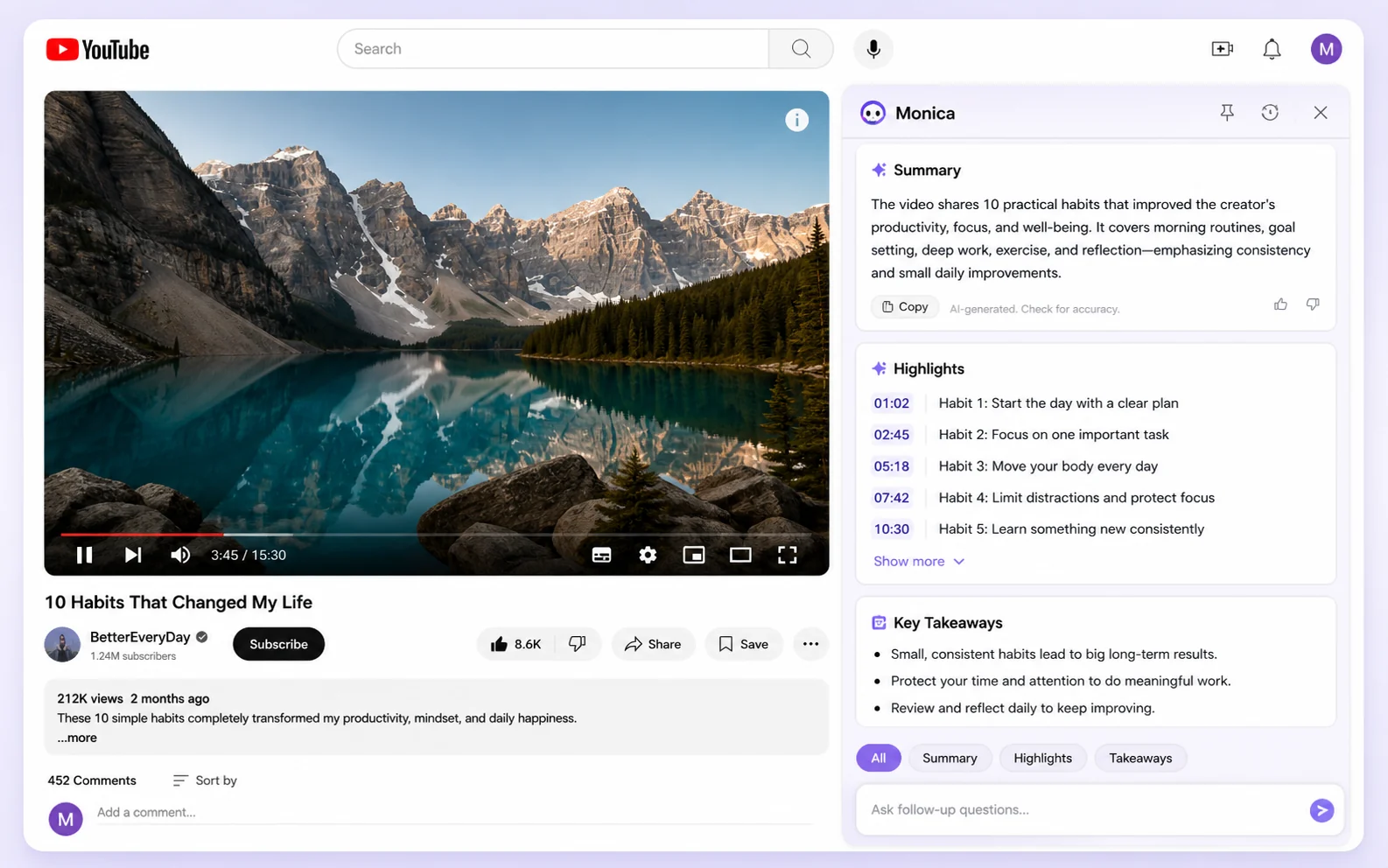
If the answer is yes, Monica can make sense. It is built around the kind of scattered work many people actually do: reading web pages, summarizing long content, asking quick questions, translating selected text, drafting email replies, rewriting short passages, checking YouTube videos, exploring multiple AI models, and occasionally using image, video, coding, or bot-style tools.
If the answer is no, the product can feel too broad. A sidebar assistant that does everything is only valuable when you actually use enough of those surfaces. Otherwise, you may be paying for a large toolbox while still returning to ChatGPT, Claude, Perplexity, a grammar tool, or a dedicated writing app for the work that matters most.
That is the tension with Monica. The product is genuinely useful as a convenience layer. It is weaker when the buyer needs a deep specialist workflow, mature team administration, or predictable high-volume usage under a simple quota model.
For my money, the safest way to evaluate Monica is not to ask, “How many AI features does it include?” It is to ask, “Which repeated tasks will I move into Monica every week?”
If you cannot answer that, stay on the free path longer.
Next step: If Monica already sounds like the right kind of daily AI assistant, test the free workflow first and verify the current plan limits before checkout.
Review snapshot
| Review point | Practical take |
|---|---|
| Best for | Knowledge workers, students, researchers, marketers, writers, support workers, and general users who want AI close to daily browsing and writing tasks |
| Not ideal for | Buyers who only need one narrow specialist app, mature team controls, or predictable heavy-use quotas without checking the plan details |
| Main use case | Using AI inside web pages, videos, email, selected text, documents, desktop workflows, and mobile access without constant tab switching |
| Free path | Available for light testing and workflow discovery |
| Paid path | Makes more sense when Monica becomes part of daily work and the quota or credit rules match real usage |
| Main strength | Broad cross-platform convenience across chat, search, summaries, writing, translation, image tools, video tools, and coding help |
| Main concern | Feature sprawl, quota pressure, refund limits, team readiness, and whether premium models are used often enough |
| Best alternatives to compare | Merlin AI, Sider, Superpower ChatGPT, Engage AI |
| Safest next step | Test three repeated tasks on the free path, then compare the live pricing page and offer route before paying |
What is Monica?
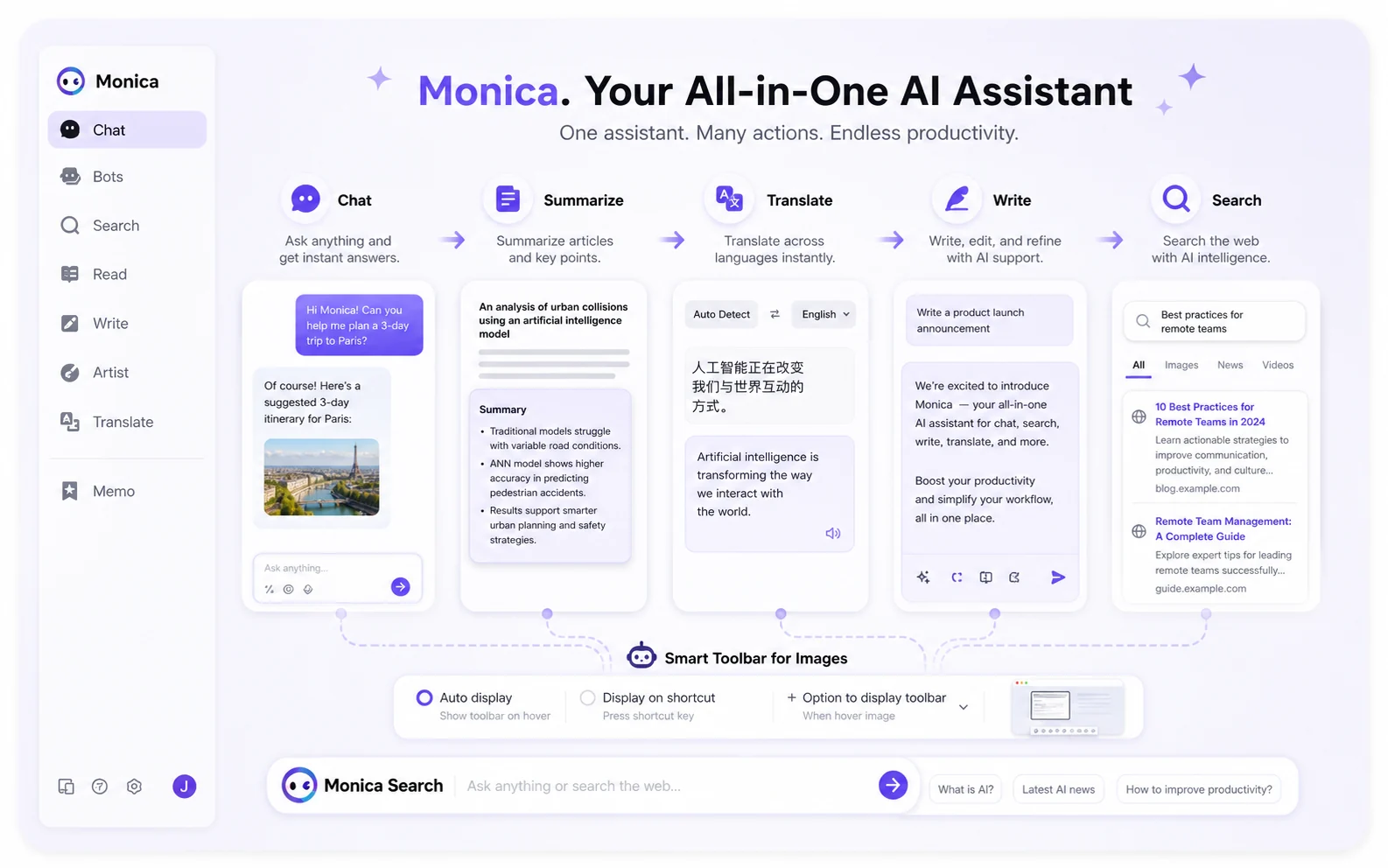
Monica is an all-in-one AI assistant that works through a browser extension, desktop app, mobile app, web app, and selected messaging-style integrations. Its official positioning is broad: AI chat, AI summaries, writing help, search, translation, art and image tools, video tools, bots, PowerUP-style workflows, coding help, and access to multiple leading AI models under one account.
That breadth is the point.
Monica is not trying to be only a writing tool. It is not only a search assistant. It is not only a YouTube summarizer. It is closer to a daily AI companion that tries to stay near whatever you are already doing: reading a page, selecting text, composing a reply, researching a topic, watching a video, or moving between devices.
That can be useful.
A buyer who spends the whole day inside a browser may care less about one perfect AI feature and more about speed. Select text, explain it. Open a long page, summarize it. Watch a long video, pull key points. Reply to an email, draft a cleaner response. Move to mobile, keep chatting. Those are small wins, but small wins can matter when they repeat every day.
The danger is assuming “all-in-one” automatically means better.
All-in-one tools often create a second problem: they include enough features to look impressive, but not every feature is deep enough to replace a specialist product. Monica works best when the buyer wants convenience across many lightweight tasks. It is a more complicated purchase when the buyer needs one serious workflow, such as enterprise search, governed team writing, deep SEO production, advanced research citation management, or predictable developer API volume.
So I would treat Monica as a broad productivity layer first.
Then I would ask whether that layer is actually close to your work.
How I would evaluate Monica
Without confirmed hands-on testing in a paid Monica account, I would not make strong performance claims about every model, tool, or workflow. Monica changes with model access, advanced credits, pricing updates, and product packaging, so the safer review standard is buyer-fit logic.
I would evaluate Monica on six layers:
| Evaluation layer | What to check |
|---|---|
| Workflow proximity | Does Monica appear where you already work, or do you still end up opening separate AI tools? |
| Repeated tasks | Do you use summaries, writing help, translation, email replies, page actions, or model chat often enough? |
| Model access | Are the models you care about available under the plan you are considering? |
| Quota pressure | Do basic queries, advanced queries, credits, and monthly reset rules fit your real volume? |
| Device fit | Do you actually need browser, desktop, mobile, web app, or messaging access under one account? |
| Risk tolerance | Are the refund terms, team limitations, and API billing route acceptable before you pay? |
This is where buyers can easily overestimate Monica.
A product that does many things can feel like a bargain during the first ten minutes. The more useful test comes later: did you use it the next day? Did you use it again the next week? Did it replace a browser habit, a writing habit, a translation habit, or a research habit?
If Monica becomes part of those repeated moments, it has a real case.
If it stays as a nice extension you occasionally click, a paid plan may be too much.
Who should use Monica?
Monica makes the most sense for buyers who want AI closer to everyday work rather than locked inside one separate chat tab.
A knowledge worker may use it to summarize web pages, ask quick questions, rewrite selected text, translate snippets, and draft email replies. This is probably the cleanest Monica use case. The buyer does not need a huge content system. They need an assistant that sits near the information they already touch.
Students and researchers may also benefit if they often review long pages, PDFs, videos, lectures, or notes. Monica’s summary and reading workflows can reduce friction when the job is to understand material quickly. I would still be careful with academic use. Summary tools can miss nuance, and users should verify important claims before citing or submitting anything.
Marketers and content operators may find Monica useful for ideation, rewriting, quick drafting, translation, social replies, and rough research. It is not automatically a replacement for a dedicated SEO platform or editorial system, but it can help with the small tasks around a larger content workflow.
Developers, analysts, and technical workers may use Monica for quick code explanations, SQL drafts, Python ideas, documentation summaries, or model access. The API platform gives technical buyers a separate route, but that should be evaluated as its own product path rather than assumed to be part of the normal assistant subscription.
General users may like Monica for a simpler reason: it puts many AI jobs in one place. If the buyer is tired of jumping between ChatGPT, a translator, a summarizer, a writing helper, a search tool, and a YouTube summary extension, Monica’s convenience can be the value.
The common thread is not “AI power user.”
The common thread is repeated friction.
If Monica removes that friction often, it has a stronger purchase case.
Who should avoid Monica?
I would be careful with Monica if you only need one narrow job.
If your real need is grammar correction, a dedicated grammar assistant may be cleaner. If your need is SEO optimization, a specialist SEO workflow tool may be stronger. If your need is deep research with citations, a research-first assistant may fit better. If your need is only ChatGPT organization, a ChatGPT-focused extension may make more sense than a broad all-in-one assistant.
I would also avoid paying too quickly if you are sensitive to usage limits. Monica’s value depends on the plan and quota structure. Basic queries, advanced queries, advanced credits, image generation usage, premium model access, and monthly reset rules can matter more than the plan name. A lower tier can look affordable and still feel tight if your real usage is heavy.
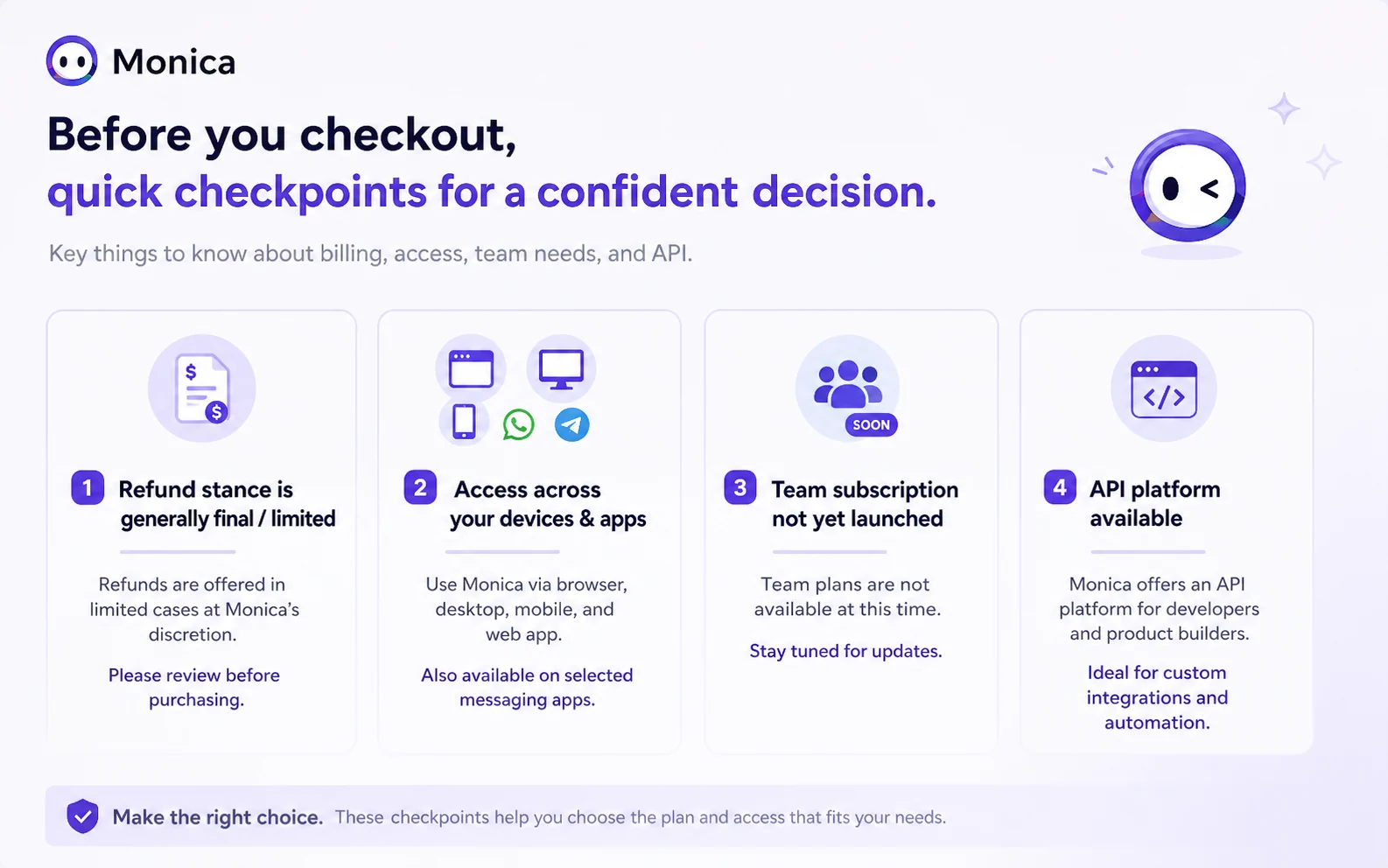
Business buyers should slow down too. Monica can be used across devices, and it has a separate API platform, but the help center says a team subscription has not been officially launched. That does not make Monica unusable for work. It does mean buyers should not assume central billing, workspace administration, role controls, or mature team governance unless the live account and support path confirm it.
Refund-sensitive buyers should also be cautious. Monica’s help center frames subscriptions, credits, and paid features as generally final and non-refundable unless applicable law requires otherwise, with limited discretionary handling in special circumstances. That matters if you are considering annual billing or credit-heavy use.
And finally, I would avoid Monica if you dislike crowded tools. Some users like the breadth. Others may find broad assistants noisy. If you prefer a clean, narrow interface, test that feeling before paying.
How Monica fits into a real workflow
A useful Monica workflow starts with the work you repeat, not with the feature menu.
Here is how I would test it:
- Pick three real tasks you do every week.
- Use Monica on those exact tasks, not on random demos.
- Compare the result against your current process.
- Watch whether Monica reduces tab switching, copy-paste work, or blank-page friction.
- Check whether you hit quota pressure during normal use.
- Only then compare the paid plans.
For a researcher, the test might be one long article, one YouTube lecture, and one PDF-style reading task. For a marketer, it might be one competitor page summary, one email reply, and one short rewrite. For a student, it might be one concept explanation, one video summary, and one bilingual reading task. For a developer, it might be one code explanation, one documentation summary, and one quick API question.
That is a better test than clicking through every feature.
All-in-one tools can seduce buyers into sampling everything once. But the purchase case usually comes from a smaller number of repeatable jobs.
Workflow check: If Monica saves time on tasks you repeat every week, verify the current plan limits before choosing a monthly or annual subscription.
Key features that matter
Monica has a long feature surface, but not every feature matters equally to the buyer decision.
Browser sidebar
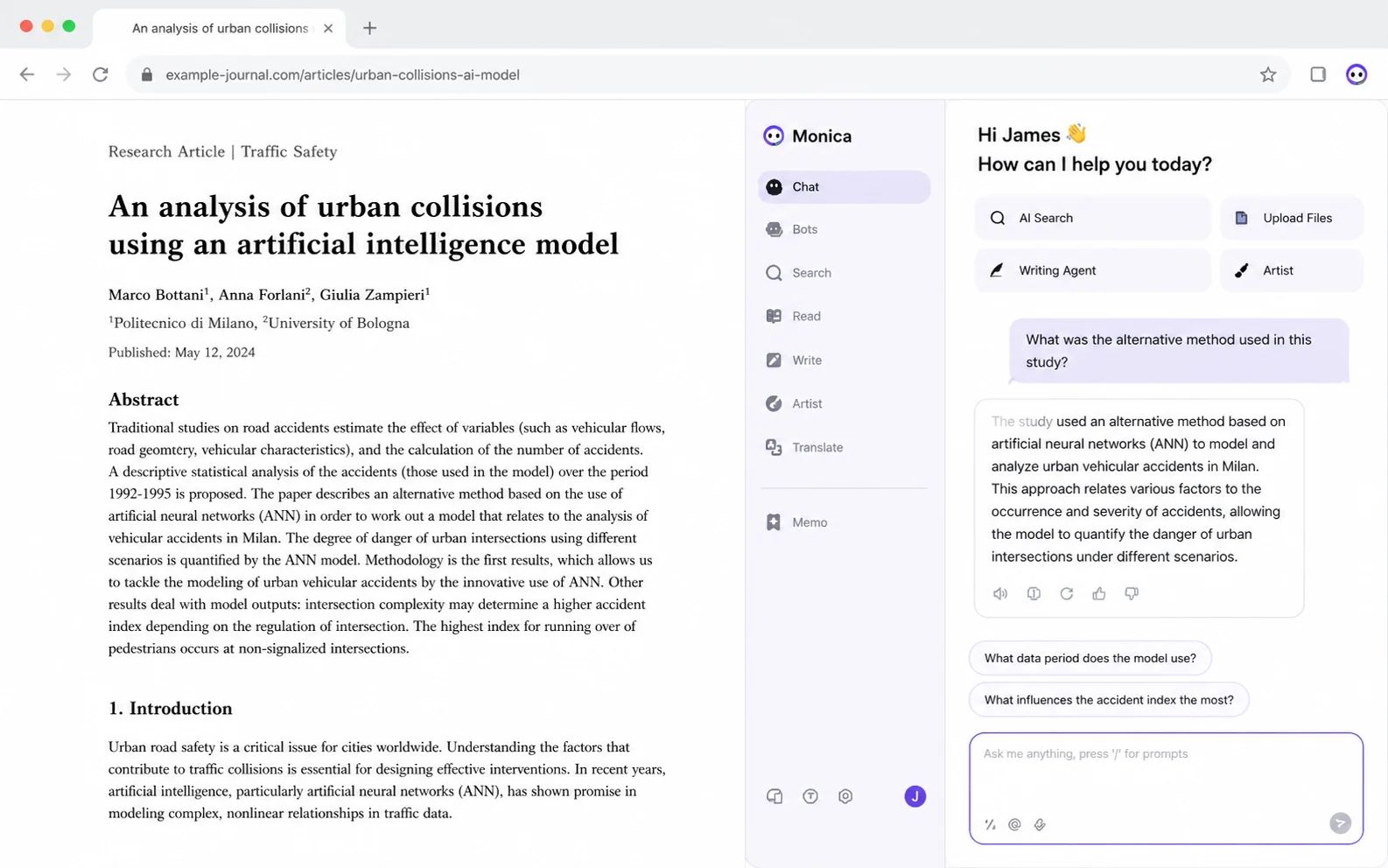
The browser sidebar is one of Monica’s clearest selling points. It lets the assistant live next to the page you are reading instead of forcing you to switch into another tab.
That sounds small, but it can be meaningful. Many AI tasks are not full projects. They are quick interruptions: explain this paragraph, summarize this page, rewrite this sentence, translate this passage, draft this reply, compare these ideas.
The sidebar is useful when it shortens that loop.
It is less useful if you still prefer working inside a full chat app or document editor.
Smart toolbar and selected-text actions
Selected-text actions are another practical Monica feature. If you regularly highlight text to explain, summarize, translate, or rewrite it, the toolbar can reduce copy-paste work.
This feature is strongest for reading-heavy users. Researchers, students, writers, support teams, and multilingual workers may get more value here than casual users.
The buyer question is simple: do you already select text and send it to AI tools?
If yes, Monica may fit naturally. If not, this feature may look better in demos than in daily use.
Web and YouTube summaries
Monica’s web and video summary features are useful when the buyer consumes long content often. A summary does not replace careful reading, but it can help with triage.
For example, a marketer can skim a competitor article before deciding whether to read the whole thing. A student can get a quick outline of a long video before taking notes. A researcher can pull a rough structure from a long page before verifying details.
The caution is accuracy. Summaries can compress nuance, miss caveats, or overstate a point. Use them as a first pass, not as a final source of truth.
Writing and email assistance
Monica can help draft replies, rewrite rough text, translate content, and improve short-form writing inside web workflows. This is useful when the writing task is small and frequent.
I would not treat Monica as a full editorial replacement. It is better as a friction reducer: getting unstuck, making a reply cleaner, shortening a paragraph, changing tone, or generating a rough version that still needs human review.
The strongest use case is not “write everything for me.”
It is “help me move faster on small writing moments I already handle every day.”
Multi-model access
Monica’s homepage emphasizes access to leading AI models. That can be valuable, especially for buyers who do not want to manage separate subscriptions or interfaces.
But model access is also where plan limits matter. A plan can list impressive models while still restricting how often or how deeply you can use them. Before paying, check the live pricing table and quota rules for the models you actually care about.
Do not buy a plan because it names a model. Buy only after checking how that model is counted in real use.
Image, video, bots, PowerUP, and coding tools
These broader tools make Monica feel more like an AI operating layer than a simple browser helper. Some buyers will like that. Others may never use these features enough to justify paying.
Image and video tools can be useful for quick concepts, content ideas, or lightweight creative work. Bots and PowerUP workflows may help if they match a repeatable process. Coding tools can help with snippets and explanations.
The risk is tool sprawl.
If you only need Monica for summaries and email replies, these extra areas may not influence the purchase. If you want one AI workspace for many small jobs, they become more relevant.
Pricing and plan value
Monica’s pricing decision is mostly a usage decision.
The public pricing page has shown a free plan and paid tiers such as Pro, Max, and Ultra, with annual-equivalent pricing that can make the monthly number look more attractive than month-to-month billing. That does not mean annual is the right first step.
The better order is:
- Start free.
- Test real repeated tasks.
- Watch for quota friction.
- Compare paid tiers.
- Consider annual only after the workflow is proven.
The reason is simple. Monica’s paid value depends on advanced model access, query counts, advanced credits, image and video usage, and whether you use the assistant across enough surfaces. A cheaper plan can still feel expensive if you hit limits quickly. A higher plan can be wasteful if you only use the sidebar a few times a week.
I would pay special attention to advanced credits. Monica’s help center documents monthly advanced credits and query rules across Free, Pro, Max, and Ultra-style plans. That is a sign buyers should look beyond the headline price.
A plan is not just a price.
It is a usage ceiling.
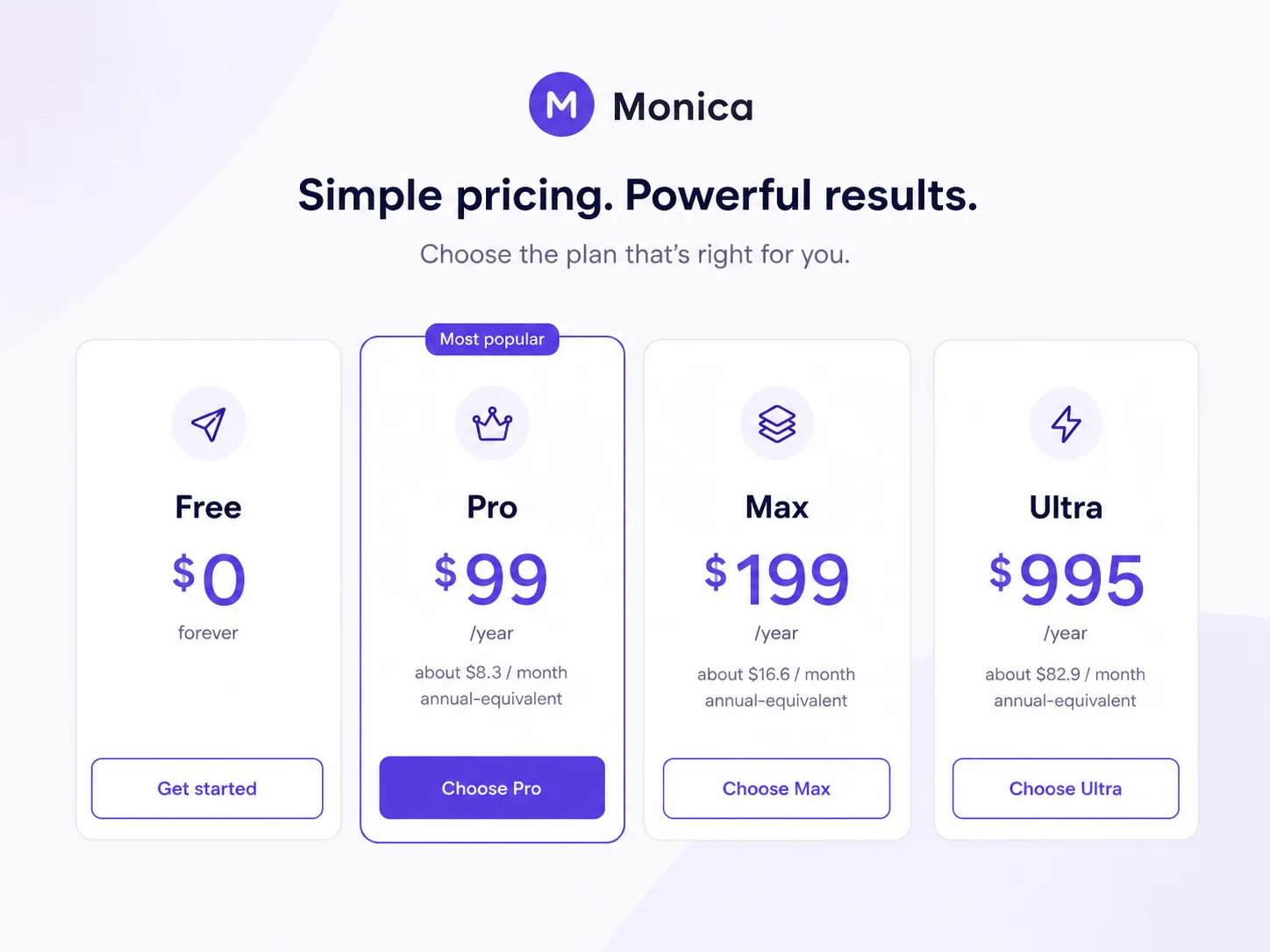
Pricing check: If Monica fits your daily workflow, compare the live plan table, advanced credit rules, and billing toggle before choosing a paid tier.
Free plan, coupon path, and checkout notes
Monica’s free access is useful because it lets buyers test the assistant in real context before paying. That matters more for Monica than for a single-purpose tool because the product depends on habit.
A free test should not be random. Use Monica on tasks that resemble your actual week:
- summarize one long article
- summarize one YouTube video
- rewrite one email or social reply
- translate one page or selected passage
- ask a research question while browsing
- test desktop or mobile access if cross-device use matters
If those tasks feel natural, a paid plan becomes easier to evaluate. If they feel forced, the free path may be enough.
The coupon path should come later.
A discount can improve the purchase, but it should not make the decision for you. Third-party coupon directories may report Monica codes or checkout offers, but coupon claims should be treated as checkout-test information, not guaranteed savings. The only price that matters is the final live checkout price compared with Monica’s official pricing and annual plan options.
Refund terms deserve the same caution. Monica’s help center says payments for subscriptions, credits, and paid features are generally final and non-refundable unless required by law, with special discretionary handling in limited cases and consumer withdrawal rights for some regions. That makes the free test more important, not less.
The buyer-protective path is straightforward: test free, confirm quota, check live pricing, test any offer, then choose the smallest plan that matches real usage.
Refund, team, and API checks
This is where Monica needs a serious buyer check.
First, refunds. Monica’s help center does not present a broad “use it and refund it later” promise. It says most payments are final and non-refundable unless applicable law requires otherwise. It may consider special partial refund requests at its discretion, and buyers in certain regions may have legal withdrawal rights. But that is not the same as a casual refund guarantee.
That matters for annual billing and credits.
Second, teams. Monica’s help center says a team subscription has not been officially launched. This is important because Monica looks useful for work, but work use is not the same as team administration. Business buyers should not assume workspace controls, centralized billing, role permissions, shared governance, or admin reporting unless the current product route confirms it.
Third, API. Monica has a separate API platform with chat, image generation, image processing, model pricing, rate limits, and a developer setup flow. That is useful for technical buyers, but it should not be confused with a normal consumer subscription. API usage has its own payment and usage logic.
So I would separate the three decisions:
| Decision | What to verify |
|---|---|
| Personal assistant plan | Plan price, model access, query limits, credits, devices, and renewal terms |
| Business/team use | Whether team subscription, billing, admin, and governance features are actually available |
| API use | API pricing, rate limits, balance funding, endpoint support, and refund stance |
Mixing these up can create bad purchases.
A solo buyer may only need the assistant plan. A team may need administration that Monica has not fully launched. A developer may need the API platform, not the consumer assistant.
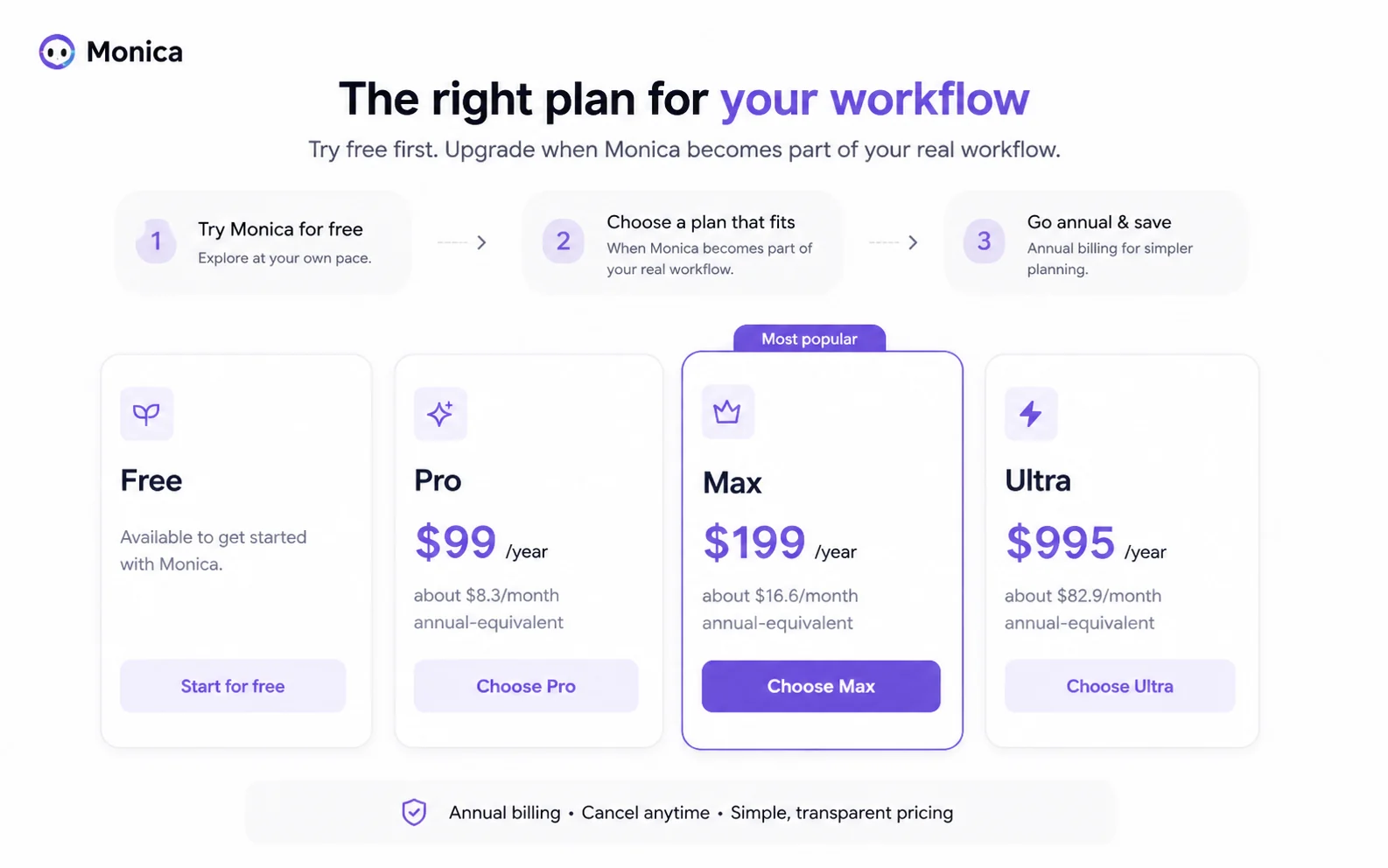
What I would check before buying Monica
Before paying for Monica, I would check these items in order:
- Primary workflow — Are you buying Monica for summaries, writing, translation, search, email help, model access, image tools, coding support, or cross-device convenience?
- Repeated use — Will you use those workflows several times per week, or only occasionally?
- Plan names and billing — What are the current Free, Pro, Max, Ultra, or equivalent tiers on the live pricing page?
- Advanced credits — Which features consume basic queries, advanced queries, or advanced credits?
- Model access — Are the specific models you care about included in the plan you are considering?
- Device needs — Do you actually need browser, desktop, mobile, web app, and messaging access?
- Refund language — Are you comfortable with payments being generally final once paid services or credits are accessed?
- Team requirements — Do you need central billing, admins, workspace controls, or governance that may not be launched yet?
- API route — Are you using Monica as a personal assistant or as a developer API platform?
- Coupon result — Does any offer actually reduce the final checkout price compared with official annual pricing?
This sounds like a lot, but Monica covers a lot of ground. The broader the tool, the more important the buying filter becomes.
Simple test before paying
For a solo buyer, I would run a three-day Monica test before paying.
Day one: use Monica for reading. Summarize a long web page, a video, and a piece of selected text. Check whether the summaries save time without hiding important details.
Day two: use Monica for writing. Draft one reply, rewrite one paragraph, translate one passage, and improve one piece of rough working text. Check whether the output reduces friction or creates extra editing work.
Day three: use Monica across surfaces. Try the browser extension, desktop shortcut, mobile app, or web app depending on how you normally work. Check whether cross-device access feels useful or merely nice to have.
At the end, ask one question: did Monica change your behavior?
If you naturally reached for it, the product may be worth comparing against paid plans.
If you forgot to use it, stay free or compare a narrower alternative.
Monica vs alternatives
Monica should be compared with other AI assistants and workflow helpers, not with every AI tool on the market.
The better comparison depends on what you are trying to replace.
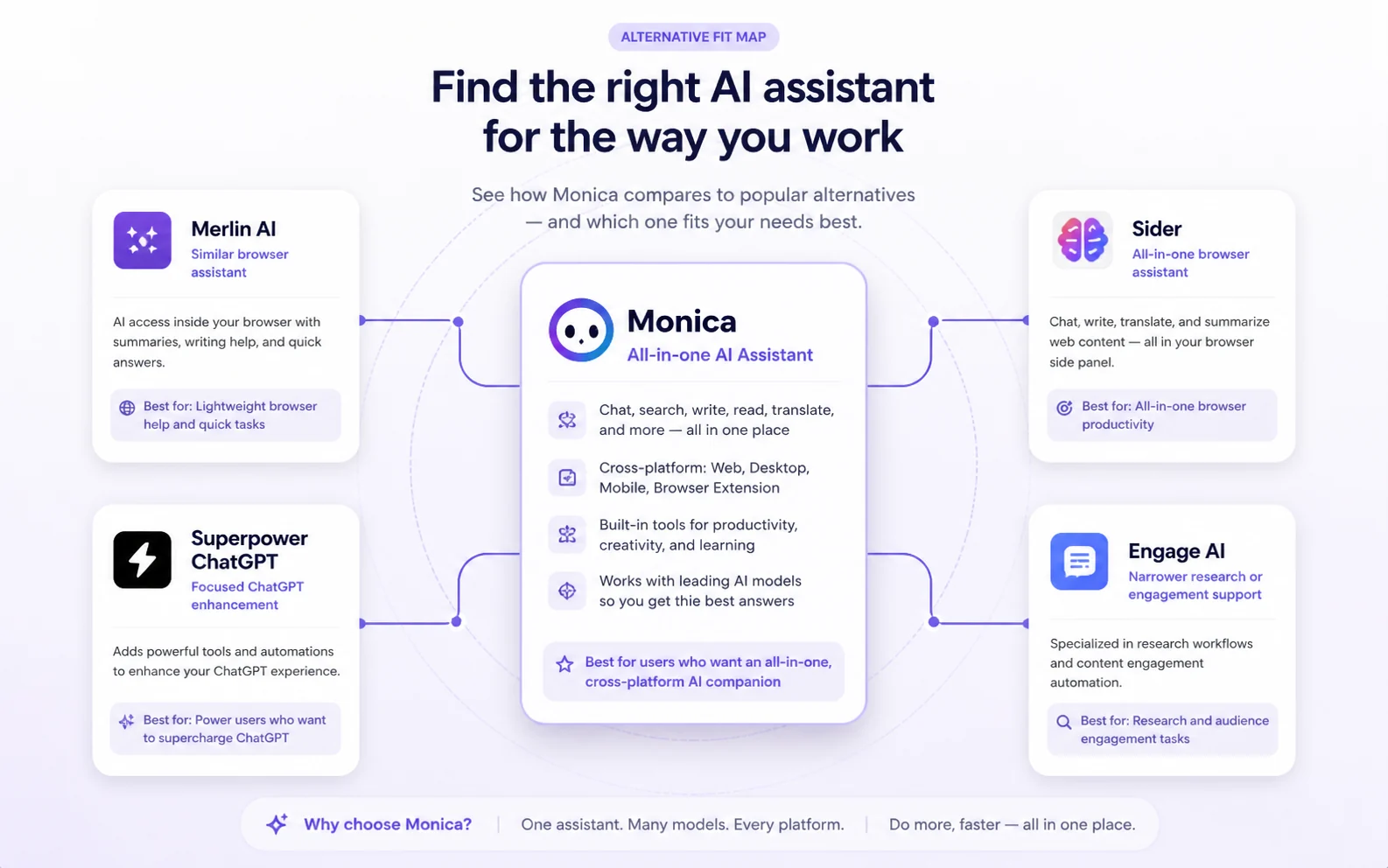
| Alternative | Better fit when… | Tradeoff against Monica |
|---|---|---|
| Merlin AI | You want a similar browser-side assistant and need to compare which sidebar workflow feels lighter | Monica may feel broader across devices and tool types, while Merlin may be easier to judge as a browser assistant |
| Sider | You want an all-in-one browser assistant with page actions, chat, translation, and summaries | Monica may offer a wider cross-platform companion feel, but Sider may be a cleaner direct sidebar comparison |
| Superpower ChatGPT | You mainly want to organize, extend, or improve the ChatGPT experience itself | Monica is broader, but Superpower ChatGPT may be better if ChatGPT remains the center of your workflow |
| Engage AI | Your main need is narrower engagement, research, or response support rather than a broad daily assistant | Monica covers more jobs, but Engage AI may fit a more focused business workflow |
If your main pain is tab switching and scattered AI tasks, Monica deserves a closer look. If your main pain is ChatGPT organization, compare Superpower ChatGPT first. If your main pain is a browser sidebar, compare Merlin AI and Sider. If your main pain is business engagement or focused research support, a narrower tool may be safer.
For broader discovery, the AI productivity hub is a better route than forcing every assistant into one comparison.
Pros and cons explained
The good part
Monica solves a real workflow problem: AI is useful, but moving between AI tools can become annoying.
You read in one tab, paste into another. You watch a video, open a summarizer. You write an email, switch to a chatbot. You translate a passage, open another tool. You ask a research question, move somewhere else again.
Monica reduces that switching when the feature works where you already are.
The cross-platform angle also matters. Browser, desktop, mobile, web app, and selected messaging access make Monica more flexible than a simple Chrome extension. For buyers who want one assistant close to multiple surfaces, this is a legitimate advantage.
The free path is another strength. Monica is the kind of product you should feel before paying. A free entry point lets you test whether the sidebar, toolbar, summaries, writing support, and device access fit your habits.
The weaker part
The weaker part is breadth.
Monica covers many jobs, which means some buyers will love the convenience and others will feel the product is crowded. The more features a product adds, the more important it becomes to verify the exact feature you need, the model access behind it, and how usage is counted.
Quota pressure is the second weakness. Advanced models, credits, premium features, and monthly reset logic can shape the real value of the plan. A plan that looks affordable can feel restrictive if your daily use is heavy.
Refund language is the third caution. Buyers should not treat Monica as a risk-free annual purchase. Test before paying.
Team readiness is the fourth caution. Monica may be useful at work, but a useful work assistant is not automatically a mature team platform.
Evidence confidence
My confidence in Monica’s public positioning is high. The official homepage, pricing page, help center, cross-device documentation, advanced credit rules, and API platform all support the broad all-in-one assistant angle.
My confidence in Monica’s buyer fit is more conditional.
The product makes sense when buyers use it repeatedly across browser reading, summaries, writing help, translation, email replies, model access, and cross-device work. It makes less sense when the buyer only needs one isolated feature or expects team controls that are not clearly available.
Third-party signals are mixed in a normal way for this category. Public review sources praise Monica’s convenience, model access, browser use, PDF and YouTube features, and quick drafting. The same sources also surface concerns around prompt limits, interface crowding, pricing, support, bugs, and paid-feature issues.
That pattern does not make Monica a bad tool.
It does mean buyers should test it with real tasks before paying.
Final verdict
Monica is a useful all-in-one AI assistant for buyers who want AI close to daily work surfaces instead of trapped in one separate chat tab.
I would consider it if you regularly summarize pages or videos, translate text, rewrite short passages, draft replies, ask quick research questions, compare AI model outputs, and move between browser, desktop, and mobile contexts. Monica’s value is strongest when it replaces several small tools or reduces enough daily friction to become a habit.
I would skip it if you only need one specialist product, dislike broad interfaces, need mature team administration, or expect a loose refund safety net after paying. I would also slow down if the plan looks attractive but the advanced credit rules or model quotas are not clear for your usage.
The safest path is simple: start free, test three repeated workflows, check the live pricing and quota rules, compare the current offer route only after fit is clear, then choose the smallest paid plan that matches real usage.
A discount can make Monica cheaper.
It should not be the reason you buy.