Engage AI Pricing, Plans & LinkedIn Fit
Engage AI is best understood as a LinkedIn relationship-building assistant, not a general writing app. Its core value is helping salespeople, founders, consultants, recruiters, and B2B creators draft more useful LinkedIn comments, monitor target prospects, and stay visible without manually hunting through the feed every day.
Fit → price → checkout
Use these routes after the official-site check: coupon first, review for fit, compare if unsure.
Engage AI pricing snapshot
Fast commercial checks before pricing, coupons, or a deeper review.
Engage AI product tour
The main video and screenshots are useful when a buyer needs to see whether Engage AI feels like a practical LinkedIn workflow tool or just another comment generator. Pay attention to how comments are drafted, how prospect activity is monitored, and how much editing you would still do before posting under your own name.
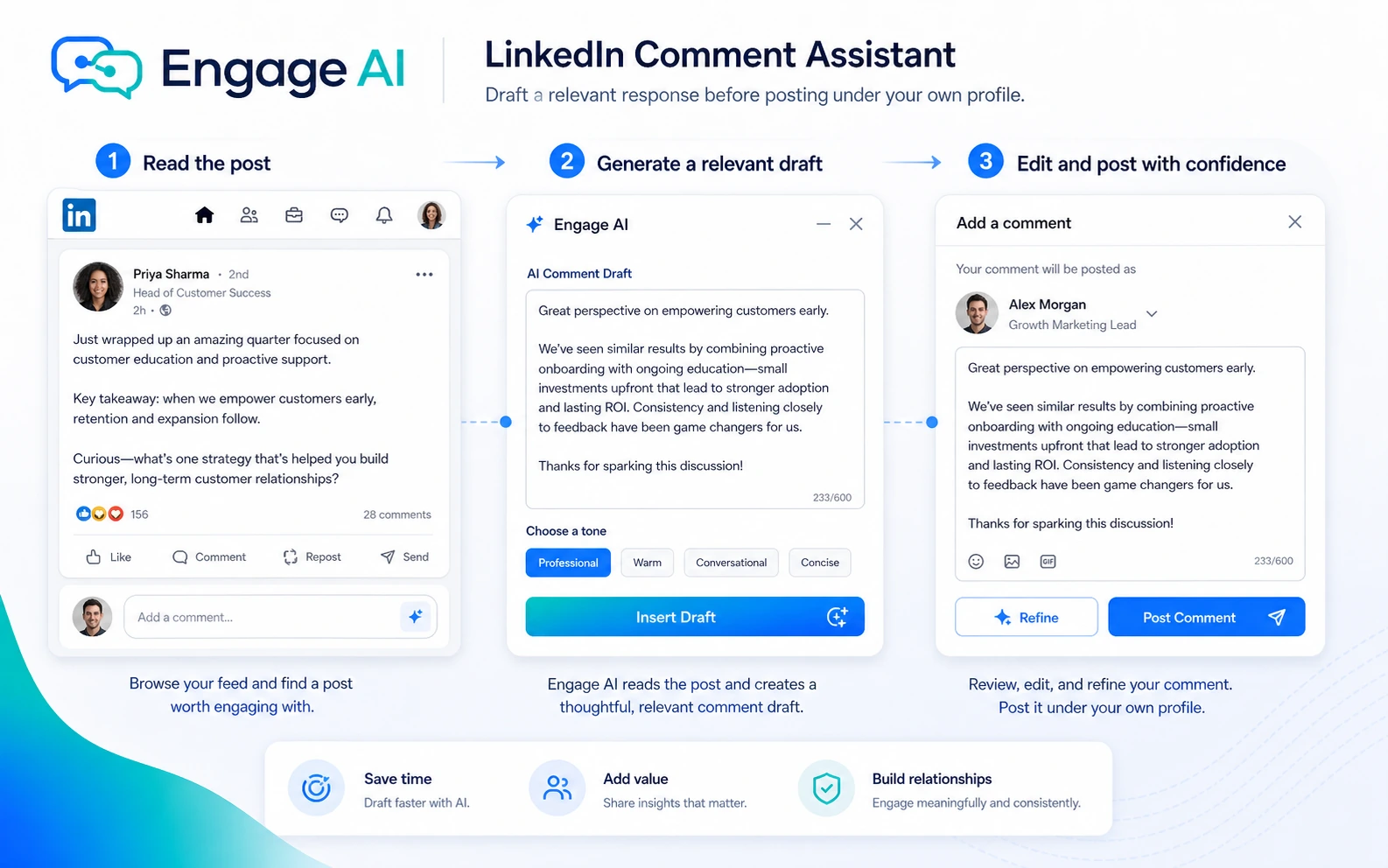
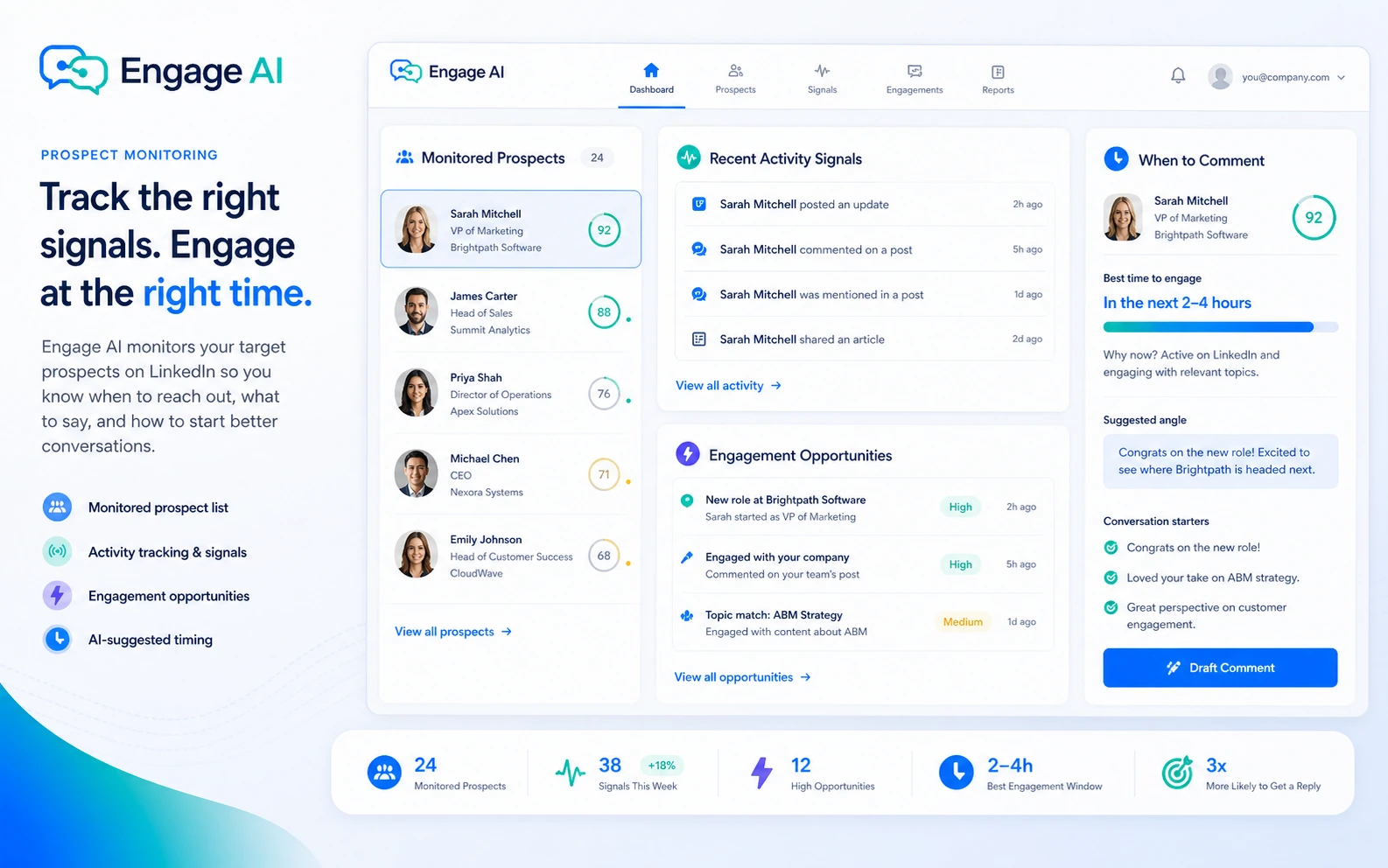
Engage AI should be judged as a LinkedIn prospect-engagement workflow, not as a general AI assistant. The buyer question is not simply whether it can write comments faster. The better question is whether it helps you leave better comments for the right people often enough to create real conversations.
What Engage AI actually does
Engage AI helps users draft LinkedIn comments, monitor target prospects, create LinkedIn content, improve profile sections, write personalized connection requests, and generate recommendations. That makes it most useful for buyers who already see LinkedIn as part of sales, consulting, recruiting, or founder-led marketing. If you do not have a prospect list or a commenting habit, the tool can feel more impressive than useful.
- Use it when LinkedIn engagement is already part of your growth workflow.
- Judge comment quality by whether you would confidently post the edited version under your real profile.
- Treat prospect monitoring as the feature that separates it from a generic writing assistant.
Pricing and plan fit
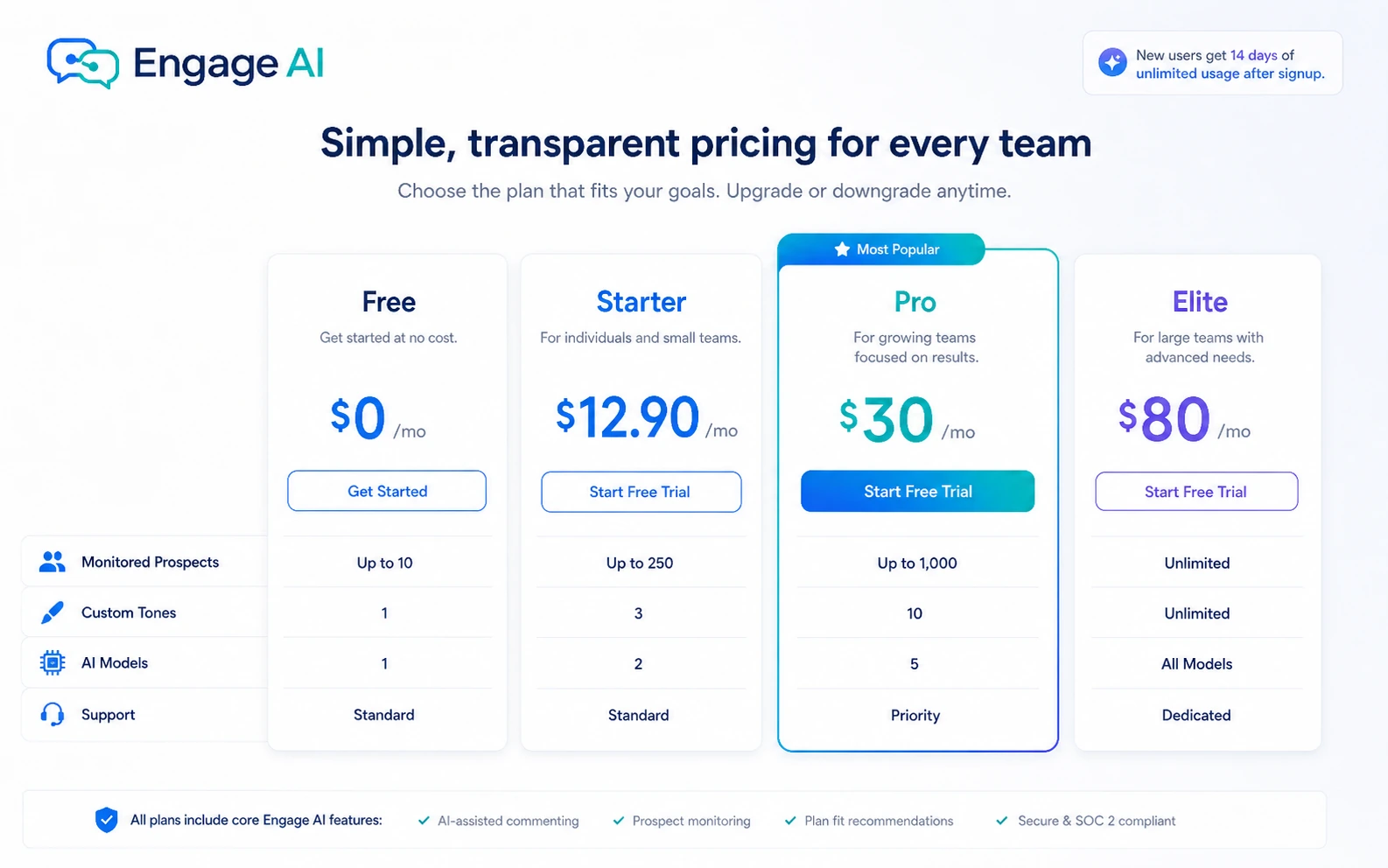
The official pricing path gives buyers a real free starting point and then separates paid plans by custom tones, monitored prospect counts, AI models, and support speed. Starter fits light social sellers who want a focused list of prospects. Pro is the more serious tier when 150 monitored prospects and stronger model access matter. Elite is harder to justify unless LinkedIn engagement is a daily business-development channel.
- Free is useful for testing comment quality and the browser-extension flow.
- Starter is the first paid step for a smaller prospect list.
- Pro and Elite should be tied to real prospect volume, not feature curiosity.
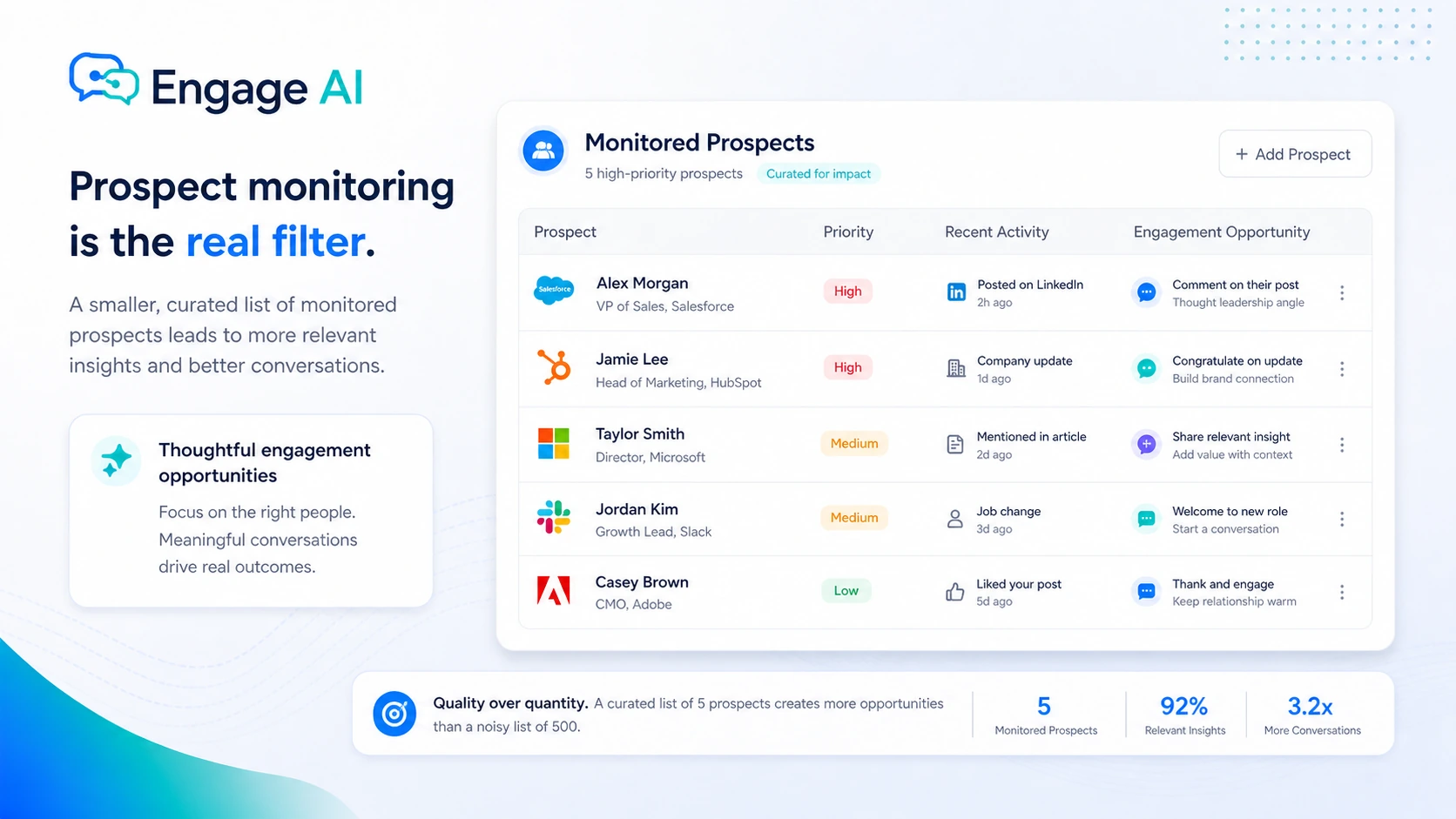
Prospect monitoring is the real filter
The official material emphasizes prospect monitoring because LinkedIn does not always show the people who matter most to your sales pipeline. This is where Engage AI becomes more than a comment generator. If you can define a focused list of prospects, monitoring helps you show up at better moments. If your LinkedIn workflow is random, the monitoring limit may not translate into results.
- Check whether 10, 30, 150, or 1,000 monitored prospects matches your actual workflow.
- Use monitoring to prioritize comments, not to spray generic replies across the feed.
- Review social-signal updates if you care about timing your engagement around prospect activity.
Video check: comment quality before scale
The video below is useful if you are unsure whether AI-assisted LinkedIn comments will feel natural enough for your niche. Watch for the gap between the generated draft and the comment you would actually post. That gap tells you whether the tool saves real time or simply moves the editing burden to a different place.
Content and profile tools widen the use case
Engage AI also supports LinkedIn content and profile work, including posts, articles, recommendations, experience sections, about sections, event descriptions, and connection request notes. This matters if your LinkedIn workflow is more than commenting. It matters less if you only want a focused assistant for replies under other people's posts.
- Use content augmentation if you need help maintaining a more consistent LinkedIn presence.
- Use profile and recommendation support when relationship-building depends on trust signals around your profile.
- Skip the upgrade if these wider LinkedIn tools do not match your daily workflow.
Best next step before checkout
The safest buyer path is to install the extension, test comments on real LinkedIn posts, build a small prospect list, and only then compare the paid tiers. If the comments feel generic after editing, buying a higher tier will not fix the core problem. If the comments save time and the monitoring flow catches real prospect activity, Starter or Pro becomes easier to justify.
- Start free and test comment quality in your real niche.
- Compare paid plans only after you know how many prospects you want to monitor.
- Use the review page for deeper fit, then check the pricing or coupon path for the current buyer route.
Best savings path from this store page
This is the clearest savings route to check once the product already looks like a fit.
Choose annual billing on Engage AI to lower the monthly equivalent before committing to a paid LinkedIn engagement workflow.
14-day trial path
Quarterly billing discount
Use comparison routes when the category fit is still open
Use these comparison routes when the product still looks plausible, but the category fit is not fully settled.
Jasper is the stronger fit when the buyer needs a broader marketing-content platform, while Engage AI is narrower and more useful for LinkedIn commenting and prospect monitoring.
Copy.ai makes more sense for wider go-to-market copy workflows, while Engage AI is better when the bottleneck is LinkedIn relationship-building.
Tweet Hunter is closer to social-content growth, but it is built around X workflows rather than LinkedIn prospect comments.
1min.AI is better for buyers who want a broader all-in-one AI toolbox, while Engage AI is more focused on LinkedIn engagement habits.
Verification points worth checking before you click out
Where this store usually fits best in the workflow
Engage AI fits founders, consultants, and salespeople who want to comment on prospect posts before sending colder outreach. The tool is most useful when the buyer already has a defined account or lead list.
Use Engage AI when commenting regularly is valuable but starting from a blank box slows you down. The buyer still needs to review each comment so the final message feels specific and human.
Engage AI can support posts, articles, recommendations, connection notes, and profile sections, which helps buyers who treat LinkedIn as a complete trust-building channel.
The product can fit a lean social selling workflow where prospect monitoring, comment drafts, and tone control matter more than full CRM automation.
Practical checkpoints before and after signup
- List the people or accounts you actually want to monitor before installing the extension.
- Test comment drafts on posts where a weak or generic reply would damage credibility.
- Decide whether LinkedIn comments are part of a repeatable sales habit or just an occasional task.
- Compare the monitored prospect count, custom tones, AI models, and support speed against your real activity level.
- Check the current billing term, discount, trial language, and refund wording inside the live checkout path.
- Do not upgrade only for stronger models unless the comments clearly improve after human editing.
- Track whether comments lead to profile visits, replies, calls, or warmer outreach, not only more activity.
- Refresh custom tones when the generated comments start sounding repetitive.
- Recheck plan fit when your prospect list grows beyond the current monitoring limit.
Fast-read signals for workflow fit and buying friction
Questions readers usually ask before choosing this store
Is Engage AI only a LinkedIn comment generator?
No. Comment generation is the easiest feature to understand, but the buying case is broader: prospect monitoring, custom tones, LinkedIn content support, profile copy, recommendations, and connection notes. The tool is strongest when those pieces support one LinkedIn relationship-building workflow.
Does Engage AI have a free plan or trial?
Yes. The newer pricing page lists a Free plan at $0/month and says users can claim 14 days of unlimited usage after signing up without a credit card. Buyers should still verify the live signup and checkout screen because pricing pages can change.
Should I look for an Engage AI coupon code first?
Not first. The safer path is to test the free plan, review the official pricing page, and compare any quarterly or yearly savings before relying on a coupon source. Coupon paths are useful only after the code or discount is verified at checkout.
What is the main risk with Engage AI?
The main risk is posting comments that sound fast but not thoughtful. Engage AI can reduce the blank-box problem, but buyers still need to personalize drafts so comments feel specific to the post, the prospect, and the relationship they want to build.
Is Engage AI better than Jasper, Copy.ai, or Tweet Hunter?
It depends on the workflow. Engage AI is better for LinkedIn comments and prospect monitoring. Jasper and Copy.ai are broader marketing-writing tools, while Tweet Hunter is closer to social-content growth but not focused on LinkedIn prospect commenting in the same way.
Choose the next route that matches what you still need to decide
The strongest next click depends on whether you still need product judgment, a savings route, or a broader category comparison.