Quick verdict
Engage AI is useful if LinkedIn comments are already part of how you build relationships with prospects. It is much less useful if you are hoping an AI comment tool will create the social-selling habit for you.
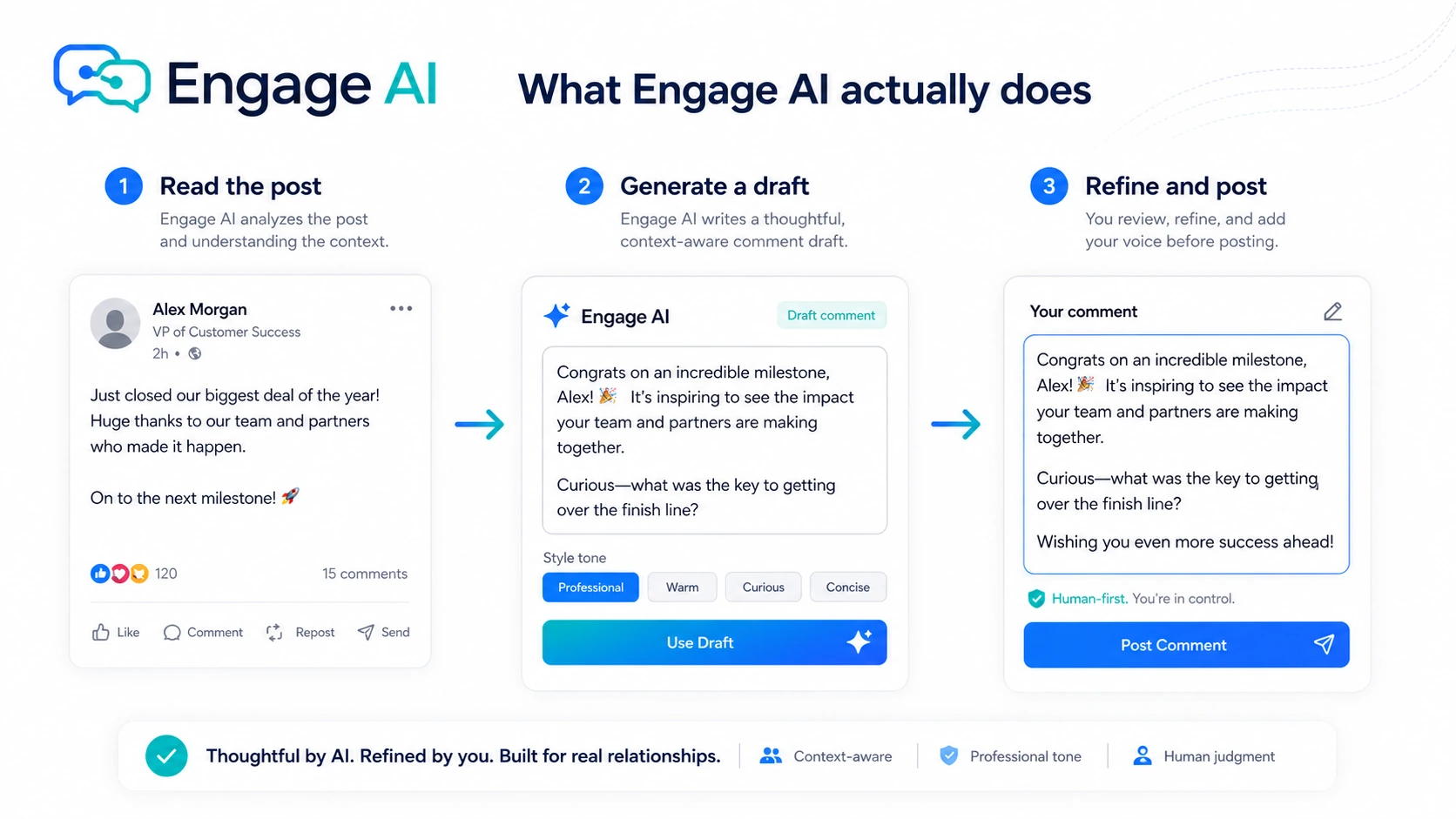
The product is not a general AI writer in the way Jasper or Copy.ai is. It is more focused: draft LinkedIn comments, monitor targeted prospects, support LinkedIn content, and reduce the blank-box problem when you want to engage with people who matter to your pipeline.
That focus is the main reason to consider it.
The risk is just as clear. A fast AI comment is not automatically a good comment. On LinkedIn, a generic reply can make you look less thoughtful, not more visible. For my money, Engage AI only works when you use it as a draft partner: read the post, generate a starting point, add your own context, then decide whether the final comment is something you would confidently publish under your real profile.
I would not buy Engage AI only because the plan looks affordable or because a discount path appears somewhere. The safer question is whether it helps you show up more consistently with the right people. If the answer is yes, Starter or Pro may be worth testing. If the answer is no, a broader writing tool or a dedicated LinkedIn content platform may be a better fit.
Next step: If Engage AI fits your LinkedIn workflow, test the current buyer route before choosing a paid plan.
Review snapshot
| Review point | Practical take |
|---|---|
| Best for | B2B founders, consultants, recruiters, creators, and salespeople using LinkedIn comments to warm up prospects |
| Not ideal for | Casual LinkedIn users, broad content teams, or buyers who want hands-off automation |
| Main use case | Drafting LinkedIn comments and monitoring target prospects so you can engage at better moments |
| Free path | Public pricing shows a free plan and no-credit-card access for testing |
| Paid path | Starter, Pro, and Elite mainly differ by prospect monitoring, custom tones, model access, and support level |
| Main strength | Narrow LinkedIn engagement workflow rather than a generic AI writing interface |
| Main concern | Comment quality, pricing-surface mismatch, refund language, and real prospect volume need verification |
| Best next step | Test real comments on real prospects before moving to a paid or annual path |
What is Engage AI?
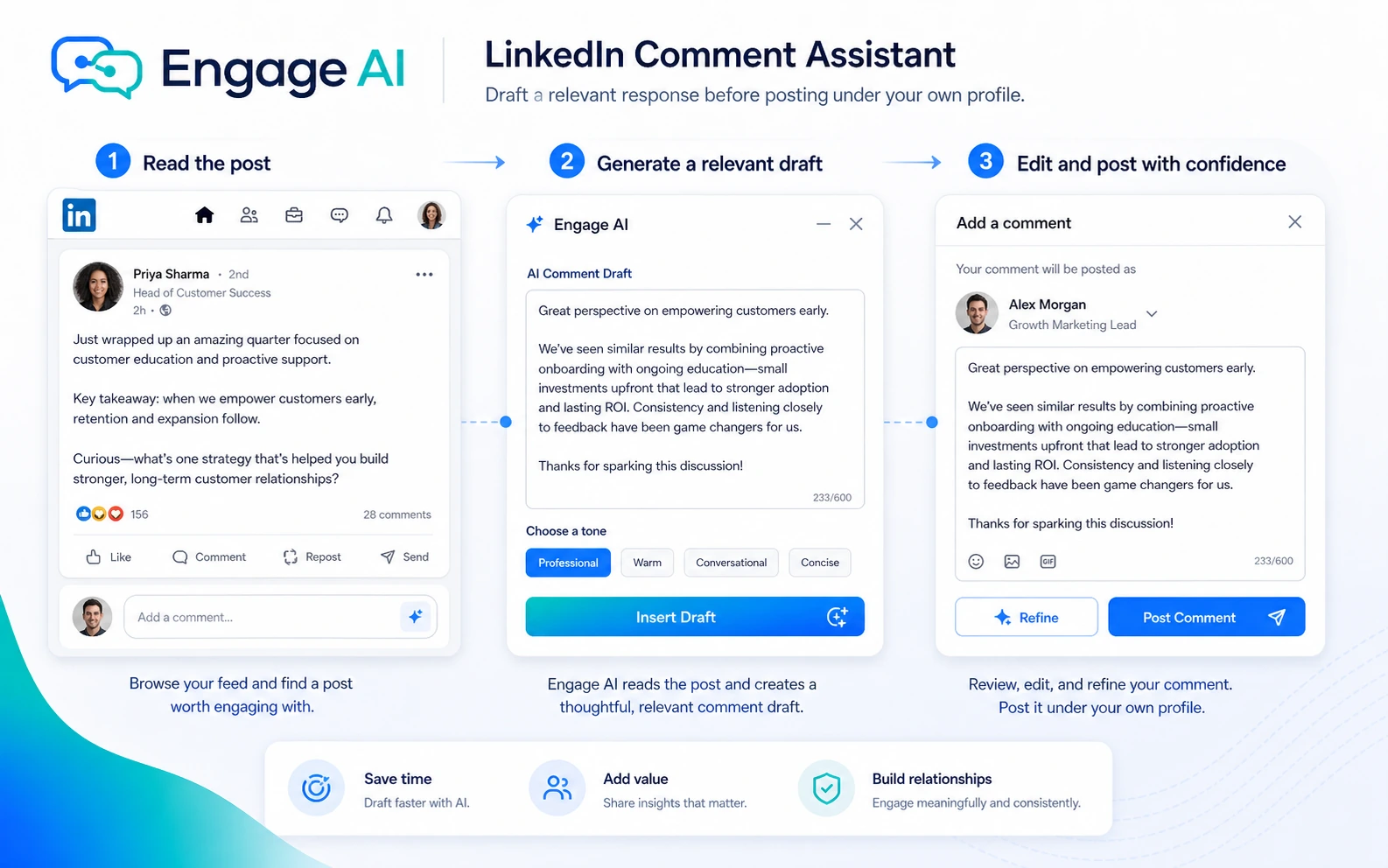
Engage AI is a LinkedIn engagement assistant built around prospect monitoring, AI-assisted commenting, and LinkedIn content support.
The simple version is that it helps you write comments faster. The more useful version is narrower: it helps you follow the people who matter to your pipeline, notice when they post, and draft a comment that you can personalize before engaging.
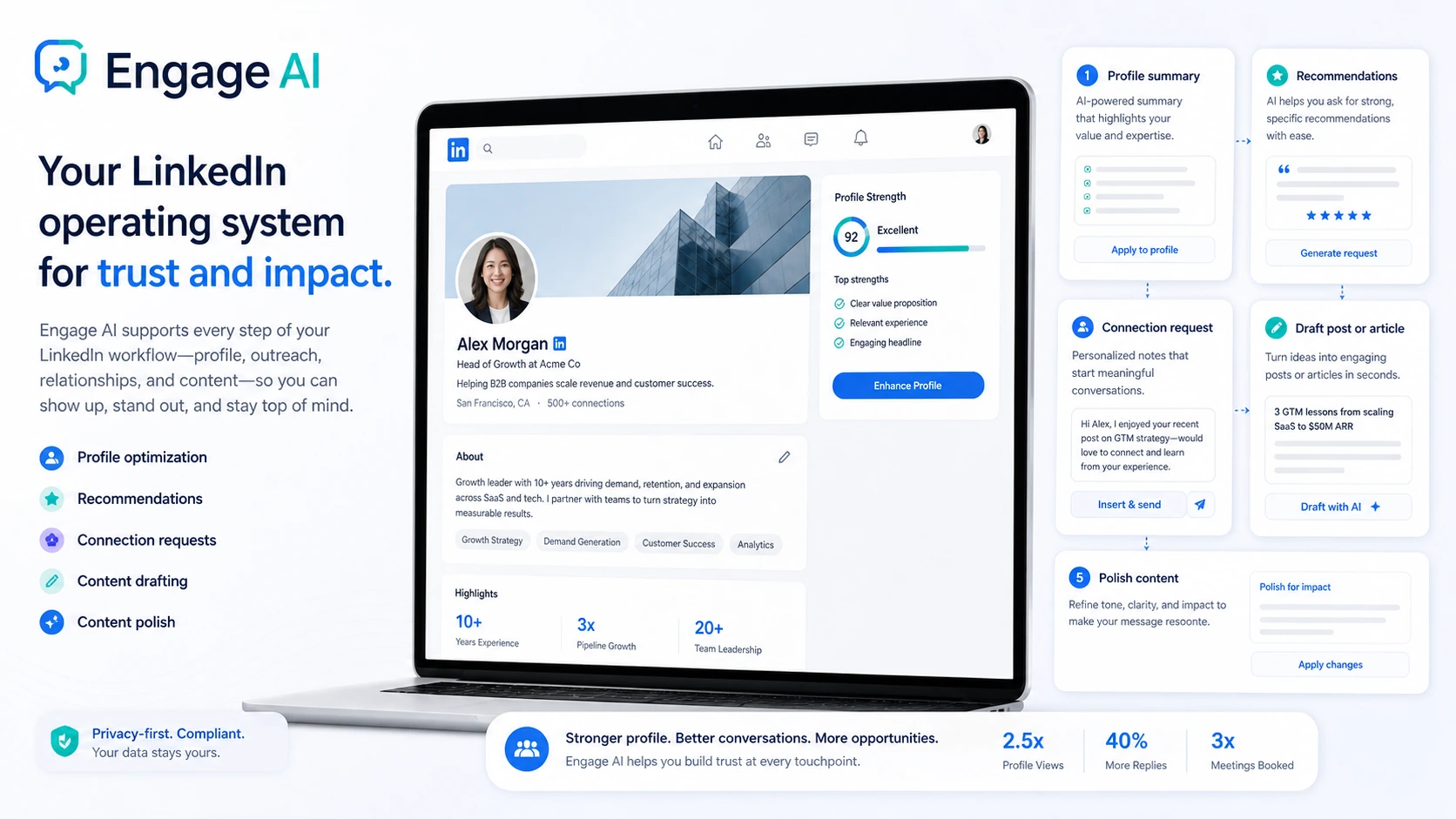
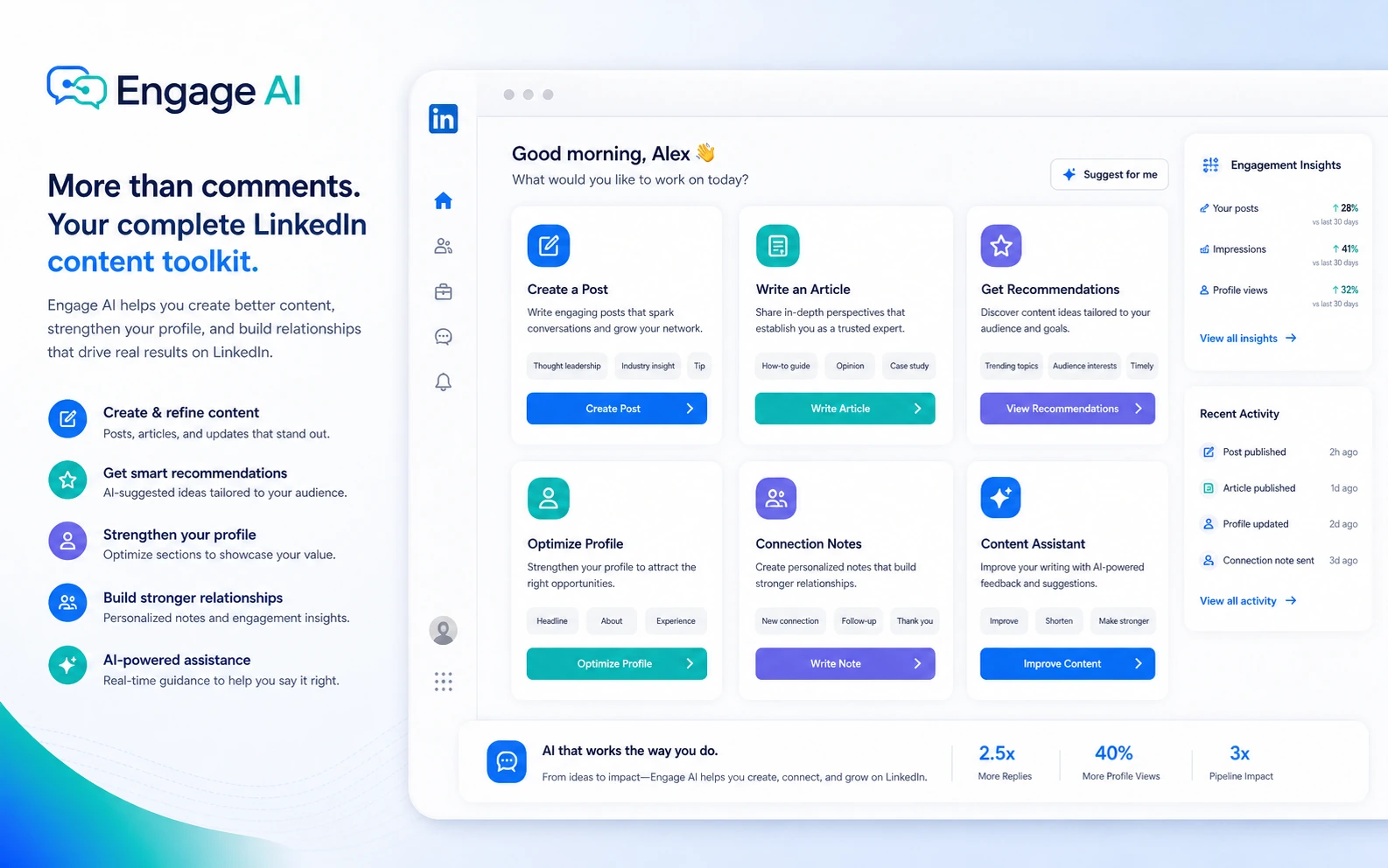
That makes Engage AI closer to a social-selling workflow tool than a normal AI writing app. It can help with comments, connection requests, recommendations, posts, articles, profile sections, and other LinkedIn-facing copy. But the core buying case is still the same: can it help you be more thoughtful and consistent with the right people?
Our review approach compares public product pages, pricing details, help and legal pages, buyer workflow fit, and nearby alternatives. I do not treat a free plan, coupon path, or low monthly price as proof that a tool belongs in the buyer’s workflow.
The common wrong expectation is that Engage AI will handle LinkedIn relationship-building for you. It will not. It can shorten the first draft. It can help you monitor a cleaner prospect list. But the relationship still depends on whether you add judgment, context, and timing.
Who should use Engage AI?
Engage AI makes the most sense for buyers who already use LinkedIn as a real business channel.
B2B founders are a strong fit when they are trying to stay visible with potential customers, partners, or investors. If you have a list of people you want to engage with before outreach, the prospect monitoring layer is more useful than a generic comment generator.
Consultants and service providers may also benefit. Many consultants know they should comment more often, but starting from a blank comment box slows them down. Engage AI can help if it gives you a thoughtful draft that only needs a human pass.
Salespeople and business-development teams can use it as a warm-up tool before direct outreach. The practical use case is not “automate LinkedIn.” It is “notice useful prospect activity and respond before the conversation goes cold.”
Recruiters and LinkedIn-focused creators may also find value when they need to stay visible with candidates, hiring managers, industry voices, or audience members. The condition is the same: the final comment still needs to sound specific, human, and appropriate for the relationship.
Who should avoid Engage AI?
I would avoid Engage AI if you are a casual LinkedIn user who comments once in a while. A free test may still be harmless, but a paid plan is hard to justify when commenting is not tied to a business outcome.
I would also be careful if you want full social media scheduling across LinkedIn, X, Facebook, Instagram, and other channels. Engage AI is much more LinkedIn-centered. That focus is a strength for social selling, but it is not a replacement for a multi-channel social media management stack.
Teams that want hands-off automation should slow down. The product is positioned around smart comments and prospect monitoring, not replacing the human touch. If your plan is to generate many comments and post them with minimal review, the risk is not just quality. It is reputation.
Buyers who need deep CRM workflows, admin governance, API-style automation, or enterprise reporting should verify the current product and plan details before treating Engage AI as a system of record.
How Engage AI fits into a real workflow
A good Engage AI workflow starts before you open the extension.
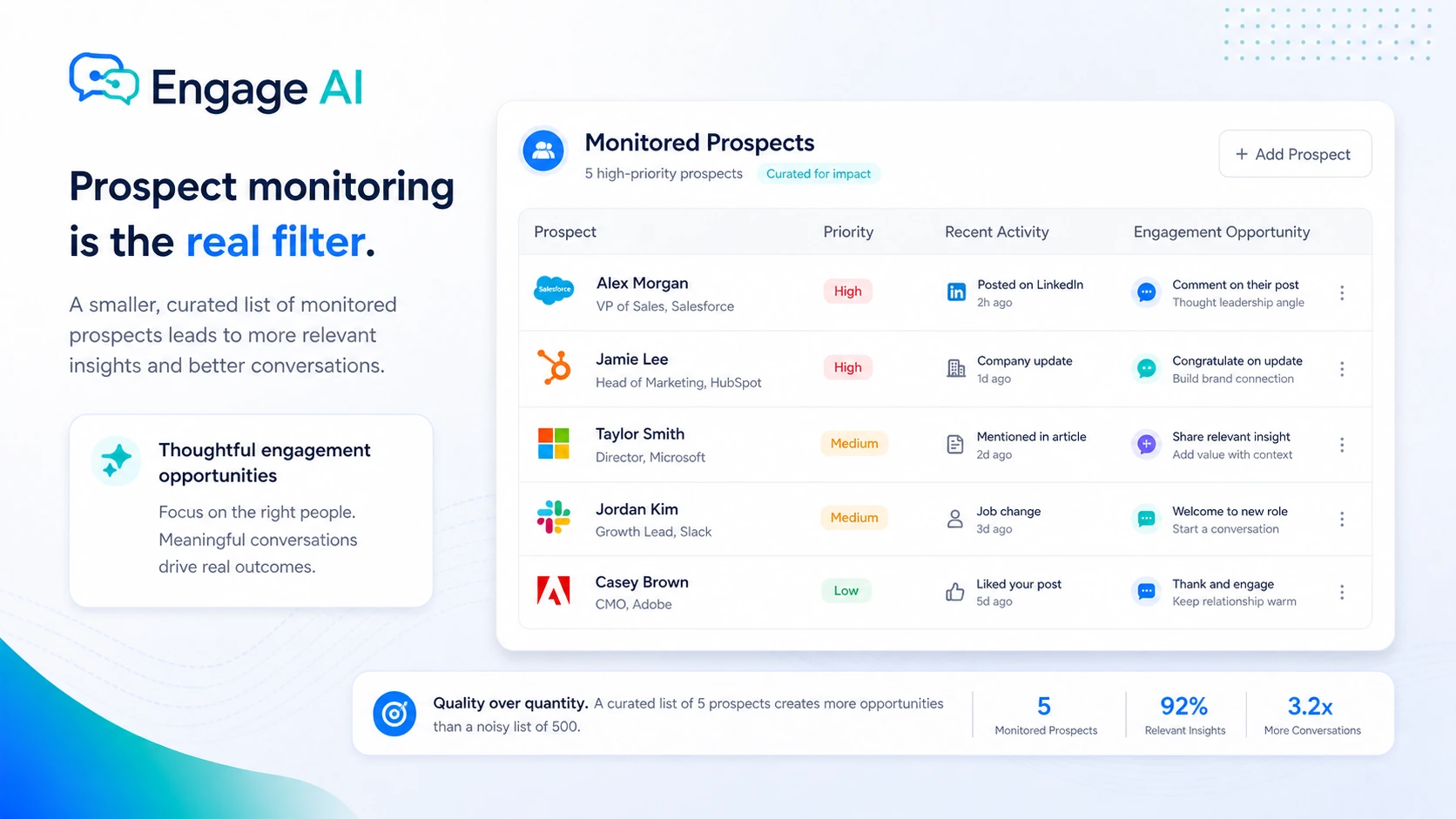
First, define the people you actually want to monitor. That might be target accounts, warm prospects, industry partners, hiring managers, creators in your niche, or existing clients whose posts you want to engage with thoughtfully.
Then use Engage AI to surface activity and draft comments. This is where the tool can save real time. Instead of scrolling through a noisy feed and writing from zero, you can focus on a smaller set of posts and generate a starting point.
The decision point comes after the draft. A careful buyer should read the prospect’s post, check whether the generated comment actually responds to the idea, remove generic phrasing, and add something specific: a short example, a relevant question, a useful disagreement, or a personal observation.
The workflow is simple: build a focused prospect list, monitor posts, generate a comment draft, edit for specificity, post only when the final comment is credible, then track whether the engagement leads to profile visits, replies, connection acceptance, or warmer outreach.
Real-world buyer scenarios
Founder warming up a target account list
A founder with a defined account list may use Engage AI to monitor prospects and join conversations before sending a more direct message. This is one of the stronger use cases because comment timing and relevance matter. The failure point is weak personalization.
Consultant trying to stay visible with buyers
A consultant may want to show up under posts from past clients, referral partners, and prospects. Engage AI can reduce the effort of writing quick but thoughtful replies. It fits less well if the consultant has no defined audience and simply wants random LinkedIn activity.
Recruiter building trust in a niche market
Recruiters can use LinkedIn comments to stay visible with candidates and hiring managers. Engage AI may help them respond faster, but recruiting conversations need care. If the comment feels too obviously generated, it can weaken trust.
Creator supporting LinkedIn posts with engagement
A LinkedIn creator who publishes regularly may use Engage AI to support a broader engagement habit. If the main need is post ideation, analytics, scheduling, or creator growth, a dedicated LinkedIn content platform may be a better comparison.
Key features that actually matter
AI-assisted LinkedIn comments
The comment assistant helps turn a post into a draft response so the user is not starting from a blank box. The value is speed, but only if the final comment still sounds credible.
Buyer note: judge the feature by edit distance. If every draft needs a full rewrite, the time saving is weaker.
Prospect monitoring
Prospect monitoring is the feature that makes Engage AI more specific than a generic writing assistant. If monitoring helps you notice the right posts earlier, Engage AI becomes more than a drafting tool.
Buyer note: plan choice should be tied to monitored prospect count, not just price.
Custom tones
Custom tones matter because generic AI comments are easy to spot. A tone preset can guide style, but it cannot know the full context of a relationship or the nuance behind a prospect’s post.
Buyer note: a stronger tone system is useful only if it reduces rewriting.
LinkedIn content and profile support
Engage AI also supports LinkedIn content creation and profile-related copy, including posts, articles, recommendations, connection requests, and profile sections. This can help buyers who treat LinkedIn as a complete trust-building channel.
Buyer note: do not pay for wider features unless they support your actual LinkedIn rhythm.
Browser extension access
Engage AI is designed to work near where LinkedIn activity happens. That can reduce copy-paste friction, but buyers should still review permissions, browser compatibility, and privacy expectations before making it part of a daily workflow.
Pricing and plan value
Engage AI pricing needs a careful read because more than one public pricing surface is visible online.
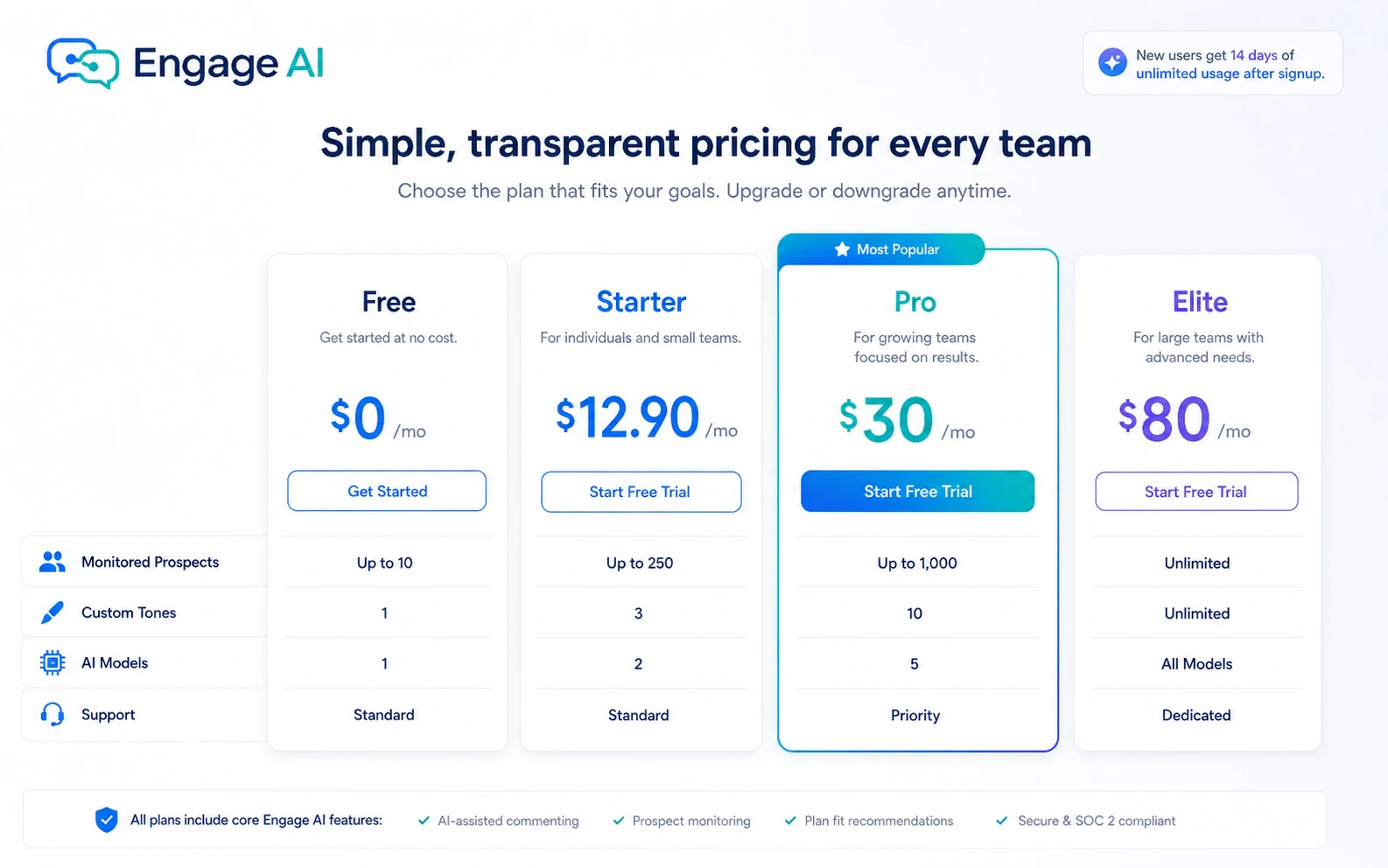
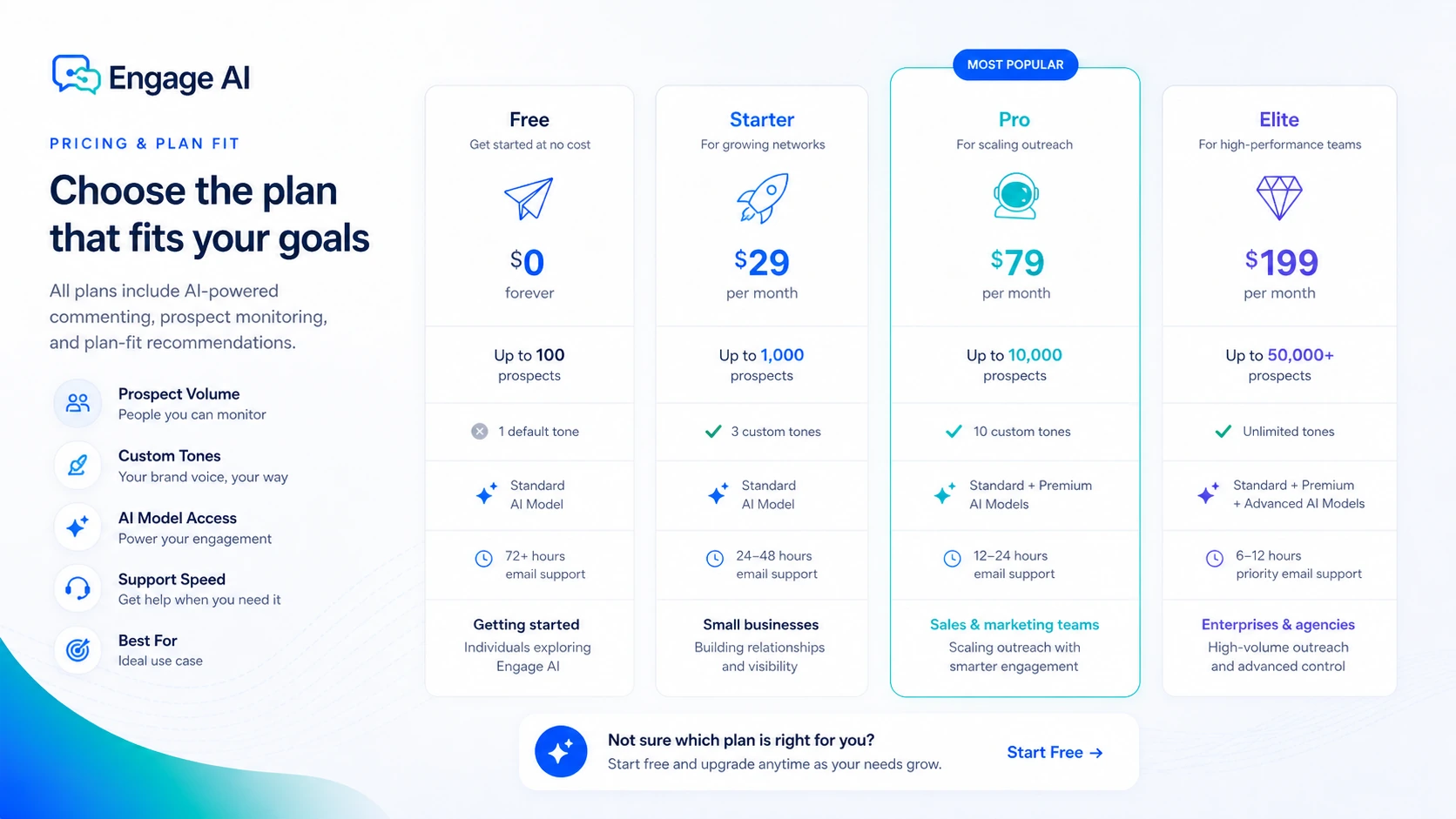
The newer pricing page lists a Free plan at $0/month, Starter at $12.90/month, Pro at $30/month, and Elite at $80/month. The plan differences include model access, custom tones, monitored prospect counts, update frequency, LinkedIn content augmentation, beta features, and support levels.
The Free plan is the right first stop for most buyers. It shows unlimited comments, a limited number of custom tones, and 10 monitored prospects. That is enough to answer the most important question: do Engage AI drafts become useful after a quick human edit?
Starter makes sense if you have a small prospect list and want stronger monitoring and more tones. Pro is the more serious buying point when 150 monitored prospects and stronger model access matter. Elite is for power users with a much larger prospect list, but I would only consider it if LinkedIn engagement is clearly tied to pipeline or business development.
Another current pricing surface shows monthly, quarterly, and yearly views, including visible discount paths and a money-back guarantee line. That is useful, but the terms page contains stricter subscription and refund language, including non-refundable paid subscription wording and case-by-case refund discretion. So the safest pricing advice is simple: start free, test the workflow, then verify the live checkout price and terms before paying.
Pricing check: If Engage AI still fits your LinkedIn workflow, compare the current plan limits and checkout terms before paying.
Free plan, trial, coupon, and checkout notes
The free path is important because comment quality is hard to judge from a pricing table.
The newer pricing page shows a Free plan and says users can claim 14 days of unlimited usage after signing up, with no credit card required. That is the route I would use first. Do not start by asking whether the paid plan is cheap. Start by asking whether the drafts are good enough to edit quickly and post confidently.
The coupon path should come later. If the free workflow works, then it makes sense to check the Engage AI coupon page or current offer route before checkout. But a coupon should not be the buying reason. With a LinkedIn engagement tool, the real cost of a bad fit is not only subscription waste. It is the risk of posting weak comments in front of prospects.
Quarterly or yearly savings may look attractive, but I would not move to a longer billing cycle until you have used Engage AI with a real prospect list. Buyers should verify the exact guarantee, cancellation, and renewal language in the live checkout path before paying.
What I would check before buying Engage AI
If I were buying Engage AI for a real LinkedIn workflow, I would check these points first:
- Whether the free plan or no-credit-card route gives enough access to test real comments.
- Whether generated comments need light editing or a full rewrite before they sound credible.
- Whether I have a defined prospect list that justifies monitoring.
- Whether 10, 30, 150, or 1,000 monitored prospects matches my actual activity level.
- Whether custom tones improve output quality or just add more settings to manage.
- Whether the live checkout price matches the public pricing page I used for comparison.
- Whether refund, cancellation, and renewal terms are clear enough before choosing a longer billing term.
The biggest buyer mistake here is upgrading before proving the habit. Engage AI becomes more valuable when you already have a repeatable LinkedIn relationship-building process.
A simple test before paying
Before paying, I would run a small test like this:
- Pick 10 to 20 real prospects or industry voices you care about.
- Install the extension and use the free path.
- Generate comments on posts where a lazy reply would be obvious.
- Edit each draft until it sounds like something you would actually say.
- Track how long the process takes compared with writing from scratch.
- Watch for replies, profile visits, accepted connection requests, or warmer follow-up opportunities.
- Decide whether the monitored prospect count and custom tone options are worth upgrading for.
If the comments still feel generic after editing, do not upgrade. If the tool helps you engage with better timing and less hesitation, then Starter or Pro becomes easier to evaluate.
Pros explained
The first real pro is focus. Engage AI does not try to be every kind of AI writing assistant. It is built around LinkedIn comments, prospect monitoring, and relationship-building touchpoints.
The second pro is the free testing path. A buyer can evaluate comment quality and workflow friction before paying. That matters because the value is subjective.
The third pro is prospect monitoring. If monitoring helps you notice the right posts earlier, Engage AI becomes part of a small social-selling process, not just a writing shortcut.
The fourth pro is tone control and content support. Custom tones, profile copy, recommendations, connection notes, posts, and articles can help buyers build a more complete LinkedIn presence.
Cons explained
The biggest con is that AI comments can sound generic. This is a category risk. The buyer still needs to add context, specificity, and judgment.
The second con is pricing clarity. The newer pricing page and another current pricing surface do not present the decision in exactly the same way. Buyers should verify the live checkout route before committing.
The third con is that paid value depends on prospect volume. If you only monitor a few people and comment occasionally, a paid plan may be unnecessary.
The fourth con is limited enterprise clarity. Team administration, CRM depth, and API-style workflows were not clear enough in the public buying path to treat as major reasons to purchase.
Green flags and red flags
Green flags:
- You already comment on prospect posts but want to do it more consistently.
- You have a defined prospect list and want cleaner monitoring.
- You can edit AI drafts quickly into your own voice.
- You measure value through conversations, not just comment volume.
- You start free and upgrade only after the workflow proves useful.
Red flags:
- You want to post AI comments without reading the prospect’s post carefully.
- You do not have a clear LinkedIn audience or prospect list.
- You are buying only because a discount or annual saving looks attractive.
- You need full CRM automation, deep team governance, or multi-channel social scheduling.
- You would feel uncomfortable posting the edited output under your own name.
The practical test is trust. If Engage AI helps you appear more thoughtful, it can be useful. If it makes you appear more automated, it is the wrong tool or the wrong workflow.
Engage AI vs alternatives
Engage AI’s alternatives depend on the buyer job. Do not compare it only by feature count. Compare it by the workflow you actually need.
Jasper vs Engage AI
Jasper is a better comparison if you need a broader marketing content platform for campaigns, brand voice, blogs, landing pages, and team content workflows. Engage AI is narrower and stronger when the specific bottleneck is LinkedIn commenting and prospect monitoring.
Copy.ai vs Engage AI
Copy.ai makes more sense for buyers who need go-to-market copy, workflow automation, and broader sales or marketing content. Engage AI may still be the better fit if the buyer’s main task is showing up under LinkedIn prospect posts with better timing and less friction.
Tweet Hunter vs Engage AI
Tweet Hunter is closer to social-content growth, but the channel is different. It is built around X workflows, not LinkedIn relationship-building.
1min.AI vs Engage AI
1min.AI is an adjacent route, not a direct LinkedIn engagement alternative. It is better for buyers who want a broader all-in-one AI workspace across many tasks.
Trust, refund, and buyer-risk notes
Engage AI has a clear product direction, but buyers should still be careful about the commercial details.
The privacy policy says the company collects account information and may collect LinkedIn cookies for Engage AI and Hashtag Analytics, while also stating those cookies are not shared with third parties. It also says account information is stored on Engage AI servers and that AI/ML providers are not authorized to use user data for generalized model training. Buyers with strict privacy requirements should still read the current privacy policy before using browser-extension access.
The terms also matter. Engage AI states that it is not a LinkedIn product and is not endorsed by LinkedIn. That is normal for a third-party LinkedIn extension, but it is still relevant buyer context.
Refund language requires extra care. One public pricing surface says there is a 30-day money-back guarantee, while the terms say paid subscription fees are generally non-refundable except where required by law or considered case by case. I would not rely on a refund assumption unless the current checkout path clearly confirms it.
Plan limits are another buyer-risk point. The difference between plans is not only price. It is custom tones, prospect count, update frequency, models, support response time, and related LinkedIn features. If you do not know how many prospects you want to monitor, you are not ready to choose the right plan.
Final verdict
Engage AI is worth considering if LinkedIn is already a real prospecting or relationship-building channel for you.
I would consider it if you have a defined list of people to monitor, you comment regularly, and you want a faster way to create thoughtful first drafts. I would start with the free route, test it on real posts, and only upgrade if the comments need light editing rather than rescue work.
I would skip Engage AI if you only want occasional LinkedIn help, if you expect AI to handle engagement without your judgment, or if you need a full multi-channel content or CRM automation platform. In those cases, a broader writing tool, a LinkedIn content platform, or a sales stack may be a better fit.
I would compare it with Jasper or Copy.ai if you need broader marketing copy, Tweet Hunter if your social growth workflow is built around X, and 1min.AI if you want a general AI workspace rather than a LinkedIn-first engagement assistant.
The safest next step is not to chase the highest plan or the biggest discount. Start with the free workflow, use it on real prospect posts, and judge whether the edited comments would make you look more thoughtful in public. If they do, Engage AI has a real role. If they do not, paying more will not fix the mismatch.
