Quick verdict
Easy-Peasy.AI is worth considering if you want one broad AI workspace for content, media, bots, and repeatable workflows. It is not the first tool I would choose if you only need one narrow job done at the highest possible depth.
That is the real buying tension here.
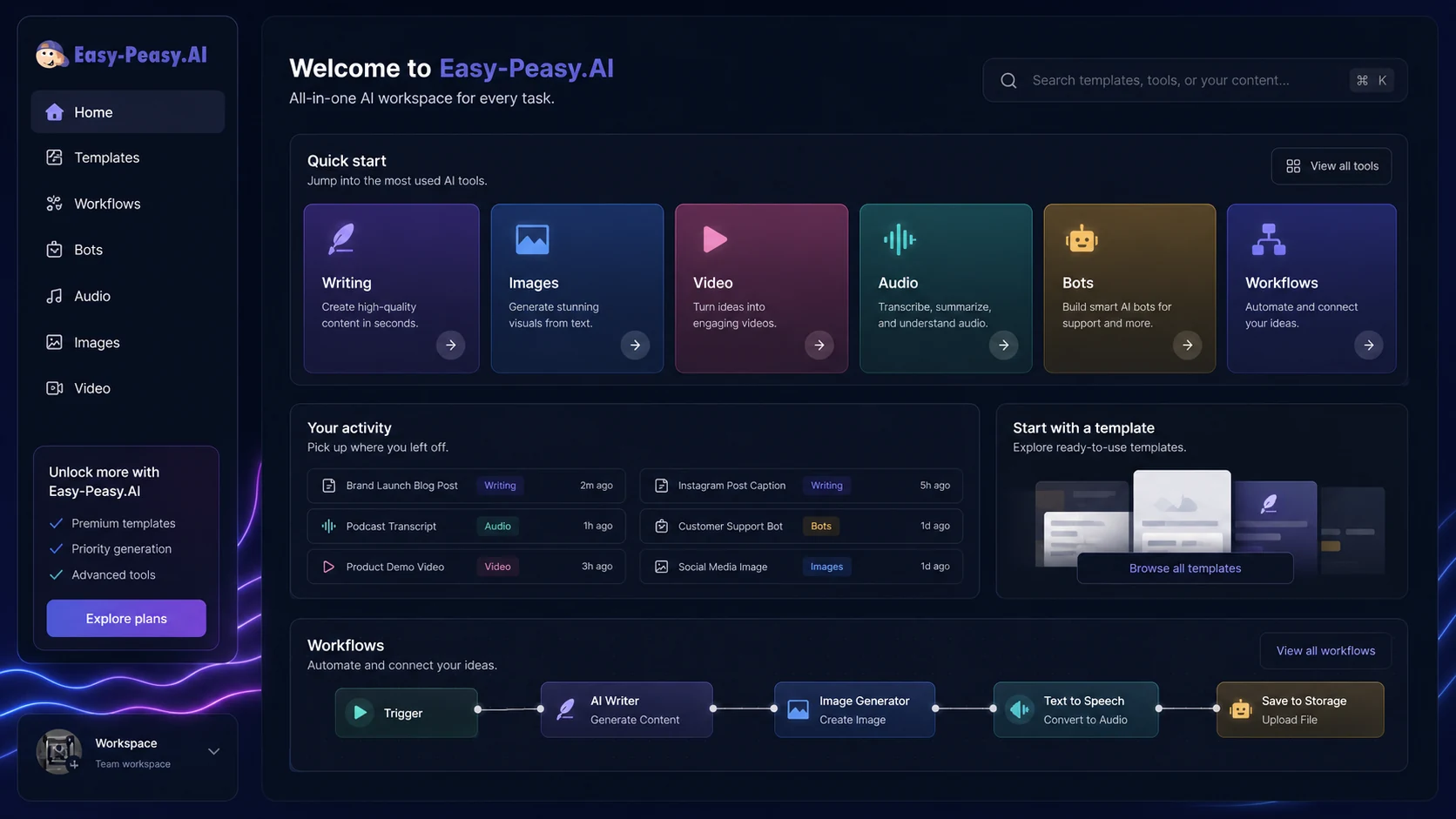
The product looks attractive because it covers a lot: writing templates, AI workflows, image generation, video generation, transcription, text-to-speech, bots, brand voice, Zapier, Make, and API access. For a solo creator or small business, that breadth can be useful. One login, one billing relationship, and several AI jobs in the same place is easier than maintaining five smaller subscriptions.
But breadth also creates a trap. A long feature list can make the buyer feel like the plan is automatically good value. It is not. Easy-Peasy.AI only makes sense if you will use several of those modules often enough to justify the subscription and the plan limits.
For my money, the safer path is simple: start free, test two or three real tasks, compare the time saved against a specialist tool, and only then look at paid tiers or active offers. A discount can improve the purchase, but it should not be the reason you buy.
Next step: If Easy-Peasy.AI still fits your workflow, test the product first and verify the current buyer route before checkout.
Review snapshot
| Review point | Practical take |
|---|---|
| Best for | Solo creators, marketers, small businesses, and operators who want several AI tasks in one workspace |
| Not ideal for | Buyers who need one specialist workflow at professional depth, or teams that require mature governance before adoption |
| Main use case | Writing, media generation, transcription, TTS, bots, workflows, and lightweight automation in one account |
| Starting price | Free plan available, with paid tiers shown on the public pricing page |
| Main strength | Breadth: writing, media, bots, workflows, integrations, and API access under one product umbrella |
| Main concern | Plan value depends on real usage across multiple limits, not just the headline monthly price |
| Best direct comparison | 1min.AI for a broad all-in-one AI workspace comparison |
| Adjacent comparison routes | Copy.ai or Jasper for content/marketing operations; Aikeedo for AI SaaS ownership rather than hosted productivity use |
| Best next step | Test the free plan with real tasks before comparing annual billing or coupon paths |
What is Easy-Peasy.AI?
Easy-Peasy.AI is best understood as a broad AI productivity and creation platform. It is not just an AI copywriting app anymore.
The current public positioning is much wider: chat, templates, workflows, brand voice, AI images, AI videos, talking videos, transcription, text-to-speech, music, sound effects, bots, integrations, and API access. That makes the product more interesting than a basic writing assistant, but also harder to judge with a simple yes-or-no review.
The wrong expectation is to treat Easy-Peasy.AI as if every module must be best in class. That is rarely how broad platforms win. The better question is whether the product gives you enough useful coverage across several jobs to reduce tool switching and subscription sprawl.
A creator might use it for blog drafts, short social posts, images, video ideas, transcription, and voice output. A small business might use it for emails, product descriptions, FAQs, and lightweight marketing assets. A technical operator might care more about API, Zapier, Make, and bot workflows.
Our review approach: we compare public product pages, pricing details, help documentation, privacy and terms language, buyer workflow fit, and nearby alternatives. We do not treat a coupon, annual discount, or low monthly price as proof that the product fits the buyer.
That matters here because Easy-Peasy.AI can look like a bargain if you only count features. It becomes a stronger buying candidate only when those features line up with repeatable work.
Who should use Easy-Peasy.AI?
Easy-Peasy.AI makes the most sense for buyers who want practical breadth.
A solo creator can use it when writing, image generation, transcription, and quick media support all show up in the same weekly routine. The tool becomes more believable when one person needs many lightweight outputs and does not want to manage separate subscriptions for each small task.
A small business marketer may also find value here. Email drafts, social posts, product copy, FAQs, content ideas, basic images, and voice output can all fit into one everyday marketing workflow. The condition is that the output still needs review. Easy-Peasy.AI can reduce blank-page friction, but it does not remove the need for editing, judgment, and brand alignment.
A content operator who builds repeatable workflows may care about the workflow builder, bots, Zapier, Make, and API path. This is where the product becomes more than a one-off generator. If your team repeats the same content or media process every week, workflow support can matter more than another list of templates.
A developer or technical marketer may consider Easy-Peasy.AI if API access helps connect AI generation to internal tools. I would verify plan access, rate behavior, output quality, and cost assumptions before building anything operational around it.
A budget-sensitive buyer can use the free plan as a safer test lane. The free tier is not enough to prove long-term value, but it can show whether the interface, output types, and workflow direction are worth deeper evaluation.
Who should avoid Easy-Peasy.AI?
I would be careful with Easy-Peasy.AI if you only need one specialist workflow.
For example, if you need a dedicated SEO content optimizer, a professional video editor, a serious design suite, or an enterprise writing governance system, a broad workspace may feel convenient but shallow. Easy-Peasy.AI can help with many tasks, but convenience is not the same thing as specialist depth.
I would also slow down if your team needs advanced approval workflows, strict role controls, compliance-heavy administration, or formal editorial governance. The product may still be useful for individual contributors, but team-level buying has a different risk profile.
Buyers handling sensitive client work should be cautious too. The pricing table notes that generated images on the free plan are public, and the privacy policy describes how user inputs may be transmitted to third-party AI service providers. That does not make the product unusable. It does mean privacy-sensitive users should read the current terms and avoid uploading confidential material without understanding the processing path.
Another mismatch is the feature collector buyer: someone who gets excited by every module but never builds a repeatable process. Easy-Peasy.AI looks best when several modules become part of real work. It looks weaker when the buyer uses one template once and forgets the account exists.
Finally, I would not buy only because a discount or coupon route appears. A lower price can make a good fit better. It cannot turn a broad product into the right product for a buyer who needed a focused specialist tool.
How Easy-Peasy.AI fits into a real workflow
The better way to judge Easy-Peasy.AI is to place it inside a working process.
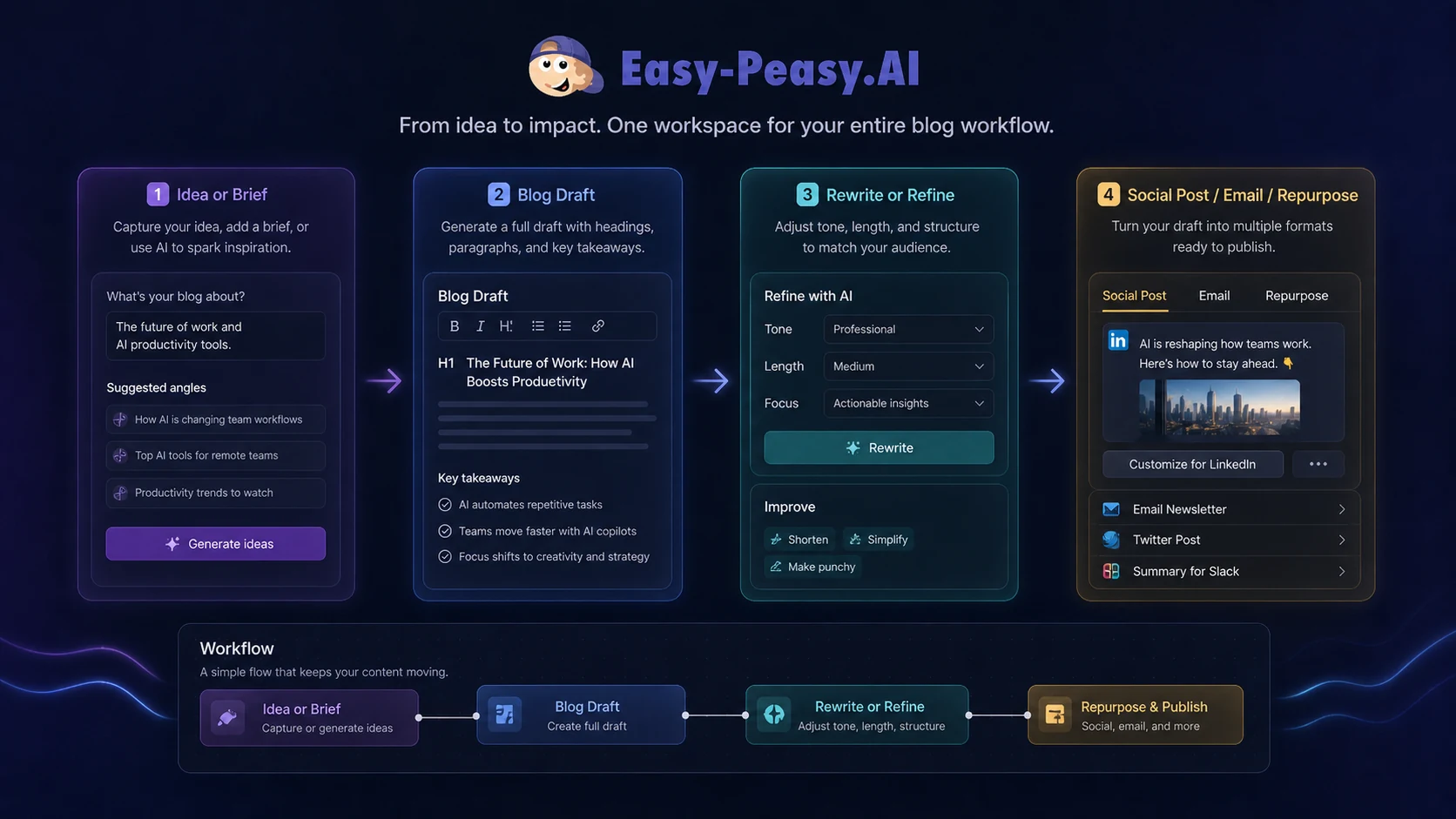
A practical creator workflow might look like this:
- Start with a real content goal, such as a blog post, product email, short video concept, or social campaign.
- Use templates or chat to draft the first version.
- Add brand voice or workflow steps if the task repeats.
- Generate supporting media only if the asset improves the final output.
- Use transcription or text-to-speech when audio or video is part of the routine.
- Review everything manually before publishing or sending it to a client.
- Track which modules saved time and which ones created extra editing work.
That last step is the one buyers often skip.
Easy-Peasy.AI should not be judged by whether it can generate something. Most AI tools can generate something. The real decision is whether it reduces the number of tools, clicks, and blank-page moments in a workflow you already repeat.
For manual creators, the value is convenience. For operators, the value is repeatability. For developers, the value may be API access. For casual users, the free plan may be enough.
The easy mistake is to start with the pricing table. I would start with the workflow instead. If you cannot name the tasks you will repeat, the cheapest plan may still be unnecessary.
Workflow check: If you can name two or three repeat tasks Easy-Peasy.AI would handle each month, it is worth testing the live product before comparing paid tiers.
Real-world buyer scenarios
A solo creator building weekly content
A solo creator may use Easy-Peasy.AI to draft blog outlines, write captions, generate image ideas, transcribe short audio, and create quick voice assets. This is a believable fit because one person often needs small pieces of many workflows.
The risk is output quality drift. If the writing needs heavy editing, the image output is not usable, or the video module does not match the creator’s style, the all-in-one promise becomes less valuable. I would test one full weekly content cycle before paying annually.
A small business marketer with limited tools
A small business can use Easy-Peasy.AI as a practical marketing helper. Product descriptions, email drafts, social posts, landing page copy, FAQ drafts, and basic creative assets all fit the product’s broad positioning.
The condition is volume. If the buyer only needs two posts a month, the free plan or a simpler tool may be enough. If marketing tasks happen every week and involve both copy and media, a paid plan becomes easier to justify.
A content operator testing workflow automation
A content operator may care less about one-off generation and more about reusable steps. This is where workflows, bots, Zapier, Make, and API access become relevant.
Before committing, I would verify exactly which plan includes the required access, how limits behave under real use, and whether the output is predictable enough for repeatable operations. Automation only helps if it reduces review time rather than producing more drafts to clean up.
A buyer comparing broad AI suites
Someone comparing Easy-Peasy.AI with 1min.AI, Copy.ai, Jasper, or other AI platforms should avoid feature-count comparison. The better test is job-based: which tool handles your actual weekly tasks with the least friction?
Easy-Peasy.AI has a stronger case when the buyer wants a hosted, multi-use workspace. It has a weaker case when the buyer needs deep marketing operations, advanced team governance, or a specialized creative workflow.
Key features that actually matter
Broad AI workspace
The core feature is not one tool. It is the bundle.
Easy-Peasy.AI brings writing, images, video, audio, bots, workflows, brand voice, and automation paths into one environment. That breadth can be useful for creators and small teams that do not want separate products for every AI job.
Buyer note: breadth is valuable only if it reduces tool switching. If you use one module heavily and ignore the rest, a specialist tool may be better.
AI writing templates and brand voice
Writing templates remain one of the most practical reasons to test Easy-Peasy.AI. Blog drafts, emails, social content, product descriptions, and marketing copy are common jobs where templates can reduce blank-page time.
Brand voice can also matter when the buyer wants more consistent output. I would still treat it as a helper, not a substitute for editing. The final piece should sound like the business, not like the platform.
Buyer note: test a real article, email, or product page draft. Do not judge the writing engine from a random test request.
Image, video, audio, and transcription tools
The media side makes Easy-Peasy.AI more interesting than a basic writing app. Image generation, video generation, talking videos, transcription, text-to-speech, music, and sound effects can help creators build supporting assets without moving between several products.
This is also where expectations need to stay realistic. A broad platform may be convenient, but it may not beat dedicated tools for high-end image editing, professional video production, or studio-grade audio workflows.
Buyer note: choose one content campaign and test whether the media outputs are publishable enough for your channel.
Workflows, bots, Zapier, and Make
The workflow layer is important because it can turn Easy-Peasy.AI from a one-off generator into a repeatable production system. Visual workflows, bots, Zapier connections, and Make references create a stronger use case for operators who repeat the same tasks.
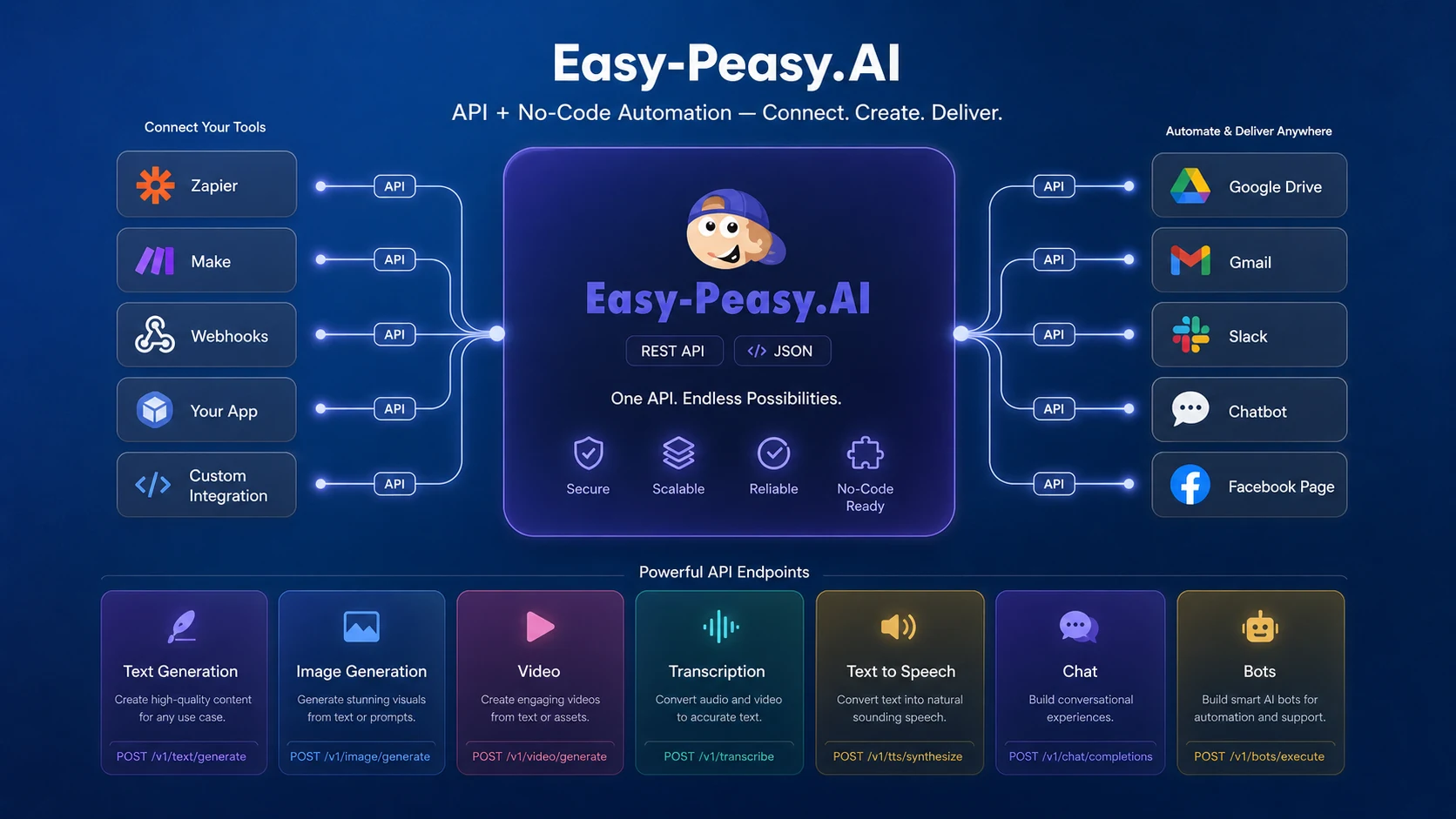
This matters for content teams, small businesses, and automation-minded buyers. If AI output needs to connect to Gmail, Google Drive, Notion, Google Sheets, Facebook Pages, or internal tools, integrations can matter more than another template.
Buyer note: confirm the exact plan access and test a small automation before relying on it in a client or business process.
API access
The API path gives Easy-Peasy.AI more serious potential for technical buyers. Public documentation describes programmatic access for text generation, image generation, video generation, transcription, text-to-speech, chat completions, and bots.
That is useful if you want to build Easy-Peasy.AI into internal tools or repeatable systems. It is not something I would assume casually. API access, limits, cost behavior, and reliability should be verified before a buyer builds around it.
Buyer note: API value depends on real volume and technical requirements. Do not upgrade for API access unless you have a clear use case.
Pricing and plan value
Easy-Peasy.AI pricing is attractive on the surface, but the plan decision is not just about the monthly number.
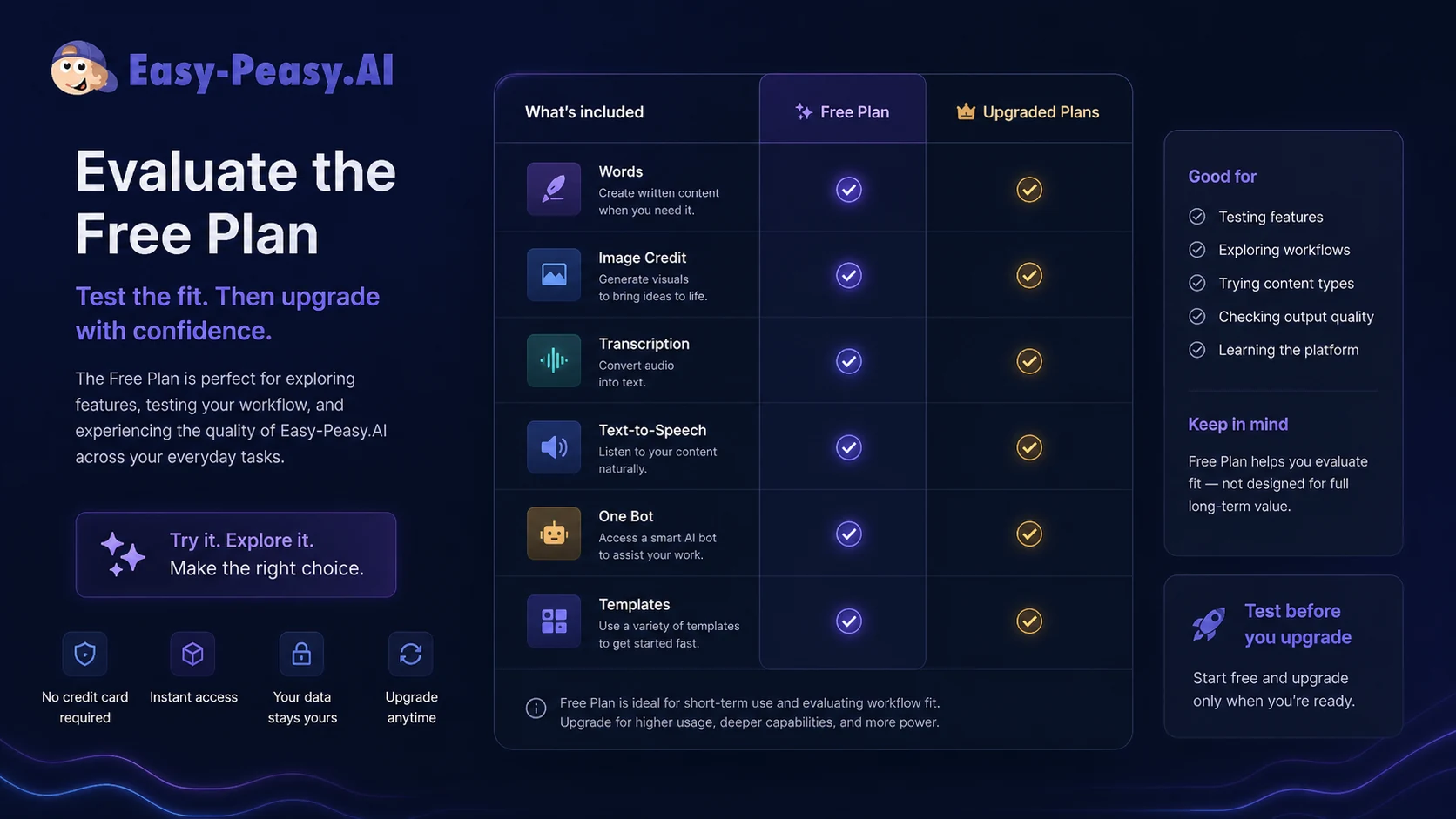
The public pricing page shows a Free plan with limited words, image credit, transcription, text-to-speech characters, one bot, template access, and no credit card requirement. It also shows paid tiers such as Starter, Unlimited 50, and Unlimited when yearly billing is selected, with higher limits for words, media credits, transcription, TTS characters, bots, brand voices, templates, and access to newer or higher-value features.
The Free plan is useful for testing. It is not a proof of long-term value. Use it to check the interface, writing quality, media output, and whether the workflow feels natural.
Starter looks like the first practical paid path for light users, but it still needs a workload check. If you only need occasional writing help, it may be enough. If you expect regular image, video, transcription, bot, or brand voice usage, you need to compare the limits more carefully.
Unlimited 50 and Unlimited make more sense when a buyer already knows the product will be used repeatedly. The higher tiers are easier to justify when premium model words, media credits, transcription, bots, brand voices, API access, or priority support affect real work.
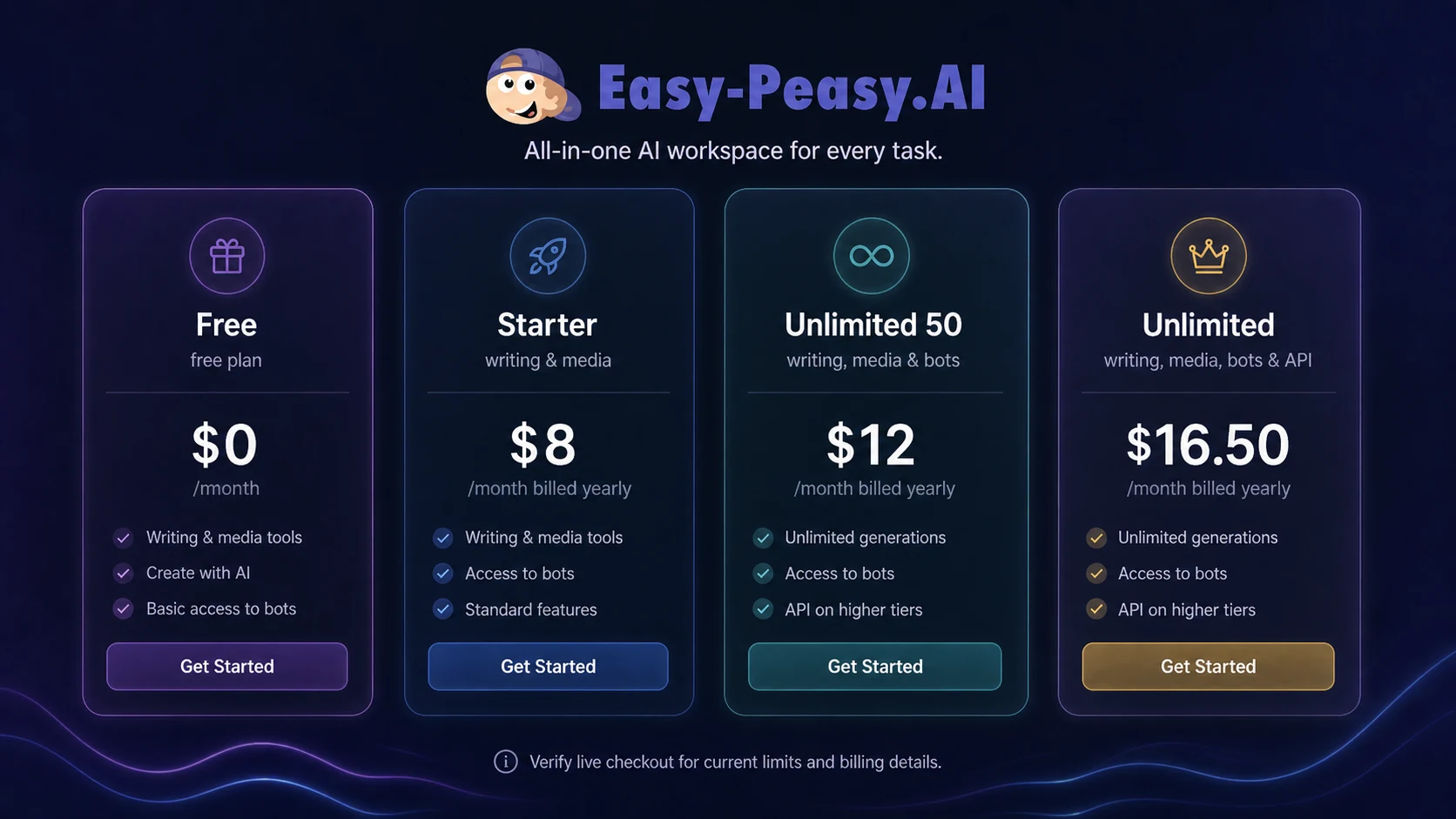
One pricing detail deserves caution: the page presents yearly billing savings and annual discount language, so the live checkout should be treated as the source of truth. I would also check renewal pricing, cancellation, refund wording, and whether the specific module you need is limited in a way that affects your monthly workflow.
My pricing take is straightforward: start free, move monthly before annual if your usage is unproven, and only choose a higher plan after you know which modules will become part of your routine.
Pricing check: Compare the plan against your real monthly words, media credits, transcription, bots, brand voices, and API needs before choosing annual billing.
Free plan, trial, coupon, and checkout notes
The free plan is the cleanest place to begin.
For Easy-Peasy.AI, the free path is useful because the product is broad. You can test writing, templates, images, transcription, text-to-speech, and bot behavior before deciding whether a paid plan makes sense. That is better than choosing a plan based only on the feature list.
I would use the free plan to answer a few practical questions:
- Does the writing output reduce editing time?
- Are the media tools good enough for your actual channels?
- Do the transcription and TTS limits matter for your workflow?
- Does the interface feel comfortable enough for repeat use?
- Do bots or workflows solve a repeated task, or are they just interesting?
- Do you need API, Zapier, or Make before paying?
The coupon path should come later. If Easy-Peasy.AI fits your workflow, the Easy-Peasy.AI coupon page can help you check current offers before checkout. But I would not let any reported checkout code or promotional path drive the decision.
Annual billing deserves the same caution. A lower annual-equivalent price can be useful once the product proves repeat value. It can also lock you into a broad tool that you only used seriously for one week.
The safest order is: free plan first, workflow test second, pricing comparison third, coupon path last.
What I would check before buying Easy-Peasy.AI
If I were buying Easy-Peasy.AI for a real workflow, I would check seven things before paying.
- The two or three modules I will actually use. If I cannot name them, I would not upgrade yet.
- Monthly word and media volume. The paid plan should match real usage, not optimistic usage.
- Transcription and TTS needs. Audio limits can matter quickly for creators, course builders, or podcast workflows.
- Bot and brand voice limits. These become important if the account supports more than casual drafting.
- API and automation access. I would verify plan access before building around integrations, Zapier, Make, or API endpoints.
- Privacy and public-output rules. I would be careful with client work, private media, and sensitive inputs.
- Refund, renewal, and checkout terms. I would read the current terms before choosing annual billing.
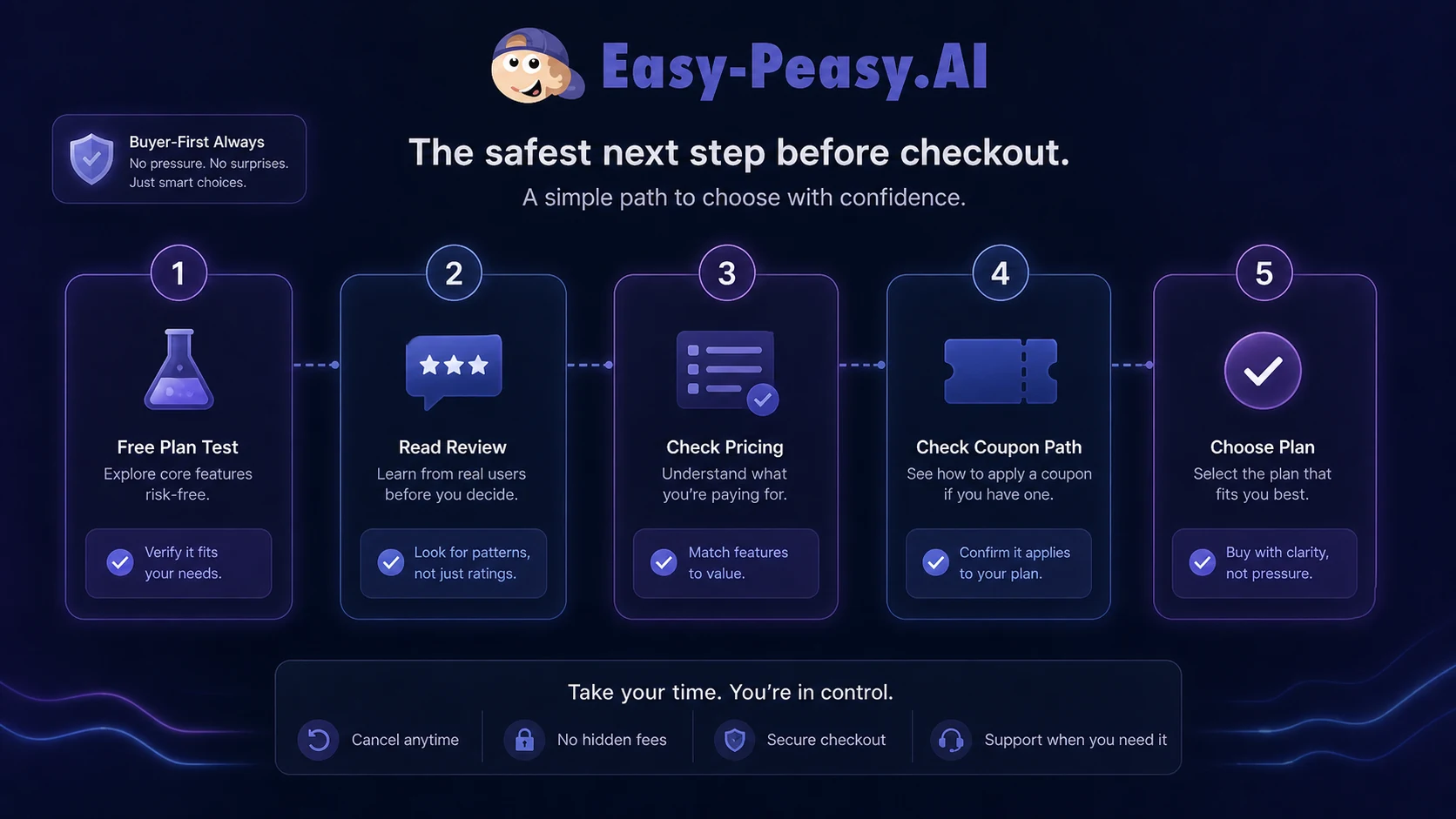
The buyer mistake here is assuming that more modules automatically means more value. Sometimes it does. Sometimes it just means more things to test.
A simple test before paying
Before paying, I would run a small test like this:
- Pick one real content workflow, such as a blog post, product email, social campaign, or short video concept.
- Use Easy-Peasy.AI to create the first draft or asset set.
- Test one media feature that would actually support the final output.
- Try one repeatable workflow, bot, or automation path if that is part of your buying reason.
- Track editing time, not just generation speed.
- Compare the result against one specialist tool you would otherwise consider.
- Check whether the free plan limit blocks real evaluation too early.
The result should tell you more than the homepage can.
If Easy-Peasy.AI saves time across multiple steps, a paid plan becomes easier to defend. If it only performs one job acceptably, compare it against a focused alternative before upgrading.
Pros explained
The first pro is breadth. Easy-Peasy.AI covers many AI tasks in one account, which is useful for buyers who create content, media, audio, and automated outputs without wanting a separate tool for each job.
The second pro is the free plan. It gives cautious buyers a way to test real fit before paying. That is especially important for a broad product because different users will care about different modules.
The third pro is the workflow and automation angle. Workflows, bots, Zapier, Make, and API access make Easy-Peasy.AI more operational than a basic template library. This helps buyers who need repeatable production, not only one-off generation.
The fourth pro is price-to-scope. If the paid tiers fit your actual limits, Easy-Peasy.AI can be a practical way to consolidate several lightweight AI needs. The value is strongest when writing, media, transcription, and automation are all part of your normal work.
The fifth pro is beginner accessibility. The product is easier to understand than a developer-first AI stack, while still offering enough advanced paths for technical buyers to investigate.
Cons explained
The first con is depth risk. Easy-Peasy.AI is broad, and broad tools do not always replace best-in-class specialist apps. A serious SEO team, professional video editor, or enterprise content operation may need deeper controls elsewhere.
The second con is limit complexity. Words, premium model usage, image and video credits, transcription, text-to-speech characters, bots, brand voices, templates, and API access all affect plan value. The buyer has to compare more than one number.
The third con is annual billing risk. The annual price can look attractive, but annual value depends on repeated use. I would not choose annual billing until the product has already earned a place in a monthly workflow.
The fourth con is privacy and output caution. Free-plan generated images being public is a meaningful note for buyers who work with client assets, brand concepts, or private creative material. Privacy-sensitive users should read the current policy and avoid sensitive uploads unless the processing path is acceptable.
The fifth con is alternative fit. Easy-Peasy.AI can be good, but it may not be the most natural choice if your real need is marketing operations, enterprise writing controls, specialist design, or AI SaaS ownership.
Green flags and red flags
Green flags
- You need several AI task types every week, not just one template.
- You want writing, media, transcription, TTS, bots, and workflows in one account.
- You can test the free plan with real tasks before paying.
- You care about Zapier, Make, or API paths for repeatable work.
- You are replacing multiple lightweight subscriptions, not expecting one tool to beat every specialist.
Red flags
- You are buying only because the plan looks cheap.
- You only need one high-depth workflow, such as advanced SEO optimization or professional video editing.
- You cannot name the modules you will use repeatedly.
- You handle sensitive client content but have not checked privacy and public-output rules.
- You want annual billing before proving monthly value.
The green flags are mostly about repeat use. The red flags are mostly about assumption. That is the pattern I would watch closely with Easy-Peasy.AI.
Easy-Peasy.AI vs alternatives
1min.AI vs Easy-Peasy.AI
1min.AI is the closest direct comparison if the buyer wants a broad all-in-one AI workspace. Both tools are trying to reduce tool switching by grouping multiple AI jobs in one place.
Easy-Peasy.AI may feel stronger for buyers who care about content templates, bots, workflows, media generation, transcription, and API documentation in one hosted workspace. 1min.AI may be worth comparing if you want a different all-in-one model and plan structure.
If you are undecided, start with the 1min.AI store guide and compare the specific tasks you will repeat most often.
Copy.ai vs Easy-Peasy.AI
Copy.ai is a more focused comparison for marketing, go-to-market, and content operations. It is not the same buyer job as a broad media and productivity workspace.
Copy.ai may be stronger if your main need is sales, marketing workflows, campaign content, or structured GTM use. Easy-Peasy.AI may make more sense if the buyer also wants images, video, transcription, TTS, bots, and a wider creative utility suite.
For buyers who care more about marketing systems than broad AI utility, compare the Copy.ai store guide before committing.
Jasper vs Easy-Peasy.AI
Jasper is usually a stronger comparison for brand-focused marketing content, team content workflows, and higher-touch writing operations. It is not the same kind of broad tool as Easy-Peasy.AI.
Easy-Peasy.AI can be more appealing when the buyer wants affordability and several media or workflow features in one place. Jasper may be more natural when brand governance, marketing content quality, and team writing workflows matter more than having many different AI modules.
I would compare these only after deciding whether the real need is broad productivity or serious marketing content operations.
Aikeedo vs Easy-Peasy.AI
Aikeedo is an adjacent route, not a direct replacement.
Easy-Peasy.AI is a hosted AI workspace for using AI tools. Aikeedo is more relevant when the buyer wants to build, own, or deploy an AI SaaS-style system. Those are different decisions.
A buyer who wants content, media, bots, and workflows should start with Easy-Peasy.AI. A buyer thinking about launching an AI tool business or owning the system should look at the Aikeedo store guide as an adjacent builder path.
Trust, refund, and buyer-risk notes
My confidence is strongest around Easy-Peasy.AI’s product role: it is clearly positioned as a broad AI workspace with writing, media, bots, workflows, integrations, and API access.
I am more cautious around long-term value because that depends on plan limits and actual usage. A buyer who uses writing, transcription, images, and workflows weekly may get real value. A buyer who only needs occasional drafting may not.
The refund and terms picture also deserves a careful read. The pricing page presents a 30-day money-back guarantee, while the terms contain broader limitation and service-change language. I would not treat that as a reason to avoid the product, but I would verify current checkout and support wording before choosing annual billing.
Privacy-sensitive buyers should read the privacy policy closely. User inputs may be transmitted to third-party AI providers, and the service warns users not to include sensitive personal or confidential business information unless necessary. This is especially important for client assets, private media, internal documents, healthcare-related content, legal materials, or confidential strategy work.
Security badges and trust-center language can be positive signals, but they should not replace a buyer’s own review of data handling, plan terms, and internal requirements.
The practical rule is simple: do not buy Easy-Peasy.AI because it has many features. Buy it only if the features you will actually use match the plan, privacy comfort level, and checkout terms.
Final verdict
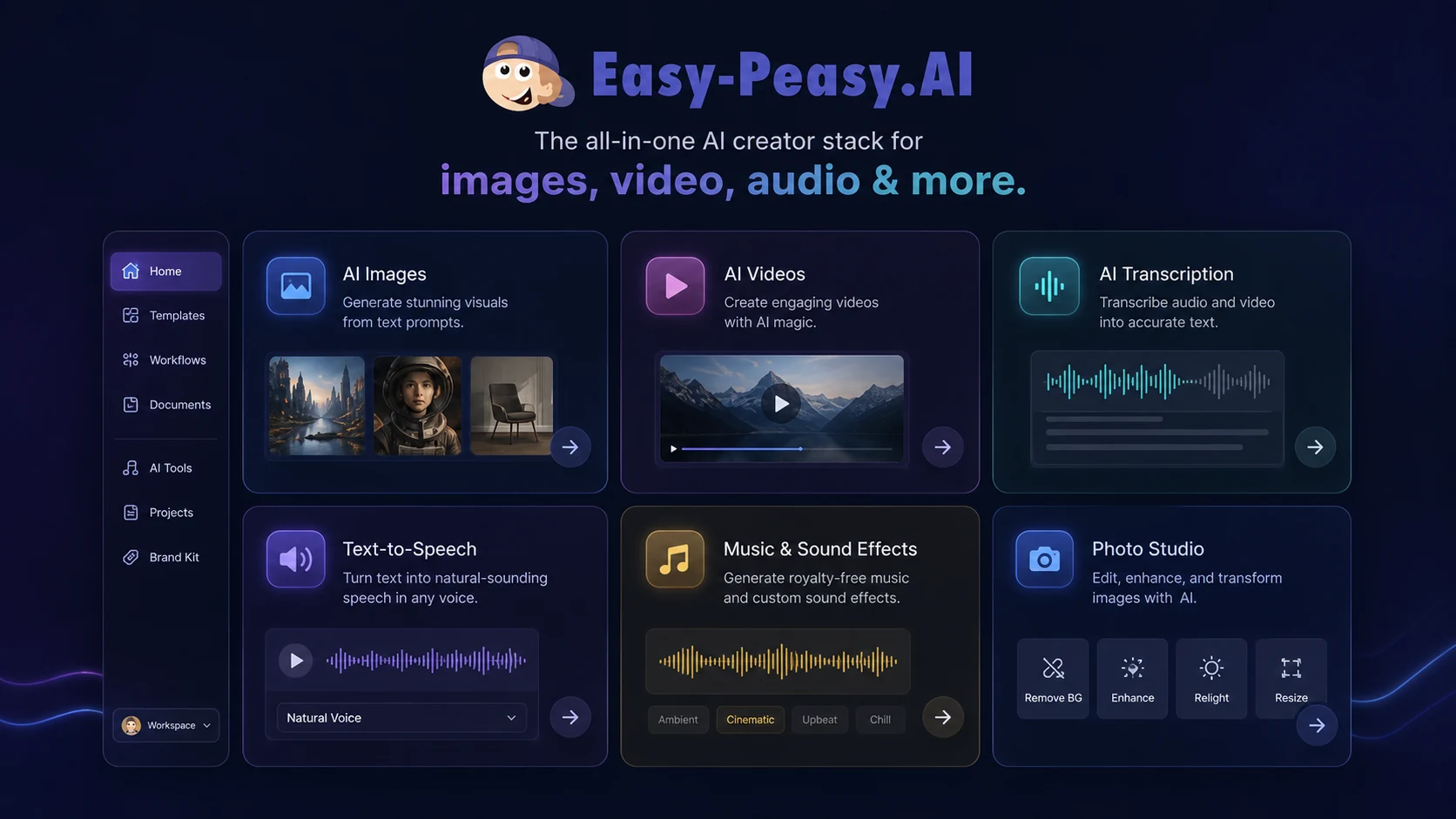
I would consider Easy-Peasy.AI if you want one affordable AI workspace for several repeated jobs: writing, social content, basic media generation, transcription, text-to-speech, bots, and light automation.
I would skip it if your real need is narrow and specialist. A serious SEO optimizer, professional video editor, enterprise writing system, or dedicated design workflow may be a better use of budget.
I would compare it with 1min.AI if you want another broad all-in-one workspace. I would compare it with Copy.ai or Jasper if your main job is marketing content and team writing workflows. I would treat Aikeedo as an adjacent route only if you are thinking about building or owning an AI SaaS-style product rather than using a hosted AI productivity suite.
The safest next step is not to chase the lowest visible price. Start with the free plan, run a real workflow, check the limits that matter, then move to pricing and current offers only after Easy-Peasy.AI proves it can save time in your actual process.
