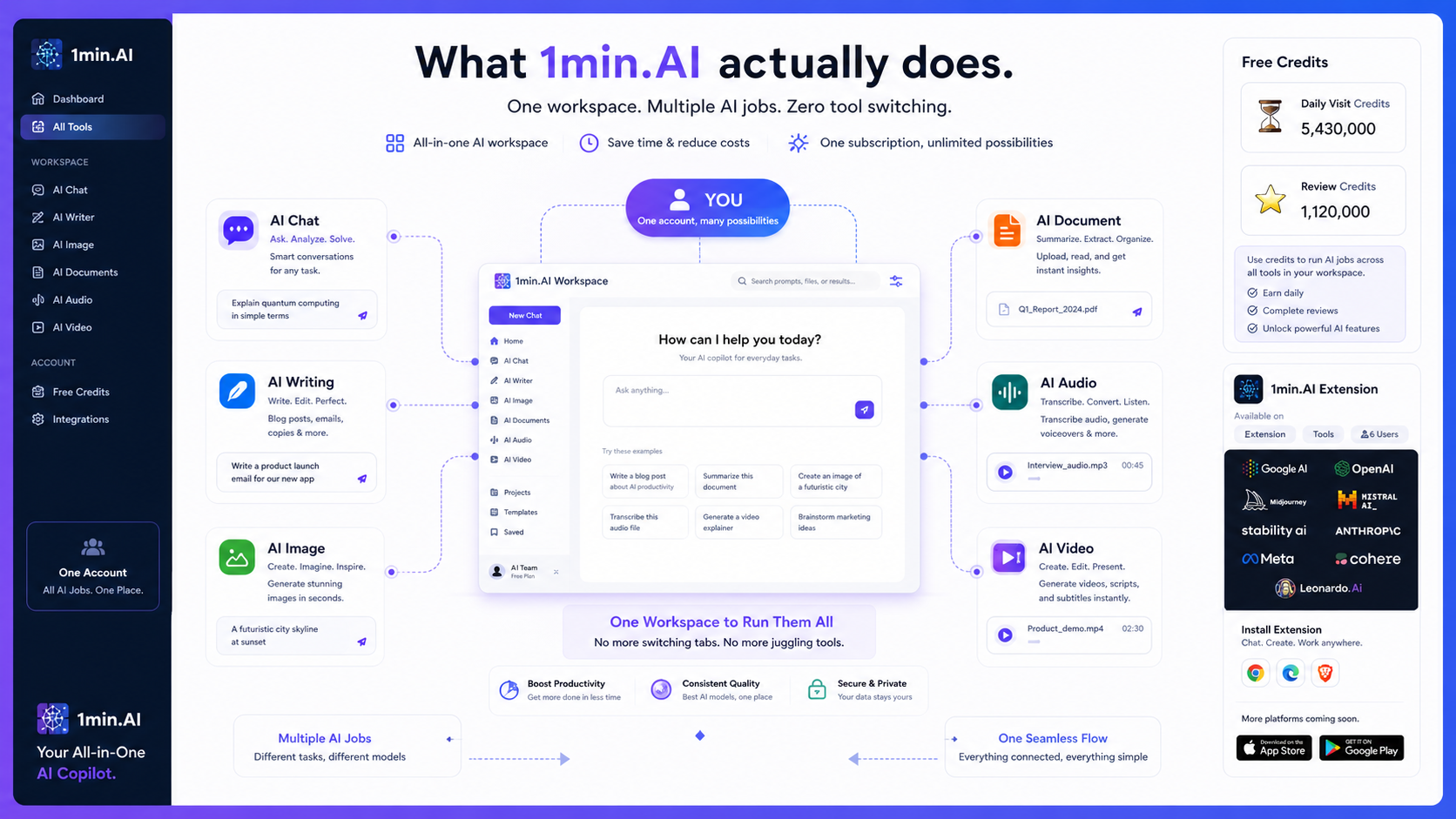
Quick verdict
1min.AI is worth considering if your real problem is tool switching.
That is the cleanest way to judge it. The product looks attractive because it puts chat, writing, image, document, audio, video, browser access, desktop apps, mobile apps, team paths, and API access under one broad AI workspace. On paper, that sounds cheaper and simpler than paying for several separate AI apps.
The buying decision is not that simple.
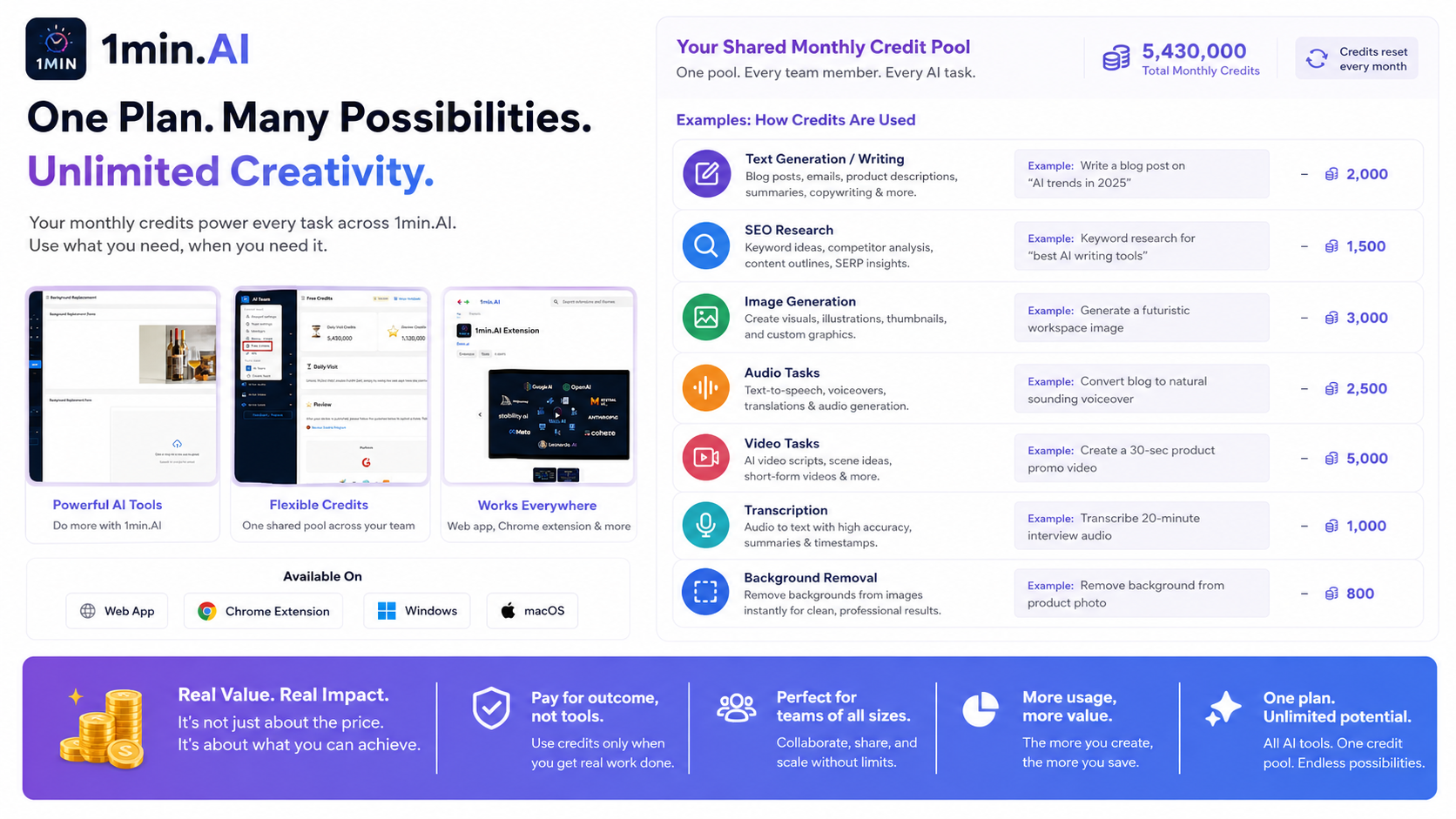
1min.AI uses a credit-based model, so the real question is not only “is the monthly price low?” It is “how fast will my actual work consume credits?” A user who mostly drafts text may experience the plan very differently from a creator who generates images, upscales assets, removes backgrounds, transcribes audio, creates voice output, and experiments with video.
For my money, 1min.AI makes the most sense when you have several small AI jobs every week and want one dashboard to handle them. It is less convincing if you need one deep specialist workflow, strict enterprise governance, or predictable usage limits that do not require credit math.
The strongest reason to test it is the free entry path. The main caution is that broad feature coverage can make a product feel more valuable than it really is for your specific routine.
Next step: If 1min.AI still sounds close to your workflow, test the product route before judging the deal route.
Visit 1min.AI
Check current offers
Read the store guide
In this review
- Quick verdict
- Review snapshot
- Who should use 1min.AI?
- Pricing and plan value
- What I would check before buying 1min.AI
- 1min.AI vs alternatives
- Final verdict
Review snapshot
| Review point | Practical take |
|---|---|
| Best for | Users who want one workspace for several small AI jobs across text, images, documents, audio, and video |
| Not ideal for | Buyers who only need one specialist tool or who want simple fixed usage instead of credits |
| Main use case | Reducing tool switching across everyday AI tasks |
| Free plan | Available, with no credit card required on the official pricing page |
| Paid path | Pro, Business, and Enterprise paths are visible, but value depends on monthly credit use |
| Main strength | Broad all-in-one coverage with web, extension, desktop, mobile, team, and API paths |
| Main concern | Credit burn, partner deal terms, feature-by-feature quality, and team/API fit need verification |
| Best alternatives to compare | Merlin AI, Sider, Monica, Aikeedo |
| Best next step | Start free, track real credit usage, then compare monthly, annual, and partner deal routes |
This snapshot helps buyers separate real workflow fit from surface-level interest. 1min.AI is easier to judge when you know whether you need one broad AI workspace or one focused specialist tool.
What is 1min.AI?
1min.AI is best understood as an all-in-one AI workspace. It is not just an AI chat app, and it is not only a writing assistant. The product groups many common AI tasks into one account: chat, writing, image tools, document work, audio features, video features, browser use, app access, and API support.
That breadth is the reason people look at it.
It is also the reason buyers should slow down.
A tool with many features can be genuinely useful if those features replace separate tools you already use. It can also become a drawer full of novelty features if you mostly repeat one or two tasks. The homepage makes the product feel simple: one AI app for many jobs. The buyer decision is narrower: will you use enough of those jobs often enough for the credit model to make sense?
Our review approach: we compare the provided DealBestDaily store data, official product pages, pricing details, help documentation, public partner deal signals, and nearby alternatives. We do not treat a coupon, lifetime deal, or low monthly price as proof that the product fits the buyer.
The practical role of 1min.AI is a shared AI toolbox. It fits people who want fewer tabs and fewer subscriptions. It is not the cleanest answer for buyers who need the best possible tool in one category, such as a dedicated image generator, professional transcription platform, advanced video editor, or enterprise AI governance layer.
For the current commercial route, you can also check the 1min.AI store guide, but the review decision should start with workflow fit.
Who should use 1min.AI?
General users who want fewer AI tools
1min.AI can make sense for people who use AI casually but often. One day you need a quick rewrite. Another day you need an image variation. Later you want a short transcript, a background removal, a chat answer, or a basic video experiment.
That mixed usage is where the product becomes more believable.
The condition is simple: you need to use multiple categories, not just admire the feature list. If you only use chat and nothing else, a cheaper or more familiar assistant may be enough.
Creators who do light multimedia work
Creators may like 1min.AI because it covers several small production tasks. Draft a caption, generate image ideas, remove a background, create a voice output, test a video feature, or turn rough content into something more usable.
The risk is expecting every feature to replace a specialist creative tool.
I would use 1min.AI as a flexible support layer first, not as the final production system for serious image, audio, or video work. Test quality category by category before you assume the whole suite is ready for your content workflow.
Knowledge workers who need everyday AI support
A knowledge worker may use 1min.AI for quick drafting, summarizing, document support, research-style prompts, translation, rewriting, and lightweight creative tasks. The platform coverage matters here because web, browser extension, desktop, and mobile access can make the tool easier to use during normal work.
The buying check is platform friction. If you mainly work inside a browser, the extension may matter. If you move between devices, app availability matters. If you only want one chat window, the broad workspace may be more than you need.
Small teams comparing a shared AI hub
A small team can consider 1min.AI if members need a shared pool of AI tasks. Business and Enterprise paths are visible in the plan structure, and the product exposes team-oriented ideas such as member management and collaboration.
This is where I would be more careful.
For solo use, the free plan can answer many first questions. For team use, you need to verify seats, sharing rules, credit distribution, admin expectations, support, and API behavior before rolling it into real operations.
Budget-conscious buyers testing the all-in-one idea
The free plan is useful because it gives buyers a low-risk way to test the all-in-one promise. A free plan does not prove long-term value, but it does let you run the product against your real tasks.
That is the right order: test first, upgrade second, compare deals last.
Who should avoid 1min.AI?
I would be careful with 1min.AI if you only need one narrow tool. If your main need is a serious writing assistant, a specialist image generator, a dedicated transcription tool, or a professional video platform, the all-in-one angle may feel broad but shallow.
I would also avoid paying too quickly if you dislike credit systems. Credits can be flexible, but they make value harder to feel at a glance. You need to know which tasks consume your monthly allowance quickly. Without that, a low plan price can be misleading.
Teams with strict governance needs should slow down too. 1min.AI has team and API paths, but that does not automatically make it a mature enterprise AI platform. If your organization needs procurement documents, security review, model governance, admin logs, role-based controls, or formal data handling requirements, verify those details before treating it as ready.
A buyer chasing only a lifetime deal should also pause. Partner deals can be useful. They can also have redemption rules, plan differences, refund rules, credit allowances, or upgrade limitations that differ from the official subscription route.
Finally, I would not choose 1min.AI if you are unwilling to test feature quality one by one. The product covers many AI categories. That is a strength only if the categories you actually use are good enough for your work.
How 1min.AI fits into a real workflow
A realistic 1min.AI workflow starts before you log in.
First, list the AI jobs you actually repeat each week. Not the jobs that sound nice. The jobs you would genuinely use: drafting, rewriting, summarizing, image generation, background removal, audio transcription, text to speech, video generation, SEO keyword research, document checks, browser assistance, or API tasks.
Then run those tasks through the free plan.
The goal is not to click every feature. The goal is to answer three buyer questions:
- Does 1min.AI reduce tool switching?
- Are the outputs good enough for your actual work?
- Does credit usage feel predictable enough to pay for?
For a creator, the workflow might look like this: outline a post, generate a few image options, remove a background, rewrite captions, transcribe a short clip, and test a voice or video feature. For a knowledge worker, it might be: summarize a document, draft an email, compare answers from different models, translate a passage, and use the browser extension during research.

This workflow map matters because 1min.AI only makes sense when it reduces friction across tasks you already repeat. The scan is not “how many features exist?” The better test is “which features save work often enough to justify credits?”
The value appears when several steps stay inside one account. The weakness appears when one step matters more than all the others. If image quality is your main need, test image features first. If writing is the main need, test long-form output and rewriting first. If audio and video matter, check how quickly those tasks consume credits.
Next step: Use the free path as a small workflow experiment before judging paid value.
Visit 1min.AI
Read the 1min.AI store guide
Real-world buyer scenarios
Scenario 1: Solo creator with scattered AI needs
A solo creator may use one tool for writing, another for images, another for transcription, and another for quick chat. 1min.AI becomes interesting if it can replace enough of those small jobs.
The buyer should test a real weekly loop: draft one piece of content, create supporting image variations, perform one audio or video task, and check how many credits disappear. If the workflow feels smooth and credit use stays reasonable, a paid plan may make sense.
If only one feature feels useful, a specialist may be the safer choice.
Scenario 2: Freelancer doing light client support
A freelancer may want one AI workspace for proposals, client emails, quick visuals, social posts, research snippets, and basic multimedia support. 1min.AI can help when the work is varied and lightweight.
The risk is client-quality output. If you are delivering final creative assets, do not assume an all-in-one tool can replace dedicated production software. Use it for drafts, ideas, variations, and support work first.
Scenario 3: Small team testing an AI hub
A small team may like the idea of one account instead of many scattered AI subscriptions. 1min.AI becomes more practical if several team members use different feature categories.
The team should verify seats, member management, sharing, collaboration, credit allocation, support, and renewal terms before rollout. I would not move directly to an annual or partner deal until the team has measured one realistic month of usage.
Scenario 4: Buyer comparing lifetime deal vs subscription
Some buyers will see partner lifetime deals and wonder whether paying once is safer than a subscription.
It might be. But the comparison is not only price. Check included monthly credits, plan level, redemption rules, refund route, future upgrade rights, account limitations, and whether the deal mirrors the current official plan. A lifetime deal can be good value if the feature set fits. It can also be dead weight if the tool is too broad for your real work.
Key features that actually matter
All-in-one AI workspace
The main feature is not one specific tool. It is consolidation.
1min.AI tries to bring text, chat, writing, image, document, audio, video, and workflow support into one account. That matters if your current AI routine is spread across too many apps.
Buyer note: judge this by the number of useful tasks it replaces, not by the number of features listed on the page.
Credit-based usage
Credits are the economic center of the product. The same pricing table can feel generous or restrictive depending on what you do with it.
Text-heavy usage may stretch differently from image, audio, video, transcription, and background-removal usage. That makes the free plan important because it lets you measure your own pattern.
Buyer note: before upgrading, run several real tasks and note which ones consume credits fastest.
Free plan and free credit paths
The free plan is a real advantage because it reduces first-purchase risk. 1min.AI also presents ways to earn free credits, including daily visits and referral-style paths.
That can help casual users test the product longer before paying.
Buyer note: free credits are useful for testing, but they should not distract from the paid-plan question. If your workflow becomes serious, monthly allowance and extra credit cost matter more.
Platform coverage
1min.AI lists access across web, Chrome extension, iOS, Android, macOS, and Windows. This matters because AI tools are more useful when they show up where the work happens.
A browser assistant may help with research. Desktop and mobile access may help with daily capture. Web access keeps the workflow simple.
Buyer note: test the platform you will actually use. A feature that works well in one environment may not matter if your routine happens somewhere else.
Team and API paths
Team and API support make 1min.AI more than a casual personal app. The API documentation shows a developer route, and higher plans present team-oriented usage.
That is useful for technical buyers and small teams.
Buyer note: do not assume team or API fit from the headline alone. Confirm access, cost, rate behavior, documentation, feature coverage, and support expectations before building a workflow around it.
Continuous product updates
The product has public update activity around models, AI Social, app improvements, and related features. Frequent updates can be a positive sign for a broad AI workspace because AI model access and media capabilities change quickly.
The tradeoff is stability. Fast-moving AI tools can change pricing, limits, model availability, or workflows over time.
Buyer note: if you buy annual or lifetime access, check what is guaranteed and what can change.
Pricing and plan value
1min.AI pricing looks friendly at first glance. The official pricing page shows a free plan at $0, a Pro plan shown at $6.5 per month, a Business plan shown at $10 per month, and an Enterprise path shown at $7 per member per month. The page also shows annual billing savings and credit-based usage examples.
That is enough to start the evaluation.
It is not enough to finish it.
The key phrase is credit-based. 1min.AI gives buyers a shared credit pool for different AI actions. The pricing page shows examples across words, SEO keyword research, image generation, image upscaling, background removal, text to speech, transcription, and video generation. Those examples are useful because they remind buyers that not every task consumes value in the same way.

This pricing decision map helps buyers judge 1min.AI by usage, credits, team needs, and checkout route rather than headline price alone. The right plan depends on what you actually run each month.
The free plan is the right first step for most people. Use it to test the product’s fit, output quality, and credit behavior. A paid plan makes more sense when you have repeated usage across multiple categories or when unlimited storage, larger monthly credits, team features, or broader AI access matters.
The Pro plan is the natural solo upgrade path if the free plan proves useful. The Business path is more relevant when team features and higher credits matter. Enterprise should be treated as a team/workspace decision, not a casual upgrade.
Annual billing may be worth considering only after you know the tool is part of your normal routine. I would not go annual just because the monthly number looks better. The same caution applies to partner lifetime deals: compare the included credits and redemption rules against the official subscription structure.
Next step: If your test workflow is already clear, check live pricing and plan limits before choosing monthly, annual, or partner deal routes.
Visit 1min.AI
Check current offers
Read the store guide
Free plan, trial, coupon, and checkout notes
1min.AI does not need to be judged from a coupon first. The free plan gives you a better first checkpoint.
Start there.
Use the free plan to test the categories you genuinely expect to use. If you only test chat, you have not tested the all-in-one promise. Try the actual mix: writing, image, document, audio, video, browser, or team workflow depending on your use case.
The coupon and deal path should come later. 1min.AI has official pricing, annual savings, free credit routes, and public partner deal visibility. Those paths are not the same. A partner lifetime deal may be attractive if it includes enough credits and matches your workflow. Official subscription pricing may be cleaner if you want predictable plan updates, direct billing, and easier alignment with the current product page.
The safer order is:
- Test the free plan.
- Measure real credit use.
- Decide whether the product replaces enough tools.
- Compare Pro, Business, Enterprise, annual billing, and partner deal paths.
- Use the coupon page only as a checkout verification step.
If the product still fits after that, check the 1min.AI coupon page before paying. Do not buy only because a deal route exists.
What I would check before buying 1min.AI
If I were buying 1min.AI for a real workflow, I would check these points before paying:
- Credit burn: Run text, image, audio, video, and document tasks that match your actual month.
- Plan toggle: Confirm whether the pricing page is showing monthly or annual billing.
- Included credits: Compare free, Pro, Business, and Enterprise by monthly allowance, not only by price.
- Extra credit cost: Check the cost of going beyond included credits before relying on the tool for heavier production.
- Rollover rules: Confirm whether unused credits roll over and under what conditions.
- Team details: Verify seats, sharing, collaboration, credit distribution, and support expectations.
- API access: Read API documentation and test technical needs before building a workflow around it.
- Refund route: Check the current refund wording, especially if you buy directly versus through a partner.
- Partner deal terms: Compare included credits, redemption deadline, refund handling, and plan mapping.
- Feature quality: Test the exact categories you care about instead of trusting the all-in-one label.

This buyer checklist helps prevent the common mistake with all-in-one AI tools: paying for feature breadth before testing the few workflows that will actually decide value.
For current pricing context, start with the 1min.AI store guide and then verify the live checkout route through the product itself.
A simple test before paying
Before paying, I would run a small test like this:
- Write down five AI tasks you repeat in a normal week.
- Make sure at least three of those tasks use different categories, such as writing, image, audio, video, or document work.
- Run those tasks inside the free plan.
- Track how many credits are used and which tasks consume the most.
- Compare the result quality with the tools you already use.
- Decide whether 1min.AI replaces enough of those tools to matter.
- Only then compare the Pro, Business, annual, and partner deal routes.
This test is small, but it protects you from the most common mistake: buying because the product has many features, not because those features improve your week.
Pros explained
Broad coverage can reduce tool switching
The biggest advantage is consolidation. One product can cover chat, writing, image work, documents, audio, video, apps, browser access, and API exploration.
This matters if your current workflow feels scattered. It matters less if you already have a specialist stack that works well.
The free plan lowers first-purchase risk
The free plan is useful because it lets cautious buyers test fit before payment. That is especially important for a credit-based tool. You do not need to guess how credits behave. You can run real tasks and observe them.
The limit is obvious: free testing does not prove paid value. It only tells you whether the tool deserves deeper evaluation.
Credits can be flexible for mixed usage
A shared credit system can be helpful when your workload changes during the month. You may use writing one week, image tools the next, and audio or video after that.
The downside is predictability. If you do not track your own usage, credits can make pricing feel less clear than a simple fixed-limit plan.
Platform access supports daily workflow testing
Web, browser, desktop, and mobile access can make 1min.AI easier to test in real contexts. A tool that only works in one place is easy to forget. A tool that follows you across work surfaces has a better chance of becoming a habit.
Still, platform coverage is only useful if the features you need work well where you need them.
Team and API paths create room to grow
The team and API paths make 1min.AI more interesting for small teams and technical buyers. A solo user can start simple, while a team can investigate shared usage later.
I would still separate personal value from business rollout. A tool can be convenient for one person and still need more verification before becoming a team system.
Cons explained
Credit-based pricing needs real testing
The main con is not that credits are bad. The problem is that credits make value personal. Your usage pattern decides whether the plan feels generous or tight.
A buyer who generates mostly text may feel comfortable. A buyer working with images, background removal, voice, transcription, and video may hit limits faster.
The fix is simple: test before upgrading.
Broad tools can be uneven
All-in-one products often have uneven strengths. One feature may be good, another acceptable, another not strong enough for serious work.
That does not make 1min.AI a bad tool. It means buyers should test the categories they actually need instead of assuming the whole suite performs equally well.
Partner deals require extra caution
Partner lifetime deals can look attractive because they replace recurring subscription anxiety with a one-time payment. But the buyer still needs to check plan mapping, credits, redemption rules, future updates, refund handling, and whether the partner deal matches the official plan structure.
A cheaper route is only better if it gives you the right usage rights.
Team rollout needs more verification
Small teams should not treat 1min.AI like a fully proven internal AI platform without checking team details. Seats, roles, credit sharing, support, API usage, security expectations, and admin needs all matter more once more people depend on the product.
For team adoption, the safest path is a limited pilot before annual or lifetime commitment.
Green flags and red flags
Green flags
- You already use several AI tools and want one simpler workspace.
- Your work spans text, image, audio, video, and document tasks.
- The free plan gives you enough room to test real workflows.
- You are willing to track credit use before upgrading.
- You value platform access across web, browser, desktop, and mobile.
- Your team needs a lightweight shared AI hub rather than a heavy enterprise system.
Red flags
- You only need one specialist tool.
- You dislike credit math and want simple fixed usage.
- You are buying mainly because a lifetime deal looks cheap.
- You need formal enterprise governance before rollout.
- You have not tested the feature categories you plan to use most.
- You expect every output type to match a dedicated best-in-class tool.
1min.AI vs alternatives
1min.AI sits in a crowded space because “all-in-one AI assistant” can mean several different things. The best alternative depends on what kind of “all-in-one” you actually need.

This alternatives map helps buyers decide whether they need a broad credit-based AI workspace, a browser/sidebar assistant, an everyday AI companion, or a build-your-own AI SaaS route.
Merlin AI vs 1min.AI
Merlin AI is the closer comparison if your main need is browser-based assistance. It is positioned around research, rewriting, summarizing, chatting with websites or documents, and using AI across web contexts.
Choose Merlin AI first if the browser is where most of your work happens. Choose 1min.AI first if you care more about a broader mix of writing, image, audio, video, and document tasks under one credit system.
For a broader route comparison, see the Merlin AI store guide.
Sider vs 1min.AI
Sider is a strong comparison for buyers who want an AI sidebar while browsing. It is more naturally tied to reading, summarizing, translating, researching, and working across webpages.
Sider may be better if your main workflow is browser-side comprehension and productivity. 1min.AI may be better if you want more multimedia task coverage in the same account.
You can compare the buyer route through the Sider store guide.
Monica vs 1min.AI
Monica is another everyday AI assistant comparison. It leans into chat, summary, writing, search, translation, art, and cross-platform access.
Monica may feel more natural if you want a general AI companion. 1min.AI may be stronger if your decision is specifically about one credit-based workspace for many production-style tasks.
Check the Monica store guide if browser and everyday assistant fit matter more than multimedia credit usage.
Aikeedo vs 1min.AI
Aikeedo is a different kind of alternative. It is not simply another hosted AI assistant. It is closer to a self-hosted AI SaaS software route for buyers who want to build or operate their own AI product.
That makes it relevant only for a specific buyer. If you want to use an AI workspace, 1min.AI is the more natural fit. If you want to launch or own an AI SaaS-style platform, Aikeedo belongs in the comparison.
For that path, start with the Aikeedo store guide rather than treating it as a direct everyday assistant replacement.
For broader discovery, the AI productivity hub is the better place to compare tool categories before choosing a product.
Trust, refund, and buyer-risk notes
My confidence is strongest around 1min.AI’s product role: it is clearly positioned as an all-in-one AI app, and the official pricing page makes the credit-based model visible enough for buyers to start evaluating it.
I am more cautious around long-term value, partner deal fit, and team rollout. Those depend on your actual usage pattern, plan selection, redemption route, and whether the features you need stay strong over time.
The refund path is worth reading before paying. The public help material describes a 30-day refund request window for direct purchases, with usage affecting the refund rate. That is useful, but it also means buyers should not assume a no-questions full refund after heavy usage.
Privacy and data handling are also worth checking if you plan to upload sensitive documents, client material, or internal business content. This applies to almost every AI workspace, not only 1min.AI. The more categories a tool handles, the more carefully teams should think about what they put into it.
The buyer-risk summary is simple:
- The product fit is real if you use several AI categories.
- The pricing fit is real only after you measure credit burn.
- The deal fit is real only after you compare official and partner terms.
- The team fit is real only after you verify seats, sharing, API, support, and internal data expectations.
Final verdict

This final verdict card helps buyers decide whether to test 1min.AI, compare alternatives, or stop before checkout if the all-in-one workflow is not a real fit.
I would consider 1min.AI if you want one broad AI workspace for mixed daily tasks and you are willing to test credit usage before paying. It is a practical candidate for creators, general users, freelancers, and small teams that want fewer tools open at once.
I would skip it if your need is narrow. A specialist writing, image, transcription, or video tool may be better if one category matters far more than everything else.
I would compare it with Merlin AI, Sider, or Monica if your real need is browser-side assistance. I would compare it with Aikeedo only if you are thinking about building or owning an AI SaaS system rather than simply using an AI app.
The safest next step is not a coupon click. The safest next step is a free-plan workflow test. Run the tasks you actually repeat, measure credit usage, judge output quality, then decide whether Pro, Business, annual billing, or a partner deal makes sense.
Next step: If 1min.AI still fits your workflow, verify the current pricing and buyer route before checkout.
