Quick verdict
ImagineArt is worth considering if you want one AI creative workspace for images, short videos, visual experiments, workflows, and possibly API-backed generation. I would not judge it as a simple image generator.
That is the first buyer mistake here.
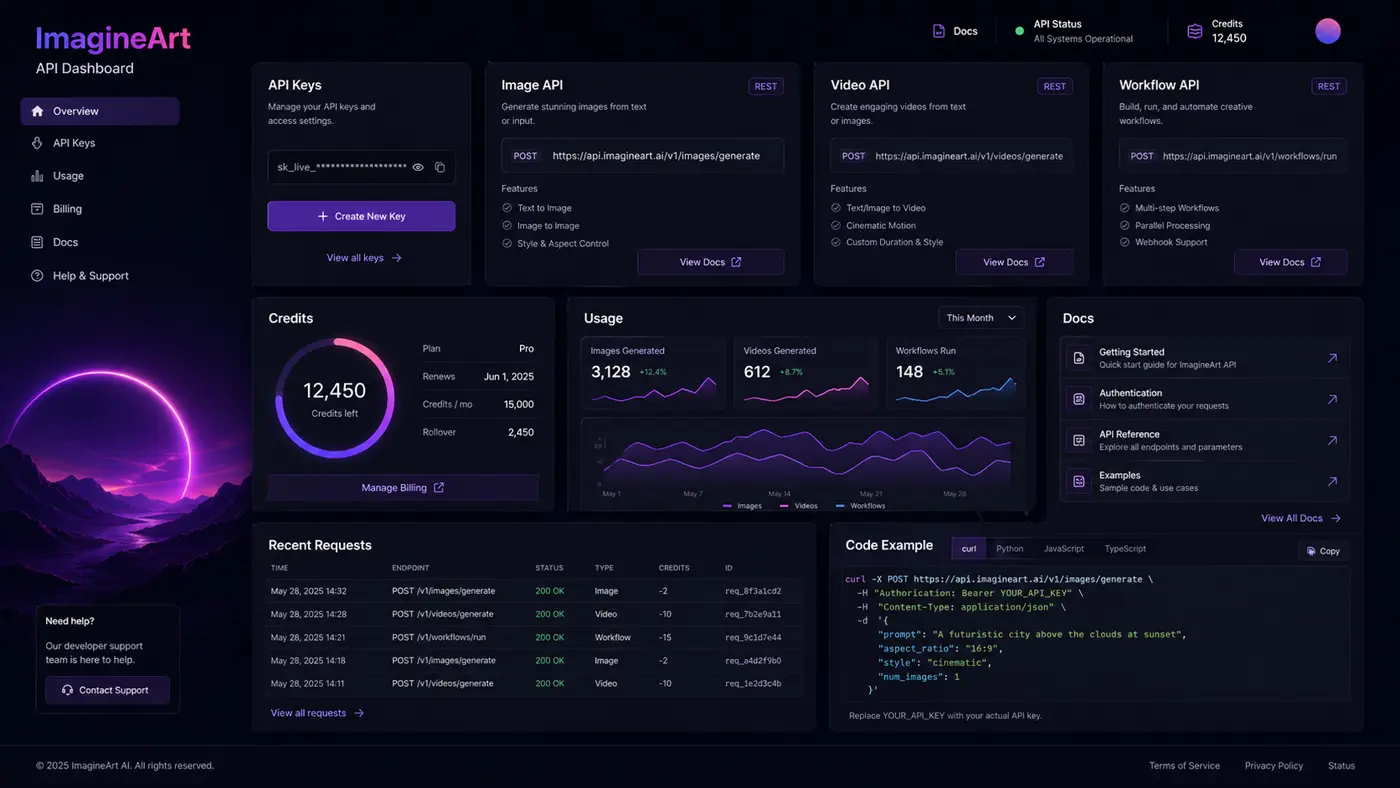
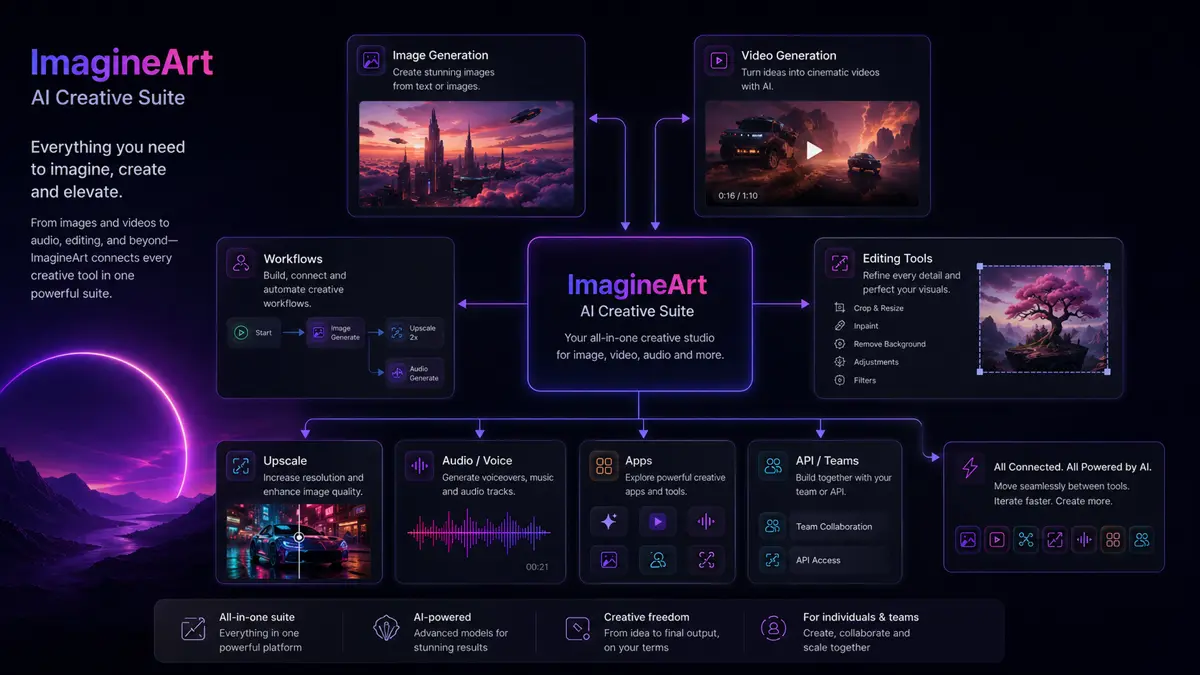
The homepage makes ImagineArt look broad because it is broad. It brings together image generation, video generation, editing tools, workflow-style creative paths, apps, voice or audio surfaces, team options, and developer-facing API documentation. That can be useful if your work already moves between thumbnails, social visuals, product concepts, short video ideas, campaign assets, and experimental prompts.
It can also become too much if you only need one occasional picture.
The buying question is not “Can ImagineArt generate cool visuals?” The better question is whether its credit system, model access, video limits, team seats, refund rules, and renewal terms match the way you actually create. A low entry plan can still feel restrictive if video generation burns credits faster than expected. A higher plan can make sense for repeat creators, but only after you have tested real prompts and know what output quality you can get.
For my money, the safest path is simple: use the free daily credits first, test one real image or video workflow, estimate credit burn, then compare monthly, quarterly, and yearly pricing before paying. A coupon or billing discount should improve a good decision, not create the decision.
Next step: If ImagineArt still looks like the right creative suite, test the live buyer route after you understand the credit model.
Review snapshot
| Review point | Practical take |
|---|---|
| Best for | Creators, marketers, designers, agencies, and teams that need repeated image, video, and visual workflow experiments |
| Not ideal for | Buyers who want a simple unlimited image generator with no credit math |
| Main use case | Generating and iterating creative assets across images, videos, workflows, and campaign concepts |
| Free path | Free accounts receive daily credits for testing, but premium models and higher limits require paid access |
| Pricing style | Credit-based subscription with monthly, quarterly, yearly, top-up, and higher-volume plan considerations |
| Main strength | Broad creative coverage in one workspace |
| Main concern | Credit burn, refund limits, output variability, and annual commitment risk |
| Direct alternatives | Deevid AI, Fliki, Akool |
| Adjacent route | Boolvideo for ecommerce product-video automation |
| Best next step | Test one real workflow, then compare live pricing against expected credit use |
What is ImagineArt?
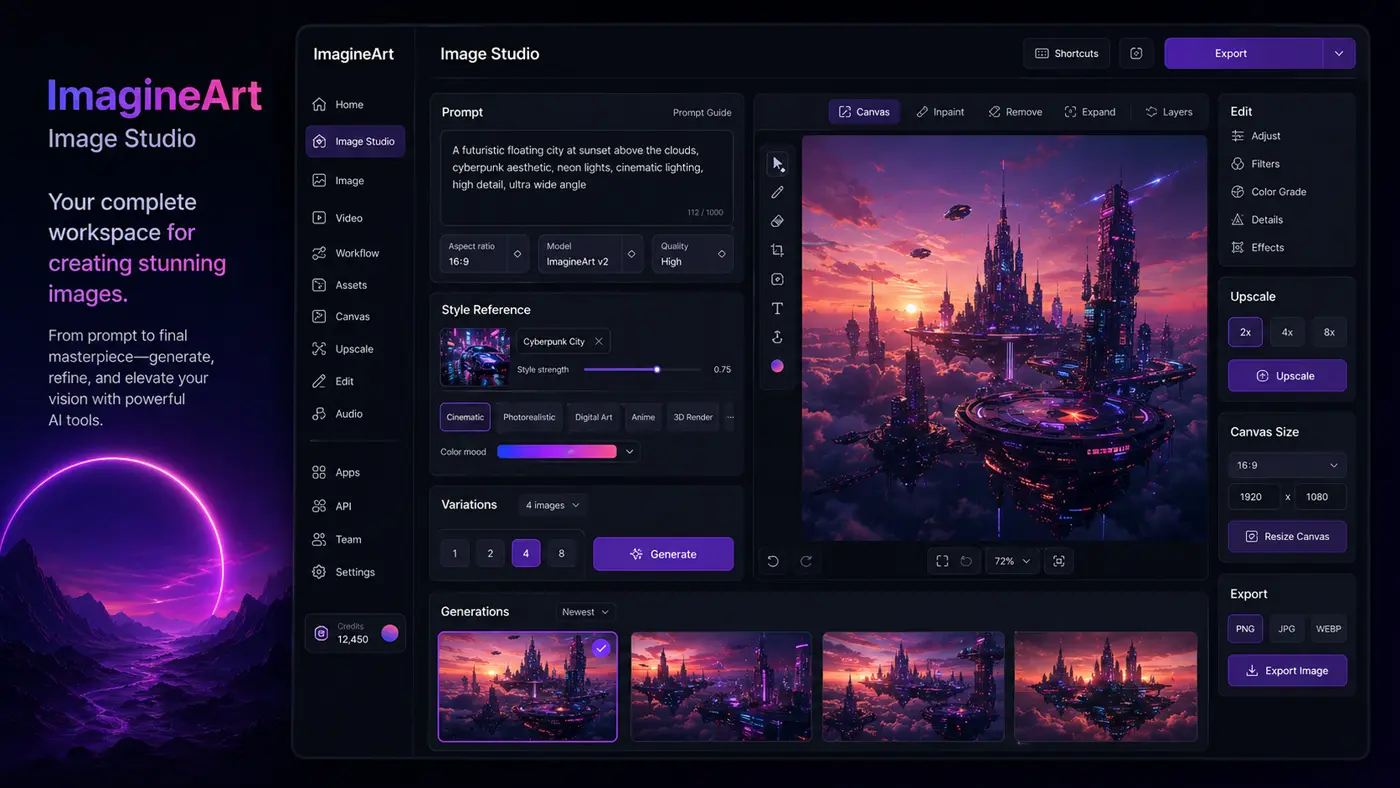
ImagineArt is an AI creative suite for generating and editing images, videos, shorts, voice-related assets, and workflow-based creative outputs from prompts, references, and models. It is better understood as a multi-surface creative workspace than a narrow AI art toy.
That distinction matters because the buyer expectation changes.
If you only want a quick logo idea or one social image, a broad suite may feel heavier than necessary. But if you need to move from idea to image, image to motion, visual concept to campaign variation, or prompt experiment to repeatable workflow, ImagineArt becomes more interesting.
The current official materials position the product around images, videos, shorts, voice, workflows, apps, and model access. The help documentation also explains a credit system that powers image, video, workflow, and other generation tools. That means the product is not judged only by whether the first output looks good. It should be judged by how repeatably you can produce usable assets without burning through credits faster than your budget allows.
Our review approach compares public product pages, subscription documentation, refund terms, buyer workflow fit, and nearby alternatives. We do not treat a low monthly price, a yearly discount, or a coupon path as proof that the tool fits the buyer.
Who should use ImagineArt?
ImagineArt makes the most sense for creators who need frequent visual experimentation. If you are testing character looks, social post visuals, YouTube thumbnails, short video concepts, or product scene ideas, the free credit path can help you see whether the models and controls fit your style before paying.
It also fits marketers who need quick campaign visuals. A marketing team may not want to wait for a full design cycle just to test a landing page concept, ad creative direction, poster idea, or social variation. ImagineArt can help in that middle layer between blank page and polished asset.
Designers may find it useful as an ideation layer, not as a replacement for design judgment. The product can help explore compositions, references, visual directions, and motion concepts. The final asset may still need editing, brand checks, typography work, and human taste.
Agencies and small teams should consider it if team seats, private generations, higher output, and workflow repeatability matter. The buyer should confirm which plan includes the collaboration, resolution, privacy, and video access they need.
Developer or product teams may also evaluate ImagineArt because official documentation exposes API-style creative generation paths. That use case needs more caution. API buyers should verify endpoint coverage, credit billing, rate behavior, output rights, and support expectations before building anything serious around it.
Who should avoid ImagineArt?
I would avoid paying for ImagineArt if you only need one occasional image. Free credits may be enough to test a small idea, and a paid subscription may create more billing friction than value.
I would also be careful if you hate credit systems. ImagineArt’s pricing is easier to understand than some creative AI tools, but credits still require math. Image generations, video generations, workflows, model choice, output settings, duration, and quality can all change the real cost of use.
Teams that require predictable procurement terms should slow down too. Refund eligibility is conditional, subscription credits do not roll over, annual billing creates commitment, and public feedback includes both happy users and complaints around cancellation or support. That does not mean the product is bad. It means the buyer should not treat checkout as casual.
ImagineArt is also not the cleanest fit for creators who need heavy manual editing control. A specialist design tool, video editor, or professional post-production workflow may still be stronger once the concept is ready.
Finally, I would not buy it only because a discount appears. A discount can make a useful plan cheaper. It cannot make the wrong credit tier fit your production rhythm.
How ImagineArt fits into a real workflow
A practical ImagineArt workflow starts before the prompt.
First, name the job. Are you trying to create product visuals, social images, short video concepts, character scenes, ad variations, or API-generated assets? If you do not know the job, the tool can feel impressive without becoming useful.
Second, test with a real prompt set. Use the free daily credits to create a small batch of outputs that resemble work you would actually publish, show to a client, or use as creative direction. Do not judge the product from one lucky result.
Third, check the controls. Look at whether the model, reference image options, workflow tools, resolution, privacy settings, video length, and export quality are available on the plan you are considering.
Fourth, estimate credit burn. If one useful short video requires several failed attempts, the practical cost is not the headline plan price. It is the number of credits required to reach usable output.
Fifth, apply human review. AI creative output can be fast, but brand consistency, product accuracy, faces, text, hands, motion quality, and copyright-sensitive visual direction still need a human check.
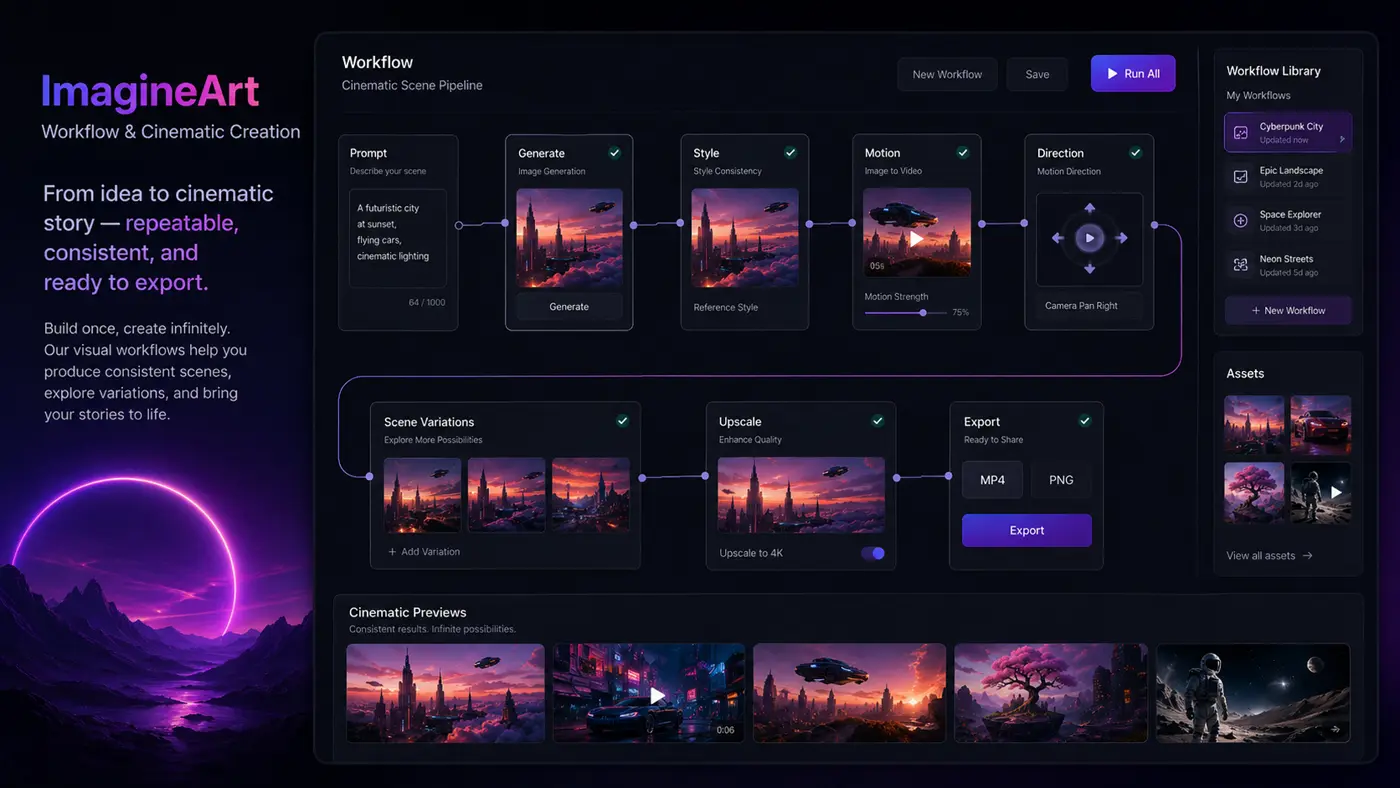
Workflow check: If your first test shows real creative value, compare the current plan limits before moving from free credits to a paid tier.
Real-world buyer scenarios
A creator planning short-form content may use ImagineArt to create image concepts, motion clips, background visuals, thumbnails, or stylized scenes. This works best when the creator needs many variations and accepts that prompt iteration is part of the job. It may fail if the creator expects every generation to be usable on the first attempt.
A marketing team may use ImagineArt to test ad angles, campaign visuals, product scenes, or social graphics before sending a concept into a more polished design process. The value is speed. The risk is assuming generated visuals are automatically brand-safe, legally safe, or product-accurate.
A designer may use ImagineArt for moodboards and exploratory directions. That can be useful when the project is still fluid. It becomes weaker when the buyer needs pixel-perfect control, exact typography, complex layouts, or final production files.
A developer may use the API path to explore image or video generation inside an app or internal tool. That is a more serious commitment. The buyer should verify endpoints, credit cost, reliability expectations, moderation rules, data handling, and support before building around it.
Key features that actually matter
Image and video generation
The core attraction is the ability to generate visuals and motion assets from prompts, references, and models. This matters because many creators do not work in a single format anymore. A campaign may need a hero image, vertical video, product scene, thumbnail, and social variation.
Buyer note: test both image and video quality before paying. A tool can be strong for images and still require patience for video output.
Workflows
Workflows are one of the stronger signals that ImagineArt wants to be more than a prompt box. A workflow-oriented creative process can help buyers repeat a style, build a scene, or move from rough idea to more structured output.
Buyer note: workflow value depends on repeat use. If you rarely create similar assets, the workflow layer may not matter enough to justify a higher plan.
Credits and top-ups
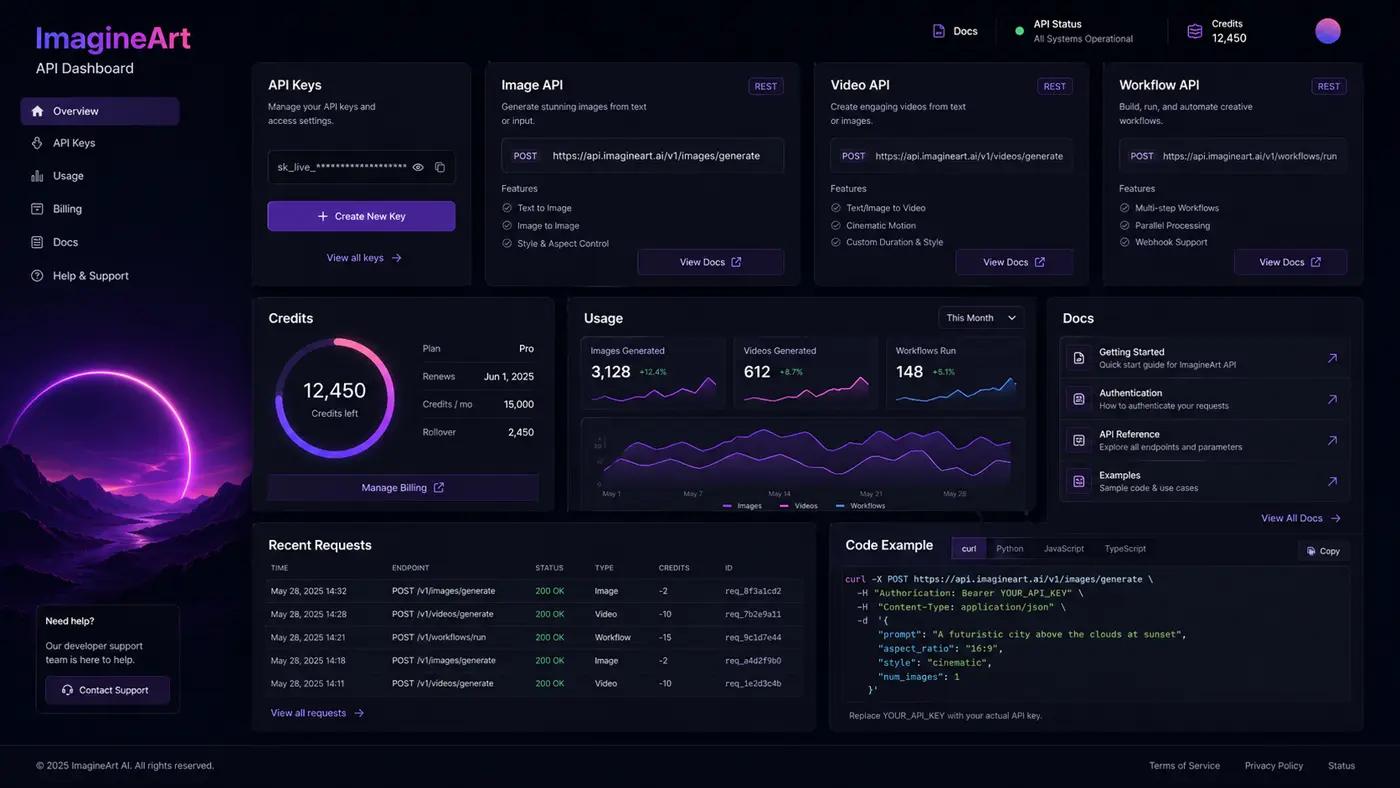
ImagineArt uses credits across generation paths. Free credits refresh daily, subscription credits refresh monthly and do not roll over, while top-up credits can be purchased separately and do not expire while usable under plan conditions.
Buyer note: credit burn is the real pricing test. Count failed generations, experiments, longer videos, and premium model usage, not only successful outputs.
Team and privacy features
Higher plans can include team seats, private generations, faster generation, better exports, and more advanced access. These details matter for agencies or teams producing client-facing work.
Buyer note: do not assume collaboration features exist on the entry plan. Confirm seat count, privacy, export quality, and support before paying.
API documentation
The API path makes ImagineArt relevant to more than manual creator work. Product teams and developers can evaluate it for image, video, audio, music, or voice generation use cases.
Buyer note: API access should be treated as a separate buying decision. Verify endpoint coverage, credit billing, plan access, reliability expectations, and technical support before committing.
Pricing and plan value
ImagineArt pricing should be judged through credits, not only monthly price.
The current public documentation shows a free tier with 100 credits per day. Paid tiers include Basic, Standard, Ultimate, Creator, and Enterprise. The help documentation presents Basic at $9 per month with 2,000 monthly credits, Standard at $30 per month with 8,000 monthly credits, Ultimate at $50 per month with 16,000 monthly credits, and Creator at $250 per month with 100,000 monthly credits. Quarterly and yearly billing can reduce the monthly equivalent, but buyers should verify the live subscription page before checkout because pricing, promotions, and plan packaging can change.
The important part is what those credits buy in your real use case. A buyer creating simple images may stretch credits further than a buyer testing premium video models, longer clips, higher output settings, or repeated failed attempts.
The free plan is useful for evaluation. It is not proof that the paid plan will feel cheap. Free credits refresh daily, but premium models, private generations, resolution, speed, and advanced features may require paid access.
For casual creators, Basic may be enough to test paid features. For serious image and video work, Standard or Ultimate may be the more realistic comparison. For teams or heavy production, Creator or Enterprise may become relevant, but that is where the buyer should be especially careful about annual billing and credit usage.
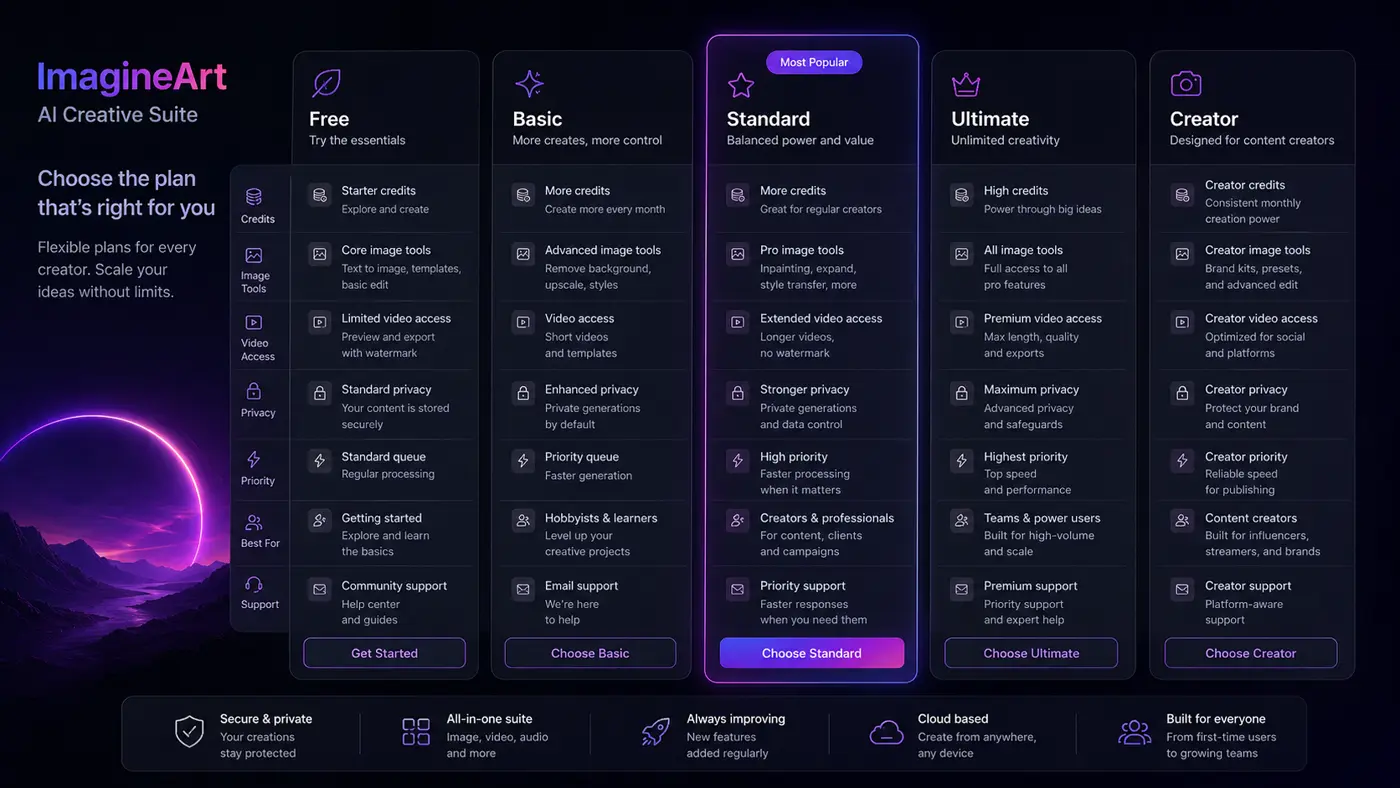
Pricing check: Do not choose a plan from the headline price alone. Verify live credit amounts, video access, refund limits, and billing term before checkout.
Free plan, trial, coupon, and checkout notes
The free path is the cleanest way to evaluate ImagineArt. Daily free credits let buyers test the platform before paying, which matters because output quality is personal, prompt-sensitive, and workflow-dependent.
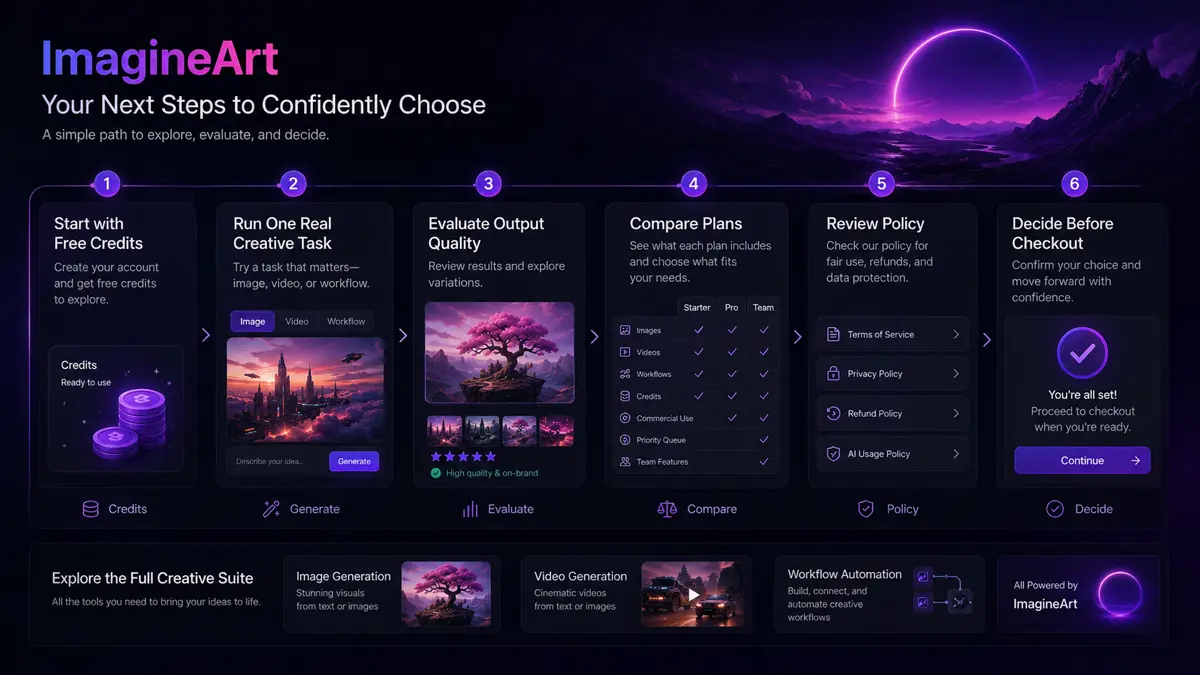
I would use the free path to test three things: whether the image output matches your style, whether the video tools produce usable clips for your use case, and whether the credit burn feels reasonable for repeated work.
The coupon path should come later. If the product still fits your workflow, the ImagineArt coupon page can help you check current offers or deal routing. But I would not let a coupon drive the purchase. A discount is only useful if the selected plan has enough credits and the billing term makes sense.
Quarterly and yearly billing may improve the effective monthly price, but longer billing terms are not automatically safer. Use them only after the product has proved useful in a real workflow.
Refund terms also matter. ImagineArt’s refund policy is conditional and tied to timing plus credit use. If you buy and immediately use many credits testing premium models, you may reduce your flexibility. That is why free testing before payment is not just convenient. It is buyer protection.
What I would check before buying ImagineArt
If I were buying ImagineArt for a real workflow, I would check these points before paying:
- Whether the free daily credits are enough to test the exact image or video workflow I care about.
- How many credits my normal prompt experiments consume before I get usable output.
- Whether the plan includes the models, video length, resolution, private generations, and exports I need.
- Whether subscription credits expire at the end of the month and how top-up credits behave.
- Whether quarterly or yearly billing is worth the commitment after testing monthly use.
- Whether the refund window and credit-use limits leave enough room for a safe evaluation.
- Whether a narrower tool such as Deevid AI, Fliki, Akool, or Boolvideo would fit the actual job better.
A simple test before paying
Before paying, I would run a small test like this:
- Pick one real creative task, such as a product visual, short video concept, social ad asset, or character scene.
- Use the free credits to create several variations, not just one generation.
- Track how many credits it takes to reach something usable.
- Check whether the model or feature you liked is available on the paid plan you are considering.
- Review the output for brand fit, accuracy, artifacts, text quality, and motion quality.
- Compare the result with one focused alternative before upgrading.
- If the tool still fits, choose monthly first unless your credit needs are already predictable.
This test is not complicated, but it prevents a common mistake: buying a broad AI creative suite before knowing which part of the suite you will actually use.
Pros explained
The first real pro is breadth. ImagineArt can support image generation, video generation, workflows, editing, apps, voice or audio paths, and API-style creative generation. That makes it useful when a buyer needs one creative hub instead of several disconnected tools.
The second pro is the free daily credit path. It gives buyers a real way to test output quality before paying. That matters because AI creative tools are difficult to judge from examples alone. Your prompt style, subject matter, and quality threshold may be different from the marketing gallery.
The third pro is clearer documentation around credits and subscription behavior. Credit systems are never perfectly simple, but ImagineArt explains free credits, subscription credits, top-ups, refresh cycles, and plan tiers in more detail than many tools in this category.
The fourth pro is the team and API direction. Solo creators may not need it, but teams and product builders should care that ImagineArt is not only a consumer-style art generator. It has a more serious path for workflow and technical evaluation.
Cons explained
The biggest con is credit complexity. Even if the pricing table looks clean, the real cost depends on model choice, video length, output settings, failed attempts, and how often you create. Buyers who dislike usage math may find this frustrating.
The second con is refund risk. The refund policy is not a broad “try everything and get your money back” promise. Timing and credit use matter. That means paid testing should be careful, especially during the first few days after purchase.
The third con is breadth itself. A broad suite is helpful when you use multiple surfaces. It is less ideal when you need one narrow job done extremely well. A focused AI video tool or image generator may be easier to judge.
The fourth con is output variability. This is normal for generative AI, but buyers should still account for it. Prompt quality, model selection, references, and settings can all change the result. You may need multiple attempts before a visual becomes usable.
Green flags and red flags
Green flags include a real need for repeated image and video generation, comfort with credit-based pricing, a workflow that benefits from rapid visual iteration, and a willingness to test outputs before paying annually.
Another green flag is a buyer who needs both creative exploration and production support. ImagineArt is more compelling when the user moves between image prompts, video clips, references, workflows, and campaign concepts.
Red flags include buying only because of a discount, assuming credits will last without testing, choosing annual billing before understanding monthly usage, or expecting AI output to replace creative direction.
Another red flag is needing exact manual control. If your work requires precise typography, complex brand systems, or final production editing, ImagineArt may be a strong ideation tool but not the entire stack.
ImagineArt vs alternatives
ImagineArt’s alternatives should be separated carefully. It is not fair to compare every AI creative tool as if they all solve the same job.
Deevid AI vs ImagineArt
Deevid AI is a more direct comparison if your main job is prompt-to-video or image-to-video creation. ImagineArt may still make more sense if you want images, workflows, and broader creative experimentation in the same workspace.
The tradeoff is focus versus breadth. Deevid AI may be easier to evaluate for video-first output. ImagineArt is stronger when the buyer needs several creative surfaces.
Fliki vs ImagineArt
Fliki is usually a better comparison for narration-led text-to-video workflows, especially when voiceover, script-to-video, and simple content repurposing matter more than broad visual generation.
ImagineArt is more visual and creative-suite oriented. Fliki is more structured around turning text into video content.
Akool vs ImagineArt
Akool may be stronger for avatar, translation, business video, and presenter-style workflows. ImagineArt may fit better when the buyer wants image concepts, cinematic scenes, creative clips, and visual experimentation.
The buyer should choose based on the output type. If the job is avatar-led business video, compare Akool closely. If the job is creative visual generation across formats, ImagineArt has the broader canvas.
Boolvideo vs ImagineArt
Boolvideo is more of an adjacent route for ecommerce and product-video automation. It is not necessarily a one-to-one replacement for ImagineArt.
This matters for store owners. If the goal is fast product videos from ecommerce assets, Boolvideo may be more direct. If the goal is flexible image, video, and creative direction across many campaign ideas, ImagineArt is the broader route.
Trust, refund, and buyer-risk notes
ImagineArt has enough public documentation to evaluate the product seriously, but buyers should still slow down around billing.
The refund policy is conditional. Monthly and quarterly initial purchases may be eligible within three calendar days if credit use stays within the stated limit. Annual initial purchases may have a longer initial window, also tied to credit use. Renewals, subjective dissatisfaction, prompt mistakes, failure to cancel before renewal, and heavy credit usage are risky cases.
Subscription credits also need attention. Free credits refresh daily. Subscription credits refresh monthly and do not roll over. Top-up credits are separate and should be understood before buying extra usage.
Data and privacy expectations should be checked too, especially for teams uploading client references, product imagery, faces, or brand assets. Creative AI tools often require more trust than buyers first realize because the inputs can be sensitive.
Public review signals are mixed but useful. Trustpilot shows a generally positive rating with many users praising ease of use and output, while some negative reviews complain about refund or cancellation experiences. I would treat that as a reason to test free credits first, read the current terms, and avoid annual billing until the workflow has proved itself.
Final verdict
I would consider ImagineArt if you need a broad AI creative workspace for images, videos, workflows, and visual experimentation, especially if you create often enough for a credit-based plan to make sense.
I would skip it if you only need one occasional image, dislike credit systems, need full manual editing control, or want a tool with very flexible refund expectations.
I would compare it with Deevid AI if video generation is the main job, Fliki if narration-led text-to-video is the job, Akool if avatar or business video matters, and Boolvideo if ecommerce product-video automation is the real use case.
The safest next step is not annual billing. It is not a coupon hunt either. Start with the free credits, run one real creative workflow, count the credit burn, compare the plan limits, and only then decide whether ImagineArt belongs in your production stack.
