Quick verdict
Boolvideo is worth testing if your real problem is speed: you have product pages, scripts, blog posts, or visual assets, and you need to turn them into short marketing videos without building every scene by hand.
That does not make it an automatic buy.
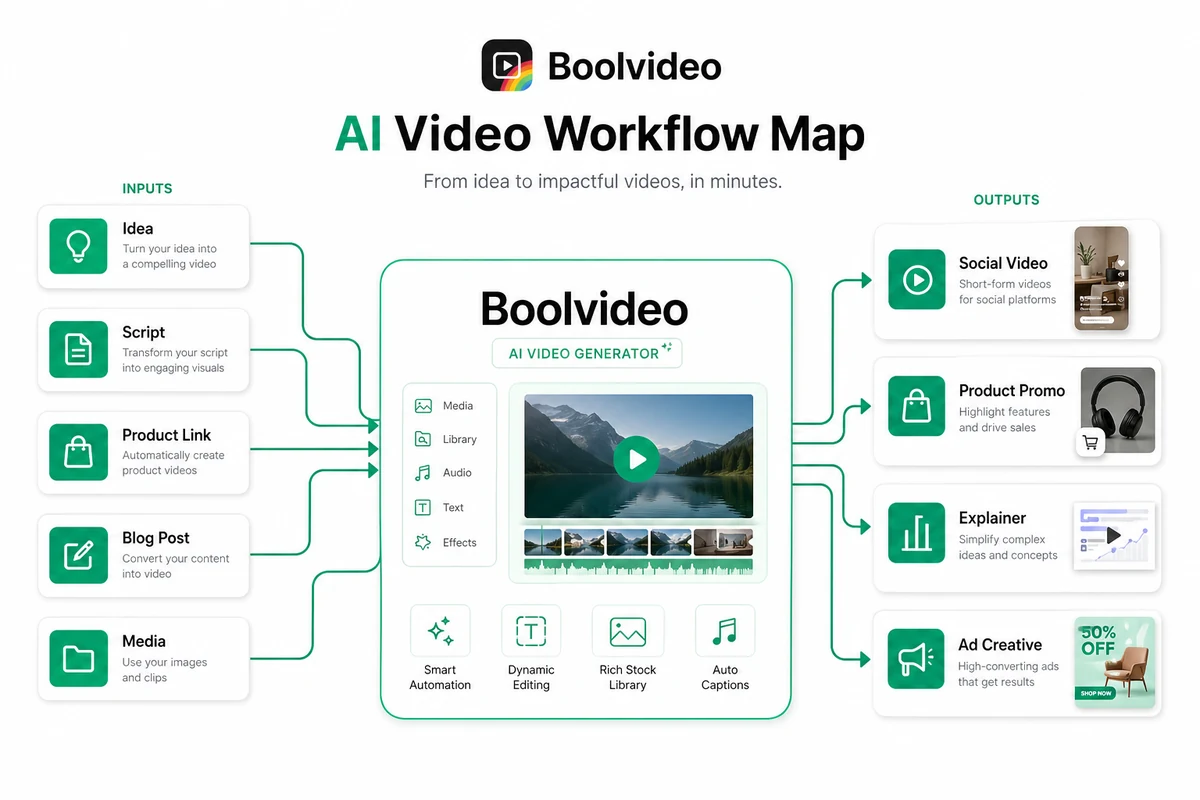
The product looks most useful for creators, e-commerce sellers, and small marketing teams that repeat the same kind of video work: product promos, reels, short explainers, simple ads, and social clips. In that setting, Boolvideo can reduce the blank-page problem. You bring an idea, script, product URL, blog post, or media library; the tool helps assemble a first video draft with scenes, visuals, music, voiceover, and export options.
The buying question is narrower: do the credits, exports, resolution, and output quality match how often you actually publish?
That is where I would be careful. AI video tools can feel affordable at the headline price, then become less attractive once you count credits, revisions, exports, and the number of videos you need every month. The safest path is to use Boolvideo’s free signup credits on one realistic workflow before choosing a paid plan.
I would consider Boolvideo if you want a guided AI video generator for product or content repurposing. I would skip it if you need professional timeline control, advanced editing, detailed analytics, or strict brand approval workflows. A discount can improve the purchase, but it should not be the reason you buy.
Next step: If Boolvideo fits your video workflow, test the current buyer route and pricing before committing to recurring production.
Review snapshot
| Review point | Practical take |
|---|---|
| Best for | E-commerce sellers, creators, bloggers, and marketers who need repeatable short video drafts |
| Not ideal for | Professional editors, strict brand teams, and buyers who only need one or two videos |
| Main use case | Turning ideas, scripts, product links, blog posts, or uploaded media into video drafts |
| Free testing path | Signup credits are positioned as enough to export a few core-feature videos |
| Pricing note | Third-party listings show Standard and Pro tiers, but live pricing should be verified before checkout |
| Main strength | Fast guided video creation from practical marketing inputs |
| Main concern | Credit usage, export quality, plan limits, renewal pricing, and refund expectations |
| Direct alternatives | Pictory, Fliki, HeyGen |
| Adjacent route | AKOOL for personalization, avatar, or face-led AI video workflows |
| Best next step | Run one real content or product-video test before choosing a paid plan |
What is Boolvideo?
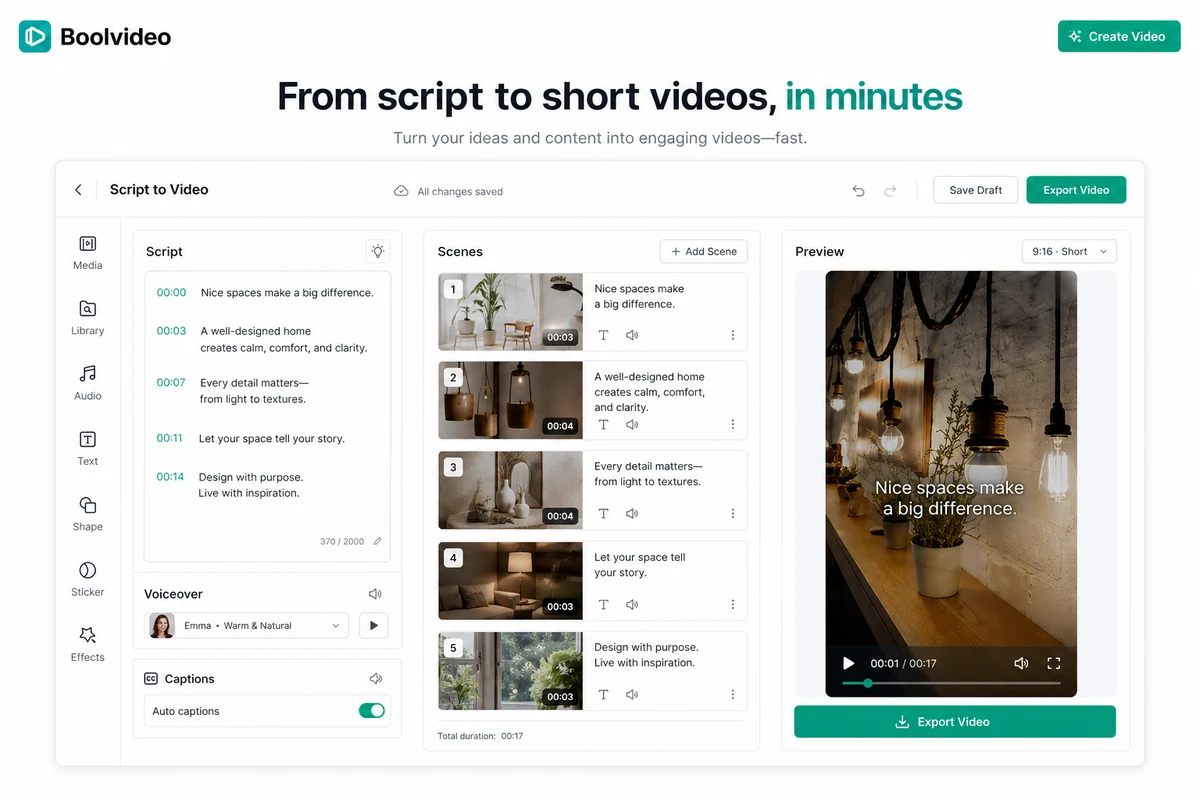
Boolvideo is an all-in-one AI video generator for turning ideas, scripts, product links, blogs, uploaded media, and templates into videos. The practical promise is simple: instead of opening a blank video editor and building every scene manually, you start from an input and let the system assemble a draft.
The official positioning leans heavily into creator and business use cases. It mentions content creators, e-commerce sellers, marketers, designers, photographers, and artists. It also supports several input routes: Idea to Video, Script to Video, Product to Showcase Video, Product to Voice-over Video, Blog to Video, Visuals to Video, Templates to Video, and a start-from-scratch editor.
That makes Boolvideo broader than a single text-to-video toy, but it is still not the same as a professional editing suite.
The right way to understand it is as a speed layer. It helps you get from raw content to a usable first video draft faster. It can match scenes from uploaded brand assets or stock clips, generate voiceover, and produce MP4 exports in supported resolutions depending on the plan. It also supports commercial use according to the public homepage.
Our review approach compares public product pages, pricing signals, help documentation, third-party review patterns, buyer workflow fit, and nearby alternatives. I would not judge Boolvideo only by the demo idea. The real question is whether the generated result is good enough after one or two revision passes to justify the plan and credit usage.
The common wrong expectation is thinking Boolvideo removes all creative judgment. It does not. You still need to check script accuracy, scene choice, brand consistency, voiceover quality, captions, pacing, and whether the final video actually fits the platform where you will publish.
Who should use Boolvideo?
Boolvideo is most attractive when the buyer has repeated video needs and does not want to become a full-time editor.
E-commerce sellers are probably the clearest fit. If you already have product URLs, product images, listing copy, and brand assets, Boolvideo gives you a faster path from product information to promotional video drafts. The condition is that the generated video must still look credible enough for your store, social channels, or ads. Before paying, I would test one real product page rather than a random demo prompt.
Creators and social media operators may also find it useful. If you often turn ideas, captions, or short scripts into reels and explainers, a script-to-video workflow can save setup time. The important check is output control. If every generated draft needs heavy editing, the speed advantage shrinks.
Bloggers and content operators can use Boolvideo for repurposing. Blog-to-video workflows are useful when a written post already has a clear structure and you want a short visual summary for social distribution. I would test one existing article and see whether the tool picks scenes, tone, and length appropriately.
Small marketing teams may use it for lightweight ad creative testing. Boolvideo can help produce quick angles before spending time on polished production. The buyer should verify credits, exports, aspect ratios, and brand asset handling before treating it as a production system.
Beginners may appreciate the guided workflow. If you do not have video editing experience, starting from idea, script, product URL, or template is much easier than learning a full editing timeline. That said, beginners should still review every export before publishing.
Who should avoid Boolvideo?
I would avoid Boolvideo if you expect it to replace a professional video editor.
Professional editors need timeline precision, color control, audio shaping, brand motion rules, detailed transitions, project organization, and client-level review workflows. Boolvideo can help produce drafts, but it is not built to replace that kind of post-production environment.
Strict brand teams should also be careful. If every video requires exact layout rules, legal approval, brand governance, localization QA, or multi-step review, a quick AI generator may become a source of extra checking rather than a finished workflow.
One-off users may not need a paid plan. If you only need one simple promo or social clip, use the free testing path first and compare the result against easier alternatives. A subscription makes more sense when the video workflow repeats.
Buyers who dislike credit management should slow down. With AI video tools, the monthly price is only part of the cost. The practical cost depends on how credits are consumed across generation, revision, export, resolution, and video length.
I would also be cautious if you are buying mainly because of a coupon. A coupon can make a good fit cheaper. It cannot make an output-quality problem go away.
How Boolvideo fits into a real workflow
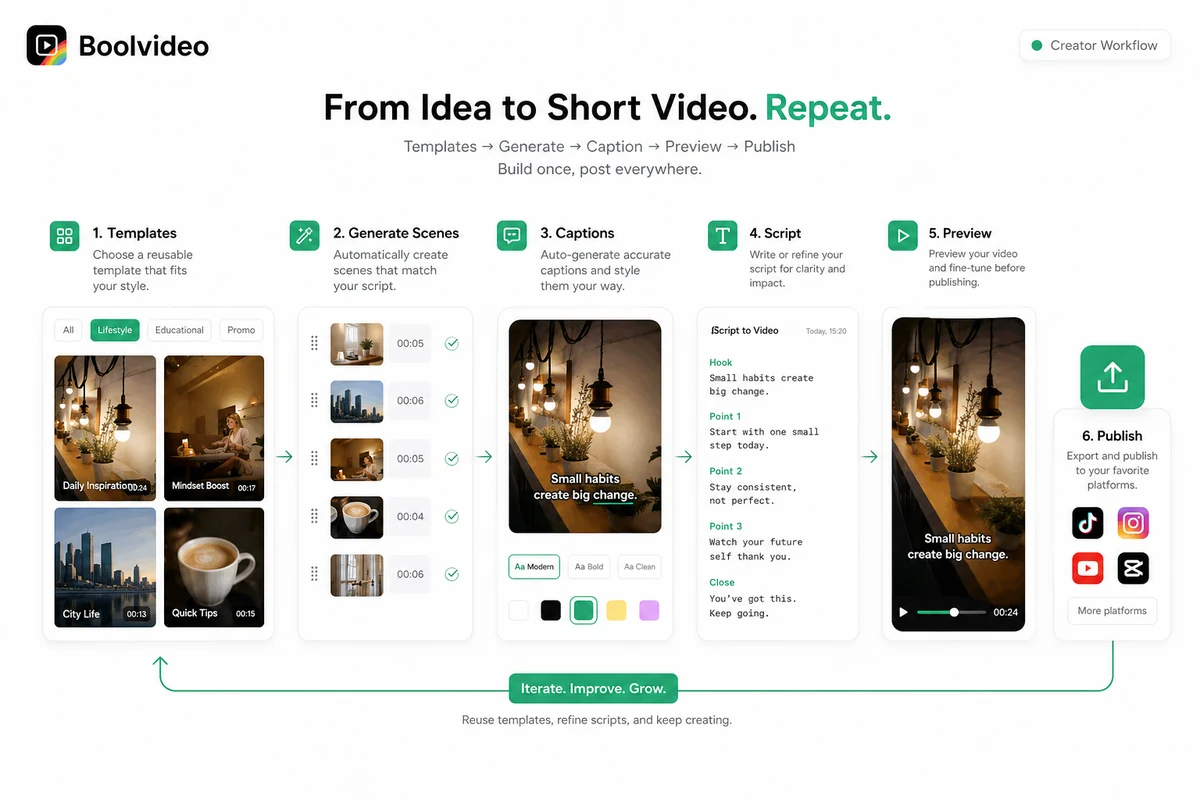
A realistic Boolvideo workflow starts before the video is generated.
First, decide the input. Is this a product URL, a short script, a blog post, a product image set, or a raw idea? Boolvideo supports several starting points, but the result will only be as clear as the material you provide.
Second, generate a draft. This is where the tool can save time. Instead of manually choosing every stock clip, writing every scene, and matching everything to a voiceover, Boolvideo gives you a first version quickly.
Third, review the structure. Does the video explain the product, post, or idea in the right order? Does it open strongly? Does the pacing fit a reel, ad, short explainer, or product showcase?
Fourth, check the assets. If you uploaded brand or product media, did the tool prioritize them correctly? If it used stock clips, do they look relevant or generic? This is one of the most important buyer checks because generic stock matching can make AI video feel cheap.
Fifth, review voiceover, captions, and export settings. The official homepage says Boolvideo supports 70+ languages and MP4 exports in 720p or 1080p depending on plan. That is useful, but you should verify the exact plan limits and quality before using the output commercially.
Finally, decide whether the video is good enough to publish or only good enough to hand off for editing.
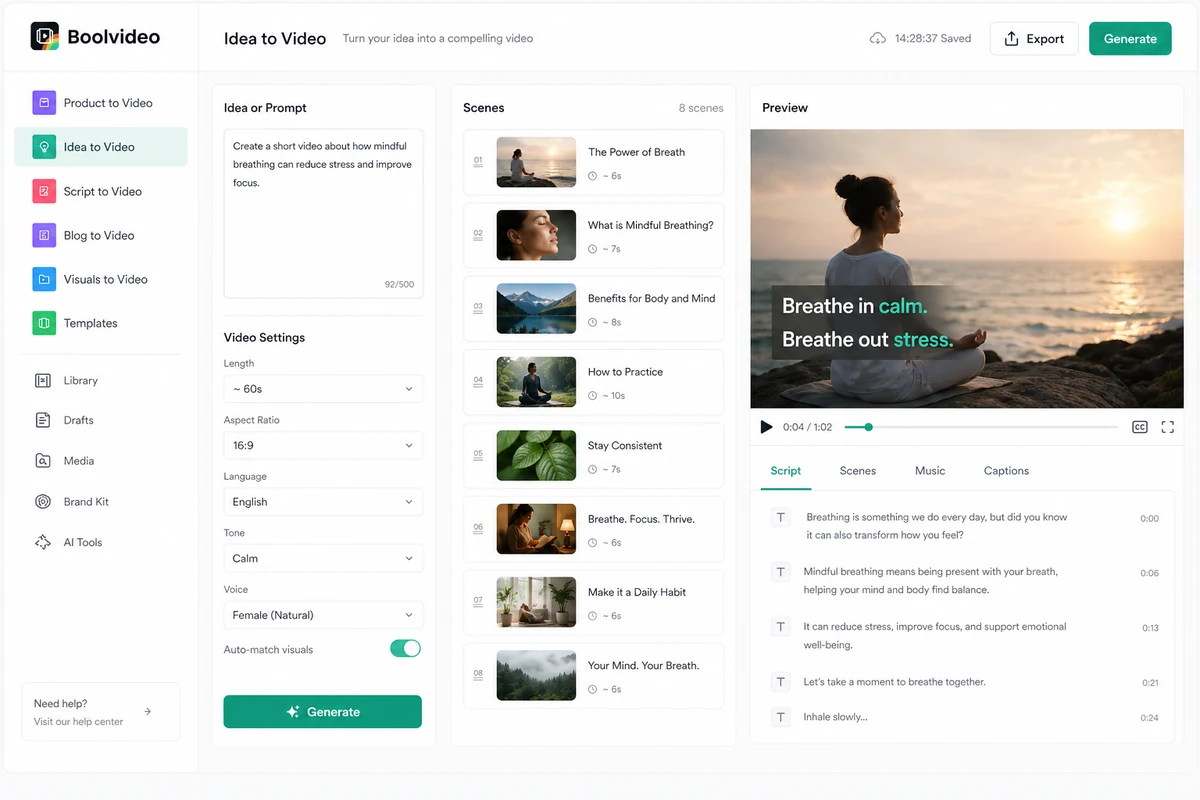
Workflow check: Use Boolvideo on one real product, script, or blog post before judging whether the paid plan fits your publishing rhythm.
Real-world buyer scenarios
An e-commerce seller wants product promo videos. Boolvideo makes sense if the seller has product pages and images but does not want to build every video manually. The risk is that the generated video may still need editing to match the store’s tone, product positioning, or ad format. Before paying, the seller should test one real product URL and check how many credits the full export consumes.
A creator wants short educational videos from scripts. Boolvideo may help when the creator already writes short scripts and needs scenes, voiceover, and visuals assembled faster. It may fail if the creator needs a very specific visual style, pacing, or voice. Fliki may be a better comparison if narration and text-to-speech are the central decision.
A blogger wants to repurpose articles. This is a practical use case. A blog post already has structure, headings, and arguments. Boolvideo can turn that into a short visual summary. The buyer should check whether the generated video captures the article’s actual message or turns it into a shallow stock-footage montage.
A small marketing team wants to test video ad angles. Boolvideo can be useful for rough creative testing. The team can generate several directions quickly, then polish the winner elsewhere. The risk is treating generated drafts as final ads without checking brand consistency, claims, captions, and platform requirements.
Key features that actually matter
Idea to Video
Idea to Video is useful when you know the topic but do not have a finished script. Boolvideo can help create the starting structure, scenes, visuals, and voiceover.
Buyer note: this is best for brainstorming and draft generation. I would not use it as the final source of truth for product claims, technical explanations, or regulated marketing copy.
Script to Video
Script to Video is probably the cleaner workflow for serious users. If you already know what the video should say, the tool can focus on turning that script into a visual sequence.
Buyer note: test this with a real script. If the visual matching is close enough, the feature can save time. If it picks generic or off-tone scenes, you may still need manual editing.
Product URL and product media workflows
This is one of the strongest reasons to look at Boolvideo. Product URL and product-image workflows are useful for e-commerce sellers who want quick showcase videos, voiceover videos, or promo clips.
Buyer note: verify whether the output reflects the product accurately. Do not publish product claims, pricing, or benefits unless you have checked them manually.
Blog to Video
Blog to Video can help content operators create social assets from existing posts. It is useful when you need a top-of-funnel video summary, not a full replacement for the article.
Buyer note: compare Boolvideo with Pictory if blog repurposing is your main job. Pictory is a more direct comparison for written-content-to-video workflows.
Custom media library
Custom media support matters because it lets buyers use their own brand assets instead of relying only on stock clips. This can make the difference between a generic AI video and something closer to a brand-consistent draft.
Buyer note: upload real assets during the test. If Boolvideo cannot use them well, the paid plan may not solve the brand-fit problem.
Pricing and plan value
Pricing is the section where I would slow down.
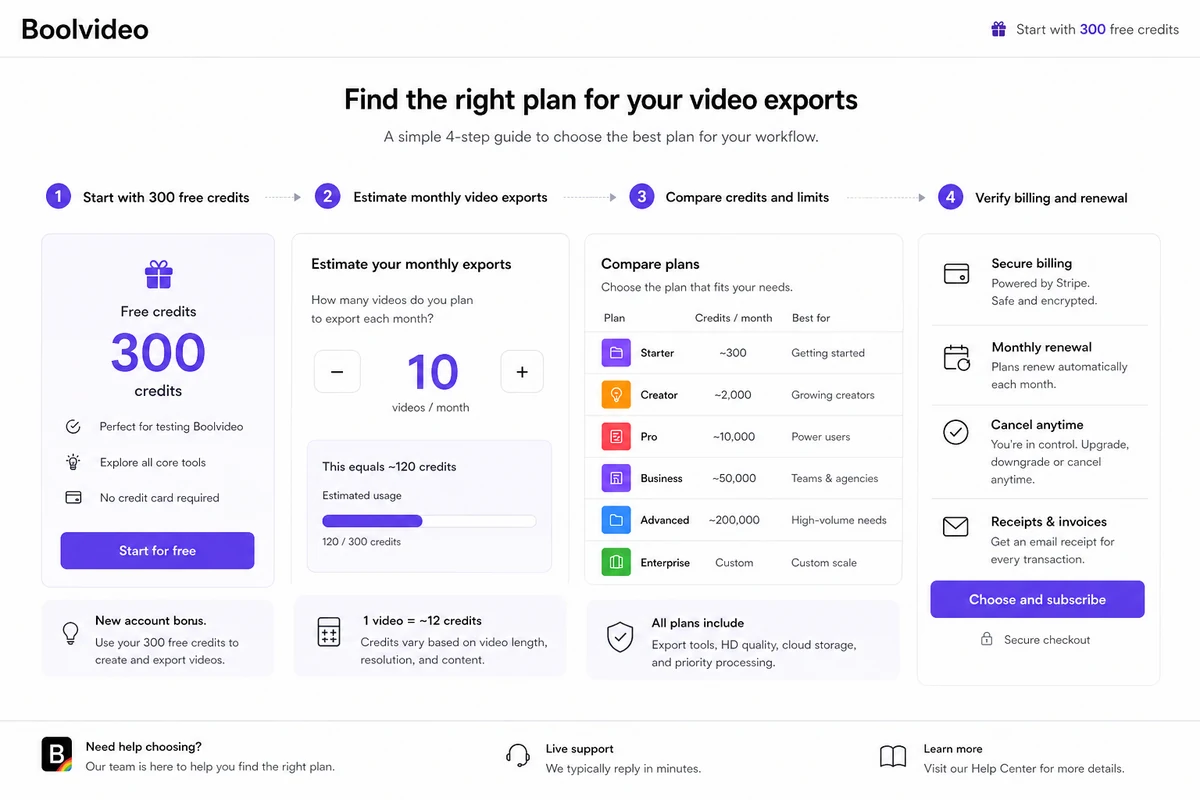
The official homepage presents Boolvideo as free to try with 300 signup credits, enough to export 3 videos using core features such as Idea to Video and Script to Video. That is the safest starting path because it lets you test the real workflow before paying.
For paid pricing, public signals need careful handling. Capterra currently lists Boolvideo with two paid plans: Standard at $29 per user per month and Pro at $69 per user per month. It also lists a free trial, no free version, and no credit card required. Those are useful reference points, but I would still verify the live Boolvideo app pricing page before checkout because AI video pricing can change quickly and plan value depends heavily on credits and export limits.
The most important pricing question is not just “What is the monthly price?”
It is:
- How many credits does one typical video consume?
- Do revisions consume extra credits?
- Which exports are included?
- Is 720p enough, or do you need 1080p?
- Are watermarks removed on the plan you choose?
- How many videos will you publish each month?
- Does annual billing make sense only after repeated use is proven?
A $29 plan can be reasonable if it supports a repeatable workflow. It can feel expensive if you only export a few usable videos. A $69 plan can make sense for higher output volume, but only if the extra credits, features, or export capacity match the work.
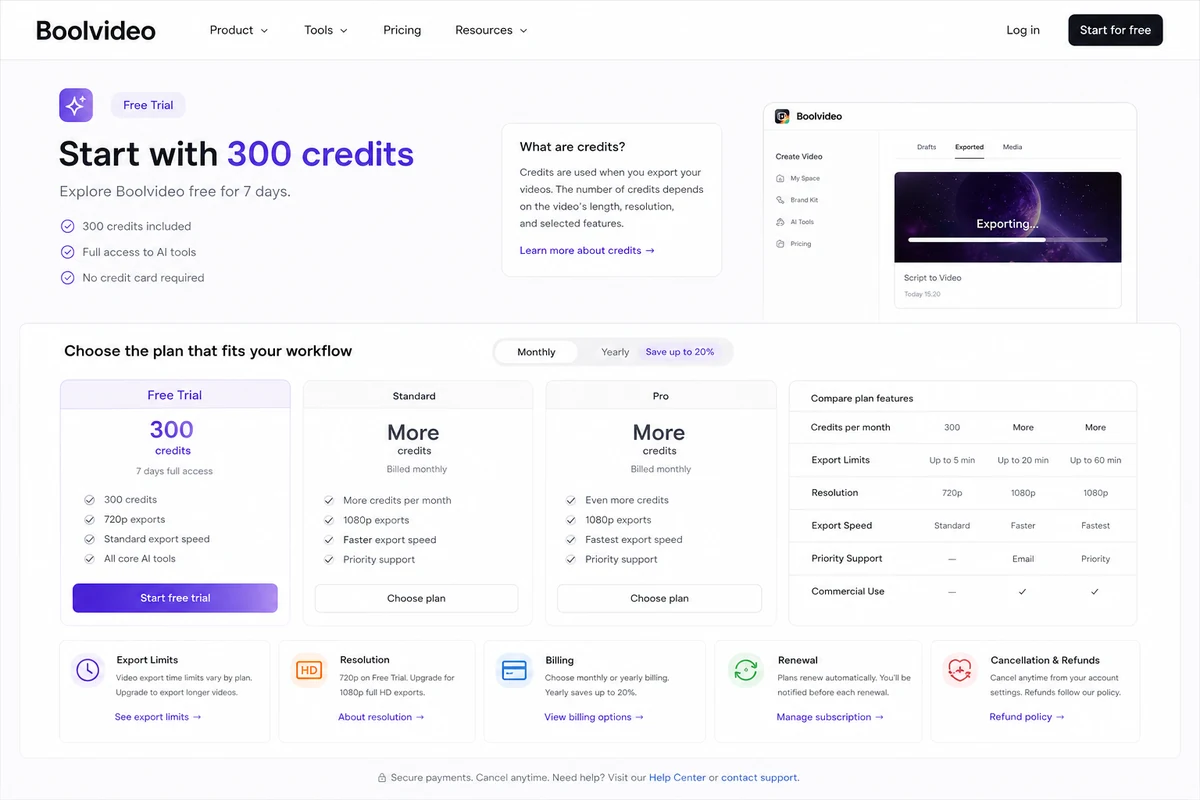
Pricing check: If Boolvideo still fits, verify live pricing, credit usage, and export limits before choosing monthly or annual billing.
Check Boolvideo pricing Check current offers Read store guide
Free plan, trial, coupon, and checkout notes
Boolvideo’s free testing path is useful because it lets you test the core value before paying. The homepage says new users receive 300 credits, enough to export 3 videos using core features. That is not the same as proving long-term value, but it is enough to answer the first question: can Boolvideo produce something useful from your real input?
I would use those credits carefully. Do not waste them on a throwaway prompt. Use a real product URL, real blog post, real script, or real set of product images.
The coupon path should come after that test, not before it. Boolvideo’s help center includes a subscription collection with cancellation, upgrade, downgrade, refund request, and coupon activation topics. That tells me coupons can exist as a checkout or account workflow, but I would not assume a public coupon code is active unless the current coupon page or checkout route confirms it.
The order I would use is simple:
- Test the free credits with a real workflow.
- Check how many credits the export consumes.
- Review the output quality and editing effort.
- Compare monthly pricing against expected video volume.
- Check active offers only after the product fit is clear.
- Read cancellation and refund-request help before choosing a longer billing interval.
That protects you from the most common mistake: buying the discount instead of buying the workflow.
What I would check before buying Boolvideo
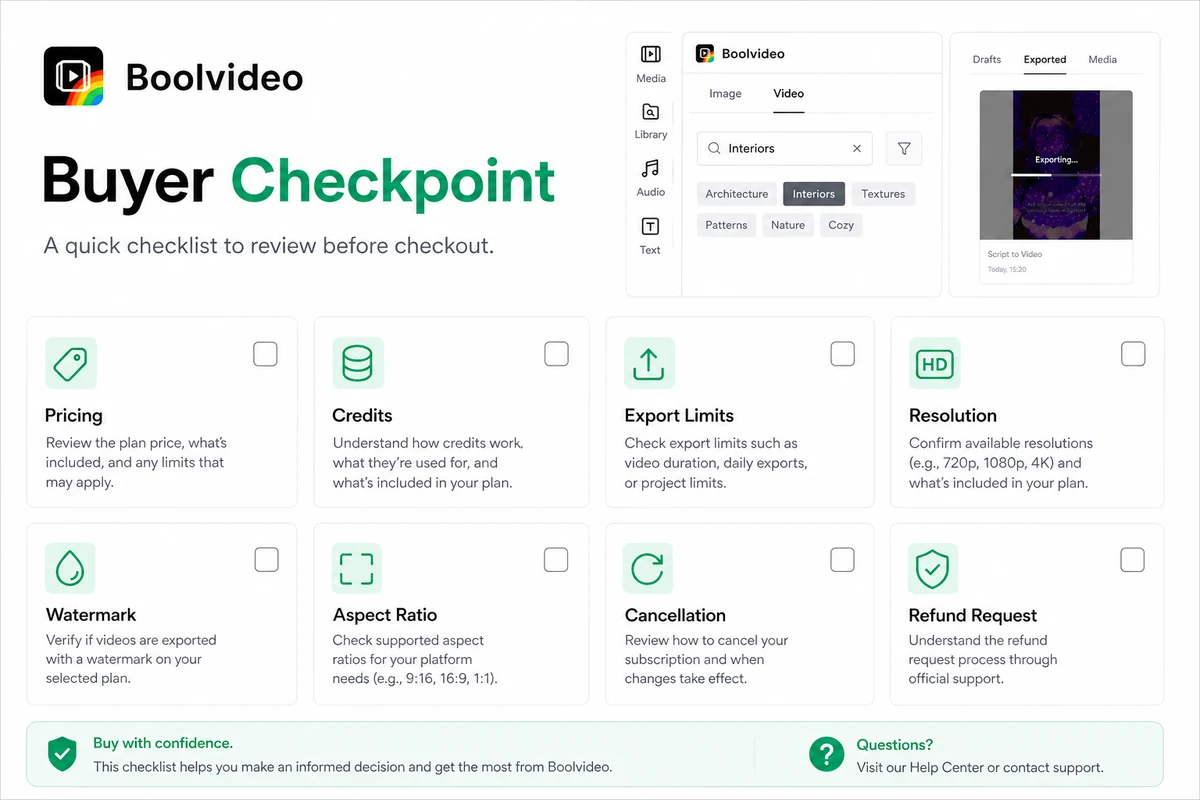
If I were buying Boolvideo for recurring content work, I would check seven things before paying.
- Credit consumption per real video. Do not estimate from marketing copy. Generate one real video and track what it costs.
- Export quality and resolution. Confirm whether your plan supports the output quality you need for TikTok, Instagram, YouTube Shorts, ads, or product pages.
- Watermark and commercial-use terms. The public homepage supports commercial use, but you should confirm any plan-specific restrictions before publishing client or paid ad work.
- Aspect ratios and platform fit. A video that looks good in one format may not work for every channel.
- Brand asset handling. Upload your own product images or media library and see whether Boolvideo uses them in a way that feels credible.
- Cancellation and refund process. The help center provides cancellation steps and a refund-request topic, but buyers should check the current support flow before relying on refund assumptions.
- Alternatives. Compare Pictory, Fliki, HeyGen, and AKOOL based on your actual video type, not only on feature lists.
A simple test before paying
Before choosing a paid Boolvideo plan, I would run one low-risk test.
- Pick one real input: a product page, script, blog post, or product image set.
- Generate one video using the workflow you would actually use every month.
- Track the credits consumed from start to final export.
- Check whether the video needs light editing or heavy rebuilding.
- Review voiceover, captions, pacing, stock clip relevance, and brand asset usage.
- Export in the format and resolution you would use publicly.
- Compare the result with one alternative tool before paying annually.
This test is more useful than reading ten feature lists. Boolvideo either saves meaningful time on a real project, or it does not.
Pros explained
Boolvideo has practical input flexibility. Ideas, scripts, product links, blogs, visuals, templates, and manual editing all point to a tool designed around real content operations. That matters because creators rarely start from the same input every time.
It has a sensible free testing path. Signup credits lower the risk of trying the core workflow. The value depends on using those credits well, but the existence of a free test is helpful.
It fits e-commerce and product-video work. Product URLs and product-image workflows are not minor details. They give Boolvideo a clearer role than a generic AI video generator that only starts from a prompt.
Custom media support is a meaningful advantage. If Boolvideo can use your own product photos, brand clips, and media library well, the output has a better chance of looking like your brand rather than a stock montage.
The learning curve looks beginner-friendly. For buyers who do not want a traditional editing suite, a guided generator can be the difference between producing videos consistently and never starting.
Cons explained
Credit economics can change the buying decision. AI video often feels simple until you count generations, revisions, exports, and monthly volume. Buyers should not assume the entry plan is enough for real use.
Output control may not satisfy advanced users. If you need exact motion design, color grading, advanced audio work, or precise scene-level edits, Boolvideo may only help with rough drafts.
Pricing clarity requires live verification. The official homepage confirms the free credit path, while third-party pricing pages list Standard and Pro plans. The final purchase decision should come from the live app pricing and checkout page.
Third-party evidence is useful but limited. Capterra has more reviews than G2, while G2 currently has limited review volume for Boolvideo. That means I would use review patterns as caution signals, not as complete proof.
Cancellation and refund expectations need attention. Boolvideo has help articles for subscription actions, including cancellation and refund requests. I would read those before choosing a longer-term billing path.
Green flags and red flags
Green flags:
- You can use the free credits on a real product, script, or blog workflow.
- The first export needs only light editing.
- Your brand assets appear naturally in the generated video.
- Credit usage is predictable enough for your monthly video volume.
- The plan supports the resolution, format, and commercial use you need.
Red flags:
- You need heavy manual edits after every generation.
- You are buying only because of a coupon or temporary offer.
- You do not know how many videos you need each month.
- You need advanced timeline editing or strict enterprise approval flows.
- You have not checked cancellation, refund, and renewal details.
The best signal is not whether Boolvideo looks impressive in a demo. The best signal is whether one real workflow produces a video you would actually publish.
Boolvideo vs alternatives
Boolvideo’s alternatives depend on the video job. I would not compare every AI video tool as if they solve the same problem.
Pictory vs Boolvideo
Pictory is the more direct comparison if your main workflow is turning written content into videos. If you have blog posts, scripts, webinars, or long-form content to repurpose, Pictory may be the stronger first comparison.
Boolvideo may still make more sense if product URLs, product images, and quick e-commerce video creation are central to your workflow.
Fliki vs Boolvideo
Fliki is worth comparing when voiceover, narration, text-to-speech, and multilingual content are the heart of the project. If the audio layer matters more than product URL generation, Fliki may be a better fit.
Boolvideo is more attractive when the buyer needs a broader product, script, blog, and media-to-video workflow.
HeyGen vs Boolvideo
HeyGen is stronger for avatar-led business videos, spokesperson content, localization, and talking-head style communication. If you need a digital presenter or avatar workflow, Boolvideo is not the cleanest direct replacement.
Boolvideo fits better when the buyer wants product promos, social clips, or visual videos generated from existing content and media.
AKOOL vs Boolvideo
AKOOL is an adjacent route, not a one-to-one replacement. It is more relevant when AI video personalization, avatars, face workflows, or campaign-level creative variation matter.
Boolvideo is simpler to judge as a product and content-to-video generator. AKOOL is better to compare when personalization and advanced AI video effects are the buyer’s main direction.
Trust, refund, and buyer-risk notes
Boolvideo is not a product I would buy on headline pricing alone.
The official homepage gives enough information to understand the workflow: AI video generation from ideas, scripts, product links, blogs, uploaded media, and templates; free signup credits; 70+ language support; MP4 export; and commercial-use support. That is useful.
But the buying risk sits in the details.
Live pricing should be checked before purchase. Third-party pricing pages currently point to Standard and Pro tiers, but AI video plan structures can change, and plan value depends on credits, exports, resolution, and renewal terms.
Cancellation and refund expectations also deserve attention. The help center includes subscription topics for cancellation and refund requests. The cancellation article explains that users cancel through the pricing page or account plan flow and says this is the way to cancel. Before annual billing, I would read the current cancellation and refund-request instructions carefully.
There is also an output-risk layer. Generated videos can save time, but they can also introduce weak scene matches, generic stock footage, awkward pacing, inaccurate product emphasis, or off-brand visuals. That matters more if you use the video in paid ads or client work.
Finally, treat coupons as secondary. Check active offers after workflow fit is clear. The core decision is whether Boolvideo saves enough time on videos you actually publish.
Final verdict
Boolvideo is a practical AI video generator for buyers who need faster short-form video drafts from real inputs: ideas, scripts, product URLs, blog posts, templates, or brand media.
I would consider it if you are an e-commerce seller, creator, blogger, or small marketing team with a repeatable video workflow. It is especially worth a test if you want product promos, social clips, quick explainers, or lightweight ad creative without opening a traditional editing suite every time.
I would skip it if you need advanced editing control, strict brand governance, detailed analytics, avatar-led business video, or only one one-off export. I would also avoid annual billing until you understand credit usage and output quality on your own material.
The strongest buying path is simple: use the free credits on one real project, compare the output against your actual publishing standard, check the live pricing and cancellation terms, then decide whether a paid plan supports recurring production.
For my money, Boolvideo makes the most sense when it turns a repeatable video task into a faster draft-and-review process. If the first real test does not save meaningful time, the coupon path should not carry the decision.
