ImagineArt Pricing, Plans & Creative Fit
ImagineArt is best treated as a broad AI creative suite rather than a narrow AI art toy. It covers image generation, video generation, workflow building, editing tools, audio or voice paths, and API-style creative infrastructure. The buying decision is less about whether the tool can generate visuals and more about whether its credit system, model access, output quality, and renewal terms fit the buyer's real production rhythm.
Fit → price → checkout
Use these routes after the official-site check: coupon first, review for fit, compare if unsure.
ImagineArt pricing snapshot
Fast commercial checks before pricing, coupons, or a deeper review.
ImagineArt product tour
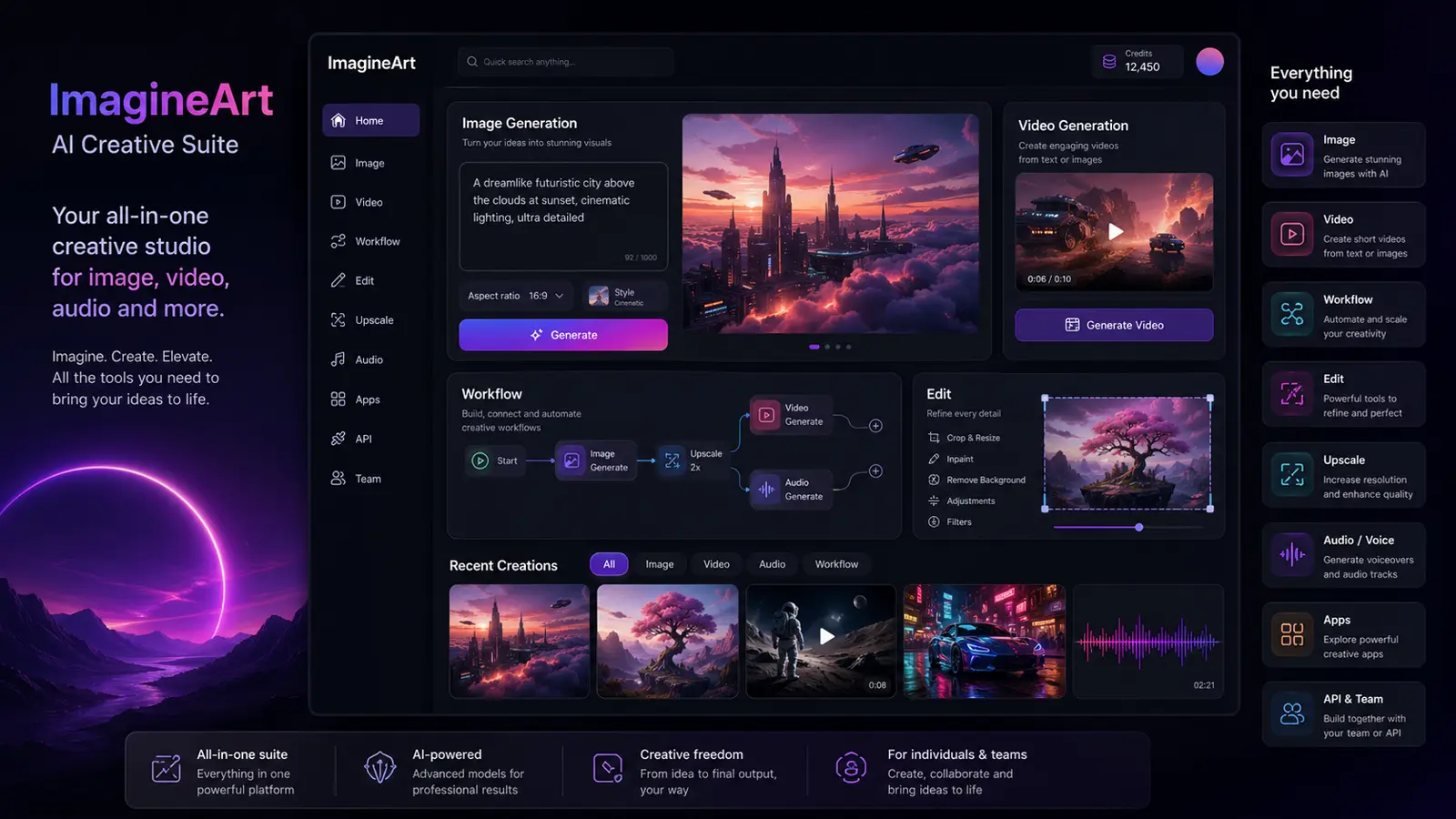
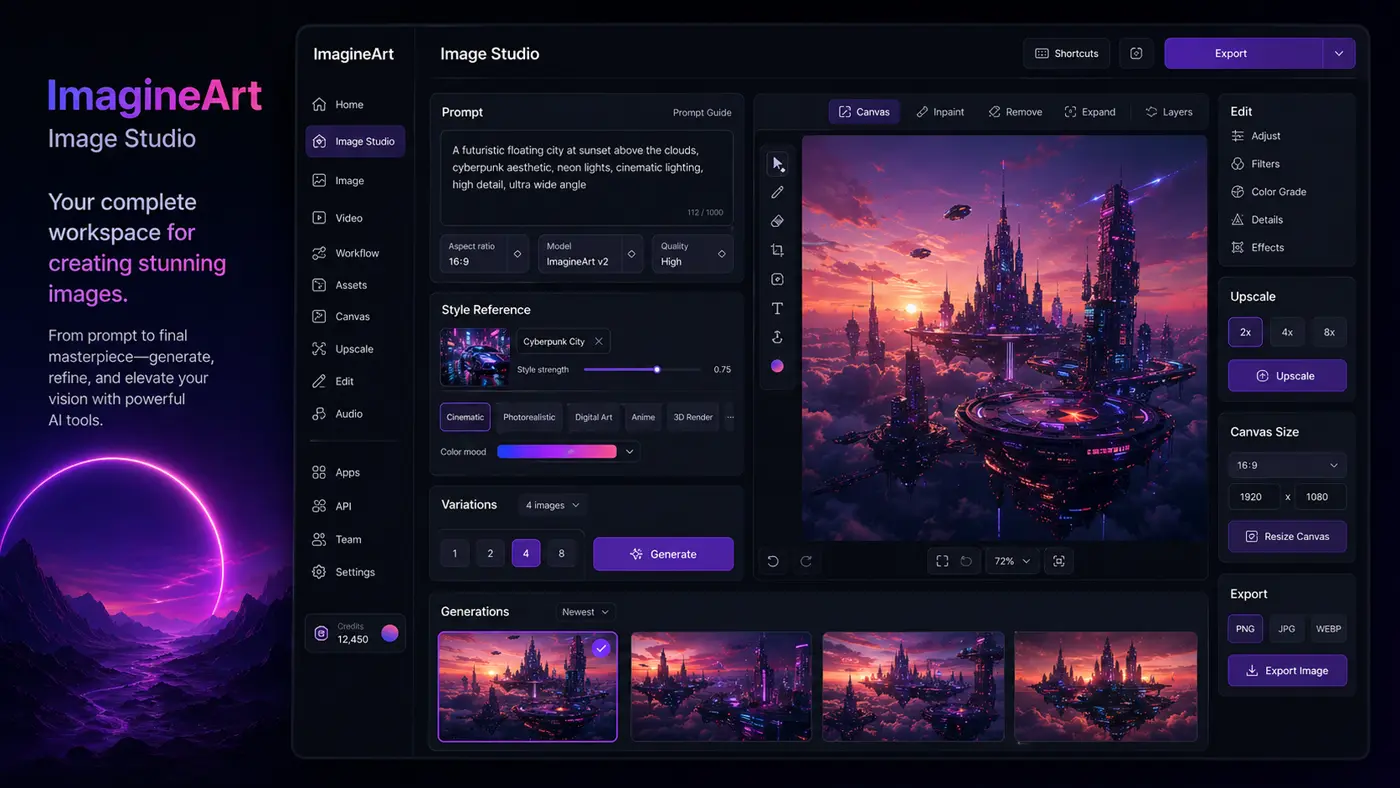
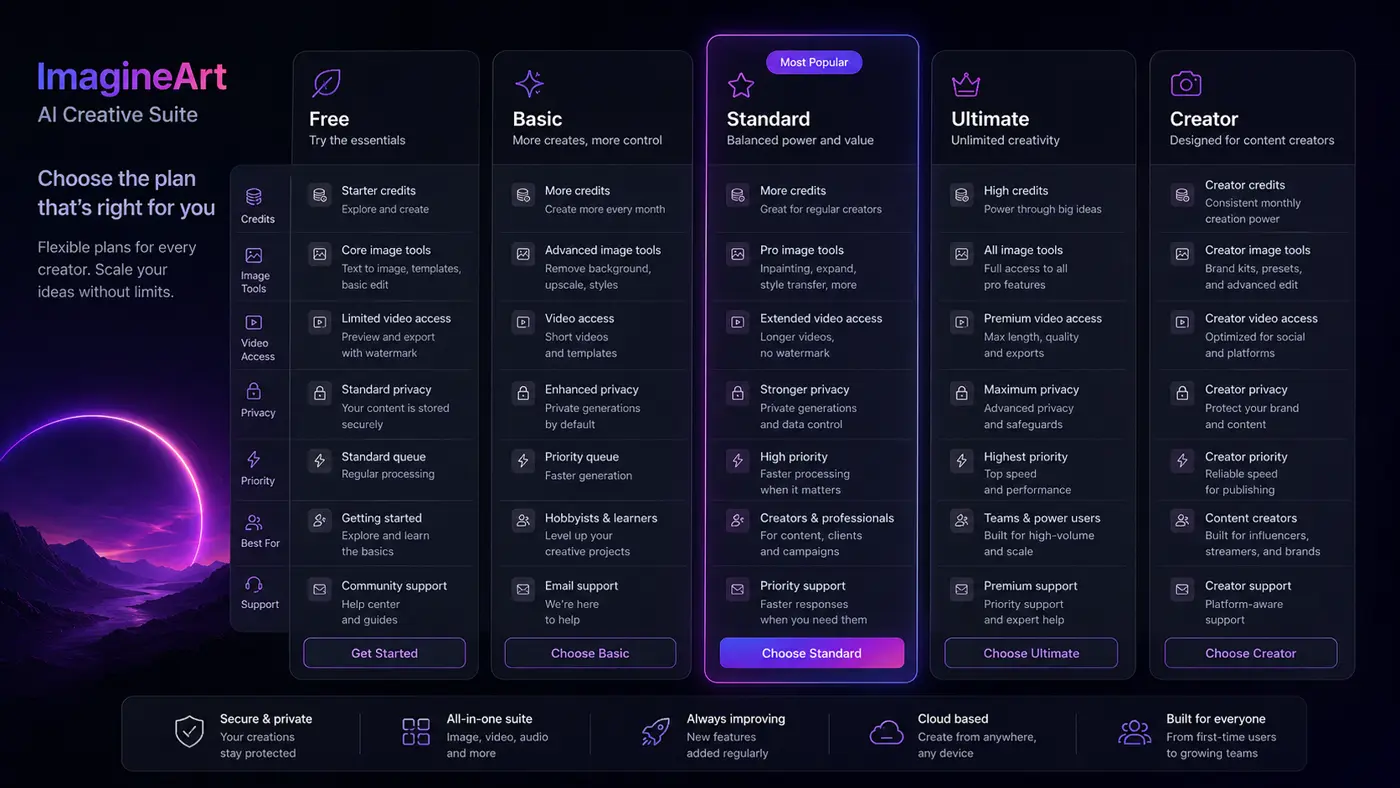
The tour should help buyers understand that ImagineArt is a multi-surface creative suite, not just a text-to-image box. The most useful visuals are pricing, Image Studio, Workflows, and API context because those are the screens that affect plan choice.
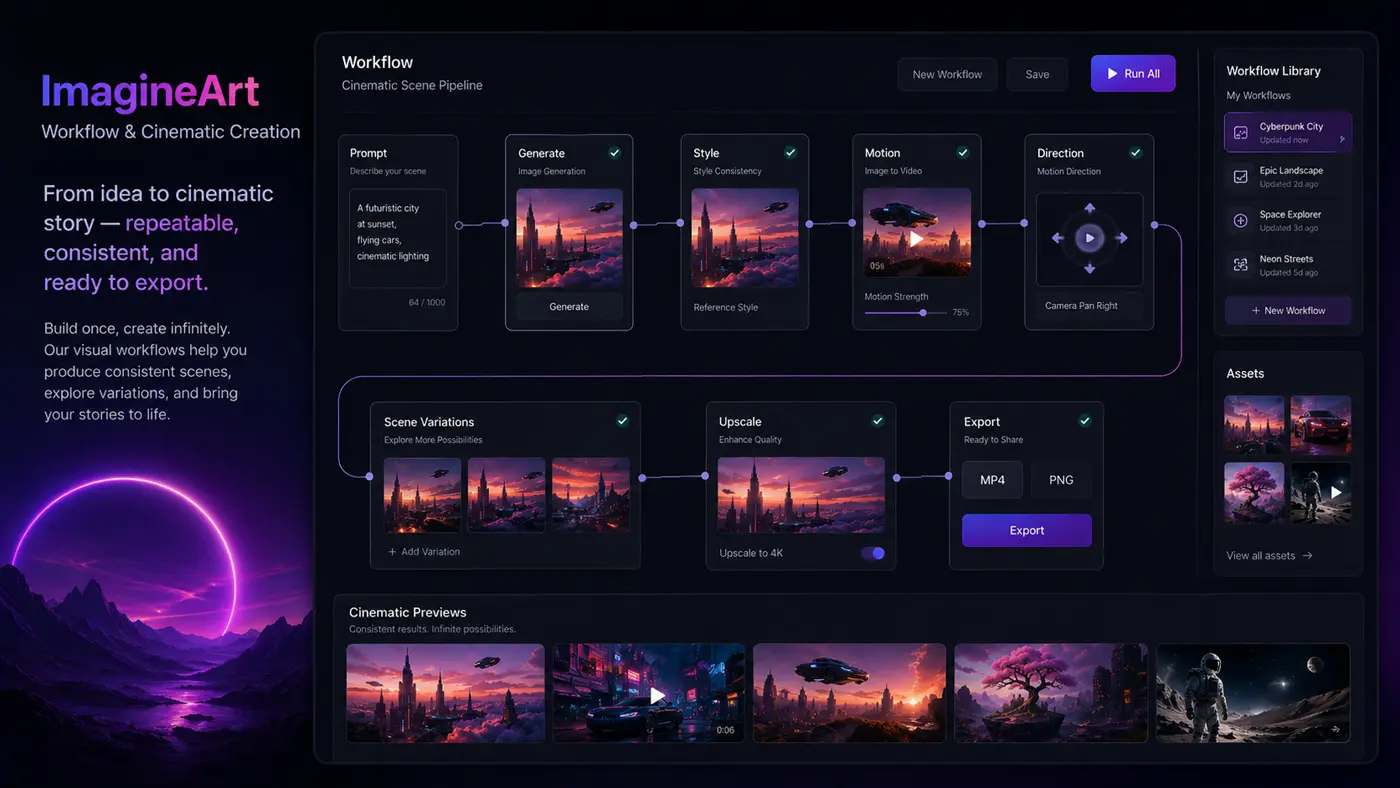
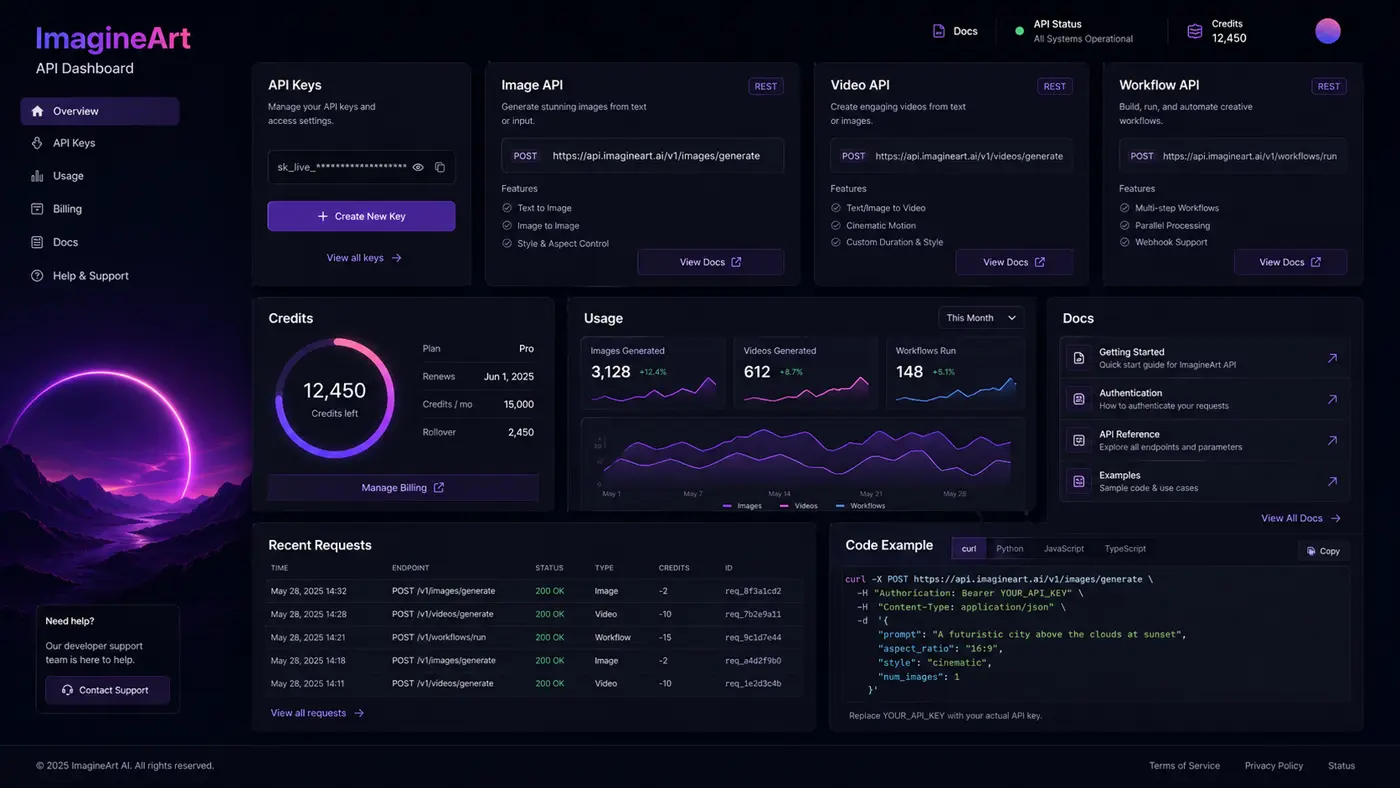
ImagineArt deserves a careful store page because the product is broad and the pricing logic is not as simple as one fixed monthly fee. A buyer is really deciding whether an AI creative suite with credits, workflows, apps, videos, images, voice tools, and API options is worth adding to their production stack.
What ImagineArt actually does
ImagineArt is an AI creative suite for generating and editing images, videos, shorts, voice, and related creative assets from prompts and references. Its official pages point buyers toward Image Studio, Video Studio, Workflows, AI image generation, AI video generation, editing tools, apps, and API access. That makes it more useful for a creator or marketing workflow than for someone who only needs one decorative AI image.
- Generate images from text prompts and reference images.
- Create or edit videos with AI models and motion tools.
- Use Image Studio for real-time generation, canvas editing, and image guidance.
- Evaluate API paths when building AI creative features into a product.
How the credit-based pricing works
The official help documentation explains that ImagineArt uses credits across the platform, with paid plans available for Individuals and Teams across monthly, quarterly, or yearly billing. Free users get 100 credits that refresh every 24 hours. Basic is listed at $9 per month equivalent with 2,000 monthly credits, while Standard, Ultimate, and Creator increase credits, priority, team seats, and access levels. The buyer mistake to avoid is comparing only the monthly sticker price without estimating credit burn.
- Free plan: 100 credits refresh every 24 hours.
- Basic: $9 per month equivalent with 2,000 monthly credits.
- Standard: $30 monthly with 8,000 monthly credits.
- Ultimate and Creator are better suited to heavier visual or video production.
Why Image Studio matters for creative fit
Image Studio is one of the strongest signals that ImagineArt is built for ongoing visual work. The official page lists text-to-image, image guidance, real-time generation, canvas design, face portraits, image editing, reimagine, creative upscale, style reference, text-to-PNG, and restructure tools. That matters because creators often need iteration and control after the first prompt, not just a one-shot generation.
- Image guidance can help maintain structure, faces, and references.
- Canvas editing keeps layout and creative assembly in the same workspace.
- Style reference and upscale features are useful when visual consistency matters.
Refund and renewal checks before checkout
ImagineArt publishes a refund policy, but it is not a casual no-risk guarantee. Monthly and quarterly initial purchases may be refund-eligible within three calendar days only if the buyer has used no more than 300 credits. Annual initial purchases may have a five-day window under the same credit-use limit. The policy also says recurring subscriptions auto-renew unless canceled, and it lists several non-refundable cases such as subjective dissatisfaction, user error, and failure to cancel before renewal.
- Read the refund policy before testing paid models heavily.
- Track credit use immediately after purchase if you may request a refund.
- Cancel before renewal if you only needed a short creative sprint.
API and team paths are real buyer differentiators
ImagineArt is not only a browser-based creative workspace. The product has an API dashboard and documentation for creative generation paths, including image and video generation. Its subscription documentation also shows team seats across paid tiers. This matters for buyers who are evaluating ImagineArt as part of a workflow, product, agency operation, or team content pipeline rather than a solo art app.
- API buyers should confirm endpoint coverage before committing.
- Teams should compare seat counts, priority, privacy, and support.
- Developer use cases may need a different plan conversation than solo creator use.
Best next step with ImagineArt
The safest next step is to test the free credit path first, then read the review page if the workflow still looks useful, then compare monthly, quarterly, and yearly pricing before choosing a paid plan. If the buyer mainly wants a coupon, the right move is still to verify plan fit first because the best saving is not useful when the selected credit tier is too small or too large for the real workload.
- Start with free credits and one real creative task.
- Move to the review path when workflow fit is still unclear.
- Use the pricing or deal route only after the buyer knows the likely credit need.
Best savings path from this store page
This is the clearest savings route to check once the product already looks like a fit.
ImagineArt positions annual billing as the better value route for creators who already know they will use image and video credits every month. Treat this as a plan-selection saving, not a coupon code.
Use this offer as a buyer-safe entry point. Pricing, plan limits, and coupon acceptance can change at checkout.
Free accounts receive daily credits for testing
Potential quarterly billing discount on selected plans
Use comparison routes when the category fit is still open
Use these comparison routes when the product still looks plausible, but the category fit is not fully settled.
Better for avatar, video translation, and business-facing AI video workflows where the buyer needs presenter-style output.
Often better for text-to-video narration workflows, especially when voiceover and simple content repurposing matter more than broad image tools.
Worth checking for ecommerce and product-video automation when the buyer wants faster ad-style video production from assets.
Useful as a closer AI video alternative when the buyer is focused on prompt-to-video or image-to-video output rather than a full creative suite.
Verification points worth checking before you click out
Where this store usually fits best in the workflow
ImagineArt fits creators who need fast image concepts, character styles, social visuals, and short creative variations before committing to a final design direction.
Marketing teams can use ImagineArt to draft campaign visuals, product mockups, posters, short clips, and social content ideas without starting every asset from a blank canvas.
Workflows and video tools make more sense when the buyer needs repeatable image-to-video or cinematic content paths, not just single-image output.
Developers and product teams can evaluate ImagineArt when they need image or video generation inside a product experience, but they should confirm API pricing and limits first.
Practical checkpoints before and after signup
- Clarify whether the real need is image generation, video generation, editing, API access, or a repeatable workflow.
- Use free credits to test output quality with one real prompt set before considering paid plans.
- Compare ImagineArt against at least one focused video tool and one focused image tool.
- Estimate monthly credit use based on real image, video, and workflow runs.
- Check whether Standard, Ultimate, or Creator has the right balance of credits, priority, privacy, and team seats.
- Read the refund policy before heavy paid testing.
- Verify live monthly, quarterly, and yearly pricing.
- Confirm whether any checkout promo or official discount is active.
- Cancel before renewal if the tool was only needed for a short creative sprint.
Fast-read signals for workflow fit and buying friction
Questions readers usually ask before choosing this store
Is ImagineArt only an AI image generator?
No. ImagineArt includes image generation, video generation, editing tools, workflows, apps, voice or audio paths, and API documentation. The image generator may be the easiest entry point, but the product is better judged as a broader AI creative suite.
Does ImagineArt have a free plan?
Yes. Official help documentation says new accounts receive 100 free credits that refresh every 24 hours. The free plan is useful for testing, but some premium models, privacy options, speed, resolution, and advanced features may require a paid tier.
What paid plan should buyers look at first?
Basic is the lowest paid step in the official help documentation, but many serious creators will compare Standard and Ultimate because those tiers show higher monthly credits and more production capacity. The right plan depends on how many images, videos, or workflow runs the buyer expects each month.
Are ImagineArt purchases refundable?
Refunds are conditional. Monthly and quarterly initial purchases may be eligible within three calendar days if no more than 300 credits have been used, while annual initial purchases may have a five-day window under the same usage limit. Buyers should read the policy before upgrading.
What is the safest next step before buying ImagineArt?
Start with the free credit path, run a real creative task, then compare the live subscription page against your expected monthly credit use. If fit is still unclear, read the review path before chasing any deal route.
Choose the next route that matches what you still need to decide
The strongest next click depends on whether you still need product judgment, a savings route, or a broader category comparison.