Quick verdict
YouLearn AI is one of those tools I would not judge by the word “summarizer.”
That undersells the buying decision.
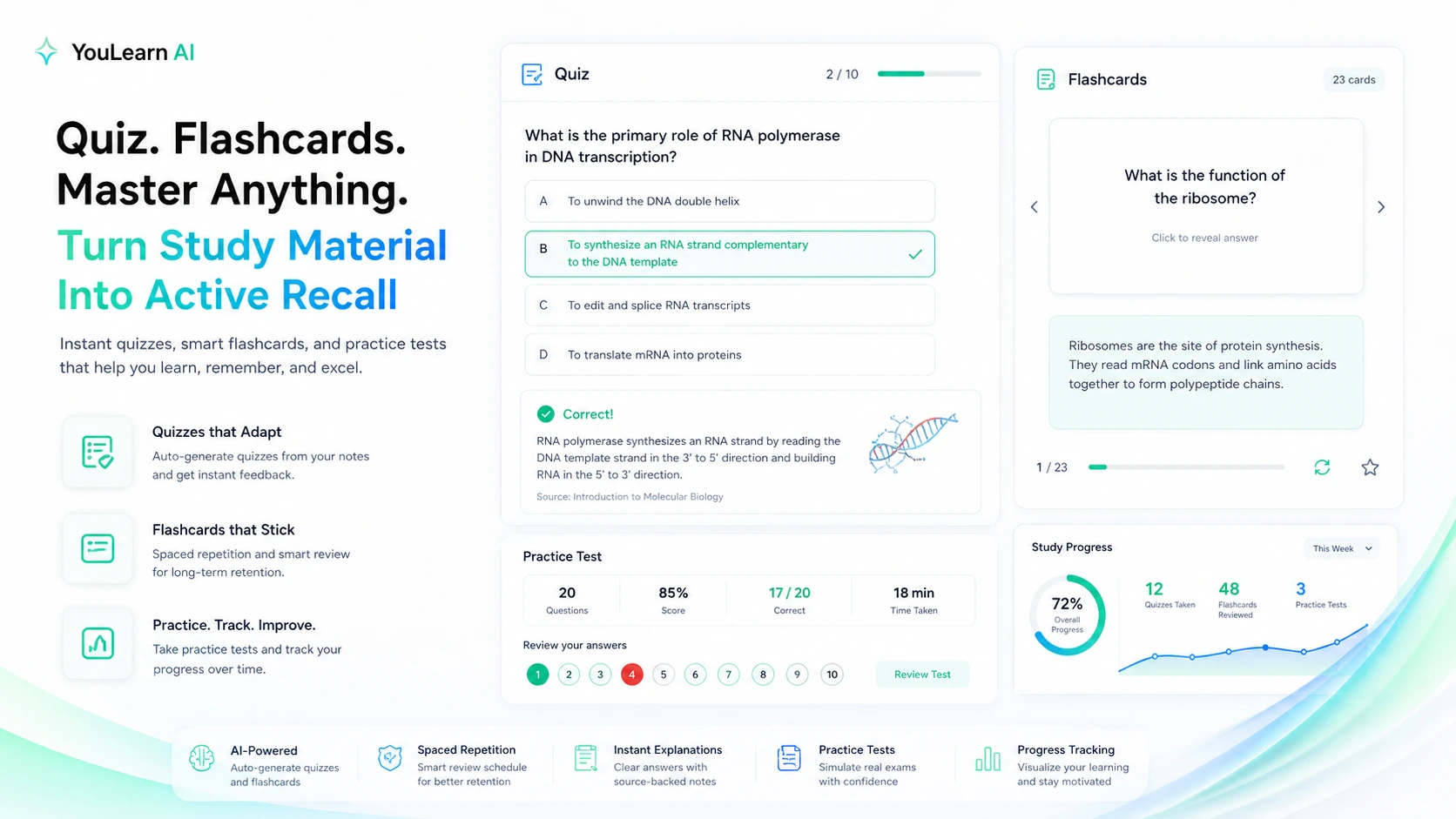
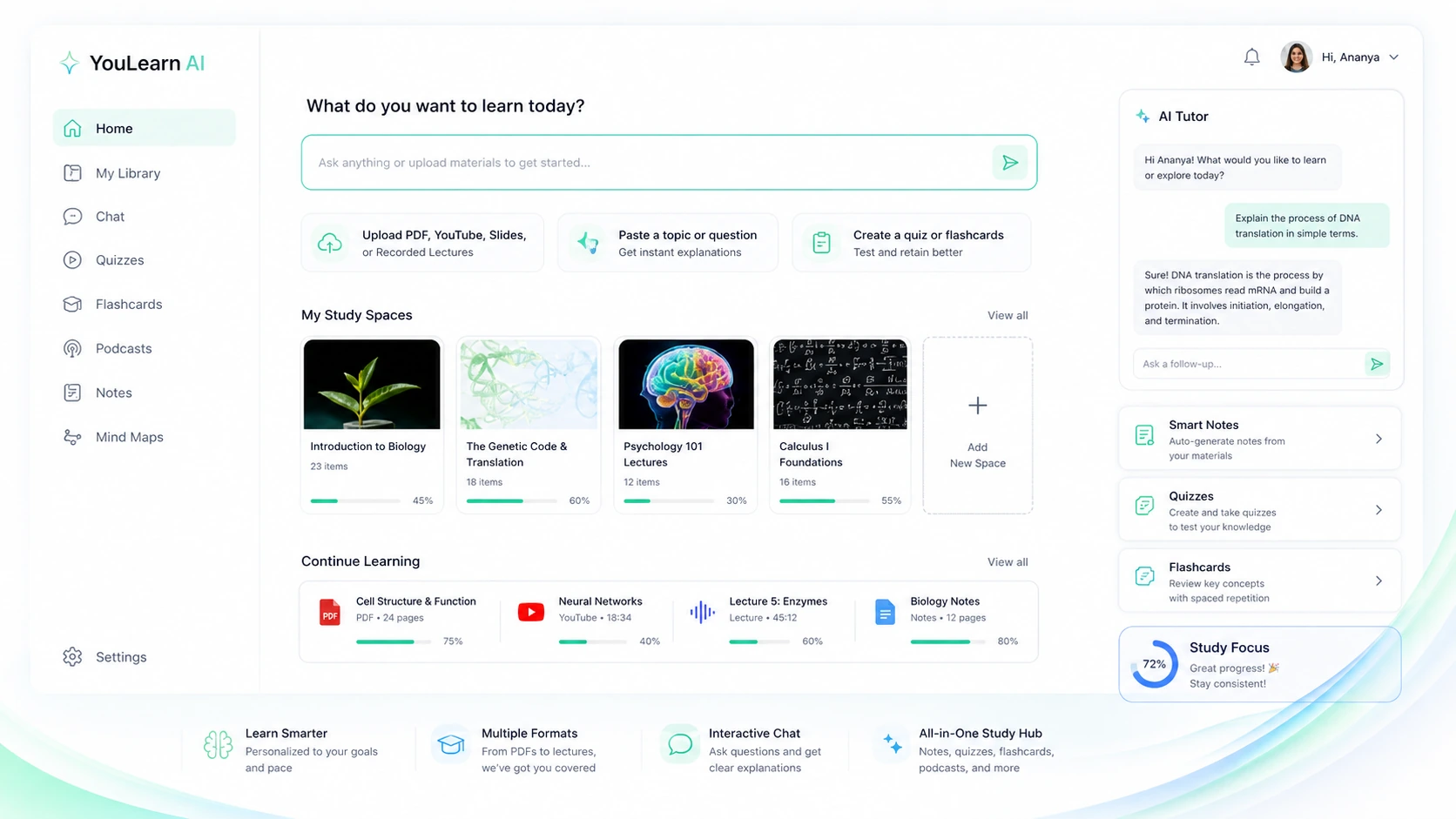
A plain summarizer gives you shorter text. YouLearn AI is trying to become a study workspace: upload PDFs, YouTube videos, slides, lecture recordings, photos, or text, then turn those materials into notes, tutor chat, quizzes, flashcards, podcasts, transcripts, and practice-style review.
That can be useful.
It can also be unnecessary.
For this YouLearn AI review, the real question is not whether AI can shorten a lecture or explain a topic. The real question is whether YouLearn helps you study from your own material often enough to justify moving beyond the free path.
I would consider YouLearn AI if you are a student, online learner, exam-prep user, or self-learner who repeatedly studies from PDFs, class slides, YouTube lectures, recorded lessons, or course portal material. It makes the most sense when you want to move from passive review into active recall: questions, quizzes, flashcards, tutor explanations, and practice sessions based on the material you actually need to learn.
I would be more careful if you only need a one-off YouTube summary, a quick PDF explanation, or a general AI chat answer. In those cases, the product may still be convenient, but a paid plan could be more than the workflow needs.
The safest path is simple: test YouLearn with one real course, one real lecture, or one real exam-prep topic before paying. Do not judge it with a tiny demo file. Do not upgrade only because the pricing page looks reasonable. And do not forget that the 7-day trial and refund window have timing rules.
Next step: If YouLearn AI sounds like it fits your study routine, test the live product with real class material before choosing a paid plan.
Review snapshot
| Review point | Practical take |
|---|---|
| Best for | Students and self-learners who study from PDFs, lectures, YouTube videos, slides, recordings, and notes |
| Not ideal for | Buyers who only need a one-off summary or a generic chatbot answer |
| Main use case | Turning learning material into notes, AI tutor chat, quizzes, flashcards, podcasts, transcripts, and practice tests |
| Free path | Useful for evaluation, but buyers should check daily upload, chat, and quiz limits |
| Paid path | Makes sense when YouLearn becomes part of a repeated study routine |
| Main strength | Study-first workflow built around uploaded or imported material |
| Main concern | Trial renewal, refund timing, plan limits, annual billing, and privacy around uploaded content |
| Best alternatives to compare | Mindgrasp, Myreader, 1min.AI |
| Safest next step | Test one real course or exam-prep workflow before paying annually |
What is YouLearn AI?
YouLearn AI is an AI study tutor built around your own learning materials.
The official positioning is straightforward: YouLearn turns PDFs, YouTube videos, recorded lectures, slides, files, websites, photos, and text into learning outputs such as notes, interactive chat, quizzes, podcasts, transcripts, explanations, flashcards, and practice tests.
That matters because the product is not only competing with AI chatbots. It is competing with the messy way students already study: downloading slides, watching lecture videos, copying notes into a document, making flashcards, asking ChatGPT for explanations, and trying to remember what matters before an exam.
YouLearn is trying to collapse that routine into one place.
The better way to think about it is this: YouLearn AI is not just “summarize this PDF.” It is closer to “turn this material into something I can actually study from.”
That difference is important.
A summary can feel helpful but still leave you passive. A study workflow should help you test recall, ask follow-up questions, review weak spots, and return to the same material over time. YouLearn becomes more valuable when those extra pieces matter.
Based on the public product information, I would treat YouLearn as a study assistant first, a summarizer second, and a productivity tool only in the narrow sense that it reduces the friction between source material and review sessions.
Who should use YouLearn AI?
YouLearn AI makes the most sense for buyers who already have study material and need to do something with it.
A college student with lecture slides, PDFs, recorded classes, and YouTube explanations is the obvious fit. The product can help turn that content into notes, chat, quizzes, flashcards, and practice outputs without bouncing between separate tools.
An online course learner is another good fit. If you study from long videos, transcripts, websites, and downloadable materials, YouLearn can make the course easier to review after the lesson ends. The value is not just “what did the video say?” It is “can I turn this into something I can remember?”
A self-learner may also get value from it. Someone studying coding, biology, finance, language, business, or exam prep often collects material from different places. YouLearn can become useful if it helps organize that material into repeatable learning blocks.
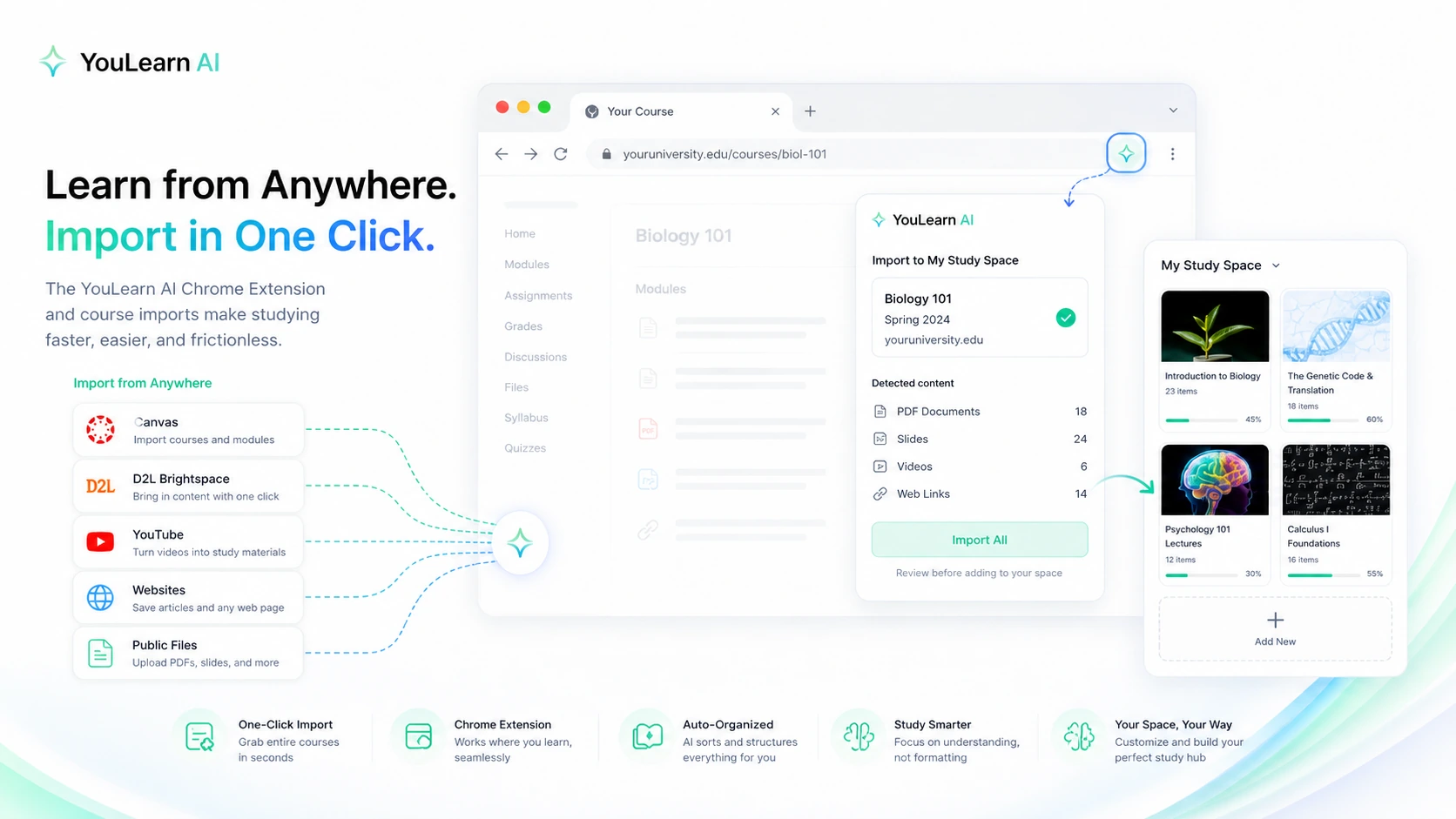
It may also fit students using Canvas or D2L. The Chrome extension angle is practical because course portal content can otherwise become annoying to move into an AI study space. If that import path works smoothly for your school setup, it can reduce friction.
The key phrase is “repeated use.”
If YouLearn becomes part of your weekly study rhythm, the paid plan can start to make sense. If you use it once during a deadline panic and then forget about it, the value drops quickly.
Who should avoid YouLearn AI?
I would skip YouLearn AI as a paid tool if you only need a quick YouTube summary.
That is not a criticism of the product. It is a mismatch problem. A dedicated study workspace can be more than you need if your actual task is one transcript, one summary, or one simple explanation.
I would also be careful if you need formal research management. YouLearn is not positioned as a citation manager, academic literature review tool, or research database. If your workflow depends on source export, formal references, paper organization, citation trails, or publication-style research, a document-reading or research-focused alternative may be a better comparison.
Schools and organizations should also slow down before rolling it out broadly. Individual students can test a study tool quickly. Institutions need procurement, privacy review, admin controls, data handling rules, and sometimes parental or compliance concerns. YouLearn may still be useful, but the buyer decision is different at that level.
I would be especially careful if you tend to forget trial renewals. YouLearn’s terms describe a 7-day free trial with automatic renewal if not cancelled before the trial ends. That is normal in software, but it means the trial is only “safe” if you actually test the product and cancel on time if it does not fit.
Finally, avoid treating any AI tutor as a replacement for learning. YouLearn can help create study outputs. It cannot guarantee that the explanations are perfect, that quiz answers match your professor’s expectations, or that generated notes capture every nuance of the source material.
It supports studying. It should not replace judgment.
How YouLearn AI fits into a real study workflow
A good YouLearn workflow does not start with pricing.
It starts with one real learning problem.
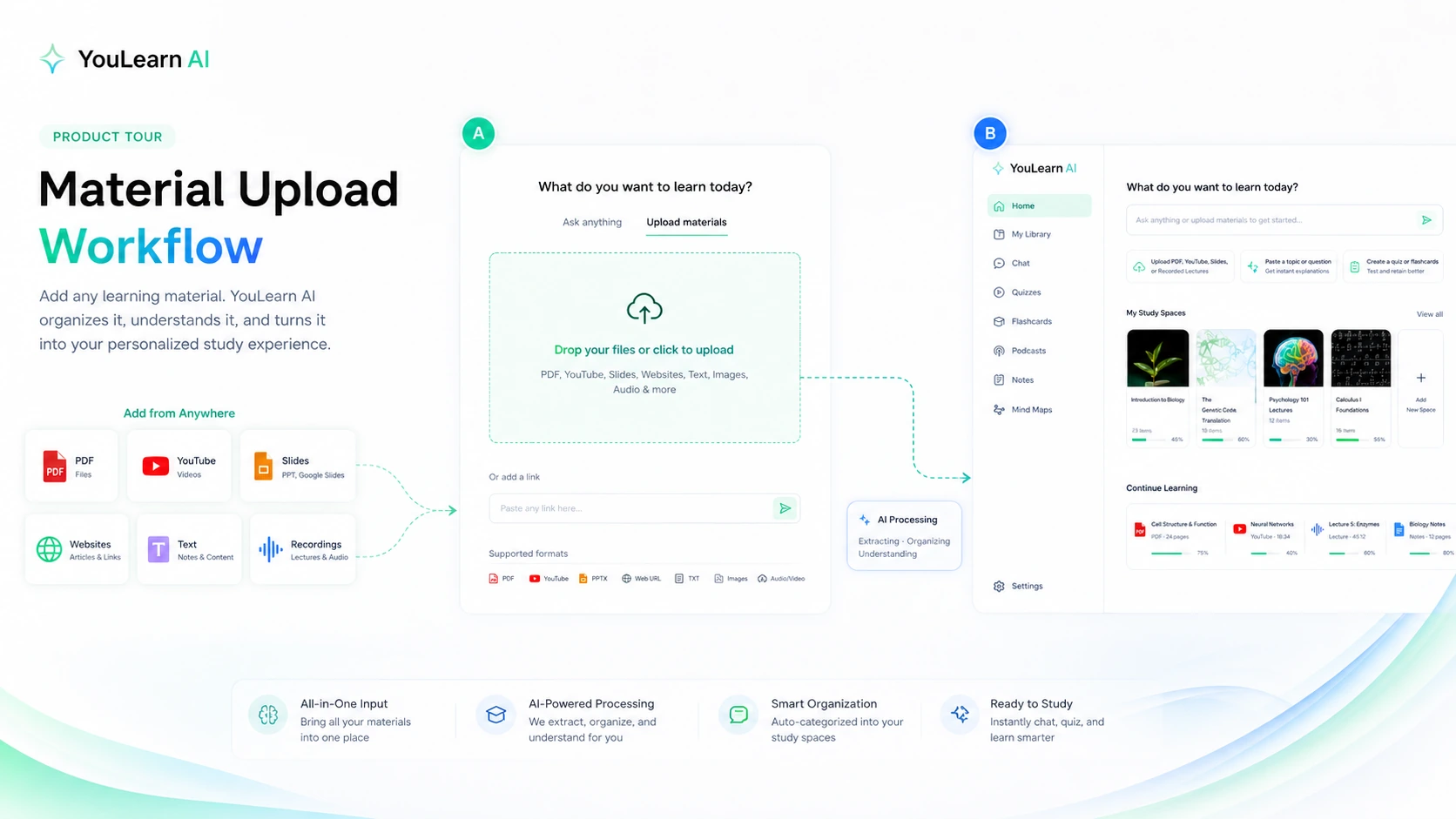
For example, a student might take one lecture recording, one PDF chapter, and one slide deck from the same course. They upload or import the material, generate notes, ask the tutor a few follow-up questions, create quizzes or flashcards, then use the results for a review session.
That is a meaningful test.
A weaker test would be uploading a tiny article and deciding the product is good or bad based on one summary. That does not show whether YouLearn can handle the kind of material that actually creates study stress.
The workflow I would use is:
- Pick one real class, topic, or exam unit.
- Add the actual materials you study from.
- Generate notes and check whether they preserve the important ideas.
- Ask the AI tutor questions you would normally ask a classmate, TA, or search engine.
- Generate quizzes or flashcards and test whether they help recall.
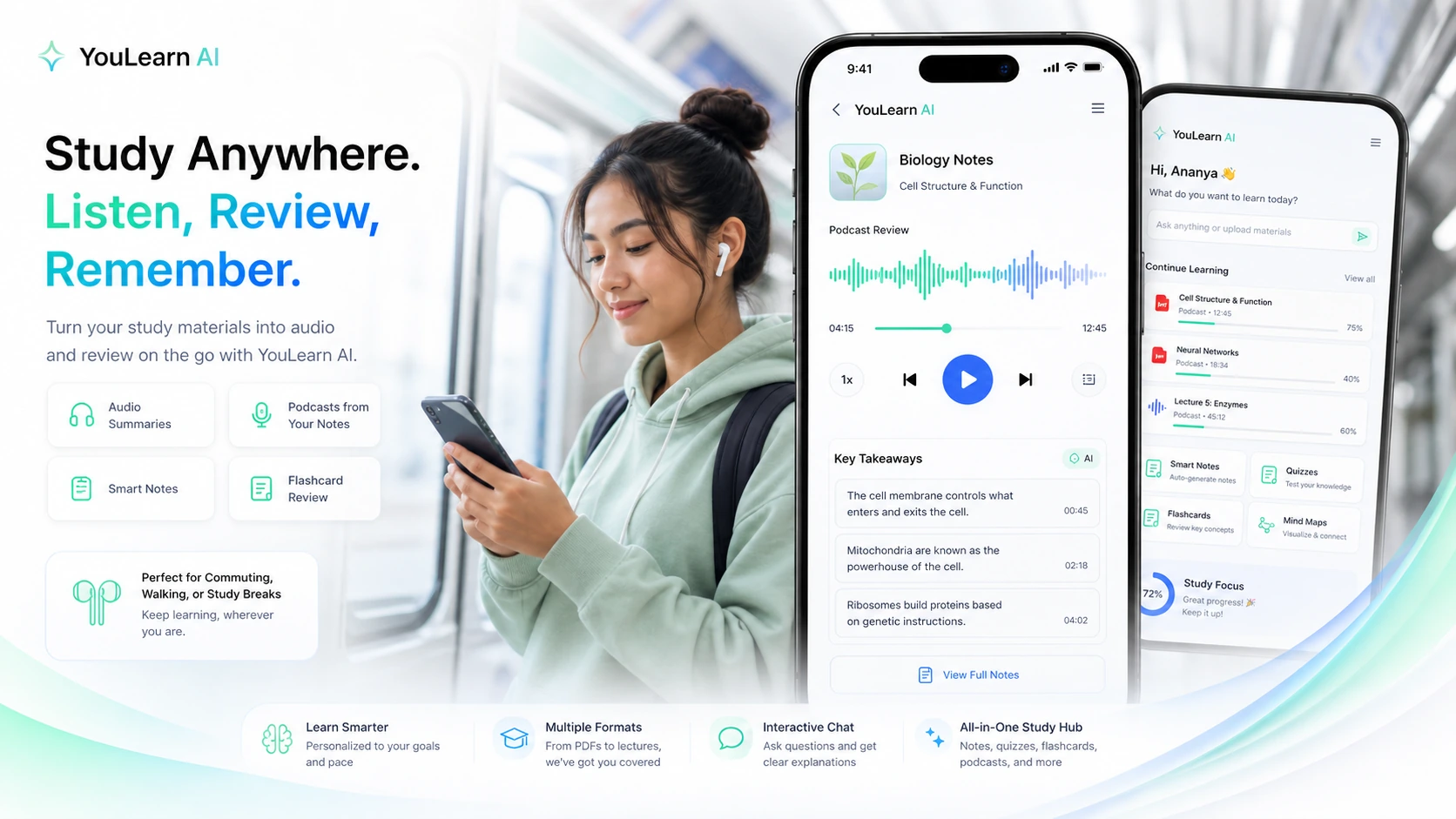
- Try podcast or mobile review if you study while commuting or walking.
- Check whether the daily or plan limits fit your rhythm.
- Decide whether the paid plan saves enough time to matter.
YouLearn is strongest when it turns passive material into active review.
It is weaker if the outputs are only “nice to have.” If you do not return to the notes, answer the quizzes, use the flashcards, or ask the tutor questions, then the paid plan may become another subscription sitting quietly in the background.
Workflow check: Use YouLearn AI with one real class or exam topic before judging the paid plan. A small real test is more useful than a polished demo.
Key features that actually matter
The feature list only matters if it changes how you study.
For YouLearn AI, the most important feature is material-based tutoring. Generic AI answers can be useful, but study help becomes more relevant when the assistant understands the PDF, video, lecture, slide deck, or recording you are working from.
The second important feature is active recall generation. Summaries are fine, but quizzes, flashcards, practice tests, weak-spot review, and answer breakdowns are usually where study value becomes clearer. If the product helps you test yourself instead of only reading condensed notes, it becomes more defensible as a paid tool.
The third useful piece is input flexibility. YouLearn supports common study sources: PDFs, YouTube videos, slides, recordings, photos, text, websites, and course content routes through the Chrome extension. That matters because students rarely study from one clean file.
The fourth feature is podcast and mobile review. I would not buy YouLearn only for this, but it can be useful for learners who review while commuting, walking, or doing lighter recap sessions away from a laptop.
The fifth feature is the Chrome extension. Canvas, D2L, YouTube, websites, and public files can create a lot of manual copy-paste friction. If the extension works well for your setup, it may be the difference between using the tool regularly and ignoring it.
The feature I would not overvalue is “AI tutor” as a broad label. Many products can claim AI tutoring now. The buyer question is narrower: are the answers grounded enough in your material, and do they help you understand the topic well enough to use the tool again tomorrow?
Pricing and plan value
YouLearn AI pricing should be judged by study volume, not by headline price alone.
The clearest public pricing signal from YouLearn-owned material lists a Free path with daily limits, Pro at $20/month or $12/month billed annually, Max at $75/month or $45/month billed annually, and Teams at $15/month per seat or $9/month per seat billed annually. The live app pricing screen should still be checked before checkout because pricing pages, app stores, annual toggles, and team-seat flows can change.
I would not start with the assumption that the paid plan is necessary.
The free path is useful if you want to test whether the product works with your study material. Upload a real PDF. Add a lecture. Try a YouTube lesson. Ask questions. Generate quizzes. Check whether the limits are annoying in real use.
Pro is the plan that likely makes sense for recurring individual study if the free path becomes too tight. If you use YouLearn across multiple classes or weekly study sessions, Pro may be easier to justify.
Max is harder to recommend casually. It may fit heavy users, but only if your use is clearly beyond Pro. I would want to see repeated high-volume usage before moving there.
Teams should be treated as a separate buyer decision. Group study, tutoring programs, school-adjacent use, or team-based learning may justify it, but seat-based plans need more careful review. For larger team use, refund eligibility and annual commitment deserve extra attention.
The cheapest plan is not automatically the best deal. The best deal is the plan that matches the number of classes, uploads, chats, quizzes, and review sessions you actually use.
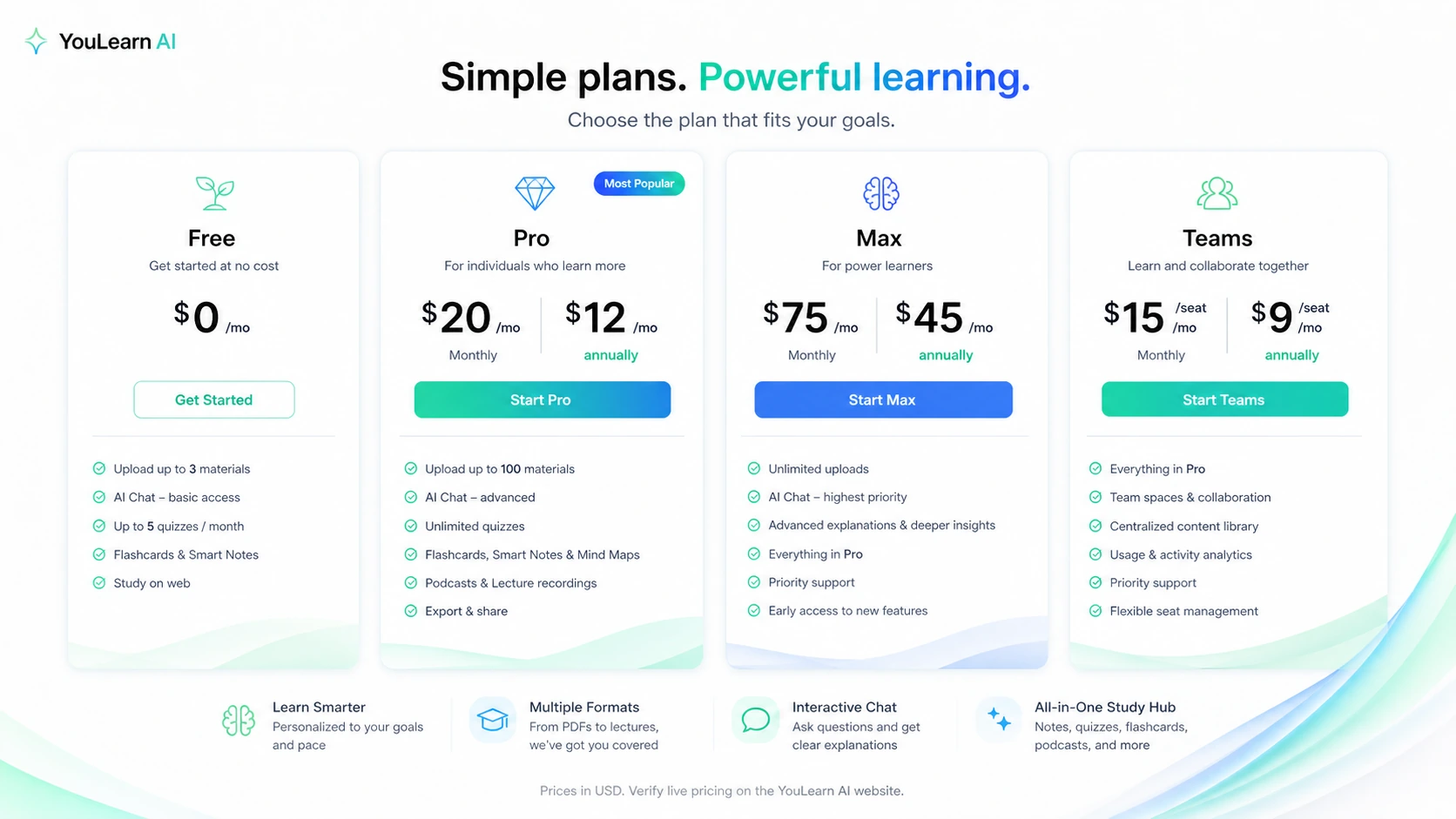
Pricing check: Before paying, compare the current app pricing, annual toggle, purchase channel, and cancellation terms against your real weekly study load.
Free plan, trial, coupon, and checkout notes
A discount can make YouLearn AI cheaper, but it should not be the reason you buy.
The safer sequence is:
- Test the free path.
- Use the 7-day trial only if you are ready to evaluate quickly.
- Compare monthly and annual pricing after the workflow proves useful.
- Check the coupon route only after plan fit is clear.
- Avoid annual billing until you know YouLearn will stay in your routine.
The trial deserves attention. YouLearn’s terms describe a 7-day free trial with automatic renewal if it is not cancelled before the trial period ends. Direct subscription users have a 7-day money-back guarantee from first payment, while renewals are described as non-refundable. App Store purchases are handled differently, so the purchase channel matters.
That is not unusual, but it changes how I would test the product.
I would set up the trial only when I had real study material ready. Do not start it on a random day and tell yourself you will evaluate later. Seven days passes quickly when you are busy.
For coupons, I would be cautious. Public coupon pages may exist, but a coupon is not the core value proposition. If YouLearn does not fit your study process, saving a few dollars will not fix the mismatch. Use the YouLearn AI coupon page as a final checkout check, not as the first reason to buy.
Offer path: If YouLearn AI passes your free or trial test, check the current buyer route before checkout and avoid choosing annual billing too early.
What I would check before buying YouLearn AI
The first thing I would check is source fit.
Can YouLearn handle the materials you actually study from? Not the materials in the demo. Your PDFs, your slides, your lecture recordings, your YouTube lessons, your course portal content, your photos, your homework prompts.
The second thing I would check is output quality. Are the notes useful? Are the quiz questions meaningful? Are the flashcards too shallow? Does the tutor answer in a way that helps you understand, or does it simply rephrase the material?
The third thing is volume. Free limits are useful for evaluation, but you need to know whether your normal study behavior will run into upload, chat, quiz, podcast, or file constraints.
The fourth thing is cancellation timing. If you start a trial, put the renewal date somewhere visible. If you choose annual billing, do it only after you know you will keep using the product.
The fifth thing is privacy and data handling. YouLearn’s privacy policy says AI-powered features may send information needed to complete a request, including relevant excerpts of uploaded content, images, or audio, to third-party AI providers. That may be normal for AI tools, but it matters for private class materials, internal training documents, sensitive recordings, or school-controlled content.
The sixth thing is whether you are using it to learn or to avoid learning. That sounds blunt, but it matters. If the tool creates shortcuts without understanding, you may feel productive while remembering less. The better use is active review: read, ask, quiz, correct, repeat.
A simple test before paying
Here is the test I would run before upgrading.
Pick one real course topic. Gather one PDF, one video or lecture, and one set of notes or slides. Add them to YouLearn. Then ask the product to help you study in three ways: summarize the core ideas, quiz you on the material, and explain the parts you struggle with.
After that, ask yourself five questions:
| Test question | Why it matters |
|---|---|
| Did the notes save time without losing important meaning? | A shorter version is only useful if it preserves the ideas you need. |
| Were the quizzes or flashcards strong enough to support recall? | Active recall is where study tools become more valuable than summaries. |
| Did tutor chat feel grounded in your material? | Generic answers are easier to get elsewhere. Grounded answers are the point. |
| Did the workflow feel smooth enough to repeat? | A paid study tool must survive normal weekly friction. |
| Did you hit limits during realistic use? | Plan value depends on actual study volume, not marketing copy. |
If the answer is mostly yes, YouLearn deserves a closer look.
If the answer is mixed, stay free or monthly.
If the answer is no, do not let a coupon pull you into a paid plan.
Pros and cons explained
YouLearn AI’s biggest strength is workflow focus. It is not just answering random questions. It is trying to help a learner move from material to understanding to practice. That is the right direction for an AI study tool.
Its second strength is source flexibility. PDFs, YouTube videos, slides, recordings, photos, text, websites, and course portal content cover many real student situations. The broader the input support, the more likely the product can fit messy study habits.
Its third strength is active study output. Notes are useful, but quizzes, flashcards, practice tests, podcasts, and tutor chat create more chances to learn rather than skim.
The main limitation is that value depends heavily on use frequency. A student who uses YouLearn every week may get meaningful value. A student who only opens it before one exam may not.
The second limitation is plan and trial caution. A 7-day trial can be helpful, but automatic renewal and non-refundable renewal terms mean buyers should test quickly and manage cancellation carefully.
The third limitation is privacy sensitivity. Uploading course material, recordings, photos, and text to an AI tool is not the same as saving notes locally. For normal personal study, this may be acceptable. For confidential school, work, or client material, buyers should read the privacy terms first.
The fourth limitation is that YouLearn is not a formal research system. It can help study, but it is not a replacement for citation management, professor guidance, source verification, or careful academic work.
Green flags and red flags
| Signal | What it means for buyers |
|---|---|
| Green flag: study-first positioning | The product is built around learning material, not just generic AI chat. |
| Green flag: multiple input types | PDFs, lectures, YouTube, slides, recordings, photos, and text make the workflow more practical. |
| Green flag: active recall tools | Quizzes, flashcards, practice tests, and tutor chat are more useful than summaries alone. |
| Green flag: free and trial path | Buyers can test before committing, as long as they manage renewal timing. |
| Red flag: trial renewal risk | The trial can renew if not cancelled before the end of the trial period. |
| Red flag: renewal refund limits | Renewals are described as non-refundable, so timing matters. |
| Red flag: privacy-sensitive uploads | Buyers should think carefully before uploading private recordings, proprietary material, or sensitive documents. |
| Red flag: one-off use case | If you only need one summary, a paid plan is probably excessive. |
YouLearn AI vs alternatives
YouLearn AI’s closest comparisons depend on what the buyer is actually trying to do.
Mindgrasp is the most direct alternative if you want another student-focused AI study assistant. I would compare Mindgrasp first if the core job is lecture notes, class material, flashcards, quizzes, and exam preparation. The decision comes down to which tool handles your real source material and study rhythm better.
Myreader is a better comparison if your workflow is more about long-form reading, document review, source-heavy study, or understanding books and large documents. YouLearn feels more study-output oriented, while Myreader may be more relevant when reading and document comprehension are the center of the job.
1min.AI is not a direct study tutor replacement. It is a broader AI utility bundle. I would compare it only if you want many AI tools in one subscription and study is just one of several tasks. If your main job is course learning, YouLearn is the more focused option.
Aikeedo is a more distant comparison. It belongs closer to AI platform or SaaS-builder style decisions, not student tutoring. I would not treat it as a direct alternative unless your buying question has shifted away from studying and toward building or managing AI products.
The mistake is comparing tools by feature count alone.
A study buyer should compare by workflow: what material goes in, what study output comes out, how much friction exists, and whether the result helps memory or understanding.
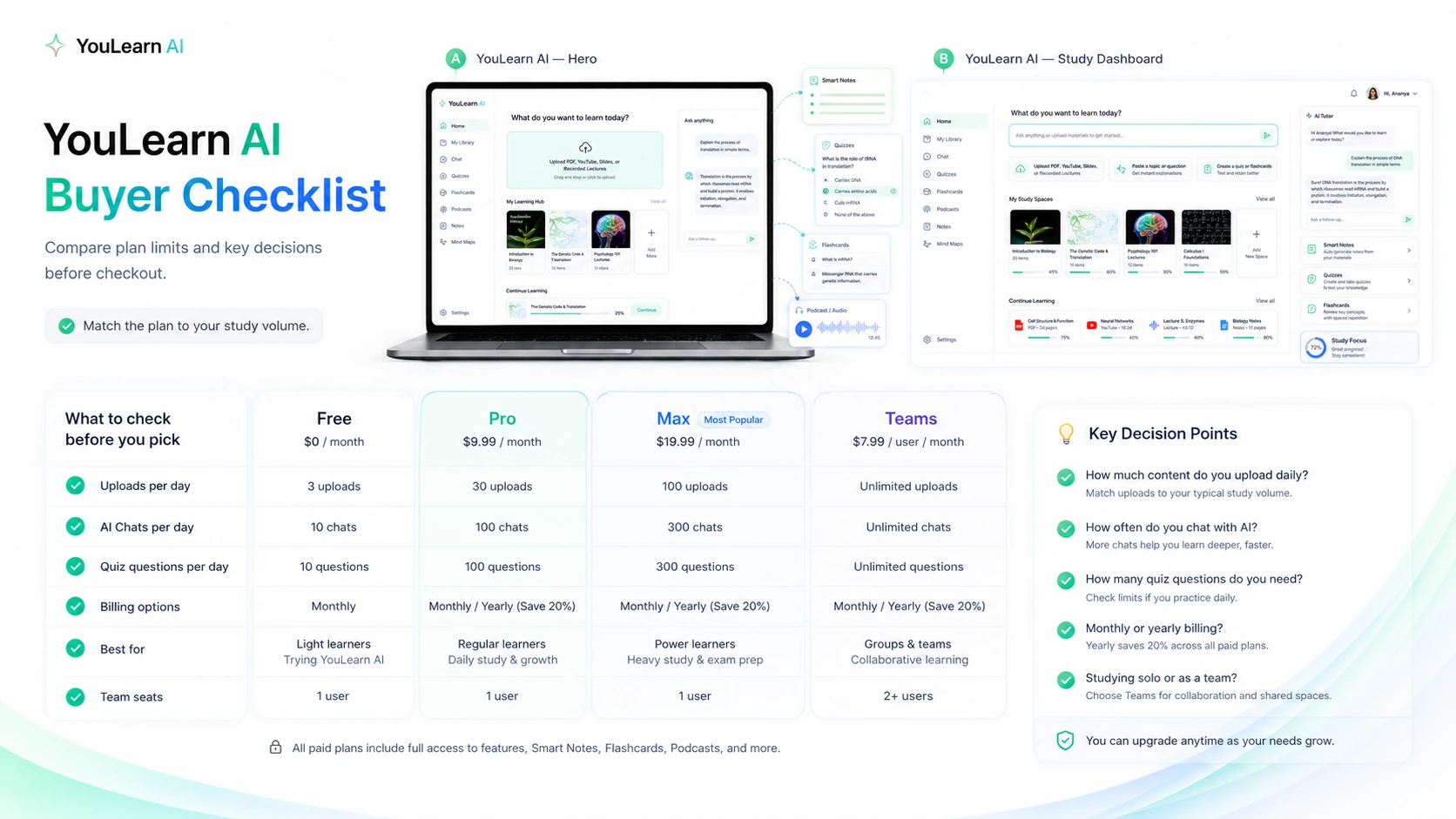
Comparison step: If YouLearn AI feels close but not obvious, compare it with a study-first alternative before locking into annual billing.
Trust, privacy, and refund notes
YouLearn has several positive trust signals: clear student-focused positioning, public app listings, a Chrome extension, Y Combinator association, mobile availability, and terms that explain trial, refund, cancellation, and renewal rules.
That does not remove the need for buyer caution.
The privacy question is especially important because study tools often process uploaded material. If you upload PDFs, recordings, images, or notes, you should be comfortable with how the service processes that content and how third-party AI providers may be involved for AI-powered features.
For normal personal study, that may be acceptable. For confidential company training, private school material, unpublished research, client documents, or anything you are not allowed to upload to third-party services, I would pause and read the terms carefully.
Refund rules also need attention. Direct subscribers have a 7-day money-back guarantee from the first payment, but renewals are non-refundable. Trial users need to cancel before renewal if the product is not a fit. Larger team plans and annual commitments deserve extra caution.
The safer path is to test small, stay monthly until the study habit is proven, and only move to annual when YouLearn is clearly part of your routine.
Final verdict
YouLearn AI is worth considering if you want a study-first AI tutor built around your own materials.
That is the cleanest way to frame it.
It is not just a YouTube summarizer. It is not just another chatbot. Its better use case is turning PDFs, videos, lectures, slides, recordings, and notes into a study loop: understand, ask, quiz, review, repeat.
I would consider it if you are studying across multiple materials and want summaries, quizzes, flashcards, tutor chat, podcasts, and practice outputs in one place. I would also consider it if Canvas, D2L, YouTube, mobile review, or lecture recordings are part of your normal learning flow.
I would skip the paid plan if you only need occasional summaries, if you do not use active recall tools, or if you are likely to forget trial cancellation. I would also compare alternatives first if your real need is formal research, citation-heavy reading, or a broader AI productivity bundle.
For my money, the best way to judge YouLearn AI is not to read the feature list twice. It is to upload one real study unit and see whether the product helps you remember more with less friction.
If it does, the paid plan may be reasonable.
If it does not, stay free or move on.