
Myreader Pricing, Reading Fit & Buyer Path
Myreader is best understood as an AI reading assistant for people who want to upload books, PDFs, documents, article links, or YouTube videos and ask questions across a personal document library. It is not a broad automation platform. The real buying question is whether the buyer repeatedly needs document chat, source citations, organized collections, OCR, and audiobook-style listening enough to move beyond the free plan.
Fit → price → checkout
Use these routes after the official-site check: coupon first, review for fit, compare if unsure.
Myreader pricing snapshot
Fast commercial checks before pricing, coupons, or a deeper review.
Myreader product tour
The main tour video is useful because it shows Myreader as a reading workflow, not just a simple PDF summarizer. A buyer should watch how documents become a searchable library, how answers point back to source sections, and whether the product feels useful for real study or research work. The body video adds a second perspective from a demo or review angle, which helps buyers notice limits before they choose Lite or Pro.
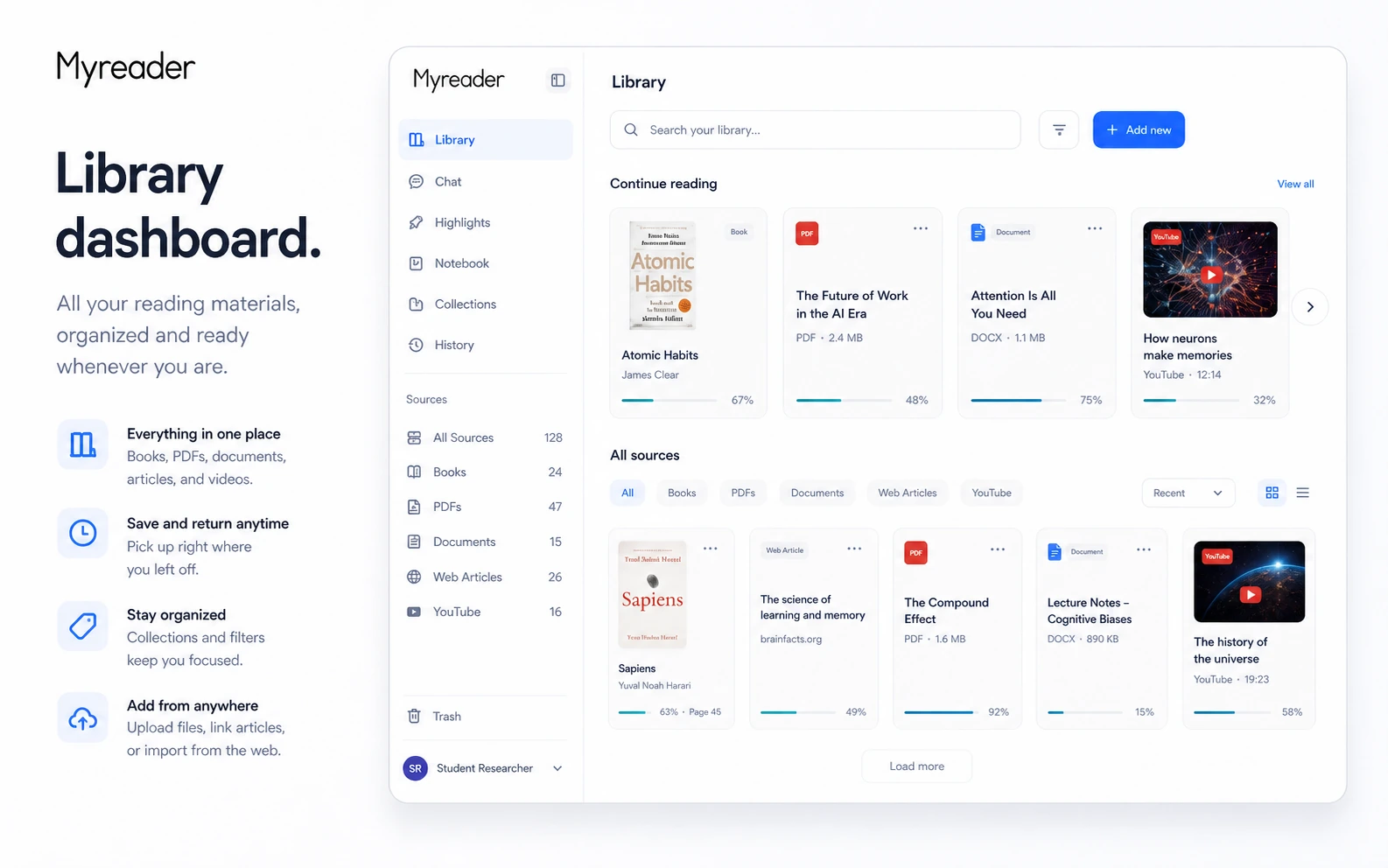
Myreader is a store-page decision for people who read or research from long material. It can help a buyer upload books, PDFs, documents, articles, and YouTube videos, then ask questions, get summaries, listen to content, and jump back to source passages. The product is most valuable when that workflow repeats often enough to make a paid plan worth checking.
What Myreader actually does
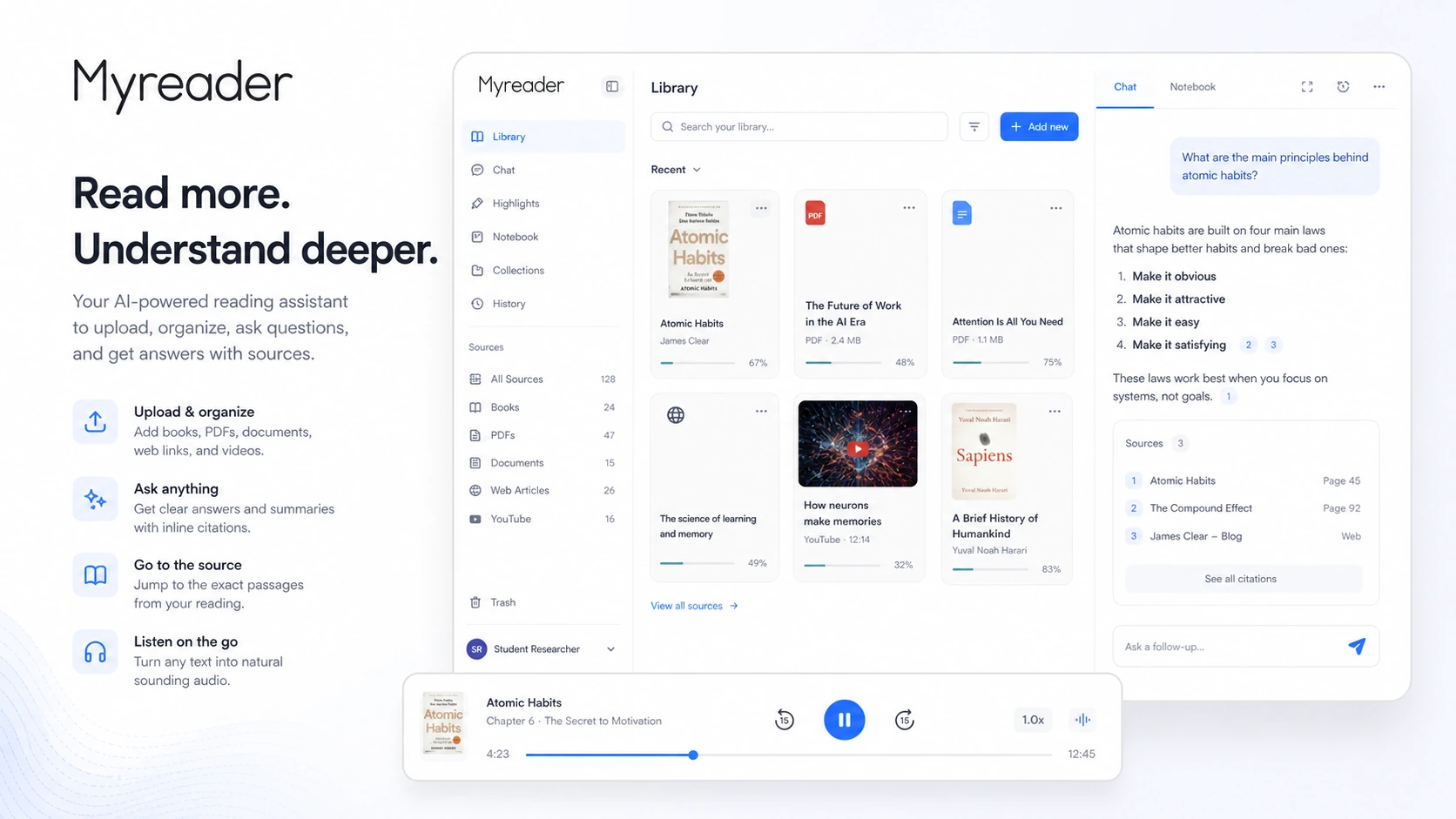
Myreader helps buyers turn a reading pile into a searchable AI library. The official product page focuses on uploading books, PDFs, documents, article links, and YouTube videos, then using AI chat, summaries, citations, collections, and text-to-speech to move through the material faster.
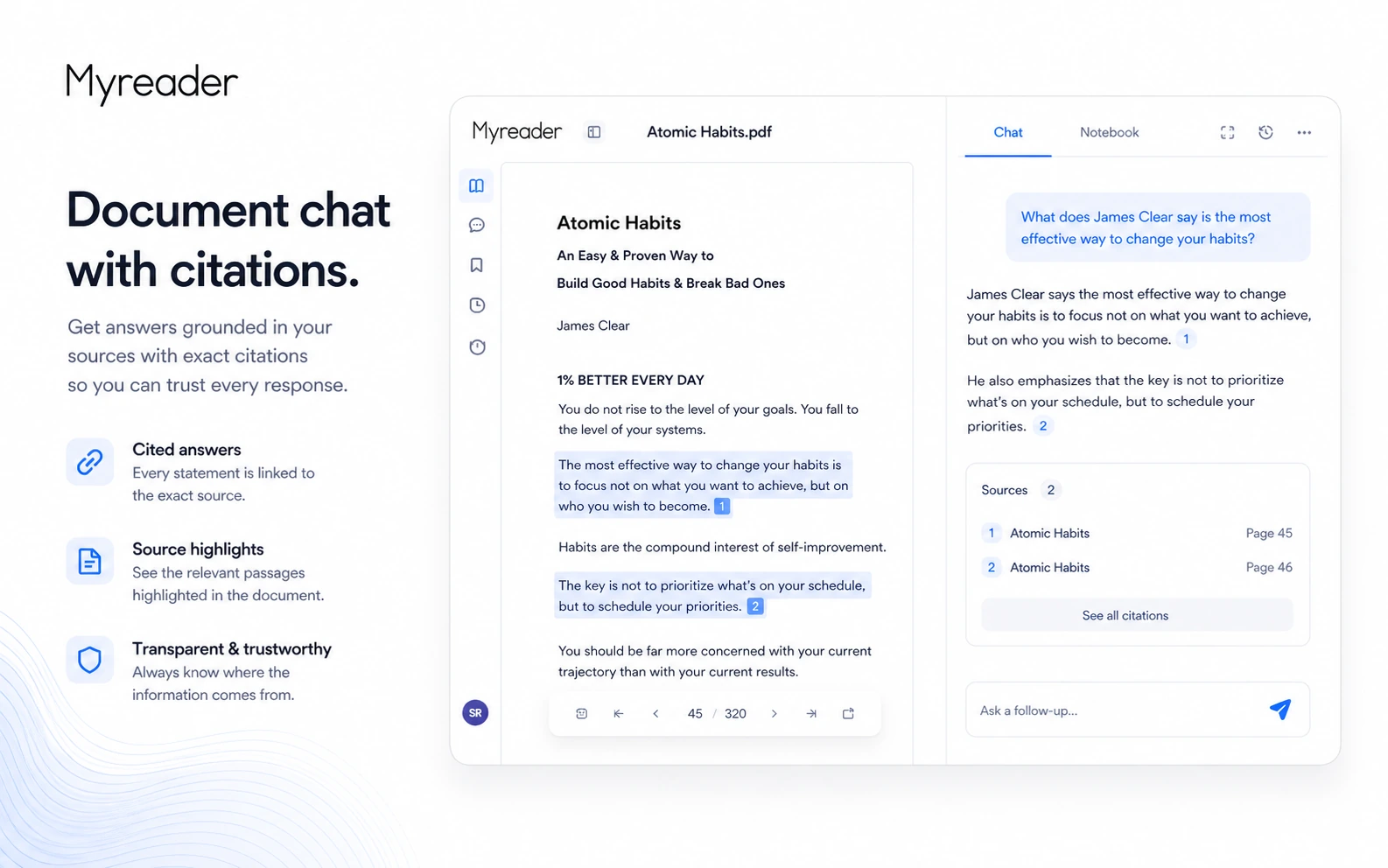
This is different from a generic chatbot because the buyer's own library is the center of the workflow. The main value is not only a quick answer. It is the ability to ask a question, see where the answer came from, and return to the relevant section when the source context matters.
- Upload books, PDFs, EPUBs, Kindle books, Word documents, PowerPoint files, articles, and YouTube videos.
- Ask questions across a single document, a collection, or the entire library.
- Use citations to jump back to the exact page or section that supports the answer.
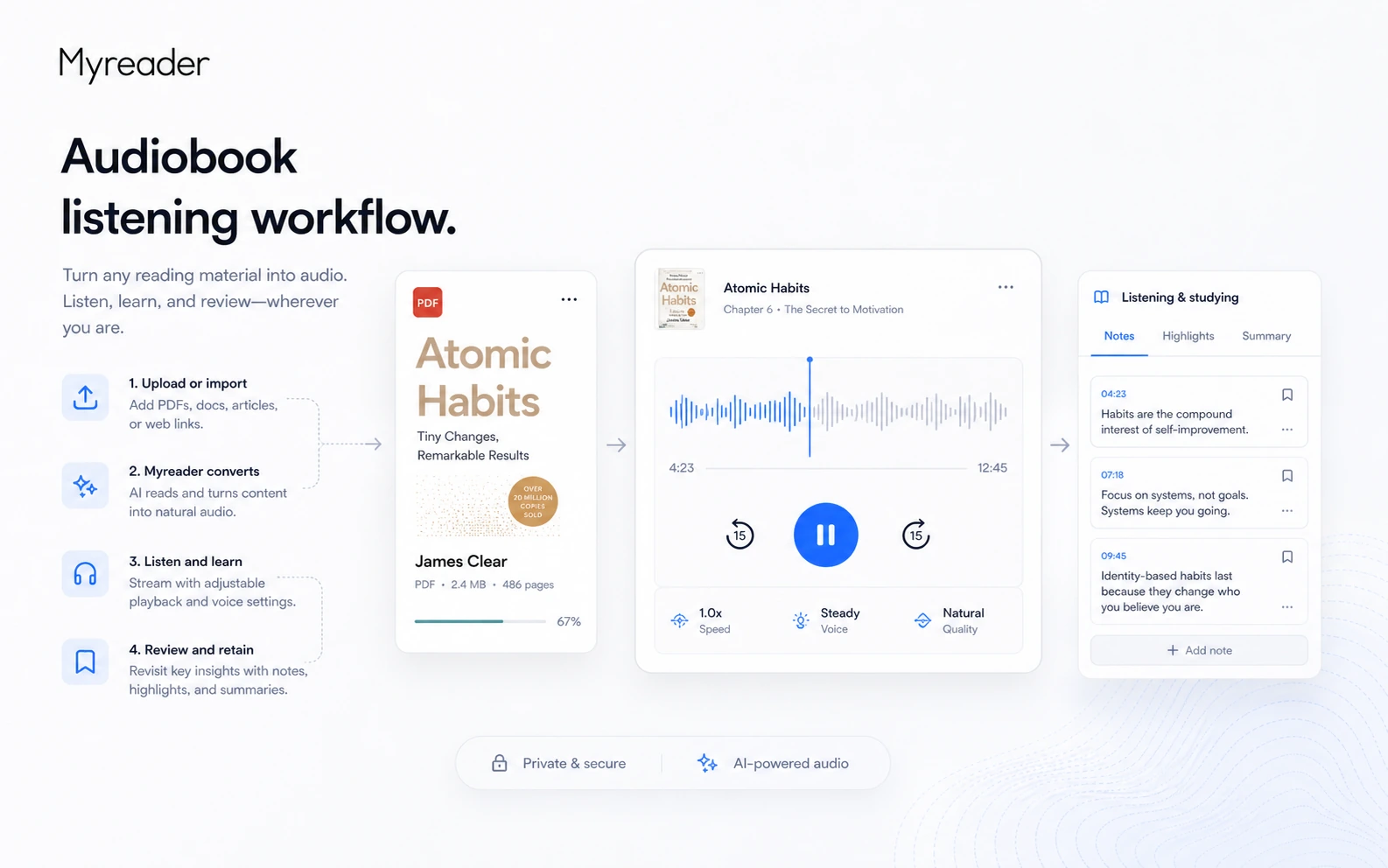
- Convert reading material into audio for listening workflows.
Pricing and plan limits
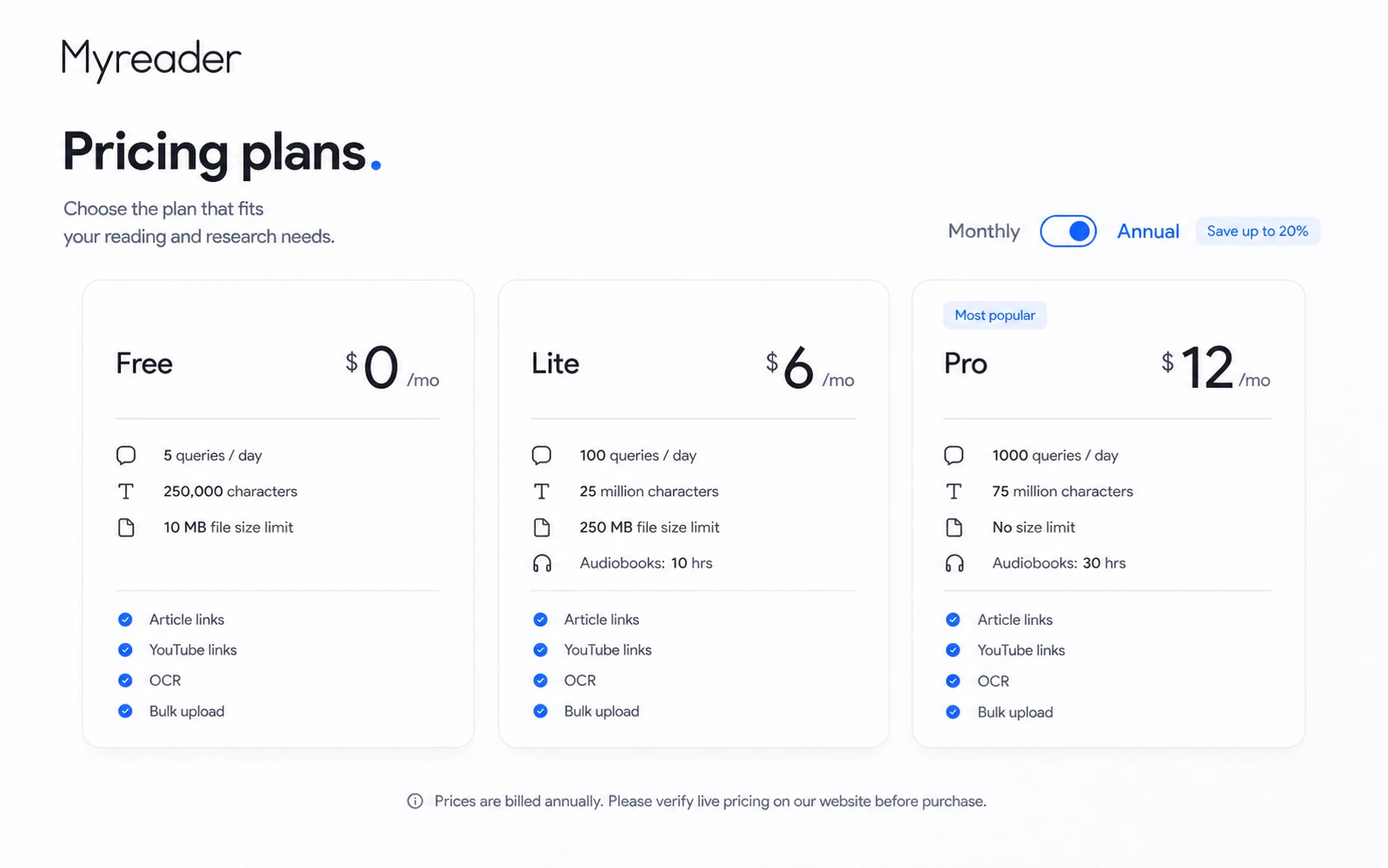
Myreader's official pricing page currently shows a free plan and two paid tiers. The free plan gives 5 queries per day, 250,000 characters, and a 10 MB file size limit. The visible annual pricing view shows Lite at $6/month and Pro at $12/month, with higher query, character, file size, and audiobook-hour limits.
The plan decision should be based on usage limits, not only price. A casual reader may be fine testing on Free. A student or researcher who asks many questions across large books, PDFs, and videos may need Lite or Pro. A buyer should verify the live monthly toggle and checkout amount before paying because Myreader also says annual plans can be up to 40% off.
- Free is the safest evaluation path.
- Lite is the first paid tier shown in the current annual pricing view.
- Pro is better for heavier research, higher query volume, no file size limit, and more audiobook hours.
- Annual billing may lower the monthly-equivalent cost, but it increases commitment.
Free plan, annual savings, and coupon path
The free plan is the strongest low-risk starting point. It lets buyers check whether Myreader can handle their file types, answer quality expectations, citation needs, and listening workflow. The paid upgrade becomes more reasonable only after the buyer knows that query limits, storage behavior, file size, OCR, and audiobook hours match real usage.
Myreader's official pricing page says annual plans can be up to 40% off. Public deal pages may mention coupon-like savings, but the safer editorial position is not to promise a code. For DealBestDaily, the store page should route the buyer toward live pricing and the coupon page while making clear that any code or deal must be verified in checkout.
- Use Free to test document chat and citations first.
- Use annual savings only when Myreader is already part of the buyer's study or research routine.
- Check the coupon route, but do not treat public codes as guaranteed.
- Review refund terms before annual billing because refunds are case-by-case.
Reading workflow and source citations
Myreader's strongest buyer benefit is the ability to ask questions and then return to the source section that supports the answer. That matters for students, researchers, and professionals because a summary without source context can be too risky for serious work.
The video below gives a second practical view of the product. A buyer should watch for three things: how easy it is to upload material, whether the answers feel grounded in the source, and whether the workflow would still be useful after the first test document. That makes the video more useful than a generic feature overview.
- Check whether citations point to the right part of the document.
- Test questions that require detail, not only broad summaries.
- Use collections when the research topic spans multiple books or files.
- Keep source checking in the workflow for important academic or professional decisions.
Privacy, storage, and business use
Myreader says documents are stored in secure cloud storage, not shared between users, and can be deleted by the user. That is reassuring for normal study and productivity use, but it is not the same as a formal enterprise security review. Buyers working with confidential client files, regulated data, unpublished research, or sensitive internal documents should verify whether the product's public terms are enough for their own rules.
Myreader also says publishers, businesses, education institutes, teachers, professors, and course facilitators can contact the company for a custom solution with content preloaded for an audience. That is useful as a signal of business interest, but it should not be confused with a public team plan or API offering.
- Normal users can organize personal reading material in the cloud.
- Sensitive-document buyers should review privacy and internal approval needs before upload.
- Business or education custom solutions require contacting Myreader directly.
- No public API plan should be assumed from the current pricing page.
Safest next step with Myreader
The safest next step is to open the free plan, upload one real document or video source, and test questions that matter. Do not upgrade only because the price looks low. Upgrade when the buyer has confirmed that citations are useful, file limits are enough, audiobook listening matters, and the product fits a repeated study or research routine.
After that fit check, the buyer can compare Lite, Pro, annual billing, and any DealBestDaily coupon route. If the plan still feels unclear, the review page should come before the coupon page because the biggest risk is not missing a small discount. The bigger risk is paying for a reader that does not match the buyer's actual material.
- Start with Free and use real source material.
- Check answer quality, citation usefulness, and source navigation.
- Compare Lite and Pro by limits, not only monthly price.
- Use the coupon path only after the workflow fit is clear.
Use comparison routes when the category fit is still open
Use these comparison routes when the product still looks plausible, but the category fit is not fully settled.
Better fit for students who want study notes, flashcards, quizzes, and tutor-style learning workflows from lectures and course material.
Better fit for academic research workflows where paper discovery, research agents, and scholarly source exploration matter more than a personal reading library.
Better fit when the core job is audio or video transcription before summary, rather than chatting with books and document collections.
Better fit for broader research organization and source synthesis when the buyer is comparing research workspace tools.
Verification points worth checking before you click out
Where this store usually fits best in the workflow
Students can upload textbooks, notes, slides, or course PDFs and ask targeted questions before exams. The buyer should still compare answers with cited passages and instructor expectations.
Researchers can organize books, articles, and PDFs into collections and ask questions across them. This is useful when source traceability matters more than a generic summary.
Professionals can use Myreader to pull answers from long reports, manuals, training materials, or reference files, then jump back to the source section before acting on the answer.
Readers who prefer audio can use the text-to-speech workflow to review material on the go, but they should compare audiobook-hour limits before choosing a paid plan.
Practical checkpoints before and after signup
- Choose one real book, PDF, report, or YouTube source rather than a short sample file.
- Decide whether the key need is answers, summaries, citations, audiobook listening, or library organization.
- Ask specific questions that require Myreader to cite the right source section.
- Check whether the 5-query daily limit, 250,000-character limit, and 10 MB file limit are enough for the buyer's normal use.
- Compare Lite and Pro by query volume, character capacity, file size, OCR, bulk upload, and audiobook-hour limits.
- Verify annual versus monthly billing on the checkout screen before relying on the headline price.
- Keep checking AI answers against cited passages for high-stakes study or professional use.
- Cancel before the next billing period if the product does not become part of a repeated workflow.
Fast-read signals for workflow fit and buying friction
Questions readers usually ask before choosing this store
What does Myreader actually do?
Myreader lets users upload books, PDFs, documents, article links, and YouTube videos, then ask questions, get summaries, listen to content, and jump back to cited source sections. It is best viewed as an AI reading and research assistant, not a full automation platform.
Is there a free Myreader plan?
Yes. The official pricing page lists a free plan at $0/month with 5 queries per day, 250,000 characters, and a 10 MB file size limit. The same page notes that books on the free plan are deleted after 7 days of inactivity, so buyers should not treat it as a long-term archive.
How much does Myreader cost?
The official pricing page currently shows Lite at $6/month and Pro at $12/month in the visible annual pricing view, with up to 40% off annual plans. Buyers should verify the live monthly toggle and checkout price because the final billing interval matters.
Can buyers get a refund from Myreader?
Myreader's terms say refunds are not provided except under exceptional circumstances. Requests must be made within 14 days of the subscription charge and are processed case by case, so the safer path is to test the free plan before paying.
What should buyers verify before checkout?
Buyers should verify file format support, query limits, character limits, file size limits, audiobook-hour limits, OCR needs, annual versus monthly billing, coupon availability, and whether the cited answers are reliable enough for their study or professional workflow.
Choose the next route that matches what you still need to decide
The strongest next click depends on whether you still need product judgment, a savings route, or a broader category comparison.