Quick verdict
Myreader is worth considering if your real problem is not “summarize one PDF quickly,” but “help me keep working through a pile of reading material without losing the source trail.”
That is the useful distinction.
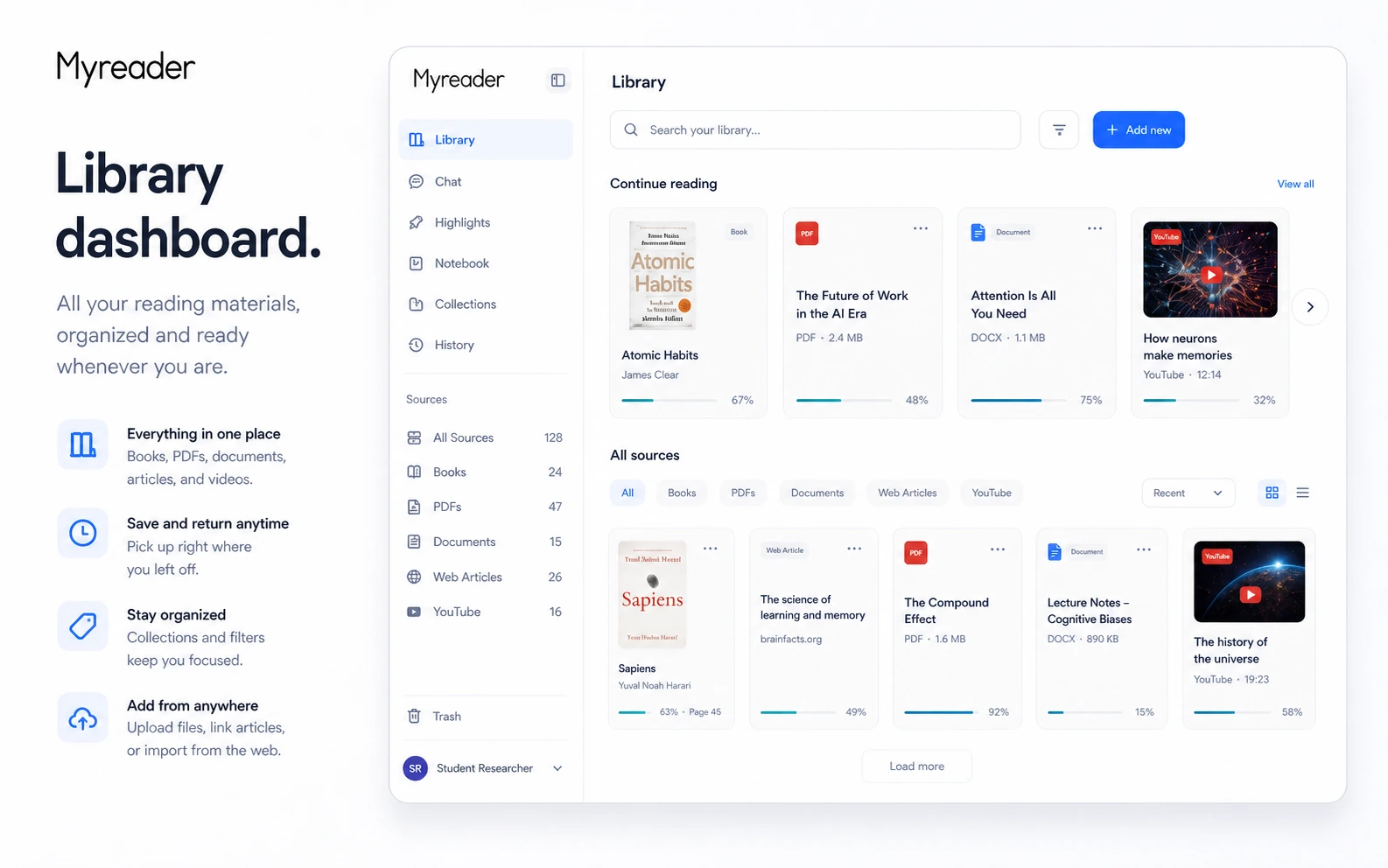
The product looks simple on the surface: upload books, PDFs, documents, article links, or YouTube videos, then ask questions and get answers with citations. The buying decision is narrower. Myreader only becomes valuable when you repeatedly need to question long material, organize it into a library, listen to it, and jump back to the pages or sections that support the answer.
I would not treat Myreader as a replacement for careful reading. It is better viewed as a reading assistant that helps you move around long material faster. For students, researchers, professionals, and serious readers, that can be genuinely useful. For casual users who only need a quick one-file summary, the free plan may be enough, and a paid plan may be unnecessary.
The strongest reason to consider Myreader is its workflow fit: library-wide chat, source citations, collections, broad document support, article and YouTube inputs, and text-to-speech in one place. The main caution is that the AI answers still need verification, the free plan is limited, annual pricing needs checkout confirmation, and refunds are not something I would rely on casually.
The safest next step is simple: start with the free plan, test real material, and only then compare Lite, Pro, annual billing, and current offers.
Next step: If Myreader fits the way you actually read or research, test the product with real source material before comparing paid plans.
Review snapshot
| Review point | Practical take |
|---|---|
| Best for | Students, researchers, professionals, and readers who repeatedly work through long source material |
| Not ideal for | One-off PDF summaries, enterprise document governance, API workflows, or highly sensitive files without review |
| Main use case | Uploading books, PDFs, articles, documents, or YouTube videos and asking source-backed questions |
| Free path | Free plan with limited daily queries, character capacity, and file size |
| Paid path | Lite and Pro make sense when query volume, file size, character limits, OCR, bulk upload, or audiobook hours matter |
| Main strength | Turns reading material into a searchable library with citations and listening support |
| Main concern | AI answers require source checking, and refund protection is limited |
| Best alternatives to compare | Mindgrasp, Scispace, Otio, Clipto AI |
| Best next step | Upload one real book, paper, report, or video source before paying |
What is Myreader?
Myreader is best understood as an AI reading assistant for people who work with long material: books, PDFs, EPUBs, Kindle book files, Word documents, PowerPoint files, article links, and YouTube videos.
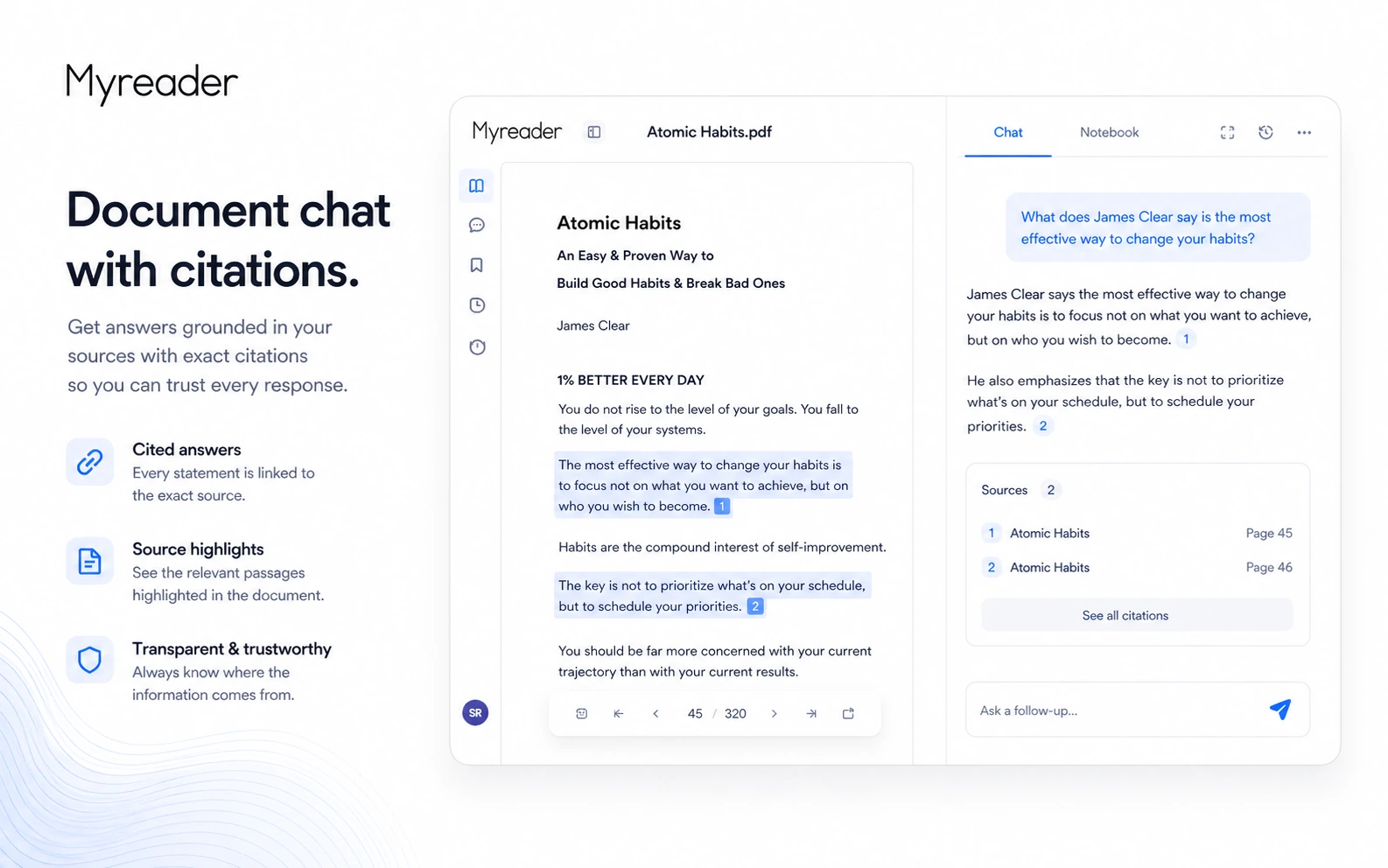
The core job is not just summarization. The more useful job is source-backed reading support. You upload material, ask questions, get summaries or answers, and use citations to return to the relevant page or section. Myreader also supports collections, library-wide chat, and text-to-speech, which gives it a slightly different shape from a simple “chat with PDF” tool.
The common wrong expectation is thinking Myreader will remove the need to read. It should not be used that way. The better expectation is that it helps you move through a reading pile faster, find the right section sooner, and decide where your attention should go next.
Our review approach: we compare public product pages, pricing details, terms, buyer workflow fit, and nearby alternatives. We do not treat a free plan, annual discount, or coupon route as proof that the tool fits the buyer. My confidence is strongest around Myreader’s product role and workflow fit. I am more cautious around long-term value because the answer quality and plan limits need to be tested with each buyer’s actual reading material.
Myreader is not a broad automation platform. It is not a team knowledge base with admin controls. It is not an academic database. It is also not a guaranteed answer engine. It is a reading workflow tool, and that is exactly how I would evaluate it.
Who should use Myreader?
Students are the most obvious fit, especially if they work with textbooks, course PDFs, slides, lecture-related videos, or long reading lists. Myreader can help them ask targeted questions, find relevant passages, and review material more quickly. The condition is important: students still need to check cited sections, especially for exams, assignments, and anything a teacher may evaluate.
Researchers may find Myreader useful when they have a focused set of books, articles, PDFs, or background material and want to ask questions across a collection. It is not a replacement for a scholarly search platform, but it can help organize already-chosen sources and return to relevant passages. If the job is paper discovery and academic source exploration, compare it with Scispace before committing.
Professionals who deal with long reports, manuals, training documents, policy material, or reference files may also benefit. The value is not that Myreader makes a final decision for them. The value is that it can shorten the time between question and source passage. For professional use, I would be careful with confidential material and internal data rules.
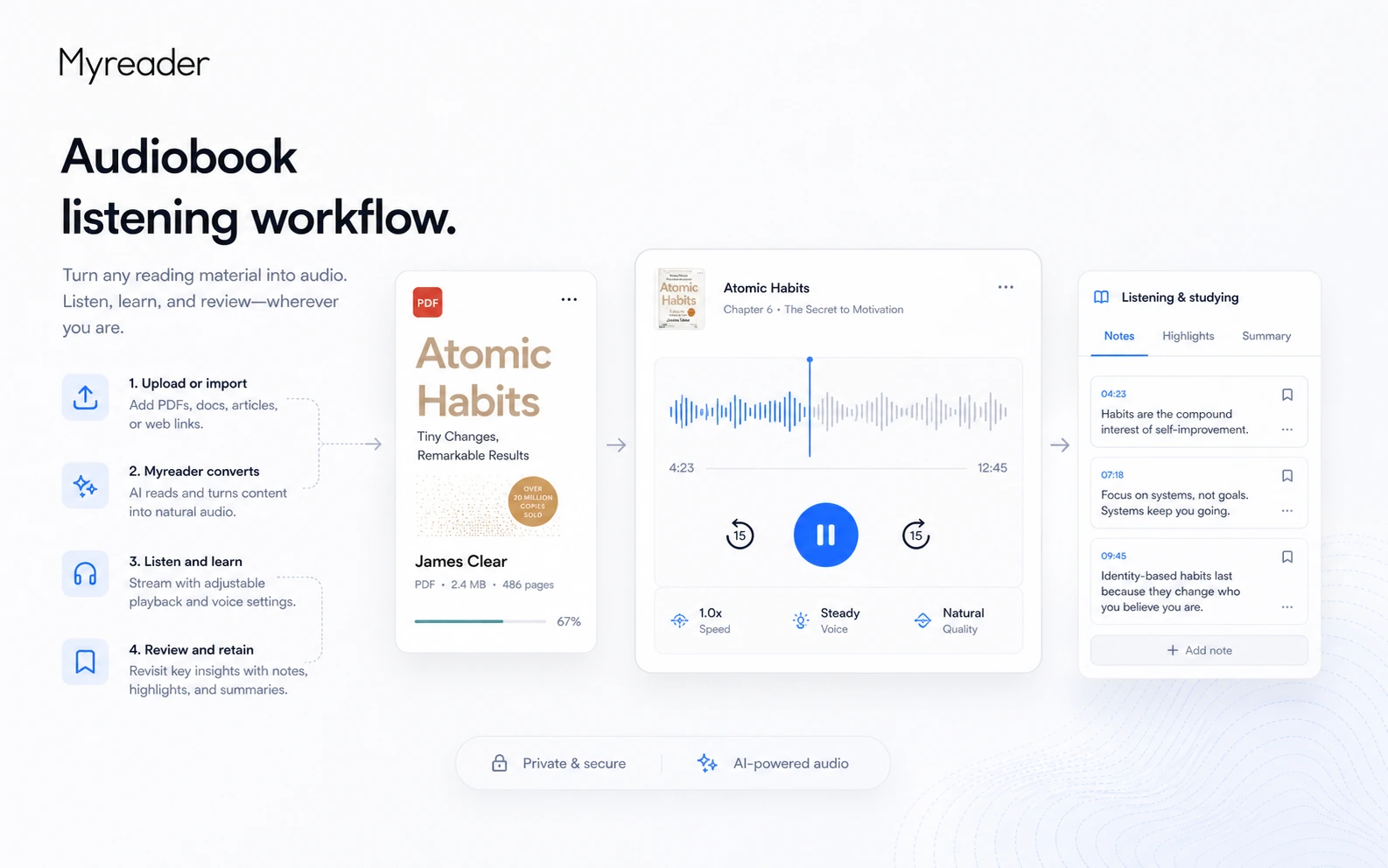
Readers who prefer listening may like the text-to-speech angle. Myreader’s audiobook-style support matters if you review content while commuting, walking, or doing low-focus reading. Before upgrading, check the audiobook-hour limits because this feature can quickly become a plan decision rather than a nice extra.
Buyers who like free testing paths should also consider it. Myreader gives you enough of an entry point to test the workflow before paying. That is the right order for this category.
Who should avoid Myreader?
I would skip Myreader if you only need a quick one-file summary once in a while. The free plan or another lightweight summarizer may be enough. Paying for a library workflow makes less sense if you do not plan to build or revisit a library.
I would also be careful if you need enterprise controls. Myreader may be useful for individuals, students, and professionals, but it is not the first tool I would choose for centralized admin roles, workspace governance, team analytics, formal compliance controls, or API-driven workflows.
Buyers working with sensitive documents should slow down. Myreader gives useful privacy signals on its public pages, including cloud storage and private user data, but that is not the same as a custom legal, school, medical, or enterprise security review. If your documents are restricted, follow your own data-handling rules first.
I would not use it as a final authority for academic, legal, medical, or professional decisions. AI answers can sound confident even when the source interpretation is wrong or incomplete. Myreader’s citations are helpful, but they do not remove the need to verify the original passage.
Finally, I would avoid upgrading only because the paid price looks low or an offer path appears. A discount can improve a good purchase. It does not turn a weak workflow fit into a strong one.
How Myreader fits into a real workflow
A useful Myreader workflow starts before you upload anything.
First, choose material that reflects your real use case: a textbook chapter, research paper set, long PDF, report, manual, article list, or YouTube lecture. A short sample file will not tell you much. Myreader is only worth paying for if it helps with the kind of source material you actually handle.
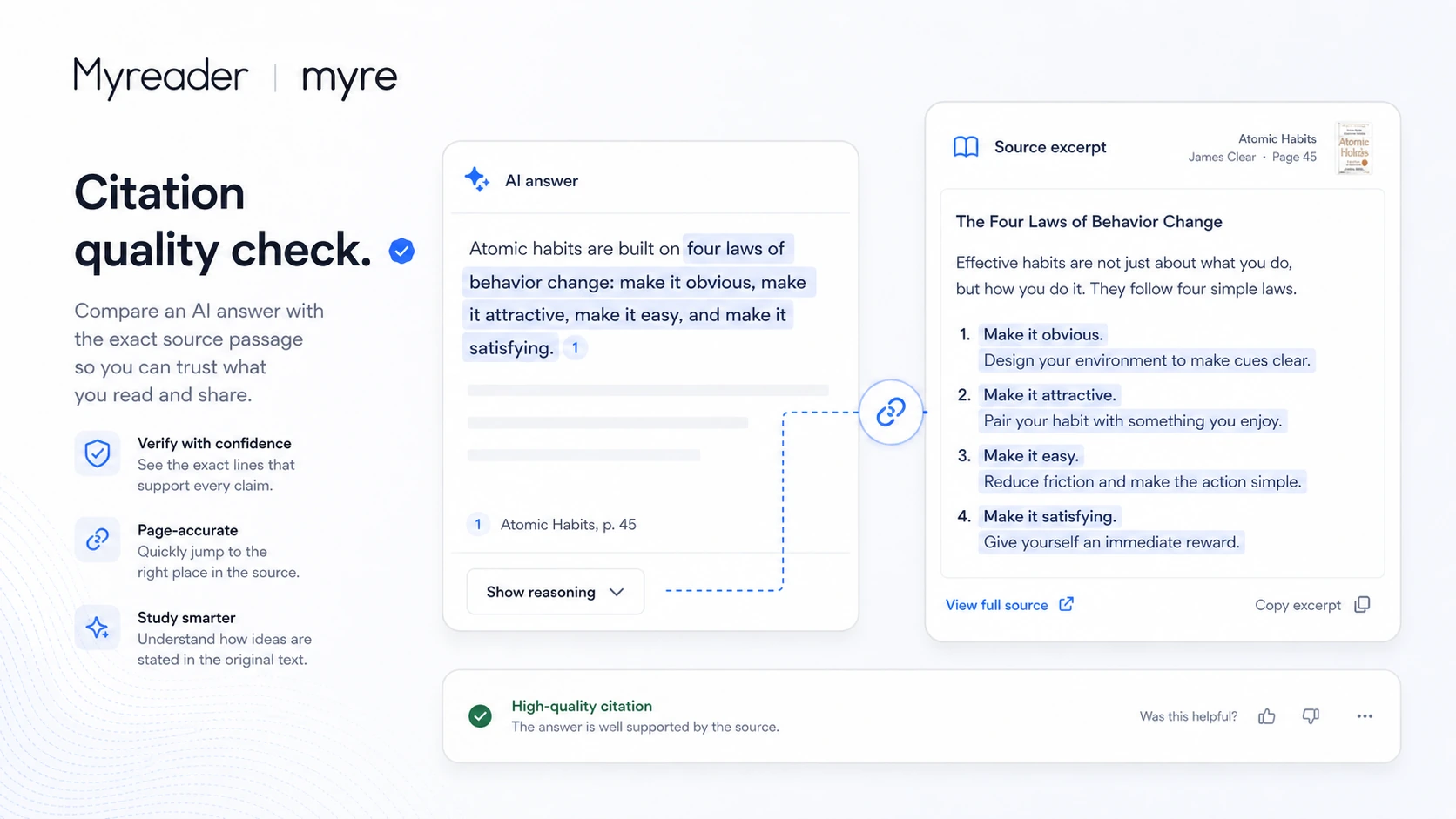
Then ask questions that force the tool to prove its value. Do not only ask for a broad summary. Ask for a comparison, a definition, a specific claim, a page-level explanation, or a question where the citation matters. The answer is useful only if the cited passage supports it.
After that, check how the workflow feels. Can you move from answer to source quickly? Do collections help you organize material? Does library-wide chat save time, or does it create more checking work? Does text-to-speech help you review material, or is it just a novelty?
The decision point comes after the test. If you repeatedly find useful passages faster, the tool has a real role. If you spend more time correcting or doubting the answers than reading the source yourself, the workflow is not ready for a paid plan.
Workflow check: Myreader is easier to judge when you upload real reading material and test whether citations actually support the answers.
Real-world buyer scenarios
A student reviewing textbooks and lecture material
A student can upload a textbook chapter, class PDF, slides, or a YouTube lecture and ask targeted questions before studying. This can be helpful when the reading pile is large and the student needs a faster way to locate relevant explanations.
The risk is overtrusting the answer. For coursework, the cited passage matters more than the summary. A student should use Myreader to find where to read, not to avoid reading entirely.
A researcher organizing a focused source library
A researcher working with a defined set of papers, books, or background documents may find Myreader useful as a source navigation layer. Collections and library-wide questions can help when the buyer already knows which sources matter.
The limitation is discovery. If the buyer needs to find academic papers, compare scholarly claims, or build a literature map from scratch, Scispace is the stronger comparison. Myreader fits better after the source pile already exists.
A professional processing long reference material
A professional may use Myreader for manuals, training documents, policy files, reports, or reference PDFs. The value is speed: ask a practical question, find the relevant section, then verify before acting.
This is where sensitive-document caution becomes important. If the material includes client, legal, HR, medical, financial, or confidential company information, Myreader should not be tested casually without checking internal rules.
A reader who wants audio support
Some buyers do not want another reading interface. They want to listen. Myreader’s text-to-speech support can matter for people who review books, notes, or articles while away from the desk.
The plan check is audiobook hours. If listening is the main reason to pay, compare the Free, Lite, and Pro limits before choosing a billing cycle.
Key features that actually matter
Document and source support
Myreader supports a broad set of inputs: PDFs, EPUBs, Kindle book files, Word documents, PowerPoint files, article links, and YouTube videos. That matters because a reading workflow is rarely limited to one file type.
Buyer note: check your real source types before upgrading. A tool can look useful in a demo and still fail if your actual files are too large, too messy, scanned poorly, or outside your normal workflow.
AI-powered chat across documents and collections
The ability to ask questions across a single book, a collection, or the whole library is the main reason Myreader is more than a one-document summarizer. This is useful when a buyer wants to connect ideas across related material.
Buyer note: test multi-document questions carefully. The more sources involved, the more important citation checking becomes.
Smart citations
Citations are the trust feature. A fast answer is not enough if the buyer cannot inspect the source. Myreader becomes more useful when the answer leads back to a page, passage, or section that clarifies the claim.
Buyer note: do not only check whether citations exist. Check whether they are useful, precise, and relevant to the question.
Text-to-speech and audiobook listening
Text-to-speech gives Myreader a second workflow: listen instead of rereading. This can be valuable for students, commuters, researchers reviewing notes, or readers who absorb material better through audio.
Buyer note: audiobook hours are a real plan limit. If listening is central to your use case, compare Free, Lite, and Pro before paying.
OCR and bulk upload
OCR and bulk upload matter when buyers deal with scanned documents or large reading piles. These features can turn Myreader from a small helper into a real workflow tool.
Buyer note: test scanned material before assuming OCR quality will handle your files. Scans vary, and messy source quality can reduce answer quality.
Cloud library and collections
Myreader’s organized library is useful for buyers who return to material over time. Collections can help separate research topics, classes, clients, or personal reading categories.
Buyer note: the free plan deletes books after 7 days of inactivity, so do not treat Free as a long-term archive. Use it as a fit test.
Pricing and plan value
Myreader’s pricing is fairly easy to understand at the headline level, but the plan decision still needs care.
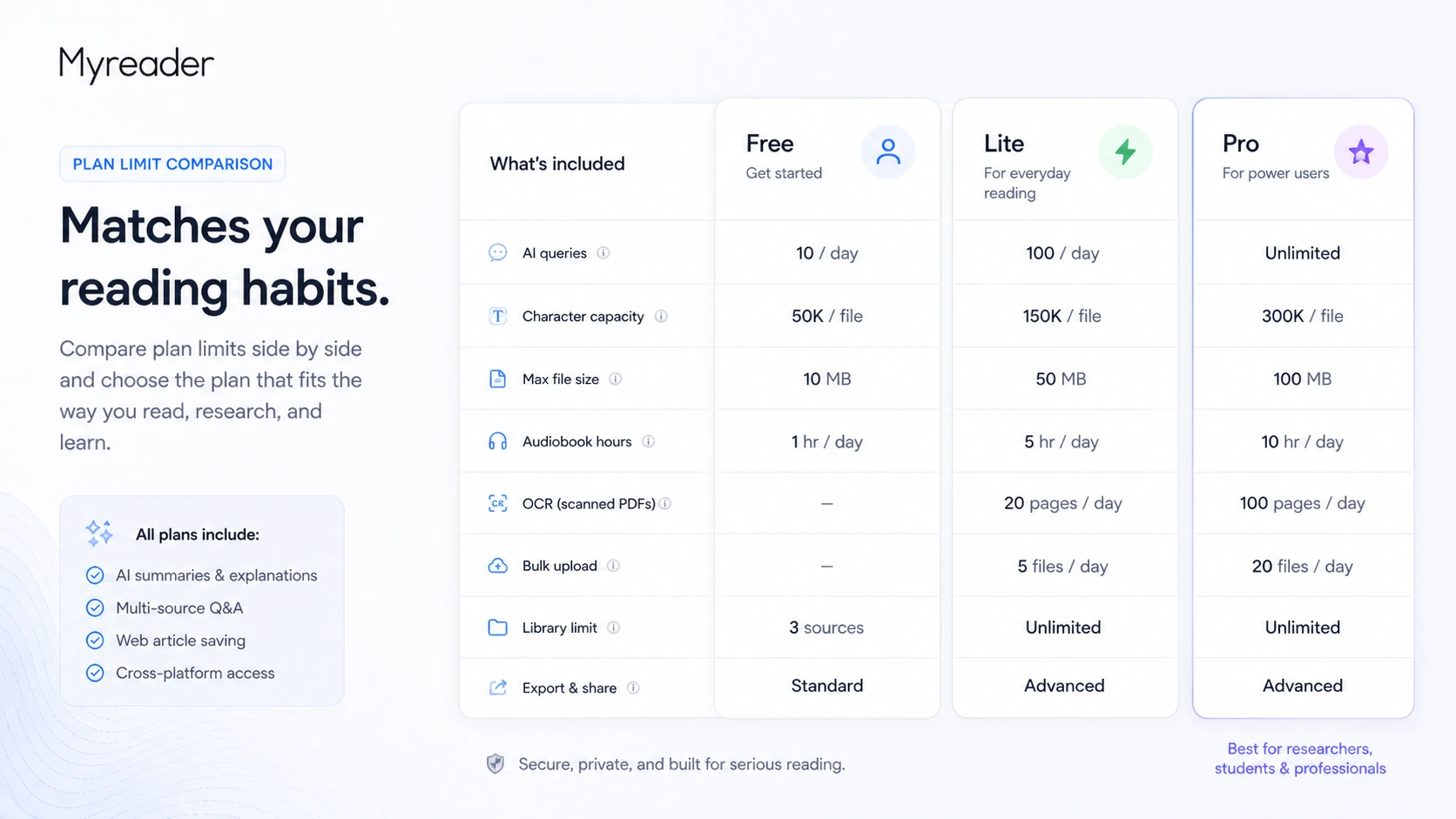
The official pricing page shows a Free plan at $0/month with 5 queries per day, 250,000 characters, and a 10 MB file size limit. It also lists support for audiobook listening, article links, YouTube videos, OCR, and bulk upload. The same pricing page notes that books on the free plan are deleted after 7 days of inactivity.
The paid annual view shows Lite at $6/month with 100 queries per day, 25 million characters, a 250 MB file size limit, and 10 hours of audiobook listening. Pro is shown at $12/month with 1,000 queries per day, 75 million characters, no size limit, and 30 hours of audiobook listening.
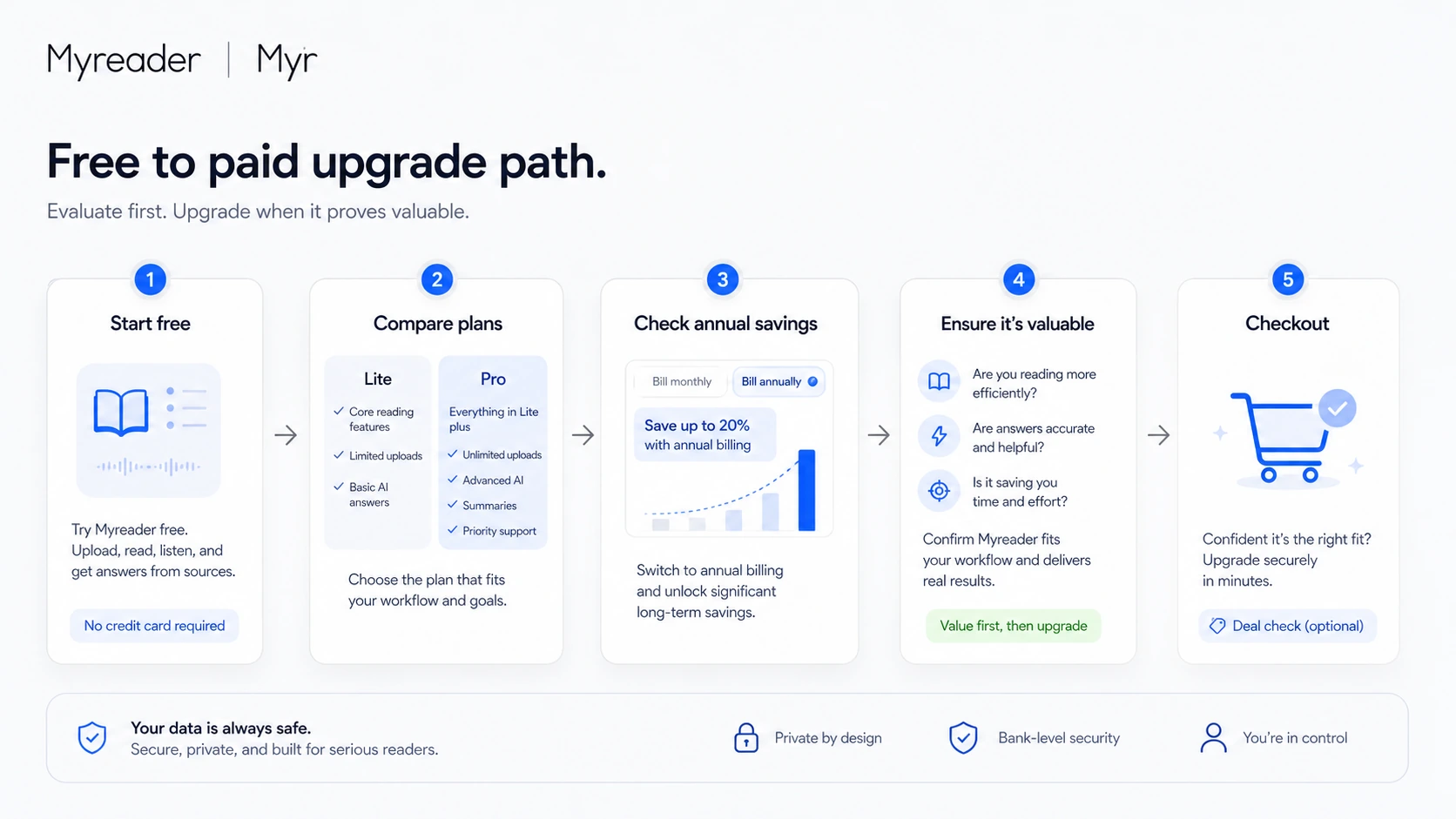
The important part is not only the monthly-equivalent number. Myreader also highlights annual savings, so buyers should confirm the billing interval before checkout. A low annual monthly equivalent can still be the wrong choice if you have not proven that Myreader belongs in your routine.
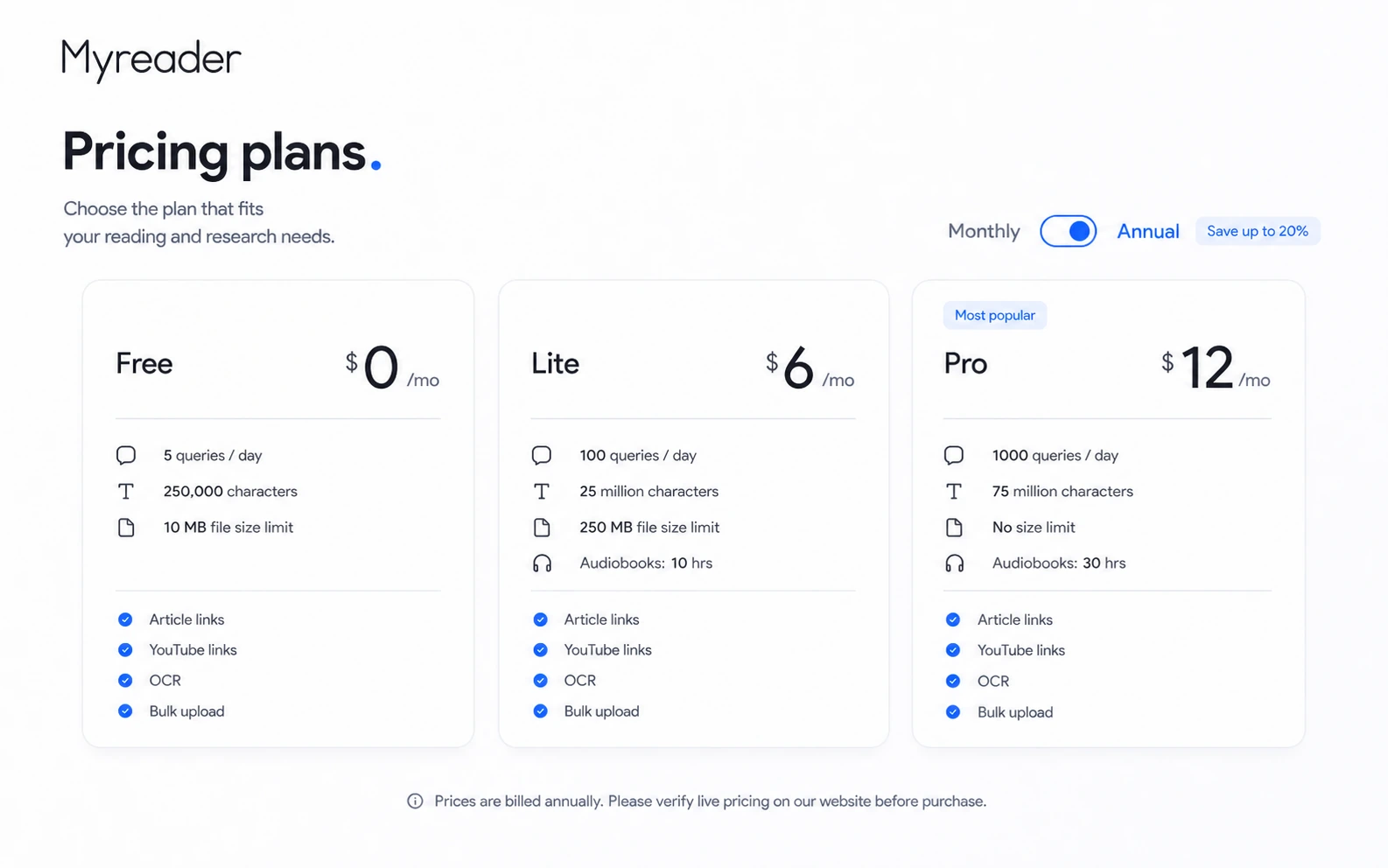
For my money, Free is the right place to start. Lite makes sense when the 5-query daily limit is too small and your files fit the 250 MB cap. Pro makes more sense when you work with heavier libraries, ask far more questions, need larger capacity, or care about more audiobook hours.
I would not move to annual billing until Myreader has already saved time with real books, PDFs, articles, or videos. Annual savings are only valuable after the workflow is proven.
Pricing check: Before choosing Lite or Pro, verify the current billing interval, plan limits, and whether the free plan already answers your main workflow question.
Check Myreader pricing Check current offers Read store guide
Free plan, trial, coupon, and checkout notes
Myreader’s free plan is the cleanest evaluation path. I would use it before thinking about coupons, annual savings, or Pro.
The free plan answers the most important buyer questions: can you upload your real material, do the answers make sense, do citations help, does the daily query limit feel too tight, and does the library workflow feel worth returning to? If the answer is no, paying less will not fix the mismatch.
The official pricing page highlights annual savings of up to 40%. That can be useful, but only after the buyer has already tested the workflow. Annual billing is not a problem by itself. The mistake is using annual savings as the reason to commit before you know whether Myreader will become part of your reading routine.
The coupon path should come after fit, not before it. If Myreader already fits your workflow, check the Myreader coupon page before checkout. If the workflow is still unclear, stay with the Myreader store guide or compare alternatives first.
Refunds need caution. Myreader’s terms say subscriptions can be canceled at any time, with cancellation taking effect at the end of the current billing period. Refunds are not provided except under exceptional circumstances, and refund requests must be made within 14 days of the subscription charge. I would not treat that as a broad money-back guarantee.
Checkout order: Test Free first, compare plan limits second, then check current offers only when the paid workflow already makes sense.
What I would check before buying Myreader
If I were buying Myreader for a real study, research, or document-review workflow, I would check these points before paying:
- Whether the Free plan handles my real file types and source quality.
- Whether citations point to passages that actually support the answer.
- Whether the 5, 100, or 1,000 daily query limit matches my normal use.
- Whether the character limits and file size limits fit my books, PDFs, reports, or videos.
- Whether audiobook hours matter enough to influence the plan choice.
- Whether I am selecting monthly or annual billing at checkout.
- Whether the refund language is acceptable before I commit to a paid plan.
- Whether any sensitive material is safe to upload under my own rules.
The easy mistake is choosing Lite because it looks inexpensive or Pro because it feels safer. The better way to judge Myreader is to upload the material you actually use and see which limit you hit first.
A simple test before paying
Before paying, I would run a small test like this:
- Upload one real document that represents your normal reading workload.
- Ask five questions that require specific source-backed answers.
- Check every citation against the original passage.
- Try one broad summary and one narrow detail question.
- Add an article link or YouTube source if those inputs matter to you.
- Test text-to-speech if listening is part of the buying reason.
- Decide whether the free limits feel like a test lane or a real bottleneck.
This test is deliberately simple. You are not trying to prove that Myreader is perfect. You are trying to answer a more useful question: does it reduce the friction of reading and source navigation enough to become a repeated habit?
If the answer is yes, compare Lite and Pro. If the answer is no, do not let a coupon or annual discount pull you into a tool you already know you will not use.
Pros explained
The first real advantage is source variety. Myreader can handle more than a single PDF workflow, which matters for buyers who read across books, documents, articles, and videos. This makes it more flexible than a simple upload-and-summarize tool.
The second advantage is citations. A reading assistant without source return can become risky very quickly. Myreader’s citation angle gives buyers a way to inspect the original material before trusting the answer. That matters most for study, research, and professional review.
The third advantage is the free test path. I like tools that let the buyer test fit before payment, especially when answer quality depends heavily on source material. Myreader’s Free plan is limited, but it is still useful enough to run a real fit check.
The fourth advantage is text-to-speech. This will not matter to every buyer, but it can matter a lot for readers who learn through listening or review material away from a desk. It gives Myreader a practical angle beyond document chat.
The fifth advantage is focus. Myreader is not trying to become every productivity tool at once. It has a clear job: help people read, question, organize, and listen to source material.
Cons explained
The first limitation is that AI answers still need checking. Myreader can point you to source passages, but it cannot remove the buyer’s responsibility to verify. This matters most for academic, medical, legal, financial, or professional decisions.
The second limitation is the free plan. It is useful as a test path, but 5 queries per day, a 10 MB file limit, and the 7-day inactivity deletion rule make it a weak long-term archive. That is not a dealbreaker. It just means Free should be treated as evaluation, not a complete solution.
The third limitation is refund safety. Myreader’s terms do not present a broad refund promise. Refunds are case-by-case and tied to exceptional circumstances within 14 days of the subscription charge. Buyers should test before paying rather than assume they can easily reverse the purchase later.
The fourth limitation is team and API depth. Myreader may work well for individuals, students, and professionals, but it is not the obvious choice if the buyer needs enterprise workspace controls, API automation, admin analytics, or compliance documentation.
The fifth limitation is that source quality can shape output quality. Poor scans, messy formatting, unclear documents, or questions that require careful interpretation can still produce weak answers. The tool can speed up reading, but it does not make every source easy.
Green flags and red flags
Green flags:
- You already have books, PDFs, articles, or videos you repeatedly need to understand.
- You care about citations and source navigation, not just quick summaries.
- You can test the workflow on the free plan before paying.
- You know whether your main bottleneck is reading, finding passages, or listening.
- You are willing to verify important answers against the original source.
Red flags:
- You only need a one-time summary and do not plan to keep a reading library.
- You expect AI answers to replace careful reading.
- You want team governance, API access, or formal enterprise controls.
- You plan to upload sensitive documents without reviewing data rules.
- You are considering annual billing before testing real material.
My confidence is strongest when Myreader is used as a source navigation assistant. I am more cautious when buyers expect it to become a final answer engine.
Myreader vs alternatives
Mindgrasp vs Myreader
Mindgrasp is the stronger comparison when the buyer’s main job is studying. If flashcards, quizzes, notes, lecture support, and tutor-style learning matter more than building a personal reading library, Mindgrasp may fit better.
Myreader may still make more sense if your core job is asking questions across books, PDFs, articles, and videos with citations and library organization.
Scispace vs Myreader
Scispace is more relevant for academic research discovery, scholarly paper workflows, and research exploration. If you are trying to find, understand, and compare academic literature, Scispace may be the stronger route.
Myreader is better when you already have the material and want to question it, organize it, and return to specific passages.
Otio vs Myreader
Otio is a broader research workspace comparison. It may be a better fit if the buyer needs source synthesis, research organization, and a more general knowledge workflow.
Myreader stays narrower: books, documents, article links, YouTube sources, citations, collections, and listening.
Clipto AI vs Myreader
Clipto AI is not a direct reading-library replacement. It is more relevant when the first job is audio or video transcription before summarizing, analyzing, or repurposing content.
Myreader is stronger when the source material is already readable or link-based and the buyer wants to ask questions inside a library.
1min.AI and Aikeedo as adjacent routes
Tools like 1min.AI and Aikeedo are adjacent routes, not direct Myreader replacements. 1min.AI is a broader AI utility direction, while Aikeedo is closer to building or owning an AI SaaS-style system. I would not compare either one as the first alternative if the buyer simply wants to read, question, and cite long material.
Trust, refund, and buyer-risk notes
The biggest trust point in Myreader’s favor is that its role is clear. It is not vague AI productivity marketing. The product is built around reading material, asking questions, citations, collections, and listening.
The biggest buyer risk is overtrust. A cited answer is better than an unsupported answer, but it is still not a guarantee. Buyers should open the cited passage and confirm that the answer matches the source. This is especially important for medical textbooks, legal material, academic claims, professional reports, and anything that affects real decisions.
Refund language is another risk. Myreader allows cancellation, but cancellation takes effect at the end of the current billing period. Refunds are only considered under exceptional circumstances within 14 days of the subscription charge. That is enough reason to treat the free plan as the real evaluation path.
Privacy and document handling also deserve attention. Myreader says documents are stored in secure cloud storage, are private to the user, are not shared between users, and can be deleted. That is reassuring for normal use. It is not the same as a formal enterprise security agreement. Sensitive-document buyers should check their own rules first.
Pricing risk is mostly about limits and billing interval. Check daily queries, character capacity, file size, audiobook hours, OCR, bulk upload, monthly versus annual billing, and whether the current checkout matches the pricing page.
Final verdict
I would consider Myreader if you already have long material to work through and you want a practical way to ask questions, find cited passages, organize sources, and sometimes listen instead of rereading.
I would start with the free plan, not because Free is enough for everyone, but because it answers the most important question: does Myreader actually help with your reading pile?
I would move to Lite if the free limits become the bottleneck and your files still fit comfortably. I would consider Pro only if you have heavier reading volume, larger files, more questions, and a real need for higher audiobook capacity.
I would skip Myreader if you only need a one-time PDF summary, if you need enterprise controls, if you are handling restricted documents without approval, or if you expect AI answers to replace source checking.
I would compare it with Mindgrasp if the job is study support, Scispace if the job is academic research discovery, Otio if the job is broader research organization, and Clipto AI if the job starts with transcription.
The safest path is to use Myreader as a reading assistant, not a reading replacement. Test it with real material, verify the citations, compare plan limits, and only check the current offer route after the workflow fit is clear.
