Quick verdict
Mindgrasp is worth considering if you have real learning material piling up and you need a faster way to turn it into notes, flashcards, quizzes, summaries, and follow-up questions.
That is the useful version of the product.
The weaker version is buying Mindgrasp like a casual summarizer, trying one small sample, forgetting the trial date, and then feeling trapped by the billing policy. The tool can be genuinely helpful for students and self-learners, but the purchase decision is not only about whether the output looks impressive. It is about whether Mindgrasp becomes part of your weekly study loop.
For my money, Mindgrasp makes the most sense when you can test it with a real lecture, PDF, video, slide deck, or reading assignment on day one. If the generated notes and quizzes help you study faster, the paid plan can be reasonable. If you only need an occasional summary, the short trial and refund limits make it a tool to approach carefully.
The strongest reason to consider Mindgrasp is workflow depth. It is not just “paste text, get summary.” It is closer to a study-session builder. The main caution is checkout discipline: the trial is short, annual billing is tempting, and refunds are not a comfortable safety net once billing starts.
Next step: If Mindgrasp still fits your study workflow, test the live buyer route before the trial window starts.
Review snapshot
| Review point | Practical take |
|---|---|
| Best for | Students, self-learners, educators, and professionals who repeatedly study from lectures, PDFs, videos, slides, and readings |
| Not ideal for | One-off summarizer users, buyers who may forget to cancel, or teams needing enterprise learning governance |
| Main use case | Turning learning material into notes, summaries, flashcards, quizzes, and AI-assisted Q&A |
| Starting price | Basic starts at $9.99/month on monthly billing or $5.99/month equivalent when billed yearly |
| Trial | 4-day free trial, with automatic billing unless canceled before the trial ends |
| Main strength | A full study-session workflow instead of a single-purpose summary tool |
| Main concern | Short trial window, strict refund posture, and feature gates across Basic, Scholar, and Premium |
| Best alternatives to compare | YouLearn AI, MyReader, Otio, Solvely AI |
| Best next step | Test one real class module during the trial before choosing monthly or yearly billing |
What is Mindgrasp?
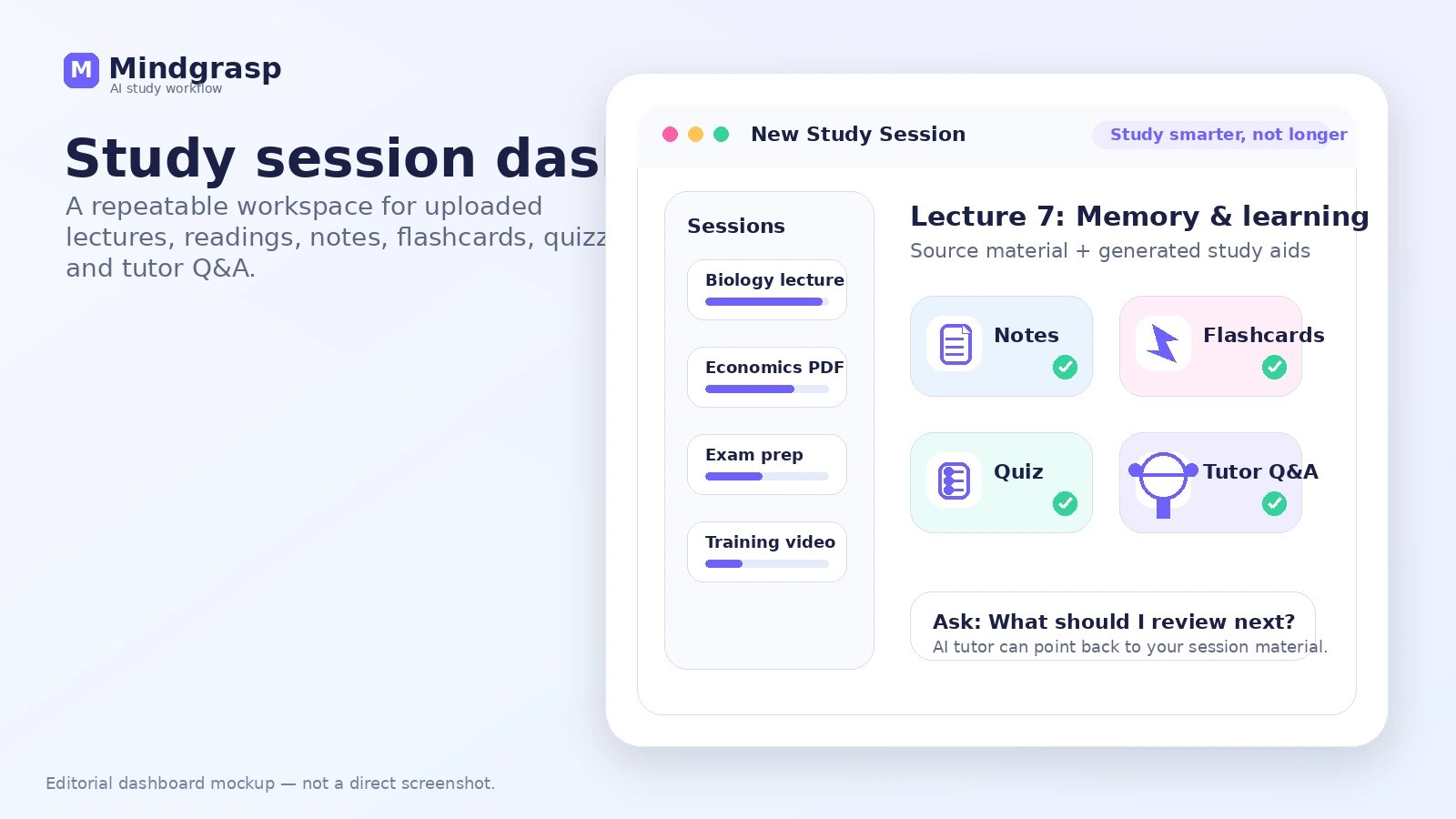
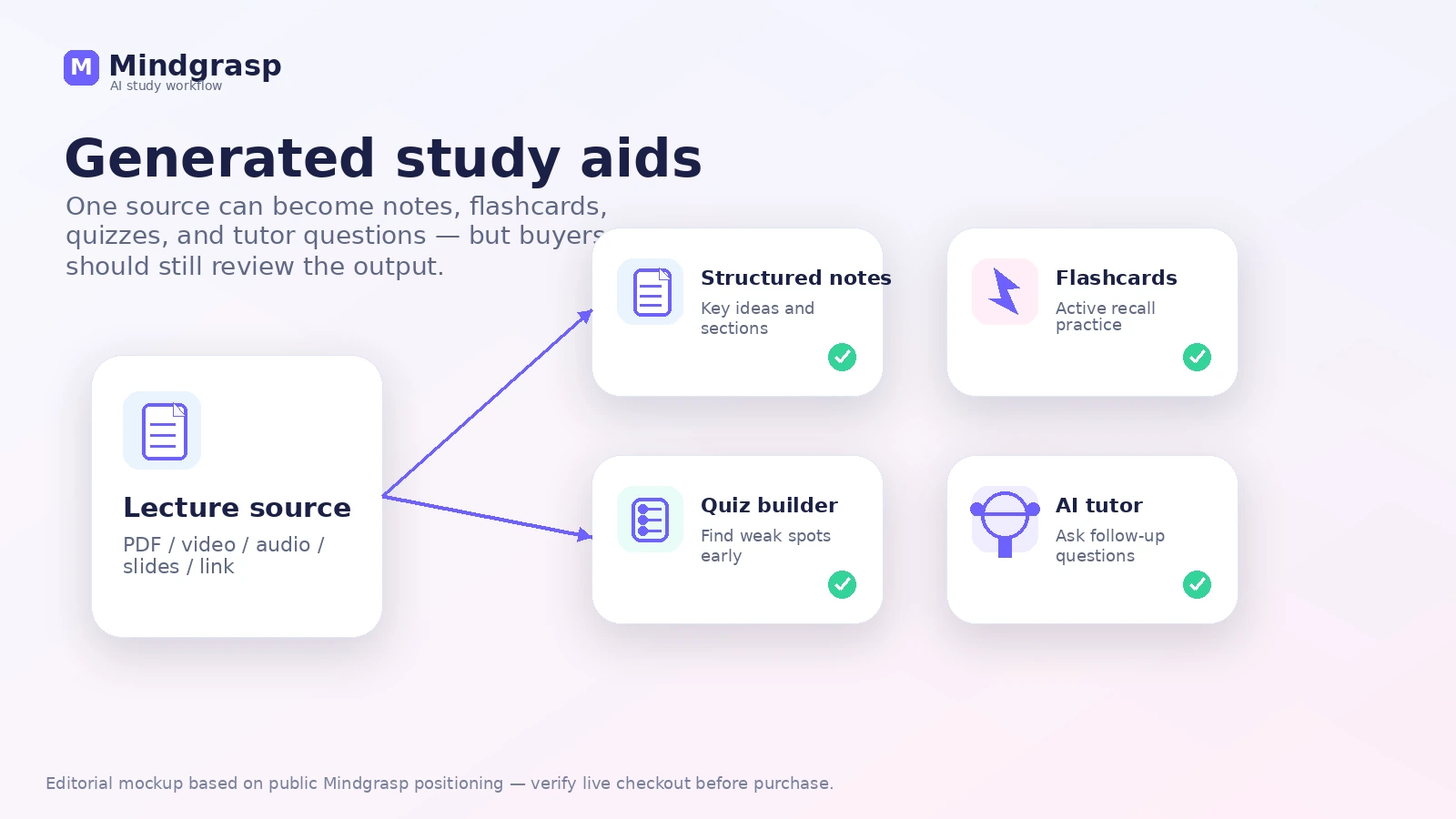
Mindgrasp is an AI study assistant for turning learning material into structured study assets. In plain language, it helps you take lectures, readings, links, videos, audio, PDFs, slides, and similar class or training material and convert them into notes, summaries, flashcards, quizzes, and AI tutor-style answers.
That makes it different from a basic summarizer.
A simple summarizer gives you a shorter version of something. Mindgrasp is trying to build a study session around the material: upload the source, generate notes, quiz yourself, review flashcards, ask follow-up questions, and keep the session organized for later review. That is the part that matters for the buyer.
The common wrong expectation is thinking Mindgrasp will remove the need to study. It will not. It can reduce the messy prep work around studying, but the learner still needs to check the output, understand the concepts, and compare AI-generated answers against the source material or instructor expectations.
Our review approach: we compare public product pages, pricing details, support documentation, deal terms, buyer workflow fit, and nearby alternatives. We do not treat a trial, coupon path, or lower annual price as proof that the product fits the buyer.
My confidence is strongest around Mindgrasp’s product role and study workflow. I am more cautious around long-term value because the short trial, billing path, app-store differences, and refund rules can matter more than the homepage promise.
Who should use Mindgrasp?
Mindgrasp is a good fit for students who already have more material than time. If your week involves lecture recordings, slide decks, readings, PDFs, YouTube explainers, and revision notes, Mindgrasp can help turn those pieces into a more usable study system.
It also fits self-learners who take online courses or watch long tutorials. The value is not just getting a summary. It is being able to ask questions, generate review assets, and return to the session later instead of rewatching everything from the beginning.
Educators and tutors may also find value, but with a different expectation. Mindgrasp can help draft notes, quizzes, and flashcards from existing materials. The teacher still needs to edit for accuracy, age level, assessment goals, and classroom context.
Professionals can use it for training videos, webinars, internal documents, and dense learning material. The fit is strongest when learning from content is part of the job, not when someone only needs one quick summary before a meeting.
I would also consider Mindgrasp if you are willing to run a disciplined trial. The buyer who gets the most from Mindgrasp is not the person who signs up casually. It is the person who starts the trial with real material ready, tests the outputs immediately, and decides before billing begins.
Who should avoid Mindgrasp?
I would be careful with Mindgrasp if you only need a free occasional PDF or YouTube summarizer. The product has free-tool messaging and a short trial path, but the core value is a paid study workflow. If you do not plan to use it repeatedly, the subscription can become harder to justify.
I would also avoid it if you are likely to forget cancellation dates. The trial window is short, and the refund policy is not the kind of safety net I would want to rely on after billing starts. A calendar reminder is not optional here.
Mindgrasp is also not the cleanest fit for teams looking for enterprise learning management governance, admin dashboards, security workflows, API automation, or institution-wide analytics. It is more of a student and learner productivity tool than a full organizational learning platform.
Students who need verified academic answers should be cautious too. AI-generated study aids can be helpful, but they are not a substitute for checking source material, citations, formulas, assignment instructions, or what an instructor expects.
Finally, do not buy Mindgrasp only because a coupon or annual price looks attractive. A discount can improve a good purchase. It cannot turn an unused study tool into a good subscription.
How Mindgrasp fits into a real workflow
The best Mindgrasp workflow starts before you open the tool.
Pick one real learning problem: a lecture you missed, a dense PDF, a slide deck before an exam, a long YouTube tutorial, or a training module you need to understand. Then use Mindgrasp to turn that material into a study session.
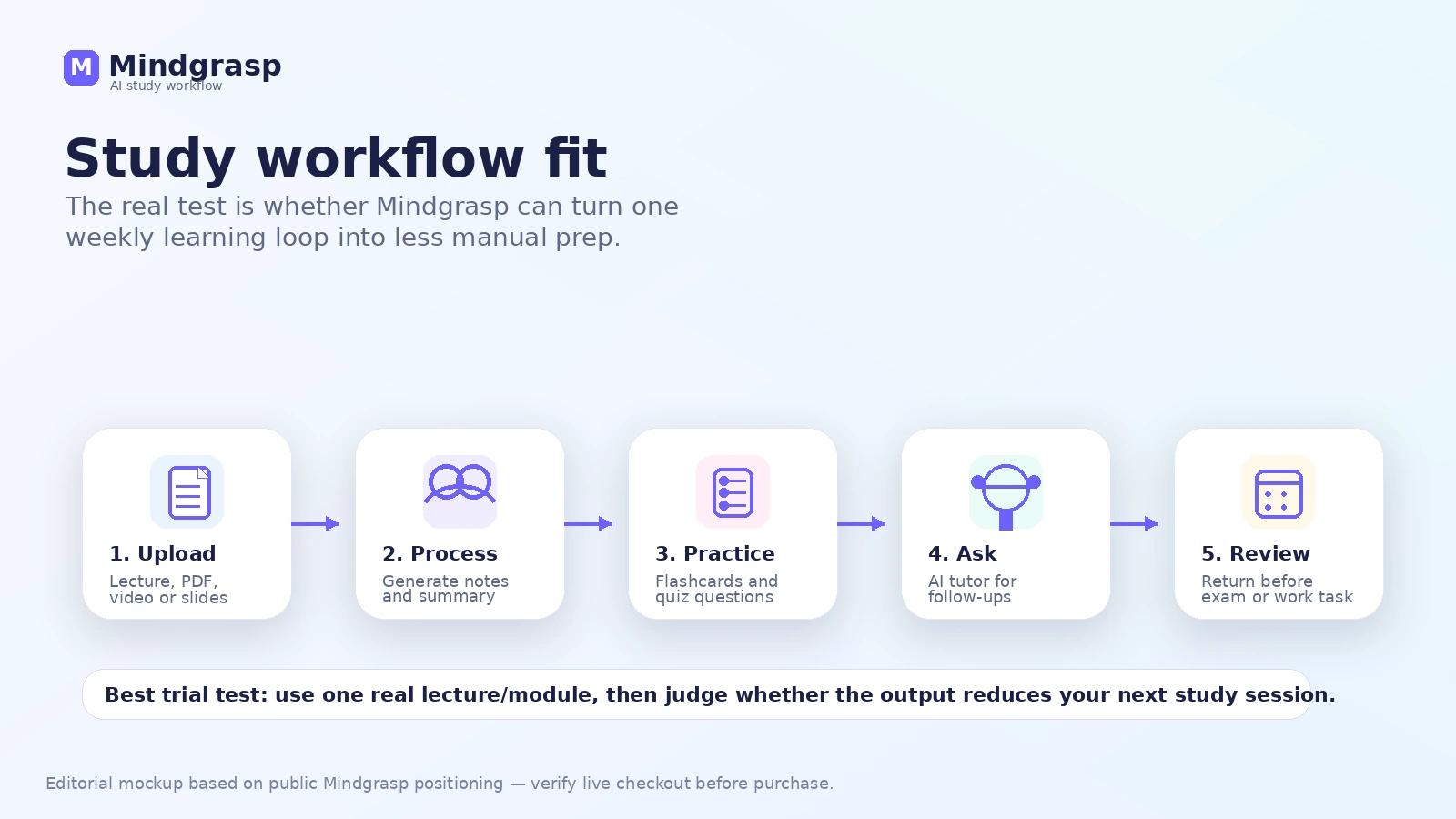
A practical flow looks like this:
- Choose one real class, course, or training topic.
- Upload the lecture, PDF, video, slide deck, link, or reading.
- Generate notes and a summary.
- Review the flashcards and quizzes.
- Ask follow-up questions where the material is still unclear.
- Compare the answers with the original source.
- Decide whether the output saves enough time to repeat weekly.
That last step is the buying decision.
Mindgrasp saves time only if the generated study assets become useful enough to revisit. If you generate a summary, glance at it once, and never return, the workflow is weak. If you build a session before every class review or exam block, the subscription logic becomes more believable.
The human review step matters. Notes can be incomplete. Flashcards can miss nuance. Quiz questions can oversimplify. AI tutor answers can sound confident even when a class expects a different framing. Mindgrasp is useful when it speeds up preparation, not when it replaces learning.
Real-world buyer scenarios
A university student preparing for midterms
A student with lecture recordings, slides, and assigned readings may find Mindgrasp useful because the tool can bring scattered material into one study session. Notes, flashcards, and quizzes are exactly the kind of outputs that can support review.
The risk is assuming the generated content is exam-ready. I would still compare notes against lecture emphasis and instructor guidance before trusting the output.
A self-learner watching long course videos
A self-learner working through online courses may use Mindgrasp to summarize long videos and create practice material. This is a real fit if the person studies consistently and wants a faster way to review.
If the entire workflow is video-first, I would also compare YouLearn AI, because a video-centered learner may care more about course playback and video-specific study flow than a broader study workspace.
An educator drafting practice material
A teacher, tutor, or instructor may use Mindgrasp to create draft study aids from existing lessons. This can save prep time, especially for quick quiz ideas or flashcard prompts.
The key word is draft. Educators should edit the output before giving it to students. Accuracy, curriculum fit, and assessment quality still belong to the human teacher.
A professional reviewing training material
Mindgrasp can fit workplace learning when someone needs to process recorded sessions, manuals, or training content. The professional benefit is faster understanding and review.
But if the workflow is more about research, citations, source management, and knowledge organization, I would compare an adjacent research assistant like Otio rather than treating Mindgrasp as the obvious default.
Key features that actually matter
Notes, summaries, flashcards, and quizzes
This is the core buyer value. Mindgrasp turns one source into multiple study assets, which is more useful than a single summary when the learner needs to remember and practice.
Buyer note: check whether the generated flashcards and quizzes are actually useful. A neat-looking output is not enough. You want review material that helps you study better.
AI tutor and Q&A over your material
The AI tutor-style Q&A is useful when you want to ask follow-up questions about your uploaded material. This can help when a lecture or reading is confusing and you need another explanation.
Buyer note: do not treat answers as final academic authority. Use the Q&A to clarify, then check the original material when accuracy matters.
File and media support
Mindgrasp supports learning inputs such as PDFs, MP3, MP4, articles, YouTube or Vimeo links, PowerPoint, and text. That matters because real study material rarely lives in one clean format.
Buyer note: test the exact file types you use most. A tool can look strong on paper but feel weaker if your actual course material does not upload cleanly.
Chrome extension and learning-platform workflow
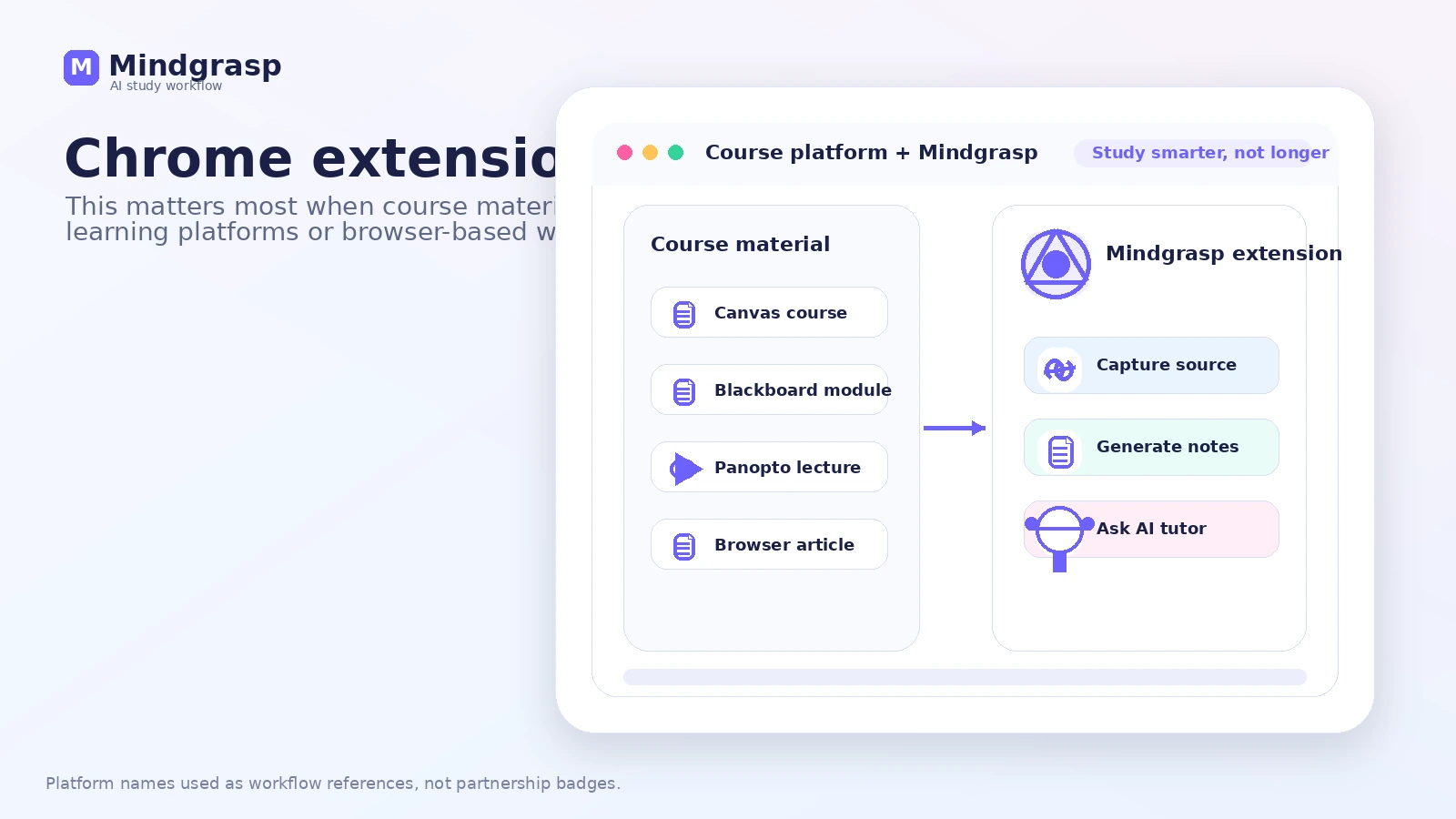
The Chrome extension matters if your course material lives inside Canvas, Blackboard, Panopto, or browser-based learning platforms. This is less important for a buyer who only uploads PDFs manually.
Buyer note: extension access is not just a feature checkbox. It affects whether Mindgrasp fits your real school environment.
Live recording and mobile access
Live recording can matter for lectures, but it is not included equally across all plans. Basic does not have live recording, while higher tiers add monthly recording limits. iOS access also matters for buyers who want to review or record on mobile.
Buyer note: this is where plan choice becomes more serious. Do not choose Basic if live lecture capture is the reason you want Mindgrasp.
Premium upload and image-analysis features
Premium becomes more relevant when you need multi-file uploads, image analysis, or heavier live recording. For casual study sessions, that may be too much plan.
Buyer note: upgrade only when the feature gate blocks your real workflow. Do not buy Premium just because it feels safest.
Pricing and plan value
Mindgrasp pricing is fairly clear, but the buyer decision still needs care.
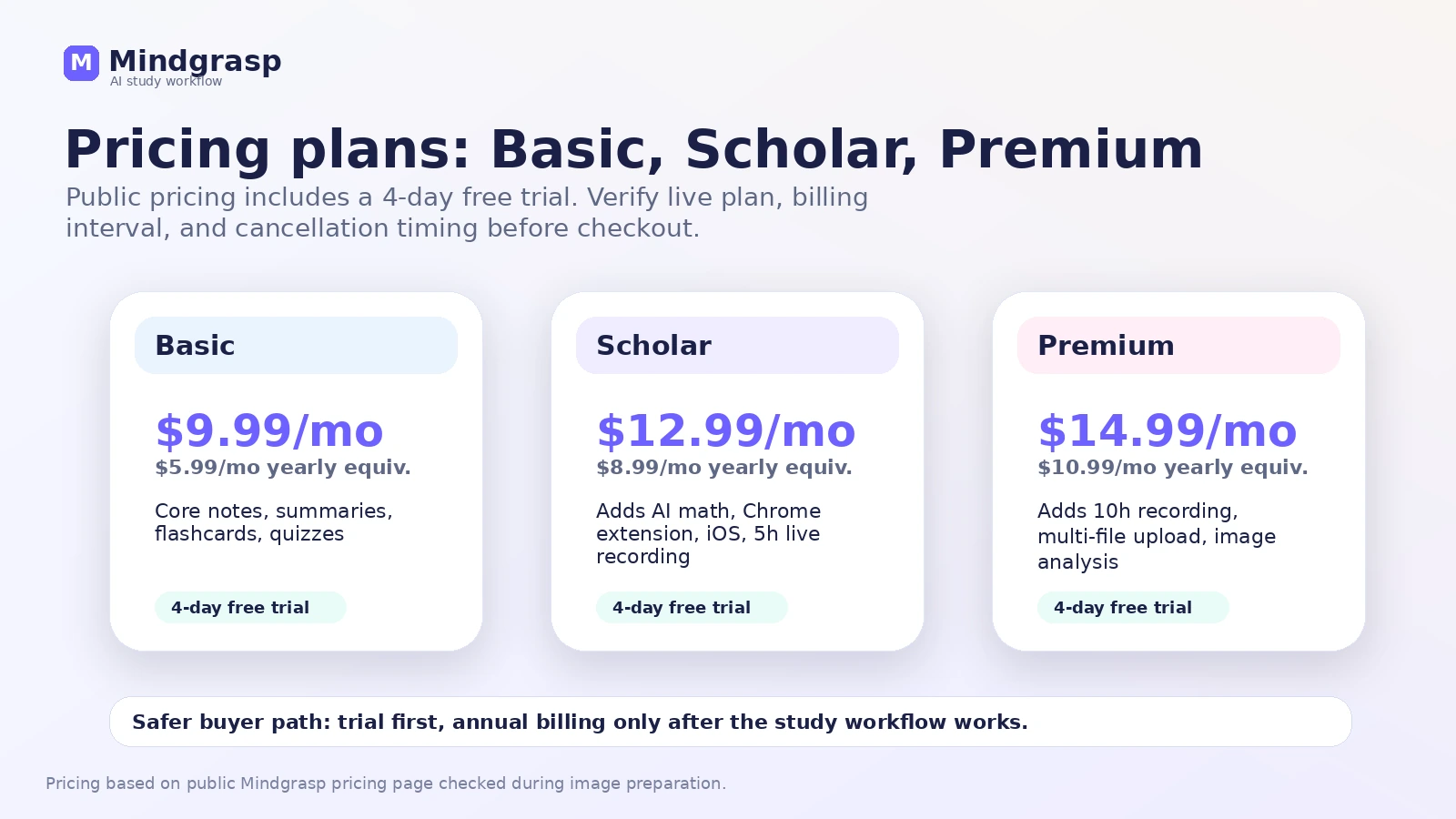
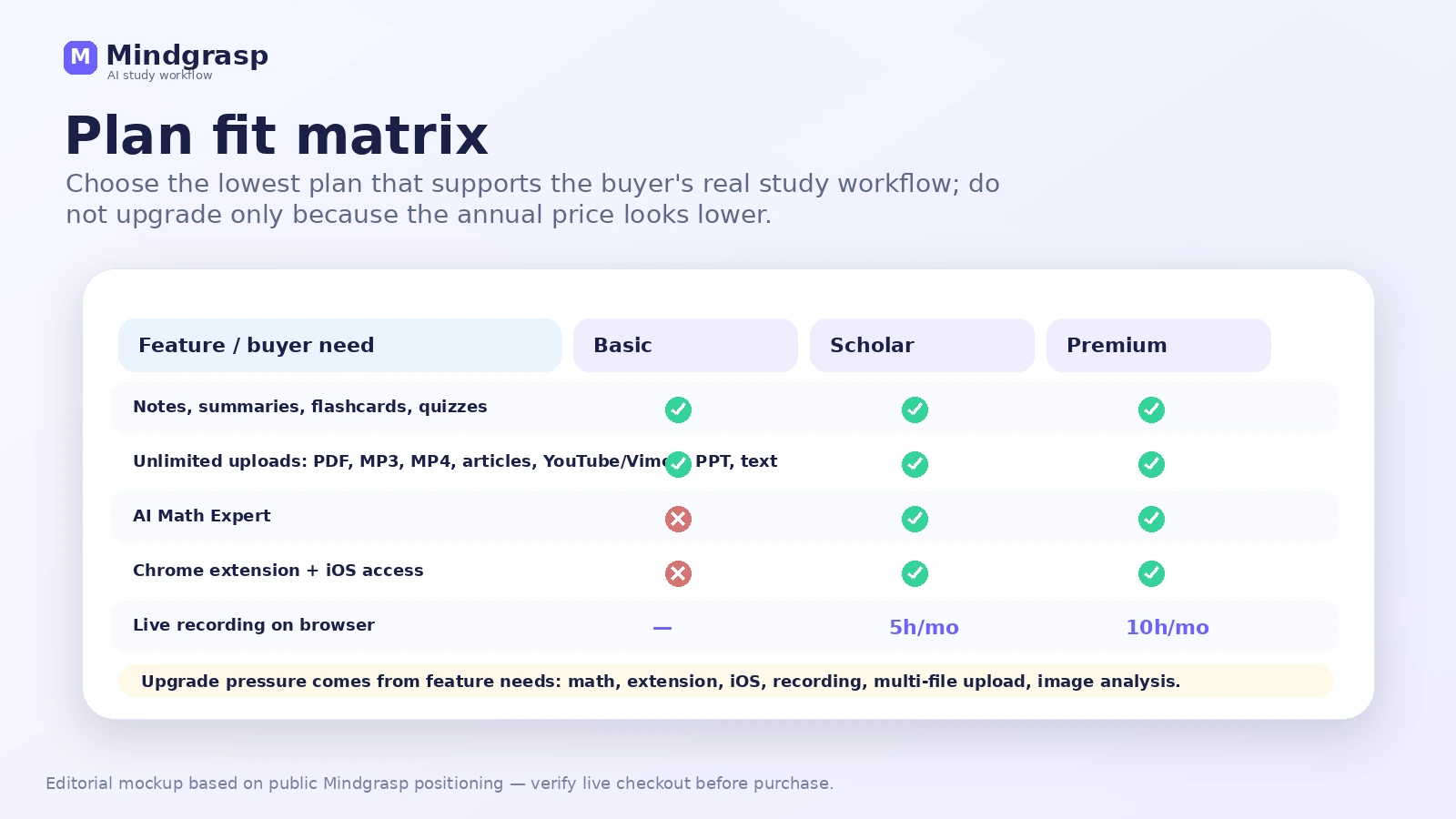
The public pricing page shows three main plans: Basic, Scholar, and Premium. Basic is listed at $9.99/month on monthly billing, or $5.99/month equivalent when billed yearly. Scholar is listed at $12.99/month monthly, or $8.99/month equivalent yearly. Premium is listed at $14.99/month monthly, or $10.99/month equivalent yearly.
All three plans show a 4-day free trial.
Basic is the logical starting point if your main need is notes, summaries, flashcards, quizzes, file uploads, focused reading, and AI assistant questions. It is not the right choice if live recording, Chrome extension access, iOS access, or AI math support are the reason you are buying.
Scholar is the plan I would look at if math explanations, Chrome extension access, iOS access, and live recording matter. That can fit students whose coursework lives in browser-based learning platforms or who need lecture capture.
Premium is for heavier study workflows. Multi-file upload, image analysis, and higher live recording limits can be useful, but they are easy to overbuy if you have not tested the workflow yet.
My pricing take is simple: start trial-first, go monthly before annual unless your use case is already proven, and treat annual billing as a commitment. The yearly price looks better on a monthly-equivalent basis, but a lower monthly-equivalent price is not the same as lower risk.
Also check where you subscribe. Web pricing and app-store subscription paths can differ by platform or region. If you sign up through iOS, manage cancellation and renewal through the subscription route that applies to that purchase.
Pricing check: If Mindgrasp still looks useful, verify the current plan, billing interval, and trial timing before starting.
Free plan, trial, coupon, and checkout notes
Mindgrasp should be evaluated through the trial, not through wishful thinking about refunds.
The trial is 4 days. That is enough time to test the product if you are prepared, but not enough if you sign up casually and decide to “look at it later.” Before starting, gather real material: one lecture, one PDF, one video, one reading, or one class module.
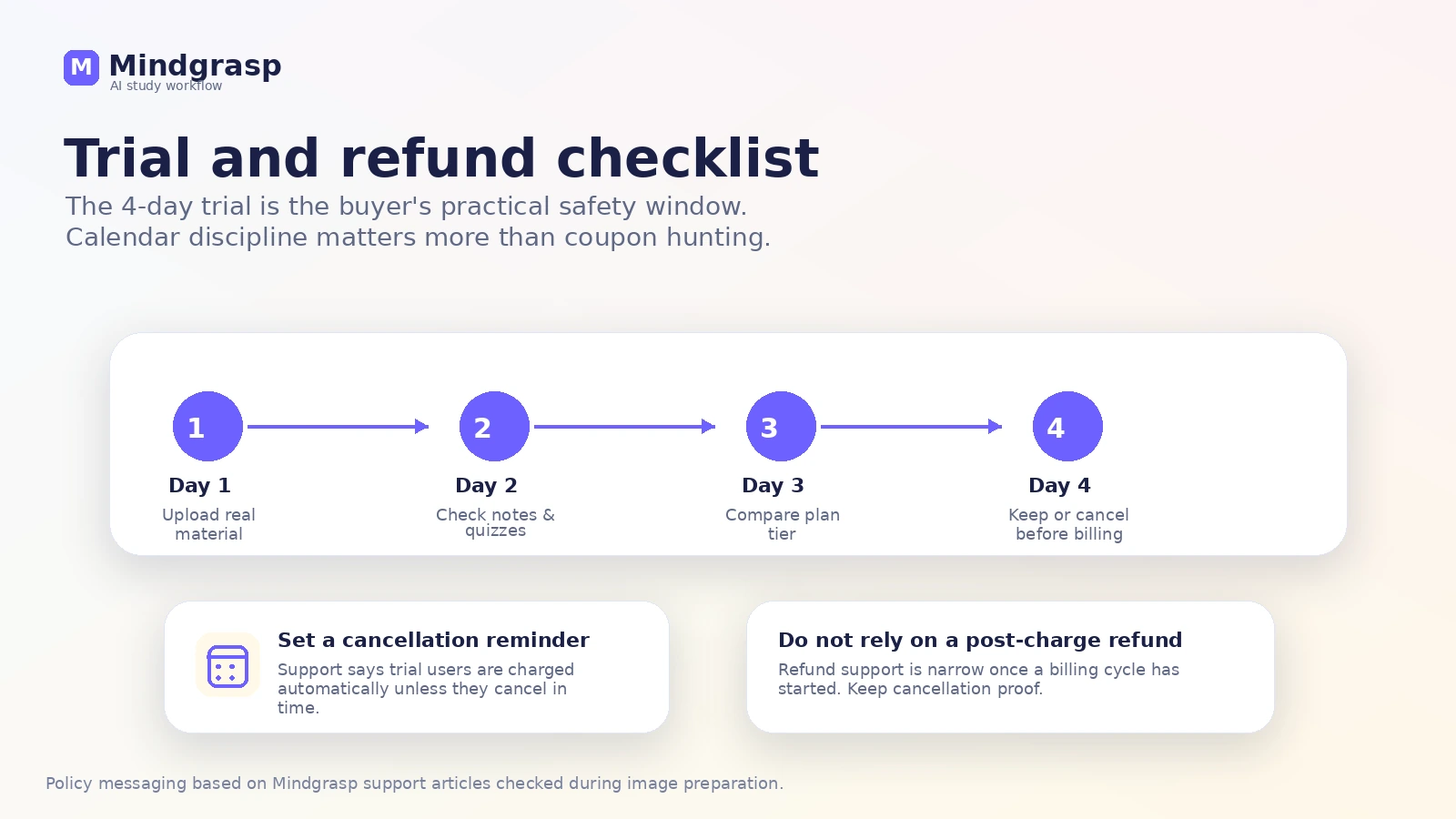
The cancellation rule is the buyer-protection point. Mindgrasp support says users are automatically charged at the end of the 4-day trial unless they cancel, and its refund policy says refunds cannot be issued once a billing cycle has started unless cancellation was completed before the billing date.
That means the safest sequence is:
- Pick a real study task before signup.
- Start the trial only when you can test immediately.
- Upload real material on day one.
- Compare Basic, Scholar, and Premium by feature need.
- Set a cancellation reminder before the trial ends.
- Check any current offer only after the workflow fits.
A coupon path can be useful, but it should come late in the decision. Check the Mindgrasp coupon page only after you know the product fits your study loop. A checkout code or reported offer does not solve the bigger question: will you use this enough after the trial?
Trial-safe route: Use the coupon path only after Mindgrasp proves useful with your own material.
What I would check before buying Mindgrasp
If I were buying Mindgrasp for a real study workflow, I would check seven things before the first paid billing date.
- Trial timing. Can you test real material within 4 days, or are you signing up at the wrong time?
- Plan fit. Does Basic cover your workflow, or do you truly need Scholar or Premium?
- Live recording. Do you need lecture recording, and are the plan limits enough?
- Chrome and iOS access. Are these essential to your workflow or just nice extras?
- File behavior. Do your real PDFs, slides, audio, videos, and links upload cleanly?
- Cancellation route. Do you know exactly where to cancel based on how you subscribed?
- Refund comfort. Are you comfortable with the policy if you miss the cancellation timing?
The easy mistake here is starting the trial because the product sounds helpful, then waiting until the last day to test it. The better move is to treat the trial like a timed study experiment.
A simple test before paying
Before paying, I would run a small test like this:
- Choose one real lecture, PDF, video, or course module.
- Upload it to Mindgrasp on the first trial day.
- Generate notes, a summary, flashcards, and quizzes.
- Ask three follow-up questions that you actually need answered.
- Compare the output against the source material.
- Try to study from the generated material without reprocessing everything manually.
- Decide whether the tool saved enough time to justify the plan.
The test should feel a little uncomfortable because it uses real material, not a toy sample. That is the point.
If Mindgrasp cannot handle the type of material you study every week, the subscription is weak. If it turns a messy pile of content into usable review assets, then the plan decision becomes more serious.
I would not move to annual billing after only a casual test. Use annual only when you know Mindgrasp is part of your routine.
Pros explained
It turns study material into a full session
The best part of Mindgrasp is that it does more than summarize. Notes, flashcards, quizzes, summaries, and Q&A from the same source can support an actual review loop.
This matters most for students with repeat study cycles. It matters less for someone who only needs a one-off summary.
It supports many real learning formats
PDFs, videos, audio, slides, links, and articles are all common study inputs. Mindgrasp’s broader format support makes it easier to use with messy real-world coursework.
The limit is that format support does not guarantee perfect output. Buyers should test their actual files.
The plan ladder is understandable
Basic, Scholar, and Premium are easier to reason about than vague credit bundles. The plan differences make sense: core study tools, then more advanced access, recording, and heavier workflows.
The caution is feature pressure. Buyers can easily talk themselves into a higher plan before proving they need it.
Browser and mobile access can reduce friction
Chrome extension and iOS access are meaningful when your study routine already happens across platforms. If Mindgrasp can meet you where the material lives, it has a better chance of becoming a habit.
If you only study from uploaded PDFs, though, this may not matter enough to justify a higher tier.
Cons explained
The 4-day trial is not forgiving
Four days can be enough for a focused buyer, but it is short for a busy student who signs up during a chaotic week. The trial rewards preparation.
The way to reduce risk is to gather material before signup and set a cancellation reminder immediately.
Refund comfort is weak after billing starts
Mindgrasp’s support policy is clear enough that I would not rely on a refund after the paid cycle begins. That does not make the product bad, but it does change the buyer behavior.
This is a trial-first tool. Test before the charge, not after.
Higher-tier features may matter sooner than expected
If you need Chrome extension access, iOS access, math help, live recording, multi-file upload, or image analysis, Basic may not be the real plan you evaluate.
That means the advertised entry price may not reflect your actual use case.
AI-generated study aids still need review
Mindgrasp can make studying faster, but it cannot know your professor’s grading style, the exact exam emphasis, or whether an AI-generated explanation misses a subtle point.
Use the output as study support. Do not treat it as academic certainty.
Green flags and red flags
Green flags
Mindgrasp is more promising when your study material is scattered and repetitive. If you regularly work from lectures, PDFs, videos, slides, and readings, the tool solves a real workflow problem.
It is also a good sign if you can test it quickly. A buyer with real material ready on day one has a much better chance of making a smart decision before billing starts.
The plan structure is another green flag. Basic, Scholar, and Premium give buyers a clear way to choose based on feature need rather than vague package names.
Red flags
The biggest red flag is trial forgetfulness. If you are likely to start the trial and delay testing, do not start yet.
Another red flag is buying annual too early. The yearly pricing is cheaper per month, but it increases commitment before you know whether Mindgrasp will become a habit.
A third red flag is using Mindgrasp to avoid learning rather than support learning. AI notes and quizzes can help, but they are not a replacement for understanding the material.
Mindgrasp vs alternatives
Mindgrasp belongs in the AI study assistant category, but not every education AI tool solves the same job. The right comparison depends on what kind of learning problem you have.
YouLearn AI vs Mindgrasp
YouLearn AI is the more direct comparison when your learning workflow is centered on videos, courses, and lecture-style content. If most of your studying starts with YouTube or recorded classes, compare the video experience carefully.
Mindgrasp may still be stronger if you want a broader study session across PDFs, slides, audio, links, notes, flashcards, quizzes, and Q&A.
MyReader vs Mindgrasp
MyReader is a closer route when the buyer mostly needs document reading and focused Q&A over uploaded files. If your main problem is understanding documents rather than preparing for exams, MyReader may be the cleaner fit.
Mindgrasp is better when the output needs to become study material, not just document answers.
Otio vs Mindgrasp
Otio is an adjacent route for research-heavy users. If the work involves literature review, source collection, research notes, and knowledge organization, Otio may make more sense than a student-facing study assistant.
Mindgrasp is easier to justify when the buyer wants class revision, flashcards, quizzes, and tutor-style support from learning material.
Solvely AI vs Mindgrasp
Solvely AI is worth comparing when the main job is step-by-step homework help. That is different from turning lectures and readings into study sessions.
Mindgrasp is broader. Solvely AI may be more direct if the pain point is solving questions rather than organizing study material.
Trust, refund, and buyer-risk notes
The biggest buyer-risk note is not hidden: Mindgrasp has a short trial and a strict post-billing refund posture. That combination means the buyer must be organized.
Do not start the trial when exams, travel, or work deadlines make testing unlikely. Do not choose yearly billing because the monthly-equivalent price looks better. Do not assume app-store billing and web billing behave the same way. And do not treat AI-generated notes as automatically correct.
For privacy and academic integrity, use common sense. Avoid uploading sensitive material unless you are comfortable with the service terms. Do not submit AI-generated answers as your own work. Do not rely on generated summaries when exact citations, formulas, or instructor-specific expectations matter.
The trust case for Mindgrasp is strongest when the buyer uses it as a study accelerator. The trust case weakens when the buyer expects it to replace judgment, solve every assignment, or act as a refund-safe casual trial.
Final verdict
I would consider Mindgrasp if you regularly study from lectures, PDFs, videos, slides, readings, or course links and you want those materials turned into notes, flashcards, quizzes, summaries, and Q&A.
I would skip it if you only need a casual summarizer, if you are not ready to test during the 4-day trial, or if you are uncomfortable with automatic billing and limited refund comfort after the paid cycle begins.
I would compare it with YouLearn AI if video learning is the center of your workflow, MyReader if document Q&A matters more, Otio if research organization is the bigger problem, and Solvely AI if step-by-step homework help is the real need.
The safest next step is not to start with annual billing. Start with one real study task, test Mindgrasp immediately, judge whether the generated study assets are useful enough to revisit, and only then decide whether Basic, Scholar, or Premium is the right path.
