Mindgrasp Pricing, Study Fit & Buyer Path
Mindgrasp is best understood as an AI study assistant for turning lectures, PDFs, videos, links, and class material into notes, summaries, flashcards, quizzes, and question-answering sessions. It is not a broad workplace automation suite. The buying decision is mostly about whether a student, educator, self-learner, or professional will repeatedly convert learning material into structured study assets often enough to justify a subscription after the short trial.
Fit → price → checkout
Use these routes after the official-site check: coupon first, review for fit, compare if unsure.
Mindgrasp pricing snapshot
Fast commercial checks before pricing, coupons, or a deeper review.
Mindgrasp product tour
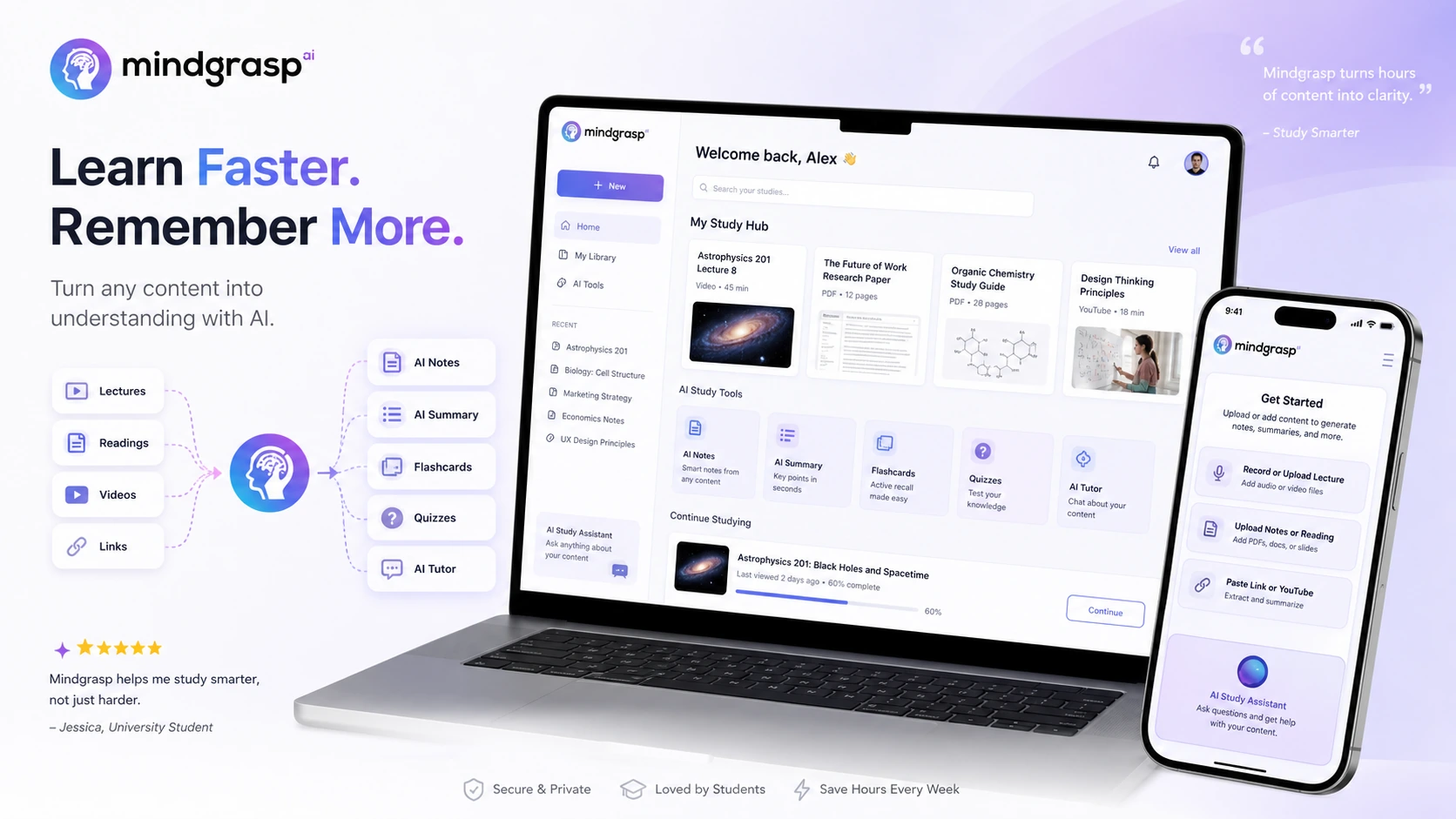
The main tour video is useful because it shows Mindgrasp as a study workflow, not just a summarizer. A buyer should watch how uploaded material becomes notes, flashcards, quizzes, and Q&A, then decide whether that workflow would save time during a real school week. The body video focuses on the Chrome extension and learning-platform context, which helps buyers judge whether Mindgrasp fits Canvas, Blackboard, Panopto, or browser-based course workflows before choosing Scholar or Premium.
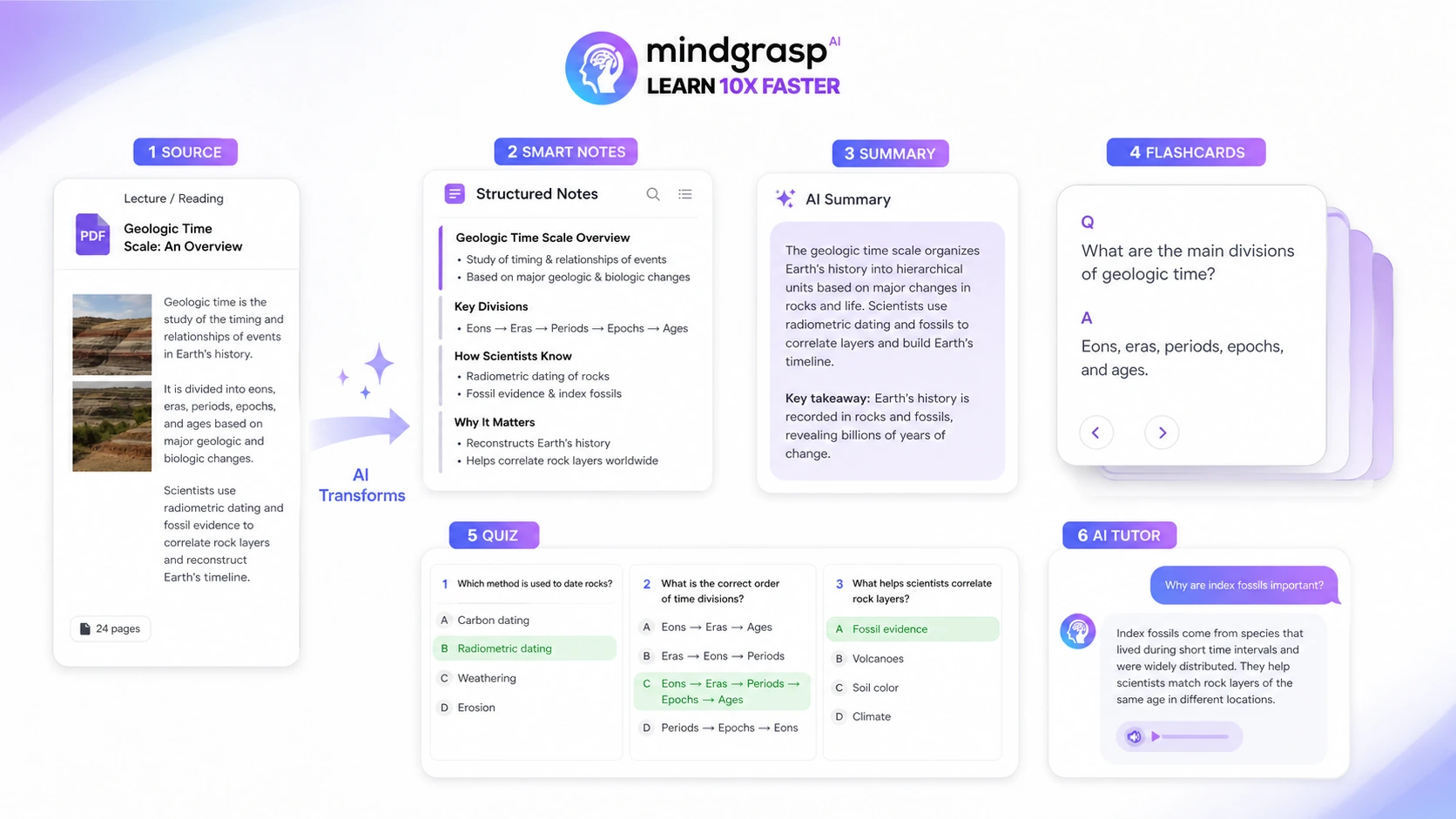
Mindgrasp is a buyer-fit decision for people who regularly learn from dense material. The product is easiest to justify when the buyer has lectures, PDFs, videos, slides, or course links that need to become usable study notes, practice quizzes, flashcards, and follow-up answers. It is harder to justify if the buyer only needs an occasional free summary and does not want to manage a paid trial.
What Mindgrasp actually does
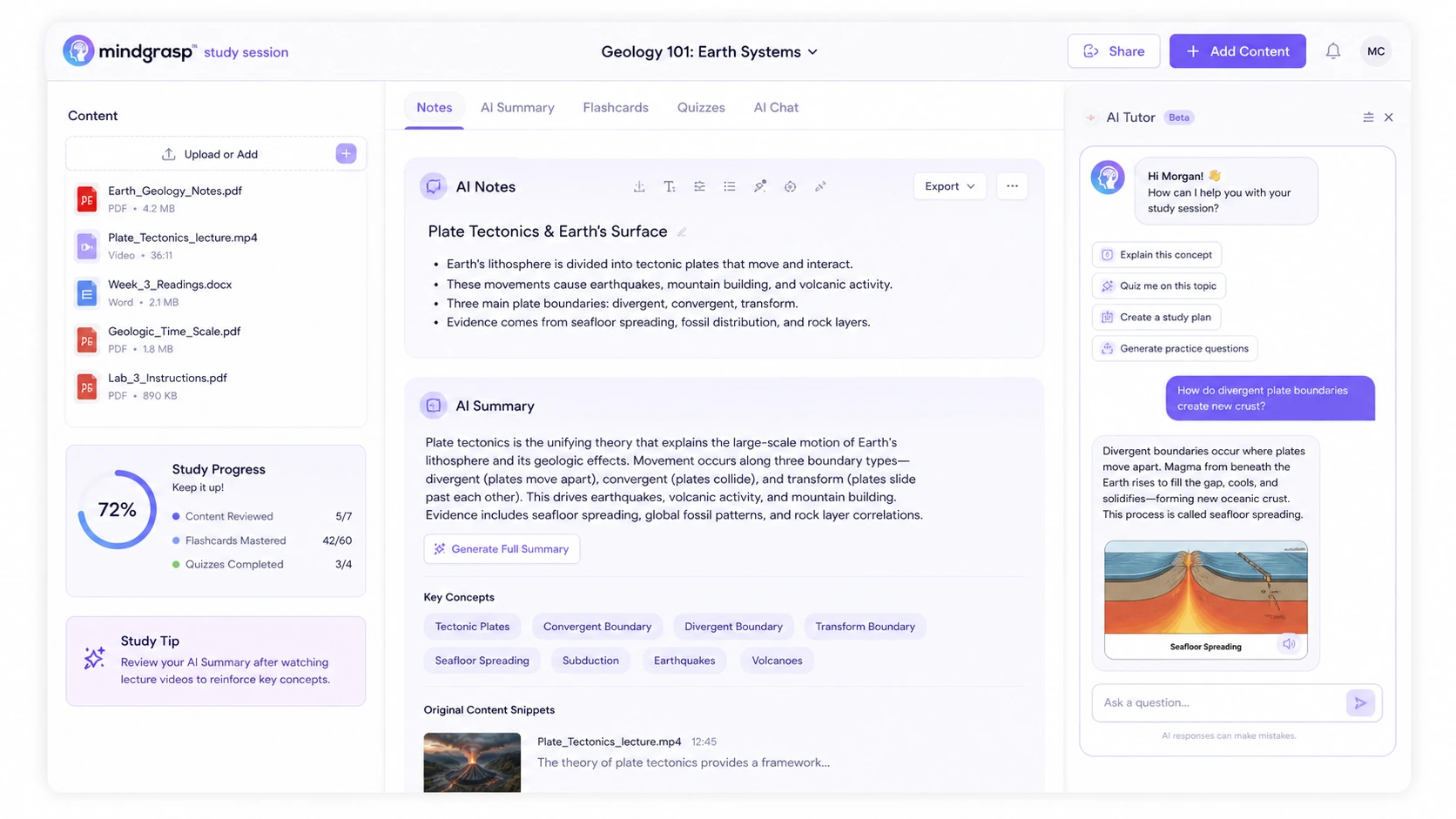
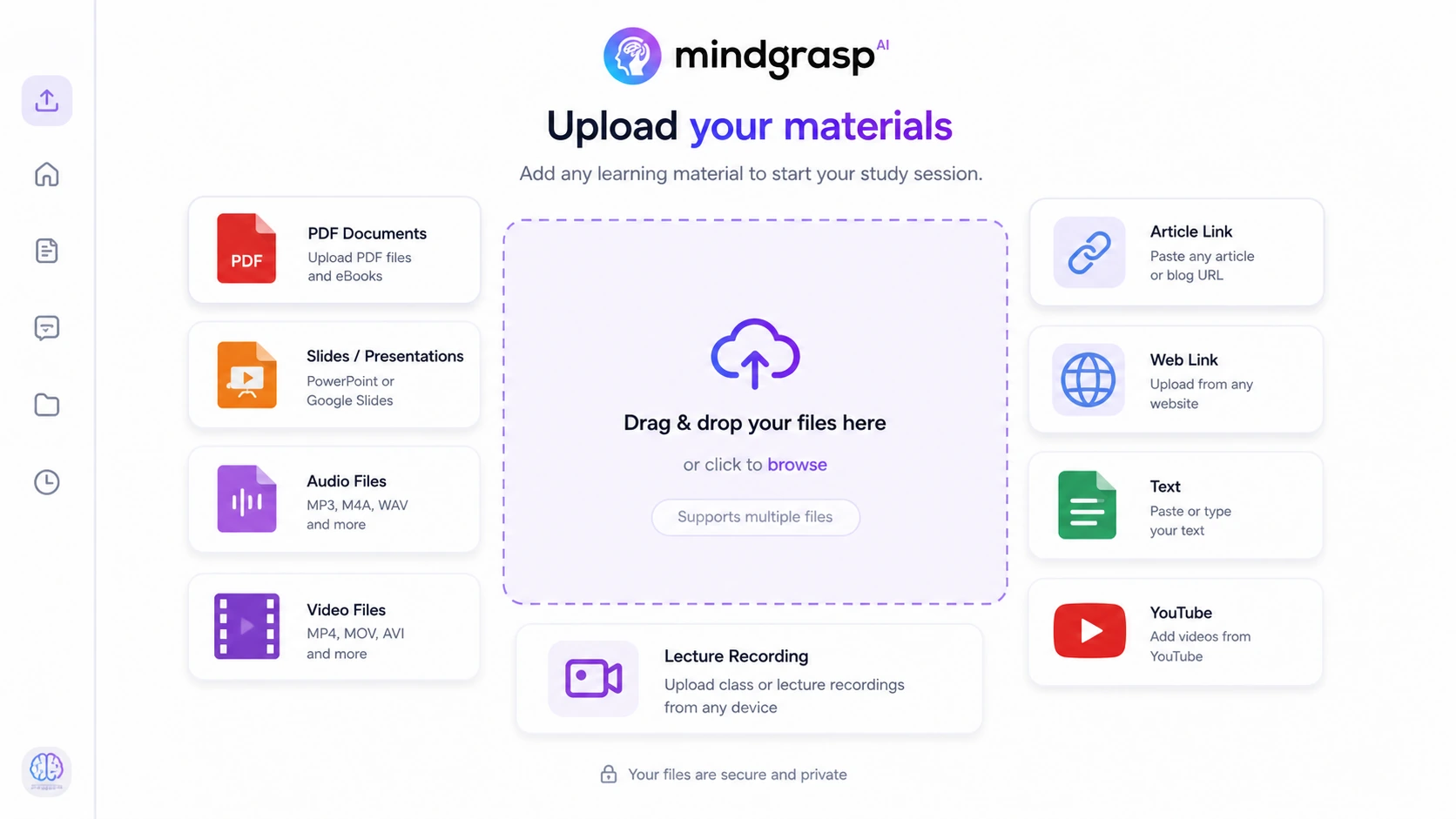
Mindgrasp takes study material and turns it into a structured learning session. The official site describes support for lectures, readings, links, videos, audio, PDFs, slides, and other files, then generates notes, summaries, flashcards, quizzes, and AI tutor answers. The practical value is not just summarization. It is the ability to move from raw class material to review material without rebuilding the whole study workflow manually.
- Upload or record class and learning material.
- Generate notes, summaries, flashcards, quizzes, and AI assistant answers.
- Use sessions to keep source material and generated study assets together.
- Review on web, iOS, or supported browser workflows depending on plan and platform.
Pricing and plan fit
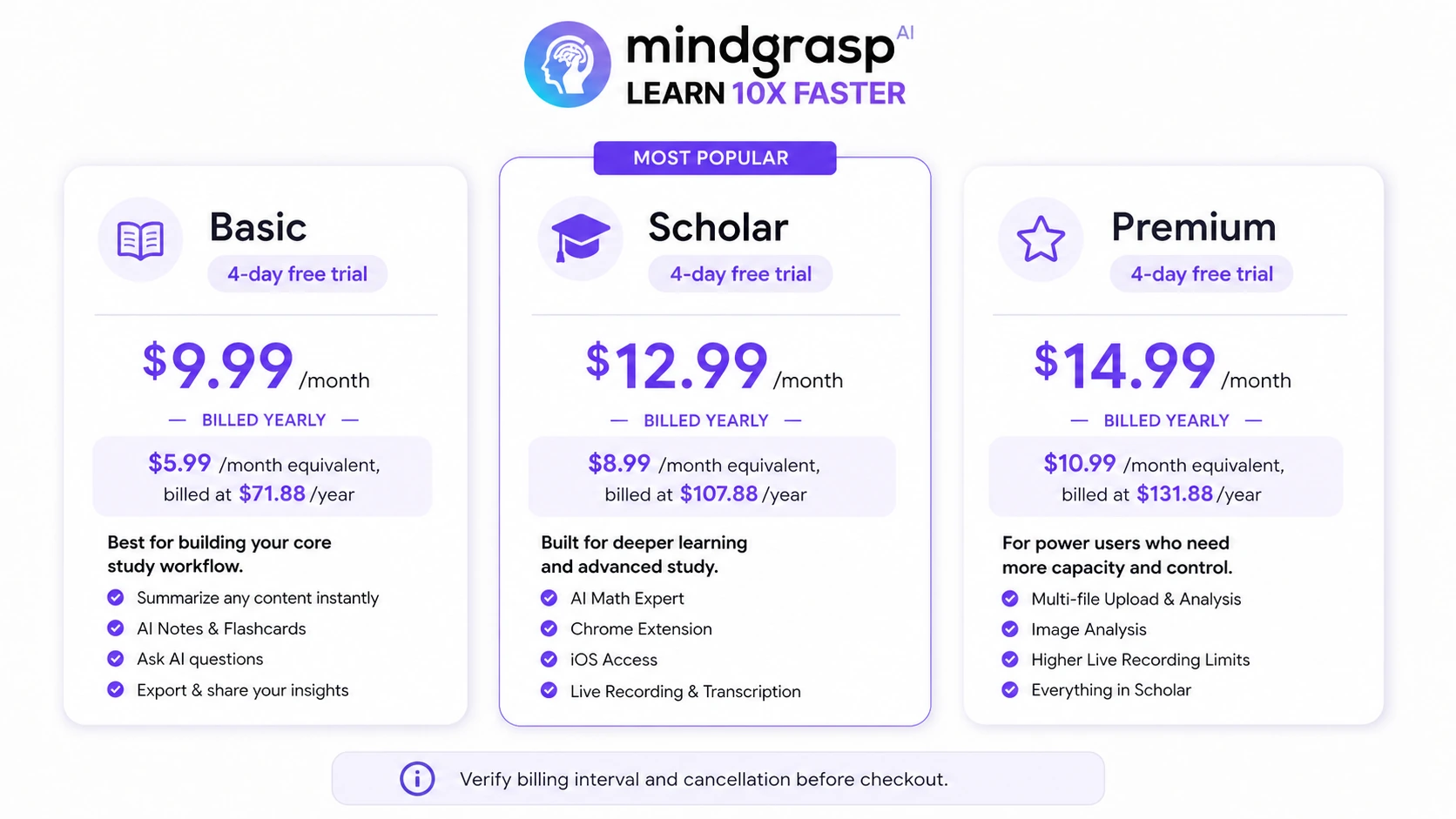
Mindgrasp's pricing decision is fairly simple on paper but still needs a careful checkout check. Basic covers the core study workflow. Scholar adds AI Math Expert, Chrome extension access, iOS access, and 5 hours of live recording. Premium adds higher live recording limits, multi-file upload, and image-analysis related value. The buyer should pick the lowest plan that covers the real study workflow, then decide whether yearly billing is worth the commitment.
- Basic is the lowest visible monthly plan.
- Scholar is more relevant when math, Chrome extension, iOS access, and live recording matter.
- Premium makes more sense for heavier upload, image, and recording workflows.
- Yearly billing lowers the monthly-equivalent price but increases commitment.
Trial, cancellation, and refund risk
The 4-day trial is the main buyer protection, but it is also the main pressure point. Mindgrasp support says card information is needed to start the trial and that the account will automatically be charged at the end of the trial unless canceled. The support refund article says refunds cannot be issued once a billing cycle has started unless cancellation was successfully completed before the billing date. That makes calendar discipline more important than coupon hunting.
- Start testing immediately after signup.
- Set a cancellation reminder before the trial ends.
- Keep cancellation proof if support review is ever needed.
- Do not rely on a refund after the paid billing cycle begins.
Where the Chrome extension and learning platforms matter
Mindgrasp promotes Chrome extension and iOS access for working across learning platforms and websites. Its homepage references Canvas, Blackboard, and Panopto compatibility, and support material covers workflows such as uploading links and using saved sessions. The video below is useful because it shows buyers what platform support looks like in practice, not just in a feature list. Watch for whether the extension solves a real course workflow for you, especially if your class material lives inside a learning management system rather than simple PDFs.
- Useful for buyers whose class material lives inside LMS platforms.
- More relevant to Scholar and Premium buyers than casual Basic users.
- Worth checking before paying if Canvas, Blackboard, Panopto, or browser workflows are central.
How Mindgrasp compares with other study tools
Mindgrasp competes less with general AI chat tools and more with study assistants that turn source material into learning assets. Compared with a simple summarizer, it has more study structure. Compared with a research assistant, it is more student-facing. Compared with a homework solver, it is broader but may be less specialized. The best alternative depends on whether the buyer needs lecture notes, document reading, guided study, research workflow, or homework-style explanations.
- Choose Mindgrasp when study-session structure matters most.
- Compare YouLearn AI when video learning is the center of the workflow.
- Compare MyReader or Otio when research reading and document review are the bigger problem.
- Compare Solvely AI when step-by-step homework help is the stronger need.
Best next step before checkout
The best next step is to use Mindgrasp with the exact material you would normally struggle to review. Upload a lecture, PDF, video, article, or slide deck. Generate notes, flashcards, quizzes, and Q&A. Then ask whether the output would genuinely change your study process. If yes, compare Basic, Scholar, and Premium. If no, a coupon will not fix the fit problem.
- Test one real lecture or module during the trial.
- Check whether the generated quiz and flashcards are useful enough to revisit.
- Confirm feature gates before upgrading from Basic to Scholar or Premium.
- Verify cancellation, refund, and billing platform before annual checkout.
Best savings path from this store page
This is the clearest savings route to check once the product already looks like a fit.
Mindgrasp shows Basic at a lower monthly equivalent when billed yearly, which can fit students who know they will use notes, summaries, flashcards, and quizzes beyond one class.
Scholar yearly price lower than monthly
Premium yearly price lower than monthly
Use comparison routes when the category fit is still open
Use these comparison routes when the product still looks plausible, but the category fit is not fully settled.
Better to compare when the buyer mainly studies from YouTube videos, courses, and lecture-style video material.
A better comparison when the buyer mostly needs document reading, uploaded files, and focused Q&A over study quizzes.
More relevant for research-heavy workflows where literature review, notes, and knowledge organization matter more than class revision.
Worth comparing when step-by-step homework help is the main job instead of turning lectures into study sessions.
Verification points worth checking before you click out
Where this store usually fits best in the workflow
Upload or record a lecture, generate notes, flashcards, quizzes, and follow-up questions, then use the session to review before exams.
Add a tutorial, class video, or lecture link and use Mindgrasp to turn the material into a summary and study aids instead of rewatching everything manually.
Upload PDFs, DOCX files, slides, articles, or textbook material and convert long reading assignments into structured review assets.
Teachers and tutors can use Mindgrasp to draft notes, quizzes, and flashcards from existing lessons, then edit for accuracy and classroom fit.
Practical checkpoints before and after signup
- Choose one real class, module, or training topic to test instead of browsing with a sample file.
- Check whether the buyer needs only Basic features or likely needs Scholar/Premium features such as live recording or extension access.
- Upload real material, generate notes, flashcards, quizzes, and Q&A, then judge whether the output saves meaningful time.
- Set a cancellation reminder before the end of the 4-day trial because billing starts automatically if the buyer continues.
- Verify web pricing versus mobile subscription pricing if the buyer might subscribe through an app store.
- Compare monthly and yearly billing only after the plan tier is clear.
- Build a repeatable weekly workflow around sessions rather than using the product only as an occasional summarizer.
- Review AI-generated notes and quizzes against source material when accuracy matters for exams or professional use.
Fast-read signals for workflow fit and buying friction
Questions readers usually ask before choosing this store
What is Mindgrasp best for?
Mindgrasp is best for turning lectures, PDFs, videos, articles, slides, audio, and other study material into notes, summaries, flashcards, quizzes, and AI-assisted answers. It makes the most sense for students, educators, and self-learners who repeat that workflow often.
Does Mindgrasp have a free plan?
Mindgrasp has a 4-day free trial on its main paid plans, but the core subscription is not best treated as a permanent free plan. The official site also promotes free AI study tools, but buyers should check which features require a paid subscription before relying on them.
How much does Mindgrasp cost?
The public pricing page shows Basic at $9.99/month, Scholar at $12.99/month, and Premium at $14.99/month on monthly billing. The yearly view shows lower monthly-equivalent prices: Basic at $5.99/month, Scholar at $8.99/month, and Premium at $10.99/month when billed annually.
Can I get a refund if I forget to cancel Mindgrasp?
Mindgrasp's support article says refunds cannot be issued once a billing cycle has started unless cancellation was successfully completed before the billing date. Buyers should treat cancellation timing as important and keep proof if they cancel before the billing date.
Which Mindgrasp plan should I start with?
Start by testing Basic if you only need the core note, summary, flashcard, quiz, upload, and focused-reading workflow. Consider Scholar if AI math, Chrome extension access, iOS access, and 5 hours of live recording matter. Consider Premium only when multi-file upload, image analysis, and higher recording limits are worth the extra cost.
Choose the next route that matches what you still need to decide
The strongest next click depends on whether you still need product judgment, a savings route, or a broader category comparison.