Quick verdict
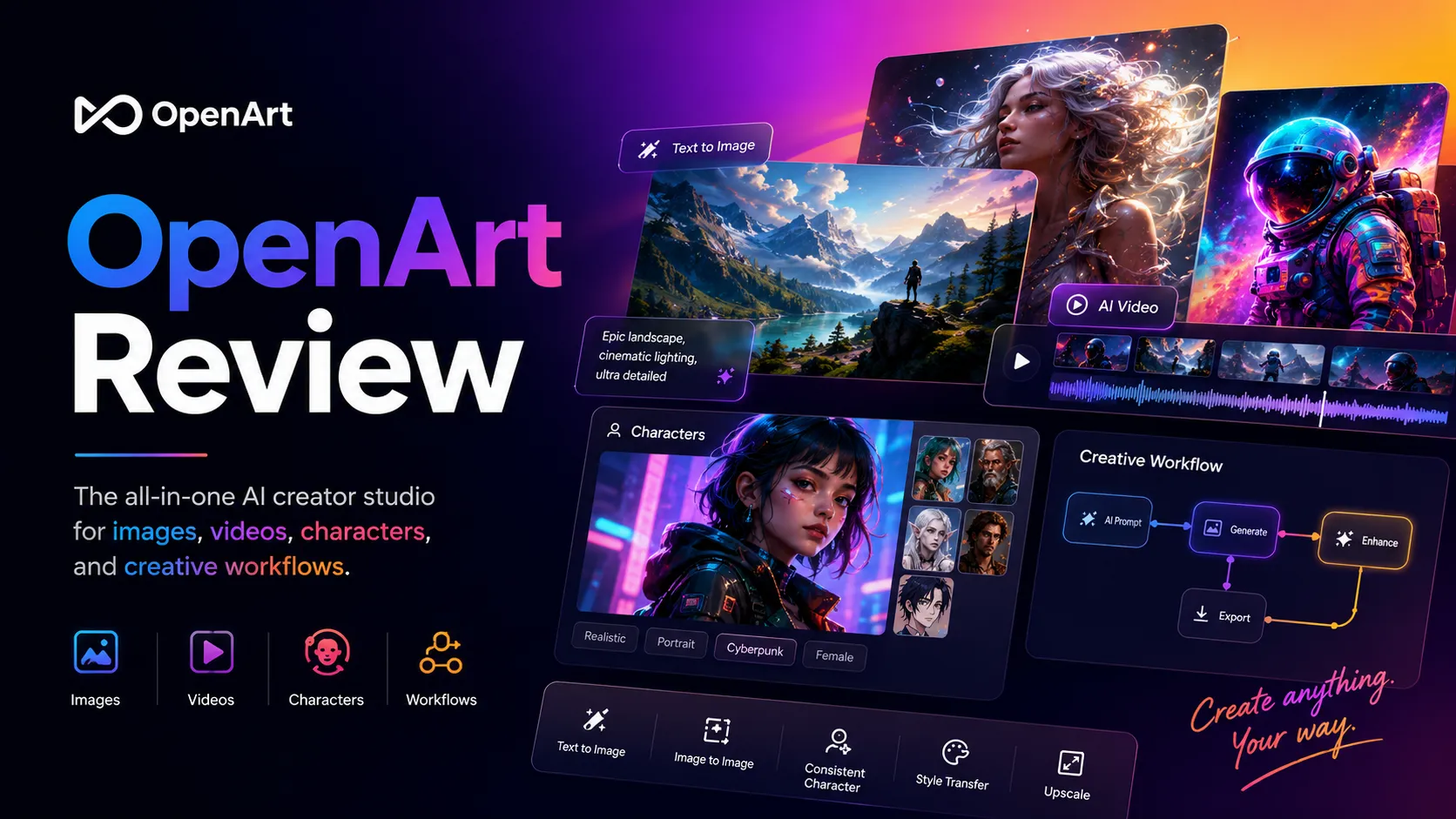
OpenArt is worth considering if you want a broad AI creator studio, not just a one-click image generator.
That distinction matters. OpenArt can help with AI images, image editing, short video experiments, consistent characters, visual stories, and personalized model workflows. For a creator who keeps returning to visual ideas every week, that breadth can be useful. For a buyer who only needs a few casual images, it can also become more tool than necessary.
The real question is not whether OpenArt can generate impressive visuals. Many tools can do that now. The better question is whether OpenArt helps you repeat a usable creative process without losing track of credits, plan limits, commercial-use rights, and refund risk.
For my money, OpenArt makes the most sense for creators, marketers, and small teams who need to explore visual directions quickly: thumbnail concepts, product scenes, campaign ideas, character references, short video tests, and story visuals. It is weaker if you need formal design handoff, strict brand approval workflows, exact client-ready assets, or a simple unlimited image tool with no credit math.
The main caution is the buying path. OpenArt’s current pricing is credit-based, paid tiers vary by billing interval, commercial-use rights appear tied to plan level, and the terms say purchases are non-refundable. A lower annual-equivalent price can look attractive, but it should not be the reason you skip the free test.
Next step: If OpenArt still fits your creative workflow, test the free path first and verify the current credit rules before choosing a paid plan.
Review snapshot
| Review point | Practical take |
|---|---|
| Best for | Creators, marketers, YouTubers, storytellers, and small teams testing many visual directions |
| Not ideal for | Buyers who need a simple no-credit image tool, formal design files, public API access, or flexible refunds |
| Main use case | AI image generation, image editing, video tests, consistent characters, and visual story creation |
| Free path | Free plan with trial credits for testing premium features before paying |
| Paid path | Essential, Advanced, Infinite, Wonder, and team/enterprise paths with credit allowances and seat pricing |
| Main strength | Broad creative workflow in one browser-based workspace |
| Main concern | Credit consumption, commercial-use rights, billing interval, and non-refundable purchase terms |
| Best alternatives to compare | Aitubo, PromeAI, ArtSmart AI, and 1of10 as an adjacent discovery route |
| Best next step | Run one real image project and one video or character test before choosing monthly or annual billing |
What is OpenArt?
OpenArt is best understood as a browser-based AI creator studio for people who want to turn ideas into visual assets without managing a self-hosted image-generation setup.
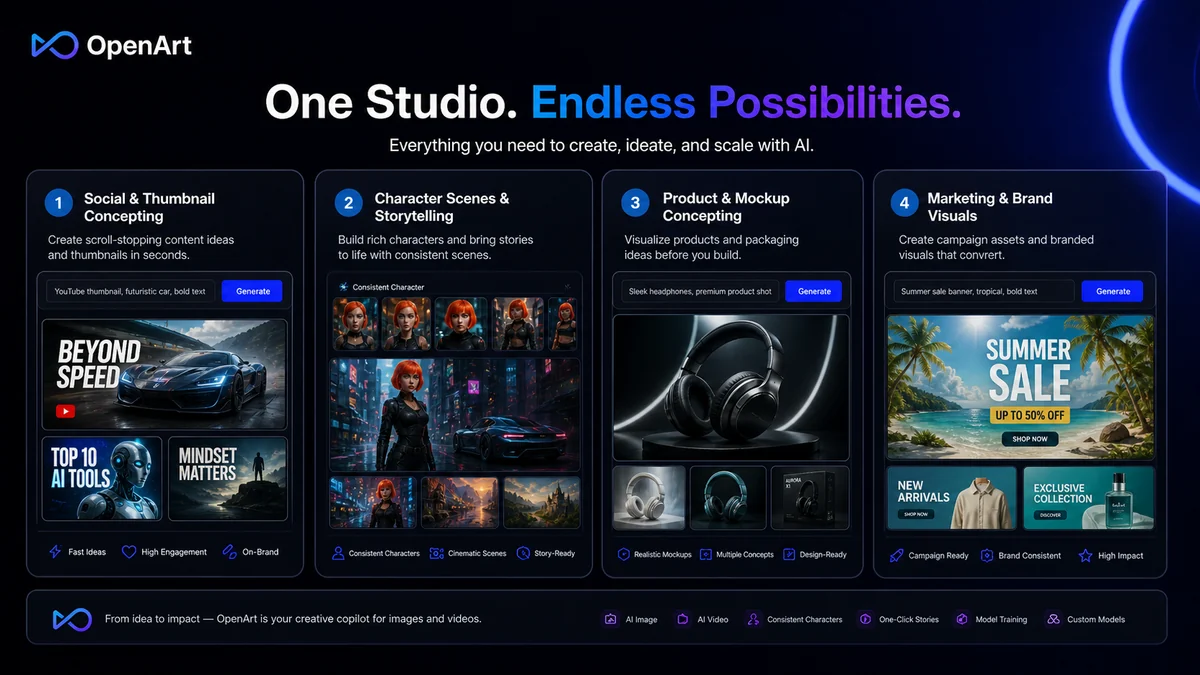
The product covers more than basic text-to-image generation. Its current public positioning includes image generation, image-to-video, style and pose references, composition references, customized model training, bulk creation, consistent characters, background changes, upscaling, inpainting, object removal, image expansion, creative variations, and other visual tools.
That breadth is the selling point.
It is also the reason the buying decision needs care. A broad creative tool can feel exciting during browsing but harder to evaluate at checkout. You are not only buying image generation. You are deciding whether one workspace can handle enough of your visual process to justify a credit-based plan.
Our review approach: we compare public product pages, current pricing details, help documentation, terms, buyer workflow fit, and nearby alternatives. We do not treat a coupon, annual discount, or impressive sample gallery as proof that a product fits the buyer.
The common wrong expectation is that OpenArt will behave like a simple unlimited image generator. It is better to think of it as a creative workflow environment. You bring prompts, references, characters, image edits, video experiments, and model choices. OpenArt gives you a guided place to test those directions. The buyer still has to decide what is usable, what needs editing, what is safe for commercial work, and what is worth spending credits on.
Who should use OpenArt?
OpenArt fits creators who need repeated visual exploration.
A YouTuber testing thumbnails may find it useful because the tool can support fast variations, background changes, character concepts, and short motion ideas. The condition is that the creator actually needs enough experiments per month to justify the credit allowance.
A marketer or content operator may use OpenArt to test campaign visuals, blog graphics, ad concepts, product scenes, and social posts before asking a designer to polish the final direction. This is where OpenArt can save time: not by replacing brand review, but by helping the team find visual direction faster.
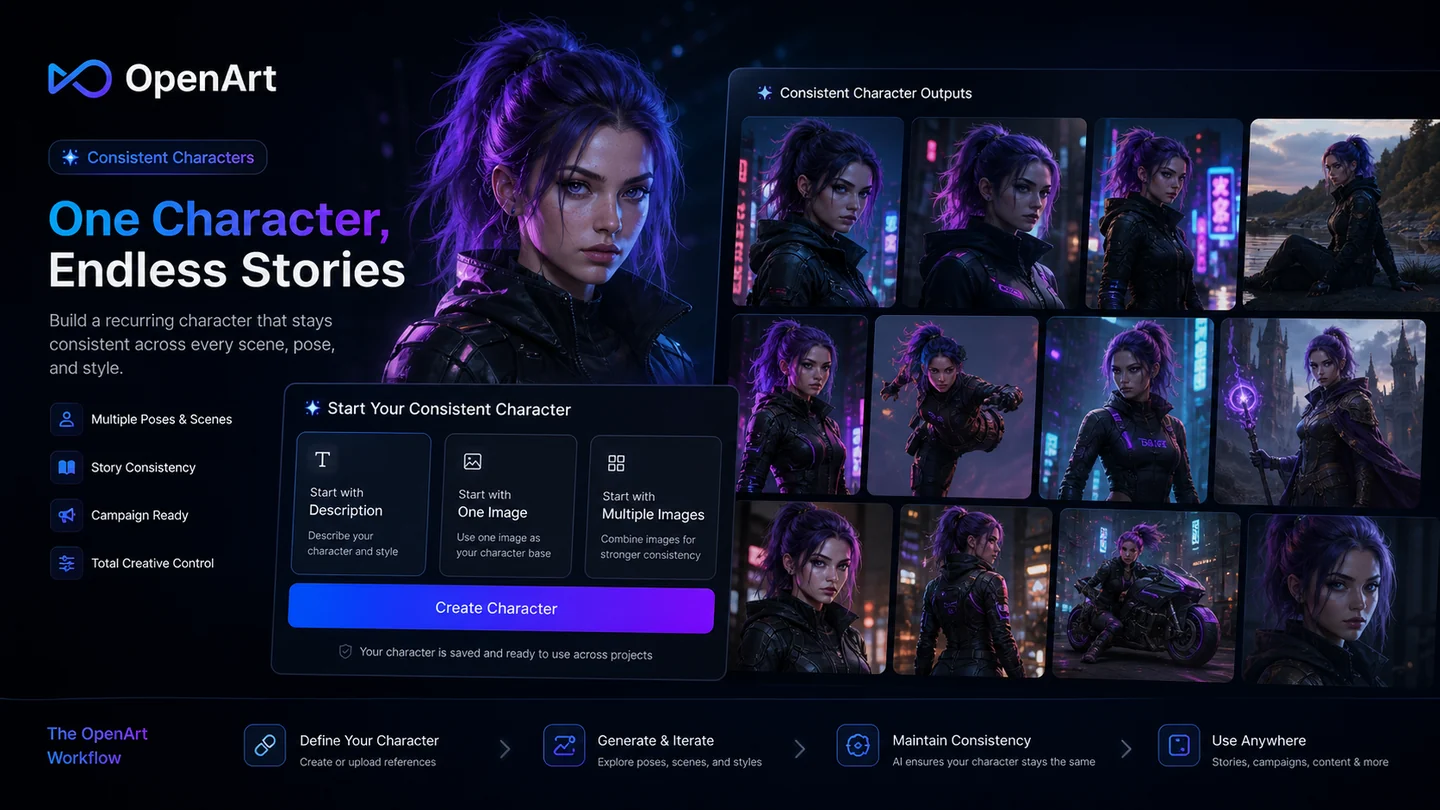
A story creator may care more about consistent characters than raw image count. OpenArt’s character and story workflows are useful if the same person, mascot, or fictional figure needs to appear across many images or short scenes. The buyer should still test whether the consistency is good enough for the project before moving up a tier.
A beginner who does not want to run Stable Diffusion locally may also find OpenArt easier. The web interface, model access, editing tools, and guided workflows reduce setup friction. The tradeoff is that the buyer is now living inside OpenArt’s credit and plan system instead of controlling every technical detail independently.
A small creative team may consider OpenArt if shared credits and collaborative workspaces matter. I would verify team pricing, seat rules, usage expectations, and rights before putting it into a real production process.
Who should avoid OpenArt?
I would be careful with OpenArt if you only need occasional images. A free test may be enough. A paid plan can become unnecessary if your use is random, light, or seasonal.
I would also avoid treating OpenArt as a final design system. It can help with concepts, variations, and visual drafts, but final client work may still need human review, brand checking, retouching, typography work, layout tools, and approval outside OpenArt.
Buyers who dislike credit math should slow down. Credit-based tools can feel affordable at first because the monthly price is easy to compare. The real cost depends on behavior: how many prompts you test, how many videos you create, how often you upscale, how many models you train, and whether failed or poor outputs force extra attempts.
Teams that need public API access should be cautious. OpenArt’s help center currently says no public API is available. That makes OpenArt less suitable for developers who want to build image generation into an external product or automated workflow.
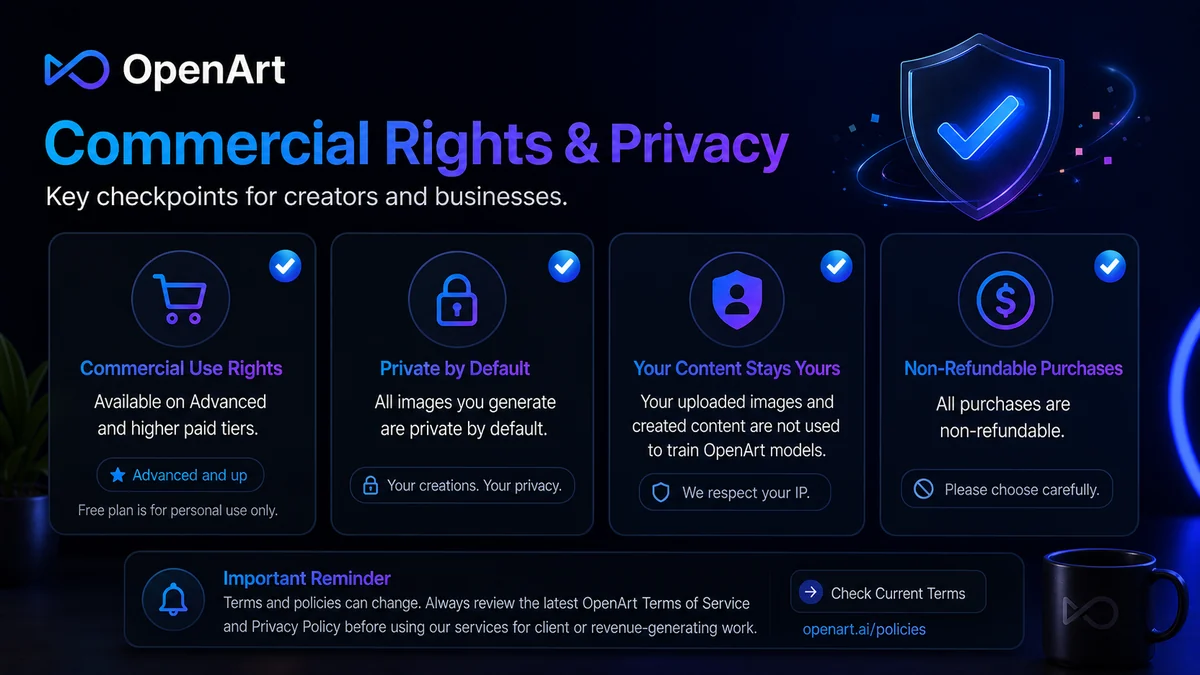
I would also be cautious if refund flexibility matters. The current terms say all purchases are non-refundable, subscriptions remain active through the paid period after cancellation, and prorated refunds are not provided. That does not mean OpenArt is a bad tool. It means the free path is more important than usual.
Finally, if you mainly want a coupon, the buying order is wrong. A discount can improve the purchase, but it cannot make a mismatched creative workflow useful.
How OpenArt fits into a real workflow
A practical OpenArt workflow starts before the first prompt.
The buyer should first decide what kind of visual work they repeat: static images, short videos, character concepts, product scenes, storyboards, social visuals, or editing existing images. OpenArt becomes easier to judge when you know which of those jobs matters most.
A realistic workflow might look like this:
- Choose one real project, not a random test prompt.
- Generate a few image directions with clear references or prompts.
- Use editing tools when the first result is close but not finished.
- Test a character or story workflow if consistency matters.
- Try a short video or image-to-video workflow if motion is part of the use case.
- Track how quickly credits disappear during normal experimentation.
- Review commercial-use rights before using outputs in paid or client work.
- Decide whether the paid tier matches real monthly behavior.
That last step is where buyers often get honest with themselves.
OpenArt can feel generous when you look at headline image counts. But if your workflow involves video, characters, personalized models, upscaling, and repeated edits, your actual usage pattern may be different from a simple image-count estimate.
Workflow check: OpenArt is easier to evaluate when you test one real image workflow and one video or character workflow instead of judging it from sample galleries.
Real-world buyer scenarios
Scenario 1: A YouTuber testing thumbnails and short visual ideas
A YouTuber may use OpenArt to create thumbnail directions, background concepts, character poses, and short visual tests. The tool can be useful when speed matters more than perfect final design.
The risk is assuming the first good-looking output is publish-ready. Thumbnails still need composition judgment, text placement, brand consistency, and often human editing. OpenArt helps with visual direction; it does not remove the need for review.
Scenario 2: A marketer building campaign moodboards
A marketer may use OpenArt to explore campaign angles before handing a brief to a designer. This can make sense for ad scenes, product concepts, social visuals, and blog imagery.
The buyer should verify commercial-use rights and brand safety before using outputs publicly. Generated assets can look polished while still carrying composition issues, rights questions, or visual details that do not fit the brand.
Scenario 3: A story creator building recurring characters
OpenArt is more interesting for story creators when consistent characters matter. A recurring character, mascot, or fictional person across many images can make the tool more valuable than a basic prompt generator.
The failure point is consistency. If a buyer needs the same character to appear reliably across a long series, they should test that workflow before paying for a higher tier.
Scenario 4: A small agency exploring AI visuals
A small agency may consider OpenArt for early visual exploration, client concepting, or internal campaign drafts. The team path can be useful if multiple people need shared access.
The agency should be more conservative than an individual creator. Check seat pricing, shared credits, rights, support expectations, and cancellation terms before turning OpenArt into part of a recurring client workflow.
Key features that actually matter
AI image generation and model access
OpenArt’s image-generation capability is the foundation, but the buyer value is not just “can it make images?” It is whether the available models, references, styles, and editing tools help you reach usable visual directions faster.
Buyer note: judge OpenArt with your own project prompts. Gallery examples are useful for inspiration, but they do not prove the tool fits your niche, brand, or client style.
Image-to-video and motion experiments
OpenArt’s video and image-to-video workflows make it more than a static image tool. This matters for creators testing social clips, visual stories, ads, character scenes, or motion concepts.
Buyer note: video can change the credit equation quickly. Do not assume the same plan that works for static images will work for frequent motion tests.
Consistent characters and story workflows
Consistent characters are one of the more practical reasons to consider a broader creative studio. If your workflow requires a recurring person, mascot, character, or brand figure, this feature can matter more than raw image quantity.
Buyer note: run a real consistency test before paying. Character tools are only useful if the results are controlled enough for your actual project.
Editing tools after generation
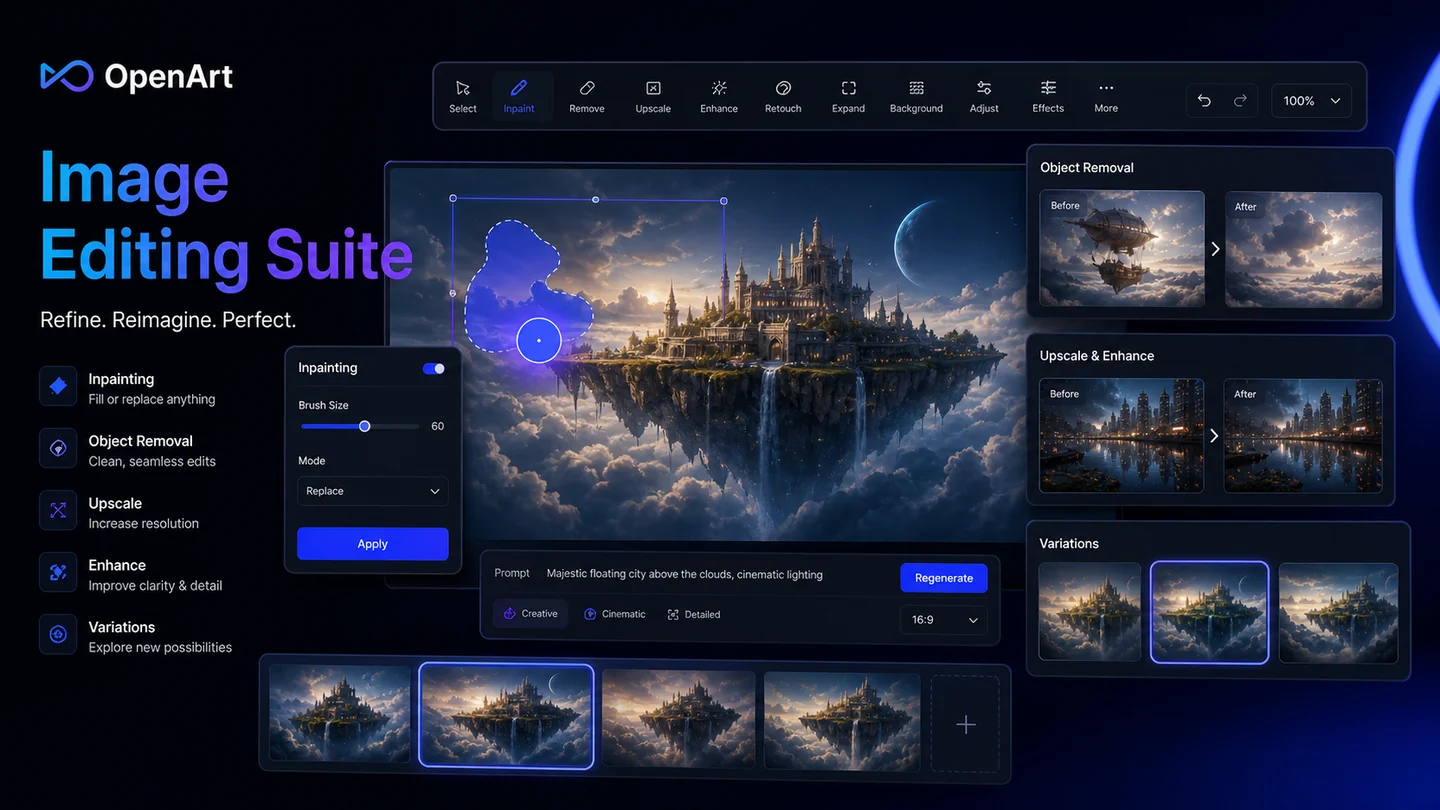
Inpainting, background changes, upscaling, object removal, expansion, face or hand fixes, and variations can reduce the need to regenerate from scratch. This is important because a near-good output is often more valuable than a completely new attempt.
Buyer note: editing features are where OpenArt may save both time and credits, but only if the edits are good enough to rescue outputs you would otherwise discard.
Personalized model training
Training a personalized model can make sense for repeated styles, faces, products, characters, or visual directions. This is a stronger fit for creators with ongoing work than for casual users.
Buyer note: model training should be tested with the exact type of source material you plan to use. Weak input references can lead to disappointing output no matter how good the tool looks on paper.
Team and enterprise path
OpenArt’s team and enterprise positioning is relevant for small agencies or groups that want shared creative capacity. This is not automatically necessary for solo creators.
Buyer note: team buyers should check shared credits, seats, support, commercial rights, ownership expectations, and cancellation terms before committing.
Pricing and plan value
OpenArt pricing is best judged through credits, not only monthly price.
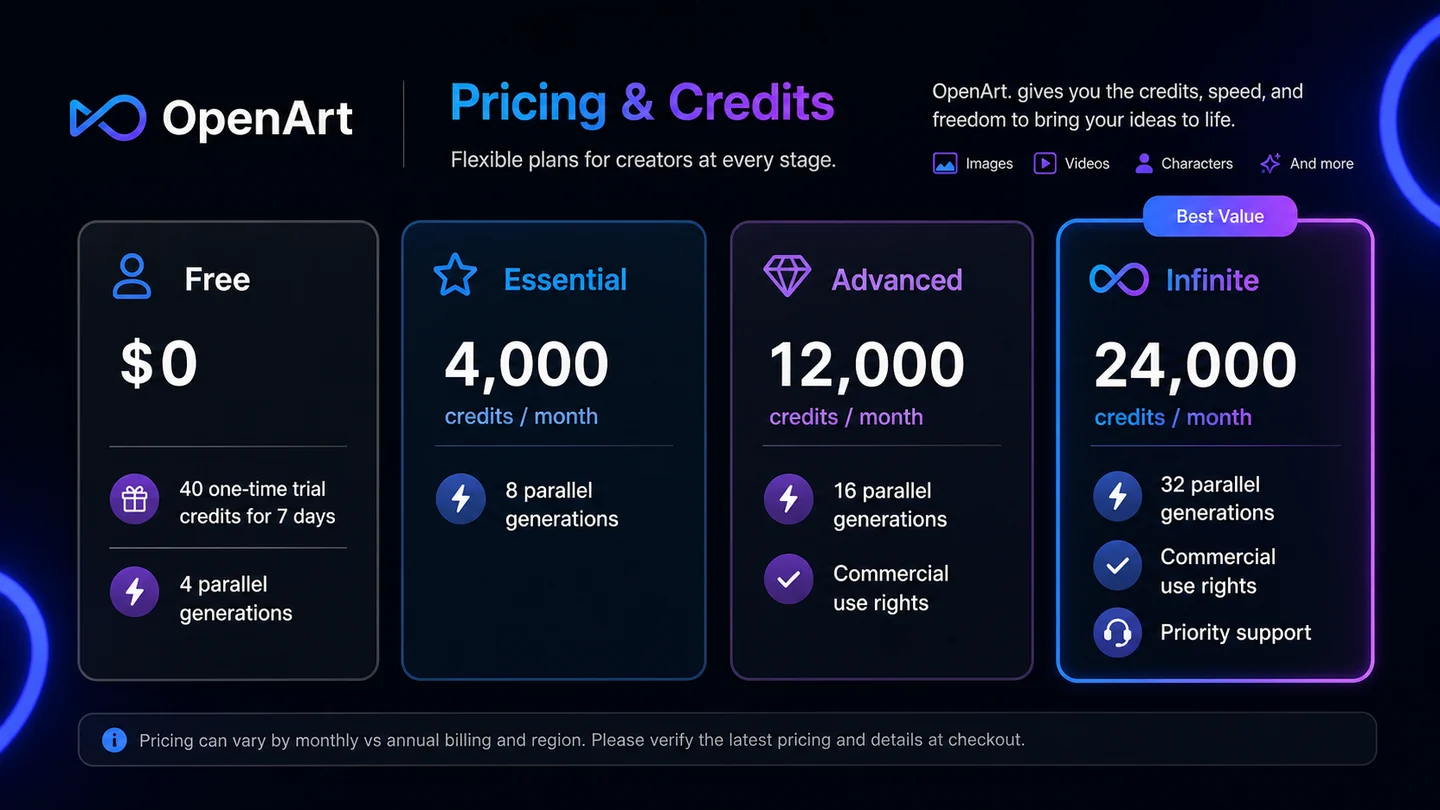
The current public pricing page shows a Free plan with trial credits, then paid seat-based plans such as Essential, Advanced, Infinite, and Wonder. The page presents monthly and annual views, with lower annual-equivalent prices shown beside higher monthly list prices. That means the number that looks best on the pricing page may not be the same as the commitment you want to make first.
The Free path is the right starting point for most buyers. It gives enough room to test whether the interface, model choices, image outputs, and editing tools fit your workflow. It is not a long-term production plan.
Essential is the lowest paid path and may fit casual or early creators who mainly generate images and do not need commercial-use rights. The issue is that commercial-use rights appear to begin at the Advanced level. That is a serious distinction for marketers, freelancers, agencies, and anyone using outputs in revenue projects.
Advanced is the more realistic starting point for buyers who need commercial use and more control. Infinite and Wonder are for heavier production, more credits, more parallel generations, priority support, and broader creative capacity. But I would not jump there until you know how fast your real projects consume credits.
OpenArt also includes add-on credit paths and credit-pack logic on higher plans. That can be useful, but it adds another layer of cost forecasting. Monthly subscription credits reset each month and do not carry over, while credit consumption varies by model or tool. A buyer creating simple images may have a very different cost profile from a buyer generating videos, training models, and upscaling outputs.
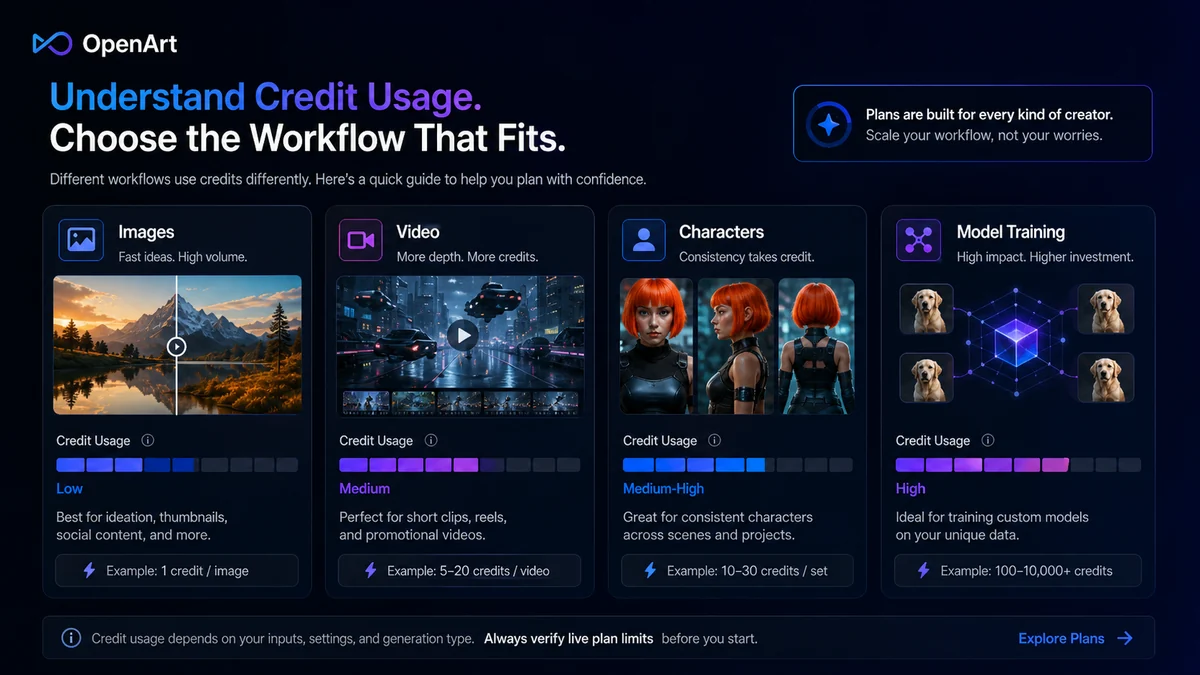
Pricing check: Before choosing a plan, compare your expected image, video, character, and model-training use against the current credit limits.
Free plan, trial, coupon, and checkout notes
The free plan is not just a nice bonus. For OpenArt, it is the safest buyer filter.
Use the free trial credits to test real work, not random prompts. A random fantasy image may look impressive and still tell you very little about whether OpenArt fits your weekly workflow. A real test should include a project you might actually publish, edit, or use as a brief.
The coupon path should come after product fit, not before it. If OpenArt still makes sense after the free test, the OpenArt coupon page can be a reasonable next stop for current offers. But I would not let a coupon decide the purchase.
The checkout checklist is straightforward:
- Confirm whether the displayed price is monthly or annual-equivalent.
- Confirm the plan’s monthly credits and whether unused subscription credits carry over.
- Confirm whether your plan includes commercial-use rights.
- Confirm cancellation and non-refundable purchase terms.
- Confirm whether team or enterprise features are needed.
- Confirm whether video, story, character, and model-training workflows consume credits differently from basic images.
A discount can make a good plan cheaper. It cannot make the wrong plan safer.
Coupon order: Check current offers only after OpenArt fits your workflow, credit needs, and commercial-use requirements.
What I would check before buying OpenArt
If I were buying OpenArt for a real creative workflow, I would check seven things before paying.
-
Credit behavior. Run one normal image workflow and one heavier workflow, such as video, character, or model training. Watch how quickly credits move.
-
Commercial-use rights. If you plan to use outputs for clients, ads, monetized content, or brand materials, verify that your exact plan supports commercial use.
-
Billing interval. The annual-equivalent price may look attractive, but annual billing is riskier when terms are strict about refunds.
-
Credit reset rules. Monthly subscription credits reset and do not carry over, so unused capacity can disappear.
-
Output quality under your prompts. Test your niche, references, style, and project type. Do not rely only on public samples.
-
Editing usefulness. Check whether inpainting, background removal, upscaling, and variations improve near-good outputs enough to reduce wasted attempts.
-
Alternative fit. Compare OpenArt with a simpler image tool if you only need occasional images, or with a more specialized visual platform if your workflow is narrow.
A simple test before paying
Before paying, I would run a small OpenArt test like this:
- Pick one real project: a thumbnail, ad concept, story character, product scene, or social visual.
- Create three to five image directions using your own prompts or references.
- Edit the best result instead of regenerating everything.
- Test one higher-cost workflow, such as video, character consistency, or model training.
- Track credit use across the whole process.
- Decide whether the output is useful enough for your real work.
- Check whether the plan you need includes commercial-use rights and acceptable billing terms.
This test is simple, but it protects the buyer from the easiest mistake: buying because the tool looks exciting before knowing whether it fits daily work.
Pros explained
Broad creative workflow in one place
OpenArt’s biggest strength is breadth. Image generation, editing, video tests, characters, story tools, and model workflows in one place can reduce the friction of jumping between several tools.
This matters when creative direction is unclear and you need to explore quickly. It matters less if you only need a single image now and then.
Free entry path supports cautious testing
The free trial-credit path gives buyers a way to test real prompts before paying. That is important because OpenArt’s value depends heavily on personal workflow.
The free path is not enough to prove long-term value. It is enough to check whether the interface, output direction, and credit behavior deserve a paid test.
Useful editing tools after generation
The editing suite is a practical advantage. When a generated image is close, tools like inpainting, background changes, upscaling, and variations may save time compared with starting over.
This stops being enough if your work requires precise brand layout, typography, vector files, or formal design handoff.
Commercial path exists for serious creators
OpenArt is not only a hobby tool. Higher paid tiers can support more serious creative work, including commercial use when the plan allows it.
The important buyer note is that rights should be verified before client or revenue use. Do not assume every plan supports every commercial scenario.
Cons explained
Credit-based pricing can be hard to predict
The main pricing risk is not the visible monthly number. It is how your behavior consumes credits. Video, model training, characters, upscaling, and repeated variations can make your real usage very different from a simple image-generation estimate.
This matters most for creators who experiment heavily. If you generate, reject, revise, and test many versions, credits become part of the creative cost.
Refund flexibility is limited
OpenArt’s current terms say purchases are non-refundable and that subscriptions remain active until the end of the paid billing period after cancellation. That makes annual billing a more serious decision.
The fix is not complicated: test free first, then monthly if possible, then consider annual only when the workflow is already proven.
Commercial-use rights need plan-level checking
OpenArt’s terms separate non-commercial use from commercial-use rights at higher plan levels. Buyers using outputs for clients, ads, revenue projects, or business content should not skip this step.
This is especially important for agencies and freelancers. The output can look good, but the rights question still matters.
Not ideal for public API workflows
OpenArt can be useful as a web-based creative workspace, but the help center currently says no public API is available. That makes it weaker for developer-led workflows that need automation or integration into another product.
If API access is a must-have, OpenArt should not be treated as confirmed until official documentation says otherwise.
Green flags and red flags
Green flags
OpenArt is more interesting when you already repeat visual work every week. That might be thumbnails, campaign concepts, story scenes, characters, product visuals, or creative experiments.
It is also a good sign if you know which workflow matters most. Buyers who can say “I need consistent characters” or “I need fast ad concepting” will evaluate OpenArt better than buyers who only know they want “cool AI images.”
The free path is another green flag. A cautious buyer can test without immediately committing to a paid tier.
Red flags
The biggest red flag is buying annual too soon. The lower annual-equivalent price can look appealing, but non-refundable purchase terms make that decision less forgiving.
Another red flag is ignoring commercial rights. If you plan to use images for paid work, your plan level matters.
A third red flag is using OpenArt as a replacement for design judgment. AI visuals still need review for anatomy, text artifacts, brand mismatch, rights, prompt accuracy, and final polish.
OpenArt vs alternatives
OpenArt sits in the broad AI creative studio category. That means some alternatives are direct creative-generation comparisons, while others are adjacent routes for a different buyer job.
Aitubo vs OpenArt
Aitubo is a more direct comparison if your shortlist is focused on AI image and video generation. It may be worth comparing when your main question is output style, model access, video experimentation, and creative generation flow.
OpenArt may still make more sense if you want a broader workspace with editing, characters, stories, and visual iteration in one place.
PromeAI vs OpenArt
PromeAI is a useful comparison for buyers who care about design-oriented generation, rendering, architecture-style visuals, product concepts, or more structured visual transformation workflows.
OpenArt may feel more creator-friendly if your work mixes images, characters, videos, and general visual story creation rather than one specialized design lane.
ArtSmart AI vs OpenArt
ArtSmart AI may be a better fit if the buyer wants a simpler AI image-generation path without needing the full OpenArt workspace. Simpler can be better when the use case is narrow.
OpenArt becomes stronger when the buyer needs editing, character consistency, video tests, and model workflows, not just a few generated images.
1of10 vs OpenArt
1of10 is more of an adjacent route than a direct replacement. It is relevant if the buyer needs visual inspiration, discovery, or creative reference direction rather than a full AI generation and editing workspace.
That difference matters. If you need to make assets, OpenArt is closer to the production side. If you need to discover visual ideas or directions, 1of10 may sit earlier in the creative process.
Broader outside comparisons
Leonardo.Ai, Recraft, Adobe Firefly, Midjourney, and Canva can also enter the shortlist depending on the buyer’s goal. I would not treat all of them as direct replacements. Some are stronger for AI art, some for brand-safe creative production, some for design operations, and some for social content workflows.
The better comparison is by job: concepting, editing, commercial rights, team workflow, consistency, video, or final design output.
Trust, refund, and buyer-risk notes
The strongest evidence for OpenArt is around product role and pricing structure. Public pages make it clear that OpenArt is a broad AI creator studio with image, video, character, editing, and model workflows.
My confidence is more cautious around long-term value because credit-based pricing depends on behavior. Two buyers on the same plan can have very different outcomes. One may create simple images and stay comfortable. Another may burn through credits quickly with videos, models, upscales, and variations.
Refund terms are the next buyer-risk point. Current terms say all purchases are non-refundable, no prorated refunds are provided for the current billing period, and subscriptions remain active until the end of the paid period after cancellation. That makes the first paid decision more important.
Privacy is more encouraging, but still worth reading. OpenArt’s help center says generated images are private by default and that uploaded images or created content are not used to train its models. Buyers with client material should still review the current privacy and account deletion language before uploading sensitive source assets.
Rights need a separate check. The terms say OpenArt does not claim ownership of AI-generated images, but commercial-use rights are tied to plan level. If the output will be used in paid work, advertising, merchandise, client deliverables, or revenue projects, verify the exact plan rights first.
The safest buying path is simple: free test, monthly proof, then annual only after repeated value is clear.
Final verdict
I would consider OpenArt if you regularly create visual concepts and want one workspace for images, video tests, characters, stories, editing, and model experimentation.
I would be more cautious if your use case is occasional, if you dislike credit-based pricing, or if you need a tool that produces final design files with formal brand approval built in. OpenArt can be part of a creative workflow, but it is not a replacement for design judgment, rights review, or final editing.
I would compare it with Aitubo if your priority is AI image and video generation, PromeAI if you want a more design-oriented route, ArtSmart AI if a simpler image tool may be enough, and 1of10 if you are still in the inspiration or discovery stage.
The safest next step is to start with OpenArt’s free credits and test one real project. If the workflow feels useful, check the OpenArt store guide for the current buyer route. If the product fit is already clear, then check the OpenArt coupon page before checkout. But do not let the coupon make the decision for you.
