
PromeAI Pricing, Plans & Creative Fit
PromeAI is best treated as an AI design and visual ideation suite, not a simple text-to-image toy. It is strongest when a buyer needs to turn sketches, modeling screenshots, product ideas, interiors, architecture concepts, or campaign visuals into faster visual options. The buying decision is mostly about whether the coin-based plan fits your real monthly output, not whether the landing page examples look impressive.

Fit → price → checkout
Use these routes after the official-site check: coupon first, review for fit, compare if unsure.
PromeAI pricing snapshot
Fast commercial checks before pricing, coupons, or a deeper review.
PromeAI product tour
Start with this walkthrough if you are trying to decide whether PromeAI feels like a real design workflow tool or just another AI image generator. Watch for how sketches, references, tool selection, and output refinement are presented, because those details help you judge whether the platform can support repeat creative work before you compare paid coin tiers.
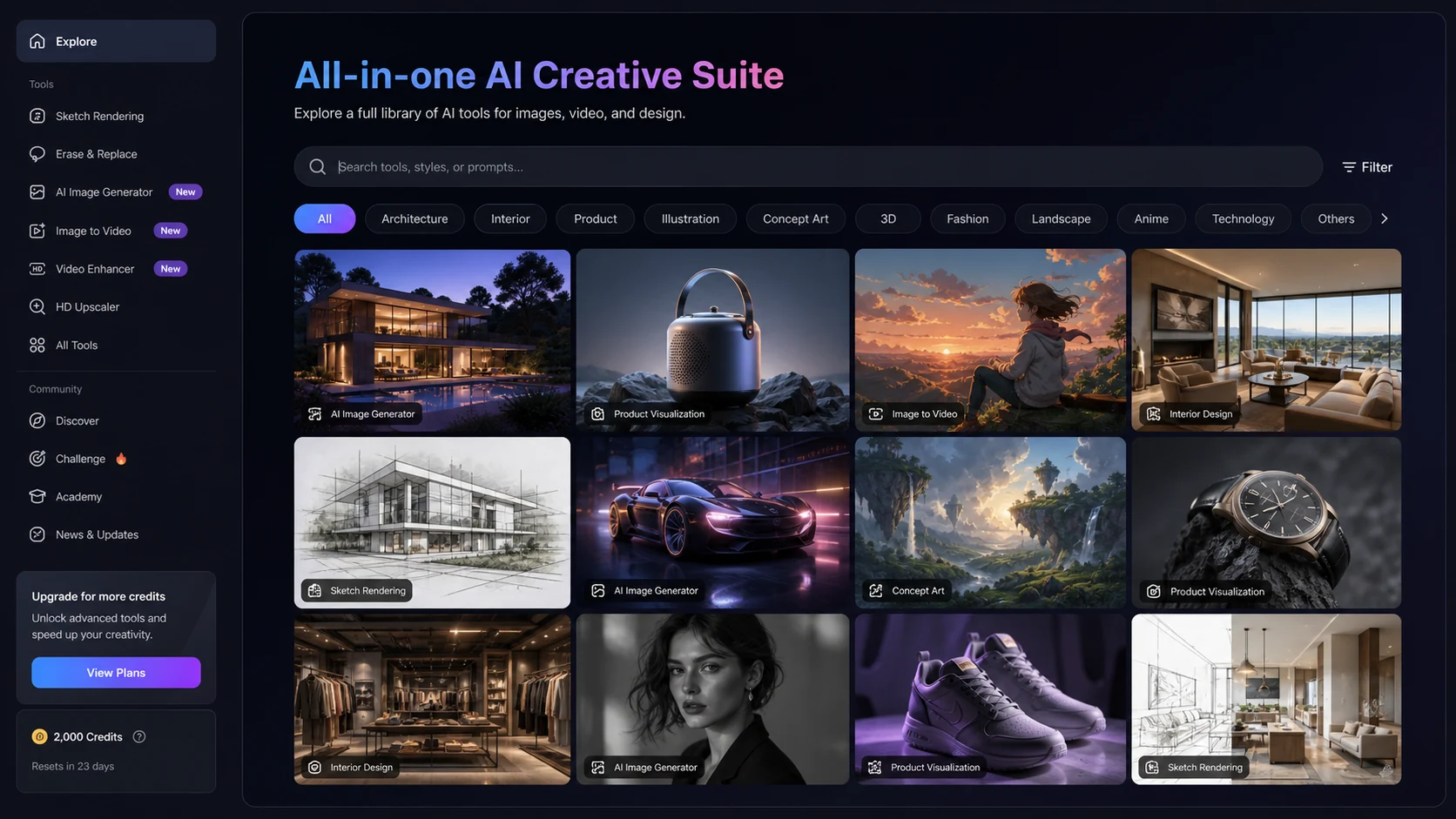
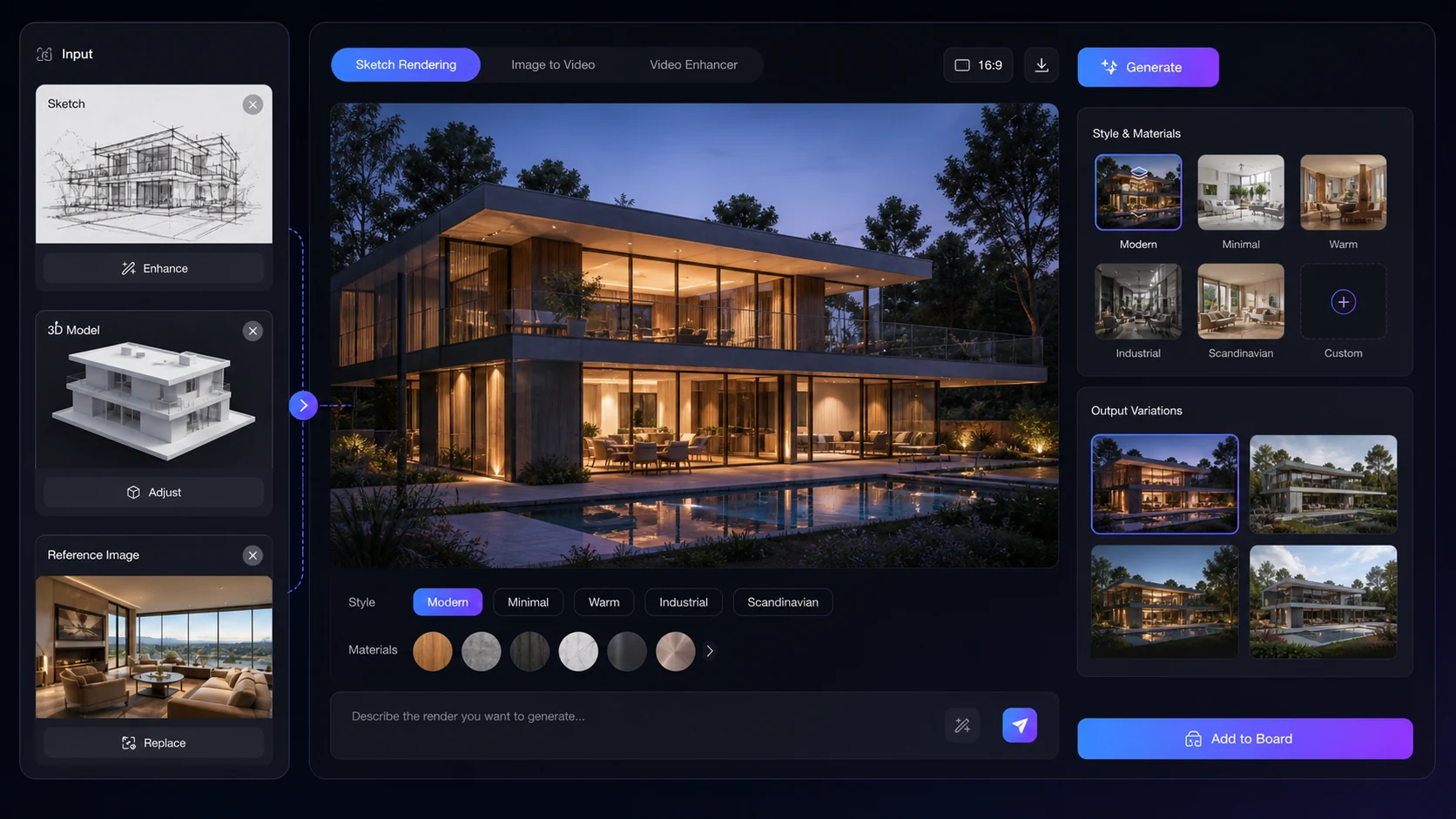
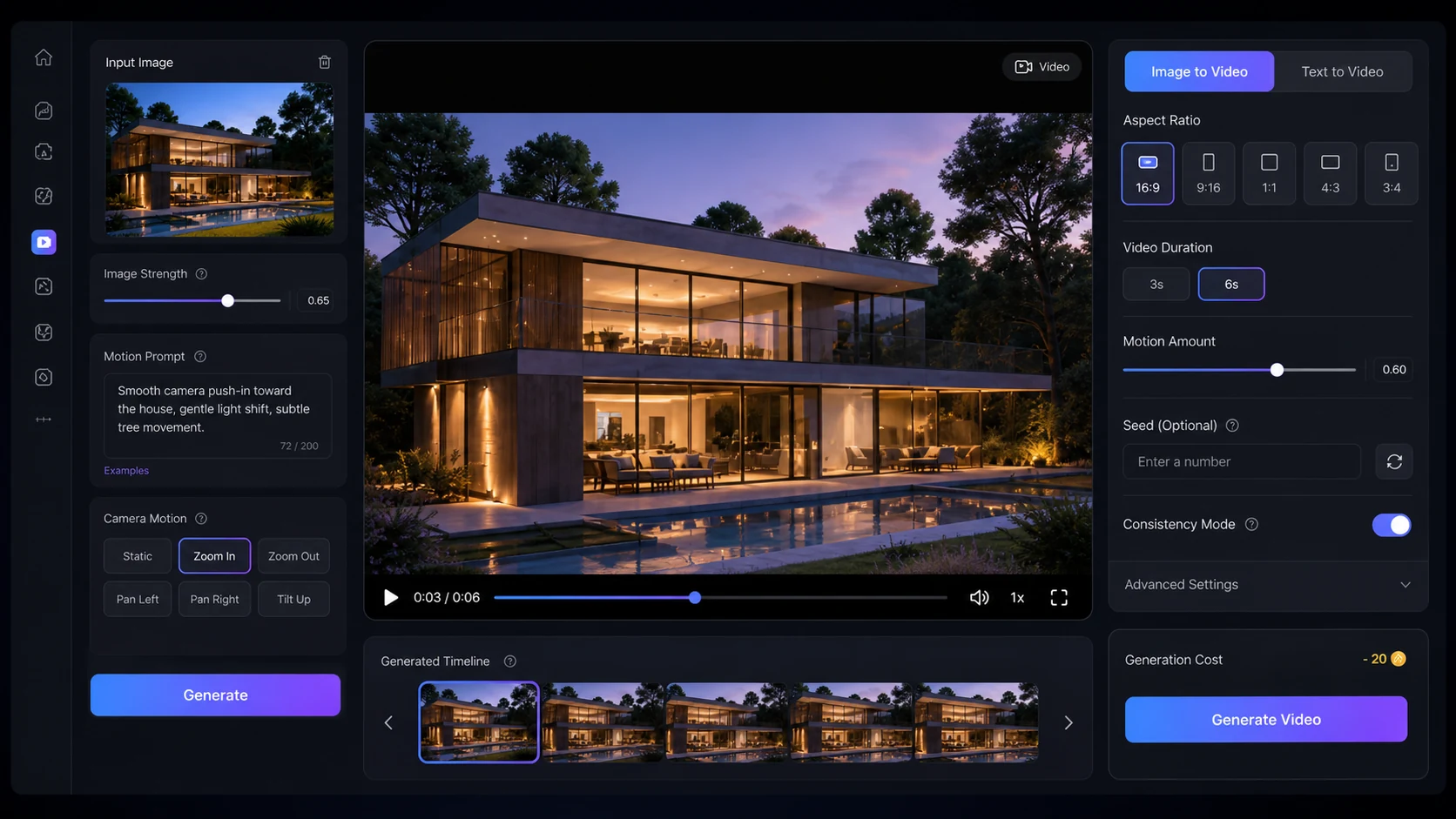
PromeAI is a stronger fit when you judge it as a design workflow platform. The homepage highlights many AI tools, but the buyer decision is narrower: do you need a repeatable way to move from sketches, references, interiors, product ideas, or marketing visuals into many visual directions without paying for a full production workflow each time?
What PromeAI actually does
PromeAI combines AI image generation, image editing, sketch rendering, video-style workflows, and design-specific tools in one web platform. The most practical angle is not simply that it can generate pretty images. The more useful question is whether it helps you move from a rough idea, sketch, model screenshot, or product concept into enough visual options to support a client presentation, creative brief, or marketing test.
- Turns sketches, photos, drafts, or model screenshots into visual render directions.
- Includes many image generation and editing tools rather than one narrow generator.
- Supports design-heavy categories such as architecture, interiors, product visuals, and creative concepts.
Pricing is mostly a coin and usage decision
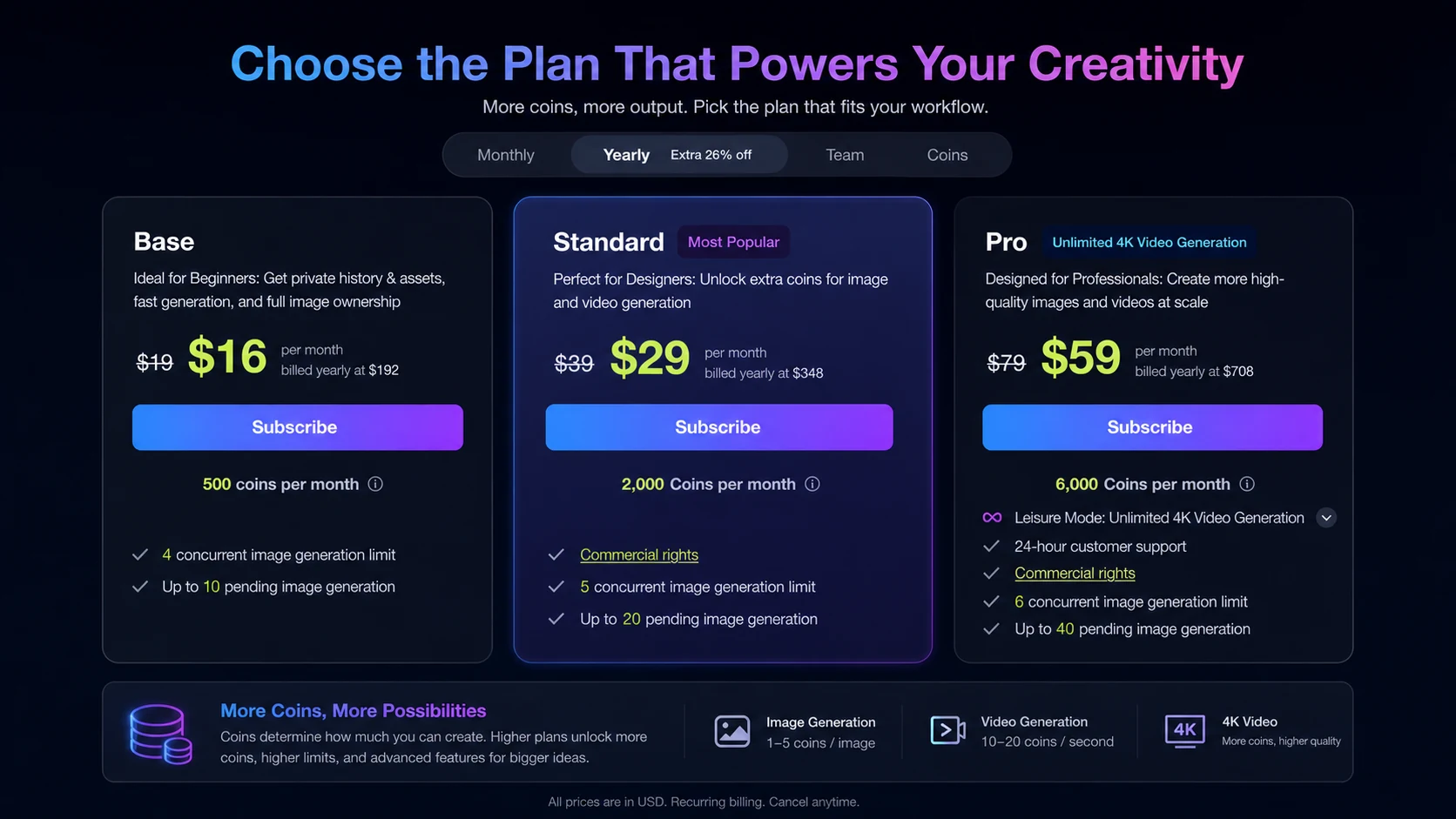
The official membership page confirms a Free plan with 10 coins per month, then Base, Standard, and Pro tiers with higher monthly coin allowances. Public pricing references vary because the official page can render prices dynamically, so the safest interpretation is that PromeAI is a coin-based subscription product. Check the plan amount, billing interval, commercial-rights language, extra coin purchase rates, and queue limits before treating any tier as a bargain.
- Free is mainly for testing because 10 coins per month is very limited.
- Base is the first paid path for lighter repeat use.
- Standard and Pro make more sense when commercial rights, more coins, and higher output volume matter.
- Team pricing should be checked separately if collaboration is part of the buying decision.
The product tour video helps you judge workflow fit
The walkthrough video is useful if you are still unsure whether PromeAI feels easy enough for your own creative process. Pay attention to how the presenter moves between tools, chooses inputs, and evaluates outputs. Those steps reveal whether PromeAI is something you can use regularly or a platform that will feel too broad if you only wanted a quick image generator.
Where PromeAI is strongest
PromeAI is most persuasive when the starting point is visual, not just text. Architects, interior designers, product teams, fashion teams, and marketers can benefit from a tool that accepts sketches, screenshots, references, and style choices. For a buyer who already works with visual drafts, the platform may save time during exploration. For a buyer who only needs one polished final asset, it may feel like too much tool for too little output.
- Architecture and interiors are a natural fit because rough visual inputs can become presentable render directions.
- Product and e-commerce teams can test different visual treatments before commissioning final assets.
- Creators can use it for ideation, but still need judgment before publishing AI outputs commercially.
Commercial rights and refund terms deserve a careful check
The official membership page lists commercial rights on higher tiers, while the terms page explains automatic renewal, cancellation timing, and refund handling. This is where buyers should slow down. If you plan to use PromeAI output for client work, ads, product pages, or public campaigns, verify the exact plan rights and refund rules before paying rather than assuming every tier works the same way.
- Standard and Pro are more relevant when commercial-rights language matters.
- Cancellation takes effect at the end of the current billing cycle.
- Recent orders have a 7-day refund request path, but later refunds are conditional.
Best next step with PromeAI
The safest next step is to test the free plan, check whether the outputs match your actual workflow, then compare the live membership page against your monthly coin needs. After that, use the review page if you need deeper positioning or the coupon route if you are already confident the plan fits. That order protects you from buying a discount before you know whether the product belongs in your workflow.
- Use the free plan for interface and output testing.
- Move to the review if you still need deeper fit analysis.
- Check the coupon or deal path only after confirming plan fit.
Best savings path from this store page
This is the clearest savings route to check once the product already looks like a fit.
A public coupon directory reports a verified PromeAI checkout coupon for eligible orders. Treat it as a researched coupon path and verify the code in checkout before relying on it.
Base from $16/month billed yearly
Reported education discount path
Use comparison routes when the category fit is still open
Use these comparison routes when the product still looks plausible, but the category fit is not fully settled.
Verification points worth checking before you click out
Where this store usually fits best in the workflow
PromeAI is useful when architects or interior designers want to turn sketches, draft layouts, or model screenshots into multiple visual directions before deeper production work.
Marketers and product teams can use PromeAI to test background, style, and creative directions before deciding which visuals deserve manual polishing.
Creators can use the free or lower paid paths to explore thumbnails, scenes, mood boards, and concept images, but should verify output rights before monetized use.
Teams with recurring visual output may find more value in higher coin allowances, queue limits, and commercial rights than solo users testing a few images.
Practical checkpoints before and after signup
- Decide whether your workflow starts from sketches, photos, 3D model screenshots, prompts, or product references.
- Use the free plan to check whether the interface and output style feel usable before comparing paid tiers.
- Estimate monthly generations and compare that number with the coin allowance in each plan.
- Verify whether your intended use needs commercial rights, HD downloads, video generation access, or team features.
- Check the live membership page because prices and annual billing display can change.
- Read the refund and cancellation terms so you know what happens after the billing cycle starts.
Fast-read signals for workflow fit and buying friction
Questions readers usually ask before choosing this store
What does PromeAI actually do?
PromeAI is an AI design platform for generating, editing, and transforming visuals. Its strongest use cases include sketch rendering, image generation, image editing, architecture and interior concepts, product visuals, and motion-oriented creative workflows.
Is PromeAI free?
PromeAI has a free plan on the official membership page with 10 coins per month. That is useful for testing, but it is too limited for serious production, so regular users should compare paid coin allowances before relying on it.
How much does PromeAI cost?
The official membership page confirms the tier structure but may render live prices dynamically. Public pricing references commonly list Base, Standard, and Pro monthly or annual-equivalent prices, but buyers should verify the current official checkout before paying.
Does PromeAI have a refund policy?
Yes. PromeAI's terms describe a refund request path for orders placed within the last 7 days. After that, refunds are limited to assessed cases such as extended software failure, incorrect package purchase, or duplicate platform payment.
What is the safest next step before buying PromeAI?
Start with the free plan, test whether the output matches your workflow, check the live membership page for the current billing interval and coin limits, then move to the review or coupon path only if the plan still fits.
Choose the next route that matches what you still need to decide
The strongest next click depends on whether you still need product judgment, a savings route, or a broader category comparison.