Quick verdict
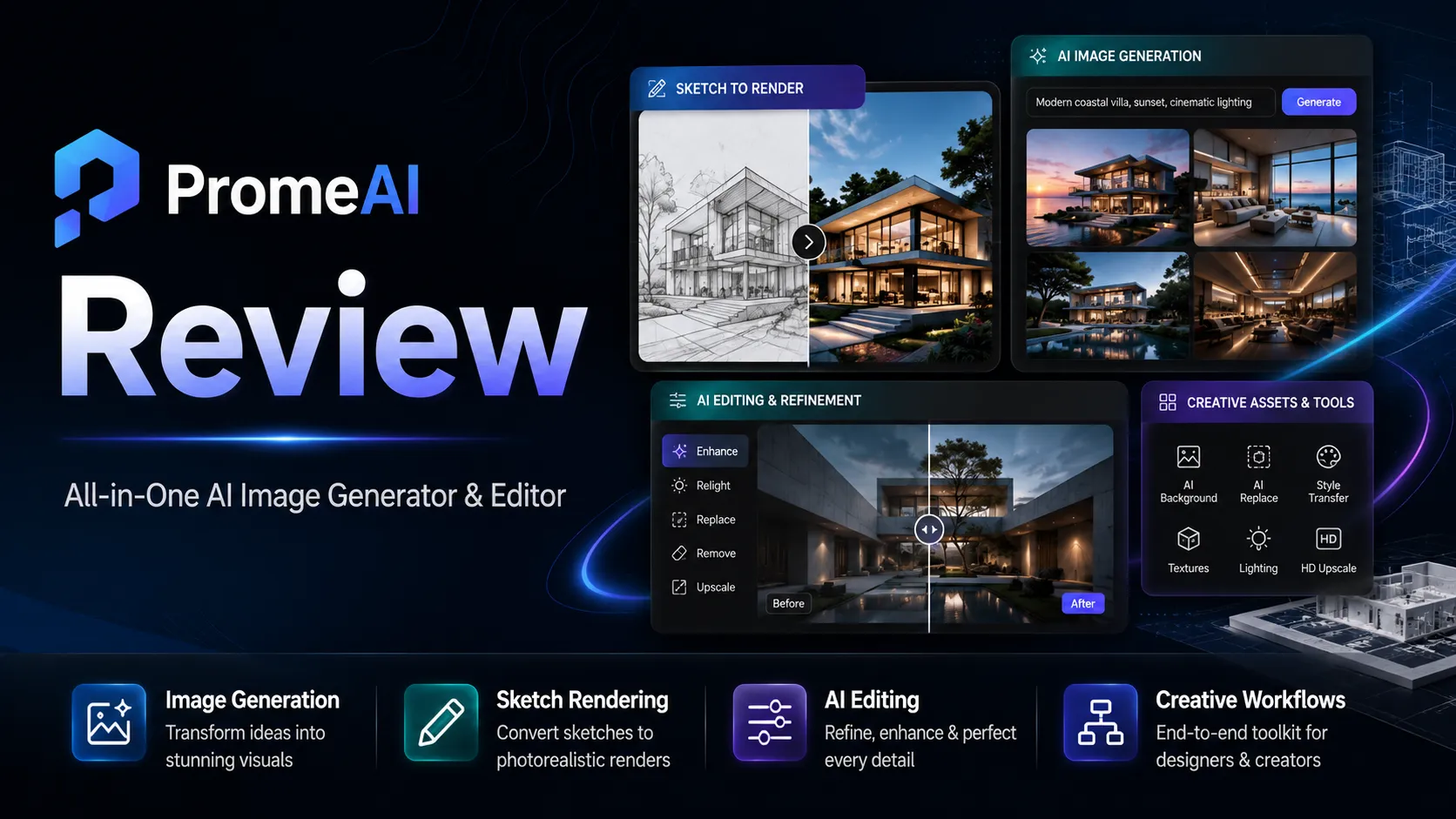
PromeAI is worth a serious look if your work starts with visual inputs: sketches, rough product ideas, 3D model screenshots, room photos, fashion concepts, campaign visuals, or early creative directions that need to become something presentable quickly.
That is the useful version of PromeAI.
The less useful version is buying it as just another AI image generator because the examples look impressive. PromeAI can generate images, but the stronger buying argument is not “pretty pictures.” It is whether the platform helps you move from rough visual thinking to repeatable design exploration without opening five separate tools every time.
I would treat PromeAI as a broad AI design workspace, not a simple text-to-image toy. Its official product surface includes sketch rendering, image generation, image editing, video-style generation paths, background tools, design templates, style palettes, and solution pages for interior design, architecture, e-commerce, and game animation. That breadth is useful if you will use it repeatedly. It becomes less convincing if you only need one occasional image.
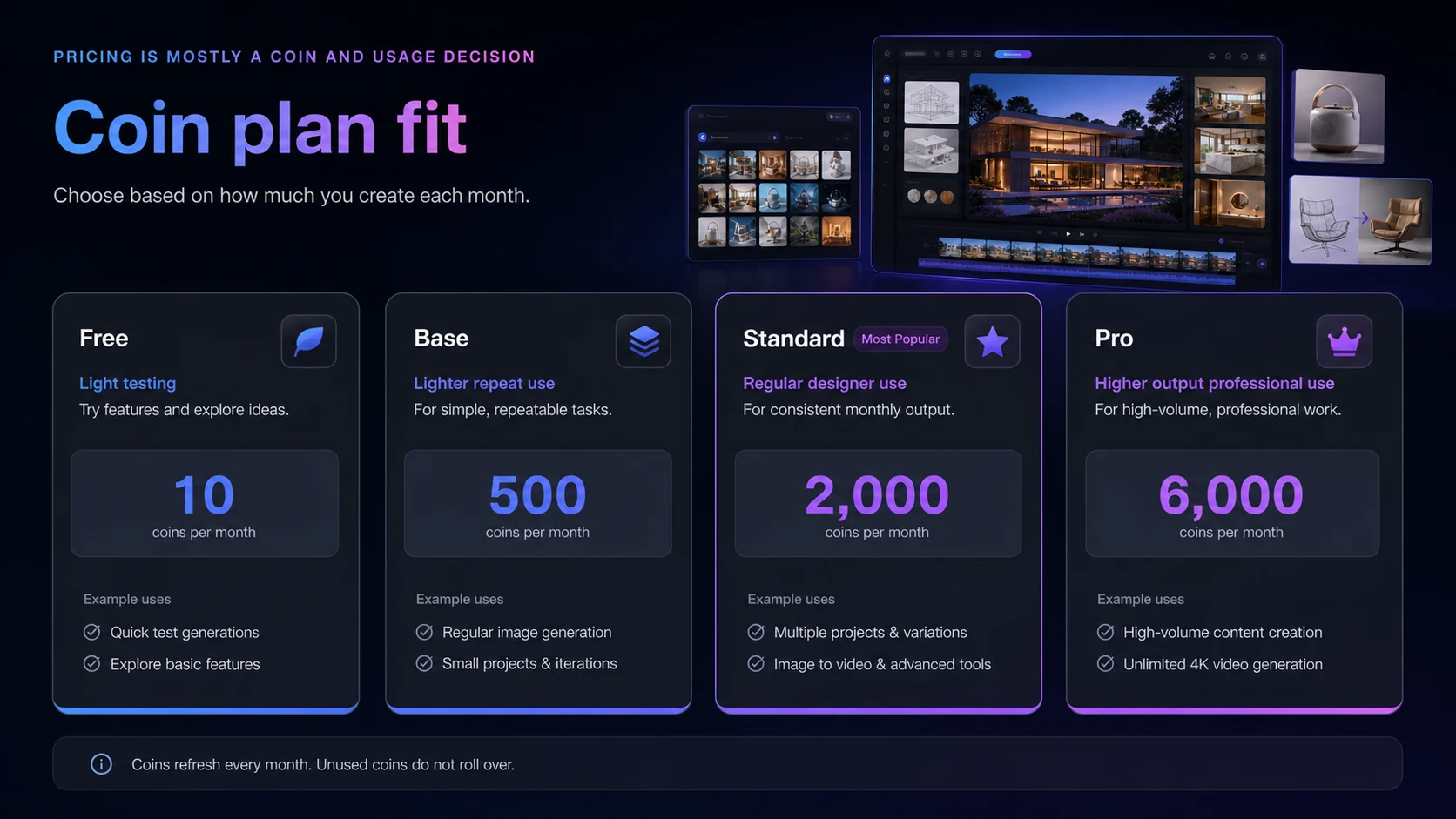
The pricing decision also needs care. PromeAI uses a coin-based membership structure with a Free plan, Base, Standard, and Pro tiers. The free path is useful for testing, but 10 coins per month will not tell you much about serious production volume. Paid tiers add more coins, generation limits, HD downloads, video access, private assets, and commercial rights on higher tiers. For my money, the plan decision is really about monthly output volume and rights, not only the headline price.
I would consider PromeAI if you need repeated visual ideation for architecture, interiors, product concepts, e-commerce visuals, creative campaigns, fashion, or game concepts. I would skip it if you want guaranteed pixel-perfect final artwork, do not want to manage coin limits, or only need a few casual AI images.
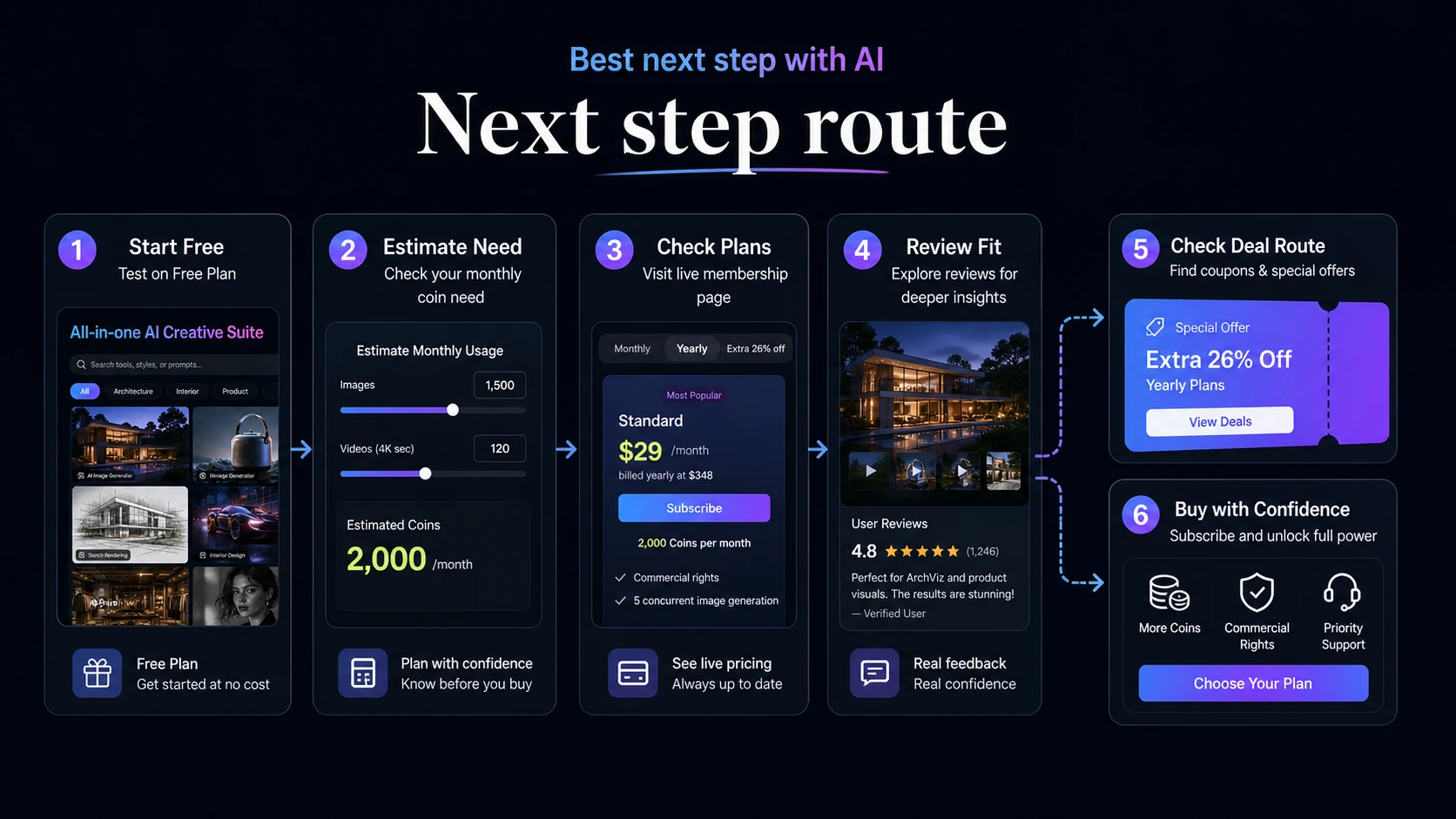
Next step: If PromeAI still looks relevant, test the free path first, then verify the live membership page before choosing a coin-based paid plan.
Review snapshot
| Review point | Practical take |
|---|---|
| Best for | Architects, interior designers, product teams, marketers, creators, and visual teams that need repeated concept exploration |
| Not ideal for | Casual users who only need a few images, buyers who dislike credit systems, or teams needing final production assets without manual review |
| Main use case | Turning sketches, photos, prompts, 3D model screenshots, and rough ideas into visual directions |
| Free path | Free plan with 10 coins per month, best used for interface and output testing |
| Paid path | Base, Standard, and Pro tiers built around monthly coins, generation limits, HD results, video access, and commercial-rights differences |
| Commercial use | Standard, Pro, and Team are the safer tiers to check when commercial licensing matters |
| Main strength | Design-oriented sketch rendering and broad AI image workflow coverage |
| Main concern | Coin usage, plan rights, refund timing, and live checkout pricing need verification |
| Best alternatives to compare | Aitubo, 1of10, Midjourney, Adobe Firefly, Canva |
| Best next step | Test one real workflow before committing to a monthly or annual plan |
What is PromeAI?
PromeAI is an AI design and image creation platform built around visual generation, rendering, editing, and creative exploration.
The homepage frames it as a free AI image generator and editor, but the more useful reading is broader than that. PromeAI is trying to be a creative workspace for people who need images, renders, videos, design concepts, background tools, product visuals, character ideas, interior treatments, and architecture-style visual directions.
That matters because buyers often evaluate AI image tools too narrowly. They ask, “Can it create a good image from a prompt?” PromeAI asks a wider question: “Can it help me move a rough visual idea into multiple usable directions?”
The answer depends heavily on your workflow.
If you start with sketches, 3D model screenshots, unfinished rooms, product photos, fashion drafts, or visual references, PromeAI has a clearer role. Its Sketch Rendering workflow is especially central because it can turn hand-drawn sketches, real-life photos, or 3D model screenshots into more polished render directions. That makes the product more relevant to designers and concept workers than a prompt-only image generator.
If your work is purely text-prompt art generation, PromeAI can still be useful. But I would compare it more carefully against dedicated image generators, brand-safe design tools, or template-based platforms depending on what you actually publish.
The homepage makes PromeAI look simple. The buying decision is not simple.
The real question is whether PromeAI becomes part of a process you already repeat: concept sketch, render direction, style exploration, client mood board, product visual, campaign mockup, image variation, manual review, then final production or publishing.
If that process exists, PromeAI can make sense. If it does not, even a discounted plan may feel like another creative subscription you barely use.
Who should use PromeAI?
PromeAI is strongest for buyers who need visual iteration more than one-off image generation.
Architects and interior designers are the most obvious fit. If your workflow involves sketches, room references, floor plan ideas, 3D model views, unfinished interiors, or early client concepts, PromeAI gives you a faster way to explore visual directions. I would not treat it as a replacement for technical documentation or professional rendering judgment, but it can help with the early “what could this become?” stage.
Product and e-commerce teams may also benefit. A team can use PromeAI to test product background ideas, lifestyle scenes, mockups, campaign angles, or visual treatments before investing in a full production shoot or manual design pass. The value is speed at the ideation stage, not guaranteed final asset perfection.
Marketers and creators may find it useful when they need thumbnails, campaign visuals, social concepts, mood boards, backgrounds, or creative variations. The caution is that broad creative tools can become distracting. If you do not have a specific output need, PromeAI can become a place where you generate interesting visuals without actually shipping anything.
Fashion, game, and animation concept workers may also have a real use case. PromeAI’s official solution structure includes game animation and fashion-style visual workflows, and its tool library includes character, scene, video, relight, background, and image-to-video style paths. That does not mean every output will be production-ready. It does mean the tool is broader than a basic image generator.
I would also consider PromeAI for small creative teams that need a shared visual ideation layer. The paid plan decision becomes more relevant if multiple people are producing concepts regularly, especially when commercial rights and queue limits matter.
Who should avoid PromeAI?
I would be careful with PromeAI if you only need a few casual images each month.
The free plan can handle lightweight testing, but paid value depends on repeated usage. If you are not generating enough images, renders, variations, or videos to care about monthly coins and queue limits, you may be paying for a workflow you do not really have.
I would also avoid PromeAI if you expect AI output to be final without review. Third-party reviewer patterns are generally positive about speed and ease of use, but they also point to a normal AI-design problem: fine details can be off, control can be limited, and results may need manual refinement. That is not unusual for the category. It is still important.
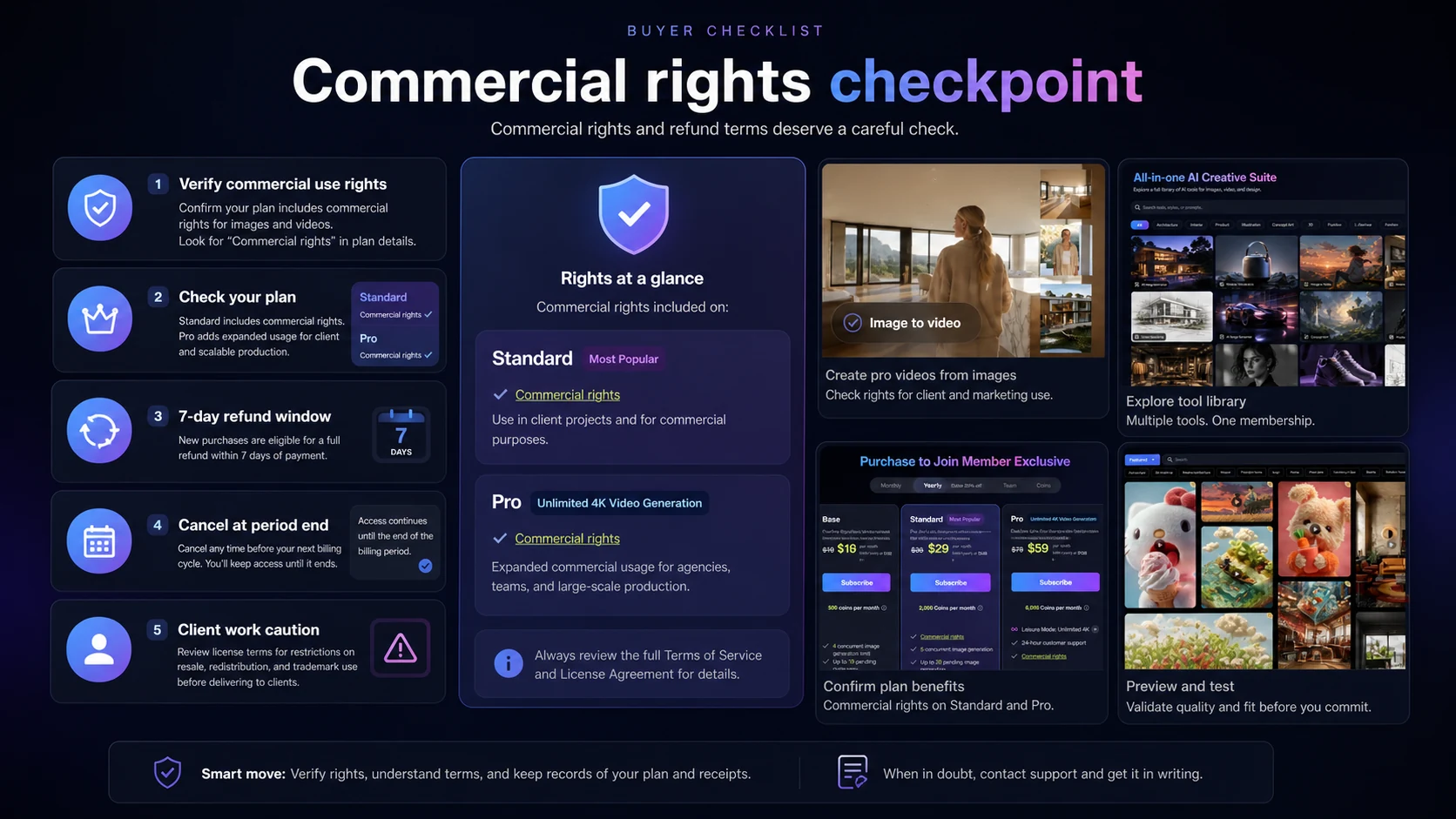
Client work deserves extra caution. PromeAI publishes commercial-use guidance that distinguishes which plan types include commercial licensing. If you plan to use generated visuals for paid campaigns, client presentations, product pages, social ads, printed material, or monetized creative work, do not assume the free or lower plan is enough.
Buyers who need a clearly documented API workflow should also slow down. The internal store data marks API access as unclear or weak. I would not build an automation plan around PromeAI unless the current official documentation or sales route confirms what you need.
And if you are buying only because you saw a redeem-code field or coupon route, pause first. A discount can reduce the cost of a good fit. It cannot turn a loose creative curiosity into a real workflow.
How PromeAI fits into a real creative workflow
The best PromeAI workflow starts before you open the generator.
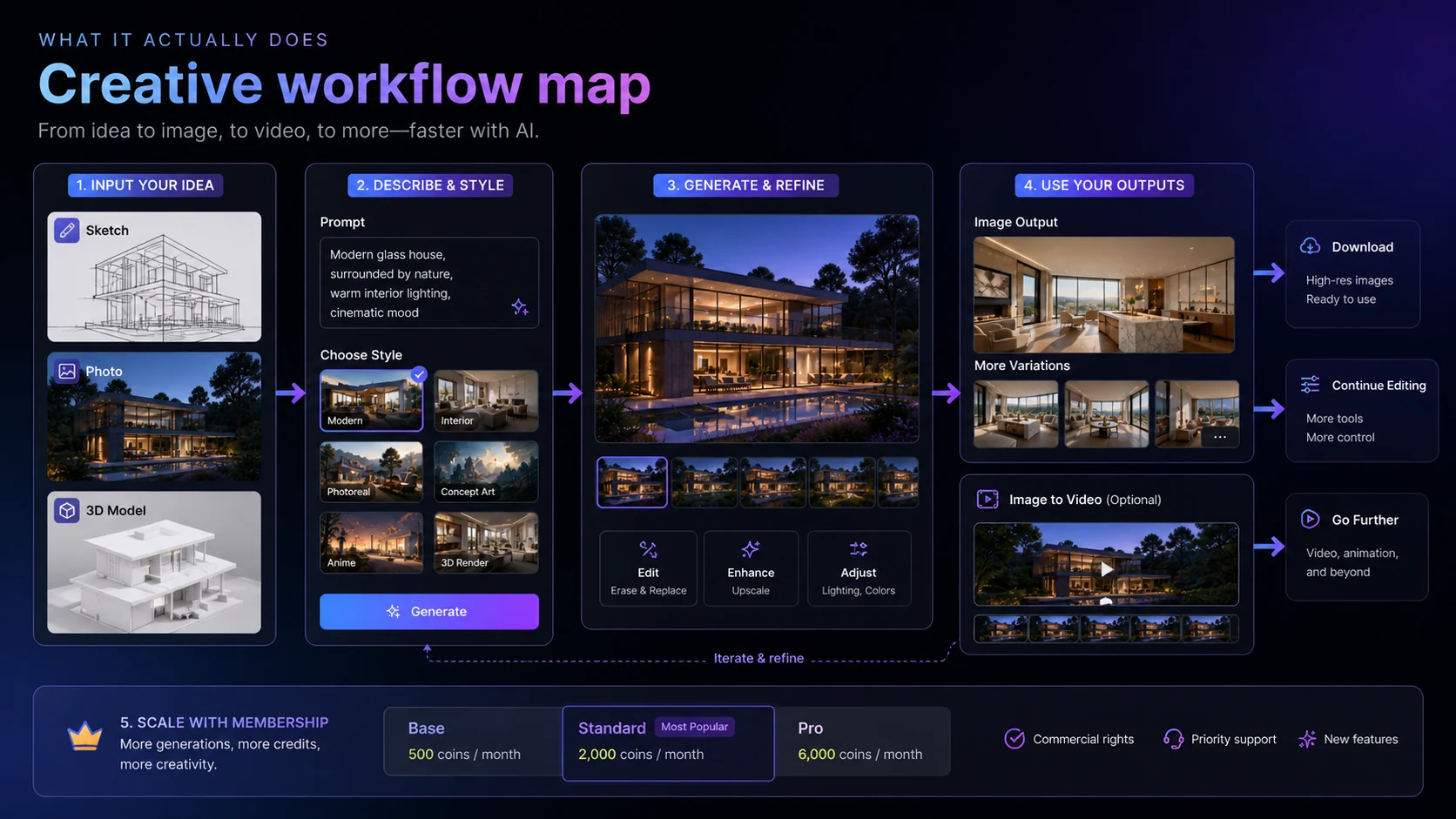
A realistic process might look like this:
- Start with a rough input: sketch, room photo, product reference, prompt, model screenshot, or mood board.
- Choose the right PromeAI path instead of forcing every job into text-to-image.
- Generate multiple directions, not one final answer.
- Compare outputs against the actual buyer or client goal.
- Save only the strongest directions.
- Use manual design judgment to correct, refine, or reject weak details.
- Check whether commercial rights, HD downloads, and asset privacy fit the intended use.
- Move final candidates into your normal design, presentation, or publishing process.
That workflow is where PromeAI becomes easier to understand.
It is not the final designer. It is not the client sign-off. It is not the full production pipeline. It is an acceleration layer for visual exploration.
The strongest use cases are not vague.
An interior designer might upload a room photo and explore different style directions. An architect might use a sketch or model screenshot to create early presentation visuals. A marketer might test product-scene concepts before requesting final assets. A game designer might explore character or environment directions before committing to a detailed production pass.
In all of those cases, the value is not that PromeAI replaces the professional. The value is that it helps the professional see more options faster.
That is why I would not judge PromeAI only by gallery examples. Gallery examples show what the product can do in ideal circumstances. Your test should use your own messy inputs: a rough sketch, a real product photo, a basic campaign idea, or a model screenshot that resembles the work you actually do.
Workflow check: If PromeAI cannot improve one real creative task during the free test, a larger coin allowance probably will not fix the mismatch.
Key features that matter
PromeAI has a large tool surface, so I would not try to evaluate every feature equally. The features that matter most are the ones tied to your actual output.
Sketch rendering
This is one of the clearest reasons to consider PromeAI. The official sketch rendering flow is built around transforming hand-drawn sketches, photos, and 3D model screenshots into renderings. For architecture, interiors, product ideation, fashion, and concept work, that is more specific than generic prompt-based image generation.
The key question is control. Does the tool preserve enough of your original idea while improving presentation quality? If it changes the concept too aggressively, you may spend more time correcting than exploring.
AI image generation
PromeAI includes text-to-image style generation, which can be useful for artwork, campaign ideas, scenes, product treatments, and social visuals. But this is also the most crowded part of the market. If image generation is your only need, compare PromeAI with specialized image tools before assuming it is the strongest fit.
Image editing and refinement tools
Tools such as background removal, outpainting, relighting, image variation, upscaling, background generation, and mockup-style workflows can make PromeAI more useful as a creative suite. This is where the platform becomes more than a single generator.
The practical question is whether you will actually use these tools together. A broad suite is valuable only when it reduces tool switching inside your process.
Video and motion-oriented tools
PromeAI includes video generation access in paid membership paths, and Pro emphasizes unlimited 4K video generation in Leisure Mode. This can matter for creators, ads, short-form visuals, and concept motion. It also raises the importance of coin usage, generation limits, output expectations, and plan selection.
Commercial licensing
This is not a small detail. PromeAI’s commercial-use page says Standard, Pro, and Team versions provide comprehensive commercial licensing, while Free and Base are for personal use only. That means a buyer using outputs for client work, ads, paid campaigns, product pages, or monetized projects should not treat every plan as interchangeable.
If there is one thing I would check before using PromeAI professionally, it is this.
Pricing and plan value
PromeAI pricing is best understood as a coin and rights decision.
The official membership page lists a Free plan with 10 coins per month, Base with 500 coins per month, Standard with 2,000 coins per month, and Pro with 6,000 coins per month. The same page also shows differences in concurrent image generation, pending generation limits, extra coin purchase rates, video generation access, private assets, HD downloads, customer support, and commercial rights.
The tricky part is that live prices may render dynamically. Public third-party pricing tables often show Base, Standard, and Pro price ranges, but I would not use those as the final source before checkout. The current membership page matters more than any old review or scraped pricing table.
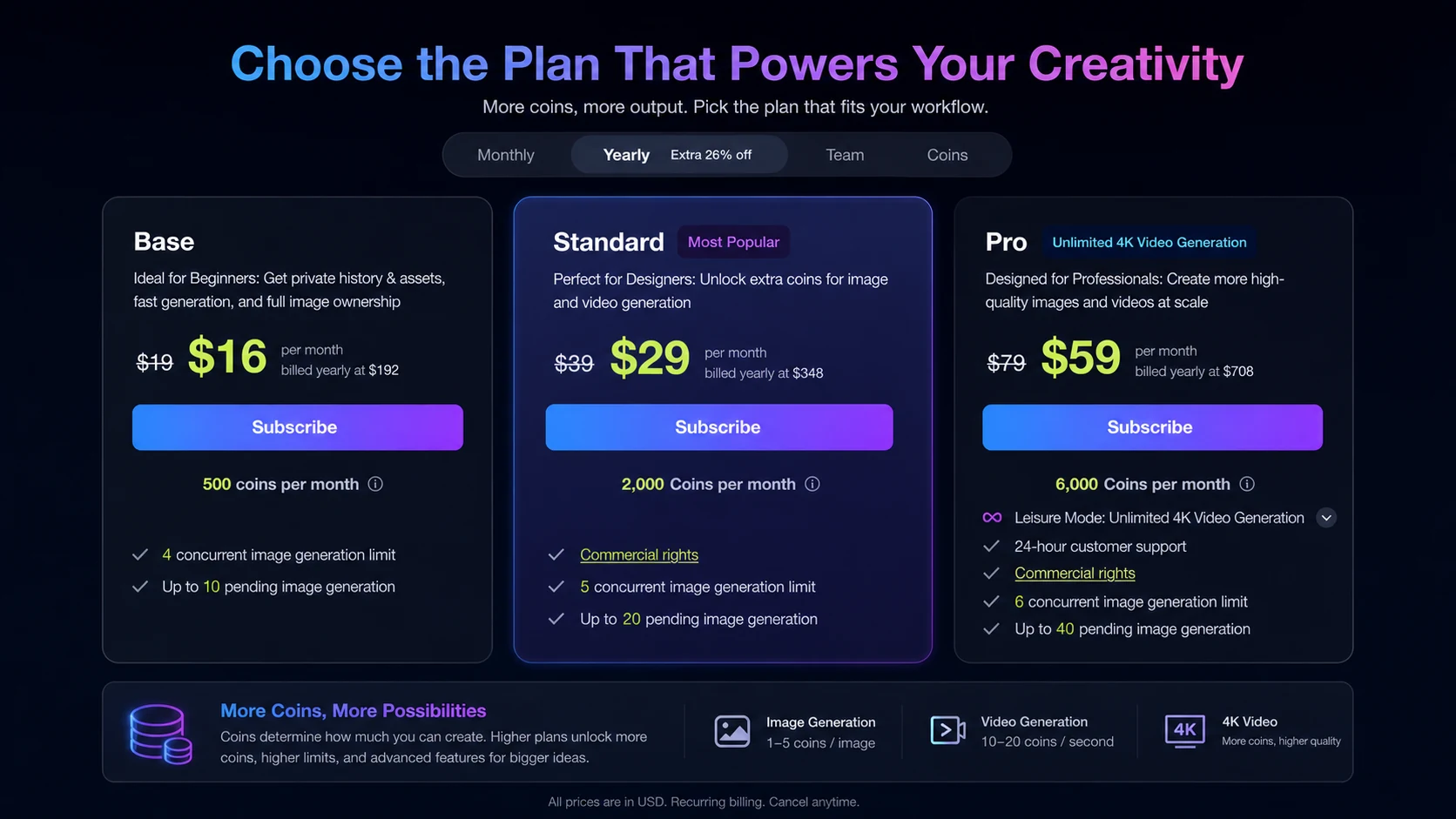
The Free plan is useful, but narrow. It gives you a way to test the interface, output style, and whether PromeAI understands your kind of input. It is not a serious production plan.
Base is more interesting for personal or lighter repeat use. The caution is commercial licensing. If you plan to use outputs for client or monetized work, check the current commercial-use rules before assuming Base is enough.
Standard is likely the first plan many professional buyers should examine because it adds more coins and commercial rights. That does not mean every buyer should choose it. It means it is more aligned with practical design use than a tiny free test.
Pro is for higher output volume, video-heavy work, larger queues, and more serious production exploration. I would only choose it after estimating monthly usage. A larger plan is not a better deal if most of the allowance goes unused.
The cheapest plan is not automatically the best plan. The best plan is the one that matches three things: output volume, rights, and workflow frequency.
Pricing check: Before paying, compare your expected monthly generation volume with PromeAI's live coin allowance and commercial-rights rules.
Free plan, coupon path, and checkout notes
The free plan is the safest first click for most buyers.
Use it to answer practical questions:
- Does PromeAI understand your sketches or source images?
- Are the outputs close enough to your intended style?
- Does the workflow feel fast enough to repeat?
- Do you need HD downloads, video access, or larger queues?
- Will you use outputs commercially?
- How many generations do you realistically need each month?
Only after that should you compare paid tiers.
PromeAI also has a redeem-code area on the membership page, and DealBestDaily has a coupon route for current offers. I would still treat the coupon path as a final checkout check, not the starting point. A code or discount is useful only after the plan fits.
The refund policy deserves a careful read. PromeAI’s terms describe refund requests within 7 days, with the refund amount calculated based on remaining membership days. After 7 days, refunds are not presented as unconditional; they are tied to assessed situations such as extended software failure, incorrect package purchase, or duplicate payment-platform purchases.
Cancellation timing matters too. PromeAI says cancellation is effective at the end of the current billing cycle, with access continuing through the period and the account downgraded to Free afterward.
That is normal subscription behavior, but it is still worth checking before you choose annual billing.
Checkout caution: Use any offer route only after checking the live plan, billing interval, refund language, and commercial-use rights.
What I would check before buying PromeAI
Before paying for PromeAI, I would run a small but realistic test.
Not a gallery-style test. Not a perfect prompt. A real workflow test.
Here is the checklist I would use:
| Buyer check | Why it matters |
|---|---|
| Test one real sketch, image, or model screenshot | A polished demo does not prove your own inputs will work well |
| Estimate monthly generations | Coin-based pricing only makes sense when you know usage volume |
| Verify commercial rights | Free and Base are not the same as Standard, Pro, or Team for commercial use |
| Check HD download needs | Client and campaign work may need better exports than casual testing |
| Compare extra coin costs | Heavy users may pay beyond the subscription allowance |
| Read refund timing | The 7-day path is useful, but not the same as unlimited buyer protection |
| Check data sensitivity | You may be uploading client visuals, unreleased products, faces, or confidential concepts |
| Compare alternatives | PromeAI may be too broad if a simpler or more specialized tool fits better |
The privacy page says user-generated content such as images or text is processed to provide services and is not retained after processing and being sent to the user. That is reassuring as public policy language, but I would still be careful with NDA material, private client concepts, unreleased product images, faces, and sensitive brand assets. For professional teams, privacy language should be reviewed before upload, not after.
The commercial-rights check is equally important. If you are producing client work, ads, social campaigns, product mockups, or paid creative assets, verify that your plan includes the rights you need. Do not rely on assumptions from a lower tier.
Pros and cons explained
PromeAI’s biggest strength is that it is visually practical. It gives creative buyers several ways to start: sketches, photos, prompts, 3D model screenshots, product ideas, rooms, characters, backgrounds, and more. That makes it easier to place inside design exploration than a prompt-only image tool.
The second strength is breadth. A buyer can move between generation, rendering, variation, background work, upscaling, relighting, and video-oriented workflows. If you use several of those tools, PromeAI can reduce tool switching.
The third strength is the free path. A free plan with 10 coins per month is limited, but it is still enough to answer the first question: does this tool understand my type of input?
The weakness is pricing complexity. Coin systems are not automatically bad, but they punish vague buyers. If you do not know how many generations you need, every plan is a guess.
The second weakness is rights complexity. Commercial-use language is plan-dependent, so a buyer using PromeAI for business cannot simply choose the cheapest option and move on.
The third weakness is output control. G2 review patterns include praise for speed and sketch-to-image usefulness, but also familiar complaints about fine-tuning, small details, export needs, and peak-time processing. That is exactly why I would treat PromeAI as a visual exploration tool first, not a final-art guarantee.
Green flags and red flags
Green flags
PromeAI has a clear design-oriented position. It is not only chasing generic AI art. The official tool library and solution pages show use cases across architecture, interiors, e-commerce, game animation, product visuals, and creative generation.
The sketch-to-render workflow is specific. That is good. Specific tools are easier to evaluate than vague “create anything” promises.
The membership page gives useful plan signals: coins, concurrent generation limits, pending queue limits, HD downloads, video access, extra coin rates, private assets, support, and commercial rights. The page does not make the buying decision effortless, but it gives buyers enough structure to ask the right questions.
The refund and cancellation terms are published. That is better than making buyers guess.
Red flags
The first red flag is overbuying. PromeAI can look exciting, and creative tools often feel more useful during the first session than they become after a month. Estimate recurring use before choosing annual billing.
The second red flag is commercial rights. If your plan does not match your intended use, the output may not be safe for client or monetized work.
The third red flag is output control. AI-generated visual detail can still drift. If your buyer, client, or campaign requires precision, PromeAI should support concept exploration, not replace final professional review.
The fourth red flag is pricing volatility. When live prices render dynamically and third-party tables disagree or age quickly, the checkout page is the only price that matters.
PromeAI vs alternatives
PromeAI sits in a crowded creative AI market, so the right alternative depends on the buyer job.
PromeAI vs Aitubo
Aitubo is the closer comparison if your main need is AI image generation and creative assets rather than a design-heavy sketch rendering workflow. PromeAI is more persuasive when your process starts from sketches, interiors, model screenshots, or product concepts. Aitubo may feel cleaner if you want a more direct image generation path without evaluating a broad rendering suite.
If that is your decision, compare the Aitubo store guide before choosing PromeAI only because it has more tools.
PromeAI vs 1of10
1of10 is not a direct sketch-rendering competitor. It is more relevant when the buyer wants short-form creative idea discovery and content inspiration rather than an AI image and rendering suite. PromeAI is the stronger fit for visual production and concept exploration. 1of10 is more relevant when your bottleneck is finding angles, formats, or creative hooks.
If idea discovery matters more than image output, check the 1of10 store guide as a different route.
PromeAI vs Midjourney
Midjourney is often the stronger comparison for high-quality stylized AI imagery and art direction. PromeAI is more practical when you need sketch-to-render, interior/product/architecture-oriented workflows, or multiple design tools in one web platform. Midjourney can be more compelling for pure image aesthetics. PromeAI can be more workflow-friendly for designers starting from visual references.
PromeAI vs Adobe Firefly
Adobe Firefly is worth comparing if brand safety, Adobe ecosystem integration, and commercially cautious creative production matter more than PromeAI’s sketch rendering range. PromeAI may feel more flexible for fast concept rendering. Firefly may be the safer route for teams already working inside Adobe tools and governance expectations.
PromeAI vs Canva
Canva is not a direct AI rendering replacement. It is stronger for templates, brand kits, social graphics, presentations, and production-ready layouts. PromeAI is stronger when the early creative problem is generating or transforming visuals. Many buyers could use both: PromeAI for visual exploration, Canva for layout and publishing.
Review methodology and evidence confidence
This review uses a buyer-side evidence approach rather than a fake hands-on claim.
I looked at PromeAI through four layers: internal DealBestDaily store data, official PromeAI pages, public policy and membership details, and third-party review patterns. The strongest facts come from PromeAI’s own homepage, membership page, sketch-rendering page, commercial-use page, terms, and privacy policy. Third-party sources are useful for sentiment patterns, especially around ease of use, sketch-to-render value, output detail control, and pricing expectations.
Evidence confidence is high for the broad positioning, free plan, coin-based membership structure, commercial-rights tier distinction, and refund/cancellation language because those are visible on official PromeAI pages.
Evidence confidence is moderate for exact price interpretation because the official membership page can render prices dynamically, while third-party pricing tables may show values that change over time.
Evidence confidence is mixed for output quality because AI visual quality depends heavily on the input, style choice, prompt quality, and buyer expectations. Review patterns are useful, but they do not guarantee your results.
That is why the safest PromeAI decision is not “buy the plan with the biggest allowance.” It is “test your own workflow, then choose the smallest plan that supports real usage and rights.”
Final verdict
PromeAI is a useful AI design platform when the buyer has a real visual workflow.
That is the line I would not blur.
If you are an architect, interior designer, product marketer, creator, concept artist, e-commerce operator, or small creative team that regularly turns rough ideas into visual directions, PromeAI can make sense. Its sketch rendering, broad tool library, image editing paths, video access, and design-oriented positioning give it a stronger workflow argument than many generic image generators.
If you only need the occasional AI picture, I would be more cautious. The free plan is enough to test curiosity. A paid plan should be tied to repeated output, commercial rights, HD downloads, or a clear time-saving process.
I would consider PromeAI if you need sketch-to-render, visual concept exploration, product or interior mockups, creative variations, or a broad design AI workspace.
I would skip it if you want guaranteed final art, dislike coin systems, rarely generate visuals, or need a fully documented API workflow before buying.
I would compare it with Aitubo if you mainly need AI image generation, 1of10 if your real problem is creative idea discovery, Midjourney if image aesthetics matter most, Adobe Firefly if brand-safe ecosystem work matters, and Canva if your main need is templates and publishing layouts.
The safest path is simple: test the free plan, use one real project, check the live membership page, verify commercial rights, read the refund terms, then decide whether the monthly coin allowance matches the work you will actually repeat.
