Quick verdict
Aitubo is worth considering if you want one creative AI workspace for images, short videos, music, effects, face swaps, upscaling, avatars, and quick visual experiments. It is not the first tool I would choose if you only need polished brand design templates, team approvals, or predictable flat-rate usage with no token math.
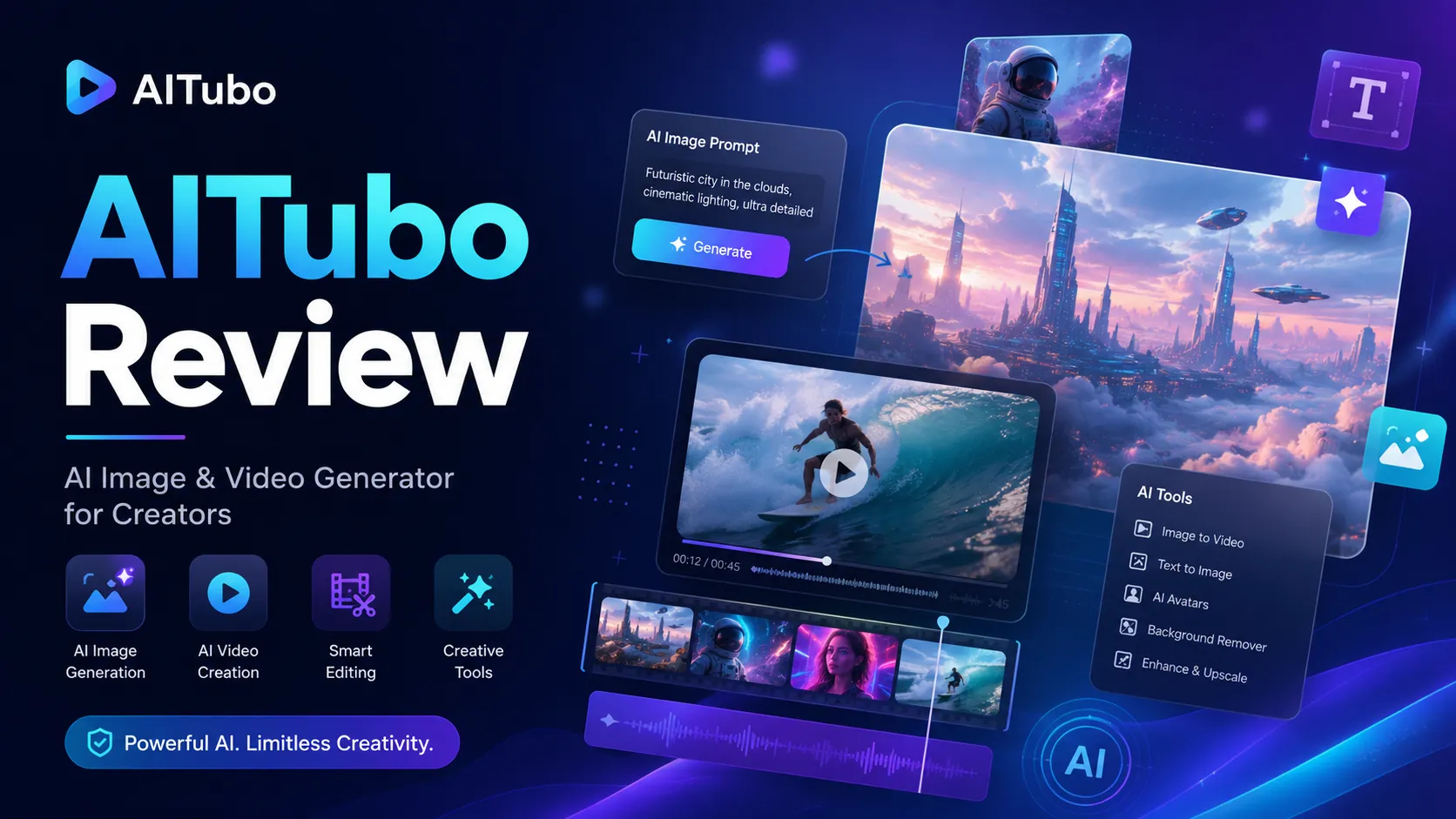
The strongest reason to look at Aitubo is breadth. The official product experience is built around many creative routes: image generation, video generation, AI music, image editing, background removal, headshots, face swap, upscaling, video effects, photo effects, and API-supported generation. That makes it attractive for creators who like to test ideas quickly.
The buying decision is less simple.
Aitubo uses a token-based model, and the practical cost depends on what you generate. Occasional image tests are one thing. Video, effects, premium models, retries, and client-ready revisions are another. A plan that feels generous for casual prompting can feel tighter when you start making short clips or running multiple variations.
For my money, Aitubo belongs in a test-first workflow. Use the free path, run one real creative task, count how many retries it takes, then look at paid tiers. The safest next step is to check the Aitubo store guide for the current route, but only after you know whether the workflow itself fits.
Next step: If Aitubo still matches your creative workflow, test the live product route before choosing a token-heavy plan.
Review snapshot
| Review point | Practical take |
|---|---|
| Best for | Creators, marketers, AI art users, and visual experimenters who want image, video, music, and effects tools in one place |
| Not ideal for | Teams needing formal collaboration, brand libraries, approval workflows, or predictable unlimited generation |
| Main use case | Testing creative visuals, short videos, AI effects, music ideas, avatars, face swaps, and upscaled assets |
| Pricing model | Free plan plus paid tiers built around monthly tokens, model access, priority, storage, and pending-job limits |
| Main strength | Broad creative toolkit with both browser tools and API documentation |
| Main concern | Token burn, refund rules after usage, and output consistency for real commercial work |
| Best direct comparisons | ArtSpace.ai, 1min.AI, Canva, Adobe Firefly, Recraft |
| Best next step | Use free tokens on one real output before moving to paid or annual billing |
What is Aitubo?
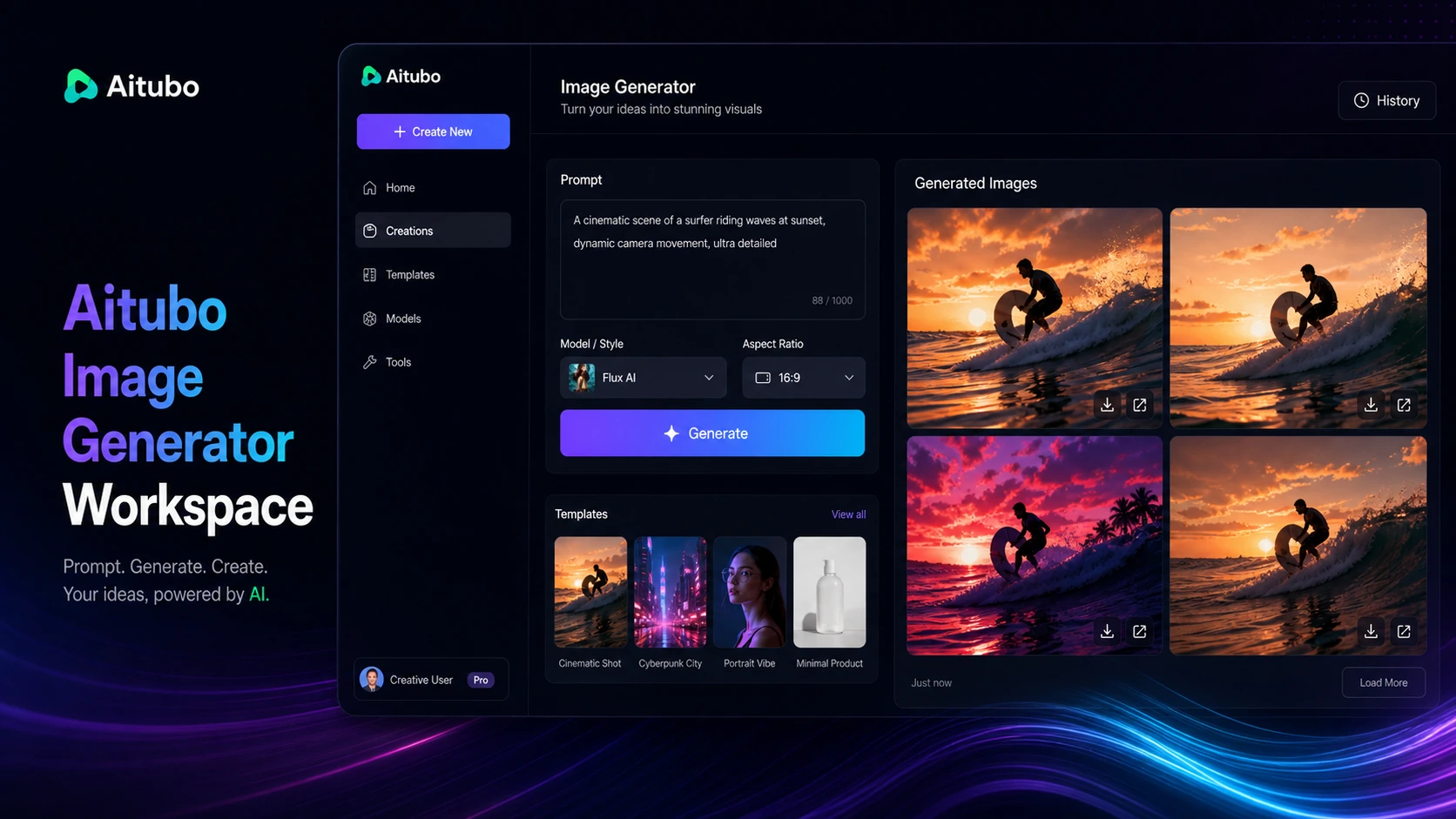
Aitubo is best understood as a creative AI generation platform for people who want to create or edit visual and audio assets from prompts, uploaded images, and built-in effects. Its public positioning leans heavily into professional-level AI image and video generation, but the platform is broader than a simple text-to-image tool.
The product includes AI image generation, AI video generation, AI music generation, image editing, background removal, AI headshots, face swap tools, upscaling, talking avatars, image-to-video, text-to-video, photo effects, and video effects. It also offers API documentation for buyers who want to recreate some generation workflows programmatically.
That breadth is the appeal.
It is also the reason I would not judge Aitubo from the homepage alone. A tool that offers many creative formats can look more valuable than it feels in daily use if the buyer does not know which output they actually need. The better question is not “does Aitubo have a lot of tools?” It is “does Aitubo reliably produce the type of asset I need without burning too many tokens or requiring too much manual repair?”
Our review approach compares public product pages, pricing details, refund language, privacy notes, API documentation, app marketplace signals, buyer workflow fit, and nearby alternatives. We do not treat a broad feature list, free tokens, or a checkout discount as proof that the product fits the buyer.
Who should use Aitubo?
Aitubo makes the most sense for creators who work across multiple creative formats. If you create social visuals, short clips, stylized images, avatar content, AI effects, or idea-stage campaign assets, a broad creative workspace can save time compared with jumping between separate tools.
It can also fit marketers who need fast concept visuals before a more serious production pass. Aitubo can help with creative directions, visual variations, effects, background removal, and quick asset testing. The condition is that the team still reviews outputs carefully before using them in ads, landing pages, client work, or brand campaigns.
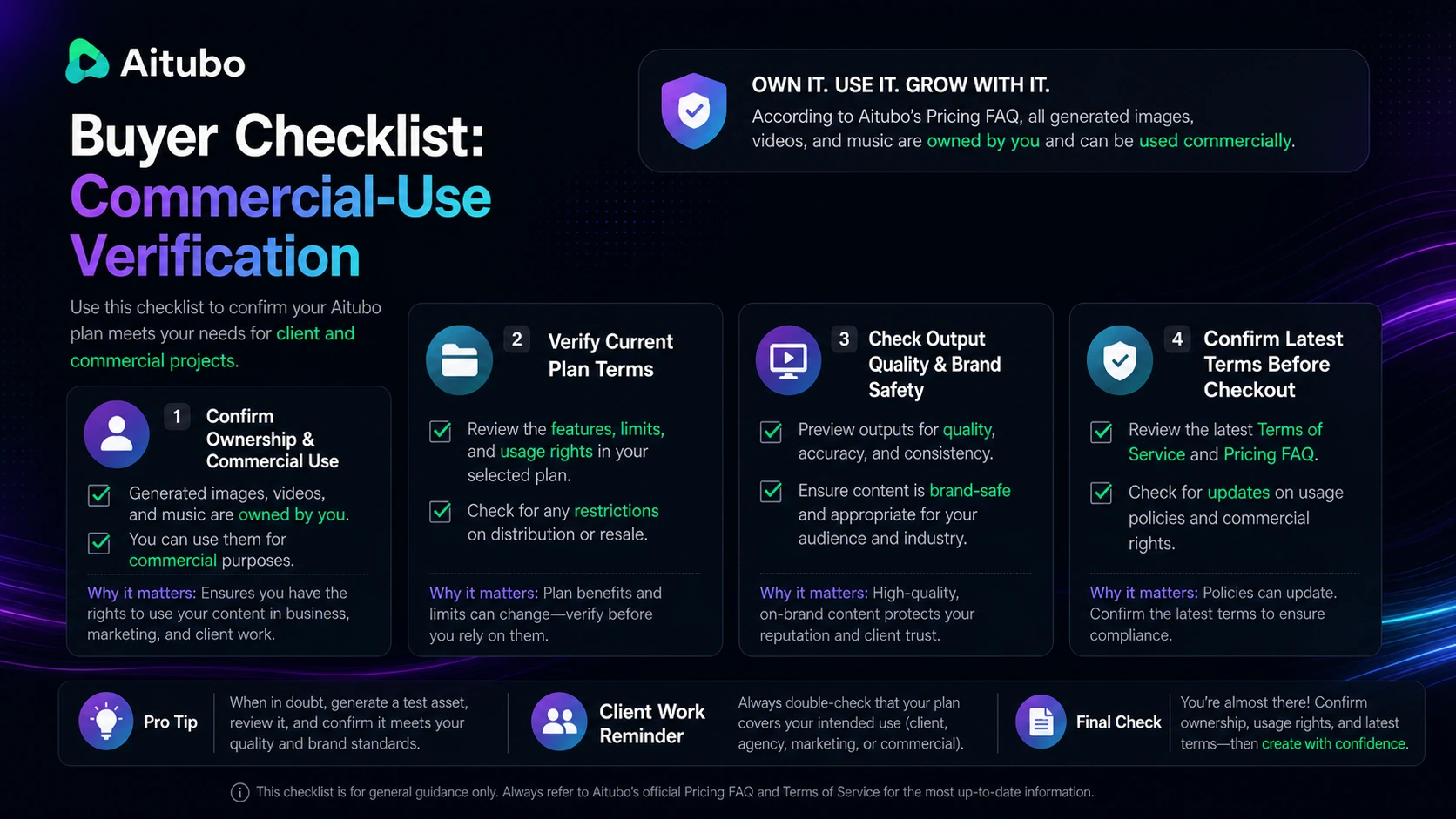
AI art users may also find Aitubo useful if they want access to multiple models and a wider set of image/video effects. Paid plans matter more here because model access, queue priority, private generation, storage, and pending-job limits can affect the daily workflow.
Technical buyers have a separate reason to look at it. Aitubo has public API documentation that describes model lists, upload flows, job creation, and job status handling. That does not automatically make it the right developer platform, but it gives builders a starting point for testing automated image or model workflows.
The best Aitubo buyer is not someone who wants every AI feature in one menu. It is someone who has a repeated creative task and can test whether Aitubo completes that task with acceptable quality, cost, and friction.
Who should avoid Aitubo?
I would be careful with Aitubo if you mainly want unlimited creative generation without thinking about tokens. Aitubo’s paid plans show monthly token allowances, model differences, queue priority, and pending-job limits. That structure is normal for generative tools, but it means the real cost is tied to behavior.
I would also slow down if you need a polished team design system. Aitubo is better framed as a generation and experimentation workspace than as a collaborative brand-management platform. If your workflow depends on team seats, approvals, asset libraries, template governance, or client review loops, Canva, Adobe Firefly inside a broader Adobe workflow, or another design platform may be easier to operationalize.
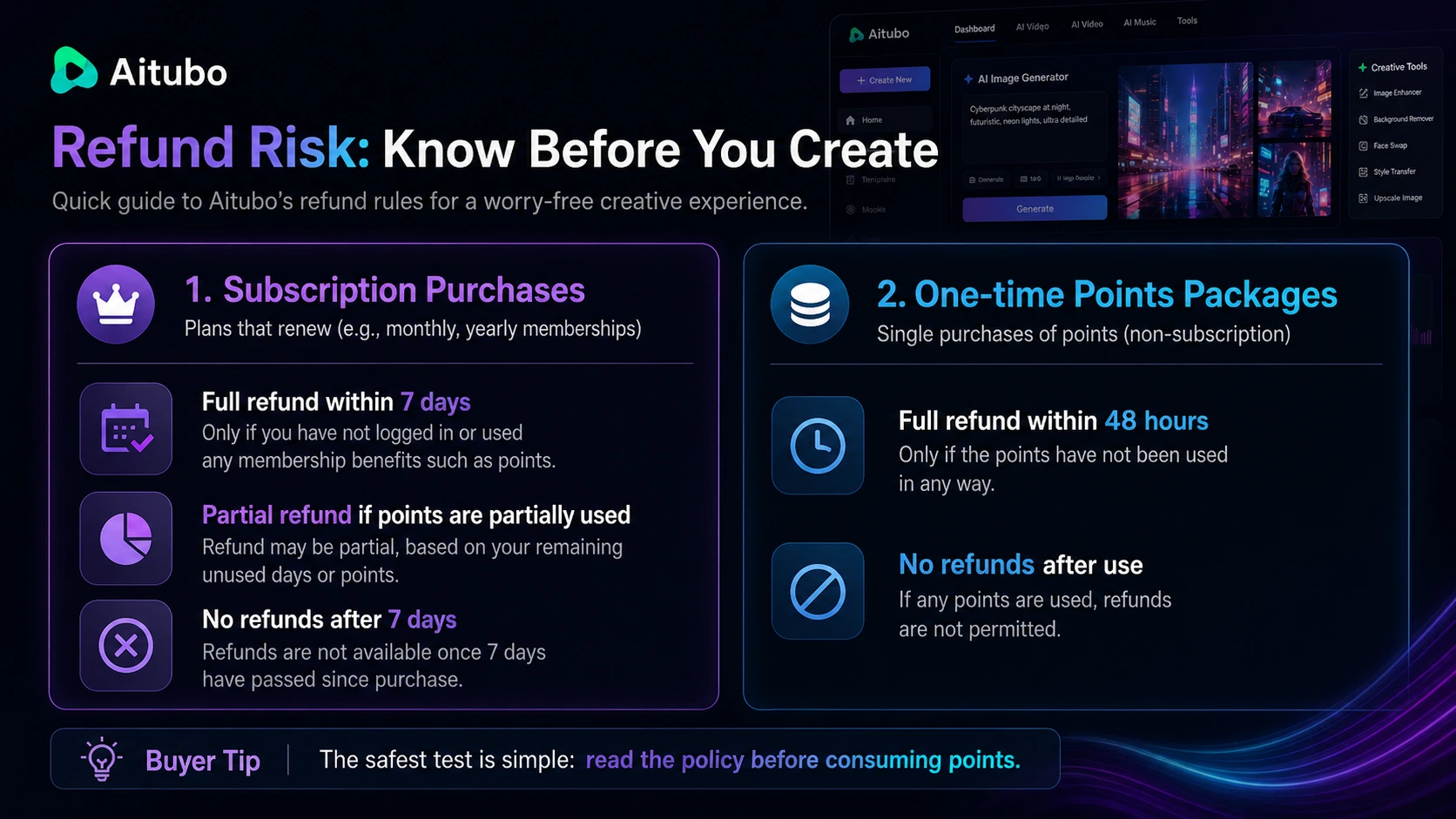
Buyers who are refund-sensitive should read the policy before using paid benefits. Aitubo’s refund policy is more conditional than a simple “try anything and cancel later” promise. Once membership benefits or points are used, refund flexibility changes.
Aitubo is also not a guarantee of final-ready output. AI images and videos can be useful, but generated media still needs checking for artifacts, brand fit, rights concerns, likeness issues, awkward motion, text errors, and platform suitability.
The easy mistake is buying the broader plan because the tool looks exciting. The safer way to judge Aitubo is to pick one real output target and test that workflow before paying for volume.
How Aitubo fits into a real workflow
Aitubo fits best as an early-to-middle creative production layer.
For a creator, the workflow might begin with a social concept: a thumbnail idea, a stylized character, a short video hook, an avatar effect, or a visual meme. Aitubo can help generate the first set of outputs, then the buyer decides which ones are usable, which ones need another generation, and which ones should be finished in a separate editing tool.
For a marketer, the workflow might start with a campaign idea. Aitubo can generate rough visual directions, test background variations, upscale assets, or create short visual effects for concept exploration. The final decision still belongs to a human reviewer who checks brand safety, messaging fit, and whether the output is usable in a real campaign.
For a developer or workflow builder, the process is different. The API path means testing authentication, model lists, upload handling, job creation, polling, response structure, token consumption, and error cases. Aitubo may be useful here, but only after the buyer proves the API behavior works with real volume and real creative requirements.
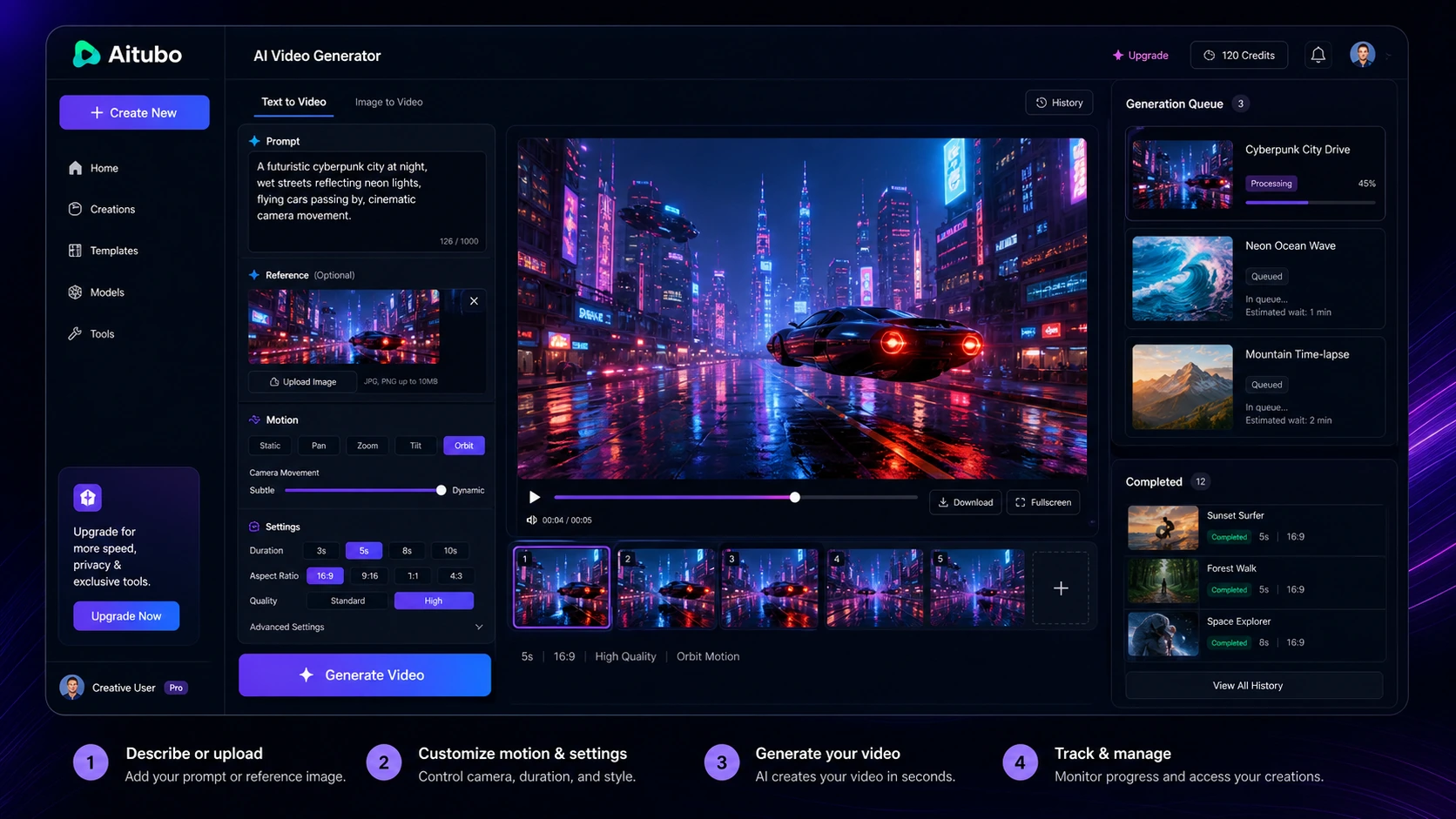
The place where Aitubo saves time is early exploration. The place where it can disappoint is final production. If you expect every output to be client-ready, you may overvalue the tool. If you use it to speed up concepting and then apply human editing judgment, the fit becomes more realistic.
Workflow check: Before paying for more tokens, run one real creative task and count how many generations it takes to reach a usable result.
Real-world buyer scenarios
Creator testing short-form visual ideas
A creator making TikTok, Reels, Shorts, or community visuals may use Aitubo for image-to-video experiments, AI dance effects, stylized portraits, background changes, and quick visual hooks. This is one of the more natural fits because the buyer values speed and variation.
The risk is token drift. A fun effect can become expensive if every result needs another retry. I would test one repeatable content format first, not every effect on the platform.
Small business marketer building campaign concepts
A small business marketer may use Aitubo to create rough visual directions before handing assets to a designer or editor. Background removal, image enhancement, upscaling, and prompt-based visual generation can be useful when the goal is ideation.
It becomes weaker if the business needs strict brand consistency. For that, a design-first platform may be safer.
AI art user exploring models and styles
Aitubo can fit AI art users who want to explore different models, prompts, image styles, and visual effects. Paid tiers may matter if the user needs premium models, private generation, priority, and permanent storage.
The buyer should still compare it with more specialist image-generation tools if final image quality matters more than all-in-one breadth.
Developer testing API-based media generation
A technical buyer might inspect Aitubo because API documentation is available. That opens the door to automated generation workflows, but it also raises the evaluation standard.
The right test is not “does the API exist?” The right test is whether the endpoints, response handling, job status flow, token cost, and output consistency can support the buyer’s actual product or client workflow.
Key features that actually matter
AI image generation
The image generator is the center of Aitubo’s creative appeal. It matters because images are often the lowest-risk way to test whether the platform understands your prompts, style preferences, and output expectations.
Buyer note: use image generation as the first test, but do not assume image success means video, music, or effects will fit equally well.
AI video generation and effects
Aitubo’s video tools and video effects are important because video can change the value equation quickly. If you create short-form content, image-to-video experiments, or social visual effects, this may be the reason to choose Aitubo over a narrower image tool.
Buyer note: video usually deserves a separate token test. Check pending-job limits, generation time, output quality, and how many retries you need before calling a paid plan good value.
AI music and multi-format creative tools
AI music makes Aitubo broader than many image-only generators. It may help creators who want a single place to test visuals and audio ideas, especially for social content or creative drafts.
Buyer note: broad toolkits are useful only when you actually use the extra formats. If you only need images, the music and effects features may not justify a higher tier.
Editing, upscaling, background removal, and face swap
These utility features can make Aitubo feel more practical. Prompt generation is only one part of creative work. Removing backgrounds, enhancing images, upscaling outputs, and testing face or avatar effects can reduce the number of tools in a lightweight workflow.
Buyer note: for client or brand work, treat these as draft-support tools. Always review output quality, likeness use, and brand safety before publishing.
API documentation
Aitubo’s API documentation is meaningful for technical buyers because it describes model listing, upload image, job creation, and job status workflows. That makes Aitubo more than a casual web app for some buyers.
Buyer note: API access should be tested with realistic prompts, realistic volume, and a cost model. Do not build a workflow around it until job success, token use, and error handling are clear.
Pricing and plan value
Aitubo pricing is a token decision before it is a subscription decision.
The public pricing page shows a Free plan and paid tiers such as Basic, Standard, and Pro. At the time of review, the pricing page displays Basic at $15 or $13 per month when billed yearly, Standard at $34 or $24 per month when billed yearly, and Pro at $78 or $45 per month when billed yearly. The paid tiers increase monthly tokens, priority, pending jobs, private generation, storage, and model access.
That means the lowest visible price is not the full story.
If you only create a few images each month, the free path may be enough to evaluate the product. If you generate videos, use effects, explore premium models, run many retries, or need private generation and permanent storage, the paid tier decision becomes more serious.
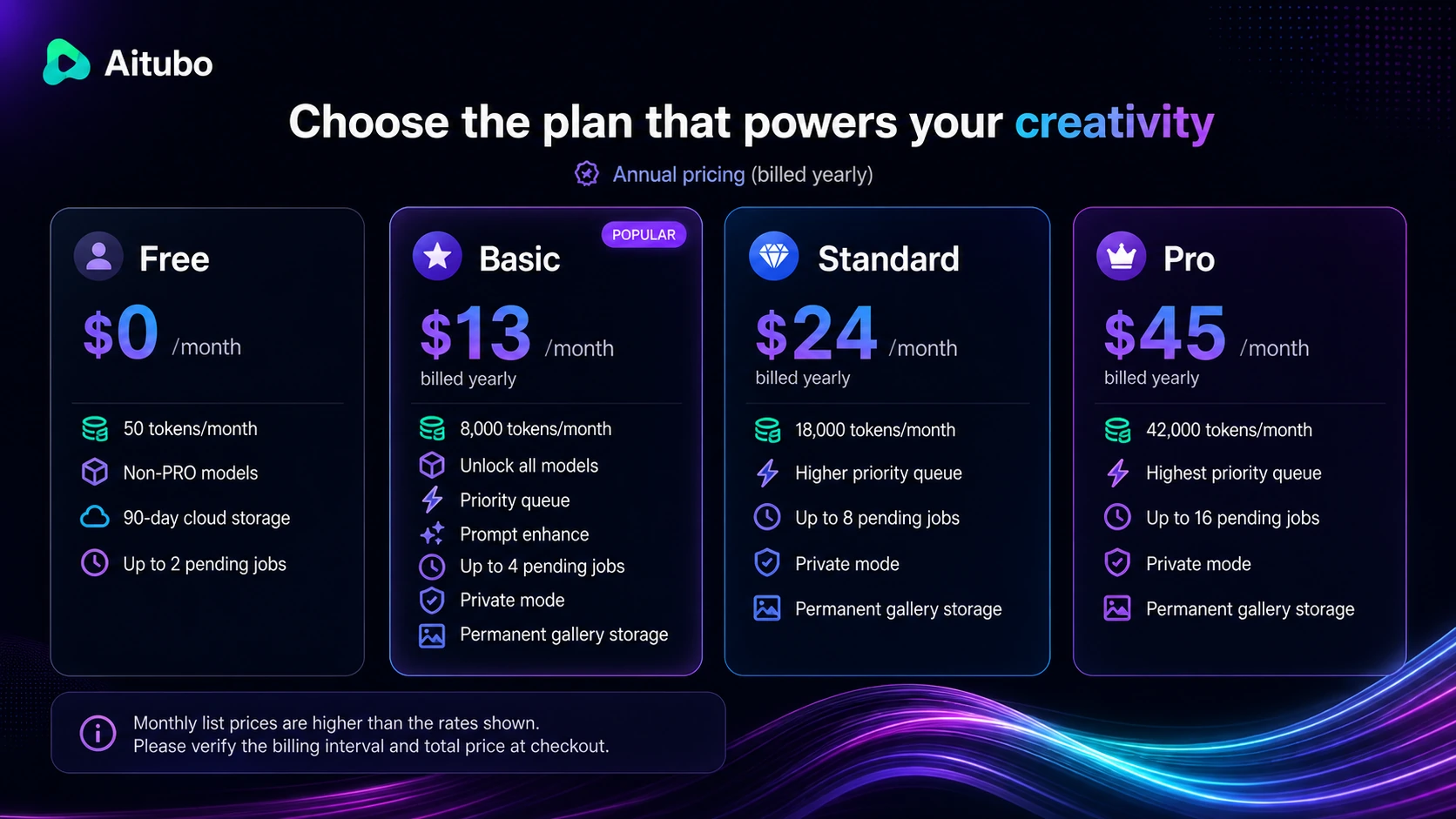
The Free plan is useful for testing output quality, but it should not be treated as proof that a paid workflow will be affordable. Newly registered users can receive initial tokens, and daily check-in tokens may help with experimentation, but serious creative work still depends on how fast tokens are consumed.
The Basic tier may fit light creative users who mainly generate images and only occasionally test video or effects. Standard and Pro become more relevant if premium models, higher queue priority, more pending jobs, and larger token budgets matter.
Annual billing can make the monthly number look better, but I would not start there unless Aitubo has already passed a real workflow test. The cheapest annual-equivalent price is not automatically the best deal if you end up needing a different tool after two weeks.
Pricing check: If Aitubo looks useful, compare the current billing interval, token allowance, and refund rules before moving from free testing to a paid tier.
Free plan, trial, coupon, and checkout notes
Aitubo has a free path, and that is where most cautious buyers should begin. The free plan and token incentives are useful because they let you test the real question: can Aitubo create the kind of image, video, music, or effect you actually need?
A free plan is not the same as a free trial of heavy usage. It is a sampling lane. Use it carefully.
I would test one output type first. For example, create one social visual, one image-to-video concept, one background-removal workflow, or one AI music idea. Then ask three practical questions: did the result look usable, how many retries did it take, and would I pay for this repeatedly?
The coupon path should come after that. A current offer can make a good purchase cheaper, but it cannot make token usage predictable or output quality reliable. If the product fits, use the Aitubo coupon page to check live offers. If the workflow does not fit, a discount is just a cheaper mistake.
Refund rules deserve attention. Aitubo’s refund policy allows a full subscription refund within 7 days only when the user has not logged in or used membership benefits such as points. If points have been partially used, refund calculation may depend on remaining unused days or points. No refunds are permitted after 7 days. One-time point packages have stricter timing and usage conditions.
The safer checkout order is simple: test lightly, read refund terms, choose the smallest plan that matches a proven workflow, then consider annual billing only after repeated use is clear.
What I would check before buying Aitubo
If I were buying Aitubo for a real creative workflow, I would check the following before paying.
- Whether the pricing page is showing monthly billing or an annual-equivalent monthly price.
- How many tokens one real image, video, effect, or music workflow consumes.
- Whether the models I need are available on the plan I am considering.
- Whether private generation, permanent storage, and queue priority matter for my work.
- Whether the output quality is good enough without too many retries.
- Whether refund flexibility matters before I use points or membership benefits.
- Whether I need API workflows or just browser-based creative tools.
- Whether a design-first tool would be safer for brand, team, or client work.
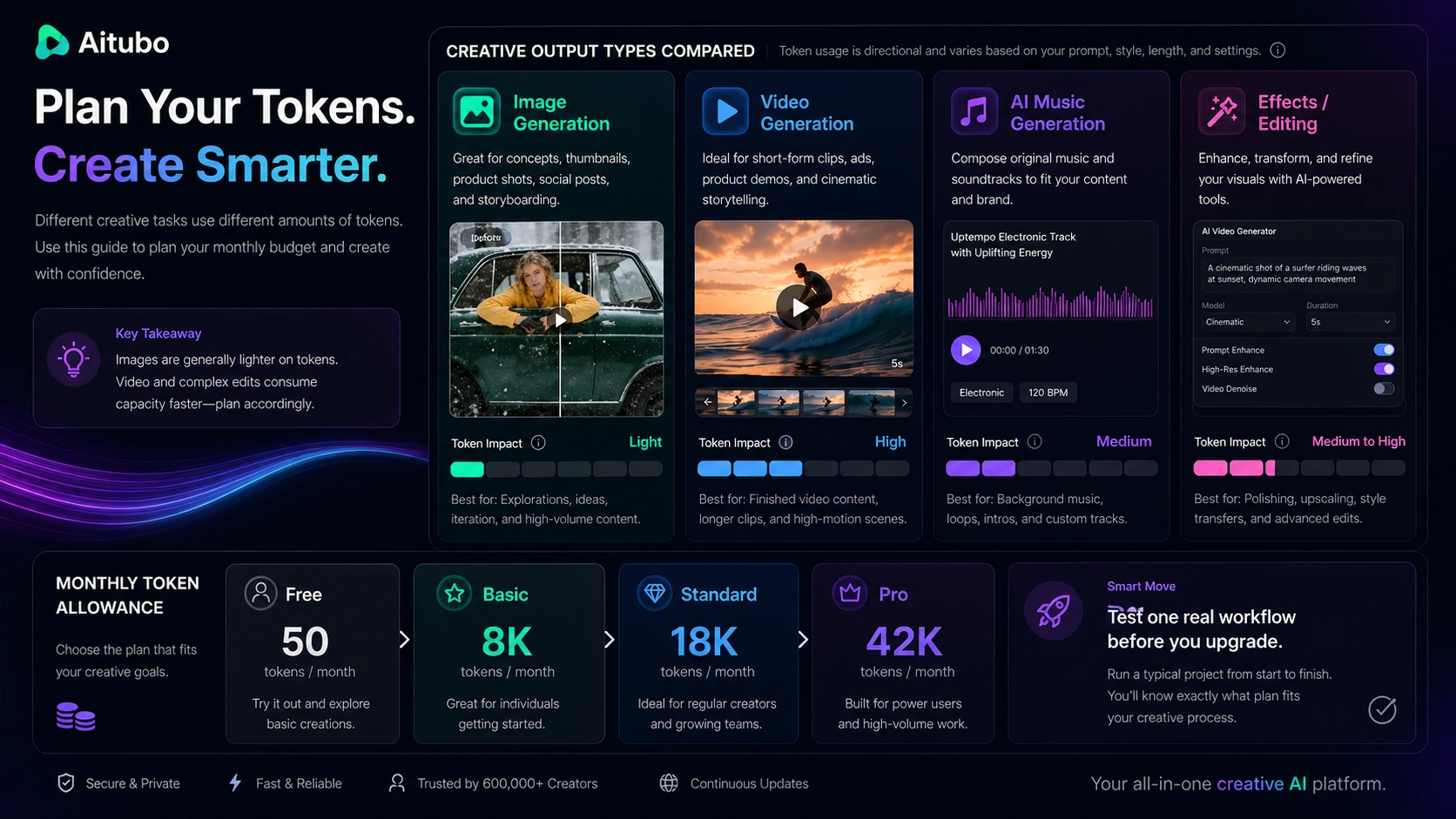
The first thing I would verify is token burn. It is easy to look at thousands of monthly tokens and assume the plan is generous. The more useful test is how many usable outputs you get from those tokens in your own workflow.
A simple test before paying
Before paying, I would run a small Aitubo test like this:
- Pick one real output you would actually use, such as a social video concept, product-style image, avatar effect, short music idea, or image upgrade.
- Use the free path first and avoid random feature browsing.
- Track how many attempts it takes to get one usable result.
- Check whether the final asset still needs heavy editing in another tool.
- Compare the token use against Basic, Standard, and Pro allowances.
- Read refund terms before consuming paid benefits.
- Compare one direct alternative if the result is close but not convincing.
This kind of test keeps the buying decision grounded. Aitubo is exciting when you browse the menu. It becomes much easier to judge when you ask it to solve one repeatable creative problem.
Pros explained
Aitubo’s biggest strength is creative breadth. It gives buyers many routes in one place: images, videos, music, editing tools, face swap, upscaling, avatars, and effects. That matters for creators who do not want a separate tool for every experiment.
The second strength is the free entry path. Free tokens are not enough to prove long-term value, but they are enough to test whether the interface and output direction feel useful.
The paid plans also have a clear upgrade logic. More tokens, model access, queue priority, private generation, storage, and pending-job capacity can matter if Aitubo becomes part of a repeated workflow.

The API documentation is another genuine plus for technical buyers. It does not guarantee that Aitubo will fit every product workflow, but it gives developers a concrete starting point for testing model lists, uploads, job creation, and status handling.
Cons explained
The main downside is token unpredictability. Token-based pricing is not bad by itself. The risk is that buyers underestimate how many attempts creative work takes. Video, effects, premium models, and repeated revisions can change the economics quickly.
Refund flexibility is the second caution. Aitubo has a published refund policy, which is better than vague support-only language. But the policy also makes usage important. If you use membership benefits or points, the refund path becomes less simple.
Team workflow fit is another limitation. Aitubo may work well for solo creators and small creative testing, but it is not the cleanest fit for formal approval workflows, shared brand systems, or multi-seat marketing operations.
Finally, output quality still needs human review. This is not unique to Aitubo. It is true for most generative visual tools. Buyers should check anatomy, text, motion, likeness, rights, artifacts, and brand fit before publishing or selling generated media.
Green flags and red flags
Green flags:
- You need multiple creative formats in one place.
- You can start with free tokens and test a real workflow.
- You understand token limits before choosing a paid tier.
- You value image, video, music, effects, and editing tools together.
- You are willing to review outputs before using them commercially.
Red flags:
- You want unlimited generation without tracking credits or retries.
- You need a team design platform with approvals and shared brand controls.
- You plan to buy annually before testing output quality.
- You expect AI-generated visuals to be final without review.
- You need refund flexibility after using paid points or membership benefits.
The green flags are about workflow match. The red flags are about expectation mismatch.
Aitubo vs alternatives
Aitubo’s alternatives depend on the buyer’s real job. A broad creative platform should not be compared only by feature count.
ArtSpace.ai vs Aitubo
ArtSpace.ai is the more direct comparison if your main goal is AI art or design-asset creation. It may be easier to evaluate if you do not care about Aitubo’s video, music, effects, or API breadth.
Aitubo makes more sense if you want one workspace that covers more formats. The tradeoff is that breadth brings more token and workflow questions.
1min.AI vs Aitubo
1min.AI is a broader all-in-one AI workspace, while Aitubo is more visual and creative-generation focused. If you want chat, writing, image tools, and general AI utility in one place, compare the 1min.AI review before choosing.
Aitubo may still be the better fit if your work is centered on image, video, music, effects, and visual experiments.
Canva vs Aitubo
Canva is not a one-to-one replacement for Aitubo, but it is a serious adjacent route for marketers and small businesses. Canva is usually safer when the buyer needs templates, brand kits, team collaboration, presentations, social graphics, and business-ready design workflows.
Aitubo is more interesting when the buyer wants AI-generated creative variations and effects rather than polished layout production.
Adobe Firefly vs Aitubo
Adobe Firefly is a stronger comparison for buyers already inside the Adobe ecosystem or buyers who prioritize commercially safer creative workflows, Photoshop/Premiere connection, and professional editing context.
Aitubo may feel more accessible for quick browser-based experimentation, but Adobe may be safer for serious brand production.
1of10 vs Aitubo
1of10 is an adjacent route, not a direct replacement. Aitubo helps create visual assets. 1of10 helps YouTube creators study outlier content ideas, thumbnails, titles, and topics. If your real problem is deciding what to make before creating visuals, the 1of10 review may be useful. If your problem is generating the visual itself, Aitubo is the closer fit.
Trust, refund, and buyer-risk notes
My confidence is strongest around Aitubo’s product role, feature breadth, public pricing structure, and refund rules because those are visible through official pages. I am more cautious around long-term value, support quality, cancellation friction, and output consistency because those depend on real usage and can vary heavily by buyer.
The refund policy is the most important buyer-risk note. A 7-day refund window can sound reassuring, but the practical condition matters: using membership benefits or points can limit the refund outcome. If you are unsure, do not spend paid points casually on the first day.
Privacy also deserves a quick check. Aitubo’s privacy policy discusses cross-border transfers of personal information and warns users not to input highly sensitive personal data into AI tools. For casual creative work, that may be acceptable. For client, confidential, regulated, or sensitive media, it deserves more caution.
Terms of use also matter for generated content and uploads. Aitubo places responsibility on users for content they create or share, including rights, misleading content, privacy, likeness, and inappropriate material. That is common in this category, but buyers using face swap, avatars, brand-like visuals, or client assets should read the current terms before publishing.
The safest buying mindset is not fear. It is discipline. Test one workflow, verify token math, check refund timing, and only then decide whether Aitubo deserves a paid plan.
Final verdict
I would consider Aitubo if you want a broad AI creative workspace for image generation, video generation, music ideas, effects, face swap, upscaling, avatars, and fast visual experiments. It is especially worth a look if you can use the free path to test one real output before paying.
I would skip Aitubo if you need predictable unlimited usage, brand-governed team workflows, strict design collaboration, or final production assets that require minimal human review. It is also not the safest purchase if you are refund-sensitive and likely to consume paid points before you understand the workflow.
I would compare it with ArtSpace.ai if AI art is the main job, with 1min.AI if you want a broader AI utility workspace, with Canva if design operations matter more than generation, and with Adobe Firefly if commercial creative workflow and professional editing context are more important.
The safest next step is to treat Aitubo as a narrow creative test first. Pick one real asset type, use the free path, watch token usage, review output quality, and only then decide whether a paid plan makes sense.
