
Quick verdict
Claid AI is worth considering if product images are already slowing down your ecommerce, marketplace, fashion, or marketing workflow. It is not the first tool I would choose if you only need one quick background removal, one social post, or a casual AI image experiment.
The real question is not whether Claid AI can make images look better. It usually can, at least for the kinds of product-photo tasks it is built around: enhancement, background cleanup, product scenes, AI fashion, image-to-video, resizing, outpainting, and API-based automation. The sharper buyer question is whether those improvements happen often enough in your workflow to justify a credit-based plan.
That credit model is the part I would slow down for. A simple background removal and a short product video do not carry the same cost profile. A seller cleaning ten product images has a different buying decision than a marketplace processing thousands of seller uploads. A fashion brand testing on-model visuals has a different risk profile again, because product accuracy matters more than a pretty generated scene.
For my money, Claid AI makes the most sense when you can test it with real product photos before paying, calculate credit usage from your actual workflow, and decide whether web editing, API automation, or a Business path fits the volume. I would be more careful if you are buying because the tool looks impressive in a demo but you have not checked credit consumption, refund timing, or whether the generated images match your brand standards.
Next step: If Claid AI still fits your product-photo workflow, test the current buyer route before choosing a plan.
Review snapshot
| Review point | Practical take |
|---|---|
| Best for | Ecommerce sellers, marketplaces, fashion teams, product marketers, and catalog workflows that need repeatable image improvement |
| Not ideal for | One-off image edits, unlimited creative play, or buyers who dislike credit math |
| Main use case | Product-photo cleanup, AI backgrounds, upscaling, product scenes, AI fashion, image-to-video, and image automation |
| Pricing model | Credit-based web and API paths, with a free trial for testing |
| Main strength | Strong product-photo focus instead of a generic image-generator angle |
| Main concern | Credit consumption can vary sharply by operation, especially with video and generation-heavy workflows |
| Best direct alternatives to compare | Photoroom, Pebblely, Flair AI, Pixelcut, and similar product-photo tools |
| Adjacent routes | Aitubo for broader creative generation; 1of10 for thumbnail and creative testing workflows |
| Best next step | Run one real product-image workflow before choosing Essential, Pro, Business, or API pricing |

What is Claid AI?
Claid AI is best understood as an AI product-photography and image-automation suite for buyers who need better product visuals at repeatable volume.
It is not just a general AI art generator. The more practical angle is ecommerce production: improving image quality, removing or changing backgrounds, generating product scenes, creating on-model or fashion-style visuals, expanding images, cleaning objects, turning product photos into short videos, and using API workflows when manual editing becomes too slow.
That matters because product imagery has a different standard from casual creative generation. A product image has to look attractive, but it also has to stay faithful to the item being sold. If a background looks beautiful but the product texture feels wrong, the image can hurt trust. If a generated clothing model makes the garment fit look inaccurate, the visual may create more risk than value. If a short video makes packaging text wobble or product edges feel artificial, it may be less useful than a static image.
Our review approach: we compare public product pages, pricing details, help documentation, deal terms, buyer workflow fit, and nearby alternatives. We do not treat a coupon, a low monthly price, or a polished demo as proof that the product fits the buyer.
My confidence is strongest around Claid AI’s product-photo role and API positioning. I am more cautious around long-term value because credit usage, checkout pricing, annual billing, and refund timing can affect the real cost faster than a feature list suggests.
Who should use Claid AI?
Claid AI makes the most sense for ecommerce sellers who already have product photos but need them to look cleaner, sharper, and more consistent before publishing. If your current product images have weak lighting, messy backgrounds, inconsistent sizing, or low resolution, Claid AI is solving a real problem.
It also fits catalog teams that process many images. This is where the API path becomes more interesting. If a marketplace or SaaS workflow needs to enhance seller uploads, remove backgrounds, resize images, or standardize product presentation repeatedly, manual editing can become too slow. Claid AI’s API route is more believable for that kind of buyer than a simple drag-and-drop editor.
Fashion and apparel teams are another natural fit, but with a warning. AI fashion and model-style visuals can be useful for testing presentation ideas, lifestyle contexts, and campaign angles. The buyer still needs human review. Apparel images are sensitive to fit, fabric texture, color accuracy, and customer expectation. A generated image that looks nice but misrepresents the garment is not a good business outcome.
Marketing teams may also find Claid AI useful when they need product visuals for ads, landing pages, seasonal campaigns, or social media variations. The image-to-video tool is especially interesting here, but I would treat it as a test-first feature because video operations can consume credits quickly.
Developers and technical teams should consider Claid AI if image processing needs to become part of a pipeline. The API documentation and API pricing path make the tool more serious for automation than many lightweight photo editors. The condition is that you need to test output quality, rate limits, credit usage, and implementation effort before building around it.
Who should avoid Claid AI?
I would avoid Claid AI if you only need one occasional edit. A dedicated background remover or a lighter design app may be simpler and cheaper if your workflow is not repeated.
I would also be careful if you dislike credit systems. Claid AI’s flexibility is useful, but it also means the buyer has to think. Background removal, AI photoshoots, upscaling, AI fashion, outpainting, and image-to-video do not all behave like the same unit of work. If you want a tool where every action feels unlimited and predictable, Claid AI may frustrate you.
Buyers who need strict brand compliance should slow down too. AI product visuals can save time, but the final image still needs approval. This is especially true for fashion, food, cosmetics, packaging, jewelry, and anything where texture, color, shape, or label accuracy directly affects customer trust.
I would not treat Claid AI as a replacement for professional retouching in high-stakes catalog work. It can support a workflow. It can speed up production. It can create useful variations. But the final image still needs a human who understands the product, the brand, the marketplace, and the customer promise.
Finally, buyers who may need several days to decide after paying should read the refund terms before checkout. The change-of-mind refund path is short, so the safer move is to test before payment rather than buy first and evaluate slowly afterward.
How Claid AI fits into a real workflow
A realistic Claid AI workflow starts before you upload anything.
First, choose a product image that represents your normal input quality. Not your best photo. Not your worst photo. Use something that looks like the images you actually need to process. Then decide what you are testing: background removal, enhancement, AI Photoshoot, AI Fashion, image-to-video, outpainting, or API automation.
Second, run that exact workflow. If you sell physical products, check whether the output keeps edges, labels, texture, shadows, and scale believable. If you sell clothing, check whether fabric and fit still look honest. If you are generating backgrounds, check whether the new scene supports the product instead of distracting from it.
Third, track credit consumption. This is the step many buyers skip. A tool can look affordable until you realize your preferred operation burns credits faster than expected. A workflow based mostly on background cleanup will price differently from one based on image-to-video or repeated high-quality AI photoshoots.
Fourth, decide whether the result is production-ready. That does not mean “impressive.” It means usable in your store, ad, marketplace listing, product page, or internal pipeline without heavy manual correction.
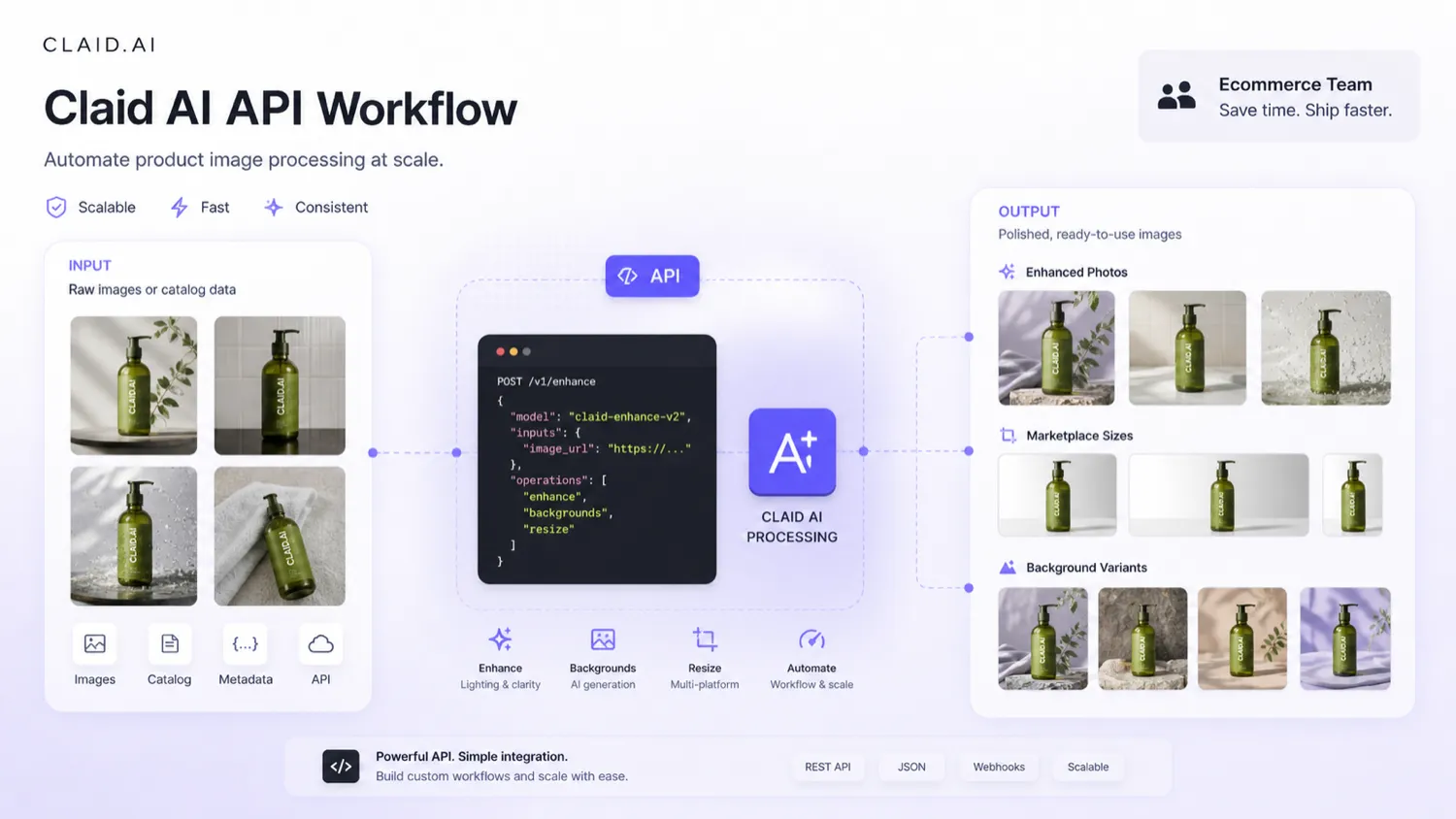
The best workflow is boring in a good way: test real photos, compare before and after, count credits, review brand fit, then decide. The weaker workflow is emotional: see a beautiful generated image, buy a plan, then discover that your normal catalog photos require more credits or cleanup than expected.
Real-world buyer scenarios
A Shopify seller cleaning a small product catalog
A small store owner with 40 to 80 product photos may find Claid AI useful if the images are inconsistent. Background removal, upscaling, and cleaner product scenes can make the catalog feel more professional.
The risk is overbuying. If the seller only needs a one-time cleanup, a subscription may not make sense for long. I would start with the free trial, test a few representative products, then choose the smallest paid path only if the results will be used across the store.
A fashion brand testing AI model visuals
A fashion buyer may be drawn to AI Fashion because on-model visuals are expensive to create manually. Claid AI can help test presentation ideas faster, especially for early campaign planning or product-page experiments.
The caution is accuracy. Clothing visuals are not only decorative. Buyers use them to judge fit, drape, size, texture, and style. Any generated model image needs close human review before it becomes a final sales asset.
A marketplace standardizing seller uploads
A marketplace or product database has a different problem: volume. Many sellers upload images with different backgrounds, lighting, sizes, and quality levels. Claid AI’s API path is more relevant here because the goal is not one perfect hero image. The goal is repeated standardization.
Before committing, the technical team should test sample images, operation costs, rate limits, storage flow, output quality, and error handling. The API can be valuable, but only if the economics and implementation work make sense.
A marketing team creating product ad variations
A marketing team may use Claid AI to create product scenes and short motion assets for social or paid ads. This is where image-to-video looks appealing.
I would still test carefully. Motion can help ads, but it can also expose artifacts. If the product has small text, thin edges, reflective materials, or packaging details, the team should check whether video improves performance or simply creates more content to review.
Key features that actually matter
Product image enhancement and upscaling
The enhancement layer is one of Claid AI’s most practical features because many ecommerce problems start with mediocre source images. Sharper detail, better color, and higher resolution can make a catalog look more trustworthy.
Buyer note: do not judge enhancement only on the prettiest sample. Test the kind of imperfect image you actually receive or shoot. If Claid AI improves ordinary inputs without making them look artificial, the feature has real value.
Background removal and generated backgrounds
Background cleanup is a core product-photo job. It can make product listings cleaner, help create consistent catalog grids, and prepare assets for marketplace requirements.
Generated backgrounds are more creative. They can help with seasonal campaigns, lifestyle images, social ads, and product-context testing. The risk is that a background may look attractive while making the product feel less accurate or less credible.
Buyer note: use generated backgrounds when they support the product. Do not let the scene become more important than the item being sold.
AI Photoshoot and product scenes
AI Photoshoot is useful when buyers want product visuals that feel more polished than a simple white-background cutout. This can be valuable for small brands without a studio budget.
The limitation is control. A generated product scene needs to respect product proportions, labels, shadows, and brand tone. If you sell a premium product, visual inconsistency can be more damaging than a plain image.
Buyer note: test several product categories, not just one easy image. Harder products reveal the tool’s real limits.
AI Fashion workflows
AI Fashion can help apparel teams explore on-model visuals, styling directions, and product presentation without starting every idea with a full photoshoot.
This is useful, but it is not a no-review workflow. Fashion images are high-risk because customers care about how the garment actually looks. Small distortions in fit, fabric, sleeves, seams, or color can matter.
Buyer note: treat AI fashion as a creative and production accelerator, not an automatic final catalog source.
Image-to-video
Image-to-video can turn static product photos into short clips for ads, social, and campaign testing. It is one of the more interesting features for marketers because motion can make a product asset more reusable.
It is also one of the places where credit planning matters most. A short video can cost much more than a simple edit, and the output still needs review for product accuracy.
Buyer note: use video where motion adds business value. Do not make it the default workflow until you know the cost and quality are reliable.
API automation
The API is what separates Claid AI from many lightweight editors. For marketplaces, SaaS products, catalog systems, and high-volume ecommerce workflows, API access can turn image enhancement into part of the infrastructure.
That also raises the standard. A technical buyer should not evaluate Claid AI like a casual user. They should test documentation, authentication, rate limits, operation cost, output consistency, storage needs, and support expectations.
Buyer note: if your use case is API-first, do not buy a web plan casually. Compare the dedicated API route and test a representative batch first.
Pricing and plan value
Claid AI is a tool I would evaluate by credits and workflow cost, not just by the monthly headline price.
The current public model includes a free trial with credits for testing, paid web plans with monthly credit allocations, a custom Business path, and a separate API pricing route. The important detail is that credits can be spent across different operations. That gives buyers flexibility, but it also means the real cost depends on what they do.
A seller who mostly removes backgrounds will experience the plan differently from a marketer generating AI videos. A fashion team using AI model visuals will read the plan differently from a marketplace running automated enhancement. A developer using the API should calculate cost from operations, volume, and output requirements rather than from the web-plan headline alone.
At the time of this review, the paid entry path is tracked around the Essential level, while Pro is the more realistic comparison for heavier product-photo work. The exact checkout price, billing interval, annual savings, included credits, and API plan details should be verified live before paying.
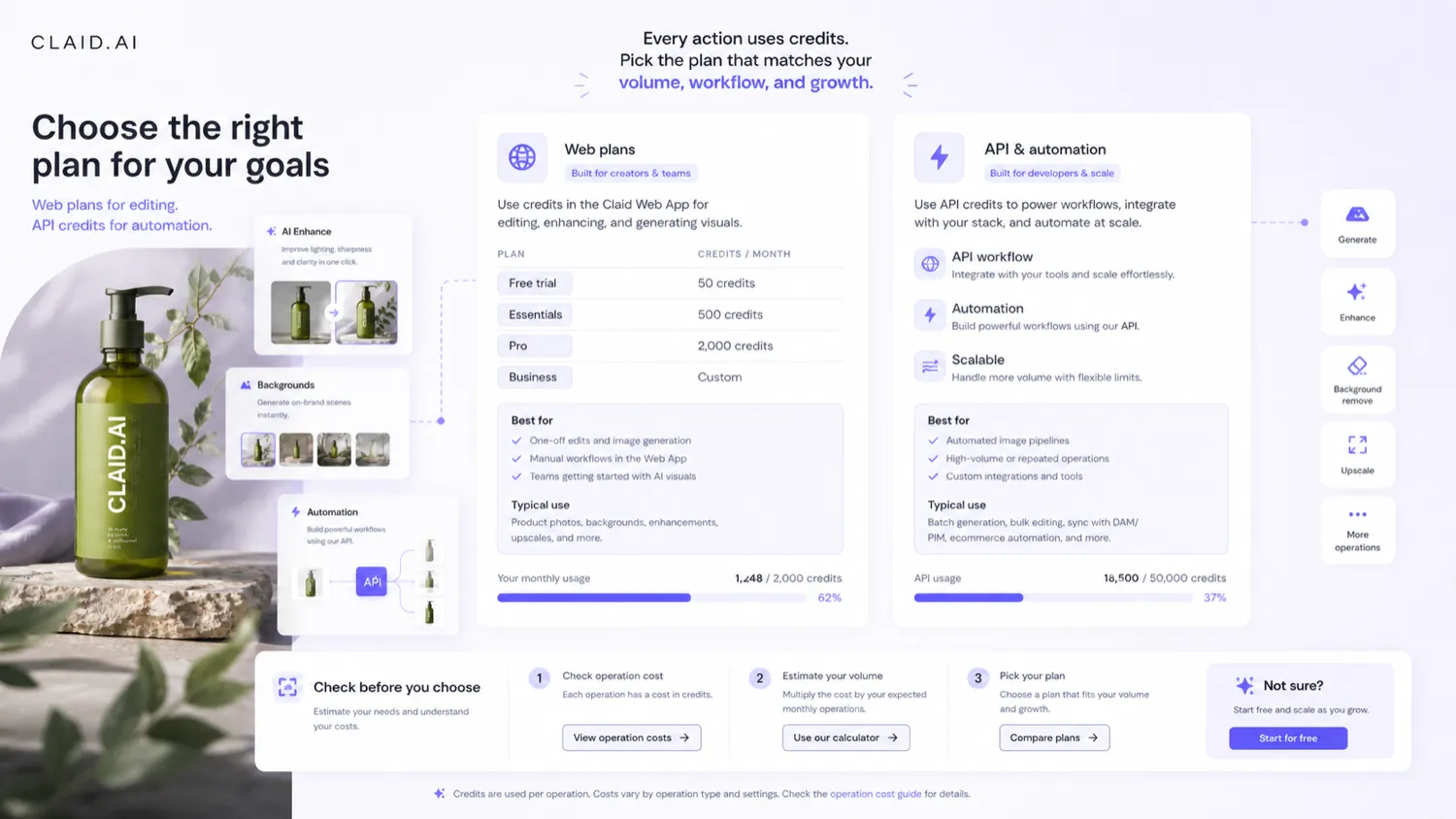
The free trial is the right place to begin. Use it to test output quality and credit behavior. A paid web plan makes sense if you have a repeated image workflow and can predict how many operations you need each month. API pricing makes sense when the work needs automation, not just occasional manual editing. Business pricing becomes more relevant when the buyer needs custom setup, dedicated support, stronger scale assumptions, or deeper workflow help.
I would not move to annual billing until the workflow is proven. The cheapest annual-looking route is not automatically the safest route if you have not tested whether credits, output quality, and refund timing fit your real production process.
Pricing check: Before choosing a plan, compare the live credit allowance against one real product-photo workflow.
Free plan, trial, coupon, and checkout notes
Claid AI’s free trial should be treated as a workflow test, not a long-term free plan.
That is not a criticism. For this category, a trial is exactly what a careful buyer needs. You want to know whether your real product photos improve, whether the generated scenes fit your brand, whether the exports are usable, and how quickly credits disappear.
The coupon path should come after that fit check. A discount can improve a good purchase, but it should not be the reason you buy a credit-based image tool. If Claid AI does not fit your workflow, a cheaper plan is still the wrong plan.
If you do decide the product fits, then it is reasonable to check the Claid AI coupon page for active offers or the Claid AI store guide for the current buyer route. Just keep the order clear: workflow first, credits second, coupon third.
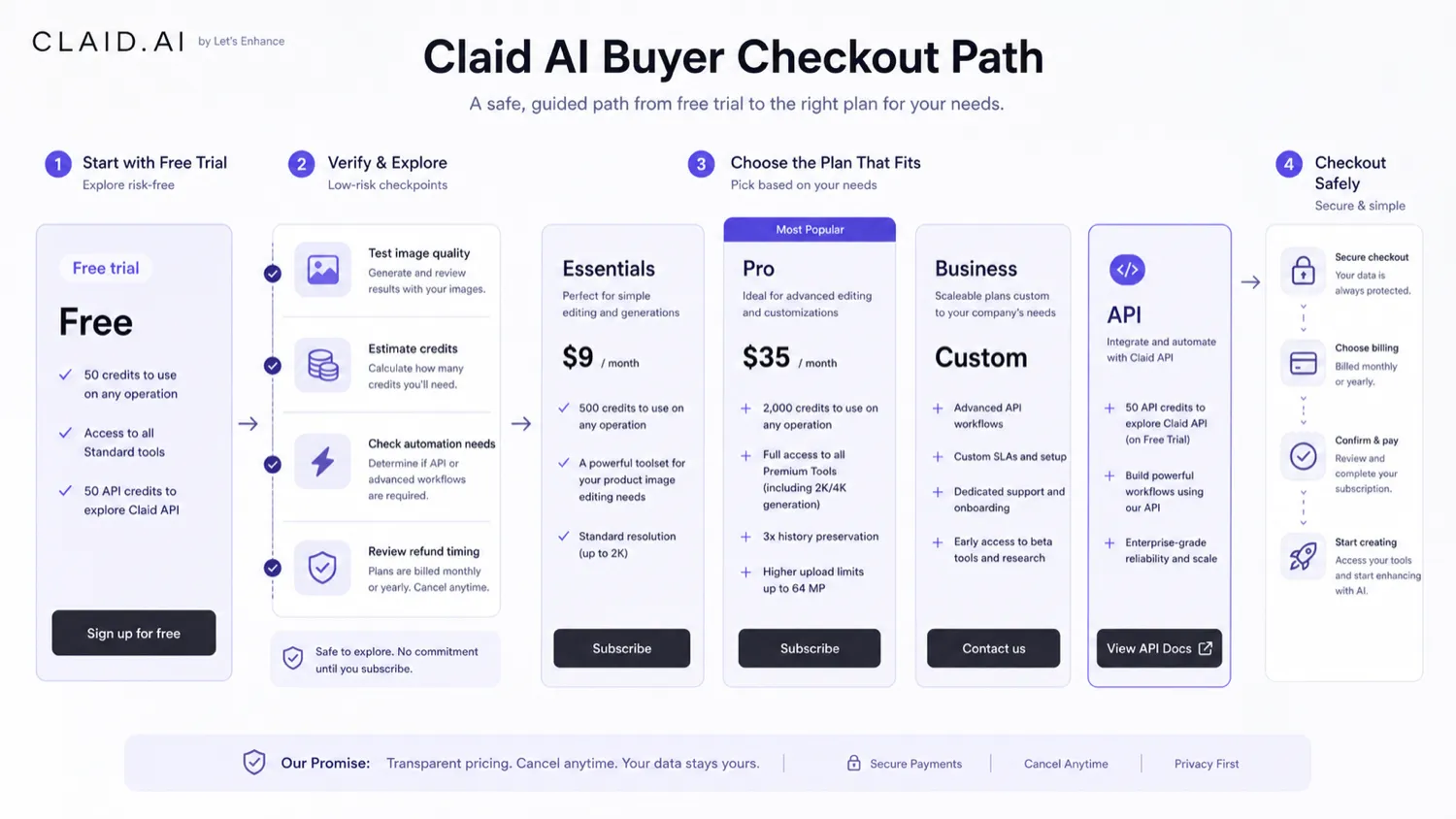
Refund timing deserves attention too. Claid AI’s change-of-mind refund path is short, and older or closed billing periods are treated differently. That makes pre-purchase testing more important. I would not buy a larger plan, annual route, or API credit path before I had already tested the workflow with real images.
Offer check: Use the coupon route only after Claid AI has already passed your image-quality and credit-usage test.
What I would check before buying Claid AI
If I were buying Claid AI for a real workflow, I would check seven things before paying.
First, I would test one normal product image, not a perfect sample. The result should show whether Claid AI improves everyday input quality.
Second, I would track credits for each operation. Background removal, enhancement, AI Photoshoot, AI Fashion, outpainting, and image-to-video are not the same buying decision.
Third, I would compare web-plan use against API use. If you only edit manually, the web app may be enough. If you process images repeatedly or inside a product, API pricing and documentation matter more.
Fourth, I would check export resolution and file limits. Product images often need specific marketplace dimensions, print quality, or ad formats.
Fifth, I would review refund timing before paying. A short refund window means the careful work should happen before checkout.
Sixth, I would test brand fit. Does the image look like your brand, or does it look like a generic AI product scene?
Seventh, I would compare alternatives if your use case is narrow. If you only need background removal, you may not need a larger product-photo suite.
A simple test before paying
Before paying, I would run a small test like this:
- Pick five real product images from your normal workflow.
- Run one simple cleanup task, such as background removal or enhancement.
- Run one creative task, such as AI background generation or AI Photoshoot.
- Test image-to-video only if motion content is genuinely part of your marketing plan.
- Track credits used for each operation.
- Export the images and check whether they meet your marketplace, store, or ad requirements.
- Compare the final outputs against the time and cost of doing the same work manually or with a lighter tool.
The goal is not to prove that Claid AI can create one impressive result. The goal is to decide whether it can support a repeatable production process without surprising you on credits, quality, or review time.
Pros explained
Strong product-photo focus
Claid AI’s biggest advantage is focus. It is not trying to be a general AI workspace for every creative task. It is built around product images, ecommerce visuals, backgrounds, enhancement, fashion workflows, video, and API automation.
That focus matters when the buyer’s real problem is product presentation. A product-photo tool should care about cleanup, resolution, background, consistency, and production speed. Claid AI is better judged through that lens than through a generic AI-image lens.
Useful free trial for realistic testing
The free trial gives cautious buyers a way to test before paying. That is especially important because image tools are difficult to judge from examples alone. Your products, lighting, angles, backgrounds, labels, and materials will reveal the real fit.
The free trial is not enough to prove long-term economics, but it is enough to avoid the worst mistake: paying before seeing how your actual workflow behaves.
API path for serious image workflows
The API route is a meaningful strength. Many AI image tools are fun for manual use but weak when a team needs automation. Claid AI has a clearer story for developers, marketplaces, and SaaS teams that need image operations inside a larger system.
This does not make the API automatically cheap or easy. It simply means Claid AI is worth a closer look when image processing has to scale beyond manual uploads.
Flexible use of credits across operations
A credit model can be annoying, but it can also be useful. If the same monthly capacity can support different operations, buyers can adjust their workflow instead of being locked into one feature.
The tradeoff is predictability. Flexibility only helps if you understand how quickly each operation consumes credits.
Cons explained
Credit usage can be harder than the monthly price suggests
The most important limitation is credit predictability. A plan can look affordable until your preferred workflow uses more expensive operations than expected.
This matters most for AI video, AI fashion, high-quality generation, API use, and larger catalogs. The buyer risk is not that credits are bad. The risk is buying without knowing your normal credit burn.
The refund window is not generous for slow evaluators
A short change-of-mind refund path means buyers should test before paying. If you are the kind of buyer who needs several days to compare output, get approval, or check team fit, do that work during the trial or before a larger purchase.
This is especially important for annual billing, API credit purchases, and business workflows.
Not every buyer needs a full product-photo suite
If your need is narrow, Claid AI may be more tool than you need. Someone who only wants a quick background remover, a simple product mockup, or a one-time social image may be better served by a lighter editor.
The stronger Claid AI use case appears when product images are a repeated bottleneck.
Generated visuals still require brand and accuracy review
AI product images can look polished and still be wrong. Product labels, packaging edges, fabric texture, jewelry reflections, food appearance, and color accuracy all matter.
That is why Claid AI should support production, not remove human review from it.
Green flags and red flags
Green flag: you already know which product-image workflow you want to repeat. Claid AI is easier to justify when the job is specific.
Green flag: your trial outputs are usable with little manual correction. If the images still need heavy editing, the time savings may be weaker than expected.
Green flag: you understand your credit mix. A buyer who knows how many background removals, AI photoshoots, or videos they need can make a calmer plan decision.
Red flag: you are buying because one demo looked good. Demo quality is not the same as workflow fit.
Red flag: you need exact product accuracy but do not have a review process. AI visuals can help, but they can also create subtle trust problems.
Red flag: you plan to use the API without testing operation costs and implementation details first. API automation should be calculated, not assumed.
Claid AI vs alternatives
Claid AI sits in a crowded space, but not every nearby tool solves the same buyer job.

Photoroom vs Claid AI
Photoroom is usually a more direct comparison for quick product-photo editing, background removal, and seller-friendly creative assets. It may feel simpler for small merchants who want fast results without thinking deeply about API workflows.
Claid AI may make more sense if product-photo automation, API use, higher-volume catalog processing, or a broader set of product-specific operations matters.
Pebblely vs Claid AI
Pebblely is a strong comparison for AI product scenes and background generation. A buyer who mainly wants attractive product lifestyle images should compare it closely.
Claid AI has the edge when the workflow includes enhancement, upscaling, background cleanup, image-to-video, API usage, and broader ecommerce production needs.
Flair AI vs Claid AI
Flair AI is more design-forward for branded product visuals and creative scene building. It may fit teams that want more hands-on creative composition.
Claid AI feels more operational: product-photo improvement, repeatable image tasks, catalog use, and API automation. The better choice depends on whether the buyer is designing campaigns or processing product images.
Pixelcut vs Claid AI
Pixelcut can be easier for lightweight product images, background removal, and quick seller content. It may be a better fit for small creators who want fast outputs without a heavier workflow decision.
Claid AI becomes more compelling when image quality, product-photo consistency, and automation matter more than simplicity.
Aitubo and 1of10 as adjacent routes
Aitubo is better treated as a broader AI creative-generation route, not a one-to-one Claid AI replacement. It can matter if the buyer wants a wider creative AI platform, but Claid AI is more product-photo specific.
1of10 is also adjacent rather than direct. It is closer to YouTube thumbnail and creative-testing workflows, while Claid AI is focused on ecommerce product images and visual automation.
Trust, refund, and buyer-risk notes
The main trust point in Claid AI’s favor is that its positioning is fairly clear. It is not pretending to be every design tool for every person. It is built around product photography, ecommerce image work, API automation, and visual workflows that have obvious commercial use cases.
The first buyer risk is pricing interpretation. Claid AI’s credit model can be fair, but only if the buyer calculates usage. Do not judge the product by the monthly number alone. Judge it by how many usable product outputs you get from your actual operation mix.
The second risk is refund timing. A short change-of-mind refund window is not ideal for slow evaluators, teams with approval layers, or buyers who need to test multiple product categories. That does not make Claid AI unsafe. It means the testing sequence matters.
The third risk is image trust. Product visuals are not only creative assets. They affect buyer expectation. If AI generation changes the product too much, the business may create a customer trust problem while trying to solve a production problem.
The fourth risk is data and workflow sensitivity. Teams using customer-uploaded images, marketplace images, or API-based image flows should read privacy, terms, and data-processing details before connecting Claid AI to a larger pipeline.
For most buyers, the safest path is simple: test real images first, calculate credits second, choose monthly before annual, and use the coupon route only after the workflow fit is already clear.
Final verdict

I would consider Claid AI if product images are a real production bottleneck and you need repeatable cleanup, backgrounds, enhancement, AI fashion, short product videos, or API automation. It is strongest when the buyer has a clear workflow and enough image volume to make credits worth managing.
I would skip Claid AI if you only need an occasional edit, want unlimited experimentation without tracking usage, or need guaranteed product accuracy without human review. In those cases, a lighter product-photo editor or a manual retouching workflow may be safer.
I would compare it with Photoroom, Pebblely, Flair AI, and Pixelcut if your job is direct product-photo creation or background work. I would compare it with Aitubo only if your real need is broader AI creative generation, and with 1of10 only if the buyer problem is creative testing or thumbnail-style performance work.
The safest next step is to run Claid AI on real product images before paying. If the trial output is usable, the credits make sense, and the workflow saves time, Claid AI can be a strong fit. If the results need too much correction or the credit math feels unclear, slow down before checkout.
