
Claid AI Pricing, Credits & Product Photo Fit
Claid AI is an AI product photography and image automation suite for ecommerce teams, marketplaces, print-on-demand sellers, food brands, fashion sellers, and marketers who need better product visuals without rebuilding every image by hand. It covers product image enhancement, background removal, AI backgrounds, product photoshoots, image-to-video, AI fashion, upscaling, resizing, and API-based automation. The buying decision should focus less on whether the tool can make a product photo look better and more on whether its credit model, resolution limits, API route, and refund window fit the buyer's real catalog volume.

Fit → price → checkout
Use these routes after the official-site check: coupon first, review for fit, compare if unsure.
Claid AI pricing snapshot
Fast commercial checks before pricing, coupons, or a deeper review.
Claid AI product tour
The product tour should help buyers judge whether Claid AI solves a real image-production bottleneck or just looks impressive in a demo. Watch for how the workflow moves from a normal product image into cleaned, enhanced, staged, or animated output, because that is the practical difference between a useful paid plan and a quick one-off experiment.
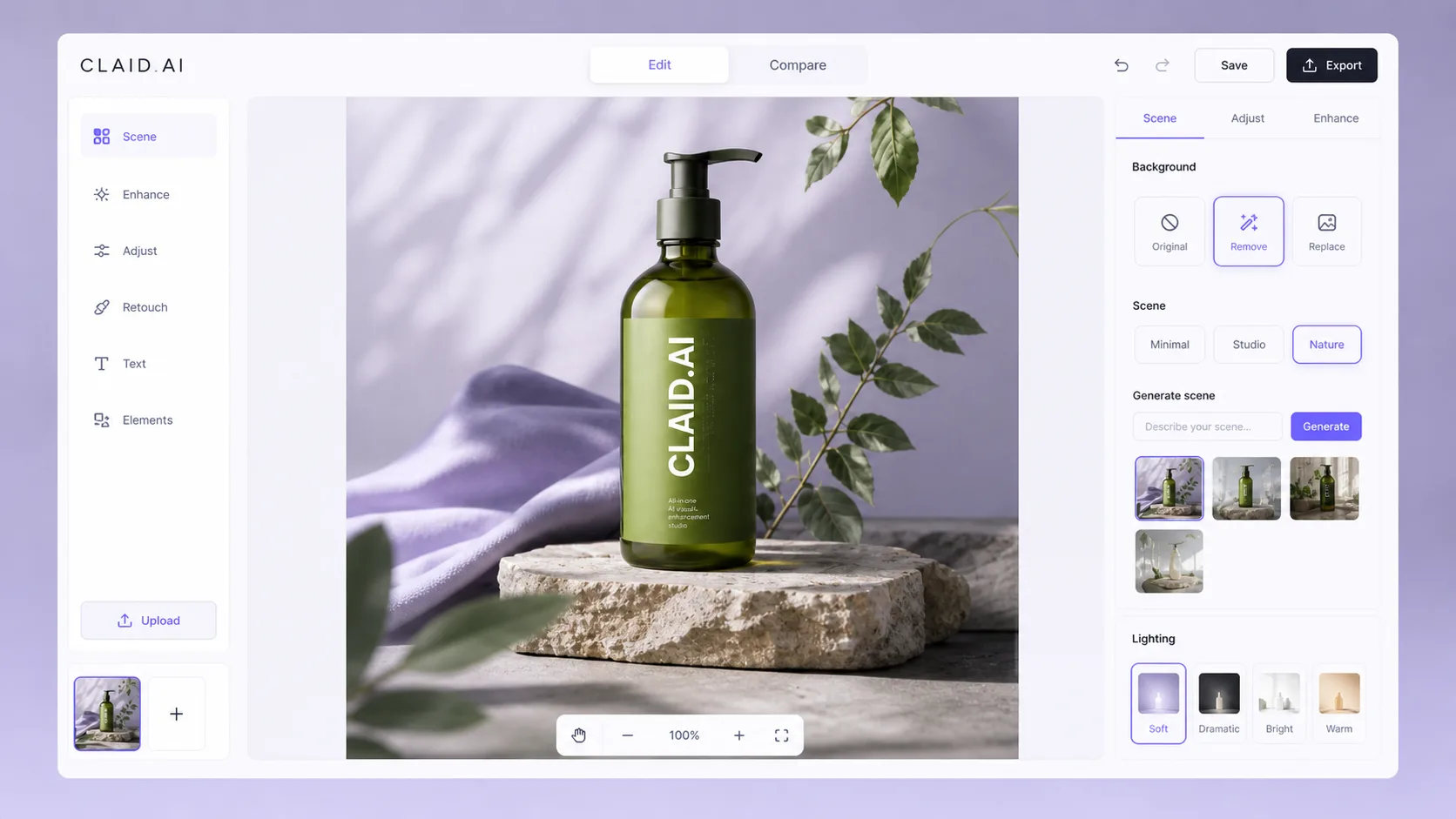
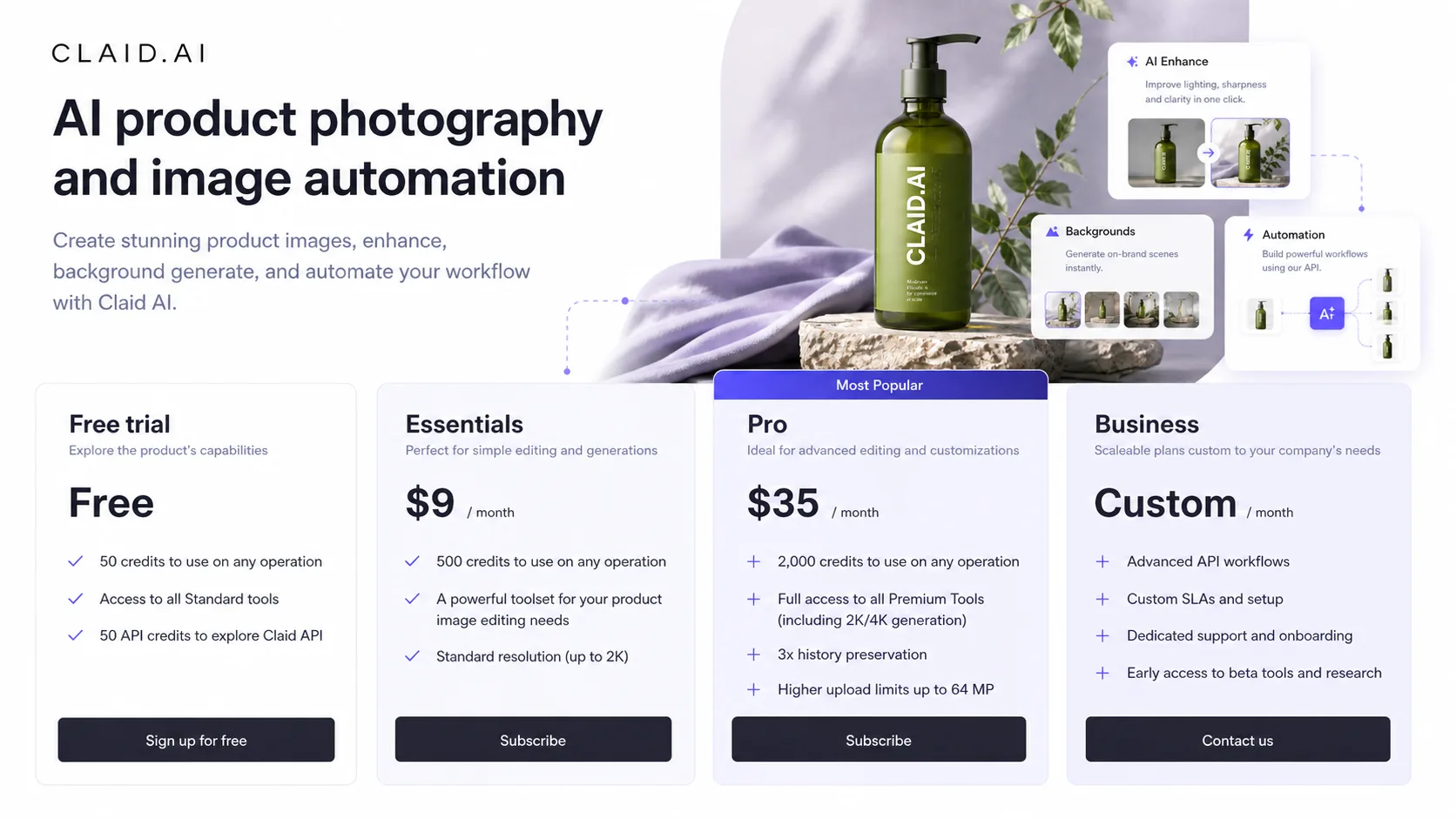
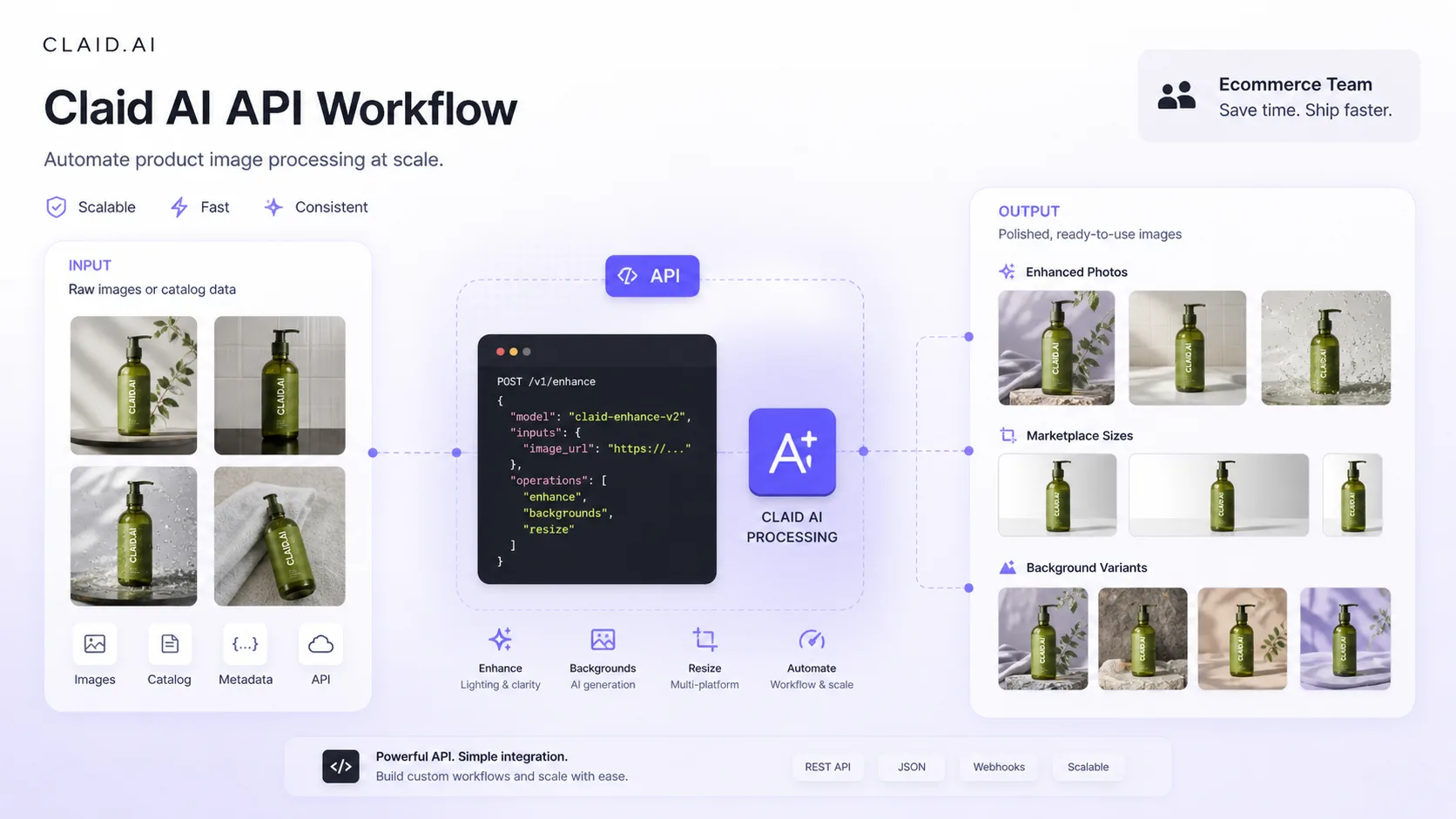

Claid AI should be evaluated as a product-photo production tool, not as a simple coupon click or a generic AI image generator. The practical buyer question is whether it can reduce image-cleanup time, make product shots more consistent, and support the right amount of scale without letting credits, API costs, or refund timing create avoidable friction.
What Claid AI actually does
Claid AI helps buyers turn imperfect product images into cleaner ecommerce assets. Its official pages cover enhancement, upscaling, background removal, AI-generated scenes, AI fashion workflows, image-to-video, outpainting, object cleanup, and API automation. That makes it more relevant for online sellers, marketplaces, brands, and agencies than for someone who only needs a casual image generator.
- Clean and enhance existing product images.
- Generate backgrounds or product-photo scenes.
- Create AI fashion and model-style product visuals.
- Use API workflows when manual editing becomes too slow.
Who gets the best fit
Claid AI is strongest when a buyer already has product images and needs faster production quality. Ecommerce sellers can use it for background cleanup and product scenes. Fashion teams can test on-model or lifestyle-style imagery. Marketplaces and SaaS teams can look at the API when image moderation, resizing, or enhancement needs to run repeatedly. The tool is less convincing when the buyer only needs one occasional edit or wants unlimited creative experimentation without usage tracking.
- Best for repeat product-image needs.
- Useful for ecommerce, fashion, marketplaces, food, and print-on-demand workflows.
- Less ideal for buyers who dislike credit math.
Pricing and credits need a real calculation
The most important buying detail is the credit model. Claid AI's Free Trial is useful for quality testing, but a paid plan should be chosen by expected image volume and operation type. Background removal, upscaling, AI Photoshoot, AI Fashion, outpainting, and image-to-video can consume credits differently. A buyer who mostly removes backgrounds may read the pricing very differently from a buyer who wants repeated AI video or high-quality product scenes.
- Essential is listed at $15/month for 500 monthly credits in the help center.
- Pro is listed at $49/month for 2,000 monthly credits in the help center.
- API credits and web-plan credits should be checked separately before rollout.
Product video workflows are useful, but expensive to test casually
Claid AI's image-to-video feature can turn product images into short motion assets for social, ads, and product promotion. That is attractive for marketers, but it is also one of the areas where buyers should be careful with credits and output expectations. Watch the tutorial with a practical question in mind: would this help you ship more usable creative, or would it become another experiment that burns plan capacity?
API and automation change the buying decision
For non-technical buyers, Claid AI may feel like a visual editor. For teams with many product images, the API is the bigger decision. The API route supports automation for operations such as background removal, light and color enhancement, upscaling, AI backgrounds, text-to-image, image-to-video, AI fashion, smart frame, and related image tasks. That can save time, but it also means the buyer should check documentation, credit pricing, rate limits, output quality, and developer resources before treating it as a simple SaaS subscription.
- Manual creators should start inside the web workflow.
- Catalog teams should compare API pricing and implementation work.
- Developers should test sample images before committing to volume.
What to verify before checkout
Before paying, confirm the current pricing page, credit costs, plan limits, refund timing, and whether your workflow needs the API. Also compare Claid AI against lighter product-photo tools if the only job is background removal or quick image cleanup. The safest next step is to run the Free Trial with your own product photos, then move to the review page if fit is still unclear or the coupon/pricing path if the workflow already looks right.
- Verify live credit allocation and operation costs.
- Check whether annual billing changes the real monthly commitment.
- Confirm refund timing before paying.
- Use the review page first if output quality or workflow fit is still uncertain.
Best savings path from this store page
This is the clearest savings route to check once the product already looks like a fit.
Use the trial image allowance to test Claid output quality before paying for product photo, background, upscaling, or ecommerce image workflows.
Save on yearly web plans
Start API workflow with included credits
Use comparison routes when the category fit is still open
Use these comparison routes when the product still looks plausible, but the category fit is not fully settled.
1of10 is closer to YouTube thumbnail and creative-testing workflows, while Claid AI is more focused on product photography, ecommerce images, and image automation.
Aitubo fits broader AI creative generation across image, video, music, and effects, while Claid AI is stronger when the buyer's main problem is product-image quality and catalog workflow.
Verification points worth checking before you click out
Where this store usually fits best in the workflow
Use Claid AI when product images need background removal, sharper detail, better lighting, or consistent export formats before publishing to a store or marketplace.
Claid AI can help apparel buyers test AI fashion, on-model visuals, flatlay-to-model ideas, and product scenes, but final catalog use should still be reviewed for garment accuracy.
Marketplaces and platforms can look at the API when they need repeated enhancement, resizing, background processing, or visual quality control across many user-uploaded images.
Marketers can test image-to-video when they need fast product motion clips, but they should watch credit costs and avoid relying on video if product accuracy is critical.
Practical checkpoints before and after signup
- Choose one real product image that represents your normal catalog quality.
- Decide whether you are testing background removal, upscaling, AI Photoshoot, AI Fashion, video, or API automation.
- Check the official pricing and help-center credit rules before judging value.
- Run a small set of product images through the exact workflow you would repeat later.
- Track how many credits each operation consumes and whether the output is usable without heavy manual correction.
- Compare web editing against API needs if your catalog volume is large.
- Confirm whether Essential, Pro, Business, or API pricing is the right buying path.
- Review the 24-hour change-of-mind refund rule and avoid annual billing until the workflow is proven.
- Open the review page first if the product fit is still unclear, then use the pricing or coupon route after the fit check.
Fast-read signals for workflow fit and buying friction
Questions readers usually ask before choosing this store
What is Claid AI best for?
Claid AI is best for product-photo workflows: cleaning images, removing backgrounds, generating product scenes, improving resolution, testing AI fashion visuals, and automating image processing through API routes. It is more practical for ecommerce and catalog work than for general image play.
Does Claid AI have a free plan or free trial?
Claid AI currently presents a Free Trial with 50 credits and limited product testing. It should be treated as a quality test rather than a long-term free plan, because ongoing production work depends on monthly credits, paid plans, or API credit purchases.
How should buyers think about Claid AI pricing?
Buyers should think in credits, not only monthly dollars. Essential and Pro may look straightforward, but the real cost depends on whether you remove backgrounds, upscale images, run AI Photoshoot, use AI Fashion, generate videos, or process images through the API.
Is Claid AI good for API-based image automation?
Yes, Claid AI has a clear API positioning and separate API pricing. It is worth checking for marketplaces, ecommerce platforms, and teams that need repeated product image enhancement or background processing, but developers should test output quality and credit costs before scaling.
What should I verify before buying Claid AI?
Verify the live pricing page, monthly credit allowance, operation costs, API pricing, refund timing, and whether public coupon claims are actually valid. If workflow fit is still unclear, read the review path first; if the fit is already clear, move to pricing or the current offer route.
Choose the next route that matches what you still need to decide
The strongest next click depends on whether you still need product judgment, a savings route, or a broader category comparison.