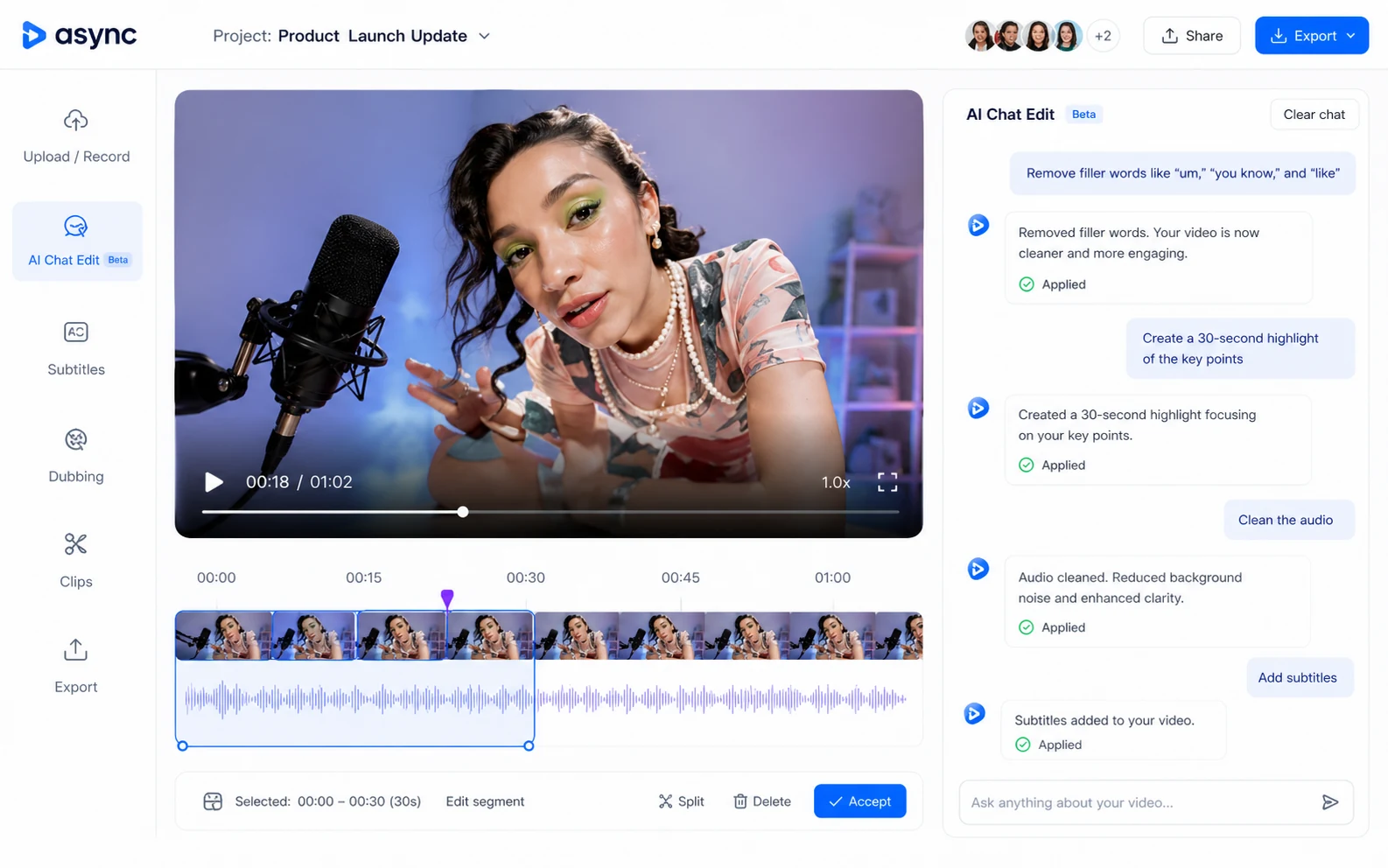
Quick verdict
Async is worth a serious look if your video or audio workflow already has several moving parts: recording, cleanup, editing, subtitles, dubbing, clips, voice work, and team review.
That is the key distinction.
I would not judge Async as just another AI video editor. The product is trying to be a broader creator production workspace, and that makes the buying decision more interesting — but also a little more risky. A broad tool can save time when it replaces several apps. It can also become expensive if you only use one narrow feature and ignore the credit system underneath the plan.
The public positioning is strong for creators who publish repeatedly. Async can make sense for podcasters, YouTubers, marketing teams, internal comms teams, and sales teams that need to turn raw recordings into cleaned-up, subtitled, clipped, dubbed, or repurposed content. It may also interest developers because Async has a separate Voice API path, but that is a different buying decision from the creator editing product.
The part I would check first is not the feature list. It is usage.
How many AI credits will your normal project consume? How many recording hours do you need? Do you need 4K recording, text-to-speech hours, team workspaces, Brand Kit, Producer Mode, or API usage? And if you start a trial, do you know exactly when it converts?
For my money, Async is best tested with one real project before annual billing. If the workflow fits, it can reduce tool-switching. If it does not, a lower annual price or occasional checkout offer will not fix the mismatch.
Next step: If Async still looks like a fit, test the current creator route and compare plan limits before checkout.
Review snapshot
| Review point | Practical take |
|---|---|
| Best for | Creators and teams that repeatedly record, edit, subtitle, dub, clip, and repurpose media |
| Not ideal for | One-off edits, deep traditional post-production, or buyers who cannot estimate credit use |
| Main use case | Turning recordings or source media into cleaner videos, clips, subtitles, dubbed content, and voice assets |
| Pricing note | Public creator pricing starts from an annual-billed entry plan, with monthly pricing higher |
| Free path | Free plan is useful for testing, but limited lifetime credits and recording time make it evaluative |
| Main strength | One workspace for audio, video, recording, AI editing, subtitles, dubbing, clips, and voice workflows |
| Main concern | AI credits, annual billing, trial timing, refund terms, and plan limits can affect real value |
| Direct alternatives | Pictory, Fliki, Crayo, ElevenLabs, depending on the buyer job |
| Best next step | Run one real creator workflow before choosing monthly, annual, team, or API-heavy usage |
What is Async?
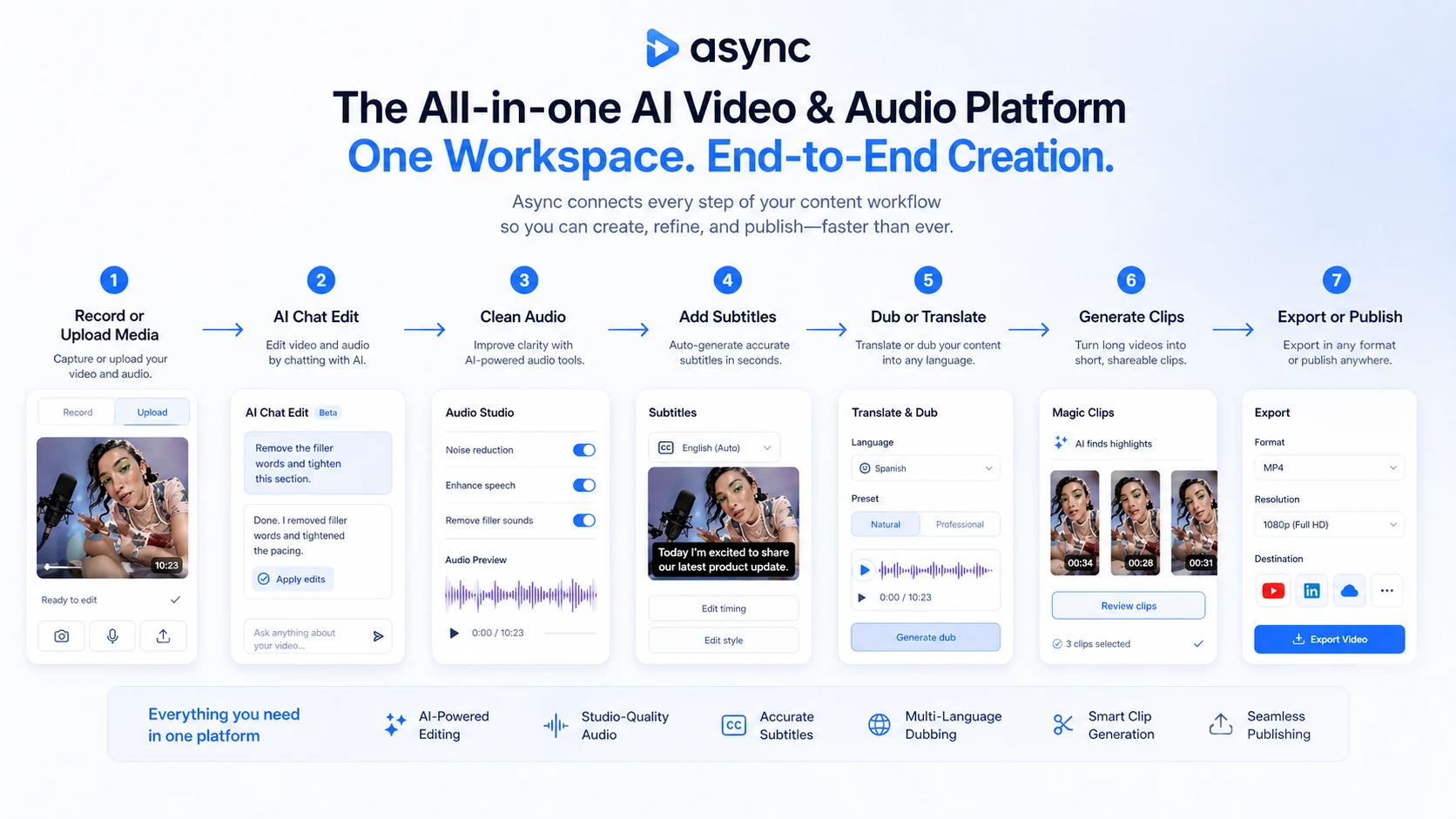
Async is an AI video, audio, recording, dubbing, clipping, subtitle, and voice platform for creators and teams that work with media repeatedly.
In plain language, it sits between a browser-based editing suite, a recording studio, an AI repurposing tool, a dubbing/subtitle platform, and a voice system. The official homepage presents Async as an all-in-one AI video and audio platform where AI handles video generation, remote recording, editing, subtitles, dubbing, and clips while the creator focuses on the story.
That is useful positioning, but it also needs a reality check.
Async is not just a button that turns rough content into perfect media. It is a workflow platform. The buyer still needs usable source material, editorial judgment, cleanup time, and a clear idea of what they want to publish. The AI can reduce friction, but it does not remove the need to review outputs.
Our review approach compares public product pages, pricing details, help documentation, deal terms, buyer workflow fit, and nearby alternatives. We do not treat a low annual price, free plan, or coupon route as proof that the product fits the buyer.
The common wrong expectation is to see Async as a single-purpose AI video generator. That misses the point. Async is more believable when several pieces matter together: recording a conversation, cleaning the sound, editing by prompt or transcript, adding subtitles, creating short clips, testing dubbing, and exporting assets for recurring publishing.
If you only need one of those jobs, Async may still work — but it has to beat a specialist tool on ease, cost, or workflow speed.
Who should use Async?
Async is strongest for buyers who already have recurring media work.
Podcasters and interview creators are a natural fit. If your process involves remote recording, audio cleanup, editing, subtitles, and social clips, Async can reduce the number of tools you touch. The condition is that you should test it with a real episode, not a short sample that is easier than your normal production work.
YouTubers and video creators may like Async if they want one web-based workspace for recording, editing, repurposing, and improving video assets. The value is less about one magical AI feature and more about whether the whole sequence feels faster than your current stack.
Marketing and sales teams can consider Async for product explainers, UGC-style ads, demos, customer education, internal updates, and branded clips. Team features matter more here because consistency, collaboration, and review steps can become the real bottleneck.
Internal communications and training teams may find Async useful when they need recurring video updates, translated clips, subtitles, or polished recordings without handing every project to a dedicated editor.
Developers and product teams should look at Async differently. If the buyer need is text-to-speech, voice cloning, streaming voice, or voice agents, the Voice API path matters more than the creator editing plans. That decision should be evaluated through API pricing, latency, support, and usage requirements, not through creator plan screenshots alone.
Who should avoid Async?
Async is not the cleanest fit for buyers who only need a one-off edit. A free plan may be enough for a quick test, but a subscription can become unnecessary if media production is not part of your normal work.
I would also be careful if you need advanced manual timeline control, motion graphics depth, heavy post-production control, or the precision of a traditional professional editing stack. Async can help with AI-assisted production, but deep editors may still prefer specialist tools.
Buyers who cannot estimate usage should slow down before choosing annual billing. The plan decision depends on AI credits, recording hours, text-to-speech hours, storage, export quality, team features, and whether credits reset or need topping up.
Voice-first buyers should not assume Async is the same as ElevenLabs or another dedicated voice platform. Async has voice features and a separate Voice API, but if voice quality, language coverage, latency, cloning controls, or API economics are the central purchase reason, compare the voice-first route carefully.
I would also avoid buying Async only because a checkout offer or coupon page looks attractive. A discount can make a useful purchase cheaper. It cannot turn a mismatched production workflow into a good long-term tool.
How Async fits into a real workflow
A realistic Async workflow starts before the AI editor.
First, you need source material: a podcast recording, interview, YouTube segment, webinar, product demo, internal update, UGC ad idea, or voice asset. Then you use Async to record or upload the media, clean the audio, make edits, generate or refine subtitles, create clips, test dubbing, and prepare assets for publishing.
The useful workflow looks something like this:
- Record or upload the media.
- Clean audio and remove obvious production friction.
- Use AI editing or transcript-style control to cut and polish the piece.
- Add subtitles or translation when the audience needs it.
- Create short clips for social channels.
- Review voice, dubbing, or lip-sync output carefully.
- Export only after a human review pass.
- Track how many credits and recording hours the project consumed.
That last step is easy to ignore, but it is the one that decides whether a paid plan makes sense.
Async is most valuable when it removes repeated handoffs. If you currently use one recorder, another editor, a subtitle tool, a clip generator, and a separate voice app, the platform can simplify the stack. If you only use one of those functions once in a while, the subscription may feel heavier than the problem.
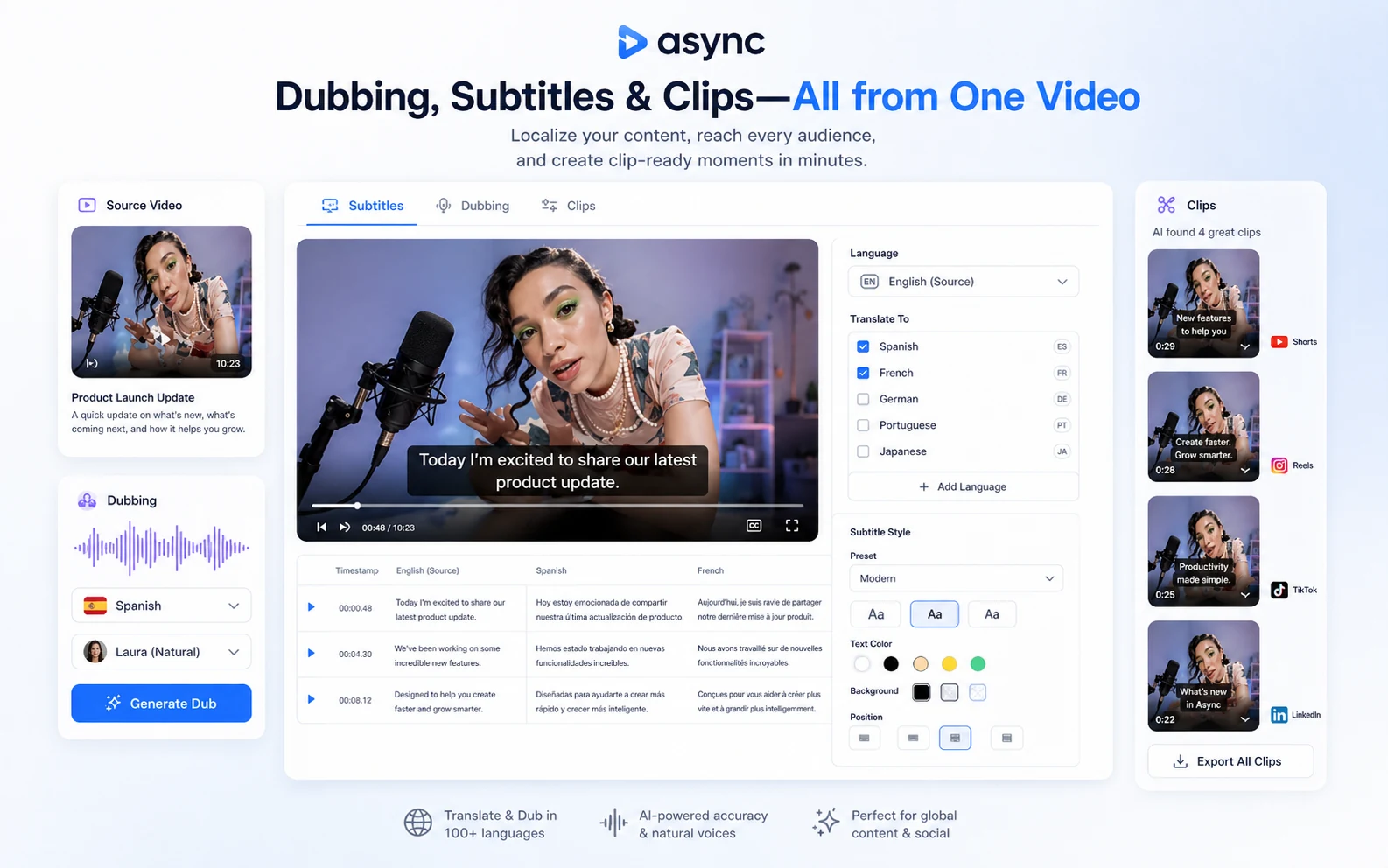
Workflow test: Use Async with one real recording or media project before deciding whether the broader creator workspace is worth paying for.
Real-world buyer scenarios
Scenario 1: A podcaster who wants fewer editing handoffs.
Async can make sense if the buyer records interviews, cleans audio, edits segments, adds captions, and publishes clips from each episode. The risk is assuming the AI will make every episode publish-ready without cleanup. The better test is one normal episode with all the background noise, pauses, speaker issues, and clip needs you actually face.
Scenario 2: A YouTube creator repurposing long videos.
If long-form content becomes Shorts, Reels, TikToks, subtitles, thumbnails, and translated snippets, Async may save time by keeping more steps inside one workspace. It may fail if the creator needs complex visual design, deep manual edits, or highly polished motion work.
Scenario 3: A marketing team producing branded clips.
Async becomes more interesting when collaboration, Brand Kit, Producer Mode, and team workspaces matter. The buyer should verify whether those features are included in the intended plan and whether the team will actually use them weekly.
Scenario 4: A developer building voice features.
Async’s Voice API is a separate decision. A developer should compare latency, voice quality, free tier, pay-as-you-go cost, concurrency, support, and integration needs. This is not the same as deciding whether a creator should pay for Pro.
Key features that actually matter
Recording and media input
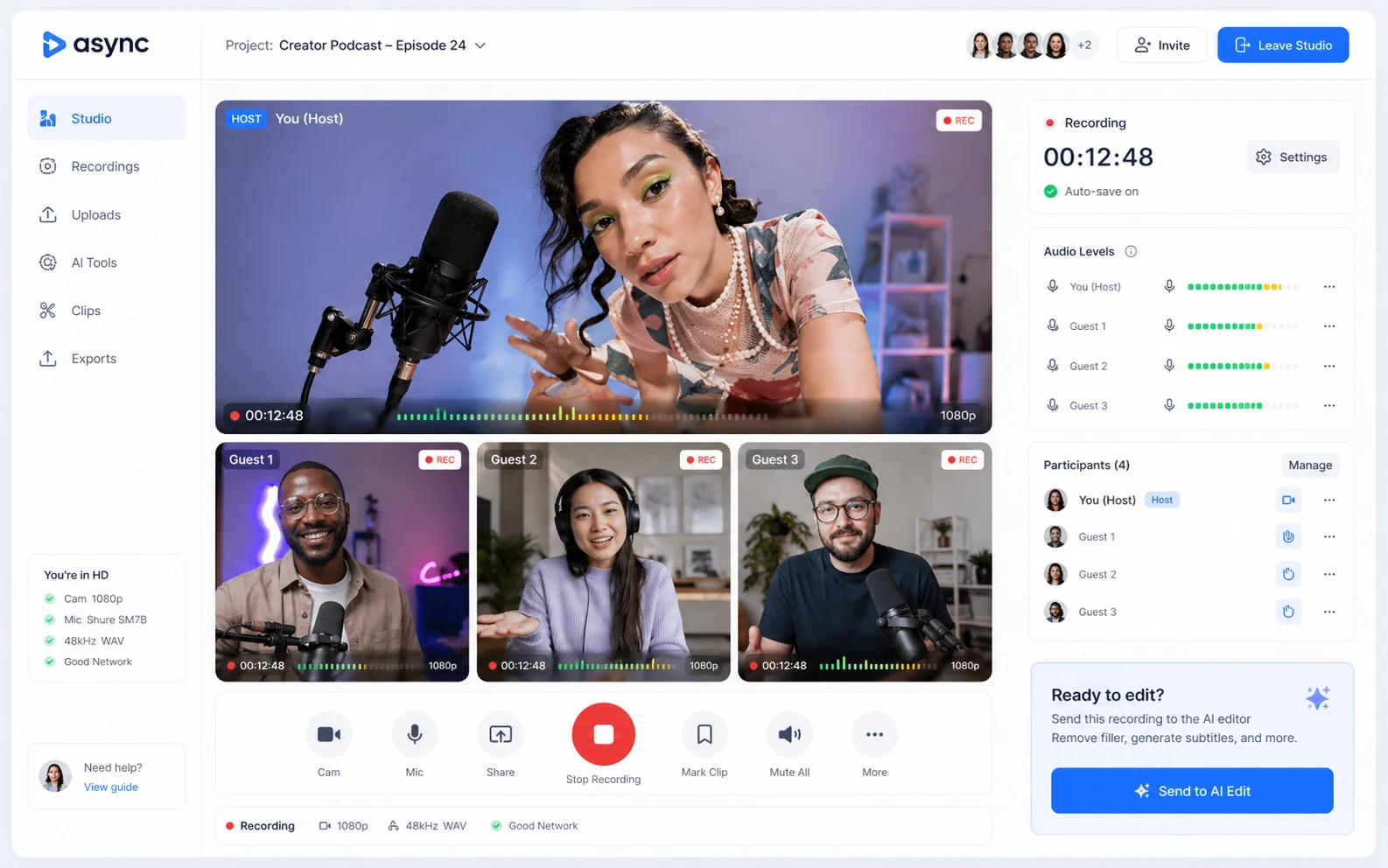
Async matters more if it can handle the start of the workflow, not only the final edit. Remote recording, upload, and browser-based production reduce friction for creators who do not want to move files across multiple platforms.
Buyer note: check recording quality, hour limits, guest workflow, and whether the plan supports the type of content you normally produce.
AI editing and cleanup
The editing promise is the heart of Async. AI-assisted video and audio editing, cleanup, noise reduction, silence removal, and chat-style production can be valuable when they save repetitive editing time.
Buyer note: do not judge this from a perfect demo. Test with messy source material.
Subtitles, dubbing, and clips
This is where Async can move from “editor” to “repurposing platform.” Subtitles, translation, dubbing, lip sync, and clip creation can help creators turn one asset into several distribution-ready pieces.
Buyer note: these features can also consume credits, so output volume matters.
Team and brand controls
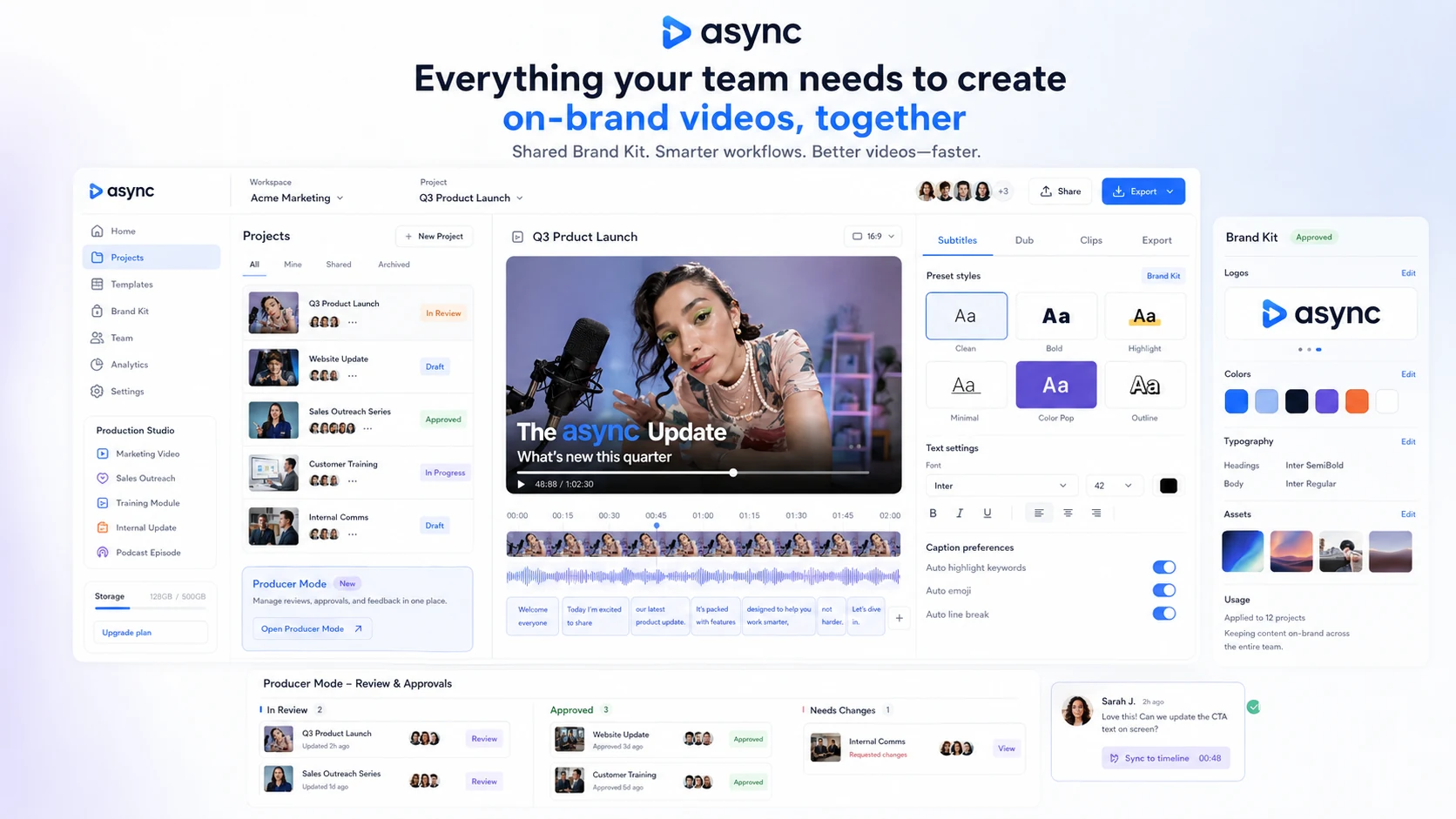
Team workspaces, Brand Kit, Producer Mode, multi-host workflows, and higher limits can matter for marketing, sales, and internal content teams. They are less important for solo creators who mostly need quick edits.
Buyer note: do not upgrade for team features unless collaboration is part of the real workflow.
Voice API and developer path
Async’s Voice API gives developers a different route from the creator product. It can be relevant for voice agents, text-to-speech features, streaming voice, and productized audio workflows.
Buyer note: API buyers should compare API pricing and technical needs separately from creator plan value.
Pricing and plan value
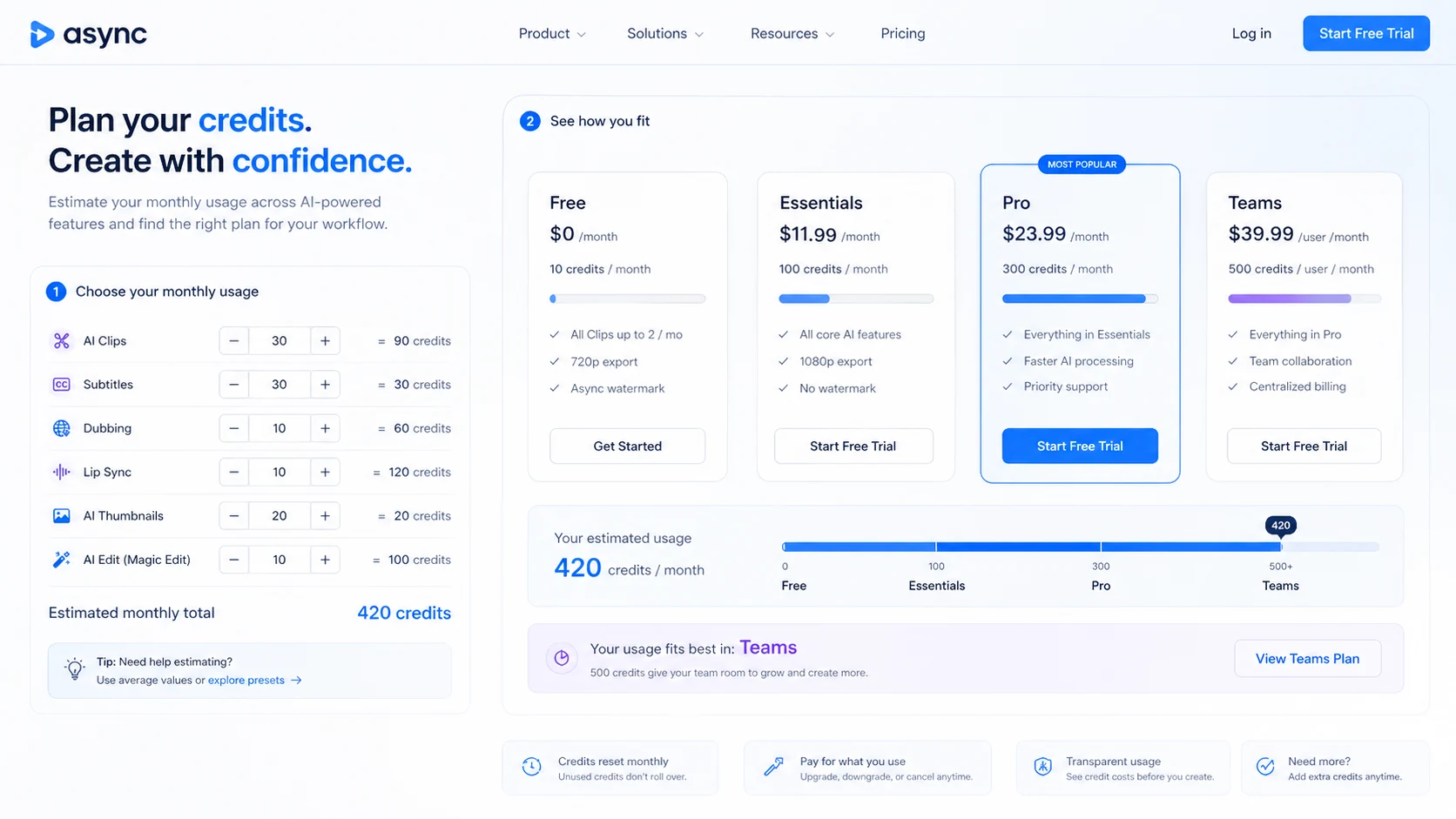
Async pricing is not just a monthly subscription question. It is a credit, recording-hour, storage, output, and workflow question.
At the time of review, Async’s public creator pricing shows a Free plan, paid creator plans, Teams, and Business options. The public pricing and help pages present Essentials at $19.99/month or $11.99/month when billed yearly, and Pro at $39.99/month or $23.99/month when billed yearly. The Free plan includes limited lifetime credits and recording time, while paid plans add monthly credits, more recording hours, text-to-speech time, storage, and higher workflow limits.
That sounds straightforward until you look at how usage works.
AI credits are the unit Async uses for generation-heavy features. Credits can be consumed by AI creation and related workflows, and monthly subscription credits reset at the start of each billing cycle. Used credits are not refundable. That means a buyer should not compare Async only by headline monthly price.
The smarter question is: how many credits does your normal project consume?
For a solo creator, Essentials may be enough if the workflow is light and predictable. Pro becomes more believable when the buyer publishes regularly, needs more recording hours, wants higher output quality, or uses AI features often. Teams makes sense only when collaboration, brand controls, and higher limits are real requirements.
The Voice API has its own pricing logic. Async publicly presents API pricing as a free tier plus pay-as-you-go usage starting from $0.50 per hour. That can be attractive for developers, but it should not be mixed with creator plan value. A video editor and a voice infrastructure buyer are solving different problems.
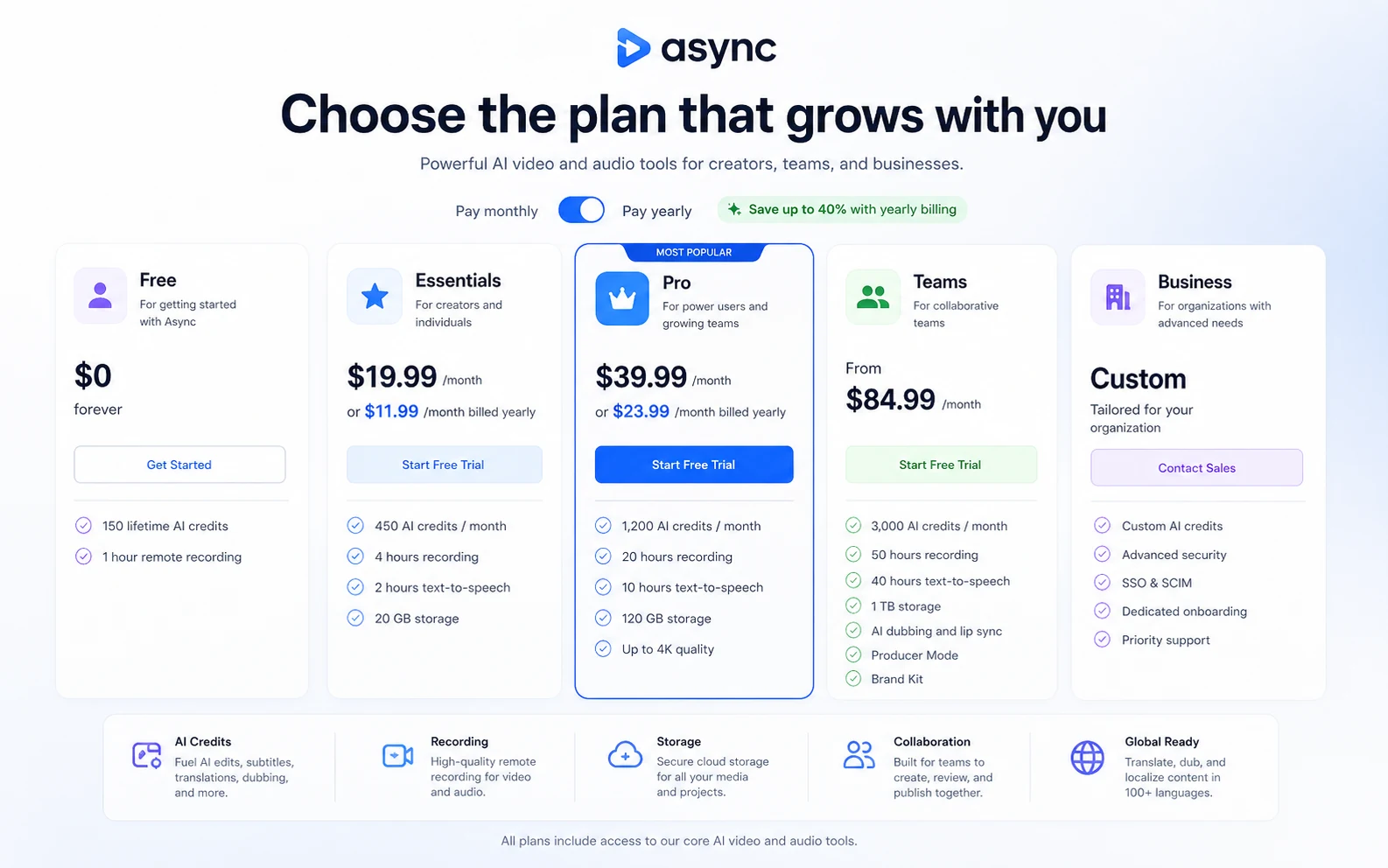
Pricing check: Before choosing a plan, compare the current Async pricing page against one real project and your expected monthly output.
Free plan, trial, coupon, and checkout notes
The safest Async buying path is not to hunt for a coupon first.
Start with the Free plan or trial route when available. Use it on a real project. Track how many credits the project consumes. Check whether the output quality is good enough. Confirm whether the editing flow feels faster than your current stack. Then compare monthly versus annual pricing.
Async’s public materials mention free access and trial language, but buyers should verify the exact checkout flow before entering payment details. This matters because annual pricing can look attractive, but annual billing is only smart after you know the workflow fits.
The coupon path should come later. If Async fits your workflow, the Async coupon page can help you check current offer routing. But a coupon should not be the reason you choose the tool.
Refund language deserves extra care. Async’s pricing page mentions a 7-day refund policy on new subscriptions excluding used AI credits, while the Terms page says refunds are not offered once a subscription charge has been processed. I would treat that as a reason to manage trial timing carefully rather than assuming refund flexibility after billing.
What I would check before buying Async
If I were buying Async for a real creator workflow, I would check these items first:
- Whether the Free plan or trial lets me test a normal project, not just a tiny sample.
- How many AI credits one realistic project consumes across editing, clips, subtitles, dubbing, lip sync, thumbnails, or generation.
- Whether monthly credits reset and whether unused credits roll over or expire.
- Whether the plan includes enough recording hours, text-to-speech time, storage, and export quality.
- Whether annual billing is worth it only after the workflow has already proved itself.
- Whether team features like Brand Kit, Producer Mode, user management, or multi-host recording are truly needed.
- Whether refund, cancellation, and trial conversion timing are clear before checkout.
A simple test before paying
Before paying, I would run a small test like this:
- Choose one real recording or video that reflects your normal content.
- Upload or record it inside Async.
- Use the editing and cleanup tools you would actually use every week.
- Generate subtitles or clips if those are part of your workflow.
- Try dubbing or voice features only if they matter to your output.
- Track credit use and time saved.
- Compare the result against your current tool stack.
The point is not to see whether Async can produce something impressive once. The point is to see whether it saves enough repeatable work to justify the plan you are considering.
Pros explained
The first real pro is consolidation. Async can bring several creator tasks into one place: recording, editing, cleanup, subtitles, dubbing, clips, and voice work. That matters when tool-switching is the hidden cost in your current process.
The second pro is the low-risk testing path. A Free plan and trial route make it easier to test whether the workflow feels right before paying. The caution is that free usage is evaluative; it does not automatically prove paid value at scale.
The third pro is plan clarity around usage gates. Credits, recording hours, text-to-speech hours, storage, team features, and Business options give buyers concrete things to compare. That is better than vague “creator” pricing with no visible limits.
The fourth pro is the separate developer route. Voice API buyers can evaluate Async as infrastructure rather than a creator editor. That separation is helpful because creator workflows and API workflows should not be judged the same way.
Cons explained
The biggest con is credit uncertainty. Credits are not automatically bad, but they make real value depend on usage patterns. A buyer who publishes heavily may burn through limits faster than expected.
The second con is annual billing risk. The lowest visible monthly-equivalent price is tied to yearly billing. That can be a good saving after Async proves itself, but it is not the safest first move.
The third con is refund ambiguity. Public-facing pricing and Terms language should be read carefully before checkout. Used credits are not refundable, and trial timing appears especially important.
The fourth con is specialist competition. Async covers a broad workflow, but a focused tool may still be better if the buyer only needs article-to-video, text-to-video, UGC ads, professional editing, or voice generation.
Green flags and red flags
Green flags:
- You publish video or audio content repeatedly.
- You currently use several separate tools for recording, cleanup, subtitles, clips, dubbing, or voice.
- You can test one real project before paying.
- You understand how credits, recording hours, and plan limits affect your monthly cost.
- Your team genuinely needs collaboration and brand consistency features.
Red flags:
- You only need one simple edit.
- You want advanced professional timeline control.
- You are choosing annual billing before running a real workflow test.
- You are attracted mainly by a coupon or annual discount.
- You need pure voice infrastructure but have not compared Voice API pricing and requirements separately.
Async vs alternatives
Async’s alternatives depend on the job you are buying for. This is where I would separate direct creator workflow alternatives from adjacent voice or short-form routes.
Pictory vs Async
Pictory is usually the cleaner comparison if your workflow is article-to-video, script-to-video, URL-to-video, or straightforward content repurposing. Async is broader when recording, editing, audio cleanup, subtitles, dubbing, clips, and voice tools all matter in one workspace.
I would compare Pictory first if your source material is mostly text. I would compare Async first if your source material is recorded audio or video.
Fliki vs Async
Fliki may be better for buyers who mainly want text-to-video, voiceover, and simple creator output. Async is more compelling when the workflow includes recording, editing, repurposing, and post-production around real media.
The tradeoff is simplicity versus workflow breadth.
Crayo vs Async
Crayo is an adjacent short-form and UGC-style route. It may fit buyers focused on fast social ad output, creator-style videos, or short-form campaigns. Async makes more sense when the buyer also needs recording, editing, audio cleanup, subtitles, and broader production workflow.
ElevenLabs vs Async
ElevenLabs is the stronger comparison if voice quality, voice generation, dubbing, or voice API depth is the main buyer job. Async is not only a voice platform; it is a broader video and audio production workspace with a separate Voice API path.
If voice is the product, compare ElevenLabs closely. If voice is only one part of a wider creator workflow, Async may still make sense.
Trust, refund, and buyer-risk notes
Async has enough public information to evaluate seriously, but the buyer still needs to verify the live checkout path.
The first risk is pricing interpretation. Annual pricing can make the monthly equivalent look attractive, but the commitment is different from true month-to-month testing. I would not move to annual billing until one real workflow has already proved value.
The second risk is credit consumption. Monthly credits reset, used credits are not refundable, and different AI features can consume different amounts. This is not a reason to avoid Async, but it is a reason to measure before upgrading.
The third risk is refund and cancellation timing. Public Trustpilot feedback is mixed: some buyers praise ease of use, support, and editing value, while several complaints focus on trial conversion, cancellation confusion, or refund disappointment. That does not prove every buyer will have a problem, but it does make trial timing worth treating seriously.
The fourth risk is data and ownership. Async’s Terms state users retain ownership of input and output to the fullest extent permitted by law, but they also place responsibility for lawful use and do not guarantee that outputs will avoid third-party rights issues. For business teams, client footage, internal communications, or sensitive training materials, privacy and usage terms should be reviewed before uploading important content.
The fifth risk is choosing the wrong product path. Creator plans, Teams, Business, and Voice API are not the same buying decision. A solo podcaster, a marketing team, and a developer building voice agents should not evaluate Async through the same plan lens.
Final verdict
I would consider Async if you publish audio or video often enough that recording, cleanup, editing, subtitles, dubbing, clips, and voice tools all belong in the same workflow.
I would be cautious if you only need one feature, cannot estimate credit use, or are tempted to jump into annual billing before running a normal project through the platform.
I would compare Async with Pictory if your workflow starts from text, Fliki if you want simpler text-to-video and voiceover, Crayo if short-form UGC-style output is the main job, and ElevenLabs if voice quality or voice API depth is the central decision.
The safest path is simple: test one real project, track credit use, verify the live pricing and cancellation terms, and only pay if Async clearly replaces enough of your existing creator stack to make the subscription feel practical rather than merely impressive.
