
Pictory Pricing, Plans & Creator Fit
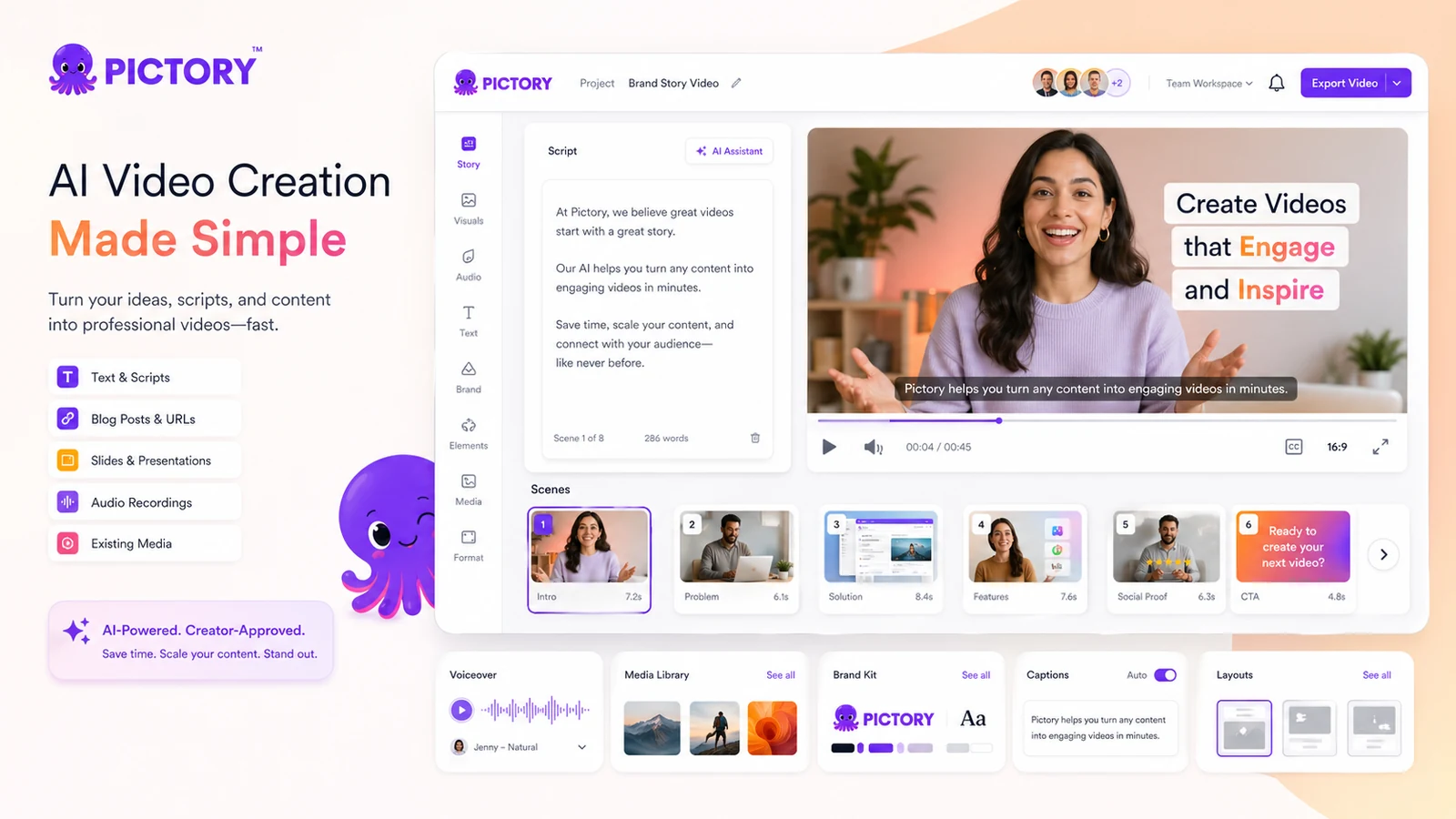
Pictory is an AI video creation platform for turning written content, URLs, audio, slides, images, and scripts into finished videos with visuals, captions, voiceovers, avatars, brand assets, and stock media. It is strongest when the buyer already has repeatable source material such as blog posts, scripts, webinars, course material, or marketing content and wants to repurpose that material into short social clips, explainers, or lightweight YouTube-style videos.
Fit → price → checkout
Use these routes after the official-site check: coupon first, review for fit, compare if unsure.
Pictory pricing snapshot
Fast commercial checks before pricing, coupons, or a deeper review.
Pictory product tour
Pictory is easiest to evaluate by following the buyer workflow from content input to finished export. The most useful visuals are the pricing page, the text-to-video editor, the script or URL workflow, and the brand or caption controls that determine whether the output can be published without heavy manual cleanup.
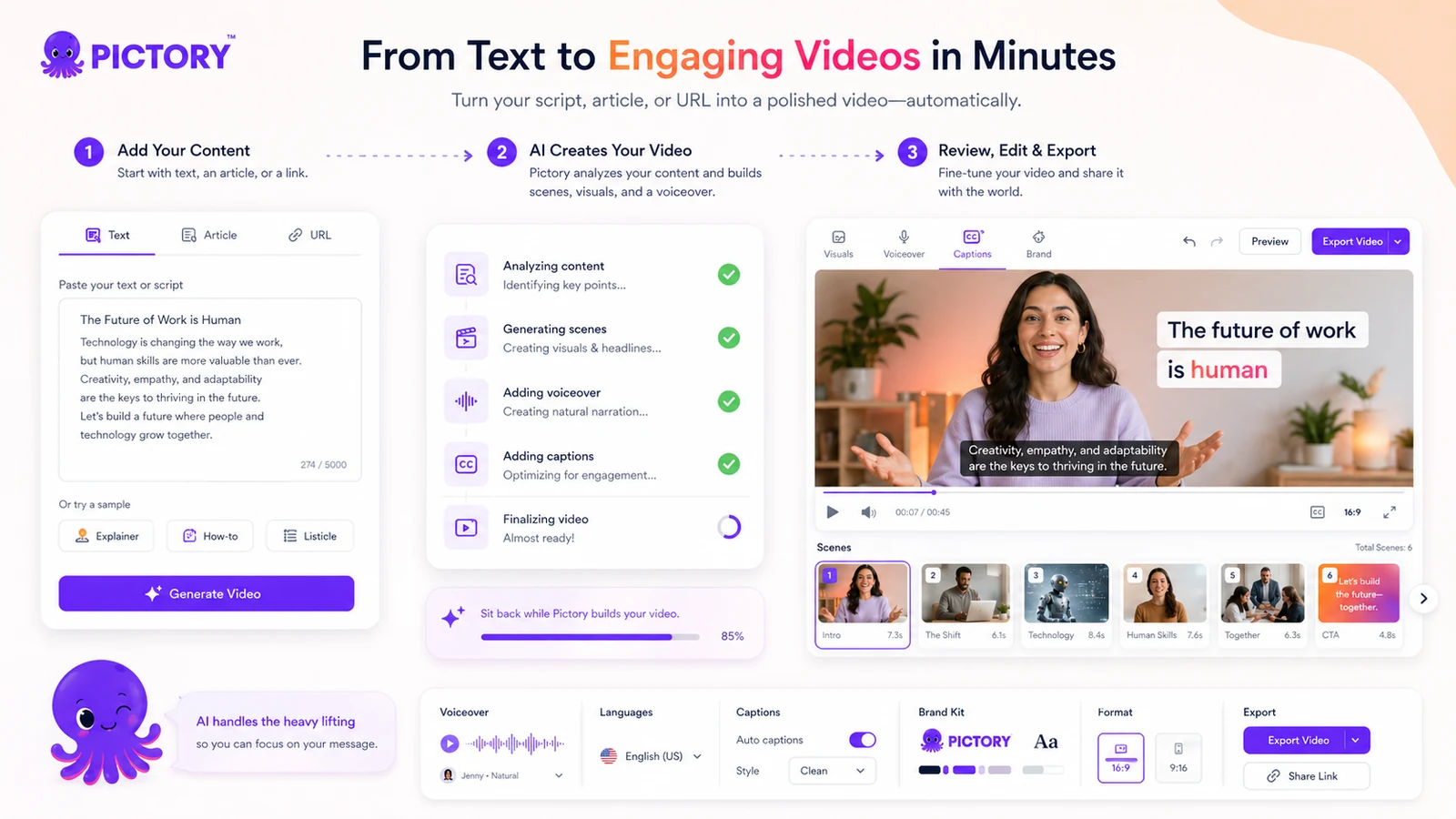
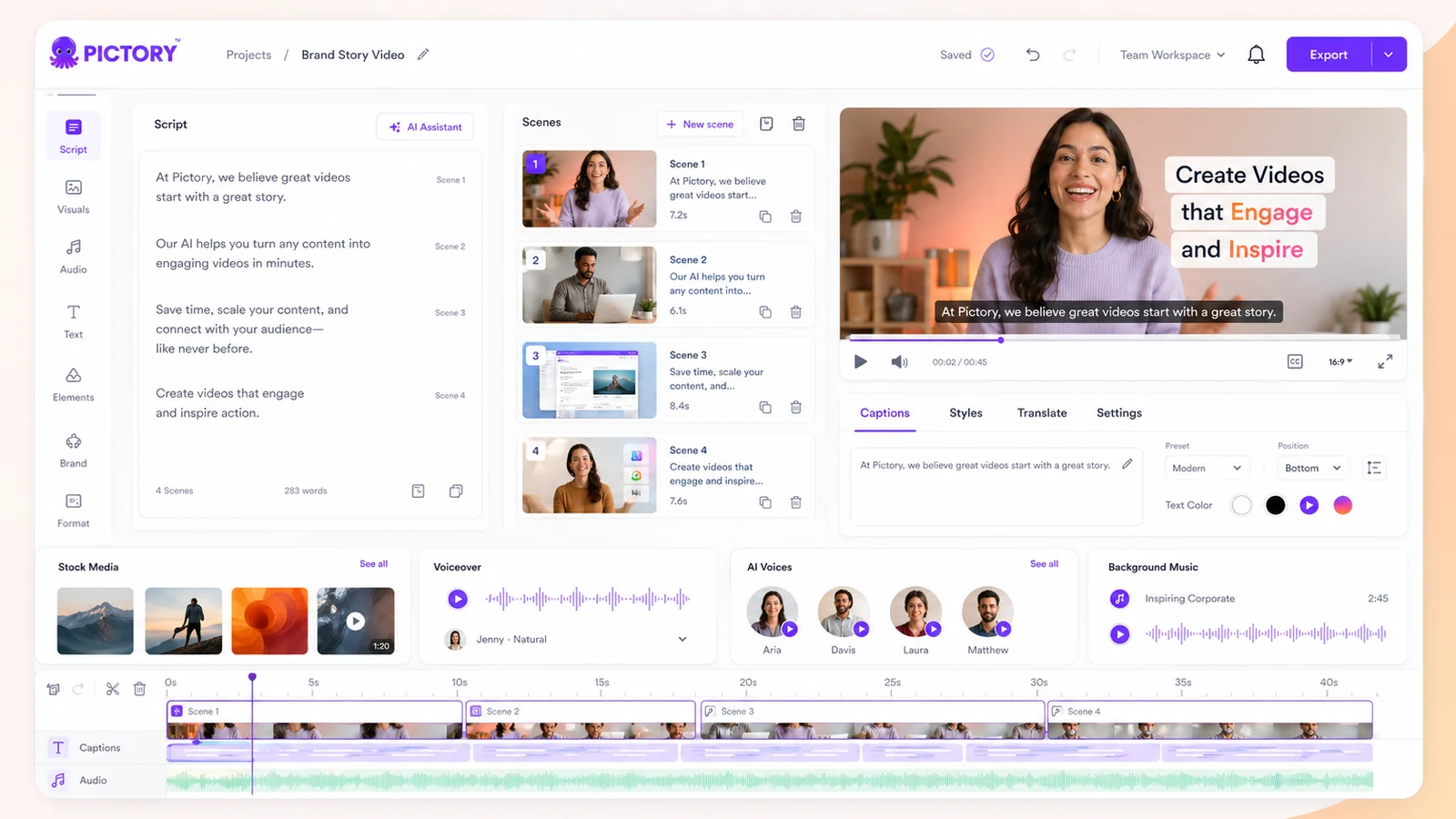
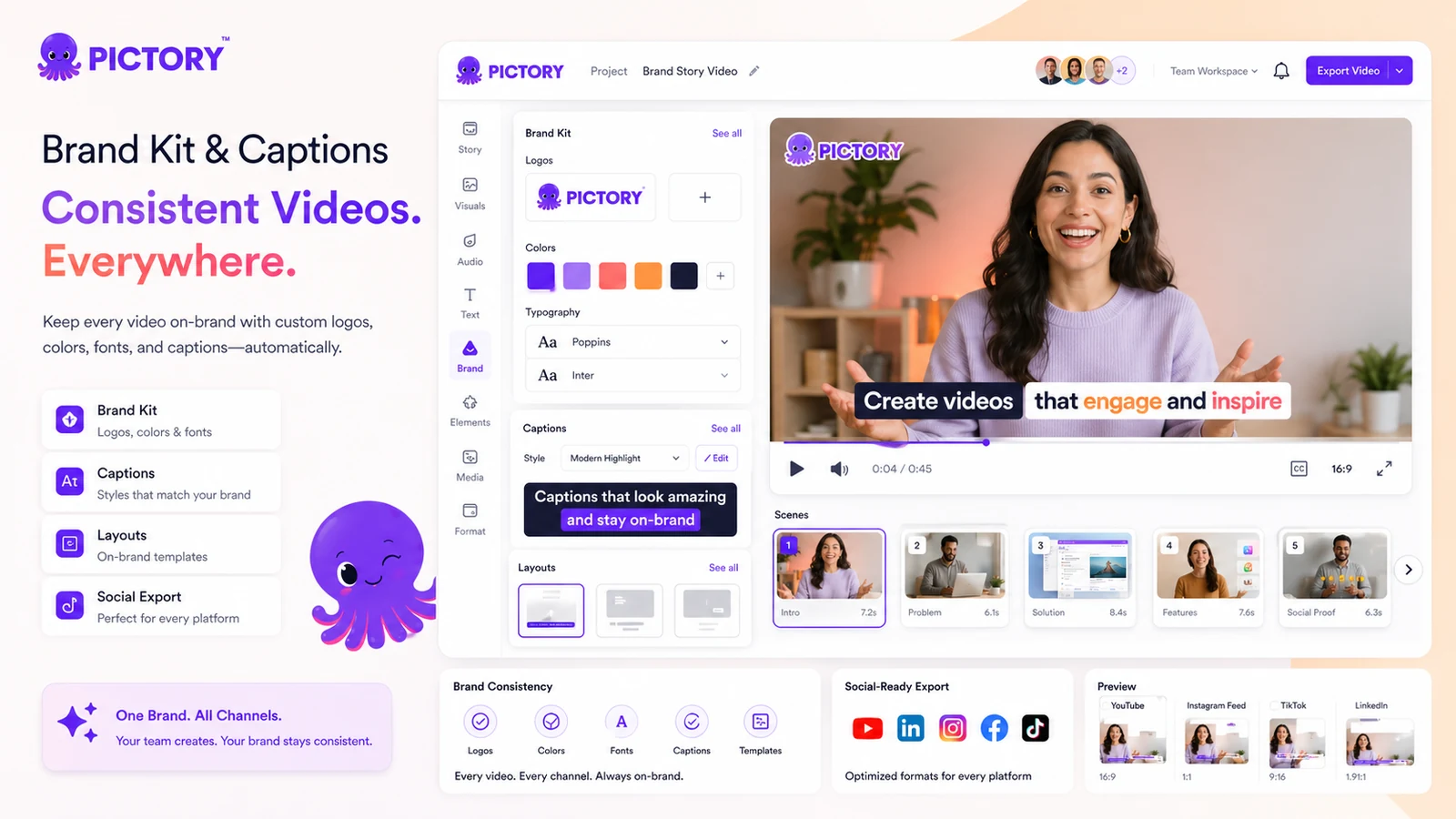
Pictory should be judged as a repurposing and light-production tool, not as a full professional video editor. The buyer question is simple: do you already have text, URLs, audio, slides, or source material that should become videos every month? If yes, Pictory can shorten the path from idea to publishable draft. If not, the paid plan may feel expensive once video minutes, AI credits, and annual billing are considered.
What Pictory actually does
Pictory turns source material into video drafts. That source can be a script, prompt, blog post, article, URL, audio file, PowerPoint deck, image, or longer video. The platform then helps assemble visuals, voiceover, captions, scenes, music, avatars, and branding controls so the buyer can move faster than starting from a blank timeline.
This is useful for marketers, educators, bloggers, and creators who already produce written or recorded content. It is less convincing for someone who only wants a single polished ad or cinematic clip, because the real value comes from repeatable repurposing.
- Best for converting existing text, URLs, slides, or recordings into video drafts
- Useful when captions, voiceovers, stock media, and branding need to live in one workflow
- Less ideal when the buyer wants deep manual editing or custom motion design
Pricing and trial path
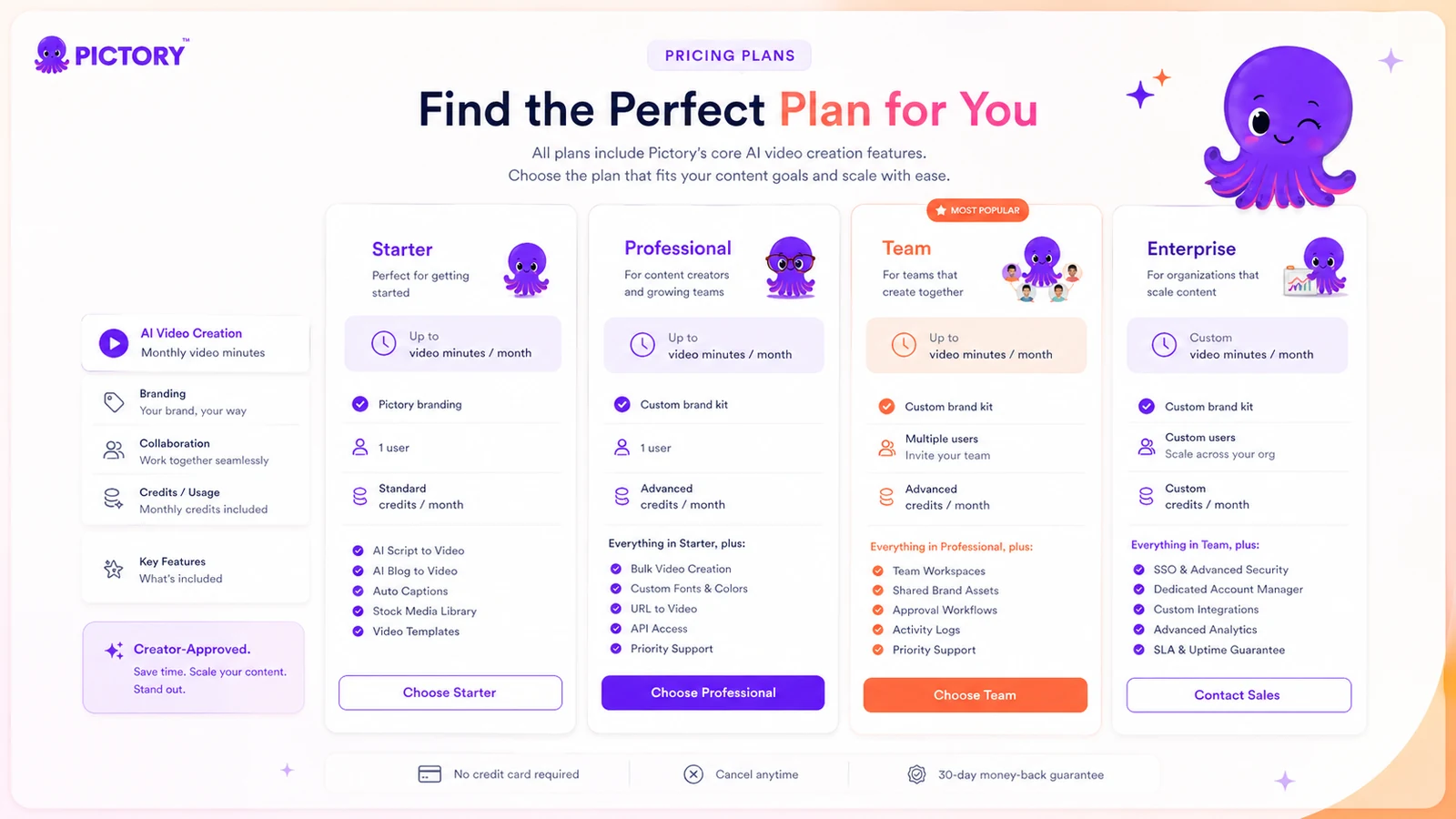
The official pricing page currently shows annual pricing starting at $25 per month for Starter, with Professional, Team, and Enterprise tiers above it. The Help Center confirms a 14-day free trial with access to premium features. After the trial expires, the account can still be accessed, but downloading videos requires a paid subscription.
Buyers should compare plans by real constraints, not just the headline price. Video minutes, storage, brand kits, premium media access, team members, AI credits, and voiceover limits can affect the true cost more than the first visible monthly number.
- Starter is the entry paid path for individual creators
- Professional adds more capacity for recurring video production
- Team makes sense when collaboration and shared assets matter
- Enterprise is for custom video volume, storage, and rollout needs
Free trial, refund risk, and checkout caution
Pictory's 14-day free trial is the safest evaluation path because the official Terms are strict about refunds. The Terms state that fees are non-refundable unless required by law or separately agreed in writing, and cancellation takes effect at the end of the current billing period.
Before paying, use the trial to create a video from your own material, download or inspect export quality, check voice and caption accuracy, and confirm whether the plan you want includes enough minutes and credits. This is especially important if you are considering annual billing.
- Test with your own script or article, not only a sample prompt
- Check captions, scene matching, voiceover quality, and export settings
- Confirm whether projects and finished videos should be downloaded before cancellation
Watch a workflow demo before judging value
A tutorial video is useful here because Pictory's value is easier to judge when you see how much editing is still required after AI generation. Watch for the steps between input, scene creation, media replacement, voice selection, captions, branding, and export. The question is not whether the tool can create a video. The question is whether the cleanup work is light enough for your publishing schedule.
Best-fit buyer profile
Pictory fits buyers who have content assets but not enough video-production bandwidth. A blogger can turn posts into short videos. A course creator can repurpose lessons into social clips. A marketer can turn landing-page or webinar material into explainers. A small team can use brand kits and shared assets to keep output more consistent.
The tool is weaker for buyers who want full creative direction over every frame. It can help with drafts and structured repurposing, but it should not be confused with a professional nonlinear editor or a specialist animation suite.
- Strong fit for content repurposing and recurring social video production
- Good fit for captions, voiceover, and stock-media-assisted explainers
- Weaker fit for cinematic editing, advanced motion work, or one-off premium ads
Alternatives worth comparing
Compare Pictory against tools based on the video outcome you actually need. If you want avatar-led presenter videos, HeyGen may deserve a closer look. If you want broader marketing video or AI voice workflows, Fliki can be a useful comparison. If your priority is short-form social or clipping, Crayo may be more direct. If you need synthetic avatar campaigns or business-facing video assets, AKOOL may fit a different branch of the shortlist.
- Compare HeyGen when avatar presenters and business videos matter most
- Compare Fliki when text-to-video and voice-led content are the focus
- Compare Crayo when short-form creator clips are the main output
- Compare AKOOL when brand, avatar, or marketing-video workflows need a broader check
Best savings path from this store page
This is the clearest savings route to check once the product already looks like a fit.
Pictory currently presents Professional annual pricing as the stronger value path for creators who need more video minutes, brand kits, AI credits, stock assets, and advanced AI tools than Starter provides.
Use this offer as a buyer-safe entry point. Pricing, plan limits, and promotional availability can change at checkout.
Official pricing lists a 14-day free trial entry point
Official pricing shows Starter at $25/month billed annually
Use comparison routes when the category fit is still open
Use these comparison routes when the product still looks plausible, but the category fit is not fully settled.
HeyGen is the stronger comparison when the buyer cares most about avatar presenters, business videos, and polished talking-head output.
Fliki is worth checking when the buyer wants a simpler text-to-video and voice-led workflow for social or educational content.
Crayo is a closer fit when the main need is fast short-form social content rather than repurposing long articles or training material.
AKOOL deserves a look when avatar, marketing creative, and brand campaign flexibility matter more than article-to-video repurposing.
Verification points worth checking before you click out
Where this store usually fits best in the workflow
Pictory is practical for bloggers and content teams that want to turn existing posts into short explainers, YouTube clips, or social videos without rebuilding every scene manually.
Educators can use Pictory to turn slides, scripts, or lesson summaries into video assets, especially when captions and voiceover support reduce editing time.
Small marketing teams can use Pictory to create product explainers, promo clips, and thought-leadership videos from existing copy, but should still review scenes and captions carefully.
Creators who do not want to appear on camera can test Pictory for script-to-video production, stock visuals, captions, and voiceover, then decide whether the paid minute limits fit their publishing cadence.
Practical checkpoints before and after signup
- Check whether your main source material is scripts, blog posts, URLs, audio, slides, or existing long videos.
- Compare Pictory against avatar-first and short-form-first tools before judging price.
- Read the pricing page and Terms before treating annual billing as a low-risk saving.
- Create one real project from your own content, not a generic demo topic.
- Track cleanup time for visuals, captions, voiceover, brand assets, and export settings.
- Confirm whether trial output is good enough to justify a paid export workflow.
- Estimate monthly finished video minutes before choosing Starter, Professional, or Team.
- Check AI credit usage for images, videos, and avatars if those features matter.
- Avoid annual billing unless the first real project proves repeatable value.
- Download finished videos and important assets before cancellation.
- Re-check whether unused minutes or credits are being wasted each month.
- Move up to Team only when collaboration and shared brand assets are already necessary.
Fast-read signals for workflow fit and buying friction
Questions readers usually ask before choosing this store
Is Pictory a full video editor?
Not really. Pictory is better understood as an AI-assisted video creation and repurposing platform. It can generate and edit videos from text, URLs, audio, slides, images, and scripts, but buyers who need deep timeline control should compare it with heavier editing tools.
Does Pictory have a free plan?
A continuing free plan was not verified. Pictory does publish a 14-day free trial with access to premium features, and after the trial expires the account remains accessible but downloading videos requires a paid subscription.
What is the cheapest Pictory plan?
At the latest store update, the official pricing page shows Starter from $25 per month when billed annually. Buyers should verify the live checkout because monthly and annual pricing, promotional offers, and plan limits can change.
Are Pictory payments refundable?
Pictory's Terms say fees are non-refundable unless required by law or expressly stated in a separate written agreement. Use the trial carefully before paying, especially before annual billing.
Who should compare alternatives before choosing Pictory?
Compare alternatives if your main need is avatar presenters, short-form clipping, cinematic editing, or advanced manual control. Pictory is strongest for repurposing existing content into structured videos, not for every video-production style.
Choose the next route that matches what you still need to decide
The strongest next click depends on whether you still need product judgment, a savings route, or a broader category comparison.