
Async Pricing, Plans & Creator Workflow Fit
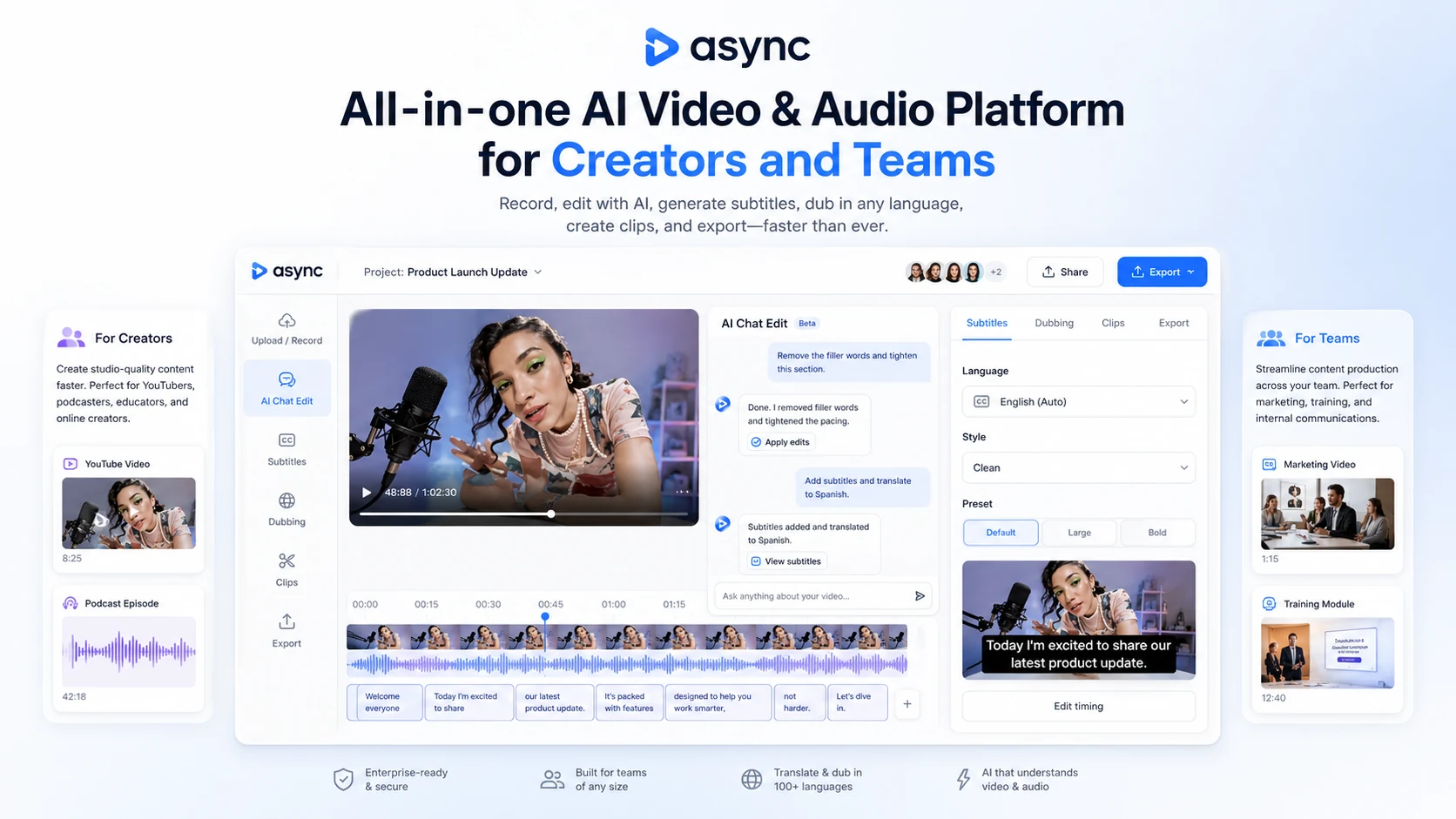
Async is an all-in-one AI video, audio, recording, dubbing, subtitle, clip, and voice platform for creators, podcasters, video teams, and developers. It is strongest when a buyer wants one workspace for recording, cleaning audio, editing video by chat, generating social clips, adding subtitles, dubbing content, cloning voices, and managing recurring creator output without moving across several separate tools.
Fit → price → checkout
Use these routes after the official-site check: coupon first, review for fit, compare if unsure.
Async pricing snapshot
Fast commercial checks before pricing, coupons, or a deeper review.
Async product tour
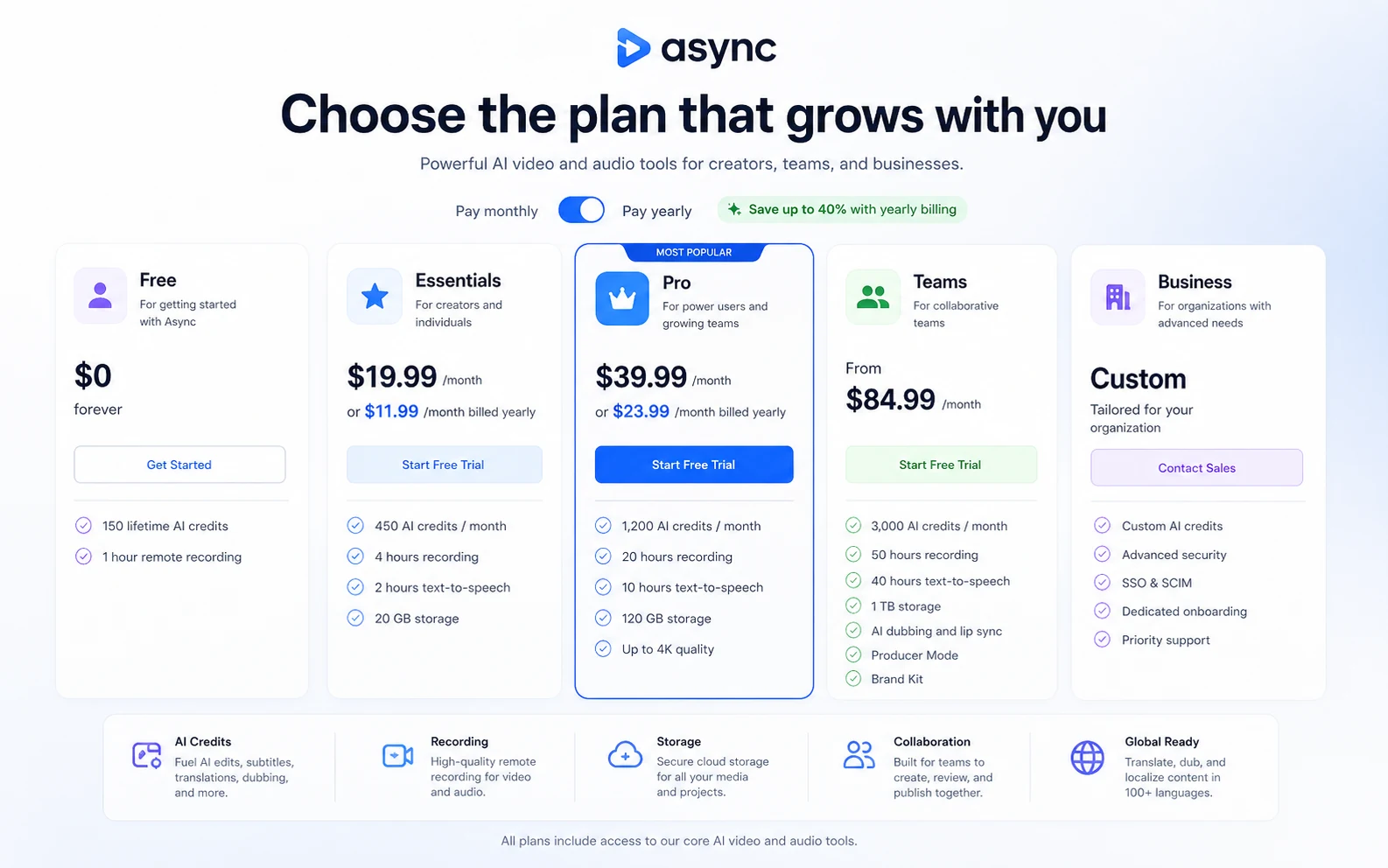
Async is best evaluated by following the full creator workflow: record or upload media, use AI chat editing, clean audio, add subtitles, create clips, test dubbing or voice tools, then compare the plan limits that control monthly value. The most useful visuals are the pricing table, AI editor, recording studio, and dubbing or clip workflow.
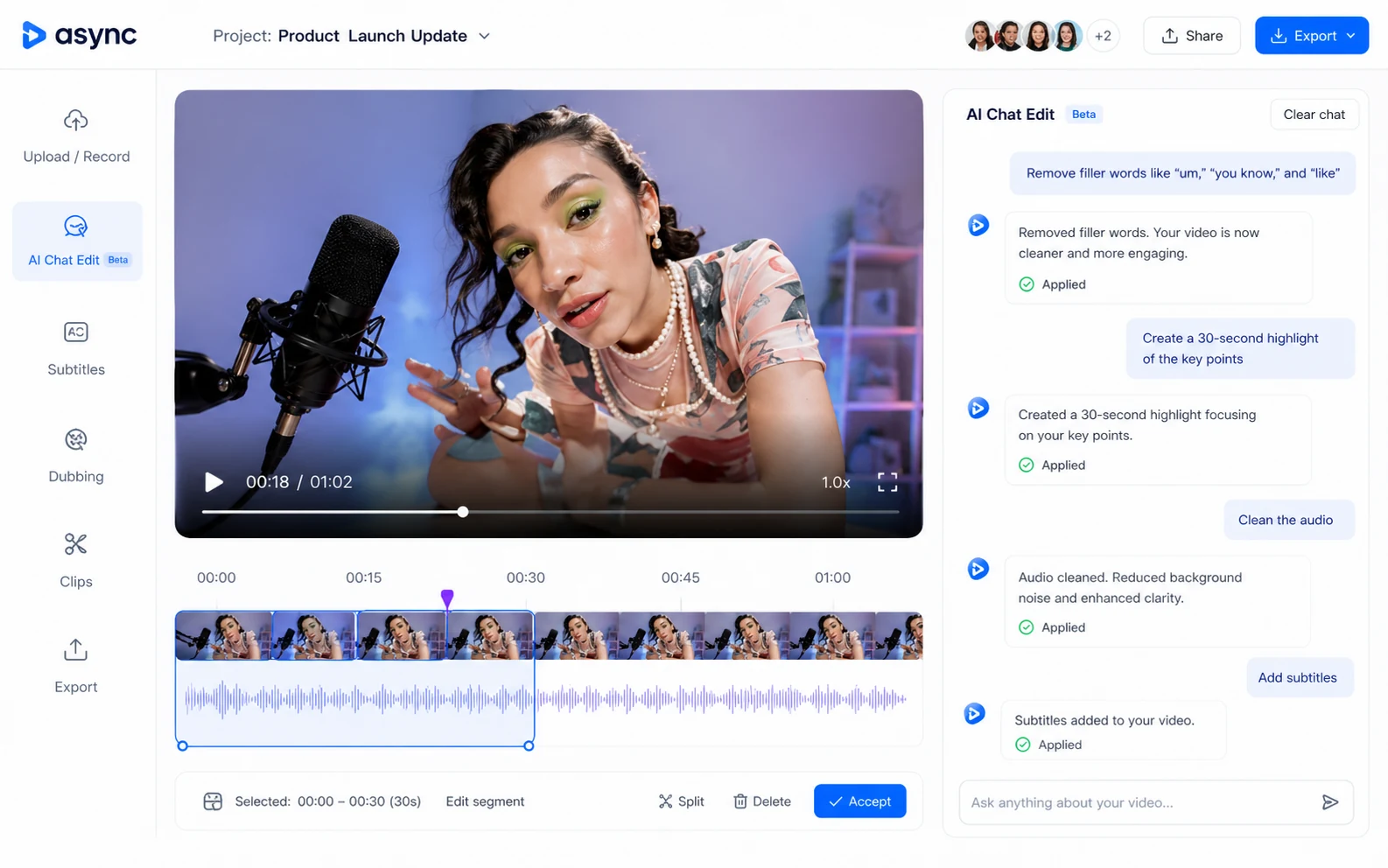
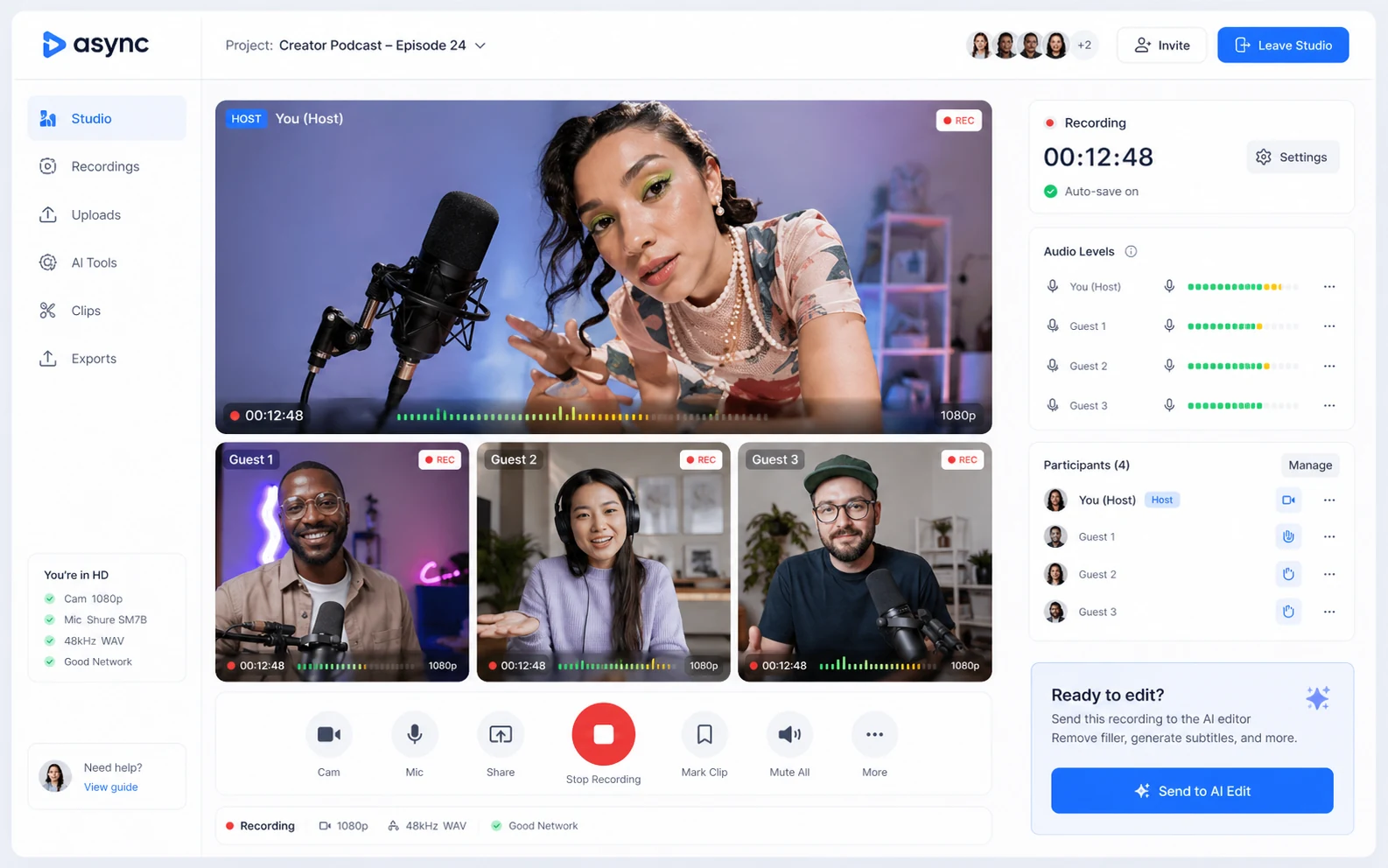
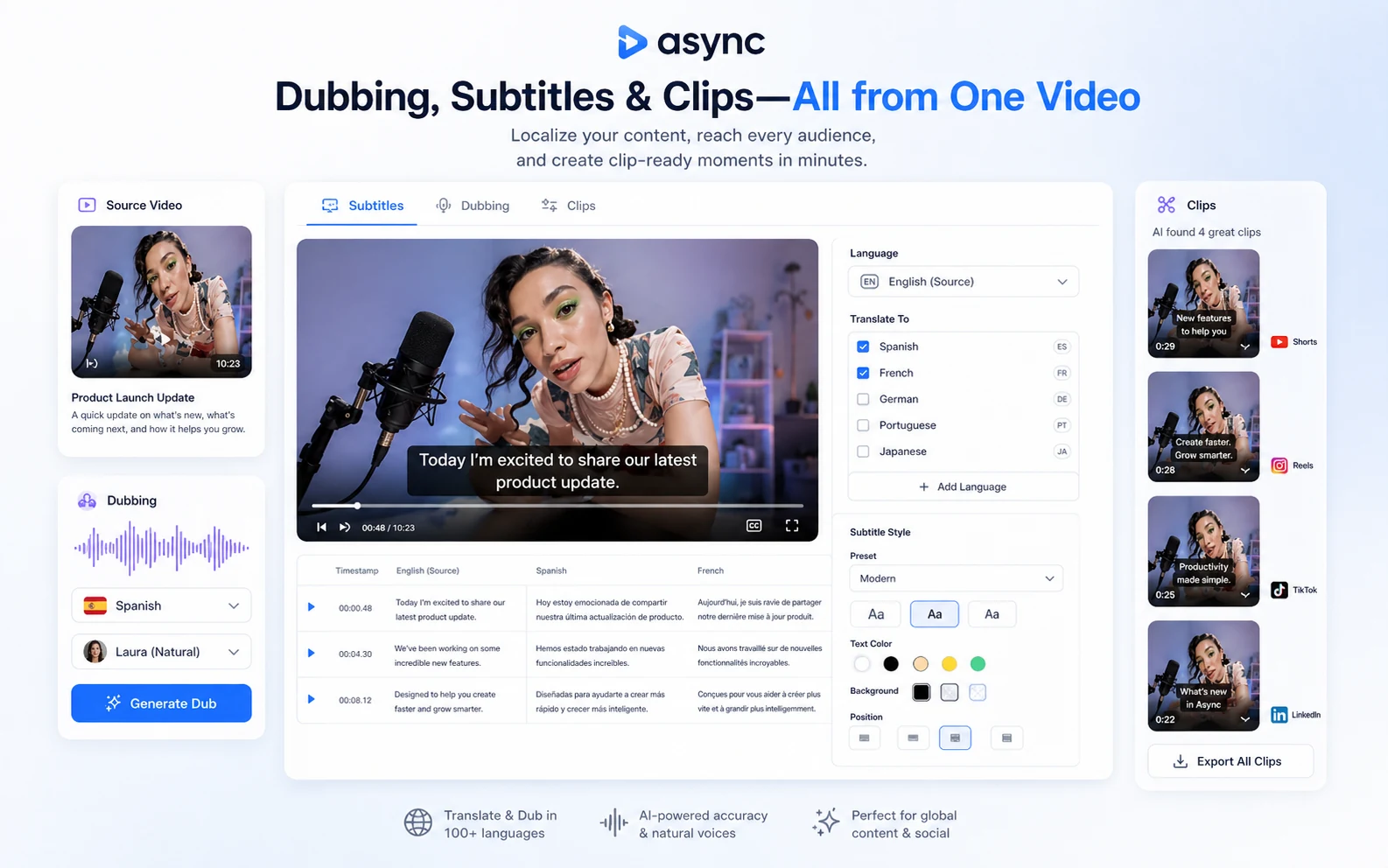
Async should be judged as a creator workflow platform, not just another AI video editor. The buyer question is whether one workspace can handle enough of your recording, cleanup, subtitles, dubbing, clipping, voice, and team production work to justify the credit-based subscription. For a creator with recurring output, the answer may be yes. For a one-off edit, the paid plan can be harder to justify.
What Async actually does
Async brings recording, AI video editing, audio cleanup, subtitles, dubbing, lip sync, clips, and voice tools into one web platform. The core pitch is speed: record or upload media, ask the AI editor to help with production work, and turn longer content into cleaner videos or shorter social assets.
That makes it more relevant for creators, podcasters, sales teams, marketing teams, and internal comms teams than for someone who only wants a decorative AI video generator. The product is strongest when you already have real source material and need to clean, translate, clip, or repurpose it often.
- Strongest for recurring creator and team production workflows
- Useful when recording, editing, subtitles, dubbing, and clips all matter
- Less ideal when the buyer only needs a single lightweight edit
Pricing, free plan, and credit limits
Async's public pricing includes a Free plan, paid Creator plans, team pricing, and a separate Voice API path. The visible Creator entry price starts at $11.99 per month when billed yearly for Essentials, while monthly pricing is higher. The Free plan is useful for basic testing, but it is not a proof that a paid plan will fit a heavier workflow.
Buyers should pay special attention to AI credits because credits are used across generation-heavy features such as AI clips, reframe, subtitles, dubbing, lip sync, and thumbnails. Monthly subscription credits reset at the start of the billing cycle, and used credits are not refundable.
- Free plan is useful for testing, not for proving long-term paid value
- Essentials and Pro differ by credits, recording hours, text-to-speech hours, storage, and output needs
- Teams adds collaboration, Brand Kit, Producer Mode, multi-host access, and support depth
- Voice API pricing belongs to a separate developer buying path
Video walkthrough for creator output
The official Async YouTube channel has tutorials focused on AI video editing and creator output. The most useful buyer angle is not whether the demo looks impressive, but whether the process matches your real workflow: input quality, prompt control, editing cleanup, subtitles, voice work, and export expectations.
For creators testing Async, a UGC ad or short-form tutorial is a good stress test because it quickly reveals whether the AI workflow saves time or merely shifts the cleanup work into another interface.
Team and brand workflow fit
Async becomes more commercially interesting for teams when collaboration and brand consistency matter. The Teams plan adds a workspace layer, Producer Mode, Brand Kit, multi-host recording, subtitle translation, user management, and higher limits. Those features are valuable for marketing, sales, customer education, HR, and internal communications teams that publish recurring media.
The caution is that team features can be overkill for a solo creator. A buyer should only move beyond Pro when there is a clear need for multi-person production, consistent branding, higher storage, or dedicated workflow support.
- Producer Mode and multi-host recording fit managed production workflows
- Brand Kit matters when clips and translated videos need consistent visual identity
- Team support is more valuable when content output is recurring and shared
Developer path through Voice API
Async also has a developer path through its Voice API. This is a different buying decision from the Creator product. The API page lists a free tier with 10 minutes of credits and a Developer path from $0.50 per hour, with text-to-speech, voice models, streaming models, instant voice cloning, parallel requests, and enterprise options.
This matters because a buyer building voice agents or text-to-speech products should not evaluate Async only through the Creator pricing table. The cost model, support needs, concurrency, and technical requirements are different.
- Creator pricing fits media production and editing workflows
- Voice API pricing fits developers building voice agents and TTS features
- Enterprise API needs should be checked through sales, limits, and support requirements
Coupon, refund, and safest next step
Async's safest buyer path is not to hunt for a random public coupon first. Start with the Free plan or trial path, build one real project, and measure whether AI credits, recording hours, text-to-speech time, and export quality match your expected output. Then check the live pricing page for annual savings or any official checkout offer.
Refund language deserves extra care. The help article describes a trial path and a conditional refund window for direct upgrades, while the main Terms page uses stricter post-charge language. That means buyers should cancel before the trial ends if the product is not a fit, rather than assuming a refund will be easy later.
- Test one real recording or edit before annual billing
- Confirm plan limits and AI-credit usage before checkout
- Check the live pricing page instead of trusting unverified public coupon claims
- Cancel before trial conversion if the workflow does not fit
Best savings path from this store page
This is the clearest savings route to check once the product already looks like a fit.
A public social promo mentions an Async coupon path. Treat this as a checkout-test route because it was not confirmed on the main Async pricing page.
Creator subscription path
Free voice API test credits
Use comparison routes when the category fit is still open
Use these comparison routes when the product still looks plausible, but the category fit is not fully settled.
Pictory is usually the cleaner comparison for article, script, URL, and content-repurposing video workflows.
Fliki is worth checking when text-to-video, voiceover, and simple creator output matter more than recording and editing depth.
Crayo is a closer fit for short-form UGC-style ads and social video generation with a more creator-ad angle.
ElevenLabs is stronger when voice generation, dubbing, and API voice quality are the main priority rather than full video production.
Verification points worth checking before you click out
Where this store usually fits best in the workflow
Async fits creators who record conversations, clean audio, edit video, add subtitles, and publish recurring episodes or clips from one workspace.
Async makes sense when long recordings need to become Shorts, Reels, TikToks, captions, thumbnails, or translated snippets without switching tools.
Marketing, sales, HR, and internal comms teams can use Async when brand consistency, collaboration, and repeatable production steps matter.
The Voice API path fits developers who need text-to-speech, streaming voice models, instant voice cloning, and usage-based pricing.
Practical checkpoints before and after signup
- Check whether Async is replacing several tools or only one narrow feature.
- Compare Creator pricing separately from Voice API pricing.
- Watch a tutorial and focus on edit cleanup, not just the polished final output.
- Use the Free plan or trial on a real recording, not a sample file that is easier than your normal workflow.
- Track AI-credit usage across clips, subtitles, dubbing, thumbnails, and AI edits.
- Check export quality, subtitle cleanup, voice output, and recording workflow before paying.
- Choose Essentials or Pro based on monthly output volume, recording hours, text-to-speech hours, storage, and export quality.
- Treat annual pricing as a commitment because refund language is limited after charges are processed.
- Upgrade to Teams only if collaboration and brand controls are part of the real workflow.
- Review unused credits and unused recording hours before renewing.
- Re-check whether a specialist tool would now serve the highest-volume workflow better.
- Revisit API pricing separately if the project moves from content production into voice infrastructure.
Fast-read signals for workflow fit and buying friction
Questions readers usually ask before choosing this store
Is Async mainly an AI video editor?
Async is broader than a basic AI video editor. It combines recording, AI editing, audio cleanup, subtitles, dubbing, clips, voice tools, and a separate Voice API path. Buyers should judge it as a creator workflow platform rather than a single-purpose editing app.
Does Async have a free plan or free trial?
Yes. Async publishes a Free plan with limited lifetime credits and recording time. The help center also describes a 7-day free trial on annual subscription plans. Buyers should verify the exact trial and billing terms on the live checkout because trial offers can change.
What is the starting price for Async?
At the latest store update, Async's Essentials plan is shown from $11.99 per month when billed yearly. Monthly billing is higher, and Teams or Business pricing changes the decision. The separate Voice API path starts with free credits and pay-as-you-go usage from $0.50 per hour.
Are Async coupons the best savings path?
Usually not. The more reliable savings path is to use the Free plan or trial, compare annual pricing, and check the live checkout for official offers. Public coupon claims should not be trusted unless the discount appears on the current checkout or a verified DealBestDaily route.
Who should avoid Async?
Async is probably not ideal for buyers who need only a one-off edit, advanced manual timeline control, or a pure voice tool without video workflow needs. It also needs careful testing if the buyer is unsure how many AI credits, recording hours, or team features they will actually use.
Choose the next route that matches what you still need to decide
The strongest next click depends on whether you still need product judgment, a savings route, or a broader category comparison.