
Quick verdict
ArtSmart AI is worth considering if you need a repeatable way to create marketing images, blog visuals, product-style concepts, thumbnails, or campaign assets from prompts. I would be more cautious if you only need one or two images, want a free trial before paying, or expect AI image generation to replace a real creative review process.
The main buying question is not whether ArtSmart AI can generate interesting images. Most AI image tools can do that now. The better question is whether its credit model, editing tools, plan structure, and output quality fit the visual workload you actually repeat.
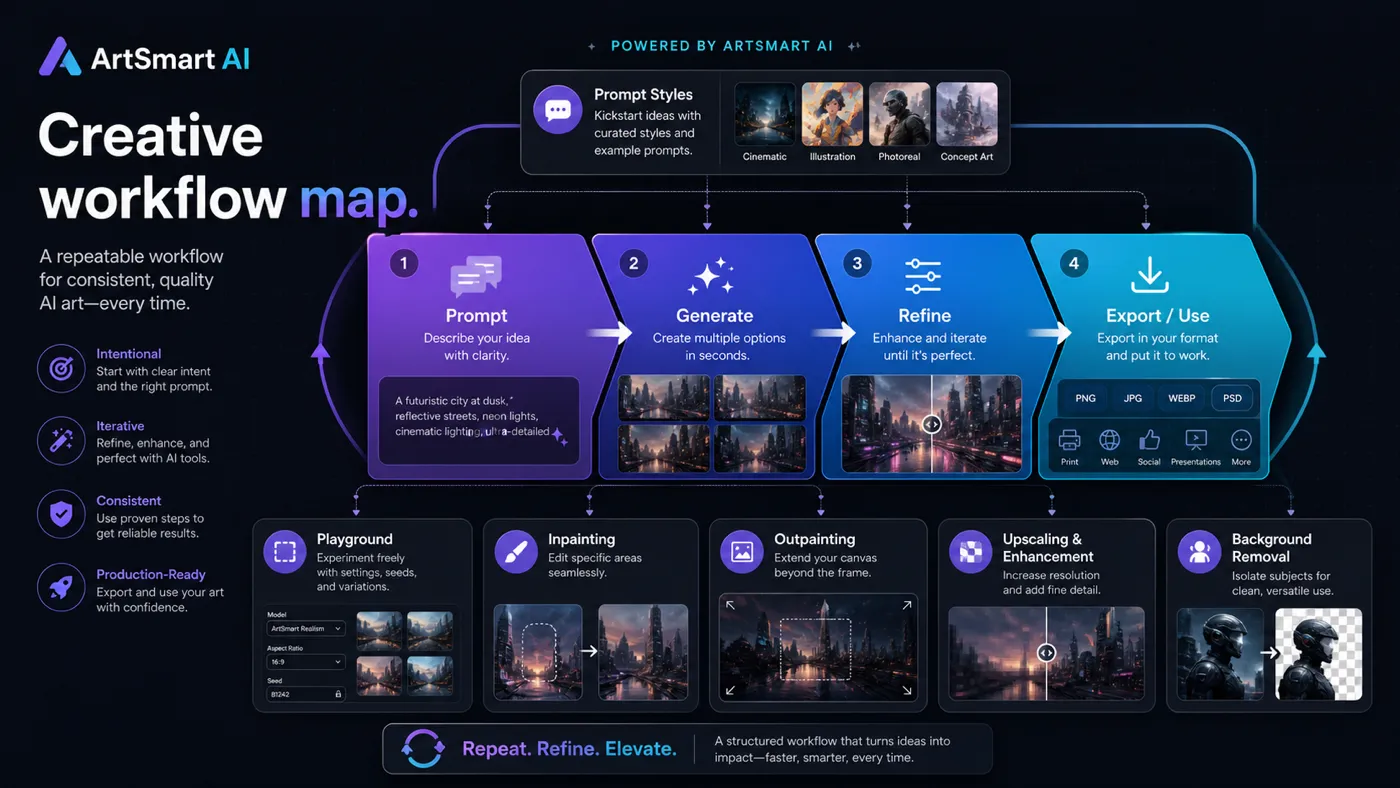
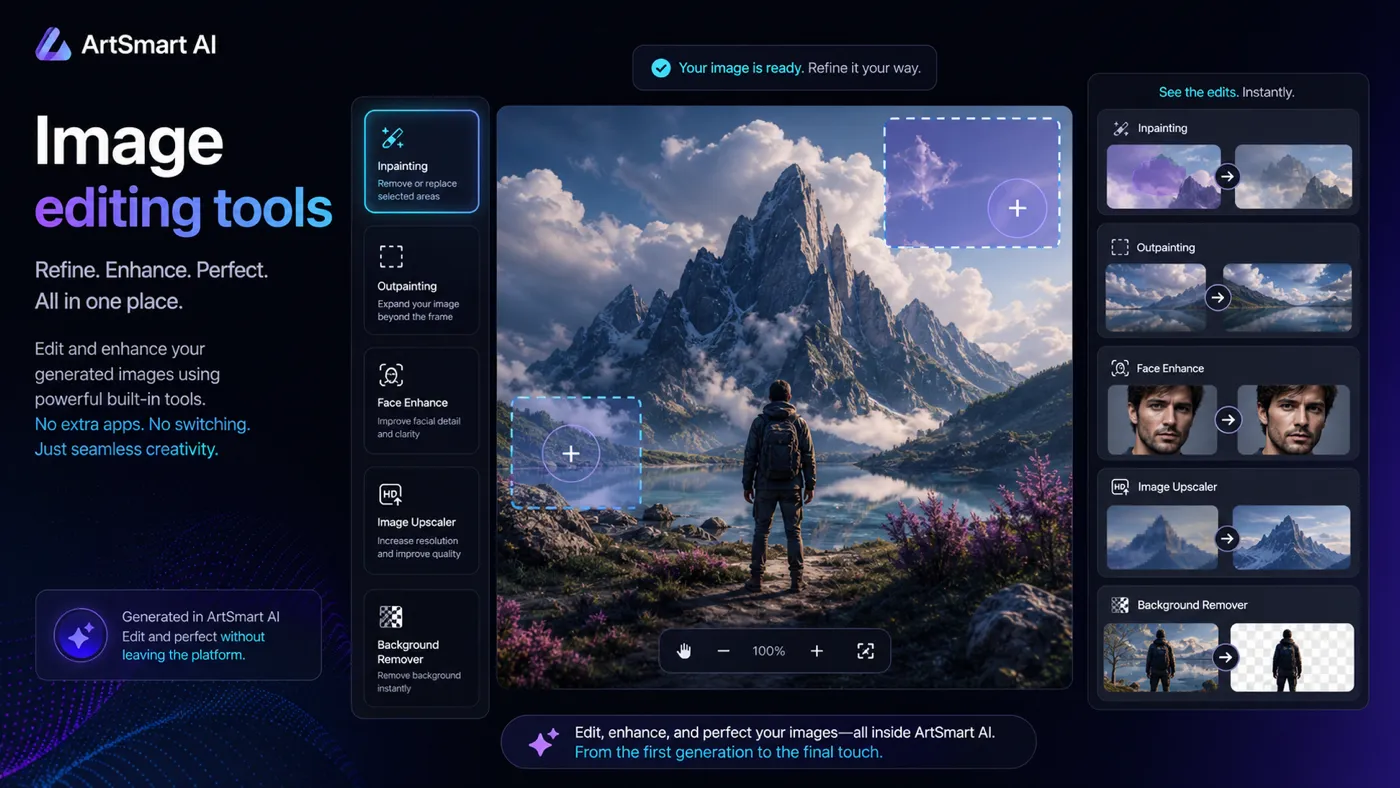
That is where ArtSmart AI becomes more specific. It offers text-to-image generation, image-to-image, image-to-prompt, inpainting, outpainting, face enhancement, upscaling, background removal, pose tools, prompt styles, generation modes, and API access. That can be useful for marketers and creators who need more than a casual image prompt box.
The caution is also clear. ArtSmart AI does not offer a free trial or free credits. The pricing page points buyers toward paid plans and a 30-day money-back guarantee instead. For my money, that means you should treat the first month as a careful workflow test, not a casual creative experiment.
Next step: If ArtSmart AI still fits your visual workflow, check the current plan and credit route before choosing monthly or annual billing.
Review snapshot
| Review point | Practical take |
|---|---|
| Best for | Marketers, creators, ecommerce operators, and small teams that need recurring AI-generated visuals |
| Not ideal for | One-off image users, free-trial shoppers, or designers who need full professional layout control |
| Main use case | Prompt-based image generation plus editing for marketing and content workflows |
| Starting price | Basic is publicly listed at $16/month equivalent on annual billing or $19/month monthly |
| Free trial | No free trial or free credits are listed publicly |
| Refund path | 30-day money-back guarantee is described on the official site and docs |
| Credit model | Basic, Standard, and Business plans include monthly Playground Credits |
| Main strength | Focused creative workflow with generation, editing, styles, modes, and API options |
| Main concern | Credit usage, output quality, commercial-use judgment, and support confidence need checking |
| Best next step | Test real prompts and monthly volume before annual billing |
What is ArtSmart AI?
ArtSmart AI is best understood as an AI image-generation and editing platform for people who need visual assets from prompts. It is not a full design suite like a professional layout tool, and it is not a free playground for occasional image experiments.
The product sits in a practical middle ground. You can generate images from text, use image-to-image workflows, create prompts from images, edit with inpainting and outpainting, remove backgrounds, enhance faces, upscale images, use pose tools, and work with prompt styles or generation modes. The public site also lists ArtSmart API as part of the feature set on paid plans.
The strongest buyer case is recurring visual production. A marketer may need campaign concepts. A blogger may need article images. An ecommerce operator may need product-style scenes. A creator may need thumbnail directions or social visuals. In those cases, ArtSmart AI can make sense if it saves time and produces usable images often enough to justify the credits.
Our review approach: we compare public product pages, pricing details, credit documentation, refund language, buyer workflow fit, and nearby creative alternatives. We do not treat a coupon, historical lifetime deal, or low headline price as proof that the product fits the buyer.
The common wrong expectation is thinking that an AI image generator is automatically a finished creative department. It is not. You still need taste, prompt judgment, brand review, and a practical sense of whether the generated image is safe to publish.
Who should use ArtSmart AI?
Marketers creating recurring campaign visuals
ArtSmart AI can make sense for marketers who need blog images, ad concepts, social visuals, landing page graphics, or campaign directions without commissioning every asset from scratch.
The condition is frequency. If you generate visuals every week, a credit-based plan may be easier to justify. If you only need a few images for a single project, the subscription model can feel heavier than the problem.
Creators who want prompt-driven visual variety
Creators may like ArtSmart AI because it combines generation with editing and style direction. The ability to move from prompt to variation to refinement matters when you are making thumbnails, newsletter images, article visuals, or social content.
The buyer should still check whether the output quality matches their niche. A tool can look impressive in sample galleries and still disappoint when your own prompts are more specific.
Ecommerce and product-style teams
ArtSmart AI may help ecommerce buyers test background ideas, product scenes, lifestyle-style concepts, or visual directions before investing in professional production.
I would be careful here. AI-generated product visuals can be useful for inspiration, but anything used in ads, product claims, or customer-facing ecommerce pages needs extra review. Do not let speed create a misleading image.
Teams considering API-assisted generation
ArtSmart AI becomes more interesting if your team wants image generation inside a repeated process. That might mean content workflows, product mockups, internal asset generation, or creative automation.
The condition is technical clarity. API access is useful only when the team has a real integration plan, cost expectations, and a way to review generated images before they go public.
Who should avoid ArtSmart AI?
You may want to skip ArtSmart AI if you need a free trial before paying. The public docs say there is no free trial or free credits, so the evaluation path depends more on paid access and the refund guarantee.
You should also be cautious if you only need one or two images. A monthly plan can be sensible for recurring visual work, but it is not always the best route for a one-time asset.
Professional designers who need layered files, strict brand systems, detailed layout control, and pixel-level editing should not treat ArtSmart AI as a complete replacement for their design stack. It can support concepting and image generation, but final creative production may still need other tools.
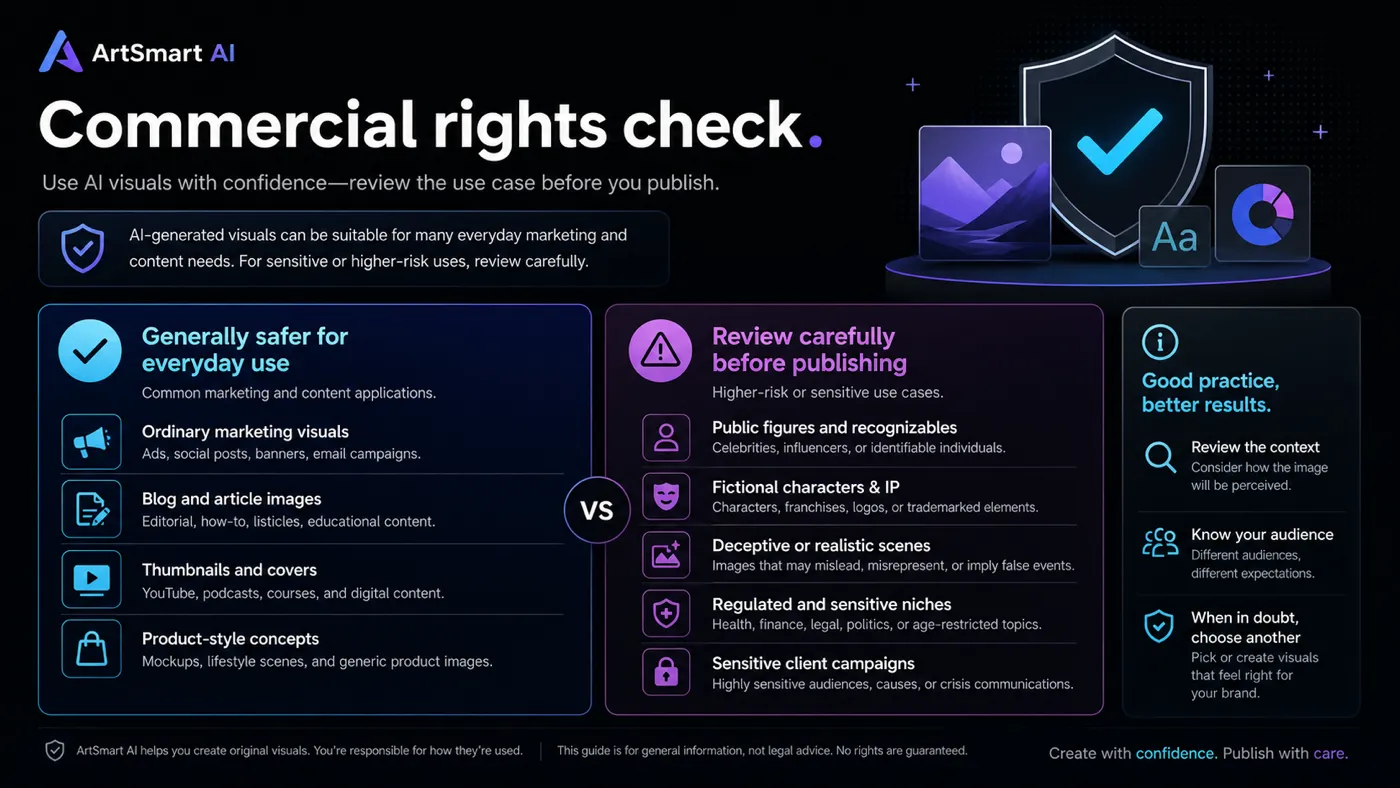
I would also slow down if your planned use involves public figures, fictional characters, deceptive realism, regulated niches, sensitive health or finance visuals, or client campaigns with strict brand/legal review. The official FAQ is positive about commercial rights, but it also warns that monetizing celebrities, public figures, and notable fictional characters can create trouble.
Finally, buyers who are attracted mainly by old AppSumo deal references should be careful. The historical listing is sold out, and current buyers should judge the live subscription path rather than old lifetime-deal expectations.
How ArtSmart AI fits into a real workflow
A realistic ArtSmart AI workflow starts before you open the prompt box.
First, define the visual job. Is this a blog header, an ad concept, a social visual, a product-scene idea, or a thumbnail direction? Then write prompts based on the asset you actually need, not just a vague aesthetic.
Next, generate several options and judge them with a practical eye. Look for composition, subject clarity, brand fit, distortion, realism, and whether the image would make sense to a real viewer. If the first output is close but not usable, editing tools such as inpainting, outpainting, upscaling, face enhancement, or background removal may help.
The final step is not download. The final step is review. For marketing and ecommerce, ask whether the visual implies something inaccurate, uses a sensitive likeness, creates a brand-safety issue, or needs manual design work before publishing.
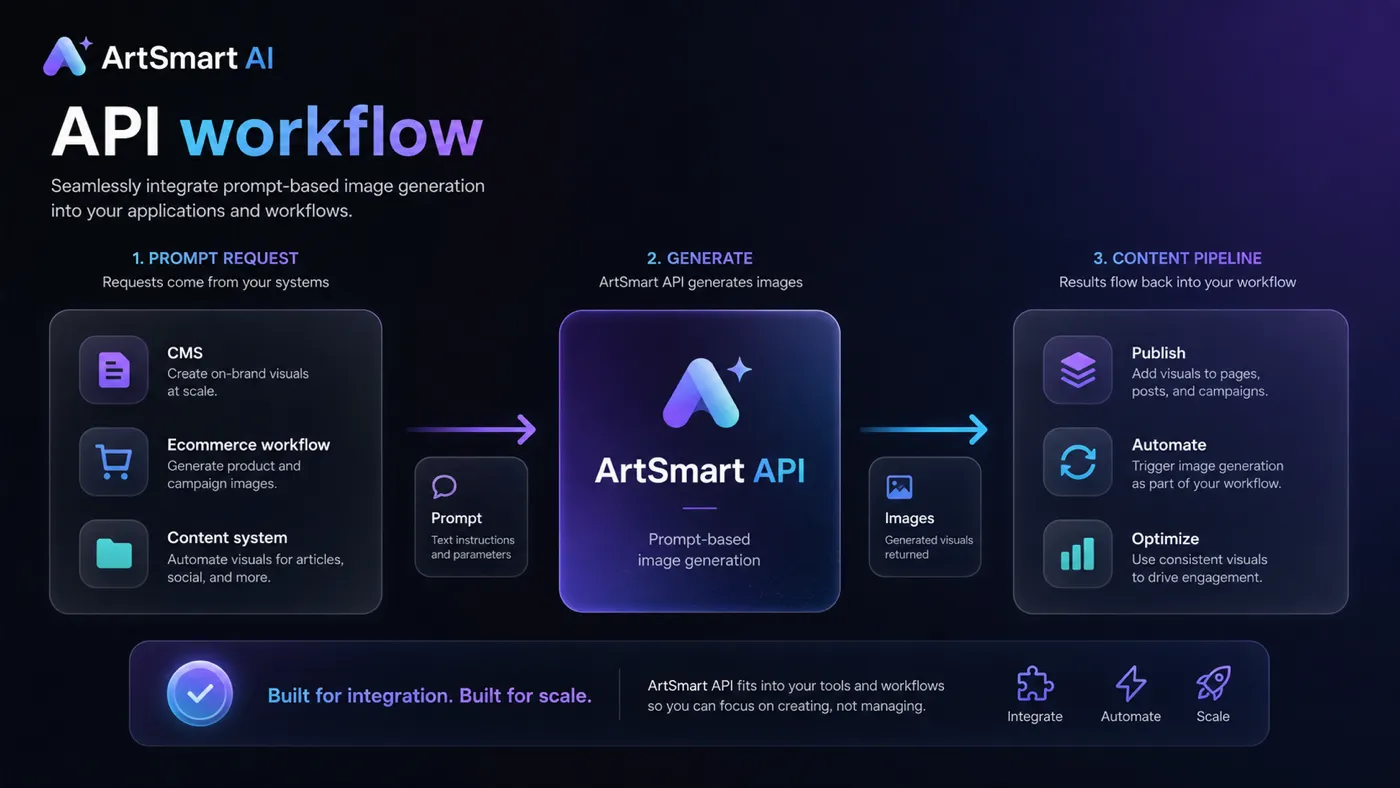
Workflow check: ArtSmart AI is easier to judge when you test it with real campaign, content, or product prompts instead of generic sample ideas.
Real-world buyer scenarios
A blogger needs article visuals every week
This is one of the cleaner ArtSmart AI use cases. A blogger who publishes often may need featured images, section graphics, comparison visuals, or newsletter thumbnails. If the tool produces usable images without burning too many credits, the subscription can become part of the publishing process.
The risk is settling for generic AI visuals. A blog image should support the topic, not just decorate the page.
A small marketing team needs ad concepts
ArtSmart AI can help a marketing team explore visual directions before a campaign is finalized. It may be useful for early concepts, mood directions, and quick creative variations.
The failure point is assuming concept art equals final ad creative. For client-facing or paid media, the team should still apply brand, compliance, and performance review.
An ecommerce operator wants product-style scenes
ArtSmart AI may help test ideas around background, context, lighting, or lifestyle-style product imagery. That can be useful before paying for a full shoot or designer.
The buyer should be careful about accuracy. If an AI image changes the product, exaggerates an outcome, or implies a feature that does not exist, it can create commercial risk.
A developer wants visual generation inside a product
API access can matter for a developer or team building visual generation into a workflow. In that case, the evaluation should focus on documentation, rate limits, plan requirements, image review, and cost control.
I would not buy for API curiosity alone. The better question is whether the product needs recurring image generation enough to justify integration work.
Key features that actually matter
Text-to-image and image-to-image generation
This is the core ArtSmart AI job: turn prompts and visual direction into images. For buyers, the important part is not whether the feature exists. It is whether the output fits the brand, niche, and publishing context.
Buyer note: test with real prompts from your business, not generic fantasy or stock-style prompts.
Inpainting, outpainting, and image editing
Editing tools can make the platform more useful than a simple generator. If an image is close but needs a fixed area, expanded canvas, enhanced face, or cleaner background, these tools can reduce the need to leave the workflow.
Buyer note: editing features matter most when they save revisions. If you still export everything to another tool for serious cleanup, ArtSmart AI becomes more of an idea generator than a production tool.
Prompt styles and generation modes
Prompt styles and generation modes help buyers steer the creative direction. This is useful because prompt-only generation can waste credits when the buyer keeps guessing how to describe the desired look.
Buyer note: presets are valuable only if they match your visual niche. A SaaS blog, ecommerce catalog, lifestyle brand, and YouTube thumbnail workflow may need very different styles.
Credit-based usage visibility
ArtSmart AI uses monthly Playground Credits across its subscription plans. This is a good transparency signal because it gives buyers a usage boundary.
The catch is that credit usage can rise depending on image dimensions, steps, variations, and tool choices. The lowest plan can look affordable until the buyer realizes their real workflow needs more experiments and edits.
Buyer note: estimate how many images, variations, and revisions you need each month before choosing a plan.
API access
API access makes ArtSmart AI more relevant to workflow-heavy buyers. If your team wants generated images inside a product, pipeline, publishing system, or automation process, this can matter.
Buyer note: do not assume API access is valuable just because it sounds advanced. It matters only when you already know where generated images will be used, how they will be reviewed, and how costs will be controlled.
Pricing and plan value
ArtSmart AI publishes three main subscription plans: Basic, Standard, and Business. Basic is listed at $16/month on annual billing or $19/month monthly. Standard is listed at $24.50/month on annual billing or $29/month monthly. Business is listed at $32.50/month on annual billing or $39/month monthly.
The more important detail is credits. Basic includes 1,000 Playground Credits, Standard includes 2,500, and Business includes 6,000. The official credit documentation says credits are refilled monthly and that the app does not offer unlimited creations.
That changes how I would judge the plans.
The Basic plan is the safest starting point for a light workflow if you can accept paid testing. It gives enough room to understand the interface and run real prompts, but heavy users may outgrow it quickly.
Standard looks more realistic for buyers who generate and edit visuals regularly. If you need multiple images per article, campaign, or product concept, the extra credits may matter more than the monthly price difference.
Business makes more sense for higher-volume teams, API-aware buyers, or teams that need more visual experimentation. I would still check usage patterns before annual billing. A larger credit allowance is not automatically better if the workflow is not proven.
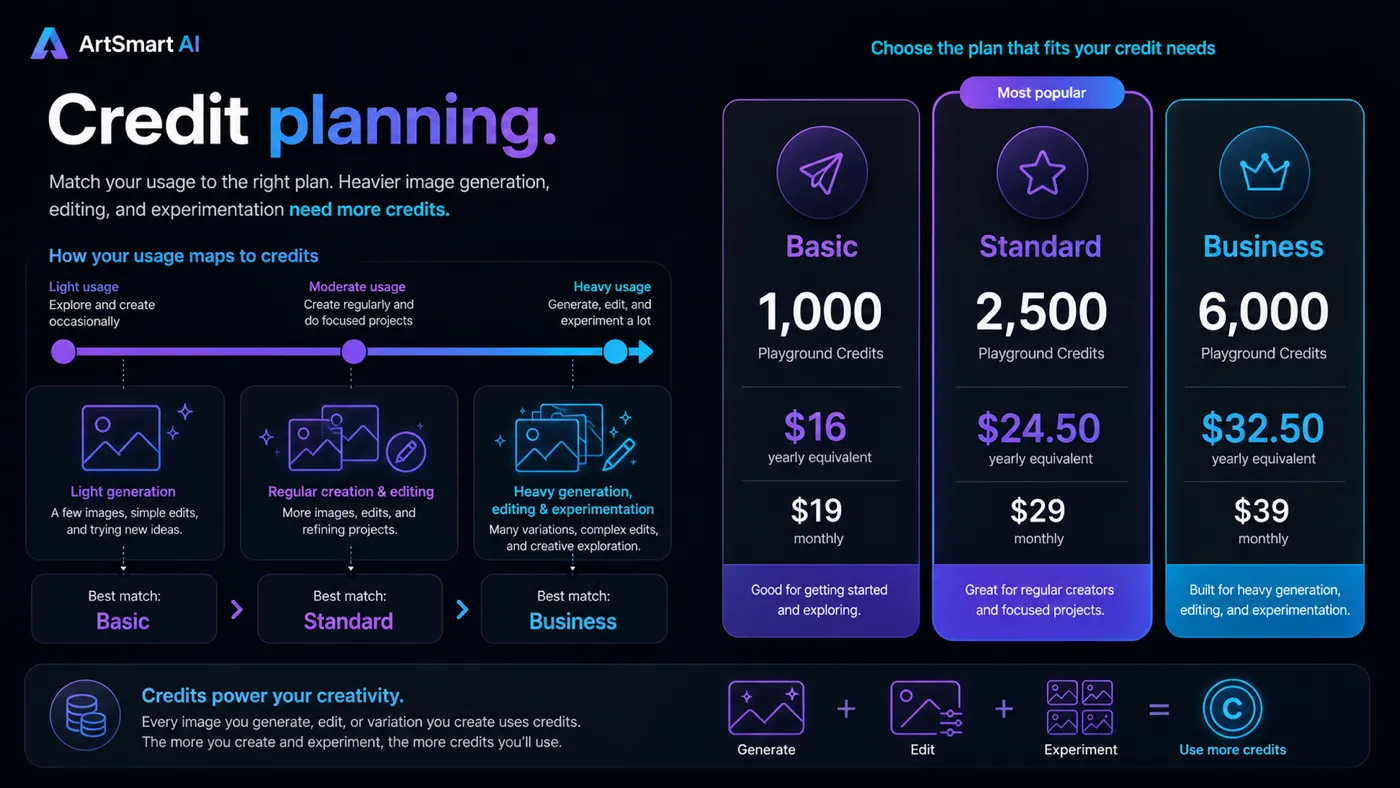
Pricing check: Before choosing annual billing, confirm the live plan price, monthly credit allowance, and refund wording on the active checkout route.
Check ArtSmart AI pricing Check current offers Read store guide
Free plan, trial, coupon, and checkout notes
ArtSmart AI is not a free-trial-first product. The public documentation says there is no free trial or free credits. Instead, the product relies on paid plans and a 30-day money-back guarantee.
That is not automatically bad. Some tools use a refund guarantee instead of a free tier because AI generation has real compute cost. But it changes the buyer psychology. You should not enter the checkout expecting a no-cost experiment.
Coupon logic should be secondary here. ArtSmart AI is better judged by plan fit, credit needs, output quality, and refund comfort than by hunting for a public code. The store route and current offers can still be useful, but only after the product already makes sense for your workflow.
The historical AppSumo deal is also not the main buying path now. The listing is sold out, so current buyers should not anchor their decision on old lifetime-deal pricing.
A careful checkout order looks like this:
- Confirm whether Basic, Standard, or Business fits your expected monthly image volume.
- Check whether annual billing is worth the commitment.
- Verify whether the 30-day guarantee appears on your current route.
- Check active offers only after workflow fit is clear.
- Avoid buying just because an old deal or discount reference looks attractive.
What I would check before buying ArtSmart AI
If I were buying ArtSmart AI for a real workflow, I would check seven things before paying.
First, I would estimate monthly image volume. Not just final downloads, but prompt attempts, variations, edits, upscales, and rejected outputs.
Second, I would confirm credit consumption. The docs say image settings can affect credit use, so the practical cost is not always one final image equals one simple unit.
Third, I would test the exact asset types I care about. Blog visuals, product scenes, ad concepts, and thumbnails all have different quality thresholds.
Fourth, I would check commercial-use comfort. The public FAQ gives a positive commercial-rights statement, but sensitive subjects and public figures still need stricter review.
Fifth, I would compare annual billing against monthly testing. Annual billing can reduce the effective monthly cost, but it is not safer if the workflow is unproven.
Sixth, I would check refund wording on the active checkout path. The guarantee is useful, but live terms matter more than memory.
Seventh, I would compare ArtSmart AI with direct image-generation alternatives before committing to a longer plan.
A simple test before paying
Before committing to ArtSmart AI for a recurring workflow, I would run a small test like this:
- Choose three real visual jobs you actually need this month.
- Write prompts for each job using your real brand, audience, and asset format.
- Generate enough variations to judge consistency, not just one lucky output.
- Use at least one editing tool such as inpainting, outpainting, background removal, or upscaling.
- Track how many credits the test consumes.
- Decide how many final images are publishable without major external editing.
- Compare the result against another image-first tool before annual billing.
That test is more useful than staring at the pricing table. The pricing table tells you what you can buy. The test tells you whether you will use it.
Pros explained
The feature set is broad for image-focused workflows
ArtSmart AI is not only a text-to-image prompt box. The combination of generation, editing, styles, modes, pose tools, upscaling, background removal, and API access gives buyers multiple ways to move from idea to usable asset.
This matters most when the buyer repeats the workflow. If you need one image, breadth may not matter. If you need weekly visuals, the toolset becomes more meaningful.
Pricing and credits are visible enough to plan around
I like that ArtSmart AI publishes plan tiers and monthly Playground Credit allowances. Vague unlimited claims can be more dangerous because they hide the real usage boundary.
The credit model still needs attention, but at least buyers can start with a practical question: how many usable images do I need each month?
The refund guarantee helps reduce paid-testing risk
Because ArtSmart AI does not offer a free trial, the 30-day money-back guarantee becomes important. It gives cautious buyers a way to test the product without treating the first payment as a permanent mistake.
The buyer still needs to check live wording and act within the window. A guarantee only helps if you actually evaluate the tool promptly.
API access expands the workflow fit
For teams with a real integration plan, API access can make ArtSmart AI more than a manual creative tool. It can support repeatable image generation inside a broader process.
This stops being a strength if the buyer has no technical plan. API access is not a reason to buy by itself.
Cons explained
No free trial raises the evaluation burden
The lack of a free trial or free credits means buyers must decide whether they are comfortable entering a paid evaluation path. The refund guarantee helps, but it is not the same experience as testing before payment.
Buyers who dislike refund-based testing may prefer alternatives with easier free-entry paths.
Credit consumption can be underestimated
The cheapest plan can look simple until you account for experiments, variations, higher resolution, editing, and rejected images. In image generation, the first useful output may not arrive on the first prompt.
This is why I would not judge ArtSmart AI only by starting price. Usage behavior matters.
Output quality still needs human judgment
AI image generation can produce impressive results and flawed results in the same session. Distorted hands, odd faces, strange product details, misleading context, or off-brand styling can still appear.
That does not make ArtSmart AI bad. It means buyers should treat it as a creative workflow tool, not a guaranteed final-asset machine.
Third-party buyer signals are mixed
The historical AppSumo page shows a strong overall rating, but some recent reviews raised concerns around login issues, support responsiveness, output quality, and product momentum. The company has responded publicly to some complaints, which is better than silence, but the pattern is still worth noticing.
I would treat this as a reason to test quickly and verify support comfort before committing long-term.
Green flags and red flags
Green flags
- You need recurring visuals for content, marketing, ecommerce, or creator workflows.
- You can estimate monthly credit usage before buying.
- You value image editing tools in the same workflow as generation.
- You are comfortable testing within a refund window.
- You have a clear API or automation use case.
Red flags
- You need a free trial before making any payment.
- You only need one or two images.
- You expect perfect final visuals without human review.
- You are buying mainly because of an old lifetime-deal reference.
- You need professional layout control rather than prompt-based image generation.
- Your use case involves sensitive commercial, legal, or likeness issues.
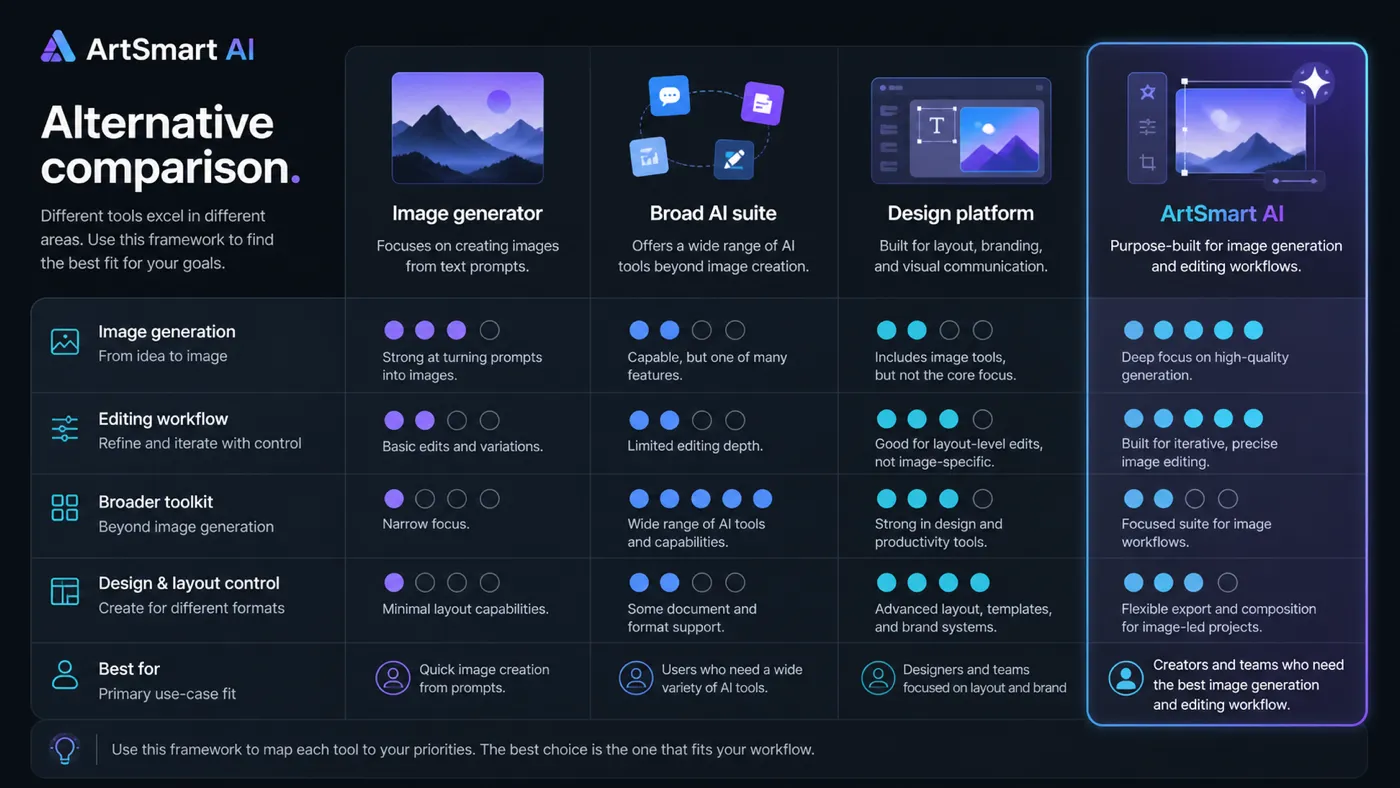
ArtSmart AI vs alternatives
ArtSmart AI should be compared as an image-generation workflow tool, not as a broad AI assistant. That makes the alternatives question more precise.
Imagine Art vs ArtSmart AI
Imagine Art is a more direct comparison if the buyer wants a consumer-friendly AI art and creative generation experience. It may be easier to evaluate if your main goal is visual exploration and fast creative output.
ArtSmart AI may still make sense if you prefer its combination of editing tools, credit model, and workflow positioning. Compare both by output quality on the same prompts, not by feature lists alone. You can start with the Imagine Art store guide if that direction feels closer.
OpenArt vs ArtSmart AI
OpenArt is a strong comparison when community inspiration, model choice, and AI art workflows matter. Buyers who want deeper creative exploration may find it worth comparing before choosing ArtSmart AI.
ArtSmart AI may be simpler if your goal is marketing visuals plus practical editing in a straightforward subscription path. For a more art-community-oriented route, review the OpenArt store guide.
1min.AI vs ArtSmart AI
1min.AI is an adjacent comparison route, not a pure direct replacement. It is better to consider if you want multiple AI utilities under one roof rather than a dedicated image-generation workflow.
ArtSmart AI is the cleaner fit when images are the main job. If you also need writing, chat, productivity, or broad AI tasks, compare with the 1min.AI store guide.
Aikeedo vs ArtSmart AI
Aikeedo is an adjacent platform-builder route. It is relevant if the buyer wants to build or own an AI SaaS-style platform, not simply generate images for marketing or content.
That is a very different job. Do not compare Aikeedo and ArtSmart AI as if they solve the same buyer problem. Compare Aikeedo only if your real goal is product ownership or platform deployment rather than creative asset production. The Aikeedo store guide is a better next stop for that direction.
Trust, refund, and buyer-risk notes
My confidence is strongest around ArtSmart AI’s product role, public plan structure, and credit-based buying logic. I am more cautious around long-term support experience, output consistency, and whether the current checkout route will match every buyer’s refund expectation.
The refund path is useful but should not be treated casually. The official docs tell buyers to email support for refund requests and describe a 30-day money-back guarantee. That gives you a clearer safety net than vague refund language, but you still need to test early inside the window.
Commercial rights also deserve careful reading. The public FAQ says generated images can be used commercially at the time of writing, while warning buyers about public figures, fictional characters, and similar sensitive usage. That is a practical reminder: the tool may give you an image, but it does not remove your publishing judgment.
I would also be careful with API claims. ArtSmart AI publishes API material and lists ArtSmart API in its plan feature set, but technical buyers should confirm access, rate limits, documentation, support expectations, and cost control before building anything important around it.
The final buyer-risk point is simple: do not let the lowest monthly number make the decision for you. ArtSmart AI is a credit-driven creative tool. The right question is whether you can turn credits into publishable visual output often enough.
Final verdict
I would consider ArtSmart AI if you need recurring AI-generated visuals and can evaluate the tool against real marketing, content, ecommerce, or creator prompts. The product makes the most sense when image generation and editing are part of a repeated process, not a one-time curiosity.
I would skip ArtSmart AI if you need a free trial, only need a couple of images, want professional layout control, or are uncomfortable evaluating a tool through a paid plan plus refund guarantee.
I would compare it with Imagine Art and OpenArt if your main priority is image quality, style variety, and creative exploration. I would compare it with 1min.AI only if you want a broader AI suite. I would treat Aikeedo as an adjacent platform-builder route, not a direct visual-generation replacement.
The safest next step is to check the current ArtSmart AI pricing route, estimate your monthly credit needs, test with real prompts as soon as you enter the product, and keep the refund window in mind. If the images become usable assets rather than just interesting experiments, ArtSmart AI can earn a place in your creative workflow. If not, a cheaper annual price will not fix the mismatch.
