Quick verdict
Decohere is worth considering if you want a fast creative sandbox for generating images, character concepts, short visual motion, and style directions without opening a heavier design or video tool.
I would not judge it as a full production platform.
That distinction matters because Decohere can look very attractive at first glance: free realtime image generation, low paid entry pricing, video generation, upscaling, AI characters, watermark removal, and commercial-license access on higher plans. The buying question is narrower. Does it create enough usable visual ideas for the kind of work you actually publish, and do the credits and license rules make sense after the free test?
For my money, Decohere makes the most sense for creators who need speed and variation. Social visuals, thumbnail concepts, character experiments, mood-board style exploration, and short creative motion are more natural fits than polished campaign production or long-form video editing.
The main caution is not feature depth. It is plan fit. Decohere’s pricing page ties paid value to credits, commercial-use rights, watermark removal, video generation, upscaling, character creation, and no-refund terms. If you choose a paid plan too quickly, the mistake is not only overpaying. The bigger mistake is buying before you know whether your own prompts produce usable outputs.
Next step: If Decohere sounds useful for your creative workflow, test the live product first and verify the current plan limits before checkout.
Review snapshot
| Review point | Practical take |
|---|---|
| Best for | Creators who want fast image ideas, character visuals, short video concepts, and visual style exploration |
| Not ideal for | Teams needing API automation, long-form video editing, team workflows, or refund safety |
| Main use case | Realtime creative iteration before deciding which visuals deserve refinement or commercial use |
| Free path | Free forever entry point for daily realtime image generation, with limits and a wait between generations |
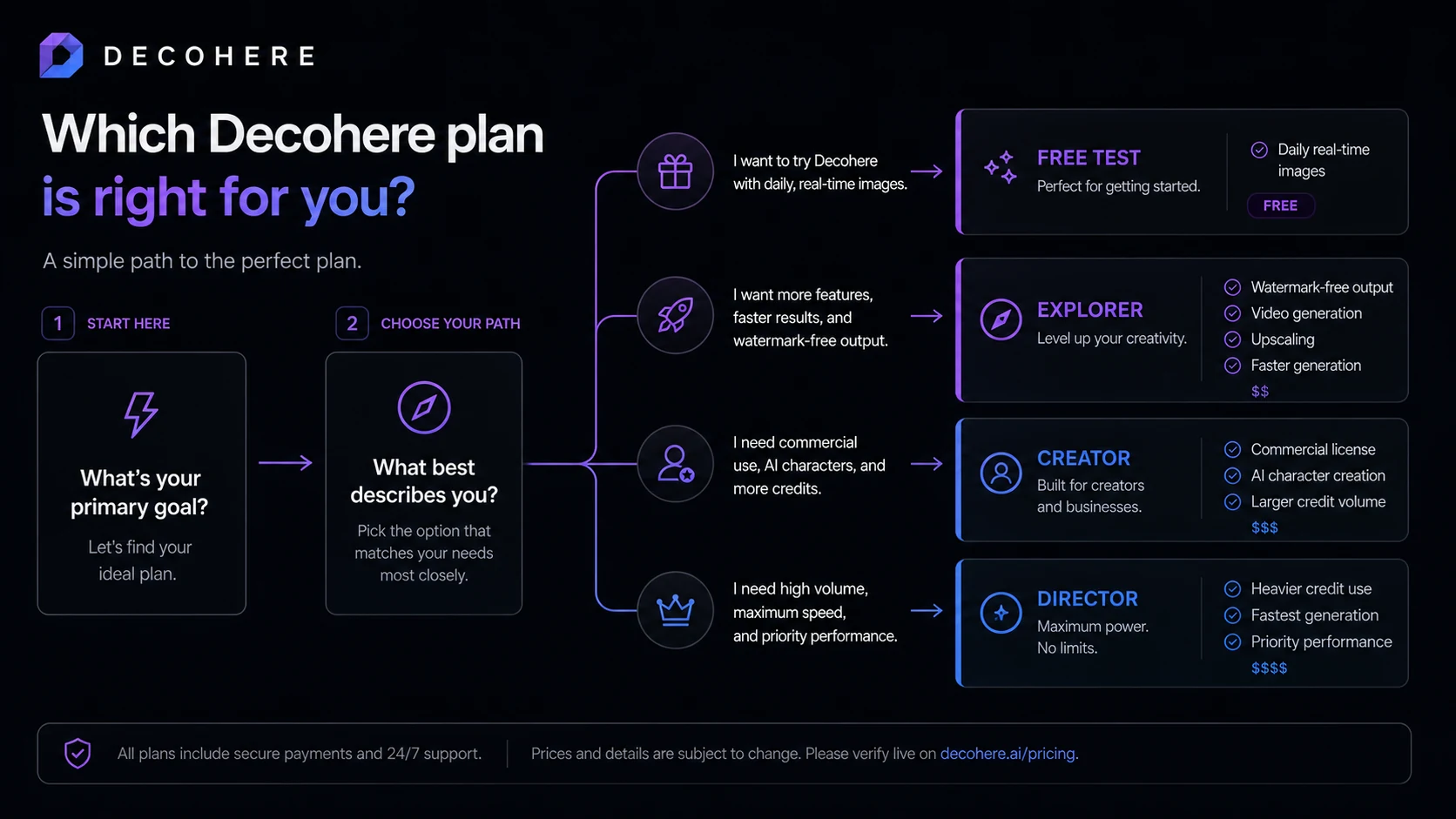
| Paid path | Explorer, Creator, and Director plans add credits, video, upscaling, watermark removal, speed, characters, and commercial rights depending on tier |
| Main strength | Fast visual iteration inside a browser |
| Main concern | Credits, commercial-use rights, no-refund language, and short video length can change the real value |
| Direct creative comparisons | Dedicated image and video generators are better comparisons when output control matters most |
| Adjacent internal routes | 1min.ai is broader AI utility; Aikeedo is more about building AI SaaS products |
| Best next step | Test real prompts for free, then choose a plan only if credit use and license rights match your output needs |

What is Decohere?
Decohere is best understood as a browser-based AI creative generator for people who want to create images, art, short videos, character visuals, and style variations quickly.
The current public positioning is speed-first. Decohere describes itself as the world’s fastest AI generator and emphasizes realtime creation for images, videos, art, and more. Its realtime image feature page also frames the product around instant creative iteration, infinite variation, browser-based use, and the ability to turn generated images into videos.
That is a useful category, but it can also create the wrong expectation.
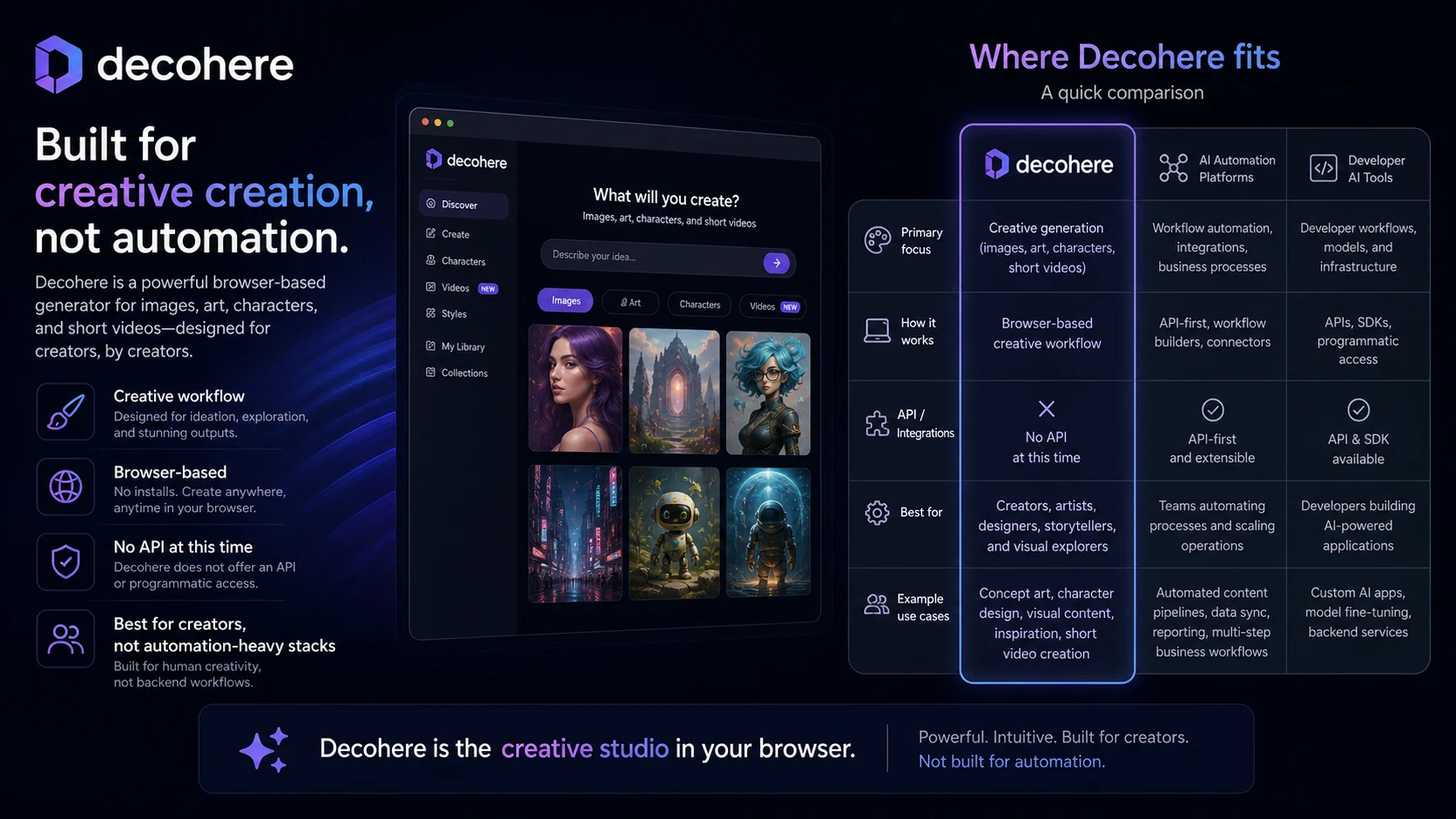
Decohere is not a full creative operations platform. It is not a full video editor with timeline depth. It is not a team approval system. It is not currently an API automation product. It is closer to a fast idea machine: type, iterate, compare, upscale, animate briefly, or build character-style visuals when the output is good enough.
Our review approach: we compare public product pages, pricing details, terms, privacy language, buyer workflow fit, and nearby alternatives. We do not treat a low monthly price, free plan, or limited-time offer as proof that the product fits a buyer’s real creative process.
One small wrinkle: some public listings still refer to the older “Decoherence” video-making positioning. That history is useful context, but buyers should judge Decohere by the current public website, current pricing page, and the workflow it supports today.
Who should use Decohere?
Decohere makes the most sense for creators who want speed before polish.
A social media creator may use it to test visual directions for thumbnails, reels, shorts, banners, background art, or stylized post ideas. In that case, Decohere’s value is not that every output is perfect. The value is that it lets the creator move through many directions quickly and keep the few that look promising.
A solo marketer may use it for campaign mood boards, ad concept visuals, quick storyboards, or landing-page creative directions. I would be careful here: Decohere can help with creative ideation, but it should not replace brand review, rights checks, or final design judgment.
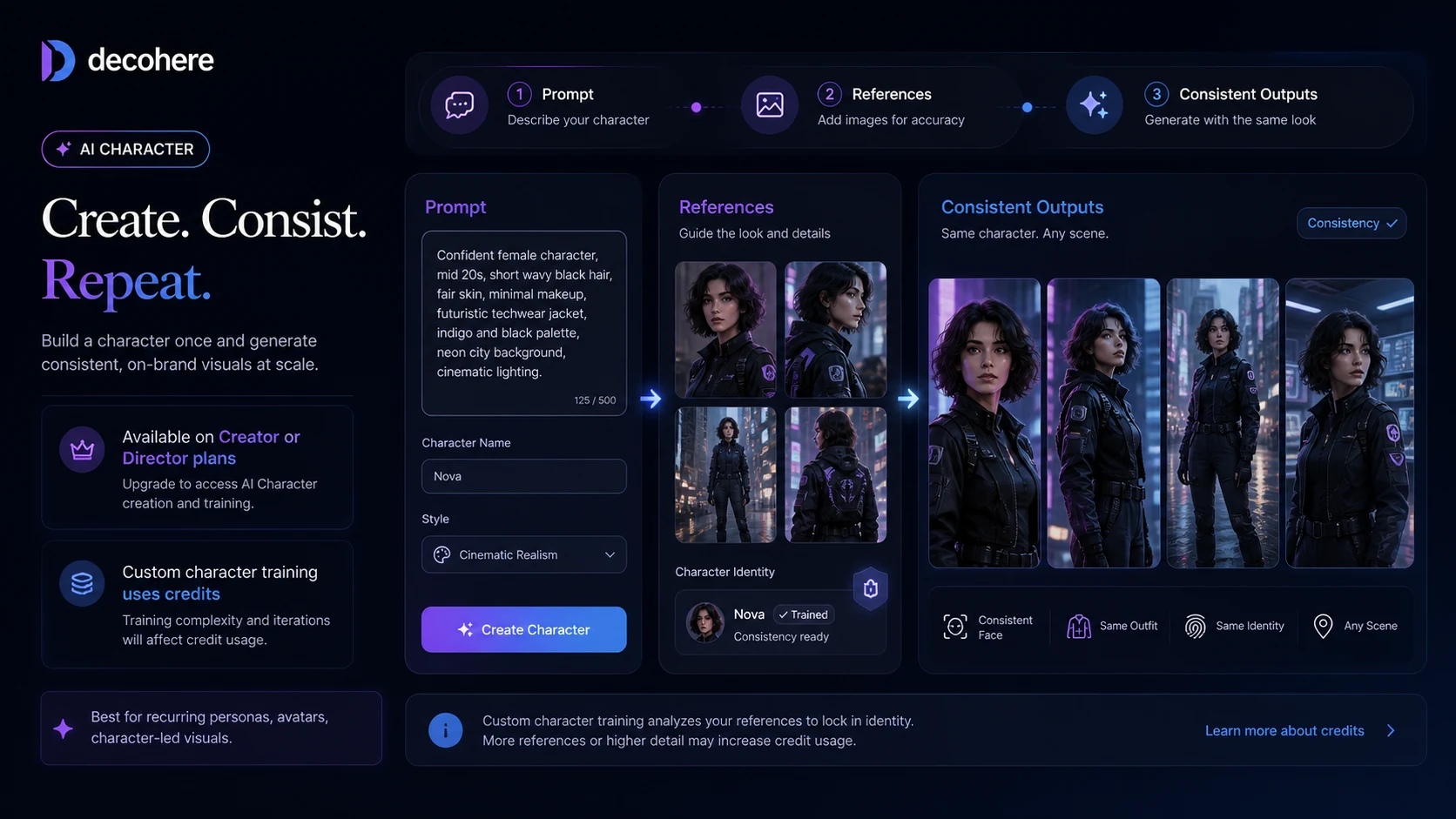
A character-based creator may find the AI character workflow more interesting than the basic image generator. This is where Creator or Director becomes more relevant, because character work can involve commercial-use needs, credit usage, and repeated visual consistency checks.
A designer or illustrator may use Decohere as a pre-production sketch tool. The product can help generate directions before manual editing, but it is not a replacement for a polished design workflow where layout control, typography, asset management, and client revision history matter.
A hobbyist can also use Decohere well. The free path is a useful testing lane for people who simply want to explore AI visuals without committing to a paid subscription.
Who should avoid Decohere?
I would avoid paying for Decohere if you need long-form video production. The pricing FAQ describes generated videos as 4 seconds long, which is useful for short creative motion but not enough for buyers expecting a full video editor.
I would also be cautious if your main requirement is automation. Decohere’s pricing FAQ says it does not offer API access at this time. That does not matter for casual creative use, but it matters a lot if you want to plug generation into a bigger workflow, app, or content pipeline.
Buyers who need refund safety should slow down. Decohere says it cannot offer refunds for paid plans, while subscriptions can be cancelled so they do not renew. That makes the free test more important than usual.
Teams that need brand governance, shared workspaces, approval flows, or controlled asset pipelines should compare more mature creative suites before committing. Decohere can be useful for visual exploration, but the current fit is more creator-led than enterprise-led.
Finally, avoid choosing a paid plan just because the yearly price looks cheaper. Annual billing can be sensible after the workflow is proven, but it is a poor first move if you have not tested your own prompts, credit burn, output quality, and license needs.
How Decohere fits into a real workflow
A good Decohere workflow starts with a real creative need, not with a random prompt.
The better process looks like this:
- Pick one actual use case: thumbnail, character concept, ad visual, storyboard frame, social background, product mood board, or short motion idea.
- Run several prompts through the free realtime generator.
- Save only the outputs that are close to publishable or worth refining.
- Check whether the image needs upscaling, video generation, watermark removal, or character consistency.
- Estimate how many credits that workflow would use in a normal month.
- Confirm whether the output will be used commercially.
- Choose the lowest plan that covers the real need, not the plan that looks best in a pricing table.
That sequence protects the buyer from the common mistake with creative AI tools: confusing excitement with repeatable value.
For a casual creator, the workflow may stop at free generation. For a paid creator, the decision moves into rights and output volume. For a marketer, the workflow may include another design tool after Decohere. For a production team, Decohere may only be useful at the concepting stage.
Workflow check: Test Decohere with the exact visual ideas you would publish, not only with fun demo prompts.
Real-world buyer scenarios
A social creator making fast visual ideas
A creator who publishes often may care more about speed than perfect realism. Decohere can help create many visual directions quickly, especially for backgrounds, thumbnails, stylized character ideas, or short motion clips.
The risk is quality control. A fast generator still needs a human eye. If outputs look exciting but not usable, paid credits will not fix the core mismatch.
A marketer testing campaign concepts
A small marketer could use Decohere to produce mood-board style images, concept visuals, or rough ad directions before involving a designer.
This is a good fit when the goal is exploration. It is weaker when the buyer needs exact brand consistency, polished typography, product accuracy, or final ad assets ready for launch.
A character creator building repeatable visuals
Decohere becomes more interesting for character-led work because Creator and Director include AI character creation and commercial-license positioning. A creator building avatars, fictional personas, or character-based social content should inspect this path carefully.
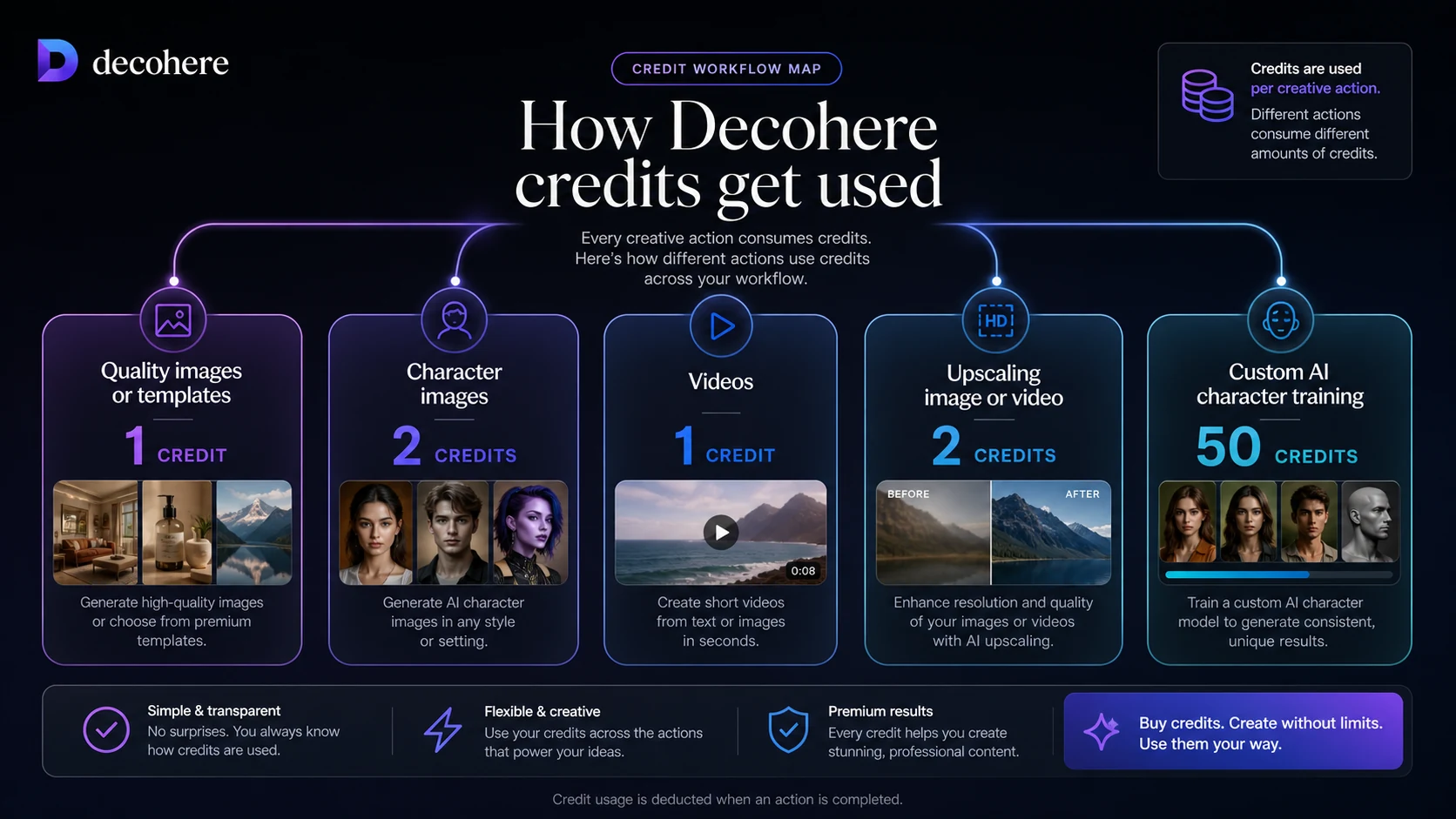
The buyer check is credit usage. Character images and custom character training consume credits differently from basic realtime images, so the plan that looks affordable may feel tighter after repeated use.
A production team looking for automation
This is the weaker fit. If a team needs API access, automated batch generation, multi-user controls, or a formal creative pipeline, Decohere is not the first tool I would choose based on current public information.
It may still help with early ideation, but I would not build a production dependency around it without confirming the current capabilities and terms.
Key features that actually matter
Realtime image generation
Realtime generation is Decohere’s clearest hook. The value is not only speed. It is the feedback loop. You can adjust prompts, compare directions, and discard weak ideas faster than with tools where every generation feels like a wait.
Buyer note: speed is useful only if the output gets close to your style. Test the kind of visuals you actually need before judging the tool from showcase examples.
Short video generation
Decohere includes video generation on paid tiers, but the buyer should treat this as short creative motion rather than full video production. The pricing FAQ says videos are 4 seconds long.
Buyer note: this can work for loops, motion concepts, social snippets, and visual experiments. It is not the right expectation if you need a full editing timeline or long narrative video.
Upscaling and watermark removal
Upscaling and watermark removal matter when a generated image is close enough to use. Explorer can be attractive here because it unlocks video generation, upscaling, watermark removal, and faster generation.
Buyer note: do not pay for watermark removal until your own generated outputs are worth keeping. Removing a watermark from weak creative is not value.
AI character creation
AI character creation is more relevant for creators who want repeated personas, avatars, stylized figures, or character-led content. This is where Decohere becomes more than a casual image toy.
Buyer note: character work can increase credit pressure. Custom character training costs more than basic image generation, so estimate your actual workflow before assuming a plan is enough.
Commercial-license access
Commercial use is one of the most important plan differences. Decohere’s pricing FAQ says Creator users own the images and videos they generate and can use them commercially, while Free and Explorer users do not have rights to the content they generate. The terms also include ownership and license language buyers should read before using assets in client, brand, or revenue-generating work.
Buyer note: if the output will be used commercially, do not treat the free or cheapest paid path as enough without checking the current pricing page and terms.
Browser-based creative workflow
Decohere runs in the browser, which lowers friction for the first test. You do not need to install a heavy creative suite just to see whether a visual direction works.
Buyer note: browser-based convenience is useful for ideation, but it does not replace the control of dedicated design, video, or post-production tools.
Pricing and plan value
Decohere’s pricing is not difficult to understand, but it is easy to misjudge.
The current pricing page shows a Free plan at $0 with daily realtime images and a wait between generations. Explorer is shown at $9 monthly or $7.99 per month on yearly billing, with 600 credits per year, unlimited realtime images, video generation, upscaling, watermark removal, and fast generation. Creator is shown at $29 monthly or $19.99 per month on yearly billing, with 4,800 credits per year, faster generation, AI character creation, commercial license, and optional safety filter. Director is shown at $59 monthly or $29.99 per month on yearly billing during a limited-time offer, with 12,000 credits per year and fastest generation.
The important point is that the paid decision is partly a credit decision.
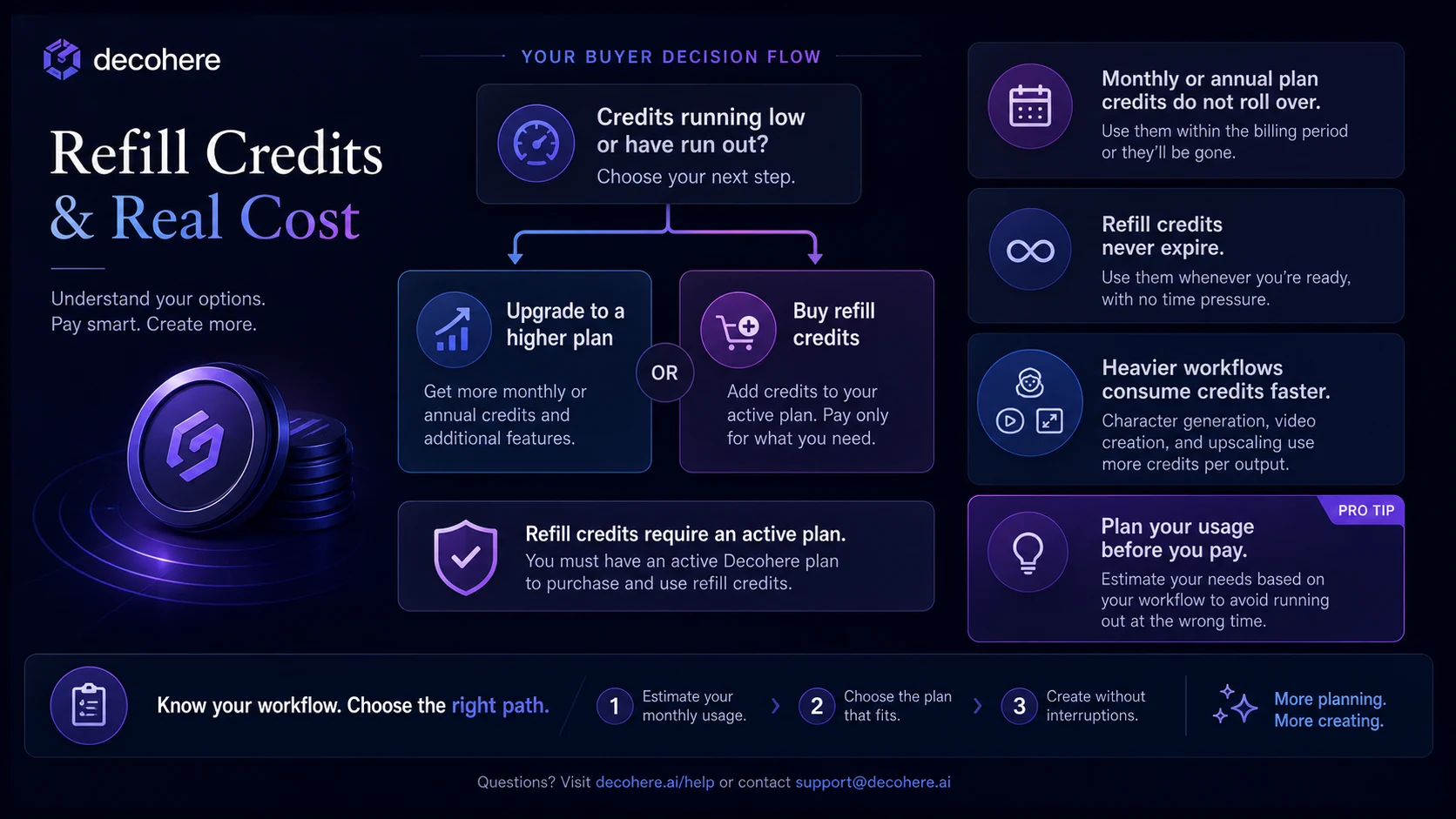
The pricing FAQ says quality images or templates cost 1 credit, character images cost 2 credits, generated videos cost 1 credit, upscaling costs 2 credits, and custom AI character training costs 50 credits. It also says unused monthly or annual credits do not roll over, while refill credits never expire but require an active plan.
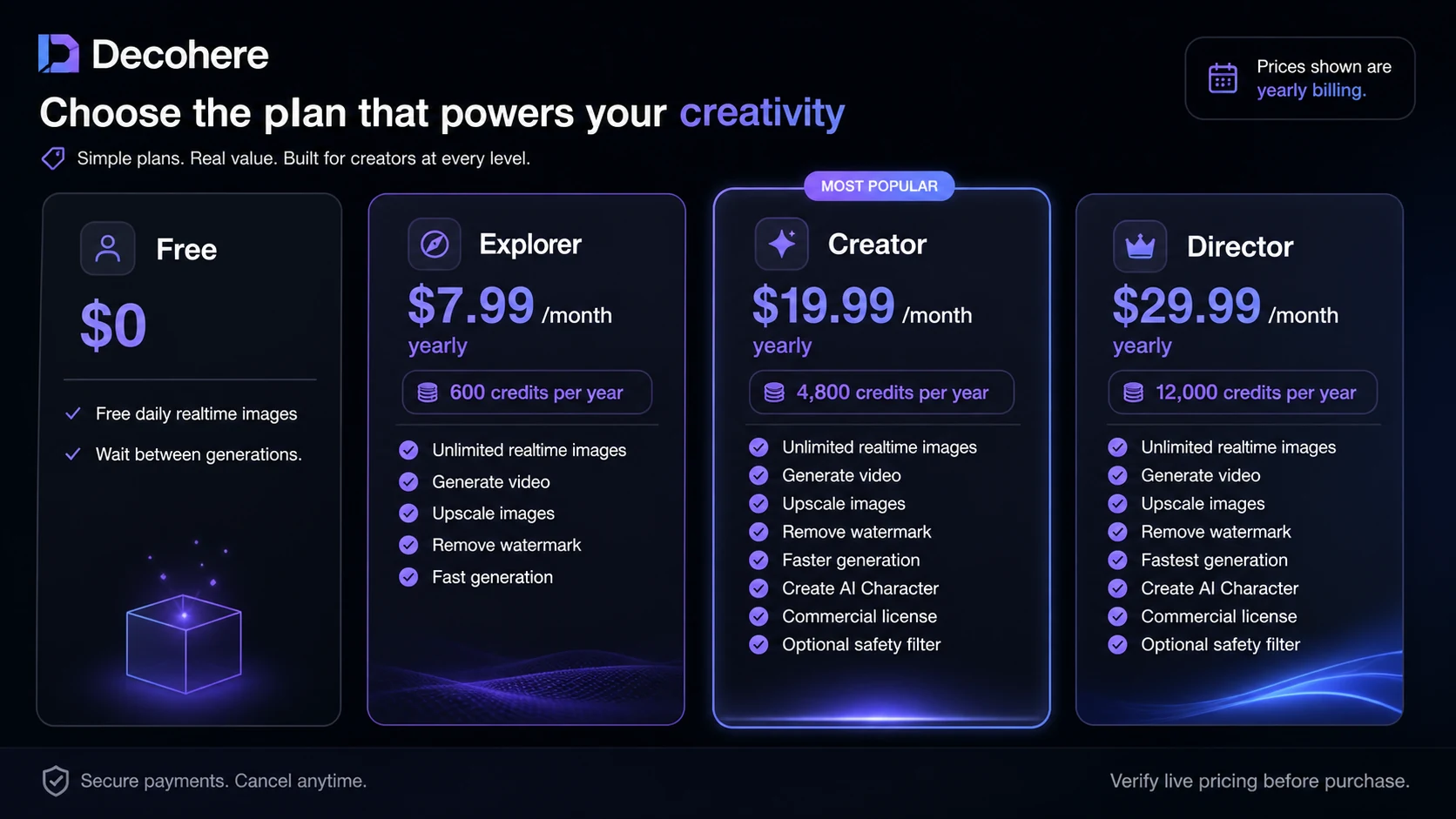
My pricing take is simple: Free is the right first test, Explorer is a hobbyist or noncommercial upgrade path, Creator is the first serious plan to inspect for commercial work, and Director only makes sense when credit volume and speed justify it.
The yearly prices can look attractive, but I would not start annual unless Decohere already proved itself in your real workflow. The no-refund language makes monthly testing more sensible for cautious buyers.
Pricing check: If Decohere still fits after your free tests, compare the current credit rules and commercial-use terms before choosing monthly or yearly billing.
Check Decohere pricing Read store guide Check current offers
Free plan, trial, coupon, and checkout notes
The free plan is Decohere’s strongest buyer-protection feature.
Use it seriously. Do not only generate one fun image and jump to a paid tier. Run several prompts that match your actual content needs. Test a realistic thumbnail idea, a character concept, a brand-safe background, a short video starting point, or a style direction you might actually publish.
The coupon path should come later. Decohere’s more reliable savings path is the official free plan, yearly billing comparison, refill-credit awareness, and whatever is visible on the live pricing or checkout route. Public coupon claims should be treated as checkout-test claims unless the discount is clearly visible on a verified offer path.
I would use this order:
- Start with the free plan.
- Save outputs that are close to usable.
- Estimate credit needs for the paid actions you would actually repeat.
- Check whether commercial-use rights matter.
- Read refund and cancellation language.
- Only then check current offers.
Checkout caution: Treat any offer as secondary. The better first question is whether Decohere gives you publishable creative directions from your own prompts.
What I would check before buying Decohere
If I were buying Decohere for a real creative workflow, I would check seven things before paying.
First, I would test prompt quality. Does Decohere produce usable visuals for your actual style, or only interesting experiments?
Second, I would estimate monthly credit usage. Basic image generation, character images, videos, upscaling, and character training do not have the same cost.
Third, I would confirm commercial-use rights. If the output will be used for client work, ads, products, thumbnails, monetized content, or brand assets, the lower plans may not be enough.
Fourth, I would check whether videos being 4 seconds long fits the job. That may be fine for motion concepts and social loops, but not for full video production.
Fifth, I would read the no-refund language. A tool with no refund path deserves a slower purchase decision.
Sixth, I would decide whether the lack of API access matters. For a solo creator, probably not. For automation-heavy teams, it may be a dealbreaker.
Seventh, I would compare Decohere with the right alternatives. Do not compare it only by feature list. Compare it by the creative job you need solved.
A simple test before paying
Before paying, I would run a small test like this:
- Choose three real creative tasks you would normally publish or send to a client.
- Generate several realtime image directions for each task.
- Mark which outputs are actually usable, not just interesting.
- Try one workflow that would require a paid feature, such as watermark-free export, upscaling, video, or character work.
- Estimate how many credits you would burn if you repeated this weekly.
- Check whether the final use is commercial.
- Choose a plan only if the result saves time or creates output you would otherwise pay someone or another tool to produce.
This test is intentionally practical. It prevents the classic creative AI mistake: paying for potential instead of paying for repeatable value.
Pros explained
The first real advantage is speed. Decohere’s realtime workflow can make creative exploration feel lighter, especially when you are trying to find a direction rather than polish a final asset.
The second advantage is breadth inside a narrow creative lane. Image generation, video generation, upscaling, character workflows, and browser-based use make it more flexible than a simple image generator, even if it is not a full creative suite.
The third advantage is the free entry path. This matters because output quality is personal. A generator that works beautifully for one creator’s style may feel wrong for another. Free testing reduces that risk.
The fourth advantage is the clearer commercial-license boundary on higher plans. I like when a creative tool forces buyers to think about rights before using assets commercially, even if the details require careful reading.
The fifth advantage is low setup friction. For creators who just want to experiment, a browser-based workflow is easier than learning a heavier production tool before knowing whether the idea is worth pursuing.
Cons explained
The biggest con is that paid value depends on credit behavior. A buyer who mostly explores realtime images may get different value from a buyer who trains characters, creates videos, and upscales frequently.
The second con is no-refund risk. Decohere’s pricing FAQ says paid plans are not refundable. That is not automatically unfair for a generation product with server costs, but it does mean buyers should test first and avoid jumping into annual billing too early.
The third con is commercial-use complexity. The pricing FAQ separates Free and Explorer from Creator-level commercial-use rights. That can be easy to miss if the buyer focuses only on price.
The fourth con is limited fit for automation. No API access means Decohere is not the right first pick for buyers who want to generate media programmatically or build it into a larger system.
The fifth con is production depth. Decohere is useful for quick creative direction, but buyers needing long-form editing, exact asset control, team review, or formal production workflows should compare more mature creative systems.
Green flags and red flags
Green flags are easy to spot.
Decohere is a better fit if your free tests produce several outputs you would genuinely refine or publish. It is also a good sign if speed changes your workflow. If realtime generation helps you explore more directions in less time, the product has a real role.
Another green flag is clear commercial need. If you already know your visuals will support client work, brand campaigns, or monetized content, then Creator-level license access becomes easier to evaluate.
Red flags are just as important.
Slow down if you cannot explain how credits will be used in a normal month. Be careful if you only want a paid plan because the current yearly price looks discounted. Pause if the no-refund policy makes you uncomfortable. And do not pay for Decohere expecting it to become a long-form video editor, API platform, or complete creative operations system.
The easy mistake is buying the most exciting creative tool instead of the most useful workflow tool.
Decohere vs alternatives
Decohere should be compared against creative-generation tools first, and only then against adjacent workflow tools.
Decohere vs Midjourney
Midjourney is the stronger comparison if your main priority is high-quality image generation and artistic output control. Decohere may feel faster and easier for realtime ideation, but Midjourney is usually the more serious creative comparison when image quality is the center of the decision.
Decohere still makes sense if speed and browser-based experimentation matter more than polished image depth.
Decohere vs Runway
Runway is the stronger comparison for buyers who care more about video workflows, editing depth, and creative production tooling. Decohere can generate short video concepts, but I would not treat it as a Runway replacement for buyers who need more developed video control.
Decohere may still fit creators who want quick short motion rather than a larger video creation environment.
Decohere vs Adobe Firefly
Adobe Firefly is a stronger comparison for buyers already inside a professional design ecosystem. If the work needs to move through Photoshop, Illustrator, Express, or broader Adobe workflows, Firefly may be the cleaner operational fit.
Decohere may still feel lighter for fast browser-based concepting before a design tool takes over.
Decohere vs 1min.ai
1min.ai is an adjacent route, not a one-to-one creative replacement. It makes more sense if you want a broader multi-tool AI workspace across content tasks.
Decohere is the cleaner fit when the job is specifically realtime visual generation, character concepts, short video ideas, and creative upscaling.
Decohere vs Aikeedo
Aikeedo is even more adjacent. It is relevant only if your actual goal is to build, launch, or own an AI SaaS-style product foundation.
That is a very different buyer job. Decohere helps you generate creative assets. Aikeedo points toward building a business or platform around AI functionality.
Trust, refund, and buyer-risk notes
My confidence is strongest around Decohere’s current product role: fast browser-based image, video, and character generation. The official pricing page is also clear enough to understand the main plan structure, credit rules, watermark removal, commercial-use differences, cancellation path, no-refund language, and current no-API position.
I am more cautious around long-term value. Creative tools change quickly. Pricing can change. Limited-time offers can disappear. Output quality can vary depending on prompt style. Public listings may still describe older Decohere or Decoherence positioning, so current official pages should matter more than older third-party summaries.
The terms are also worth reading if you plan to use Decohere for commercial work. They discuss service changes, user responsibility for inputs, asset rights, non-paid member license terms, public datasets, possible similarity to protected materials, and the service being provided as is. None of that means buyers should avoid the tool. It means buyers should not use generated assets casually in high-stakes commercial work without checking rights and risk.
The privacy policy is another practical check. Decohere says prompts and related usage data may be part of the personal data collected, and it gives a support address for policy questions and deletion requests. If you create sensitive brand, client, or unreleased campaign material, treat that as a real buyer check before uploading it.
Final verdict
I would consider Decohere if you want a fast creative generator for image ideas, character concepts, short visual motion, and visual exploration before heavier production work.
I would start with the free path. That is not just because it is cheaper. It is because AI creative tools are personal. You need to see whether your prompts produce visuals that match your style, audience, and publishing needs.
I would move to a paid plan only when one of three things is true: you need watermark-free output, you need paid creative features often enough to justify credits, or you need commercial-use rights for real work.
I would skip Decohere if you need long-form video editing, API automation, team governance, exact brand control, or refund protection before subscribing.
The safest next step is not to chase a deal first. Test Decohere with your own creative prompts, compare the current pricing and license terms, then decide whether it belongs in your real workflow or whether a more specialized creative platform is the better fit.
