Quick verdict
Exemplary AI is worth a close look if you already have long audio or video content and want one workflow for transcripts, subtitles, social clips, audiograms, summaries, show notes, blog drafts, and other repurposed assets.
That is the key phrase: already have long media.
If you are not regularly publishing from recordings, Exemplary AI can feel like more tool than you need. A simple transcription app or a single-purpose clip maker may be enough. But if your workflow starts with podcasts, webinars, interviews, lessons, product videos, or long YouTube content, the product becomes more interesting because it tries to turn one source file into several usable outputs.
I would not judge it by the homepage promise alone. The homepage makes media repurposing look very simple. The real buyer question is narrower: does Exemplary AI reduce enough manual work after you check transcript accuracy, clip selection, subtitle timing, output quality, export limits, and plan usage?
The current public pricing page shows a Free plan, Starter at $12/month billed annually, Pro shown as a limited-time $19/month billed annually, and a custom Team route. That gives buyers a reasonable test path, but it also means the plan decision depends on upload minutes, file size, upload length, storage, retention, export counts, workspace users, and API access.
For my money, the safest path is to test one real recording before paying. If the transcript needs heavy cleanup, the clips miss the strongest moments, or the written outputs still require a full rewrite, the headline price matters less. If the workflow saves time across every file, then Starter or Pro can make sense.
Next step: If Exemplary AI fits your media workflow, verify the current plan limits and buyer route before checkout.
Review snapshot
| Review point | Practical take |
|---|---|
| Best for | Creators, podcasters, educators, marketers, and small teams that repurpose recordings often |
| Not ideal for | One-off transcription users, advanced video editors, or buyers who need a clearly published refund window before paying |
| Main use case | Turning long audio or video into transcripts, subtitles, clips, audiograms, summaries, and written content |
| Free path | Free plan with 60 upload minutes per month and 14 days data retention |
| Paid entry | Starter is currently shown at $12/month billed annually |
| Pro signal | Pro is currently shown as limited-time $19/month billed annually with higher limits and API access |
| Main strength | One source file can become many publishing assets |
| Main concern | Plan limits and generated output quality matter more than the headline monthly price |
| Direct alternatives to compare | Opus Clip, Vidyo.ai, Vizard, Klap, Munch for video clipping and repurposing |
| Adjacent routes | 1min.AI for broader AI utility; Aikeedo for building AI software rather than using a creator tool |
| Best next step | Upload one real file and measure cleanup time before choosing a paid plan |
What is Exemplary AI?
Exemplary AI is an AI media repurposing platform. It takes audio or video and helps turn it into transcripts, subtitles, translations, social clips, audiograms, summaries, chapters, show notes, blog-style content, and other written assets.
I would not describe it as only a transcription tool. Transcription is the base layer, but the buying decision is really about what happens after the transcript exists. Can you create useful clips? Can you generate captions and summaries? Can you move from a podcast or webinar to social posts and blog drafts without opening five different apps?
That is where Exemplary AI becomes more interesting.
The common wrong expectation is assuming that “AI repurposing” means the work is finished. It usually is not. Transcript cleanup, speaker names, subtitle timing, clip selection, translation accuracy, titles, hooks, and brand voice still need review. Exemplary AI can reduce the starting effort, but it should not remove the human approval step.
Our review approach compares public product pages, pricing details, help documentation, buyer workflow fit, and nearby alternatives. A low monthly price, a free plan, or a coupon path is not enough by itself. The better question is whether the tool saves time in a publishing process you actually repeat.
Who should use Exemplary AI?
Exemplary AI makes the most sense for creators who publish from long-form media. If your raw material is a podcast, interview, webinar, lecture, product demo, or long YouTube video, the tool gives you a way to extract more assets from the same recording.
Podcasters are a natural fit. A podcast episode can become a transcript, show notes, audiograms, short clips, episode summaries, social captions, and maybe a blog draft. The condition is that the transcript and clips must be clean enough to reduce post-production time rather than adding another review burden.
Educators and course teams can also benefit. Recorded lessons, seminars, and training videos often need transcripts, subtitles, chapters, summaries, and searchable text. Exemplary AI is useful when accessibility and reuse matter, but buyers should check retention and storage limits before treating it like a permanent course library.
Marketing teams may find value when webinars and interviews feed multiple channels. A single webinar might become LinkedIn clips, a blog outline, newsletter copy, YouTube chapters, subtitles, and internal notes. This is where an all-in-one repurposing tool can be more efficient than a simple transcription service.
Small teams and agencies should look at Pro or Team only after mapping real volume. Workspace users, upload minutes, storage, API access, and export limits become important when multiple people need to handle recordings and derived assets.
Who should avoid Exemplary AI?
I would avoid paying for Exemplary AI if you only need occasional transcription. A free transcription option, a meeting recorder, or a lower-cost single-purpose tool may be enough if you do not need clips, audiograms, subtitles, summaries, and written repurposing assets.
I would also be careful if your main need is professional video editing. Exemplary AI can help with clips and captions, but it is not the same as a deep timeline editor with advanced motion graphics, color work, manual sound design, or complex brand control.
Teams with strict data policies should slow down before uploading sensitive recordings. The privacy policy describes the service around generated summaries, clips, audiograms, transcripts, subtitles, and similar outputs, and buyers should check how their specific media, third-party integrations, and account setup fit internal privacy rules.
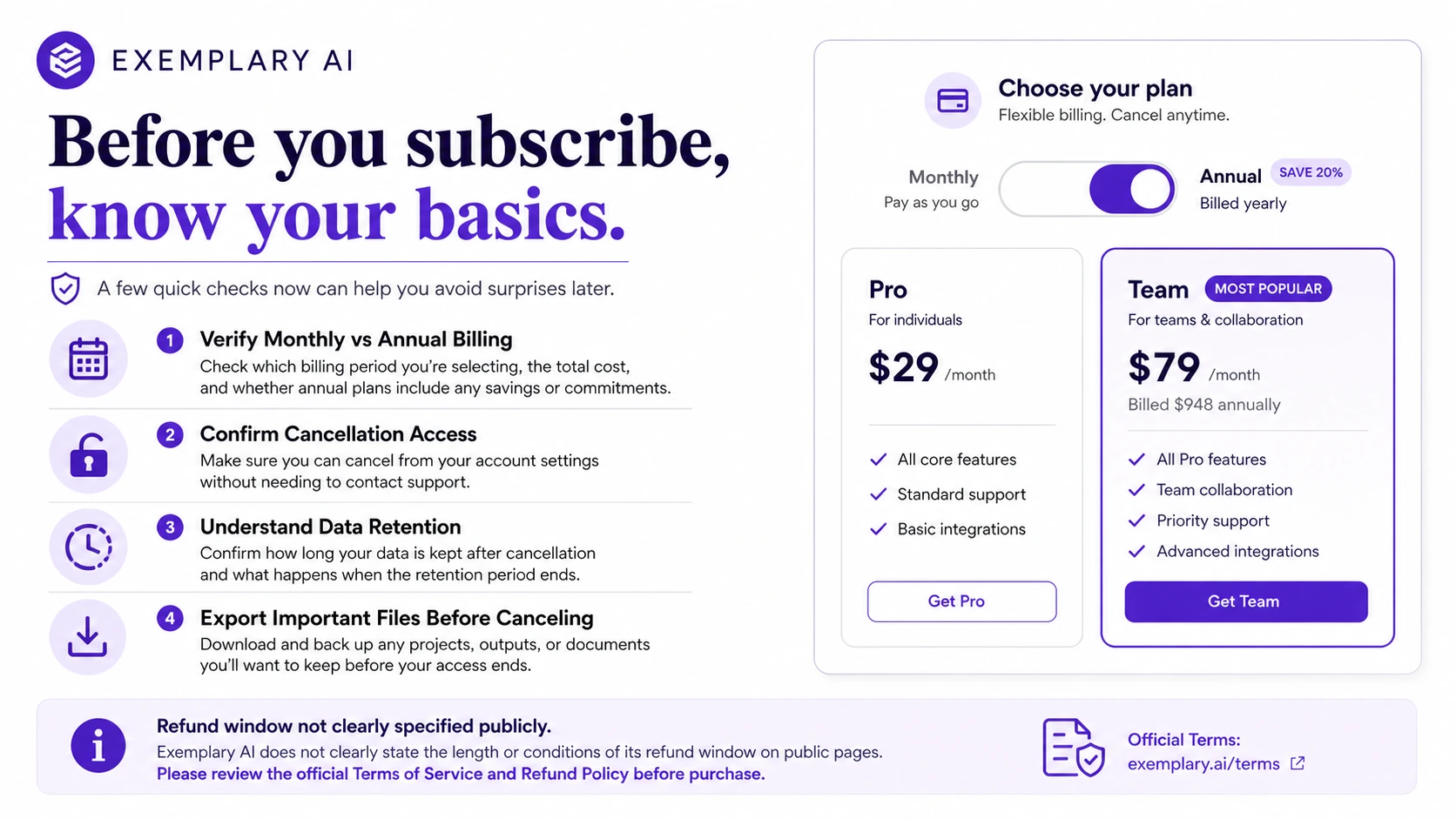
Annual-billing buyers should be cautious too. The pricing page gives a clear public plan structure, but I did not find a simple public refund window for normal subscriptions during this review pass. That does not mean no support path exists; it means refund handling should be verified before checkout rather than assumed.
The easy mistake is buying because the tool looks like it can replace several apps at once. That may be true for the right workflow. But if you do not publish from recordings regularly, the all-in-one value can quickly become unused capacity.
How Exemplary AI fits into a real workflow
A good Exemplary AI workflow starts before the upload.
First, choose a recording that represents your normal work. Do not test with a clean two-minute sample if your real files are 90-minute webinars with multiple speakers, background noise, product demos, or mixed audio quality.
Then decide which outputs matter. A podcaster may care about transcripts, audiograms, show notes, and YouTube Shorts. A marketer may care about LinkedIn clips, captions, blog summaries, and speaker quotes. An educator may care about subtitles, chapters, summaries, and searchable transcript text.
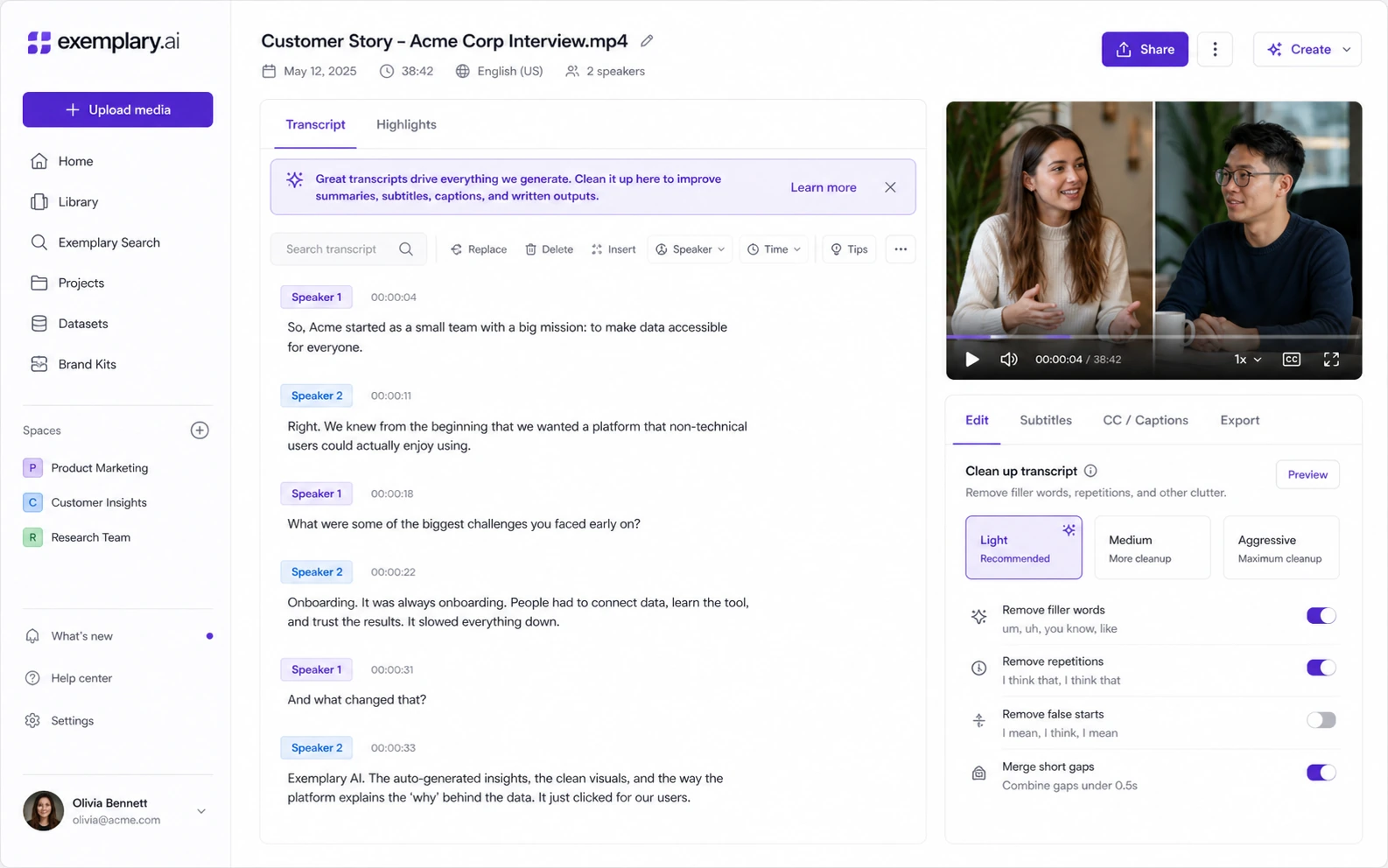
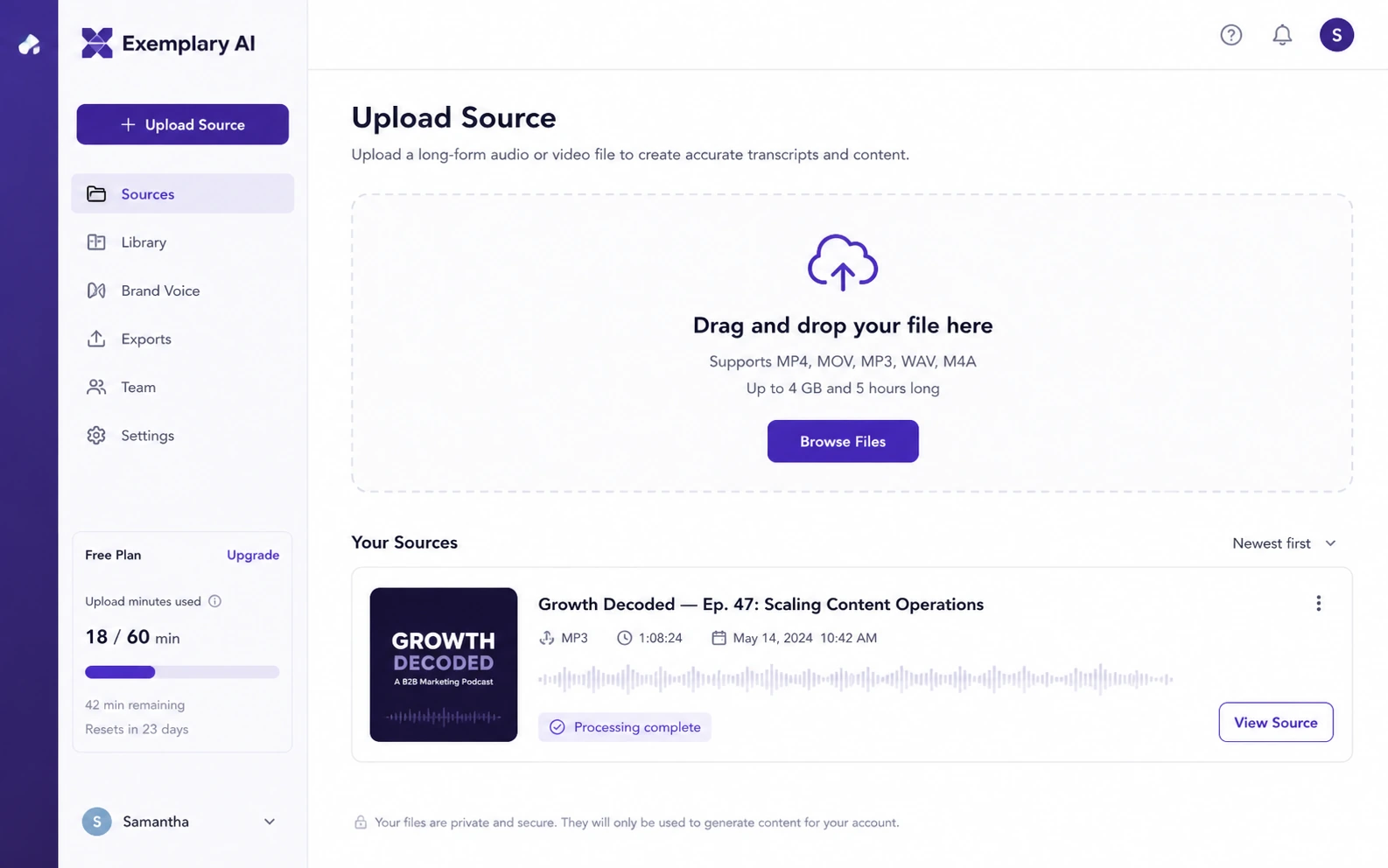
After upload, the workflow moves through transcript creation, cleanup, content generation, clipping, subtitles, and exports. The decision point is not whether the tool creates outputs. Most tools in this category can create something. The decision point is whether the output is close enough that editing takes minutes instead of hours.
Human review still matters. You need to check speaker names, technical terms, quote accuracy, clip context, subtitle timing, translations, and whether the generated written assets sound like your brand. If those checks are light, Exemplary AI can save time. If they are heavy every time, the workflow may not fit.
Real-world buyer scenarios
A podcast host with weekly episodes is one of the clearest use cases. Each episode can become a transcript, show notes, audiogram, short clips, social captions, and maybe a blog draft. Exemplary AI may fit well if the host currently uses separate tools for each step. The buyer check is whether the monthly upload minutes and export counts match the real episode schedule.
A webinar marketer has a different problem. The source content may be longer, denser, and more business-focused. Here, Exemplary AI is useful if it can identify usable moments, create accurate subtitles, and generate summaries or follow-up content without losing product context. If every clip still needs heavy manual editing, a specialist video repurposing tool may be a better first comparison.
An educator or course creator may value transcripts and subtitles more than viral clips. In that case, the strongest reason to test Exemplary AI is accessibility and reuse. The caution is retention. The Free plan’s 14-day data retention is useful for testing, not for long-term content management.
An agency or small team should think in terms of operational capacity. If several team members upload client recordings, generate clips, create summaries, and export assets, the question shifts from “is this tool cool?” to “do the seats, storage, API access, export counts, and cancellation terms fit a real client workflow?”
Key features that actually matter
Transcription and transcript editing
Transcription is the base layer. If the transcript is weak, summaries, captions, subtitles, clips, and blog drafts all become weaker too. Exemplary AI claims high transcription accuracy and supports a broad language workflow, but buyers should test their own audio quality, accents, speaker changes, and niche vocabulary.
Buyer note: judge the tool by cleanup time, not only by the first transcript preview.
AI clips and social-ready short video
The clip workflow is one of the main reasons to consider Exemplary AI over a basic transcription service. Turning long videos into short social assets can save a lot of time when the selected moments are useful.
Buyer note: check whether the clips identify moments you would actually publish. If the tool creates clips that still need full editorial rebuilding, the value drops.
Subtitles, translations, and multilingual reach
Subtitles and translations can make media more accessible and usable across platforms. This is valuable for educators, creators, and brands that publish to audiences beyond one language.
Buyer note: multilingual output should still be reviewed by a human when accuracy, names, terminology, or compliance matters.
AI writing and content generation
Exemplary AI can generate summaries, blogs, show notes, captions, and other written assets from the media. This is useful when the recording already contains the source ideas and the buyer wants a starting draft.
Buyer note: treat generated content as a first pass. Brand voice, structure, hooks, and factual accuracy still need editing.
Workspace, API, and team expansion
The Pro and Team paths matter when the workflow becomes heavier. API access, workspace users, storage, organization controls, and export limits are not important for a casual creator, but they can matter for agencies and operations teams.
Buyer note: do not assume team/API needs are included in the plan you want. Verify plan-level access before building a workflow around it.
Pricing and plan value
Exemplary AI pricing is fairly understandable, but the right plan is not determined by headline price alone.
At the time of review, the public pricing page shows a Free plan at $0 with 60 upload minutes per month, single user access, 14 days data retention, transcription, translation, subtitle editor, clips, audiogram maker, AI chat, AI content, AI clips, a 1 GB file limit, and upload length up to 1 hour.
Starter is shown at $12/month billed annually, with 2400 upload minutes per year, 100GB storage, one workspace user, larger upload limits, content generations, 1080p exports without watermark, 200 video exports, and extra upload time available at $4 per hour.
Pro is shown as a limited-time $19/month billed annually, with 7200 upload minutes per year, 3 workspace users, 500GB storage, larger file and upload length limits, transcription regeneration, API access, unlimited content generations, 500 video exports, and extra upload time available at $4 per hour.
Team is custom. That is the route for larger teams and agencies that need custom upload minutes, multiple users, custom storage, tailored solutions, a dedicated account representative, org controls, SSO, and multiple workspaces.
The cheapest paid plan is not automatically the best deal. Starter may be enough for a regular creator with controlled volume. Pro makes more sense when you need higher upload capacity, API access, more users, more exports, and less friction. Team should be evaluated only after the workflow is clearly operational.
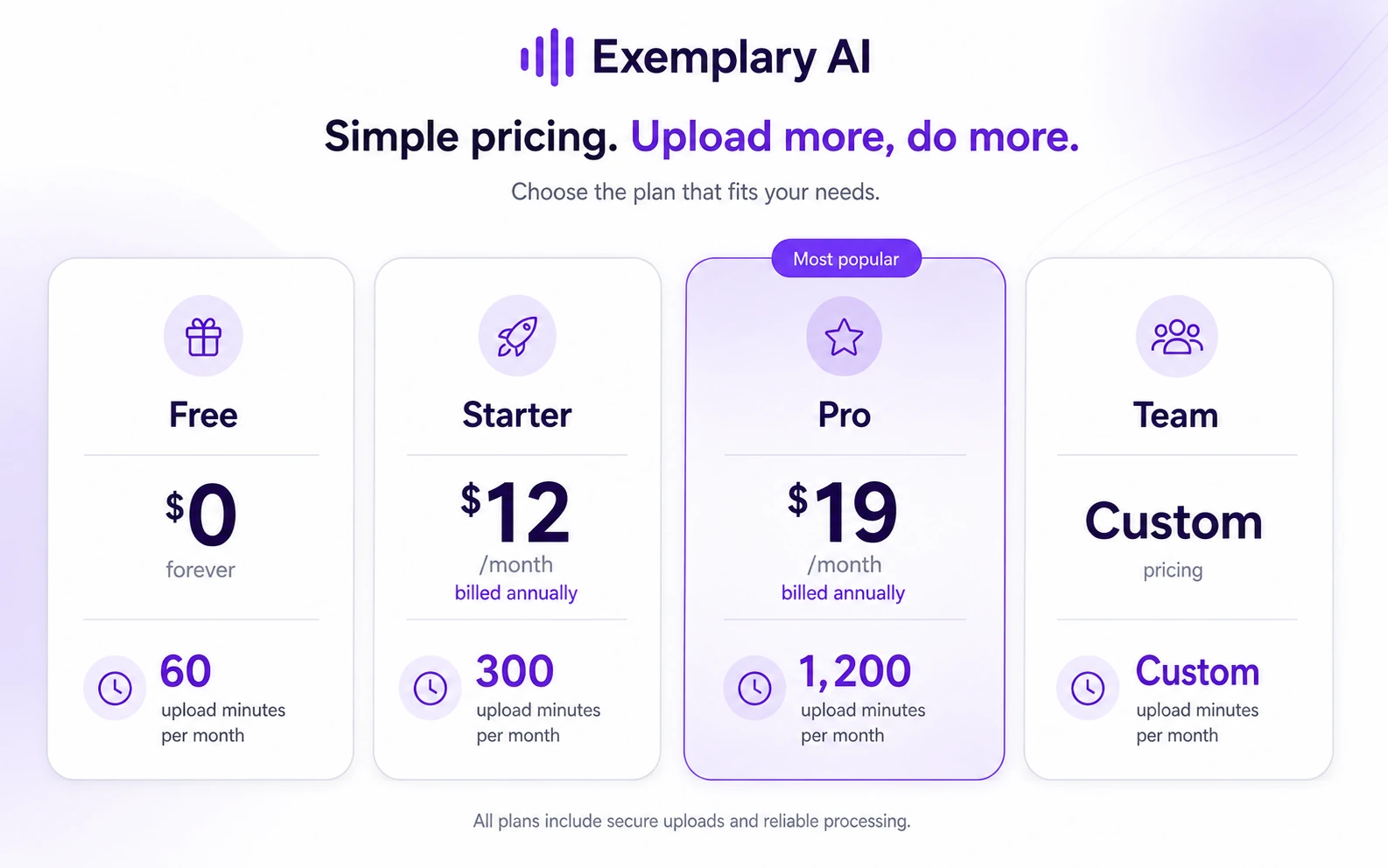
Pricing check: Before choosing Starter, Pro, or Team, compare the current plan limits against the amount of media you publish each month.
Free plan, trial, coupon, and checkout notes
The Free plan is the right first step for most buyers. It gives you enough room to test a real workflow, but the 14-day data retention means it should not be treated as long-term project storage.
I would use the Free plan to answer four questions:
- Is the transcript accurate enough for your audio quality?
- Are the AI clips close enough to publish after light editing?
- Do subtitles, translations, and captions need heavy cleanup?
- Do written outputs save writing time or just create more editing work?
Coupon and deal paths should come later. Third-party coupon directories may report codes or deal paths, and the pricing page may show limited-time pricing. That can be useful at checkout, but it should not drive the decision. A discount cannot fix weak transcript quality, poor clip selection, or a plan that runs out of upload minutes too quickly.
For the current buyer route, start with the Exemplary AI store guide and use the Exemplary AI coupon page only after the workflow fit is clear.
What I would check before buying Exemplary AI
If I were buying Exemplary AI for a real content workflow, I would check these items before paying:
- Upload minutes: Do your normal podcasts, webinars, interviews, or videos fit the monthly or annual capacity?
- File limits: Are your files under the plan’s size and upload length limits?
- Retention: Do you need long-term project access, or can you export and archive elsewhere?
- Video exports: Are the allowed export counts enough for your short-form publishing rhythm?
- Output quality: Are clips, transcripts, subtitles, summaries, and captions close enough to publish after review?
- Team/API needs: Do you need workspace users, API access, org controls, or SSO now, or only later?
- Cancellation and refund handling: Are you comfortable with the billing interval and the current checkout terms?
The plan can look affordable and still be wrong if your files are long, your team needs more seats, or your output requires heavy editing every time.
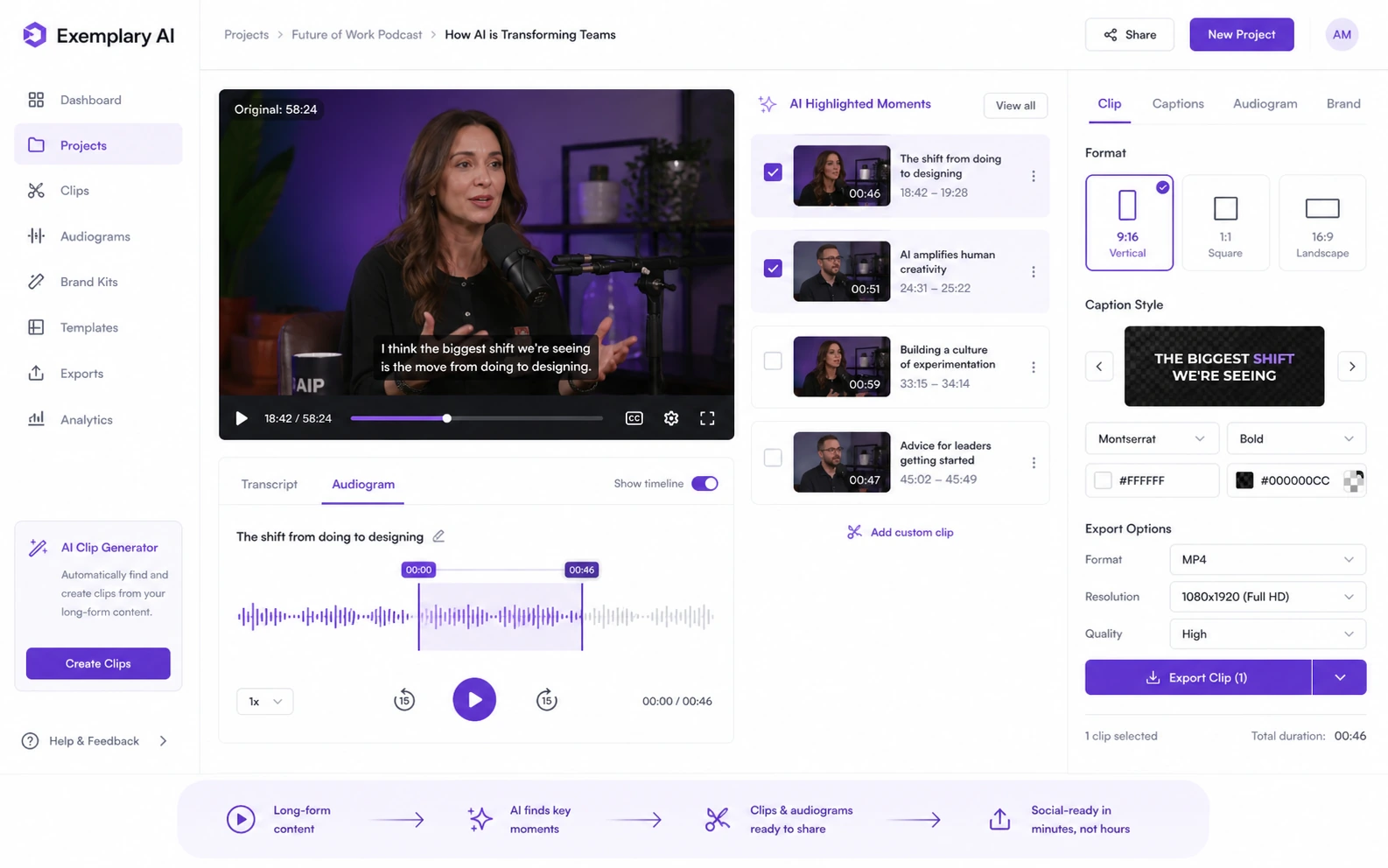
A simple test before paying
Before paying, I would run a small test like this:
- Upload one real file that represents your normal work.
- Check the transcript for speaker names, terminology, punctuation, and section flow.
- Generate subtitles and review timing, readability, and translation quality if relevant.
- Create clips and compare them with the moments you would have chosen manually.
- Generate show notes, captions, summaries, or a blog draft and measure editing time.
- Export the assets you would actually publish.
- Compare total cleanup time against your current workflow.
That test is more useful than reading another feature list. Exemplary AI makes sense when it reduces the time between recording and publishing. It is weaker when it simply creates more AI outputs that still need full editorial rebuilding.
Pros explained
The biggest strength is workflow consolidation. Exemplary AI can replace a scattered process where one tool handles transcription, another handles subtitles, another creates clips, and another drafts written content. For creators who publish often, that consolidation can be valuable.
The Free plan is another real advantage. It lets buyers test the core workflow without starting paid billing immediately. That matters because media tools are difficult to judge from screenshots. You need to see how your own recordings perform.
The product also fits content repurposing well. Podcasts, webinars, courses, interviews, and long videos naturally contain many smaller content assets. Exemplary AI gives buyers a structured way to extract those assets.
Paid plans add useful capacity for heavier creators. Higher upload minutes, more storage, more exports, workspace users, and API access can matter if the workflow becomes part of a repeatable publishing operation.
Cons explained
The first drawback is that plan value depends heavily on real volume. A buyer with short, occasional files may not need Starter or Pro. A buyer with long weekly webinars may outgrow a lower plan quickly. The headline price does not tell the whole story.
The second drawback is output review. AI-generated clips, summaries, captions, subtitles, and translations can be useful, but they should not be published blindly. Brand voice, factual accuracy, quote context, and timing still need human judgment.
The third drawback is refund clarity. Pricing is visible, cancellation guidance exists in the help center, and the product has a public terms page, but I did not find a clearly stated standard refund window for normal subscriptions during this review. That makes checkout verification important, especially for annual billing.
The fourth drawback is video-editing depth. Exemplary AI is not the same as a professional editor. If your workflow depends on detailed timeline control, complex motion graphics, advanced brand templates, or high-touch production polish, a specialist editor or clip-focused tool may fit better.
Green flags and red flags
Green flags are strongest when you already publish from long media every week, you need several asset types from the same recording, and the Free plan proves that cleanup time is manageable.
Another green flag is a clear repurposing calendar. If every episode or webinar needs clips, subtitles, summaries, social captions, and written assets, Exemplary AI is solving a repeated problem.
A red flag is buying before testing with your own file. Demo workflows often look cleaner than real media. Your actual recordings may include cross-talk, noise, unusual vocabulary, brand names, or long sections that are hard to clip.
Another red flag is choosing annual billing only because the monthly equivalent looks better. Annual pricing can be reasonable after the tool has proven value, but I would not use annual billing as the first serious test.
Exemplary AI vs alternatives
Exemplary AI should be compared honestly. Some alternatives are direct competitors. Others are adjacent routes that solve a different buyer job.
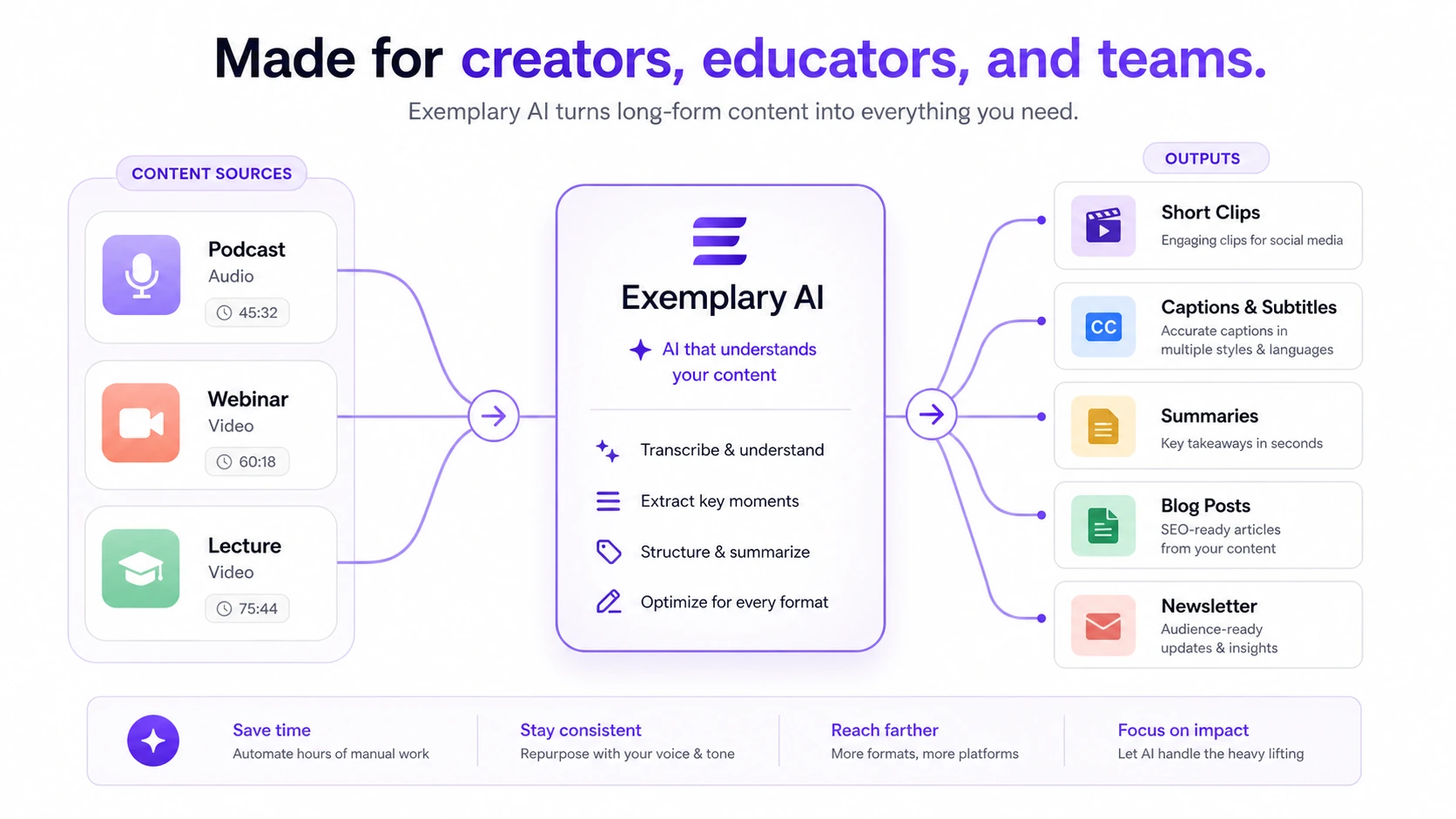
Opus Clip vs Exemplary AI
Opus Clip is a more direct comparison if the main job is turning long videos into short social clips. Exemplary AI may still be stronger if you also care about transcripts, summaries, audiograms, subtitles, and written repurposing in one workflow.
Vidyo.ai vs Exemplary AI
Vidyo.ai is another direct video clipping comparison. It may be worth comparing if short-form social video is the main deliverable. Exemplary AI is more appealing when the buyer wants clips plus broader text and transcript-based outputs.
Vizard, Klap, or Munch vs Exemplary AI
These tools sit closer to the short-form video repurposing category. They may be better comparisons for creators who care mostly about finding clips and publishing across social platforms. Exemplary AI becomes more interesting when the buyer wants a fuller audio/video-to-content workspace.
1min.AI vs Exemplary AI
1min.AI is an adjacent route, not a one-to-one replacement. It makes more sense if the buyer wants a broader all-in-one AI workspace across many tasks. Exemplary AI is more focused when the source material is audio or video and the goal is repurposing.
Aikeedo vs Exemplary AI
Aikeedo is also adjacent. It is relevant only if the buyer is thinking about building, hosting, or owning an AI SaaS foundation. It is not a direct alternative for a creator who simply wants to upload a podcast and generate clips, transcripts, and show notes.
Trust, refund, and buyer-risk notes
The trust picture is mixed in a normal SaaS way: strong enough to evaluate, but still worth checking before checkout.
The official product positioning is clear. Exemplary AI is not hiding what it does. It presents itself around long-video-to-short-clip repurposing, transcription, subtitles, summaries, show notes, blogs, chapters, and other media-derived outputs.
Pricing is also more transparent than many AI tools. The plan page shows Free, Starter, Pro, and Team, with meaningful limits around upload minutes, storage, users, file size, upload length, AI generation, exports, API access, and extra upload time.
The caution is refund and renewal expectation. I found help-center cancellation guidance, but not a simple public refund window for standard subscriptions. Buyers should treat the payment step as a commitment unless the live checkout or support response says otherwise.
Data and privacy also deserve attention because media files can contain sensitive conversations, client material, student content, health information, internal business details, or unpublished creative work. Before uploading sensitive files, buyers should read the current privacy policy and confirm whether the workflow fits their own privacy requirements.
Finally, AI reliability should be treated realistically. Transcripts, subtitles, translations, clip choices, and written outputs can be useful without being final. A careful buyer keeps human review in the workflow.
Final verdict
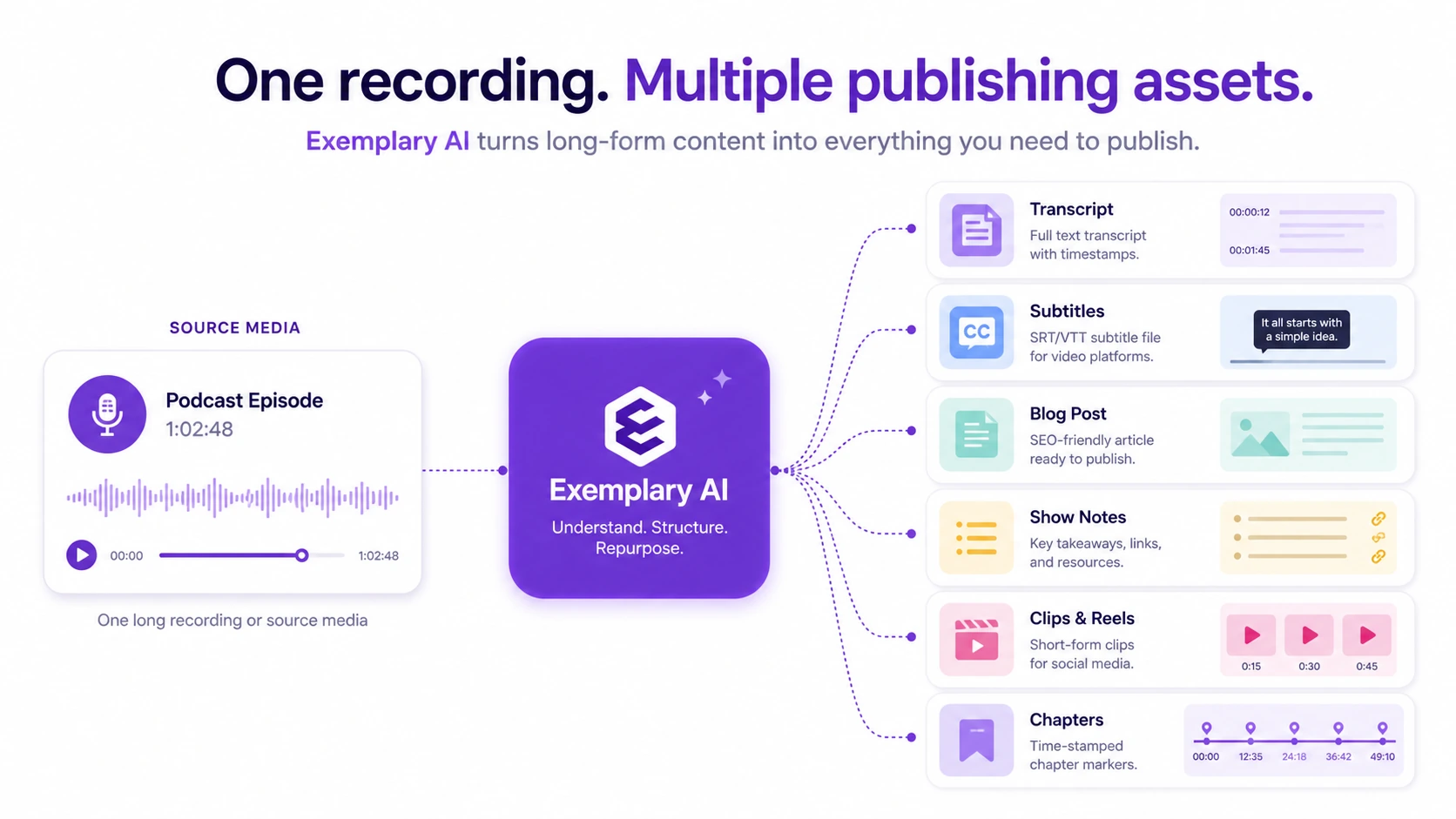
I would consider Exemplary AI if you regularly turn recordings into multiple publishing assets and want one workflow for transcripts, subtitles, clips, audiograms, summaries, show notes, and written content.
I would start with the Free plan, not a paid plan. Upload one real file. Check the transcript. Review the clips. Export the assets. Measure cleanup time. Then decide whether the paid limits match your monthly output.
I would skip it if you only need occasional transcription, if you need deep professional video editing, or if you are not comfortable paying without clearer refund expectations at checkout.
I would compare it with direct video repurposing tools if short clips are your main goal. I would compare it with broader AI workspaces only if your buying question is bigger than audio and video repurposing.
The safest next step is simple: prove the workflow first, then check the current plan limits, then look at the coupon or deal path last. Exemplary AI can be useful, but only if it saves real publishing time on the kind of media you actually create.
