Quick verdict
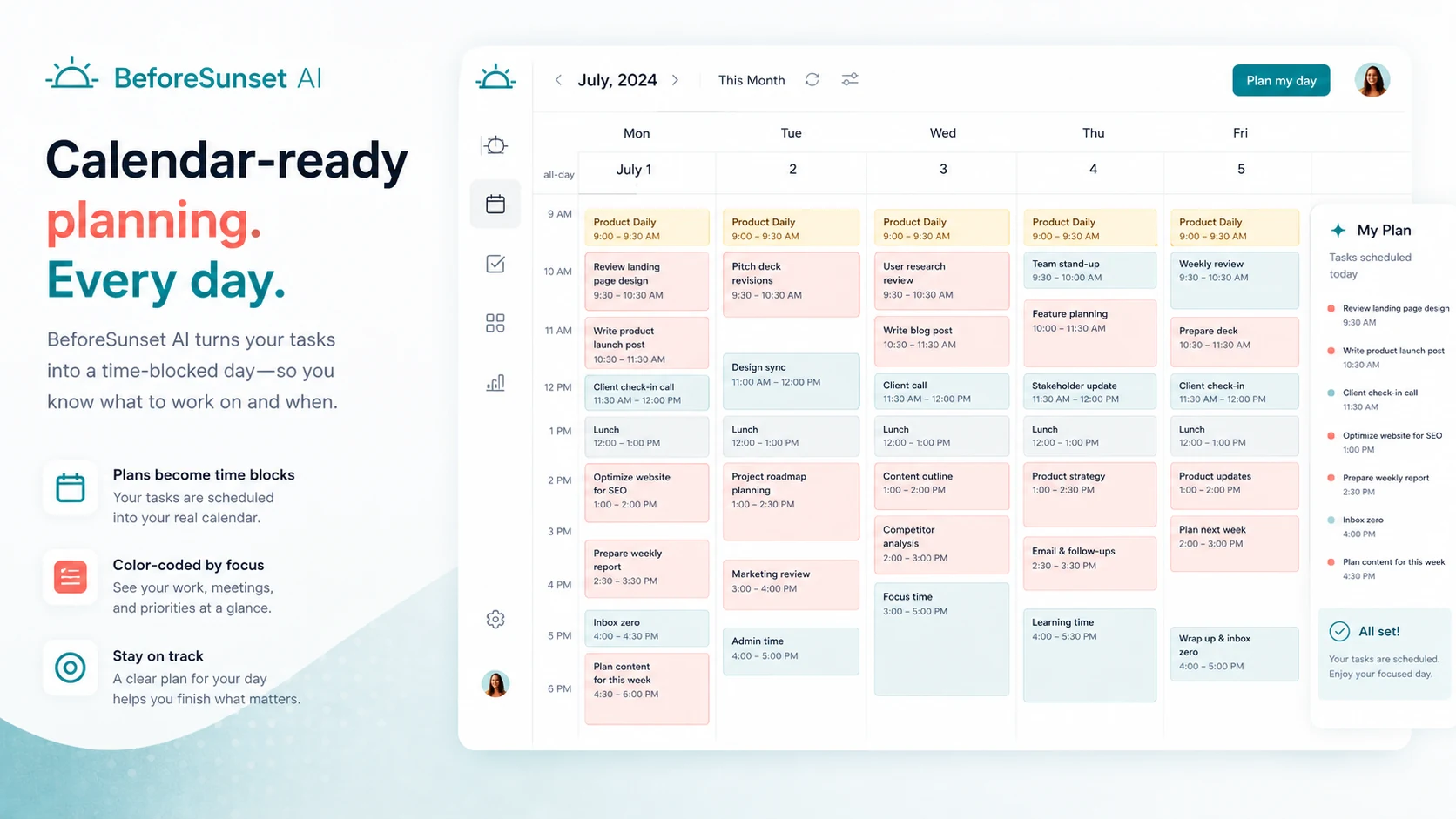
BeforeSunset AI is worth considering if your planning problem is not “I need another to-do list,” but “I keep starting the day with scattered tasks and no realistic schedule.”
That is the cleaner way to judge it.
The product looks like an AI-powered daily planner, but the buying decision is really about habit fit. If BeforeSunset AI helps you turn tasks into calendar-aware work blocks, then move into focus sessions without rebuilding your day manually, it can earn a place in your routine. If you already have a stable planning system, the AI layer may feel more like extra structure than real help.
I would be most interested in it for knowledge workers, founders, freelancers, students, and small teams that need a lighter planning system than Motion, Sunsama, ClickUp, or a full project management stack. The strongest reason to consider it is the combination of AI task planning, calendar sync, Oasis focus mode, recurring work, analytics, and a free entry path.
The main caution is not the feature list. It is checkout confidence. The official pricing page currently presents Pro and Team Pro paths with a 7-day money-back guarantee, while some public customer feedback complains about cancellation and refund friction. That does not mean every buyer will have a bad experience, but it does mean I would test the free path first and avoid annual billing until the workflow proves itself.
Next step: If BeforeSunset AI sounds like a planning fit, test the current app route before choosing a paid plan.
Review snapshot
| Review point | Practical take |
|---|---|
| Best for | Knowledge workers, founders, freelancers, students, and small teams that need help shaping a realistic day |
| Not ideal for | Buyers who only need a simple checklist or teams that need complex project management |
| Main use case | AI-assisted daily planning, calendar-aware scheduling, focus sessions, and light analytics |
| Free entry | Free download/access path is useful for testing the habit before paying |
| Paid path | Pro is the personal planning route; Team Pro adds workspace and team analytics |
| Main strength | Turns loose tasks into a more structured day and connects planning with focus work |
| Main concern | Refund/cancellation confidence and annual billing should be checked carefully |
| Best direct alternatives to compare | Sunsama, Motion, Reclaim AI, Todoist, TickTick |
| Adjacent routes | 1min.AI for broader AI utility, Saner.AI for notes/knowledge, Aikeedo for building an AI product |
| Best next step | Run one real workweek on the free path before paying |
What is BeforeSunset AI?
BeforeSunset AI is an AI-powered daily planner for turning tasks, goals, calendar commitments, and focus sessions into a more structured workday.
The product sits between a simple to-do app and a heavier productivity system. It is not trying to be a full project management platform with complex dependencies, approvals, client delivery reporting, sprint planning, or enterprise-level workflow controls. Its more natural job is narrower: help you create tasks, plan your day, sync work with a calendar, focus through Oasis, and review productivity signals over time.
That distinction matters because buyers can easily compare the wrong things. BeforeSunset AI is not only competing with task apps. It is competing with the way you already plan your day: notebooks, Google Calendar, Todoist, Notion, Sunsama, Motion, Reclaim, or a rough mental list you keep rewriting every morning.
Our review approach compares public product pages, pricing details, help documentation, app listings, review patterns, deal terms, workflow fit, and nearby alternatives. We do not treat a coupon, student deal, or low monthly equivalent as proof that the planner fits the buyer. The real test is whether it helps a normal week become easier to plan and finish.
The most common wrong expectation is that an AI planner will automatically solve productivity. It will not. At best, BeforeSunset AI can reduce the friction between “I have tasks” and “I know when I will do them.” The buyer still needs to decide what matters, protect focus time, and follow through.
Who should use BeforeSunset AI?
BeforeSunset AI fits buyers who already feel the pain of daily planning.
A knowledge worker with a messy task list is the clearest use case. If your day starts with Slack, email, meetings, scattered notes, and unfinished tasks from yesterday, the product can act as a planning layer that helps convert those pieces into a more workable schedule. The condition is simple: you must be willing to let the app shape your day and then check whether that schedule feels realistic.
A founder or freelancer may also find it useful. This type of buyer often works across sales, delivery, admin, content, finance, and client follow-up in the same week. BeforeSunset AI is more attractive when you need one place to capture tasks, plan the week, and move into focus sessions without setting up a complex project management system.
Students are another reasonable audience because the official site has a student angle and the workflow maps well to classes, assignments, deadlines, and personal commitments. The buyer should still check whether the student deal is live and whether the app handles the real rhythm of coursework, not just a tidy ideal schedule.
Small teams can consider Team Pro if shared planning, unlimited members, workspace visibility, and team analytics matter. I would be more careful here. Team Pro can be useful for light coordination, but it should not be treated as a replacement for a mature project management tool unless the team’s needs are genuinely simple.
Who should avoid BeforeSunset AI?
I would avoid BeforeSunset AI if you only need a plain task list. If Todoist, Apple Reminders, TickTick, Google Tasks, or a notebook already solves your planning problem, adding AI scheduling may create more process than value.
I would also be cautious if you dislike guided planning. BeforeSunset AI’s appeal comes from letting the product help arrange the day. If you prefer full manual control over every time block, the planning assistant may feel intrusive instead of helpful.
Larger teams should slow down before assuming Team Pro is enough. Team workspace and analytics can help with visibility, but teams needing approvals, workload routing, project dependencies, client reporting, granular permissions, or formal delivery workflows should compare dedicated project management platforms first.
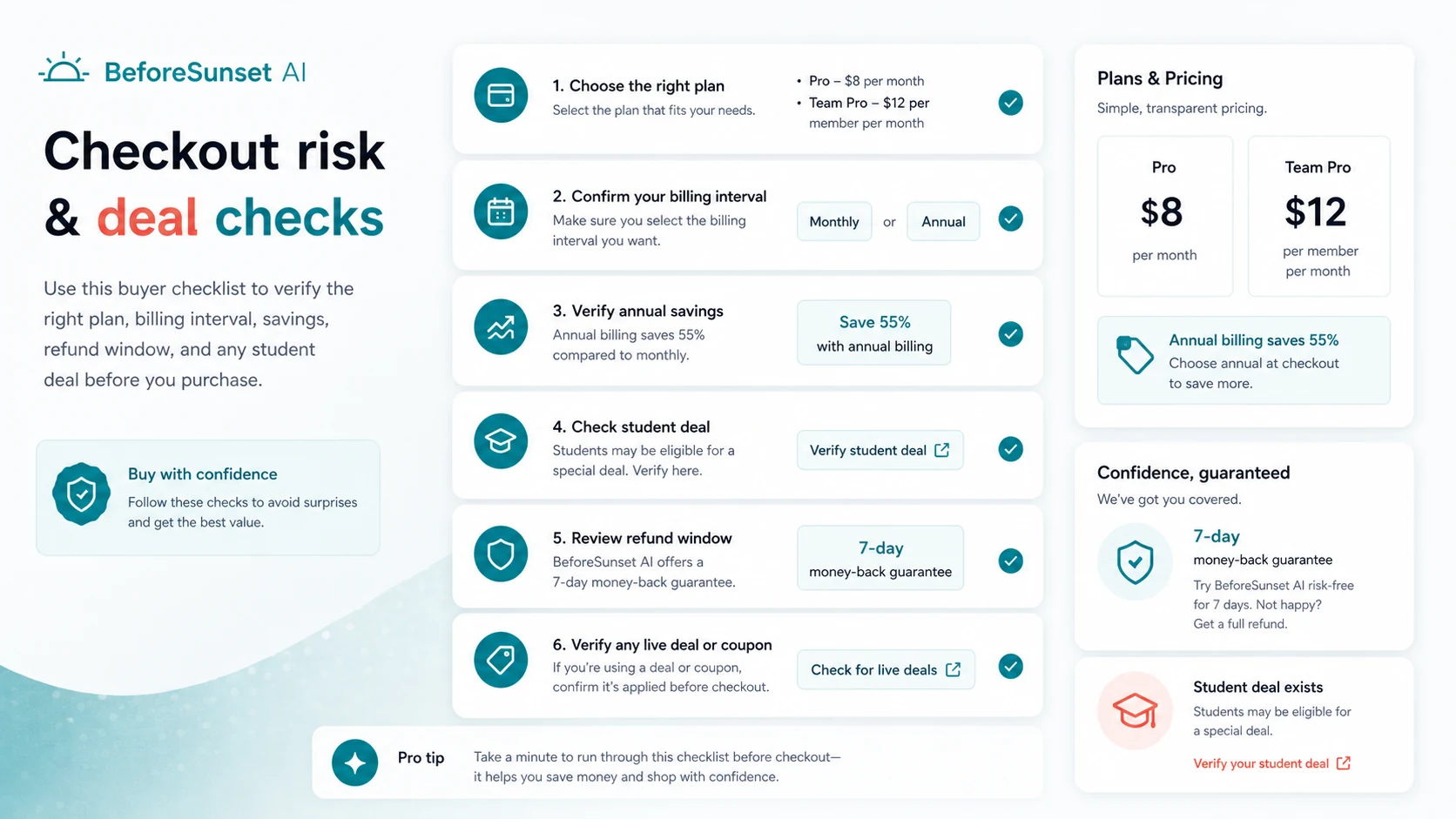
Buyers worried about cancellation or refund support should be extra careful. The official pricing page shows a 7-day money-back guarantee, but public Trustpilot feedback includes complaints about cancellation and refund friction. That kind of signal does not prove the experience will be bad for everyone, but it does make a free-path test and checkout verification more important.
Finally, do not choose BeforeSunset AI mainly because a coupon or partner offer appears somewhere online. A discount can make the purchase cheaper. It cannot make a planner become a daily habit.
How BeforeSunset AI fits into a real workflow
A realistic BeforeSunset AI workflow starts before the app opens.
First, you need a real planning problem. Maybe your task list is too long. Maybe you underestimate how long work takes. Maybe you schedule meetings but not execution time. Maybe you plan well in the morning and ignore the plan by lunch.
Then the tool becomes useful only if it changes that behavior.
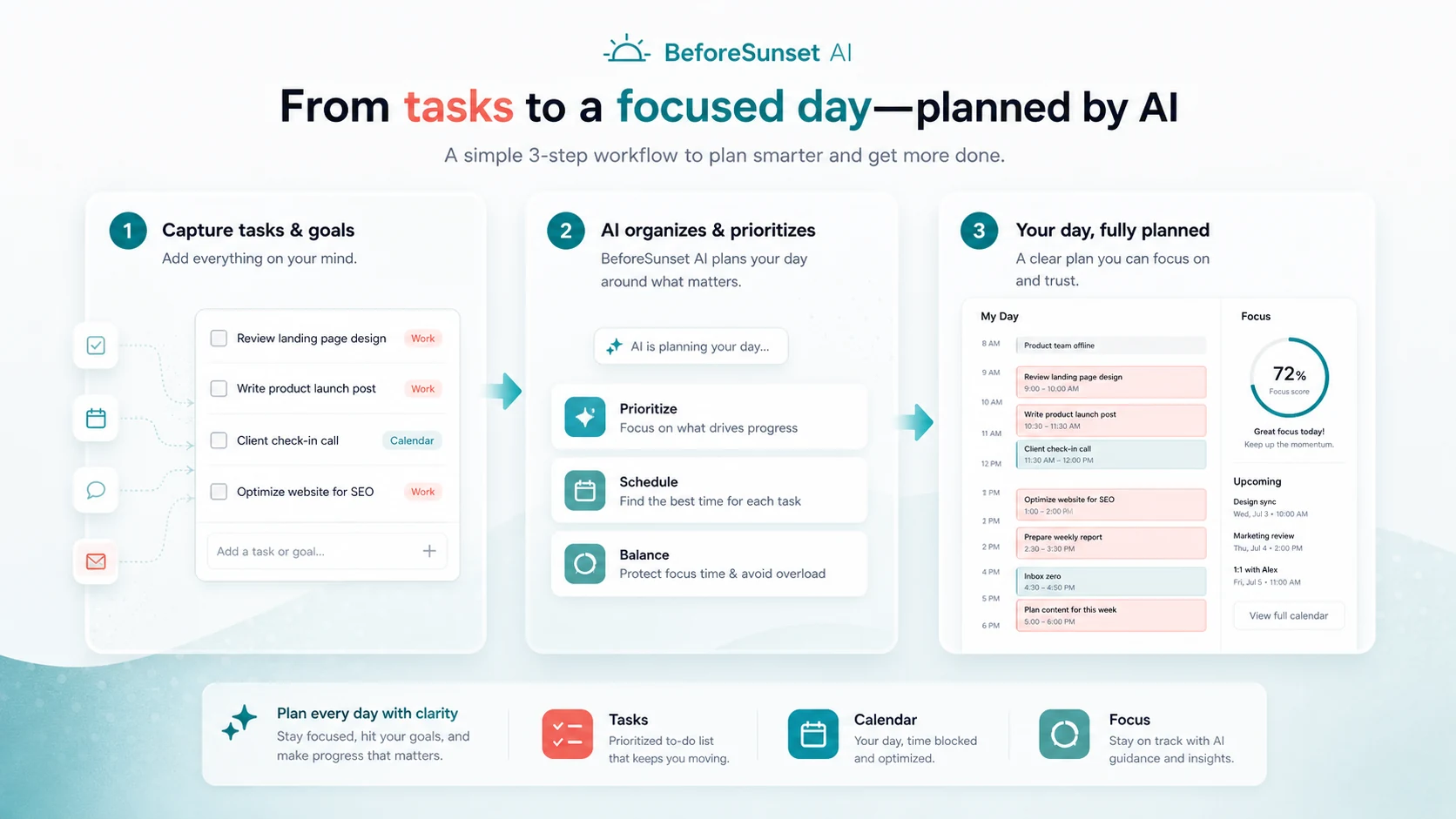
A practical flow looks like this:
- Capture tasks, goals, or loose work items.
- Add the details that matter: priority, timing, due dates, categories, or recurring needs.
- Let the AI planning flow help arrange the day.
- Check the result against your actual calendar.
- Move key work into focus sessions through Oasis when appropriate.
- Adjust when the plan is unrealistic.
- Review whether the app reduced planning time, missed tasks, or overcommitted days.
The strongest fit is a repeated daily or weekly planning habit. The weakest fit is a one-time productivity experiment where you download the app, let it plan one day, and then never return.
Workflow check: Before comparing Pro and Team Pro, test whether BeforeSunset AI can survive one normal workweek with real meetings, interruptions, and unfinished tasks.
Real-world buyer scenarios
A solo operator with too many loose tasks
A freelancer, consultant, or solo founder may have plenty of work but no reliable way to shape it into a day. BeforeSunset AI can help if it turns scattered tasks into a plan the buyer actually follows.
The risk is overplanning. If the schedule looks perfect but collapses whenever a client email arrives, the tool is not saving enough friction. The buyer should test one busy week before paying annually.
A knowledge worker juggling meetings and deep work
This is a strong use case if calendar sync and focus sessions become part of the routine. The buyer can use BeforeSunset AI to see what fits between meetings, then use Oasis to protect execution time.
The limit is that the app cannot defend your calendar for you. It can create a cleaner plan, but it cannot make your company respect focus time.
A student managing classes and assignments
BeforeSunset AI can be useful for students who need a clearer way to organize classes, homework, recurring study blocks, and deadlines. The student discount angle may matter, but the workflow still comes first.
The test is whether the app helps with real academic workload. If it only makes the week look tidy, a simpler planner may be enough.
A small team looking for lighter planning visibility
Team Pro is interesting when a small team wants shared planning, team workspace, and daily or weekly analytics without moving into a full project management platform.
I would not roll it out across a team immediately. Start with one recurring planning problem, such as weekly coordination or focus accountability. If that improves, Team Pro deserves a closer look.
Key features that actually matter
AI-assisted day planning
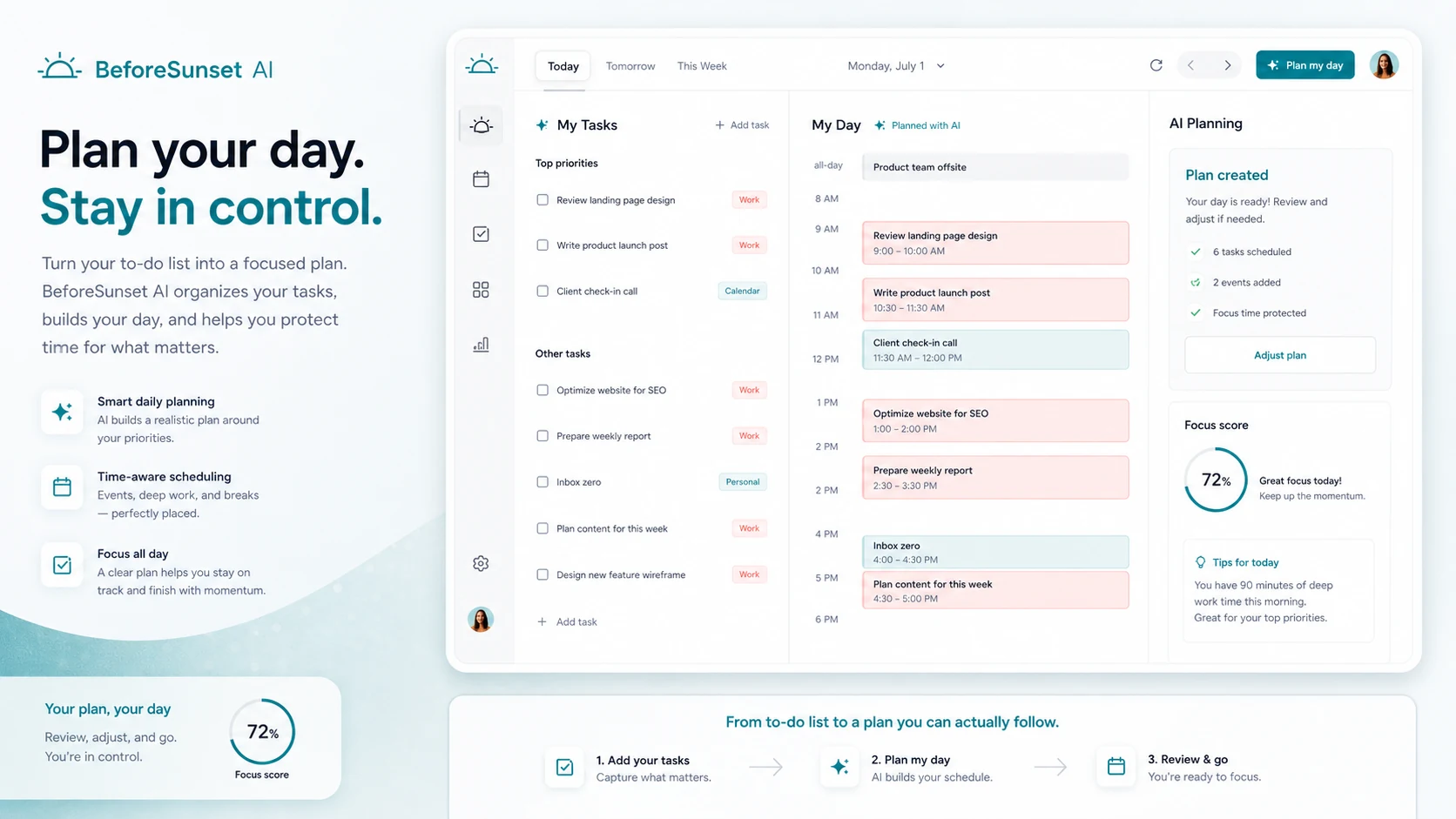
The core feature is the planning flow: take tasks and shape them into a workable day. This matters because many buyers do not fail at productivity because they forgot tasks. They fail because tasks never become realistic time commitments.
Buyer note: judge the schedule output by realism, not neatness. A beautiful day plan that ignores meeting fatigue, context switching, and interruptions will not hold up.
Calendar sync
BeforeSunset AI lists Google Calendar and Outlook Calendar support, with Apple Calendar described as coming soon in the calendar feature materials. Calendar sync matters because planning tools become weaker when they ignore existing commitments.
Buyer note: verify the current calendar support you need before paying. If your main calendar or device ecosystem is not fully supported, the workflow may break at the worst place.
Oasis focus mode
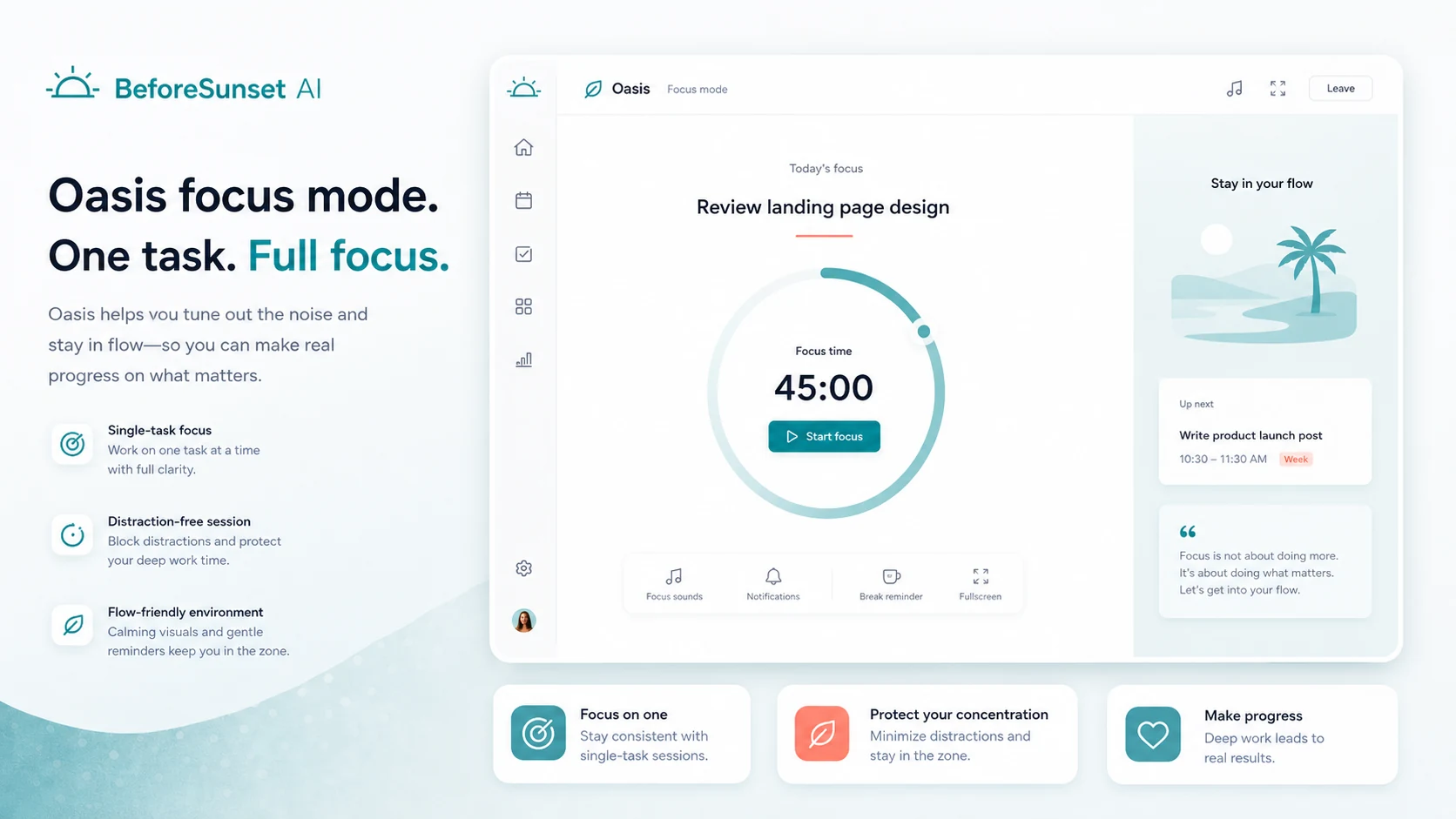
Oasis is the execution layer. It combines focus workspace elements such as Pomodoro-style timing, notes, music or sounds, to-dos, and AI-generated backgrounds. This matters because daily planning without execution support can become another form of procrastination.
Buyer note: use this feature only if it helps you start and complete work. If you already have a reliable focus system, Oasis may be nice rather than essential.
Recurring tasks, weekly planning, and analytics
Recurring tasks and weekly planning make the product more useful for repeated routines. Analytics can help buyers see whether planning is improving over time.
Buyer note: analytics should lead to better decisions. If you look at dashboards but do not change how you plan, the feature adds little value.
Team workspace and team analytics
Team Pro adds a workspace layer, unlimited members, and team daily or weekly analytics. This can be useful for small teams that need visibility without a heavier project management platform.
Buyer note: team analytics are not the same as delivery management. If your team needs dependencies, approvals, sprint planning, resource allocation, or client-facing reporting, compare broader tools before treating Team Pro as enough.
Pricing and plan value
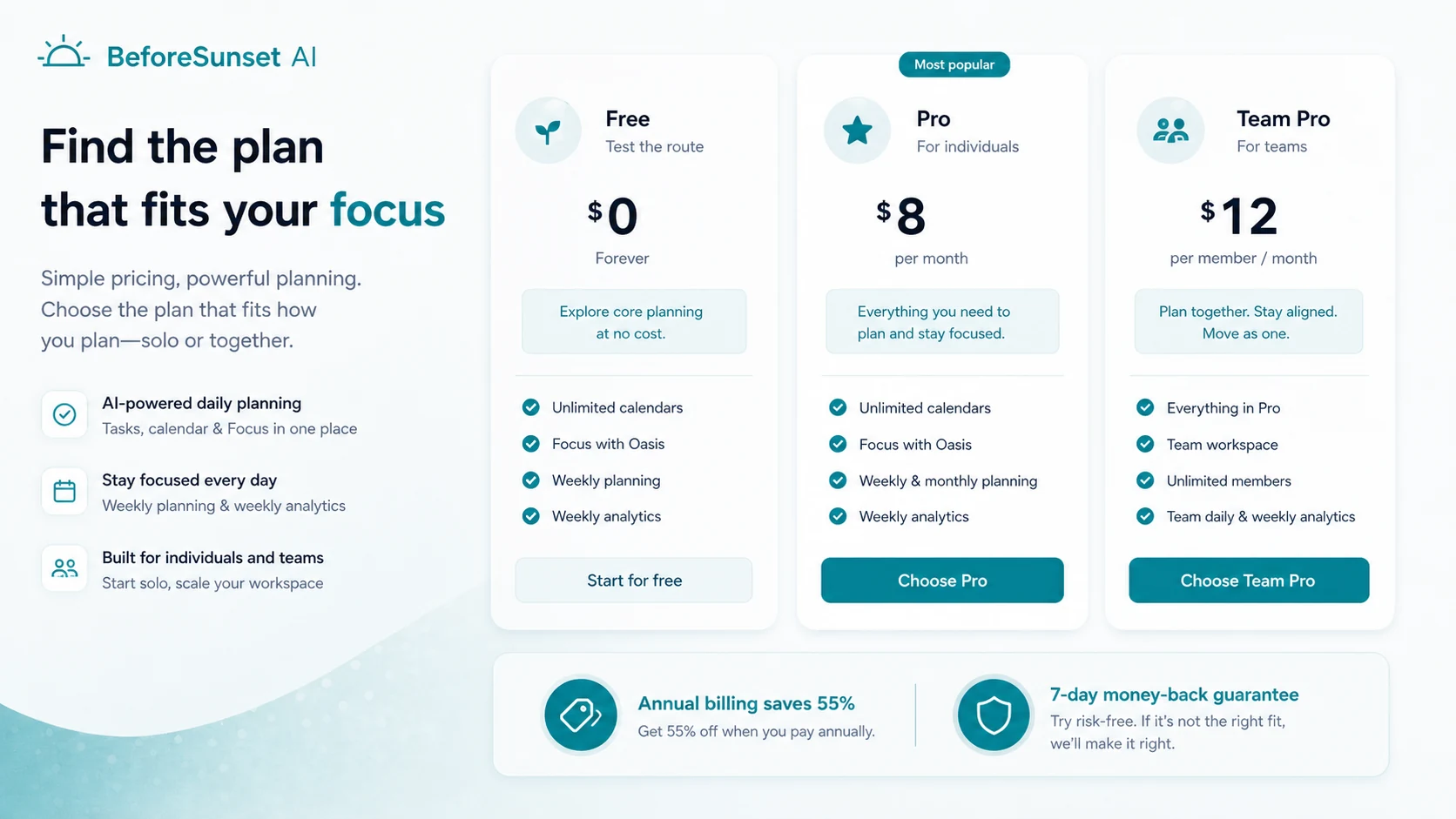
The official pricing page currently shows a free entry path, Pro at $8 per month, and Team Pro at $12 per member per month in the pricing view, with annual billing savings displayed. The page also references unlimited AI assistant credits on paid plans, unlimited calendars, Focus with Oasis, task auto-moving, weekly and monthly planning, weekly analytics, bookmarks, team workspace, unlimited members, and team analytics.
That sounds straightforward, but the buyer should still slow down.
The pricing question is less about whether $8 or $12 looks reasonable and more about whether BeforeSunset AI becomes part of your real planning routine. If you use it every morning, connect it to your calendar, rely on focus sessions, and review analytics, the paid plan can make sense. If you only open it twice a month, even a low monthly equivalent becomes waste.
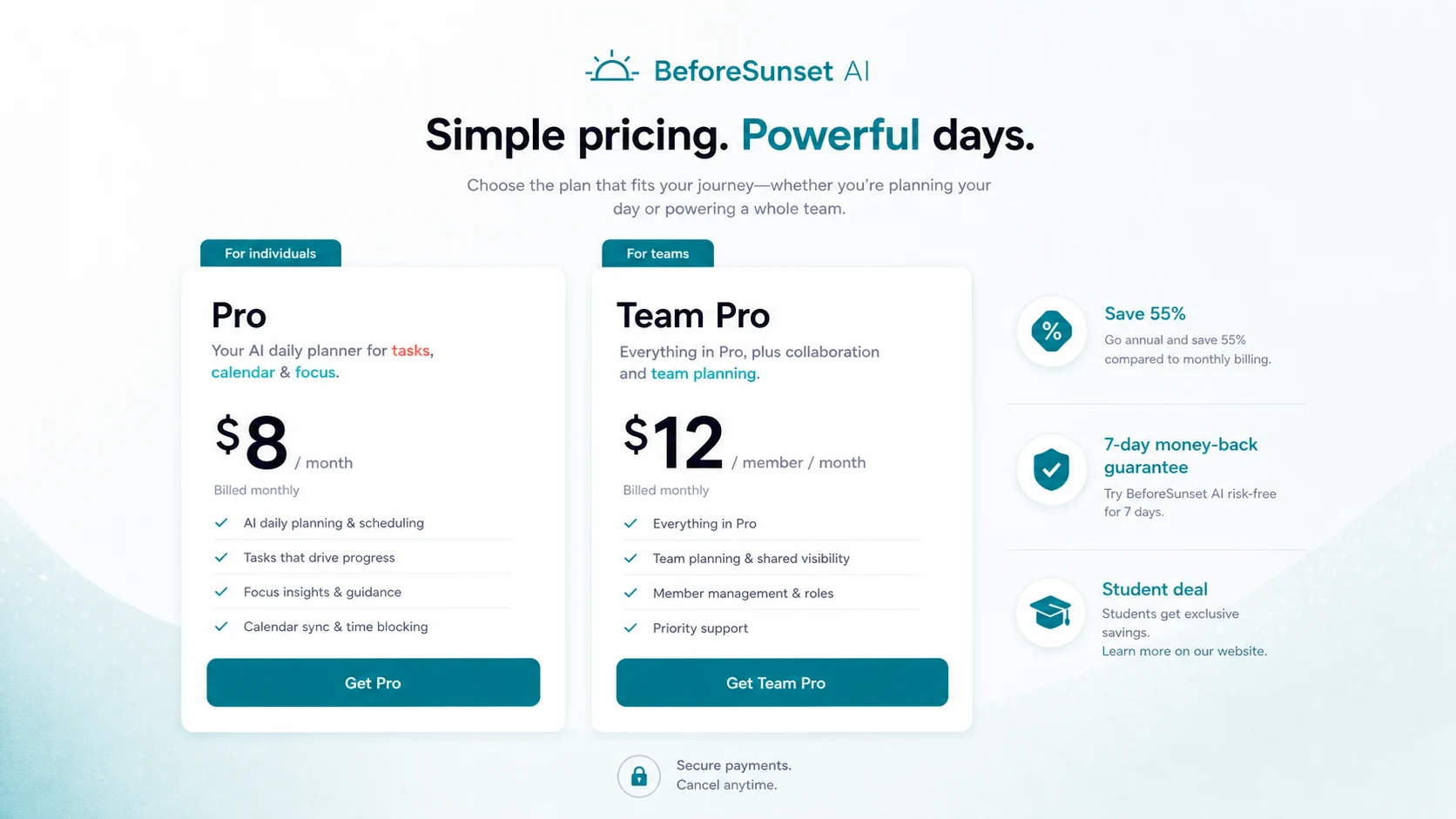
I would treat Pro as the personal planning plan. It makes sense when you want stronger AI planning, focus mode, calendar depth, recurring work, and analytics.
I would treat Team Pro as a coordination plan. It makes sense only when the team workspace and analytics solve a real team problem.
Annual billing can be attractive if the official savings are still live, but I would not start there unless the app has already helped for at least one normal workweek. Productivity tools are easy to buy and easy to abandon.
Pricing check: If the daily planning workflow already fits, compare the live Pro and Team Pro terms before choosing monthly or annual billing.
Free plan, trial, coupon, and checkout notes
The free entry path is the safest starting point. Use it to test whether BeforeSunset AI improves a real week, not a demo day.
A buyer should check five things before paying:
- Does AI planning create a realistic schedule?
- Does calendar sync work with the calendar you actually use?
- Does Oasis focus mode help you finish tasks?
- Do the analytics change how you plan?
- Would you open the app without forcing yourself?
The coupon and offer path should come after those questions. BeforeSunset AI has possible savings angles such as annual billing, a student deal, and current offer routing. There are also historical partner lifetime deal references online, including AppSumo pages, but buyers should not assume lifetime access is currently active unless a live partner page confirms it.
The refund picture deserves a careful note. The official pricing page shows a 7-day money-back guarantee. The affiliate context mentions 14 calendar days. AppSumo-style partner routes may have their own refund rules. Trustpilot feedback also includes public complaints about cancellation and refunds. The safe move is to verify the exact checkout path you are using, not rely on a general statement from a different context.
I would not treat a coupon as the decision. I would treat it as the final verification step after the workflow fits.
What I would check before buying BeforeSunset AI
If I were buying BeforeSunset AI for a real workflow, I would check these points first:
- Calendar fit. Confirm whether Google Calendar, Outlook Calendar, or your preferred calendar setup works the way you need.
- Free-path usefulness. Test whether the free route is enough to understand the workflow before payment.
- Billing toggle. Check whether you are seeing monthly pricing, annual pricing, or a monthly equivalent for annual billing.
- Refund wording. Verify the guarantee or refund terms on the exact checkout path.
- Cancellation process. Given public cancellation complaints, check how subscription management works before relying on a refund window.
- Team needs. Do not choose Team Pro unless workspace and analytics solve a clear coordination problem.
- Alternative fit. Compare direct planning tools if your problem is scheduling, not general productivity.
The easy mistake is buying because the monthly equivalent looks affordable. The better test is whether the product makes tomorrow morning easier.
A simple test before paying
Before paying, I would run a small test like this:
- Add one real week of tasks, not a cleaned-up sample list.
- Connect or compare it against your actual calendar.
- Use the planning flow for three working days.
- Try Oasis on at least two focus sessions.
- Track whether tasks feel more realistic or just more organized.
- Review whether you changed your behavior after seeing analytics.
- Only then compare Pro, Team Pro, annual billing, and current offers.
The point is not to prove the app is perfect. The point is to prove it solves a repeated planning problem. If it does not, the paid plan does not matter.
Pros explained
The first real advantage is workflow focus. BeforeSunset AI is not trying to become an all-purpose AI workspace. Its buyer promise is clearer: plan the day, organize tasks, connect with calendar time, and move into focus.
The second advantage is the combination of planning and execution. A normal task app may help you list work. BeforeSunset AI is more useful when it helps decide when work should happen and then supports the actual focus session.
The third advantage is the free entry path. Productivity tools are risky because users often buy the idea of a better routine, not the routine itself. Being able to test the app first reduces that risk.
The fourth advantage is the team option. Team Pro gives small teams a lighter path for shared planning and analytics without immediately adopting a large project management tool.
The fifth advantage is clarity of category. BeforeSunset AI is easier to evaluate than broad AI tools because the main question is narrow: does it help you plan and finish the day?
Cons explained
The first weakness is that BeforeSunset AI is not a full project management replacement. Teams that need complex workflows, dependencies, approvals, client reporting, or formal operations will likely outgrow it or need another system alongside it.
The second weakness is refund and cancellation confidence. Official pages mention a guarantee, but public review platforms include complaints about cancellation and refunds. I would not ignore that signal. It is exactly the kind of buyer-risk note that should change behavior before checkout.
The third weakness is potential over-guidance. Some buyers like AI arranging the day. Others want full manual control. If you are in the second group, the app may feel like another layer to manage.
The fourth weakness is calendar dependence. The product is more valuable when calendar sync works cleanly. If your calendar setup is unusual, shared, heavily fragmented, or dependent on Apple Calendar support, verify current integration coverage.
The fifth weakness is habit risk. A planner only works when you return to it. BeforeSunset AI can make planning easier, but it cannot make you adopt the habit.
Green flags and red flags
Green flags:
- You already plan daily but struggle to make the plan realistic.
- You need tasks and calendar time in the same decision flow.
- You want a focus mode after planning, not only a task list.
- You can test the free path with a real workweek before paying.
- Your team needs light planning visibility, not a full project management system.
Red flags:
- You only need a basic checklist.
- You want a mature project management platform.
- You are buying mainly because of a discount or student deal.
- You need Apple Calendar support or a specific integration that is not clearly live.
- You are uncomfortable with the public refund and cancellation complaints.
This is not a product I would judge by the pricing card alone. It is a product I would judge by whether it makes daily planning less fragile.
BeforeSunset AI vs alternatives
Sunsama vs BeforeSunset AI
Sunsama is usually the stronger comparison if you want a guided daily planning ritual with a calmer, deliberate workflow. It may fit buyers who want structure but less AI-forward planning.
BeforeSunset AI may make more sense if AI-assisted task shaping, focus mode, and a lower-cost planning route are more important than a polished daily planning ceremony.
Motion vs BeforeSunset AI
Motion is a stronger comparison for buyers who want automatic scheduling and calendar optimization to take over more of the planning burden. It can feel more operational and heavier.
BeforeSunset AI may fit buyers who want help planning the day but still want a lighter system with focus sessions and task-level control.
Reclaim AI vs BeforeSunset AI
Reclaim AI is more calendar-automation oriented. It is a better comparison if your main problem is protecting time, scheduling habits, and managing calendar availability.
BeforeSunset AI is more attractive when your task list and daily execution need as much help as the calendar itself.
Todoist or TickTick vs BeforeSunset AI
Todoist and TickTick are better if you want clean task capture, recurring tasks, labels, and manual control without AI planning. They are also safer for buyers who do not want a guided scheduling layer.
BeforeSunset AI is stronger if the missing piece is not task capture but turning tasks into a realistic day.
Adjacent routes: 1min.AI, Saner.AI, and Aikeedo
The 1min.AI review is relevant only if you want a broader all-in-one AI utility workspace. It is not a direct daily planner alternative.
Saner.AI is a closer adjacent route for notes, knowledge, and personal organization. It may matter if your productivity problem starts with information overload rather than day planning.
The Aikeedo review is a different route entirely. It matters if you are thinking about owning or building an AI SaaS system, not if you simply want a hosted daily planner.
Trust, refund, and buyer-risk notes
My confidence is strongest around BeforeSunset AI’s product role: it is clearly positioned around AI-assisted daily planning, calendar structure, focus sessions, and light team visibility.
I am more cautious around checkout and support risk. The official pricing page mentions a 7-day money-back guarantee. Other BeforeSunset affiliate context mentions 14 calendar days. Partner deal pages can follow different rules. Trustpilot contains a small but negative set of cancellation and refund complaints. G2 and Product Hunt show more positive planning-focused feedback, but those do not remove the need to check the active checkout path.
Privacy also deserves a practical look. The privacy policy discusses third-party account connections and collection of account-related information, including contact information in some cases. That is not unusual for productivity apps with calendar or account integrations, but buyers using sensitive work calendars should read the policy before connecting important accounts.
For teams, I would check support expectations and admin needs before rollout. BeforeSunset AI can be a useful planning layer, but a team that needs formal operational controls should not assume Team Pro covers everything.
The safest buyer posture is simple: test free, verify calendar support, check cancellation/refund terms, then decide whether Pro or Team Pro solves a repeated problem.
Final verdict
I would consider BeforeSunset AI if your main productivity problem is turning loose tasks into a realistic day and then following through with focused work. It is especially interesting for solo workers, students, freelancers, founders, and small teams that want more structure than a basic checklist without moving into a heavy project management tool.
I would skip it if you already have a planning system that works, if you dislike guided scheduling, or if your team needs complex delivery workflows. I would also be cautious if refund/cancellation certainty is a major concern for you; in that case, stay with the free path until you are comfortable with the checkout terms.
I would compare it with Sunsama if you want a stronger planning ritual, Motion or Reclaim if calendar automation is the main problem, and Todoist or TickTick if you only need clean task management. For broader AI utility or knowledge workflows, adjacent internal routes like 1min.AI and Saner.AI may be useful, but they are not direct replacements for a daily planner.
The safest next step is to test BeforeSunset AI with one real workweek. If it helps you plan faster, protect focus time, and finish more of what you intended to do, then Pro or Team Pro deserves a pricing check. If the plan looks tidy but your behavior does not change, a cheaper or simpler task app is probably the better decision.
