Quick verdict
Clipto.AI is worth considering if transcription is already a repeated part of your work. It is not the kind of tool I would start just because the trial looks easy or the annual price looks cheaper than the monthly route.
The real question is narrower: do you regularly need to turn audio, video, meetings, interviews, lectures, podcasts, or YouTube content into usable text?
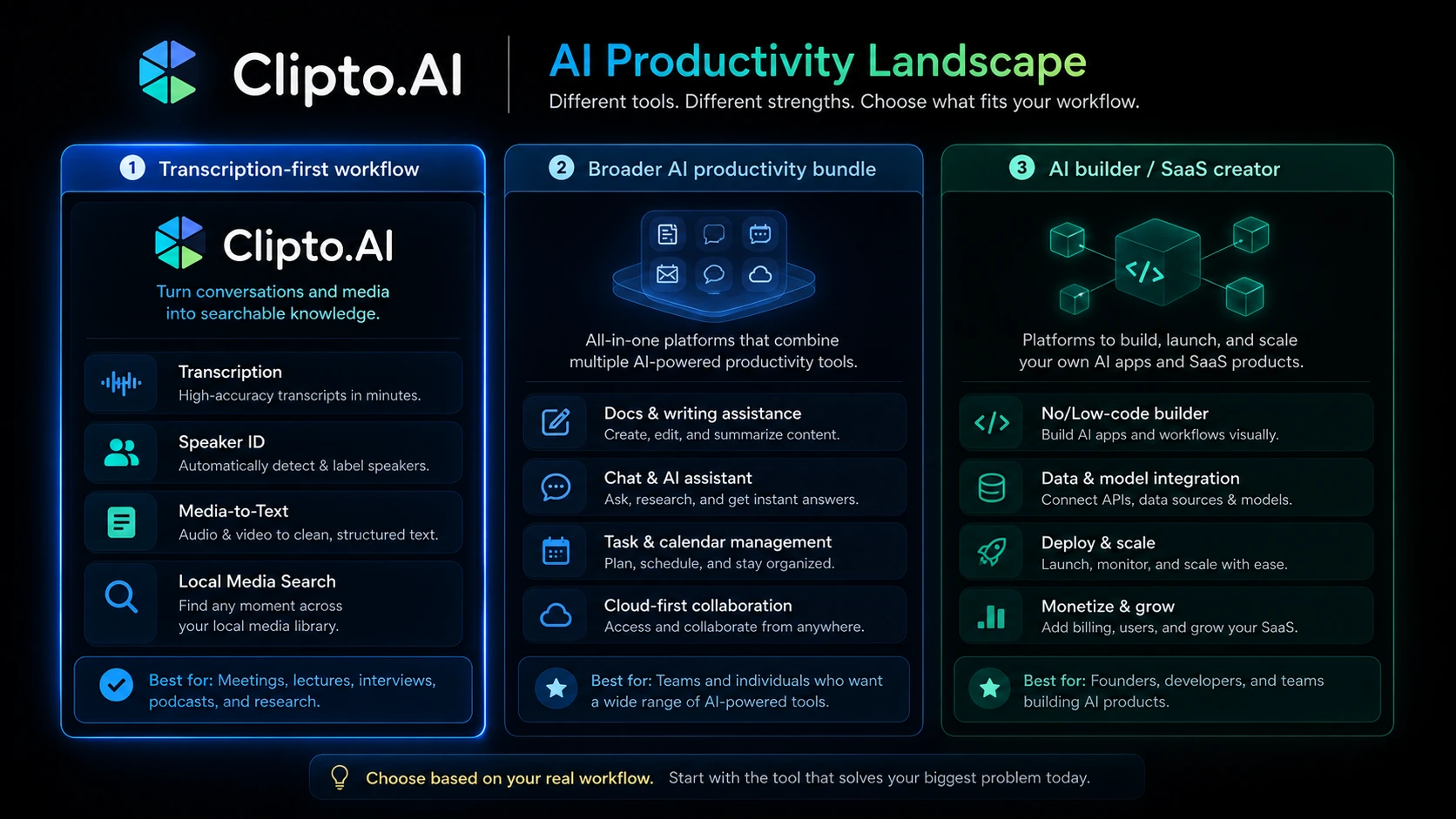
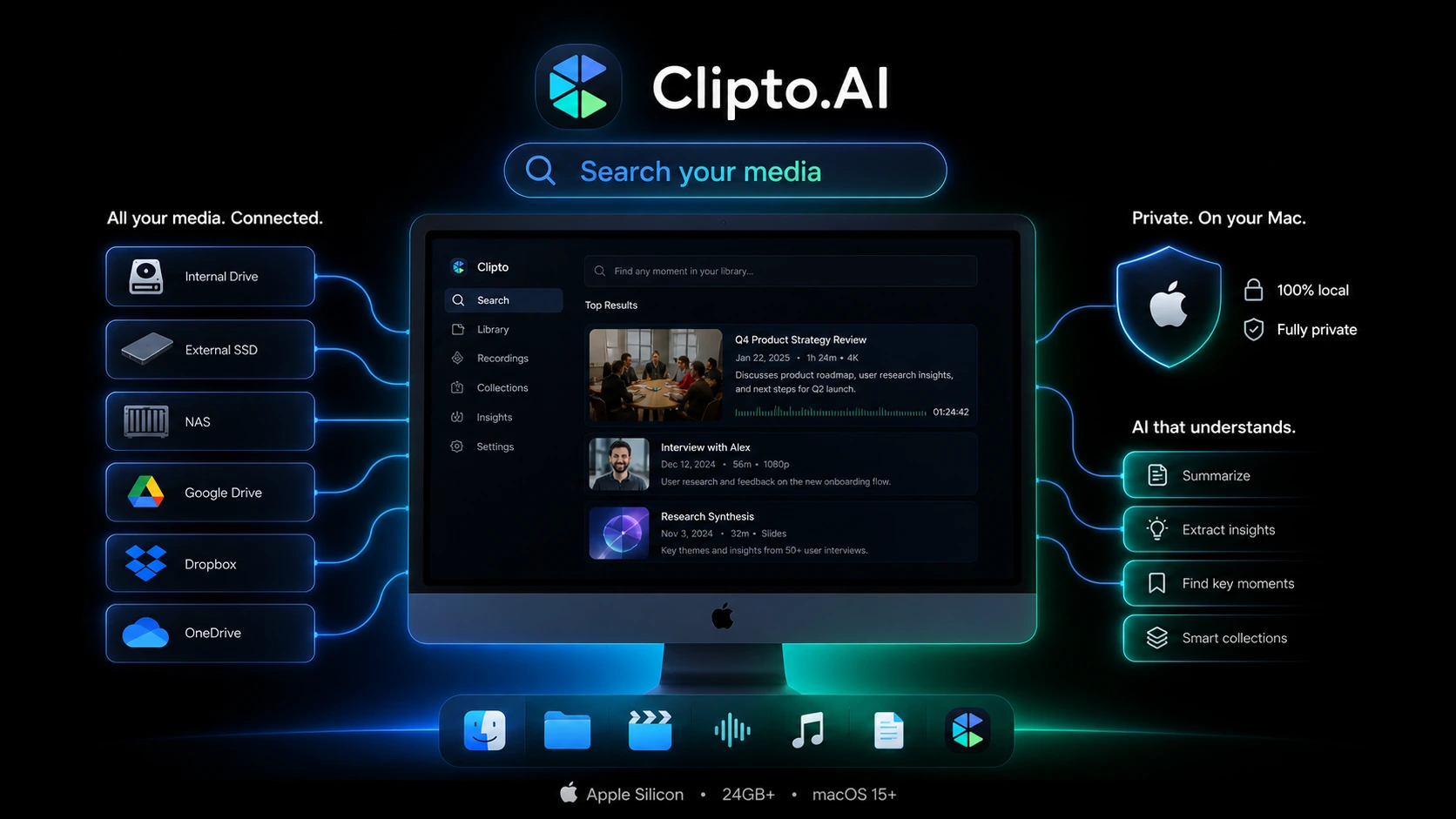
If the answer is yes, Clipto.AI has a believable role. Its transcription pages focus on audio and video transcription, URL import, speaker identification, summaries, multilingual support, and exports. Its newer homepage positioning also pushes a local Mac knowledge assistant angle, which could be interesting for people with large media libraries who want more private on-device search.
That mix is useful, but it also creates the main buying caution. Clipto.AI is not just one simple thing anymore. A creator looking for YouTube transcripts, a student recording lectures, a researcher reviewing interviews, an iPhone user needing live captions, and a Mac user searching local media are not making the same buying decision.
For my money, the safest path is to test one real file during the 7-day trial, check the renewal price before the trial ends, and avoid annual billing until Clipto.AI proves it can reduce cleanup time in your actual workflow.
Next step: If Clipto.AI still fits your media-to-text workflow, verify the current trial and pricing path before the checkout screen makes the decision feel urgent.
Review snapshot
| Review point | Practical take |
|---|---|
| Best for | Creators, researchers, students, interviewers, and solo operators with repeated transcription needs |
| Not ideal for | One-off users, large teams needing governance, or buyers who cannot test cancellation before renewal |
| Main use case | Turning audio and video into transcripts, summaries, subtitles, searchable notes, or reusable content |
| Free path | 7-day trial, best used with a real file ready before starting |
| Pricing model | Monthly intro price, higher monthly renewal, and yearly billing path |
| Main strength | Practical transcription workflow coverage across files, URLs, language support, summaries, and exports |
| Main concern | Product-path clarity, renewal pricing, refund visibility, and sensitive recording privacy checks |
| Direct alternatives to compare | Otter.ai, Descript, Rev, Happy Scribe, Fireflies.ai |
| Adjacent DealBestDaily routes | 1min.AI for broader AI utility, Aikeedo for builder-style AI product ownership |
| Best next step | Run one representative file through the trial before choosing monthly or annual billing |
What is Clipto.AI?
Clipto.AI is best understood as a transcription and media-knowledge workflow tool for people who need spoken content turned into usable text.
That sounds simple, but the product has several angles. The transcription side covers local file transcription, URL-based transcription, YouTube-style media workflows, speaker identification, summaries, exports, and support for many languages. The mobile angle appears focused on live captions and real-time voice-to-text. The Mac angle is newer and more privacy-driven: Clipto presents a local media assistant that can help manage and search large media libraries on-device.
The wrong expectation is thinking Clipto.AI is only a cheap transcription page.
A better way to judge it is by workflow. If your work repeatedly creates recorded material that has to become notes, captions, quotes, summaries, clips, research material, or searchable knowledge, Clipto.AI becomes more interesting. If you only need one transcript, it may be easier to use a one-off tool or a free limit somewhere else.
Our review approach compares public product pages, pricing details, help documentation, privacy and terms language, buyer workflow fit, and nearby alternatives. We do not treat a trial, low first-month price, or possible deal path as proof that the product fits the buyer.
The evidence is strongest around Clipto.AI’s transcription role and visible pricing structure. I would be more cautious around long-term support, refund assumptions, and the exact product path because those details can change faster than a review page.
Who should use Clipto.AI?
Clipto.AI makes the most sense for buyers who already know what file they want to test.
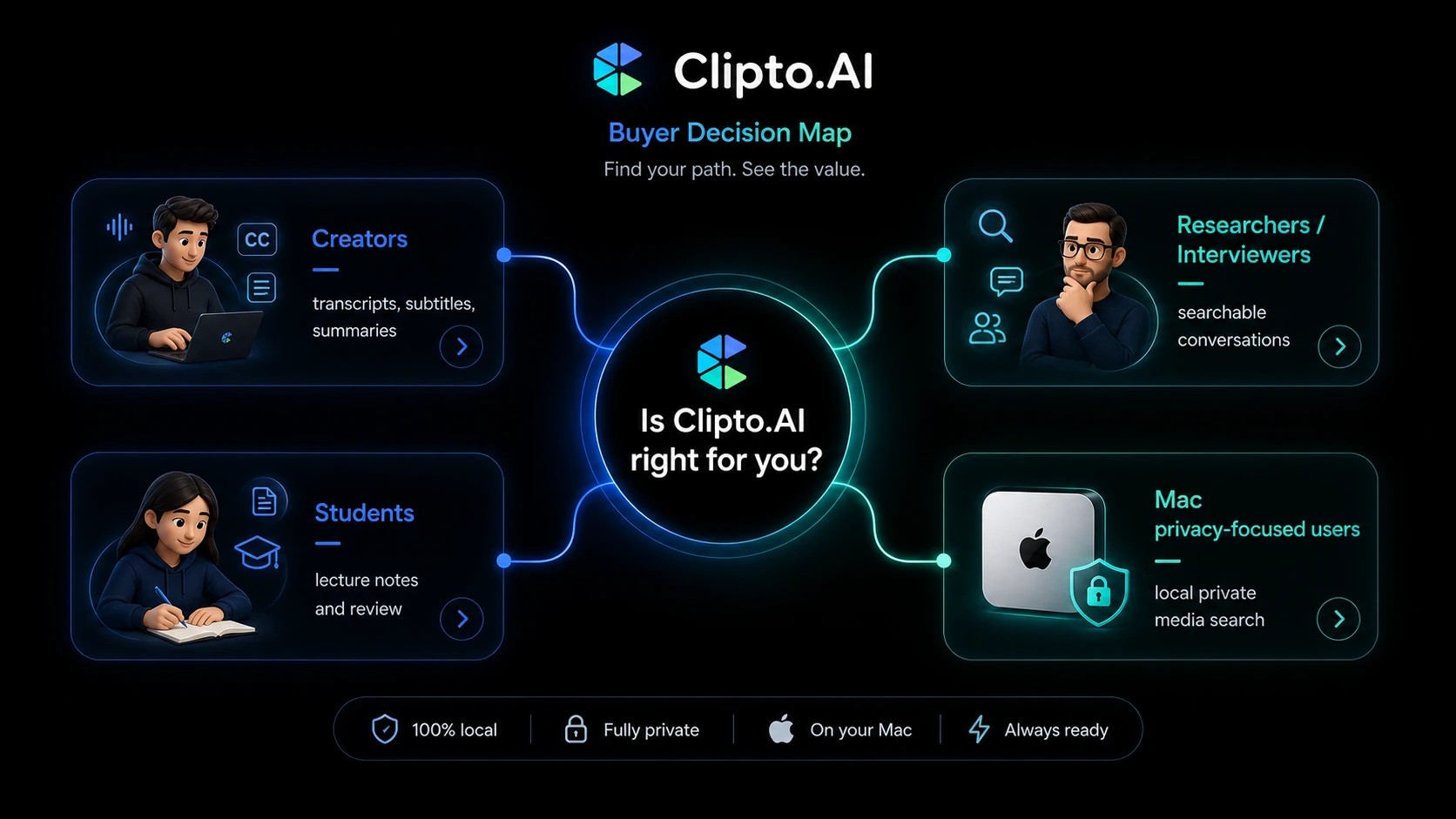
A YouTuber or podcaster may use it to create transcripts, subtitles, summaries, and reusable written material from long-form media. This is one of the cleaner use cases because the value is easy to measure: did the transcript reduce manual work, and were the exports useful for publishing?
A researcher, interviewer, or hiring manager may find it useful when recordings need to become searchable text. The condition is audio quality. Interviews with overlapping speakers, accents, background noise, or technical vocabulary should be tested before paying annually.
A student or educator may use Clipto.AI for lectures and class recordings. The tool is more convincing when it helps review long sessions, summarize key points, or export notes in a format that can be studied later. It is less convincing if the user only wants a transcript once in a while.
A meeting-heavy solo operator may use Clipto.AI to turn recorded calls into notes. But this is where the comparison matters. If you need a bot that joins meetings, creates action items, and integrates with a team workspace, a meeting assistant may be a stronger route.
A Mac user with a large media archive may be interested in the local private search angle. I would check device requirements first. The official homepage points to M1+ Macs, 24GB+ memory, and macOS 15+, so this path is not automatically useful for every Mac owner.
Who should avoid Clipto.AI?
I would be careful with Clipto.AI if you only need one or two short transcripts. A subscription makes more sense when the problem repeats. If the use case is casual, the trial may answer the question without a paid renewal.
I would also avoid starting the trial casually. Seven days can disappear quickly if you do not already have a file ready. The trial is useful only if you use it immediately to test a real recording.
Teams needing admin controls, shared workspaces, API access, compliance review, or formal meeting workflows should slow down. Clipto.AI may still help with transcription, but it is not the first tool I would compare for team governance or structured meeting automation.
Privacy-sensitive buyers should also be careful. Audio and video files can contain client calls, interviews, classes, medical conversations, research material, or confidential business details. Clipto’s FAQ and privacy pages provide useful signals, but buyers should still read current terms before uploading sensitive files.
Finally, I would not choose Clipto.AI only because the first-month price looks attractive. The monthly route has an intro price, and the renewal price is the number that matters after the first month. A discount can improve the purchase, but it should not become the reason you buy.
How Clipto.AI fits into a real workflow
A practical Clipto.AI workflow starts before the upload.
First, choose a file that represents your real work. Not the cleanest sample you can find. Use the kind of audio or video you actually need help with: a meeting, lecture, podcast, interview, YouTube video, webinar, or field recording.
Then upload or import the file and check the transcript quality. Do not judge only by the first paragraph. Look for speaker separation, names, timestamps, technical terms, punctuation, and whether the text is clean enough to use without heavy editing.
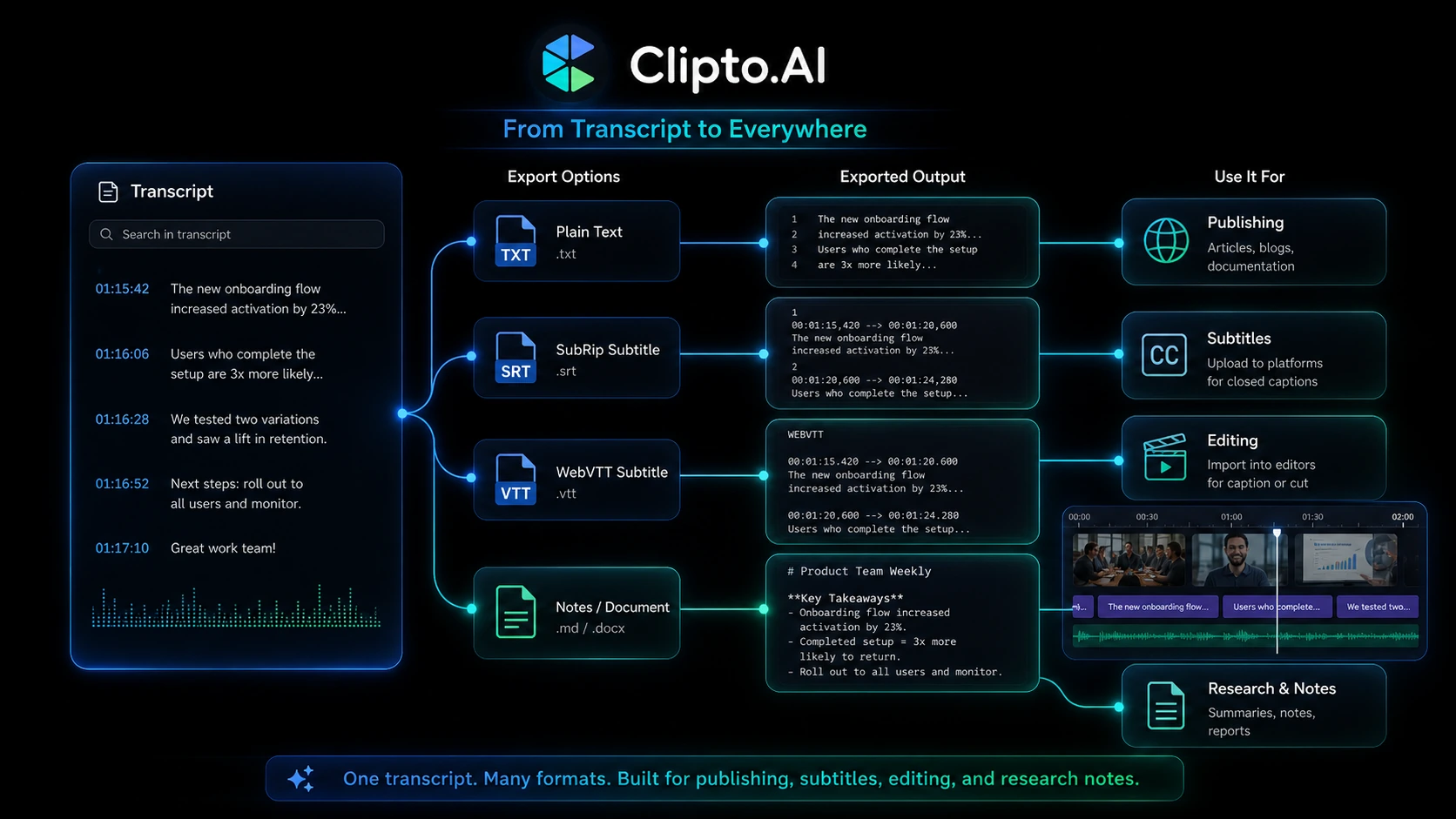
After that, check the summary and export path. A transcript that looks fine on the screen may still be annoying if you cannot export it in the format you need. For creators, subtitles and caption workflows matter. For researchers, searchable text and clean speaker sections matter. For students, summary quality and review speed matter.
The final step is the one buyers often skip: compare cleanup time. If Clipto.AI saves you 30 minutes on every recording, the subscription may make sense. If it creates a transcript that still requires heavy correction, the trial has done its job by warning you before renewal.
Workflow check: Start Clipto.AI only when you have one real recording ready. The trial is most useful when it tests your actual file quality, export needs, and cleanup time.
Real-world buyer scenarios
A creator repurposing long videos
A YouTuber, podcaster, or course creator may use Clipto.AI to turn long media into transcripts, subtitles, summaries, and written content drafts. This is one of the better fits because the output can support publishing, SEO, accessibility, and content repurposing.
The risk is assuming every file will be clean. If the creator uses poor audio, overlapping speakers, music beds, or mixed languages, the transcript may still need editing. The trial should test a real file from the actual channel, not a perfect demo clip.
A researcher reviewing interviews
A researcher or interviewer may use Clipto.AI to convert interviews into searchable text. The value is speed: being able to find quotes, compare answers, or summarize themes without re-listening to full recordings.
The caution is accuracy. In research workflows, small transcription errors can change meaning. Clipto.AI may help reduce manual work, but important quotes should still be checked against the audio before being used.
A student recording lectures
For students, Clipto.AI can be useful when lectures are long and reviewing audio is inefficient. Transcripts and summaries can make study sessions more searchable.
The buyer note is simple: do not start the trial during a light week. Start when there are actual lectures, class recordings, or study materials ready to test. Otherwise, the trial ends before the tool proves anything.
A Mac user searching a media archive
The local Mac assistant angle is interesting for people with many video or audio files sitting on a device. It is a different decision from cloud transcription. The promise is more about private local search and media knowledge than just uploading one file.
The practical issue is setup fit. Device requirements, macOS version, storage, memory, and actual file library size all matter. This buyer should verify the Mac path before treating Clipto.AI as just another web transcription subscription.
Key features that actually matter
Audio and video transcription
The core reason to consider Clipto.AI is transcription. The product supports turning audio and video into text, and public pages position it around fast transcription for local files and imported URLs.
This matters when spoken content blocks your workflow. Meetings, lectures, webinars, podcasts, interviews, and videos are slow to review manually. A transcript gives you something searchable, editable, and reusable.
Buyer note: test real audio quality. Clean marketing examples do not prove performance on noisy rooms, multiple speakers, accents, or long recordings.
URL and YouTube-style import
URL import can save time for creators and researchers who need transcripts from online media. Instead of downloading a file first, the buyer can work from a media link when supported.
This is useful for YouTube workflows, research review, competitor analysis, course review, or repurposing public media into notes.
Buyer note: verify which URLs work in your real use case. Not every platform, protected video, or private file will behave the same way.
Speaker identification
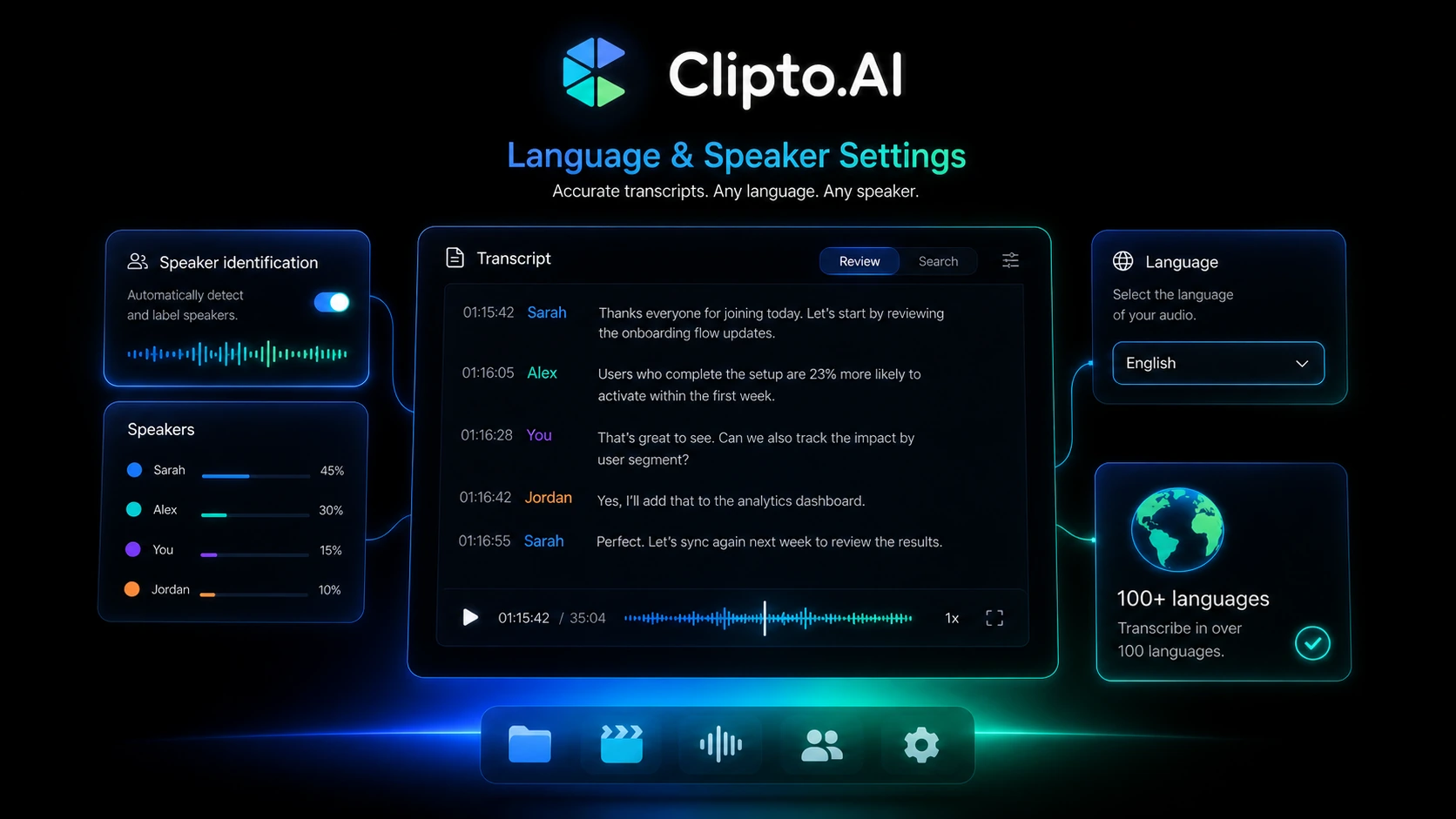
Speaker identification is one of the features that separates a usable transcript from a messy wall of text. It matters for interviews, meetings, panels, podcasts, and class discussions.
If the transcript cannot separate speakers well enough, the buyer may spend too much time cleaning the output. That can erase the time savings.
Buyer note: test speaker-heavy files during the trial. A single-speaker voice memo is not enough to judge this feature.
Summaries and review shortcuts
Summaries can help buyers move from raw transcript to practical review. For students, that may mean key points. For creators, it may mean content ideas. For business users, it may mean meeting notes.
This feature is valuable only when the summary matches the transcript closely enough to be trusted as a starting point. It should not replace human review for important decisions.
Buyer note: compare summary quality against the transcript. If the summary misses important nuance, the feature is helpful for orientation but not for final notes.
Export and subtitle workflow
Export options matter because transcription is rarely the final destination. The buyer may need text, captions, subtitles, notes, quotes, or material that moves into an editor, LMS, CMS, research tool, or content workflow.
This is where Clipto.AI can become more than a transcript screen. If export formats save time, the tool becomes easier to justify.
Buyer note: check the exact formats you need before paying. A good transcript is less useful if you cannot use it where your work actually happens.
Local Mac media assistant
Clipto’s homepage now leans into a local Mac media assistant that helps manage and search large media libraries on-device. That is a different promise from a browser-based transcript generator.
This may appeal to privacy-conscious users, creators with large archives, researchers with local recordings, or anyone who wants media search without pushing every file into a cloud workflow.
Buyer note: verify device requirements and whether the local app supports the specific media library you care about. This path should be judged separately from the web transcription plan.
Pricing and plan value
Clipto.AI pricing is understandable, but buyers need to read the renewal path carefully.
The public pricing page shows a monthly route with a $9.99 first-month price before a $24.99 monthly price, plus a yearly route displayed as $8.99 per month when billed yearly. It also promotes a 7-day free trial and describes benefits such as unlimited use, support for files up to 6 hours, 99+ languages, speaker identification, and results in minutes.
The value question is not whether the annual number looks lower. It usually will. The value question is whether you know you will use Clipto.AI every month.
For a creator processing weekly videos, annual billing may make sense after testing. For a researcher with a short project, the monthly route may be safer even if the renewal is higher. For a student, the value may depend on the semester schedule. For a Mac user interested in local media search, the price should be judged only after confirming device and workflow fit.
I would not move to annual billing after only testing a clean sample. I would test the messier file first: the long interview, the lecture with background noise, the meeting with several voices, or the media file that actually matters.
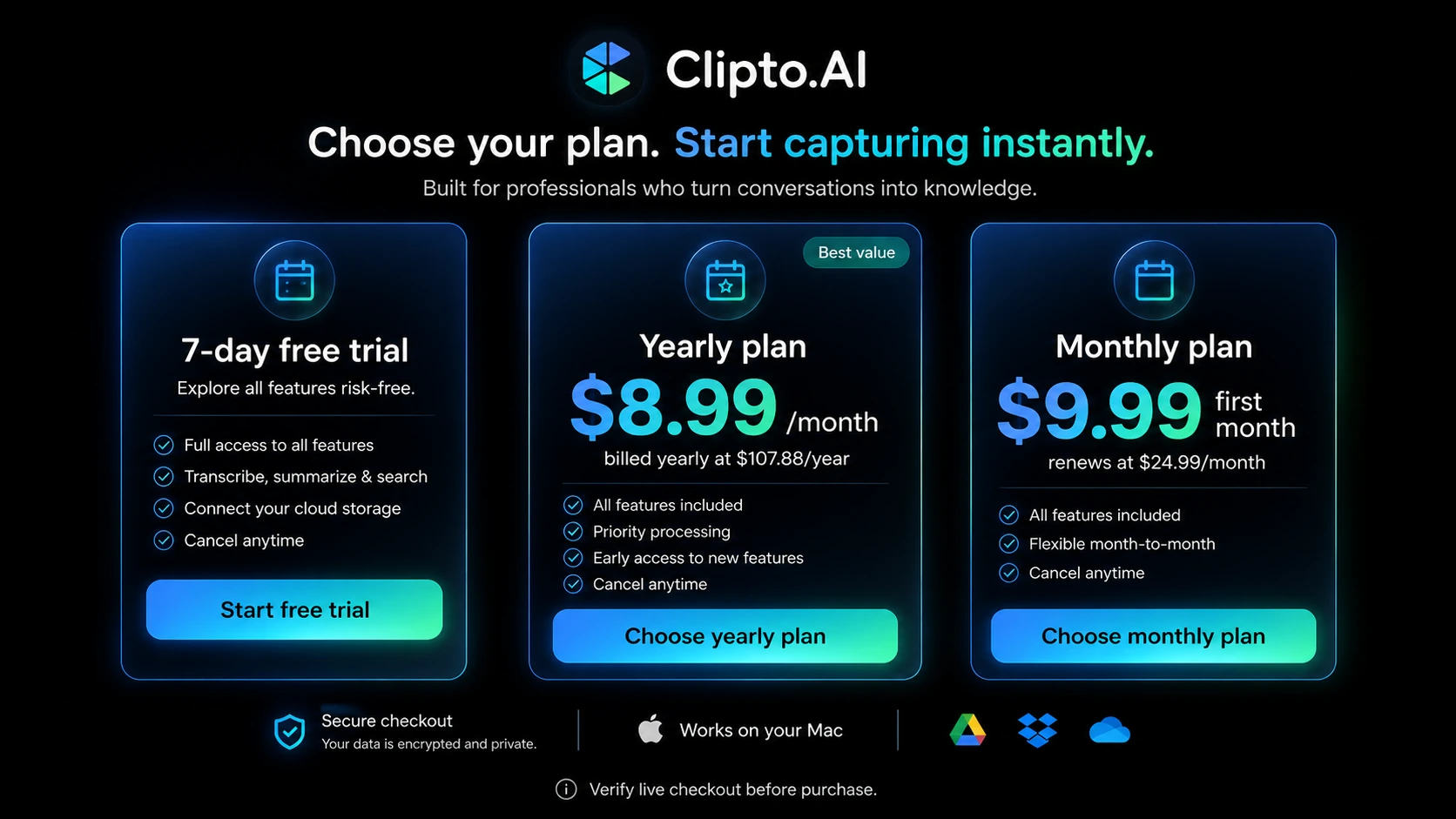
Pricing check: If the workflow test looks promising, verify the current checkout price and renewal path before choosing monthly or annual billing.
Check Clipto.AI pricing Check current offers Read pricing notes
Free plan, trial, coupon, and checkout notes
Clipto.AI should be treated as trial-first, not coupon-first.
A full permanent free plan was not clear enough to rely on during this review. The visible entry path is the 7-day trial. That can be useful, but only if you use it with discipline.
The mistake buyers make here is starting the trial before they have a real file ready. Then the trial becomes a timer, not a test. A better approach is to prepare one or two representative files first: a meeting, interview, class, podcast, webinar, or YouTube-style workflow. Start the trial only when you can test immediately.
The coupon path should come later. If Clipto.AI fits your workflow, checking the Clipto.AI coupon page before checkout is reasonable. But I would not let a deal path override the workflow test. A cheaper subscription is still wasteful if the transcript requires too much cleanup.
The checkout note that matters most is renewal. The first-month monthly price is not the same as long-term monthly cost. Annual billing may be cheaper per month, but it also locks in more commitment. The safest path is trial, real file test, cleanup-time check, renewal-price check, then plan decision.
Checkout order: Test workflow fit first, check pricing second, and use the coupon route only after Clipto.AI has earned a place in your transcription process.
What I would check before buying Clipto.AI
If I were buying Clipto.AI for a real workflow, I would check these items before letting the trial convert.
- The exact renewal price after the first month.
- Whether annual billing is charged upfront.
- Whether the 7-day trial is enough to test your real files.
- Whether the transcript is accurate enough for your recording quality.
- Whether speaker identification works on your actual meetings or interviews.
- Whether export formats match your publishing, study, or research workflow.
- Whether the web app, iPhone app, or local Mac assistant is the product path you actually need.
- Whether current terms, privacy language, and cancellation steps fit your risk tolerance.
- Whether a direct alternative is better for your specific use case.
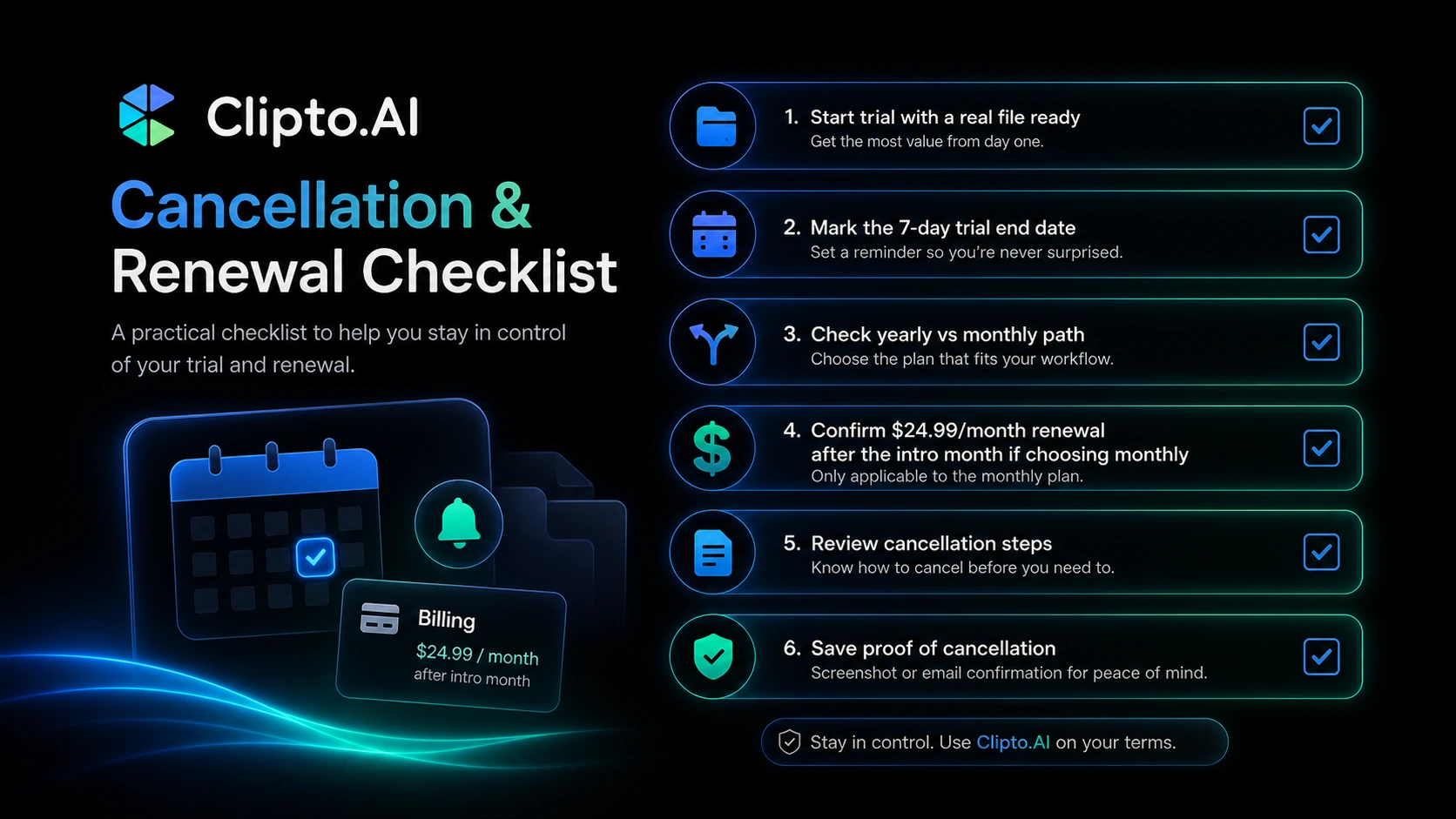
For my money, the first thing to verify is not the annual discount. It is whether the output reduces cleanup time. If the transcript still takes heavy editing, the cheaper plan is not really cheaper.
A simple test before paying
Before paying, I would run a small test like this:
- Pick one real file that represents your normal work.
- Run it through Clipto.AI during the trial.
- Check the transcript against the original audio or video.
- Review speaker labels, timestamps, summary quality, and language handling.
- Export the transcript in the format you actually need.
- Estimate cleanup time compared with your current process.
- Check renewal pricing and cancellation steps before the trial ends.
This test is intentionally simple. The goal is not to prove Clipto.AI is perfect. The goal is to decide whether it saves enough time to justify a subscription.
A clean result on one easy file is not enough for annual billing. A good result on a messy, realistic file is much more meaningful.
Pros explained
The biggest pro is that Clipto.AI solves a real, repeated problem. Turning media into text is still a bottleneck for many creators, students, researchers, and operators. If the transcript is good enough, the time savings can be obvious.
The trial is also useful when used properly. Seven days is short, but it is enough to test one or two real files. That gives careful buyers a way to evaluate the product before committing to a paid renewal.
The feature mix is practical. Local files, URL import, speaker identification, summaries, multilingual support, and exports all matter in real workflows. These are not just cosmetic features if the buyer regularly handles long-form media.
The local Mac angle is another potential strength. For buyers with large local media libraries, on-device search can be more appealing than constantly uploading files. But this strength only matters if the buyer’s device and workflow match the requirements.
Finally, Clipto.AI is easier to understand than many bloated AI workspaces. It has a focused role: media becomes text, text becomes more useful, and the buyer decides whether the time savings justify the plan.
Cons explained
The first con is product-path clarity. Clipto.AI can appear as a web transcription tool, an iPhone live caption app, and a local Mac knowledge assistant. Those may all be related, but they are not the same buyer decision.
The second con is renewal pricing. The monthly plan’s first-month price is not the long-term monthly price. Buyers who only look at the lower entry number may underestimate the real monthly cost after renewal.
The third con is refund confidence. Cancellation language is visible, and the FAQ explains the trial pre-authorization, but I would not assume a generous refund path unless the current terms clearly support it. Cancellation timing matters.
The fourth con is team depth. Clipto.AI may be useful for individual workflows, but buyers who need meeting bots, admin controls, CRM integrations, shared team notes, or enterprise governance should compare meeting-focused tools first.
The final con is accuracy dependence. Transcription quality depends on audio quality, speaker overlap, accents, recording length, and vocabulary. No transcription tool should be judged only by its best-case demo.
Green flags and red flags
Green flags
Clipto.AI is more promising if you already process audio or video every week. Repeated use is the main reason a subscription makes sense.
It is also a good sign if your first real file produces a transcript that needs only light cleanup. That tells you the product is solving the actual problem, not just generating text.
Another green flag is export fit. If Clipto.AI gives you a transcript, summary, or subtitle file that moves directly into your next tool, the workflow value becomes easier to defend.
The local Mac path may also be a green flag if you have a large private media library and a compatible device.
Red flags
A red flag is starting the trial without a file ready. That usually means the buyer is testing curiosity, not workflow fit.
Another red flag is buying because of an annual discount before checking the monthly renewal path and cancellation steps.
It is also a warning sign if your test file contains overlapping speakers and the transcript needs heavy manual cleanup. In that case, the tool may still be useful, but the value calculation changes.
For teams, a red flag is unclear governance. If you need admin controls, permissioning, meeting-bot workflows, or API-style automation, do not assume Clipto.AI covers that requirement without verification.
Clipto.AI vs alternatives
Clipto.AI has to be compared by workflow, not by the broad label “AI transcription.”
Otter.ai vs Clipto.AI
Otter.ai is usually the stronger comparison if your workflow is live meetings, collaborative notes, speaker timelines, and workplace meeting capture. It is more meeting-assistant shaped.
Clipto.AI may still make more sense if your main use case is importing media files, transcribing videos, working with creator content, or testing a broader media-to-text workflow outside formal meetings.
Fireflies.ai vs Clipto.AI
Fireflies.ai is a stronger route for meeting automation, call recording, summaries, and team-oriented workflows. If you want a tool to join meetings and create shared records, Fireflies.ai may be the cleaner comparison.
Clipto.AI is more relevant when the input is a media file or content workflow rather than a calendar-driven meeting process.
Descript vs Clipto.AI
Descript is the stronger comparison for creators who want transcription tied to editing. If you are editing podcasts, videos, clips, or screen recordings, Descript may fit deeper into the production process.
Clipto.AI may be simpler if you mainly need transcripts, summaries, and exports without adopting a full editing environment.
Rev vs Clipto.AI
Rev is the stronger comparison when accuracy stakes are high and human transcription may be needed. Legal, medical, journalistic, or quote-sensitive workflows often need more than automated output.
Clipto.AI may make sense when AI transcription is good enough and speed matters more than near-perfect human review.
Happy Scribe vs Clipto.AI
Happy Scribe is a useful comparison for subtitles, captioning, and translation-heavy publishing workflows. It may be stronger when subtitle editing and multilingual caption production are the main job.
Clipto.AI may still be enough if your broader workflow includes transcripts, summaries, and general media-to-text conversion rather than subtitle production alone.
Adjacent DealBestDaily routes: 1min.AI and Aikeedo
1min.AI is not a direct transcription replacement. It is an adjacent route for buyers who want a broader AI utility bundle rather than a transcription-first product.
Aikeedo is also not a direct replacement. It is an adjacent route for buyers who want to build or own an AI SaaS-style product, not simply transcribe media.
That distinction matters. If your problem is audio and video transcription, compare transcription tools first. If your problem is broader AI productivity or product ownership, then adjacent routes become more relevant.
Trust, refund, and buyer-risk notes
The trust question with Clipto.AI is less about whether transcription tools are useful and more about whether the current product path matches the buyer’s expectations.
The official homepage emphasizes a local Mac media assistant. The transcription pages emphasize cloud-style upload, URL import, speaker identification, summaries, language support, and exports. The iPhone listing emphasizes live captions and real-time transcription. These are related, but buyers should not assume every path behaves the same way.
Refund visibility is another reason to move carefully. The terms explain cancellation and recurring charges, and the FAQ explains trial pre-authorization, but I would not treat refund protection as the main safety net. The stronger safety net is testing quickly and cancelling before renewal if the tool does not fit.
Privacy also deserves a real read. Clipto handles audio, video, transcripts, account details, and potentially sensitive recordings. The FAQ says uploaded files and transcript results are encrypted and stored in AWS cloud storage, while the homepage promotes a local on-device Mac angle. Buyers should verify which workflow they are using before processing private material.
The safest buyer behavior is boring but effective: test a real file, check the cleanup time, verify renewal pricing, read the current terms, and avoid annual billing until the workflow earns it.
Final verdict
I would consider Clipto.AI if you regularly turn media into text and can test a real file during the 7-day trial. It is especially worth a look for creators, students, researchers, interviewers, and solo operators who need transcripts, summaries, subtitles, exports, or searchable media workflows often enough to justify a subscription.
I would skip it if you only need a one-off transcript, if you cannot test the trial immediately, or if you need a mature team meeting assistant with admin controls and workplace integrations.
I would compare it with Otter.ai or Fireflies.ai for meeting automation, Descript for creator editing workflows, Rev for higher-accuracy human transcription needs, and Happy Scribe for subtitle-heavy publishing.
The safest next step is not to chase the cheapest visible price. Prepare one real recording, test Clipto.AI against that file, check the cleanup time, verify the renewal price, and only then decide whether the trial should become a monthly or annual subscription.
