Quick verdict
Creative Fuel is worth considering if your biggest YouTube problem is not editing, recording, or thumbnails, but the earlier problem that quietly blocks everything else: deciding what to make next.
That is the right frame for this review.
Creative Fuel is currently presented as a YouTube creator ideation and upload-prep tool. It helps creators generate ideas, workshop concepts, and move closer to metadata-ready publishing. It is not a general AI workspace, a full social scheduler, or a guarantee that your next video will perform well.
For my money, the safest move is to start with the free Ember plan. Use it with your actual channel, not a pretend niche. If the ideas feel specific enough that you would genuinely consider filming them, Blaze or Inferno can become a real decision. If the ideas feel generic, a coupon or annual discount will not fix the mismatch.
The strongest reason to consider Creative Fuel is focus. The main caution is that annual pricing, special creator discounts, and the 30-day guarantee all need live checkout and support verification before you treat the offer as settled.
Next step: If Creative Fuel sounds like it fits your YouTube planning workflow, test the live product path before comparing paid capacity.
Review snapshot
| Review point | Practical take |
|---|---|
| Best for | YouTube creators who need repeatable idea planning and upload preparation |
| Not ideal for | Occasional uploaders or buyers who need a broad business AI workspace |
| Main use case | Turning channel context and inspiration into video ideas, workshopped concepts, and metadata support |
| Free path | Ember is currently presented as a Free Forever plan with limited usage |
| Paid path | Blaze and Inferno add more channels, larger workflow capacity, and stronger idea/workshop limits |
| Main strength | YouTube-specific focus instead of generic AI content help |
| Main concern | Annual pricing, discount eligibility, refund handling, and real idea quality need buyer checks |
| Direct comparisons | TubeBuddy, vidIQ, YouTube research and creator planning workflows |
| Adjacent DealBestDaily routes | 1min.AI for broader AI utility; Aikeedo for AI product-building direction |
| Best next step | Start free, test several real channel ideas, then decide whether paid capacity is justified |
What is Creative Fuel?
Creative Fuel is best understood as a YouTube ideation and creator workflow tool for people who need help moving from “I need a video idea” to “this is a concept I can actually work on, package, and prepare for upload.”
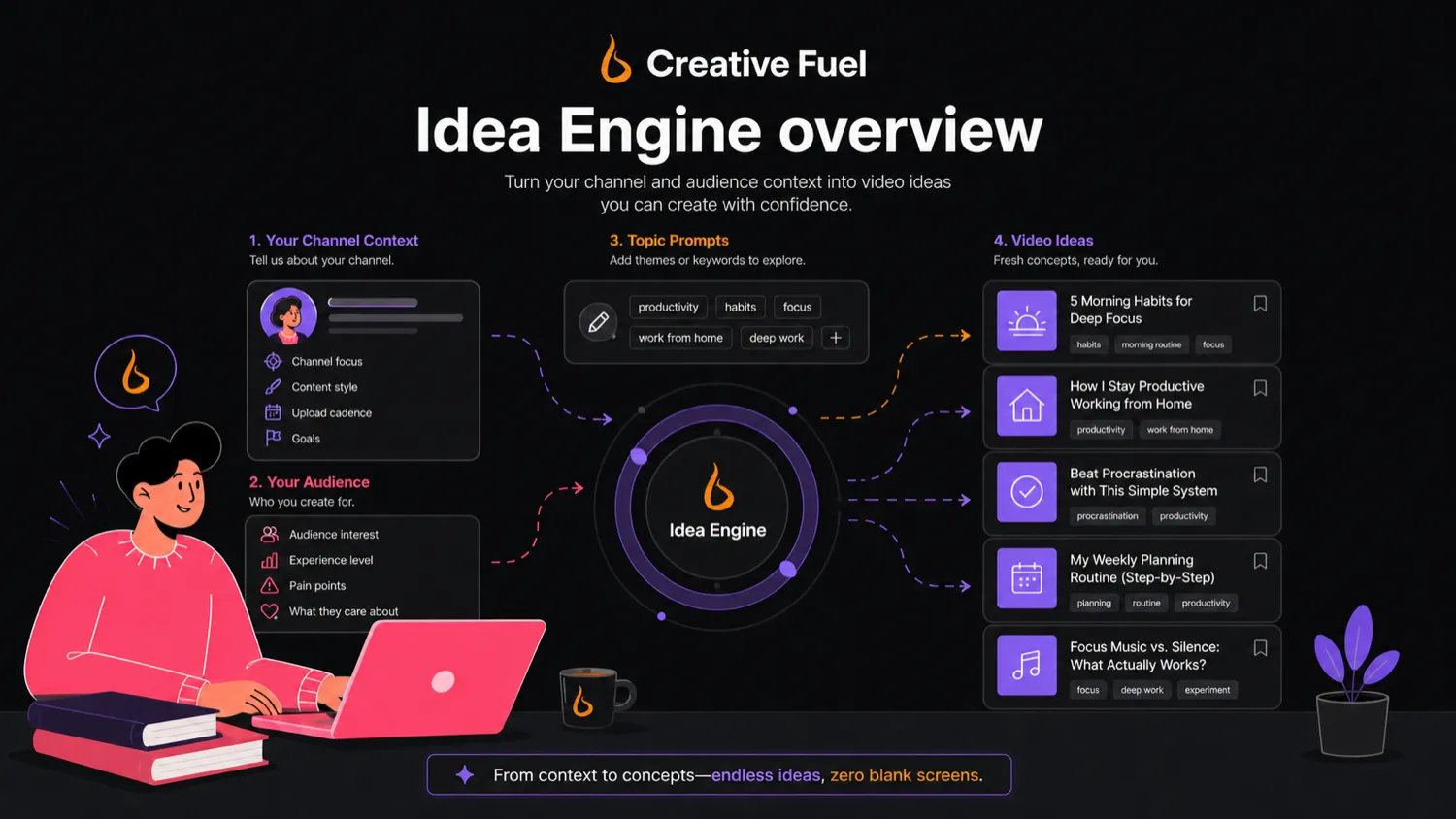
The current public positioning is narrow in a useful way. Creative Fuel describes a flow that starts with proprietary Idea Engines, moves into content workshopping with AI and inspiration, then supports YouTube upload metadata. The public page also frames the product as built into YouTube.com through a browser extension, with a free entry path and paid plans for more serious creators.
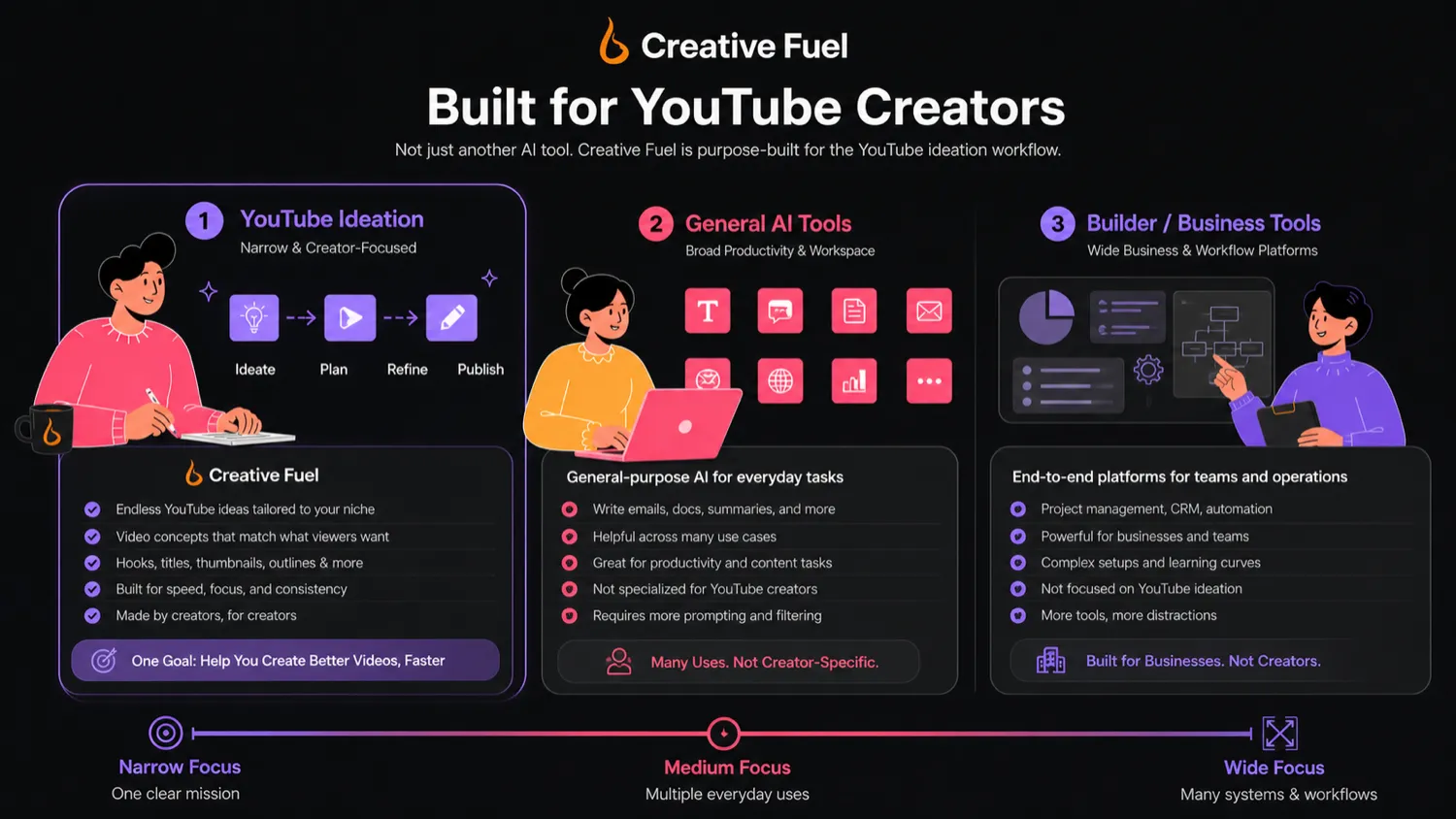
That makes it different from a broad AI assistant. A general AI tool can produce titles, scripts, descriptions, and thumbnail angles if you guide it well. Creative Fuel tries to package those decisions around the YouTube creator process: channel context, inspiration, ideas, workshopping, Draft Genie, export, and bulk description editing.
Our review approach: we compare public product pages, pricing details, terms, privacy notes, buyer workflow fit, and nearby alternatives. We do not treat a coupon, low annual-equivalent price, or creator discount as proof that the product fits the buyer.
The common misunderstanding is thinking Creative Fuel can guarantee better videos. It cannot. It can help you create more and sharper options. You still have to choose, film, package, publish, and learn from audience response.
Who should use Creative Fuel?
Creative Fuel makes the most sense for creators who publish often enough that idea friction becomes expensive.
A weekly YouTuber may find it useful because the real pain is not one idea. It is the next ten. A tool that helps generate, organize, and workshop ideas can become valuable when the creator has to show up every week without repeating the same formats.
A small channel can also use Creative Fuel carefully. The free Ember plan gives smaller creators a way to test whether the tool understands their niche well enough to produce usable concepts. The condition is important: do not judge it from one clever suggestion. Test it across several topics you would actually film.
A multi-channel creator may get more value from Blaze or Inferno because plan capacity starts to matter. Channel count, inspiration sources, and Draft Genie usage become real workflow issues when one person manages repeated publishing formats.
The buyer who benefits most is not looking for a magic viral button. It is the creator who says, “I already publish. I need better starting points and a cleaner path from idea to upload.”
Who should avoid Creative Fuel?
I would slow down with Creative Fuel if you upload only occasionally. A free plan may still be useful, but a paid plan can become shelfware if YouTube planning is not a repeated routine.
I would also avoid jumping into paid capacity if you do not know your niche yet. Creative Fuel can help generate ideas, but it cannot replace basic creator positioning: who you serve, what topics you cover, what formats you can produce, and what your audience already responds to.
It is also not the cleanest fit if you need a full social media operating system. If you want multi-platform scheduling, client approvals, team workflows, campaign calendars, or brand asset management, Creative Fuel is probably too narrow.
Buyers who want a general AI toolbox should compare it with a broader route like 1min.AI before paying. If your real goal is to build or own an AI product rather than use a YouTube planning tool, Aikeedo is an adjacent route, not a direct replacement.
The easy mistake is buying Creative Fuel because the paid plan looks inexpensive. A low annual-equivalent price is attractive only if the tool changes your weekly creator behavior.
How Creative Fuel fits into a real workflow
A realistic Creative Fuel workflow starts before the tool opens.
First, choose a real channel and a real content problem. For example: “I need five long-form video ideas for beginner creators,” or “I need Shorts concepts around a current trend without drifting away from my niche.”
Then use Creative Fuel to generate ideas, but do not stop at the first output. Save the ideas that feel filmable. Discard the ones that sound generic. Push promising concepts through workshopping so you can think about title angle, hook, audience fit, and upload preparation.

The weak version of the workflow is simple: open the tool, generate ideas, feel inspired, and never film anything.
That is not a software failure by itself. It is a workflow mismatch. Creative Fuel can reduce idea friction, but it cannot do the harder creative work for you: choosing, filming, editing, packaging, and learning from performance.
Workflow check: Before paying, use Creative Fuel with a real channel and save only the ideas you would genuinely consider filming.
Real-world buyer scenarios
A small creator trying to publish weekly
Creative Fuel can help a small creator who has enough discipline to publish but keeps losing time on topic selection. The buyer check is whether the ideas match the creator’s production ability, audience promise, and actual niche.
A YouTuber with multiple channels
A creator managing two or more channels may care about plan capacity sooner. Creative Fuel may fit if it keeps channel ideas organized, but it is weaker if the buyer needs team approvals, social scheduling, or full campaign management.
A creator comparing it with TubeBuddy or vidIQ
TubeBuddy and vidIQ are closer direct YouTube creator comparisons for research, growth signals, and optimization. Creative Fuel is more relevant when the bottleneck is idea generation and workshopping, not broader channel analytics.
Key features that actually matter
Idea Engines
The Idea Engines are the heart of Creative Fuel. They are meant to generate YouTube video concepts in specific ways instead of asking the creator to start from a blank chat box.
This matters because many creators do not need more generic suggestions. They need sharper starting points that can become videos in their niche.
Buyer note: judge Idea Engines by saved ideas, not generated volume. If you would not film any of the ideas, the plan capacity does not matter.
Workshop AI tools
The workshop layer is where Creative Fuel becomes more than a title generator. A rough idea is rarely enough. Creators still need angle, hook, format, and packaging direction.
This feature matters if it helps you refine weak concepts into better candidates. It disappoints if it only makes ideas sound more polished without making them more useful.
Buyer note: use workshop output to think, not to outsource judgment.
Inspiration channels
Inspiration channels can help creators look at what is working around them without manually building a research system from scratch.
This is useful when you need more reference points, but it can also become distracting. Inspiration should help you adapt patterns to your channel, not copy what another creator is doing.
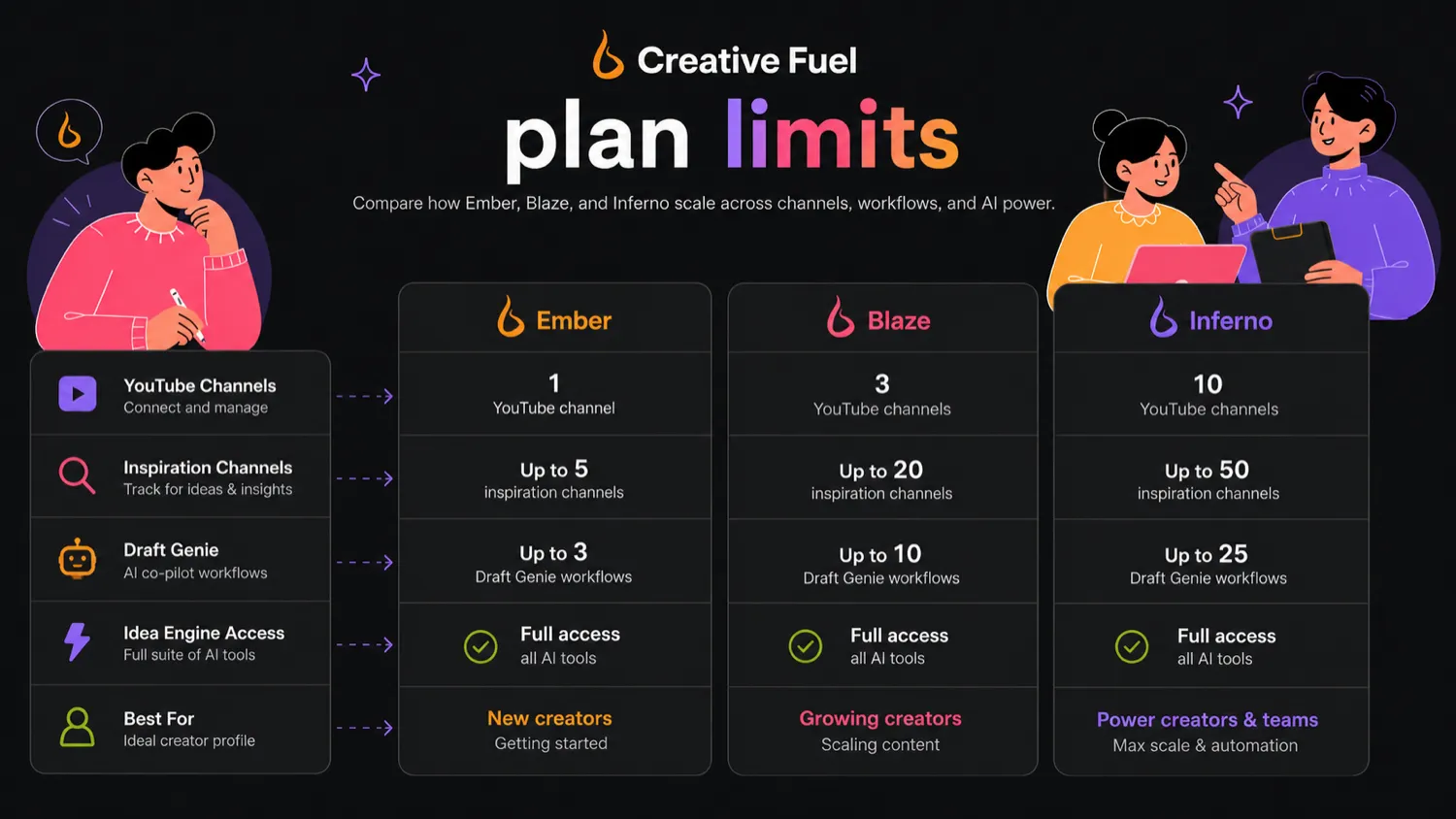
Buyer note: the plan limits around inspiration channels are worth checking because they shape how useful the feature feels for a single-channel creator versus a multi-channel operator.
Draft Genie and upload preparation
Draft Genie and upload metadata support are more valuable when Creative Fuel moves the creator closer to publishing. The idea is not only to brainstorm, but to reduce the handoff from planning to upload.
This can matter for creators who lose time turning notes into usable titles, descriptions, and upload fields.
Buyer note: if your biggest bottleneck is editing or recording, this may not solve the real problem. If your bottleneck is planning and packaging, it may help.
Data export and bulk description editing
Data export and bulk description editing are more operational features. They matter less to casual users and more to creators with a real publishing system.
If you manage multiple videos, multiple channels, or repeated update work, these tools may save time. If you only publish now and then, they may be nice but not decisive.
Pricing and plan value
Creative Fuel’s pricing is best judged by workflow capacity, not only by the headline number.
The current public pricing page lists Ember as Free Forever with one YouTube channel and limited idea, inspiration, and Draft Genie usage. Blaze is currently shown as $5.60 per month when billed annually at $67.20, with two-channel support and broader workflow capacity. Inferno is currently shown as $15.20 per month when billed annually at $182.40, with five-channel support and unlimited inspiration and Draft Genie usage.
The page also emphasizes annual pricing, a 20% annual saving, and an extra Inferno discount for creators with under 1,000 subscribers. That is exactly why I would verify the live checkout before treating any plan math as final.
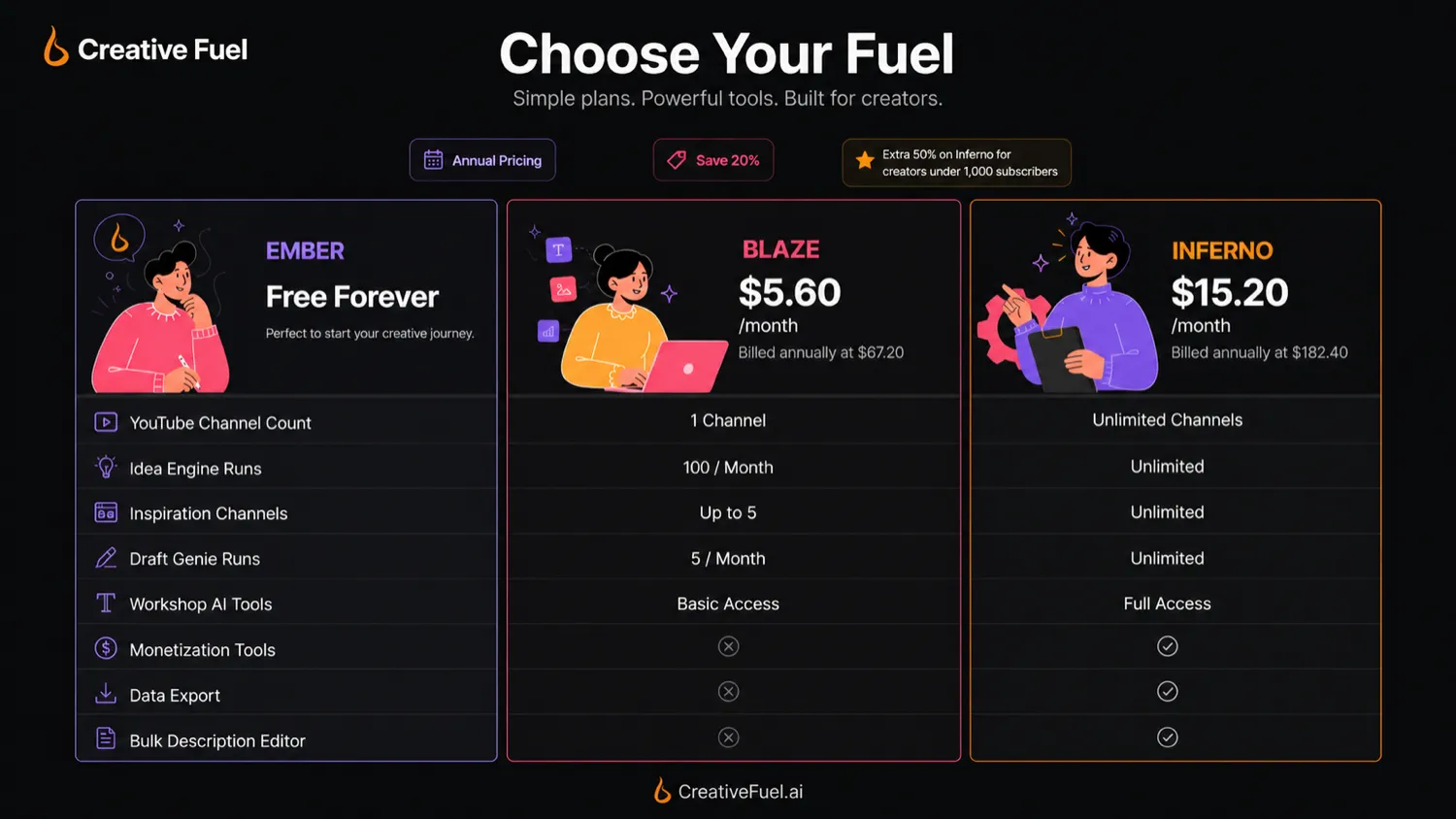
The free plan is the right first move for most buyers. Blaze makes sense when one free-channel workflow becomes too tight and you need all Idea Engines, more capacity, and support for two channels. Inferno makes sense only when higher capacity will actually be used.
Pricing check: Compare Creative Fuel by channel count, idea capacity, Draft Genie usage, annual billing, and discount eligibility before choosing a paid plan.
Free plan, trial, coupon, and checkout notes
The free Ember plan is the safest evaluation path. Use it before chasing paid-plan discounts.
A coupon or special checkout route can make a good purchase cheaper, but it cannot tell you whether Creative Fuel understands your channel. That answer comes from testing real topics, not from seeing a lower price.
The official savings path appears to include the free Ember plan, annual billing, and the under-1,000-subscriber Inferno discount mentioned on the pricing section. Public coupon pages may list Creative Fuel deals, but those should be treated as checkout-test paths, not guaranteed official promotions.
The guarantee also needs a careful read. Creative Fuel advertises a 100% money-back guarantee and frames it around getting a “1 of 10” on your channel within 30 days. The FAQ also says refunds are available when users do not get value from the service.
That sounds buyer-friendly. Still, I would not assume every edge case is obvious from the marketing page. Before choosing an annual plan, check how support handles the guarantee, what counts as value, how the refund request works, and whether the same terms apply across checkout paths.
Deal path: Use the free plan first. Check active offers only after Creative Fuel proves useful for your real YouTube planning workflow.
What I would check before buying Creative Fuel
If I were buying Creative Fuel for a real channel, I would check these points first:
- Idea quality for my niche. Generate several ideas and save only the ones you would seriously consider filming.
- Plan capacity. Compare one, two, or five channel support against your real channel portfolio.
- Inspiration channel limits. Check whether the limits match how much reference material you need.
- Draft Genie usage. Decide whether monthly or unlimited capacity matters for your publishing cadence.
- Annual billing. Verify the live renewal amount, not just the annual-equivalent monthly number.
- Discount eligibility. Confirm whether any under-1,000-subscriber discount appears for your account at checkout.
- Guarantee handling. Ask how the 30-day money-back guarantee works before relying on it.
The biggest mistake is treating a low price as proof of fit. For a creator tool, the real proof is whether it changes what you publish next.
A simple test before paying
Before paying, I would run a small test like this:
- Pick one real YouTube channel.
- Write down three topics your audience already cares about.
- Use Creative Fuel to generate ideas around those topics.
- Save only the ideas you would actually film.
- Workshop the strongest two or three concepts.
- Decide whether the tool improved the title angle, hook, structure, or upload preparation.
- Compare the result with what you could have done in a general AI chat tool, TubeBuddy, vidIQ, or your own planning document.
Creative Fuel should not be judged by whether it can create a list. Almost any AI tool can create a list. It should be judged by whether it helps you make better creator decisions faster.
Pros explained
It is built around YouTube planning
Creative Fuel’s strongest advantage is its narrowness. YouTube creators need ideas to become titles, hooks, formats, packaging decisions, and upload metadata. That advantage matters most when YouTube is your main channel.
The free plan lowers buying risk
The free Ember plan lets buyers test idea quality before paying. If the output feels weak for your channel, stop early. If it gives you usable starting points, compare paid capacity with more confidence.
Paid plans scale by creator capacity
Blaze and Inferno are capacity decisions: more channels, more inspiration, more Draft Genie use, and broader access to idea engines. That helps frequent creators, but it is less useful if you need team operations, social scheduling, or full content management outside YouTube planning.
The TubeBuddy founder signal adds trust
Creative Fuel says it is built and maintained by the original founders of TubeBuddy. Treat that as a positive trust signal, not a guarantee. The final decision still depends on whether the tool helps your channel.
Cons explained
The pricing needs a live checkout check
The visible pricing emphasizes annual-equivalent numbers. Buyers should still confirm renewal terms, billing interval, discount eligibility, and whether monthly billing is available or sensible.
The guarantee sounds generous but needs context
The 30-day money-back guarantee is a positive signal, but buyers should understand how refund requests work, what support considers “value,” and whether third-party checkout paths affect the experience.
The tool is narrow by design
Creative Fuel’s YouTube focus is a strength for the right creator and a limitation for the wrong buyer. It does not replace a scheduler, video editor, design tool, team project manager, or all-purpose AI workspace.
Idea generation still needs human taste
A tool can generate a promising concept, but it cannot fully know your voice, production ability, audience trust, timing, or packaging quality. Use it as planning support, not a guarantee.
Green flags and red flags
Green flags are simple: you already publish regularly, idea selection slows you down, and the free plan produces several ideas you would actually film. That is better evidence than a testimonial, coupon, or clever demo.
Red flags matter too. Slow down if you upload rarely, buy only because the annual price looks friendly, or need a complete creator operating system. If Creative Fuel helps you choose and prepare your next few videos, it has a role. If it only creates notes you never use, stay free or compare alternatives.
Creative Fuel vs alternatives

TubeBuddy vs Creative Fuel
TubeBuddy is the more natural direct comparison if the buyer wants a mature YouTube creator toolkit with channel-growth and workflow utilities.
Creative Fuel may still make sense if the problem is more specific: you need a dedicated ideation and content-workshop flow rather than a broad set of YouTube management utilities.
vidIQ vs Creative Fuel
vidIQ is another direct YouTube creator comparison, especially for creators who care about research, topics, keyword ideas, and channel growth signals.
Creative Fuel feels more relevant when you want a structured ideation desk built around generating and workshopping video ideas.
1min.AI vs Creative Fuel
1min.AI is an adjacent route, not a direct YouTube ideation replacement.
It makes more sense if the buyer wants a broad AI utility workspace for many tasks. Creative Fuel makes more sense when the buyer’s main question is, “What should I make next for YouTube?”
Aikeedo vs Creative Fuel
Aikeedo is also adjacent, not direct.
Aikeedo belongs closer to the AI product-building direction. Creative Fuel belongs closer to the creator workflow direction. A buyer thinking about launching or owning an AI tool should not compare those two as if they solve the same job.
Trust, refund, and buyer-risk notes
My confidence is strongest around Creative Fuel’s current public positioning: it is a YouTube creator ideation and upload-prep tool, not a broad AI workspace.
I am more cautious around live checkout details, discount eligibility, and refund handling because those can change faster than editorial copy. The official page currently shows Ember, Blaze, and Inferno; it also presents annual pricing, a creator-size discount message, and a 30-day guarantee. Buyers should verify those at checkout before relying on them.
Privacy and data handling deserve a quick check too. Creative Fuel says it works from publicly available data and does not require access to the buyer’s YouTube channel. Its privacy policy also discusses Google/YouTube-related services, app permissions, authentication options, and data deletion requests. If you are sensitive about account permissions or creator data, read the current privacy page before connecting accounts or using the mobile app.
Terms are also worth reading because they cover mobile apps, in-app purchases, auto-renewal through the App Store, user-generated content, liability limits, account termination, and governing law. The safest mindset is simple: test Creative Fuel with your channel and treat checkout claims as something to verify, not assume.
Final verdict
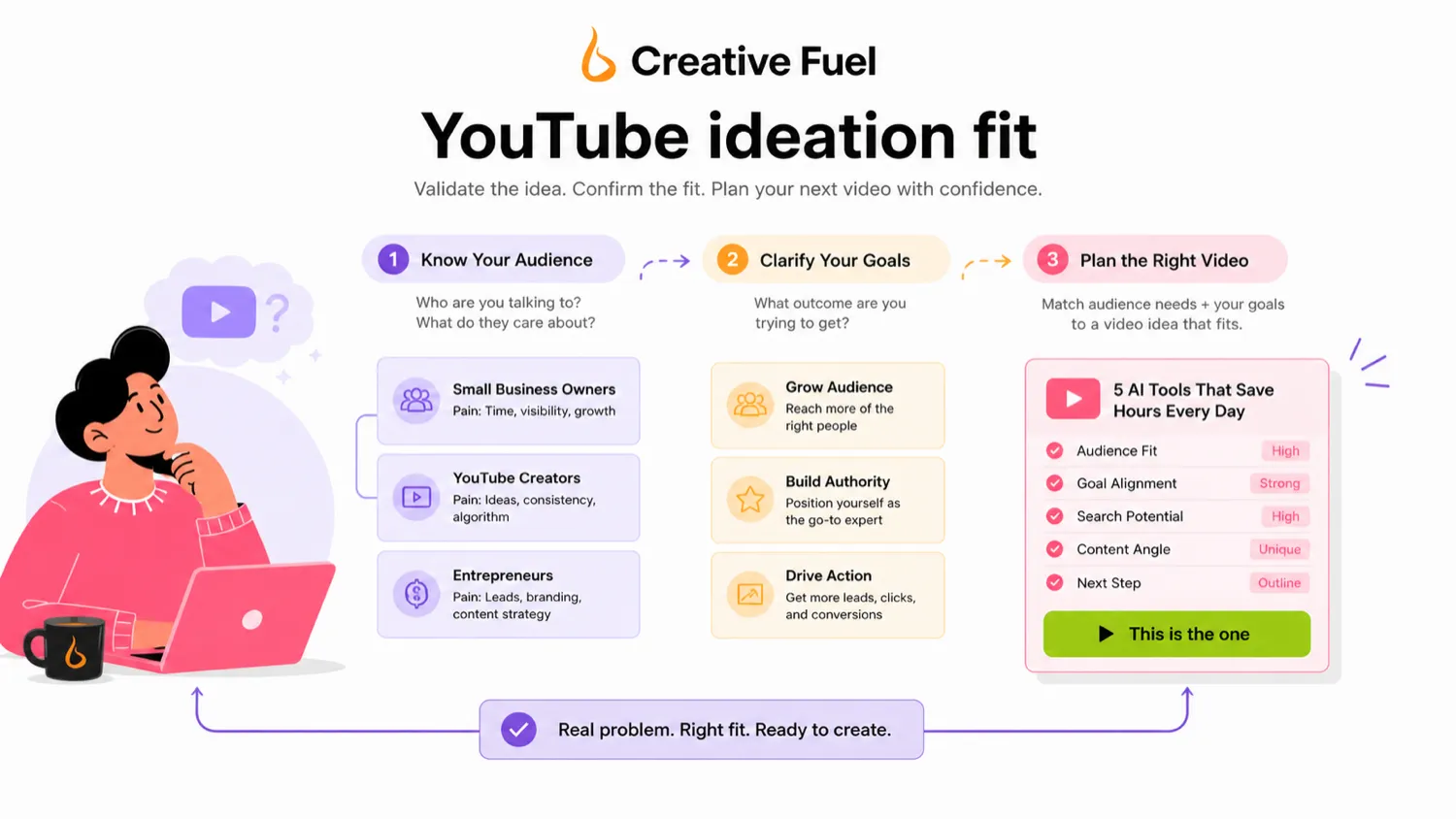
I would consider Creative Fuel if YouTube ideation is a real recurring bottleneck and you want a tool that is built around creator planning rather than generic AI content help.
I would start with Ember, not a paid plan. Run several real ideas for your actual channel. If the ideas feel specific, filmable, and useful after workshopping, then the paid plans deserve a closer look.
I would skip Creative Fuel if you only upload occasionally, need a full social media management system, or want a broad all-purpose AI workspace. In that case, the tool may be too narrow even if the price looks friendly.
I would compare it with TubeBuddy or vidIQ if you need a broader YouTube creator toolkit. I would compare it with 1min.AI only if your buyer job is broader AI utility. I would look at Aikeedo only if your real direction is AI product-building, not YouTube planning.
The safest next step is simple: test the free workflow first, verify the current pricing page second, and only check the coupon route after Creative Fuel proves it can improve your actual publishing routine.
