Creative Fuel Pricing & YouTube Creator Fit
Creative Fuel is a YouTube creator ideation and publishing workflow tool, not a broad general-purpose AI assistant. Its main job is to help creators move from video ideas to workshopped content and upload-ready metadata, with Idea Engines, inspiration channels, Workshop AI tools, Draft Genie runs, monetization tools, data export, and a bulk description editor.
Fit → price → checkout
Use these routes after the official-site check: coupon first, review for fit, compare if unsure.
Creative Fuel pricing snapshot
Fast commercial checks before pricing, coupons, or a deeper review.
Creative Fuel product tour for YouTube creators
The product tour video should help a buyer see the practical workflow behind Creative Fuel: setting up the tool, generating YouTube ideas, turning those ideas into stronger concepts, and deciding whether the output is useful enough for a real channel. Watch for whether the process feels like a repeatable publishing routine, not just a novelty idea generator.

Creative Fuel should be evaluated as a YouTube creator workflow tool, not as a generic AI productivity app. The buying question is simple: can it help you produce better video ideas, shape those ideas into upload-ready content, and reduce the planning friction that usually slows creators down?
What Creative Fuel actually does
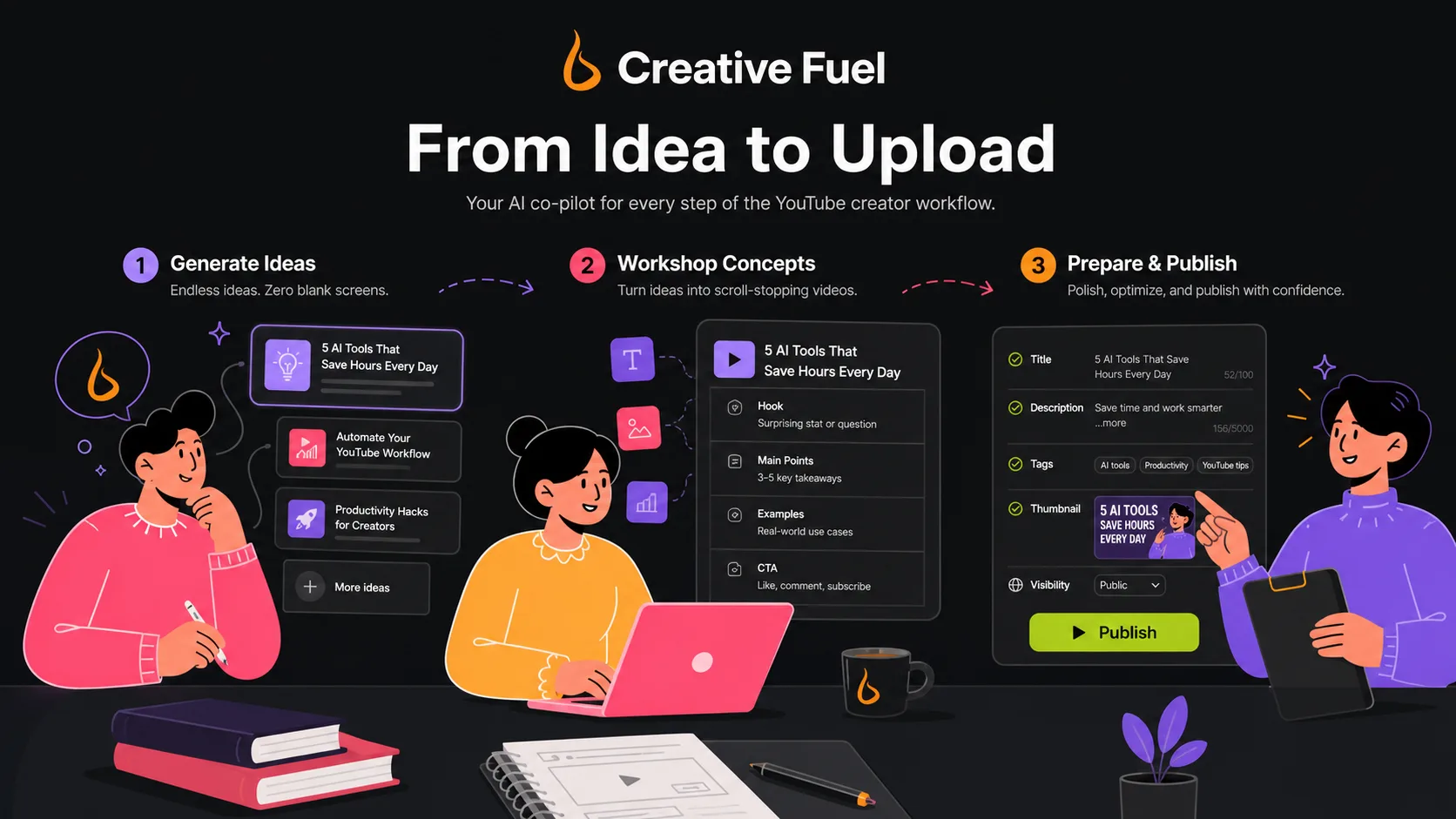
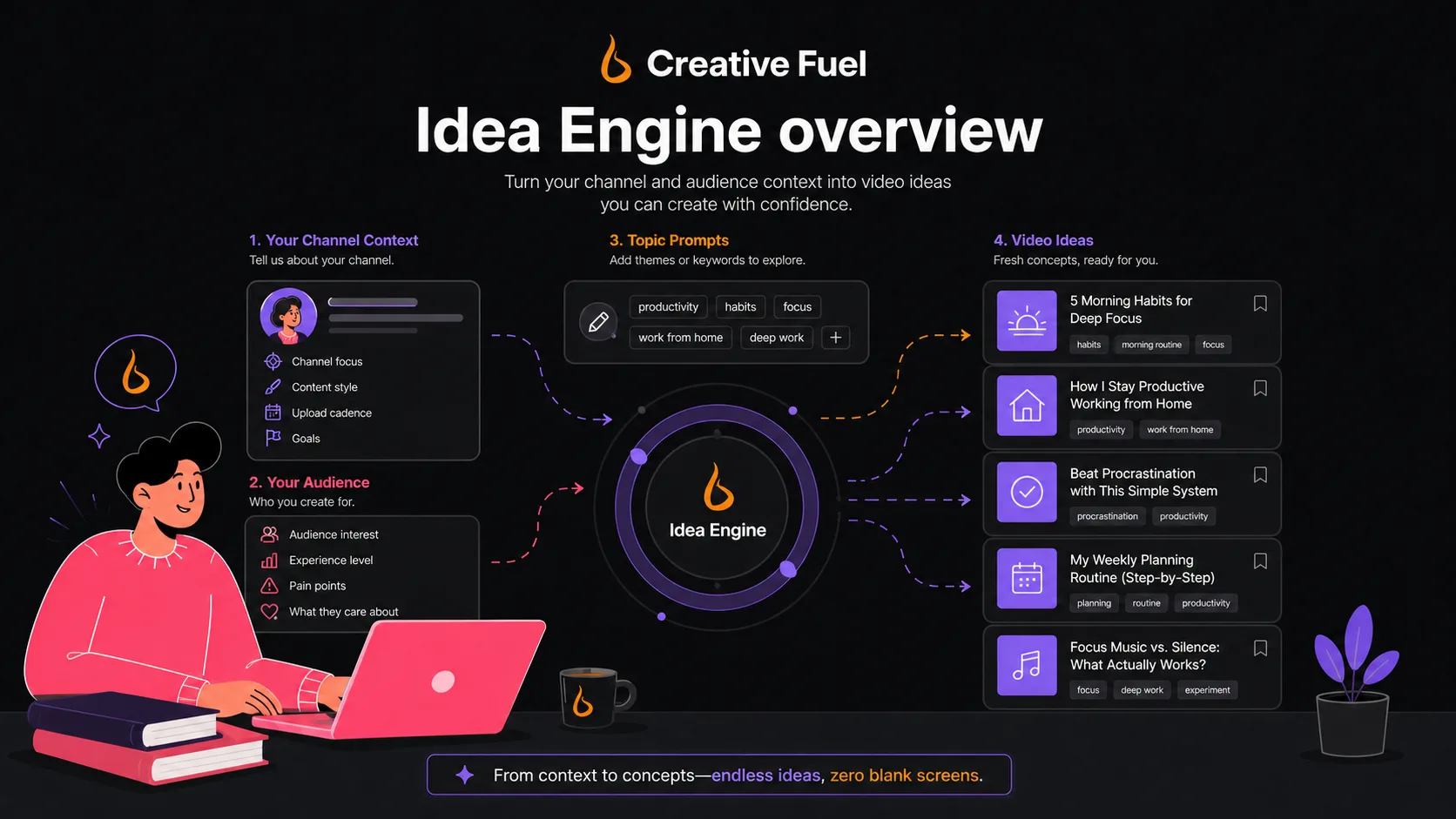
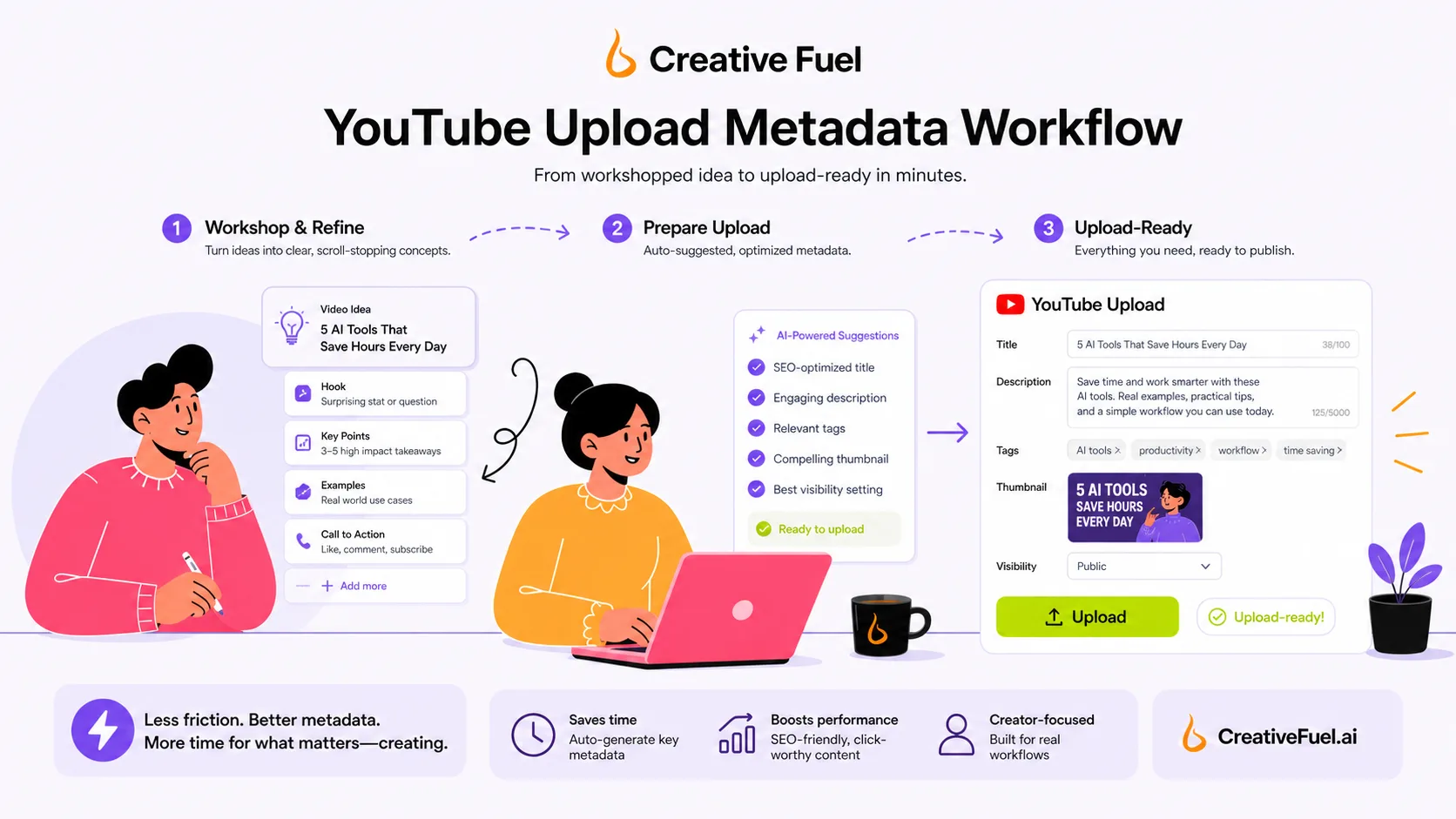
Creative Fuel helps YouTube creators generate video ideas, workshop content, and prepare publishing metadata. The official page describes a three-step workflow: generate ideas with proprietary Idea Engines, workshop the content with AI and inspiration, then simplify the upload process by populating metadata from the workshopped idea.
That makes the product most useful for creators who already know they need a more repeatable planning system. If you only want a one-off list of video titles, a generic AI chat tool may be enough. If you want something closer to a YouTube-specific ideation desk, Creative Fuel becomes more relevant.
- Idea Engines for video concepts.
- Workshop AI tools for shaping ideas.
- Upload metadata support for YouTube publishing.
- Data export and bulk description editing.
Pricing and plan fit
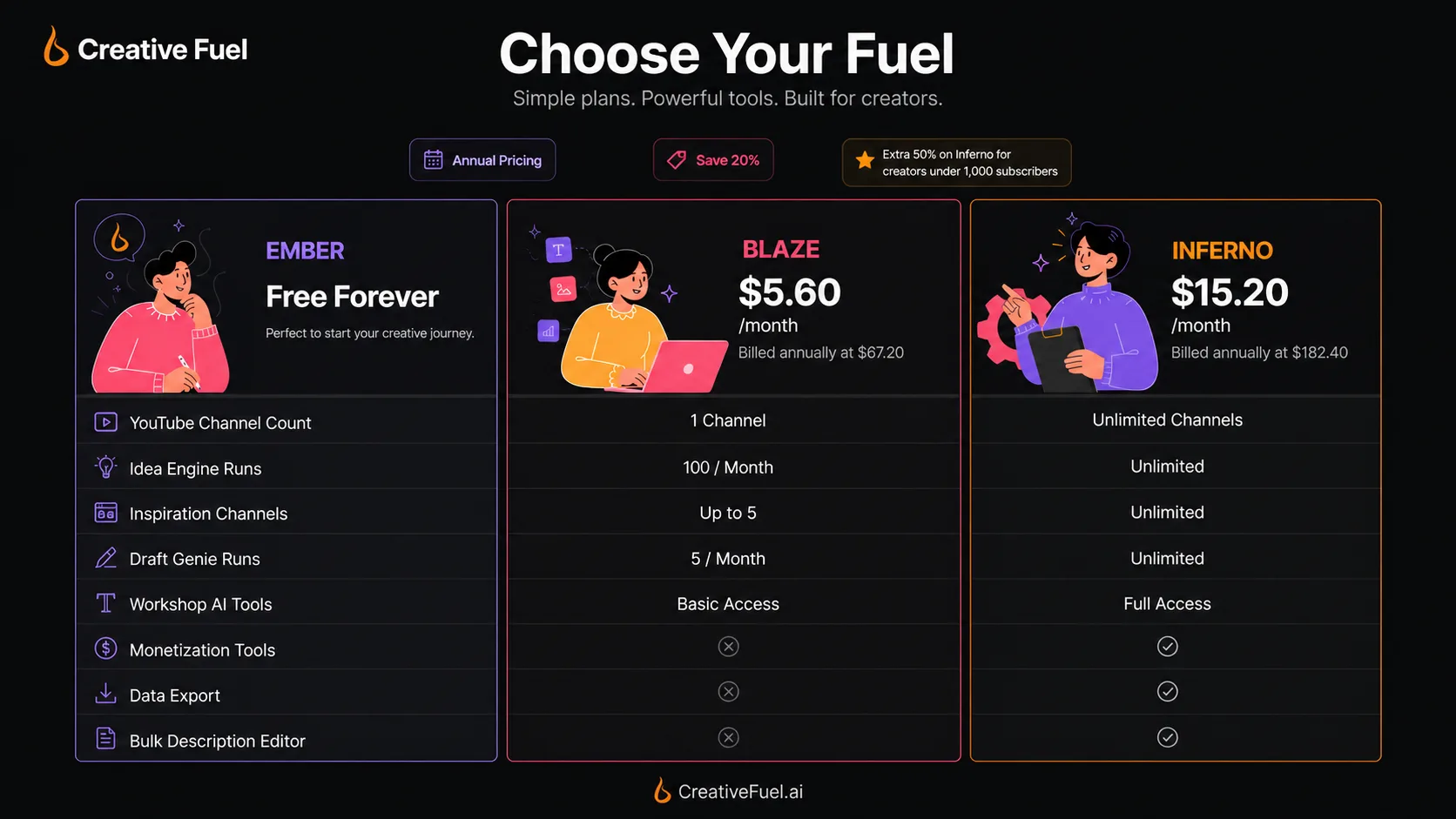
Creative Fuel's pricing is easier to understand if you compare capacity rather than only price. Ember is free and limited. Blaze adds two-channel support, all Idea Engines, unlimited idea engine runs, workshop tools, monetization tools, more inspiration channels, and more Draft Genie runs. Inferno is the larger plan for up to five YouTube channels, unlimited inspiration channels, and unlimited Draft Genie runs.
The official page emphasizes annual pricing, with Blaze shown at $5.60 per month when billed annually and Inferno at $15.20 per month when billed annually. It also mentions a 20 percent annual saving and an extra Inferno discount for creators under 1,000 subscribers. Buyers should verify the exact checkout math because the best deal depends on channel count, publishing volume, and whether the special discount applies.
- Use Ember to validate whether the workflow produces useful ideas.
- Use Blaze when two-channel support and unlimited ideas matter.
- Use Inferno when multiple channels and higher workshop capacity are important.
Helpful video before you install Creative Fuel
The video below is useful if you want to understand the setup side rather than only the sales page. Watch it with one question in mind: can you get from install to useful YouTube ideas quickly enough that the tool becomes part of your weekly planning routine?
This matters because the free plan is the safest way to test Creative Fuel. If setup feels confusing, or if the early ideas are too generic for your channel, you can stop before moving into paid capacity.
What buyers should verify before checkout
The main buyer risk is not that Creative Fuel has no value. The risk is buying too much capacity before you know whether the tool improves your actual video ideas. The free plan helps reduce that risk, but you should still test with your own niche, recent uploads, audience expectations, and the type of videos you can realistically produce.
Also verify the refund wording. Creative Fuel advertises a generous guarantee, but you should understand how support evaluates the 30-day result claim, what evidence might be needed, and whether the guarantee applies the same way across all plans and billing paths.
- Confirm billing interval and renewal amount.
- Check whether any creator-size discount applies.
- Test idea quality with your actual channel niche.
- Read the refund and cancellation path before paying annually.
Where Creative Fuel fits against alternatives
Creative Fuel should sit in the YouTube creator planning part of your stack. It is more focused than broad AI assistants, but less broad than all-in-one content operating systems. That focus is a strength if your bottleneck is YouTube ideas and upload preparation. It is a limitation if you need social scheduling, email marketing, team collaboration, or a full AI content database.
In your DealBestDaily comparison path, 1min.AI is closer to a broad multipurpose AI toolkit, while Aikeedo is a different kind of AI product foundation. Creative Fuel is the closer fit when the buyer's real question is, "What should I make next for YouTube, and how do I move it toward upload?"
Safest next step
The safest next step is to start with Creative Fuel's free Ember path, test the Idea Engines against your actual channel, and save several ideas that you would genuinely consider filming. Then compare Blaze and Inferno based on capacity: channels, inspiration sources, Draft Genie runs, and how often you publish.
If the workflow feels useful, move to the pricing or coupon path and verify the live checkout. If the ideas feel generic, stay free or compare alternatives before buying. That sequence protects the buyer better than chasing a coupon first.
- Start free.
- Test with a real channel and real video topics.
- Upgrade only if the workflow improves your planning cadence.
- Use coupon checks only after fit is clear.
Best savings path from this store page
This is the clearest savings route to check once the product already looks like a fit.
The Blaze plan is the more affordable paid route for creators who want more idea engines, monetization tools, two YouTube channels, and higher inspiration-channel limits without jumping to the largest plan.
Higher-capacity annual plan
Browser extension workflow
Use comparison routes when the category fit is still open
Use these comparison routes when the product still looks plausible, but the category fit is not fully settled.
1min.AI is broader for buyers who want many AI utilities in one place, while Creative Fuel is more focused on YouTube ideation and creator planning.
Aikeedo fits buyers thinking about AI product infrastructure, while Creative Fuel fits creators who need video ideas, workshop flow, and upload preparation.
Verification points worth checking before you click out
Where this store usually fits best in the workflow
Use Creative Fuel when you need a steady list of topic ideas, angles, and concepts for a weekly or multi-week publishing calendar. The value is highest when you judge output against your own niche instead of using generic prompts.
Smaller channels can use the free or lower paid path to test more ideas without building a complicated planning spreadsheet. The buyer should still compare results over several uploads because one good idea does not prove a repeatable system.
Blaze and Inferno become more relevant when the buyer manages more than one YouTube channel and needs higher idea capacity, more inspiration sources, and a more organized way to prepare uploads.
Creative Fuel can support creators who want help moving from rough concept to upload-ready metadata, especially when bulk description editing and data export save repetitive publishing work.
Practical checkpoints before and after signup
- List the actual channel, niche, and content format you want to test.
- Decide what counts as a usable idea before opening the tool.
- Check whether you need one channel, two channels, or five channels.
- Use Ember to run several real ideas, not just one curiosity prompt.
- Save the ideas you would actually consider filming.
- Check whether Draft Genie and workshop tools fit your planning style.
- Compare Blaze and Inferno by channel count, idea capacity, inspiration limits, and Draft Genie usage.
- Confirm annual billing, renewal terms, and any creator-size discount in checkout.
- Read refund and cancellation wording before choosing the annual path.
- Track whether ideas become published videos, not just interesting notes.
- Review plan value after a month of real use.
- Cancel or downgrade if the workflow does not improve publishing consistency.
Fast-read signals for workflow fit and buying friction
Questions readers usually ask before choosing this store
What does Creative Fuel actually do?
Creative Fuel helps YouTube creators generate ideas, workshop concepts, and prepare upload metadata. It is best understood as a creator ideation and publishing workflow tool rather than a broad AI assistant.
Does Creative Fuel have a free plan?
Yes. The public pricing section lists Ember as Free Forever, with limits such as one YouTube channel, three idea engine runs per day, limited monetization tools, five inspiration channels, and three Draft Genie runs per month.
How much does Creative Fuel cost?
The public page lists annual pricing with Blaze at $5.60 per month when billed annually at $67.20, and Inferno at $15.20 per month when billed annually at $182.40. Buyers should verify live checkout because the page also mentions annual savings and a special discount for creators under 1,000 subscribers.
Is Creative Fuel mainly for YouTube creators?
Yes. Its strongest fit is YouTube ideation, content workshop, metadata, and creator planning. If you need a general business AI platform, social scheduler, API, or team workspace, Creative Fuel may be too narrow.
What should I check before paying for Creative Fuel?
Test the free plan with your actual channel first, confirm whether the generated ideas feel usable, check channel-count limits, verify annual billing and any discount in checkout, and read the guarantee or refund wording before choosing a paid plan.
Choose the next route that matches what you still need to decide
The strongest next click depends on whether you still need product judgment, a savings route, or a broader category comparison.