Quick verdict
Albato is worth considering if your team already knows which apps need to talk to each other and wants a practical no-code way to connect them. It is not the kind of automation platform I would buy just because the entry price looks friendly.
The real question is narrower: can you define the trigger, the action, the fields being moved, and the number of times that workflow will run each month?
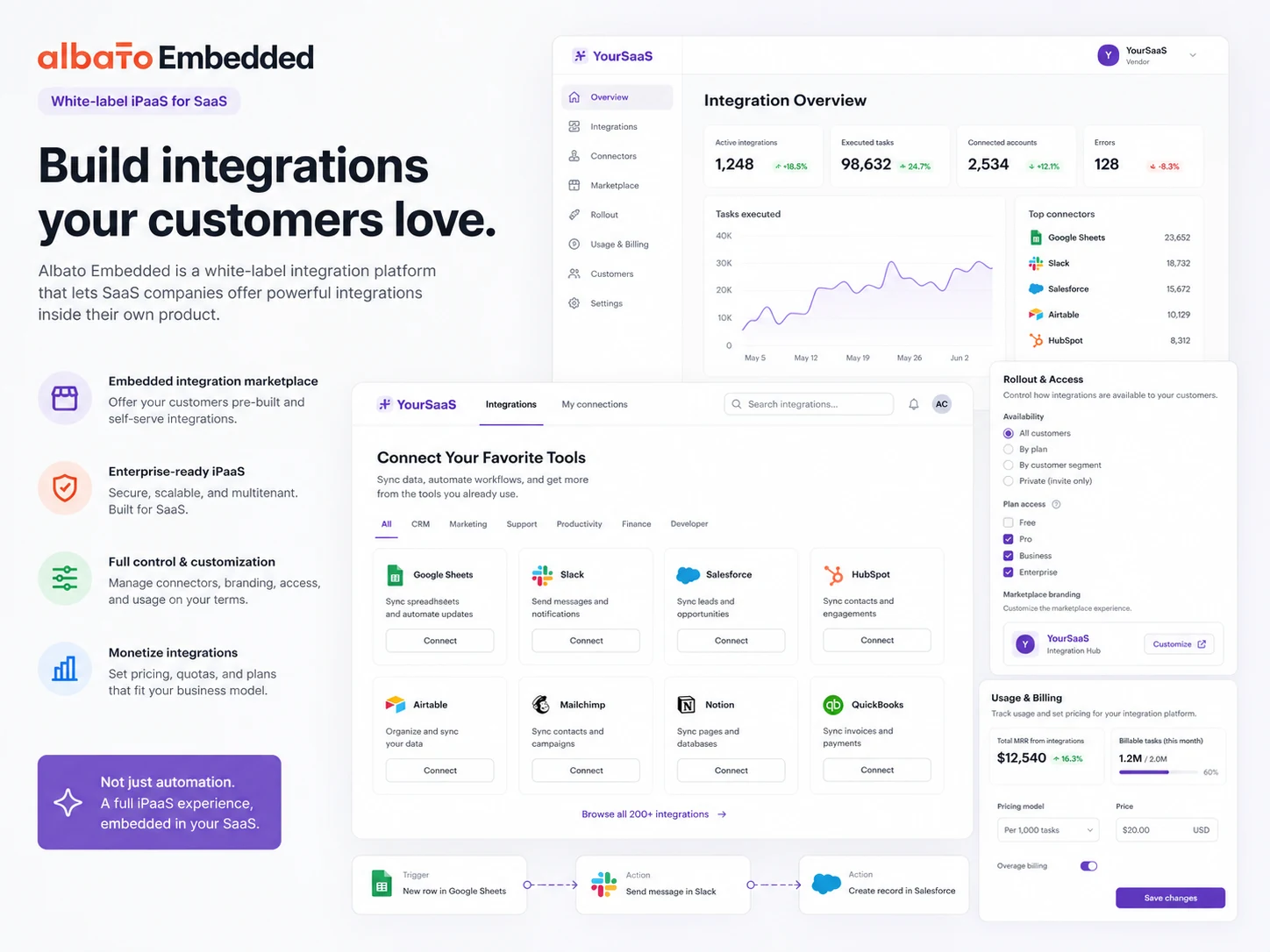
If the answer is yes, Albato can make sense. The Free plan gives you a useful test lane, the Pro plan opens unlimited automations and steps, and App Integrator gives more technical teams a way to build custom connectors without starting from a blank engineering project. For SaaS companies, Albato Embedded is a separate buyer path for white-label integrations inside a product.
That separation matters. A small business trying to sync leads from a form to a CRM is not making the same decision as a SaaS founder embedding native integrations for customers. The pricing logic, rollout risk, support expectations, and buyer checklist are different.
My main caution is transaction volume. Albato pricing is not only a plan-name decision. It is also a usage decision. A workflow that looks cheap at 1,000 transactions can become less simple if several multi-step automations run all day. Before paying, I would test one real workflow, estimate monthly runs, and check whether Albato is replacing meaningful manual work.
Next step: If Albato still fits your automation use case, verify connector support and current pricing before building around it.
Review snapshot
| Review point | Practical take |
|---|---|
| Best for | Small businesses, operations teams, agencies, and SaaS teams with clear integration needs |
| Not ideal for | Buyers who have not mapped their trigger, action, fields, and expected monthly volume |
| Main use case | Connecting apps and automating repeatable data movement without custom middleware |
| Current pricing note | Free plan is available; Pro is shown from $22/mo monthly or $15/mo annual at 1K transactions |
| Trial/demo path | Pro trial path for normal automation; demo-led evaluation for embedded iPaaS |
| Main strength | Good balance of no-code automation, app coverage, custom connector building, and embedded options |
| Main concern | Transaction volume, refund conditions, and embedded pricing scope need careful verification |
| Direct alternatives | Make and Relay.app for workflow automation comparison |
| Adjacent routes | Jet Admin for internal tools; Adalo for app building rather than cross-app automation |
| Best next step | Build one real workflow before choosing monthly, annual, or embedded pricing |
What is Albato?
Albato is best understood as a no-code automation and iPaaS platform. For everyday business users, it connects apps so data can move from one tool to another without a developer writing a custom integration. For SaaS teams, Albato also has an embedded iPaaS path designed to place integrations inside a product experience.
That is the first thing to get right. Albato is not only a Zapier-style automation tool, and it is not only an embedded SaaS integration product. It has both paths. Buyers get into trouble when they judge both paths from one mental model.
For a small business, Albato might connect a form submission to a CRM, then send a Slack notification, update a spreadsheet, and trigger an email follow-up. For an agency, it might automate client reporting, lead routing, or repetitive admin work. For a SaaS company, the question becomes bigger: can Albato provide white-label integrations that customers can use inside the SaaS product?
Our review approach compares public product pages, pricing details, help documentation, deal terms, buyer workflow fit, and nearby alternatives. We do not treat a coupon, low entry price, or app-count claim as proof that the product fits the buyer.
The common wrong expectation is that an automation platform solves the process problem for you. It does not. You still need to know what should happen, when it should happen, what data should move, and what should happen when a workflow fails.
Albato can reduce manual glue work. It cannot replace process clarity.
Who should use Albato?
Albato makes the most sense for small businesses that already run repeatable workflows across separate tools. If leads arrive in one place, customer data lives in another, and notifications happen somewhere else, automation can save real time. The condition is that the workflow must be clear enough to map.
Operations teams may also benefit. These buyers usually care less about flashy AI language and more about reliability: does the automation run, does it move the right fields, does it alert someone when something breaks, and can a teammate understand it later?
Agencies are another believable fit. If an agency builds repeatable client workflows across forms, CRMs, spreadsheets, project management tools, and reporting apps, Albato can become part of the implementation toolkit. The buyer should still check whether client-specific connectors exist and whether transaction usage will be predictable.
SaaS teams should consider Albato differently. For them, the standard automation platform is not the whole story. Albato Embedded is for customer-facing integrations inside a SaaS product, which means pricing, implementation, authentication, SSO, white-labeling, and support ownership become part of the buying decision.
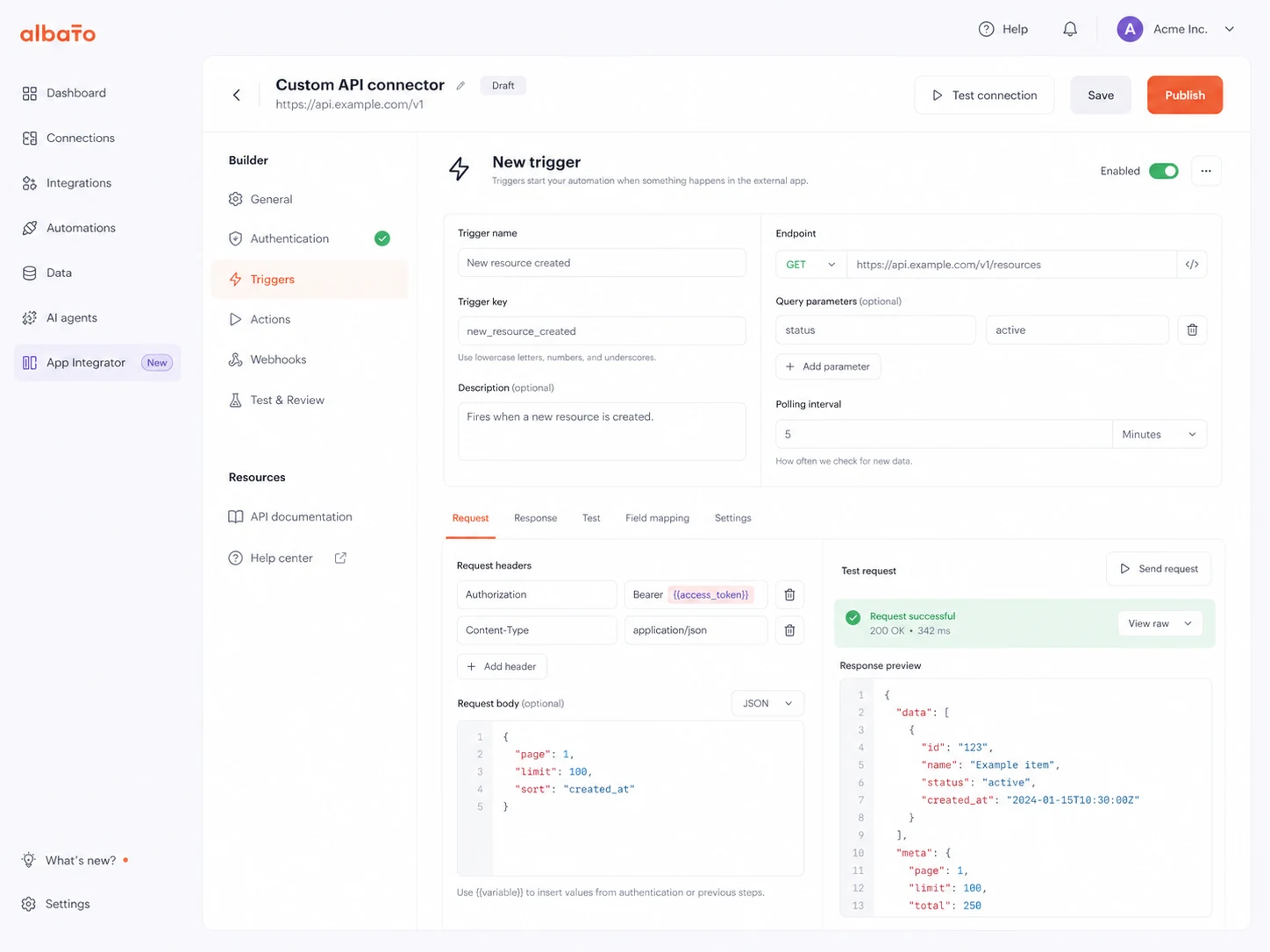
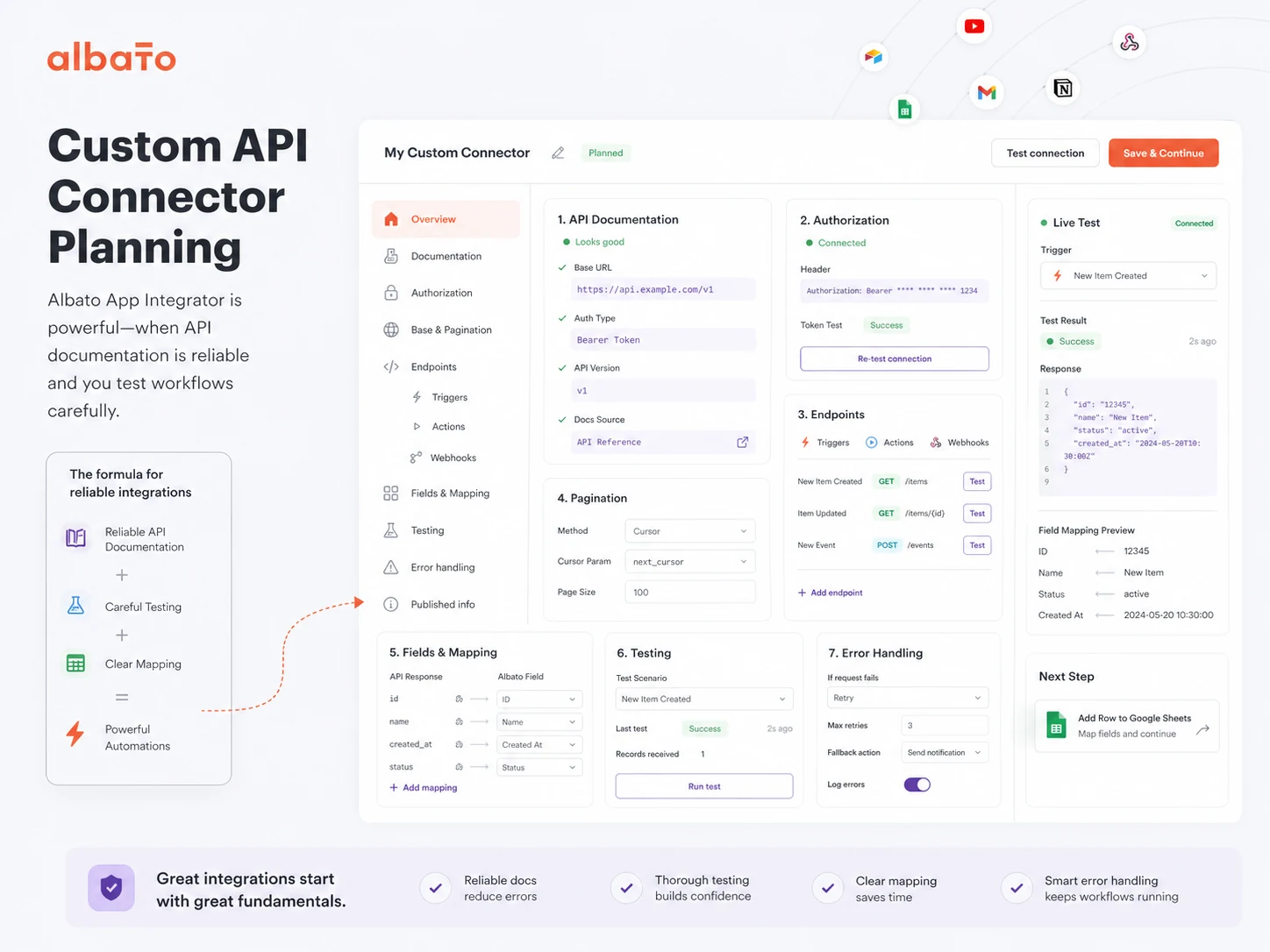
Technical-but-not-full-engineering teams may also like App Integrator. It can help build custom connectors from API documentation, but this still requires someone who can read API docs, test requests, understand authentication, and catch fragile edge cases.
Who should avoid Albato?
I would be careful with Albato if you cannot describe the workflow in one clear sentence. “We need automation” is not enough. A better sentence is: “When a new Typeform lead is submitted, create a CRM contact, add it to a spreadsheet, and alert the sales channel.”
One-off users may not need it either. If one native integration inside your CRM or form tool already solves the problem, adding a separate automation layer may create more maintenance than value.
Engineering teams that want full control over connector behavior, hosting, logging, retries, and deployment may also feel constrained. App Integrator can help, but it is not the same as owning a custom integration stack.
Buyers should also pause if they are choosing only because the Free plan exists. Free is useful for testing. It is not proof that your real workflow will stay within 100 transactions, two steps, or the update interval that the free plan provides.
Finally, SaaS teams should not treat Albato Embedded like a simple upgrade from the Pro automation plan. Embedded iPaaS is a product rollout decision. It affects customer experience, support, connector coverage, pricing model, authentication, and implementation timeline.
How Albato fits into a real workflow
A sensible Albato workflow starts before opening the builder.
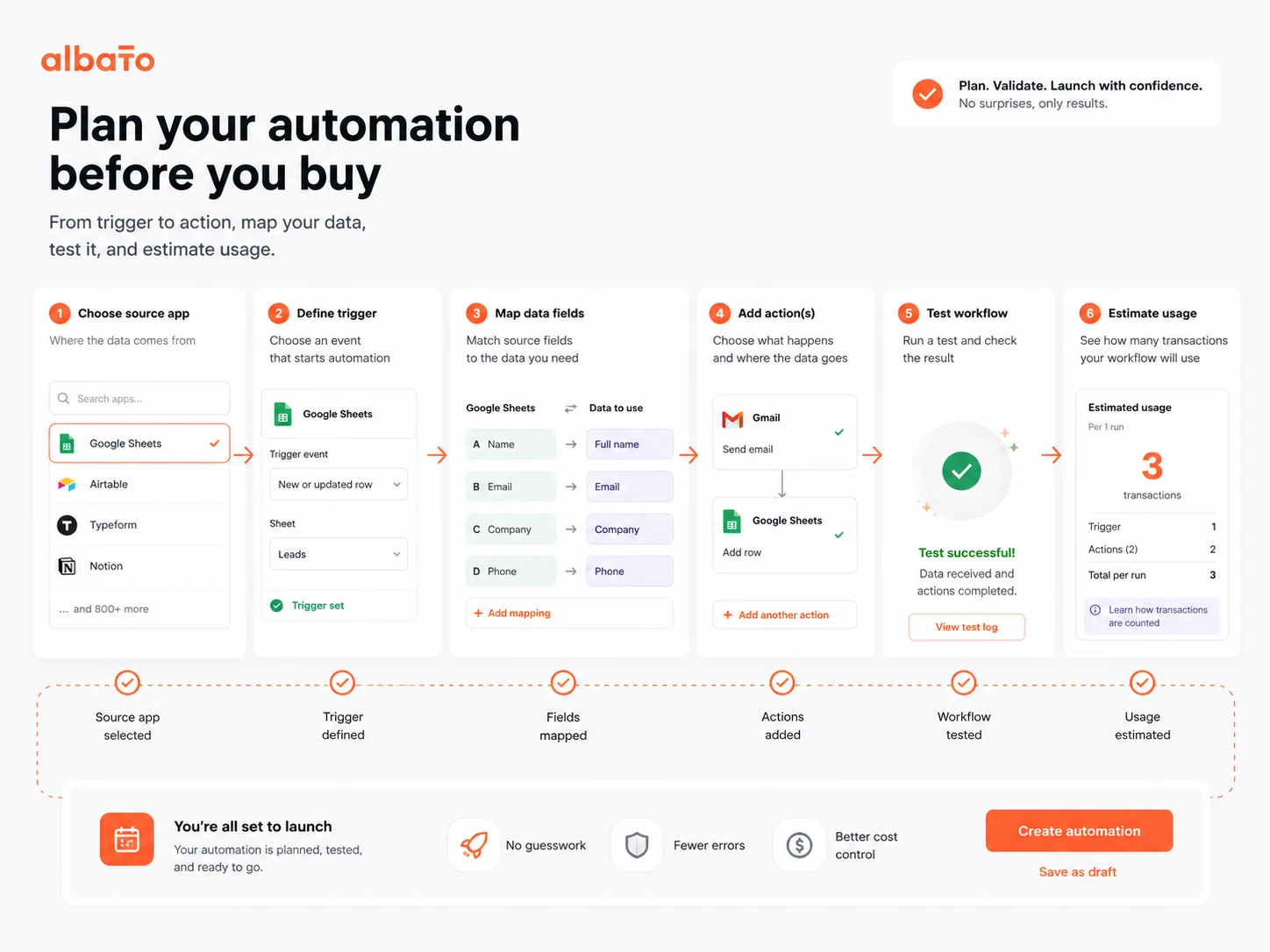
First, write down the source app, destination app, trigger, action, fields, and expected monthly volume. Then check whether Albato supports the exact connector, trigger, and action you need. After that, build a small test automation with sample data, inspect the result, and only then decide whether the workflow deserves a paid plan.
For normal business automation, the sequence usually looks like this:
- Identify the repeated manual task.
- Confirm the apps and fields involved.
- Build the trigger and action flow.
- Test the automation with safe sample data.
- Monitor runs, errors, and transaction usage.
- Document the workflow so someone else can maintain it.
- Upgrade only when the workflow saves enough time to justify the plan.
That last step matters. Many automation tools feel exciting in the first hour. The real value appears only after the workflow runs reliably for weeks without forcing people to clean up bad data.
For embedded iPaaS, the workflow is different. The buyer should not start with a simple automation test. They should scope the product experience: which integrations customers need, whether iFrame or headless API makes sense, what branding is required, how authentication works, and who handles support when an end customer gets stuck.
Real-world buyer scenarios
A small business syncing leads into a CRM
A small business may use Albato to move form leads into a CRM, add them to a spreadsheet, and notify a sales channel. This is a good fit when the process is repeated often enough that manual copying wastes time or creates mistakes.
The risk is underestimating transaction volume. A workflow with several action steps can consume more transactions than the buyer expects. Before paying, I would run a sample week and estimate monthly usage from real activity.
An agency building client automations
An agency may use Albato to build repeatable client workflows across CRM, marketing, support, and reporting tools. Albato can be useful here because the agency can reuse automation logic and avoid custom code for every client request.
The risk is connector depth. “Supports the app” is not the same as “supports the exact trigger and action the client needs.” Agencies should test connector behavior before promising delivery.
A SaaS founder evaluating embedded integrations
A SaaS founder may look at Albato Embedded because customers keep asking for native integrations. This is a serious use case, but it is not a casual subscription decision.
The founder should ask about active-user or connector-based pricing, platform fees, SSO, white-label authentication, implementation timeline, analytics, support ownership, and what happens when a third-party app changes its API.
A technical operator building a custom connector
A technical operator may use App Integrator when an app is missing from the standard library. This can reduce engineering work, but it still requires API documentation, authentication setup, careful field mapping, and error testing.
The better question is not “Can I build this connector?” It is “Can I maintain it when the API changes or the workflow starts failing?”
Key features that actually matter
No-code automation builder
Albato’s core value is the ability to build app-to-app workflows without writing custom middleware. This matters when teams are stuck between native integrations that are too limited and custom development that is too expensive.
Buyer note: do not judge the builder only by whether you can create the first version. Judge it by whether the workflow is easy to inspect, fix, and hand off later.
1,000+ app integrations
The app library is a major selling point, especially for buyers connecting common business tools. Broad app coverage can reduce the need for custom connectors and make Albato easier to adopt.
Buyer note: app count is only a starting point. Verify the exact trigger, action, field mapping, and permission behavior needed for your workflow.
Transactions and plan scaling
Albato counts successfully executed automation steps after the trigger as transactions. That model is important because the real monthly cost depends on how many action steps run, not only how many workflows you create.
Buyer note: map your workflow step by step. A three-action automation running hundreds of times per month is a different cost profile from a single-action notification flow.
App Integrator for custom connectors
App Integrator is one of Albato’s more interesting features. It lets users create private or public integrations when an app has a public API, using entities such as authorization, triggers, actions, lists, webhooks, and API requests.
Buyer note: this is useful for technical operators, but it is not magic. You still need API documentation, testing discipline, and someone responsible for maintenance.
Embedded iPaaS for SaaS products
Albato Embedded is relevant when a SaaS company wants integrations to live inside its own product experience instead of sending customers to a third-party automation platform.
Buyer note: treat this as a scoped product project, not a self-serve automation upgrade. Ask about implementation, SSO, white-labeling, customer analytics, support handoff, and pricing model.
Pricing and plan value
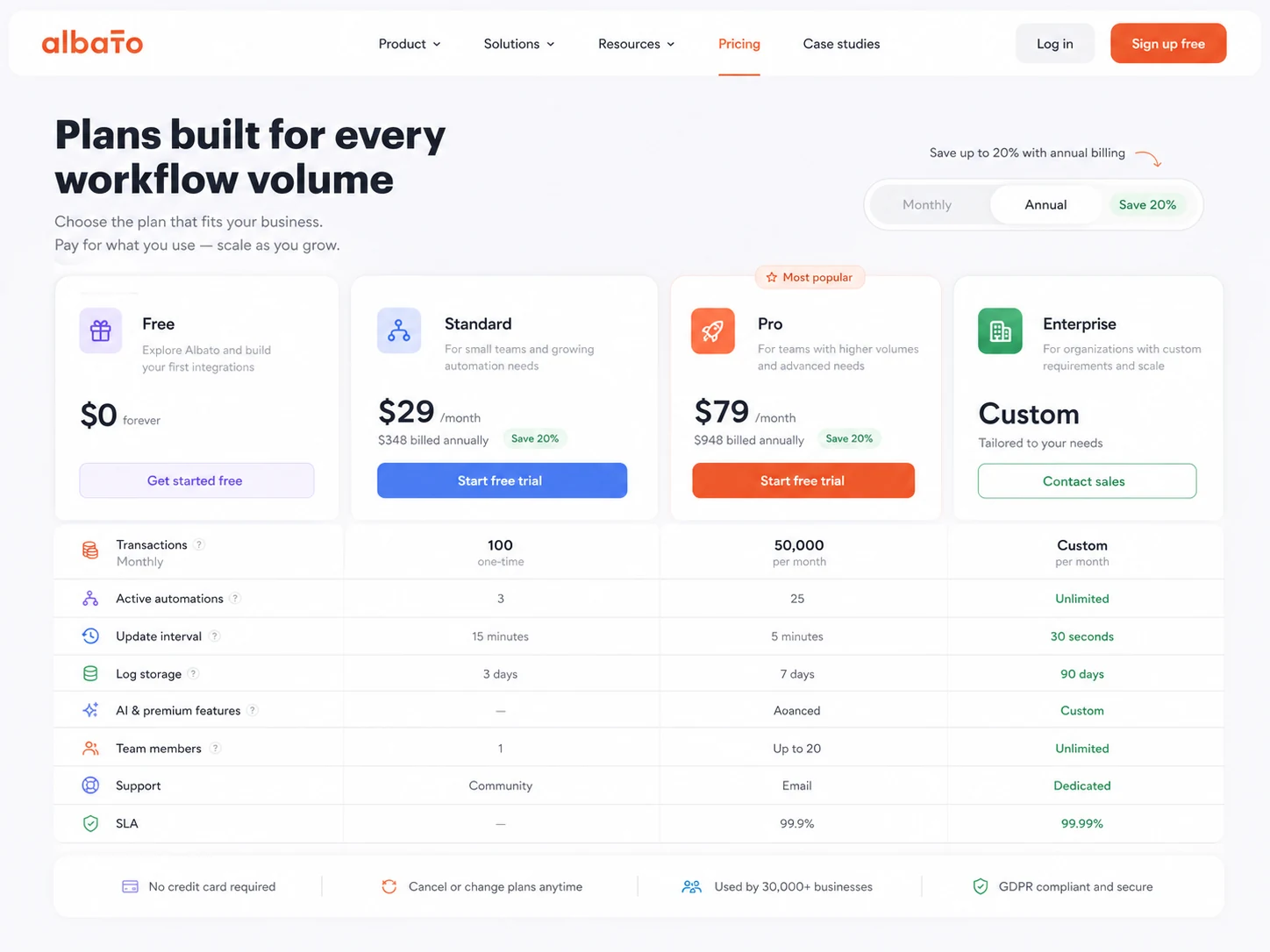
At the time of this review, Albato’s public pricing page shows a Free plan at $0/month with 100 transactions, 5 active automations, 2 steps per automation, 7-day log storage, and a 15-minute automation update interval.
The Pro plan is shown for individuals and small teams with a trial path, $22/month on monthly billing, and $15/month on annual billing at the 1K transaction package. Pro adds unlimited automations and steps, data migration and auto replay, Albato AI, parallel scenario execution, 30-day log storage, and a 5-minute automation update interval.
The same public pricing area also shows Teams as “coming soon,” with displayed pricing from 5K transactions, and Custom as a contact route for enterprise needs. Buyers should verify availability and checkout details before treating those as final.
The pricing question is less about the headline number and more about transaction fit. Albato explains transactions as successfully executed automation steps after the trigger. If you use up your included transactions, the page says additional transactions can keep workflows running and are priced higher than included package transactions.
That is both helpful and risky. Helpful because automations are less likely to stop suddenly. Risky because a buyer who estimates poorly may discover the real cost after workflows are already live.
For most buyers, I would start free if the workflow is small, use the trial path if unlimited steps or faster updates matter, and avoid annual billing until monthly transaction usage is predictable. For embedded iPaaS, I would skip self-serve assumptions and request a scoped demo.
Pricing check: Before choosing Albato, compare the plan price against your expected monthly transactions and the exact connectors you need.
Free plan, trial, coupon, and checkout notes
Albato’s Free plan is useful because it lets buyers test the platform without treating a paid plan as the first step. That is the right order for automation tools. Build the workflow first. Measure whether it works. Then decide whether paying makes sense.
The Free plan is not enough for every real operation. Two steps per automation and 100 transactions can be tight if your workflow has several actions or runs often. But it is enough to test whether the builder, connector behavior, and workflow logic fit your process.
The Pro trial path matters when you need unlimited steps, faster update time, AI support, data migration, auto replay, and more serious log storage. I would use that trial to test a real workflow, not to click around randomly.
A coupon should be secondary here. With Albato, the bigger buyer question is not “Can I save a little at checkout?” It is “Will this automation keep working at the volume I need?” If active offers exist, check the Albato coupon page only after the workflow and plan fit are clear.
Refund language also deserves attention. Albato’s license terms describe refund eligibility in a conditional way, including timing and usage requirements for prepaid subscription terms, and a separate path for lifetime plans. I would not assume this is a simple no-questions-asked refund.
Checkout order: Test the workflow first, size the transaction package second, and only then look at current offers or annual billing.
What I would check before buying Albato
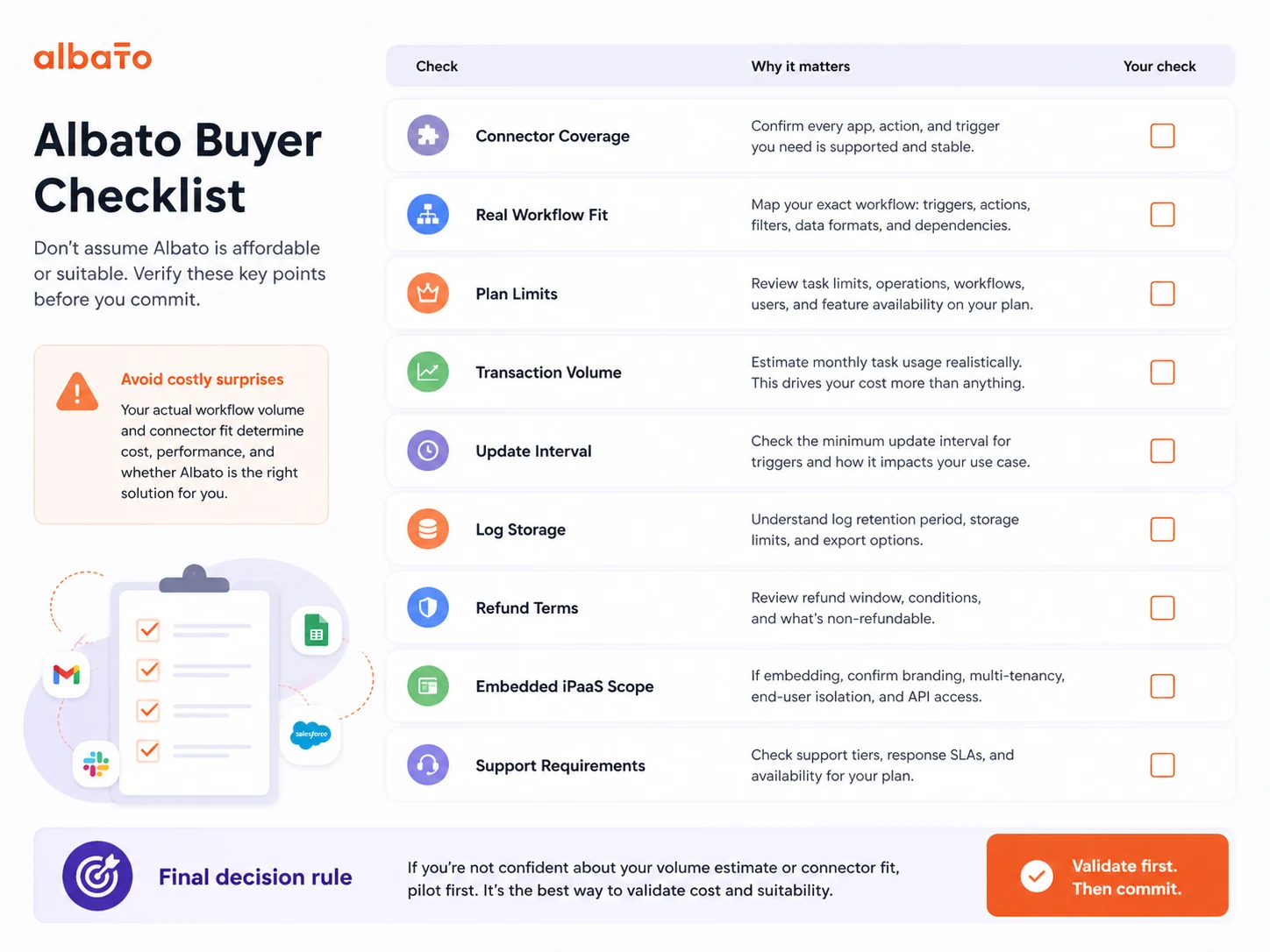
If I were buying Albato for a real workflow, I would check these points before paying:
- Whether every required app, trigger, and action is supported.
- Whether the workflow needs more than two steps, which may push it beyond the Free plan.
- How many successful action steps will run each month.
- Whether update timing matters: 15 minutes, 5 minutes, 3 minutes, or 1 minute can change the workflow feel.
- Whether log storage and auto replay are important if something breaks.
- Whether the purchase is for internal automation or embedded customer-facing integrations.
- Whether refund, cancellation, annual billing, or extra transaction terms create risk.
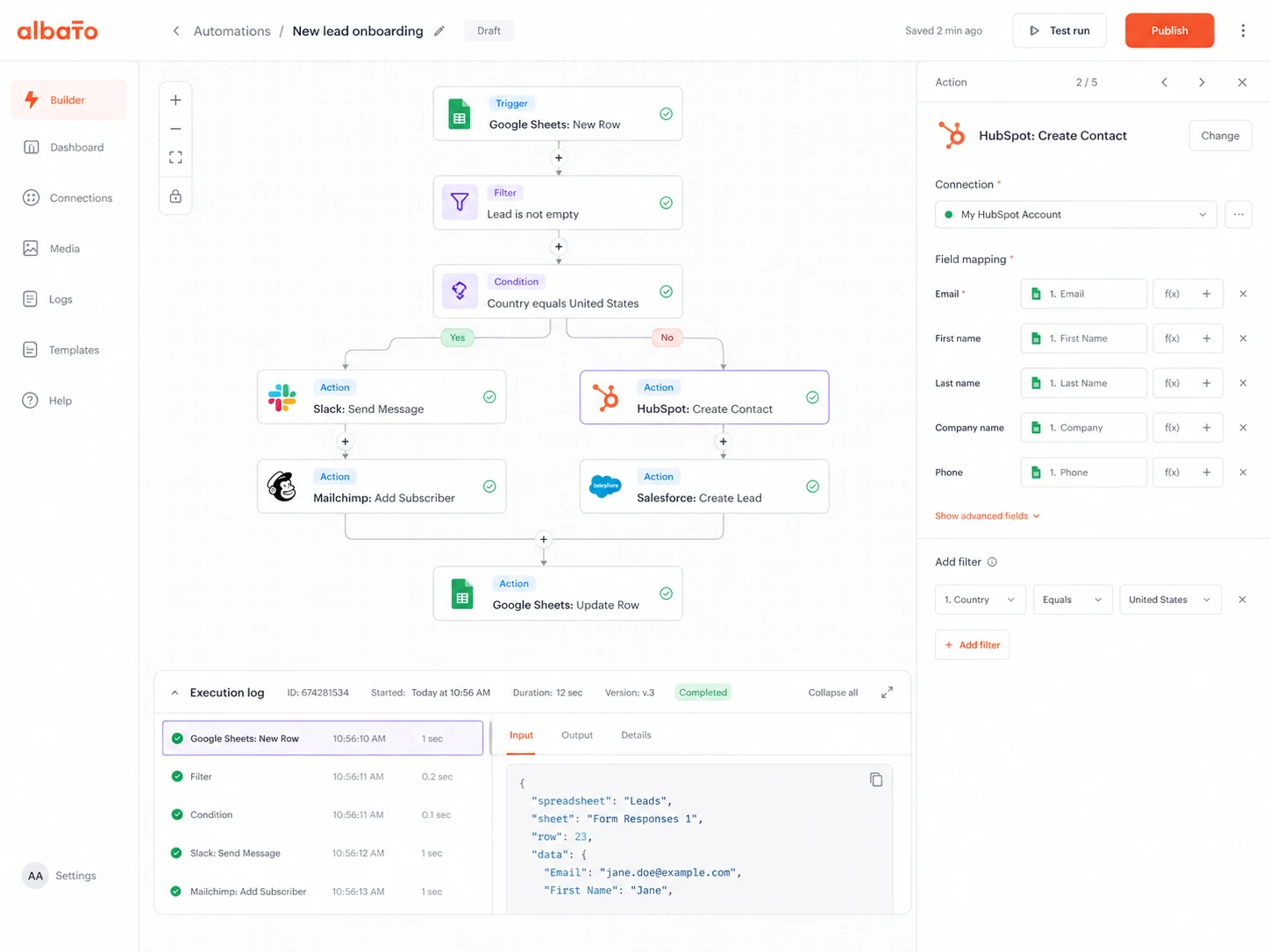
For my money, the first thing to verify is connector depth. A missing trigger is more painful than a slightly higher plan price. The second thing is transaction volume, because that controls whether the plan remains affordable once the automation is no longer a test.
A simple test before paying
Before paying, I would run a small test like this:
- Pick one workflow you currently perform manually.
- Write the trigger, destination app, action, and fields in plain English.
- Check whether Albato supports the exact trigger and action.
- Build the workflow with safe sample data.
- Run it several times and inspect the output manually.
- Estimate monthly transaction usage from the number of action steps and expected runs.
- Decide whether the saved time is worth the plan cost and maintenance responsibility.
For embedded iPaaS, the test should be more formal. Book a demo, ask for connector examples, request pricing structure, clarify implementation timeline, and confirm who supports end users when integrations fail.
Pros explained
The first real pro is low-risk testing. A Free plan with meaningful limits gives buyers a way to learn whether Albato fits before committing. That is especially helpful for small teams that are not yet sure how often they will automate.
The second pro is the move from simple automations to more serious workflows. Pro adds unlimited automations and steps, faster update timing, longer logs, data migration, auto replay, and AI support. Those features matter once automations are part of operations rather than experiments.
The third pro is flexibility through App Integrator. When the needed app is not available, the ability to create a custom connector from API documentation can keep a project moving. It is not effortless, but it can be much lighter than full custom development.
The fourth pro is the embedded iPaaS path. For SaaS teams, giving customers native integrations inside the product can be a real retention and product-value lever. Albato is more interesting here than a simple automation tool because it can support white-label and embedded integration experiences.
The fifth pro is buyer segmentation. Albato gives different paths for free testing, Pro automation, teams, custom enterprise needs, and embedded SaaS integrations. That is useful as long as the buyer does not mix those paths together.
Cons explained
The first con is transaction complexity. Albato’s pricing can look simple at the plan-card level, but real cost depends on workflow volume and action steps. Buyers who do not estimate usage may underprice the tool in their head.
The second con is Free plan narrowness. The Free plan is good for testing and light automation, but 100 transactions and two steps per automation can be too limited for active operations. A buyer should not assume “free plan available” means “free plan sufficient.”
The third con is embedded buying complexity. Albato Embedded is a different purchase. Pricing model, rollout scope, customer-facing UX, authentication, support ownership, and implementation timing need a deeper conversation than ordinary automation pricing.
The fourth con is refund caution. The license language is not something I would treat casually. Timing and usage can affect refund eligibility, so annual or prepaid billing deserves extra care.
The fifth con is connector depth risk. Broad app coverage is helpful, but integrations live or die by exact trigger and action support. A connector that lacks the one action you need can make the whole workflow fail the business case.
Green flags and red flags
Green flags:
- You can clearly define the workflow before opening the builder.
- The needed app connector, trigger, and action are already supported.
- The workflow saves repeated manual effort, not just occasional clicking.
- Monthly transaction volume is predictable enough to price.
- You have someone responsible for monitoring failed runs and updating workflows.
Red flags:
- You are buying before mapping the process.
- You are choosing annual billing before estimating transaction usage.
- You assume the Free plan proves paid value.
- You need embedded iPaaS but are comparing it against ordinary Pro automation pricing.
- You expect no-code automation to remove all maintenance work.
The easy mistake is comparing plan prices before comparing workflows. The better way is to build one realistic automation and see whether it holds up.
Albato vs alternatives
Make vs Albato
Make is the most direct comparison if you want a mature visual scenario builder and are comfortable thinking through more complex automation logic. It can be stronger for buyers who want deep branching and a highly visual automation canvas.
Albato may still make sense if you want a more guided automation path, custom connector options, and embedded iPaaS as a possible future route.
Relay.app vs Albato
Relay.app is a better comparison when the workflow needs human approvals, review steps, or collaborative handoffs. Some workflows are not pure background automations. They need a person to approve, check, or decide before the next step runs.
Albato is stronger when the goal is app-to-app data movement and repeatable workflow execution across a broad connector base.
Jet Admin vs Albato
Jet Admin is an adjacent route, not a direct replacement. It fits buyers who need internal tools, admin panels, portals, or operational interfaces.
Albato fits better when the main job is connecting existing apps and moving data between them. If your team keeps saying “we need a dashboard,” Jet Admin may be closer. If the team says “we need these tools to sync automatically,” Albato is closer.
Adalo vs Albato
Adalo is also adjacent. It is a no-code app builder, not a direct automation platform. It matters when the buyer really needs to build an app interface for users, customers, or internal teams.
Albato may still be part of the stack later, but it should not be treated as an app builder replacement.
Trust, refund, and buyer-risk notes
Albato has enough public information to understand the buying decision, but the buyer should still treat pricing, refund, and embedded scope carefully.
On pricing, the key risk is transaction volume. The plan name tells you the work format. The transaction package tells you how much usage fits. Do not separate those two decisions.
On refunds, Albato’s license terms describe a general no-refund position with exceptions and conditional refund logic tied to access, service outages, timing, transaction usage, and plan type. That is not something to skim after paying.
On data and privacy, automation tools often touch sensitive operational data: contacts, deals, messages, support tickets, form submissions, customer records, and internal alerts. Albato publishes security and data-processing information, but every team should still check what data will move through the platform, who can access it, and whether the connected apps have their own permission risks.
On embedded iPaaS, the trust question becomes larger. A SaaS company is not only trusting Albato for internal automation. It may be placing Albato-powered integrations in front of customers. That requires more careful review of SSO, authentication, branding, implementation timeline, support, security, and contractual terms.
The safest buyer behavior is simple: start small, test with realistic data, monitor failure cases, and pay only after the workflow proves it can save more time than it creates in maintenance.
Final verdict
I would consider Albato if you have a clear automation problem, know which apps need to connect, and want a no-code platform that can grow from simple internal workflows toward custom connectors or embedded integrations.
I would skip Albato if your workflow is still vague, if one native integration already solves the job, or if your team needs full engineering control over every part of the integration layer.
I would compare it with Make if visual scenario building and complex logic matter more. I would compare it with Relay.app if approvals and human handoffs are central to the workflow. I would treat Jet Admin and Adalo as adjacent routes only when the real need is an internal tool or app interface, not pure automation.
The safest next step is to build one real workflow before paying. If the workflow runs cleanly, the connector coverage is right, and the transaction estimate makes sense, Albato becomes a serious option. If those pieces are still unclear, a discount or annual savings path will not fix the mismatch.
