Quick verdict
Adalo is worth considering if you want to build a real app-shaped product before hiring developers, but I would not judge it only by the promise of “no-code app building.” The better question is narrower: can your app idea fit into a visual canvas, a clear data model, and a practical publishing path without needing deeper engineering control too early?
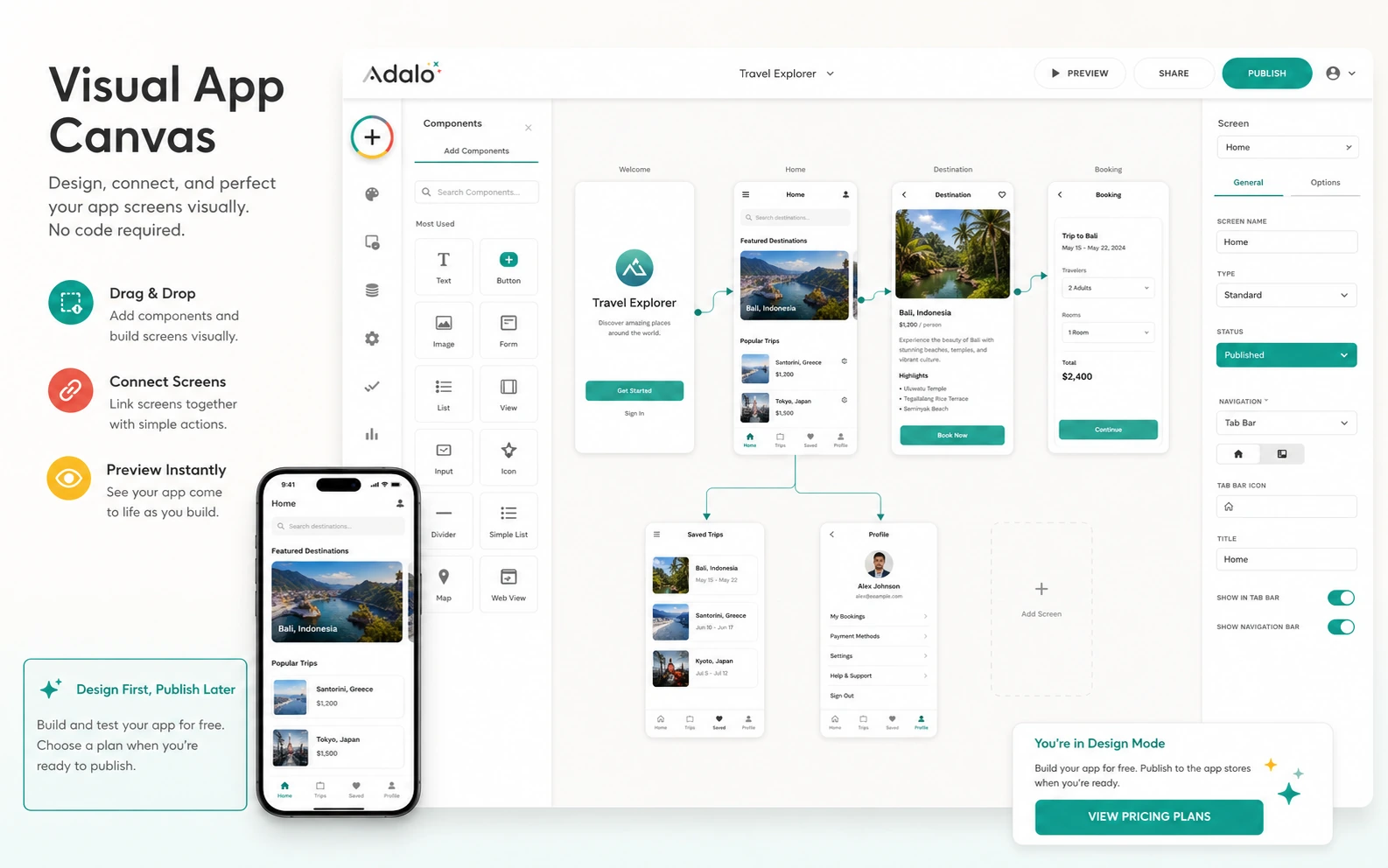
That is where Adalo makes sense. It gives founders, small businesses, and agencies a way to design screens, connect data, preview the app, and move toward web or native mobile publishing from one workflow. If your first version is a booking app, directory, portal, customer dashboard, lightweight marketplace, class app, or internal workflow tool, Adalo can be a practical shortcut.
The caution is that app builders become more expensive and more complicated at the exact moment the project starts feeling serious. Publishing, app editors, storage, API access, external integrations, Apple and Google developer accounts, cancellation rules, and downgrade behavior all matter. The free build path is useful, but it is not the same as proving that Adalo is the right long-term home for your app.
For my money, Adalo is strongest when you use it to build a narrow working MVP first. I would be more careful if you need source-code ownership, advanced backend logic, heavy automation, compliance-sensitive data, or a product that is already expected to scale beyond a simple no-code structure.
Next step: If Adalo still fits your app idea, verify the current publishing route and plan limits before choosing a paid tier.
Review snapshot
| Review point | Practical take |
|---|---|
| Best for | Founders, small businesses, and agencies building scoped web or mobile app MVPs |
| Not ideal for | Complex SaaS products, engineering-heavy apps, or buyers needing full source-code ownership |
| Main use case | Visual app building with screens, database, user actions, preview, and publishing |
| Free path | Free build path for testing app structure before paying |
| Paid path | Paid plans become relevant when publishing, branding, collaborators, storage, integrations, or API access matter |
| Main strength | Adalo makes app building feel more visual and approachable for nontechnical buyers |
| Main concern | Plan gates, publishing requirements, cancellation/refund rules, and scalability expectations need checking |
| Direct comparison | Base44 if the buyer wants an AI-first app-generation workflow |
| Adjacent routes | Jet Admin for internal tools, Make or Albato for automation-first workflows |
| Best next step | Build one narrow app flow on the free path before paying for publishing |
What is Adalo?
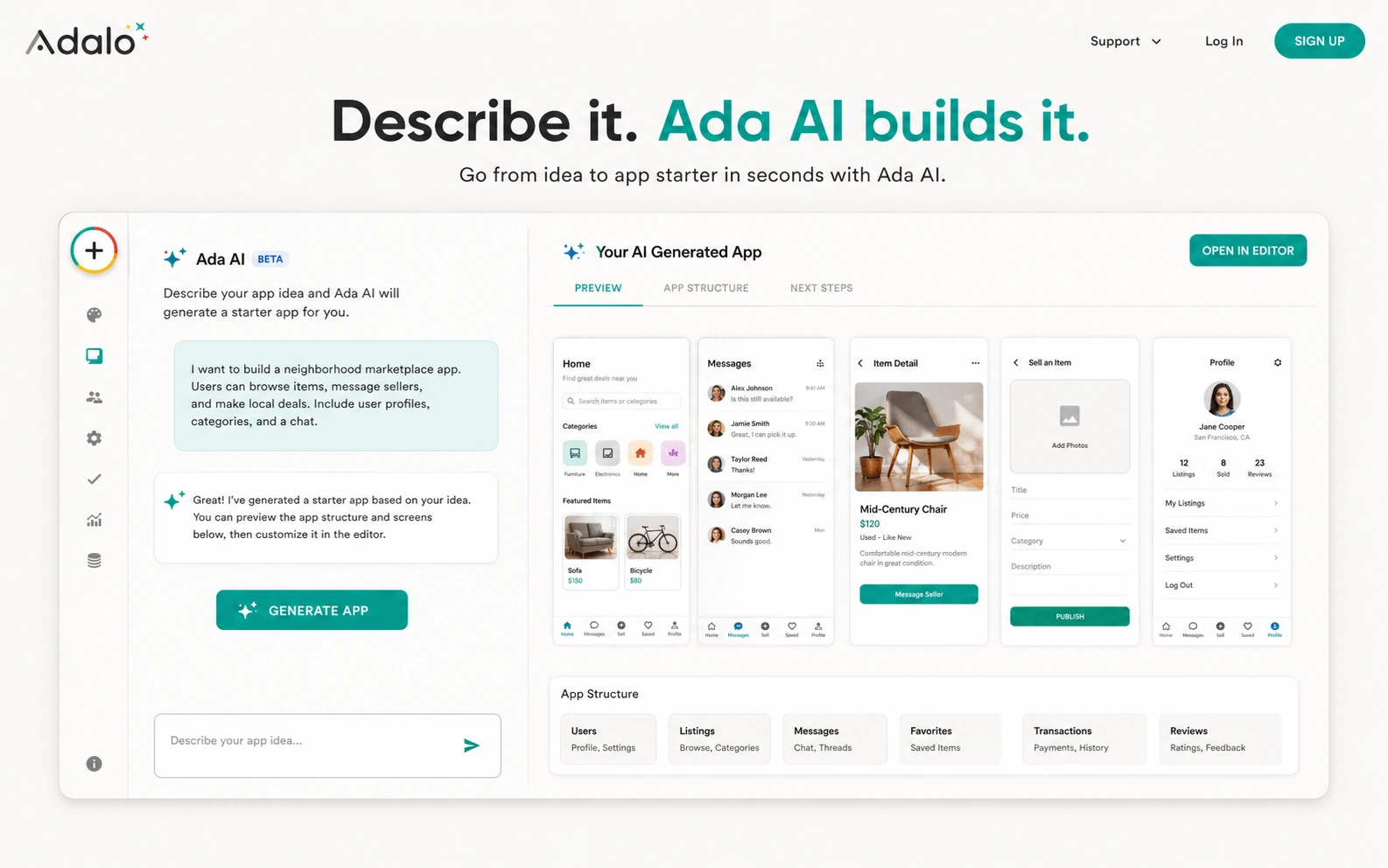
Adalo is a visual no-code app builder for creating database-driven web, iOS, and Android apps without writing traditional code. The current public positioning is built around a visual multi-screen canvas, AI-assisted app creation, built-in data, mobile/web publishing, and a free path before paid publishing.
The important phrase is “app builder.” Adalo is not mainly a workflow automation tool like Make or Albato. It is not just a database front-end. It is not a website builder for content pages. It is closer to a product-building environment for buyers who want screens, buttons, forms, users, records, workflows, and an app interface that can be previewed and eventually published.
That makes it useful, but also easy to overestimate.
A simple app can become real quickly in a visual builder. A complicated app can become messy just as quickly. The buyer mistake I would watch for is starting with a big product idea, seeing a polished demo, and assuming the tool removes the need for product thinking. It does not. You still need to understand who the app serves, what data it stores, what actions users take, what happens when something fails, and how the app will be maintained after launch.
Our review approach compares public product pages, pricing details, help documentation, publishing requirements, buyer workflow fit, and nearby alternatives. We do not treat a free plan, coupon path, or low starting price as proof that a no-code builder fits the app a buyer actually wants to ship.
Who should use Adalo?
Adalo makes the most sense for founders validating an app idea before they commit to a development team. The condition is that the first version must be narrow enough to build visually. A founder building a simple marketplace, directory, class app, booking app, community tool, or customer portal has a clearer path than someone trying to rebuild a complex SaaS platform from day one.
Small businesses can also use Adalo well when the app supports a specific operating workflow. Think appointment flows, member dashboards, local service directories, event listings, intake forms, simple order tracking, or lightweight customer apps. The tool is more convincing when the business already knows the process it wants to digitize.
Freelancers and agencies may find Adalo useful for client prototypes and early MVPs. This is a good fit only when scope is controlled. Before accepting a client project, I would define who owns the app, who maintains it, what happens if the client needs custom logic later, and whether native app-store publishing is truly required.
Nontechnical product people may also like Adalo because the canvas makes the app feel visible. You can think in screens, data, and user actions rather than code files. That is helpful for early product thinking, but it does not eliminate the need to test on real devices and with real users.
Internal teams can consider Adalo when they need a lightweight app with forms, records, dashboards, and user flows. But if the real need is connecting existing systems rather than designing a new app interface, an automation tool or internal admin builder may be the cleaner route.
Who should avoid Adalo?
I would avoid starting with Adalo if you already know the app needs deep engineering control. If source-code ownership, custom infrastructure, unusual backend logic, advanced security requirements, or complex compliance controls are central to the project, a no-code builder may become a detour rather than a shortcut.
Adalo is also not the first tool I would choose for buyers who have not mapped the app yet. A vague idea like “I want an Uber for my niche” is not enough. You need the first user journey, core screens, records, roles, and publishing goal. Without that, you can spend time building screens that look promising but do not prove the business.
Teams building internal operations dashboards should compare alternatives before assuming Adalo is the right fit. If the main job is admin panels, database management, or internal workflows, Jet Admin may be closer. If the main job is moving data between tools, Make or Albato may be more natural. Adalo becomes stronger when the app interface itself is the product.
I would also be cautious with high-scale app ideas. Adalo’s current public pages speak confidently about native publishing and flat paid plans, but serious scale still needs planning. If the app will handle heavy usage, advanced permissions, sensitive data, complex integrations, or mission-critical workflows, test the architecture before you sell the app as production-ready.
Finally, I would not buy Adalo just because a deal path appears. A discount can reduce the bill, but it cannot make the app idea clearer. Build the first version first, then decide whether the paid plan fits.
How Adalo fits into a real workflow
A sensible Adalo workflow starts before you open the builder.
First, define the app in plain terms: who uses it, what they do, what records the app stores, and what a successful first version must prove. Then sketch the core screens. For many early apps, that may be fewer screens than the founder expects: login, home, list, detail, form, profile, and one core action.
Next, use Adalo’s free build path to create the first version. This is where the visual canvas matters. You are not only designing how the app looks. You are testing whether the structure makes sense. Can users move from screen to screen? Are the data collections clear? Do forms create the right records? Does the flow still make sense on a phone?
After that, preview the app on real devices. A no-code canvas can look clean on a desktop, but mobile app quality is judged by friction: tap targets, loading states, navigation, empty states, permissions, and user confusion. I would not treat the app as ready until someone outside the builder can complete the main task.
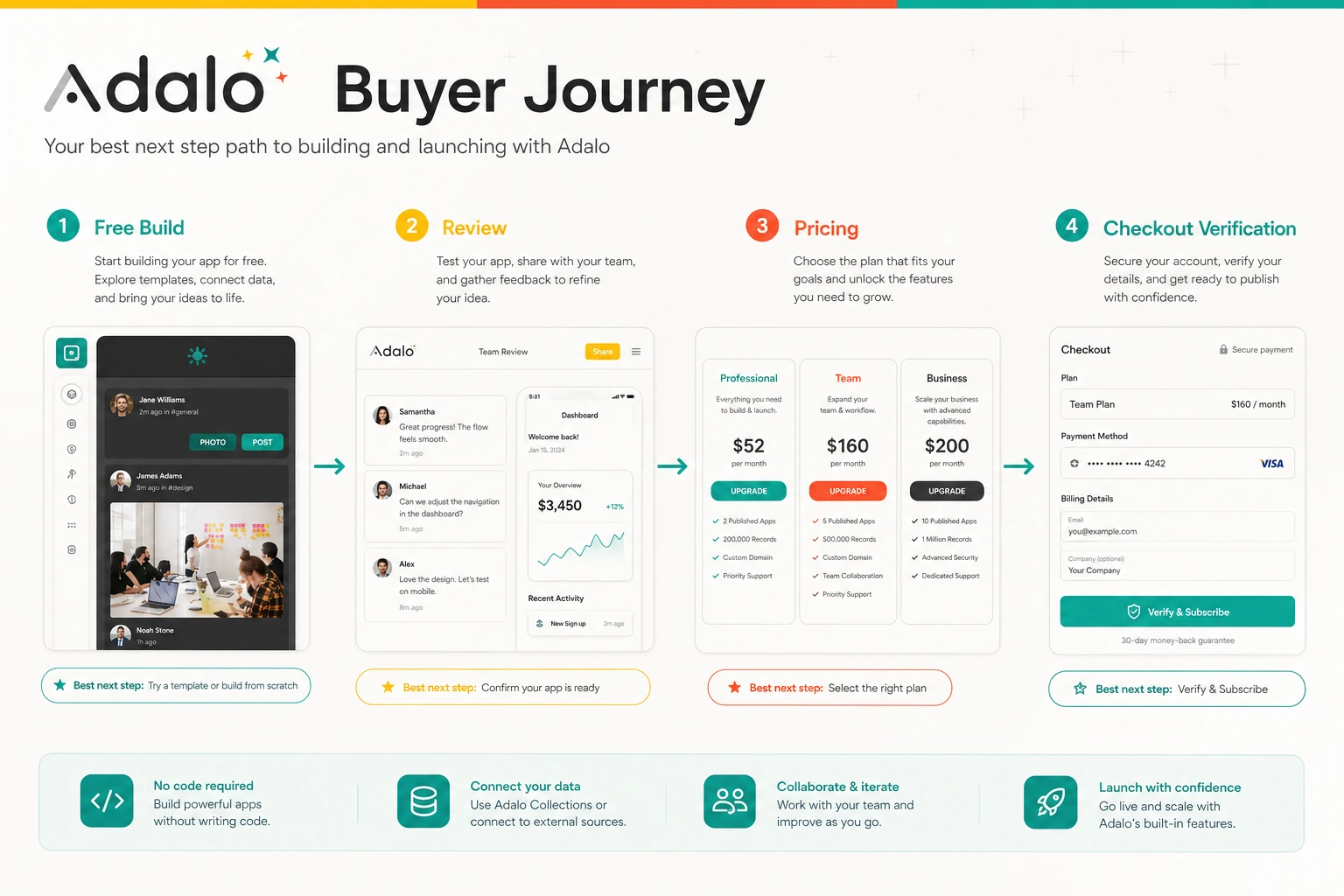
Only then does the paid decision become serious. If the app needs a custom domain, app-store publishing, more editors, integrations, API access, or more storage, compare plans against the exact launch path. Do not pay for a big plan before the first workflow is proven.
Real-world buyer scenarios
A founder building a first MVP
A founder with a clear mobile app idea can use Adalo to turn a concept into something testable. The fit is strongest when the MVP has simple records and predictable user actions: sign up, browse, submit, book, save, message, or view a dashboard.
The risk is trying to build the final product immediately. If the founder needs advanced logic, custom performance controls, or deep backend flexibility, Adalo may be better for prototype validation than long-term production.
A local business creating a customer app
A gym, class provider, local service company, directory owner, or small membership business may use Adalo to create a practical customer-facing app. In this case, the value is not novelty. The value is reducing friction for a known audience.
The buyer should verify whether the app really needs native app stores. Sometimes a web app or simple portal is enough. Native publishing adds developer account requirements, review processes, store screenshots, privacy policy needs, and update responsibilities.
An agency building client prototypes
Agencies can use Adalo to show clients a working version faster than a traditional build. That can be valuable for discovery, MVP validation, and early demos.
The danger is overselling the prototype. If the client expects custom ownership, complex integrations, or enterprise reliability, the agency should document what Adalo handles and what may need a different stack later.
An internal team replacing spreadsheets
An internal team may use Adalo to create a cleaner interface around records, forms, and status updates. This can work when the team needs an app-like workflow, not just data automation.
If the team mainly needs to sync tools, trigger actions, or manage operational data across systems, Make, Albato, or Jet Admin may be a better first comparison.
Key features that actually matter
Visual multi-screen canvas
The visual canvas is the main reason many nontechnical buyers will consider Adalo. It lets you see app screens, navigation, and layout as a product rather than a codebase. That helps founders and business owners think in terms of user journeys.
Buyer note: the canvas is useful only if you keep the first version focused. A visual builder can still become confusing when the app grows too many screens, actions, and conditional flows.
Free build path
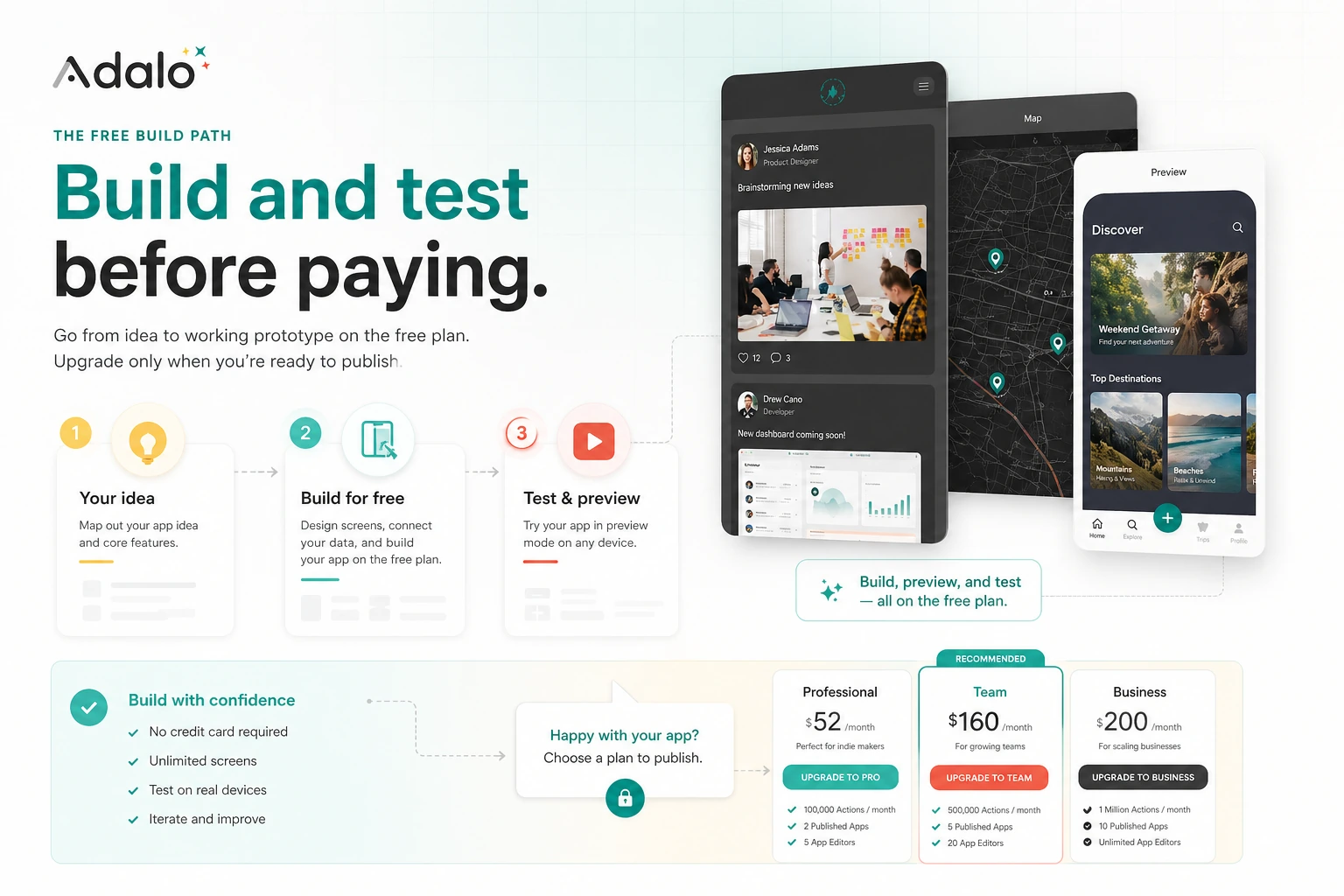
Adalo’s free path matters because it lets buyers test the idea before paying. For a no-code app builder, that is not a small detail. You should be able to find out whether the app structure works before committing to a paid publishing plan.
Buyer note: a free build path is not proof of paid value. Use it to test screens, records, and core flow. Upgrade only when the project needs publishing, branding, app editors, storage, API access, or integrations.
Web and native publishing direction
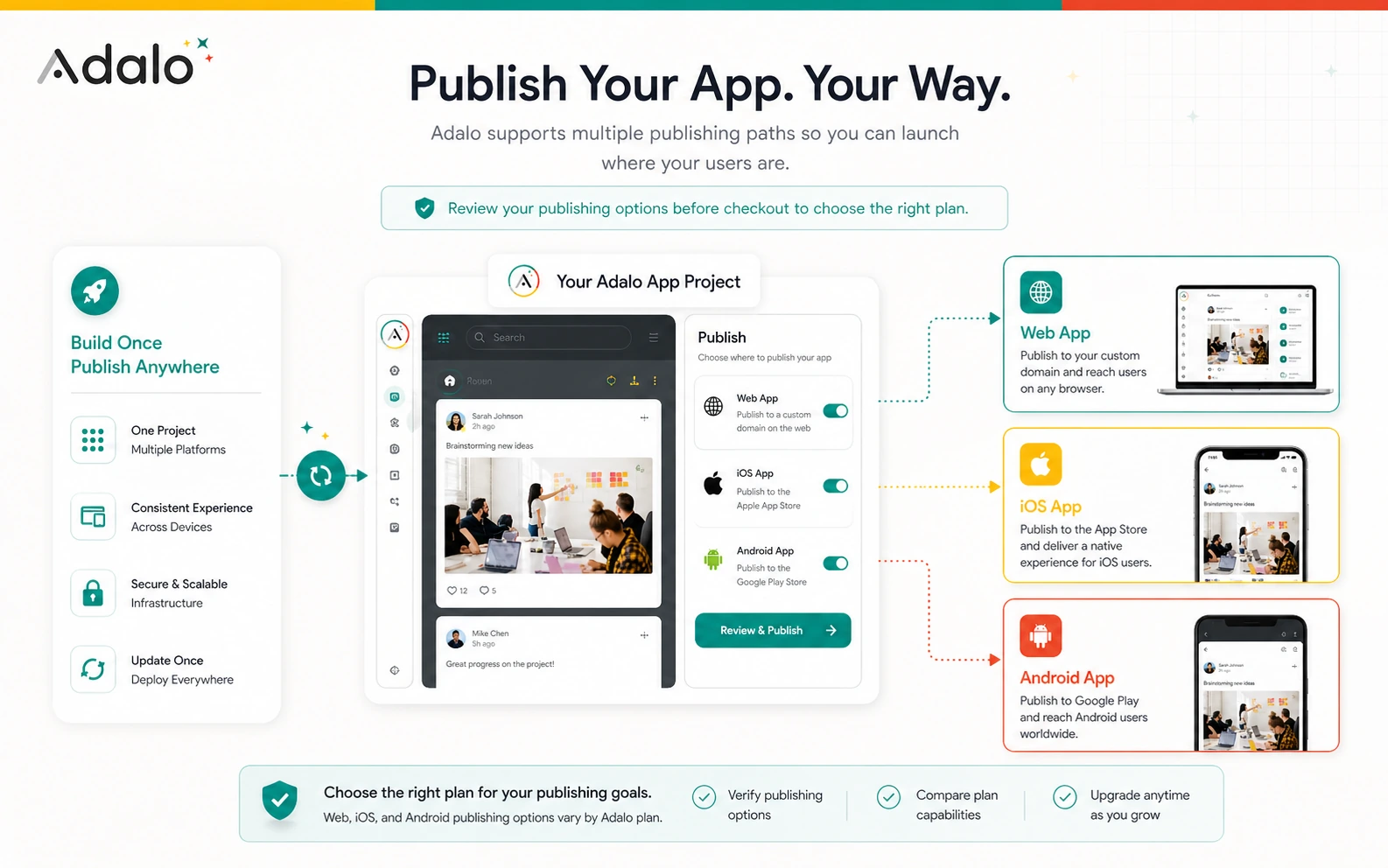
Adalo’s current public pages emphasize building once and publishing toward web, iOS, and Android paths. That makes it more relevant than simple web-only builders for buyers who truly need a mobile app presence.
Buyer note: native publishing has external requirements. Apple and Google developer accounts, store review rules, app icons, screenshots, privacy policy links, and resubmission work can become part of the project.
Built-in database and app logic
Adalo includes a hosted database structure, which is useful for early apps that need records, users, and relationships. For simple apps, this reduces setup friction.
Buyer note: the database model still needs planning. If your app depends on complex permissions, high-scale operations, unusual queries, or advanced backend logic, compare the limits before building too far.
Integrations, API access, and advanced plan gates
Adalo becomes more serious when integrations and API access enter the workflow. This is where the buyer should slow down. A simple app can be built visually; a connected business app may require plan-gated features and external services.
Buyer note: do not assume API, Xano, external data, or automation workflows are available on the plan you first notice. Confirm plan-level access before building your architecture around it.
Pricing and plan value
Adalo pricing should be judged by launch path, not by the lowest number on the pricing page.
At the time of this review, Adalo’s public pricing route presents a free build path and paid plans for publishing and more advanced use. The public pricing page describes the Starter plan at $36/month and says paid plans use a flat monthly fee rather than per-action metering. It also says you can build and test on the Free plan before upgrading when you are ready to publish.
That pricing model is easier to understand than platforms that meter every action or workload unit. But flat pricing does not mean every buyer is safe. The real plan question is whether you need web publishing, native app-store publishing, more app editors, extra storage, API access, external integrations, design version history, or team features.
There is another cost layer: app-store publishing. Adalo’s own publishing guidance points to the separate Apple Developer Program fee and Google Play developer registration. These are not Adalo coupon issues. They are part of the real app launch budget.
I would treat the free plan as the safest place to test product fit. Paid Starter may make sense when publishing becomes real. Higher tiers make sense only when the project clearly needs their collaboration, integration, or scale features.
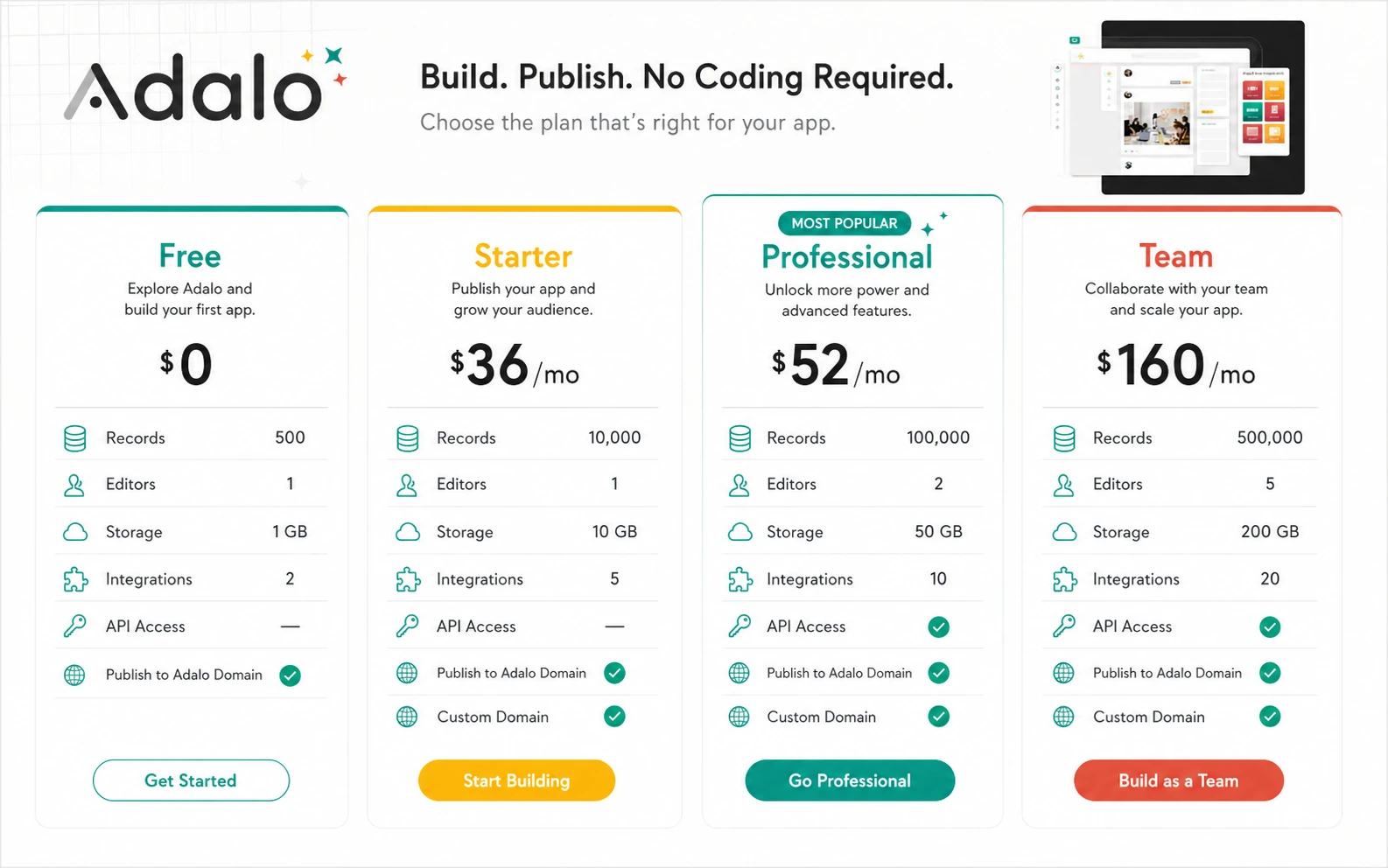
Pricing check: Before paying, compare your real app requirements against the current plan table and live checkout terms.
Free plan, trial, coupon, and checkout notes
The free path is the most useful Adalo offer for cautious buyers. It lets you build and test before the paid publishing decision. That is the right order for this category.
Adalo help content also references a 14-day free trial for testing some premium features, with important exceptions around publishing to app stores or a custom domain. Because trial availability and plan access can vary by signup flow, I would verify the current trial terms inside the account or checkout experience before relying on it.
I would not treat coupons as the main savings path here. The cleaner savings path is to avoid upgrading before the app is defined. Build the first version, test the data model, preview it on devices, and then decide whether paid publishing or collaboration features are needed.
If there is an active offer route, use it only after the workflow fit is clear. Check the Adalo coupon page for current offers, but do not let the offer decide the purchase. A cheaper plan still wastes money if your app needs a different builder.
The checkout check should include billing interval, current plan limits, app-editor count, published-app count, storage, custom domain access, native publishing access, API access, cancellation behavior, and refund rules. Annual billing should come after a working app test, not before.
What I would check before buying Adalo
If I were buying Adalo for a real app workflow, I would check these items before paying:
- Whether the first app can be built on the free path without hitting a structural limit.
- Whether the app needs web-only publishing, native app-store publishing, or both.
- Whether Apple and Google developer-account costs belong in the launch budget.
- Whether the plan includes the number of app editors and published apps the project needs.
- Whether storage, integrations, API access, external collections, Xano, or automation requirements are plan-gated.
- Whether cancellation and downgrade behavior could break published apps or paid features.
- Whether refund rules are acceptable before choosing annual billing.
A simple test before paying
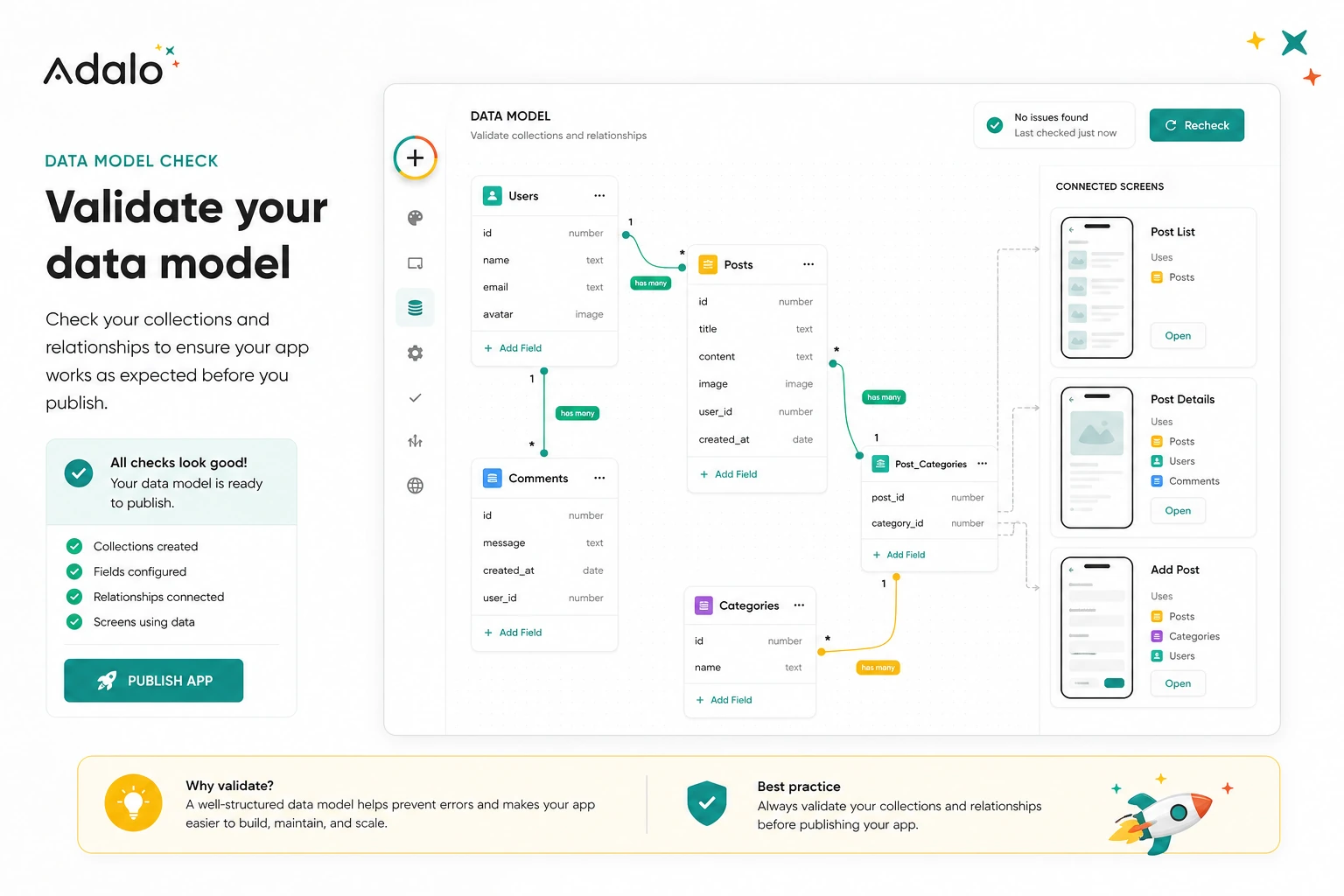
Before paying for Adalo, I would run a small test like this:
- Write one sentence explaining the app’s main job.
- List the first five screens the user needs.
- Create the core database collections and relationships.
- Build one complete user flow from start to finish.
- Preview the app on a real mobile device.
- Ask one outside person to complete the main task without coaching.
- Compare the issues you find against the paid plan features you think you need.
This test is intentionally narrow. It does not prove that Adalo can run your entire business. It proves whether the app idea is clear enough to deserve a paid publishing path.
If the test feels messy, paying will not automatically fix it. Clean up the app structure first. If the test works and the next blocker is publishing, collaborators, integrations, or storage, then the paid-plan conversation becomes more realistic.
Pros explained
The free build path reduces early purchase risk
Adalo lets buyers start with building and testing rather than paying first. That is a strong advantage for founders who are still shaping the app. A free path gives you room to find out whether the visual workflow makes sense.
The limit is that free testing should be treated as discovery. Once publishing, team access, or app-store distribution matters, the buyer still needs to compare paid plan limits carefully.
The visual canvas is approachable for nontechnical builders
Adalo’s visual canvas is one of its main strengths. It helps buyers think about screens, components, and user flows without starting from code. For many founders, this is enough to move from idea to something testable.
It stops being enough when the app’s logic becomes too complex for visual editing to stay clean. At that point, the buyer may need a more technical platform or a developer-supported build.
Native app direction is commercially useful
Adalo is more compelling when the buyer truly needs mobile app-store distribution. A web-only builder may be enough for many projects, but some businesses want customers to install a real app.
The catch is that native publishing creates extra work. Store accounts, screenshots, privacy policy links, store review rules, and app updates are still part of the process.
Flat paid pricing is easier to budget than usage-metered tools
Adalo’s public pricing material emphasizes flat monthly fees rather than per-action metering. That can make budgeting easier for nontechnical buyers who do not want to model every workload unit.
The buyer still needs to check plan gates. Flat pricing does not mean every feature is included in every plan.
Cons explained
Serious app requirements can outgrow the beginner-friendly workflow
Adalo is approachable, but approachable does not always mean sufficient. If the app becomes complex, performance-sensitive, compliance-heavy, or deeply integrated with external systems, the buyer may need more technical control.
The way to avoid this issue is to define the app’s likely future needs before committing to the platform as the long-term foundation.
Publishing is not only an Adalo subscription decision
Publishing an app to the App Store or Google Play brings external requirements. Adalo can support the path, but Apple and Google still have their own accounts, fees, review processes, and listing requirements.
Buyers should budget these before treating Adalo’s paid plan as the total launch cost.
Cancellation and refund rules deserve attention
Adalo help content states that subscriptions auto-renew and that refunds are not offered for cancellations. Downgrades also take effect at the end of the billing cycle, and paid-feature access can be affected after downgrade.
That does not make Adalo unusual for SaaS, but it does make annual billing a decision to take carefully. I would not choose annual until the app has passed a real workflow test.
Adjacent tools may solve the real problem better
Sometimes the buyer does not need an app builder. They need an automation workflow, an internal admin panel, a database front-end, or an AI app generator. Adalo can be the wrong category if the problem is misdiagnosed.
This is why I would compare by job-to-be-done, not by feature lists.
Green flags and red flags
Green flags for Adalo are easy to spot. You have a narrow app idea. You can describe the main user flow. You need screens, records, and actions. You want to test before hiring developers. You can start with a simple version. You understand whether publishing is web-only or native.
Another good sign is that the app does not depend on unusual backend logic. If the first version can be built from clear screens and collections, Adalo has a believable role.
The red flags are just as important. If you need full code ownership, custom infrastructure, advanced permissions, deep integrations, heavy automation, or strict compliance controls, slow down. Adalo may still help with prototyping, but it may not be the right production foundation.
I would also slow down if the purchase is driven by a discount. A current deal path can be useful, but it should come after the app workflow makes sense.
Adalo vs alternatives
Adalo alternatives should be separated carefully. Some products compete directly as app builders. Others solve adjacent jobs.
Base44 vs Adalo
Base44 is the more direct comparison if the buyer wants an AI-first app-generation workflow. It may appeal to buyers who want to describe an app and move quickly from prompt to prototype.
Adalo may still make more sense if the buyer wants a visual multi-screen canvas and a clearer app-building environment for web and mobile publishing. If you are choosing between the two, compare how each tool handles editing after the first generated version.
Jet Admin vs Adalo
Jet Admin is an adjacent route, not a one-to-one replacement. It is more relevant when the buyer needs internal admin panels, operational dashboards, and business data management.
Adalo is better when the app interface itself is the product or customer-facing experience. If the app is mainly for internal staff managing records, compare Jet Admin before committing to Adalo.
Make vs Adalo
Make is not a direct app builder alternative. It is a workflow automation platform. It becomes relevant when the buyer mainly needs to connect existing tools, move data, trigger actions, or automate back-office steps.
Adalo is the better fit when users need a custom interface. Make is the better fit when the interface already exists and the real problem is automation.
Albato vs Adalo
Albato is another adjacent automation route. It can make more sense when the buyer wants app-to-app integrations and process automation without building a new app front end.
Adalo is stronger when the buyer needs screens, forms, user flows, and app publishing. Albato is stronger when the work is mostly connecting software tools behind the scenes.
Bubble, FlutterFlow, and Glide as external comparisons
For broader market comparison, Bubble is usually worth checking for complex web apps, FlutterFlow for more developer-adjacent mobile builds, and Glide for simple data-driven apps and internal tools. I would not treat any of these as automatically better. The right choice depends on how much control, speed, mobile publishing, learning curve, and backend flexibility the buyer needs.
Trust, refund, and buyer-risk notes
The trust question with Adalo is not whether no-code apps are real. They are. The better question is whether the buyer understands the platform boundary before paying.
Adalo’s current public pages are strong on app-building positioning, free-start messaging, visual canvas, AI support, flat paid pricing, and native app publishing. That gives buyers enough information to evaluate fit. But billing and plan limits still deserve close reading.
The clearest buyer-risk point is cancellation and refund behavior. Adalo’s help content says subscriptions auto-renew and refunds are not offered for cancellations. It also explains that downgrading does not take effect until the end of the billing cycle and that paid features can be lost after downgrade. That matters if the app is already published or depends on paid features.
Data and app ownership also deserve practical thinking. If the app becomes central to a business, the buyer should understand what happens to app data, design history, integrations, custom domains, and published app behavior if the plan changes.
For native app publishing, do not ignore platform rules. Apple and Google developer accounts, store reviews, screenshots, privacy policy requirements, and rejected submissions are part of the launch process. Adalo can help with publishing, but it does not remove the buyer’s responsibility to prepare a real app listing.
My confidence is strongest around Adalo’s role as a visual app builder for scoped MVPs and simple app workflows. I am more cautious around long-term scale, refund expectations, and complex technical needs because those depend on the buyer’s app architecture and current plan details.
Final verdict
I would consider Adalo if you have a clear app idea, a simple first user flow, and a real need to build a web or mobile app without starting with a development team. It is especially useful when you can test the first version on the free path and only pay when publishing or collaboration features become necessary.
I would skip Adalo if your product already requires advanced backend logic, source-code ownership, custom infrastructure, strict compliance controls, or a heavy engineering roadmap. In that case, Adalo may still be useful for early mockups, but I would not treat it as the long-term foundation without deeper technical review.
I would compare Adalo with Base44 if AI-first app generation is the main attraction. I would compare it with Jet Admin if the real need is internal operations. I would compare it with Make or Albato if the buyer mainly needs automation between existing systems.
The safest path is simple: build one narrow app flow first, test it on a real device, check the current plan gates, and only then decide whether paid publishing is worth it. Adalo can shorten the distance between idea and working app, but it works best when the buyer brings a focused app idea rather than hoping the tool will create the product strategy for them.
