Quick verdict
Base44 is worth considering if you want to turn a clear software idea into a working app without starting from a blank codebase.
But I would not judge it only by the homepage promise.
The better question is narrower: do you have a real app workflow that is clear enough to build, test, and refine inside Base44’s credit and plan structure? If yes, Base44 can be a useful shortcut for MVPs, internal tools, customer portals, productivity apps, and lightweight business systems. If no, the free plan may still be interesting, but a paid upgrade can become premature quickly.
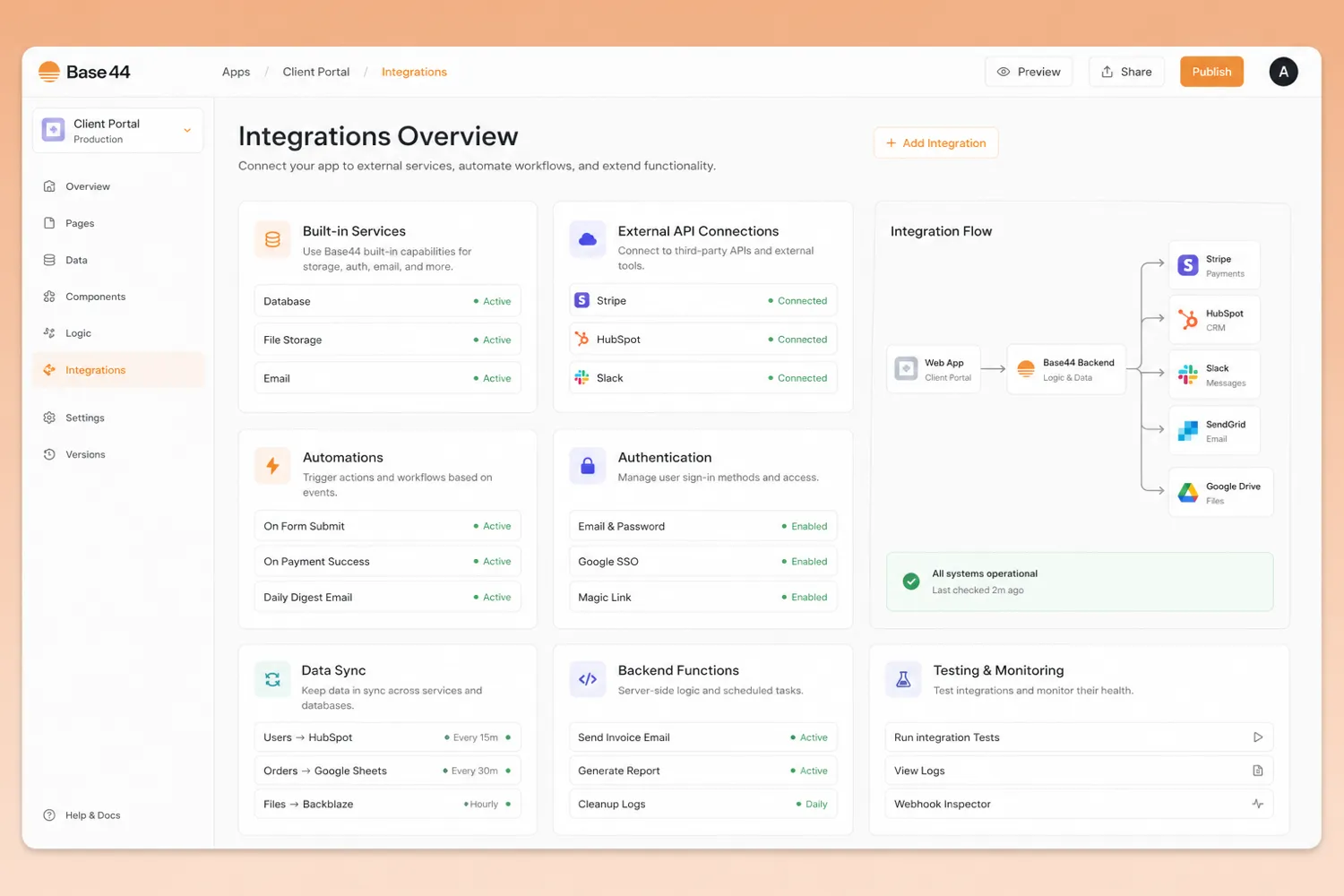
The strongest reason to consider Base44 is that it brings several early app-building pieces into one AI-assisted workflow: natural-language generation, app editing, authentication, database functionality, hosting, analytics, backend functions, and integrations.
The main caution is the credit model. Message credits affect how much you can build and refine. Integration credits matter when the app starts doing real work. Once connectors, backend functions, custom domains, GitHub integration, or heavier support become important, the cheapest plan may not be the right plan.
For my money, Base44 should be tested with one small real app before annual billing. A coupon or lower annual price can improve the purchase, but it should not be the reason you choose the product.
Next step: If Base44 still matches the app you want to build, check the current buyer route and plan structure before choosing a paid tier.
Review snapshot
| Review point | Practical take |
|---|---|
| Best for | Founders, operators, and product teams building MVPs, internal tools, portals, or workflow apps |
| Not ideal for | Buyers who want unlimited experimentation, deep engineering control, or a serious production app without credit planning |
| Main use case | Turning a clear app idea into a working AI-assisted app with data, users, screens, and actions |
| Pricing note | Free plan available; paid annual pricing currently starts at Starter, with higher Builder, Pro, and Elite tiers |
| Free path | Useful for testing the builder and a small prototype, not enough to prove heavy production usage |
| Main strength | Combines AI app generation with app logic, authentication, data, hosting, integrations, and builder controls |
| Main concern | Message credits, integration credits, connector requirements, renewal timing, and plan-gated features |
| Direct comparison | Adalo for a more traditional no-code app-builder path |
| Adjacent routes | Jet Admin for internal admin tools; Make and Relay.app for workflow automation rather than app creation |
| Best next step | Build one narrow real app on the free plan, then upgrade only when a specific blocker appears |
What is Base44?
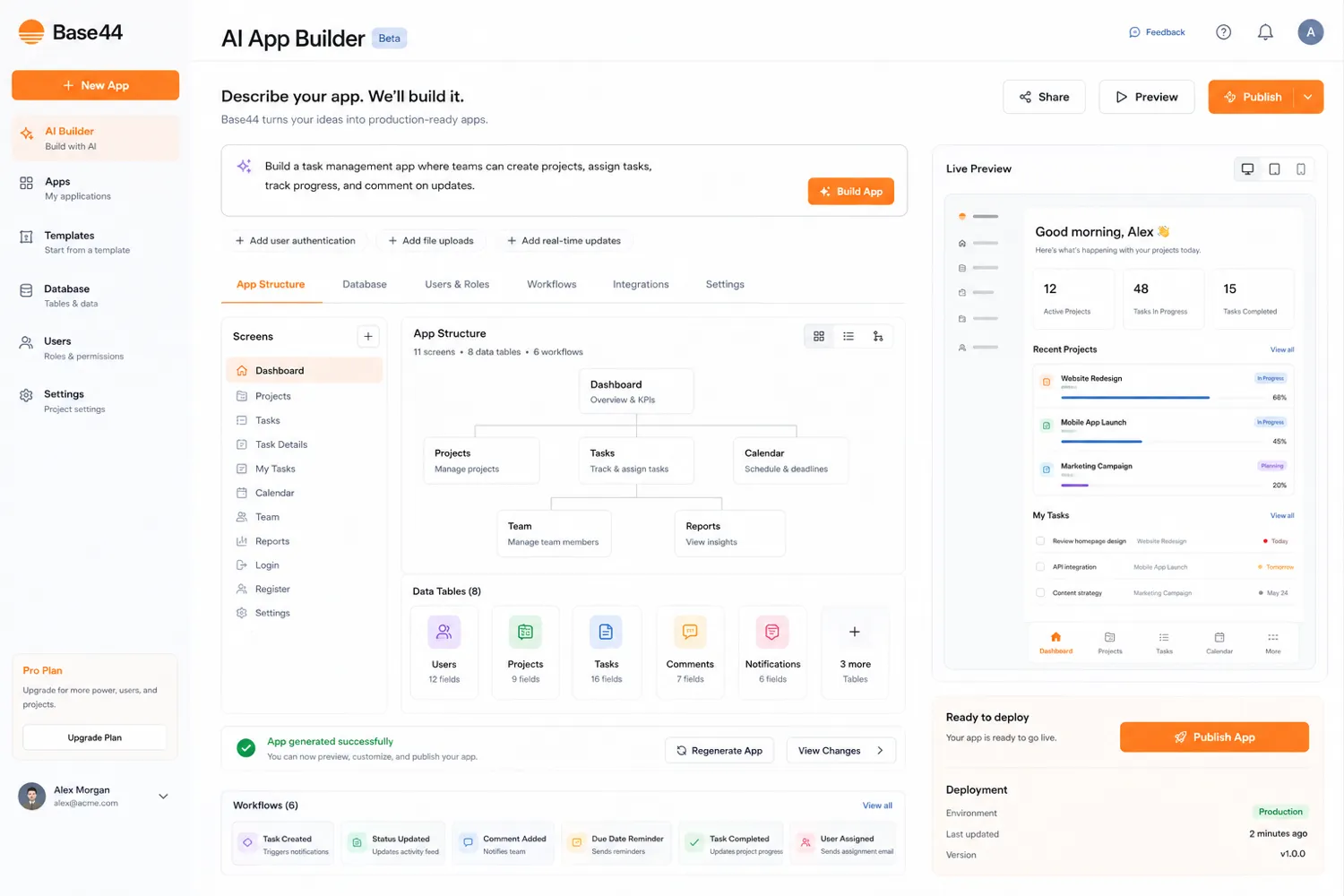
Base44 is an AI app builder for people who want to describe a software idea in plain language and turn it into a working app with less manual setup.
The current public positioning is not just “write a prompt and get a screen.” Base44 presents itself as a platform for building apps and websites with AI, then refining them through chat. Its official materials point to authentication, database functionality, analytics, built-in hosting, custom integrations through APIs, and credit-based usage. Base44 also now sits in a wider Wix context after Wix announced its acquisition of Base44 in 2025 while saying the product would continue to operate as a distinct business.
That context matters, but it does not remove the buyer’s job.
Base44 is not the same as a design mockup generator. It is also not the same as a workflow automation platform. The closer category is AI-assisted no-code or vibe-coding app building: you describe the product, the AI builds a first version, and then you iterate, correct, connect, and test.
The common wrong expectation is that Base44 removes the need to think like a product builder. It does not. You still need to know who will use the app, what data it stores, what actions users take, and which integrations matter.
Our review approach compares public product pages, pricing details, support documentation, deal terms, buyer workflow fit, and nearby alternatives. We do not treat a free plan, annual discount, or promo-code path as proof that the product fits the buyer.
Who should use Base44?
Base44 makes the most sense for buyers who can describe a real app, not just a vague idea.
Founders building a first MVP are one of the clearest fits. If you need to test a customer portal, lead intake tool, internal marketplace, lightweight SaaS workflow, or niche productivity app, Base44 can help you move faster than a manual build. The condition is that your first version must stay narrow.
Operators and small teams are another good fit. A back-office tracker, approval workflow, reporting tool, intake form, or lightweight internal database can be a strong Base44 use case. These buyers usually do not need a full engineering sprint for every internal process.
Product teams can use Base44 for prototypes before handing work to engineering. A working prototype can reveal data assumptions, screen-flow gaps, and missing business logic earlier than a static brief.
No-code builders may also like Base44 if they want a more AI-assisted route than traditional drag-and-drop building. The product becomes more interesting when the app needs authentication, data, basic logic, and integrations in one place.
Who should avoid Base44?
I would be careful with Base44 if you only want to play with prompts for an afternoon. The free plan is fine for curiosity. A paid plan is harder to justify unless you have a real app workflow to build.
I would also avoid upgrading too quickly if you have not mapped your app’s data and integrations. Many app ideas sound simple until they need user accounts, file handling, email, AI calls, third-party services, permissions, or real users triggering actions.
Base44 is also not the cleanest first choice if your team needs strict engineering ownership from day one. It has GitHub-related workflow and backend features on higher tiers, but that does not automatically make it a substitute for a traditional development stack.
Buyers who expect unlimited usage should slow down too. Base44’s pricing is tied to message credits and integration credits. The cost question is not only “what is the monthly price?” It is also “how fast will this app consume credits when I build, revise, and let people use it?”
How Base44 fits into a real workflow
A practical Base44 workflow starts before the first prompt.
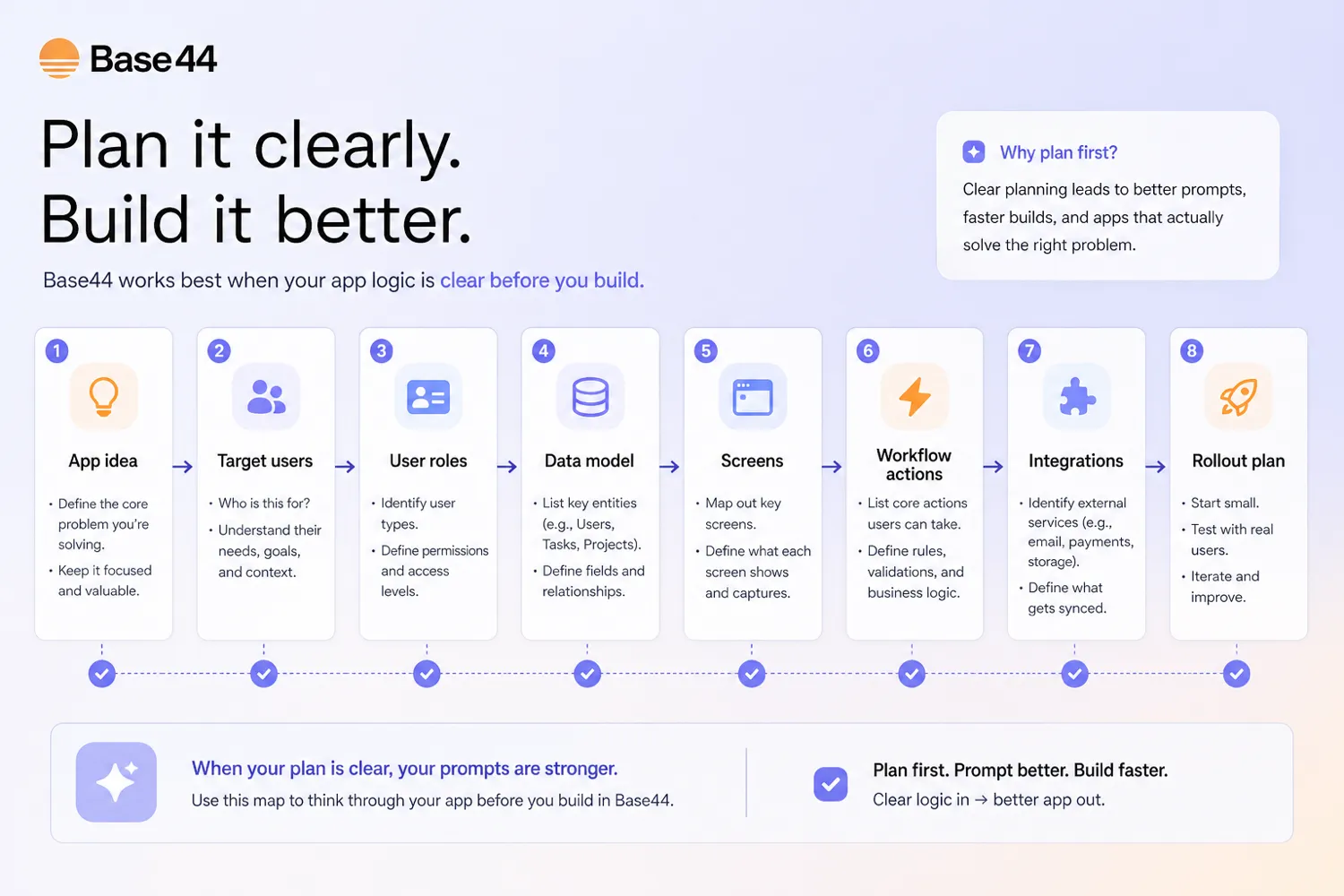
The buyer should define the app in simple but concrete terms: user, data, screens, actions, integrations, and the first version that would actually be useful.
Then Base44 becomes an acceleration layer. You describe the app, let the AI generate a first version, inspect what it built, refine screens and logic, test with realistic data, and only then decide whether the plan limits match the next stage.
The key decision point is not the first app draft. The key decision point is whether you can correct the draft without losing control of the product.
If Base44 gives you a working starting point and you can iterate clearly, the tool has value. If you spend most of your time fighting misunderstood requirements or burning credits without getting closer to a usable workflow, the cheaper plan does not solve the real issue.
Real-world buyer scenarios
A founder building an MVP
A founder with a clear product idea may use Base44 to build a first version before hiring or committing engineering time. This works best when the MVP has one user type, one core workflow, and a clear data structure.
Where it can fail is scope creep. If the founder keeps adding features before testing the core flow, credits and editing complexity can rise before the product is validated.
An operator building an internal tool
An operations person may need a dashboard, approval system, tracker, or intake workflow that is too specific for off-the-shelf software. Base44 can be useful here because the buyer may care more about getting a working internal process than owning a custom codebase on day one.
The thing to verify is integration pressure. If the app needs Gmail, Slack, Sheets, Notion, Stripe, Twilio, or another external system, the plan tier and connector rules matter more than the homepage demo.
A product team testing a workflow
A product manager may use Base44 to create a working prototype before sending a spec to engineers. The risk is confusing prototype speed with production readiness. A prototype can be valuable even if Base44 is not the final app platform.
A no-code builder serving clients
A freelancer or no-code consultant may find Base44 useful for quick prototypes or internal business apps. If client work requires code ownership, compliance review, or long-term maintenance guarantees, I would verify the higher-tier workflow before committing.
Key features that actually matter
Natural-language app generation
Base44’s headline feature is the ability to describe an app in plain language and get a working starting point. This matters because it lowers the blank-page cost of building software.
Buyer note: do not judge Base44 by a toy prompt. Test it with the actual app flow you care about.
Built-in app foundation
Base44 is more interesting because it is not only generating a visual mockup. Public product and documentation pages point to authentication, database functionality, analytics, built-in hosting, data management, backend functions, and app behavior controls.
Buyer note: list the app’s data, user roles, and core actions before paying.
Message credits and integration credits
The credit model is one of the most important buying factors. Message credits are tied to how much you can build and refine through AI prompts. Integration credits matter when apps trigger built-in services, AI calls, emails, file actions, or similar activity.
Buyer note: monitor both build usage and live app usage before moving to a larger plan.
Integrations and connectors
Base44 supports built-in integrations and connector-style workflows, but connectors need careful plan verification. Official documentation says connectors require Builder plan or higher.
Buyer note: write down every integration you need, then check whether it is built-in, connector-based, custom, or backend-function driven.
Backend functions and developer workflow
Base44 becomes more serious when backend functions, GitHub workflow, custom domains, and model selection enter the decision. These features matter when the buyer wants to move beyond a demo.
Buyer note: if backend functions or GitHub matter, compare Starter against Builder and above rather than choosing only by price.
Pricing and plan value
Base44 pricing is relatively clear, but it still needs careful reading.
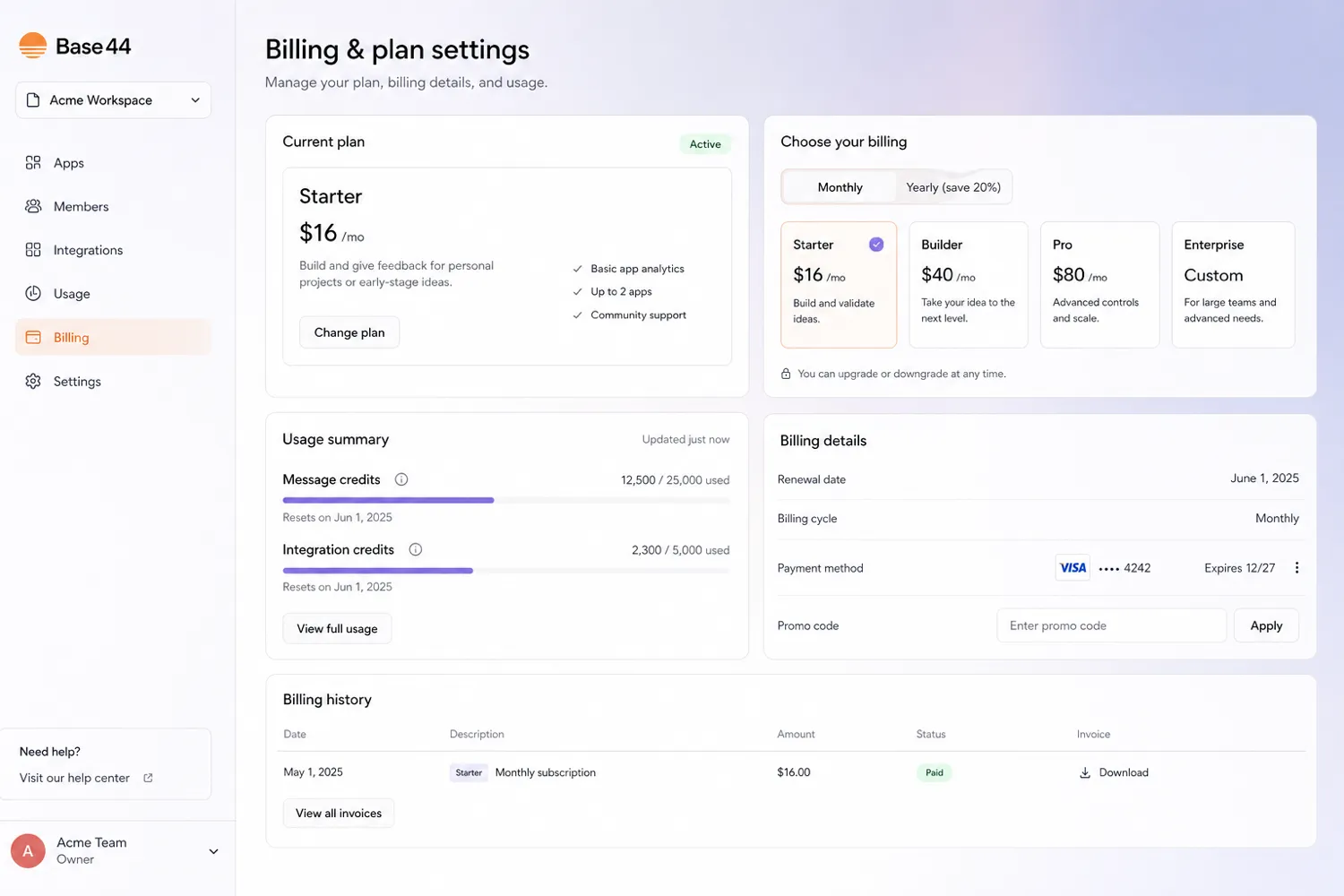
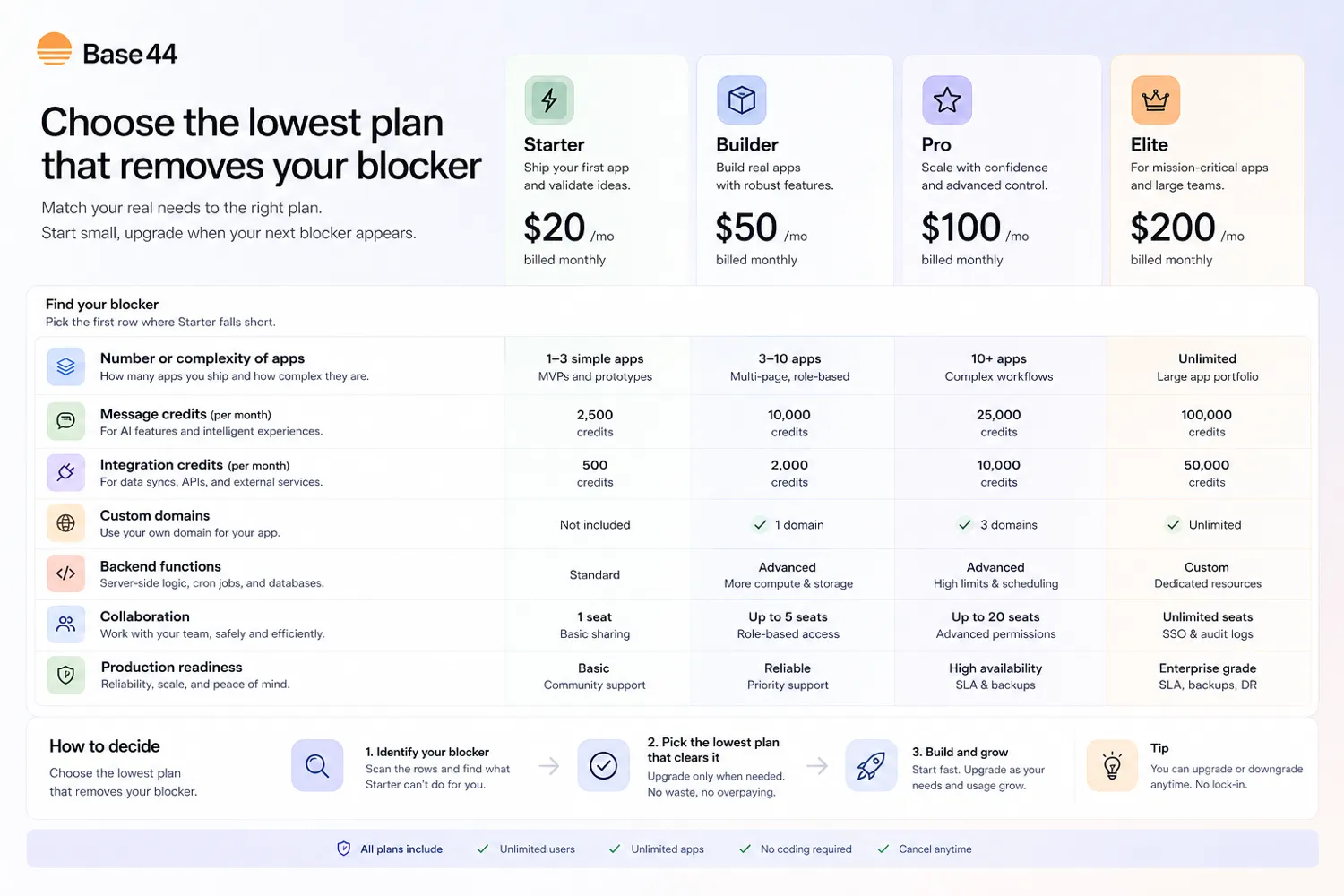
At the time of this review, the public pricing page shows a Free plan with 25 message credits per month and 100 integration credits per month. Paid annual pricing is shown at Starter for $16 per month, Builder for $40 per month, Pro for $80 per month, and Elite for $160 per month. Base44’s own pricing article also shows monthly equivalents: Starter at $20, Builder at $50, Pro at $100, and Elite at $200.
That price ladder is not the whole buying decision.
The real question is which limit blocks your app first. Starter gives more room than Free, but it is still an early builder plan. Builder is the bigger checkpoint because it introduces more serious capabilities such as custom domains, backend functions, and GitHub integration. Pro and Elite are better framed around heavier development, more integration activity, support depth, and higher credit needs.
The free plan is useful for testing the builder. It is not enough to prove a production workflow. Base44 documentation says free users can use up to 5 credits a day, up to 25 credits per month, and unused credits do not carry over. Paid-plan credits reset monthly too.
Annual billing can save money, but I would not start annual just because the monthly-equivalent price looks better. First, build a small app. Then check how many message credits you used, whether integrations are required, and which paid tier actually removes the blocker.
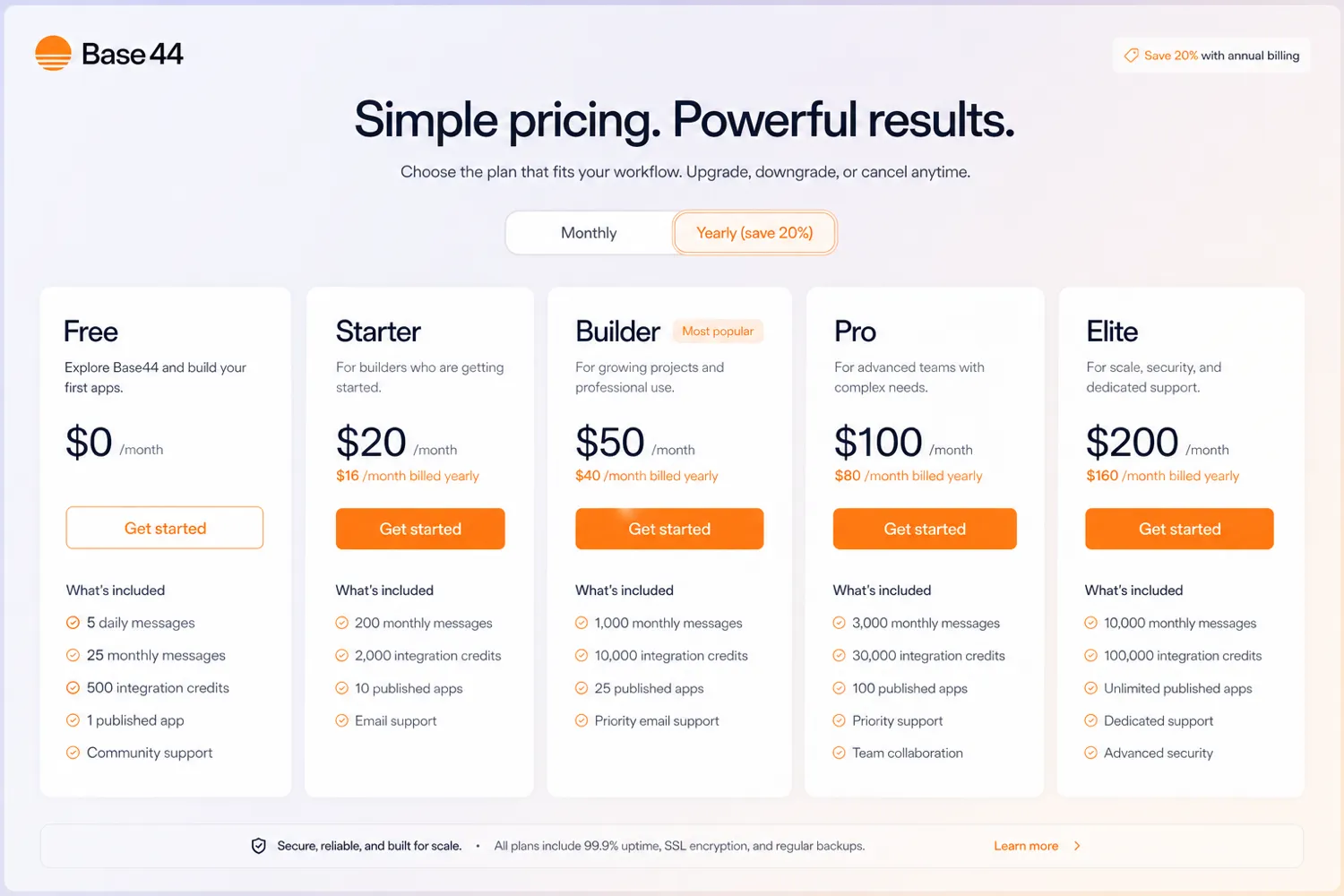
Pricing check: If Base44 fits your app idea, compare live plan limits against your first prototype before choosing monthly or annual billing.
Free plan, trial, coupon, and checkout notes
Base44’s free plan is the safest starting point for most buyers.
Use it to check whether Base44 understands your app idea, whether refinement feels manageable, whether credits disappear too quickly, and whether you need integrations, backend functions, or a custom domain.
The coupon path is secondary. Base44 documentation mentions promo-code entry from the plan and billing area, but that does not mean a public coupon is always available. If a current offer exists, it should be checked only after product fit is clear.
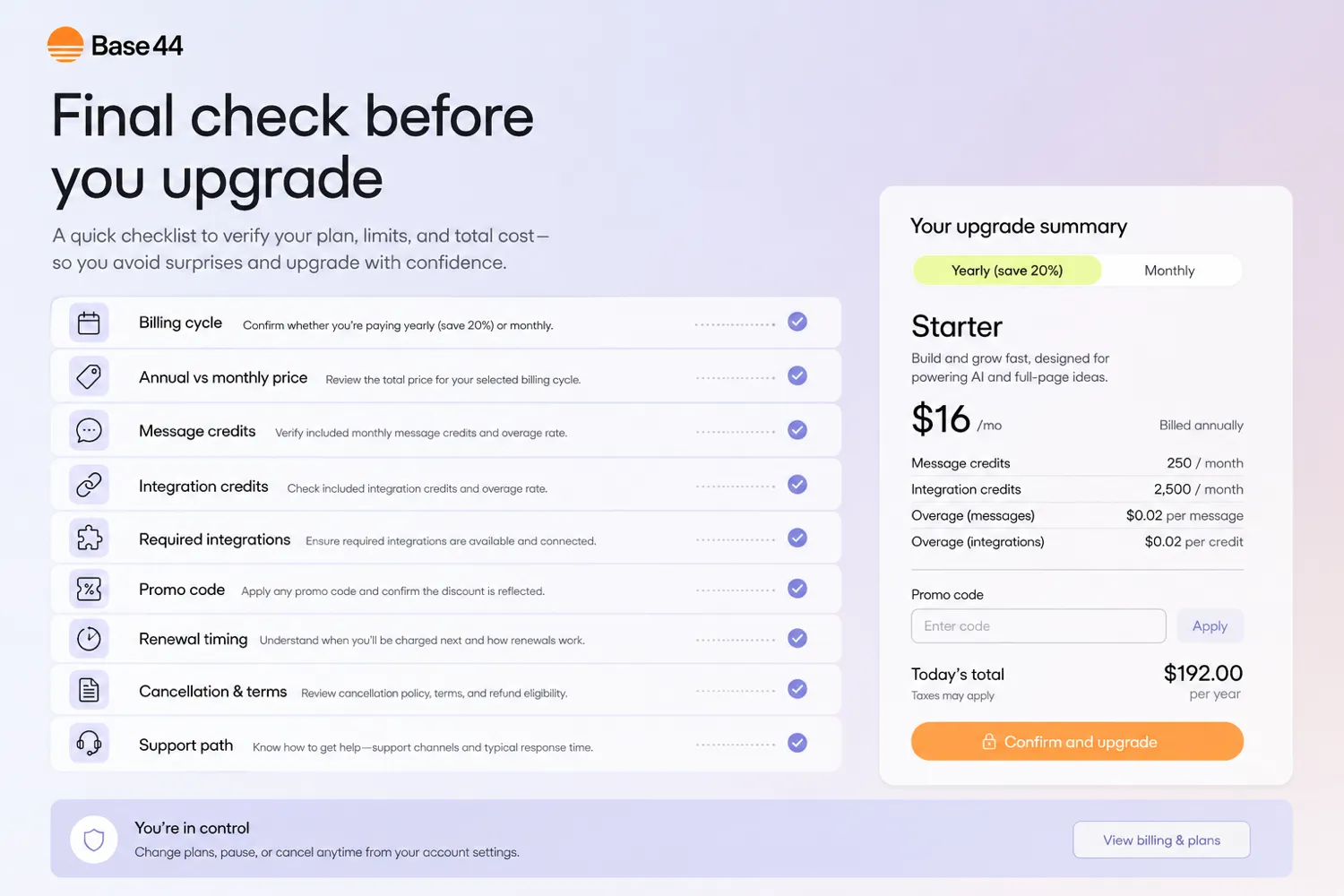
Checkout should be handled slowly. Confirm whether the final price is monthly or annual. Confirm whether the features you need are in Starter, Builder, Pro, or Elite. Check renewal timing before paying. If the app is still experimental, a smaller plan or monthly path may be safer than chasing the biggest annual saving.
What I would check before buying Base44
If I were buying Base44 for a real workflow, I would check seven things before paying.
First, I would build one small app on the free plan. Not a sample prompt. A real app with a real user, real data, and one useful workflow.
Second, I would measure message credit usage. If the first app needs many refinement prompts, the paid plan should be chosen around iteration volume, not just feature labels.
Third, I would measure integration credit pressure. Apps that send emails, generate content, process files, call AI models, or connect to services can behave differently once real users start triggering actions.
Fourth, I would confirm whether connectors are needed. If the app requires connector-based integrations, Builder or higher may be part of the real cost.
Fifth, I would check whether backend functions, custom domains, GitHub integration, or model selection matter.
Sixth, I would review renewal terms before annual billing. Base44’s terms say renewal charges are generally non-cancelable and non-refundable once a renewal term begins, except where an order form or mandatory law says otherwise.
Seventh, I would compare nearby routes. If the problem is mobile-style no-code apps, compare Adalo. If it is admin panels, compare Jet Admin. If it is automation across existing tools, compare Make or Relay.app instead.
A simple test before paying
Before paying, I would run a small test like this:
- Pick one app idea with one clear user and one main workflow.
- Write a short app brief covering screens, data, actions, and expected output.
- Build the first version on the free plan.
- Track how many message credits are used during generation and editing.
- Add one realistic integration or workflow action if the app needs it.
- Test whether the app can be shared, corrected, and improved without confusion.
- Upgrade only if you can name the exact blocker: credits, connector access, backend functions, custom domain, GitHub, support, or scale.
This is a better test than asking whether Base44 “can build apps.” The real question is whether it can build your app in a way you can control.
Pros explained
The first major pro is speed from idea to working prototype. Base44 can reduce the time between “I need an app for this” and “I have something I can test.” For founders and operators, that speed can matter.
The second pro is the free plan. It gives cautious buyers a way to test the platform before paying, which is useful in a category where demos can look more impressive than real workflows.
The third pro is the bundled app foundation. Authentication, data, hosting, analytics, integrations, and builder controls can reduce setup friction compared with stitching everything together manually.
The fourth pro is visible plan progression. Base44 makes its credit and feature tiers visible enough to plan around. You can compare Free, Starter, Builder, Pro, and Elite by credits and capabilities.
Cons explained
The first con is credit pressure. Base44 is not priced only by access. It is also constrained by message credits and integration credits. Heavy iteration or active app usage can change the economics.
The second con is that the entry paid tier may not be the real tier for serious use. Starter can make sense for early projects, but Builder becomes important when custom domains, backend functions, GitHub integration, connectors, or more professional app needs appear.
The third con is renewal risk. The terms around renewal and cancellation should be read before annual billing, especially when a buyer is upgrading from an experiment.
The fourth con is platform-fit uncertainty. A simple internal workflow may fit well. A regulated, highly custom, deeply engineered product may require a more traditional build path.
Green flags and red flags
Green flag: you can describe your app in one paragraph and list the user, data, actions, and output.
Green flag: your first test app uses credits slowly and becomes more useful with each refinement.
Green flag: you know exactly why you need a paid tier: more credits, backend functions, a custom domain, GitHub integration, connectors, or support.
Red flag: you are buying because the demo looks impressive but you cannot define your app workflow.
Red flag: you need third-party integrations but have not checked whether they require Builder or higher.
Red flag: you want annual billing before knowing monthly credit usage.
Red flag: you need strict security, compliance, or code ownership rules and have not reviewed the current docs, terms, privacy, and technical workflow.
Base44 vs alternatives
Base44 sits in a mixed category. Some alternatives are app builders. Others are internal-tool builders or automation tools. Treating them as identical would be a mistake.
Adalo vs Base44
Adalo is the more direct comparison if you want a traditional no-code app-builder path, especially for mobile-style app projects and visual app structure. Base44 is more appealing when AI-assisted generation and prompt-driven iteration are the main reasons you are shopping.
You can compare the Adalo store guide if your buyer question is more about traditional no-code app building than AI-assisted generation.
Jet Admin vs Base44
Jet Admin is stronger when the job is admin panels, dashboards, and internal operations interfaces. Base44 is broader when the buyer wants to create a custom app experience from scratch.
Make vs Base44
Make is not a direct app-builder replacement. It is an automation platform for connecting tools and moving data across workflows.
If you already have the apps and just need automation between them, Make may be the cleaner fit. If you need to build a new app experience with users, data, and interface logic, Base44 is the better category match.
Relay.app vs Base44
Relay.app is an adjacent route for team workflows and automation. It is useful when the buyer wants to coordinate actions across existing tools and humans.
Base44 is stronger when the buyer wants to create the actual app, not only route a process between tools.
Trust, refund, and buyer-risk notes
Base44 has enough public documentation to evaluate it seriously, but buyers should still be cautious around volatile details.
Pricing can change. Credits can become the real cost driver. Plan features can shift. Integrations and connectors should be verified before checkout. Renewal terms matter if you choose annual billing.
The cancellation and renewal language is especially important. Base44 terms say subscriptions can be canceled or auto-renewal can be turned off through account settings or support, but renewal charges are generally non-cancelable and non-refundable once a renewal term begins, except where an order form or mandatory local law says otherwise.
Privacy and data deserve attention too. Base44 is an AI-powered platform that can involve app data, user data, and third-party AI providers. If your app handles sensitive personal data, regulated workflows, confidential business information, or client systems, read the current privacy, security, AI provider, and terms pages before building a serious workflow.
The evidence is strongest around Base44’s current product role, pricing ladder, credit model, and app-builder positioning. I would be more cautious around long-term production fit because that depends heavily on the specific app, credit usage, integration needs, and support expectations.
Final verdict
I would consider Base44 if you have a specific app idea, a narrow first workflow, and a willingness to test the free plan before paying. It is strongest when a founder, operator, or product team needs to move from concept to working app quickly and can judge the result with practical discipline.
I would skip Base44, or at least delay paying, if your app idea is still vague, if you expect unlimited experimentation, or if your team needs strict engineering control before the workflow is defined.
I would compare it with Adalo if you want a more traditional no-code app-building path. I would compare it with Jet Admin if the real need is an internal admin interface. I would compare it with Make or Relay.app if the missing piece is automation between existing tools rather than a new app.
The safest next step is simple: build one small real app on the free plan, measure credit usage, check whether integrations or Builder-level features are needed, and only then decide whether Starter, Builder, Pro, or Elite makes sense. Base44 can be useful, but it should earn the upgrade through a real workflow test.
