Quick verdict
Buzzy is worth a serious look if you want to turn prompts, Figma designs, or structured business workflows into working web and mobile apps without starting from a traditional codebase.
But I would not judge Buzzy like a simple AI app demo tool.
The more important question is whether you need its governed app-building model: app definition, UI, data, logic, security, Figma workflow, deployment, and ongoing platform management. That is a more serious promise than “type a prompt and get an app,” but it also means the buying decision has more moving parts.
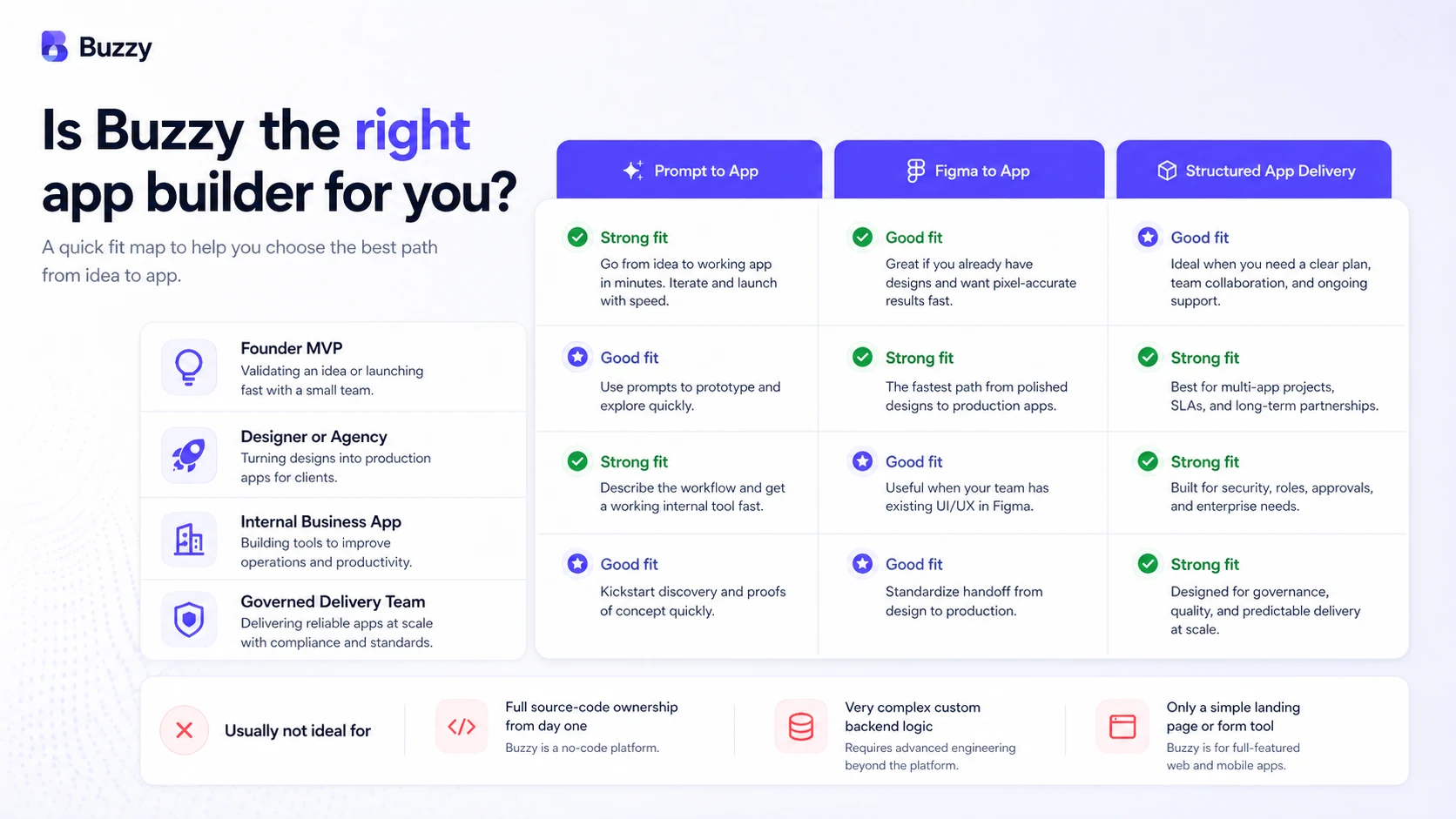
For founders, designers, agencies, and small teams, Buzzy can make sense when the app idea is real enough to define screens, users, data relationships, and deployment needs. It is weaker when the buyer only has a vague idea and expects AI to solve product design, business logic, branding, publishing, and maintenance without careful input.
The pricing decision also needs attention. Buzzy has a free creation path, supported own-key workflows, AI credits for AI-heavy tasks, and paid deployment plans that start with web-only hosting before moving into web/mobile, larger storage, logging, and enterprise needs. The cheapest path is useful for testing, but it may not represent the real cost of a production app.
For my money, the safest path is simple: test the app concept first, define the workflow properly, avoid buying annual deployment too early, and treat AI credits as a cost to plan rather than a magic shortcut.
Next step: If Buzzy still fits your app-building workflow, check the current buyer route and pricing before choosing a deployment plan.
Review snapshot
| Review point | Practical take |
|---|---|
| Best for | Founders, designers, agencies, and teams turning prompts or Figma designs into working apps |
| Not ideal for | Buyers who need full source-code ownership, custom infrastructure, or a basic website/form tool |
| Main use case | Building governed web or mobile apps from prompts, Figma workflows, and structured app definitions |
| Free path | Useful for early creation and workflow testing before paid deployment |
| Pricing note | Deployment starts with Small, Medium, Large, and custom Enterprise paths; AI usage can involve separate credit decisions |
| Main strength | Combines no-code app building, Figma workflow, app definition, and deployment thinking |
| Main concern | Real cost depends on app scope, AI credits, web/mobile publishing, storage, database, scale, and annual billing choices |
| Direct alternatives | Adalo, Base44, Bubble, FlutterFlow |
| Adjacent route | UseBasin if the buyer only needs form handling rather than a full app platform |
| Best next step | Build a small proof-of-workflow before paying for production hosting or annual deployment |
What is Buzzy?
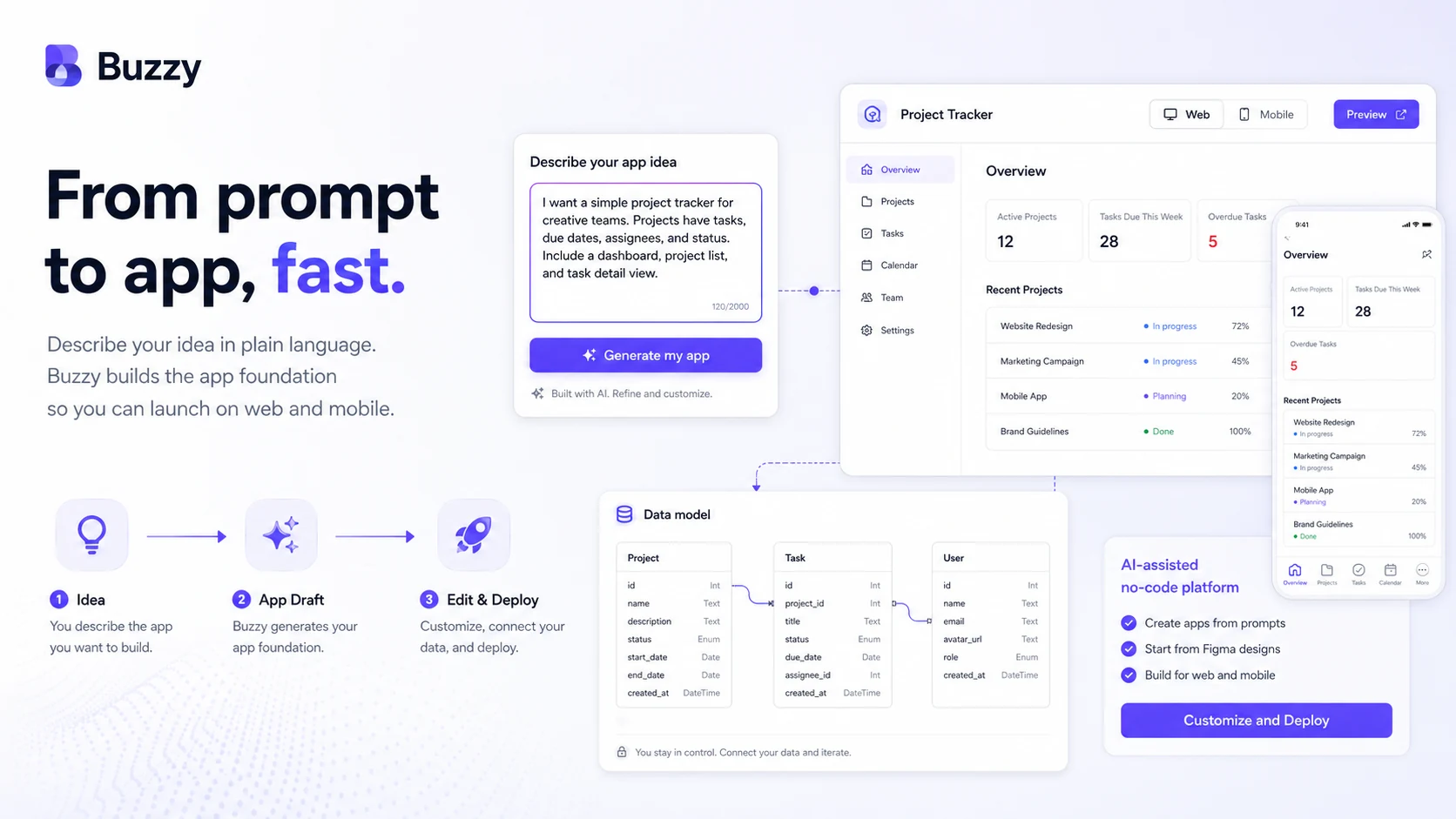
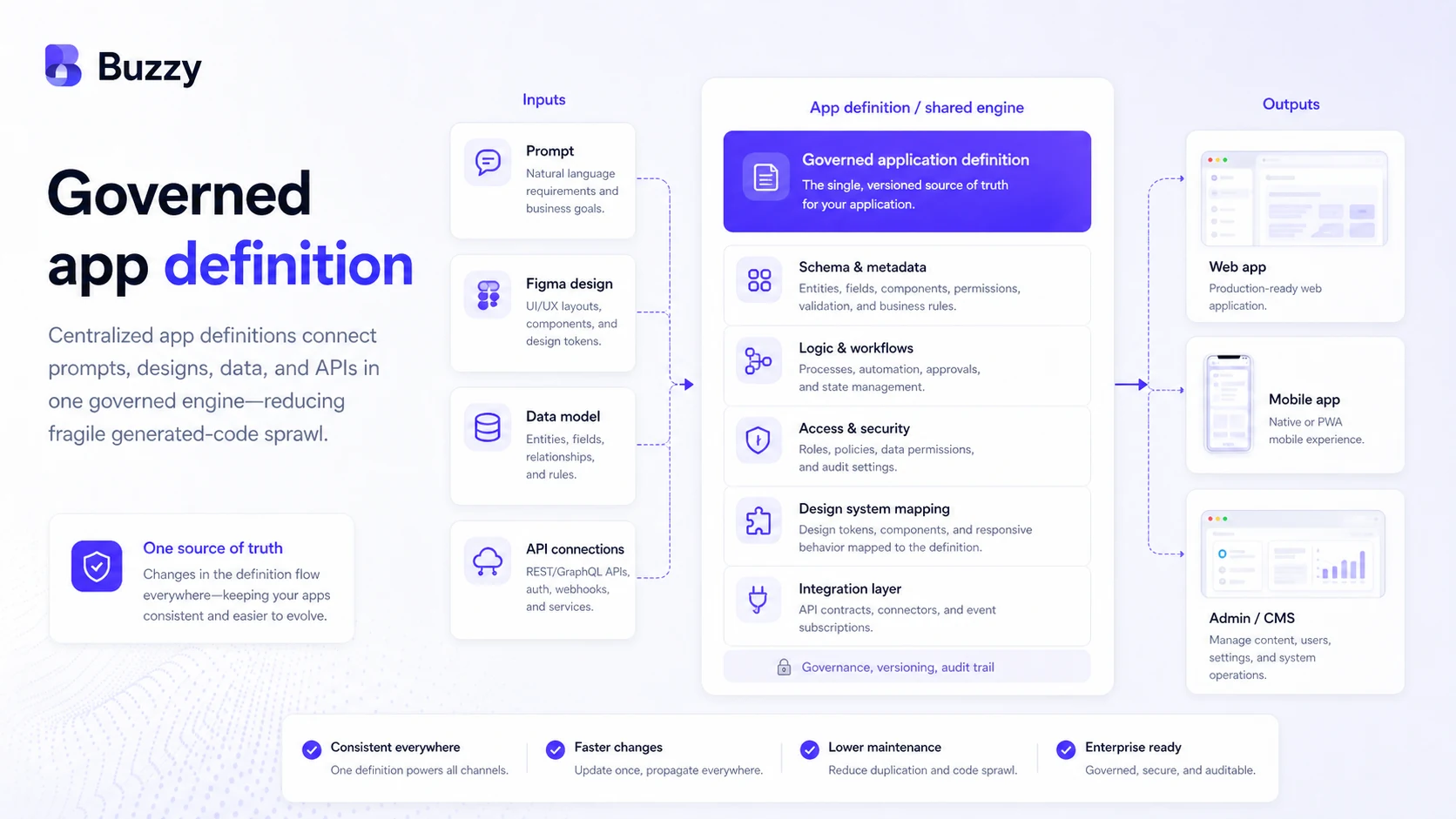
Buzzy is an AI and no-code app-building platform for turning prompts, designs, and app ideas into working web and mobile applications. Its current public positioning is not only “AI generates an app.” Buzzy talks more seriously about creating a semantic application definition that covers the UI, logic, data, and security model, then running that definition on a governed core.
That distinction matters.
A lot of AI app builders are sold around speed. Buzzy is still about speed, but the more interesting angle is control. Instead of producing a pile of generated code that becomes harder to maintain later, Buzzy positions itself around a shared application definition, a central execution layer, and multi-platform output.
In plain buyer language, Buzzy is for people who want to move from idea or design toward a functioning app without immediately hiring a full development team. It can start from a prompt. It can work with Figma. It can support web and mobile publishing paths. It can help teams create internal apps, MVPs, field tools, workflow apps, customer-facing apps, and design-to-app prototypes.
What it is not is just as important.
Buzzy is not a simple landing page builder. It is not only a form backend. It is not a guaranteed replacement for product strategy, app architecture, design judgment, QA, compliance, or long-term engineering. It also is not the right tool if your first requirement is owning and editing a conventional source-code repository from day one.
Our review approach compares public product pages, pricing details, help documentation, cancellation terms, buyer workflow fit, and nearby alternatives. I would not treat a low entry point or a fast demo as proof that Buzzy fits every app project.
Who should use Buzzy?
Buzzy makes the most sense for buyers who already have a real app direction, not only a vague “I want to build something” idea.
Founders building an MVP are the most obvious fit. If you can describe your users, app screens, data objects, permissions, and workflow, Buzzy may help you get from idea to working prototype faster than hiring an engineering team for the first version. The condition is that the MVP still needs to be scoped clearly. A fuzzy app idea will still produce fuzzy output.
Designers and agencies working in Figma are another strong fit. Buzzy’s Figma-connected workflow is meaningful when the buyer wants design work to become more than a static prototype. If your team already thinks in Figma, design systems, screens, and user flows, Buzzy may give you a more natural bridge into a functioning app.
Small businesses building operational apps may also find Buzzy useful. Internal reporting tools, field workflows, checklists, basic CRM-style apps, training flows, form-heavy workflows, and team communication apps are all closer to the Buzzy value proposition than highly unusual custom software.
Teams worried about generated-code sprawl may appreciate Buzzy’s governed app-definition angle. The pitch is not simply “move faster.” It is “avoid creating one-off codebases that become painful to maintain.” That is more relevant for teams that expect the app to evolve after the first demo.
Schools, startup programs, and incubators may be a fit if they want many creators building apps inside a more structured environment. The buyer still needs to check the current education or incubator path, usage model, and support assumptions before committing.
Who should avoid Buzzy?
Buzzy is not the right starting point for every buyer.
I would avoid it if you only need a simple marketing website. Buzzy is about app creation, app logic, data, deployment, and multi-platform output. If your real need is a homepage, blog, or brochure site, a website builder will probably be simpler.
I would also be careful if you only need form collection. If your workflow is “collect submissions and send them somewhere,” a form backend or lightweight automation stack may be enough. That is where an adjacent route like UseBasin can make more sense than paying for a full app-building platform.
Engineering teams that need full code ownership, custom infrastructure, unusual backend architecture, or strict deployment control should slow down. Buzzy’s governed execution model may be a strength for many buyers, but it is not the same as owning a conventional custom codebase from day one.
Buyers expecting AI to handle all product decisions should also be cautious. Buzzy AI can help with briefs, data models, screens, and app generation, but the official docs themselves make clear that oversight, input, and refinement still matter. Brand, style, visual quality, data relationships, and production readiness still need human judgment.
Finally, I would be careful if you are mainly attracted by annual savings. Annual pricing can look better on paper, but app scope often changes quickly. If you have not proven the app concept, monthly testing is usually the safer path.
How Buzzy fits into a real workflow
A realistic Buzzy workflow starts before the tool.
The buyer needs to define what the app actually is. Who uses it? What do they create, view, edit, approve, or submit? What data needs to be stored? What permissions matter? Does the app need web only, or web and mobile? Is it a prototype, a client MVP, an internal tool, or a production app?
Once that thinking is done, Buzzy can enter the workflow in a few ways.
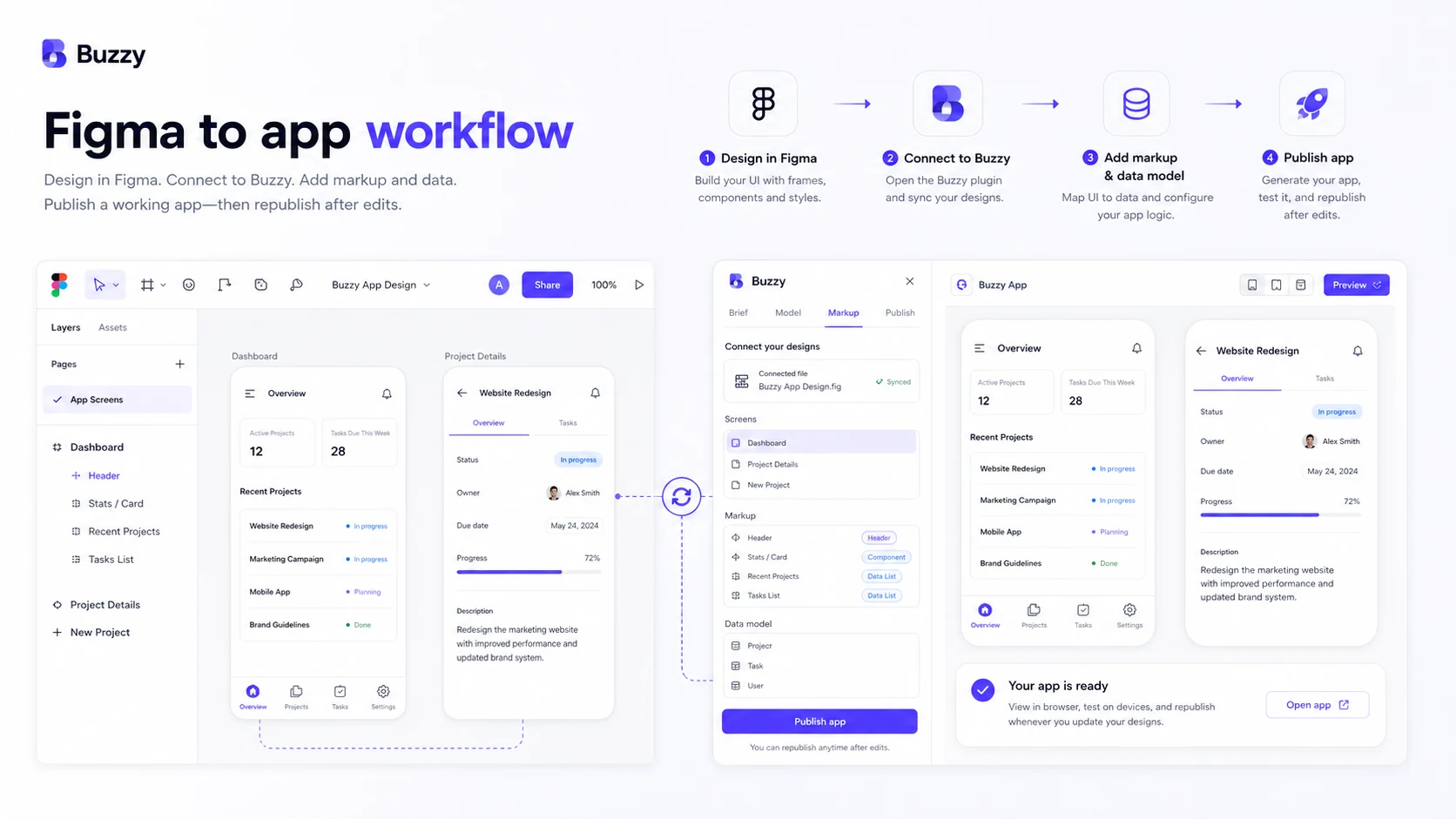
A prompt-first buyer may use Buzzy AI to define an app brief and generate the first version of the app structure. A Figma-first buyer may use the Buzzy Figma plugin to turn designs into a functioning app path. A more structured team may treat Buzzy as a way to maintain a central app definition rather than manually stitching together UI, backend, database, and deployment decisions.
The key workflow is usually:
- Define the app brief.
- Clarify user roles and core functions.
- Shape the data model.
- Generate or mark up screens.
- Preview the working app.
- Refine design, logic, and data relationships.
- Decide whether the app needs production deployment.
- Choose the plan based on web, mobile, storage, database, support, and scaling needs.
This is where Buzzy is most credible. It can compress the distance between idea, design, data model, and working application. But it does not remove the need for a careful app owner.
Workflow check: If your app idea is already structured enough to test, use Buzzy only after mapping screens, data, and publishing needs.
Real-world buyer scenarios
A founder with a marketplace idea may use Buzzy to test the first version of user profiles, listings, submissions, admin review, and user-facing screens. Buzzy may help reduce the cost of early validation. The risk is overbuilding before the business model is clear. In that case, the buyer should test the simplest workflow first.
A design agency may use Buzzy when a client wants more than a Figma prototype. If the agency can turn a polished design into a working app preview, that can make client conversations more concrete. The risk is promising production-grade complexity before confirming deployment, database, mobile, and support requirements.
A small business may use Buzzy for an internal operations app: field reporting, training checklists, staff updates, simple approvals, or customer intake. This can be a strong use case because internal apps often need structure more than visual perfection. The buyer should still check storage, database, access control, and support expectations.
A product team comparing AI app builders may use Buzzy as a more governed route than pure prompt-to-app generation. This is where Buzzy’s application-definition positioning becomes relevant. The tradeoff is that a platform model may feel less flexible than a custom development workflow for unusual products.
Key features that actually matter
Prompt-to-app creation
Buzzy can help turn an app idea into a working application path. That is useful for founders and operators who need to see whether a workflow can become software.
Buyer note: a prompt is not a product spec. The better your brief, roles, data objects, and workflows are, the more useful the output is likely to be.
Figma-to-app workflow
The Figma workflow is one of the more important Buzzy differentiators. The docs describe the ability to use the Buzzy Figma plugin to design, test, and deploy working apps with real data and live forms.
Buyer note: this is strongest for designers and agencies already comfortable in Figma. If your team does not work in Figma, this advantage may matter less.
Semantic application definition
Buzzy’s current public messaging emphasizes application definition rather than scattered generated code. The idea is that UI, logic, data, and security live in a central app definition that runs on a governed core.
Buyer note: this is a strategic advantage only if you value ongoing maintainability and centralized updates. If you mainly want to export and own a custom codebase, this may not be your preferred model.
Managed deployment
Buzzy offers managed deployment paths with different web, mobile, database, storage, branding, logging, and scale assumptions. This matters because an app builder is not only about creating the first version; someone still needs to run it.
Buyer note: do not compare Buzzy only by its creation workflow. Compare the deployment plan that matches the app you actually intend to launch.
AI credits and own-key options
Buzzy separates AI-heavy work from basic deployment decisions. Buyers may use Buzzy-managed AI credits for certain AI tasks, and supported workflows may allow use of a buyer’s own OpenAI API key.
Buyer note: this can be flexible, but it also means the real cost depends on how much AI generation and iteration your app needs.
Pricing and plan value
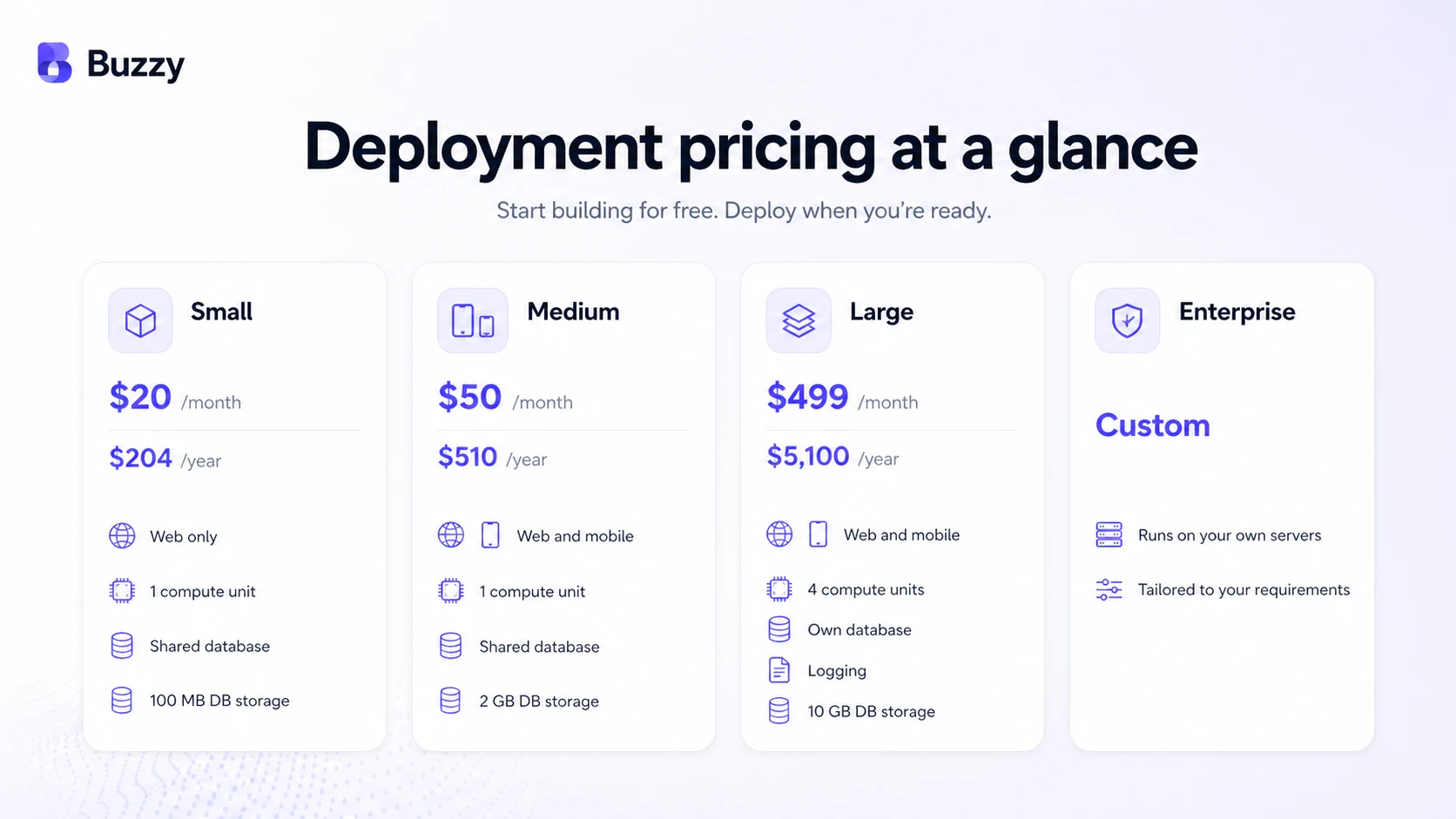
The current public pricing page shows Buzzy deployment plans across Small, Medium, Large, and Enterprise paths. At the time of review, Small is shown as $20 monthly or $204 yearly, Medium as $50 monthly or $510 yearly, and Large as $499 monthly or $5,100 yearly. The pricing page also presents annual-equivalent “from” pricing when paid yearly.
The important point is not just the headline price.
Small is the lower-cost deployment route, but it is web-only and has tighter database/storage assumptions. Medium adds web and mobile app coverage with higher storage. Large moves into a more serious configuration with more compute, own database, logging, larger storage, and advanced feature options. Enterprise is custom and appears aimed at buyers with governance, scale, or infrastructure requirements.
Buzzy also mentions AI credits for AI-heavy tasks when using Buzzy-managed AI. That means a buyer should not treat deployment pricing as the only cost question. If the app needs a lot of AI-assisted generation, iteration, or refinement, AI usage should be estimated separately.
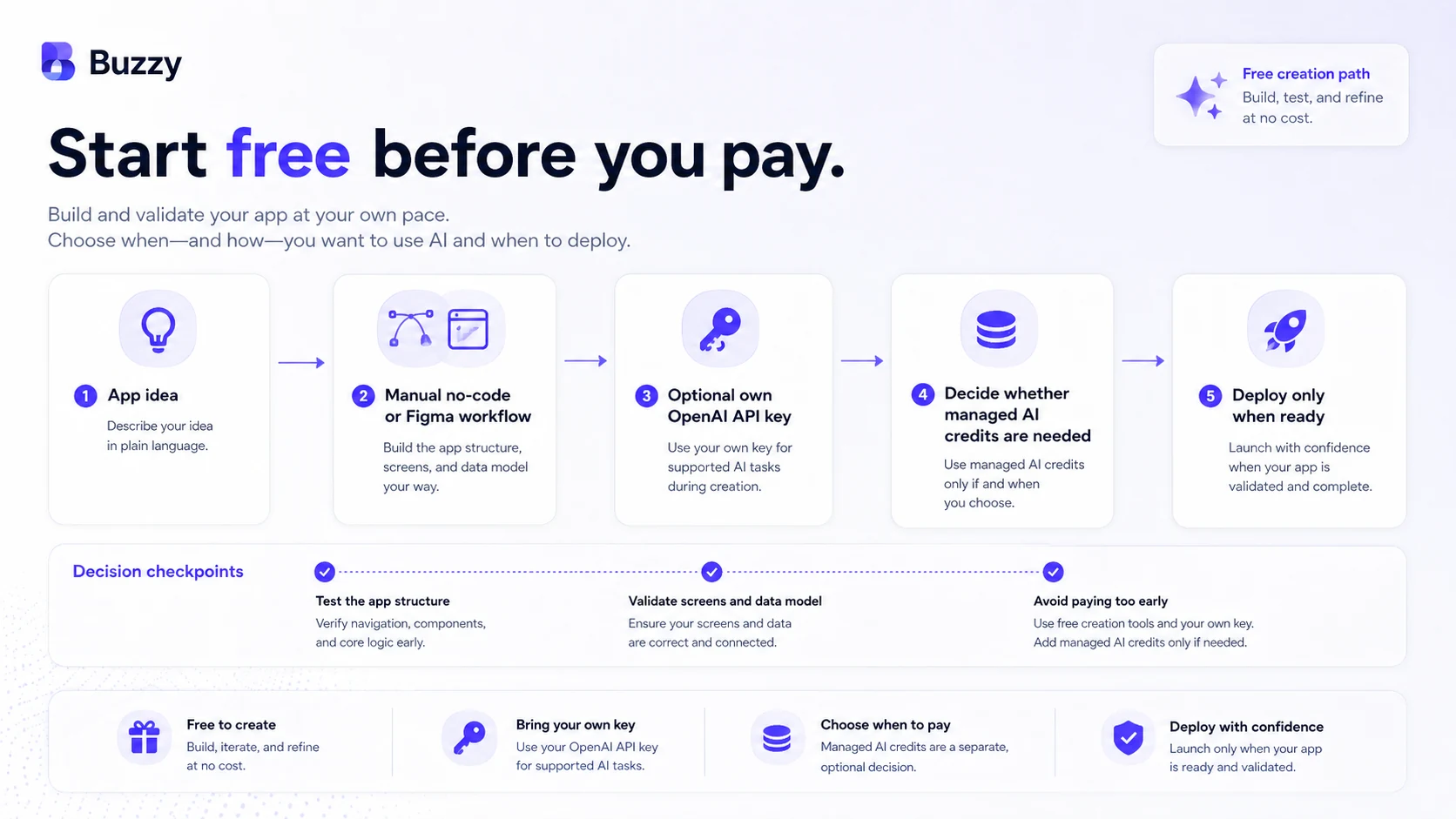
The free path matters because it gives buyers a way to test the app-building concept before committing. I would use that path to validate the brief, data model, Figma workflow, and early app structure. A paid plan makes more sense after the buyer knows whether the app needs production hosting, mobile publishing, database capacity, logging, scaling, or enterprise support.
Annual billing can lower the monthly equivalent, but I would be cautious. Apps change. MVPs pivot. Internal tools get simplified. If the app has not proven repeated value, paying yearly can turn a flexible experiment into a sunk cost.
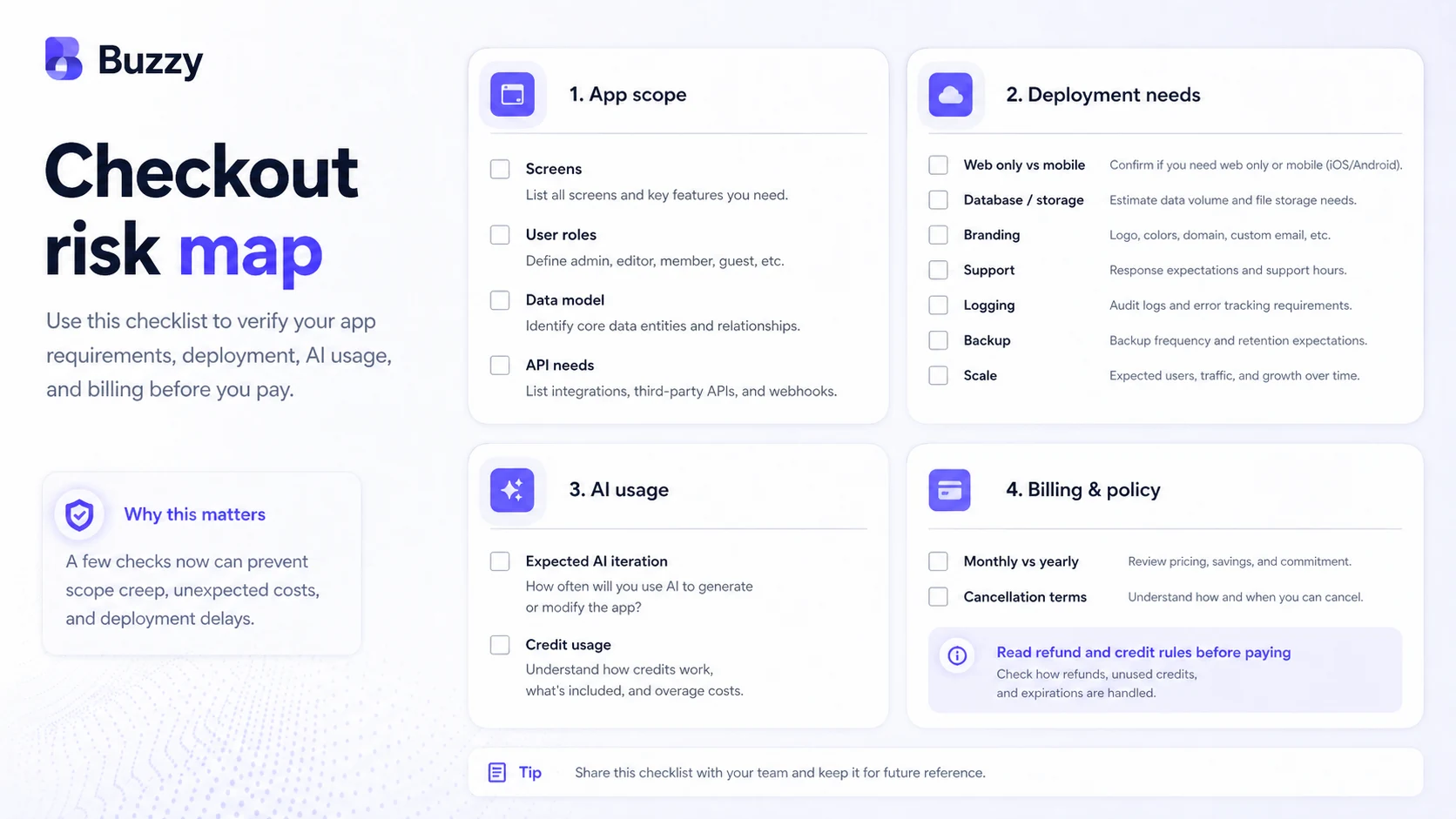
Pricing check: Before paying, compare the current deployment plan, AI credit needs, and cancellation terms against the app you actually plan to launch.
Free plan, trial, coupon, and checkout notes
The safest Buzzy buying path is not to hunt for a discount first. It is to prove the app workflow first.
Buzzy has a free creation/testing angle, and that is where most buyers should start. If you are still defining the product, screens, data model, or Figma workflow, the free path is more valuable than a small discount on a plan you may not need.
The coupon path should be secondary. If there are active offers on the Buzzy coupon page, use them only after workflow fit is clear. A checkout code can reduce cost, but it cannot decide whether Buzzy is the right app-building model for your project.
Buyers should also pay attention to AI credits. If Buzzy-managed AI is part of your build process, estimate how many generation and iteration rounds you expect. If an own-key workflow is available for your use case, compare whether that gives you better cost control.
For annual billing, slow down. The current cancellation language makes refund flexibility limited once the paid subscription period begins. That does not make Buzzy unusual in SaaS, but it does mean annual deployment should come after a real app test, not before.
What I would check before buying Buzzy
If I were buying Buzzy for a real workflow, I would check these points before paying:
- Whether my app is web-only or needs web and mobile publishing.
- Whether the free creation path is enough to validate the brief and data model.
- Whether I need Buzzy-managed AI credits or can use an own-key workflow where supported.
- Whether the Small plan’s storage, database, compute, and web-only limits match the app.
- Whether mobile publishing, logging, own database, or scaling pushes me into a higher plan.
- Whether annual billing makes sense after reading the current cancellation policy.
- Whether an alternative like Adalo or Base44 fits the buyer job better.
The easy mistake is buying deployment before the app itself is ready. The better approach is to define the app, test the workflow, estimate real usage, and only then choose the plan.
A simple test before paying
Before paying for Buzzy deployment, I would run a small test like this:
- Write a one-page app brief with users, screens, data objects, and the core workflow.
- Decide whether the first version starts from a prompt, a Figma design, or a manual no-code build.
- Create a small version of the app with only the critical workflow.
- Check whether the data model matches how the app will actually be used.
- Preview the app and ask whether the workflow saves time compared with your current process.
- Estimate whether the app needs web-only deployment, mobile publishing, database capacity, logging, or scale.
- Only then compare monthly, annual, AI credit, and enterprise paths.
This kind of test is not glamorous, but it protects the buyer. If the small app cannot prove workflow value, a bigger paid plan will not fix the core problem.
Pros explained
Buzzy’s first real strength is that it can support both idea-to-app and design-to-app workflows. That makes it useful for buyers who are not only writing prompts but also thinking through Figma screens, app structure, and production paths.
The second strength is the governed app-definition angle. Many AI builders are exciting in the first demo but unclear later. Buzzy’s message around a central application definition and governed core is more serious for teams that worry about maintainability.
The third strength is the free and staged evaluation path. Buyers can explore creation before committing to deployment. That reduces risk if they use it properly.
The fourth strength is pricing segmentation. Small, Medium, Large, and Enterprise paths are not perfect, but they do force the buyer to think about web, mobile, storage, database, logging, scale, and support.
The fifth strength is the Figma connection. For design-led teams, this may be the difference between another AI builder and a tool that fits the way they already work.
Cons explained
The first drawback is pricing complexity. Buzzy is not only “one plan and done.” Deployment tier, AI credits, annual billing, own-key usage, mobile publishing, storage, database, and scale can all affect the real cost.
The second drawback is that Buzzy still requires planning. The docs make clear that the AI workflow needs a functional brief, data model thinking, and user input. Buyers who expect the tool to make product decisions for them may be disappointed.
The third drawback is refund risk. If a paid subscription begins and the buyer later realizes the app is not ready, the current cancellation policy is not especially flexible. That makes upfront testing more important.
The fourth drawback is source-code and infrastructure fit. Buzzy’s governed model may be a positive for many teams, but it may not satisfy teams that want full control over every layer of custom infrastructure.
The fifth drawback is category fit. Buzzy can look like a broad AI app builder, but it is not the right replacement for every no-code, backend, automation, or custom development route.
Green flags and red flags
Green flags:
- You can clearly describe the app users, screens, data model, and workflow.
- Your team already works in Figma and wants designs to become functional apps.
- You care about governed app delivery more than one-off generated code.
- You can start small and avoid annual billing until the app proves value.
- Your deployment needs match a clear Small, Medium, Large, or Enterprise path.
Red flags:
- You only have a vague app idea and expect AI to define the product for you.
- You need full source-code control or unusual infrastructure from day one.
- You are buying mainly because a deal or annual price looks attractive.
- You have not estimated AI credit usage or deployment tier needs.
- You need only a simple form backend, landing page, or lightweight automation.
Buzzy vs alternatives
Buzzy should be compared by buyer job, not by feature count. Some alternatives are direct app-builder comparisons. Others are adjacent routes for different workflows.
Adalo vs Buzzy
Adalo is a more familiar no-code app-builder comparison for buyers who want a visual way to build apps, especially if they prefer a conventional no-code app-building environment.
Buzzy may make more sense when the buyer is interested in the Figma-to-app path, semantic app definition, and governed delivery model. Adalo may feel simpler for buyers who want a more established visual app-builder workflow.
Base44 vs Buzzy
Base44 is a closer comparison if the buyer wants AI prompt-to-app creation and is evaluating newer AI app-builder workflows.
Buzzy’s edge is the Figma and governed app-definition angle. Base44 may feel more direct if the buyer wants rapid AI app creation and does not care as much about the design-to-app process.
Bubble vs Buzzy
Bubble is a major comparison for buyers who want a mature no-code web app builder with broad community, templates, plugins, and flexibility.
Buzzy may still make sense for buyers who prefer a Figma-connected workflow and a more platform-governed app definition. Bubble may be better for buyers who want deeper builder control and a larger no-code ecosystem.
FlutterFlow vs Buzzy
FlutterFlow is relevant when the buyer wants app-building depth with stronger mobile-app and developer-adjacent control.
Buzzy may be more attractive to teams focused on Figma-to-app and governed app delivery. FlutterFlow may be stronger for buyers who want more traditional app-building control and are comfortable with a more technical learning curve.
UseBasin vs Buzzy
UseBasin is not a direct Buzzy replacement. It is an adjacent route.
If the real job is collecting form submissions, handling backend form data, or simplifying lead capture, UseBasin may be enough. Buzzy only makes sense when the buyer needs a full app workflow rather than a form-handling layer.
Trust, refund, and buyer-risk notes
The biggest Buzzy risk is not that the product lacks ambition. The risk is buying too early, at the wrong plan level, before the app scope is clear.
Pricing should be verified at live checkout because deployment, annual billing, AI credits, and higher-tier needs can all affect total cost. The current public page makes deployment tiers visible, but the buyer still needs to match those tiers to real app requirements.
Refund terms need attention. The current cancellation page says refunds are not available once the paid subscription period begins because a trial period is provided. For annual subscriptions, that makes the pre-payment test especially important.
AI credits also need caution. Used AI credits should not be treated like a refundable experiment. If the app requires many iterations, the buyer should estimate usage and avoid buying more than the current app brief can justify.
Data and governance claims should be read carefully. Buzzy’s governed core is part of its value proposition, but buyers with strict compliance, regulated data, or enterprise security requirements should confirm current documentation, support scope, deployment architecture, and contract terms directly.
Support expectations should also match the plan. Support forum, chat, email, enterprise scoping, and custom deployment are not the same buying situation. A solo founder testing an MVP and an enterprise deploying internal apps have different risk profiles.
Final verdict
I would consider Buzzy if you are a founder, designer, agency, small business, or product team that wants to turn prompts or Figma designs into a working app without jumping straight into custom development.
I would be especially interested if you care about the app-definition and governed-core model, not just the first AI-generated demo. That is where Buzzy has a clearer point of view than many “build an app with a prompt” tools.
I would skip Buzzy if your real need is a basic website, a simple form backend, full custom code ownership, or a highly unusual backend architecture. I would also slow down if you are mainly tempted by annual pricing before you have proven the app workflow.
The safest next step is to start small: define the app, test the free or low-risk creation path, compare deployment needs, estimate AI credit usage, and only pay when the app is real enough to justify the plan.
Buzzy can be a useful bridge between idea, design, and working software. Just do not treat the bridge as the destination. The app still needs a clear workflow, a realistic budget, and a buyer who knows what they are trying to build.
