
Base44 Pricing, Plans & Builder Fit
Base44 is an AI app builder for turning natural-language software ideas into working apps with authentication, database functionality, integrations, analytics, and deployment-oriented tooling. It is best read as a no-code and AI-assisted builder for founders, product teams, and operators who want to prototype internal tools, customer portals, productivity apps, or MVPs without starting from a blank codebase.
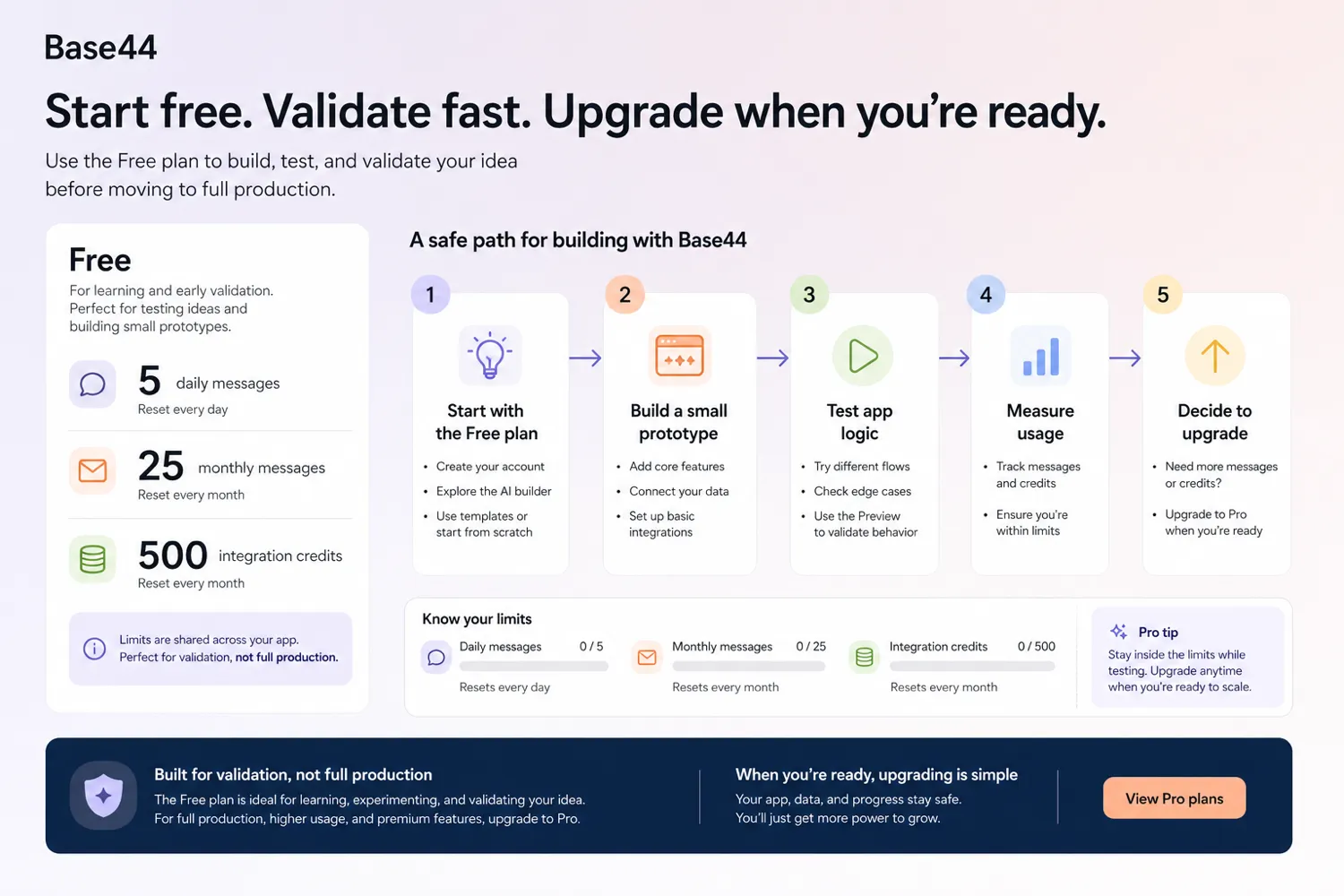
Fit → price → checkout
Use these routes after the official-site check: coupon first, review for fit, compare if unsure.
Base44 pricing snapshot
Fast commercial checks before pricing, coupons, or a deeper review.
Base44 product tour
The useful Base44 product tour is not just a homepage scan. Buyers need to see the prompt-to-app workflow, the app editor, the credit-based plan structure, and the integration layer before deciding whether Base44 is a simple experiment or a serious builder for the next project.
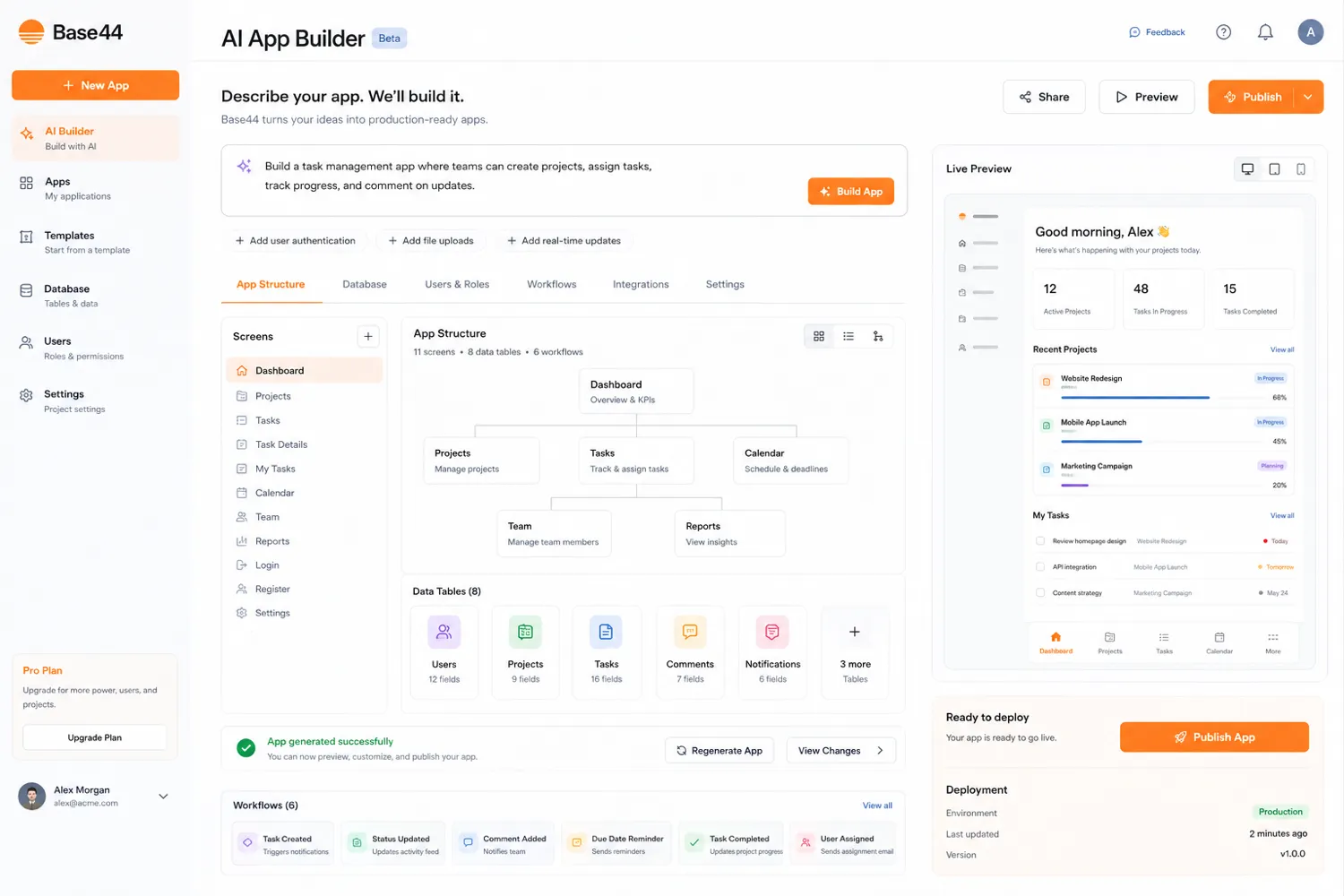
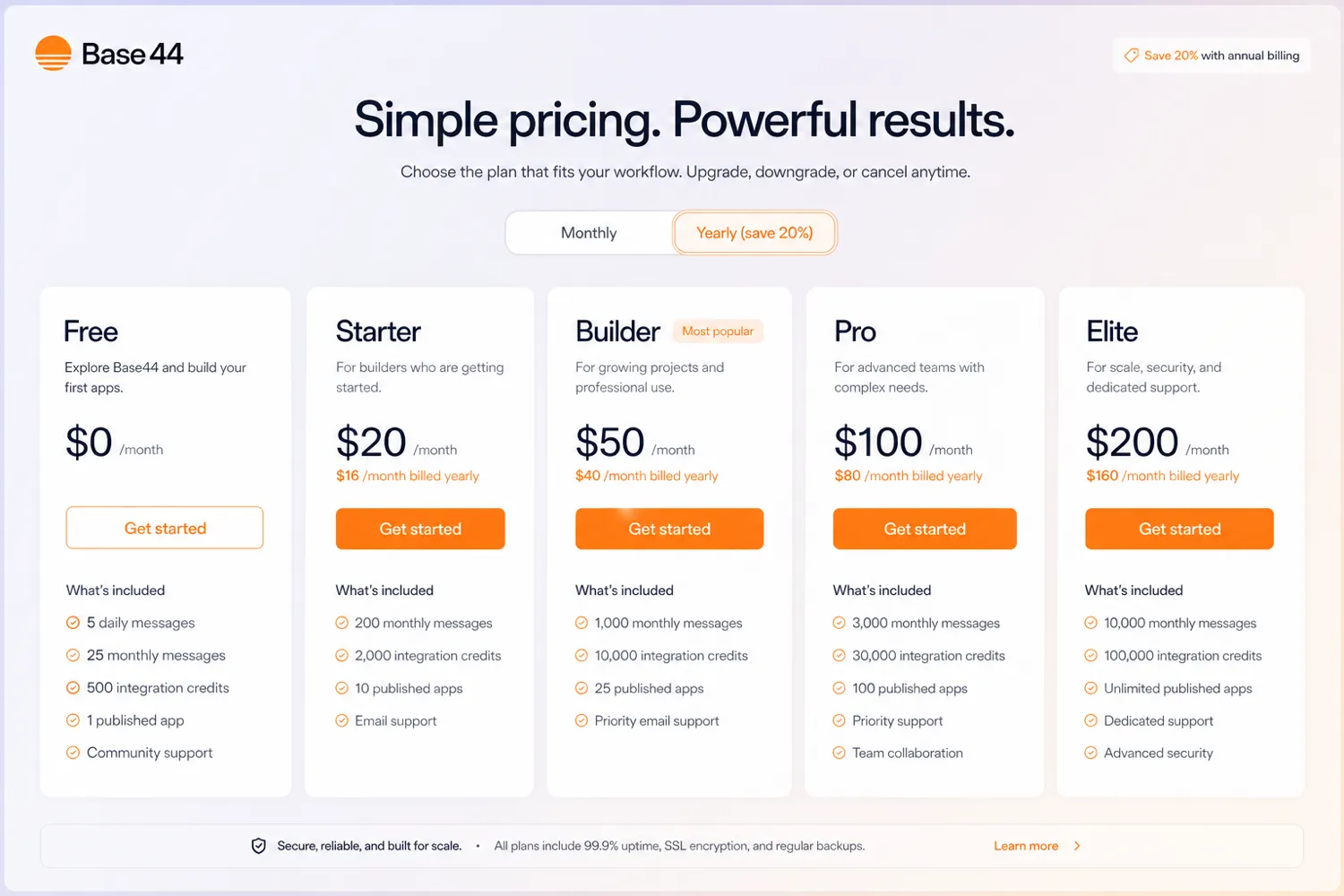
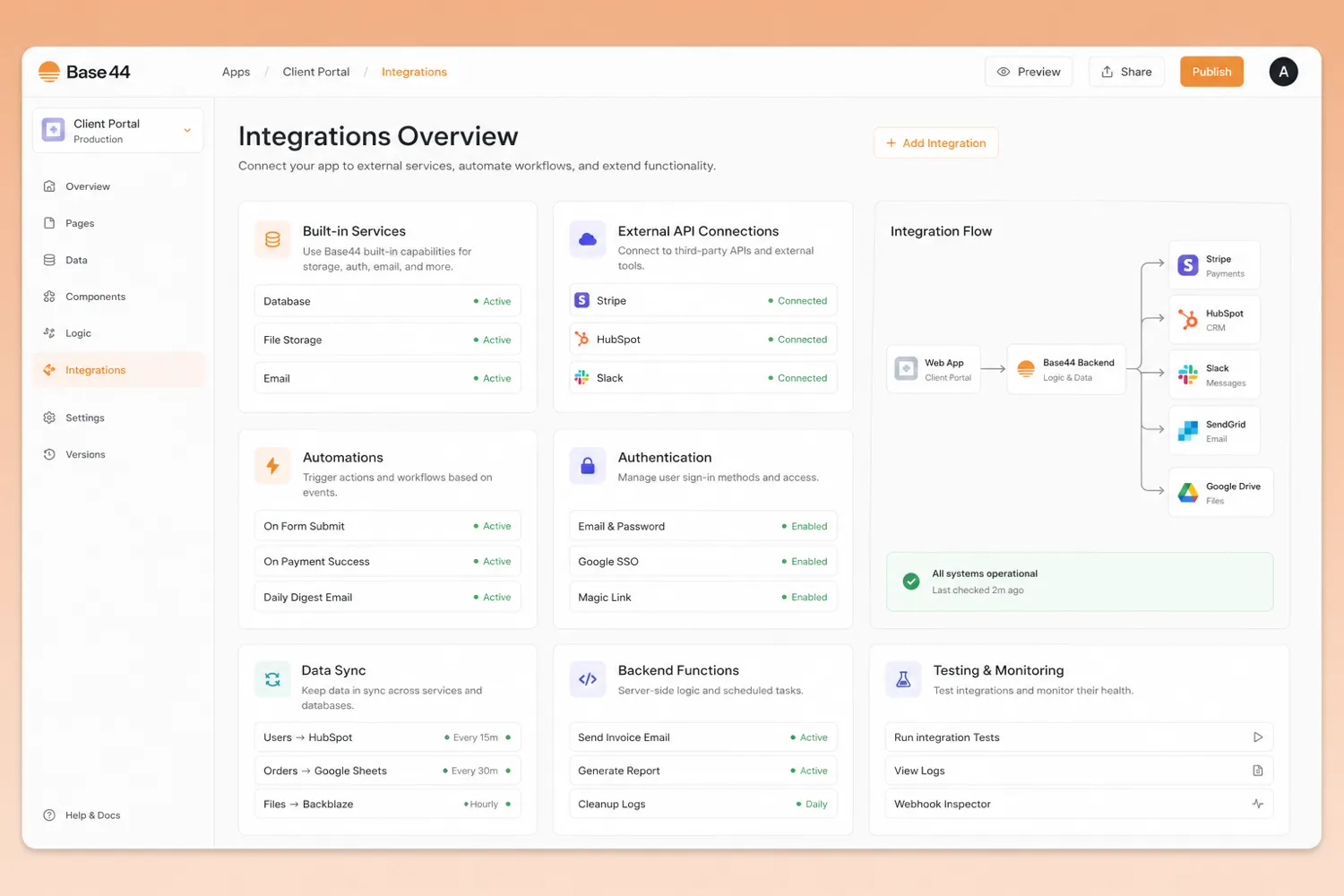
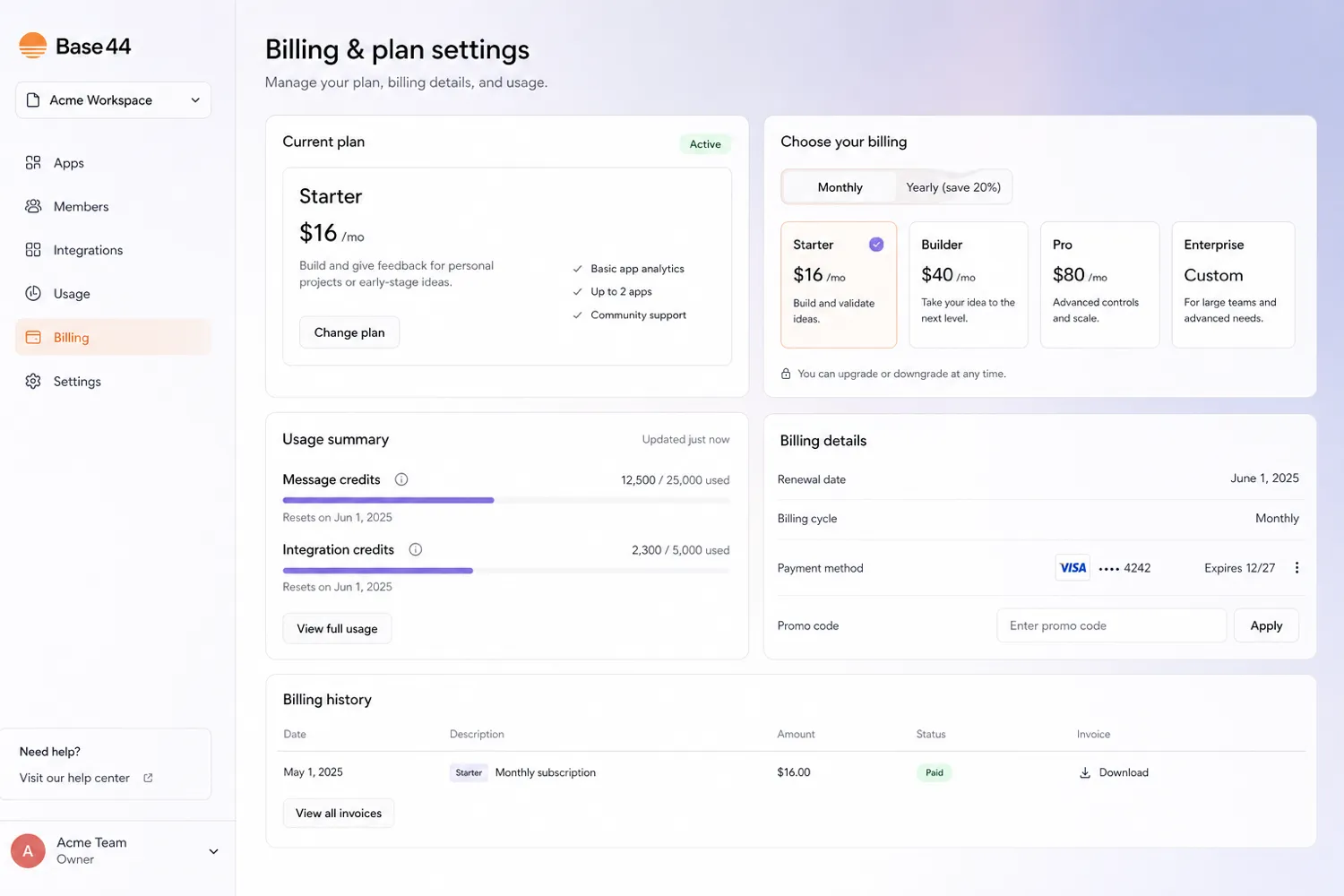
Base44 is best treated as a commercial decision about app-building capacity. It can help a founder or product team move from idea to prototype quickly, but the real buying question is not whether the demo looks impressive. The better question is whether your app needs enough messages, integrations, backend functions, domains, GitHub workflow, or support to justify leaving the free plan.
What Base44 actually does
Base44 lets users describe an app in plain language and then build toward a functional software product with user authentication, database functionality, analytics, integrations, and editor controls. That makes it more useful for MVPs, internal tools, customer portals, productivity apps, and business process tools than for vague experimentation.
The strongest fit is a buyer who can describe a real workflow: who uses the app, what records it stores, which actions users take, and what external tools it must connect with. Without that clarity, Base44 can still produce something interesting, but the paid plan decision becomes much weaker.
- Use it for app ideas with a clear user, workflow, and data shape.
- Treat the free plan as a proof-of-fit step.
- Move to paid only when limits or gated features block real progress.
How the free plan should be used
The free plan is real, but it is not a serious substitute for a paid build path. Official pricing lists 25 message credits and 100 integration credits per month, while the pricing FAQ also describes a daily message allowance and credit-based limits. That is enough to test the feel of the builder, create a small prototype, and understand whether the app idea is worth pursuing.
It is not enough to assume production readiness. If the test app needs repeated AI messages, user-triggered integrations, file handling, image generation, email, or more app refinement, the buyer should expect to compare paid tiers rather than trying to stretch free usage indefinitely.
- Free is useful for testing the builder and a small app idea.
- Free is risky as proof that a production workflow will be affordable.
- Track both builder messages and integration usage before upgrading.
Where paid plans start to make sense
Paid plans become more logical once the app needs more build messages, more integration credits, backend functions, a connected domain, model selection, GitHub integration, or higher support depth. Starter is the low-cost paid entry. Builder is the more serious checkpoint because it adds capabilities that matter when the app is moving beyond hobby testing. Pro and Elite are better framed around heavier development and usage needs.
The mistake is buying too early because a prototype looked promising. A better move is to build a small working version first, then compare the paid plan to the actual bottleneck: messages, integrations, backend needs, collaboration, domain, or support.
- Starter fits early personal projects and small MVP work.
- Builder matters when backend functions, domain, model choice, or GitHub are part of the plan.
- Pro and Elite should be tied to heavier credits, complexity, or support needs.
Integration and backend limits to verify
Base44 includes built-in integrations for common app actions such as AI responses, email sending, file upload, image generation, and extracting structured data from uploaded files. Docs also describe connectors and custom API options, with connectors requiring Builder plan or higher. That distinction matters because many real apps become valuable only when they can connect to external services.
Before checkout, buyers should list the exact integrations their app needs. If the app depends on connectors, external APIs, backend functions, or secrets, the cheapest plan may not be the right plan even if the prototype starts well.
- Check built-in integrations separately from connectors.
- Confirm whether Builder or higher is required for the integrations you need.
- Do not assume custom API or backend needs are covered by the lowest tier.
Video walkthrough for building a real app
A second tutorial is useful because Base44 is easier to judge through a real build than through a pricing table. Watch for how the builder handles planning, app generation, editing, fixes, and publishing decisions. Those steps reveal whether the workflow feels manageable for a non-technical buyer or still needs someone comfortable with software structure.
What buyers should verify before checkout
The safest checkout path is boring but useful: confirm the billing cycle, credit limits, connector needs, annual savings, promo-code field, renewal settings, and cancellation timing. Base44 docs explain that upgrades can take effect immediately and that annual billing can save money, but that does not automatically make yearly payment the best first move.
If the app is still experimental, monthly billing or a smaller paid tier may be safer than chasing the biggest annual discount. If the app is already validated and needs more credits or features, annual billing may make sense after the buyer understands usage.
- Check the final monthly versus yearly price at checkout.
- Confirm which tier unlocks the integrations and app controls you need.
- Review auto-renewal and cancellation timing before paying.
- Use the review route before the coupon route if workflow fit is still unclear.
Best savings path from this store page
This is the clearest savings route to check once the product already looks like a fit.
The Builder annual path is the stronger buyer route when custom domains, backend functions, and GitHub integration matter for a more serious app.
Use comparison routes when the category fit is still open
Use these comparison routes when the product still looks plausible, but the category fit is not fully settled.
Adalo is worth checking when the buyer wants a more traditional no-code app-builder path, especially for mobile-style app projects. Base44 is the closer fit when AI-assisted app generation and prompt-driven iteration are the main appeal.
Jet Admin is stronger when the job is admin panels and internal operations dashboards. Base44 is broader when the buyer wants AI-assisted creation of custom apps from plain-language requirements.
Make is better for automating workflows across existing apps. Base44 is more relevant when the buyer wants to create a new app experience with data, users, and interface logic.
Relay.app makes sense for process automation and team workflows. Base44 is the better next tab when the buyer wants an app builder rather than a workflow router.
Verification points worth checking before you click out
Where this store usually fits best in the workflow
A founder can use Base44 to turn a product idea into a working prototype, test flows with early users, and decide whether the app deserves deeper engineering investment.
A small team can build a back-office workflow, database-backed tracker, or customer-facing portal without starting with a full custom software project.
Product teams can use Base44 to explore interface, data, and workflow assumptions before asking developers to build a more permanent version.
Buyers can use built-in integrations and AI features to create business apps that call language models, process files, send messages, or handle structured data.
Practical checkpoints before and after signup
- Define the users, records, screens, and actions the app needs before prompting.
- Start with one narrow workflow instead of trying to build the whole business system at once.
- Track how quickly message credits and integration credits are consumed by a real test app.
- Check whether corrections and app edits feel manageable without engineering help.
- Compare plan tiers by the blocker you actually hit: credits, backend functions, domain, GitHub, integrations, or support.
- Confirm billing cycle, renewal timing, and any promo code before final checkout.
- Monitor credit usage after real users interact with the app.
- Document which integrations, app actions, and AI calls create the biggest usage pressure.
Fast-read signals for workflow fit and buying friction
Questions readers usually ask before choosing this store
What is Base44 best for?
Base44 is best for founders, operators, and product teams that want to build a working app from a plain-language idea. It fits MVPs, internal tools, productivity apps, customer portals, and business process apps better than vague experimentation.
Does Base44 have a free plan?
Yes. Base44 has a free plan. Official pricing and docs describe limited monthly message credits and integration credits, which makes the free tier useful for testing the builder and a small prototype before choosing a paid plan.
How much does Base44 cost?
The public pricing page lists Free at $0, Starter at $16 per month billed annually, Builder at $40 per month billed annually, Pro at $80 per month billed annually, and Elite at $160 per month billed annually. Buyers should also check the monthly billing view and any active promotion before checkout.
Are public Base44 coupon codes the main savings path?
Not usually. Base44 savings appear more likely to come from free-plan testing, annual billing, occasional promo-code paths, or verified checkout offers. A public coupon should only be trusted when it is visible on a verified offer page or accepted at checkout.
What should buyers verify before paying for Base44?
Buyers should verify message credits, integration credits, connector requirements, backend needs, custom domain needs, billing cycle, annual savings, promo-code availability, renewal timing, and cancellation rules before paying. The review route is the safer next step if workflow fit is still unclear.
Choose the next route that matches what you still need to decide
The strongest next click depends on whether you still need product judgment, a savings route, or a broader category comparison.