
Buzzy Pricing, Plans & App Builder Fit
Buzzy is best understood as an AI-assisted no-code app delivery platform, not a proxy or data collection product. It turns prompts, Figma designs, and application definitions into governed web and mobile apps, with a stronger emphasis on maintainability, shared infrastructure, and production deployment than many quick demo builders.

Fit → price → checkout
Use these routes after the official-site check: coupon first, review for fit, compare if unsure.
Buzzy pricing snapshot
Fast commercial checks before pricing, coupons, or a deeper review.
Buzzy product tour
Buzzy visuals should help buyers understand the difference between a quick AI app demo and a governed app delivery workflow. The most useful screens are the prompt-to-app path, Figma plugin editing, deployment plan table, and app definition model because these decide whether Buzzy fits the buyer's project or only looks impressive in a demo.
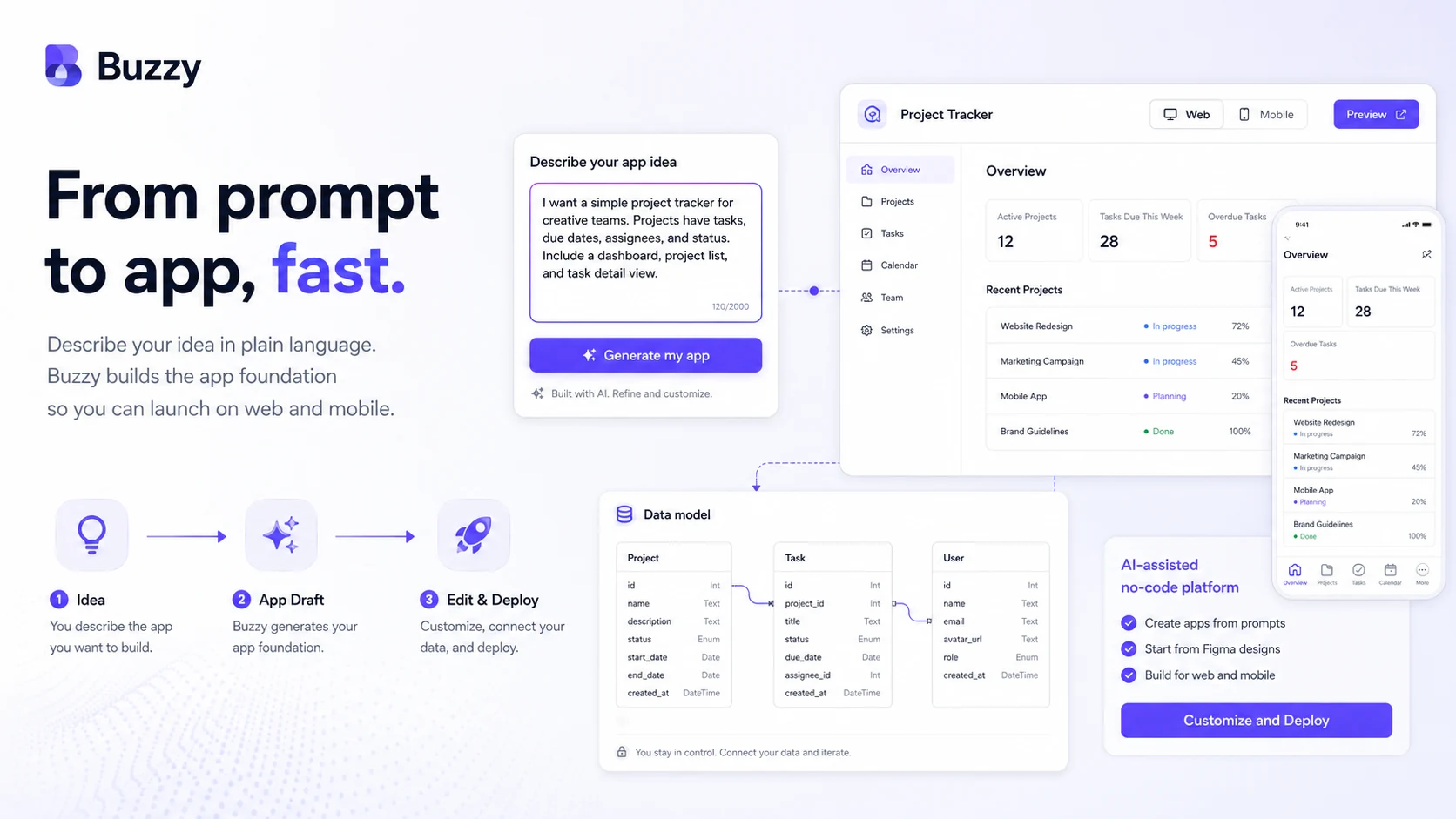
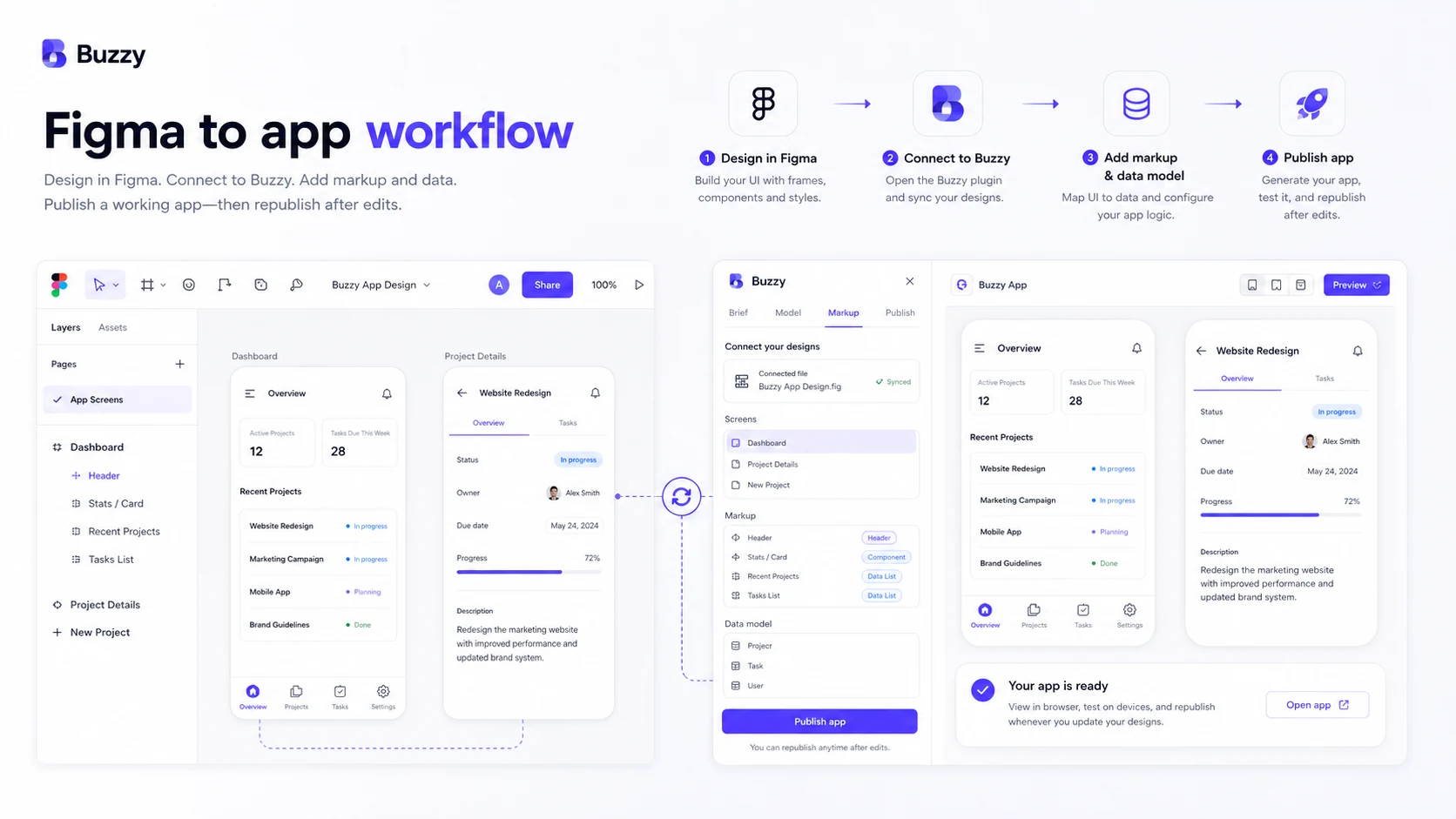
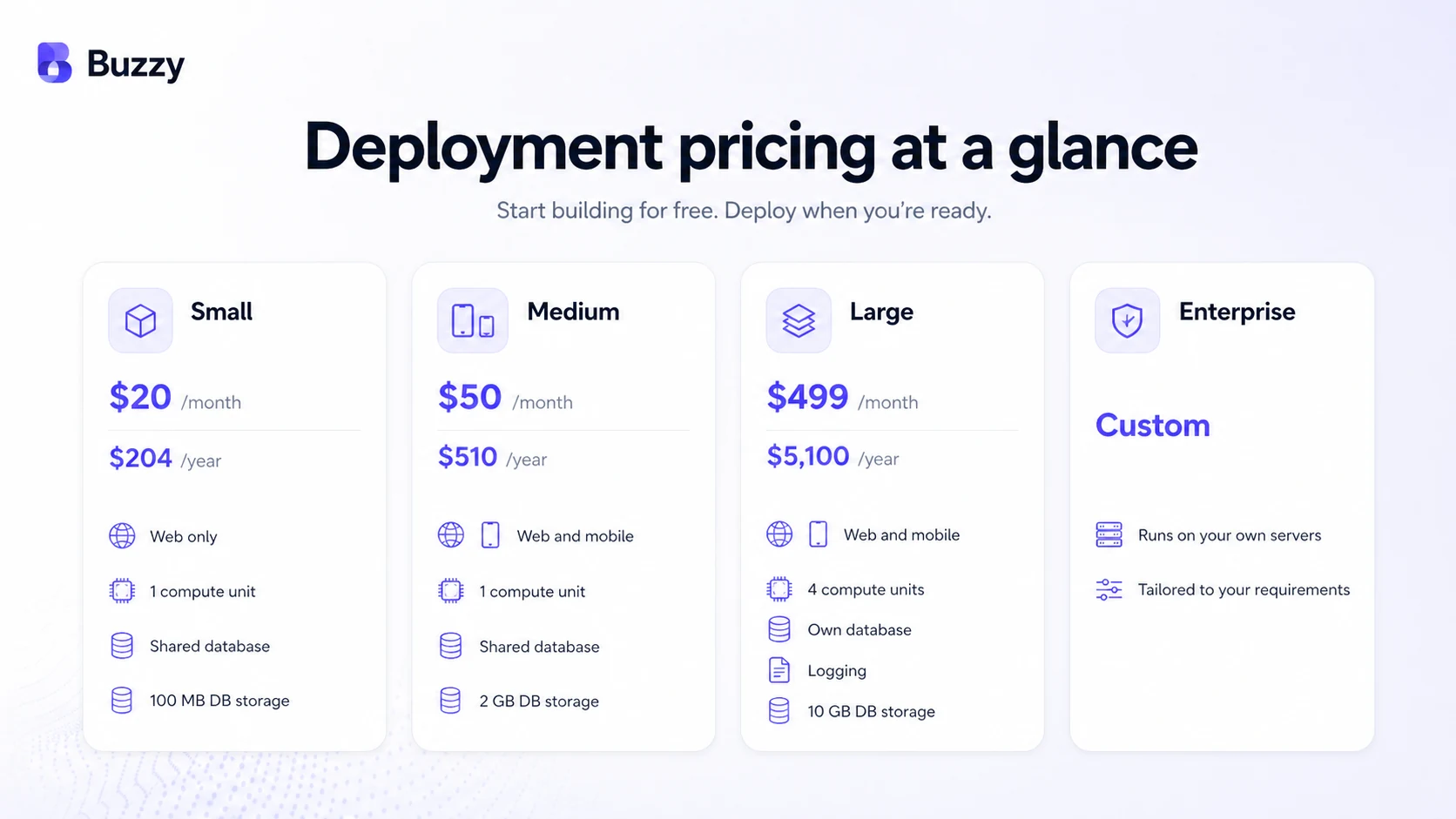
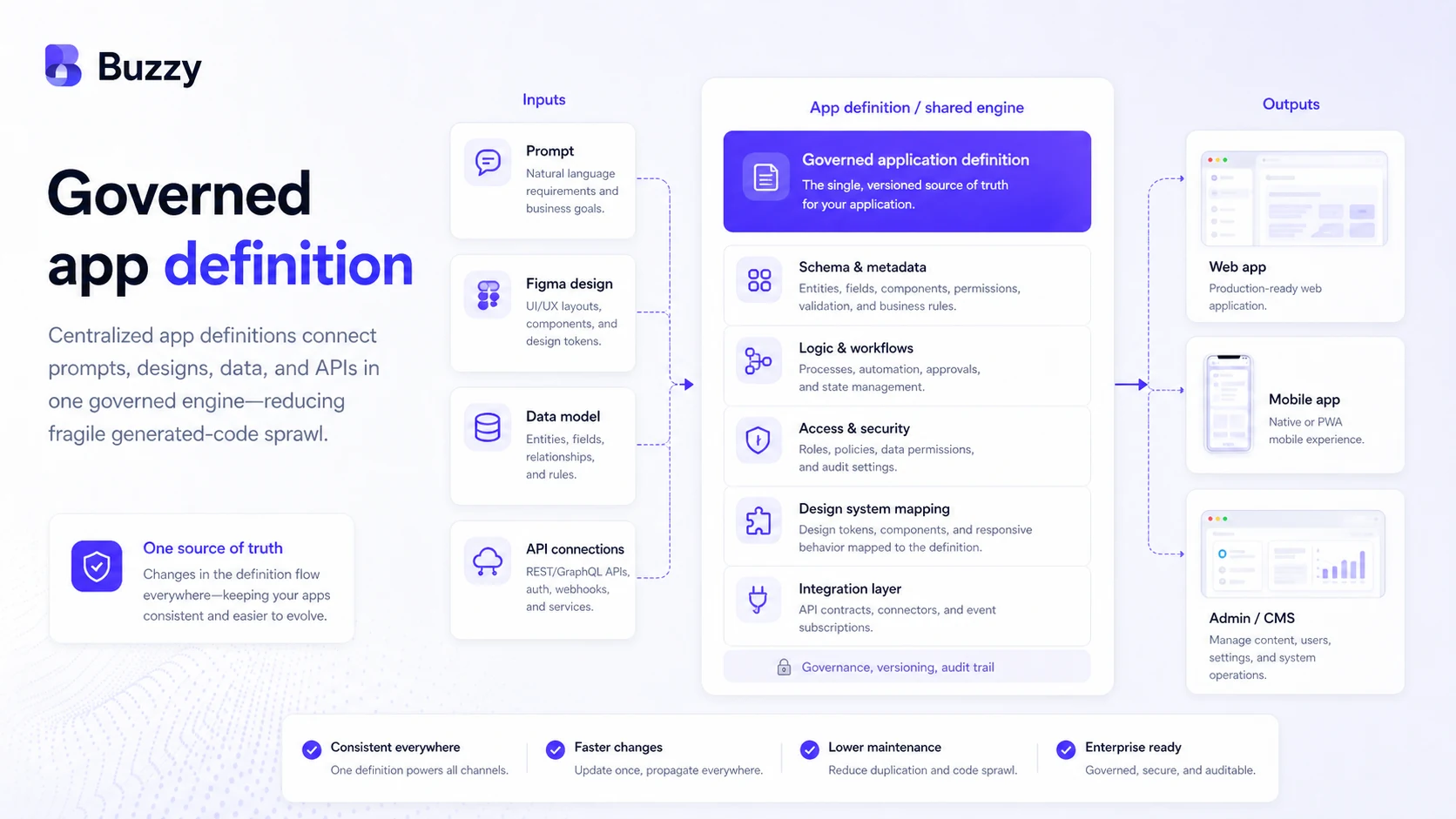
Buzzy should be evaluated as an AI-assisted no-code app platform for buyers who want a real app path, not a loose prototype or a proxy/data tool. The key decision is whether the buyer needs a governed way to build, edit, and deploy web or mobile applications from prompts and Figma designs. Pricing only makes sense after that workflow fit is clear.
What Buzzy actually does
Buzzy helps buyers turn prompts, Figma designs, APIs, and structured app definitions into working web and mobile applications. The important difference is that Buzzy is not primarily selling raw code generation. Its pitch is that apps run from a governed application definition and a shared engine, which can reduce the maintenance burden that often appears after a quick AI-generated demo.
- Create an app from a prompt or start from a Figma design
- Edit app behavior and screens through Buzzy and Figma workflows
- Deploy simple web apps or higher-tier web and mobile apps
- Use documentation and API resources for more advanced application behavior
Where the free path is useful
Buzzy's free path is useful for testing whether the building model makes sense. Buyers can start with manual no-code or Figma workflows, and supported AI workflows may use their own OpenAI API key. That lowers the risk of paying too early, but it does not mean production deployment or AI-heavy iteration is free.
- Use free manual building to test the interface and app structure
- Bring your own OpenAI key when supported and cost control matters
- Treat Buzzy-managed AI credits as a separate usage decision
How to read Buzzy pricing
Buzzy pricing is not a single SaaS subscription decision. The buyer has to separate three costs: free or own-key creation, Buzzy-managed AI credits, and managed deployment. Small deployment starts at $20/month and is web-only. Medium adds web and mobile deployment, while Large is aimed at more serious scale with its own database, logging, and advanced options. Enterprise is custom.
- Small is the low-cost deployment path, but it is web only
- Medium is more relevant when mobile app output matters
- Large becomes relevant when database ownership, logging, and scale features matter
- AI credits should be estimated from the app brief and number of iterations
Video: editing a Buzzy app in Figma
This video is useful after the main product tour because it focuses on the practical editing layer. Buyers should watch how a generated Buzzy app moves back into Figma and how edits are handled, since that reveals whether Buzzy fits a design-led workflow or only looks good as a prompt demo.
What buyers should verify before checkout
The safest checkout path is to map the app first. Buyers should know the expected screens, user roles, data structure, mobile publishing needs, storage requirements, AI iteration needs, and support expectations. Buzzy can be attractive for governed app delivery, but a buyer who skips this mapping may buy the wrong deployment tier or burn AI credits before the project is ready.
- Confirm whether web-only deployment is enough or mobile publishing is required
- Check database, storage, branding, support, logging, backup, and scale requirements
- Read AI credit and cancellation terms before buying credits or annual deployment
- Ask about enterprise deployment if compliance, own cloud, or HIPAA-like requirements matter
Relevant alternatives to compare
Buzzy is worth comparing with no-code and AI app builders, but the comparison should be based on workflow. Adalo is easier to understand as a visual app builder for founders who want app store publishing and a hosted database. Base44 is closer to the AI app builder question for buyers who want fast prompt-to-app creation. Buzzy's stronger angle is governed delivery from an application definition, especially when the buyer cares about avoiding fragile generated-code sprawl.
- Compare Adalo when visual app building and app store publishing are the main concerns
- Compare Base44 when prompt-to-app speed is the main attraction
- Stay with Buzzy when Figma workflow, governed app definition, and managed deployment are the fit drivers
Best savings path from this store page
This is the clearest savings route to check once the product already looks like a fit.
A public coupon directory reports a Buzzy coupon path for selected AI or deployment-related purchases. Treat it as a checkout-test path, not an official guaranteed discount.
Build for free with your own key
Buy credits only when managed AI is needed
Use comparison routes when the category fit is still open
Use these comparison routes when the product still looks plausible, but the category fit is not fully settled.
Better known for visual no-code app building with a straightforward founder-friendly app publishing path.
Closer when the buyer wants fast AI prompt-to-app creation and is comparing newer AI app builder workflows.
Much simpler if the buyer only needs form collection or backend form handling, not a full app builder.
Verification points worth checking before you click out
Where this store usually fits best in the workflow
A founder can use Buzzy to test whether an app idea has a workable data model, screen flow, and early user experience before hiring a full engineering team.
A designer or agency can use the Figma plugin path when the goal is to turn visual design work into a functional app instead of stopping at a static prototype.
A small business can use Buzzy for internal workflows such as reporting, team communication, forms, checklists, training flows, and simple operational apps.
A team that worries about AI-generated code sprawl can evaluate Buzzy for its application definition model and shared execution layer rather than only for demo speed.
Practical checkpoints before and after signup
- Define the app's users, screens, data model, permissions, and core workflow before spending AI credits.
- Decide whether the project starts from a prompt, a Figma design, or an existing process that needs to become an app.
- Check whether free manual building or a bring-your-own OpenAI key workflow is enough for the current stage.
- Estimate deployment needs across web, mobile, storage, database, support, and branding before choosing a plan.
- Read the cancellation policy and confirm that the app is ready for production use before committing to yearly deployment.
- Avoid buying more AI credits than the current app brief and iteration plan can justify.
- Monitor whether the governed app definition model reduces maintenance for the actual team, not just during the demo.
- Review scaling, logging, backup, and enterprise support needs before app usage grows.
Fast-read signals for workflow fit and buying friction
Questions readers usually ask before choosing this store
Is Buzzy a proxy or SEO data collection tool?
No. The workbook scaffold placed Buzzy near proxy and data collection terms, but the official product is an AI-assisted no-code app platform for building web and mobile apps from prompts, Figma designs, and structured application definitions.
Can I start using Buzzy for free?
Yes. Buzzy's pricing page says buyers can start for free with the Figma plugin or no-code tools, build manually without paid AI credits, and use their own OpenAI API key for supported workflows. Paid deployment and Buzzy-managed AI credits are separate decisions.
What is the first paid Buzzy plan?
The first listed deployment plan is Small at $20/month or $204/year. It is positioned for simple web apps with one compute unit, shared database, SSL, support, own branding, and 100Mb database storage. Buyers needing mobile app publishing should compare higher deployment plans.
Are Buzzy AI credits refundable?
Buzzy's pricing page says used AI credits are non-refundable. The cancellation page also says refunds are not available once the paid subscription period begins. Buyers should test the free workflow and read the policy before buying credits or annual deployment.
What should I compare Buzzy against?
Compare Buzzy against app builders like Adalo when visual no-code building is the main question, and against AI app builders like Base44 when prompt-to-app speed matters most. Buzzy's difference is its governed application definition model, Figma workflow, and managed production delivery angle.
Choose the next route that matches what you still need to decide
The strongest next click depends on whether you still need product judgment, a savings route, or a broader category comparison.