
Albato Pricing, Plans & Automation Fit
Albato is best understood as a no-code automation and iPaaS platform with two different buyer paths. Individuals and small teams can use it to connect apps, build multi-step automations, use AI inside workflows, and create custom API or webhook-based connections. SaaS companies can evaluate Albato Embedded when they want white-label integrations inside their own product. The store page should keep those two paths separate because the pricing logic, implementation risk, and buying decision are not the same.

Fit → price → checkout
Use these routes after the official-site check: coupon first, review for fit, compare if unsure.
Albato pricing snapshot
Fast commercial checks before pricing, coupons, or a deeper review.
Albato product tour
Albato deserves a visual pass because the buying decision depends on workflow shape, not only the plan price. Buyers should look at the automation builder, app directory, App Integrator, embedded iPaaS path, and pricing screen before deciding whether the platform is a practical fit.
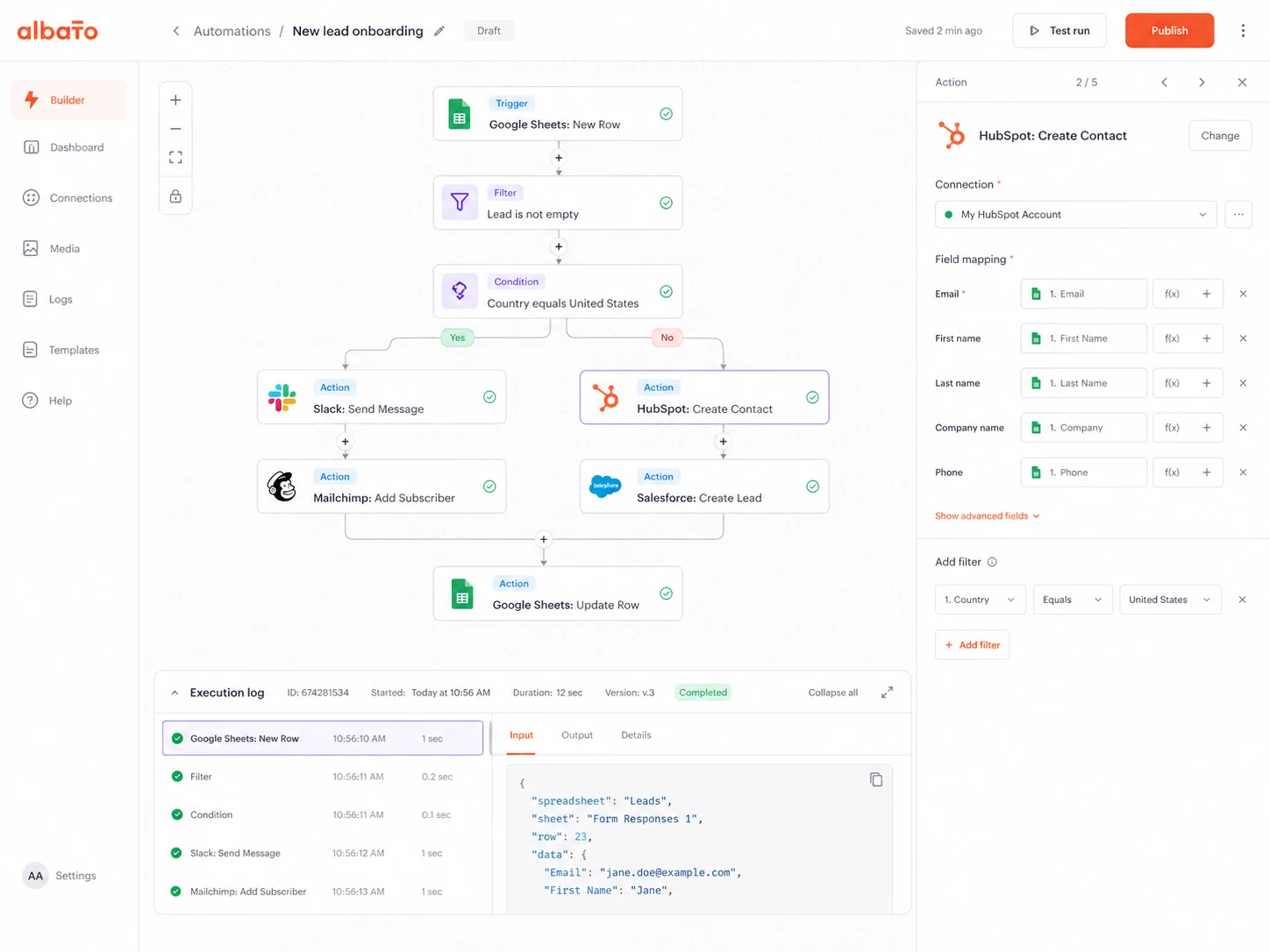
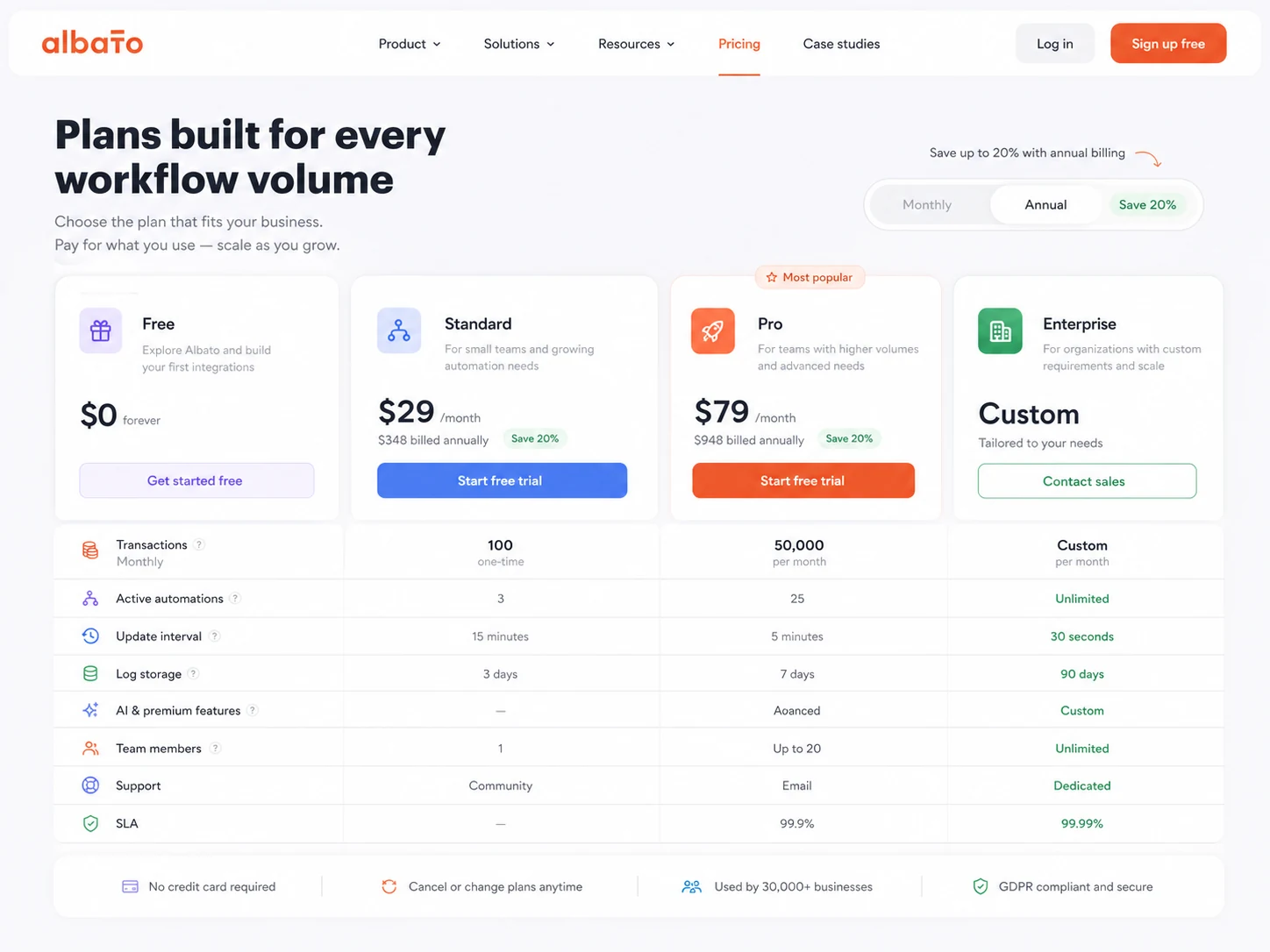
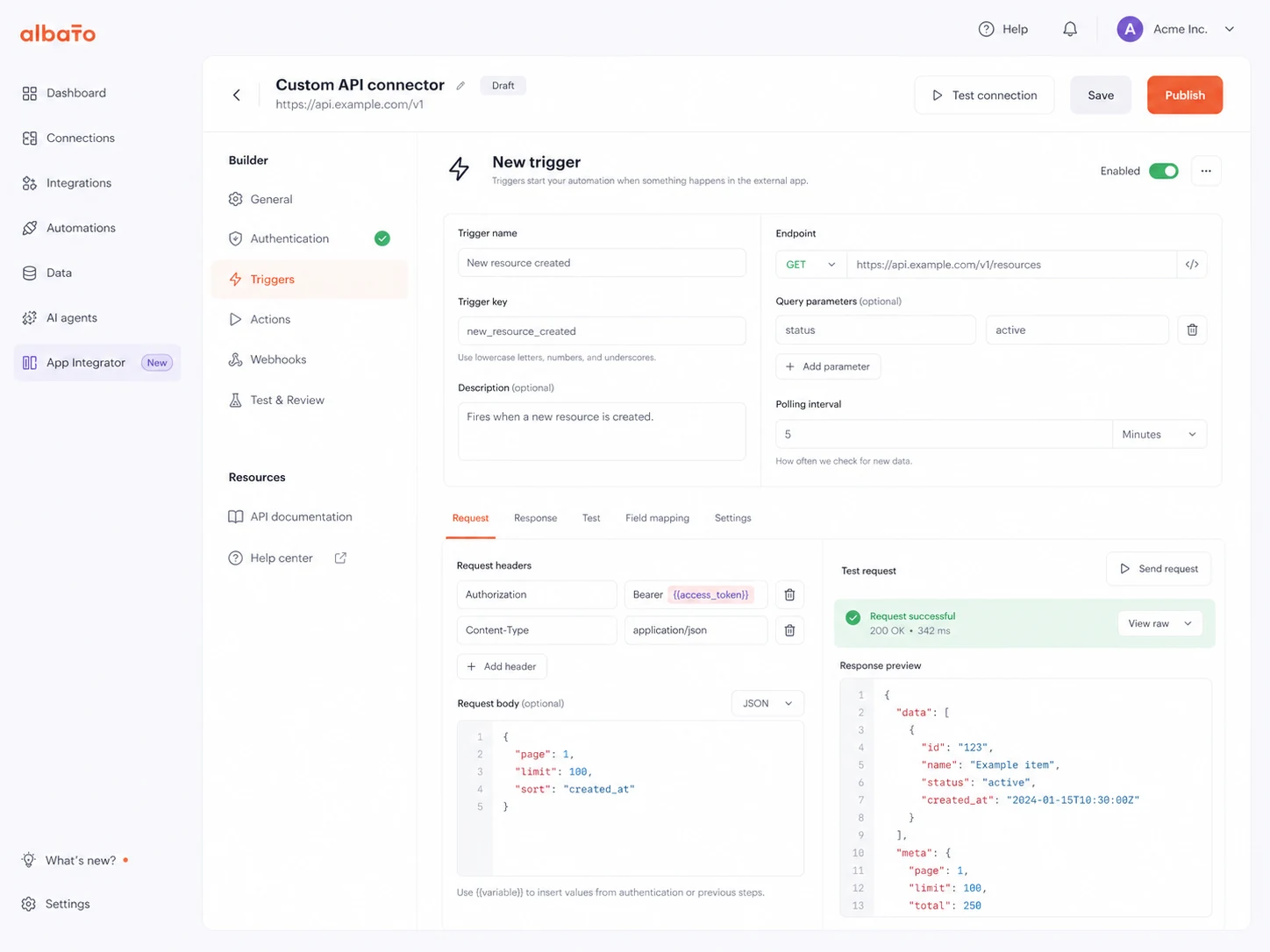
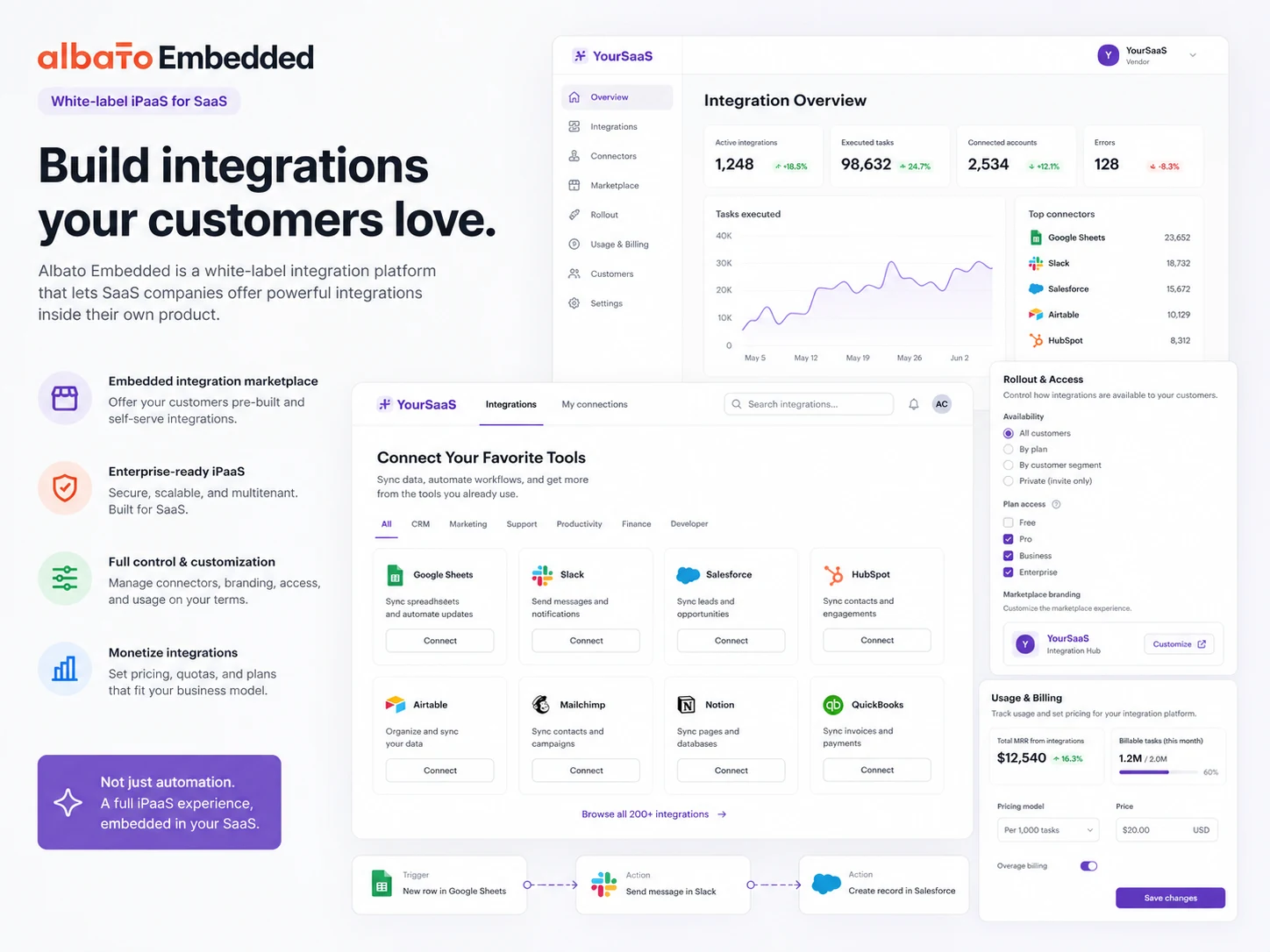
Albato should be read as a workflow and integration decision first. For a small team, the question is whether its no-code builder, app directory, AI tools, and transaction limits fit the automations you want to run every month. For a SaaS company, the question shifts toward embedded iPaaS: whether Albato can supply white-label integrations without forcing your users out to Zapier or another third-party tool.
What Albato actually does
Albato connects business apps and moves data between them through no-code automations. A normal workflow starts with a trigger, continues through actions, filters, routers, parsing, or other data tools, and ends by updating another app or sending information somewhere useful. The public automation page also highlights AI inside workflows, including tools such as ChatGPT, Gemini, Claude, and other AI services.
- Connect apps across CRM, forms, email, spreadsheets, support, ecommerce, and AI tools.
- Build multi-step workflows without writing code.
- Use webhooks, API requests, filters, routing, parsing, and data tools when a basic connector is not enough.
- Create reusable solutions for repeatable workflows across teams or clients.
Pricing and plan fit
Albato pricing has a useful Free path, but the Free plan is mainly a testing and light-workflow tier. It includes 100 transactions, 5 active automations, 2 steps per automation, 7-day log storage, and a 15-minute update interval. Pro adds unlimited automations and steps, data migration, auto replay, Albato AI, 30-day logs, and a 5-minute update time. That makes the paid decision less about headline price and more about transaction volume, update speed, and whether your workflows need more than two steps.
- Free is best for testing simple workflows and checking connector fit.
- Pro is the practical path for recurring multi-step automations.
- Teams and Custom should be checked for collaboration, SLA, or higher-volume needs.
- Embedded iPaaS pricing should be scoped separately from the standard automation plan.
Free plan, trial, and annual savings
The Free plan is a genuine low-risk entry point because Albato states there are no time limits and no credit card requirement. Pro also shows a 7-day trial, and the pricing page shows annual billing at $15 per month compared with $22 per month on monthly billing for the 1K transaction package. The safer buyer path is to test the exact workflow first, then compare monthly against annual only after the transaction package is clear.
- Use Free to confirm the app connector and field mapping.
- Use the Pro trial to test unlimited steps and faster update timing.
- Choose annual billing only when the workflow is proven and likely to keep running.
- Check whether extra transaction charges would affect the real monthly cost.
Embedded iPaaS is a different buying path
Albato Embedded is aimed at SaaS companies that want integrations inside their own product, including white-label or gray-label authentication experiences, embedded UI, analytics, implementation support, and customer-facing connector coverage. That is a product and rollout decision, not just an automation subscription. The embedded pricing page describes a model based on a fixed monthly platform fee plus either active users or connectors, with Enterprise potentially using a platform-fee-only model.
- Use the embedded path when integrations need to live inside your SaaS product.
- Check whether per-user or per-connector pricing better matches your own pricing model.
- Confirm implementation timeline, SSO needs, white-label requirements, and support scope.
- Do not compare embedded iPaaS pricing directly against Pro automation pricing.
App Integrator and custom API work
Albato becomes more flexible when the buyer needs an app that is not already in the connector library. App Integrator lets users create public or private integrations by setting up authorization, triggers, actions, webhooks, lists, pagination, and error statuses. That does not remove the need to understand API documentation, but it can reduce the engineering lift for teams that can follow endpoint logic and test carefully.
- Use preconfigured authentication methods such as OAuth 2.0, Basic, API Token, Session Auth, and Custom.
- Create API or webhook triggers and outgoing actions for custom workflows.
- Handle lists, pagination, connection fields, and status handling inside the connector setup.
- Submit public integrations when a custom app is ready for broader Albato use.
What buyers should verify before checkout
The most important checkout questions are practical. Does the needed connector exist? Does the workflow need more than two steps? How many times will the automation run each month? Is a 15-minute update interval acceptable, or does the team need 5-minute updates? Is the purchase for internal automation or embedded SaaS integrations? These questions matter more than chasing a coupon code because the wrong plan can be cheap and still fail the job.
- Confirm app availability, trigger support, and action coverage for your exact workflow.
- Check whether the plan has enough steps, update speed, log history, and team access.
- Estimate monthly transaction volume before choosing a paid transaction package.
- Review refund terms and cancellation logic before committing to annual billing.
Best savings path from this store page
This is the clearest savings route to check once the product already looks like a fit.
A public coupon directory lists a checkout coupon path for Albato. Treat it as a researched coupon route and confirm the discount on the live checkout page.
Start free on Albato
Trial path for Pro plan
Use comparison routes when the category fit is still open
Use these comparison routes when the product still looks plausible, but the category fit is not fully settled.
Make is often the stronger comparison when buyers want a mature visual scenario builder and already understand automation logic.
Relay.app deserves a look when the workflow needs human approvals or collaborative handoffs instead of pure background automation.
Adalo is not a direct automation substitute, but it is relevant when the buyer really wants to build an app interface rather than connect existing apps.
Jet Admin fits buyers who need internal tools or admin panels, while Albato fits cross-app workflow automation and data movement.
Verification points worth checking before you click out
Where this store usually fits best in the workflow
Albato fits teams that need to move leads, orders, tasks, messages, or spreadsheet records between apps without hiring a developer for every integration.
Marketing and sales teams can use Albato to connect forms, ads, CRM records, email tools, chat apps, and AI services when manual copy-paste work starts slowing follow-up.
SaaS companies can evaluate Albato Embedded when their customers keep asking for native integrations and the product team does not want to build every connector from scratch.
Teams with API documentation can use App Integrator to create private or public connectors, but this works best when someone can test authentication, fields, webhooks, and error behavior carefully.
Practical checkpoints before and after signup
- List the exact source app, destination app, trigger, action, and fields you need to move.
- Check whether the workflow can fit inside 5 active automations, 2 steps, and 100 monthly transactions on Free.
- Estimate monthly transaction volume and compare it with the transaction package.
- Confirm whether update time, log storage, data migration, and auto replay matter for your workflow.
- Decide whether pricing should scale by active users or connectors.
- Ask about SSO, white-label auth, implementation timeline, analytics, and support responsibility.
- Monitor failed runs, transaction usage, app permission changes, and connector limits.
- Document each live automation so a teammate can understand what happens when something breaks.
Fast-read signals for workflow fit and buying friction
Questions readers usually ask before choosing this store
What is Albato best for?
Albato is best for connecting apps and automating repeatable workflows without code. It is especially useful for operations, marketing, sales, support, and SaaS teams that already know which apps need to exchange data.
Does Albato have a free plan?
Yes. Albato lists a Free plan at $0 per month with 100 transactions, 5 active automations, 2 steps per automation, 7-day log storage, and a 15-minute update interval. That is useful for testing and light workflows, not proof that a heavier business process will stay free.
How much does Albato Pro cost?
The public pricing page shows Pro with a 7-day trial, $22 per month on monthly billing, and $15 per month when billed annually for the 1K transaction package. Buyers should verify the current package size and billing interval before checkout.
Is Albato Embedded the same as the normal Pro plan?
No. Albato Embedded is a separate SaaS-facing buying path for white-label integrations inside a product. Its pricing is described around a monthly platform fee plus either active users or connectors, so it should be scoped through a demo.
What should I check before buying Albato?
Check connector coverage, trigger and action support, transaction volume, update speed, log storage, team access, refund terms, and whether your use case is normal automation or embedded SaaS integration. Those details matter more than the headline monthly price.
Choose the next route that matches what you still need to decide
The strongest next click depends on whether you still need product judgment, a savings route, or a broader category comparison.