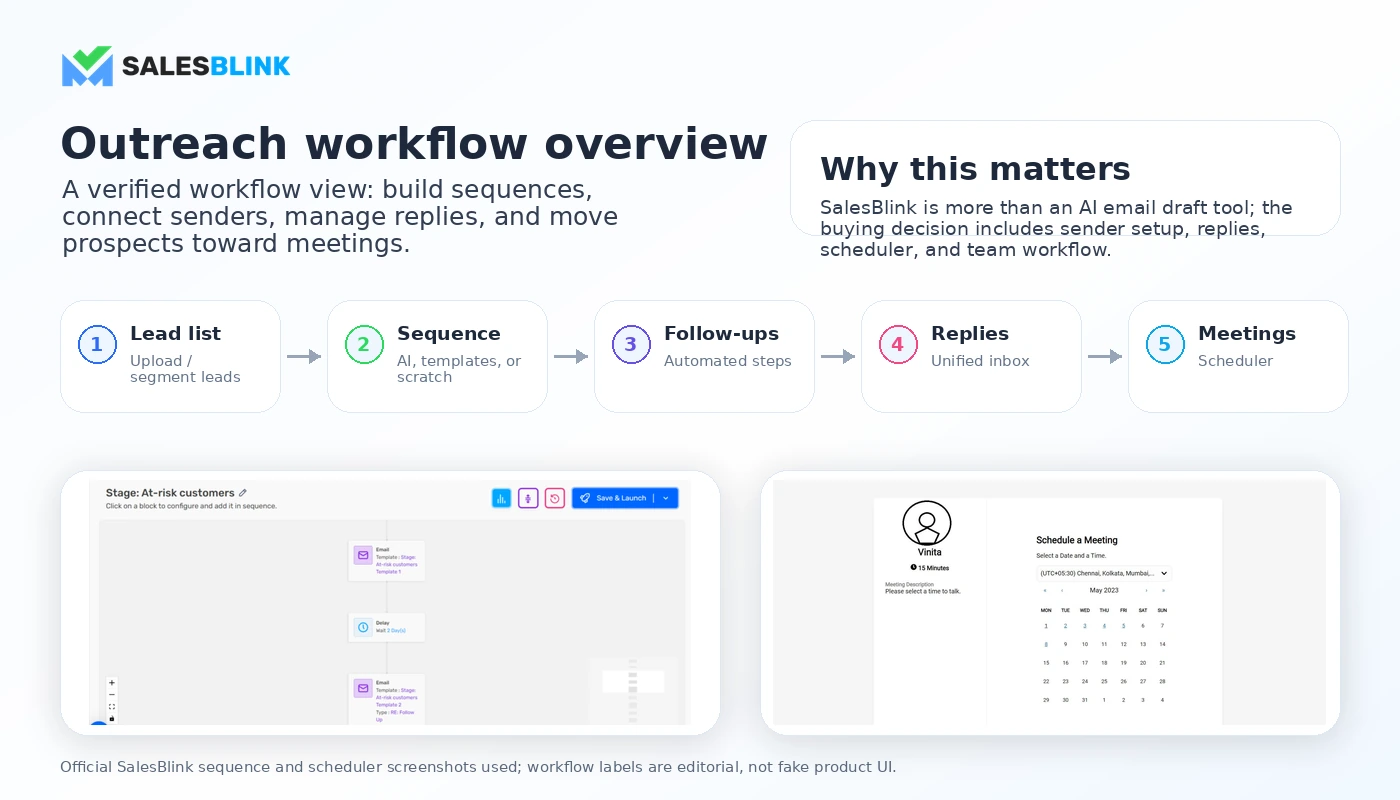
Quick verdict
SalesBlink is worth a serious look if you are buying a cold email outreach workflow, not just an AI email writer.
That difference matters more than the homepage makes it look.
SalesBlink can help you create sales sequences, automate follow-ups, warm up sending accounts, manage replies, schedule meetings, connect integrations, and report on outreach activity. For a B2B sales team or lead-generation agency, that combination can be useful because the work is not only writing an email. The work is building a repeatable outbound process that does not collapse when replies, senders, team members, or campaign volume increase.
I would be more cautious if your real need is small. If you only want to write a few cold emails, SalesBlink may be more system than you need. If you want a full marketing automation platform for newsletters, lead nurturing, ecommerce journeys, or CRM-style customer lifecycle flows, something like ActiveCampaign may be the more natural comparison.
The strongest reason to consider SalesBlink is workflow consolidation. The main caution is cost realism. The public pricing page shows a 14-day trial, annual plan pricing, feature gates between Starter, Growth, and Business, and add-ons for verification, mailbox setup, and placement testing. Those add-ons may be reasonable, but they also mean the cheapest visible plan is not automatically the real monthly cost of running outreach.
For my money, the safer path is simple: start with the trial, build one real sequence, connect one real sender, check warmup and reply handling, then decide whether the paid plan actually fits your outbound process.
Next step: If SalesBlink still fits your outreach workflow, verify the current plan path before checkout instead of choosing only by the lowest annual price.
Review snapshot
| Review point | Practical take |
|---|---|
| Best for | B2B sales teams, lead-generation agencies, founder-led outbound teams, and operators running repeatable cold email campaigns |
| Not ideal for | One-off email writers, newsletter marketers, buyers without sender setup discipline, or teams shopping only for a coupon |
| Main use case | Building cold email sequences, automating follow-ups, managing replies, warming inboxes, and routing prospects toward meetings |
| Public trial path | 14-day free trial with no credit card required |
| Public pricing note | Starter begins at $25/month when billed annually, while Growth and Business add higher-tier workflow features |
| Main strength | Combines sequence building, warmup, unified inbox, meeting scheduling, integrations, reporting, and AI features on higher plans |
| Main concern | Plan gates and add-ons can change the real cost of running outreach at volume |
| Direct alternatives | Mailshake, Instantly, Salesforge, and other cold outreach platforms |
| Adjacent routes | ActiveCampaign for marketing automation, ClickFunnels for funnel and checkout workflows |
| Best next step | Test one real outreach workflow during the trial before annual billing |
What is SalesBlink?
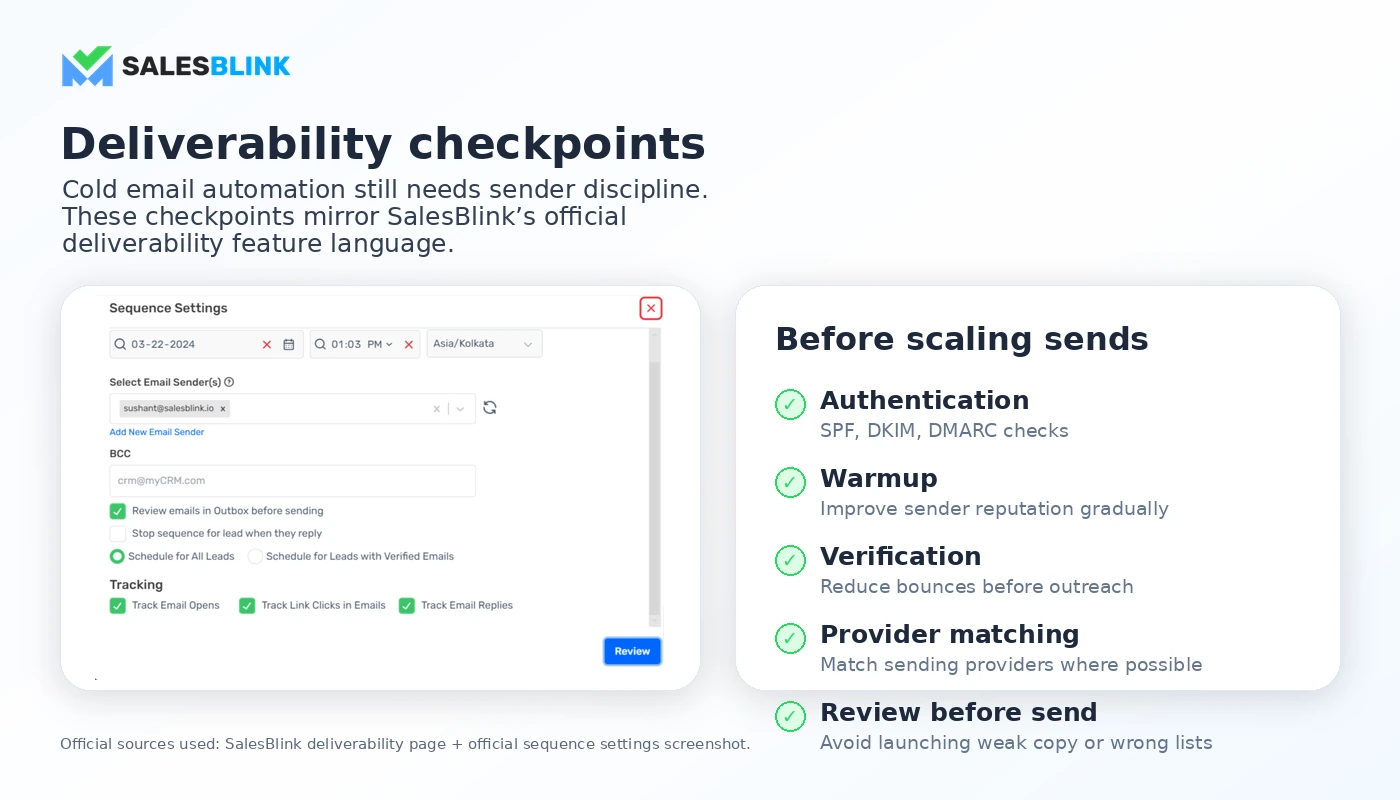
SalesBlink is best understood as an AI-assisted cold email outreach platform for teams that want to build and run outbound campaigns from one place.
Its public positioning is not just “write emails with AI.” The product leans into a fuller sales outreach workflow: create sequences, automate follow-ups, warm inboxes, track campaign activity, manage replies from a unified inbox, schedule meetings, connect tools such as Gmail, Outlook, Google Calendar, HubSpot, Pipedrive, Zoho CRM, Slack, Zapier, Make, n8n, and use API access on supported plans.
That makes SalesBlink different from a simple AI copy generator. The buyer is not only paying for words. The buyer is paying for campaign movement: lead upload, sender connection, sequence setup, deliverability checks, reply handling, calendar booking, and reporting.
The common misunderstanding is assuming that cold outreach software solves the hardest parts of outbound by itself. It does not. A tool can make campaign execution easier, but it cannot fix a weak offer, poor targeting, messy sender setup, bad lead quality, or reckless sending volume.
Our review approach compares public product pages, pricing details, help and legal pages, buyer workflow fit, and nearby alternatives. I do not treat a coupon, low entry price, or AI feature label as proof that the product fits the buyer.
Who should use SalesBlink?
SalesBlink makes the most sense for buyers who already know they need a repeatable outbound workflow.
A B2B sales team can use SalesBlink when reps need to send structured sequences, follow up automatically, track replies, and move prospects toward calls. The condition is that the team has a real sales motion. If the team is still guessing at the offer, market, or prospect list, the software will only automate the uncertainty.
A lead-generation agency may find SalesBlink useful if it manages outreach for clients and needs sender rotation, warmup, reply management, reports, and team workflow. The practical check is whether the plan includes enough team access, reporting, integrations, and add-ons for the agency’s operating model.
A founder-led outbound team can use SalesBlink to avoid the messy mix of spreadsheets, manual Gmail follow-ups, and scattered calendar links. This is a good fit when the founder is testing a real market and wants a controlled process. It is weaker when the founder only wants to send a handful of exploratory emails.
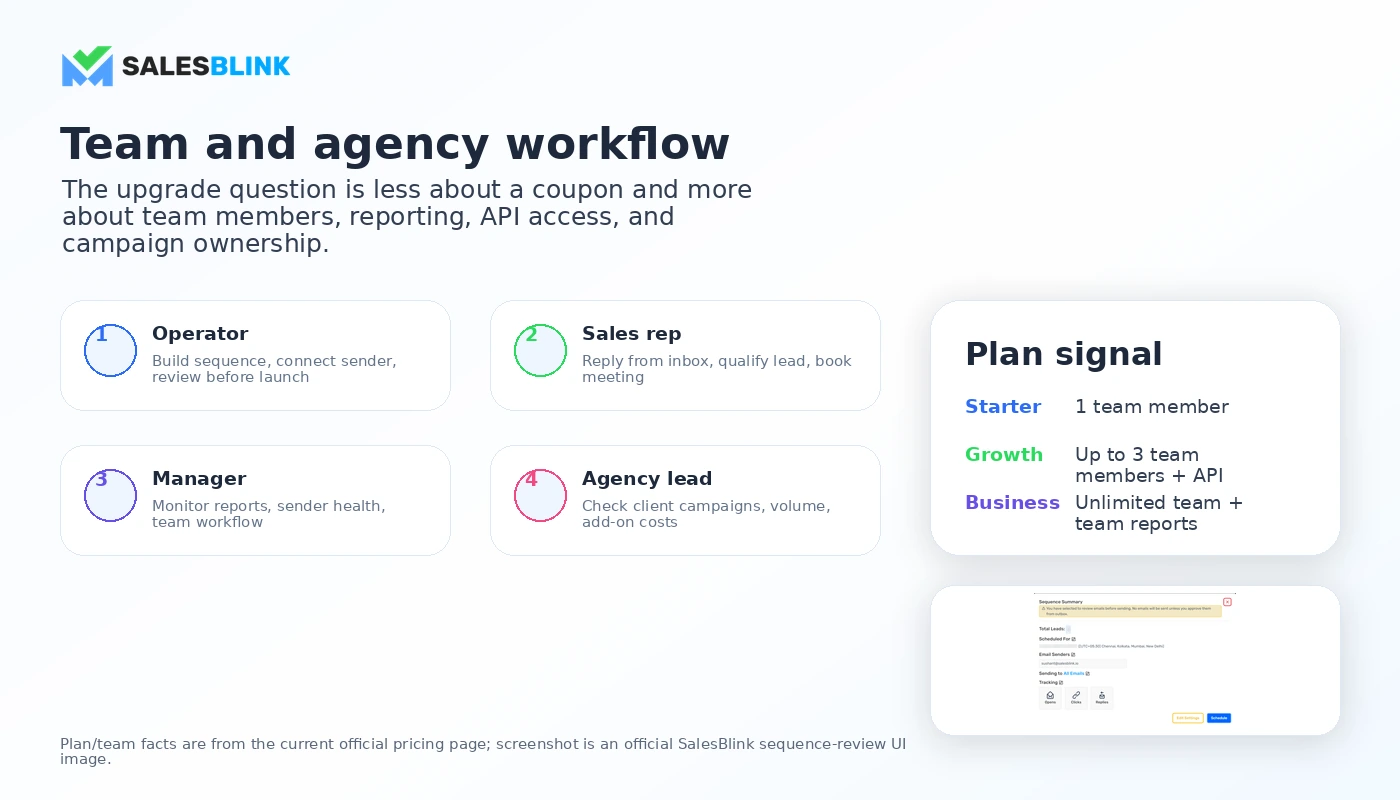
A deliverability-aware operator may also like SalesBlink because warmup, SPF/DKIM/DMARC checks, sender tools, placement testing, and reporting can support a more careful campaign rollout. But these features only matter if the buyer actually uses them before increasing volume.
A small sales team moving beyond manual outreach can consider SalesBlink when reply handling and meeting booking are becoming bottlenecks. In that case, Growth or Business may matter more than Starter because team members, scheduler access, API, AI, and reporting features can become part of the real buying decision.
Who should avoid SalesBlink?
I would not start with SalesBlink if you only need occasional email copy. A general AI writing tool or a lighter email assistant may be enough.
I would also avoid buying SalesBlink just because the entry plan looks affordable. The Starter plan can be useful for basic outreach, but it does not include AI features in the current public pricing table. If the reason you are interested is BlinkGPT, Outreach AI, team workflow, scheduler, integrations, or API access, you may need a higher plan.
SalesBlink is not the cleanest fit for newsletter marketing. If your real workflow is broadcast campaigns, marketing automations, tags, ecommerce customer journeys, and lifecycle messaging, ActiveCampaign is a more relevant comparison.
It is also not a shortcut for teams with poor list hygiene or risky cold email practices. Warmup and deliverability tools help, but they do not make bad outreach safe. Buyers still need clean lists, compliant sending habits, tested copy, unsubscribe handling, sender authentication, and controlled volume.
Finally, I would be careful if you are planning to pay annually before testing. SalesBlink’s public terms state that subscription charges are generally non-refundable unless the terms or an order form says otherwise. That does not mean buyers should avoid the product. It means the trial exists for a reason.
How SalesBlink fits into a real workflow
A good SalesBlink workflow starts before the software.
First, define the outreach motion. Who is the target buyer? Where does the lead list come from? What is the offer? How many steps should the sequence include? Who handles replies? What happens after a prospect books a meeting?
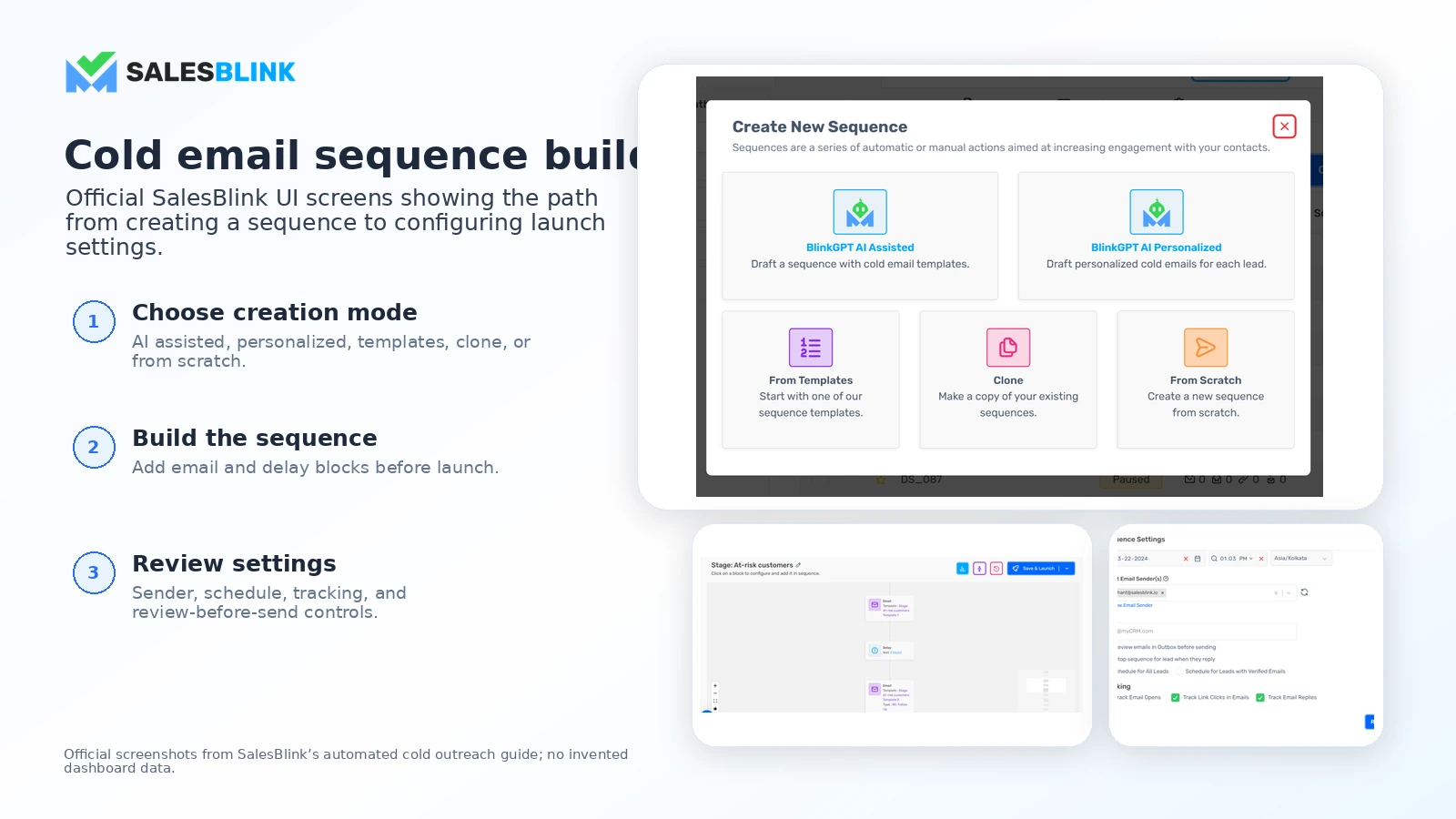
Then SalesBlink becomes more useful. You can connect a sender account, upload or import leads, build a sequence, personalize emails, set follow-ups, warm sending accounts, track replies, and send prospects toward a meeting scheduler.
The decision point comes after the first real test. Did replies arrive in a manageable place? Did the sequence feel easy to adjust? Did warmup and deliverability tools reveal anything useful? Did the team understand the reports? Did the campaign produce useful conversations, not just opens and clicks?
That is where SalesBlink should be judged.
The easy mistake is to test the interface with a fake campaign and then buy the plan. That does not prove much. A better test uses one real sender, one real segment, one realistic sequence, and one clear meeting or reply goal.
Workflow check: Use the trial to test one real outbound flow before deciding whether Starter, Growth, or Business is the better plan.
Real-world buyer scenarios
Small B2B team launching repeatable outbound
A small sales team may use SalesBlink to move away from manual follow-ups and scattered inbox tracking. This buyer needs sequence automation, sender connection, reply management, and reporting.
SalesBlink can fit if the team already has a defined target market and an offer worth testing. It may fail if the team expects the tool to discover the strategy for them.
Before paying, I would verify team member limits, CRM integrations, scheduler access, and whether Growth is the practical starting point rather than Starter.
Lead-generation agency managing client campaigns
An agency may care more about sender setup, warmup, campaign reporting, and team workflow than a solo user does. SalesBlink can be useful here because outbound work has many moving parts.
The risk is underestimating add-ons. Verification credits, mailbox setup, and placement testing may be useful, but they need to be priced into the client’s campaign cost.
If the agency needs deeper multi-channel scale, more advanced deliverability infrastructure, or heavy LinkedIn automation, it should compare SalesBlink with platforms built more aggressively for those workflows.
Founder testing a new outbound motion
A founder can use SalesBlink to make outbound less chaotic. Instead of writing messages manually and forgetting follow-ups, the founder can test a structured campaign.
The risk is buying too much too early. If the founder has not proven the offer or audience, a higher plan may create the feeling of progress without improving the market signal.
For this buyer, I would start with the trial and judge whether the process saves time without creating unnecessary setup work.
Marketing team choosing between outreach and automation
Some buyers compare SalesBlink with tools that are not truly the same category. If the team wants cold email sequences and reply handling, SalesBlink belongs in the conversation. If the team wants nurture campaigns, newsletters, tags, automations, and lifecycle journeys, ActiveCampaign is the more natural lane.
This distinction matters because buying the wrong category creates more frustration than picking the wrong plan.
Key features that actually matter
Cold email sequences and follow-ups
SalesBlink’s core value starts with structured outbound sequences. You can create campaigns, send personalized emails, and automate follow-ups rather than handling every touch manually.
This matters when outreach is repeated. It matters less when you only send a few manual messages each month.
Buyer note: judge the sequence builder by how easy it is to edit, pause, personalize, test, and report on one real campaign.
AI-assisted email and sequence creation
SalesBlink promotes AI assistance through BlinkGPT and Outreach AI, but this is where plan fit matters. The current public pricing table marks the entry Starter plan as having no AI features, while higher plans carry more of the AI workflow value.
AI can help with draft creation and personalization, but it should not replace positioning, offer clarity, or manual review.
Buyer note: do not buy Starter expecting the full AI experience unless the current pricing page confirms the features you need.
Email warmup and deliverability support
Warmup, sender checks, provider matching, DKIM/SPF/DMARC checks, deliverability reports, and placement testing are important because cold email performance depends heavily on sender health.
This is a real advantage if you use it carefully. It is not a magic shield. Poor lists, aggressive volume, weak copy, and non-compliant outreach can still create problems.
Buyer note: treat deliverability tools as risk controls, not guarantees.
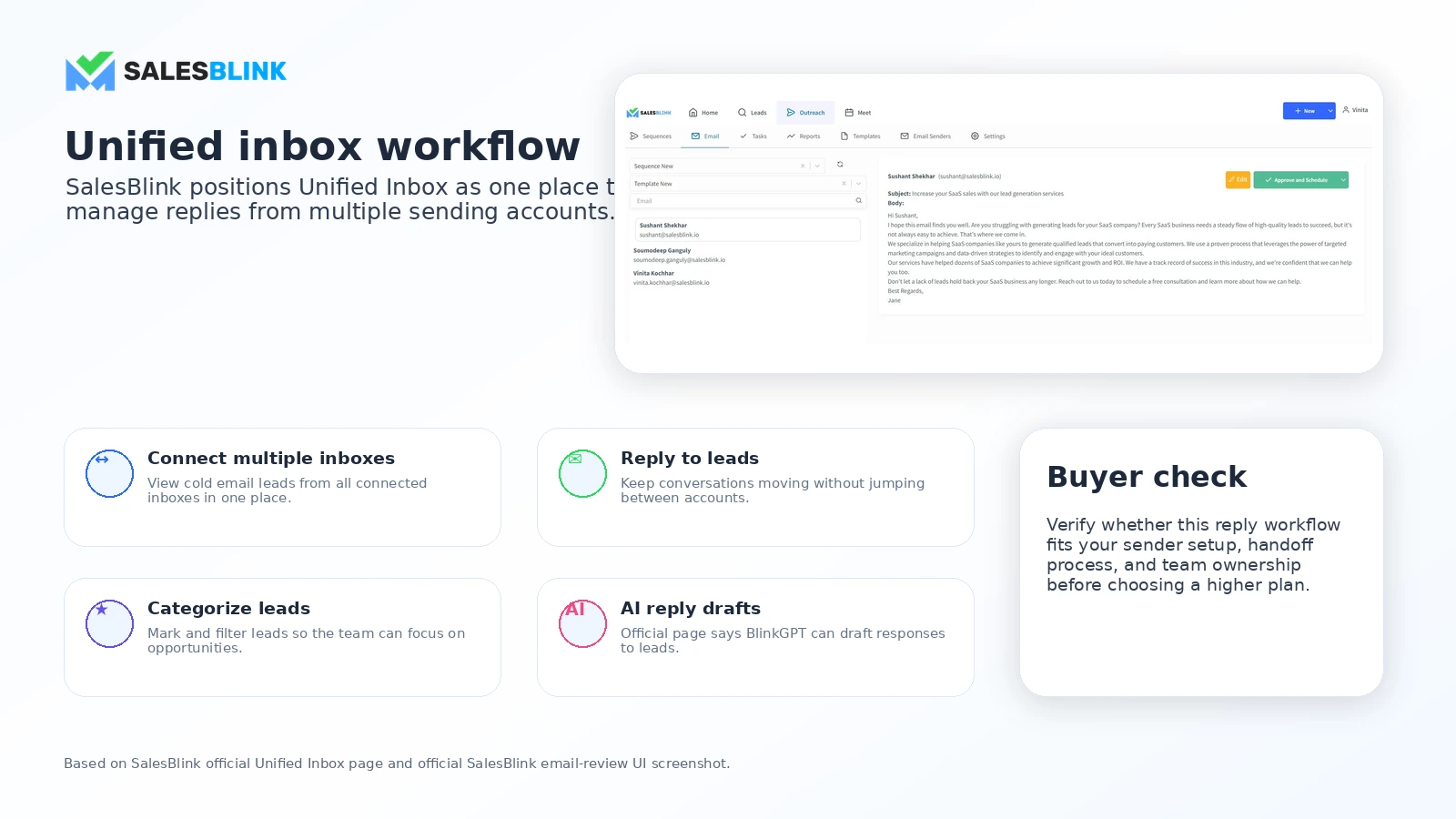
Unified inbox and reply management
The unified inbox matters once campaigns generate replies across multiple sender accounts. A reply workflow can quickly become messy if the team does not know who owns each response.
SalesBlink’s inbox and AI reply-related features can help, especially for teams that need one place to manage conversations.
Buyer note: test reply assignment, filters, lead status, and CRM handoff before assuming the inbox fits your sales process.
Meeting scheduler and integrations
SalesBlink includes meeting scheduler features and integrations with common sales and workflow tools on supported plans. That can reduce friction after a prospect responds.
The buying question is whether these integrations are nice-to-have or essential. A team using HubSpot, Pipedrive, Zoho CRM, Google Calendar, Outlook Calendar, Zapier, Make, or n8n should verify the exact plan-level access.
Buyer note: integrations are only valuable if they match your actual handoff process.
Pricing and plan value
SalesBlink pricing is clear enough to evaluate, but not simple enough to judge from the first number alone.
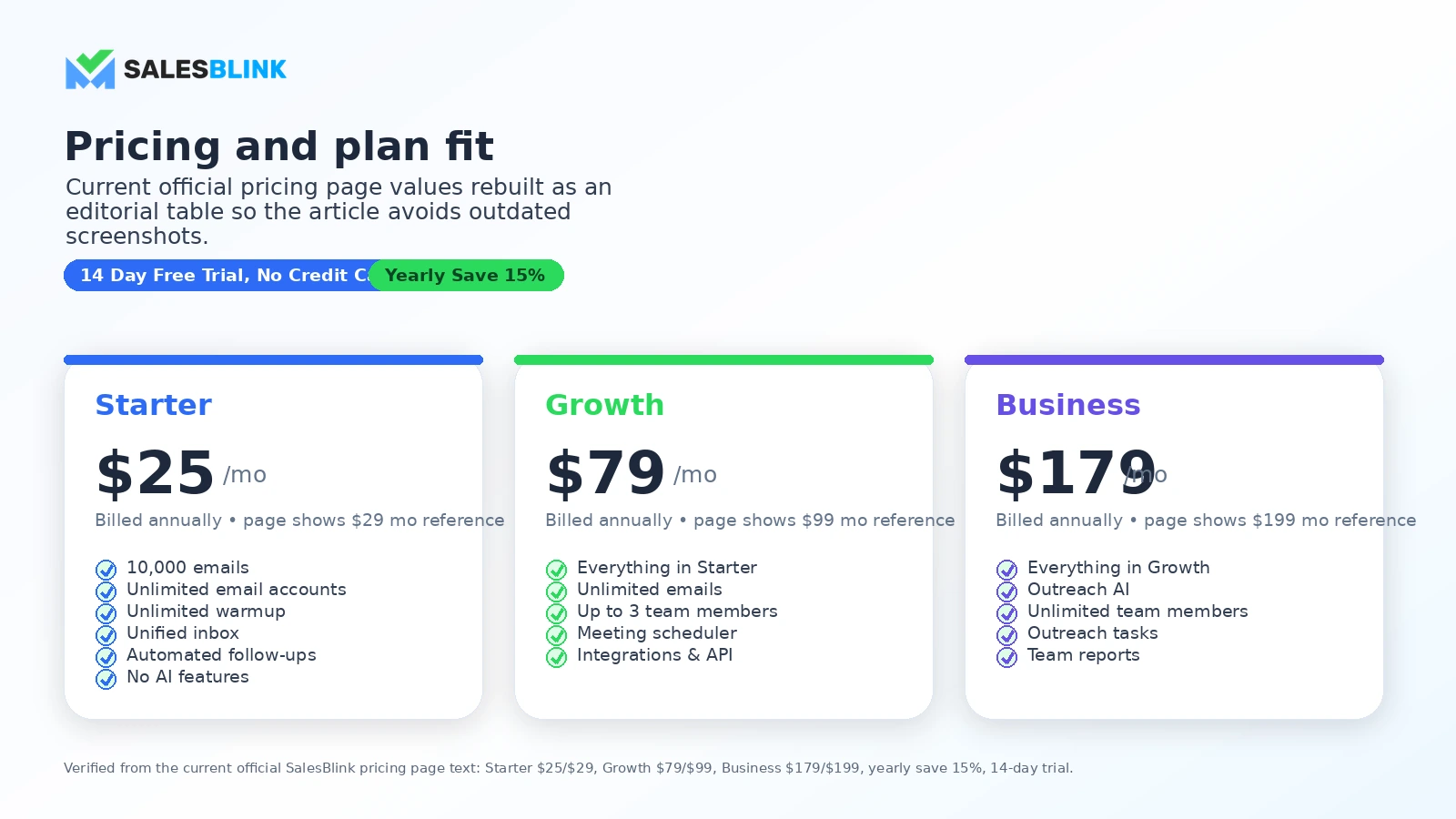
At the time of this review, the public pricing page shows a 14-day free trial with no credit card required. The yearly pricing view lists Starter at $25 per month billed annually, Growth at $79 per month billed annually, and Business at $179 per month billed annually. The page also shows higher monthly reference prices and a yearly savings cue.
The important part is not just the price. It is the feature gate.
Starter is the lowest-cost path and includes core outreach features such as email sends, uploaded contacts, email accounts, warmup, unified inbox, and automated follow-ups. But the pricing table also marks Starter as having no AI features. Growth adds unlimited emails, up to three team members, meeting scheduler, integrations, and API access. Business adds Outreach AI, unlimited team members, outreach tasks, and team reports.
That plan split should shape the buying decision. If you only need basic cold email sequences, Starter may be enough to test. If you need team workflow, API, scheduler, integrations, or AI, Growth or Business may be the real comparison.
Add-ons deserve their own attention. SalesBlink’s pricing page lists email verification credit packages, done-for-you mailbox setup options, and placement test subscriptions. Those may be useful for serious outbound work, but they can also change the real cost of running campaigns.
I would not move to annual billing until the trial proves three things: your sender setup works, your team understands the workflow, and the plan includes the features you actually need.
Pricing check: Compare the trial, plan gates, and add-ons before treating the lowest annual plan as the real cost of SalesBlink.
Check SalesBlink pricing Check current offers Read store guide
Free plan, trial, coupon, and checkout notes
SalesBlink does not currently present a standard free plan on the public pricing page. The safer entry route is the 14-day trial with no credit card required.
That is useful because SalesBlink needs a real workflow test. You should not judge it only by feature labels. You should test whether the sequence builder, sender connection, warmup, inbox, scheduler, reporting, and add-ons match how you actually run outreach.
A coupon can improve the purchase, but it should not be the reason you buy. The better order is:
- Confirm SalesBlink fits your outreach workflow.
- Use the trial to test one real campaign setup.
- Decide whether Starter, Growth, or Business is the true plan.
- Add verification, mailbox, or placement testing costs if needed.
- Check the SalesBlink coupon page for current offers only after the plan fit is clear.
The checkout risk is not only price. It is commitment. The public terms say subscription charges are generally non-refundable unless the terms or a relevant order form says otherwise, and the cancellation section includes notice language buyers should read before paying.
That makes the trial more important than a discount.
What I would check before buying SalesBlink
If I were buying SalesBlink for a real outbound workflow, I would check these items before payment:
- Plan fit: Does Starter cover the workflow, or do you need Growth or Business for AI, API, team members, scheduler, integrations, outreach tasks, or reports?
- Billing interval: Are you comparing monthly pricing, annual pricing, or a yearly savings display?
- Add-ons: Will you need email verification credits, mailbox setup, or placement testing?
- Sender setup: Are your domains, inboxes, SPF, DKIM, DMARC, and warmup process ready before you launch?
- Reply workflow: Who owns replies, meetings, CRM updates, and campaign pauses?
- Refund and cancellation terms: Are you comfortable with the non-refundable subscription language and notice requirements?
- Alternative fit: Are you choosing a cold outreach tool when you actually need marketing automation, funnel pages, or a broader sales engagement stack?
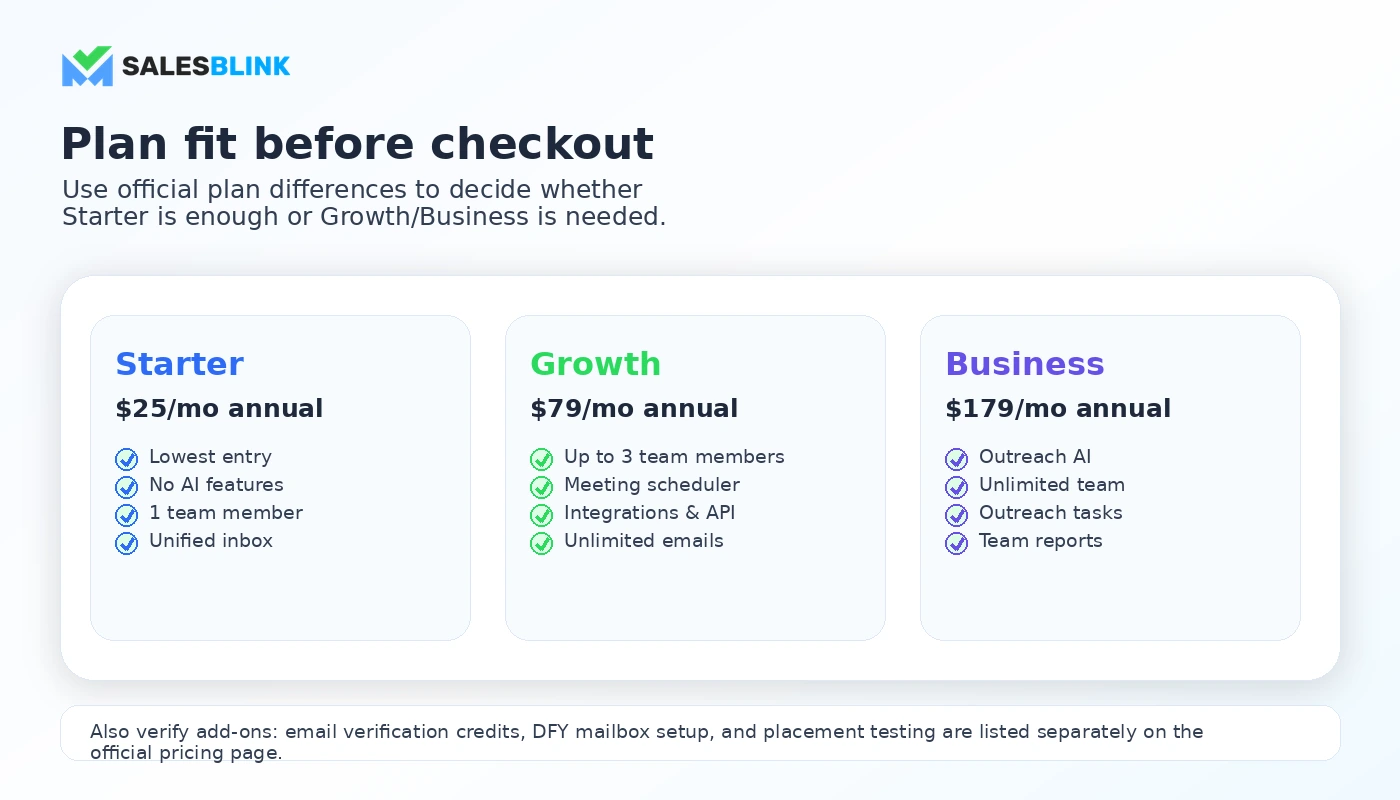
The first check I would make is plan fit. If the feature you care about is gated behind Growth or Business, the Starter price is useful context but not the final decision.
A simple test before paying
Before paying, I would run a small SalesBlink test like this:
- Choose one real target segment, not a fake test list.
- Connect one real sender account and check the setup requirements.
- Build a short sequence with two or three follow-ups.
- Use personalization carefully and review every AI-assisted draft manually.
- Check warmup, sender health, unsubscribe handling, and reporting.
- Send at controlled volume and monitor replies, not only opens.
- Decide whether the plan saves time and reduces workflow friction.
This test will not prove long-term deliverability. No short trial can do that perfectly. But it can show whether SalesBlink feels like a practical operating system for your outreach or just another tool you have to manage.
The mistake buyers often make is testing only the surface. They click around, see enough features, and then buy. A better test asks whether the tool changes the next business action: better replies, cleaner handoff, easier campaign management, and clearer reporting.
Pros explained
SalesBlink combines several outbound steps in one place
The main advantage is consolidation. Sequences, follow-ups, warmup, inbox management, scheduling, reports, and integrations can live in one workflow.
That matters for buyers who are tired of managing cold outreach across spreadsheets, Gmail tabs, calendar links, and manual reminders.
It stops being enough if the buyer does not have a clear campaign process. Consolidation cannot replace strategy.
The trial lowers the first-step risk
A 14-day no-card trial is useful because SalesBlink is a workflow product. You need to see it with your sender, your sequence, and your team’s process.
This matters more than a coupon because trial testing can reveal plan mismatch before money changes hands.
It stops being enough if you do not test realistically. A trial with fake data can create false confidence.
Higher plans support more serious team workflows
Growth and Business add features that matter when outbound becomes operational: team members, scheduler, integrations, API access, Outreach AI, outreach tasks, and team reports.
That is useful for agencies and teams, not just solo users.
It stops being enough if your team needs heavier multi-channel scale, stricter governance, or a platform built specifically for high-volume outbound infrastructure.
Deliverability features support better campaign discipline
Warmup, sender checks, provider matching, DKIM/SPF/DMARC checks, placement testing, and deliverability reporting can help buyers think more carefully before scaling campaigns.
This matters because cold email success depends on more than writing quality.
It stops being enough if the buyer treats these tools as protection against bad practices. They are support tools, not guarantees.
Cons explained
The cheapest plan may not be the real buyer fit
Starter is useful as an entry route, but the current pricing table shows no AI features on that plan. Buyers interested in AI-assisted outreach may need Growth or Business.
The risk is simple: you compare SalesBlink by the lowest price, then discover the workflow you wanted sits higher in the plan stack.
The way to avoid this is to map must-have features before looking at price.
Add-ons can change the real cost
Email verification credits, mailbox setup, and placement testing are practical services, but they can turn a clean subscription comparison into a more layered cost decision.
This matters most for agencies and teams managing multiple domains, inboxes, or campaigns.
Before paying, estimate these costs as part of your outbound budget rather than treating them as small extras.
Refund flexibility is limited
SalesBlink’s public terms say subscription charges are generally non-refundable unless the terms or a relevant order form says otherwise.
That does not make the product bad. It does mean buyers should treat annual billing carefully.
Use the trial. Read the terms. Confirm cancellation timing. Keep order-form exceptions documented if any exist.
Cold outreach still needs human judgment
SalesBlink can help execute outreach, but it cannot decide whether your offer is strong, whether your list is appropriate, whether your message is relevant, or whether your sending behavior is safe.
This is the part buyers can easily overestimate. Automation can amplify a good process. It can also amplify a weak one.
Green flags and red flags
Green flags
SalesBlink is a stronger fit when:
- You run cold email repeatedly, not once in a while.
- You need sequences, follow-ups, warmup, replies, and meetings in one process.
- You understand sender setup and list hygiene.
- You can test the workflow during the trial before paying.
- You know which plan features are essential.
Red flags
Slow down if:
- You are buying mainly because the entry price looks low.
- You need AI features but are only evaluating Starter.
- You have not calculated add-on costs.
- You expect warmup to fix poor targeting or aggressive sending.
- You need refunds to be flexible after a paid subscription.
- You actually need newsletter automation, funnel building, or a broader CRM journey instead of cold outbound.
The healthiest buyer mindset is not “Can SalesBlink send emails?” It is “Can SalesBlink support the outbound process I am ready to run responsibly?”
SalesBlink vs alternatives
Mailshake vs SalesBlink
Mailshake is a direct comparison if your main need is cold email outreach and sales engagement. It may be the cleaner comparison for buyers who want an established outbound email workflow without making SalesBlink’s AI and add-on stack the default.
SalesBlink may still make sense if you like its combination of warmup, inbox handling, scheduler, integrations, trial route, and AI features on higher plans.
The tradeoff is workflow preference. Compare sequence building, reply management, plan limits, and total cost before choosing.
Instantly vs SalesBlink
Instantly is a direct comparison for buyers focused on cold email infrastructure, sender management, and scaling outreach. It often appears in discussions about deliverability and higher-volume cold email operations.
SalesBlink may feel more approachable for buyers who want a simpler all-in-one outreach workflow with AI assistance, scheduler, inbox, integrations, and reports.
The tradeoff is scale and operating style. If your priority is heavy sending infrastructure, compare carefully. If your priority is a guided cold email workflow, SalesBlink remains relevant.
Salesforge vs SalesBlink
Salesforge is another direct comparison when the buyer needs more advanced outbound automation, multi-channel scale, or stronger infrastructure-oriented workflow. Some third-party comparisons frame SalesBlink as a better fit for lighter or moderate outreach and Salesforge as a more advanced option for teams that outgrow simpler campaigns.
SalesBlink may still be enough if your work is mainly cold email sequences, warmup, replies, and meeting booking.
The tradeoff is complexity. Do not buy the more advanced tool if your process is not ready for it.
ActiveCampaign vs SalesBlink
ActiveCampaign is an adjacent route, not a one-to-one cold email replacement. It is a better fit when the buyer wants email marketing automation, CRM-style customer journeys, lead nurturing, segmentation, and lifecycle campaigns.
SalesBlink is stronger when the job is outbound prospecting and cold email follow-up.
The tradeoff is category. Choose ActiveCampaign for marketing automation. Choose SalesBlink only if outbound outreach is the real job.
ClickFunnels vs SalesBlink
ClickFunnels is also adjacent. It belongs in the funnel-building lane: landing pages, sales pages, checkout flows, and offers.
SalesBlink belongs before that stage when the buyer needs to contact prospects and book conversations.
The tradeoff is customer acquisition path. If you need outbound conversations, evaluate SalesBlink. If you need pages and checkout flow, compare funnel tools.
Trust, refund, and buyer-risk notes
The first trust point is that SalesBlink’s public positioning and pricing are reasonably clear. The product is presented as an AI cold email outreach platform, and the pricing page shows plan tiers, trial terms, feature gates, team limits, integrations, and add-ons.
The second trust point is more cautionary: cold outreach tools involve sensitive operational details. You may connect email accounts, calendars, CRMs, and prospect data. SalesBlink’s privacy policy describes personal data collection, third-party service connections, Google API usage, and service-related processing. Teams with strict data rules should review the privacy policy, Google/Outlook connection behavior, and internal compliance requirements before rollout.
The refund terms are important. The terms page says subscription charges are non-refundable unless otherwise specified in the terms or a relevant order form, and that no refunds are issued for partial use or non-use. The cancellation language also deserves attention before annual billing.
I would also treat deliverability claims carefully. SalesBlink includes useful warmup and sender-health features, but no outreach tool can guarantee results. Deliverability depends on domains, inboxes, list quality, message relevance, unsubscribe behavior, provider rules, and sending volume.
The coupon path should be secondary. A current offer can make the purchase better, but it does not solve plan mismatch, weak targeting, add-on surprises, or poor sender setup.
Final verdict
I would consider SalesBlink if you need a practical cold email outreach system that brings sequences, follow-ups, warmup, reply handling, scheduling, reporting, integrations, and higher-plan AI features into one workflow.
I would be careful if you are still unclear about your outbound strategy. SalesBlink can help execute a process, but it cannot invent a strong offer, a clean list, or responsible sending discipline.
I would skip it if you only need occasional email writing, newsletter automation, funnel pages, or a very simple sales process with no need for warmup, inbox management, or campaign reporting.
I would compare it with Mailshake, Instantly, or Salesforge if your decision is mainly cold outreach execution. I would compare ActiveCampaign if the real job is marketing automation. I would compare ClickFunnels if the real problem is funnel building.
The safest next step is not to chase a discount first. Start with the trial, test one real campaign, calculate plan and add-on costs, read the refund and cancellation terms, then decide whether SalesBlink is a workflow fit or just an attractive-looking outbound tool.
