Quick verdict
FinalScout is worth a serious look if your prospecting workflow already begins on LinkedIn and your main bottleneck is turning a profile, company page, or search result into a usable work email and a decent first outreach draft.
That is the key qualifier.
I would not judge FinalScout as a full outbound platform. It is not a CRM. It is not a cold email sequencer. It is not a deliverability tool. It is better understood as a prospecting layer: find the email, save the contact, draft or support the first message, export the list, then move the contact into the rest of your sales process.
For the right buyer, that can save real time. A sales rep researching prospects on LinkedIn all day does not want to copy names, guess domains, search manually, and then write the same awkward first line again and again. A recruiter or agency building lead lists may also get value from the Chrome extension, contact management, CSV export, and team credit structure.
The caution is pricing. FinalScout uses credits, and credits are where the real buying decision lives. Finding emails, generating AI drafts, and scraping profile data can consume credits differently. A plan that looks affordable on the pricing page may feel tighter once a team runs a normal week of prospecting.
My safer judgment: consider FinalScout if LinkedIn-based prospecting is already a repeated workflow. Skip it if you mainly need campaign sending, inbox placement, CRM automation, or a one-off email lookup. Before paying, run a small real list and measure valid email rate, credit use, export quality, and how much manual editing the AI-written message still needs.
Next step: If FinalScout fits your LinkedIn prospecting workflow, test the current buyer route before choosing a paid plan.
Review snapshot
| Review point | Practical take |
|---|---|
| Best for | Sales teams, recruiters, agencies, and founders prospecting from LinkedIn or Sales Navigator |
| Not ideal for | Buyers who need a full CRM, sequencer, deliverability tool, or broad sales engagement platform |
| Main use case | Finding work emails, saving contacts, drafting first messages, and exporting prospect lists |
| Free path | Public site promotes a free/trial entry and 50 emails per month for free |
| Paid path | Solo, Team, Business, Corporate, and Custom plans depend on credit volume and team needs |
| Main strength | LinkedIn-centered lookup plus AI-assisted outreach drafting and export workflow |
| Main concern | Credit usage, LinkedIn dependence, non-refundable payment language, and email accuracy variance |
| Direct alternatives | Mailshake, SalesBlink, Mailivery, ActiveCampaign depending on the buyer problem |
| Best next step | Test a real LinkedIn prospect list before monthly, annual, or team billing |
What is FinalScout?
FinalScout is a professional email finding and outreach support tool built around LinkedIn-heavy prospecting. The public positioning is straightforward: find valid work email addresses for people, companies, or domains, then use ChatGPT-powered assistance to craft tailored outreach messages.
The practical version is narrower.
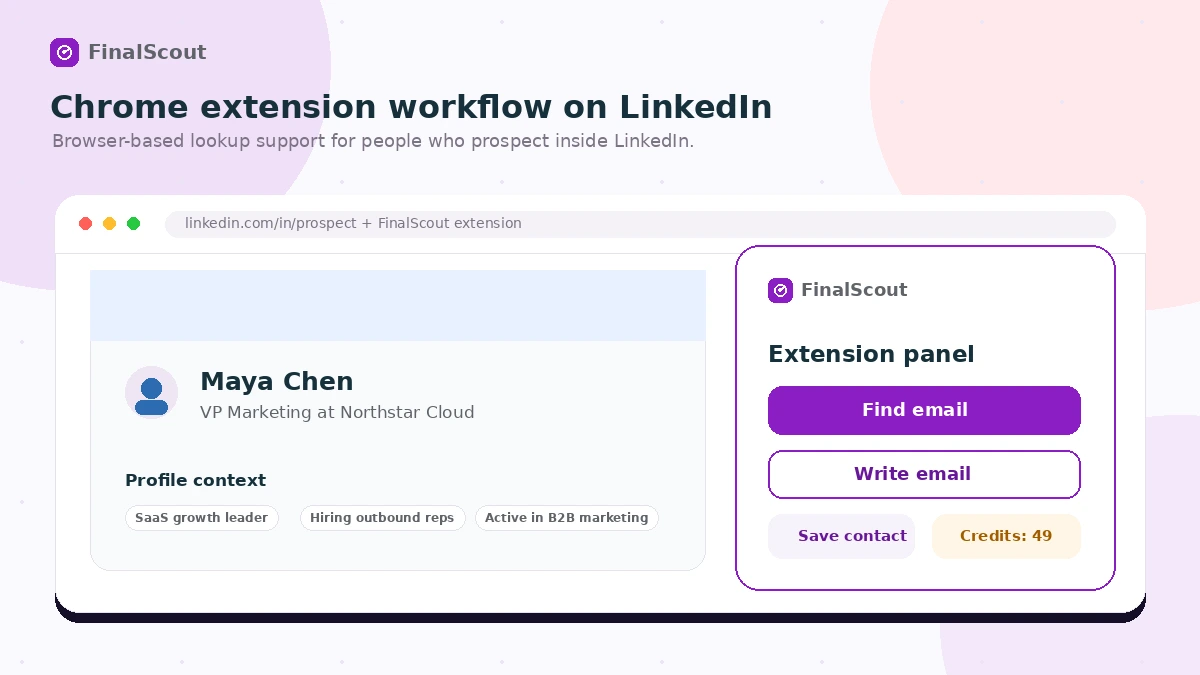
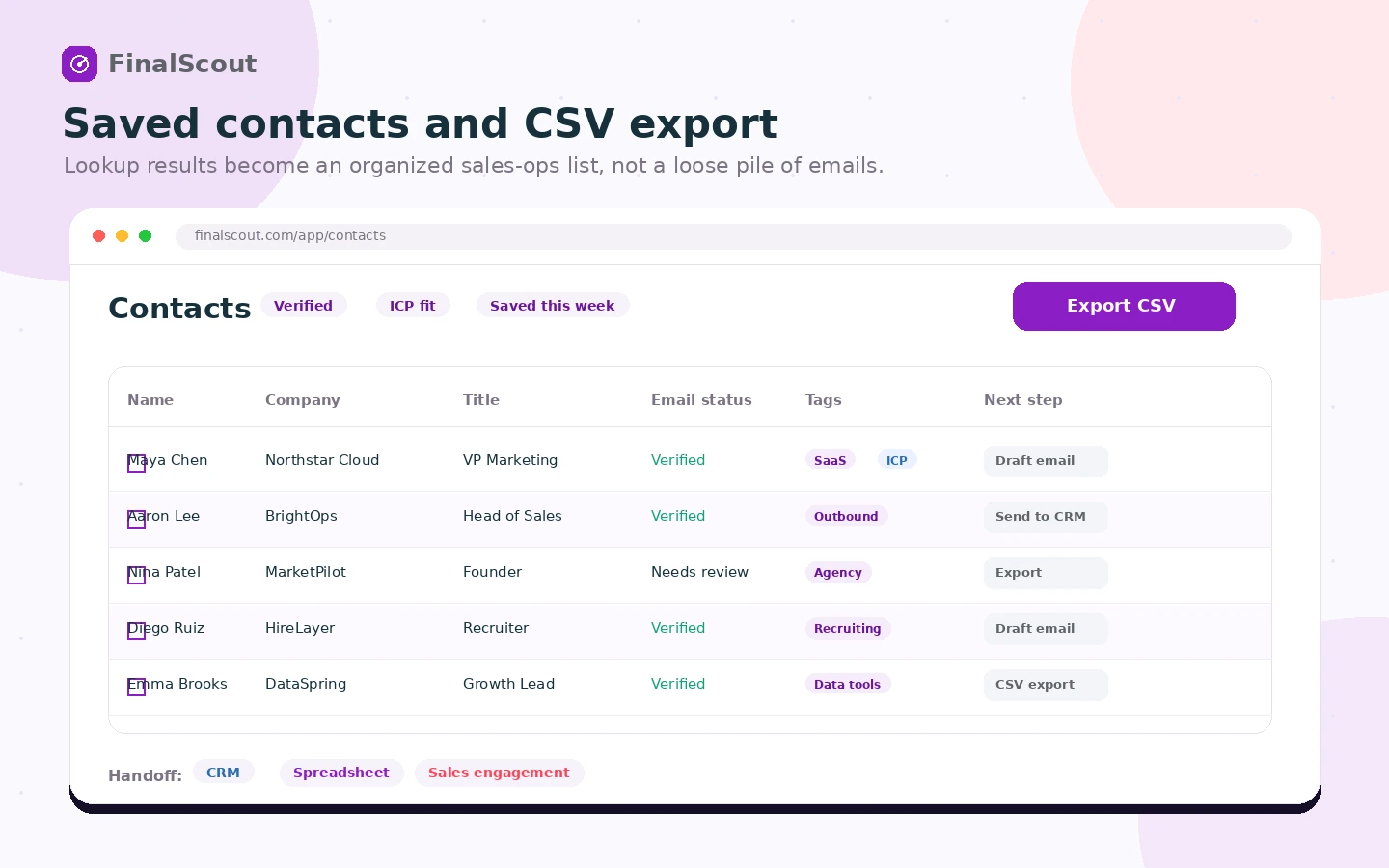
FinalScout helps you move from prospect research to contact discovery. You can use the Chrome extension around LinkedIn workflows, find professional emails, save contacts, organize or tag them, export to CSV, and use EmailAI to draft message copy from prospect context. For teams that already prospect this way, the tool can remove a lot of manual lookup friction.
What it is not: a complete outbound engine.
That distinction matters because a buyer can easily overestimate the value of an email finder. Finding the email is only one step. You still need a good target list, a real reason to contact the person, a sending platform, inbox setup, deliverability care, follow-up logic, compliance judgment, and human editing. FinalScout can support the early part of that workflow, but it does not magically make weak targeting or generic outreach effective.
Our review approach compares public product pages, pricing details, help documentation, buyer workflow fit, deal terms, and nearby alternatives. I would not treat a Chrome extension or AI-written first line as proof that the tool fits your process. The better test is whether it saves time on a prospecting routine you already repeat.
Who should use FinalScout?
FinalScout makes the most sense for buyers who already know where their prospects come from.
Sales reps prospecting on LinkedIn are the clearest fit. If your normal day involves opening profiles, checking company context, saving contact details, and preparing a first message, FinalScout can shorten the path from research to outreach. The condition is that LinkedIn is not occasional; it has to be a real part of your workflow.
Recruiters and talent sourcers may also find it useful when professional email lookup matters more than broad CRM depth. The value is highest when the recruiter is working from LinkedIn profiles and needs a way to build a contact list without jumping between too many tools.
Agencies building client lead lists can use FinalScout as a contact discovery layer before moving data into another campaign system. In that scenario, export quality matters more than the homepage promise. An agency should test whether the CSV fields, email status, tags, and saved contacts are clean enough for client work.
Founders testing outbound may use the free or entry path to validate a prospecting motion. I would keep this small at first. A founder does not need a large plan until they know which market, persona, and message angle produce useful replies.
Technical or sales operations teams may care about API, webhooks, integrations, shared credits, and rollover rules. That is a more advanced buying decision. Before building around it, I would verify the current plan-level access and whether the data actually flows into the rest of the sales stack cleanly.
Who should avoid FinalScout?
FinalScout is not the right first purchase for every outbound problem.
Avoid it if your main problem is campaign sending and sequencing. In that case, a tool like Mailshake or SalesBlink may be closer to the actual job because they focus more directly on outreach execution.
Avoid it if your main problem is inbox placement. Finding more contacts does not solve deliverability. If messages are already landing poorly, Mailivery or a dedicated deliverability workflow may be the more urgent comparison.
Avoid it if you need a CRM or marketing automation platform. FinalScout can help find and export contacts, but ActiveCampaign or a CRM-centered platform is a different category with lifecycle automation, contact journeys, and customer communication depth.
Be careful if you do not prospect from LinkedIn. FinalScout can find professional emails from more than one context, but the strongest workflow appears tied to LinkedIn and Sales Navigator-style research. If your leads come from events, purchased lists, inbound forms, referrals, or another database, test carefully before assuming the extension will matter.
I would also avoid annual billing too early. FinalScout’s terms present purchases as non-refundable, and that changes the risk profile. The free or trial path is not just a nice bonus. It is the part of the buying process that protects you from paying before you understand your own credit usage.
How FinalScout fits into a real workflow
A realistic FinalScout workflow starts before the tool opens.
First, you define the target. That means role, company size, market, region, buying trigger, and reason to contact. Without that, any email finder becomes a faster way to build a weak list.
Then you research prospects in LinkedIn or Sales Navigator. FinalScout becomes useful when it lets you find a professional email, save the person to contacts, generate a draft message, and export the result into your next step. That next step might be a CRM, cold email platform, spreadsheet, recruiting process, or agency handoff.
The tool can help at four points:
- finding a valid work email,
- reducing manual profile copying,
- drafting a starting outreach message,
- exporting or organizing the contact for the next system.
The human work does not disappear. You still need to decide whether the prospect is worth contacting, whether the email address makes sense, whether the generated message sounds credible, and whether the campaign follows your compliance and deliverability standards.
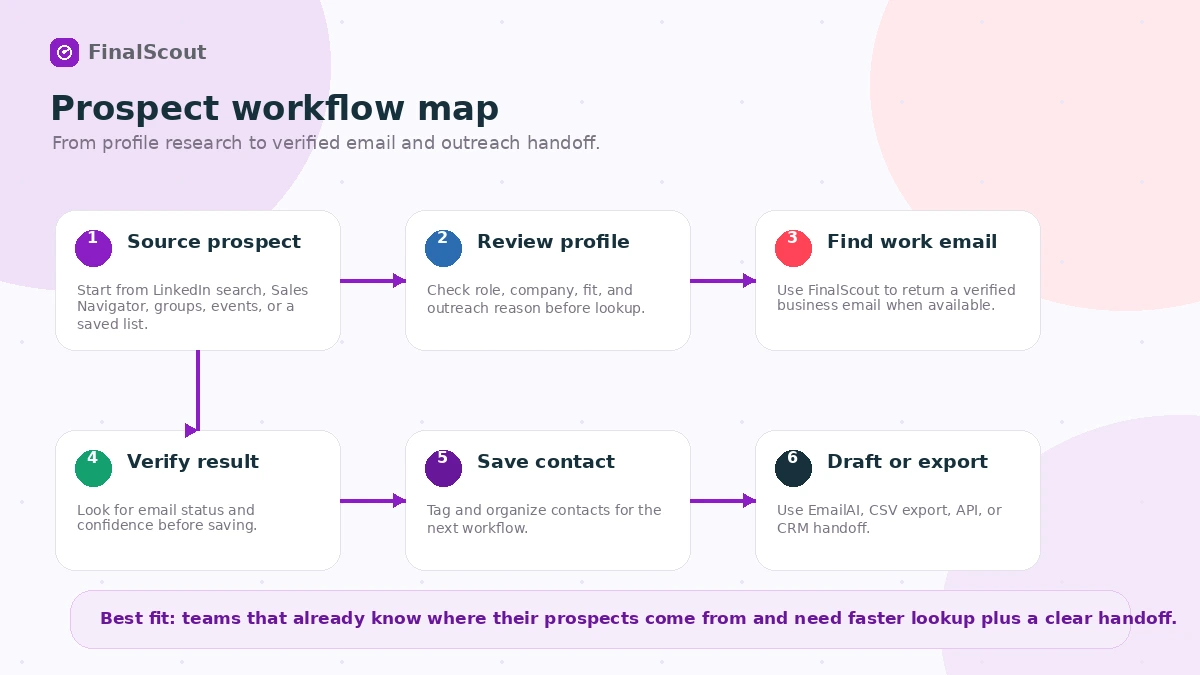
Workflow check: If your team already prospects inside LinkedIn, test FinalScout on a small list before comparing bigger plans.
Real-world buyer scenarios
A solo founder testing outbound
A founder may want to contact 50 to 100 potential partners, agencies, customers, or investors. FinalScout can help if the founder already has a precise target list and wants to avoid manual email hunting.
The failure point is usually not the software. It is the list. If the founder is still guessing who to contact, FinalScout may simply make that guessing faster. I would use the free or trial path, test a small list, and only pay after seeing whether the returned emails and drafted messages are actually useful.
A small sales team prospecting on LinkedIn
This is one of the stronger fits. A small team may need shared credits, contact export, saved lists, AI draft support, and faster lookup from profiles. The buying question is whether Solo is enough or whether Team makes more sense because credits and concurrency are shared.
The mistake is choosing by team size alone. A two-person team with high volume may need more than a small plan. A three-person team with occasional prospecting may not.
An agency building lead lists for clients
An agency may use FinalScout to build prospect lists before handing contacts to a separate outreach system. Here, the main test is not just lookup accuracy. It is export cleanliness, tags, contact fields, repeatability, and whether the process can be explained to a client.
Agencies should also watch credit consumption closely. Bulk scraping and email finding can make the monthly price feel different from the plan label.
A recruiting workflow
Recruiters may use FinalScout to contact candidates, partners, or hiring-side prospects when LinkedIn profiles are the starting point. AI-assisted message drafting may help with first-pass writing, but recruiting outreach usually needs careful tone. A generic AI-generated compliment can feel worse than a short, honest message.
For this use case, I would judge EmailAI by edit distance: how much rewriting is needed before the message sounds human and specific?
Key features that actually matter
LinkedIn email finding
FinalScout’s core value is email discovery around LinkedIn-style research. If you already spend time on LinkedIn profiles, groups, events, or search results, the extension can reduce manual lookup work.
Buyer note: test your own market. Email finders can perform differently by region, industry, seniority, company type, and data availability.
EmailAI message drafting
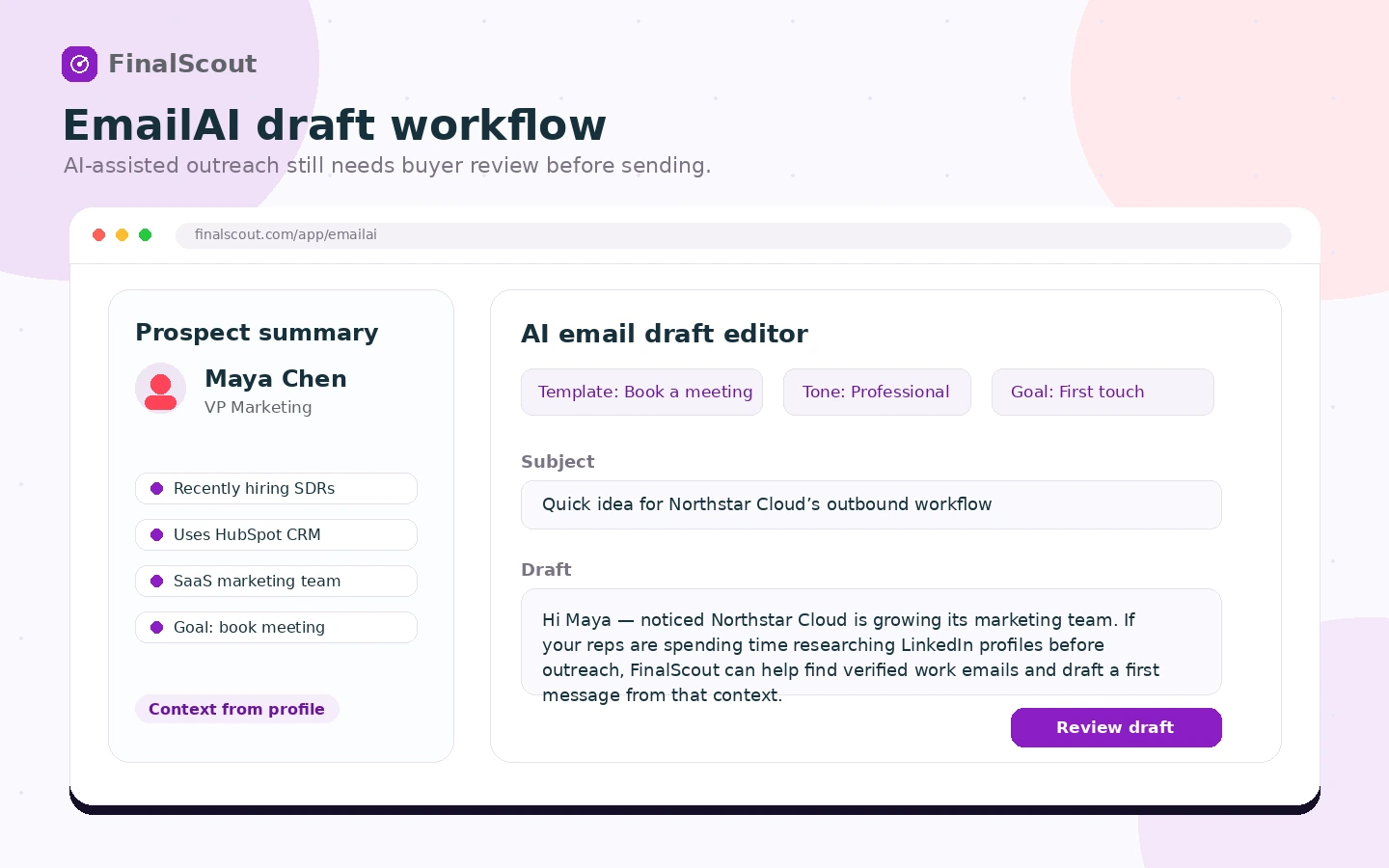
EmailAI can create outreach drafts using prospect context. This matters because contact discovery and first-message writing often happen together.
Buyer note: treat the AI draft as a starting point. If every message sounds like a generated compliment, prospects will feel it. The value is speed, not permission to skip human editing.
Contact management and CSV export
Saved contacts, tags, statuses, and CSV export matter when FinalScout feeds another system. This is especially important for agencies, SDR teams, and recruiters who need organized handoff.
Buyer note: test export fields before paying for volume. A list that looks good in the app still needs to work in your CRM, sequencer, spreadsheet, or reporting process.
Credit-based usage tracking
Credits are not just a billing detail. They determine whether the plan fits real usage. The help center explains that valid email finding, EmailAI generation, profile scraping, and bulk workflows can consume credits in different ways.
Buyer note: measure a normal session before choosing a plan. A single afternoon of prospecting can teach you more than the pricing table.
Team, API, webhook, and integration paths
FinalScout’s plan grid includes team sharing, integrations, API and webhook access, and rollover notes. These are useful when prospecting data needs to move into a larger operating system.
Buyer note: verify plan-level access before building a workflow around API or webhooks. Do not assume technical access is meaningful until you know the limits, rate behavior, and destination system.
Pricing and plan value
FinalScout pricing is fairly visible, but the plan names do not tell the whole story.
At the time of review, the public pricing page shows a Free Trial path at $0, Solo at $50 per month, Team at $100 per month, Business at $300 per month, Corporate at $800 per month, and a Custom option for volume pricing. The page also shows annual billing with two months free.
That is the headline.
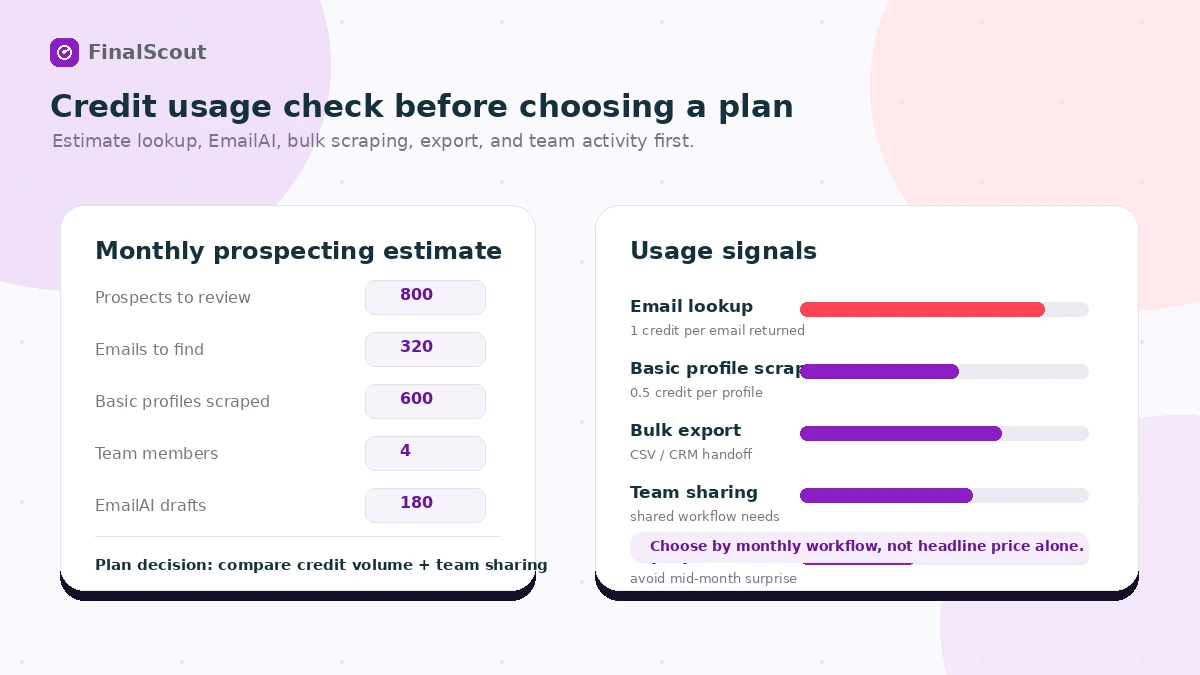
The real pricing question is credit behavior. FinalScout’s own help documentation describes a unified credit system. Finding a valid email can consume 1 credit. EmailAI generation can consume 0.5 credit. Scraping a basic LinkedIn profile without finding an email can consume 0.5 credit. Some actions can combine these costs.
This means a buyer should not ask only, “Can I afford the monthly plan?” The better question is, “How many useful contacts can I produce per month at this plan level, and what does each contact cost once lookup misses, AI drafts, exports, and team usage are considered?”
The free or trial path is useful because it lets you test actual credit burn. Solo can make sense for a single user with a moderate prospecting cadence. Team and Business become more logical when shared credits, concurrent scrape tasks, export volume, and collaboration matter. Corporate and Custom are only worth considering when the workflow is already proven and volume justifies it.
Annual billing can reduce the effective monthly cost, but I would not start there unless the tool has already passed a real workflow test. Because purchases are presented as non-refundable in the terms, the annual discount should come after confidence, not before it.
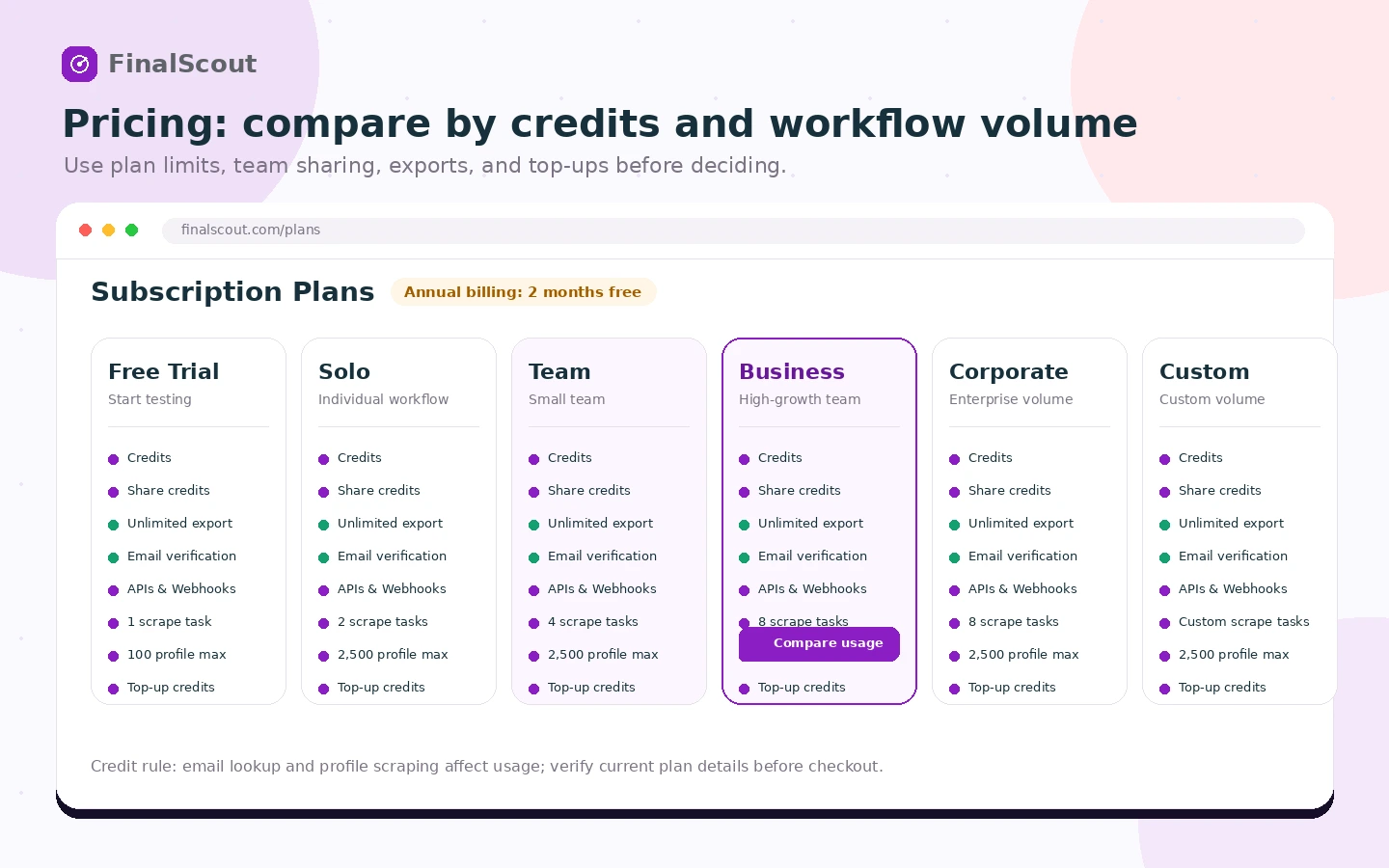
Pricing check: Compare the live plan grid against your real monthly prospecting volume before upgrading.
Check FinalScout pricing Check current offers Read store guide
Free plan, trial, coupon, and checkout notes
FinalScout’s safest savings path is not really coupon-first. It is test-first.
The public site promotes a free entry path and 50 emails per month for free. The terms also mention a 14-day free trial for new users. The pricing page may require adding a card to activate the trial, so buyers should verify the current account flow before assuming there is no billing risk.
I would use the free or trial path to answer four questions:
- Can FinalScout find usable emails in my target market?
- How many credits does one normal prospecting session consume?
- Do the EmailAI drafts reduce writing time, or do they need heavy editing?
- Does the export workflow fit my CRM, sequencer, or spreadsheet process?
Only after those answers are clear would I look at paid plans, annual billing, top-up credits, or the FinalScout coupon page. A discount can improve a purchase, but it should not be the reason to buy an email finder.
The checkout caution is simple: live pricing, credit rules, and terms matter more than old screenshots or third-party pricing references. Verify the current plan grid, cancellation language, and payment flow before committing.
What I would check before buying FinalScout
If I were buying FinalScout for a real prospecting workflow, I would check these items before paying:
- Valid email rate in my market. Test real prospects, not easy demo profiles.
- Credit use per session. Track lookup, scraping, and EmailAI actions separately.
- Export quality. Confirm that contact fields, tags, statuses, and CSV output work in your next system.
- Message quality. Judge how much editing EmailAI drafts need before they sound credible.
- LinkedIn dependency. Make sure your team actually works where the extension provides value.
- Team sharing and concurrency. Choose Team or Business only if shared credits and scrape tasks will be used.
- Refund and annual billing risk. Read the current terms before paying for a larger or annual plan.
A simple test before paying
Before paying, I would run a small test like this:
- Choose 25 to 50 real prospects from your actual target market.
- Use FinalScout to find emails from the same source your team normally uses.
- Track how many valid emails are returned and how many credits are consumed.
- Generate a few EmailAI drafts and measure how much editing they need.
- Export the list and import it into your next tool or spreadsheet.
- Compare the time saved against manual lookup or your current email finder.
- Decide whether monthly, annual, top-up, or team billing makes sense.
This test is intentionally small. The goal is not to prove FinalScout works for everyone. The goal is to find out whether it works for your prospects, your messaging, your data handoff, and your monthly volume.
Pros explained
The LinkedIn workflow is clear. FinalScout is easiest to understand when LinkedIn is the starting point. The Chrome extension and profile-centered workflow make sense for buyers who already research prospects there.
Email finding and message drafting sit close together. Some tools stop at email lookup. FinalScout’s EmailAI angle can reduce the blank-page step after finding a contact. That matters when a seller or recruiter needs a starting message quickly.
Pricing is easier to inspect than many sales tools. The public plan grid shows several tiers, annual billing, team sharing, credit-related features, export, integrations, API, webhooks, and rollover notes. Buyers still need to verify live checkout, but the starting comparison is fairly visible.
Team and technical paths exist. Shared credits, concurrent scraping, integrations, API, and webhooks make FinalScout more interesting for teams than a bare-bones lookup extension.
Cons explained
Credit math can get tricky. A buyer may think in monthly plan prices, but actual value depends on how many emails, profiles, AI drafts, and bulk actions the team needs. This is the first place I would slow down.
It is not an all-in-one outbound platform. FinalScout helps with prospect discovery and preparation. It does not replace a mature CRM, campaign sequencing, deliverability setup, inbox management, or sales reporting workflow.
LinkedIn dependence can narrow the fit. If your list-building motion does not happen around LinkedIn or Sales Navigator, FinalScout may still be useful, but the strongest workflow advantage becomes less obvious.
Email accuracy and data freshness still need testing. Public reviews tend to praise ease of use and email discovery, but some buyers mention credit limits and occasional inaccurate or outdated data. That is normal in this category, but it is still a buying risk.
Refund flexibility is weak. The terms present purchases as non-refundable. That makes the free/trial path more important and annual billing less attractive until the workflow has been proven.
Green flags and red flags
Green flags:
- Your team prospects from LinkedIn every week.
- You can clearly estimate monthly lookup volume.
- You need contact export more than a full sales engagement suite.
- You already have a CRM, sequencer, or outreach process after lookup.
- You can test the tool with a real list before paying.
Red flags:
- You are buying only because a discount or annual saving looks attractive.
- You expect AI-generated personalization to replace thoughtful outreach.
- You do not know where your prospects will come from.
- You need deliverability repair more than contact discovery.
- You cannot tolerate non-refundable subscription language.
The easy mistake is buying an email finder because “more contacts” sounds like more opportunity. The better way to judge FinalScout is to ask whether the contacts are accurate, reachable, exportable, and useful enough to support a real outbound process.
FinalScout vs alternatives
FinalScout has a specific role. It should be compared against nearby tools based on the buyer’s actual bottleneck.
Mailshake vs FinalScout
Mailshake is a stronger comparison when the buyer needs cold email campaign sending, sequences, follow-ups, and outreach execution. FinalScout may still make sense before Mailshake if the main missing piece is finding valid contacts from LinkedIn.
If you already have contact data and need campaign operations, read the Mailshake store guide instead of treating FinalScout as the whole stack.
SalesBlink vs FinalScout
SalesBlink is more relevant when the buyer wants a broader sales outreach workflow, not just contact discovery. FinalScout is cleaner when the job is finding emails, saving prospects, generating starting copy, and exporting the list.
The tradeoff is scope. Broader tools can reduce stack fragmentation, but they may also add complexity if all you need is email discovery.
Mailivery vs FinalScout
Mailivery is an adjacent route, not a direct replacement. It matters when the real problem is deliverability and inbox placement. FinalScout can help you find people to contact, but it does not guarantee that your outbound emails land well or get replies.
If inbox placement is the bigger issue, compare the Mailivery store guide before adding more contacts.
ActiveCampaign vs FinalScout
ActiveCampaign is not a direct email-finder alternative. It is a CRM and marketing automation platform. It is better when the buyer needs customer journeys, automation, email marketing, segmentation, and lifecycle communication.
FinalScout may feed contacts into a broader system, but it does not replace the system itself. If the buyer problem is nurturing, segmentation, and automation, the ActiveCampaign store guide is the more relevant next read.
Trust, refund, and buyer-risk notes
FinalScout has several positive trust signals: a public website, visible pricing page, Chrome Web Store listing, G2 presence, support center, API reference link, terms, privacy page, and a clear description of credit behavior.
That does not remove buyer risk.
The first risk is email accuracy. FinalScout promotes high deliverability and email verification, and many public reviews praise ease of use and LinkedIn email finding. Still, email data can be wrong, stale, personal instead of professional, or unavailable depending on market. Test your own segment.
The second risk is credit consumption. The unified credit system is clearer than multiple credit buckets, but buyers still need to understand how lookup, scraping, and EmailAI add up. Heavy usage can change the real cost quickly.
The third risk is AI personalization quality. AI-generated copy can save time, but generic personalization is now easy to recognize. A buyer should use EmailAI as drafting help, not as an excuse to send lazy outreach.
The fourth risk is refund flexibility. The terms say purchases are non-refundable and cancellation takes effect at the end of the current paid term. This is why I would avoid annual billing until FinalScout has passed a real workflow test.
The fifth risk is compliance and data handling. FinalScout publicly states GDPR and CCPA handling around business data, but teams with strict legal, regional, or internal policy requirements should still review the current privacy, terms, and LinkedIn-related workflow implications before rollout.
Final verdict
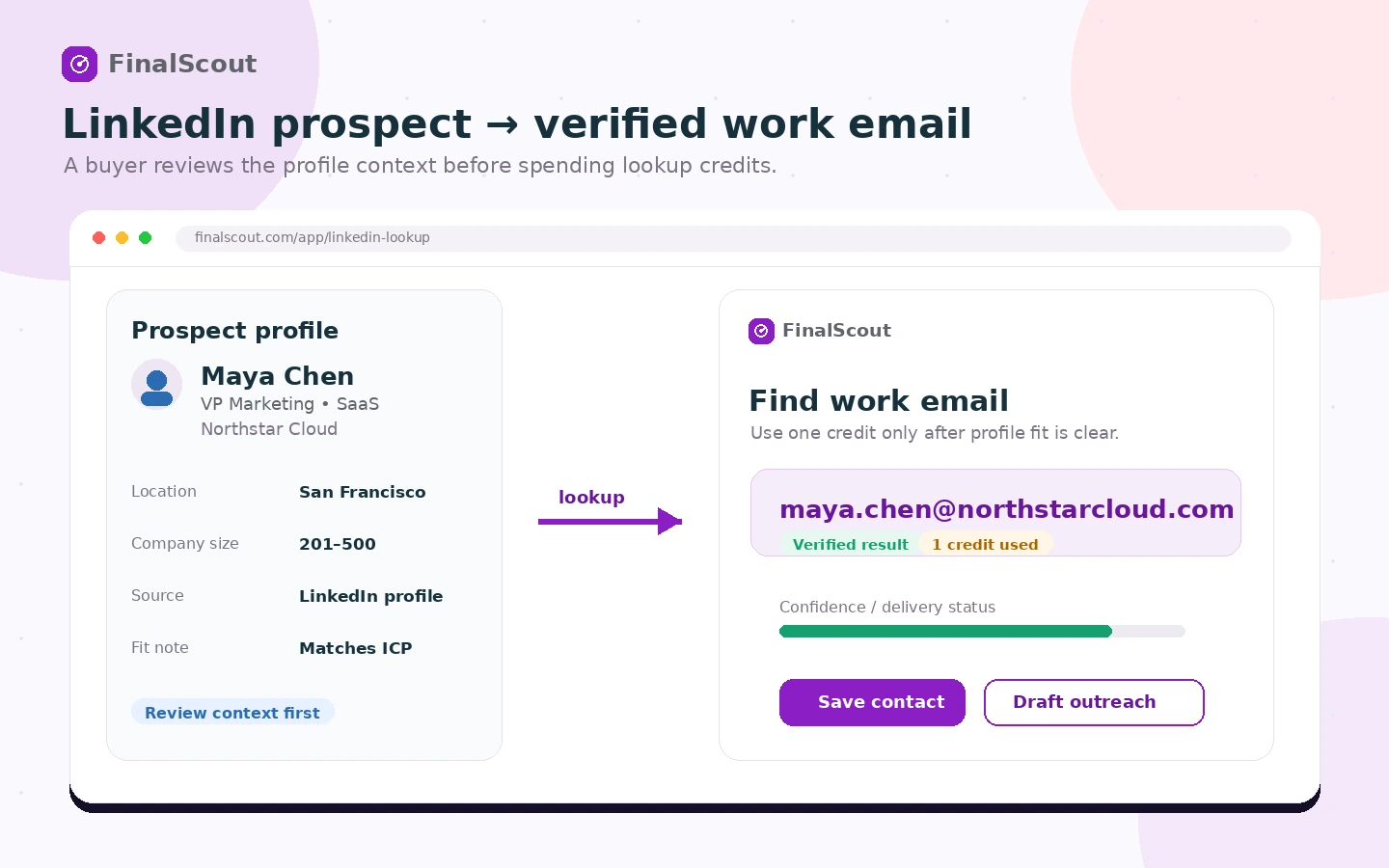
I would consider FinalScout if LinkedIn prospecting is already part of your weekly sales, recruiting, agency, or business development process and you need a faster way to find work emails, draft first messages, and export contacts.
I would skip it if you mainly need a CRM, campaign sequencer, deliverability platform, or broad marketing automation system. FinalScout may support those workflows, but it is not the same category.
I would compare it with Mailshake or SalesBlink if campaign execution is the bottleneck. I would compare it with Mailivery if deliverability is the bottleneck. I would compare it with ActiveCampaign if lifecycle automation and customer communication are the real needs.
The safest next step is simple: test FinalScout on a small real prospect list, track valid emails and credit use, review the AI draft quality, export the contacts, and only then decide whether Solo, Team, Business, annual billing, or top-up credits make sense. If that test saves meaningful time, FinalScout can be a useful prospecting layer. If it does not, a discount will not fix the mismatch.
