
FinalScout Pricing, Plans & Sales Fit
FinalScout is an email discovery and outreach support tool built around LinkedIn prospecting, verified business email lookup, contact management, CSV export, and AI-assisted email writing. It is best understood as a prospecting layer for sales, recruiting, agency, and business development workflows, not as a full cold email sending platform or CRM.

Fit → price → checkout
Use these routes after the official-site check: coupon first, review for fit, compare if unsure.
FinalScout pricing snapshot
Fast commercial checks before pricing, coupons, or a deeper review.
FinalScout product tour
The product tour should help buyers see FinalScout as a LinkedIn-heavy prospecting workflow: find a work email, use AI to draft a first message, save contacts, export data, and watch credit usage. The key buying question is whether the tool improves the buyer's existing outreach process enough to justify monthly credits.
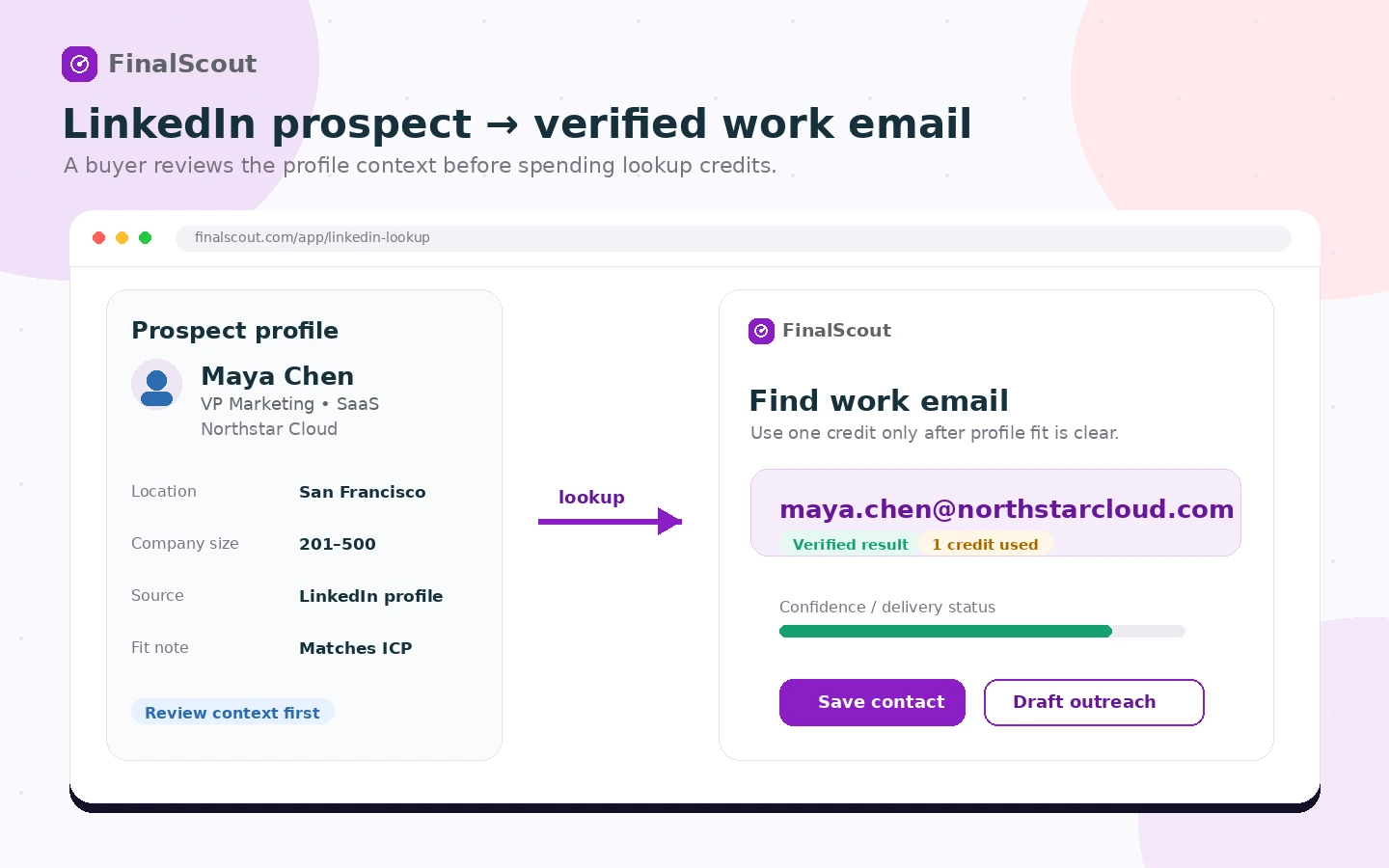
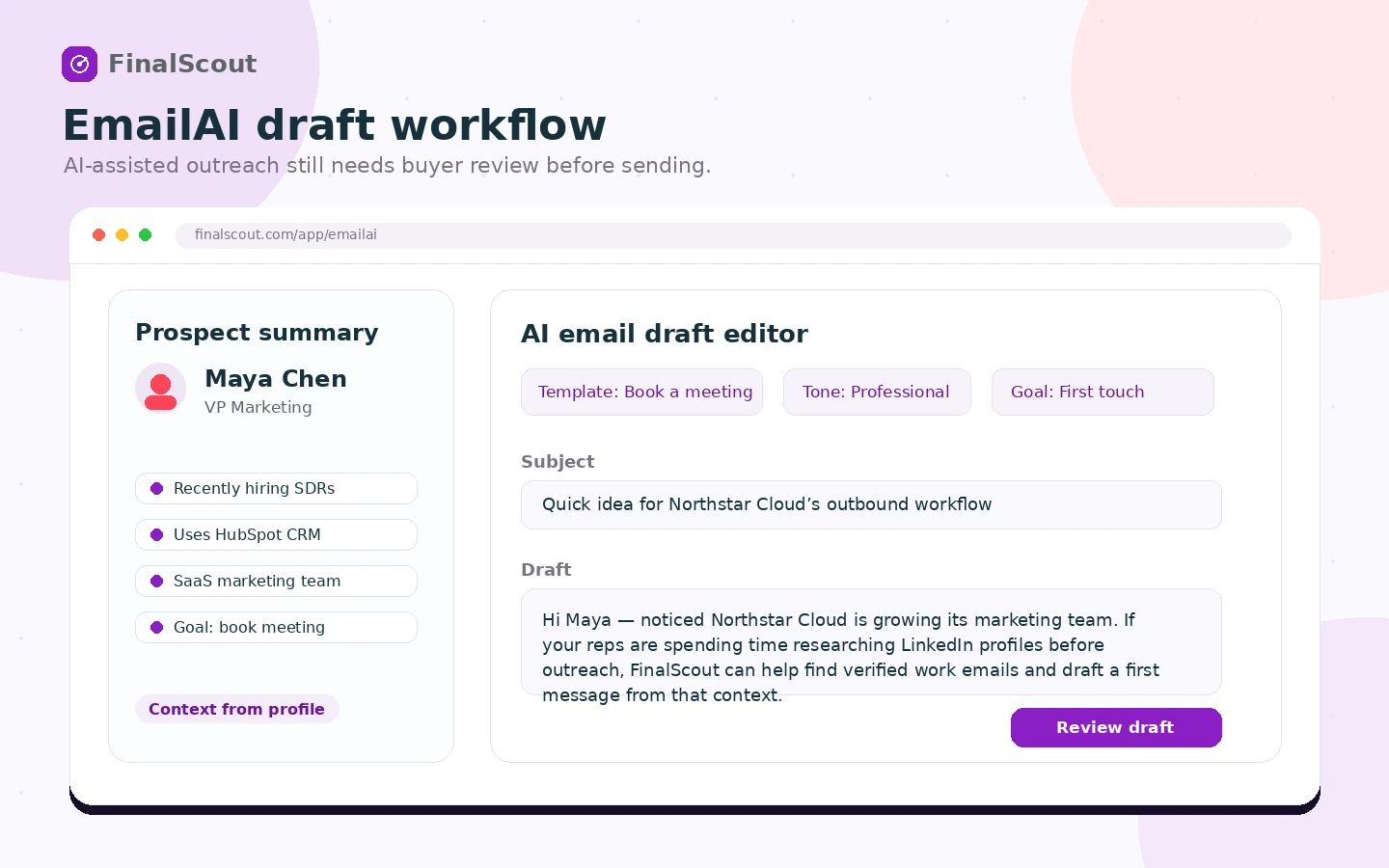
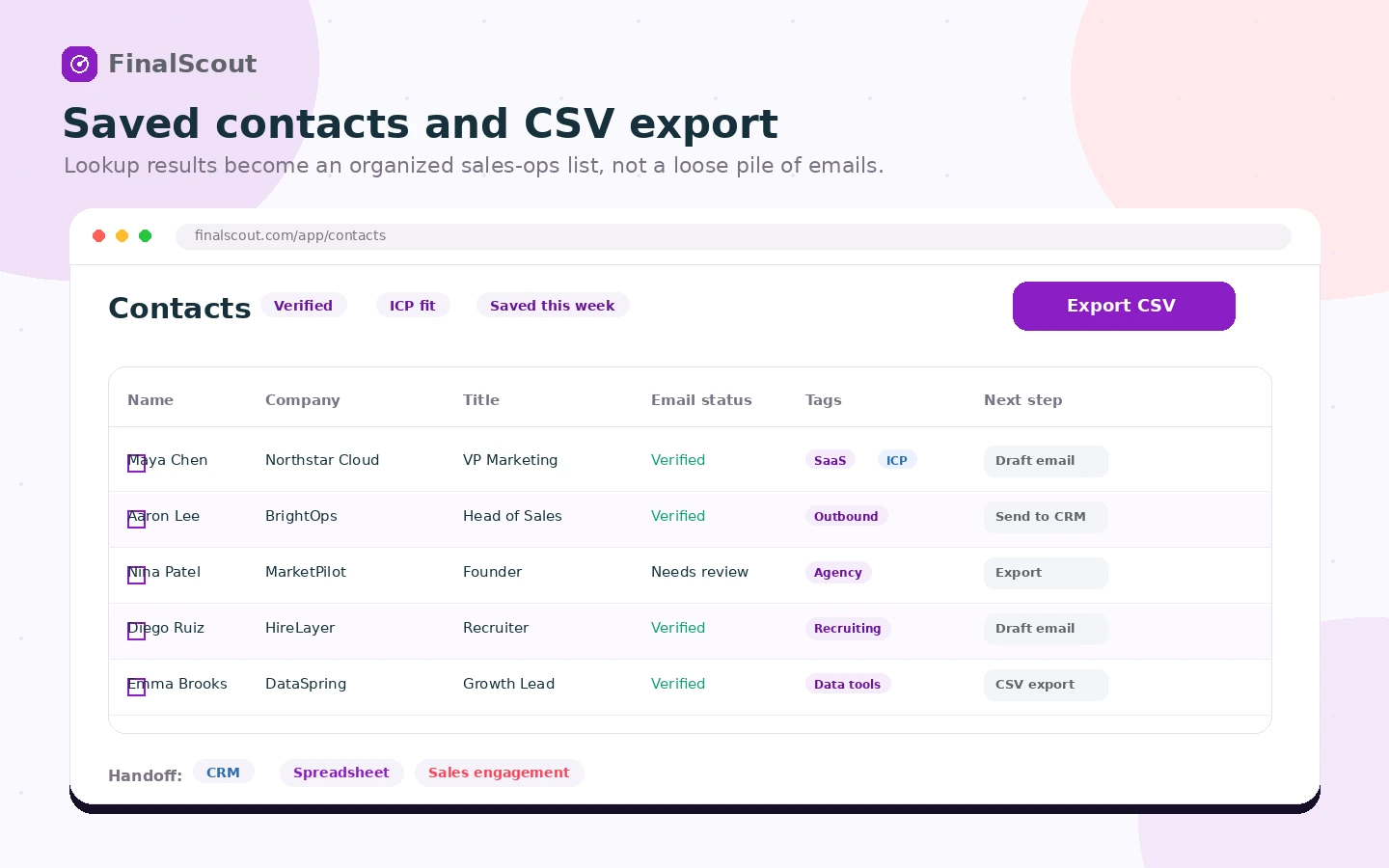
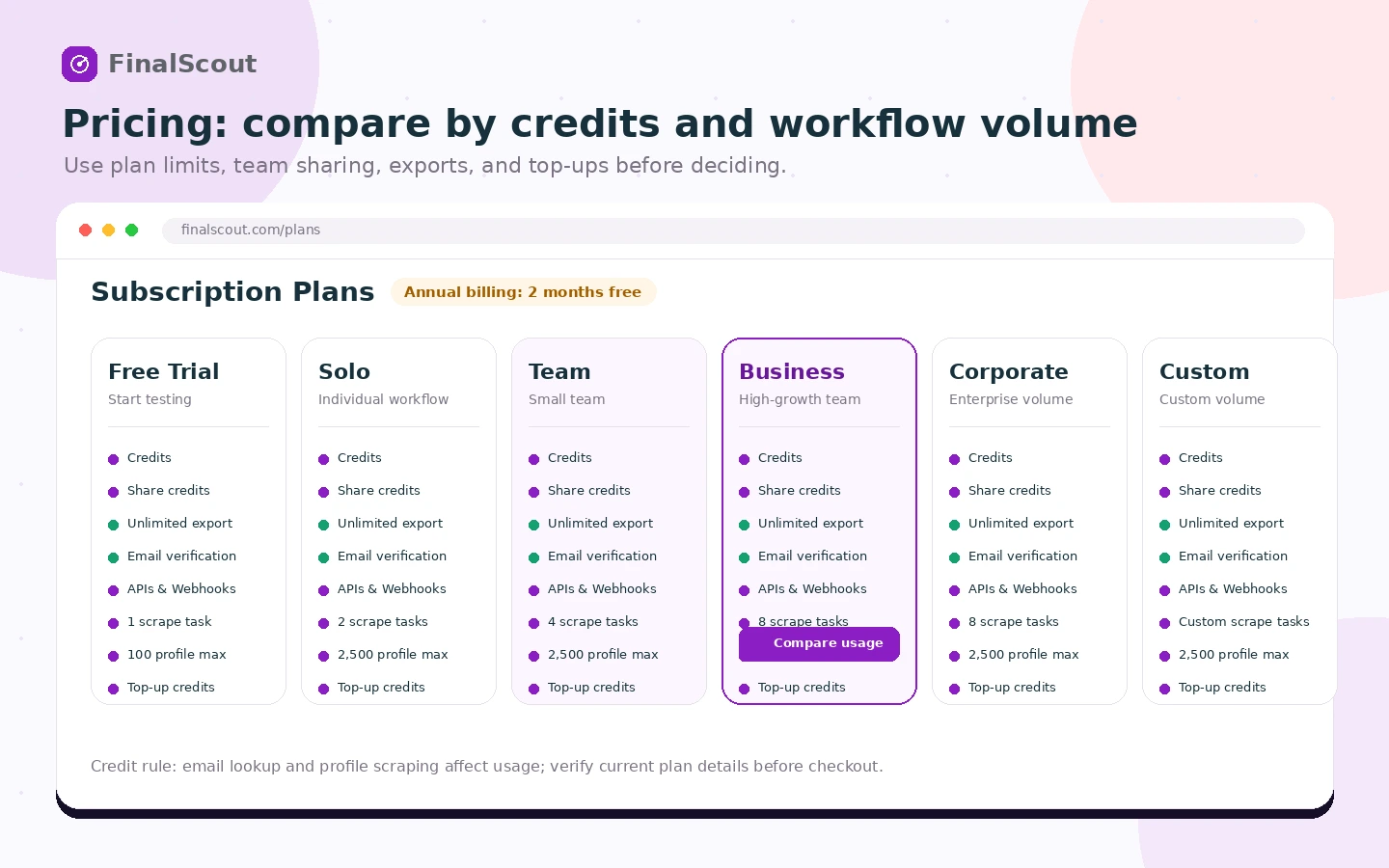
FinalScout is easiest to evaluate when the buyer separates three questions: can it find usable work emails from the lead sources they already use, can the AI-written message save real drafting time, and do the credit limits match monthly prospecting volume? The free path is useful for testing. The paid plans only make sense when the team has a repeatable list-building workflow.
What FinalScout actually does
FinalScout helps users find professional email addresses, especially from LinkedIn-style prospecting workflows, then save contacts and draft personalized messages with AI. It is closer to a lead contact discovery layer than a complete outbound system. A sales team may use it before importing contacts into a CRM, sequencer, or email platform.
- Find professional email addresses from prospect and company context.
- Use AI to create personalized outreach drafts from profile information.
- Save, organize, tag, and export contacts for the next sales workflow.
Pricing and credit fit
The pricing decision is mainly about credits, not just plan names. The public plan grid shows a free or trial entry, Solo at $50/month, Team at $100/month, Business at $300/month, Corporate at $800/month, and Custom for volume needs. Annual billing shows two months free, but buyers should calculate expected monthly lookups, profile scraping, AI writing, exports, and team sharing before choosing a higher tier.
- Free entry is best for checking email quality and basic workflow feel.
- Solo fits one user with a moderate prospecting cadence.
- Team and Business fit shared prospecting workflows with higher concurrency and credit needs.
Product tour video and workflow fit
The product tour video is useful because it shows the core workflow in context: finding an email from a LinkedIn profile and using ChatGPT-powered personalization to draft outreach. Buyers should watch for how many clicks the workflow takes, whether the output feels usable, and whether the process fits their team's existing outreach stack.
Chrome extension and LinkedIn dependency
FinalScout's Chrome extension is a major part of the appeal because it brings lookup and AI writing into the browser workflow. That is useful for sellers, recruiters, and agencies already working inside LinkedIn or Sales Navigator. It is less compelling for buyers who source leads mostly from offline lists, paid databases, events, or inbound CRM records.
- Best fit when LinkedIn is the main prospect research environment.
- Less useful when the buyer only needs occasional domain-based email lookup.
- Extension reliability should be tested before paying annually.
Team, API, and export considerations
FinalScout becomes more interesting for teams when shared credits, concurrent scrape tasks, CSV export, API access, and webhook access matter. A solo user may only care about finding emails quickly. A sales ops or agency buyer should check how contacts move from FinalScout into the CRM, cold email platform, data enrichment process, or reporting workflow.
- Confirm whether team credit sharing is needed before moving above Solo.
- Check API and webhook fit if prospect data needs to flow into internal systems.
- Use export quality and field cleanliness as a buying checkpoint.
Coupons, annual savings, and refund risk
FinalScout's safer savings path is plan-based, not coupon-driven. The official pricing page shows annual billing with two months free and also mentions top-up credits. Since the terms describe purchases as non-refundable, the buyer should treat the trial and free monthly allowance as the main risk reducer. A coupon route is only useful after the tool already fits the workflow.
- Use the free entry path before chasing a discount.
- Compare top-up credits against upgrading to a higher monthly plan.
- Treat annual billing carefully because purchases are presented as non-refundable.
Best alternatives and safest next step
FinalScout should be compared against tools that solve nearby sales and outreach problems. Mailshake and SalesBlink are stronger comparisons when the buyer needs campaign sending and sequencing. Mailivery is more relevant when deliverability is the real concern. ActiveCampaign is broader if the buyer needs CRM and marketing automation rather than prospect lookup. The safest next step is to test FinalScout on a small, real LinkedIn prospect list, then read the review or pricing route before paying.
- Choose FinalScout when email discovery and LinkedIn prospecting are the bottleneck.
- Compare Mailshake or SalesBlink when campaign execution matters more.
- Compare Mailivery when inbox placement is the bigger issue.
- Compare ActiveCampaign when the buyer needs CRM and marketing automation depth.
Best savings path from this store page
This is the clearest savings route to check once the product already looks like a fit.
A public coupon directory reports an active FinalScout checkout coupon path. Treat it as a checkout-test offer and verify the discount before paying.
$0 per month trial path
Two months free with annual billing
Use comparison routes when the category fit is still open
Use these comparison routes when the product still looks plausible, but the category fit is not fully settled.
Better fit when the buyer needs cold email campaign sending and sequencing, not just contact discovery.
Better fit for teams comparing a broader outreach workflow with prospecting, sequencing, and sales execution features.
Better fit when the main problem is email deliverability and inbox placement rather than finding new contacts.
Better fit when the buyer needs CRM, email marketing automation, and lifecycle campaigns instead of prospect lookup.
Verification points worth checking before you click out
Where this store usually fits best in the workflow
Use FinalScout when sales reps already research prospects on LinkedIn and need a faster path from profile to work email.
Use FinalScout when an agency needs to build exportable prospect lists for a client campaign before handing contacts to another outreach system.
Use FinalScout when recruiters need professional contact lookup and quick personalized drafts for candidate or partner outreach.
Use FinalScout when a sales ops team needs email lookup, export, API, or webhook paths to support a larger sales data workflow.
Practical checkpoints before and after signup
- Clarify the target persona, company size, and source list before testing FinalScout.
- Use a small LinkedIn prospect sample to judge lookup quality and extension friction.
- Compare FinalScout against at least one outreach platform and one deliverability tool if the sales workflow is still unclear.
- Track how many credits are consumed by email lookup, EmailAI writing, and scraping.
- Export a sample list to confirm field quality and downstream compatibility.
- Check whether the free allowance is enough for light use or only enough for evaluation.
- Compare monthly versus annual billing and confirm whether two months free outweigh the refund risk.
- Read the cancellation and non-refundable purchase language before paying.
- Choose Team or Business only if shared credits and concurrent scraping will be used.
- Measure valid email rate, reply quality, and time saved against credit spend.
- Review top-up credit usage before upgrading plans.
- Re-check pricing and credit limits before renewal or team expansion.
Fast-read signals for workflow fit and buying friction
Questions readers usually ask before choosing this store
What is FinalScout best for?
FinalScout is best for sales teams, recruiters, agencies, and business development users who need to find professional email addresses from LinkedIn-style prospecting workflows and move those contacts into another outreach process.
Does FinalScout have a free plan or free trial?
The official site says users can find 50 emails per month for free, and the terms mention a 14-day free trial for new users. Buyers should verify the live account setup because the pricing page may require adding a card to activate the trial.
What should buyers check before paying for FinalScout?
Check credit usage, LinkedIn workflow fit, scrape size limits, team sharing, export needs, API or webhook requirements, annual billing, and the non-refundable purchase language before choosing a paid plan.
Is FinalScout a replacement for Mailshake, SalesBlink, or ActiveCampaign?
Not usually. FinalScout is better understood as an email finding and prospecting layer. Mailshake and SalesBlink are more relevant for sending and sequencing campaigns, while ActiveCampaign is broader CRM and marketing automation software.
Does FinalScout support API or team workflows?
The public pricing grid lists API and webhook access, integrations, shared credits on team plans, concurrent scrape tasks, and rollover rules. Teams should verify the current plan limits and integration requirements before building a workflow around it.
Choose the next route that matches what you still need to decide
The strongest next click depends on whether you still need product judgment, a savings route, or a broader category comparison.