Quick verdict
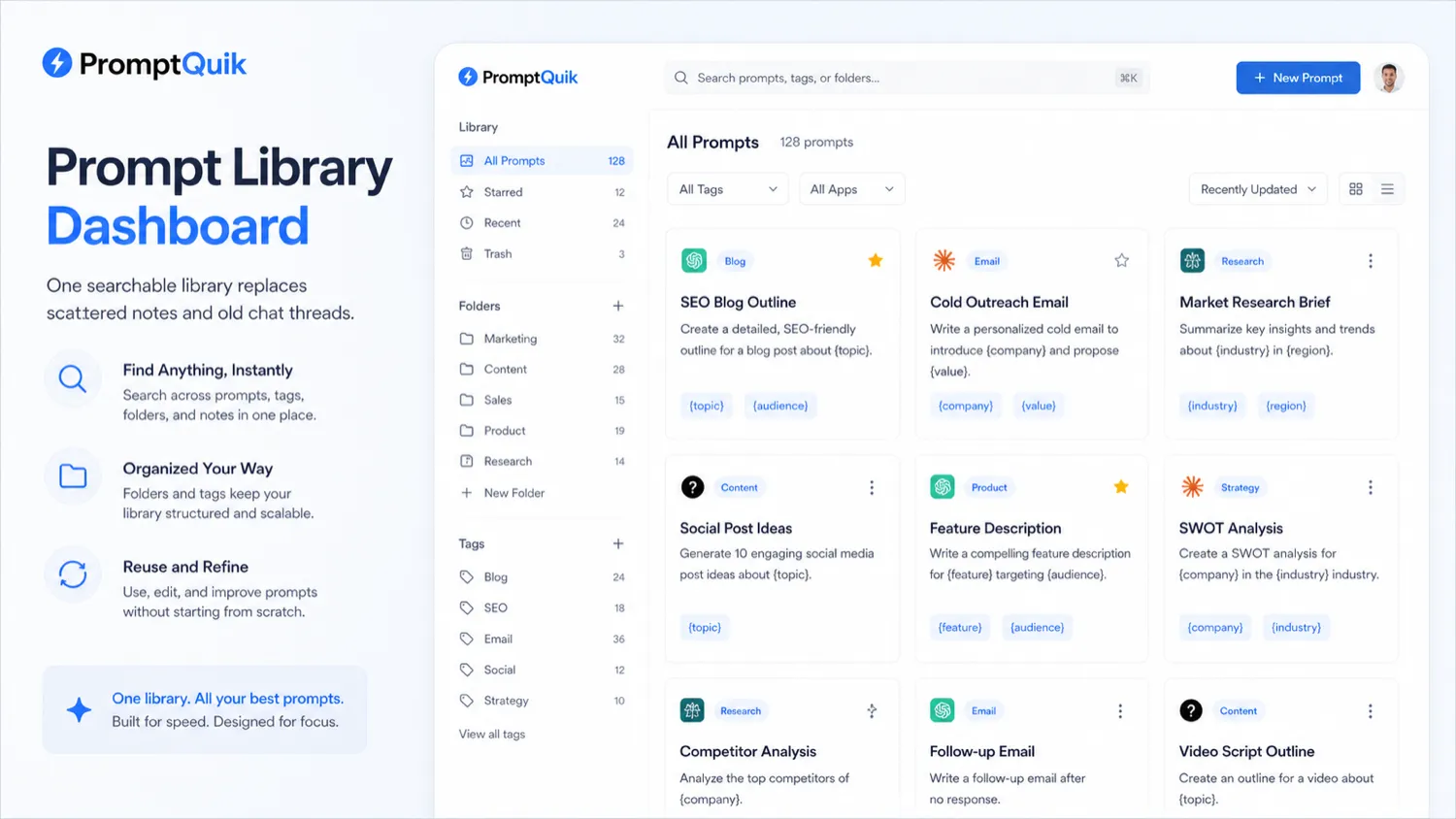
PromptQuik is worth considering if your AI workflow has grown beyond random saved prompts, copied snippets, old chat threads, and half-maintained documents.
That is the real buying tension here. PromptQuik is not trying to be another AI writer. It is closer to a prompt vault: a place to store, tag, search, annotate, reuse, and share the prompts that already work for you. If you use ChatGPT, Claude, Perplexity, or similar tools every week, that can be more useful than it sounds.
But I would not judge PromptQuik by the simple appeal of “keep your prompts in one place.” Many buyers think they need a prompt-management tool when the real problem is weaker: they have not yet built repeatable prompts worth organizing. In that case, a notes app may be enough.
The strongest reason to consider PromptQuik is workflow retrieval. If you regularly reuse prompts for marketing, research, client work, SEO, analysis, content production, outreach, or planning, a searchable library with folders, tags, notes, variables, and sharing can reduce friction.
The main caution is commercial clarity. The public product positioning makes the free tier and core prompt-vault idea easy to understand, but paid-plan value, refund terms, export controls, and team limits need verification before you upgrade.
For my money, the safer path is simple: start free, import real prompts, use them during normal work, and only pay if PromptQuik clearly beats your current storage system.
Next step: If PromptQuik sounds useful, test the prompt-library workflow first and verify the current buyer route before upgrading.
Review snapshot
| Review point | Practical take |
|---|---|
| Best for | Repeat AI users who need a searchable prompt library |
| Not ideal for | Casual users with only a few prompts or teams needing enterprise prompt governance |
| Main use case | Saving, organizing, finding, and reusing prompts across regular AI workflows |
| Free path | Publicly presented free tier with a 20-prompt starting limit |
| Paid path | Premium plans are mentioned, but buyers should verify the current price and limits directly |
| Main strength | Lightweight prompt retrieval and reuse instead of scattered prompt storage |
| Main concern | Pricing, export, privacy, refund, and team controls need live verification |
| Direct comparison | Ainisa for another prompt-library route |
| Adjacent routes | Jasper, Rytr, and Writesonic for broader AI writing workflows |
| Best next step | Save 10 to 20 real prompts, tag them, and see whether retrieval gets faster |
What is PromptQuik?
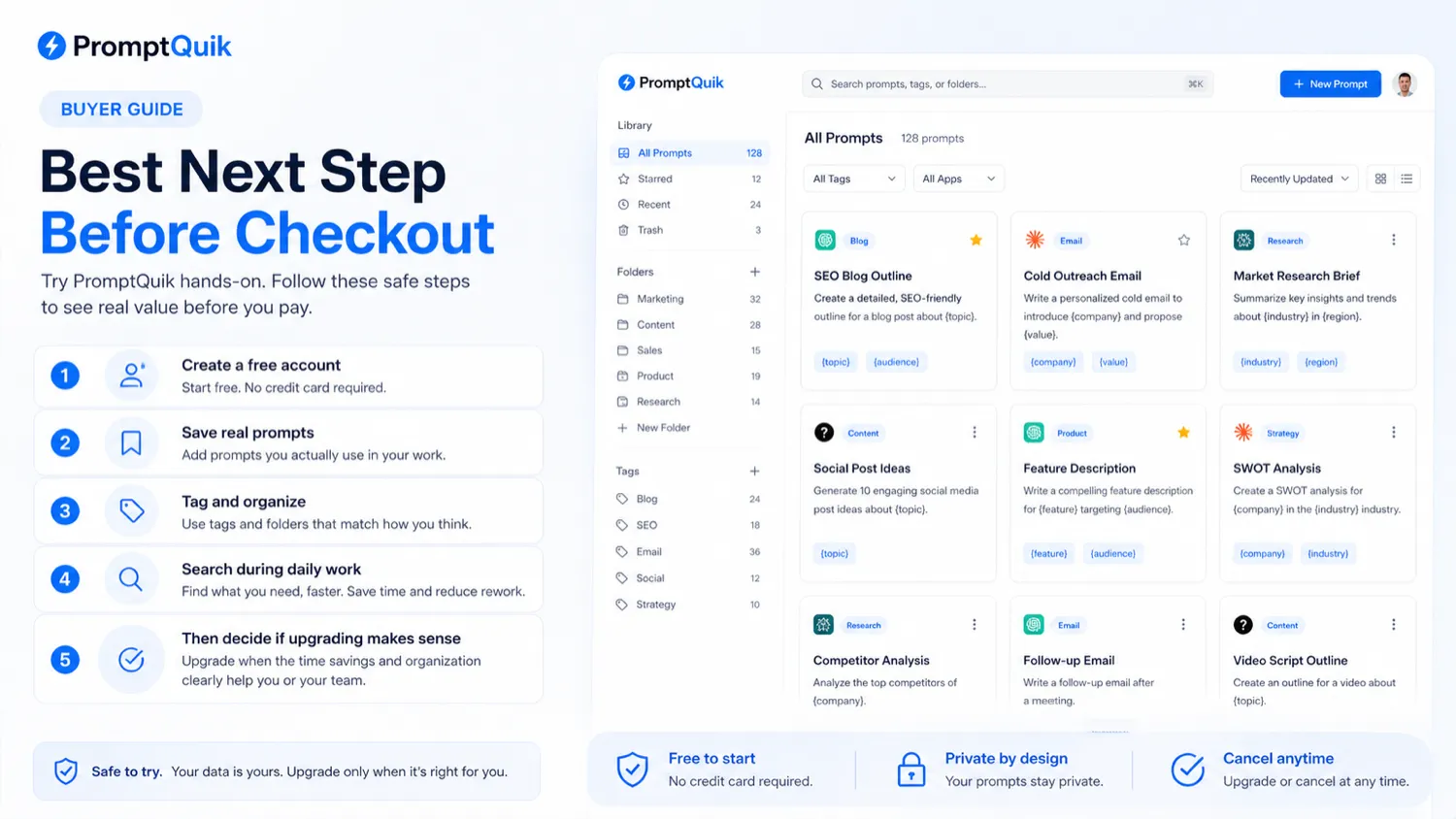
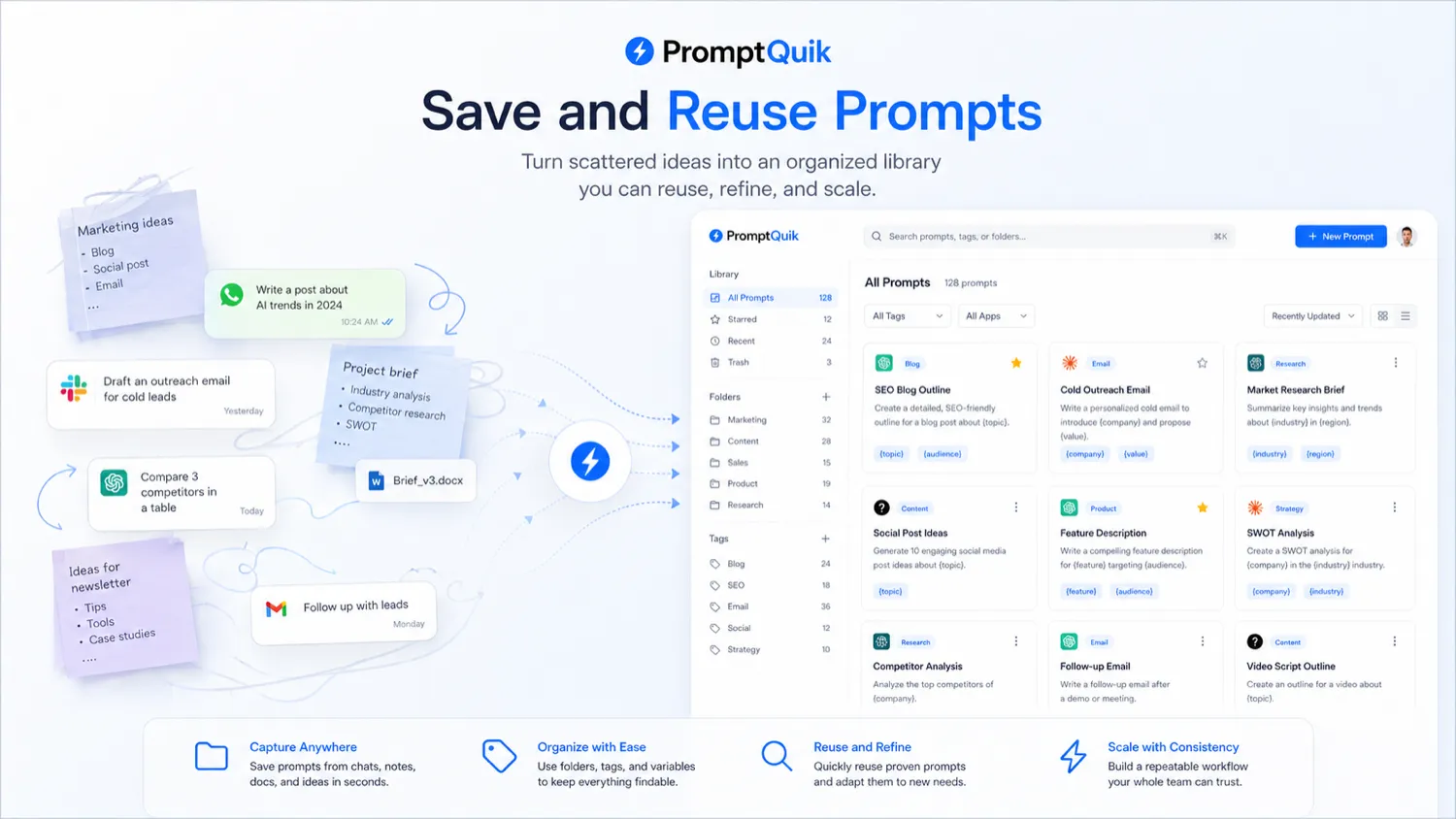
PromptQuik is best understood as a lightweight prompt-management tool for people who want to store, organize, search, reuse, and share AI prompts.
The product category matters. PromptQuik is not a general AI writing assistant like Jasper, Rytr, or Writesonic. It is not trying to generate every piece of copy for you. It sits one layer earlier in the workflow: keeping your working prompts clean enough to reuse.
That sounds small until your AI workflow becomes messy.
If you use AI casually, you may have five prompts in a note file and no real problem. But if you write client briefs, SEO outlines, email frameworks, content prompts, analysis templates, research instructions, coding helpers, reporting prompts, or recurring business workflows, the prompt mess becomes real. You remember that you had a good prompt somewhere. You search old chats. You open three documents. You rewrite the same instruction again. That is the friction PromptQuik is trying to remove.
The current public positioning focuses on storing, organizing, and sharing AI prompts with folders, tags, and variables. Public directory coverage also describes PromptQuik as a way to quickly find prompts for ChatGPT, Perplexity, and Claude, with notes and search. That tells me the buyer job is retrieval, not magic prompt generation.
Our review approach compares public product positioning, pricing signals, prompt-workflow fit, buyer risks, deal-path caution, and nearby alternatives. I would not treat a free tier or third-party coupon listing as proof of value. The product only earns its place if it makes repeat AI work easier.
Who should use PromptQuik?
PromptQuik is most useful for people who already reuse prompts.
A solo creator or marketer can use it to organize prompts for blog outlines, ad ideas, landing page drafts, email sequences, research summaries, product comparisons, and social content. The condition is simple: those prompts need to be repeated often enough that retrieval saves time.
A freelancer may get more value. Client work often involves repeatable patterns: intake questions, proposal drafts, brief analysis, article outlines, report summaries, content refresh prompts, and revision checklists. PromptQuik can keep those prompts in a cleaner structure than a pile of documents, especially if notes and tags help identify when each prompt works best.
A researcher or analyst can also benefit if prompts are used for summarization, extraction, comparison, synthesis, or decision frameworks. In that case, variables can be useful because the structure stays the same while the input changes.
Small teams may find PromptQuik useful when they need lightweight prompt sharing but do not need a full governance platform. A marketing team, for example, might share a small set of approved prompt templates for briefs, newsletters, content research, or customer-facing drafts.
The important condition is repeatability. If your AI use is occasional and unpredictable, PromptQuik may feel like organization work for a problem you do not really have yet.
Who should avoid PromptQuik?
I would be careful with PromptQuik if you expect it to write expert prompts for you automatically. The product is more about storing and reusing prompts than replacing prompt thinking.
I would also skip it if you only use a few prompts. A simple note, browser bookmark, text expander, or knowledge-base page may be enough. A dedicated prompt vault becomes useful when the number of prompts, use cases, models, clients, or workflows starts to create search friction.
Teams with serious governance needs should slow down too. PromptQuik may support sharing, but that is not the same as enterprise prompt operations. If your team needs version control, approval workflows, audit logs, access policies, analytics, model testing, or compliance review, you should compare heavier systems before assuming a lightweight vault is enough.
Privacy-sensitive buyers should also be cautious. Prompt libraries can contain client briefs, internal strategy, research processes, proprietary instructions, sales scripts, and reusable operating logic. Before storing that kind of material, check privacy terms, export options, deletion controls, sharing settings, and account cancellation rules.
Finally, avoid buying PromptQuik only because a deal page appears to mention savings. A discount can make a useful tool cheaper. It cannot make an unnecessary prompt vault useful.
How PromptQuik fits into a real workflow
A good PromptQuik workflow does not begin with creating a beautiful library. It begins with the prompts you already reuse.
The practical workflow looks like this:
- List the prompts you actually use every week.
- Separate personal, client, team, and sensitive prompts before importing anything.
- Save a small group of real prompts into PromptQuik.
- Add folders based on workflow, not vanity categories.
- Add tags for model, task type, client, content format, or stage.
- Add notes explaining when each prompt works and when it does not.
- Use variables for prompts where only the inputs change.
- Search for the prompt during normal work instead of opening old docs or chat threads.
- Decide whether retrieval is faster than your current system.
That last point is the decision point. PromptQuik is not valuable because it stores prompts. Any notes app can store prompts. It becomes valuable if it helps you find the right prompt faster, reuse it with fewer edits, and avoid rebuilding the same instruction from memory.
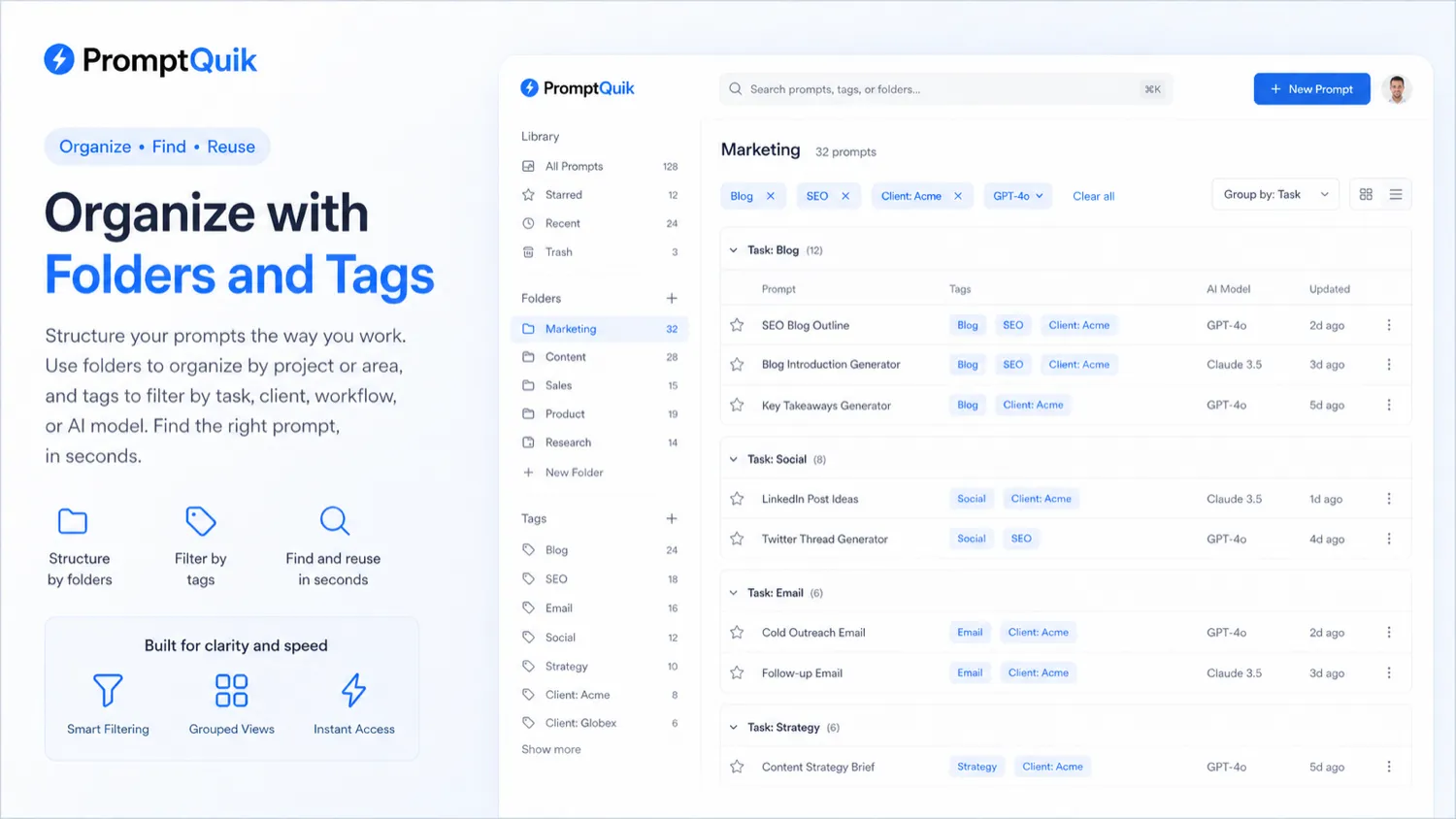
The tool saves time only when retrieval is part of the work. If you save prompts and never return to them, PromptQuik becomes another digital shelf. If you use the same prompt frameworks every week, it can become a small but practical workflow layer.
Real-world buyer scenarios
A freelance writer managing client prompts
A freelance writer may reuse prompts for brief analysis, outlines, comparison tables, reporting, and client emails. PromptQuik can help if those prompts repeat across accounts, but client material needs careful separation. Before saving sensitive context, I would check sharing, deletion, and export behavior.
A marketer building repeatable campaign workflows
A marketer may save prompts for ad angles, landing page copy, email ideas, customer research, and competitor notes. PromptQuik fits when those prompts are grouped by funnel stage or campaign type. It becomes weaker if the library turns into a cluttered archive of ideas that are never reused.
A researcher using ChatGPT, Claude, and Perplexity
A researcher may reuse extraction, comparison, summary, and synthesis prompts across different AI tools. PromptQuik helps when notes and model-specific tags reduce confusion. If the workflow also needs citations, source management, or document history, it should sit beside research tools rather than replace them.
A small team sharing prompt templates
A small team can use PromptQuik to share approved prompt patterns without building a full internal knowledge base. If approval, permissions, auditability, or governance matters, though, lightweight sharing should be tested carefully before the team relies on it.
Key features that actually matter
Prompt library and search
The searchable library is the reason to consider PromptQuik at all. If saved prompts are still hard to retrieve, the vault is not solving the real problem. Buyer note: test search with real titles, tags, and notes, not sample prompts that are too clean.
Folders and tags
Folders and tags work only when they match your process. “Marketing” or “Writing” may be too broad; client, workflow stage, model, or output type may be more useful. Buyer note: decide your folder logic before importing too many prompts.
Notes and prompt context
Notes can turn a saved prompt into reusable knowledge. A prompt without context can be confusing later: which model was it for, what input does it need, and when should it be avoided? Buyer note: add a short “best used when” note to important prompts.
Variables for reusable prompt templates
Variables matter when the same prompt structure is used repeatedly with changing details. They are useful for stable frameworks like briefs, outlines, reports, or extraction prompts. They matter less for one-off creative prompts.
Prompt sharing
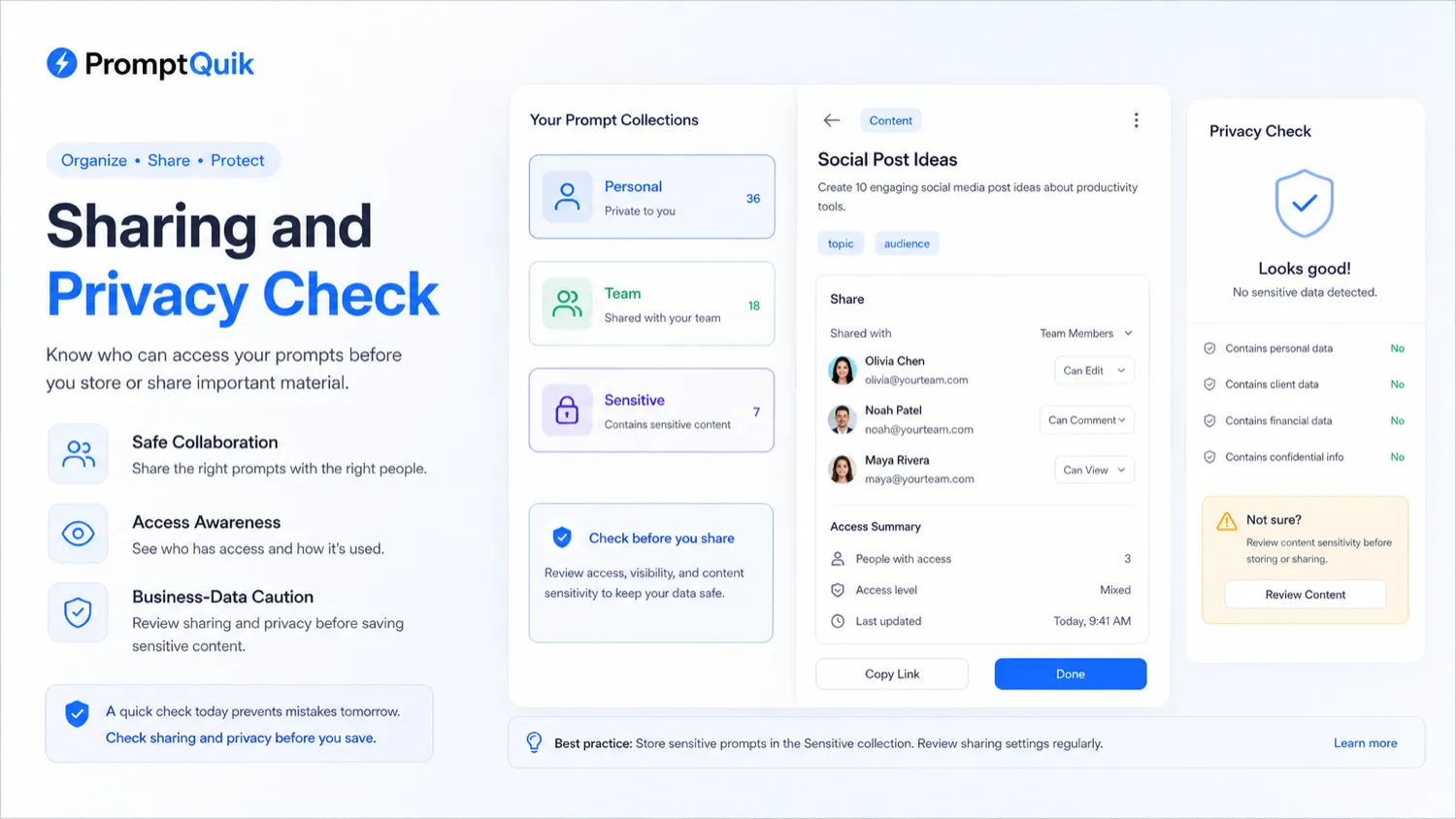
Sharing helps collaborators use proven prompt patterns, but it also creates data risk. A shared prompt may include client context, private strategy, or reusable business logic. Buyer note: verify who can see, copy, edit, or reuse shared prompts.
Pricing and plan value
PromptQuik is easier to judge on workflow than on paid-plan pricing.
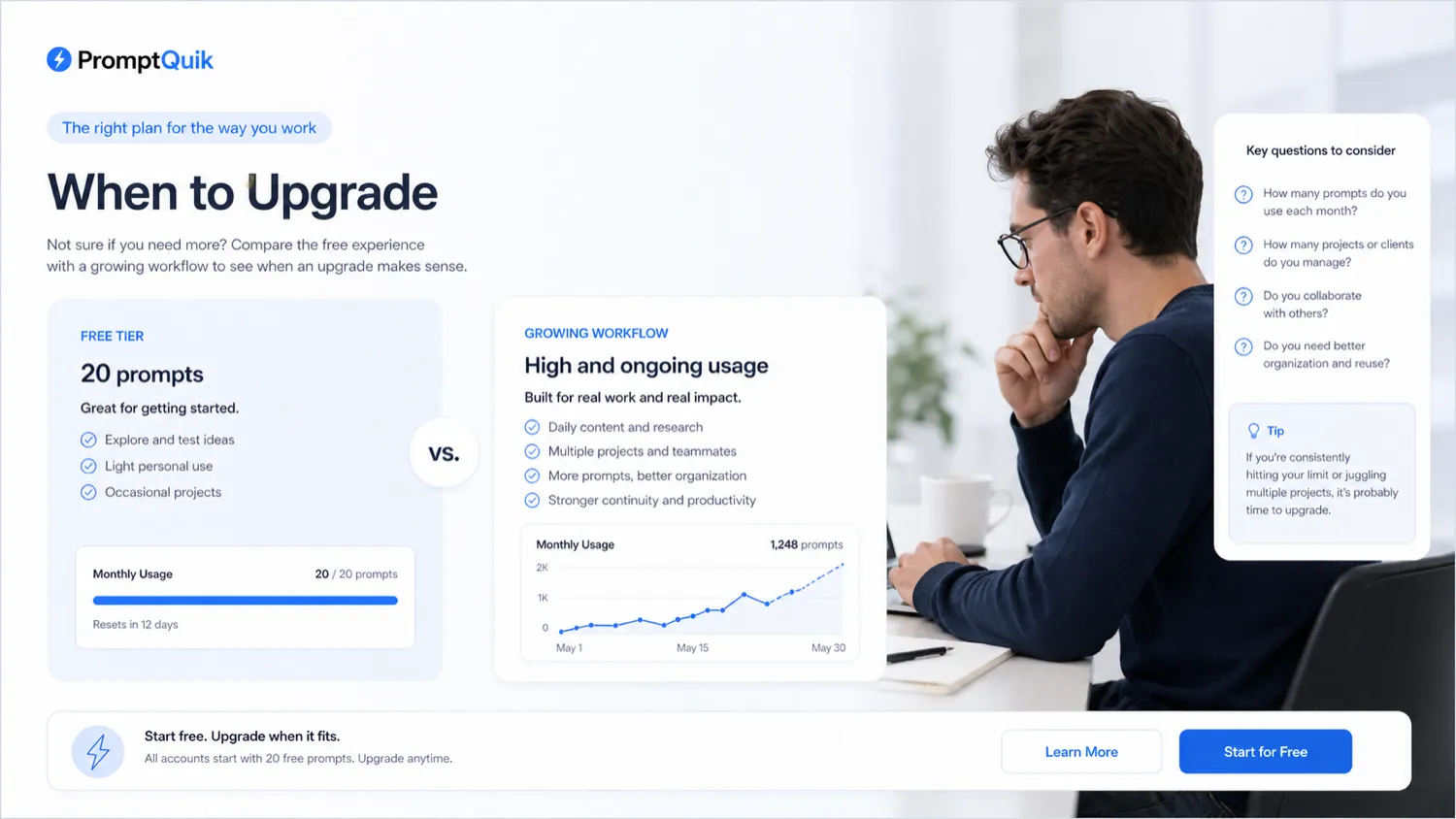
The public information I would treat with higher confidence is the free starting path. PromptQuik is publicly presented with a free tier, and the store data references a 20-prompt free limit. That is enough to test whether the product is solving a real problem.
Paid-plan value is less clear from the public pricing route. Premium plans are mentioned, but I would not treat a stable paid price, renewal total, feature split, refund window, or long-term plan limit as confirmed until the current checkout or account upgrade screen shows it.
That does not make PromptQuik weak. It just changes how I would buy it.
I would start with the free tier and use the 20-prompt limit as a practical test. Add only prompts you actually reuse. If you cannot fill the free library with real prompts, you probably do not need to upgrade yet. If you hit the limit quickly and still feel the library is saving time, then a paid plan becomes easier to justify.
The free tier is not the final product evaluation. It is a workflow filter.
For annual billing, I would be even more cautious. Do not move to a longer commitment until you know PromptQuik is part of your weekly work. Prompt tools can feel exciting during setup and then fade if the habit does not stick.
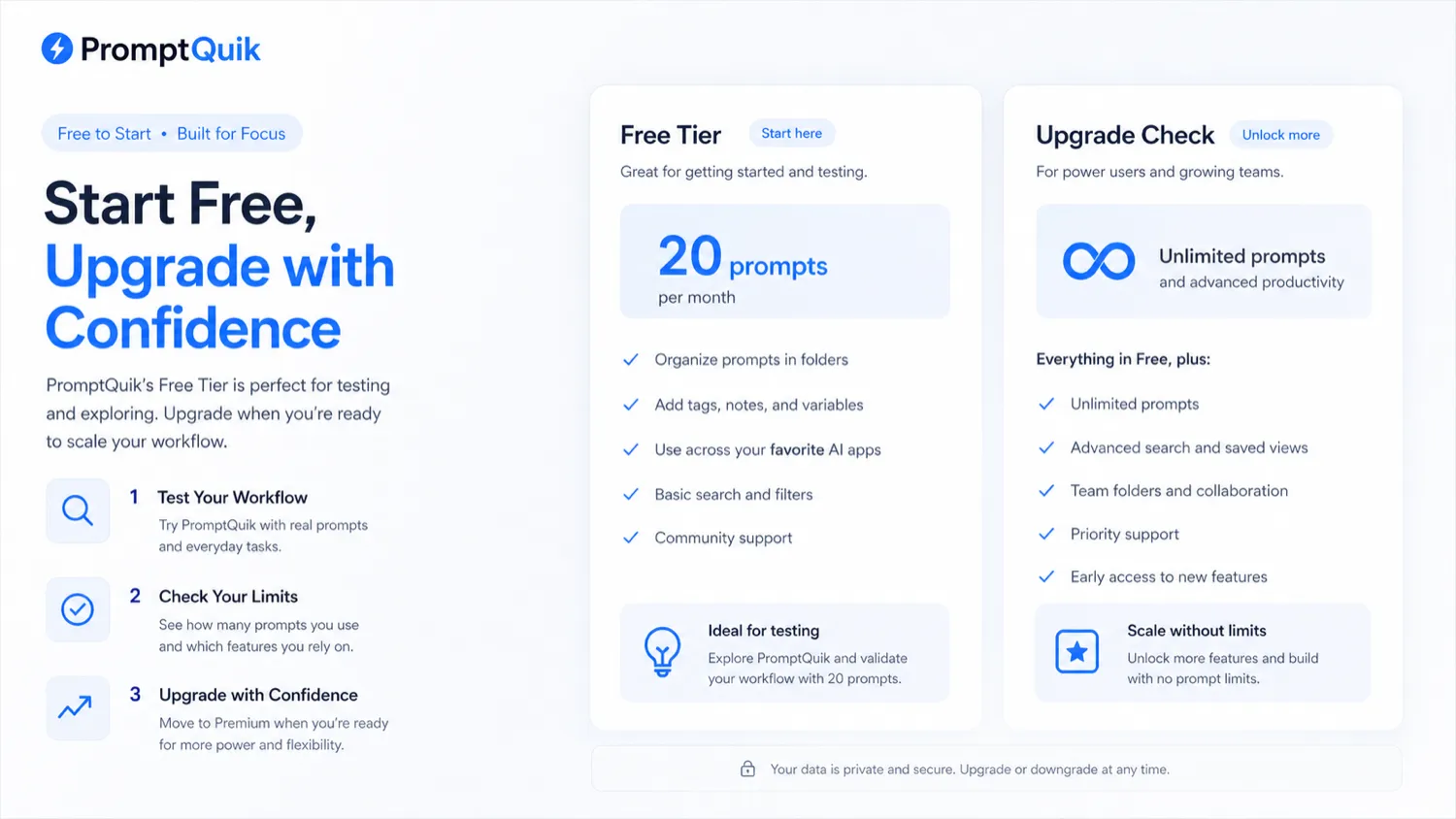
Pricing check: If the free tier proves useful, confirm the live premium plan, included limits, and checkout terms before choosing a paid route.
Check PromptQuik pricing Check current offers Read store guide
Free plan, trial, coupon, and checkout notes
The free tier is the right first step for most PromptQuik buyers.
Use it to answer a concrete question: does a prompt vault make your next AI session faster? If the answer is no, a paid plan is not likely to fix the mismatch. If the answer is yes, the upgrade decision becomes more rational.
I would not treat the coupon path as the starting point. Third-party coupon pages may mention deals, working codes, or discount claims, but those are not the same as confirmed official checkout terms. For a lightweight SaaS tool, the safer order is:
- Confirm that PromptQuik fits your prompt workflow.
- Check the current premium plan and included limits.
- Verify cancellation, renewal, privacy, and export terms.
- Only then check the PromptQuik coupon page or current deal path.
A checkout code can improve a purchase that already makes sense. It should not be the reason you buy.
If no live discount applies, the decision should still be clear: either the prompt vault saves enough time to justify payment, or it does not.
What I would check before buying PromptQuik
If I were buying PromptQuik for a real workflow, I would check seven things before upgrading.
- Prompt limit: Is the premium prompt capacity enough for your real library, or will you outgrow it quickly?
- Folder and tag structure: Can you organize prompts by the way you actually work: task, client, model, output type, or workflow stage?
- Variables: Do variables reduce rewriting time for repeat prompt templates, or are most of your prompts too unique?
- Sharing controls: Can you safely share prompts without exposing private client or team material?
- Export and deletion: Can you move or remove your prompt library if you stop using the product?
- Privacy terms: Are you comfortable storing business prompts, research patterns, client briefs, or internal workflows inside the account?
- Checkout terms: Is the current price, renewal, refund, cancellation, and deal path clear before payment?
The privacy point is not theoretical. The prompts you save may reveal how you research, sell, write, analyze, or serve clients. That is useful data. Treat it accordingly.
A simple test before paying
Before paying, I would run a small test like this.
- Choose 10 to 20 prompts you have used more than once.
- Save them in PromptQuik with clear titles.
- Add folders based on workflow, not broad categories.
- Add tags for model, task, client type, or output format.
- Add notes explaining when each prompt works best.
- Use PromptQuik during normal work for one week.
- At the end of the week, ask whether you found prompts faster than before.
The test should feel boringly practical. That is the point.
If PromptQuik saves time only during setup, be careful. If it saves time when you are busy, switching context, working with multiple clients, or moving across AI tools, then the value is more believable.
I would also test one shared prompt if team use matters. Share it with a collaborator and watch what happens: Can they understand the prompt? Do they need notes? Can they use it safely? Does sharing create confusion or reduce it?
A prompt vault should make retrieval calmer. If it becomes another place to maintain, the value weakens quickly.
Pros explained
PromptQuik solves a narrow, real problem
Prompt storage and retrieval are real problems for heavy AI users. This matters when the buyer already has repeatable prompts; it matters less when the buyer is still experimenting casually.
The free tier supports a cautious test
A free starting path matters because PromptQuik’s value depends on habit. The free tier lets buyers save, tag, search, and reuse real prompts before paying for a system they may not maintain.
Folders, tags, notes, and variables support repeat workflows
Folders and tags help retrieval. Notes preserve context. Variables make repeat prompt templates easier to reuse. This matters most for freelancers, marketers, researchers, and operators who repeat similar tasks with changing inputs.
Multi-assistant workflows make the prompt vault more useful
PromptQuik’s positioning around ChatGPT, Claude, and Perplexity is sensible because serious AI users often move across tools. A separate prompt vault keeps the instruction layer portable.
Cons explained
Paid-plan value is not clear enough from public information alone
The biggest commercial caution is pricing clarity. The free tier is easy to understand, but premium pricing, limits, and renewal terms should be verified directly before upgrading. A convenience tool needs proof that it saves time.
The free limit may be too small for serious prompt users
A 20-prompt free limit is useful for testing, but heavy users can reach it quickly. If you already have a large prompt library, the upgrade decision will arrive early.
It is not an enterprise prompt operations platform
PromptQuik appears more lightweight than a full prompt testing, analytics, or governance system. That is fine for solo users and small teams, but organizations should not confuse sharing with governance.
Prompt privacy and export deserve attention
The more useful your prompt library becomes, the more important data control becomes. Before storing serious business prompts, verify privacy, export, deletion, cancellation, and sharing behavior.
Green flags and red flags
Green flags are easy to identify with PromptQuik.
If you already search old chats for prompts, that is a green flag. If you reuse similar instructions across multiple AI tools, that is another. If your prompts need small changes each time, variables may help. If collaborators keep asking for the same prompt patterns, sharing may be useful.
The strongest green flag is repeated frustration: you know you have a good prompt, but finding it takes too long.
The red flags are just as important.
If you are saving prompts because it feels productive but never reusing them, slow down. If your prompt library contains client-sensitive material and you have not checked privacy controls, slow down. If your team needs approvals or audit trails, slow down. If you are buying because of a coupon before testing the free tier, slow down.
PromptQuik is a better fit when it removes retrieval friction from a workflow that already exists. It is a weaker fit when it becomes a project to organize prompts you may never use again.
PromptQuik vs alternatives
PromptQuik’s alternatives need to be separated into two groups: direct prompt-library comparisons and adjacent AI writing routes.
Ainisa vs PromptQuik
Ainisa is the closer comparison if the buyer wants another prompt-library or prompt-database route. This is the most natural place to compare category fit before paying.
PromptQuik may make more sense if its folder, tag, notes, variables, and sharing flow feels simpler for your actual prompt workflow. Ainisa may be worth checking if you want a broader or different prompt-resource experience.
The tradeoff is prompt-vault simplicity versus the exact structure of the prompt database you prefer.
Jasper vs PromptQuik
Jasper is not a one-to-one replacement. It is an adjacent AI writing platform.
Jasper makes more sense if the buyer wants a full marketing writing workflow, brand voice, campaign content, and structured content generation. PromptQuik makes more sense if the buyer already uses AI tools and only needs a better way to manage prompts.
The tradeoff is creation platform versus prompt organization.
Rytr vs PromptQuik
Rytr is a simpler writing-assistant route. It fits buyers who want generated copy quickly rather than a vault for their own reusable prompt systems.
PromptQuik is stronger when the buyer already has prompts that work. Rytr is stronger when the buyer wants the tool to generate more of the copy workflow directly.
The tradeoff is saved prompt control versus guided writing output.
Writesonic vs PromptQuik
Writesonic is broader than PromptQuik. It is more relevant when the buyer needs AI writing, chatbot, SEO, or broader content workflows.
PromptQuik is narrower and may feel cleaner for buyers who want to keep using ChatGPT, Claude, Perplexity, or other AI tools while organizing the instructions that make those tools useful.
The tradeoff is broader platform depth versus lightweight prompt retrieval.
Trust, refund, and buyer-risk notes
The main buyer-risk issue with PromptQuik is not whether prompt storage is useful. It is whether you are ready to treat your prompt library as a real asset.
A useful prompt library can include client-facing processes, proprietary research approaches, sales angles, content frameworks, product positioning, reusable support answers, or internal operating logic. That means privacy and export deserve more attention than buyers may expect from a small productivity tool.
Before upgrading, I would verify the current privacy policy, cancellation flow, data deletion behavior, export options, sharing permissions, and refund language. If a clear refund window is not visible at the point of purchase, do not assume one exists.
Pricing also needs a live check. PromptQuik’s free tier gives a reasonable test path, but premium pricing, limits, and renewal details should be confirmed directly. Third-party coupon pages can be useful leads, but they should not be treated as final truth.
I would also avoid annual billing until the habit is proven. Prompt tools often create setup excitement. The real test is whether you still use the library during normal work after the first week.
The safer buying rule is straightforward: do not pay for a prompt library until you have prompts worth protecting, organizing, and reusing.
Final verdict
I would consider PromptQuik if you already reuse prompts across real work and keep losing them in chat histories, notes, documents, or browser tabs.
That is where the product makes sense. It gives the buyer a cleaner prompt vault with folders, tags, notes, variables, search, and sharing. For freelancers, marketers, researchers, creators, and small teams, that can remove a small but repeated source of friction.
I would skip PromptQuik if your prompt workflow is still casual. If you only have a handful of prompts, a simple notes app may be enough. If you need enterprise prompt governance, approval workflows, analytics, audit logs, or model testing, PromptQuik may be too lightweight.
I would compare it with Ainisa if you want another prompt-library route. I would compare it with Jasper, Rytr, or Writesonic only if your real need is broader AI writing, not prompt storage.
The safest next step is not to upgrade immediately. Start with the free tier, save real prompts, organize them the way you actually work, and use the library during normal AI sessions. If it makes your workflow faster without creating a new maintenance burden, PromptQuik earns a closer look. If not, the smartest decision may be to keep your setup simple.
