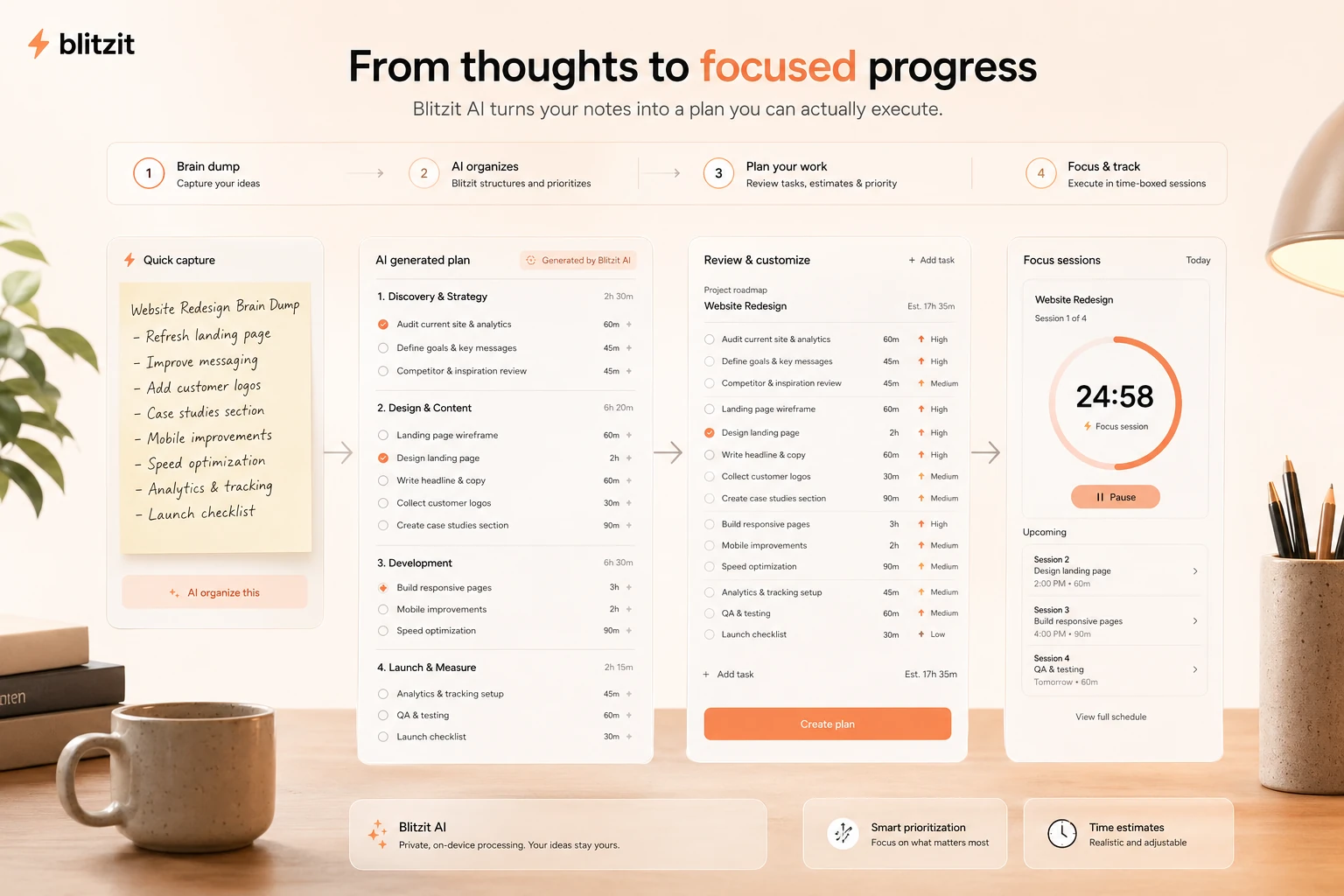
Quick verdict
Blitzit is worth considering if your real problem is not task capture, but task execution.
That distinction matters more than the feature list.
There are many task apps that let you write a list. Blitzit is trying to solve the next problem: keeping one task visible, estimating how long it should take, starting a focused work session, and giving you enough pressure to finish instead of drifting into another tab. If that is the part of productivity where you usually fail, Blitzit has a believable role.
I would not judge it as a full project management tool. It is not the first place I would send a team that needs workload planning, approvals, dependencies, admin controls, or complex reporting. It is better understood as a personal productivity layer for freelancers, creators, students, remote workers, and solo operators who need a task list plus a visible timer.
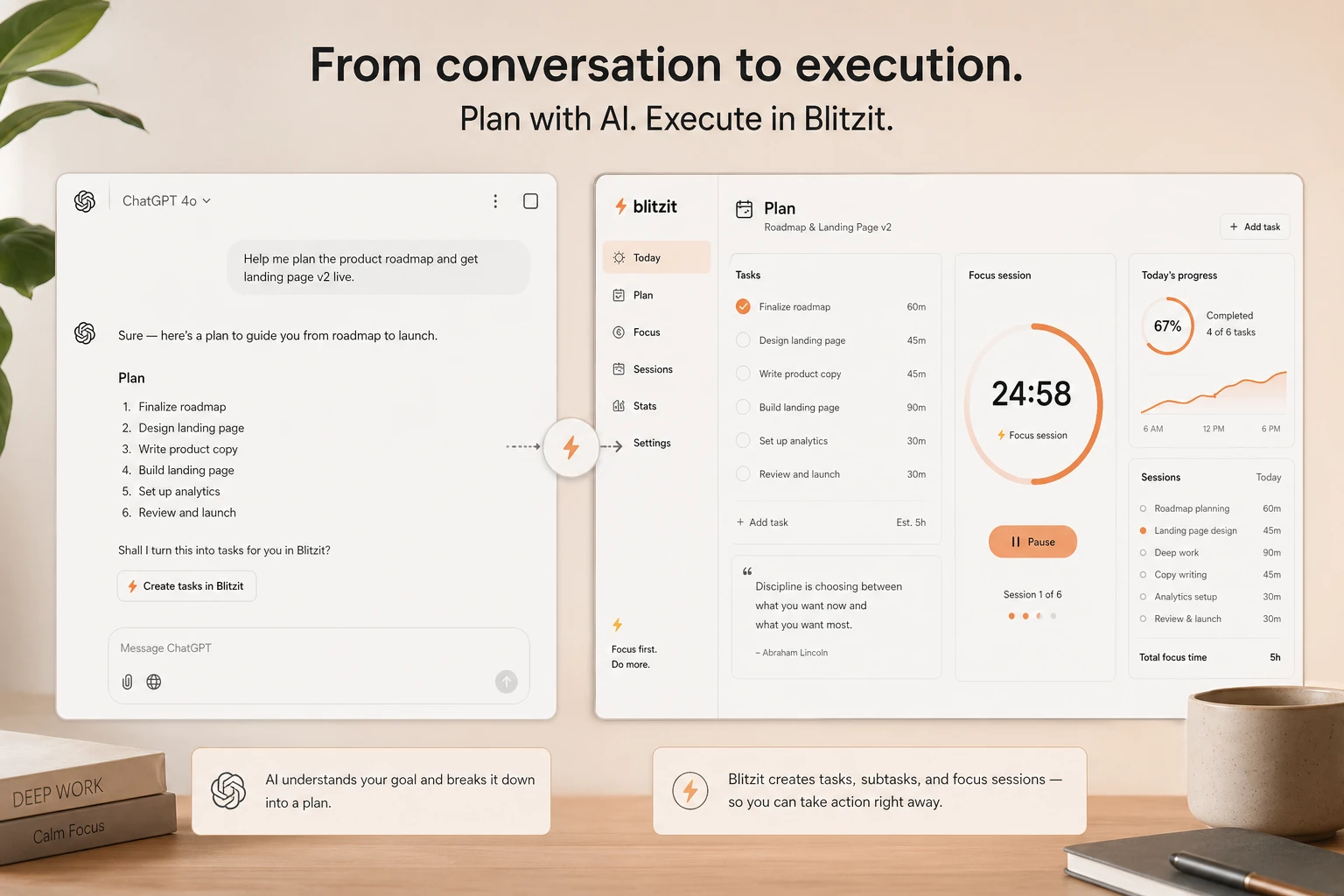
The newer AI direction also makes Blitzit more interesting. Blitzy, MCP support, ChatGPT and Claude task routing, voice capture, and calendar-style integrations suggest the product is moving toward an execution layer for messy task input. That is useful only if the core daily app already works for you.
The safest next step is simple: use the trial with one real workweek. Do not pay just because the annual price, coupon path, or lifetime route looks attractive. If the timer changes your behavior, Blitzit may earn its spot. If it becomes another ignored task list, the discount does not matter.
Next step: If Blitzit fits your personal focus workflow, check the current pricing and trial route before choosing monthly, annual, or any deal path.
Review snapshot
| Review point | Practical take |
|---|---|
| Best for | Freelancers, creators, students, and solo professionals who need visible focus sessions tied to tasks |
| Not ideal for | Teams needing full project management, approvals, dependencies, admin controls, or workload planning |
| Main use case | Turning daily tasks into timed execution blocks with notes, subtasks, reminders, and reports |
| Pricing note | Public pricing shows a 7-day trial, monthly billing, and annual billing with a lower monthly equivalent |
| Main strength | Blitzit connects task planning with task execution instead of leaving the list passive |
| Main concern | Value depends on whether timers, focus mode, and session pressure match your working style |
| Direct alternatives | Todoist, TickTick, Sunsama, Akiflow |
| Best next step | Run one normal week through the trial before choosing annual billing or a lifetime-style path |
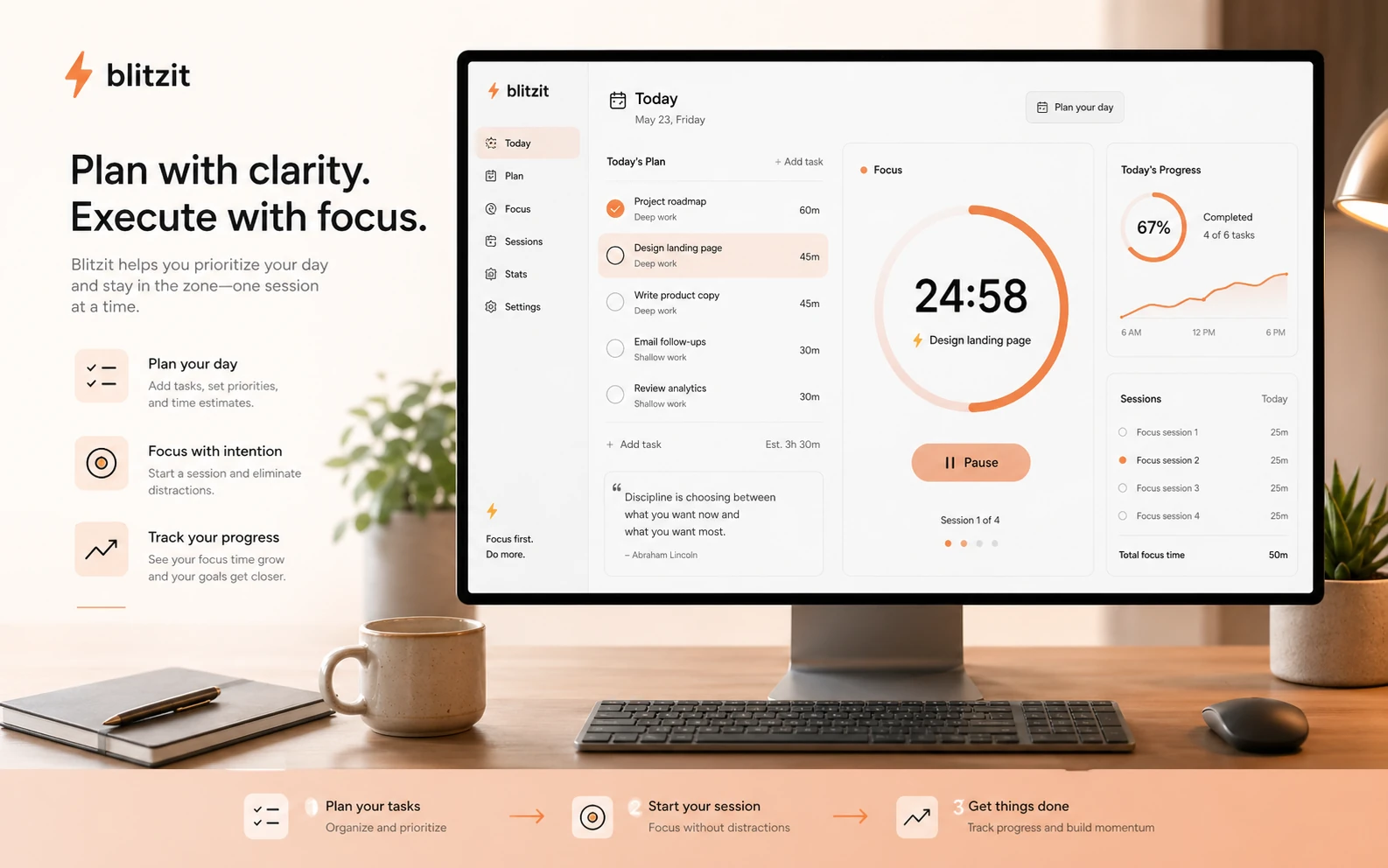
What is Blitzit?
Blitzit is a personal productivity app that combines task management, focus sessions, Pomodoro-style work blocks, scheduling, time estimates, reports, and newer AI-assisted task planning.
The easiest way to understand it is this: Blitzit is not only asking you to write down what you need to do. It is trying to keep the next task in front of you long enough that you actually do it.
The current public positioning leans into tasks, notes, subtasks, scheduling, focus mode, session tracking, mobile apps, desktop apps, and an AI assistant called Blitzy that can turn messy input into organized tasks. Blitzit also presents an MCP direction for connecting ChatGPT and Claude conversations to task creation and execution.
That is a different buying decision from choosing a normal to-do list.
A buyer comparing Blitzit with Todoist or TickTick should not only ask, “Can I store my tasks here?” The better question is, “Does this make me act on the tasks?” If the answer is yes, Blitzit has a clearer reason to exist. If the answer is no, a mature general-purpose task manager may be safer.
Our review approach compares public product pages, pricing details, help documentation, deal terms, buyer workflow fit, and nearby alternatives. I would not treat a low annual price, coupon path, or lifetime route as proof that Blitzit fits the buyer. Productivity software only works when it becomes a repeatable habit.
Who should use Blitzit?
Blitzit makes the most sense for people who already know they respond well to visible structure.
Freelancers are a natural fit. If your workday is a mix of client tasks, admin, writing, outreach, edits, and follow-ups, a passive checklist can become too easy to ignore. Blitzit gives each task a clearer execution frame: what is next, how long should it take, and are you actually working on it?
Creators may also like it because creative work often breaks into small, awkward fragments. Write the outline. Record the clip. Edit the thumbnail. Reply to comments. Draft the sponsor email. Blitzit works when those tasks need to become timed actions rather than a vague list sitting in Notion.
Students and self-directed learners are another reasonable audience. The timer can help with study blocks, reading sessions, assignment planning, and time blindness. The condition is that the student must actually like structured sessions. If timers create stress instead of momentum, Blitzit may become annoying.
Busy solo professionals may find it useful when their calendar is not enough. Calendar blocks tell you when time exists. Blitzit helps turn a block into a specific task with a running timer and follow-up context.
AI productivity users may also want to test the Blitzy and MCP direction. If you often leave ChatGPT or Claude with a messy plan and then fail to execute it, turning those outputs into tasks could be useful. I would still treat newer AI features as something to test during the trial, not something to assume will replace a real task system.
Who should avoid Blitzit?
Blitzit is easier to trust when you know what it is not.
I would avoid it if you need a full team project management system. If your buying checklist includes workload planning, project dependencies, team approvals, client permissions, sprint boards, advanced reporting, or admin governance, Blitzit is probably too personal-productivity focused. Tools like Asana, ClickUp, Motion, or a team-oriented workflow may be a better comparison than a timer-first app.
I would also be careful if you only need a free basic task list. Blitzit is paid productivity software. If your current problem is simply remembering groceries, recurring chores, or a few small reminders, a free app may be enough.
Buyers who dislike visible timers should slow down. Blitzit’s strength can become its weakness. Some people work better when the active task is always visible. Others feel watched, rushed, or irritated. The trial should answer that before money does.
I would not move quickly into annual billing if you are mostly excited by the deal path. A discount can improve a purchase, but it cannot make you use the product every day. The buyer mistake here is choosing the cheaper billing route before proving the habit.
Finally, teams with privacy or data controls should review the privacy policy and connected integrations before syncing calendars, task notes, AI assistant output, or workspace data. For a solo user, that may be normal productivity-app behavior. For a business team, it deserves a more careful look.
How Blitzit fits into a real workflow
A useful Blitzit workflow starts before the timer.
The buyer needs a real task list, not just a vague intention to “be more productive.” The app works best when you capture work, add enough context, estimate time, start a session, and then compare what you thought would happen with what actually happened.
A practical day might look like this:
- Capture tasks from your inbox, notes, calendar, or AI chat output.
- Sort them into a small number of lists.
- Add subtasks or notes only where they help execution.
- Estimate time for the tasks that matter.
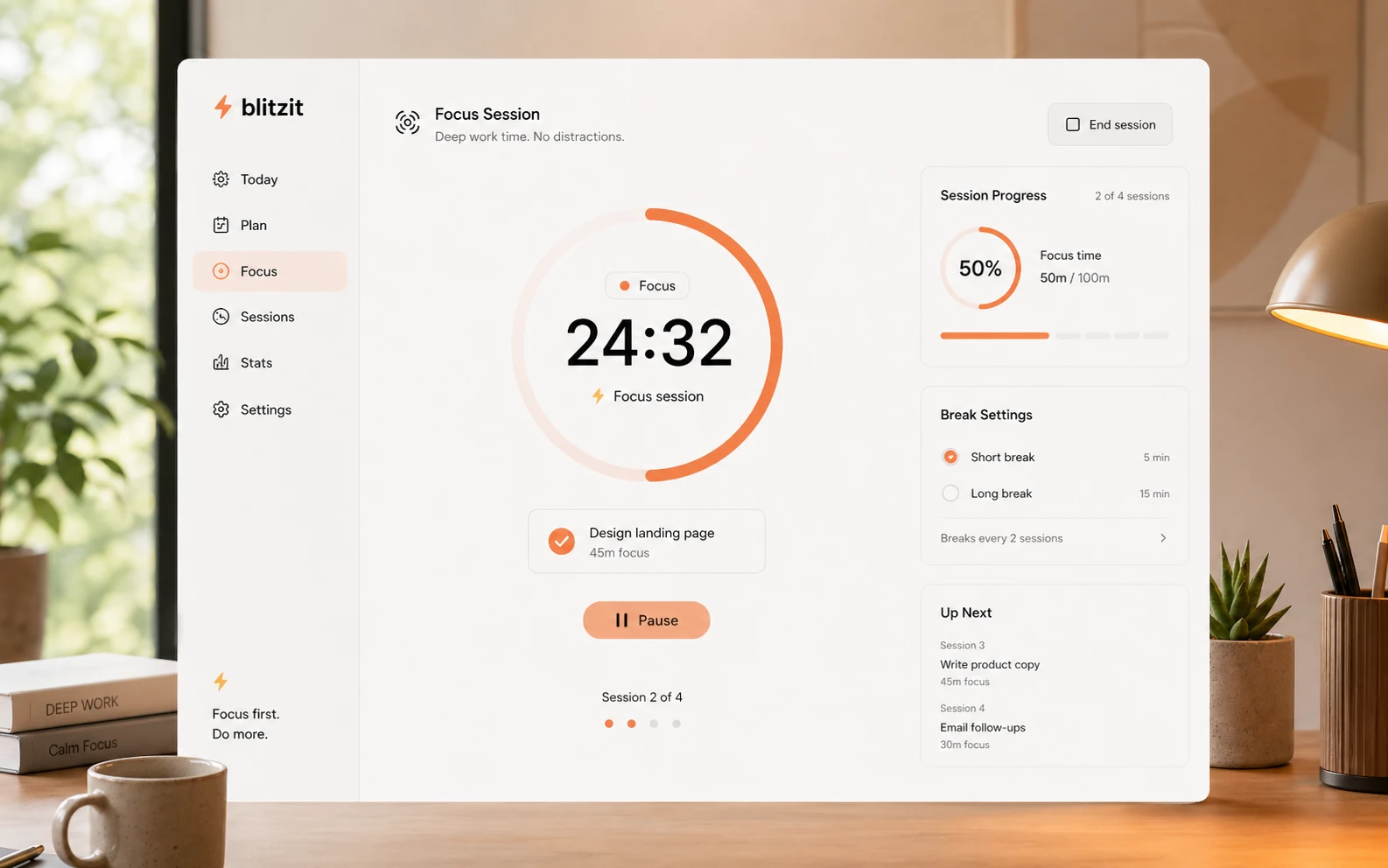
- Start Blitz mode or a focus session for one active task.
- Use the visible timer to stay honest about the next action.
- Review completion patterns and time estimates at the end of the day.
- Adjust tomorrow’s plan based on what was consistently underestimated.
This is where Blitzit becomes more than a cute timer. The app is trying to connect planning, task visibility, and actual work behavior.
But the human part still matters. Blitzit will not choose your priorities for you in a meaningful business sense. It can help surface the active task, support scheduling, and reduce drift, but you still need to decide what is worth doing.
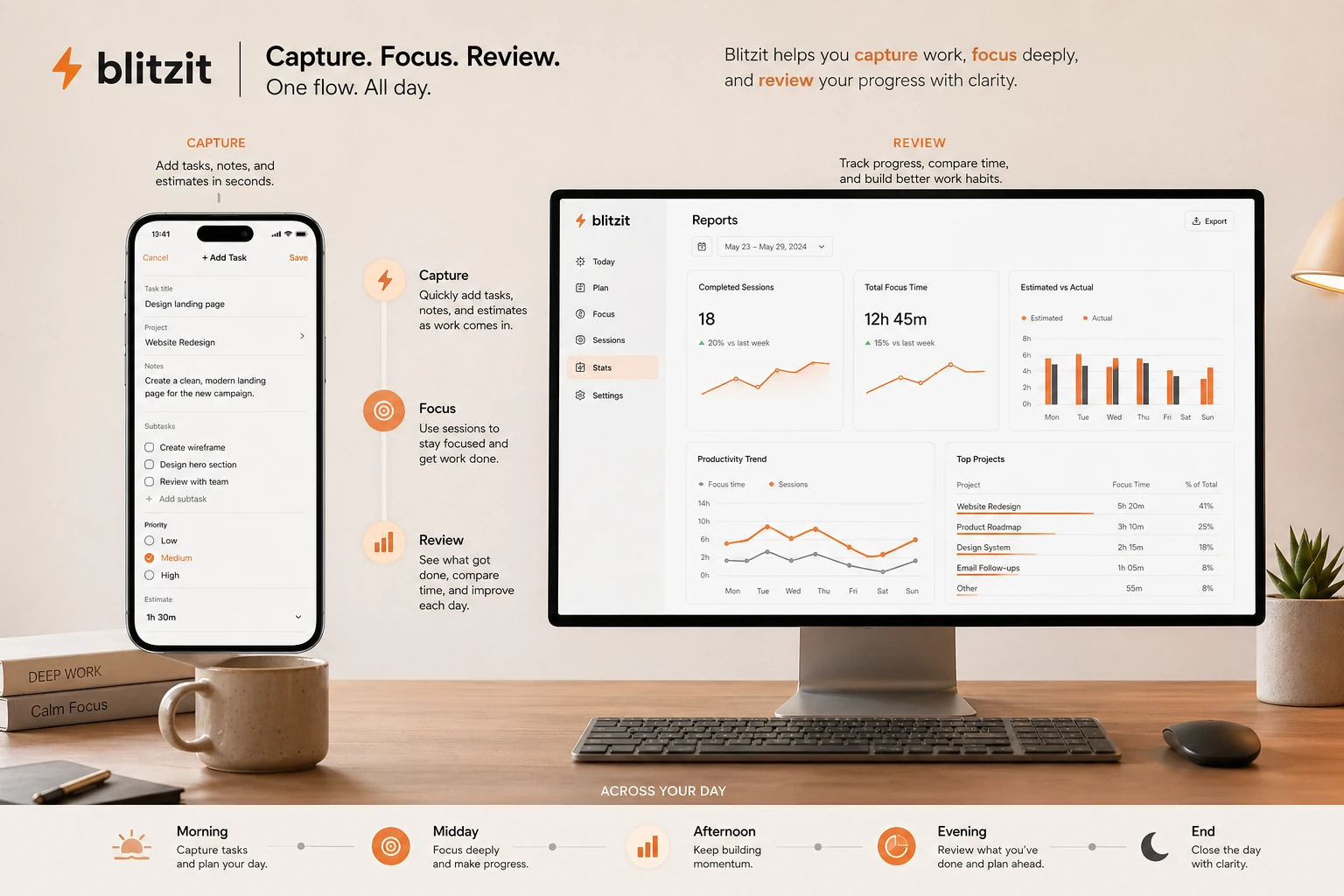
Workflow test: Blitzit is easiest to judge with a real workday, not a feature list. Try it with actual tasks before committing to annual billing.
Real-world buyer scenarios
A freelance marketer with multiple client tasks may use Blitzit to stop the day from becoming a loose pile of obligations. The fit is strong if the marketer can create separate lists, estimate tasks, and use focus sessions to move through client work one block at a time. The risk is overloading Blitzit with too many lists and turning a simple focus tool into a cluttered system.
A student preparing for exams may use Blitzit for timed reading, practice questions, essay planning, and recurring study sessions. The fit is real if the timer reduces procrastination and time blindness. It may fail if the student spends more time organizing the app than studying.
A creator managing weekly publishing may use Blitzit to move content from idea to execution. Research, scripting, recording, editing, uploading, and repurposing can become separate timed tasks. The tool helps most when the creator already knows the workflow but needs execution pressure.
A productivity enthusiast may buy Blitzit because it looks cleaner or more fun than older task apps. That is not enough. The better test is whether Blitzit survives a normal messy week. If you abandon it after two days, the product did not become a system.
Key features that actually matter
Task lists with notes, subtasks, and estimates
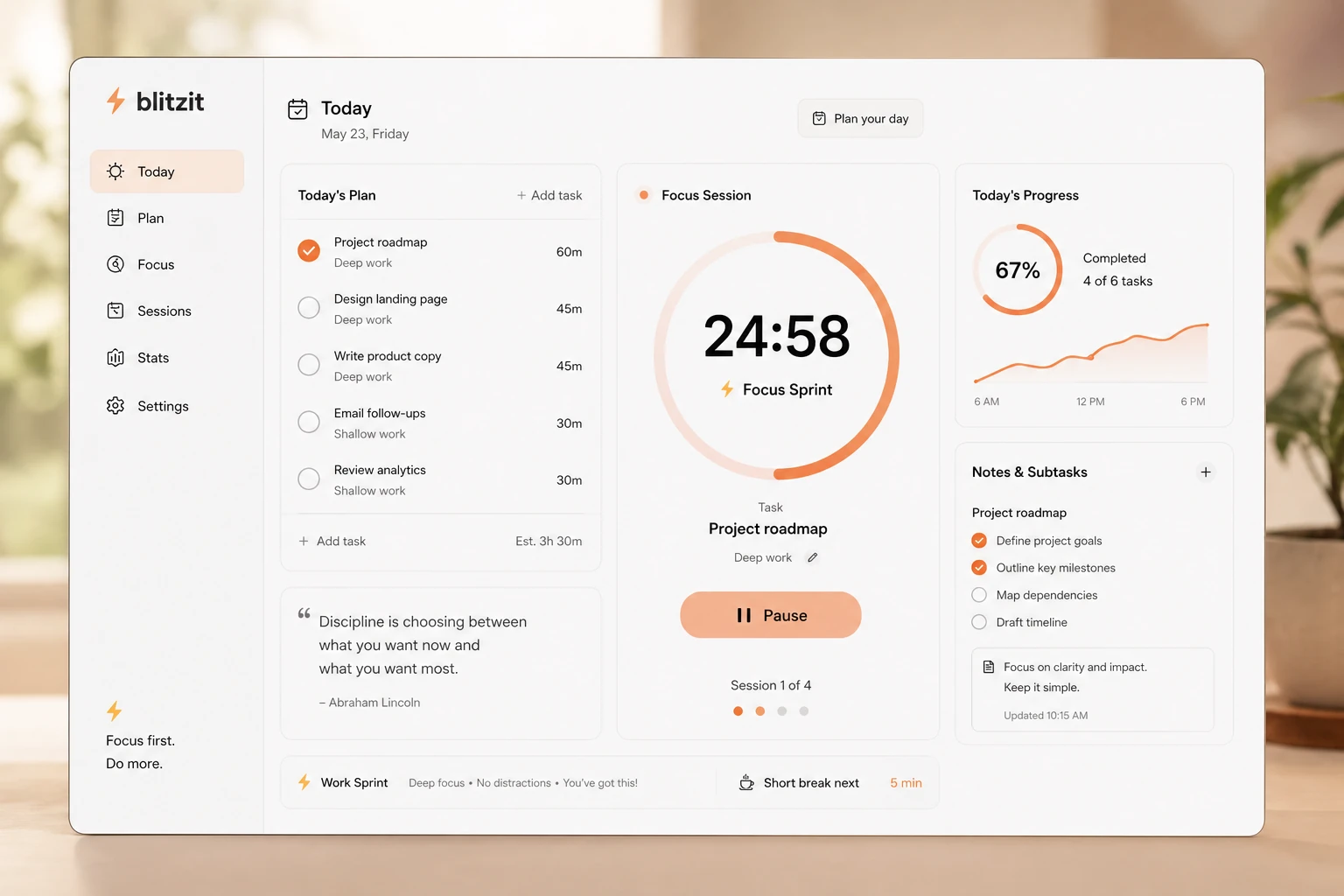
Blitzit includes the core pieces most solo users expect: lists, tasks, notes, subtasks, priorities, reminders, scheduling, and time estimates. The important part is not that these features exist. The important part is that they feed the focus workflow.
Buyer note: if you only want a beautiful task database, compare Blitzit with Todoist, TickTick, or Notion before paying.
Blitz mode and visible focus sessions
This is the feature that gives Blitzit its clearest identity. A visible focus timer can make the active task harder to ignore. For people who struggle with drifting, time blindness, or overestimating what they can finish, that can be genuinely useful.
Buyer note: test this honestly. If the timer feels motivating, Blitzit becomes stronger. If it feels stressful, the app may not fit you.
Session tracking and reports
The reporting direction matters because productivity problems are often estimation problems. If you constantly think a task takes 25 minutes but it takes 90, the report can help you plan more realistically.
Buyer note: reports are only useful if you review them. If you never look back at your sessions, this becomes another unused feature.
Integrations and sync
Blitzit publicly documents integrations around Google Calendar, Notion, ChatGPT, Claude, Raycast, webhooks, and other workflow connectors. That matters for buyers who want tasks to flow from other places rather than manually recreating everything.
Buyer note: verify the exact integration you need before buying. A connector being listed does not always mean it behaves exactly the way your workflow requires.
Blitzy and MCP direction
Blitzy and MCP support make Blitzit more interesting for AI-assisted planning. The promise is not simply “AI writes your tasks.” The better use case is turning messy thoughts, meeting notes, or AI conversations into executable tasks.
Buyer note: treat this as a workflow advantage to test, not a reason to skip normal task discipline.
Pricing and plan value
Blitzit’s public pricing is fairly understandable, but the buyer still needs to verify the live checkout before paying.
At the time of review, the public pricing area presents a seven-day trial, a Monthly Plan at $6.99 per month, and an Annual Plan displayed as $4.99 per month with $59.88 paid yearly. The annual route is positioned as cheaper than monthly billing, and the pricing area also shows deal language that should be treated as live-checkout dependent rather than permanent.
The pricing question is not whether Blitzit is expensive compared with enterprise software. It is not. The question is whether it becomes a daily habit.
A monthly plan makes sense when you are still proving fit. A seven-day trial can show whether the timer, estimates, reports, and integrations feel useful, but one week is short. I would use the trial with a normal workweek, not a cleaned-up test week where you only add perfect tasks.
Annual billing is more attractive only after Blitzit has changed your behavior. If the app helps you finish work, avoid drift, and estimate time more accurately, the annual price may be reasonable. If you are still unsure after the trial, monthly is safer than paying ahead because the lower monthly equivalent looks better.
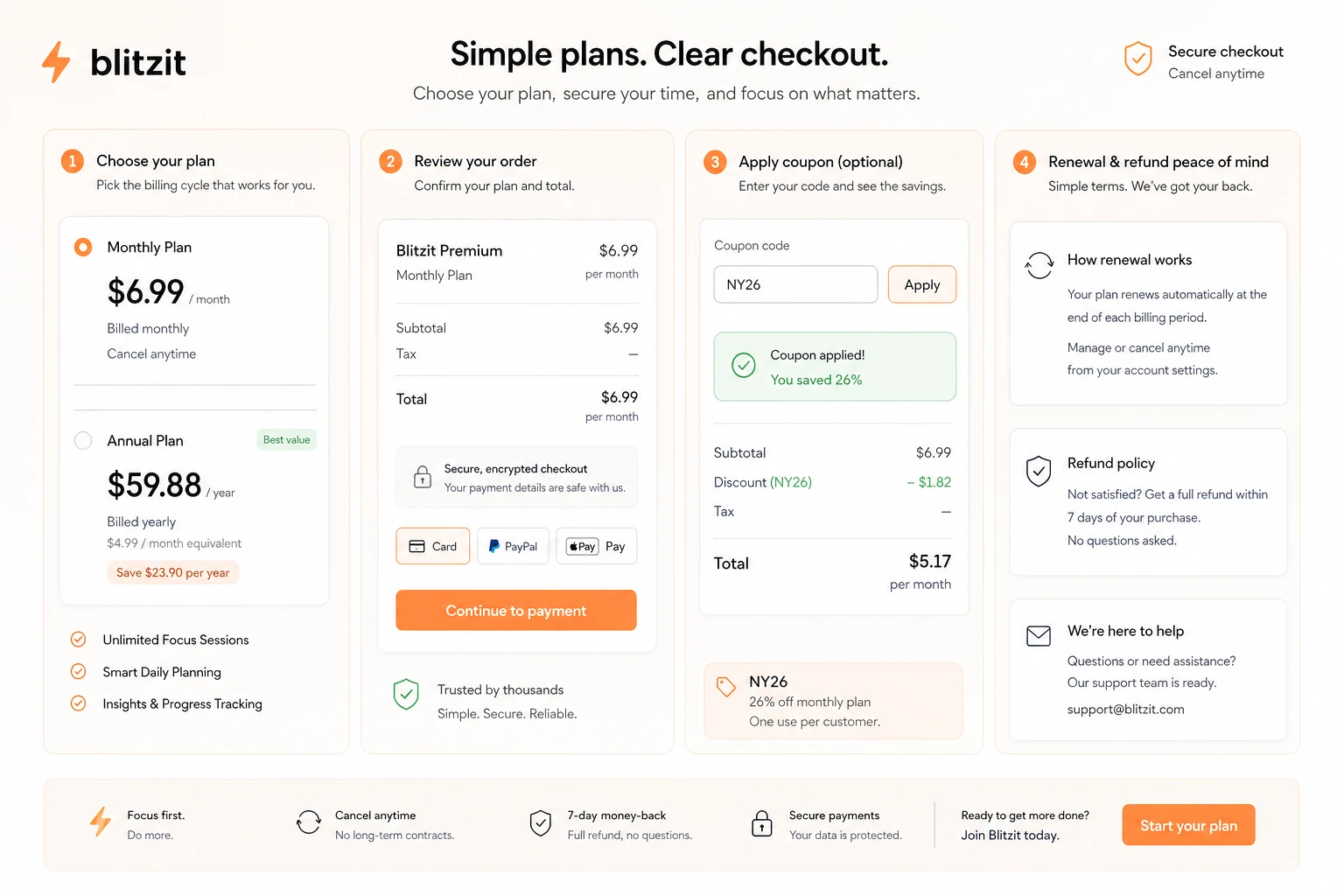
Pricing check: If Blitzit looks useful, verify the current trial, annual billing total, cancellation terms, and any active offer before checkout.
Free plan, trial, coupon, and checkout notes
Blitzit is not best judged by the coupon path first.
The public site points buyers toward a seven-day free trial, then paid plans inside the app. That is the right order: trial first, payment second, discount last.
The trial should answer three questions:
- Did Blitzit make the next task clearer?
- Did the visible timer improve focus or create stress?
- Did reports and estimates teach you anything useful about your work habits?
If the answer is no, a coupon should not change the decision. If the answer is yes, the coupon page or active offer route can be checked before checkout.
I would also be careful with refund assumptions. Blitzit’s pricing area uses buyer-friendly money-back language, while the terms say subscriptions can be canceled but payments already made are not refunded. That does not mean buyers cannot have statutory rights or that checkout terms will never offer a separate guarantee. It does mean the careful move is to read the current checkout and terms before paying, especially for annual billing or any separate lifetime-style route.
Use the Blitzit coupon page only after the workflow fit is clear. The coupon should improve a decision you already believe in, not create the decision for you.
What I would check before buying Blitzit
If I were buying Blitzit for a real workflow, I would check these points first:
- Whether the seven-day trial is long enough to run a normal workweek, not just a casual test.
- Whether the visible timer feels motivating or distracting after several real sessions.
- Whether monthly billing is safer than annual billing while the habit is still unproven.
- Whether the refund and cancellation language at checkout matches what you expect.
- Whether the mobile apps cover the tasks you actually need away from desktop.
- Whether Google Calendar, Notion, ChatGPT, Claude, or webhook integrations behave the way your workflow needs.
- Whether Todoist, TickTick, Sunsama, or Akiflow fits your task style better.
A simple test before paying
Before paying, I would run a small test like this:
- Add one real workday of tasks into Blitzit.
- Estimate how long each important task should take.
- Use Blitz mode or a focus session for at least five tasks.
- Track whether the visible timer keeps you on task or irritates you.
- Review the session data at the end of the day.
- Repeat the same process for several days, including at least one messy day.
- Compare the result with your current task app.
The messy day is important.
Most productivity apps feel good when the schedule is clean. The real test is whether the app helps when you get interrupted, underestimate tasks, or have too many small obligations competing for attention.
Pros explained
The biggest pro is focus pressure. Blitzit is not just a place to store tasks. Its visible timer and focus workflow can make the active task feel more present. For buyers who struggle to stay with one thing, that is the practical value.
The second pro is that Blitzit keeps the system lightweight. It has lists, notes, subtasks, reminders, estimates, and reports, but it does not feel positioned as a heavy team operations platform. For solo users, that can be a strength.
The third pro is the trial path. A seven-day trial gives buyers a low-risk way to see whether the behavior change is real. Productivity software should always be tested against normal work, not purchased on hope.
The fourth pro is the AI and MCP direction. If Blitzit can turn AI conversations, brain dumps, or meeting notes into structured tasks, it becomes more useful for people who already plan inside ChatGPT, Claude, or similar tools.
The final pro is cross-device ambition. Desktop, mobile, calendar, and integration coverage make Blitzit more credible than a single-purpose Pomodoro timer. I would still test mobile and integration behavior before depending on it.
Cons explained
The main con is that Blitzit is not a team project management replacement. If you need shared boards, dependencies, workload views, approval flows, permission layers, or serious admin controls, Blitzit is probably too narrow.
The second con is that the timer-first style will not fit everyone. Some buyers work better with calm lists and flexible planning. Blitzit’s visible task pressure may be useful for one person and distracting for another.
The third con is refund and billing clarity. The site presents friendly pricing and trial language, but careful buyers should still read checkout terms and cancellation rules before paying. That matters most for annual billing or any non-standard deal route.
The fourth con is product maturity risk. Public third-party feedback includes praise for the focus workflow, but also some criticism around bugs, reliability, or support. I would not ignore that. It does not make Blitzit unusable, but it does make the trial more important.
The fifth con is that newer AI features can be easy to overvalue. MCP and AI task capture are interesting, but they do not replace the habit of choosing meaningful tasks and finishing them.
Green flags and red flags
Green flags:
- You already like Pomodoro-style work but want task context and reports in the same app.
- You lose focus because your task list is too passive.
- You work solo and need execution momentum more than team planning.
- You want to test AI-assisted task capture without moving into a complex productivity suite.
- You are willing to run the trial with real tasks before paying.
Red flags:
- You are buying mainly because of a discount or lifetime-style offer.
- You need a full team project management tool.
- You dislike visible timers or structured work sessions.
- You rely heavily on mobile and have not tested current mobile behavior.
- You assume AI task creation will automatically fix prioritization.
Blitzit vs alternatives
Blitzit should be compared with task and planning tools that solve nearby problems, not only with Pomodoro timers.
Todoist vs Blitzit
Todoist is usually the stronger choice if you want a mature, broad, cross-platform task manager. It is excellent for capturing tasks, organizing projects, and keeping a clean personal or lightweight team list.
Blitzit may still make more sense if your problem is not task capture but task execution. If Todoist holds the list but does not make you act, Blitzit deserves a test.
TickTick vs Blitzit
TickTick is a strong all-purpose productivity app with tasks, calendar-style planning, habits, reminders, and broad platform coverage. It is a safer comparison for buyers who want one mature app for many personal productivity needs.
Blitzit is narrower and more focused on visible task execution. Choose Blitzit if the timer workflow matters more than having the most complete task app.
Sunsama vs Blitzit
Sunsama is stronger for structured daily planning, calendar-led routines, and a slower planning ritual. It is more of a guided day-planning system.
Blitzit feels lighter and more action-oriented. It may fit buyers who do not want a full planning ceremony and mainly need the next task plus a timer.
Akiflow vs Blitzit
Akiflow is better for power users who want to centralize tasks from many tools, protect calendar time, and run a more advanced productivity command center.
Blitzit is simpler. It is more appropriate if you do not need a complex hub and mainly want a focused work session tied to a task.
Trust, refund, and buyer-risk notes
The main buyer risk with Blitzit is not that it lacks a clear use case. The use case is clear. The risk is buying before proving that the use case matches your behavior.
Check live pricing before checkout. Public pricing can change, and deal language should not be treated as permanent. The current public pricing page is useful, but the checkout screen is the final decision point.
Check cancellation and refund terms. The pricing area and terms may not feel identical at first glance, so do not assume the most generous interpretation. Read the current terms, in-app purchase rules, and checkout wording before paying.
Check mobile behavior. Blitzit has desktop apps and public mobile routes, but buyers who work across phone, tablet, and desktop should test sync and mobile feature coverage before relying on it.
Check integrations. Google Calendar, Notion, ChatGPT, Claude, Raycast, and webhook-style connectors sound useful, but each buyer should verify the exact integration that matters to them.
Check data/privacy comfort. Productivity apps can involve personal tasks, calendars, notes, and connected services. That may be normal, but it is still worth reviewing the privacy policy if you plan to connect work accounts or sensitive task notes.
Finally, compare alternatives before annual billing. Todoist, TickTick, Sunsama, and Akiflow each solve a slightly different version of the productivity problem. Blitzit is strongest when the missing piece is execution pressure.
Final verdict
I would consider Blitzit if you work solo, lose focus easily, and want a task app that pushes you into execution instead of simply storing your list.
I would skip it if you need a full project management system, dislike visible timers, or only want a basic free checklist.
I would compare it with Todoist or TickTick if you need a broader task manager, Sunsama if daily planning matters more, and Akiflow if you want a power-user command center.
The safest next step is to treat Blitzit as a behavior test. Add real tasks, run real focus sessions, check whether the timer helps, then review the pricing and cancellation terms. If the workflow sticks, Blitzit can be a useful personal productivity tool. If it does not, paying less will not make it part of your day.
