Quick verdict
MakeUGC is useful if your real problem is creative testing volume, not simply making a nice-looking AI video.
That distinction matters more than the homepage promise.
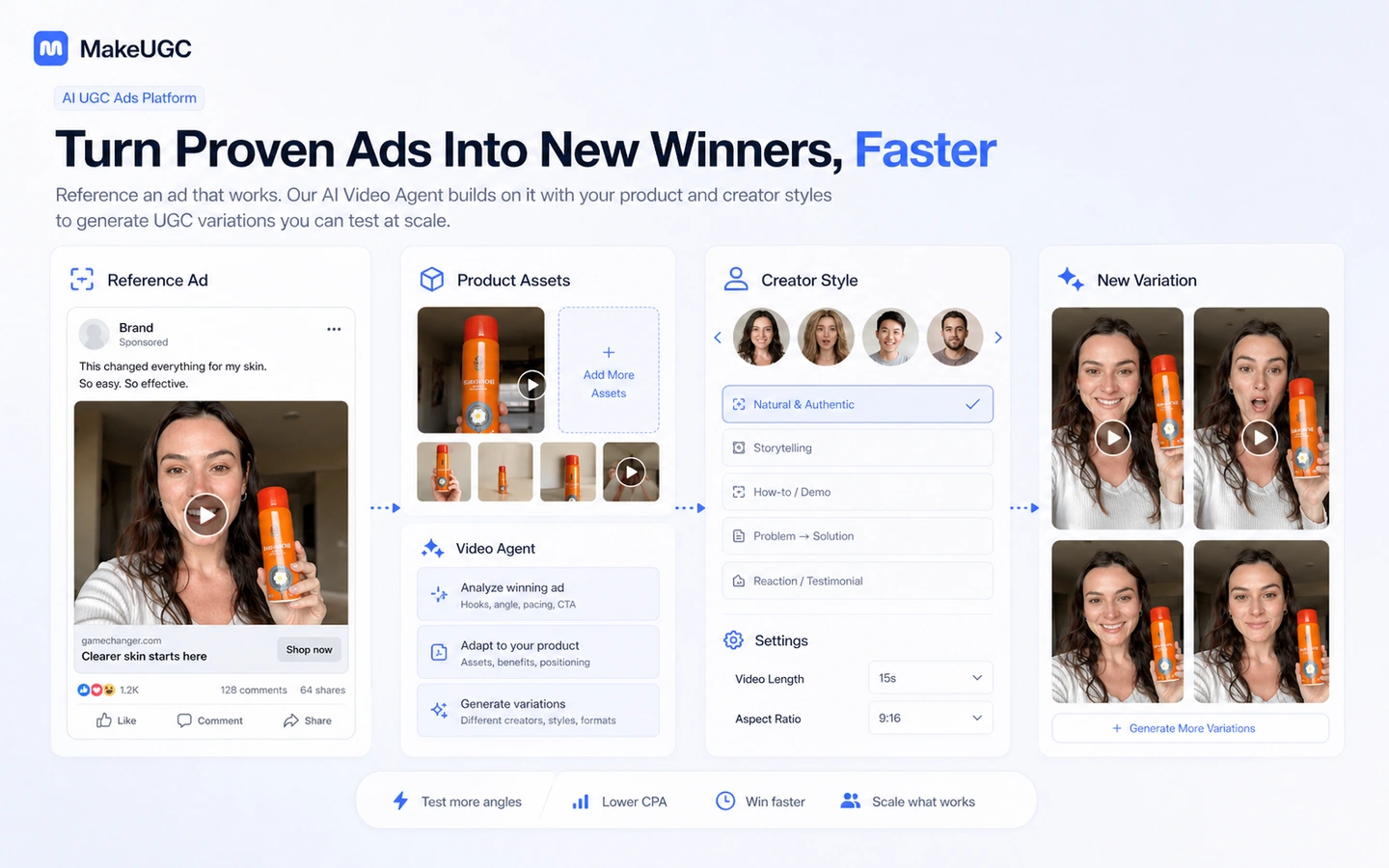
The product is built around AI UGC-style ad creation: write or generate a script, choose an AI actor, add product or B-roll context when the plan supports it, and turn that into ad variations you can test. For ecommerce brands, DTC teams, agencies, and media buyers, that can be genuinely practical. A team that needs ten different hooks, angles, creator styles, and product demonstrations every month may get more leverage from MakeUGC than from another generic video editor.
But I would not treat MakeUGC as a magic performance machine. It can help produce ad assets faster. It cannot fix a weak offer, poor targeting, unclear positioning, or a media buyer who does not know what to test next.
The main strength is focus. MakeUGC is not trying to be a broad AI workspace. It is aimed at UGC-style ads, AI actors, product-led creative, B-roll, image ads, Video Agent-style workflows, and campaign-oriented output. The main risk is that plan value depends heavily on credits, video counts, feature gates, billing interval, and how carefully you use the trial or first subscription.
For my money, MakeUGC makes the most sense after you have a real product, a real campaign brief, and at least a few ad angles you want to test. If you only want to play with AI avatars, the refund and credit rules make casual experimentation less attractive.
Next step: If MakeUGC still fits your creative testing workflow, verify the current pricing and buyer route before spending credits.
Review snapshot
| Review point | Practical take |
|---|---|
| Best for | Ecommerce brands, agencies, DTC teams, and media buyers testing many UGC-style video ads |
| Not ideal for | One-off creators, brands without a campaign plan, or teams that need real human creator relationships |
| Main use case | Turning scripts, product assets, reference ideas, and AI actors into testable ad variations |
| Pricing note | Public monthly pricing starts at $49/month, with lower annual equivalents and a $1 start path to verify live |
| Free plan/trial path | No permanent free plan is presented as the main route; treat the $1 path as a paid promotional test |
| Main strength | Focused AI UGC ad production rather than generic video generation |
| Main concern | Credit use, feature gates, refund limits, and whether generated ads actually improve campaign testing |
| Direct alternatives | HeyGen and AKOOL for broader avatar video workflows; Quickads is an adjacent ad-creative route |
| Best next step | Prepare a real ad brief, run a small controlled test, then compare monthly versus annual billing |
What is MakeUGC?
MakeUGC is an AI UGC ad creation platform for marketers who want to generate creator-style video ads without booking a human creator for every variation.
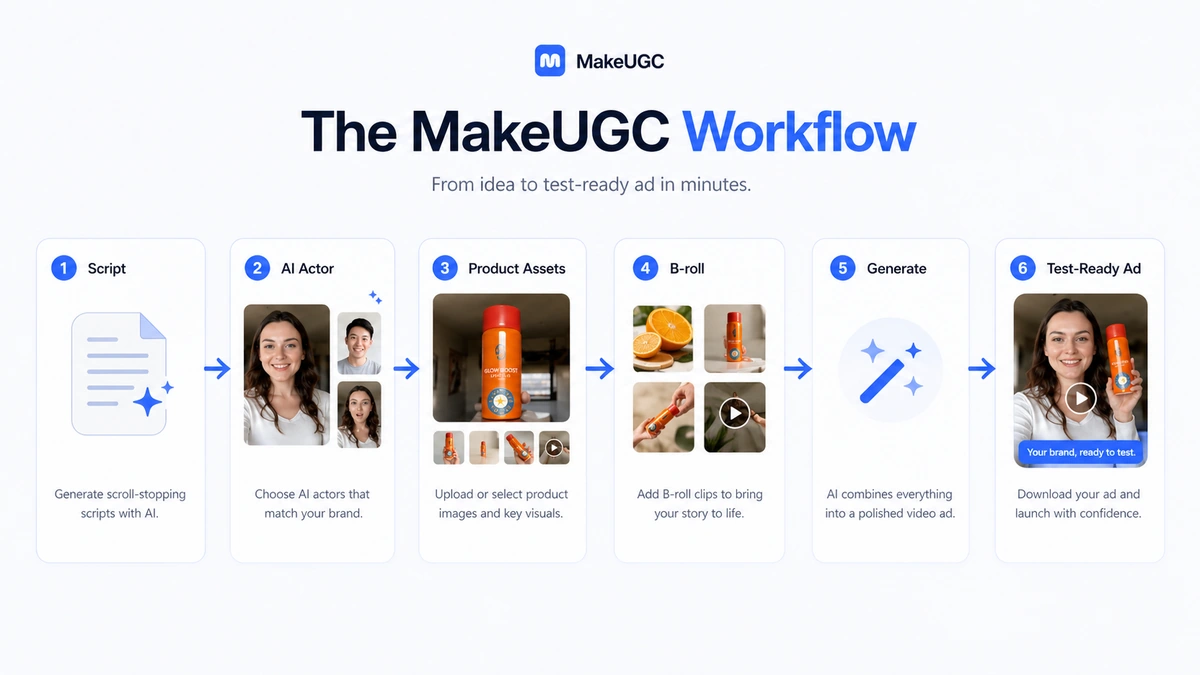
In plain language, it helps you move from a script or ad idea to an AI actor video. Depending on the plan and feature access, that workflow can involve AI creators, product-in-hand style output, B-roll, image generation, AI image ads, Video Agent-style reference workflows, PDF-to-video, batch creation, and higher-level service paths for larger teams.
The common misunderstanding is that MakeUGC is just an AI avatar toy. That is too shallow. The better way to judge it is as a production layer for paid-social creative testing.
If you are running Meta, TikTok, YouTube Shorts, or similar campaign tests, the bottleneck is often not one finished video. The bottleneck is how quickly you can test different hooks, angles, offers, testimonials, demonstrations, objections, and creator styles. MakeUGC is more interesting when it helps with that loop.
Our review approach compares public product pages, pricing details, refund language, trial terms, buyer workflow fit, and nearby alternatives. A low entry price or coupon path is not proof of fit; the real question is whether generated UGC-style output becomes part of a repeatable creative-learning process.
Who should use MakeUGC?
MakeUGC fits buyers who already know what they want to test.
Ecommerce brands are the clearest fit. If you sell a physical product and need several ad angles around benefits, objections, demonstrations, social proof, or offer framing, MakeUGC can help produce more variations than a small team could film manually.
Media buyers may also get value from it when creative fatigue is hurting performance. I would still judge the tool by whether it shortens the test cycle, not by whether the avatar looks impressive in a demo.
Agencies can use MakeUGC when client accounts need repeatable creative output. The advantage is speed and variation. The risk is client expectation, especially if a client expects premium human-shot creator content.
DTC teams with multiple products may be another fit because they have more chances to use credits intentionally across SKUs, offers, and audiences.
Who should avoid MakeUGC?
I would avoid MakeUGC if you only need one occasional social video. A subscription and credit-based production workflow can become overkill when the real job is a single promo clip.
I would also be careful if you do not have a campaign brief yet. MakeUGC can help generate videos, but it cannot decide your product positioning, audience pain point, offer, or media-buying strategy.
Brands that need authentic human creator relationships should think twice. AI UGC can help with testing, but it is not the same as working with a real customer, influencer, niche creator, or professional spokesperson.
Buyers who dislike credit math should slow down. MakeUGC pricing is not just a monthly number. The value depends on video counts, credit use, feature gates, and the tools your workflow actually consumes.
How MakeUGC fits into a real workflow
The best MakeUGC workflow starts before you open the platform.
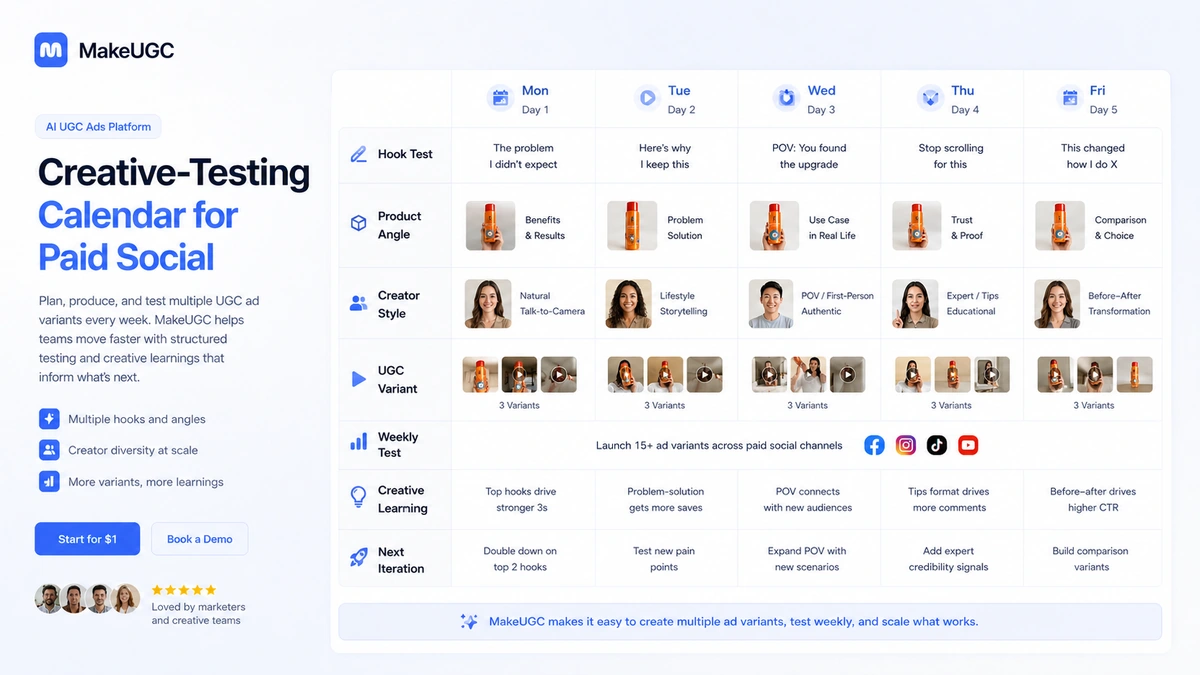
First, prepare a real product brief. What is the product? Who is the buyer? What problem are you solving? What hook are you testing? What proof, objection, or demonstration should the video show?
Second, write a small set of scripts or prompts. Do not begin with random ideas. Begin with campaign hypotheses: one pain-point hook, one comparison hook, one objection-handling hook, one demonstration hook, and one offer-focused hook.
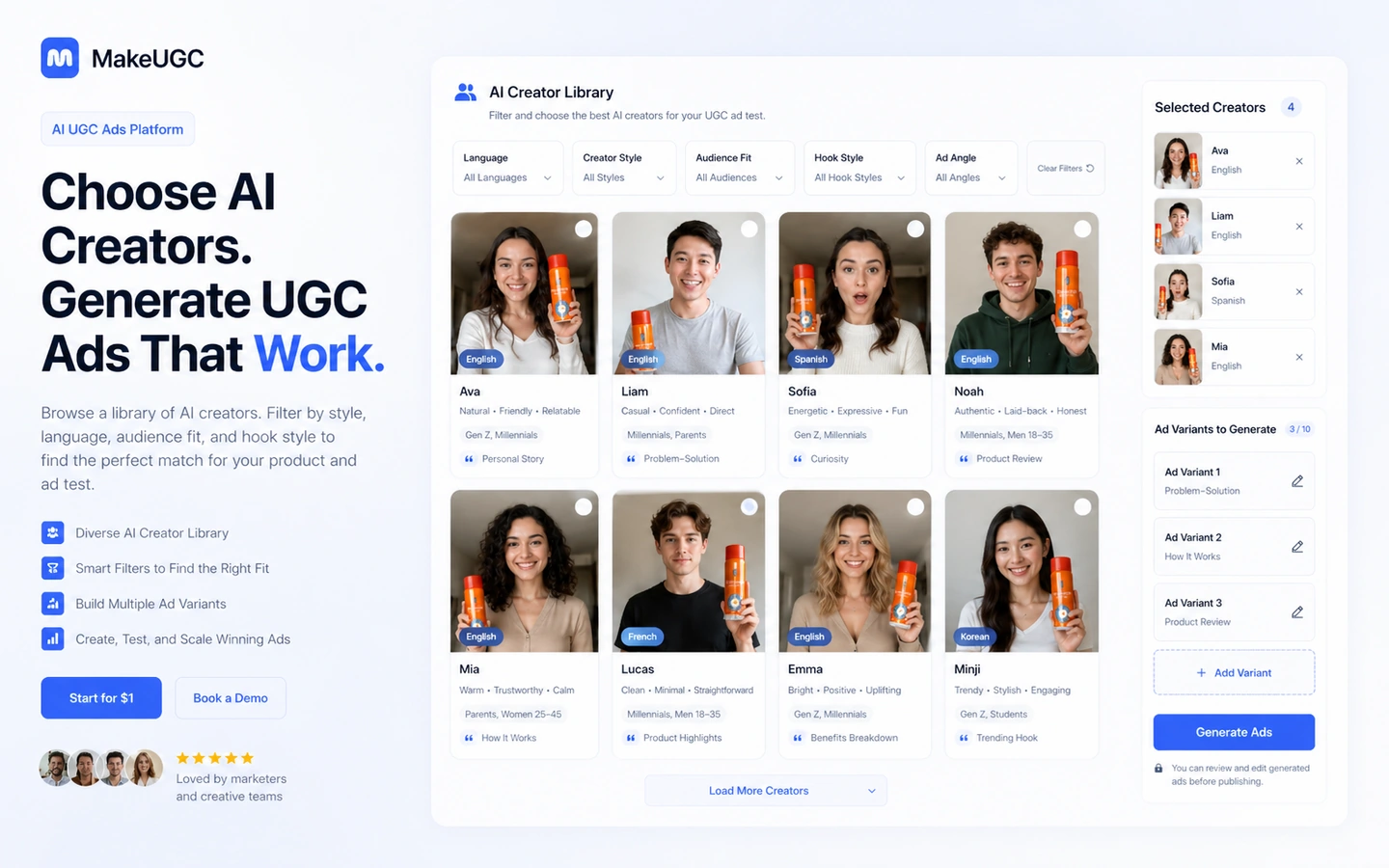
Third, choose the actor and format based on audience fit. The actor’s delivery, tone, language, and visual style matter because UGC ads depend on believability. An avatar that looks technically polished can still be wrong for your product.
Fourth, generate a controlled batch. This is where MakeUGC can save time. Instead of booking creators, filming, editing, and waiting, you can produce several variants quickly enough to decide which angles deserve more attention.
Fifth, review the output like a media buyer, not a fan of AI. Does the hook land in the first seconds? Does the product appear naturally? Is the claim believable? Does the CTA feel forced? Would this look native in your target channel?
Sixth, test the winners. MakeUGC’s output should feed campaign learning. If generated videos never make it into a real test, the platform becomes content inventory rather than a performance tool.
Real-world buyer scenarios
An ecommerce brand can use MakeUGC to test several hooks around the same product: pain point, demonstration, objection, social proof, and offer. That is useful when the team already knows its claims and audience. It is weaker when the buyer expects the platform to invent the campaign strategy.
A paid-social agency may use it to refresh creative across multiple client accounts. The fit is stronger because agencies often need speed, variation, and learning cadence. The agency still needs QA, because AI UGC that looks acceptable in preview can still feel off-brand in a real feed.
A DTC team with winning ads may use reference-style workflows to adapt proven structures to new products. That is practical when the reference is treated as a learning pattern, not something to copy blindly.
Key features that actually matter
AI UGC-style actor videos
The core feature is turning scripts into creator-style videos using AI actors. This matters because UGC ads depend on face, voice, delivery, and pace. Buyer note: judge the result against your actual ad channel, not against a polished demo.
Product in Hand and product-led visuals
Product in Hand matters for ecommerce because many buyers need the product to appear naturally in the creative. Buyer note: verify plan access before assuming the entry plan covers the product-led workflow you need.
B-roll and AI image ad tools
B-roll and image ad generation make MakeUGC more useful than a simple talking-head generator. Buyer note: these tools only help when you already know what visual proof or product context the ad needs.
Video Agent and reference-ad workflows
Video Agent-style workflows can help teams adapt proven ad structures faster. Buyer note: adaptation is not strategy. You still need to know which parts of the reference ad are worth borrowing and which parts should change.
Enterprise and done-for-you paths
The Enterprise route appears aimed at brands that want managed support, strategy, editing, and production help. Buyer note: ask exactly what is included, what is custom, and whether service work changes refund comfort.
Pricing and plan value
MakeUGC pricing is visible, but it needs careful reading.
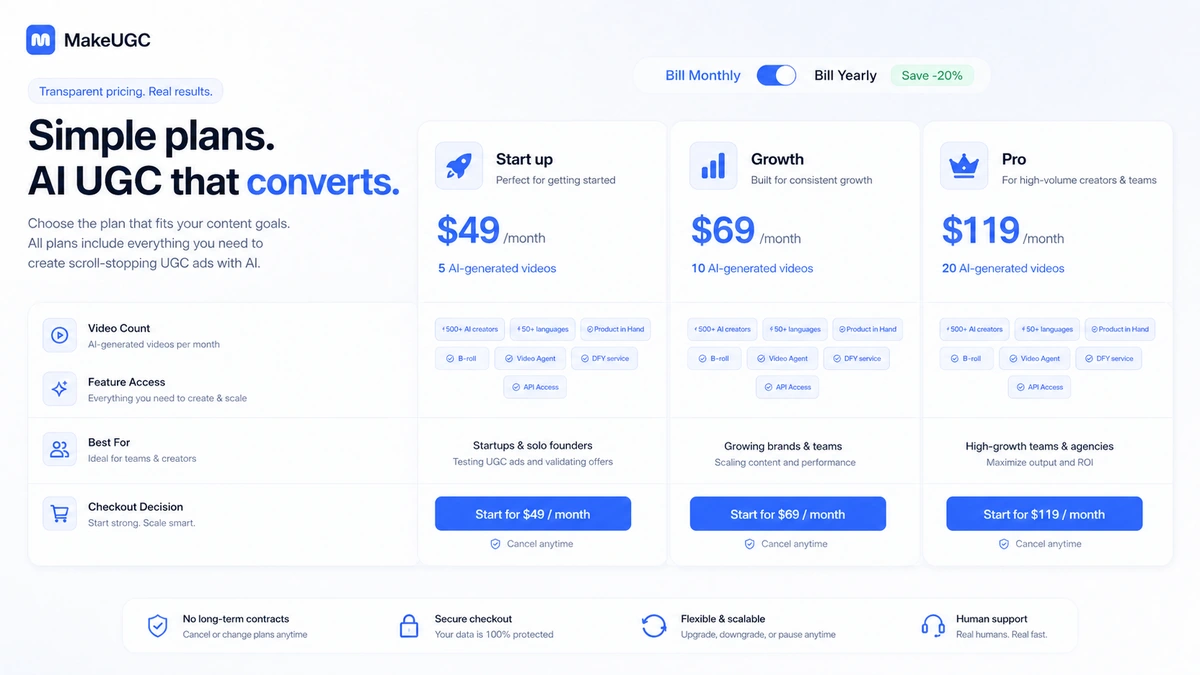
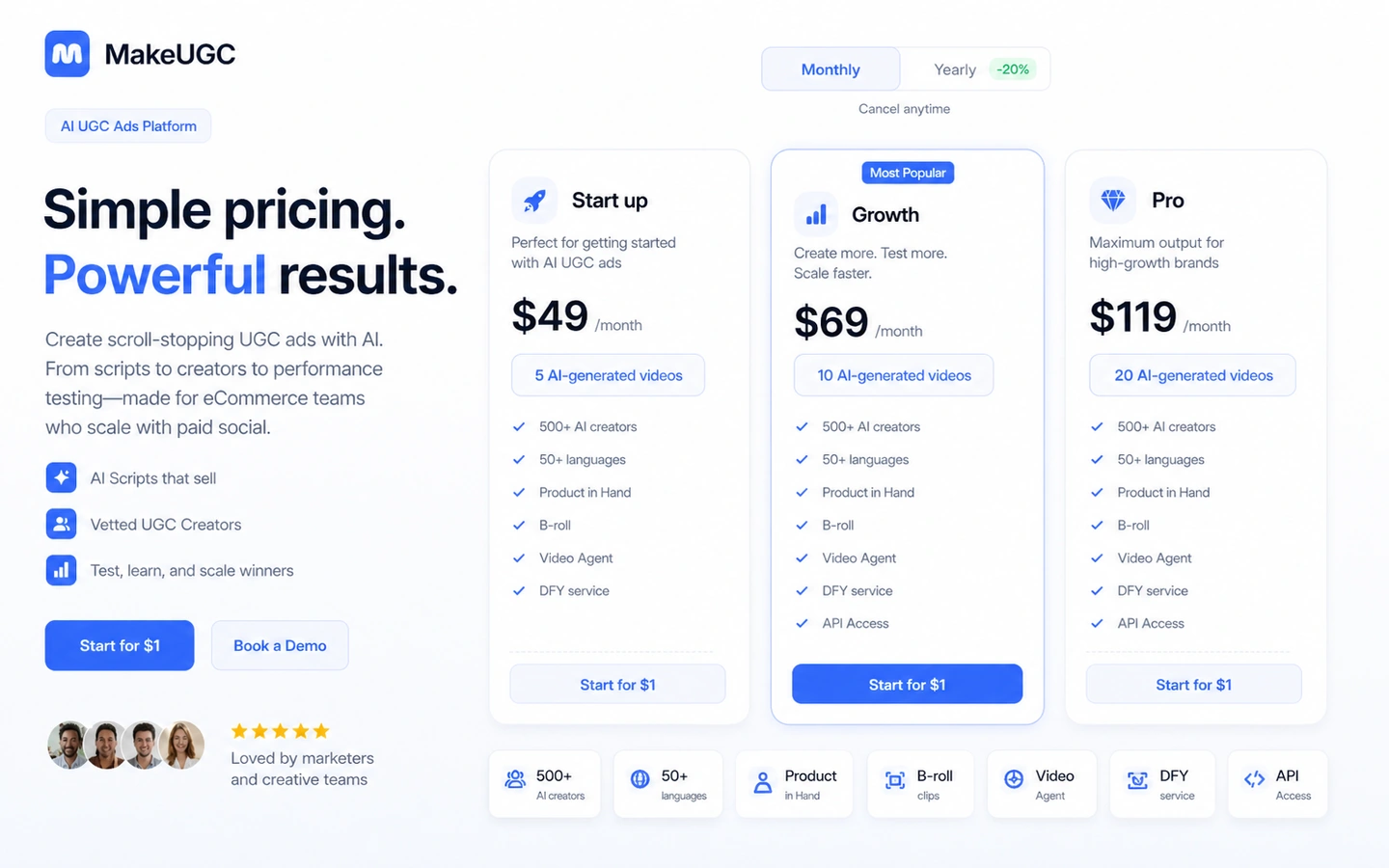
At the time of review, the public pricing page shows a $1 start path. Monthly pricing starts with Start up at $49/month, Growth at $69/month, and Pro at $119/month. The yearly view shows lower monthly equivalents, with Startup at $39/month, Growth at $59/month, and Pro at $99/month. Enterprise is a sales-led path for brands that need done-for-you production and more support.
That sounds straightforward. It is not the whole decision.
The more important question is what each plan actually lets you produce. The pricing page describes AI-generated video counts, credit use for different video models and tools, Product in Hand access, B-roll, image generation, AI Image Ads, Video Agent, batch mode, and other features. In practice, the cheapest plan is not automatically the best deal if your workflow needs features or output volume that sit higher up the pricing ladder.
The $49 monthly entry plan can be a reasonable starting point for a controlled test. The annual equivalent may look better, but I would not move to annual billing until MakeUGC has produced useful ad variants for your actual product.
For agencies and media buyers, the plan math should start with creative volume. How many concepts do you test each month? How many video variants make it to launch? How many outputs are discarded? How many credits are used before a video becomes test-ready?
That is the real pricing question.
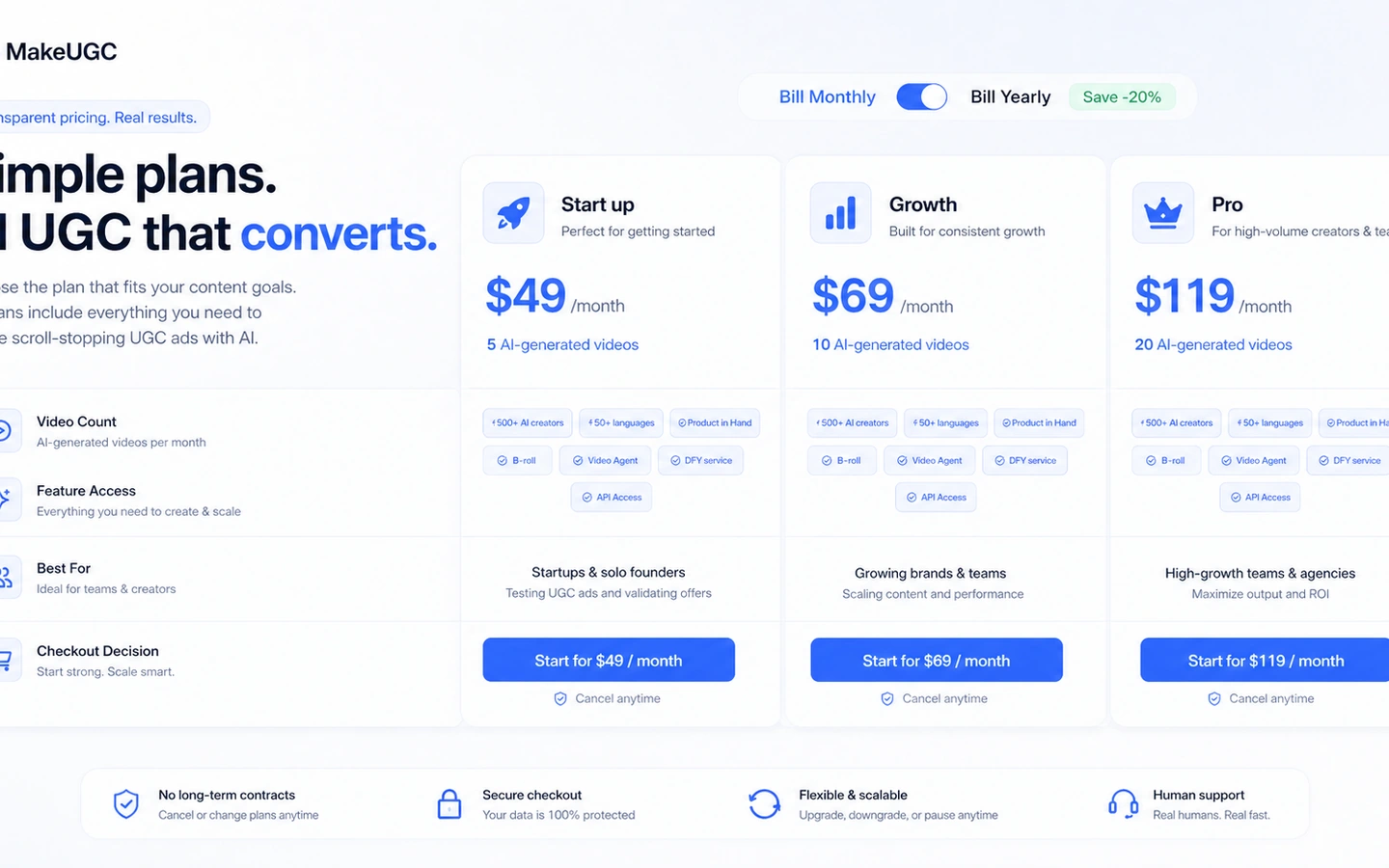
Pricing check: Before choosing a MakeUGC plan, compare the live monthly and yearly views against your real creative testing calendar.
Free plan, trial, coupon, and checkout notes
MakeUGC should not be treated as a free-plan-first product.
The public pages point buyers toward a $1 start path, while the pricing FAQ says there is not a free trial at the moment. That means the safer language is paid promotional test, not free plan.
The $1 path also has a dedicated trial policy. That matters because trial abuse, duplicate use, payment signals, and enforcement terms are not casual fine print. A buyer should read the current trial terms before assuming the low entry price is risk-free.
The coupon path should come after workflow fit. If there is an active DealBestDaily offer, it may help reduce the purchase cost, but it should not be the reason to choose MakeUGC. Campaign brief first, small output test second, pricing comparison third, deal route last.
If you reach checkout, verify the exact plan, billing interval, credit rules, cancellation route, and refund language.
What I would check before buying MakeUGC
If I were buying MakeUGC for a real ad workflow, I would check these points before paying:
- Whether the $1 start path is currently available and what it converts into after the promotional period.
- How many usable video ads the selected plan can realistically produce for one product or campaign.
- Whether Product in Hand, B-roll, AI Image Ads, Video Agent, batch mode, or PDF-to-video are included in the plan I need.
- How credits are consumed by different models, tools, animations, image generation, and product features.
- Whether monthly billing is safer until the platform proves useful for repeated tests.
- How refund eligibility changes after credits are used, videos are generated, or the subscription passes certain time limits.
- Whether a broader avatar tool, ad-creative tool, or human creator marketplace would fit the campaign better.
A simple test before paying
Before committing to a larger MakeUGC plan, I would run a small test like this:
- Choose one real product and one real campaign channel.
- Write three hooks: pain point, product demonstration, and objection handling.
- Generate a small batch of videos with different actor styles or formats.
- Compare the output against your current best ad or best manual creative.
- Check whether the AI videos are usable without heavy editing.
- Track how many credits were used to produce the usable versions.
- Decide whether the plan value still makes sense after the test, not before it.
This test is not about proving that MakeUGC can generate a video. The test is whether it generates videos you would actually launch, measure, and learn from.
Pros explained
The first pro is focus. MakeUGC is built for AI UGC-style ads, not generic content generation, so ecommerce and paid-social teams can evaluate it against a clear buyer job.
The second pro is production speed. If a team needs many video variations, AI actors and templates can shorten the path from idea to test-ready asset.
The third pro is public pricing. MakeUGC publishes plan pricing instead of forcing every buyer through a quote-only route. The caution is that price still has to be read alongside credits and feature gates.
The fourth pro is workflow breadth. Product in Hand, B-roll, AI Image Ads, Video Agent, and enterprise service paths make the platform more serious than a simple avatar-only tool.
Cons explained
The biggest con is that the $1 start path can create a false sense of low risk. It may be useful, but it is not the same as a permanent free plan or frictionless no-risk trial.
The second con is credit complexity. Different models and tools can consume credits differently, so buyers need to track usage before judging plan value.
The third con is refund strictness. The policy is conditional, time-sensitive, and usage-sensitive. If you generate too much while experimenting, refund comfort can shrink quickly.
The fourth con is authenticity. AI UGC can be fast, but some products still need real customers, real creators, or human-shot context.
Green flags and red flags
Green flags:
- You already run paid-social tests and need more creative variants.
- You know your product, offer, audience, and channel before generating videos.
- You can judge each output against campaign performance, not only visual realism.
- You are willing to start monthly or with a small test before annual billing.
- You understand which plan features and credit rules matter for your workflow.
Red flags:
- You are buying because the $1 start path feels cheap.
- You do not know what hooks or products you want to test.
- You expect AI UGC to replace brand strategy or media buying judgment.
- You need authentic human creator relationships or influencer trust.
- You are uncomfortable with limited refund eligibility after credit use.
MakeUGC vs alternatives
HeyGen vs MakeUGC
HeyGen is the broader comparison for business avatar video, localization, and polished presenter content. MakeUGC is more focused when the job is UGC-style ad variation. If your bottleneck is broader business video production, compare the HeyGen store guide first.
AKOOL vs MakeUGC
AKOOL is a broader AI avatar and visual-generation platform. MakeUGC may still make more sense when the buyer wants a narrower ad-production lane. If you are deciding between broad AI visual creation and AI UGC ads, read the AKOOL store guide alongside MakeUGC.
Quickads vs MakeUGC
Quickads is an adjacent route, not a perfect one-to-one replacement. It is more relevant when the bottleneck is ad creative planning, format generation, or campaign assets. Use the Quickads store guide if you need to compare campaign workflow against UGC actor generation.
Manual creators vs MakeUGC
Manual creators are still stronger when authenticity, influencer trust, niche experience, or real product use matters. MakeUGC can help test angles faster, but human creators may still be better once an angle proves worth deeper investment.
Trust, refund, and buyer-risk notes
MakeUGC is not a product I would buy on headline pricing alone.
The refund policy is important because it ties eligibility to time and usage. A full refund may require quick notice and limited credit use. Once credits are consumed, videos are generated, or the account is active beyond certain windows, refund options can become limited. Manual or creative services are also a separate risk area.
The trial policy also deserves attention. The $1 path is governed by anti-abuse rules and sits alongside terms, fair use, privacy, and subscription conditions. That does not make the product bad. It simply means the buyer should treat the trial as a serious paid test, not a throwaway sandbox.
Privacy and content handling also matter. MakeUGC processes account information, billing details, uploaded scripts, files, feedback, usage patterns, avatar selections, and platform activity. That is normal for this type of service, but brands working with unreleased products, regulated claims, or sensitive customer material should read the current privacy policy before uploading assets.
The most important buyer-risk note is performance expectation. AI UGC can speed up production, but it does not guarantee ROAS. Your offer, audience, creative angle, landing page, and media buying still determine whether the asset works.
Final verdict
I would consider MakeUGC if you already run paid-social or ecommerce campaigns and need more UGC-style video variations than your current creator or editing process can produce.
I would skip it if you only need one video, have no campaign brief, dislike credit-based tools, or need authentic human creator trust more than speed.
I would compare it with HeyGen if you need broader avatar video, AKOOL if you want a wider AI visual platform, and Quickads if your bottleneck is ad creative workflow rather than AI actor output.
The safest next step is not to chase a coupon first. Prepare one real ad brief, run a small controlled MakeUGC test, compare the output against your current creative, and then decide whether the plan, credit use, refund terms, and billing interval make sense for repeated work.
