Quick verdict
Foreplay is worth a close look if your team already treats ad creative research as a real operating process, not a once-a-month inspiration hunt.
That distinction matters more than the feature list.
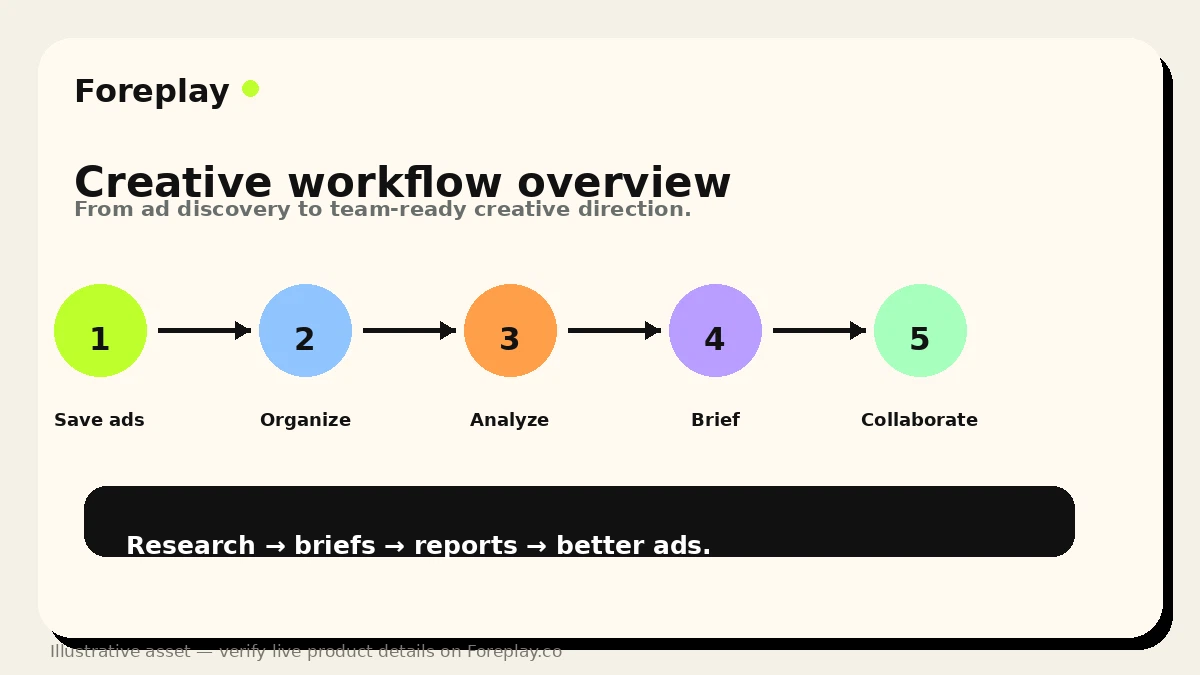
The product is positioned as a complete ad creative workflow: save ads, organize swipe files, discover winning examples, track competitors, analyze creative performance, build briefs, and collaborate with the people who actually turn ideas into campaigns. That is more serious than a basic swipe file. It is also more demanding. If your team will not use the workflow repeatedly, Foreplay can turn into an attractive but underused library.
For my money, the strongest Foreplay buyer is a performance marketing team, ecommerce brand, or agency that already has a weekly creative review rhythm. The tool can replace messy screenshots, expired ad links, Slack threads, unstructured boards, and half-finished creative briefs with a cleaner system. The weaker buyer is a solo marketer who mainly wants to browse a few ads, grab screenshots, or find quick inspiration before moving on.
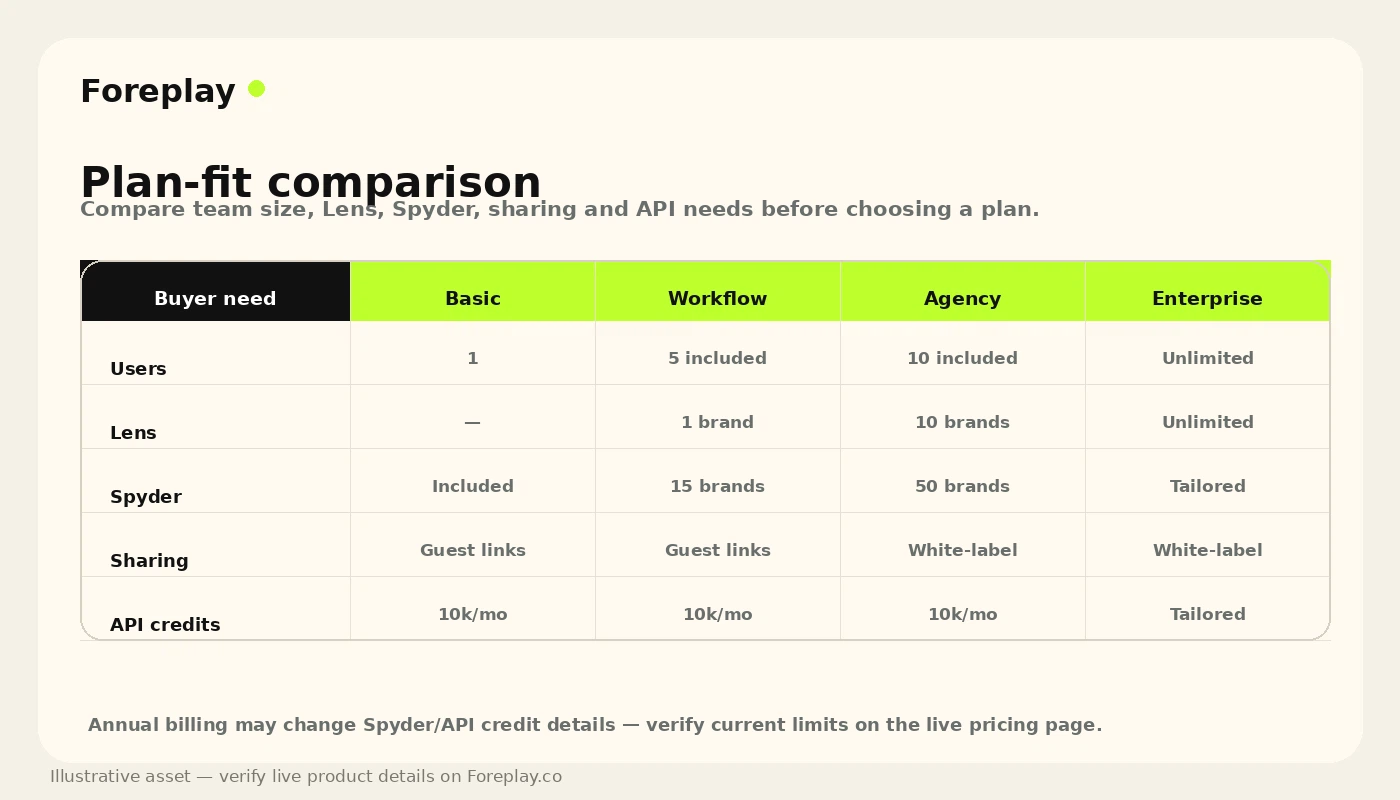
The pricing question is not only “Can I afford the Basic plan?” The better question is whether Basic, Workflow, Agency, or Enterprise matches the depth of your creative process. User count, brand limits, Lens, Spyder, API credits, white-label sharing, and annual billing all change the decision.
I would consider Foreplay if creative research is already costing your team time. I would slow down if you are buying it mainly because the product looks polished or because a trial button is available.
Next step: If Foreplay still sounds like a real workflow fit, verify the current plan table and buyer route before starting a trial or choosing annual billing.
Review snapshot
| Review point | Practical take |
|---|---|
| Best for | Performance marketers, agencies, ecommerce brands, and creative teams running recurring paid social tests |
| Not ideal for | Casual ad browsers, one-off inspiration searches, or buyers expecting an AI tool that creates final ads automatically |
| Main use case | Saving ads, organizing swipe files, tracking competitors, analyzing creative patterns, and turning references into briefs |
| Starting price | Current public pricing shows Basic from $59/month monthly or $49/month when billed annually |
| Trial path | Foreplay promotes a 7-day trial; checkout and FAQ language should be verified live |
| Main strength | It connects ad inspiration, research, analytics, briefing, and team collaboration better than a scattered folder system |
| Main concern | The subscription only pays off when the team uses the workflow repeatedly |
| Direct alternatives | PiPiAds for ad discovery, Quickads for ad creation, MakeUGC for UGC-style assets |
| Adjacent route | Voluum if campaign tracking and attribution matter more than creative research |
| Best next step | Test one real campaign workflow before upgrading or choosing annual billing |
What is Foreplay?
Foreplay is an ad creative research and workflow platform for performance marketers, media buyers, creative strategists, ecommerce teams, and agencies.
The product is not just a place to save a few ads. Its current public positioning is built around a broader “winning ad workflow”: research inspiration, save ads, organize swipe files, monitor competitors, analyze creative performance, turn insights into briefs, and share work with the team or clients.
That makes Foreplay different from three nearby categories that buyers often mix together.
It is not only an ad spy tool. It includes Discovery and Spyder-style competitor tracking, but the more interesting use case is what happens after you find the ad: tagging, organizing, discussing, reporting, and briefing.
It is not mainly an AI ad generator. It may include AI-assisted analysis and brief-building language, but a buyer should not treat it as a tool that creates finished campaign assets by itself.
It is not a full attribution or media-buying platform either. If your main problem is tracking conversions, attribution, campaign routing, or affiliate media-buying performance, a tool like Voluum may be a more relevant route.
The way I would judge Foreplay is simple: does it reduce friction between inspiration, strategy, creative production, and campaign learning? If yes, it can make sense. If all you need is occasional browsing, the subscription may feel heavy.
Our review approach compares public product pages, current pricing, FAQ and policy language, buyer workflow fit, creative-team use cases, and nearby alternatives. I would not treat a trial, annual discount, or attractive demo as proof of value until the workflow has been tested with real ads.
Who should use Foreplay?
Foreplay fits buyers who have enough ad creative activity to need structure.
A performance marketer running paid social every week is the clearest fit. If you are constantly looking at Meta, TikTok, LinkedIn, Instagram, or YouTube Shorts examples, Foreplay can give that research a place to live. The condition is that you actually review and tag examples instead of letting boards become another messy archive.
An ecommerce or DTC brand can also get value when creative testing is a repeatable growth lever. The product becomes more useful when your team is comparing hooks, formats, offers, proof angles, UGC styles, landing pages, and competitor patterns. If you are only launching a handful of ads per quarter, the value is harder to defend.
Agencies are another strong fit. Client work often creates a messy chain of screenshots, reference links, comments, briefs, and feedback calls. Foreplay’s sharing, collaboration, public links, white-label possibilities, and brief workflow can reduce that friction if the agency standardizes around it.
Creative strategists may benefit when they need to turn research into direction. A saved ad is not enough. The real value comes from explaining why an example works, which pattern matters, and how the next creative test should be framed.
Technical or data-heavy teams may consider Foreplay for its API access, but only if competitor ad data will feed a real workflow. API credits are not automatically useful. They matter when you already know what you want to build, automate, or analyze.
Who should avoid Foreplay?
Foreplay is not the first tool I would recommend to someone who only wants a few free ad examples.
If your research process is casual, the product may feel like buying a studio when you only need a notebook. Public ad libraries, screenshots, bookmarks, or a lighter tool may be enough until your creative process becomes more regular.
I would also be careful if you expect Foreplay to generate finished ads for you. It can help you research, organize, brief, and learn from creative patterns, but that is not the same as producing final UGC videos, image ads, scripts, or campaign assets. Buyers who need asset creation should compare tools like Quickads or MakeUGC instead.
Foreplay may also be too broad for buyers whose real pain is attribution. If you are asking which campaign, placement, affiliate source, or funnel path is profitable, you are in a different category. Voluum-style tracking is not a direct replacement, but it may be closer to the real job.
Small teams should be careful with annual billing. The pricing page shows annual savings, and that can be attractive, but a lower monthly equivalent does not matter if the team stops using the workflow after the first few weeks.
Finally, I would avoid upgrading too quickly if you have not mapped the plan gates. Users, extra-user pricing, brand limits, Lens access, Spyder usage, API credits, and reporting needs can change the real cost of the tool.
How Foreplay fits into a real workflow
Foreplay works best when it becomes part of a weekly creative loop.
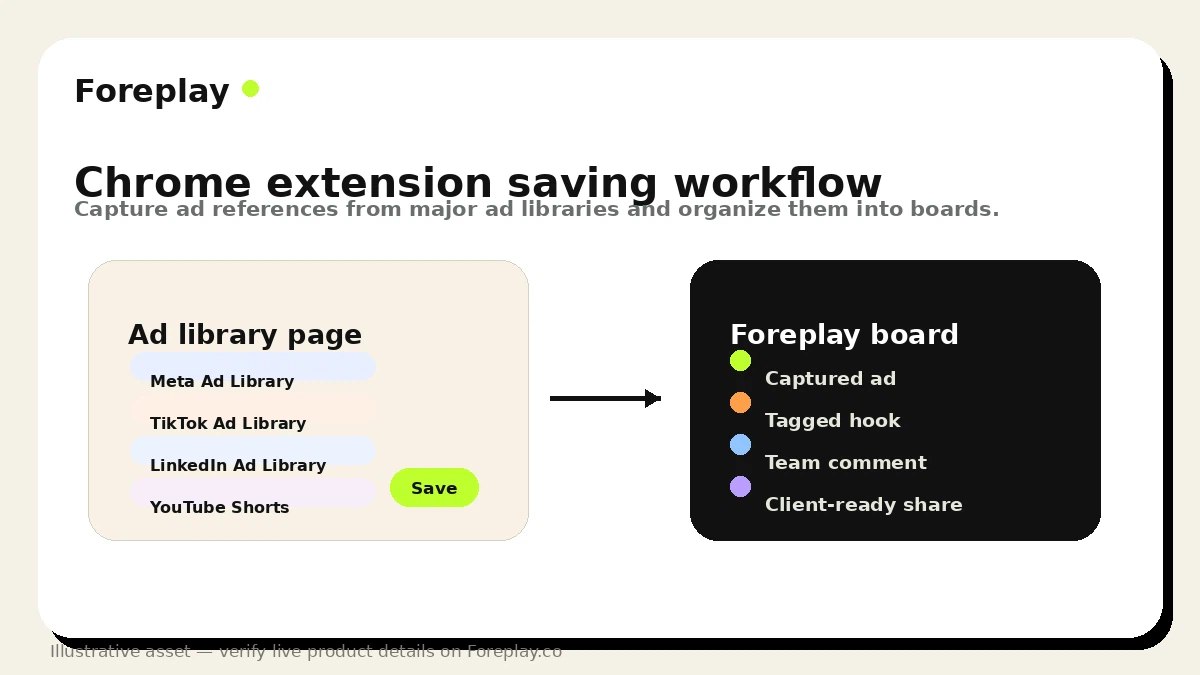
A realistic workflow starts before the platform is opened. The team chooses a product, angle, competitor set, offer, or campaign problem. Then someone saves ads from the relevant libraries or social platforms, organizes them into boards, tags useful examples, and looks for repeated patterns.
From there, the workflow becomes more valuable if the team uses Foreplay to answer creative questions, not just collect references. Which hooks keep appearing? Which formats seem to fit the category? Which competitor has been testing the same message for a long time? Which landing page screenshots, copy structures, or proof angles are worth discussing?
The next step is briefing. This is where Foreplay can move from passive inspiration to production support. A strategist or media buyer can turn saved examples into a brief that a designer, editor, creator, or client can understand.
Then the loop continues. Lens and reporting features are more relevant when the team wants to connect creative themes with performance learning. Spyder and API workflows matter when competitor tracking becomes systematic rather than occasional browsing.
The weak version of Foreplay is simple: save a bunch of ads, admire the board, and never use it again.
The strong version is different: research, organize, discuss, brief, launch, learn, and repeat.
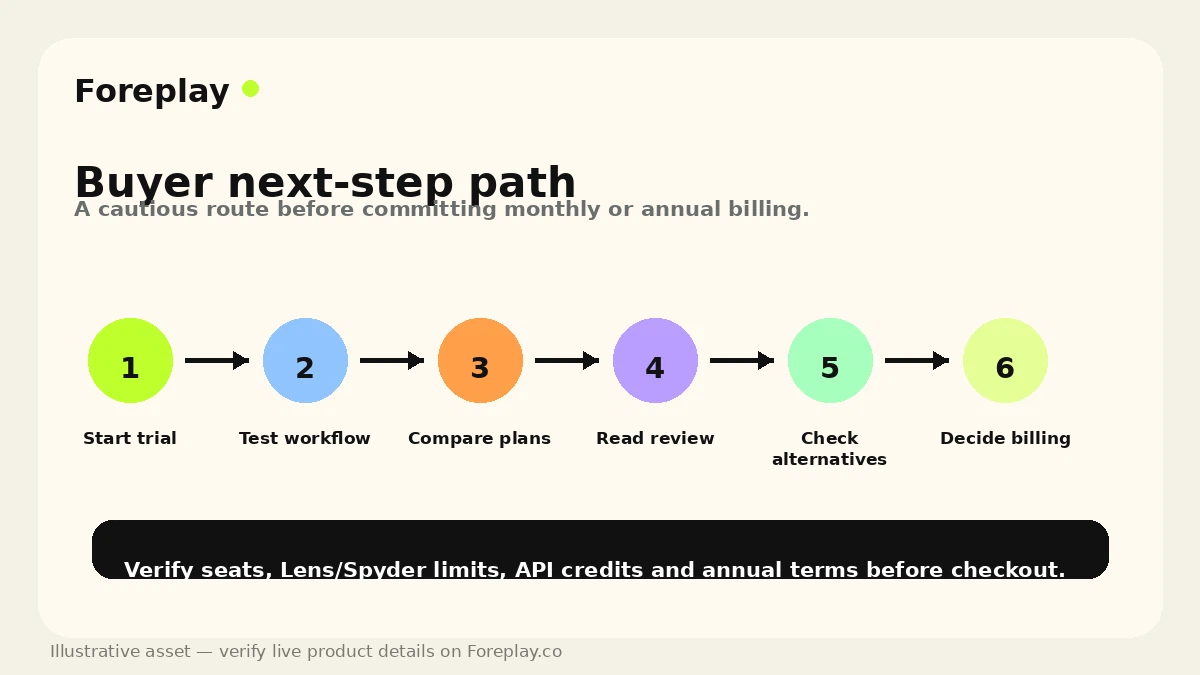
Workflow test: Before paying, use one real campaign or competitor set to see whether Foreplay improves your research-to-brief process.
Real-world buyer scenarios
A DTC brand testing new paid social angles may use Foreplay to keep its creative process from becoming guesswork. The buyer situation is familiar: the team needs fresh ideas, competitor awareness, and a better way to explain creative direction. Foreplay fits if the brand reviews ads weekly and turns patterns into briefs. It may fail if the team saves examples but does not translate them into new tests.
An agency managing multiple clients has a different problem. The issue is not only finding inspiration. It is keeping client references, strategist notes, feedback, and creative direction organized. Foreplay can help when boards, comments, sharing, and briefs become part of the agency process. The buyer should check brand limits, user seats, white-label sharing, and whether the relevant plan supports the level of reporting needed.
A media buyer studying competitors may find Spyder and Discovery useful. The value depends on whether competitor monitoring is a recurring habit. If you only check a competitor once, a full subscription is harder to justify. If you track a category every week, the workflow becomes more believable.
A technical team building internal ad intelligence workflows should look at API access separately. Foreplay’s API can be interesting for competitor ad data, transcripts, metadata, and automation, but API credits and implementation effort need a real business case. A buyer should not choose a deeper plan just because API access sounds advanced.
Key features that actually matter
Swipe File
Swipe File is the everyday foundation of Foreplay. It lets teams save ad examples into a structured workspace instead of relying on screenshots, expired links, or scattered bookmarks.
The practical value is organization. Saved ads only matter if the team can find, tag, compare, and discuss them later.
Buyer note: if your team does not already collect ad references regularly, Swipe File alone may not justify a paid plan.
Discovery
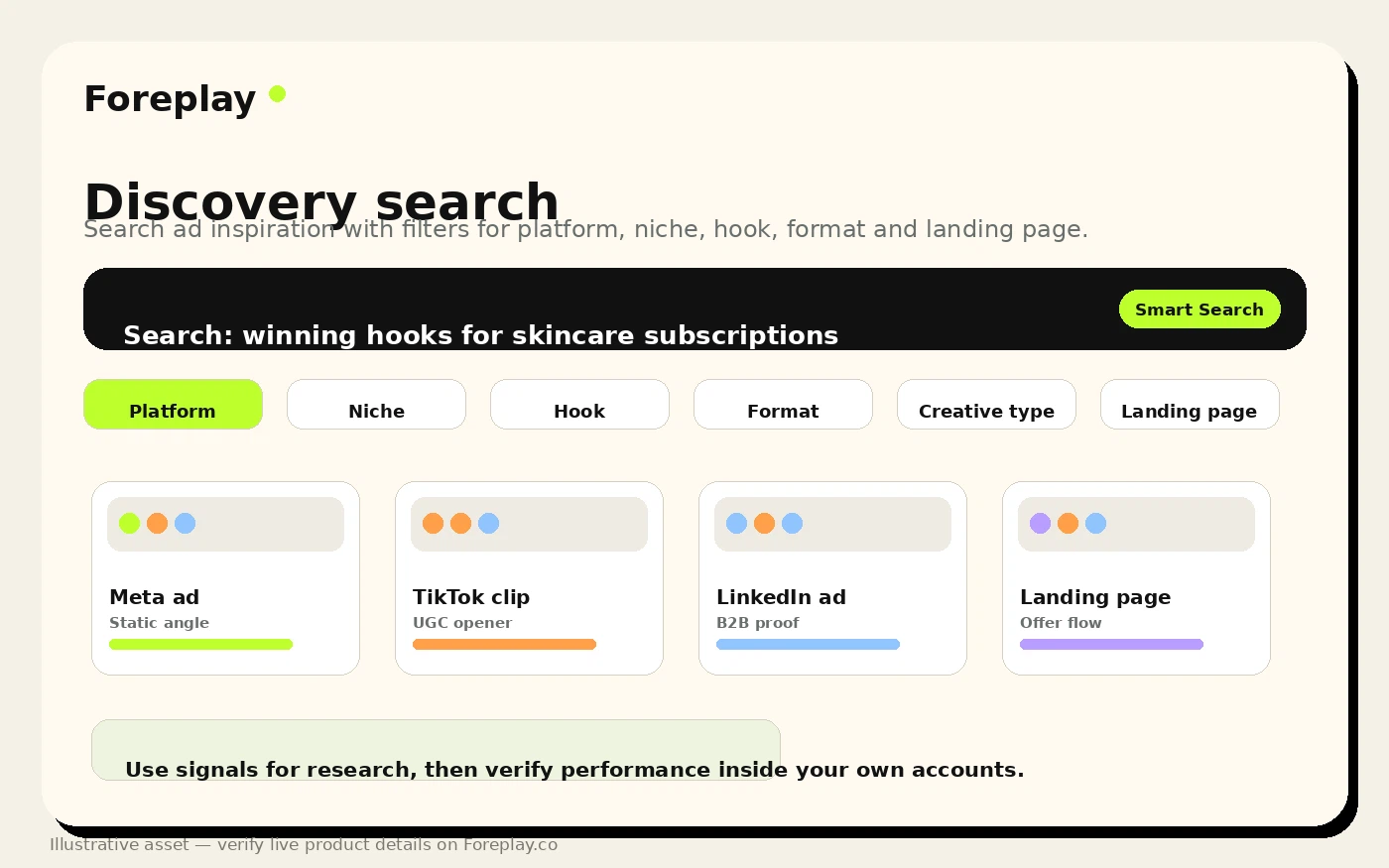
Discovery is Foreplay’s ad search layer. It helps buyers look for inspiration and patterns across a large ad database instead of manually hunting through public ad libraries.
This matters when the buyer needs repeated research across competitors, categories, hooks, formats, or offers.
Buyer note: test Discovery against your actual niche during the trial. A search tool is only useful if it returns examples that influence your real campaign decisions.
Spyder
Spyder is the competitor tracking layer. It is more relevant for teams that want ongoing monitoring rather than one-off searches.
The value is not “seeing competitor ads” once. The value is noticing creative movement over time: which themes repeat, which hooks persist, and which competitors are testing aggressively.
Buyer note: check plan-level Spyder access and brand limits before assuming the entry plan covers the monitoring depth you need.
Lens
Lens is the creative analytics and reporting side of Foreplay. It becomes important when teams want to connect creative patterns with performance learning rather than treat swipe files as passive inspiration.
This is where Foreplay starts to look more like a creative operating system than an inspiration board.
Buyer note: if Lens is a major reason you are buying, verify current plan gates, brand limits, data requirements, and whether your team will actually use reports in weekly reviews.
Briefs
Briefs help turn ad references into creative direction. This matters because inspiration does not automatically become production-ready work.
A good brief can help a designer, video editor, creator, strategist, or client understand the angle, structure, reference, and intended output.
Buyer note: Briefs are useful only when your team has a clear handoff process. If the brief still lives outside the normal workflow, the feature may not change much.
Pricing and plan value
Foreplay’s pricing should be judged by workflow depth, not by the lowest visible number.
At the time of review, Foreplay’s public pricing page shows Basic at $59/month on monthly billing and $49/month when billed annually. Workflow is shown at $175/month monthly and $149/month annually. Agency is shown at $459/month monthly and $389/month annually. Enterprise is positioned for larger agencies and scaling brand organizations, with a demo route rather than a simple public price.
The plan names matter because the buyer jobs are different.
Basic is easier to understand for a smaller team that mainly needs to save and organize ad inspiration, use Discovery, and build early workflow structure. But even there, I would check the exact current feature table before assuming Basic includes everything that looks useful on the homepage.
Workflow is more interesting when a scaling team needs more included users, more serious monitoring, Lens-style analytics, and a fuller creative process.
Agency becomes relevant when multiple ad accounts, brands, client workflows, reporting, and collaboration depth matter.
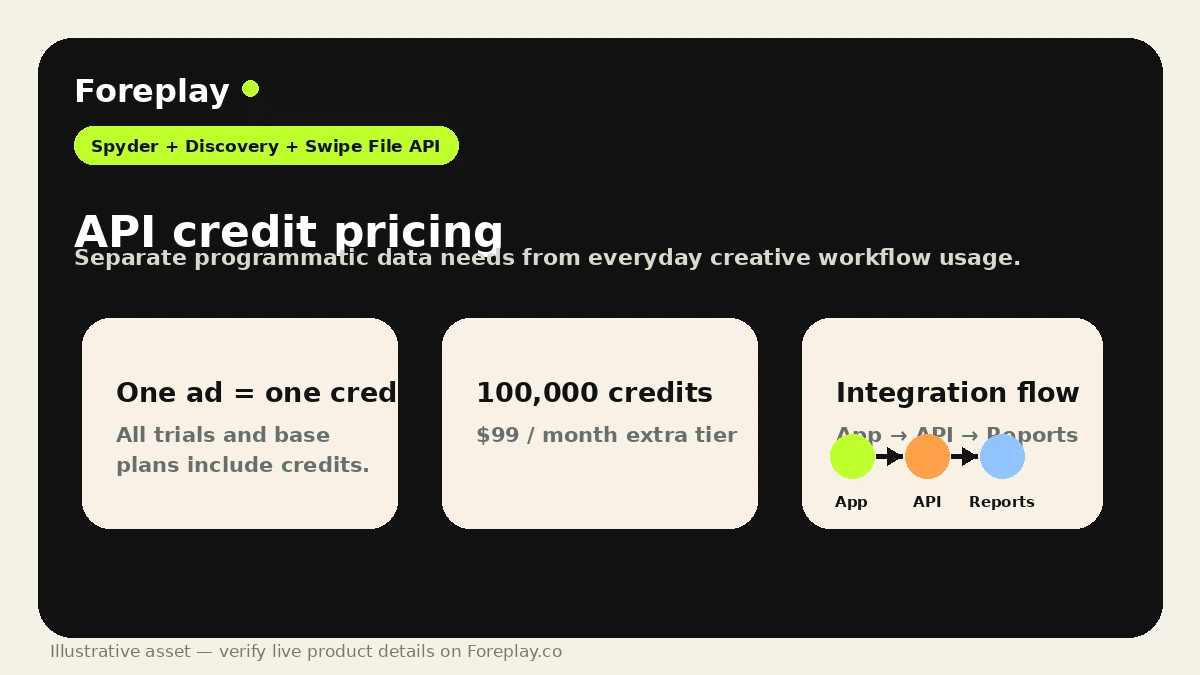
API usage is its own decision. Foreplay publishes additional API credit pricing, and the current API page explains that one ad equals one credit, with trials and base plans including monthly free credits. That can be useful for teams building internal tools, automations, or reporting workflows, but it should not drive the purchase unless you know exactly how competitor ad data will be used.
The cheapest plan is not automatically the best deal. The right plan is the one that matches how often your team saves ads, researches competitors, analyzes creative patterns, builds briefs, shares work, and needs API access.
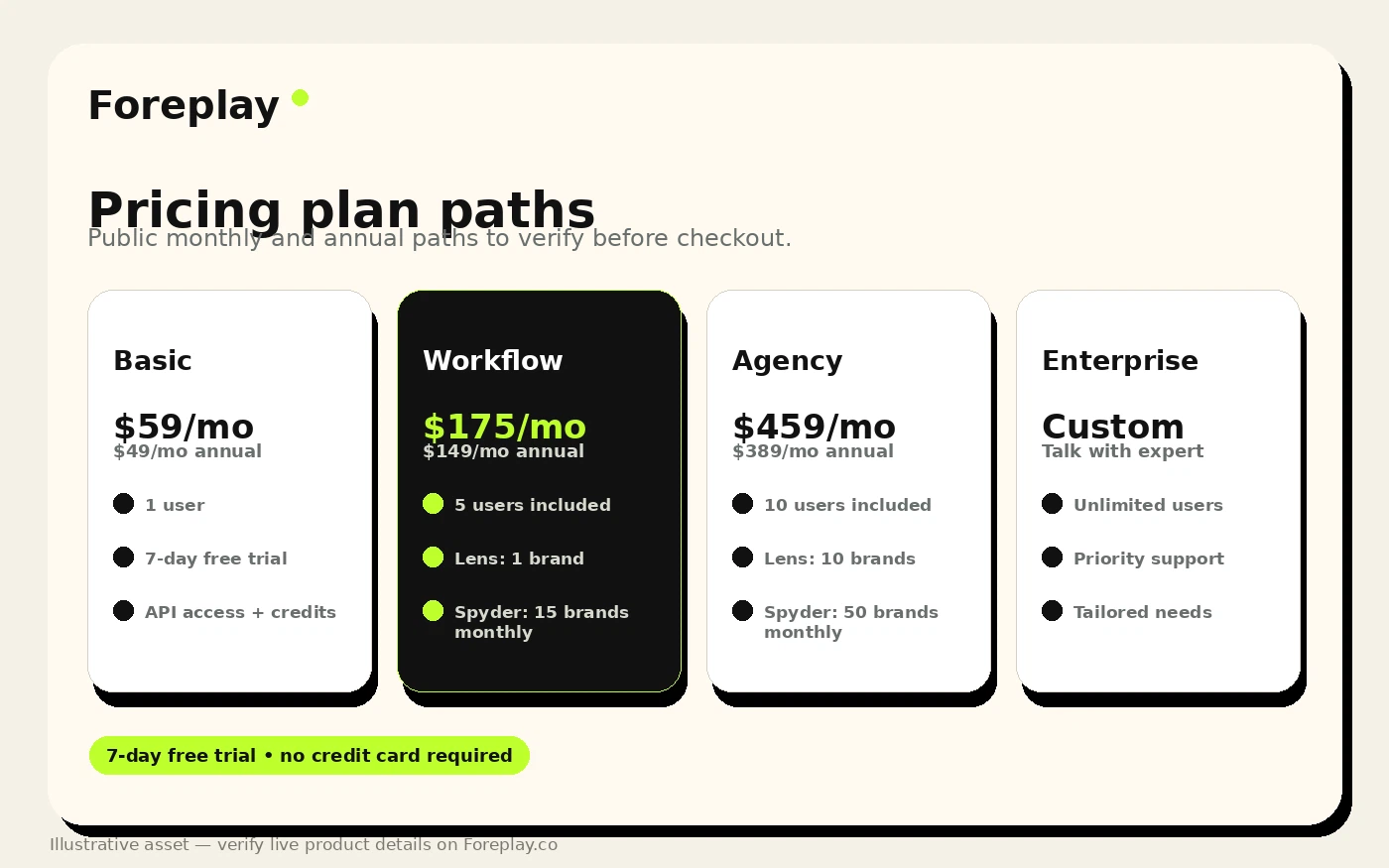
Pricing check: Compare the current monthly and annual plan table before treating the lowest visible Foreplay price as the real cost of ownership.
Check Foreplay pricing Check current offers Read store guide
Free plan, trial, coupon, and checkout notes
I would treat Foreplay’s trial as the safest starting point, but I would not treat trial language casually.
The current public pricing page promotes a 7-day free trial and plan cards include “No credit card required” language. The FAQ, however, describes a trial flow where buyers select a plan, enter a credit card, and are automatically subscribed after 7 days unless they cancel during the trial. That difference is exactly why I would verify the live checkout step before assuming the current requirement.
This is not a reason to avoid Foreplay. It is a reason to be precise.
Use the trial for a real test. Save ads from your actual research sources. Build one board. Try Discovery. Track one competitor. Create a brief. Share it with a teammate or client. Check whether the workflow feels easier than your current process.
Coupon logic should come later. A discount can make a good purchase better, but it should not be the reason you buy a tool that depends on team habits. A stable public coupon-code path is not the main buyer route I would rely on here. The better savings path is trial first, monthly plan if uncertain, annual billing only after proving repeated use.
If you still want to check the deal route, use the Foreplay coupon page after workflow fit is clear. Do not make the coupon the decision.
Offer check: Use offers as a final checkout step, not as the reason to choose Foreplay before the workflow is proven.
What I would check before buying Foreplay
If I were buying Foreplay for a real marketing workflow, I would check these points before paying:
- Trial requirements. Confirm whether the current checkout requires a card, when billing starts, and how cancellation works.
- Monthly versus annual cost. Annual pricing lowers the effective monthly number, but it also increases commitment risk.
- User count. Check included users and extra-user pricing before assuming the plan fits the whole team.
- Brand and account limits. Agencies and multi-brand teams should verify brand limits, ad account handling, and sharing needs.
- Lens access. If creative analytics is a major reason for buying, confirm the exact plan gate and whether your team will use it.
- Spyder usage. Competitor monitoring matters only if you will track brands regularly, so check the current limits and annual-plan differences.
- API credits. Technical buyers should confirm included credits, additional credit pricing, endpoint needs, and support before building around the API.
A simple test before paying
Before paying, I would run a small but serious Foreplay test.
Start with one real campaign or product category. Do not click around randomly. Pick a competitor set, a new creative angle, or a campaign problem your team actually cares about.
Then run this test:
- Save 20 to 30 relevant ads from your main research channels.
- Organize them into boards by angle, hook, format, or competitor.
- Use Discovery to find additional examples you would not have found manually.
- Track at least one competitor with Spyder if competitor monitoring matters.
- Turn the best references into one creative brief.
- Share the board or brief with the person who would actually produce or approve the ad.
- Ask whether the process was faster, clearer, and more repeatable than your current system.
That last step is the real buying signal.
If the answer is yes, Foreplay may deserve a paid plan. If the answer is no, the tool may be polished without being necessary.
Pros explained
The first major pro is workflow depth. Foreplay is not limited to saving ads. It connects saving, search, competitor tracking, analytics, briefs, collaboration, extension capture, mobile saving, and API access. That makes it more valuable for teams that want one creative research system instead of several disconnected tools.
The second pro is team communication. Creative strategy often breaks because media buyers, strategists, designers, creators, and clients are looking at different references. Foreplay gives teams a shared place to collect and discuss the examples that shape campaign direction.
The third pro is that it supports serious ad creative habits. A swipe file is useful only when it becomes part of a repeatable process. Foreplay’s value grows when teams use it every week to review examples, monitor competitors, and build briefs.
The fourth pro is plan depth. Basic, Workflow, Agency, and Enterprise give different levels of seriousness. That can be a weakness if the buyer does not know what they need, but it is useful when a team wants to scale from simple research to more structured analytics or API usage.
The fifth pro is the trial path. A 7-day test is short, but it is enough to run one focused workflow test if the buyer enters the trial with a real campaign question.
Cons explained
The biggest con is adoption risk.
Foreplay is only valuable if the team keeps using it. A library full of saved ads is not the same as a functioning creative process. If nobody tags examples, reviews boards, turns patterns into briefs, or checks competitor movement, the tool becomes another nice dashboard.
The second con is plan complexity. The buyer has to understand users, brands, Lens, Spyder, API credits, extra-user pricing, monthly billing, annual billing, and cancellation/refund details. That is manageable, but it is not a casual purchase.
The third con is category mismatch. Some buyers may expect Foreplay to create ads. Others may expect deep attribution. Those are different jobs. Foreplay can support creative decisions, but it should not be confused with a finished-ad generator or performance tracking platform.
The fourth con is annual billing risk. Annual savings can be reasonable after a team proves usage, but I would be careful about jumping into annual billing before the workflow becomes a habit.
The fifth con is that the trial language deserves live verification. Public pricing and FAQ language can make the current trial requirement slightly confusing, so checkout should be checked directly.
Green flags and red flags
A green flag is a team that already has a weekly creative review meeting. If Foreplay feeds that meeting with saved examples, competitor patterns, and clearer briefs, the product has a real job.
Another green flag is messy client communication. Agencies that constantly move ad references through Slack, screenshots, spreadsheets, and decks may find the structure valuable.
A third green flag is repeated competitor monitoring. If you need to watch category movement over time, Spyder and Discovery can become more useful than manual browsing.
A red flag is buying Foreplay because the homepage looks impressive but your team does not have a creative testing cadence.
Another red flag is expecting Foreplay to replace creative judgment. The tool can surface and organize patterns, but someone still has to decide which insights matter.
A third red flag is choosing annual billing before proving adoption. Annual savings are only savings if the team uses the product consistently.
Foreplay vs alternatives
Foreplay’s alternatives depend on the buyer’s real job. I would separate direct creative-research alternatives from adjacent marketing tools.
PiPiAds vs Foreplay
PiPiAds is the more direct comparison if the buyer mainly wants ad discovery and competitor ad research, especially around TikTok-style creative spying.
Foreplay may still make more sense if the buyer wants saved boards, team collaboration, briefs, creative analytics, and a broader research-to-production workflow.
The tradeoff is simple: PiPiAds leans more toward discovery and spying, while Foreplay leans more toward creative workflow management.
Quickads vs Foreplay
Quickads is a stronger comparison if the buyer wants to create ad assets faster.
Foreplay is stronger when the buyer needs to research what is working, organize references, and turn creative patterns into briefs before production.
The tradeoff is creation versus strategy. If your bottleneck is producing ad variations, Quickads may be closer. If your bottleneck is deciding what to produce and why, Foreplay is more relevant.
MakeUGC vs Foreplay
MakeUGC is an adjacent but useful comparison for buyers who need UGC-style ad assets.
Foreplay can help identify references, hooks, formats, and creative direction. MakeUGC is closer to the asset production side.
The tradeoff is research versus output. A team may use a Foreplay-style workflow to decide what UGC to make, then use a production tool to create or scale the asset.
Voluum vs Foreplay
Voluum is not a direct Foreplay replacement. It belongs in the conversation when the buyer’s main problem is campaign tracking, attribution, media-buying optimization, or performance routing.
Foreplay helps with creative research and direction. Voluum helps with campaign measurement and optimization.
The tradeoff is creative input versus performance tracking. If you are asking “what should we make next?”, Foreplay is closer. If you are asking “which traffic, placement, or offer path is profitable?”, Voluum is the more relevant route.
Trust, refund, and buyer-risk notes
The main Foreplay trust signal is that the product has a clear public footprint: official product pages, pricing, feature pages, FAQ, Chrome extension listing, mobile app positioning, API documentation, and public examples of how the workflow is meant to operate.
That said, the buyer still has to manage a few risks.
Pricing should be verified live because monthly and annual plan views change the effective starting cost. A static number does not tell you whether the plan includes the users, brands, Lens access, Spyder usage, API credits, and sharing features your team needs.
Trial and refund terms should also be read carefully. Foreplay’s FAQ discusses a 7-day trial, post-trial billing, cancellation, and a 14-day money-back guarantee after the first charge. It also says yearly plan cancellations do not receive a refund. That means annual billing deserves more caution than monthly testing.
Privacy is another practical check. Foreplay’s privacy page says account, usage, payment, support, and Chrome extension ad-link data may be collected to provide the service. That is not unusual for this kind of product, but teams working with sensitive client research should still confirm their internal policy before storing boards, competitor notes, or client-related material.
API buyers should be especially careful. Foreplay’s API positioning is useful, but programmatic workflows create technical and cost assumptions. Verify current credits, endpoints, access, support, and implementation needs before building internal reporting or automation around it.
The buyer mistake here is treating Foreplay as a simple tool purchase. It is better treated as a workflow adoption decision.
Final verdict
Foreplay is a strong fit if your team already runs a serious ad creative process and needs a better way to connect inspiration, competitor research, creative analytics, briefs, and collaboration.
I would consider it for performance marketers, ecommerce brands, agencies, and creative strategists who review ad examples repeatedly and need a shared operating system for that work.
I would skip it if you only need occasional inspiration, want a tool that generates finished ads for you, or are mainly looking for attribution and media-buying analytics.
I would compare it with PiPiAds if ad discovery is the main need, Quickads if ad creation is the bottleneck, MakeUGC if UGC-style asset production matters most, and Voluum if the real pain is tracking campaign performance.
The safest path is to test Foreplay with one real campaign, one real competitor set, and one real creative brief. If that workflow feels clearer than your current process, the product earns a serious look. If the trial feels like a polished library with no repeatable next step, the smarter move is to compare lighter or more specialized alternatives before paying.
