Quick verdict
MakeReels AI is worth a closer look if your real problem is not “I need one nice video,” but “I need a repeatable way to create and publish short videos without editing every reel from scratch.”
That is the important distinction.
The product is built around turning topics, text, news, and RSS-style inputs into reels, with automation and social publishing as the bigger promise. For creators, niche publishers, and small marketing teams, that can be useful. But I would not judge MakeReels AI by the automation promise alone; the real test is whether it can create acceptable reels from your actual topics at the volume your content calendar needs.
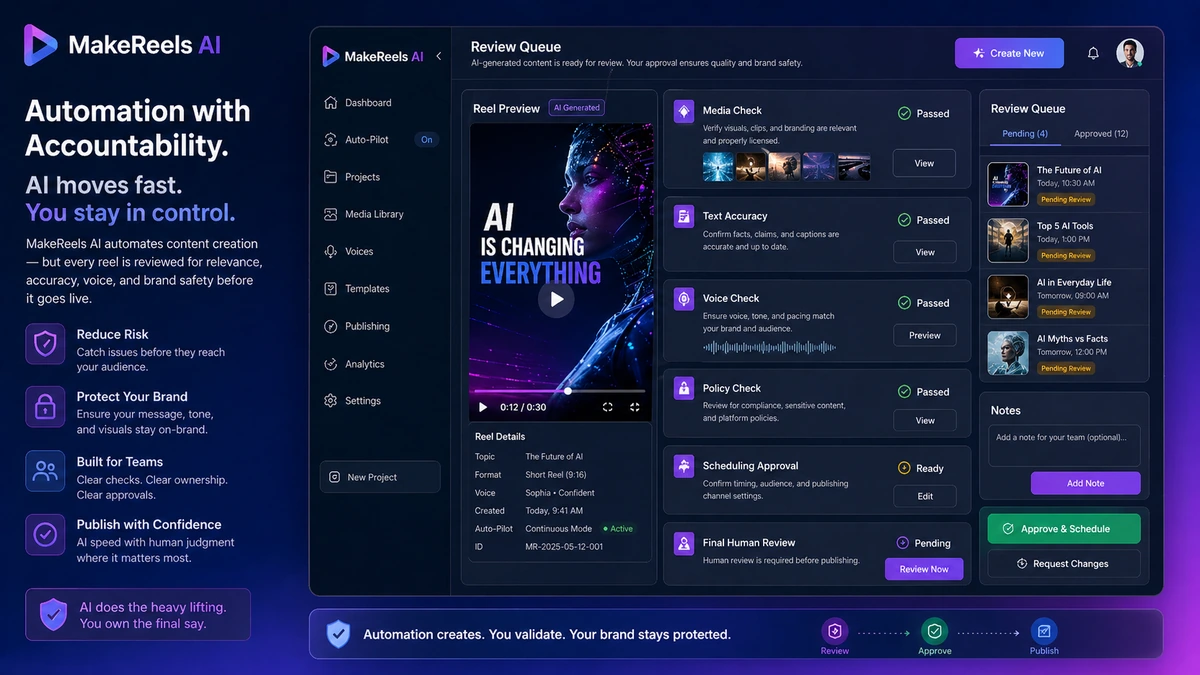
The strongest case for MakeReels AI is workflow speed. It can fit buyers who want topic-to-reel creation, AI voices, media selection, scheduling, and higher-volume short-video output. The main caution is control. Autopilot video creation can save time, but it can also publish weak media choices, awkward narration, or brand-sensitive content if the buyer treats automation as a replacement for review.
Pricing also needs a careful look. The public pricing page currently shows a free plan plus Creator, Automated Reels, and Automated Reels Pro paths, but the visible monthly charge can depend on the billing view and should be verified at live checkout. A lower headline price is not automatically the right plan if the workflow needs voice cloning, RSS automation, platform publishing, or team access.
Next step: If MakeReels AI sounds useful for your content calendar, test the workflow first and verify the current buyer route before upgrading.
Review snapshot
| Review point | Practical take |
|---|---|
| Best for | Creators, marketers, niche publishers, and small teams that need repeatable short-form video output |
| Not ideal for | Manual video editors, one-off users, and brands that cannot review AI-generated reels before publishing |
| Main use case | Turning topics, text, news, or RSS-style inputs into short social reels |
| Free path | Free plan is useful for testing output style and basic workflow fit |
| Paid path | Paid plans matter when automation, publishing, voice cloning, team access, or higher volume is needed |
| Main strength | Short-video automation built around repeated reel creation and publishing |
| Main concern | Pricing view, plan limits, voice cloning, watermark behavior, and autopilot risk need verification |
| Direct alternatives | AutoShorts.ai, Fliki |
| Adjacent route | AKOOL for avatar and visual-generation workflows |
| Safest next step | Test a real topic before choosing monthly, annual, or higher-volume automation |
What is MakeReels AI?
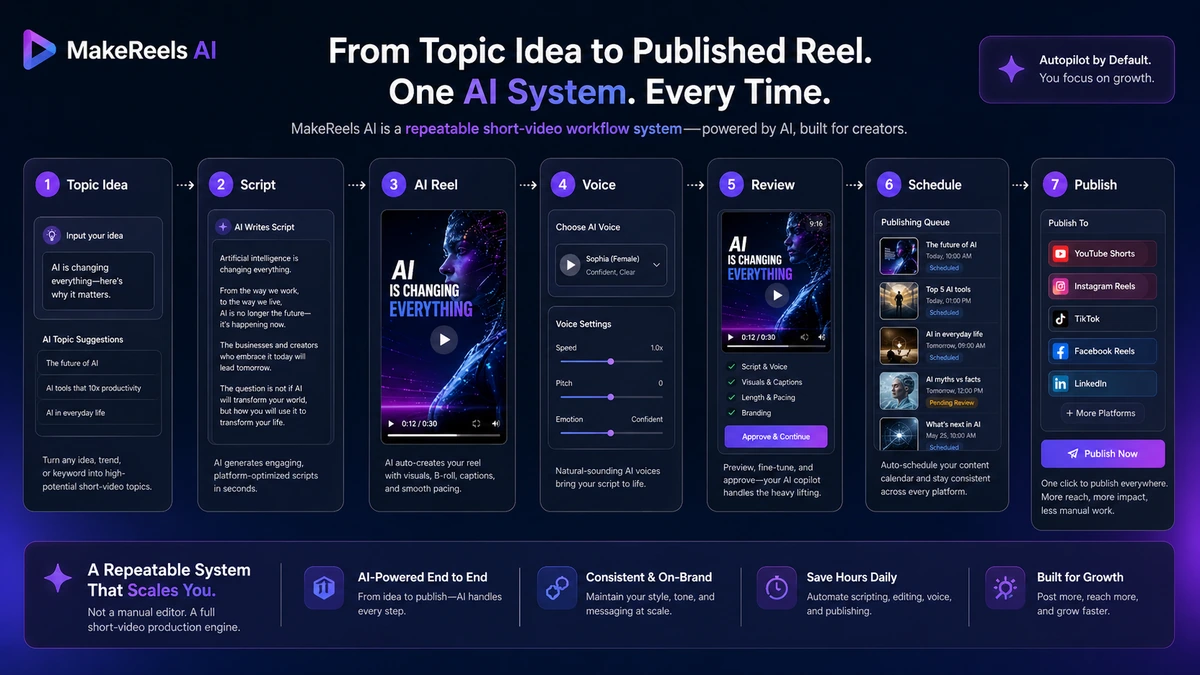
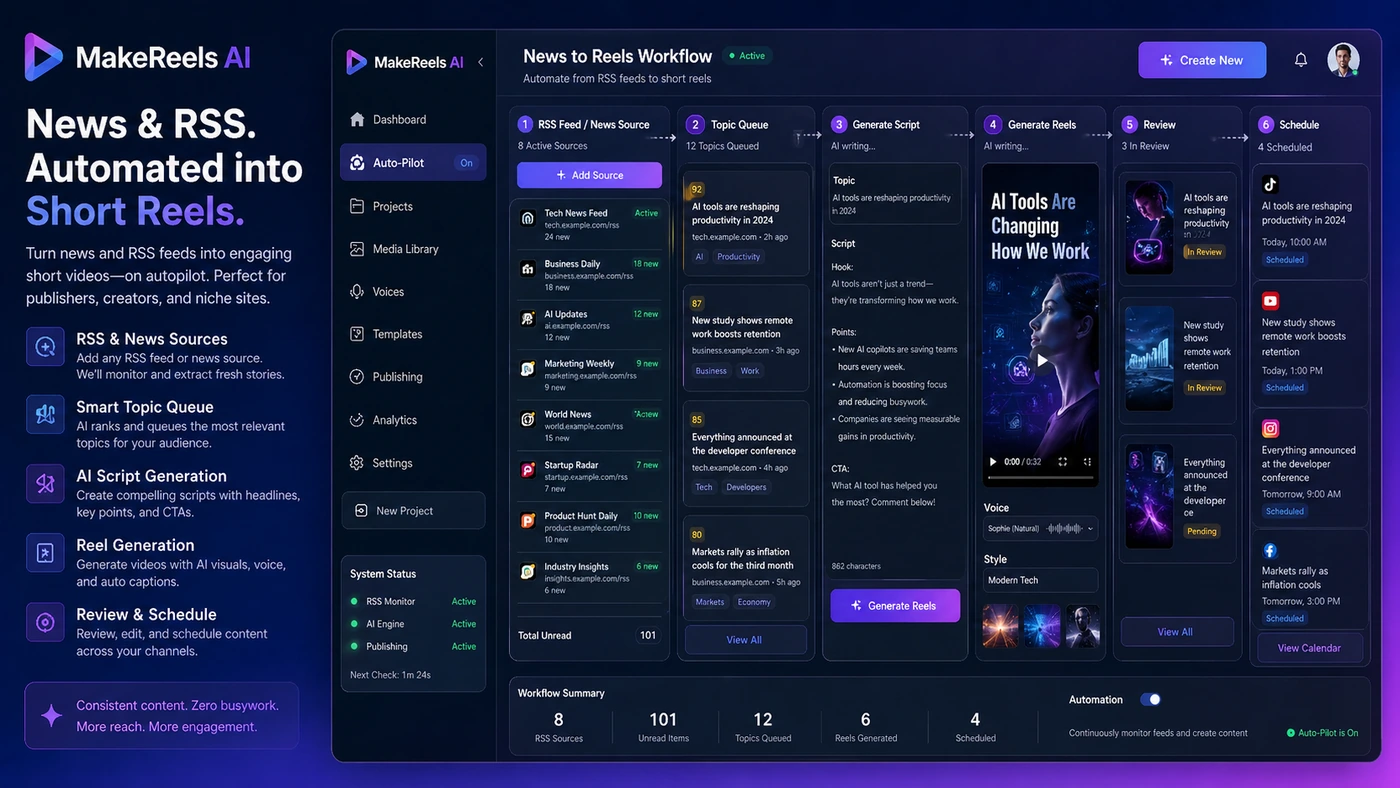
MakeReels AI is an AI reels tool for creating and publishing short-form videos from prompts, topics, text, news, and RSS-style inputs. It is closer to a short-video automation system than a traditional video editor.
The official homepage positions the product around automatically creating and publishing reels in a cloned voice. The pricing page adds more detail: free testing, higher reel volume, Auto-Pilot workflows, AI voices, media libraries, publishing options, voice cloning on higher plans, support levels, and limited team access.
MakeReels AI is not the same as a manual editor where you control every cut, transition, timeline layer, and design detail. The more serious use case is repeatability: take a topic or source, generate a short reel, review it, publish it, and repeat the process often enough that automation saves time.
Our review approach compares public product pages, pricing details, terms, privacy language, buyer workflow fit, and nearby alternatives. We do not treat a free plan, coupon route, or low monthly charge as proof that the tool fits the buyer. With this category, the real value is proven only when the generated reels are good enough for the buyer’s audience and safe enough for the buyer’s account.
The common wrong expectation is that MakeReels AI can fully replace creative judgment. A better expectation is that it creates a first-pass reel workflow that still needs review.
Who should use MakeReels AI?
MakeReels AI makes the most sense for creators who publish frequently and feel stuck between two bad options: spend too much time editing simple reels manually, or post less often than the content strategy requires. If the goal is repeated social output, MakeReels AI has a clearer role.
It also fits niche-site operators and small publishers who want to turn topical content, news, or RSS-style inputs into short videos. This is where the product becomes more interesting than a generic AI video generator. A publisher does not just need one pretty clip. They need a source-to-reel process that can run again and again.
Marketers may find it useful when the goal is lightweight social content across Instagram, TikTok, YouTube Shorts, or Facebook. The condition is that someone still checks the message, visuals, voice, and platform fit before publishing. Automation is helpful only if it reduces production work without creating brand risk.
Voice-led creators may also be interested because paid plans include voice cloning paths. This is useful only when the creator is comfortable with synthetic voice use and understands the ethical restrictions. MakeReels AI’s own policy limits voice cloning to the account holder, so teams should not assume they can clone third-party voices casually.
Who should avoid MakeReels AI?
I would avoid MakeReels AI if you only need one or two occasional reels. A free test may still be worth trying, but a paid automation plan is harder to justify when the workflow is not repeated.
Editors who need manual timeline control should also be careful. MakeReels AI is not the strongest fit for custom motion design, complex brand systems, heavy editing, color correction, multi-track audio, or frame-by-frame polish. A traditional editor or a more flexible design/video platform may be the better route.
Brands with strict compliance rules should slow down before using autopilot. The terms place responsibility on users for content, platform rules, uploaded assets, automated text, and scheduled reels. If a wrong clip, inaccurate statement, awkward AI voice, or policy-sensitive post could hurt the account, human review is not optional.
Buyers who are attracted only by a coupon or lower billing view should also pause. A discount can make a useful plan cheaper, but it cannot make automated reels valuable if the output quality is weak for your niche.
I would also be careful if your team needs a confirmed API, approval workflow, legal review, or enterprise governance. Buyers with serious integration needs should confirm those details directly before paying.
How MakeReels AI fits into a real workflow
A sensible MakeReels AI workflow starts before the tool generates anything.
First, choose a real topic that matches your niche. Not a demo prompt. Not a generic motivational quote. A real topic you would actually publish.
Then generate a reel and check the basics: the hook, script, voice, media choice, pacing, captioning, and platform fit. If the generated video needs so much rewriting or editing that it takes as long as manual creation, the tool has not solved the right problem.
The next step is volume testing. One acceptable reel does not prove the automation system. I would test a small batch and ask whether the tool produces enough usable first drafts to save time over a normal content week.
If the answer is yes, then plan comparison becomes useful. The buyer can look at Auto-Pilot workflows, publishing platforms, watermark behavior, voice cloning, support level, team seats, and AI image limits. If the answer is no, upgrading will probably magnify the mismatch.
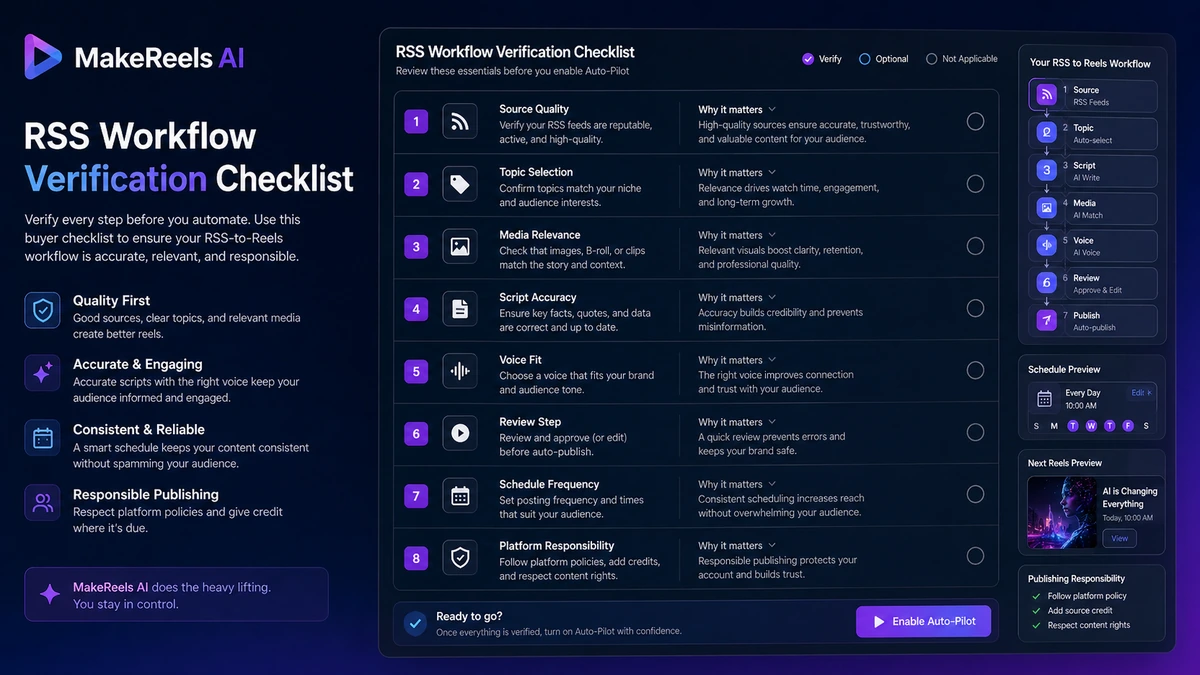
Workflow check: Use MakeReels AI only after testing it with the kind of topics, language, voice, and posting cadence you would actually use.
Real-world buyer scenarios
A solo creator posting daily educational reels is one of the more natural fits. The buyer has recurring topics and needs fast output. The risk is sameness: if every reel feels templated, the time saving may come at the cost of audience fatigue.
A niche publisher using news or RSS inputs is another strong scenario. MakeReels AI can be useful when the buyer wants to turn current topics into short social posts quickly. The caution is accuracy and source relevance. News-style automation should still have a review step because an AI-generated reel can choose the wrong emphasis or media.
A small agency managing multiple social accounts should be more careful. Automation sounds attractive, but client work adds review, approval, brand voice, platform compliance, and reporting pressure. If agency or white-label features matter, the buyer should confirm the current custom pricing path before assuming the standard plans cover it.
A casual user who only wants an occasional short video should probably test the free plan and stop there unless the output is unusually useful. MakeReels AI becomes more believable when volume exists. Without volume, the upgrade logic is weaker.
Key features that actually matter
Topic-to-reel creation
The core value is turning a topic or text input into a short video without building every element manually. This matters for buyers who have more ideas than editing time.
Buyer note: test the tool with real topics from your niche. Generic demo topics can make almost any AI video tool look better than it feels in production.
News and RSS-style automation
The news-to-reel angle is one of the more interesting parts of MakeReels AI. It can fit publishers, niche sites, and marketers who want to convert source material into repeated short videos.
Buyer note: verify how much control you have over sources, review steps, and final output before using this for brand-sensitive or news-sensitive accounts.
Auto-Pilot workflows
Auto-Pilot workflows can reduce manual effort when the buyer needs repeated creation and publishing. This is also where risk rises. Faster publishing is useful only if the buyer still controls quality.
Buyer note: start with human-reviewed output before trusting autopilot on a live account.
Voice cloning and AI voices
Paid plans include voice-related features, and MakeReels AI’s policies say voice cloning is limited to the account holder. That is a meaningful ethical boundary, especially for creators and agencies.
Buyer note: check voice quality, language support, deletion controls, and plan access before treating voice cloning as the reason to upgrade.
Multi-platform publishing
Publishing support matters if MakeReels AI becomes part of a real social workflow. The official terms also make clear that users remain responsible for third-party platform compliance.
Buyer note: confirm the platforms you actually use, the permission flow, and any posting limitations before connecting important accounts.
Pricing and plan value
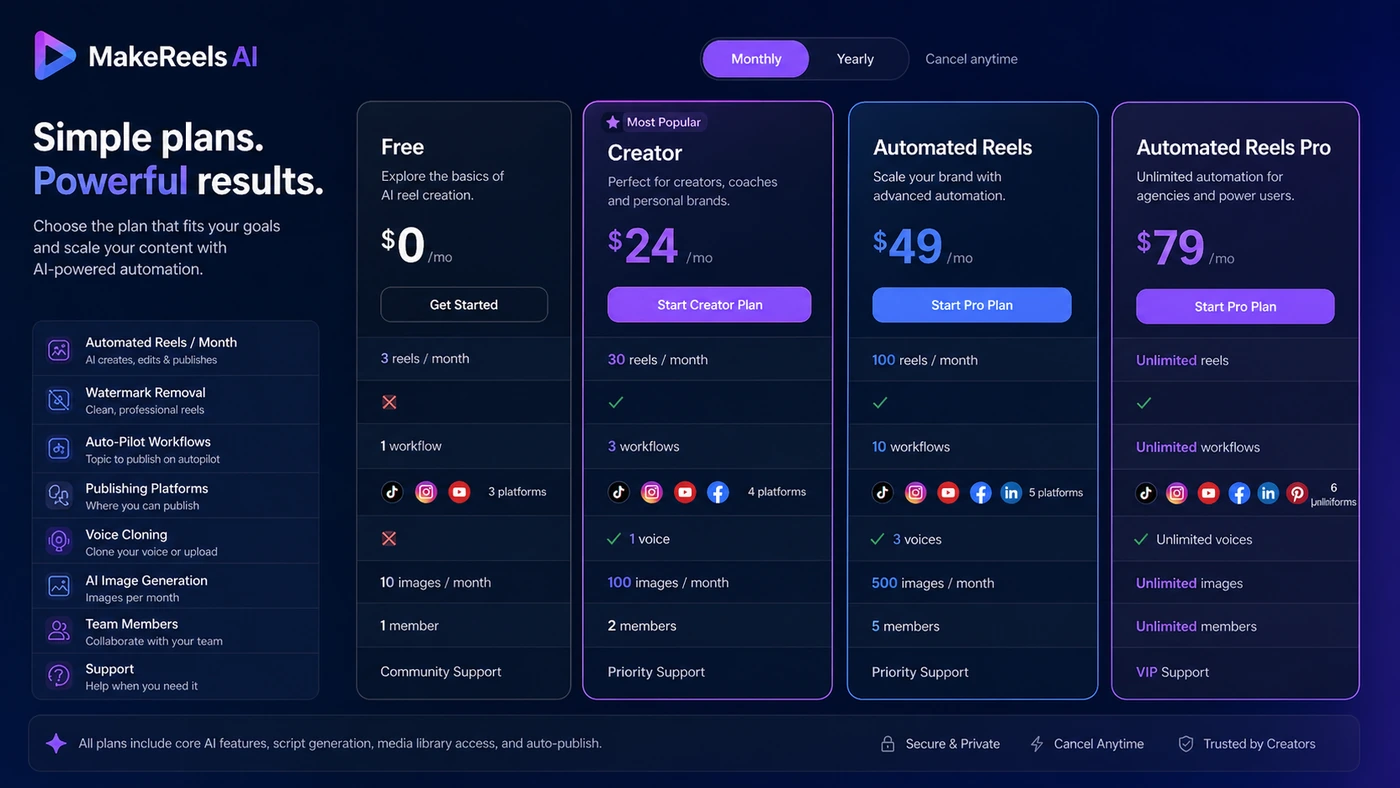
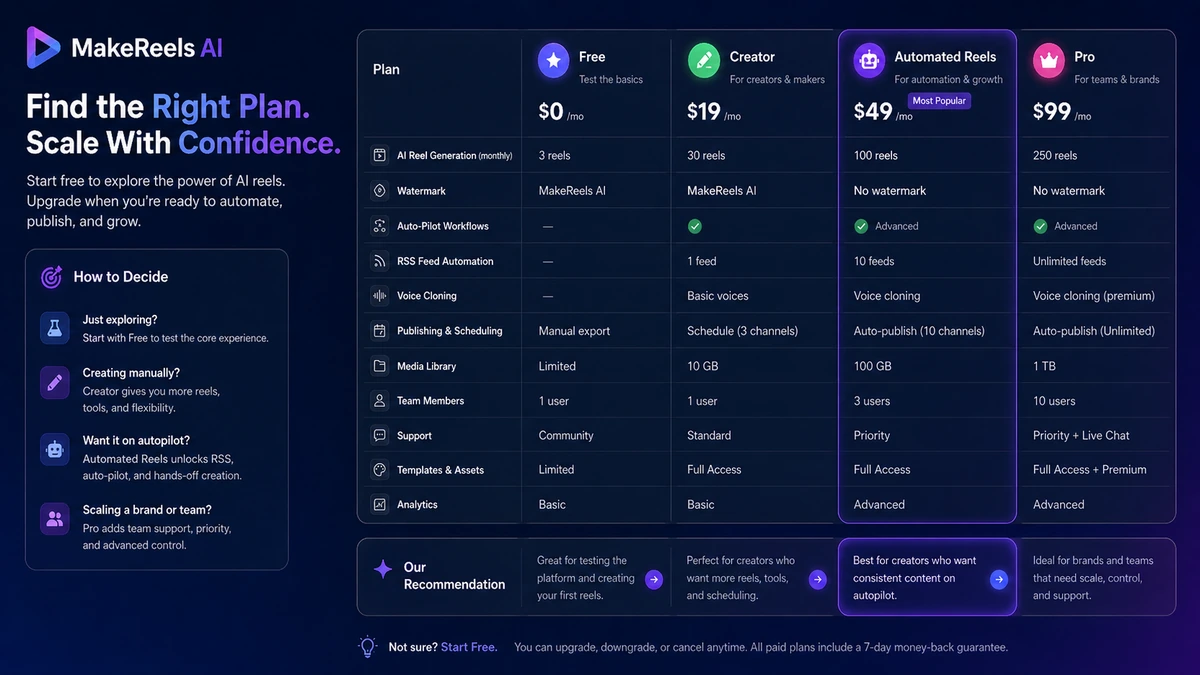
MakeReels AI pricing needs a careful read because the public pricing page includes a free plan, paid plans, a monthly/yearly toggle, and custom pricing for white-label, agency, and enterprise clients.
At the time of review, the public pricing page shows these main plan paths:
| Plan path | What buyers should understand |
|---|---|
| Free | Useful for basic testing, with limited automated reels and AI image generation |
| Creator | Lower-volume paid path with no watermark, limited publishing, Auto-Pilot workflow access, AI voices, and AI image allowance |
| Automated Reels | More relevant when unlimited reels, more workflows, RSS automation, voice cloning, publishing, support, and team access matter |
| Automated Reels Pro | Higher-volume path with more Auto-Pilot workflows, larger media/image allowances, stronger support, and limited team expansion |
| Custom pricing | Better fit for white-label, agency, and enterprise needs that standard plans may not cover |
The important caution is that pricing text can vary by billing view. The page currently exposes “We charge you” monthly amounts in the visible plan cards, while older or alternate pricing references may show different monthly amounts. I would not treat any article snapshot as the final price. The live checkout page is the only number that matters before payment.
For most buyers, the free plan should be used as a workflow test. It is not proof that paid automation is worth it. The paid plan becomes more logical only after you know your monthly reel volume, whether watermark removal matters, whether voice cloning is needed, how many workflows you need, and whether publishing platforms are included.
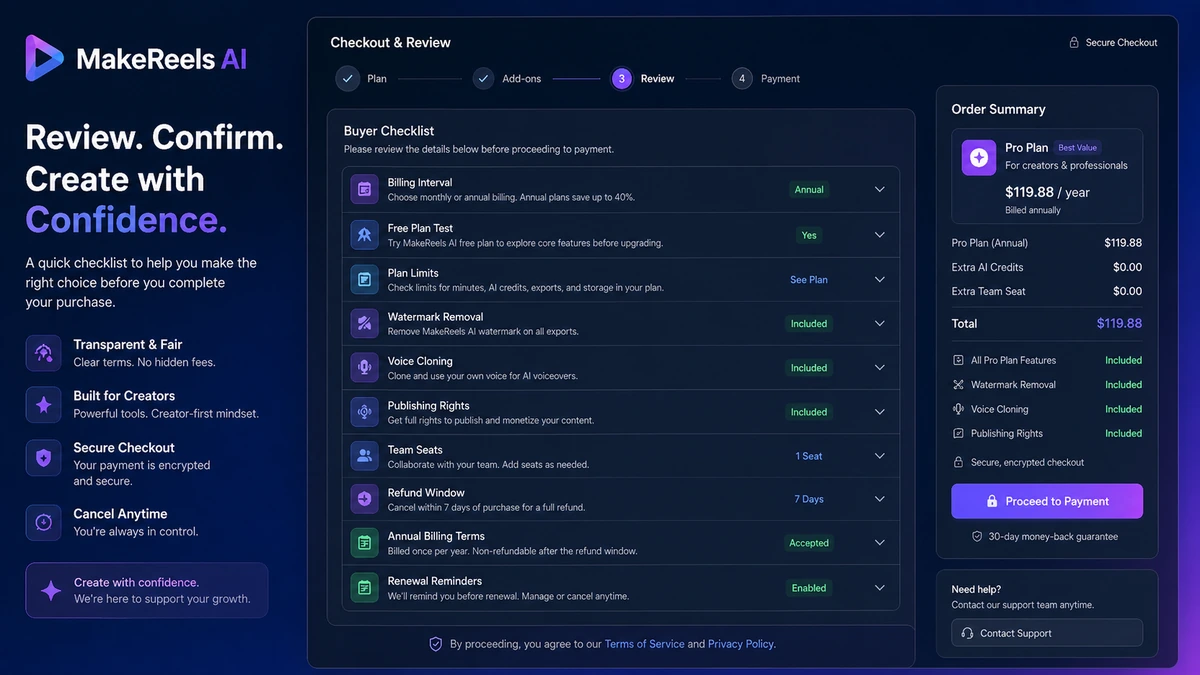
Annual billing should come later. The terms say full refunds are available within the first 24 hours of purchase, while annual cancellations may refund remaining unused months with past months charged at the regular monthly rate. That is better than no refund language, but it still means buyers should test quickly and read the current terms before committing.
Pricing check: If MakeReels AI still fits your workflow, verify the live pricing page, billing interval, and plan limits before checkout.
Free plan, trial, coupon, and checkout notes
MakeReels AI has a free plan, which is the right place to start. I would use it to test output quality, topic handling, media relevance, voice fit, watermark expectations, and how much editing is still needed.
That is different from proving the paid plan.
The paid decision depends on the features that sit behind the upgrade path: reel volume, Auto-Pilot workflows, watermark removal, voice cloning, publishing access, support, AI image allowance, and team members. A buyer who only needs a few videos may not need the same plan as a publisher trying to build a daily news-reel workflow.
The coupon path should come after fit is clear. If an active offer exists, it can improve the purchase. But I would not let a discount choose the plan. The better order is free test, workflow review, plan comparison, live checkout verification, then coupon or deal route.
Offer check: Use the coupon route only after you know which MakeReels AI plan actually matches your publishing volume.
What I would check before buying MakeReels AI
If I were buying MakeReels AI for a real creator workflow, I would check these items before paying:
- Whether the free plan can generate acceptable reels from my real topics.
- Whether the paid plan removes the watermark in the way I expect.
- Whether voice cloning is included in the plan I am considering.
- Whether my required platforms are supported for publishing and scheduling.
- Whether Auto-Pilot workflow limits match my weekly or monthly content calendar.
- Whether annual billing, refund timing, and cancellation handling are acceptable.
- Whether I still need a human review step before every automated post.
The easy mistake is buying the automation before proving the content. I would reverse that. Prove content first. Then buy automation.
A simple test before paying
Before upgrading, I would run a small test like this:
- Choose three real topics from your actual niche.
- Generate reels using the free path or lowest-risk workflow available.
- Check whether the visuals, voice, pacing, and script feel publishable.
- Estimate how many manual edits are still needed per reel.
- Compare that time against your current creation process.
- Check which paid plan unlocks the missing features you truly need.
- Only then consider monthly or annual billing.
This test is intentionally simple. The goal is not to prove that MakeReels AI can make a demo video. The goal is to find out whether it can save time on work you already repeat.
Pros explained
The first real pro is repeatability. MakeReels AI is more compelling when the buyer needs a steady flow of short videos instead of a single polished clip.
The second pro is the free plan. Even if the free tier is limited, it gives buyers a safer way to test the basic workflow before paying. In a category where output quality varies heavily by prompt, topic, and voice, that matters.
The third pro is the automation stack. Auto-Pilot workflows, RSS/news inputs, publishing, voice options, and AI media can reduce the number of separate tools a creator needs for lightweight reels.
The fourth pro is simplicity. Not being a full professional editing suite can help buyers who want consistent short-form output without timeline complexity.
Cons explained
The first con is control. Automated reels can save time, but they can also make poor creative choices. Media relevance, narration accuracy, pacing, and tone still need human review.
The second con is pricing clarity. Public pricing references can differ depending on billing view or source freshness. Buyers should trust live checkout more than old articles, screenshots, or summaries.
The third con is volume dependence. If you do not publish regularly, a paid automation plan can become another unused SaaS subscription.
The fourth con is category fit. MakeReels AI is not the best choice for buyers who need manual editing depth, advanced creative control, client approval workflows, or enterprise governance.
Green flags and red flags
Green flags are easy to spot when the buyer has a real content calendar. If you already publish short videos weekly or daily, have repeatable topics, and need faster first drafts, MakeReels AI is more credible.
Another green flag is a successful free test. If the generated reels are close enough that light review makes them publishable, the paid plans become easier to judge.
The red flags are just as important.
If you are buying because the automation sounds impressive but you do not know what you will publish, slow down. If you cannot review AI-generated content before posting, slow down. If your brand has strict legal, medical, financial, political, or compliance rules, slow down even more.
A final red flag is annual billing before proof. I would not move to annual billing until MakeReels AI has already saved time on real content.
MakeReels AI vs alternatives
MakeReels AI sits in a specific part of the AI video market: repeated short-form reel creation and publishing.
AutoShorts.ai vs MakeReels AI
AutoShorts.ai is the most direct comparison when the buyer wants automated short-video publishing. If your main goal is faceless or automated shorts at volume, compare these two closely.
MakeReels AI may still make sense if its voice cloning, RSS/news angle, and plan structure fit your workflow better. The tradeoff is that both tools should be judged by output quality and scheduling control, not just by how fast they generate videos.
Fliki vs MakeReels AI
Fliki is a stronger comparison when text-to-video, voiceover quality, and broader video creation matter more than autopilot publishing. If you care about script-to-video polish and voice selection, Fliki may feel more flexible.
MakeReels AI may be stronger when the buyer specifically wants repeated reels, source-to-video workflows, and social publishing automation.
AKOOL vs MakeReels AI
AKOOL is an adjacent route, not a one-to-one replacement. It is more relevant for buyers exploring avatars, AI visual generation, or creative production workflows.
MakeReels AI is the clearer fit when the job is short-form social reel automation. AKOOL becomes more relevant when the buyer’s creative need moves beyond reels into broader AI visual content.
Trust, refund, and buyer-risk notes
The buyer-risk picture is mixed but manageable if you test in the right order.
The terms say full refunds are available within the first 24 hours of purchase, while refunds after that window are not available except for the stated annual plan handling. Credit purchases are described as non-refundable. That means buyers should verify paid features quickly after upgrading and avoid treating the refund policy as a long trial.
The terms also place responsibility on users for platform compliance and content shared through connected accounts. If content violates a platform rule, the buyer carries the risk.
Voice cloning deserves extra care. MakeReels AI says voice cloning is limited to the account holder and prohibits third-party voice samples. That is the right kind of boundary, but buyers still need to use synthetic voice responsibly.
Privacy and platform permissions also matter. Buyers should be comfortable connecting social accounts before using MakeReels AI as a publishing workflow.
My practical advice is simple: do not buy on automation language alone. Test output quality, verify plan limits, read current refund and platform terms, and start with the smallest plan that proves repeated value.
Final verdict
MakeReels AI is a useful tool to consider if your workflow already demands repeated short-form video creation and you want a faster path from topic to reel to publishing.
I would consider it if you publish often, have clear topic sources, can review output before posting, and want automation more than deep manual editing. I would be more cautious if you need polished brand storytelling, heavy timeline control, enterprise approval workflows, or a tool that can be trusted to publish without review.
The product’s best fit is not the buyer looking for one impressive AI video. It is the buyer who needs a repeatable reels system and is willing to test whether the generated output is good enough for the audience.
For my money, the safest path is to test the free workflow with real topics first, compare the paid plan limits against your publishing calendar, and treat the coupon or deal path as secondary. MakeReels AI can make sense when it supports a process you already repeat. It becomes weaker when automation is the only reason you are interested.
