MakeReels AI Pricing, Plans & Creator Fit
MakeReels AI is a short-form video automation tool for turning topics, text, news, and RSS-style inputs into social reels. The main buying question is not whether it can make videos quickly. The sharper question is whether its automation, voice, publishing, and plan limits match the volume of reels a creator or marketer actually needs.
Fit → price → checkout
Use these routes after the official-site check: coupon first, review for fit, compare if unsure.
MakeReels AI pricing snapshot
Fast commercial checks before pricing, coupons, or a deeper review.
Visible on the official pricing page with limited automated reels and AI image generation.
Best checked for 100 automated reels, no watermark, 2 platforms, and 1 Auto-Pilot workflow.
More relevant for unlimited reels, RSS automation, voice cloning, and multi-platform publishing.
Higher-volume path with 20 workflows, more AI images, phone support, and 2 team members.
MakeReels AI product tour
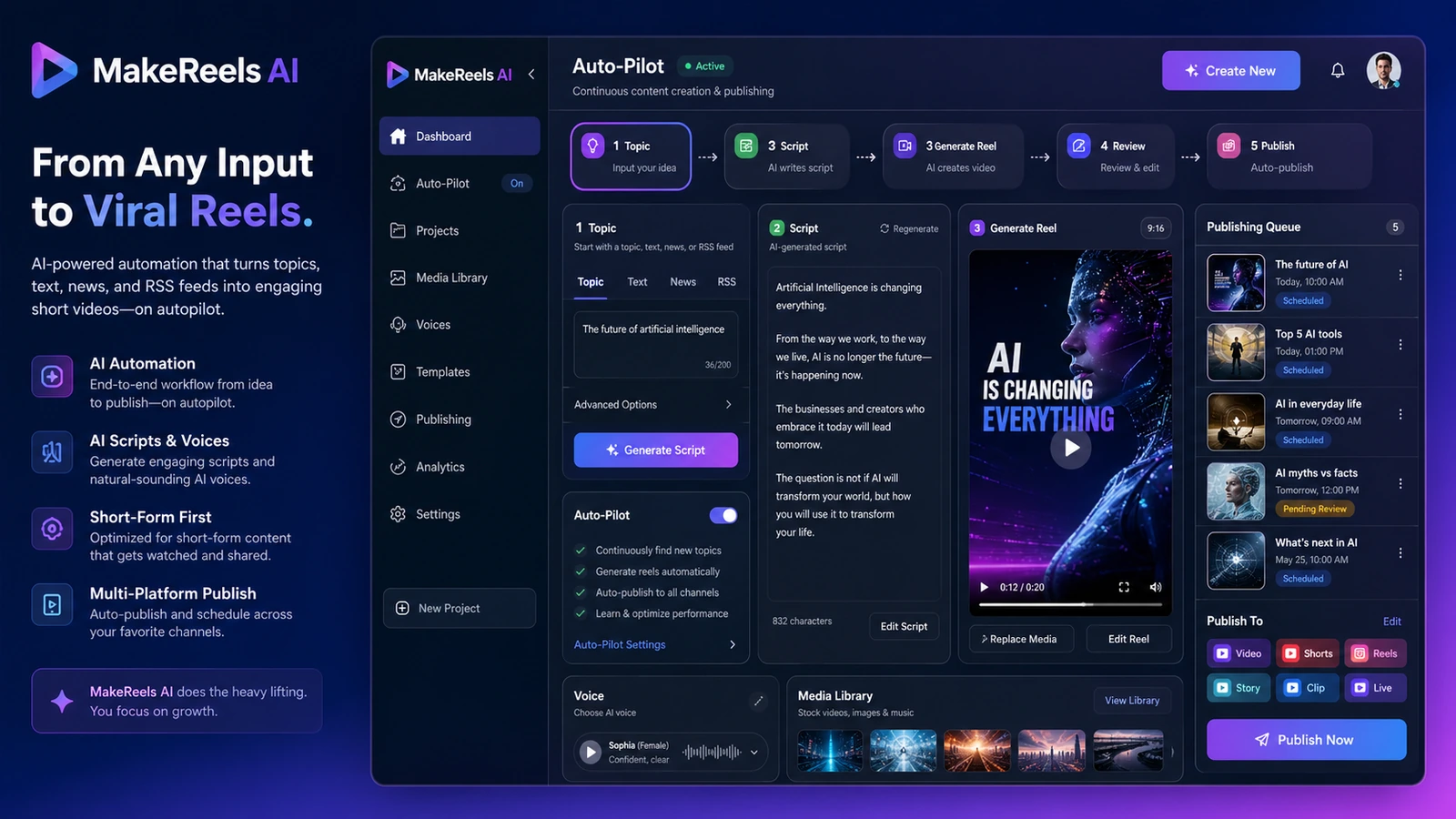
The product tour should focus on three buyer decisions: how a topic becomes a reel, how plan limits affect publishing volume, and whether automation is safe enough for the buyer's brand workflow. The video and screenshots below are framed around those decisions rather than generic product decoration.
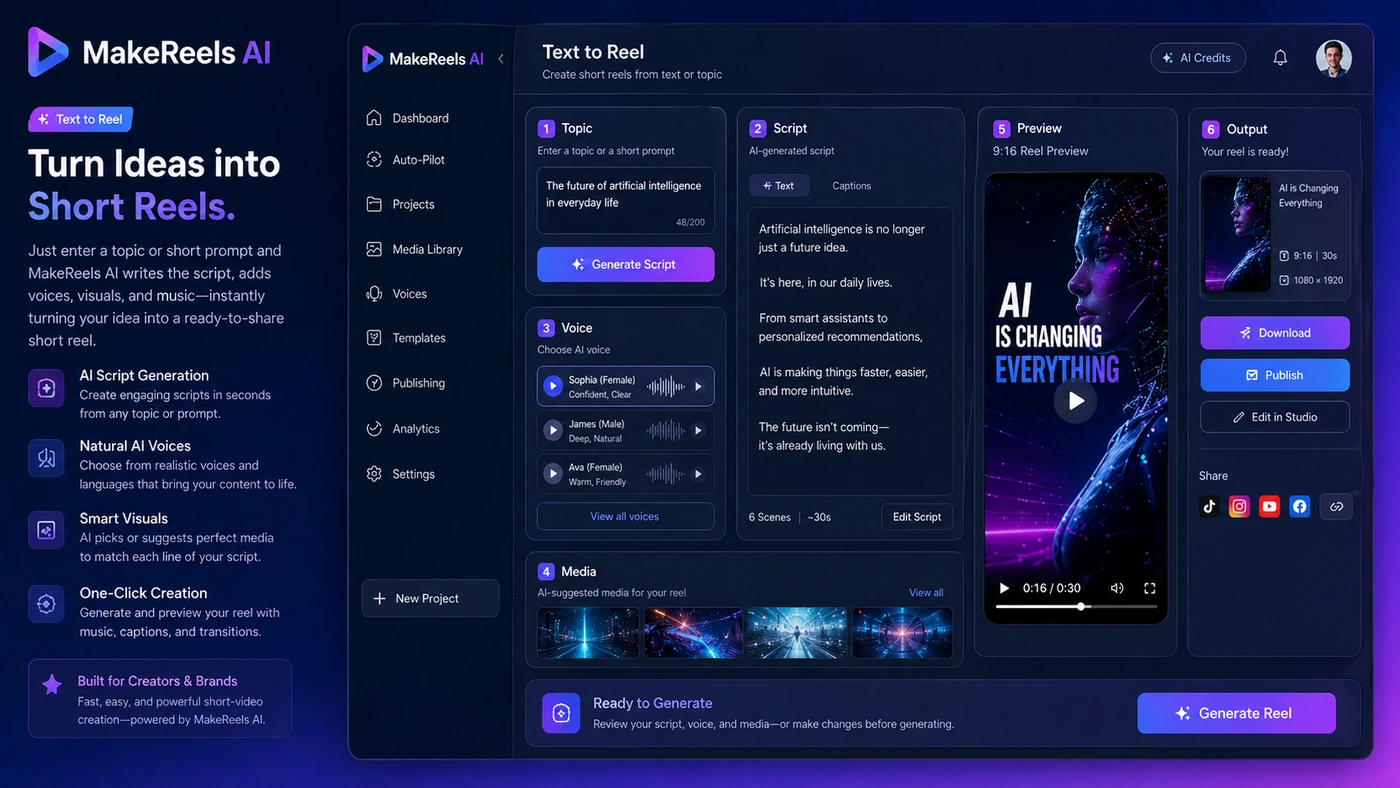
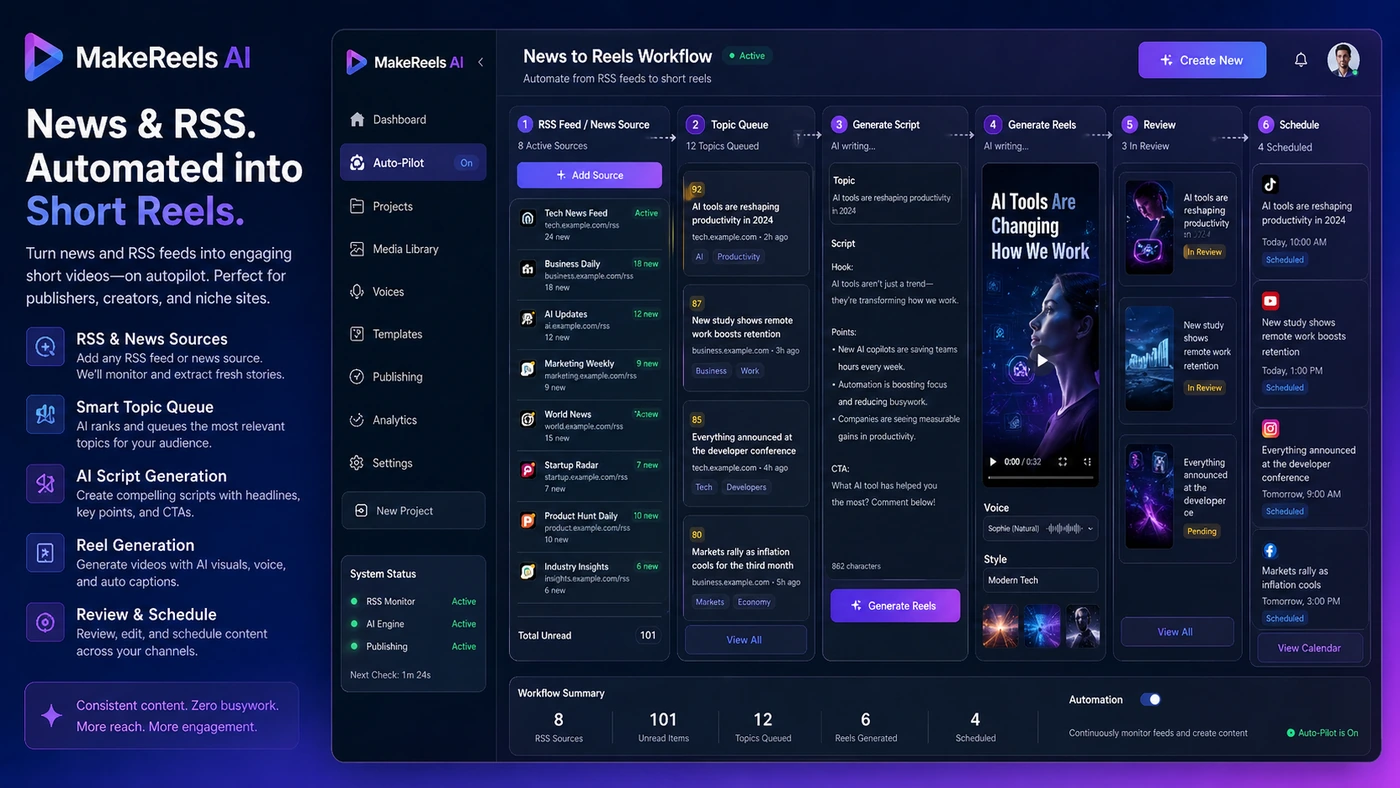
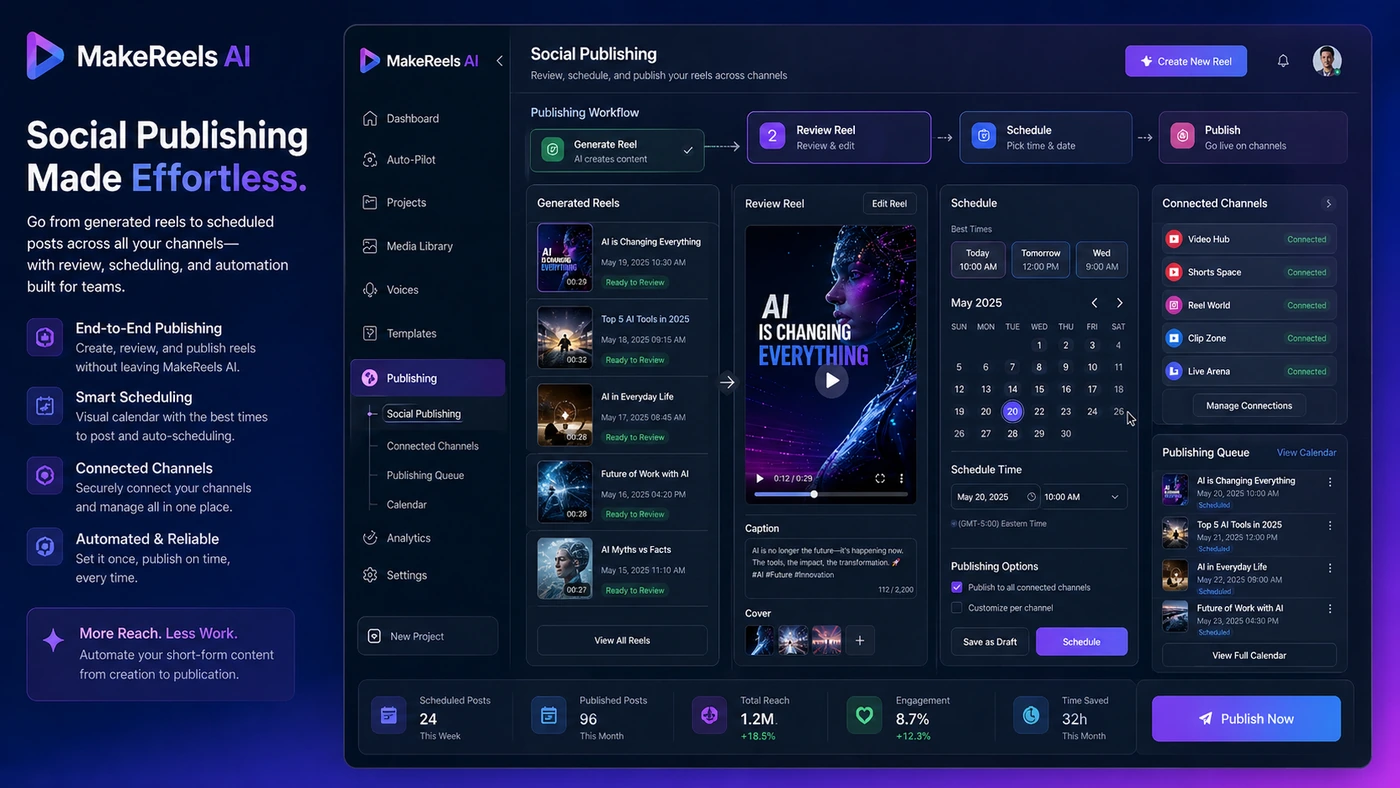
MakeReels AI belongs in the AI video and creator workflow bucket, but it should not be judged like a traditional editor. The buyer decision is closer to this: can it reliably turn ideas, news, or text into enough acceptable short videos to justify a paid automation plan?
What MakeReels AI actually does
MakeReels AI is built around automated short-video creation. Its public pages focus on turning topics, text, and news inputs into reels, then publishing or scheduling them across short-form platforms. That makes it more useful for a creator who needs a repeatable content engine than for an editor who wants granular creative control over every frame.
- Text or topic input can become a short reel workflow.
- News and RSS-style sources are part of the automation angle.
- Paid plans add stronger publishing, voice, and workflow limits.
Pricing and plan fit
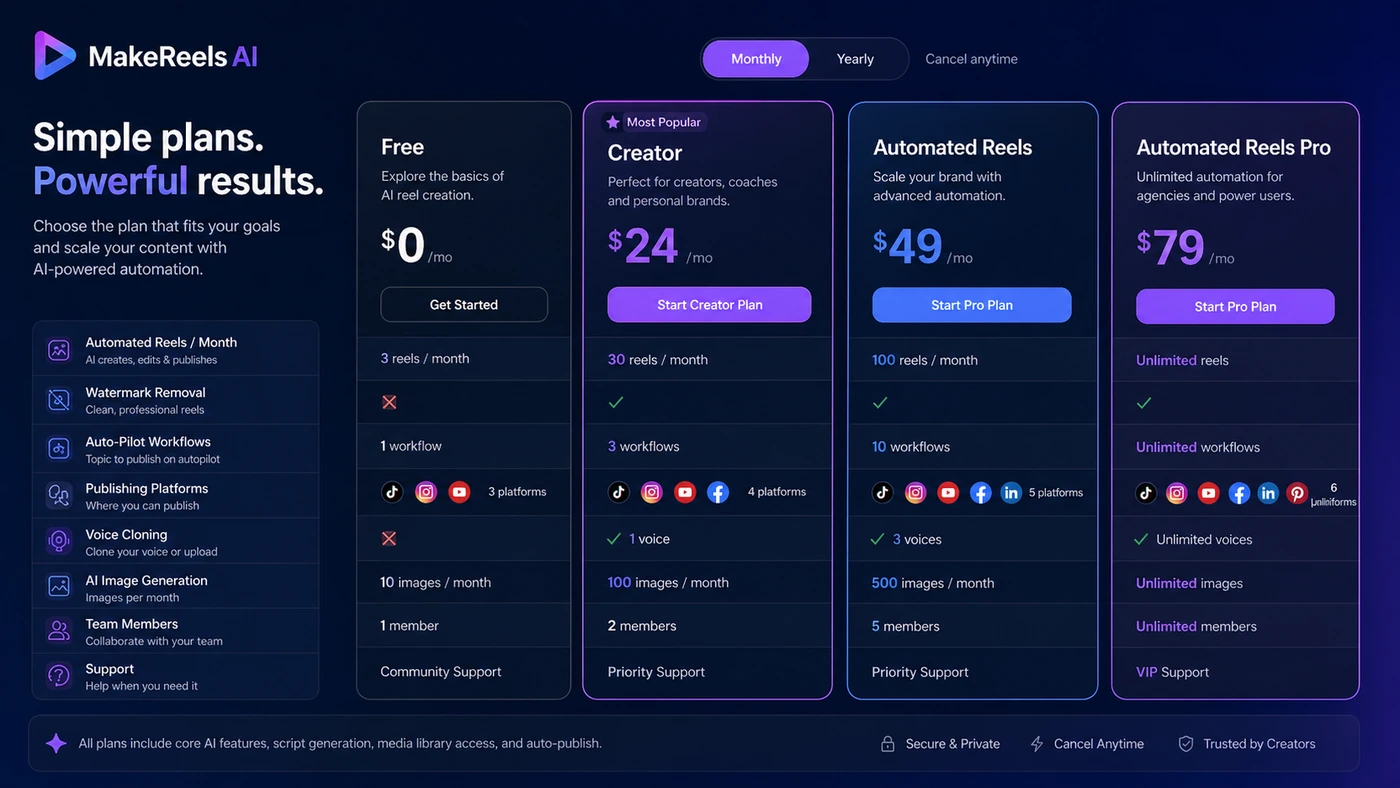
The official pricing page shows a free plan and three main paid paths: Creator, Automated Reels, and Automated Reels Pro. The paid plans differ by reel volume, Auto-Pilot workflows, publishing access, voice cloning, AI image limits, support, and team members. Buyers should not compare the plans by headline price alone because the real value comes from whether the plan unlocks the exact automation level needed.
- The free plan is useful for testing the first output path.
- Creator is easier to justify for lower-volume short-video workflows.
- Automated Reels and Pro make more sense when publishing volume and workflow automation are the real need.
A separate video to understand news reel automation
This video is relevant because it focuses on creating multiple news-style reels rather than a single demo reel. Buyers should watch for the source-to-video flow, the amount of manual review still needed, and whether the output pace fits their niche-site or social publishing workflow.
Automation risk and brand control
MakeReels AI can reduce production effort, but autopilot publishing is not a free pass. The terms place responsibility on users for content compliance, platform rules, uploaded assets, automated text, and reels created without human review. For a brand account, that means automation should be tested with review steps before being trusted with regular publishing.
- Review AI-selected media before using autopilot for brand-sensitive accounts.
- Confirm that generated voice and music rights match the intended use.
- Check platform policy requirements before connecting social accounts.
Free plan, trial logic, and refund risk
MakeReels AI has a free plan, which is different from a full free trial of every paid feature. The terms also describe a full refund within the first 24 hours of purchase and special handling for annual plan cancellations. That gives buyers a risk window, but it still requires discipline: test the free plan first, then verify the paid feature you need immediately after upgrading.
- Use the free plan to test output style, language, media fit, and topic handling.
- After upgrading, check watermark removal, voice cloning, publishing, and workflow limits right away.
- Treat annual billing as a commitment that needs extra verification before payment.
Best next step before checkout
The safest path is simple. First, test the free workflow with a real topic. Second, read the review if you are still unsure about output quality or creator fit. Third, open the pricing or deal path only after you know whether Creator, Automated Reels, or Pro matches your publishing volume. That order reduces wasted clicks and avoids buying a plan just because an automation promise sounds attractive.
- Start with one real content topic, not a generic demo prompt.
- Compare the expected monthly reel count against the plan limits.
- Check whether your workflow needs voice cloning, RSS automation, team seats, or phone support.
- Use the deal path only after you know the plan you would actually buy.
Best savings path from this store page
This is the clearest savings route to check once the product already looks like a fit.
MakeReels.ai lists a free plan with limited automated reels and AI image generations. This is the safest way to test whether text-to-reel creation, voice options, and media selection fit your social workflow before upgrading.
Use this offer as a buyer-safe entry point. Pricing, plan limits, and promotional availability can change at checkout.
Creator plan starts the paid path with no watermark and platform publishing
Automated Reels plan adds unlimited reels, workflows, and voice cloning
Use comparison routes when the category fit is still open
Use these comparison routes when the product still looks plausible, but the category fit is not fully settled.
AKOOL is a closer fit for buyers comparing AI avatar and visual-generation workflows, while MakeReels AI is more centered on automated social reels.
AutoShorts.ai is a more direct alternative when the buyer mainly wants automated short-video publishing and wants another reel-first workflow to compare.
Fliki is worth comparing when text-to-video and voiceover quality matter more than autopilot publishing volume.
Verification points worth checking before you click out
Where this store usually fits best in the workflow
Use MakeReels AI when a creator needs a repeatable way to turn topic ideas into daily reels without building every video manually.
Use it for niche news, content curation, or publisher workflows where the source-to-reel process matters more than advanced editing control.
Use a paid plan only after confirming that voice cloning, voice quality, and ethical voice-use rules fit the creator's account.
Use it when a small marketing team wants generated reels and scheduling, but still has someone reviewing output before autopublishing.
Practical checkpoints before and after signup
- Confirm that MakeReels AI is solving a short-video volume problem, not a manual editing problem.
- Compare it with other reel-first or text-to-video tools before judging the price.
- Check whether your content source is topic prompts, blogs, RSS, news, or uploaded media.
- Generate reels from real topics that match your niche or brand.
- Review output quality, media relevance, voice quality, and watermark behavior.
- Do not treat a polished demo as proof that high-volume automation is ready.
- Match the chosen plan to monthly reel volume and Auto-Pilot workflow needs.
- Verify voice cloning, team seats, support level, and publishing platforms before checkout.
- Check refund timing immediately after upgrading, especially for annual billing.
- Start with human-reviewed publishing before enabling heavier automation.
- Track whether the tool actually saves production time over a two-week content cycle.
- Re-check pricing and limits before renewal or expanding to team use.
Fast-read signals for workflow fit and buying friction
Questions readers usually ask before choosing this store
What is MakeReels AI best for?
MakeReels AI is best for creators, marketers, and small teams that need repeatable short-video output from topics, text, news, or RSS-style inputs. It is less about deep manual editing and more about creating a reliable reel workflow.
Does MakeReels AI have a free plan or free trial?
MakeReels AI shows a free plan on its official pricing page. Treat it as a workflow test rather than a full paid-feature trial because higher automation, voice, publishing, support, and team limits sit behind paid plans.
What should I verify before paying for MakeReels AI?
Verify the current billing interval, reel limits, Auto-Pilot workflow limits, watermark rules, voice cloning access, publishing platforms, team seats, refund timing, and annual billing terms before checkout.
Is MakeReels AI better than simpler AI video tools?
It depends on the job. MakeReels AI is more attractive when automation, scheduling, RSS-to-reel workflows, and repeated publishing matter. A simpler video tool may be better when you only need occasional text-to-video output or more manual creative control.
Does MakeReels AI support teams, API access, or enterprise use?
The official pricing page shows team-member limits on higher plans and custom pricing for white-label, agency, and enterprise clients. Public API availability was not clear enough to treat as verified, so buyers needing integration should confirm it directly before purchase.
Choose the next route that matches what you still need to decide
The strongest next click depends on whether you still need product judgment, a savings route, or a broader category comparison.