Quick verdict
Jogg AI is worth a closer look if your real problem is repeatable avatar-video production, not if you are just curious about whether AI presenters look impressive.
That distinction matters more than the homepage makes it seem.
Jogg AI, which the official product also stylizes as JoggAI, sits in the AI video and avatar-video category. The practical promise is straightforward: turn scripts, links, product URLs, images, talking photos, or ideas into presenter-led videos faster than filming a person from scratch. For creators, e-commerce sellers, agencies, and small marketing teams, that can be useful when video output is a bottleneck.
But I would not judge this tool from the demo angle alone. The real buying question is narrower: can it produce enough usable videos, in your style, with acceptable avatar realism, without burning credits too quickly?
If the answer is yes, Jogg AI can be a useful production shortcut. If the answer is no, a discount, a flash-sale price, or a shiny avatar library will not fix the mismatch.
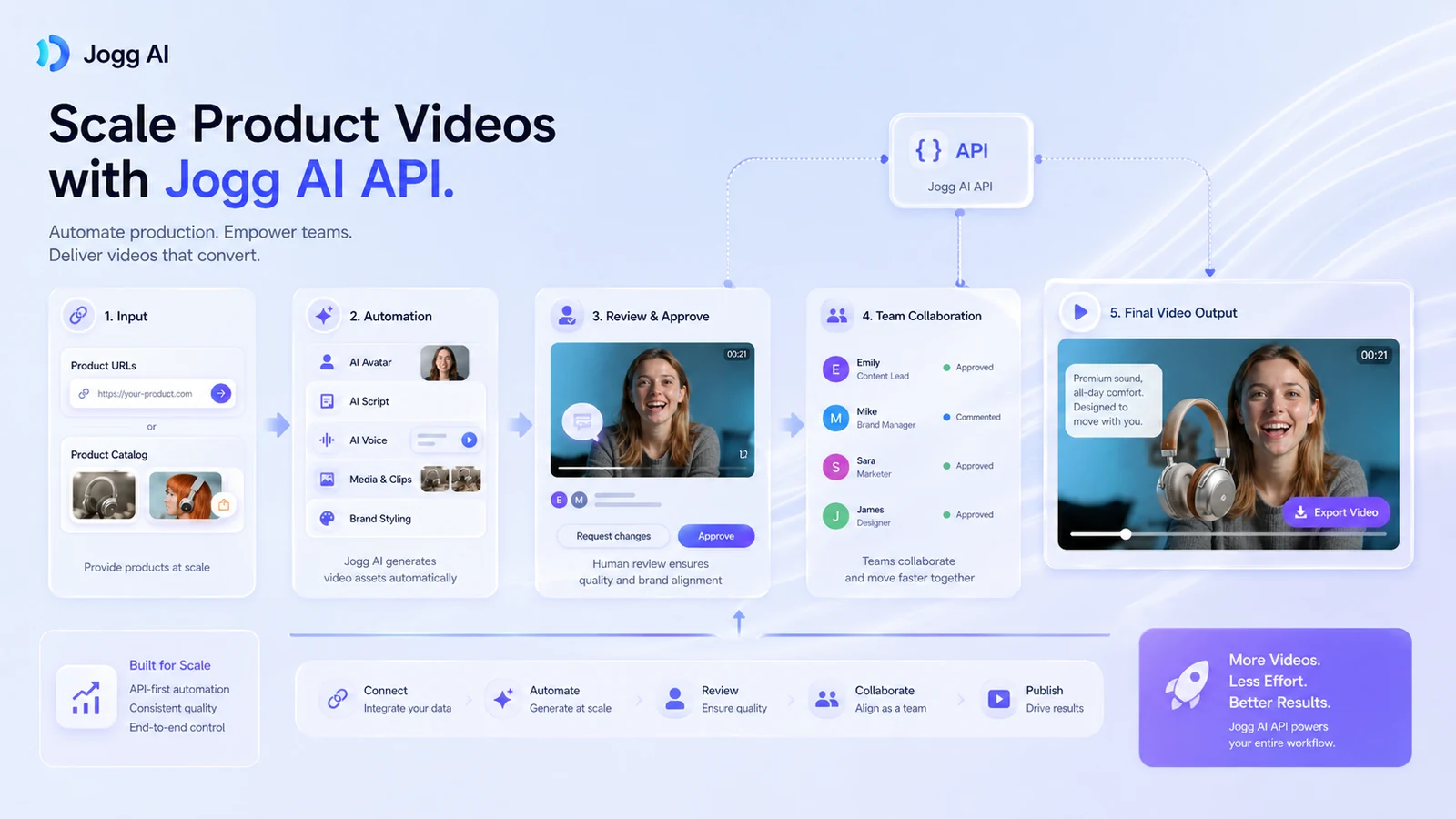
The strongest reason to consider Jogg AI is its workflow range. It is not only a talking-head generator. The public product pages and store data point to URL-to-video, product video, talking photo, podcast video, video translation, custom avatars, team workflows, and API access. The main caution is that pricing is credit-driven, the free plan is limited, paid plans need careful checkout verification, and the refund language is not generous.
For my money, the safest path is simple: test one real video idea on the free path, inspect the output carefully, then decide whether the current paid plan limits match your monthly production need.
Next step: If Jogg AI fits your actual video workflow, verify the current plan, credits, and checkout route before paying.
Review snapshot
| Review point | Practical take |
|---|---|
| Best for | Creators, marketers, e-commerce sellers, agencies, and teams that need repeatable avatar-led videos |
| Not ideal for | Buyers who need cinematic editing, one-off novelty clips, or guaranteed human-level presenter nuance |
| Main use case | Turning scripts, URLs, product pages, photos, or ideas into short avatar-led videos |
| Free path | Free plan with limited credits and watermarked exports |
| Paid path | Starter, Creator, Team, and Enterprise paths, with credit and billing details to verify live |
| Main strength | Combines avatar video, URL-to-video, product-video workflows, team features, and API access |
| Main concern | Credit math, promotional pricing, output variability, and non-refundable payment language |
| Direct alternatives | AKOOL, HeyGen, Synthesia, Fliki |
| Best next step | Test one real project before choosing monthly, annual, team, or API-heavy usage |
What is Jogg AI?
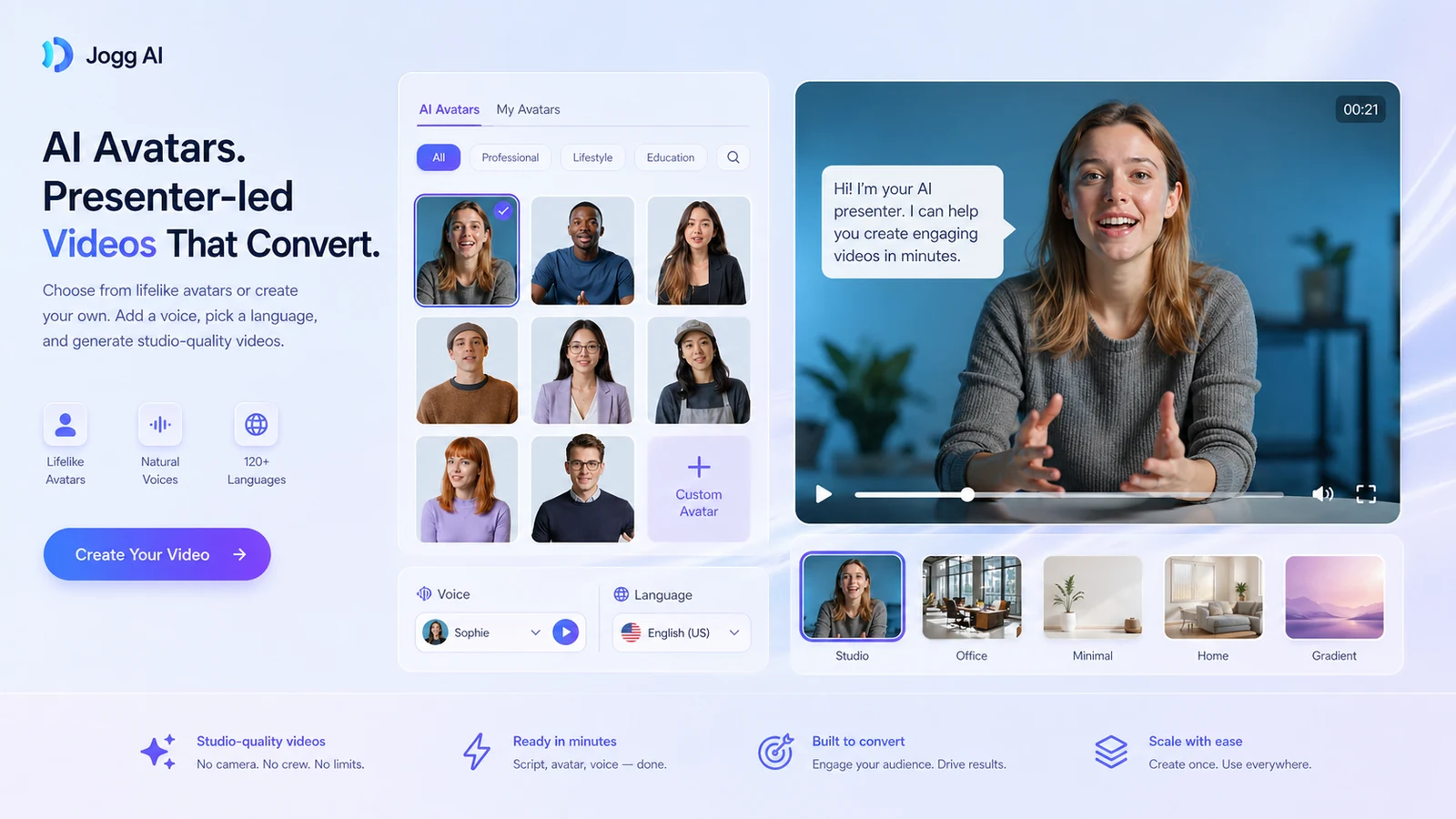
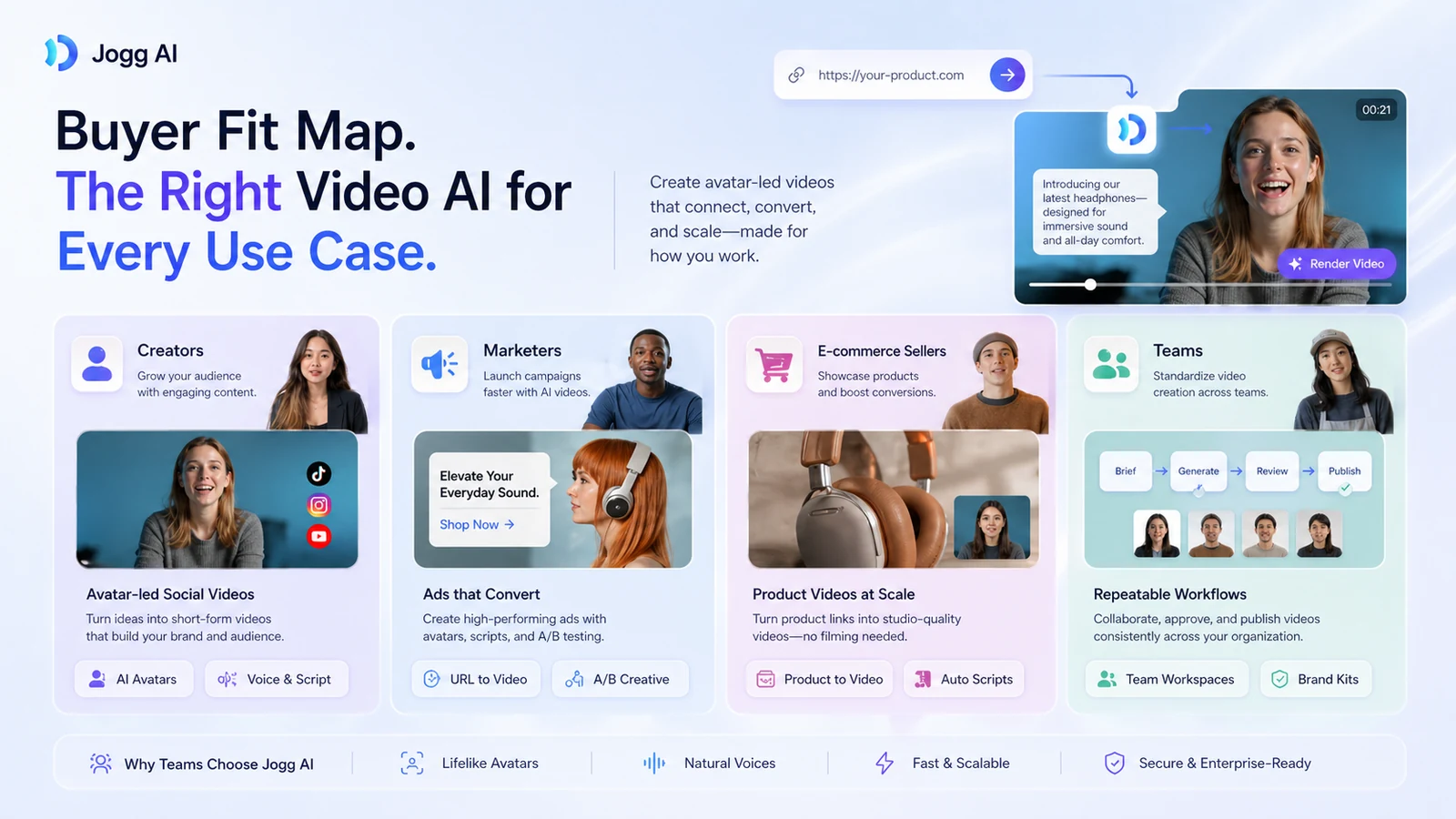
Jogg AI is an AI video generator built around lifelike avatar videos, product-video workflows, and fast creator output. In plain buyer language, it helps you create presenter-style videos without filming yourself or hiring talent for every clip.
The product is broader than a basic “make a talking avatar” tool. The official site presents core areas such as AI avatars, talking photos, idea-to-video, podcast video, video translation, URL-to-video, product photo/video tools, voice cloning, auto-captioning, batch video creation, and an AI video editor. That makes Jogg AI more relevant to marketers and e-commerce teams than a simple novelty avatar app.
The common wrong expectation is thinking this replaces all video production.
It does not.
Jogg AI is better understood as a draft-and-production accelerator. It can help create avatar-led clips, ad variations, product explainers, translated videos, or faceless creator content. But the buyer still needs to judge script quality, product claims, avatar fit, voice realism, captions, export quality, and whether the final video actually feels credible for the target audience.
Our review approach compares public product pages, current pricing signals, knowledge-base coverage, buyer workflow fit, refund and cancellation language, and nearby alternatives. We do not treat a low monthly price, coupon path, or impressive demo video as proof that the tool fits every buyer.
The mistake buyers often make here is comparing avatar tools by feature count only. The better question is: which tool creates the type of video you will actually publish?
Who should use Jogg AI?
Jogg AI makes the most sense for buyers who already have a repeatable video problem.
Creators who do not want to appear on camera are the easiest fit. If you need presenter-style videos, short explainers, social clips, or faceless content, Jogg AI can reduce the friction of recording, lighting, retakes, and editing. The condition is that the avatar style must match your audience. A clip that looks technically impressive can still feel wrong if the presenter does not fit the brand.
E-commerce sellers and product marketers should pay attention to the URL-to-video and product-video angle. This is where Jogg AI becomes more than a generic avatar tool. A product page, product image, or product message can become the base for multiple ad drafts. That is useful if you test variations often. It is weaker if you expect one automated draft to become a polished winning ad without human review.
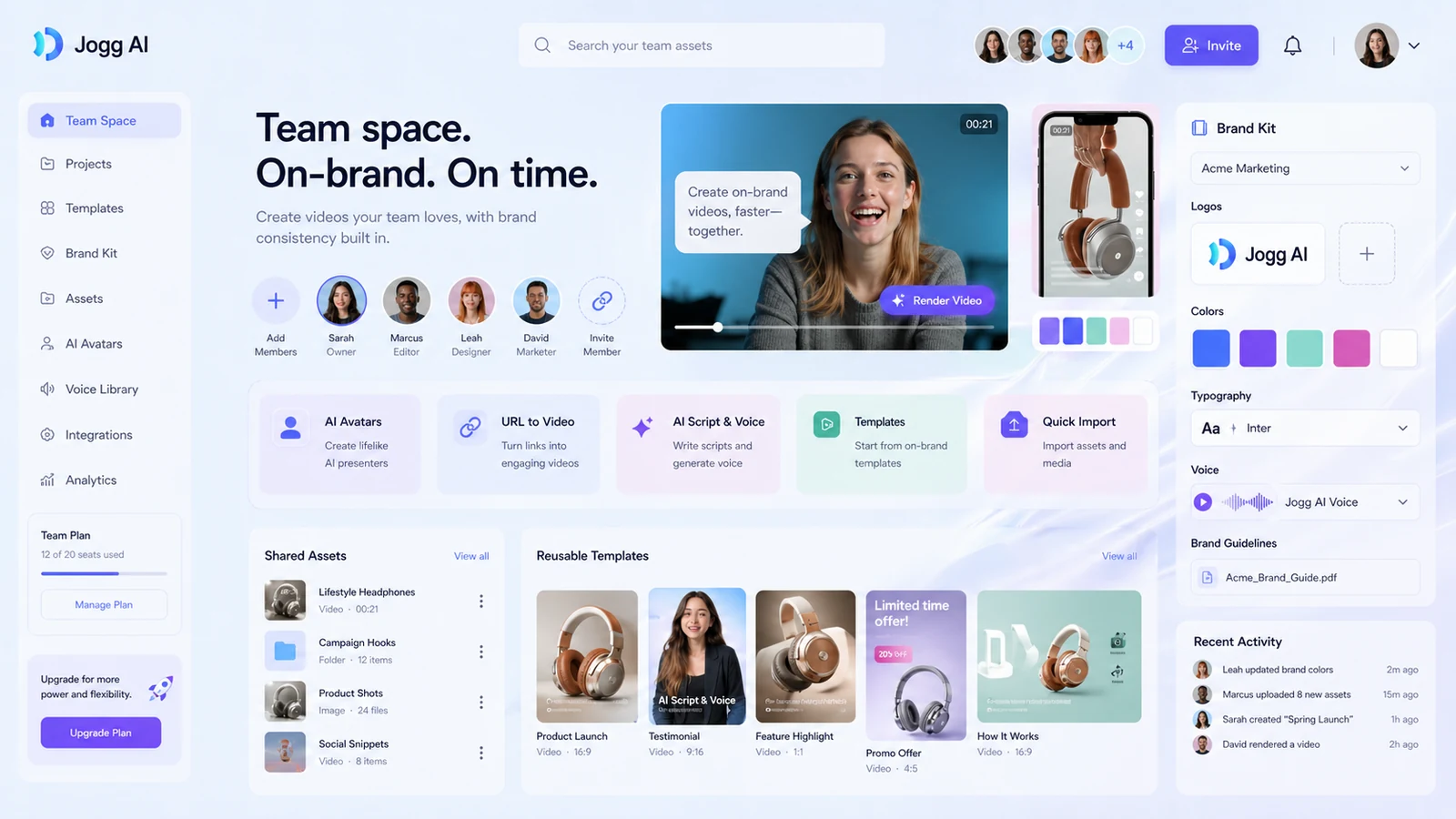
Agencies and small marketing teams may find Jogg AI useful when they need fast creative volume. Brand kits, team spaces, shared workflows, and higher plan limits matter more in that situation than the avatar library itself. The thing to verify is whether the Team plan structure, roles, seats, and credits match how your team actually works.
Localization and education-style content teams can consider it if translation, avatar presenters, and reusable scripts are part of the workflow. The caution is that language, voice, emotion, and lip-sync quality need testing with real examples, not generic demos.
Technical operators and product teams may care about the API. Jogg AI has an API route for avatar video generation at scale, including URL-to-video and template-to-video workflows. That is useful only if your team is ready to manage API cost, output review, automation logic, and approval before publishing.
Who should avoid Jogg AI?
Jogg AI is not the best fit for buyers who only need one quick clip. The free plan may be enough to satisfy curiosity, and a paid plan can become wasteful if you do not have ongoing video output.
I would also be careful if you need deep manual timeline editing. Jogg AI can accelerate avatar and product-video production, but it is not the same as a professional video editor with full frame-level control, motion graphics, sound design, and detailed post-production.
Teams with strict brand standards should test slowly. AI avatars can save time, but presenter nuance, facial motion, voice tone, pacing, and subtitle accuracy can vary. If the output needs to represent a regulated product, a high-trust brand, or a sensitive claim, human review is not optional.
Jogg AI is also a poor fit for buyers who are mainly chasing a coupon. A discount can improve the purchase, but it should not be the reason you buy. With credit-based AI video tools, the cheaper plan is not automatically the better deal. A lower price can still be expensive if drafts consume credits before you get a publishable output.
Finally, I would avoid annual billing until the workflow is proven. The current help and terms language points to non-refundable payments, so testing first is not just a nice idea. It is buyer protection.
How Jogg AI fits into a real workflow
A practical Jogg AI workflow starts before you open the tool.
First, choose one real video job. Not a random prompt. Not a demo script. Use an actual product URL, campaign idea, customer question, educational topic, or social video you would publish if the output were good enough.
Then create the first version. If you are using URL-to-video, check whether the generated script understands the product correctly. If you are using an avatar presenter, check face style, voice fit, pacing, lip sync, captions, and whether the delivery feels natural enough for your audience.
After that, revise like an editor. This is the part buyers underestimate. AI video generation can give you speed, but it does not remove judgment. You still need to check product claims, brand language, subtitles, CTA accuracy, music, scene pacing, and whether the final clip matches the platform where it will be used.
The best use case is not “generate one video and hope.” It is more like:
- Pick one product, script, image, URL, or topic.
- Generate an avatar-led draft.
- Review the script and visuals.
- Adjust voice, avatar, subtitle, duration, or format.
- Export only if the clip is publishable.
- Track how many credits were needed to get there.
- Use that number to judge the paid plan.
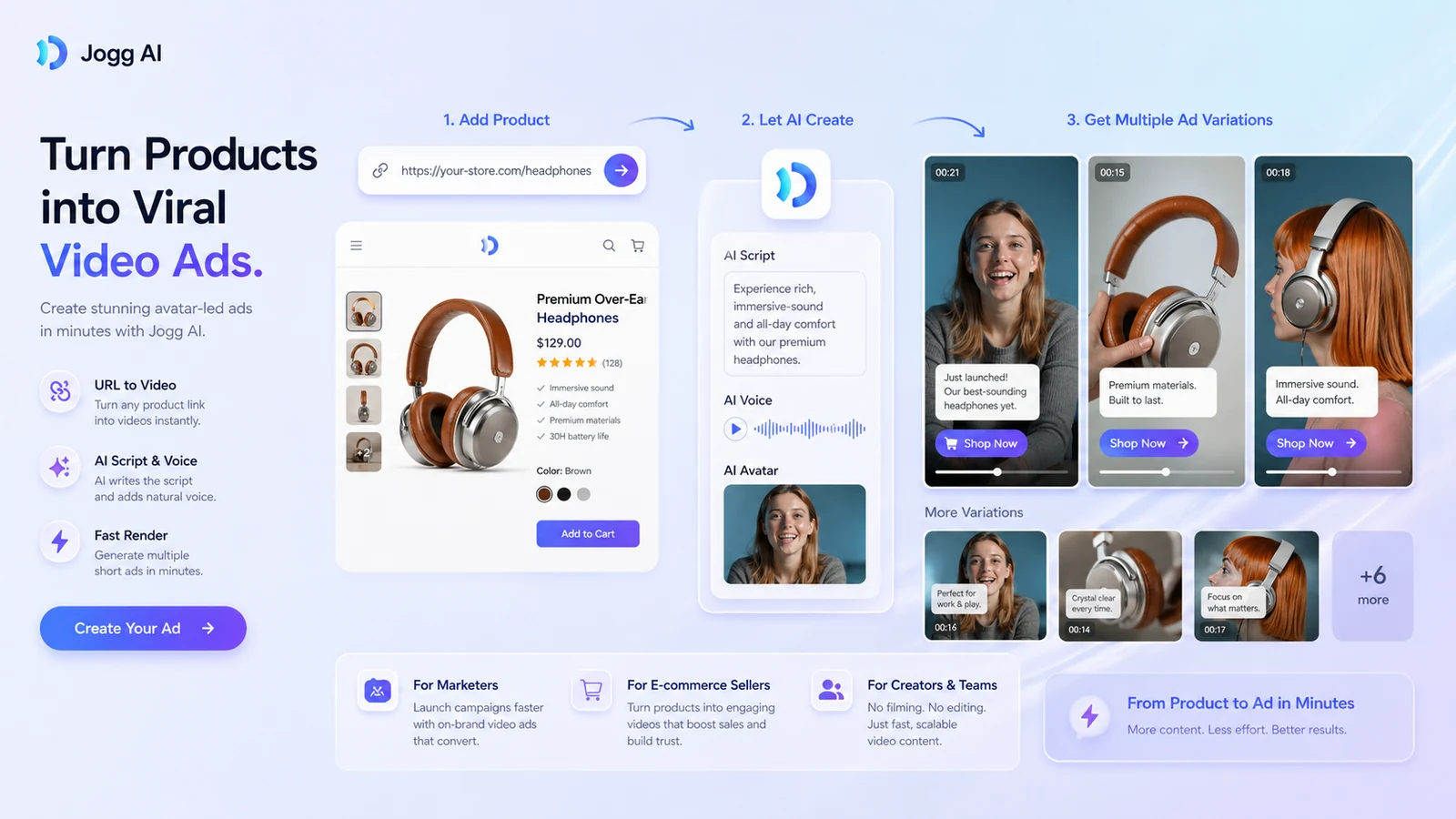
Workflow check: Run one real avatar, URL-to-video, or product-video test before comparing paid plans.
Real-world buyer scenarios
Scenario 1: An e-commerce seller needs product ad variations.
This is one of the cleaner fits. Jogg AI’s URL-to-video and product-video tools can help turn a product page into multiple short creative drafts. The upside is speed. The risk is that AI-generated scripts may miss product nuance or overstate benefits. Before paying, the seller should test whether the generated video can be edited into a real ad without too much cleanup.
Scenario 2: A faceless creator wants presenter-led content.
Jogg AI can help if the creator wants to publish explainers, tips, reviews, or educational clips without appearing on camera. The buyer should test avatar personality, voice fit, lip-sync quality, and whether the output feels natural on the intended platform. If the creator mainly needs narration over stock footage, Fliki may be a better comparison.
Scenario 3: An agency needs fast client creative drafts.
The tool can make sense if the agency needs draft volume for ads, landing-page videos, or social concepts. But agency use is more sensitive to team seats, brand kits, shared workspace controls, approval steps, and output rights. A solo plan may not be enough. This is where Team pricing and workflow controls need checking before checkout.
Scenario 4: A product team wants API-based video generation.
Jogg AI’s API makes the product more interesting for technical buyers. The API can support automated avatar/video workflows, but API access changes the buying decision. The buyer needs to check documentation, credit cost, rate behavior, review steps, and how generated videos are approved before being shown to customers.
Key features that actually matter
URL-to-video and product-video generation
This is one of Jogg AI’s strongest buyer hooks. Instead of starting every video from a blank script, you can use a product page, URL, or product content as the base for an avatar-led video draft.
Why it matters: marketers and e-commerce sellers often need variations, not just one polished brand video. URL-to-video can make ideation and first drafts faster.
Buyer note: test it with your real product page. The important question is not whether it creates a video. The question is whether the script, visuals, and claims are accurate enough to edit and publish.
AI avatars and talking photos
Jogg AI offers stock avatar, custom avatar, talking photo, and presenter-style workflows. This is useful for people who want a human-facing clip without filming.
Why it matters: camera friction is real. If the avatar feels acceptable for your brand, this can save time.
Buyer note: avatar quality is use-case specific. A presenter that works for a quick product demo may not work for a serious training course, founder message, or high-trust sales video.
Video translation and multilingual output
Video translation can matter for teams that repurpose the same message across markets or audiences.
Why it matters: localization usually adds cost and production time. AI translation and avatar workflows can reduce that friction.
Buyer note: translation quality, voice tone, cultural fit, and subtitle accuracy need human review before publishing. Do not assume “multilingual” means ready for every market without editing.
Team spaces and brand controls
Jogg AI’s team and brand-kit direction matters for agencies and internal marketing teams.
Why it matters: solo video tools often break down when multiple people need shared assets, approvals, and repeatable formats.
Buyer note: confirm team seats, permissions, workspace behavior, brand assets, and whether your chosen plan includes the collaboration features you expect.
API and automation
Jogg AI’s API route separates it from simpler creator-only avatar tools.
Why it matters: API access can support product-video automation, template-driven generation, or backend video workflows.
Buyer note: API access should not be assumed to be cheap or simple. Verify documentation, pricing, credits, output review, and technical ownership before building around it.
Pricing and plan value
Pricing is the section I would read most carefully with Jogg AI.
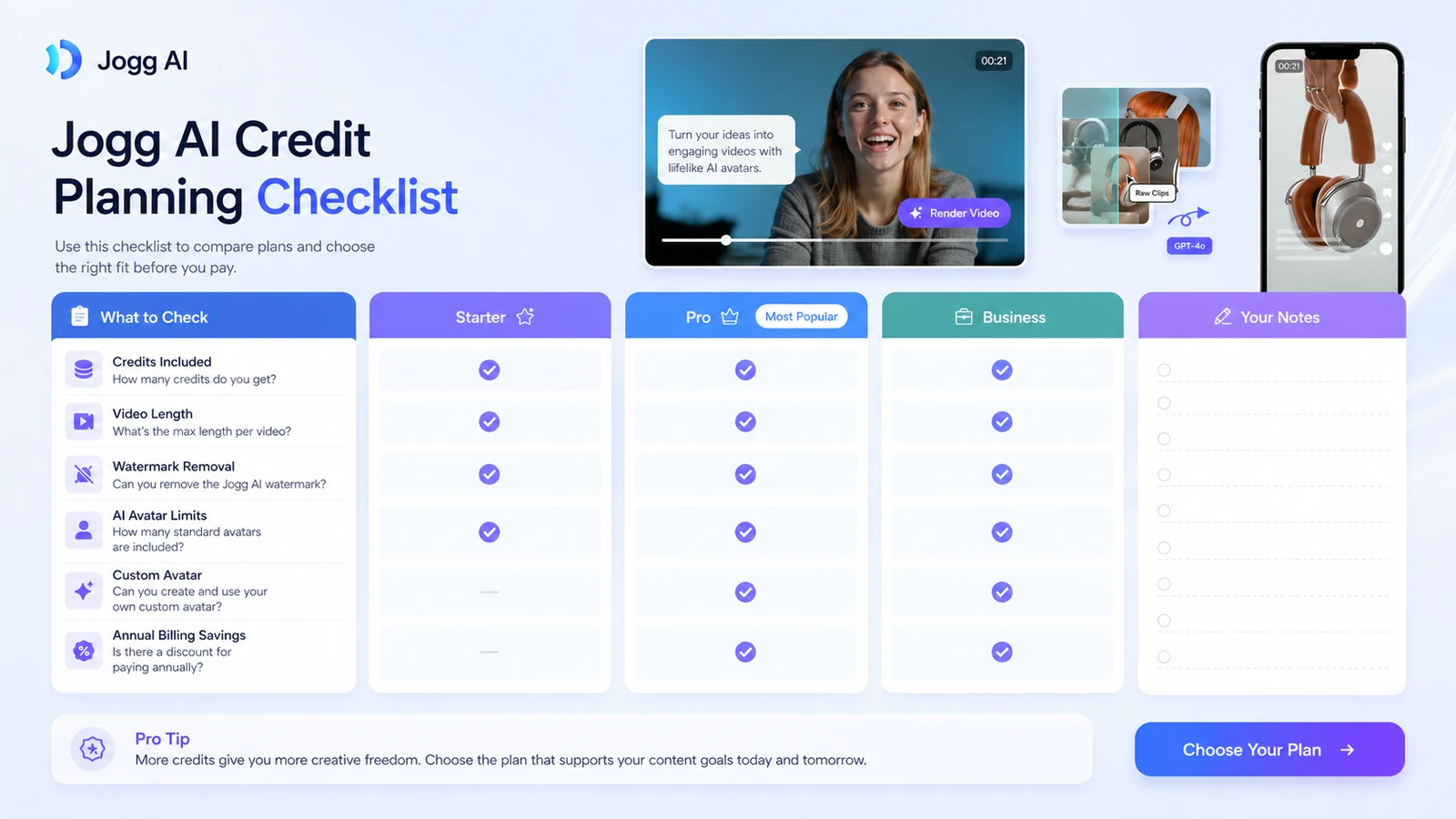
At the time of review, the public pricing page shows a Free plan, Starter, Creator, Team, and Enterprise. The Free plan is listed at $0/month with 3 credits, up to 3 avatar videos, videos up to 1 minute, 1 custom avatar, limited AI tools, standard processing, and watermarked exports. That is useful for testing, not for proving long-term production value.
The paid pricing cards show Starter, Creator, and Team paths with credits, video-duration limits, custom-avatar limits, watermark removal, faster processing, brand kit, collaboration, and higher feature access. The page also shows monthly/yearly controls, annual savings language, and promotional values in different parts of the page. That means I would treat the live checkout page as the final source, not an old screenshot, third-party directory, or static review.
For paid buyers, the real pricing question is not “what is the lowest visible monthly number?” It is:
- How many credits do you get?
- How many usable videos can you create from those credits?
- How long can each video be?
- Are exports watermarked?
- Do you need custom avatars or AvatarX?
- Do you need team seats or brand kits?
- Do you need API access?
- Are you comfortable with non-refundable payment language?
The Starter path may be enough if you need light creator output and shorter videos. Creator becomes more relevant if you need more output, longer videos, brand kit, and broader creative access. Team is the more natural fit if multiple people need shared production workflows. Enterprise should be treated as a sales-led path for larger requirements.
Annual billing can look attractive, especially when the page highlights savings. But with AI video tools, I would not move to annual billing until you know your real monthly production volume and credit burn.
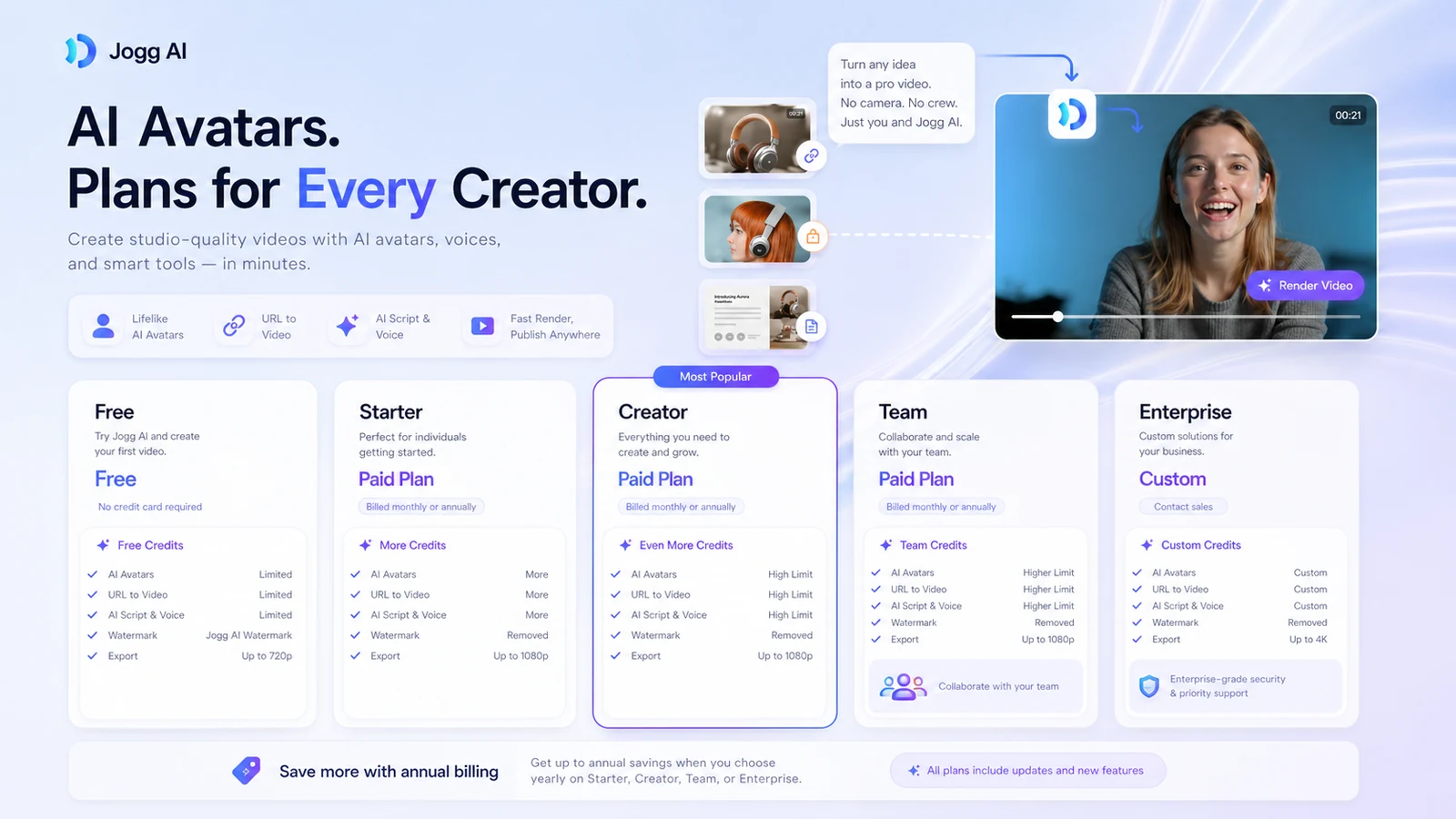
Pricing check: Compare credits, video length, watermark removal, team seats, and annual billing before choosing a plan.
Free plan, trial, coupon, and checkout notes
The free plan is the safest starting point. It gives you a way to test output quality, avatar style, credit behavior, watermarking, and export friction without jumping straight into a paid subscription.
That said, the free plan should not be treated as proof that a paid plan is worth it. Three credits can show whether the tool has potential. It may not show whether you can produce a full month of usable videos at scale.
The coupon path should be secondary. Public coupon pages may mention Jogg AI deals, but the safer buyer route is to check the official pricing page, the Jogg AI store guide, and the Jogg AI coupon page only after the workflow fit is clear. Do not rely on a reported coupon path unless it works at live checkout.
The checkout order I would follow is:
- Test one real video with free credits.
- Track how many drafts it takes to get a usable output.
- Check whether the watermark, duration, and export quality are acceptable.
- Compare monthly and annual plan limits.
- Read cancellation and refund language.
- Use a coupon or offer only if the product already fits.
A discount can make Jogg AI cheaper. It cannot make an unsuitable avatar workflow useful.
What I would check before buying Jogg AI
If I were buying Jogg AI for a real workflow, I would check these items before paying:
- Credit burn per finished video. Do not count one generated draft as one finished asset. Track how many attempts it takes to produce a usable clip.
- Avatar and voice fit. Test the actual style you would publish, not just the best-looking demo on the homepage.
- Video length limits. A one-minute test video does not prove a longer training, product, or explainer workflow.
- Watermark removal. Confirm which plan removes watermarks and whether exports meet your publishing needs.
- Custom avatar limits. If your brand depends on a custom presenter, verify how many custom avatars are included.
- Team and brand controls. Agencies and teams should check seats, roles, shared spaces, templates, and brand kit access.
- Refund and cancellation terms. Payments are described as non-refundable, so test before choosing a larger or annual path.
A simple test before paying
Before paying for Jogg AI, I would run a small test like this:
- Pick one real product page, script, or campaign idea.
- Create one avatar-led draft using the workflow you expect to use later.
- Check the script for accuracy, exaggeration, and brand fit.
- Review avatar realism, voice tone, lip sync, subtitles, and pacing.
- Export or preview the clip and note watermark or quality limits.
- Count how many credits and revisions were needed.
- Compare that number against the paid plan you are considering.
This test will tell you more than a feature list.
If one usable video takes several attempts, your true cost is higher than the plan card suggests. If the first or second draft is close enough to publish after light editing, Jogg AI becomes much more interesting.
Pros explained
The biggest pro is speed. Jogg AI can reduce the friction of filming, scripting, avatar selection, and first-draft video creation. That matters for creators and marketers who need regular output.
The URL-to-video angle is commercially useful. Many AI video tools can generate clips from text, but product and URL workflows are more directly tied to e-commerce and ad production. If this works well for your catalog or campaign pages, it can save real time.
The free path is helpful. A free plan with limited credits is exactly what buyers need in this category because avatar quality is hard to judge from marketing alone.
The feature mix is broad. Talking photos, product video, AI avatars, video translation, voice features, team support, and API access make Jogg AI more flexible than a narrow avatar-only tool.
The API route adds depth. For technical teams, API access can turn the product into an automation layer rather than only a web-app workflow. That is valuable only if the economics and quality control work.
Cons explained
Credit math can be the hidden cost. The plan card may look affordable, but AI video often involves retries. If you need several generations to get one usable video, credits become the real price.
Refund flexibility is weak. Public help and terms language point to non-refundable payments. That is not unusual for some SaaS tools, but it means buyers should test carefully before committing.
Avatar quality is not universal. Some use cases may look strong; others may feel stiff, off-brand, or not quite natural. This is not something a feature list can settle.
It is not a full professional editor. Jogg AI can create and accelerate video output, but buyers who need detailed timeline control, advanced motion design, or cinematic production should compare dedicated editing tools.
Pricing can require careful reading. The official pricing page shows different billing and promotional signals. That does not mean the product is bad, but it does mean buyers should verify the exact checkout route before paying.
Green flags and red flags
Green flags:
- You already publish avatar-led, product-led, or faceless videos regularly.
- You can test a real use case with the free credits before paying.
- Your workflow values speed and variation more than cinematic control.
- Your product pages or scripts can be turned into video drafts repeatedly.
- Your team has someone who can review scripts, captions, claims, and final output.
Red flags:
- You only want one or two videos and do not plan to publish regularly.
- You expect a perfect human presenter replacement with no editing judgment.
- You are buying mainly because of a sale price or coupon path.
- You need advanced manual editing more than avatar automation.
- You are uncomfortable with non-refundable subscription language.
Jogg AI vs alternatives
Jogg AI should be compared with tools based on the video job, not just the category label.
AKOOL vs Jogg AI
AKOOL is the broader creative-avatar comparison. It may be a better fit if you want a wider creative AI suite around avatar, image, face, and video workflows. Jogg AI may still make more sense if your main job is fast avatar-led product video, URL-to-video ads, or repeatable creator clips.
The tradeoff: AKOOL is a broader creative route; Jogg AI is more focused on avatar and product-video workflows.
HeyGen vs Jogg AI
HeyGen is a stronger comparison if you want established avatar-video presentation workflows, business communication, sales videos, or polished AI presenter content. Jogg AI may be more attractive if URL-to-video and product-ad variation are central to the buying decision.
The tradeoff: HeyGen may feel more mature for presentation-style avatar video; Jogg AI may feel more direct for product and ad workflows.
Synthesia vs Jogg AI
Synthesia is the more natural comparison for corporate training, internal enablement, and enterprise-friendly avatar video. It is likely a better shortlist item if governance, scale, and business training workflows matter more than creator speed.
The tradeoff: Synthesia is more corporate-training oriented; Jogg AI is more creator, ad, and product-video oriented.
Fliki vs Jogg AI
Fliki is the better comparison when narration-led text-to-video content is the main need. If you are turning blog posts, scripts, or narration into videos, Fliki may fit better. If you need avatar presenters, talking photos, and URL-to-video product ads, Jogg AI remains more relevant.
The tradeoff: Fliki leans narration and text-to-video; Jogg AI leans avatar presenter and product-video generation.
Trust, refund, and buyer-risk notes
Jogg AI has enough public product depth to take seriously, but the risk profile is still important.
The official site presents a broad AI video platform with avatar, product, translation, voice, and URL-to-video workflows. The knowledge base and API pages add credibility because they show more than a shallow landing page. Product Hunt, AppSumo, Trustpilot, and other third-party sources also show public buyer interest and discussion.
But the cautious buyer should not stop there.
Refund language matters. Public Jogg AI help content says payments are non-refundable, and the terms language also points to non-refundable payments except where required by law. That makes free testing important. If you skip testing and buy annual or a larger team path too early, you may not have much flexibility if the output does not fit.
Credit limits also matter. Credits are not abstract. They decide how many real videos you can create, how many retries you can afford, and whether your monthly plan matches your production volume.
Data and content review matter too. Uploading scripts, URLs, brand assets, product material, voice inputs, or images to any AI video tool requires practical judgment. Teams with sensitive product data or strict legal review should read the current privacy and terms pages before using the tool at scale.
Finally, AI video output still needs editorial review. Jogg AI can accelerate production, but it should not be allowed to publish product claims, translated messages, voice content, or avatar videos without human approval.
Final verdict
Jogg AI is a useful option if you need repeatable avatar-led videos, product videos, URL-to-video ad drafts, or faceless creator content and you are willing to test output quality before paying.
I would consider it if your workflow already has a real video bottleneck. That could be e-commerce ad variations, product explainers, short social videos, training snippets, or avatar-led content where filming a person every time is too slow.
I would skip it if you only need one or two clips, if you need advanced manual video editing, or if your brand cannot tolerate avatar output that sometimes needs multiple review passes.
I would compare it with AKOOL if you want broader creative AI tooling, HeyGen if you need polished avatar presentation videos, Synthesia if your use case is corporate training or enterprise enablement, and Fliki if narration-first text-to-video is the better fit.
The safest next step is not to chase the cheapest visible price. Start with one real project, check how many credits it takes to create a publishable video, then decide whether the current paid plan makes sense for your monthly output. If the workflow fits, Jogg AI can be a practical shortcut. If the workflow does not fit, the better move is to compare alternatives before money gets locked into a plan you do not use.
