Quick verdict
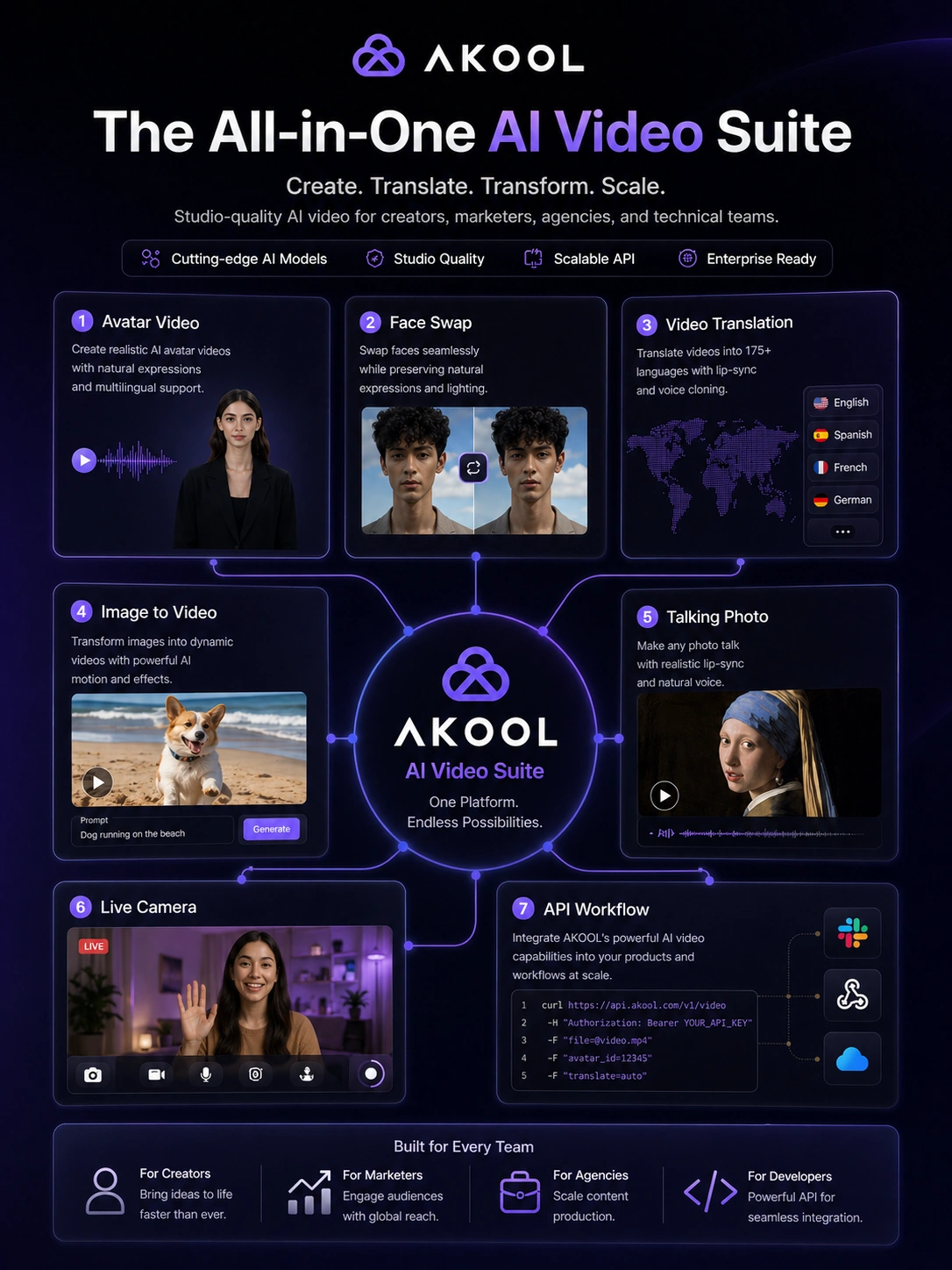
AKOOL is worth a serious look if you want one AI video platform that can handle several creative jobs: avatar videos, video translation, talking photos, face swap, image-to-video, and developer-facing media workflows.
But I would not judge it only by the feature list.
The real buying question is narrower: will AKOOL replace a repeatable production bottleneck, or will it become another impressive AI tool you test once and forget? That distinction matters because AKOOL is broad. Breadth can be useful when you run creative campaigns, localize videos, build avatar-led explainers, or need API access for AI media. Breadth can also make pricing harder to judge because the right plan depends on credits, output length, resolution, model access, watermark removal, collaboration, and whether you need API features.
The strongest reason to consider AKOOL is workflow coverage. A creator might use it for talking-avatar clips. A marketer might test multilingual product videos. An agency might produce campaign variations. A technical team might look at the API docs and see a path for face swap, video translation, or streaming avatars inside another product.
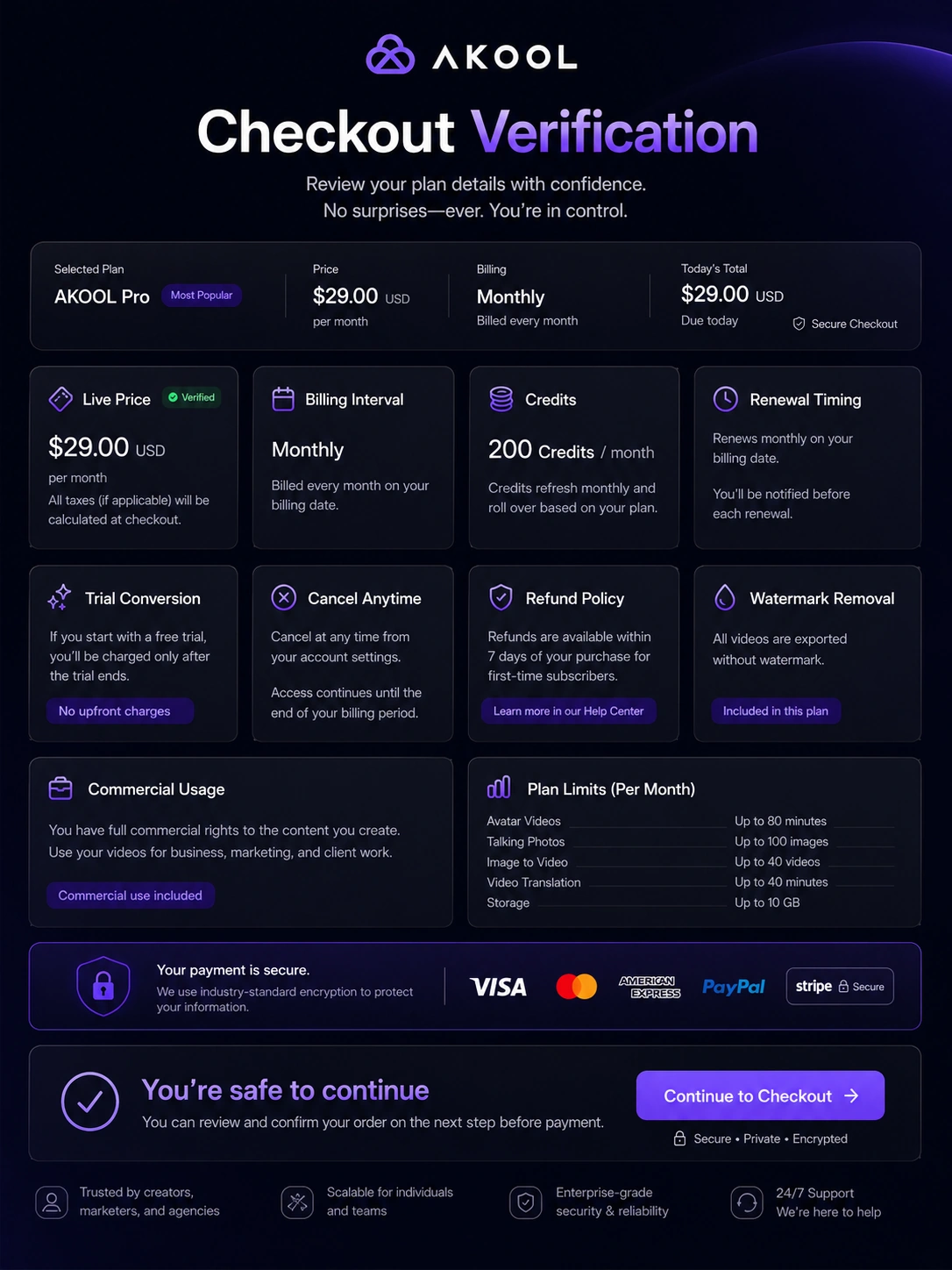
The main caution is plan clarity. The current public pricing path shows a free Basic plan and paid tiers such as Pro, Pro Max, Business, and Enterprise, but the buyer still needs to verify the live checkout price, credit behavior, renewal timing, and feature limits before paying.
For my money, AKOOL makes the most sense after a real output test, not before it.
Next step: If AKOOL still fits the kind of video workflow you want to build, verify the live plan route before treating any discount or annual price as the best deal.
Review snapshot
| Review point | Practical take |
|---|---|
| Best for | Creators, marketers, agencies, and technical teams that need repeatable AI video output |
| Not ideal for | One-off users, traditional timeline editors, or buyers who dislike credit-aware pricing |
| Main use case | Avatar videos, video translation, face swap, talking photos, image-to-video, and API media workflows |
| Free path | Basic free plan with limits such as watermarking, lower resolution, slower processing, and shorter output limits |
| Paid path | Paid tiers become relevant when watermark removal, higher quality, longer videos, faster processing, API, or workspace needs matter |
| Main strength | Broad AI video suite with both web-studio and API angles |
| Main concern | Credits, plan limits, renewal terms, and output quality must be tested before serious use |
| Direct alternatives | HeyGen, Synthesia, Pictory, Fliki |
| Best next step | Test one real workflow, then compare plan limits against that workflow before upgrading |
What is AKOOL?
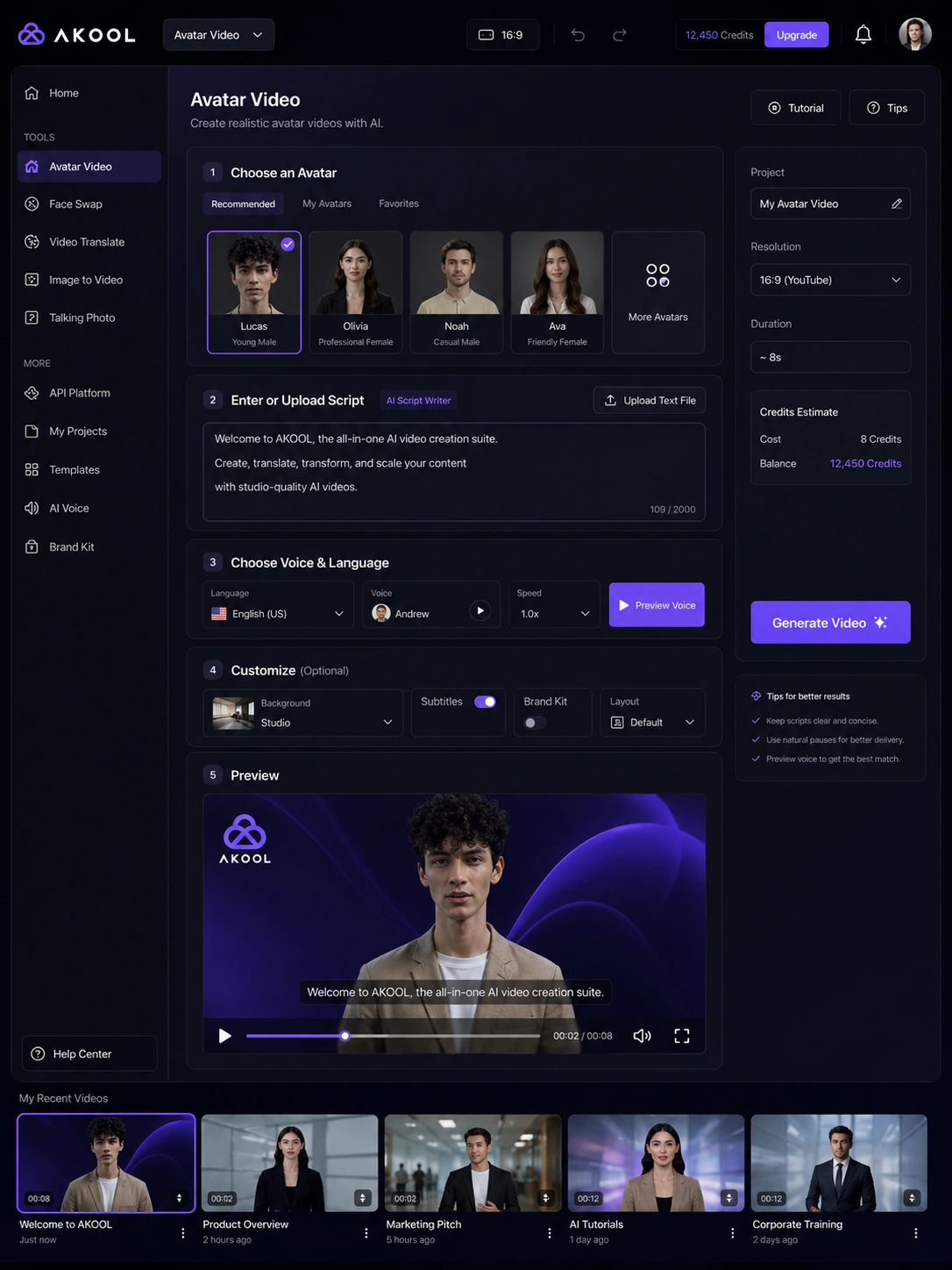
AKOOL is a broad AI video and visual-content suite. The current public product pages present it around tools such as face swap, image generation, background change, avatar video, video translation, talking photos, live camera, and other AI media workflows.
That makes AKOOL different from a narrow avatar tool and different from a traditional video editor.
The wrong expectation is to treat AKOOL as a normal timeline editor where you manually control every cut, transition, and frame. That is not the main job. AKOOL is closer to an AI production layer: upload or enter inputs, choose a tool, generate a video or visual asset, then review whether the output is usable enough for a campaign, social post, training clip, product demo, localization workflow, or API-driven media process.
Our review approach compares public product pages, pricing details, help documentation, terms, buyer workflow fit, and nearby alternatives. I would not treat a coupon, free plan, or broad feature list as proof that AKOOL fits the buyer. The better way to judge it is to ask which output you will produce repeatedly and what plan limits stand in the way.
AKOOL looks strongest when speed matters more than frame-by-frame editing depth. It becomes weaker when the buyer expects one tool to replace a full creative review process.
Who should use AKOOL?
AKOOL makes sense for creators who need video assets without filming every clip. If your workflow involves short explainers, avatar-led messages, talking photos, or quick campaign visuals, AKOOL gives you several ways to produce video faster than a manual shoot. The condition is simple: you still need to review the output carefully before publishing.
It can also fit marketing teams that need localization or campaign variations. Video translation, lip-sync, AI voices, and avatar workflows are more useful when a team has existing scripts, product videos, webinars, or sales assets that need to reach different audiences. Before paying, the team should test one real sample and check whether language handling, subtitles, pacing, and brand terms survive the workflow.
Agencies may find AKOOL useful because it combines several client-facing outputs in one environment. One client may need a localized product video. Another may need a talking avatar. Another may want a quick face-swap or product visual. The risk is paying for the platform’s breadth while only using one feature, so an agency should track which outputs actually become billable or repeatable.
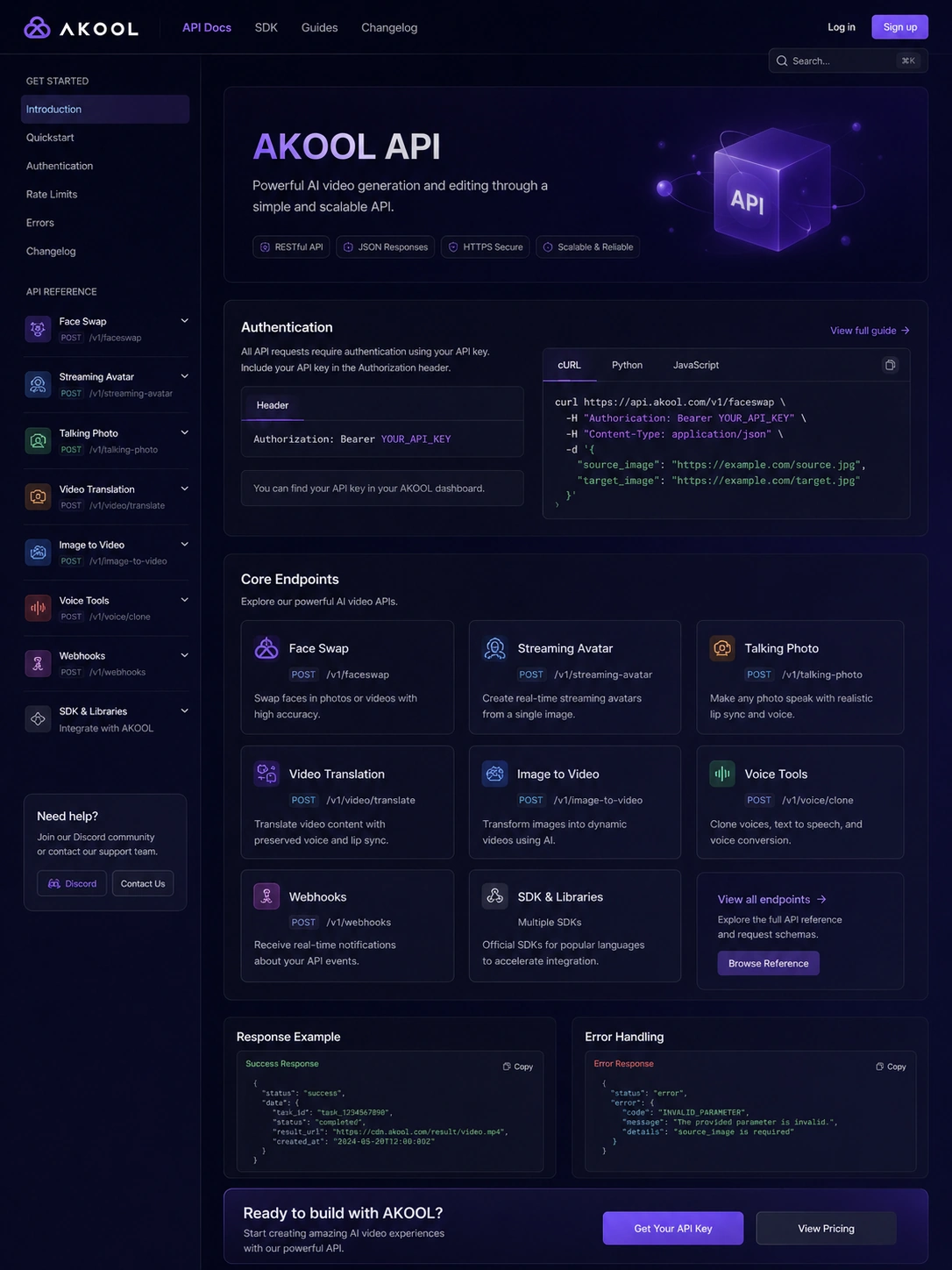
Technical buyers should consider AKOOL if they need AI media functions inside a product, campaign system, or internal workflow. The docs cover API-style use cases across areas such as face swap, voice tools, video translation, talking photo, talking avatar, image generation, live face swap, and webhooks. That is a meaningful signal, but API access and credit cost still need plan-level verification.
Who should avoid AKOOL?
I would be careful with AKOOL if you only need one small experiment. A single face swap, one talking-photo test, or one short social clip may not justify a paid plan unless the free path quickly proves that the output is useful.
Traditional video editors should also slow down. AKOOL may generate or transform video, but it is not the same buying decision as a timeline-based editing system. If you need detailed manual control over cuts, audio mixing, frame-level fixes, color work, or long-form editing, AKOOL is better treated as a creative input tool rather than the whole production stack.
Buyers who need predictable flat pricing should be cautious. AKOOL is credit-aware, feature-limited, and plan-dependent. The practical cost can change depending on output length, model choice, quality level, workspace members, credit packs, and API usage. If you dislike that style of pricing, compare simpler video tools before committing.
I would also avoid jumping straight to annual billing before testing the exact output. AI video can look excellent in demos and still need manual edits in real brand content. A small test is safer than a confident yearly purchase.
Finally, teams with sensitive content or strict commercial-use rules should read the terms, privacy policy, and acceptable-use guidance before uploading assets or using generated media in public campaigns.
How AKOOL fits into a real workflow
A careful AKOOL workflow starts before the tool opens.
First, decide which job matters. Is it avatar video, video translation, talking photos, face swap, image-to-video, or an API workflow? AKOOL has enough features that a vague test can become misleading. A focused test is better.
Then use realistic material. For an avatar video, use a real script. For translation, use a real clip with brand terms or names. For face swap, use source material similar to what you would use in a campaign. For API evaluation, review the docs and estimate credit behavior before building around it.
After generation, the human review step still matters. Check pacing, lip-sync, pronunciation, visual consistency, watermarking, export quality, and whether the output feels acceptable for the channel. A generated demo that looks fun is not the same as a production-ready asset.
The decision point comes after that: did AKOOL save enough time or unlock enough output quality to justify a paid tier? If yes, move to pricing. If no, a coupon will not fix the mismatch.
Real-world buyer scenarios
A solo creator might use AKOOL to turn scripts into avatar-led videos. That can work if the creator needs frequent short clips and does not want to film every time. The weak point is control. If the avatar voice, pacing, or expression needs too much cleanup, a simpler creator video tool may be a better fit.
A marketing team might use AKOOL for multilingual campaign assets. This is one of the more interesting use cases because video translation can reduce the cost and friction of reaching different markets. The buyer should test real brand names, subtitles, proofread options, and lip-sync quality before assuming it can carry public-facing campaigns.
An agency might use AKOOL as a production sandbox for client concepts. Fast avatar clips, face swaps, product visuals, and translated demos can help with pitches or rapid drafts. The agency should still check licensing, client approval, storage, team access, and whether added workspace members create extra charges.
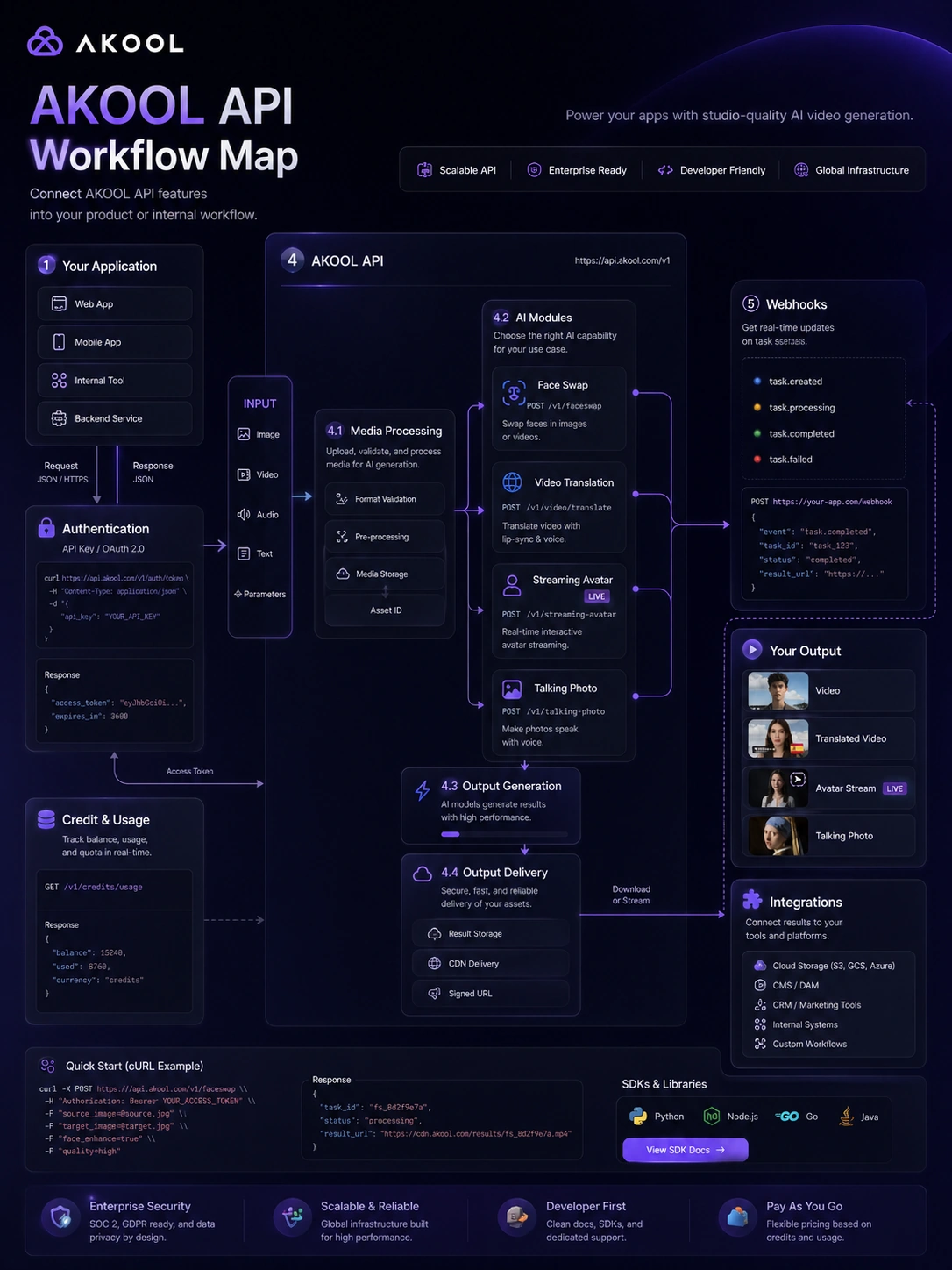
A technical team might evaluate AKOOL for API-driven media features. That can be useful for apps, internal tools, personalized campaigns, or interactive video experiences. The risk is overbuilding before commercial terms are clear. Endpoint coverage, authentication, credit usage, concurrency, webhooks, support, and plan access matter more than the homepage headline.
Key features that actually matter
Avatar and talking-video workflows
AKOOL’s avatar and talking-photo tools matter because they reduce the need to film a presenter for every clip. That is useful for explainers, training snippets, social posts, product messages, and fast creative tests.
Buyer note: test voice quality, pacing, avatar style, watermarking, export resolution, and whether the final clip fits your brand before judging the paid plan.
Video translation and localization
Video translation is one of the stronger reasons to compare AKOOL. The pricing page and docs point to multilingual video workflows, lip-sync, AI voice selection, captions, proofreading, and upload limits. This matters for brands, educators, and creators who already have video assets they want to adapt.
Buyer note: translation quality should be checked with real content, not only polished demos. Names, technical phrases, subtitles, and lip-sync can decide whether the output is usable.
Face swap and visual generation
Face swap, image generation, background change, and image-to-video features make AKOOL feel more like a creative media suite than a single avatar product. That can be valuable for campaign concepts, product visuals, social content, and personalized creative.
Buyer note: these features are useful only if the buyer understands rights, usage restrictions, approval needs, and brand safety. Fast visual output still needs human judgment.
API and developer coverage
AKOOL’s docs make the platform more interesting for technical buyers. Public documentation covers areas such as face swap, live face swap, voice tools, video translation, talking photo, talking avatar, lip sync, image generation, and webhooks.
Buyer note: docs prove that developer pathways exist, but they do not remove the need to verify plan access, credit consumption, support, and production reliability.
Workspace and production limits
AKOOL’s paid path is not only about unlocking a feature. It is about limits: resolution, video length, processing speed, storage, credits, concurrency, roles, workspace membership, license type, and enterprise support.
Buyer note: the cheapest paid path is not automatically the best deal. It is only a good deal if it removes the actual blocker in your workflow.
Pricing and plan value
AKOOL pricing needs a careful read.
The current public pricing page presents a Basic free plan plus paid routes such as Pro, Pro Max, Business, and Enterprise. Basic is positioned as free, with limitations such as lower resolution, shorter video length, limited templates, slower processing, a personal license, and watermarking. Paid tiers expand output quality, video length, templates, model access, processing speed, storage, workspace collaboration, and, at higher levels, API and business or enterprise-oriented features.
I would not quote the paid dollar amount as a stable buying fact without checking the live checkout page. Public pricing pages can render dynamically, promotions can change, annual billing can alter the headline number, and credit packs can affect the real cost.
The practical pricing question is not “what is the cheapest plan?” It is “which limit blocks your workflow?”
If the watermark is the blocker, free is only a test. If resolution or video length is the blocker, compare Pro, Pro Max, and Business carefully. If API access is the blocker, verify the plan and credit cost before building. If team access is the blocker, check workspace member charges and role permissions. If enterprise privacy, support, or dedicated resources matter, the sales-led route may be the real comparison.
The common buyer mistake is upgrading because the demo output looks exciting. A better move is to run one realistic workflow, identify the exact limit, then choose the smallest plan that removes that limit.
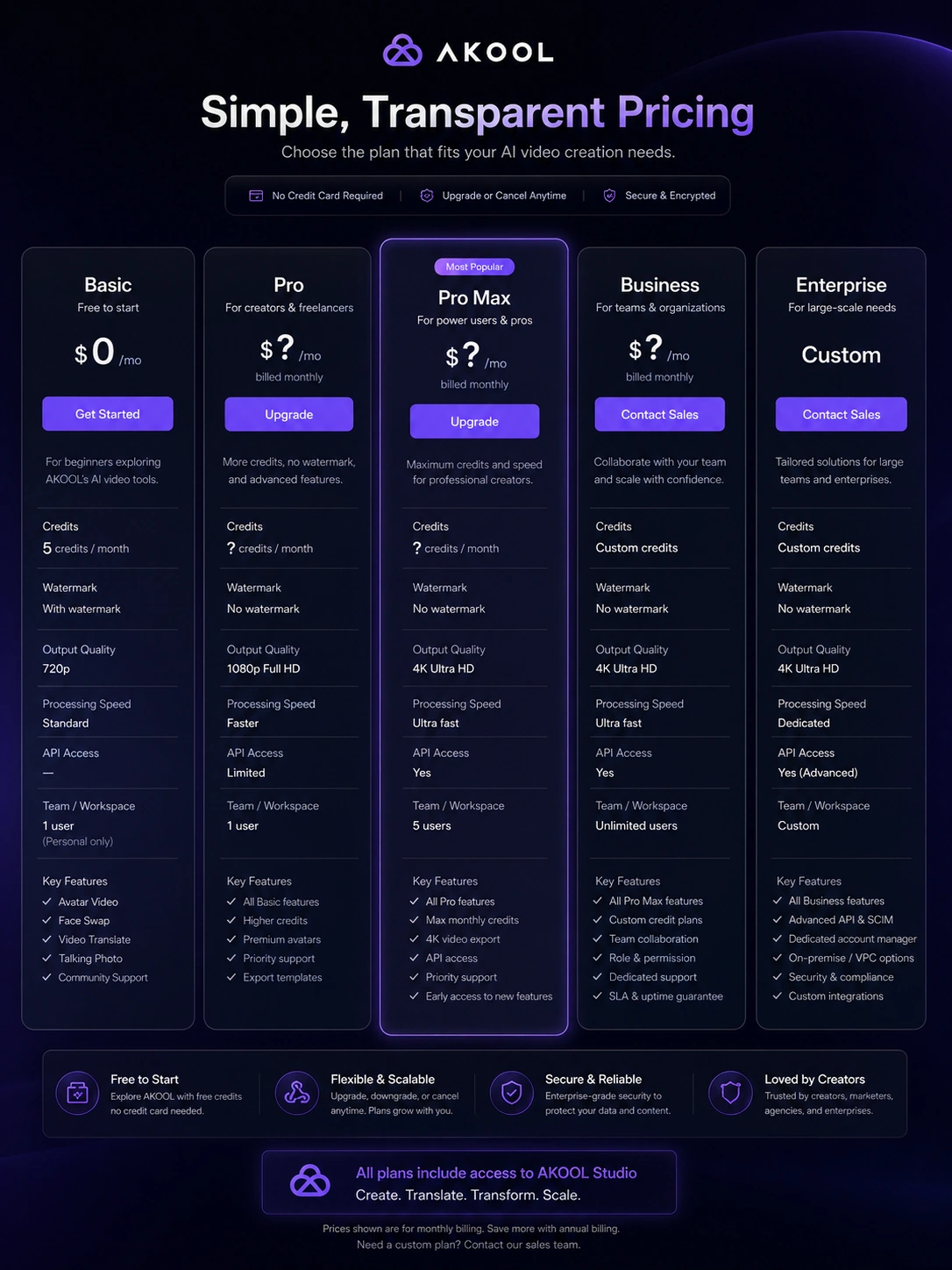
Pricing check: If AKOOL passed your workflow test, compare the live pricing page against the exact feature limit you need removed before upgrading.
Free plan, trial, coupon, and checkout notes
The free Basic path is useful, but I would treat it as a testing lane, not proof of paid value. It can show whether AKOOL’s interface, output direction, and creative workflow make sense. It may not show whether the paid plan is cost-effective at real production volume.
A trial or promotional route should be handled carefully. AKOOL’s terms include subscription auto-renewal language and cancellation timing. The help center also warns that refunds are not issued for accidental purchases or failure to cancel in time. That is enough reason to check renewal timing before entering payment details.
Coupon logic should stay secondary. A current offer can improve the purchase, but it should not be the reason you buy AKOOL. If the tool does not fit your workflow, a cheaper price only lowers the cost of the mismatch.
The safer checkout order is:
- Test one real output on the free path when possible.
- Identify the feature or limit that blocks production use.
- Compare the current paid tiers and credit behavior.
- Read cancellation and refund language.
- Check the AKOOL coupon page only after the workflow and plan fit are clear.
What I would check before buying AKOOL
If I were buying AKOOL for a real workflow, I would check these points before paying:
- Whether the free Basic output is good enough to justify deeper testing.
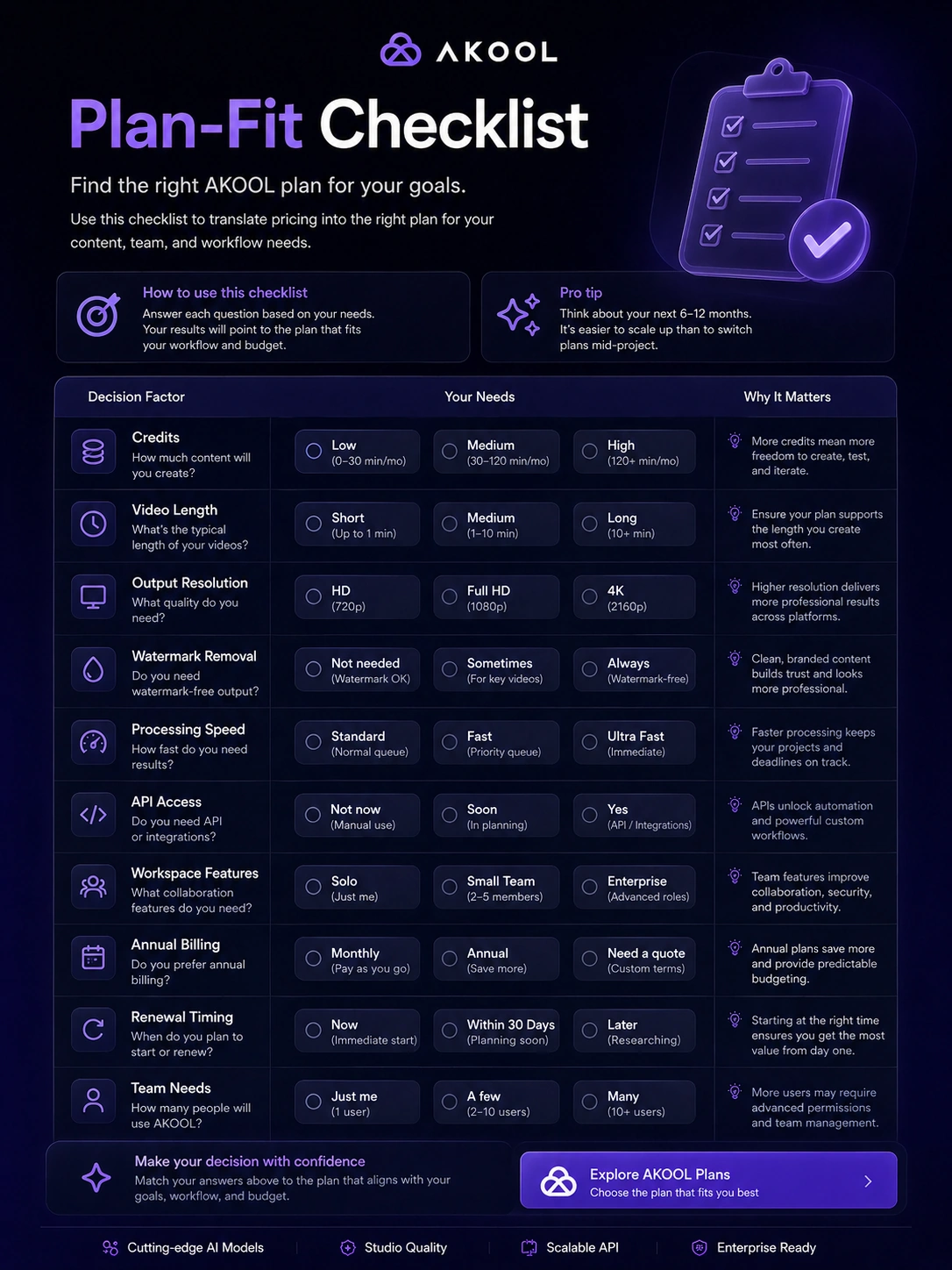
- Which exact limit blocks production: watermarking, resolution, video length, processing speed, credits, or model access.
- Whether the plan includes the feature I care about, such as video translation, avatar video, face swap, studio avatar, or API access.
- Whether workspace members create extra charges and which roles can generate, export, or manage assets.
- Whether the credit system is predictable enough for the volume I expect.
- Whether cancellation timing, refund language, and trial conversion rules are acceptable.
- Whether commercial rights, avatar restrictions, privacy expectations, and acceptable-use rules match the intended campaign.
A simple test before paying
Before paying for AKOOL, I would run a small test like this:
- Pick one real use case, not five. Choose avatar video, translation, face swap, image-to-video, or API evaluation.
- Use realistic source material. Avoid judging the tool only with a perfect demo script or easy sample.
- Generate one output and review it like you would review paid creative work.
- Check the practical blockers: watermark, video length, resolution, voice quality, lip-sync, pacing, export quality, credits, and processing speed.
- Estimate monthly usage. A tool that works for one clip may become expensive or slow at higher volume.
- Compare AKOOL with a focused alternative before upgrading.
- Start monthly or low-commitment when possible before considering annual billing.
That kind of test is not glamorous, but it prevents the biggest mistake: buying a broad AI suite because the homepage makes every feature look useful.
Pros explained
AKOOL’s first major advantage is breadth. You can test avatars, translation, face swap, talking photos, images, video generation, and API workflows without immediately jumping between several products. That matters for buyers who are still figuring out which AI media workflow will become repeatable.
The second advantage is the free starting path. A free Basic plan is helpful because output quality is difficult to judge from marketing pages alone. You need to see whether the generated result fits your brand, channel, and production standard.
The third advantage is business and developer potential. AKOOL is not only a consumer-facing creative toy. The API documentation, workspace features, video translation, and enterprise path make it more relevant for teams that want AI video inside a broader workflow.
The fourth advantage is speed. Third-party review patterns often point to ease of use and fast creation as strengths. That does not mean every output is ready to publish, but it does suggest AKOOL can reduce friction for buyers who need rough-to-polished visual assets quickly.
Cons explained
The first weakness is pricing complexity. AKOOL can be free to start, but real value depends on paid limits and credit behavior. Buyers should not assume the same plan works for avatar video, high-resolution output, translation, API use, and team production.
The second weakness is creative control. AI video generation is fast, but fast does not always mean editable enough. Some buyers may still need a separate editor, designer, or human review step to clean up pacing, voice, brand fit, or final polish.
The third weakness is breadth risk. AKOOL does many things, which can be useful, but broad tools can make buyers overestimate how many features they will actually use. If you only need polished avatar videos, a more focused avatar product may feel clearer.
The fourth weakness is renewal and refund caution. Subscription auto-renewal, cancellation timing, and refund limits deserve attention before entering payment details. This matters even more if the buyer is considering annual billing or testing multiple paid features.
Green flags and red flags
Green flags:
- You already know which AKOOL workflow you will use repeatedly.
- The free output is strong enough to justify deeper testing.
- The paid plan removes a specific blocker such as watermarking, resolution, video length, processing speed, API access, or workspace needs.
- You can measure whether AKOOL saves production time or increases usable creative output.
- Your team is comfortable reviewing AI-generated video before publishing.
Red flags:
- You are buying only because the tool looks broad.
- You have not tested your real source material.
- You do not understand the credit behavior or renewal timing.
- You need traditional timeline editing more than AI generation.
- You need strict commercial, legal, or brand-safety review but have not checked the terms.
- You are choosing annual billing before proving monthly value.
AKOOL vs alternatives
AKOOL belongs in the AI video and creator-tool category, but not every nearby product solves the same problem. I would separate direct creative-generation alternatives from adjacent editing or content-repurposing routes.
HeyGen vs AKOOL
HeyGen is usually the cleaner direct comparison if the buyer mainly wants polished avatar videos, business presenters, and straightforward avatar-led communication. AKOOL may make more sense when the buyer also wants face swap, video translation, image-to-video, talking photos, or API-driven media workflows.
The tradeoff is focus versus breadth. HeyGen may feel simpler for avatar-first teams. AKOOL is more flexible if the buyer wants multiple AI video tools in one place.
Synthesia vs AKOOL
Synthesia is a stronger comparison for enterprise training, internal communications, and governed avatar-video production. If the buyer needs a more structured avatar-video workflow for teams, Synthesia deserves a serious look.
AKOOL may still make sense when the buyer wants broader creative experimentation, multilingual marketing, face swap, or developer-oriented media features rather than a narrower corporate video workflow.
Pictory vs AKOOL
Pictory is more relevant when the buyer wants to turn scripts, blog posts, or long-form content into edited marketing videos. It is closer to content repurposing than a broad avatar and AI media suite.
AKOOL is the better comparison when the buyer cares about avatars, face swap, translation, talking photos, or API workflows. Pictory may be better when the buyer wants a simpler route from written content to video.
Fliki vs AKOOL
Fliki may fit buyers who want lighter text-to-video and voice-led creator content. It can feel simpler for users who do not need the full creative-media spread.
AKOOL may be stronger when the buyer wants more visual experimentation, avatar-style workflows, or multilingual video options. The risk is that AKOOL may feel heavier if the buyer only needs a simple voice-led video tool.
JoggAI as an adjacent route
JoggAI is an adjacent route for buyers focused on AI product videos, ads, and short-form commercial content. It is not always a one-to-one replacement for AKOOL’s full suite, but it can be worth comparing if the buyer’s real goal is product-led video creative rather than avatar, face swap, or API depth.
Trust, refund, and buyer-risk notes
AKOOL has enough public documentation to take it seriously, but buyers should still separate product promise from purchase risk.
The official site presents a broad AI video suite. The docs show developer-facing coverage across several AI media functions. The pricing page shows a free Basic path and multiple paid routes with meaningful limits. Review platforms such as G2 and Capterra show positive signals around ease of use, speed, and video creation. At the same time, recurring caution points around rendering speed, credit confusion, editing needs, and cost are exactly the kind of things a buyer should test before paying.
The refund and billing side deserves extra attention. AKOOL’s terms include auto-renewal language, and its billing help warns that accidental purchases or failure to cancel in time are not refund reasons. That does not mean every support case will be handled the same way, but it does mean buyers should not treat payment as risk-free.
Data and rights also matter. AI video tools often involve uploaded assets, faces, voices, brand material, or commercial campaign content. Before using AKOOL for client work, ads, public-facing campaigns, or sensitive material, read the current terms, privacy policy, content moderation guidance, and usage restrictions.
The safe path is boring but useful: test first, verify limits, read terms, compare alternatives, then pay only if AKOOL clears the real workflow.
Final verdict
I would consider AKOOL if you need a flexible AI video suite and you can name the workflow it will support: avatar-led explainers, translated videos, face swap campaigns, talking photos, image-to-video experiments, or API-driven media production.
I would skip it if you only need one casual edit, if you want a traditional timeline editor, or if you are not comfortable checking credits, limits, renewal timing, and commercial-use terms before paying.
I would compare it with HeyGen or Synthesia if avatar video is the main job. I would compare it with Pictory or Fliki if you mainly want easier content-to-video creation. I would compare adjacent product-video tools if your real goal is short-form ads or product demos.
The safest next step is to run one realistic output test before choosing a paid plan. AKOOL can be useful, but it is not a tool I would buy on breadth alone. It earns its place only when one or two of its workflows become repeatable enough to justify the plan, credits, and checkout commitment.
