Quick verdict
HelpDesk is worth considering if your customer support work has moved past the point where a shared inbox feels safe.
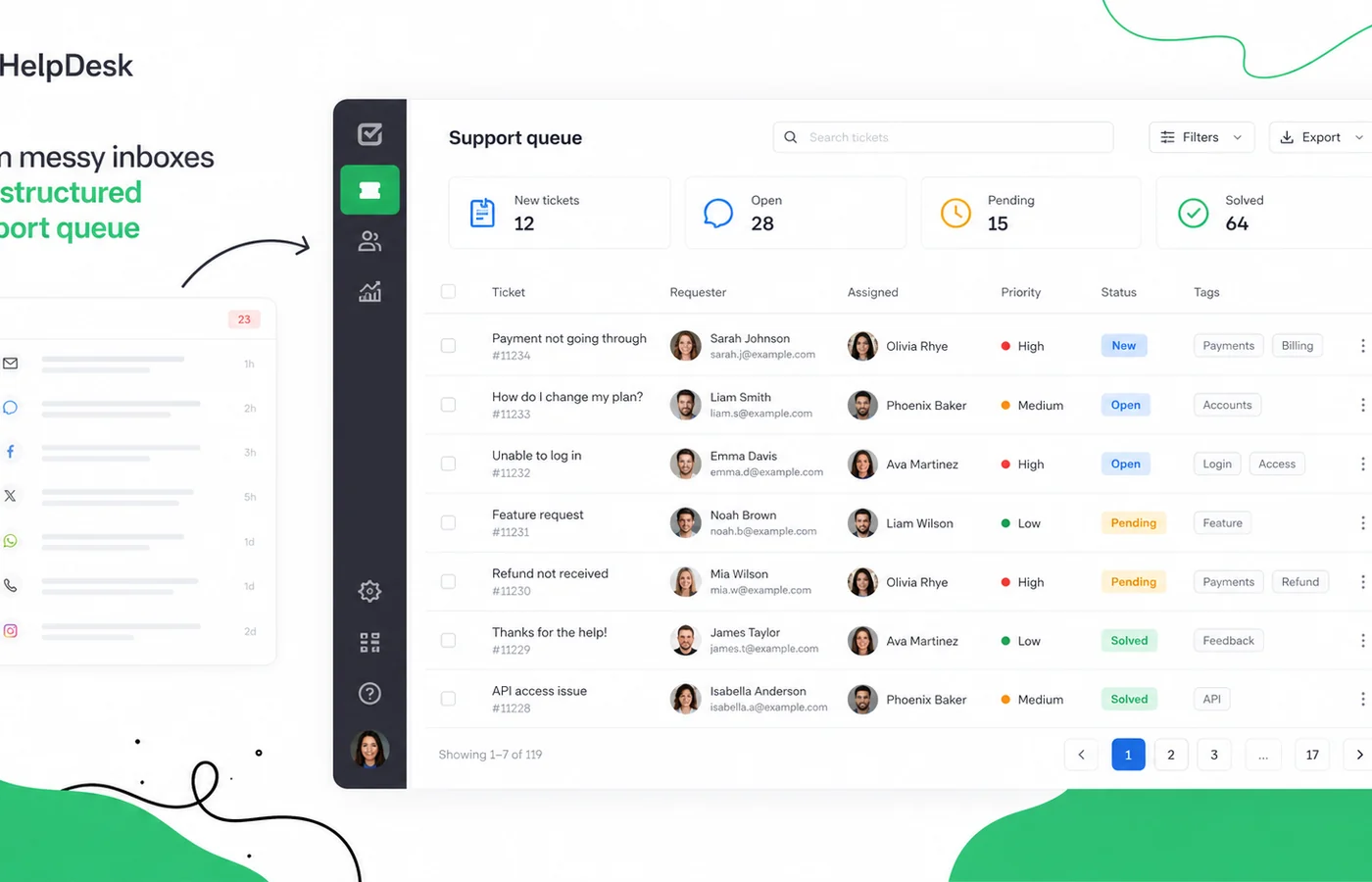
That is the real buying tension here. HelpDesk is not trying to be a full CRM, a chatbot platform, or an enterprise IT service management suite. Its cleaner job is to take incoming customer messages and turn them into tickets that agents can assign, prioritize, filter, discuss, resolve, and measure.
For a small or mid-sized support team, that can be enough.
The homepage makes the product look approachable, and that is part of the appeal. But I would not judge HelpDesk only by the first screen or the lowest annual price. The better question is whether your team has enough ticket volume, enough shared ownership, and enough reporting need to justify paid per-agent software.
If one founder answers five emails a week, HelpDesk may be too much. If several agents are already stepping on each other’s replies, missing customer context, or trying to track support performance from a messy inbox, HelpDesk becomes much easier to defend.
The main strength is focused ticketing: queue visibility, ticket history, assignments, tags, priorities, automation, integrations, and reports. The main caution is commercial: there is no permanent free plan, pricing scales by agent, annual billing is cheaper but less flexible, and refund handling should be checked before a larger commitment.
Next step: If HelpDesk still fits your support workflow, verify the current plan route and trial terms before checkout.
Review snapshot
| Review point | Practical take |
|---|---|
| Best for | Support teams moving from shared inbox chaos into structured ticket management |
| Not ideal for | Solo users, free-plan seekers, chatbot-first buyers, or teams needing full ITSM depth |
| Main use case | Organizing customer support requests into owned, trackable tickets |
| Pricing model | Per-user paid plans after a 14-day trial |
| Free path | 14-day trial, no permanent free plan confirmed |
| Main strength | Ticketing workflow, team visibility, automation, integrations, and reporting |
| Main concern | Agent-based cost, annual billing risk, and unclear fixed refund window |
| Direct alternatives to compare | Zendesk, Freshdesk, Zoho Desk |
| Adjacent DealBestDaily routes | LiveChat for real-time chat, ChatBot for automation, ActiveCampaign for CRM/marketing journeys |
| Safest next step | Trial with real support messages and at least two agents before annual billing |
What is HelpDesk?
HelpDesk is browser-based help desk and ticketing software for customer support teams. It centralizes customer messages into tickets, then gives agents and managers a structured way to track ownership, priority, status, history, and performance.
In plain buyer language, it is a shared support queue with collaboration and reporting.
That makes it different from a few nearby categories. HelpDesk is not mainly a live chat tool, although it sits near LiveChat in the Text ecosystem. It is not mainly a chatbot automation tool, although automation and AI-assisted support features exist. It is not mainly a marketing automation or CRM platform, even though customer communication data may overlap with those workflows.
The common wrong expectation is to treat HelpDesk as a complete customer engagement suite. I would narrow the decision. Ask whether you need a better way to manage support cases after they come in.
Our review approach compares current product positioning, public pricing details, help documentation, buyer workflow fit, support-stack alternatives, and visible review patterns. I would not treat a discount or clean UI as enough proof that the product fits. The real test is operational: does HelpDesk make your team handle support requests with less confusion?
Who should use HelpDesk?
HelpDesk makes the most sense for teams that already feel the pain of shared inbox support.
Customer support teams with multiple agents are the clearest fit. When more than one person can answer the same customer, you need ticket ownership, conversation history, and visible status. HelpDesk becomes useful because it gives the team a shared source of truth.
Small SaaS and ecommerce teams may also get strong value. These buyers often start with a basic support email address. That works until refunds, billing questions, product bugs, shipping questions, and account issues all land in the same inbox. A ticketing tool helps route and measure that work.
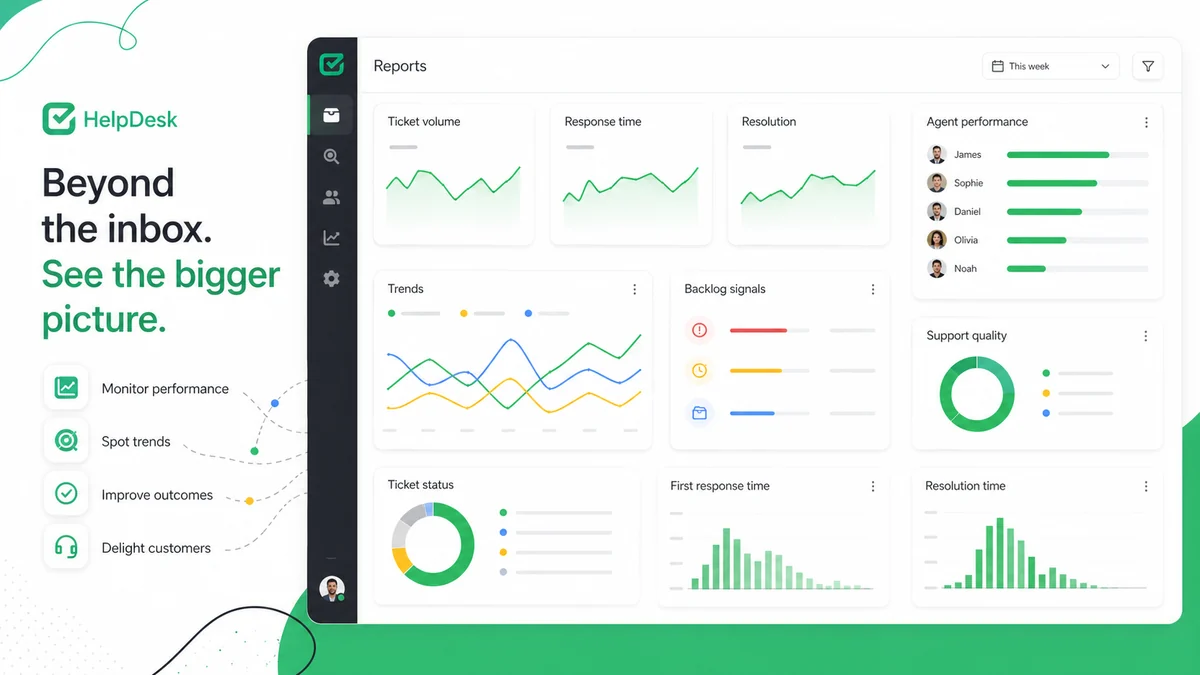
Managers who need reporting should consider HelpDesk if they want better visibility into ticket volume, response time, resolution time, and agent workload. The reporting layer matters when support is no longer just “answer as fast as possible” and becomes a process the business needs to improve.
Teams already considering the Text ecosystem may find HelpDesk easier to justify. If LiveChat, ChatBot, or KnowledgeBase are already part of the support plan, HelpDesk can sit closer to those tools than a disconnected help desk.
Operations teams with integration needs should also look at it, but carefully. HelpDesk has marketplace integrations and a public API path. That does not mean every workflow will be plug-and-play. It means technical buyers have more to verify before buying.
Who should avoid HelpDesk?
HelpDesk is not the right first move for every business with a support email.
I would avoid it if you are a solo founder handling a tiny number of messages. A paid per-agent ticketing system can be overkill when the real problem is simply staying responsive.
I would also be careful if your main need is real-time chat. In that case, LiveChat may be the more natural route. HelpDesk can support customer service operations, but its center of gravity is ticketing, not live website conversation.
If your main need is chatbot automation, HelpDesk is not the cleanest first comparison. A tool like ChatBot is more directly aligned with automated conversation flows, lead capture, and deflection before a human agent becomes involved.
If you need marketing journeys, CRM automation, segmentation, and campaign follow-up, HelpDesk is adjacent at best. ActiveCampaign is more relevant for marketing automation and customer lifecycle communication.
I would also pause if your company requires a clearly defined refund window before annual billing. Public HelpDesk information points buyers toward a trial and individual refund request handling rather than a simple “no questions asked” public refund promise. That does not make the product bad. It just means annual billing deserves a slower decision.
How HelpDesk fits into a real workflow
A useful HelpDesk workflow starts before the software is opened.
The team first needs to decide what counts as a ticket. Is every support email a ticket? Are billing questions separate from product questions? Should sales-adjacent messages enter the same queue or move somewhere else? These definitions matter because a ticketing system only helps when the team agrees on how requests should move.
A realistic workflow looks like this:
- A customer sends a support message.
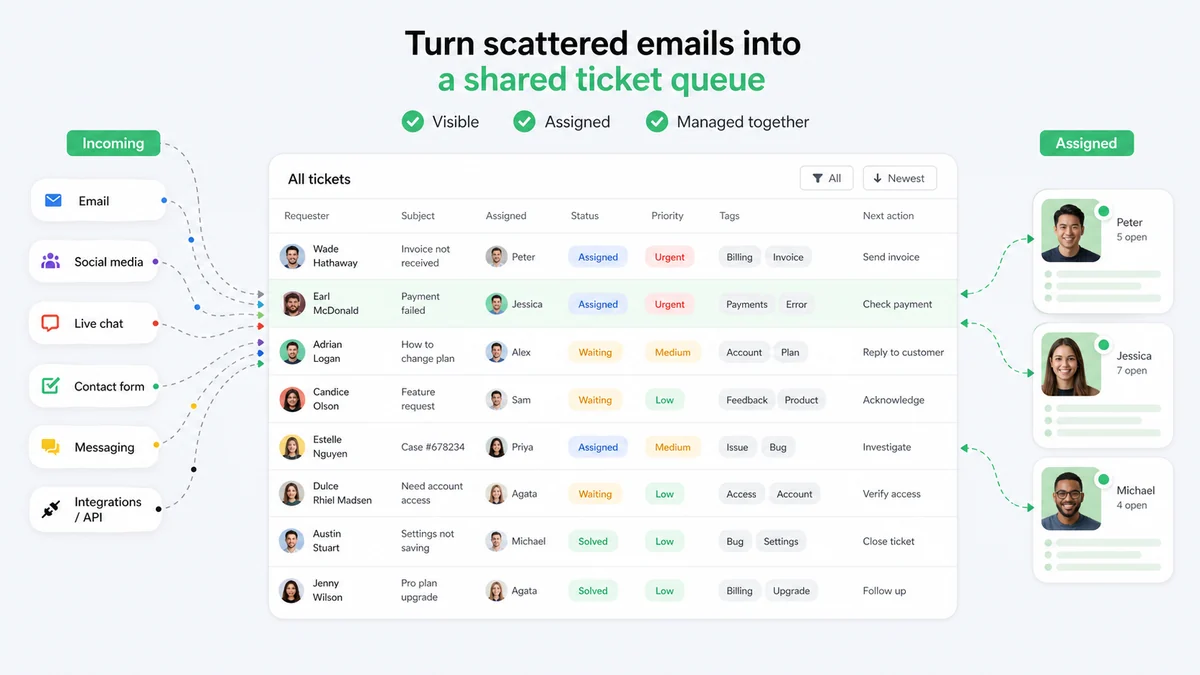
- HelpDesk turns that message into a ticket.
- An agent checks the ticket status, priority, requester details, and history.
- The ticket is assigned, tagged, or routed through a saved view.
- Another teammate can see ownership and avoid duplicate work.
- The agent replies or uses internal context to resolve the issue.
- The manager reviews queue health and performance trends.
That is where HelpDesk can save time. It creates structure around the mess.
But it still needs human judgment. HelpDesk can organize, route, and report. It cannot decide your support policy, write perfect answers for every customer, or fix a weak knowledge base. If the team’s internal process is unclear, the software will expose that confusion rather than magically solve it.
Real-world buyer scenarios
A small SaaS team with a crowded support inbox
This is the scenario where HelpDesk is easiest to understand. A few people are answering customer emails, but nobody has a clean view of which issues are open, who owns them, and which problems repeat.
HelpDesk can help because tickets create a visible queue. The risk is paying too early before the team has tested whether tags, assignments, and views match the actual support process.
An ecommerce team handling order and product questions
Ecommerce support can get messy quickly. Shipping questions, returns, product availability, failed discounts, and account issues can all look urgent.
HelpDesk may fit when the business wants agents to sort and track those requests in one place. The buyer should test integrations and reporting early. If real-time pre-sale chat is the more important job, LiveChat may be the better adjacent route.
A service business that wants accountability
Service businesses often need to know whether a customer request was handled, not just whether someone probably replied.
HelpDesk can help create accountability through ticket ownership and status. The buyer should verify whether the reporting is deep enough for their service operation before choosing Business or annual billing.
A growing support stack using multiple tools
If the buyer is already thinking about chat, knowledge base, chatbot automation, and CRM follow-up, HelpDesk can be part of the stack, but not the whole stack.
This is where tool boundaries matter. HelpDesk handles tickets. LiveChat handles real-time conversations. ChatBot handles automation-first conversations. ActiveCampaign handles marketing and customer journey automation. Buying HelpDesk because the whole ecosystem sounds attractive is not enough. The ticketing need should stand on its own.
Key features that actually matter
Ticket management and shared queue visibility
The core feature is ticket management. HelpDesk turns incoming requests into records that agents can track, assign, prioritize, and resolve.
Buyer note: this matters only if the team actually needs a queue. If your support work is still low-volume and informal, the paid structure may feel heavier than the problem.
Agent collaboration and collision awareness
When several people can reply to the same customer, duplicate answers and missed ownership become real risks. HelpDesk’s collaboration layer helps agents see what is happening around a ticket.
Buyer note: test this with at least two agents during the trial. A single-user demo will not reveal whether the tool solves team friction.
Automation rules
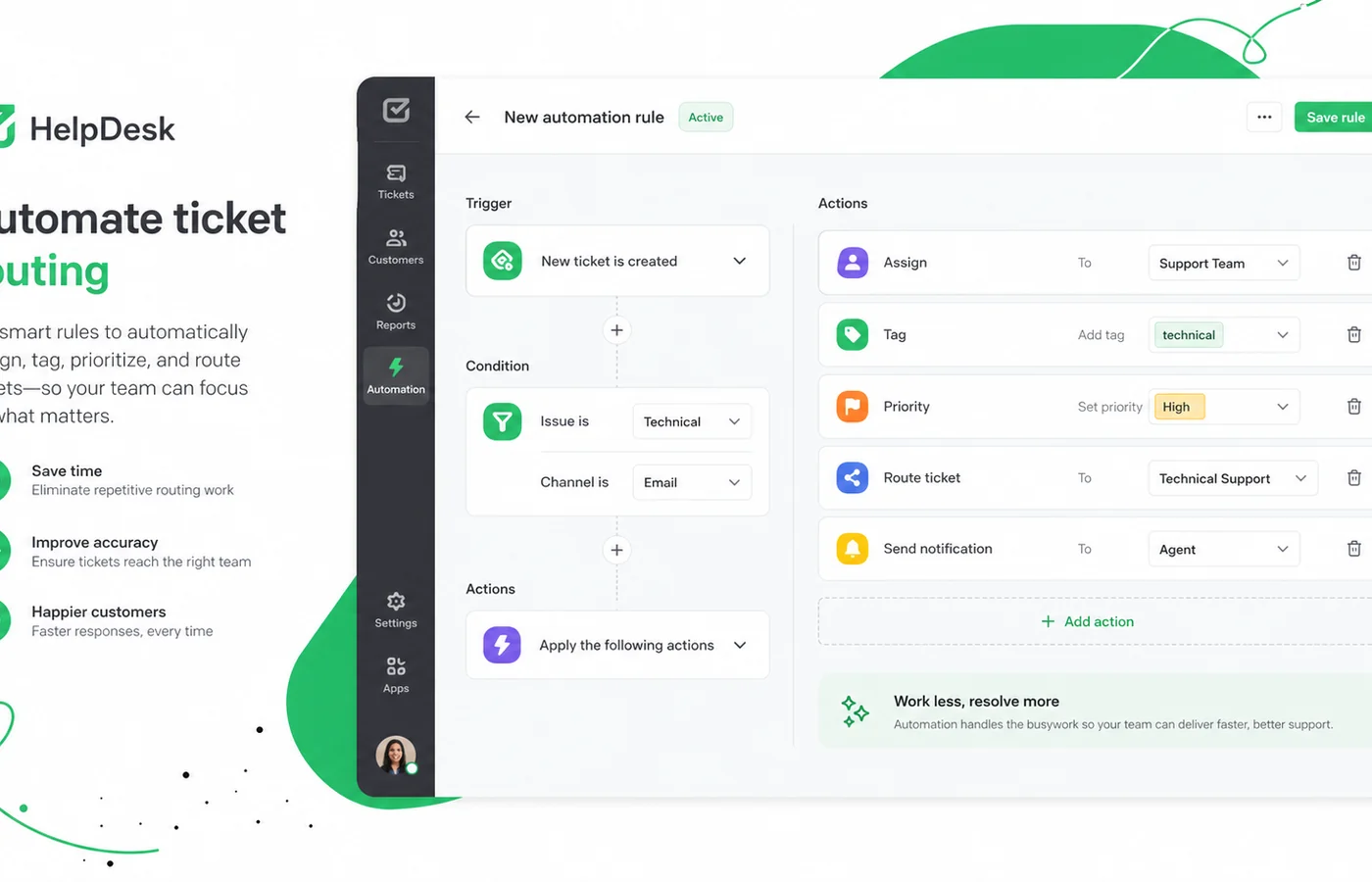
Automation can help with repetitive routing, assignments, and workflow movement. This is where HelpDesk becomes more useful than a plain inbox.
Buyer note: do not assume automation will match every support rule you have in mind. Build one real automation during the trial and see whether it reduces manual work.
Reporting and analytics
Reports help managers understand the queue instead of guessing from inbox volume. For growing teams, this can be one of the stronger reasons to pay.
Buyer note: reporting is only valuable if the team uses it. Check whether the metrics match what your business already cares about: response time, resolution time, agent workload, ticket source, and recurring issues.
Integrations and API access
HelpDesk connects with marketplace apps and has a developer/API path. That can matter when ticketing needs to connect with other customer systems.
Buyer note: integration depth should be verified before checkout. A listed integration is not always the same as the exact workflow you want.
Pricing and plan value
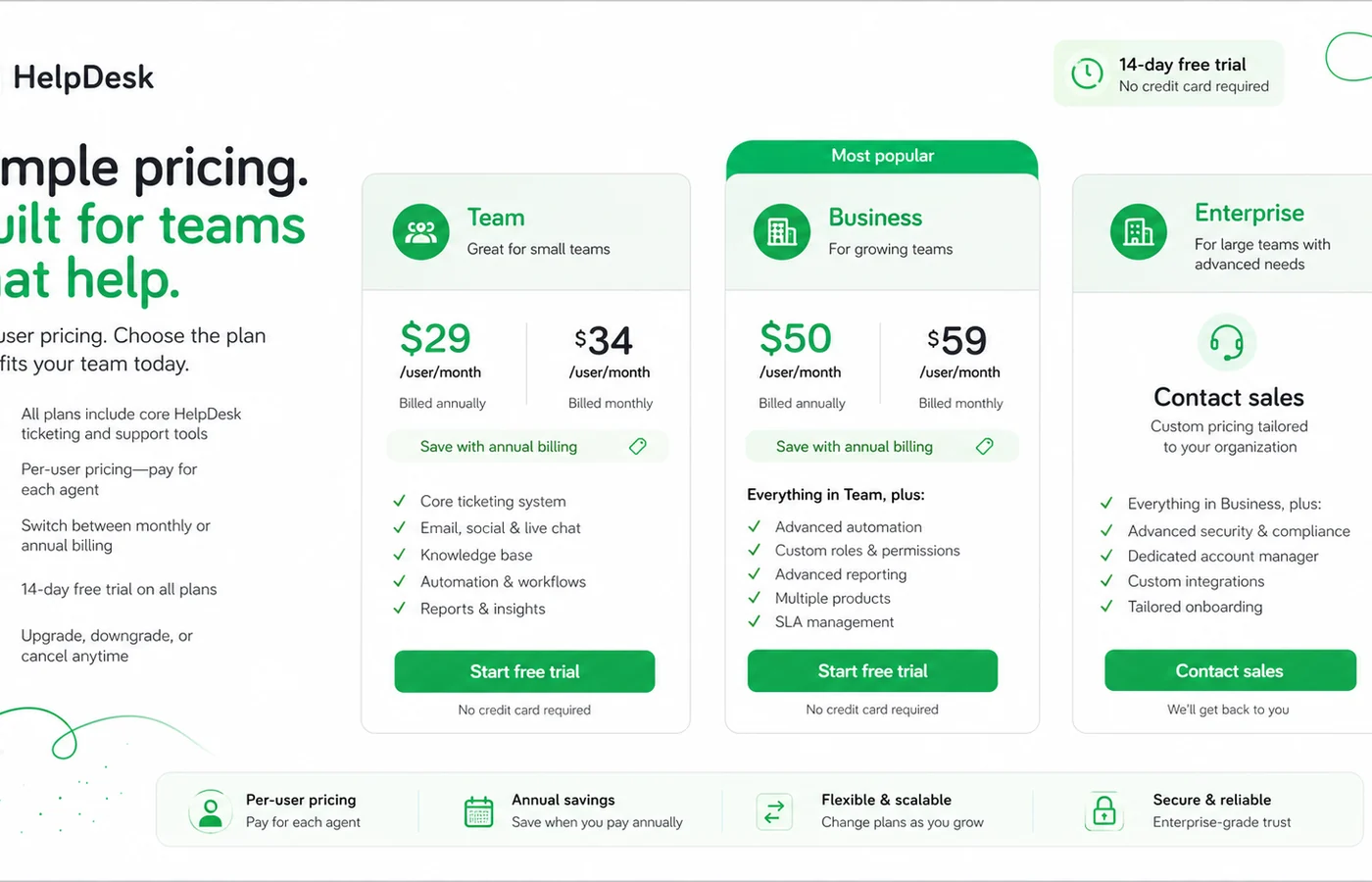
HelpDesk pricing should be evaluated as per-agent support software pricing, not as a flat monthly app cost.
At the time of review, the public pricing page shows a Team plan from $29 per user per month when billed annually, a Business plan from $50 per user per month when billed annually, and Enterprise as an individual contract. HelpDesk also promotes a 14-day trial, and public pricing materials describe annual billing as a 15% discount path.
That is clear enough to plan from, but not enough to buy blindly.
The first pricing question is agent count. A tool that looks affordable for two agents changes quickly with five, ten, or twenty active users. Viewers and observers may change the calculation depending on plan rules, but the buyer should count people who actually manage tickets.
The second pricing question is Team versus Business. Trial access can create a subtle trap. If the trial exposes higher-plan functionality, the team may get comfortable with features that are not available on the lower plan. Before paying, I would list the features the team actually used during the trial and map them to the live plan grid.
The third question is annual billing. A 15% annual discount can be sensible after workflow fit is proven. It is not the best first decision if the team has not tested real tickets, integrations, and reporting.
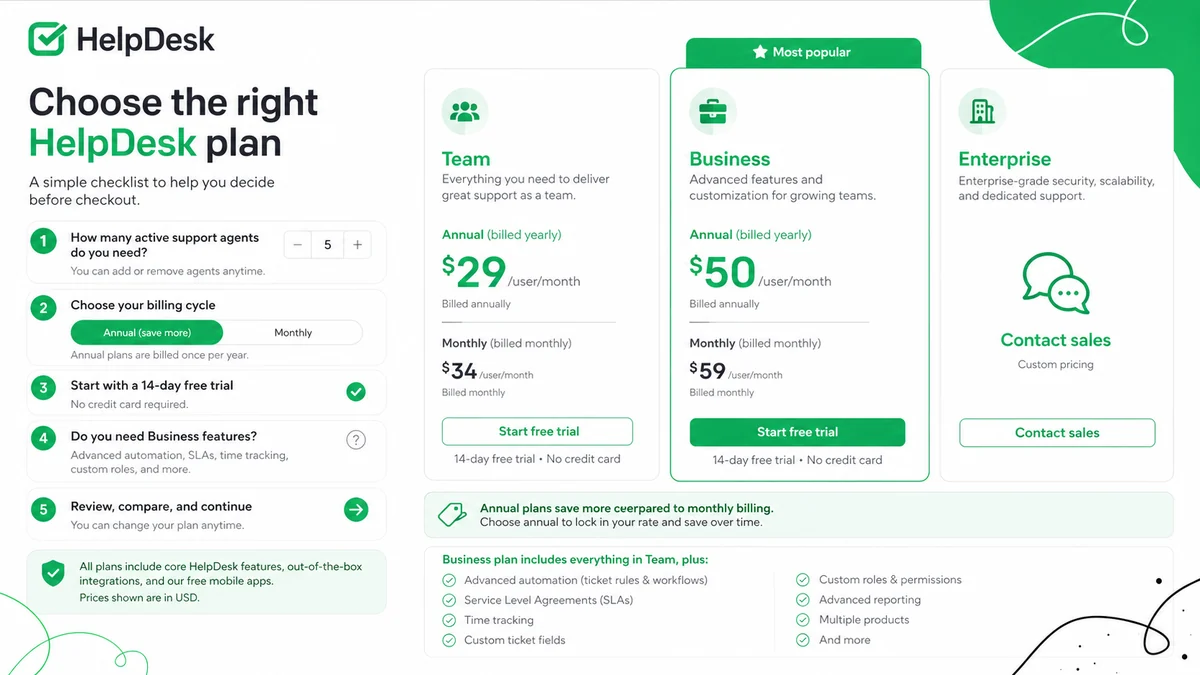
Plan check: If the trial proves HelpDesk fits your support queue, compare the current Team and Business plan limits before choosing annual billing.
Check HelpDesk pricing Read store guide Check current offers
Free plan, trial, coupon, and checkout notes
HelpDesk’s safest starting point is the trial, not a coupon.
A 14-day trial is useful because ticketing software is hard to judge from screenshots. You need to bring in real messages, invite real agents, build a queue, and see whether the tool reduces confusion.
I would not treat HelpDesk as a free-plan tool. The public buyer route is trial first, then a paid plan. That makes the trial more important. Use it deliberately.
For coupon and savings intent, I would be careful. A reliable permanent public coupon path was not confirmed as the core buying route. The more practical savings decision is plan fit: choosing the right tier, counting agents accurately, comparing monthly flexibility against the annual discount, and checking current offers only after the support workflow makes sense.
If a HelpDesk offer is available, check the HelpDesk coupon page as a final checkout step. Do not make the offer the reason to buy.
What I would check before buying HelpDesk
If I were buying HelpDesk for a real support team, I would check these items before paying:
- Active agent count: how many people need to answer, assign, or manage tickets?
- Team versus Business fit: which trial features are actually needed after the trial ends?
- Annual billing risk: is the 15% discount worth the upfront commitment?
- Refund handling: what happens if the team buys annually and the workflow does not stick?
- Integration needs: does HelpDesk connect with the exact tools the support team already uses?
- Reporting depth: are the available reports enough for managers to make better support decisions?
- Adjacent tool mismatch: is the real need ticketing, live chat, chatbot automation, or CRM follow-up?
The easy mistake is choosing a help desk because it looks clean and affordable for one agent. The better way to judge it is to run a real support scenario with the actual people who will use it.
A simple test before paying
Before paying, I would run a small HelpDesk test like this:
- Invite at least two agents, not just one admin.
- Forward or recreate a handful of real support messages.
- Create one saved view that matches an actual support queue.
- Assign tickets between agents and watch for ownership clarity.
- Build one automation rule for a repetitive routing task.
- Check whether reporting answers a real manager question.
- Compare the features used during the test against the Team and Business plan grids.
This test does not need to be complicated. It just needs to be real. If HelpDesk makes the queue clearer after a few realistic tickets, the product has a stronger case. If the team still works around the system or ignores the queue, paying annually will not fix that.
Pros explained
Focused ticketing without unnecessary sprawl
HelpDesk’s biggest advantage is focus. It is easier to understand than a broad enterprise customer service suite because its core job is ticketing.
That focus matters for teams that want to move away from shared inbox confusion without rebuilding their whole customer operations stack. It stops being enough if the buyer needs full omnichannel support, advanced ITSM, or a more complex enterprise support ecosystem.
Useful fit for team collaboration
Ticket ownership, conversation history, saved views, and collaboration signals are practical features. They address common support problems: duplicate replies, unclear ownership, lost context, and managers not knowing what is happening.
This advantage matters most when several agents work in the same queue. It matters much less for a solo operator.
Trial-first buying path
The 14-day trial is a real positive because support software should be tested with real work. A demo can show the interface. A trial can show whether the team actually changes behavior.
The limitation is time. Fourteen days is enough to test basics, but not always enough to understand long-term reporting, seasonal volume, or renewal pressure.
Ecosystem and integration options
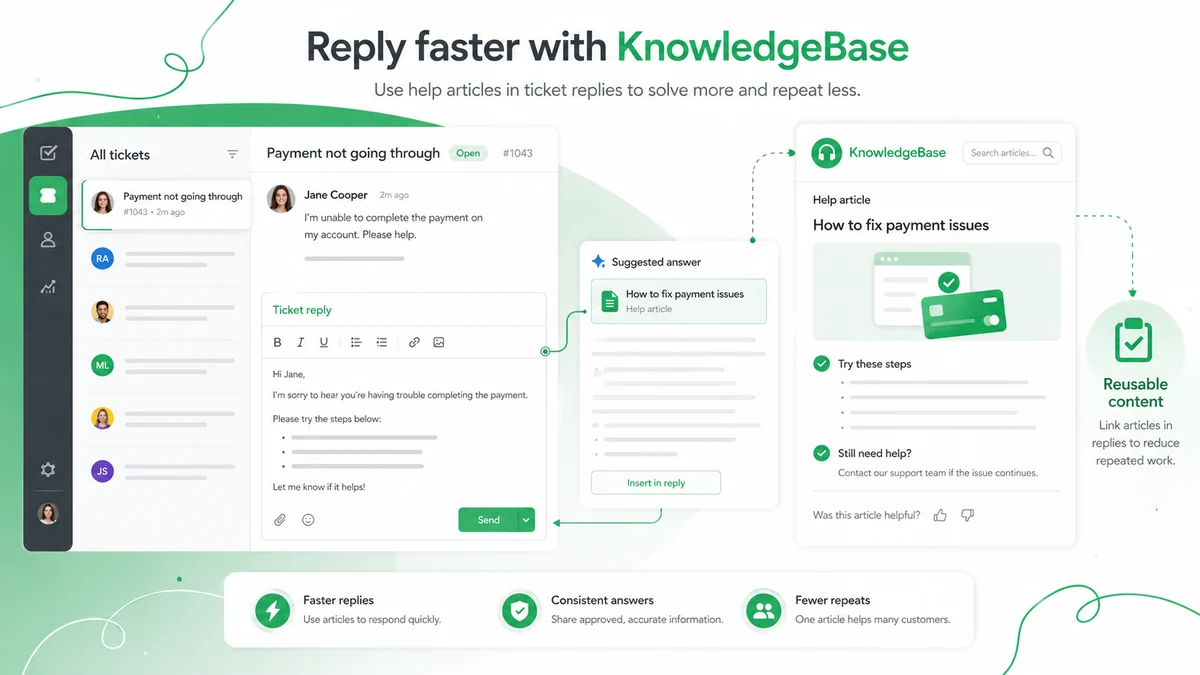
HelpDesk’s relationship with the wider Text product ecosystem can be useful. Teams considering LiveChat, ChatBot, KnowledgeBase, or related integrations may prefer a support stack that feels connected.
The buyer still needs to verify exact workflows. Ecosystem proximity is not the same as perfect operational fit.
Cons explained
No permanent free plan for long-term light use
HelpDesk is not the best choice if the buyer wants a free help desk for a very small team. The trial helps evaluation, but after that the decision becomes paid per-agent software.
This is not necessarily unfair. Many support tools charge by agent. But it means low-volume teams should be honest about whether the support problem is large enough.
Per-agent pricing can grow quickly
The starting price is easy to understand, but agent count changes the actual cost. A team with several active support reps needs to calculate the full monthly or annual bill.
This is where buyers can overestimate value. The tool may be worth it, but only if the saved time and reduced confusion are meaningful enough.
Refund clarity deserves caution
HelpDesk encourages trial testing, and public pricing information points buyers toward contacting support for refund handling rather than relying on a simple fixed public refund window.
For monthly billing, this may be manageable. For annual billing, I would ask questions before paying.
It is not the best fit for every support-adjacent job
HelpDesk is a ticketing product. If the real need is live chat conversion, chatbot deflection, marketing automation, or CRM lifecycle campaigns, a different tool may make more sense.
This is not a weakness of HelpDesk as much as a buyer-fit issue. The danger is buying the wrong category.
Green flags and red flags
Green flags:
- Your support inbox already needs shared ownership.
- Several agents handle the same customer queue.
- Managers need ticket volume and performance visibility.
- The team wants a browser-based support system without a heavy enterprise rollout.
- You can test realistic tickets during the trial.
Red flags:
- You only need a basic contact form or personal inbox.
- You want a permanent free support tool.
- You are buying only because annual billing looks cheaper.
- Your real need is live chat, chatbot automation, or CRM campaigns.
- You cannot confirm refund handling before annual billing.
For my money, the strongest green flag is team friction. When agents are already duplicating work or losing customer context, HelpDesk has a clear job. Without that friction, it may be a nice system solving a problem you do not yet have.
HelpDesk vs alternatives
Zendesk vs HelpDesk
Zendesk is the more obvious direct comparison for buyers who want a broader, more established support platform. It may make more sense for teams that need deeper enterprise workflows, more extensive app ecosystems, or a wider support suite.
HelpDesk may still make sense if the buyer wants a simpler ticketing-first workflow without jumping into a heavier platform decision.
Freshdesk vs HelpDesk
Freshdesk is another direct help desk comparison, especially for teams comparing ticketing, automation, knowledge base, and free or entry-level support options.
HelpDesk may feel cleaner for buyers already interested in the Text ecosystem or teams that want straightforward ticket handling. Freshdesk may be worth comparing if free-plan availability or broader omnichannel support is important.
Zoho Desk vs HelpDesk
Zoho Desk is a stronger comparison for buyers already using Zoho products or wanting a broader customer support system tied to a larger business software suite.
HelpDesk may be easier to evaluate if the buyer wants focused ticketing and does not want to bring more of the business into the Zoho ecosystem.
LiveChat vs HelpDesk
LiveChat is an adjacent route, not a one-to-one replacement. It makes more sense when the buyer’s main job is real-time website conversation, sales support, or chat-based customer engagement.
HelpDesk is stronger when the buyer needs asynchronous ticket ownership and support queue visibility.
ChatBot and ActiveCampaign as adjacent routes
ChatBot fits buyers who want automated conversation flows before a human ticket is needed. ActiveCampaign fits marketing automation, CRM-style follow-up, and customer journeys.
Neither is a direct replacement for HelpDesk’s ticketing workflow. They are relevant only if the buyer’s real problem sits outside support queue management.
Trust, refund, and buyer-risk notes
HelpDesk is not a product I would buy on headline price alone.
The trust signals are reasonable: public pricing, a trial route, help center documentation, marketplace/integration paths, and a long-standing product presence. The buyer risk sits more in fit and commitment than in basic legitimacy.
The first risk is plan fit. If the team tests Business-level features and then tries to move to Team, the final purchase may feel different from the trial experience. Map trial behavior to plan limits before checkout.
The second risk is annual billing. Annual pricing may lower the per-agent cost, but it increases the cost of a wrong decision. I would start monthly unless the team has already proven the workflow and agent count.
The third risk is refund handling. Because refund requests are not presented as a simple fixed public guarantee, buyers should ask support before annual billing if refund flexibility matters.
The fourth risk is category mismatch. HelpDesk is a ticketing tool. It can sit near chat, chatbot, knowledge base, and CRM tools, but those are different buying decisions.
The final risk is process maturity. Ticketing software helps organize support. It does not define support policy, write the knowledge base, train agents, or decide escalation rules. If the team does not know how it wants to handle support, HelpDesk will not remove that decision.
Final verdict
I would consider HelpDesk if your team has outgrown a shared inbox and needs a cleaner way to manage support tickets, agent ownership, customer history, automation, and reporting.
I would skip it if your support volume is still tiny, if you need a permanent free plan, or if the real need is live chat, chatbot automation, or CRM follow-up rather than ticketing.
I would compare it with Zendesk, Freshdesk, and Zoho Desk if you are making a direct help desk decision. I would compare the adjacent DealBestDaily routes only when your actual need shifts: LiveChat for real-time chat, ChatBot for automated conversation flows, and ActiveCampaign for marketing or CRM journeys.
The safest path is simple: use the trial with real tickets, invite real agents, test one automation, check one report, and then decide whether the paid plan fits the support process. If the workflow becomes clearer, HelpDesk has a good case. If the team still does not need structured ticket ownership, the cleanest interface in the world will not make it a necessary purchase.
