Quick verdict
ChatBot is worth considering if your website already has enough repeat customer conversations to justify a real support automation stack. I would not judge it as a simple chatbot widget.
That is the important difference.
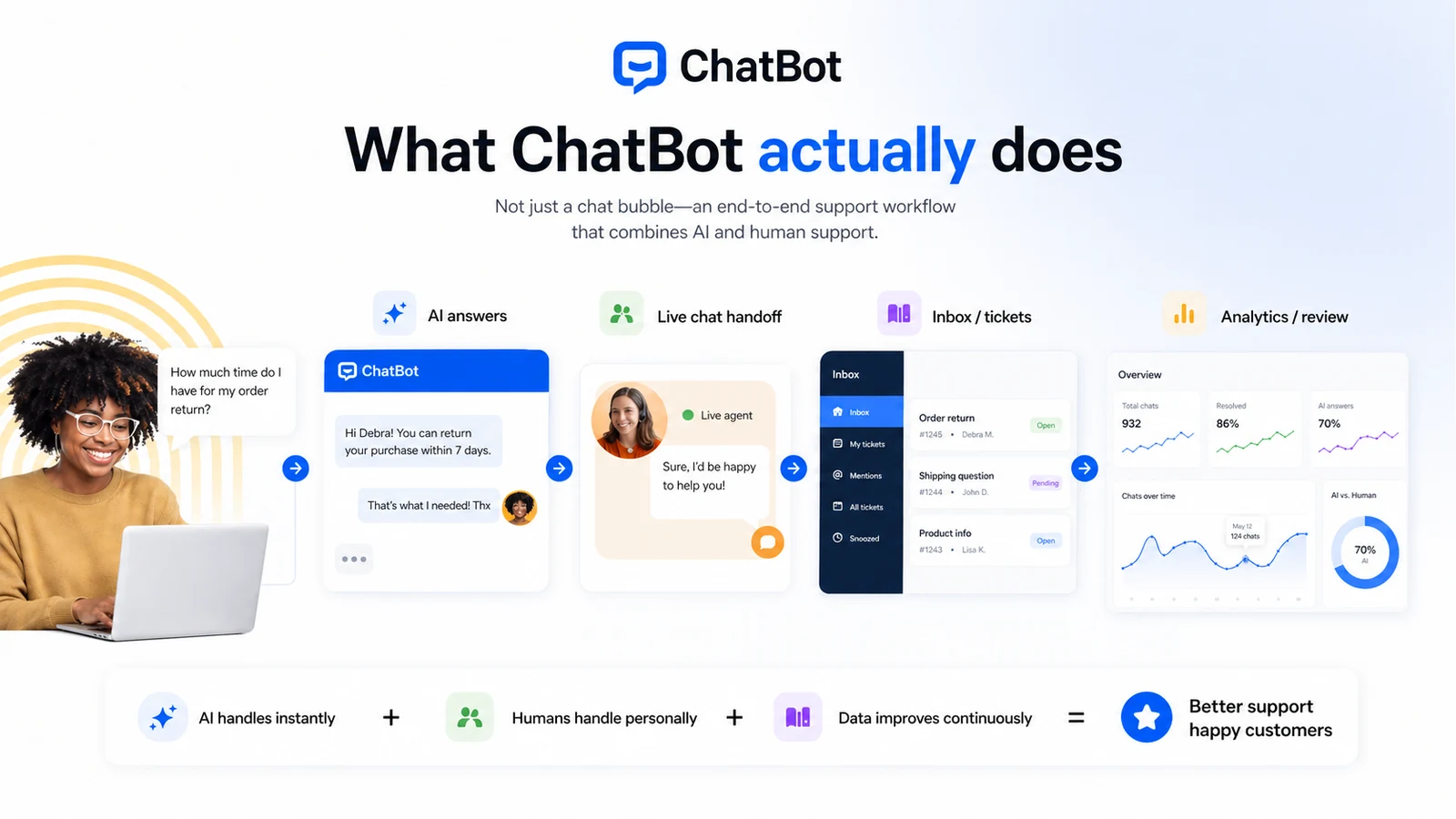
The current public positioning is broader than “add a chat bubble to your site.” ChatBot by Text is presented around AI-powered customer service, website chat, AI-generated replies, AI training, live chat handoff, ticketing, workflows, analytics, integrations, and a shared support environment. For a team with repeat questions, that can be useful. For a tiny site that only wants a free contact widget, it can be too much tool and too much paid commitment.
The pricing decision also deserves care. At the time of review, the public pricing page showed Essential from $19 per user per month when billed annually, $25 per user per month on monthly billing, Growth from $79 per user per month annually, and a custom Enterprise path. The catch is that the buyer should not look only at the seat price. AI resolution limits, automatic extra-resolution packages, team seats, integrations, and support handoff can matter more than the headline number.
For my money, ChatBot makes the most sense when a support or ecommerce team can test it with real questions during the 14-day trial, prove that it reduces repetitive work, and only then decide whether the paid plan is justified.
Next step: If ChatBot still sounds like a real support workflow fit, test the current buyer route before committing to a paid plan.
Review snapshot
| Review point | Practical take |
|---|---|
| Best for | Support, ecommerce, SaaS, and SMB teams with repeat customer questions |
| Not ideal for | Tiny sites that only need a basic free chat widget or contact form |
| Main use case | AI-powered website support with human handoff, shared inbox, ticketing, and reporting |
| Starting price | Public pricing shows Essential from $19/user/month when billed annually |
| Monthly entry | Public pricing shows Essential from $25/user/month on monthly billing |
| Free path | 14-day free trial with no credit card required; no permanent free tier publicly advertised |
| Main strength | AI agent plus live chat, ticketing, workflows, integrations, and analytics in one path |
| Main concern | AI resolution limits, automatic extra-resolution packages, annual billing, and cancellation checks |
| Direct alternatives | LiveChat, HelpDesk, Chatbase, Social Intents |
| Best next step | Run the trial with real support questions before choosing monthly or annual billing |
What is ChatBot?
ChatBot is an AI-powered customer service chatbot platform from Text. In plain buyer language, it is built to help businesses answer website and customer questions automatically, then hand off harder conversations to a human support path when needed.
That makes it different from a general AI assistant.
A general AI assistant is something a person chats with to write, research, summarize, or brainstorm. ChatBot is closer to a customer-support system: train the AI on business knowledge, deploy it on a website or supported channel, route conversations, collect customer context, use live chat or tickets when the AI is not enough, and review reporting to improve the setup.
The common wrong expectation is that buying a chatbot instantly reduces support work. It can, but only if the buyer has the right inputs. The bot needs accurate help content, clear product policies, known escalation rules, and a support team that reviews failures. Without that, the tool may simply create another customer-facing channel that still needs human cleanup.
Our review approach compares public product pages, pricing details, help documentation, buyer workflow fit, deal terms, and nearby alternatives. I would not treat a coupon, a polished demo, or a low entry price as proof that ChatBot fits the buyer. The practical question is whether it can answer the questions your customers actually ask.
Who should use ChatBot?
ChatBot fits teams that already know customer support is a recurring operational problem.
A support team with repeat questions is the most obvious fit. If customers constantly ask about returns, account access, order status, billing, onboarding, shipping, product setup, or troubleshooting, ChatBot can act as the first layer of response. The condition is that those answers must already exist somewhere: help articles, policies, product pages, internal notes, FAQs, or support scripts.
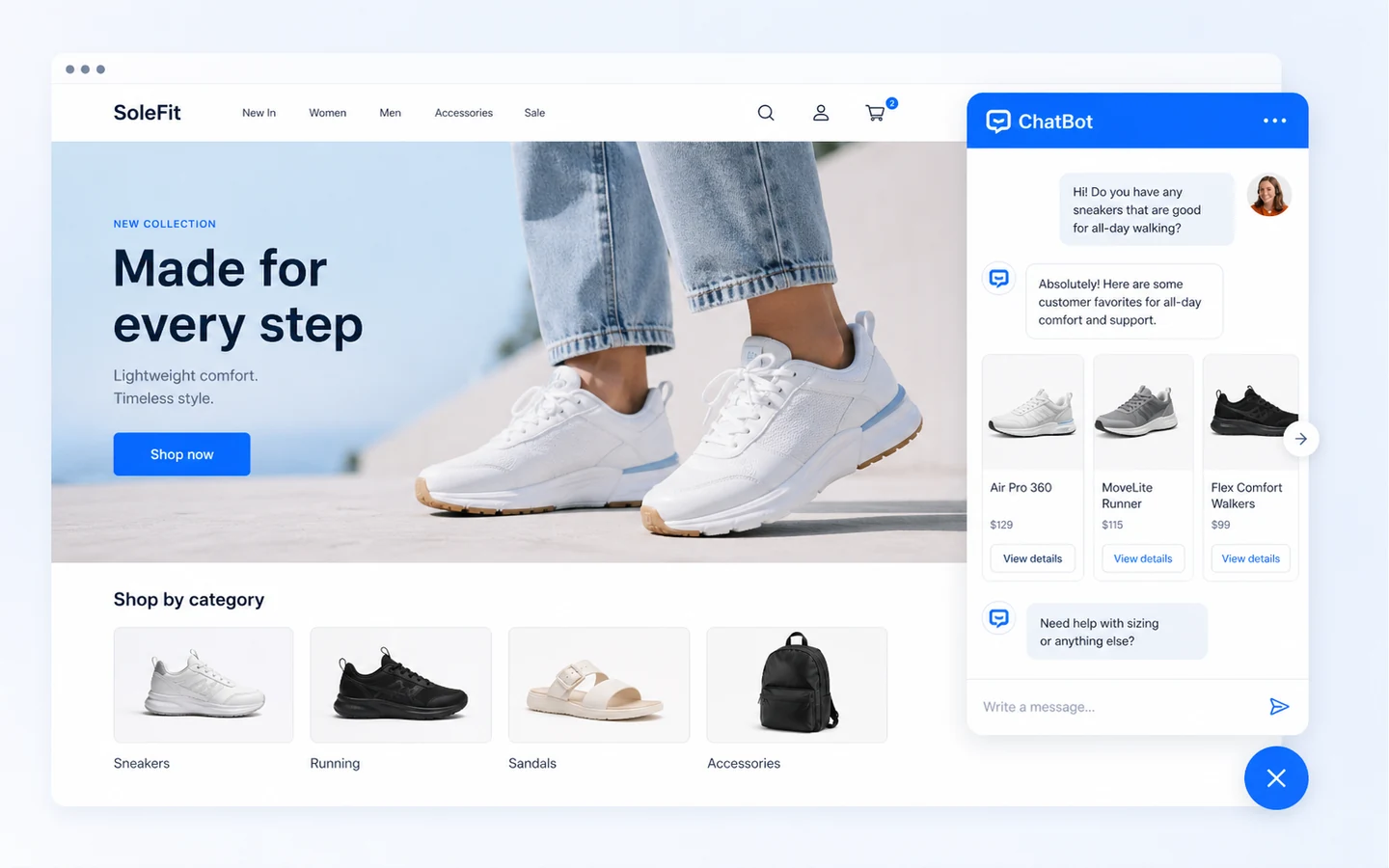
An ecommerce team can also make sense. ChatBot can support product guidance, order questions, abandoned-cart hesitation, and shopping-related questions. I would still be careful here: the bot needs accurate product data, return rules, shipping policies, and escalation logic. A wrong answer in ecommerce can become a refund, complaint, or trust problem.
A SaaS team may use ChatBot as a website support and lead qualification layer. It can answer common pre-sale questions, route higher-intent visitors, and help existing customers get basic help faster. The buyer should verify whether ChatBot integrates cleanly with the existing CRM, help desk, website, and support processes before annual billing.
A marketing team can consider it when lead qualification is the job. ChatBot may help collect visitor information, ask qualifying questions, and route better conversations to the right person. It becomes weaker if the team only wants a decorative “AI” label without a clear post-chat workflow.
A technical team may care about widget controls, API access, and automation. ChatBot has a more serious implementation path than a basic no-code widget, but technical buyers should verify current limits, API call allowances, and integration depth before committing.
Who should avoid ChatBot?
A tiny website with only a few monthly inquiries should probably avoid paying too quickly. A contact form, simple live chat widget, or lower-cost chatbot may be enough until support volume proves the need.
Buyers who expect a permanent free plan should also be cautious. The public pricing page presents a 14-day trial, not a forever-free tier. That means the trial should be treated as a focused evaluation window, not a casual account you can keep using indefinitely.
Teams without help content should slow down. ChatBot can be useful when trained on real business knowledge, but the tool cannot magically create accurate policies, product explanations, or escalation rules. If your support content is messy, the first project may be documentation cleanup rather than chatbot deployment.
Companies with strict compliance or privacy needs should check the legal and data-processing details before uploading customer information or connecting support workflows. That is not a criticism of ChatBot specifically. It is just the reality of customer-support software: the tool may process customer conversations, personal data, and operational support context.
I would also be careful if your team needs deep enterprise governance, custom SSO, advanced SLAs, procurement terms, or a dedicated account setup. Enterprise options exist, but that is a sales-led decision. Do not assume the entry plan covers enterprise expectations.
Finally, avoid buying only because the concept sounds useful. The easy mistake is to think, “We should have an AI chatbot.” The better question is, “Which exact questions will it answer, what happens when it fails, and who maintains it every week?”
How ChatBot fits into a real workflow
A realistic ChatBot workflow starts before the bot goes live.
First, the team lists the top customer questions. This should include the ordinary ones, not only the impressive demo cases: return window, order status, password reset, product compatibility, pricing, plan differences, account cancellation, delivery time, invoice request, and onboarding steps.
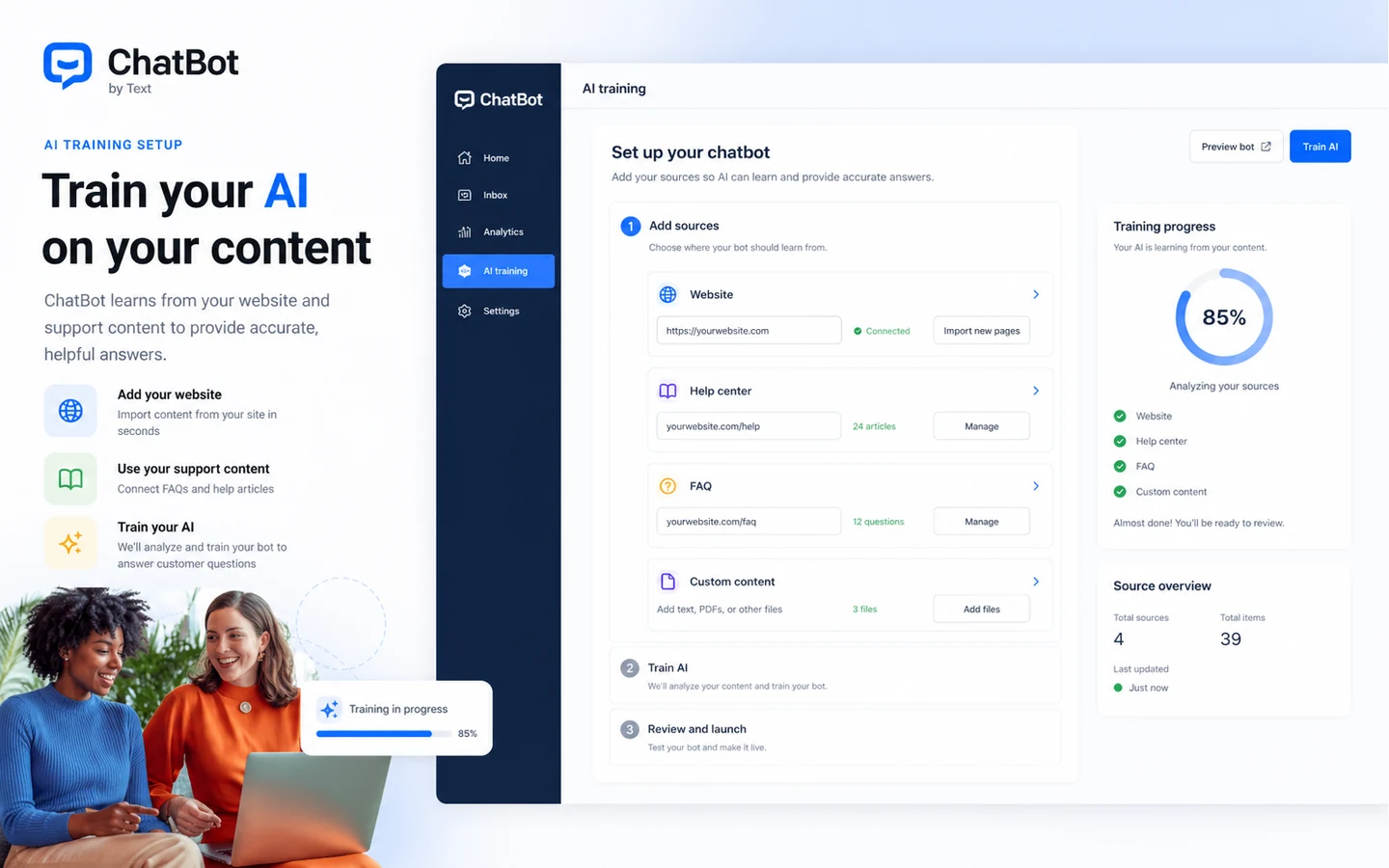
Second, the team connects or prepares knowledge sources. That might include website pages, help-center content, FAQs, product documentation, policy pages, and internal support notes that can safely be used for customer-facing answers.
Third, the team builds the conversation paths. Some questions can be answered by the AI agent. Some should trigger a human handoff. Some should create a ticket. Some should not be answered automatically at all, especially when money, legal, account-sensitive, or personal data issues are involved.
Fourth, the team tests the bot with real support questions. I would not test only friendly demo prompts. Use angry customer questions, unclear questions, typo-heavy questions, pricing questions, refund questions, and edge cases. That is where the workflow shows whether it is ready.
Fifth, the team watches reporting after launch. The most useful chatbot is not the one that answers everything on day one. It is the one the team can improve every week by reviewing missed questions, failed handoffs, and recurring confusion.
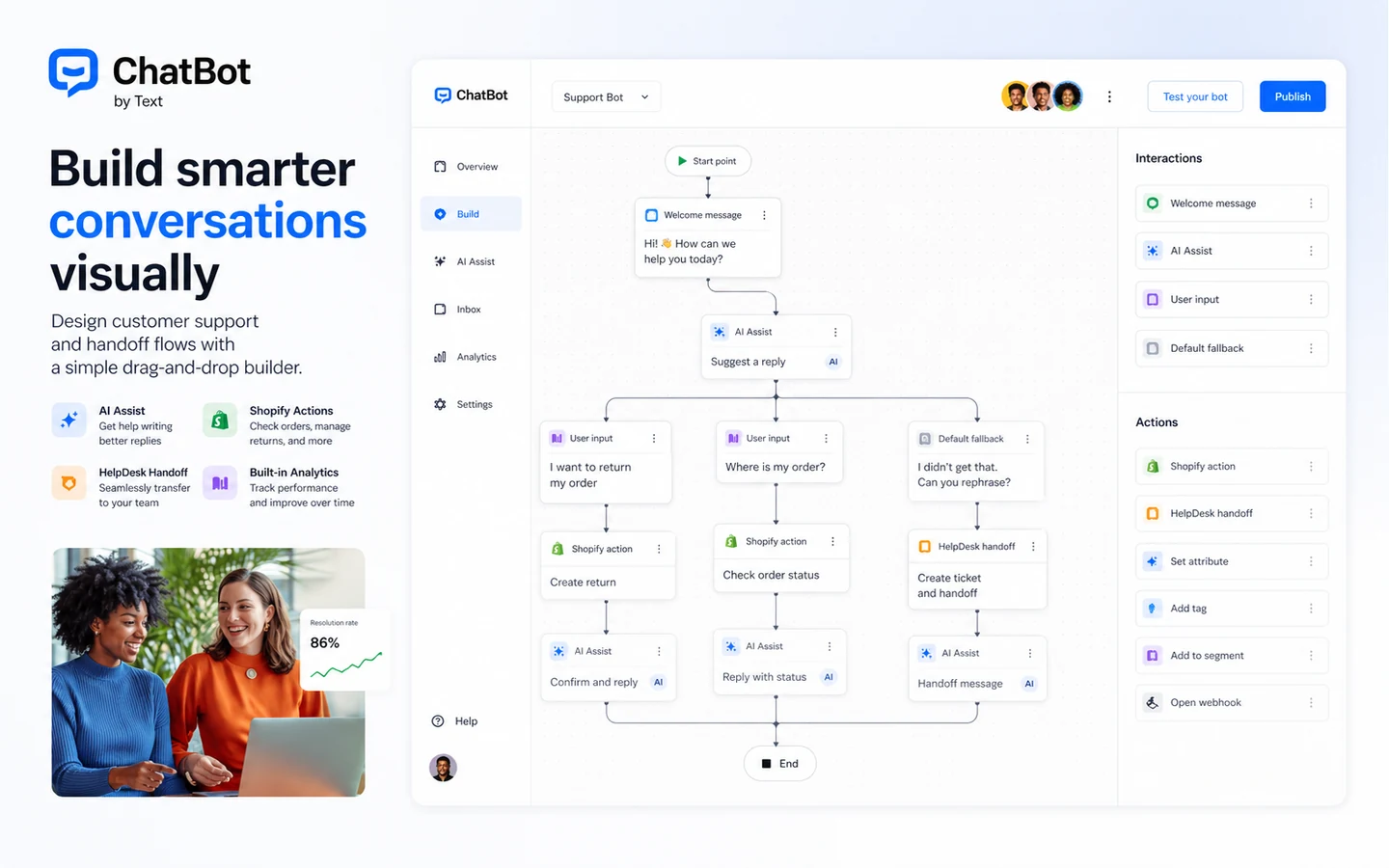
Workflow check: If your team has repeat support questions ready for testing, use the trial with real conversations before judging the paid plan.
Real-world buyer scenarios
Ecommerce store with repeat product and order questions
This is one of the stronger ChatBot scenarios. A store may receive repeated questions about shipping, returns, product sizing, availability, discount eligibility, order status, and recommendations. ChatBot can help if those answers are clear and if the team tests how the bot handles unhappy or confused customers.
Where it may fail: product data and policies change. If the bot is not updated, it can give stale answers. Before paying annually, an ecommerce buyer should verify Shopify or website integration, escalation behavior, AI resolution limits, and whether product recommendation behavior is accurate enough for real customers.
SaaS team with onboarding and pre-sale questions
A SaaS company may use ChatBot to answer plan questions, route sales-ready visitors, and help new users find basic setup guidance. This can save time if the same questions repeat every week.
Where it may fail: the bot may not understand nuanced technical, billing, or account-specific questions. The team should verify when ChatBot hands the conversation to a human and whether tickets or shared inbox workflows are clean enough for daily use.
Small business wanting a simple chat widget
This is a weaker fit. If a business only wants a basic website chat bubble, ChatBot may be more product than necessary. The paid plan includes a broader support stack, which can be valuable, but only if the business uses it.
The buyer should compare with lighter tools before paying. If there is no support volume, no help content, and no weekly review process, the 14-day trial may reveal that the idea is interesting but not yet worth the subscription.
Support team considering AI automation for the first time
This buyer should start slowly. AI support can reduce repetitive work, but it also creates new responsibilities: training content, reviewing failed answers, checking privacy expectations, and deciding which topics should never be automated.
ChatBot may fit if the team wants AI agent behavior plus human support workflows in one environment. A simpler knowledge-base bot may be better if the team only wants to answer basic documentation questions.
Key features that actually matter
AI agent trained on business knowledge
The AI agent is the center of the buying decision. It can use business knowledge to answer customer questions and support common workflows. This matters because generic AI is not enough for customer support. The answer needs to match your policies, products, and support boundaries.
Buyer note: test the bot with your real support questions. If your support content is weak, fix that before judging the AI.
Live chat handoff and shared inbox
A support chatbot needs a human escape hatch. ChatBot is more compelling when the AI agent works alongside live chat, shared inbox, and tickets instead of pretending automation solves every issue.
Buyer note: verify the handoff experience. A chatbot that traps customers in automation can hurt trust faster than it saves time.
Ticketing and workflow automation
Ticketing matters when customer conversations require follow-up. If a refund request, order issue, or account problem needs action after the chat, the tool needs more than a friendly AI answer.
Buyer note: check whether the ticketing workflow matches how your team already assigns, prioritizes, and resolves support work.
Integrations and widget controls
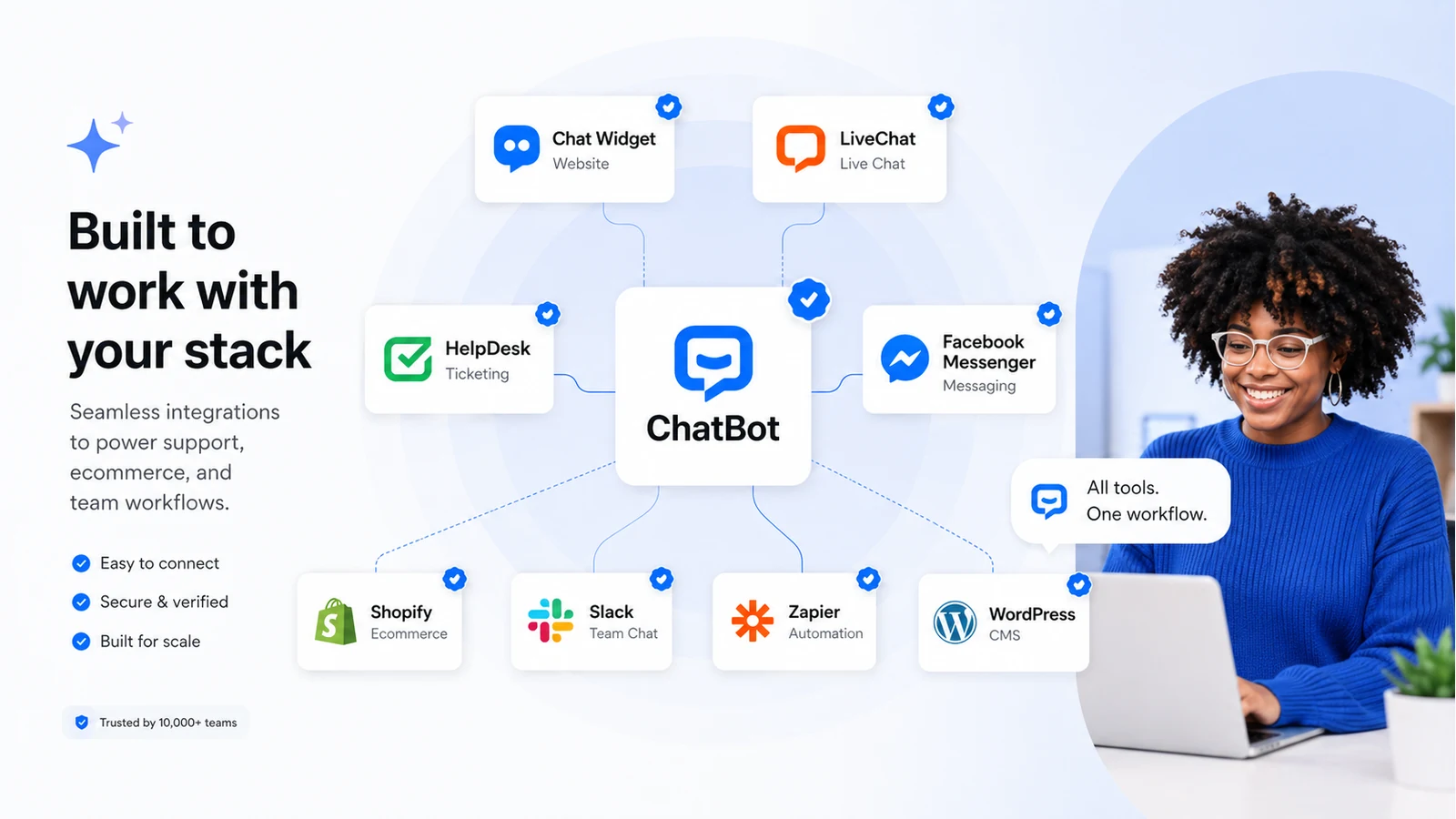
ChatBot supports common website, ecommerce, and support integrations, and public documentation references API and widget controls. This matters for teams that need the chatbot to fit into an existing stack rather than sit alone on the website.
Buyer note: do not assume a logo on an integrations page means the exact workflow you need is covered. Test the connection during the trial.
Reporting and improvement loop
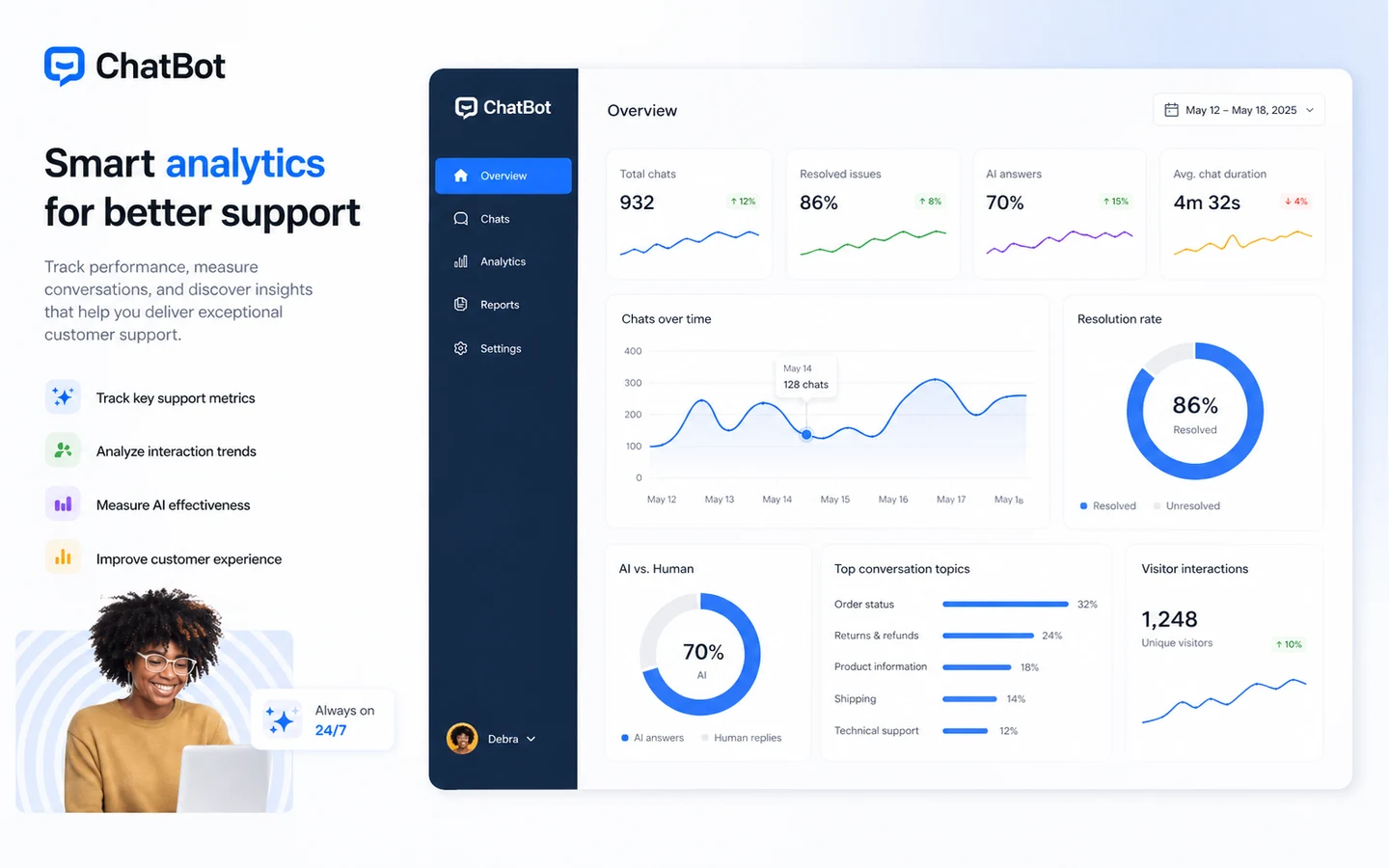
Reports are important because the first launch is rarely the final version of a chatbot. The team needs to know what customers ask, where the AI fails, and which topics should be improved.
Buyer note: if reporting does not help your team improve the bot weekly, the automation may become a black box.
Pricing and plan value
The public pricing page currently presents three main paths: Essential, Growth, and Enterprise.
At the time of review, Essential was shown at $25 per user per month on monthly billing or $19 per user per month when billed annually. Growth was shown at $99 per user per month on monthly billing or $79 per user per month when billed annually. Enterprise used custom pricing.
That headline pricing is only the first layer.
The more important layer is usage. The public pricing page describes included AI resolutions by plan: Essential includes a small monthly AI resolution allowance, Growth includes more, and Enterprise is positioned for much higher volume. It also describes automatic extra packages of AI resolutions when the limit is reached. That can matter a lot if the bot handles more conversations than expected.
So the value question is not simply, “Is $19 per user cheap?” The better question is, “How many users, AI agents, customer conversations, AI resolutions, integrations, and support workflows do we actually need?”
Essential may fit a small team testing whether ChatBot can handle real questions. Growth may make more sense when conversation volume, reporting, campaigns, and support workflow depth start to matter. Enterprise is the route to verify for larger teams that need onboarding, SLAs, governance, payment terms, SSO, or higher-volume controls.
I would start monthly unless the team has already proven repeat value. Annual billing can lower the visible monthly price, but it also raises the commitment. With support automation, the safest path is usually trial first, monthly second, annual only after the bot reduces real support work.
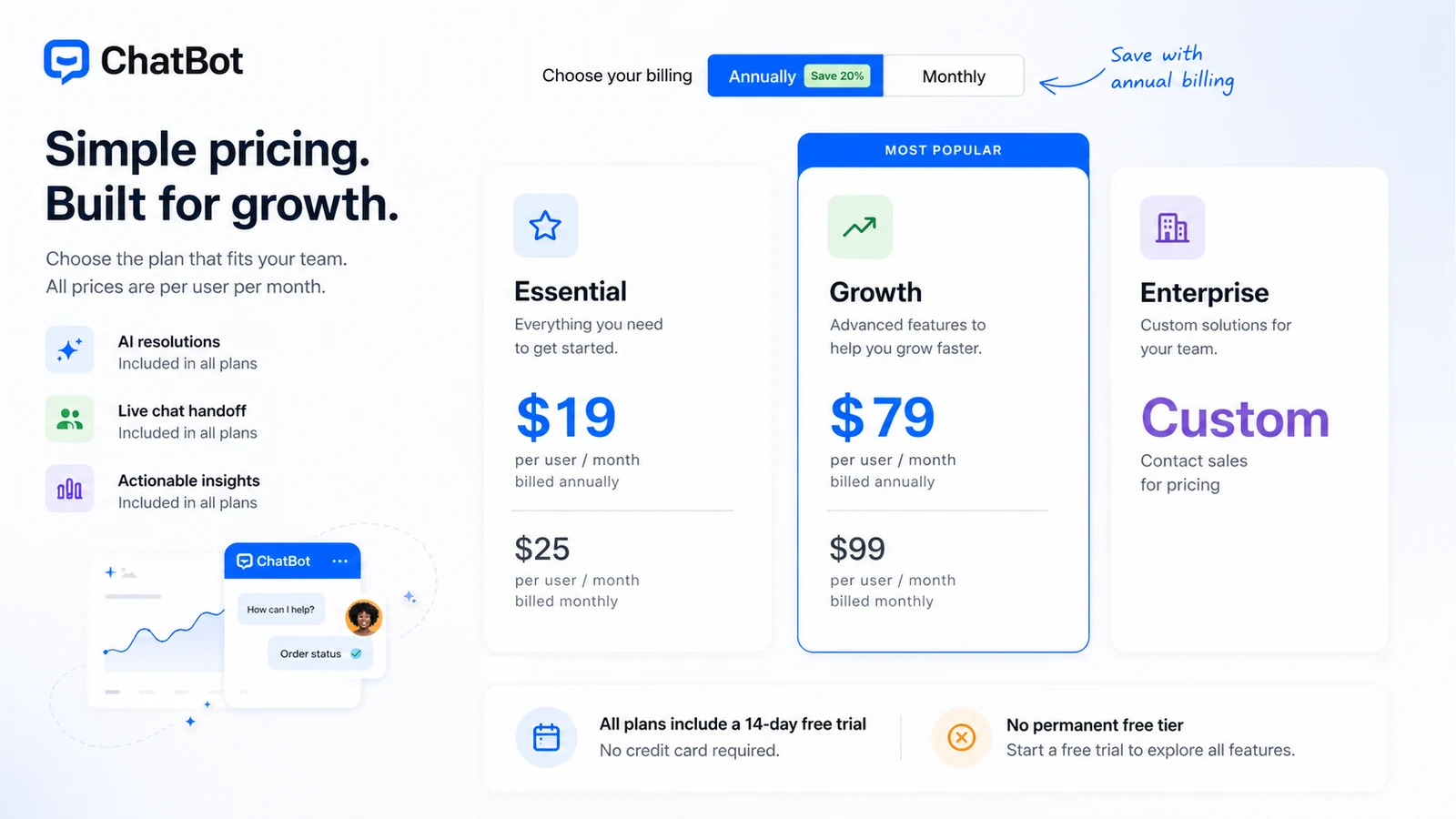
Pricing check: Before choosing a plan, verify the current seat price, included AI resolutions, and any extra-resolution charges at live checkout.
Free plan, trial, coupon, and checkout notes
ChatBot has a useful trial path, but I would not call it a free-plan product.
The public pricing page says all plans include a 14-day free trial with no credit card required. It also states that there is no permanent free tier. That means the trial should be used with intent. Do not spend the trial only clicking through the interface. Use real customer questions, test human handoff, connect the needed integrations, and compare the reporting against your weekly support review process.
The coupon decision should come after that.
A coupon or current offer can improve the checkout path, but it should not be the reason to buy ChatBot. If the support workflow is not there, a discount only makes a mismatch cheaper. If the workflow is there, then checking the ChatBot coupon page before checkout is reasonable.
I would use this order:
- Start the 14-day trial.
- Train the bot on real help content.
- Test real support questions.
- Estimate seat count and AI resolution volume.
- Compare monthly and annual billing.
- Check the current store or coupon route.
- Choose the smallest plan that matches proven usage.
That order protects the buyer better than chasing a deal first.
What I would check before buying ChatBot
If I were buying ChatBot for a real support workflow, I would check these points before paying:
- Whether the 14-day trial gives enough time to test real support questions, not just demo prompts.
- How many users need paid access, and whether the per-user price matches the team structure.
- How many AI resolutions the business realistically needs each month.
- Whether automatic extra-resolution packages could increase the bill during busy periods.
- Whether required integrations are deep enough for the actual website, ecommerce, CRM, or help desk workflow.
- How cancellation works, and whether the account remains active until the end of the billing cycle.
- Whether customer data, consent, retention, and privacy requirements fit your business obligations.
A simple test before paying
Before paying, I would run a small test like this:
- Collect 20 real customer questions from recent support conversations.
- Separate them into easy, medium, and risky questions.
- Train ChatBot with the website, help pages, FAQs, and policies the bot should rely on.
- Test whether the bot answers easy questions correctly and admits uncertainty on risky ones.
- Check whether unclear or sensitive conversations hand off to a human cleanly.
- Review reports or conversation logs to see what failed.
- Estimate whether the saved support time is worth the monthly or annual cost.
This test is not perfect, but it is better than judging the tool by a demo. A support chatbot should prove itself against the messy questions customers actually ask.
Pros explained
ChatBot’s biggest strength is that it is not just a floating chat widget. The current product path combines AI agent behavior, live chat, shared inbox, ticketing, workflows, analytics, and integrations. That matters for teams that want support automation to connect with human support instead of becoming a separate island.
The trial path is also useful. A no-credit-card 14-day trial gives buyers a clean way to test real questions before paying. That does not remove pricing risk, but it does reduce the risk of paying before the workflow is understood.
Another advantage is fit for ecommerce and SMB support teams. ChatBot can make sense when a business receives repeated questions and has enough help content to train useful responses. The more repetitive the support workload, the easier it is to see whether automation saves time.
The API and widget controls are also a meaningful strength for technical teams. A basic chat tool may be enough for some buyers, but teams with implementation needs should appreciate having a more flexible path. The caution is that exact limits and technical behavior still need verification.
Cons explained
The first drawback is the lack of a permanent free tier. For some buyers, that is fine. For very small websites, it means the product may move from “interesting” to “paid commitment” faster than expected.
The second drawback is pricing complexity around AI resolutions. Seat pricing is visible, but AI-handled conversation volume can become the real cost driver. Automatic extra-resolution packages are especially worth checking if traffic fluctuates or if the bot starts handling more conversations than planned.
The third issue is maintenance. ChatBot can reduce support work only if someone maintains it. Help content changes, policies change, product details change, and customers ask new questions. A neglected chatbot can create inaccurate answers at scale.
The fourth concern is refund clarity. I found subscription cancellation guidance, but I would not rely on a simple money-back window unless the current official terms or support team confirms it. The safer risk-control path is to use the trial properly and understand cancellation before checkout.
Green flags and red flags
Green flags are easy to spot when the buyer has a real support problem.
If your team already answers the same questions every day, that is a green flag. If you have organized help content, that is another. If your support team can review failed answers weekly, ChatBot has a better chance of becoming a useful system instead of a one-time setup project.
Another green flag is tool consolidation. If ChatBot can replace or connect parts of live chat, inbox, ticketing, and automation, the paid plan may be easier to justify.
The red flags are just as important.
If nobody owns the bot after launch, slow down. If your support policies are unclear, slow down. If you are buying only because the homepage makes AI support sound effortless, slow down. If your expected AI resolution volume is unknown, do not jump into annual billing.
The biggest red flag is treating the chatbot as a substitute for customer support judgment. ChatBot can help automate routine conversations, but the business is still responsible for the answers customers receive.
ChatBot vs alternatives
ChatBot’s direct alternatives depend on the buyer’s actual job. It is not enough to compare feature lists. A human-first support team, an AI knowledge-base buyer, and a Slack-first internal support buyer may all choose different tools.
LiveChat vs ChatBot
LiveChat is the stronger comparison when the buyer wants human live chat first. If your team’s main need is fast human response, agent productivity, and conversion-focused chat, LiveChat may be the cleaner fit.
ChatBot makes more sense when AI automation is a central part of the support strategy. The tradeoff is that automation requires training, testing, and ongoing maintenance.
HelpDesk vs ChatBot
HelpDesk is the better route when ticket management matters more than front-end chatbot behavior. If the biggest pain is tracking, assigning, and resolving customer issues after the conversation starts, a ticketing-first tool may be more important.
ChatBot is stronger when the buyer wants the AI agent to answer or qualify conversations before they become tickets.
Chatbase vs ChatBot
Chatbase is a more direct comparison for buyers who mainly want an AI chatbot trained on knowledge sources. It may feel simpler for teams focused on documentation-based answers rather than a broader support stack.
ChatBot may still be better if the buyer wants AI answers, live chat, ticketing, workflows, and support analytics together.
Social Intents vs ChatBot
Social Intents is worth comparing when the buyer wants live chat inside tools like Microsoft Teams, Slack, or Google Chat. That is a more specific workflow direction.
ChatBot is broader as a website support automation system. Social Intents may be cleaner when the team’s internal communication channel is the center of the support workflow.
Trust, refund, and buyer-risk notes
The trust question with ChatBot is less about whether the product is real and more about whether the buyer understands the operating model.
First, verify pricing at checkout. Public pricing can change, and the difference between monthly and annual billing is meaningful. Essential and Growth look cheaper when billed annually, but that only helps if the team has already proven value.
Second, verify AI resolution limits. A chatbot that handles only a small number of AI-resolved conversations may be fine for testing, but a busy website can push usage higher than expected. The automatic extra-resolution package detail is one of the first things I would check before rollout.
Third, verify cancellation and billing behavior. The subscription help page says you can terminate the subscription and that the account remains active until the end of the current billing cycle. That is useful, but it is not the same as a broad refund guarantee.
Fourth, think about data and privacy. Customer conversations can contain personal details, order information, account context, and support history. The business using ChatBot still needs to handle consent, privacy notices, and legal basis for processing where required.
Fifth, do not automate sensitive issues too aggressively. Refunds, billing disputes, account access, medical/legal/financial questions, and high-emotion customer problems may need human review. A good chatbot workflow knows when not to answer.
Final verdict
ChatBot is a strong candidate if your business already has repeat customer questions, organized help content, enough support volume, and a team willing to maintain the bot after launch.
I would consider it for ecommerce stores, SaaS companies, SMB support teams, and marketing teams that want AI support automation connected to live chat, tickets, workflows, and analytics. The product becomes more convincing when it replaces repetitive support work instead of merely adding another tool.
I would skip it if your website barely receives support questions, if you only need a free chat widget, or if nobody on the team will own training and improvement. I would also be careful with annual billing until the trial proves that AI resolutions, integrations, handoff, and reporting match your real workflow.
I would compare it with LiveChat if human chat is the priority, HelpDesk if ticketing is the priority, Chatbase if AI knowledge-base chat is the priority, and Social Intents if internal team-chat support is the priority.
The safest verdict is conditional: use ChatBot when support automation is already a real operational need, not when “having an AI chatbot” is only a nice idea. Test the workflow first, check the plan limits second, and treat any coupon or checkout offer as a final step rather than the reason to buy.
