Quick verdict
Chaport is worth considering if you want a simple website live chat tool that can start small and grow into a broader customer messaging setup. It is not the kind of product I would judge only by the widget. The buying decision is really about whether your team needs basic live chat, operator productivity features, or the deeper automation layer that comes with chatbots and a knowledge base.
That matters because Chaport has a real free entry point. You can test the basic live chat workflow before paying, and new accounts get a 14-day Unlimited trial. That makes the safest path fairly clear: put Chaport on a real page, send real test conversations, check how operators respond, and only then decide whether Pro or Unlimited makes sense.
The strongest reason to consider Chaport is its balance. It is not as heavy as a full help desk, but it is more than a bare chat bubble. You get live chat, offline messaging, mobile and desktop apps, multi-channel support, API options, and a path into chatbots, FAQ bot, knowledge base, assignment rules, and advanced reporting.
The main caution is commitment. Chaport’s terms are strict about no refunds or credits for unused subscription time. For my money, that makes annual billing something to use after workflow fit is proven, not before.
Next step: If Chaport still looks like the right live chat layer for your site, test the free or trial path before choosing a paid tier.
Review snapshot
| Review point | Practical take |
|---|---|
| Best for | Small businesses, SMBs, ecommerce sites, and lean teams that need website live chat without a full help desk stack |
| Not ideal for | Teams that need deep ticketing, SLA workflows, enterprise case management, or AI-first support automation |
| Main use case | Answer website visitor questions, capture leads, handle offline messages, and add light automation when support volume grows |
| Pricing note | Current public pricing shows Free, Pro, and Unlimited plans with monthly and annual billing paths |
| Free path | Free plan includes two operators, unlimited chats and websites, 60-day chat history, and core apps |
| Trial path | 14-day Unlimited trial, then downgrade to the Free plan if no paid plan is chosen |
| Main strength | Simple live chat foundation with a clear upgrade path into chatbots, knowledge base, reports, API, and Zapier |
| Main concern | Higher-value features sit behind paid tiers, and refund language is strict for unused subscription time |
| Direct alternatives | LiveChat, ChatBot, HelpDesk, Social Intents |
| Best next step | Run one real website chat test before choosing monthly, annual, Pro, or Unlimited |
What is Chaport?
Chaport is best understood as customer messaging software for websites. Its core job is to help a business talk with website visitors through live chat, then expand that conversation layer with offline messages, multi-channel messaging, chatbots, a knowledge base, and support-team workflow features.
The product is not a traditional ticketing-first help desk. It is also not an AI chatbot platform where automation is the whole product. Chaport sits in the middle: human-first live chat at the base, automation and team routing on top when the buyer needs them.
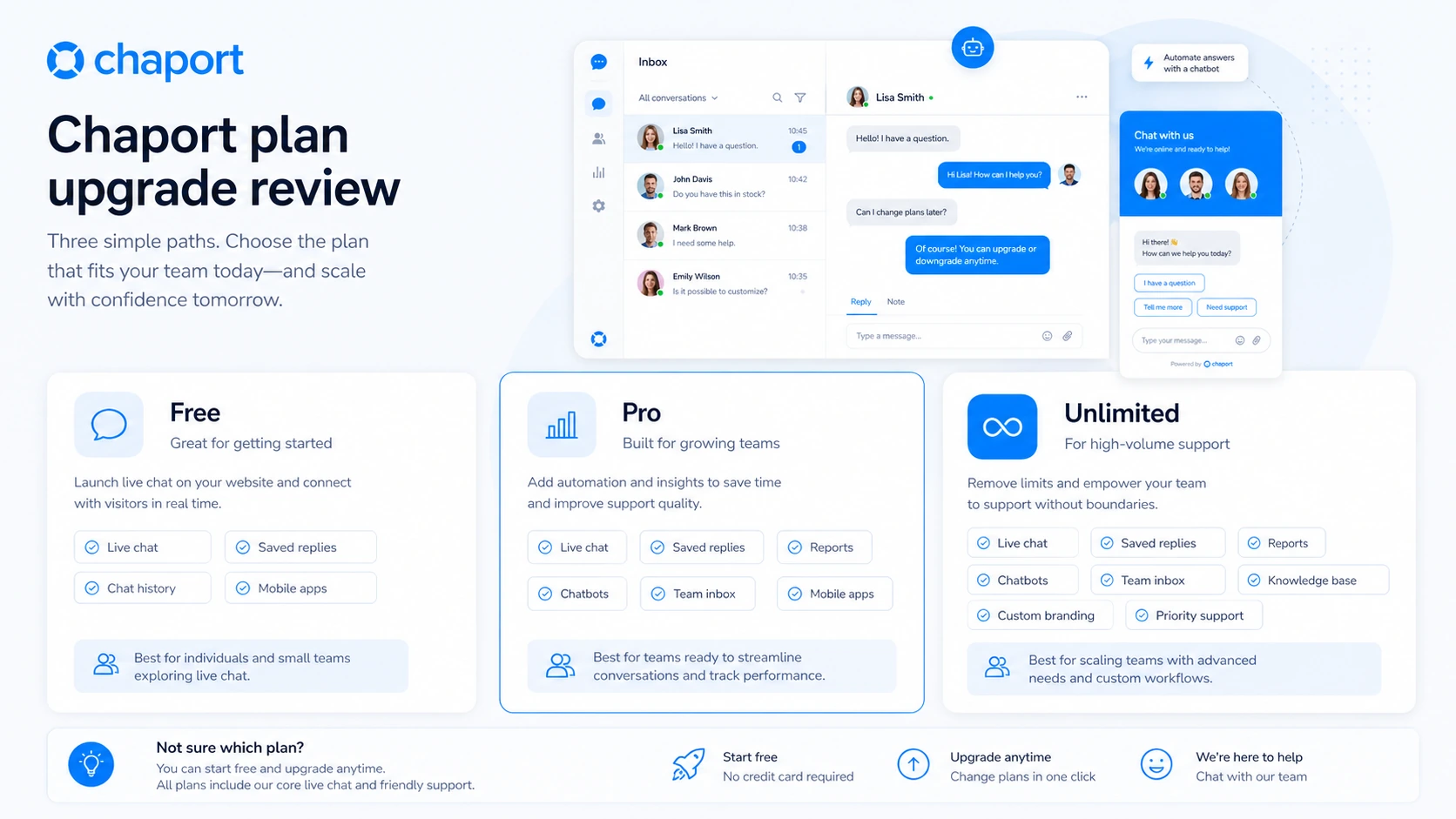
That positioning is important because the wrong buyer can overpay here. If a business only needs a small chat widget for occasional questions, the Free plan may be enough for a while. If a support team needs reports, saved replies, pre-chat forms, API access, and unlimited history, Pro becomes more realistic. If the buyer wants chatbots, knowledge base, FAQ bot, teams, assignment rules, chat ratings, and advanced reports, Unlimited is the tier that carries the real value.
Our review approach compares public product pages, pricing details, help documentation, terms, privacy language, buyer workflow fit, and nearby alternatives. We do not treat a free plan, annual discount, or coupon path as proof that the product fits the buyer.
The common wrong expectation is assuming Chaport is either “just a chat widget” or “a complete support platform.” It can be more capable than a simple widget, but it is still not the same buying decision as a full help desk with advanced ticketing operations.
Who should use Chaport?
Chaport makes the most sense for a small business that already gets website questions and wants a cleaner way to answer them. If visitors ask about pricing, shipping, onboarding, services, appointments, or product fit, live chat can shorten the distance between interest and response.
It also fits lean support teams that need to answer customers from different devices. Chaport’s web, desktop, and mobile apps matter when the same person handles support, sales, and operations during the day. The tool becomes more useful when missed chats, offline messages, and mobile notifications directly affect customer response time.
Sales teams can use Chaport when proactive chat invitations and visitor context help start better conversations. This is especially relevant on high-intent pages, such as pricing pages, checkout flows, service pages, demo pages, and product pages. The condition is that the team must have someone available to answer quickly. A proactive chat that no one responds to is not a growth feature; it is a trust leak.
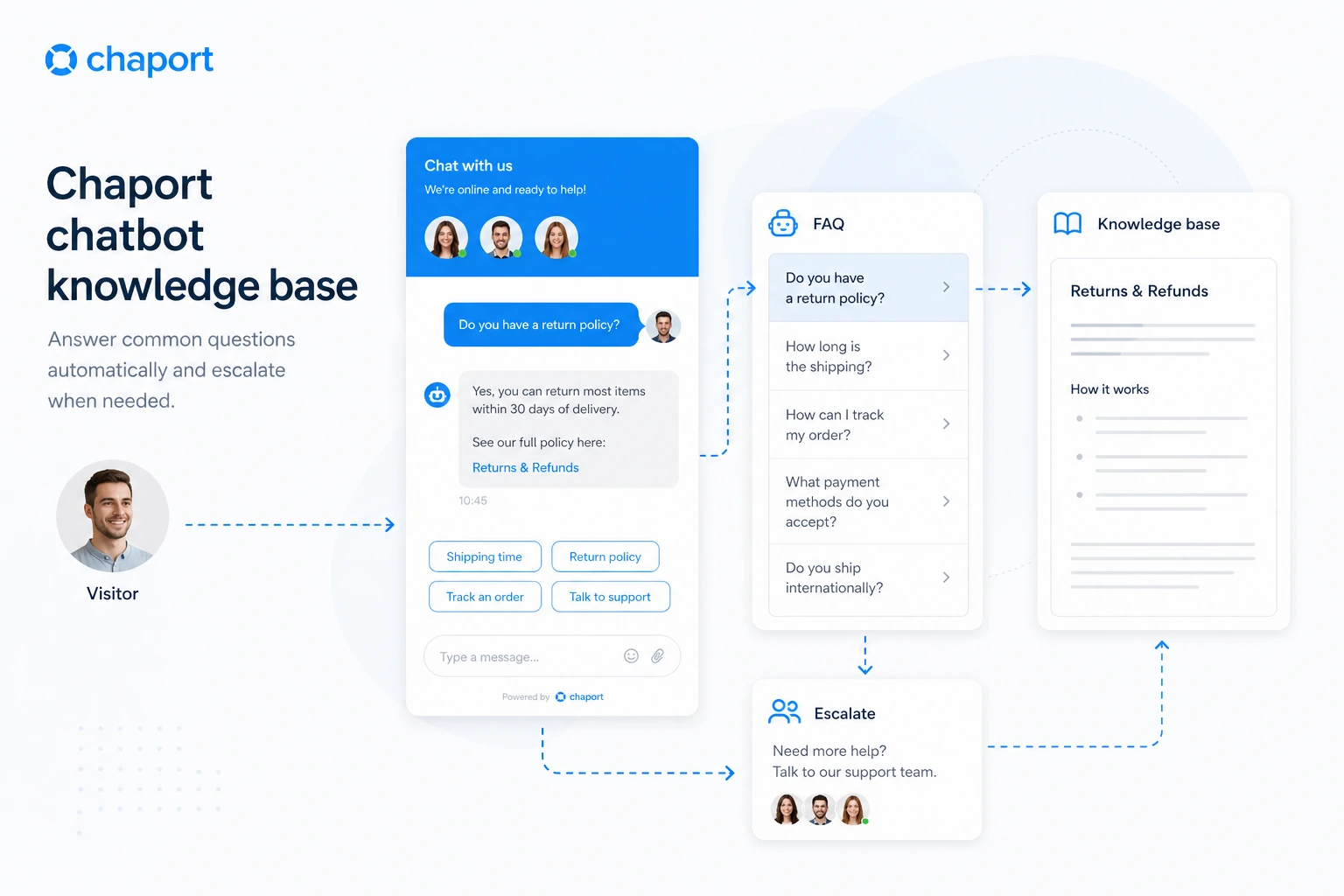
Chaport may also fit ecommerce stores and service businesses that want a simple self-service layer. The Unlimited plan’s chatbot, knowledge base, and FAQ bot features are more defensible when the business already has repeated questions. If customers keep asking the same thing, automation can save time. If the team has not documented common answers yet, the automation layer may feel premature.
Technical buyers may consider Chaport when API, JavaScript customization, webhooks, Zapier, or platform plugins matter. I would still treat those as workflow-specific reasons, not generic bonuses. API access only matters if the business has a real system to connect.
Who should avoid Chaport?
I would be careful with Chaport if the site barely receives support or sales questions. In that case, the Free plan is a safer learning lane than a paid subscription. A live chat tool cannot create a support workflow that the business does not actually need yet.
I would also avoid treating Chaport as a full ticketing replacement. If your team needs SLA management, complex escalations, advanced ticket queues, customer portals, knowledge governance, and deeper case history, a dedicated help desk may be the better comparison.
Chaport is not the first tool I would choose if the main job is AI-first automation. It has chatbots and a knowledge base, but if the buyer wants sophisticated bot flows, intent handling, AI training, and deep automation logic as the primary value, a chatbot-first product may deserve a closer look.
Buyers who dislike strict refund terms should also slow down. Chaport gives a free plan and trial path, but the terms do not present unused subscription time as refundable after a voluntary early account closure. That makes pre-purchase testing more important.
Finally, I would avoid choosing Unlimited just because it has the longest feature list. The better question is narrower: will the team actually use chatbots, knowledge base, assignment rules, shared saved replies, custom fields, and advanced reports together? If not, Pro or Free may be enough.
How Chaport fits into a real workflow
A sensible Chaport workflow starts before installation. The buyer should first decide where live chat belongs: homepage, pricing page, checkout page, service page, onboarding page, or help page. Not every page needs a chat widget, and not every chat needs automation.
The first real step is installing the widget and sending test conversations from both desktop and mobile. This is where many buyers learn whether the experience is simple enough. Can the visitor start a chat quickly? Does the operator receive the message? Does the offline message work? Do notifications arrive where the team actually checks them?
Next comes operator workflow. A small team should test saved replies, pre-chat forms, visitor context, typing insights, chat transfers, and group chats. These are not glamorous features, but they influence whether live chat saves time or simply creates another inbox.
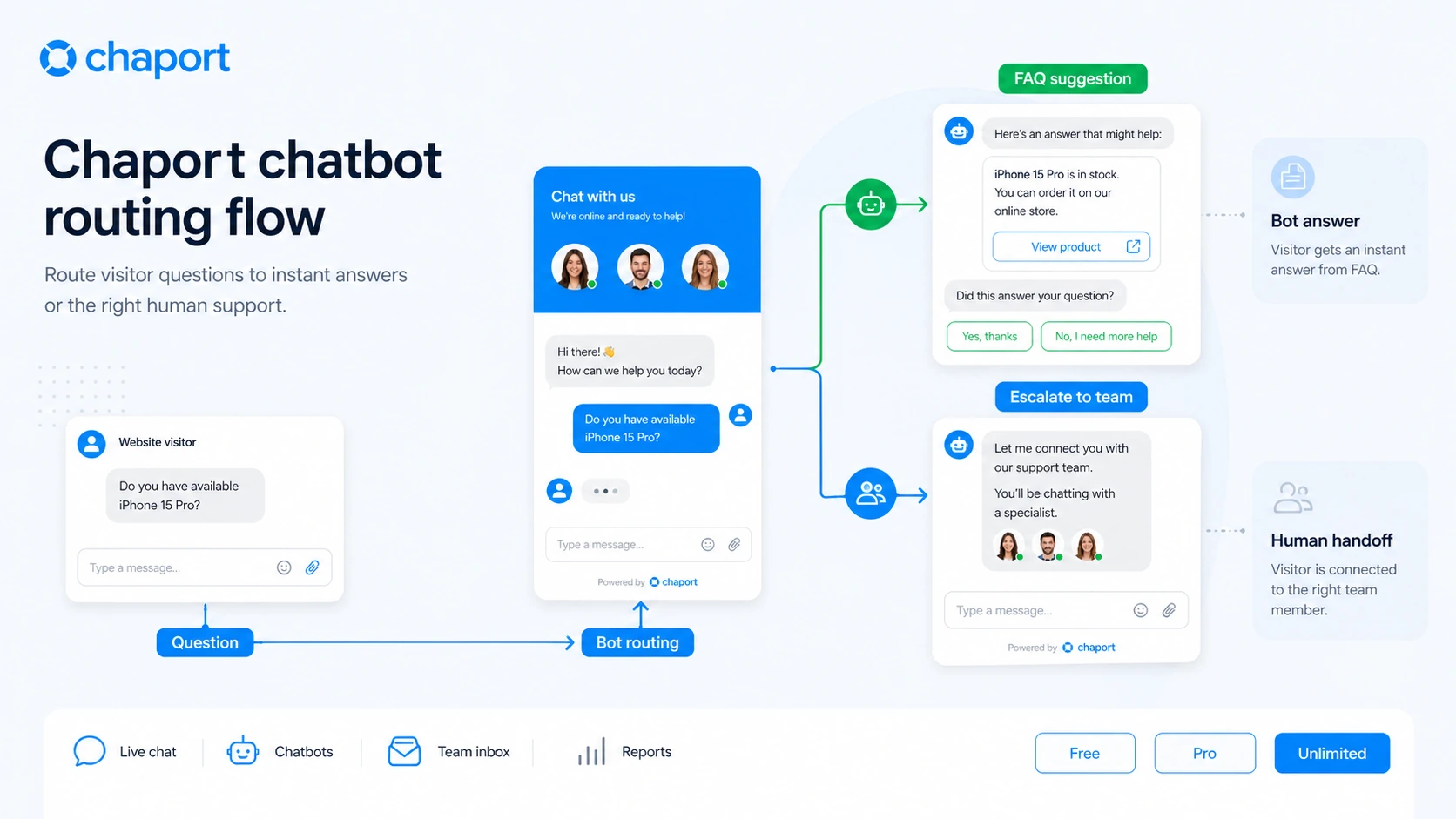
Then comes the automation question. If the team is considering Unlimited, it should test one chatbot flow and one knowledge base or FAQ bot use case. The goal is not to automate everything. The goal is to reduce repetitive questions while still giving customers a clean escalation path to a human.
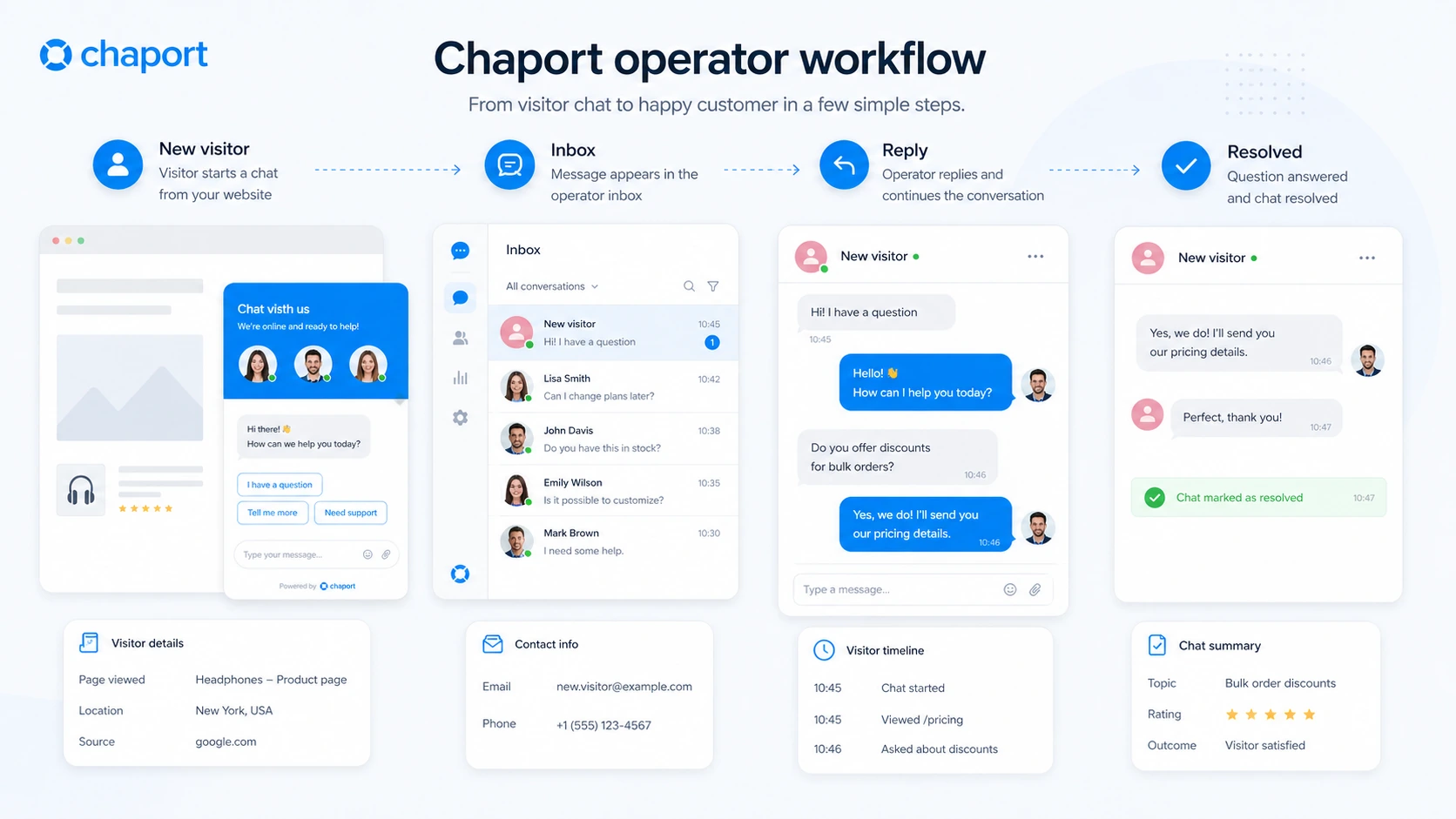
If the workflow works, Chaport can become the front door for customer conversations. If the workflow feels messy during the trial, paying annually will not fix it.
Workflow check: Test Chaport on one real page before committing to a paid tier or annual plan.
Real-world buyer scenarios
A small business adding chat to a service page
A small local or online service business may use Chaport to answer pre-sale questions faster. The fit is strongest when visitors already hesitate before contacting the business. A chat widget can make that first question easier.
Where it may fail: if no one is available to answer, live chat becomes a promise the business cannot keep. Before paying, I would test offline messages, mobile notifications, and response ownership.
An ecommerce store handling product and checkout questions
An ecommerce team may use Chaport to answer questions about product fit, delivery, returns, sizing, setup, or checkout uncertainty. This is where auto-invitations and visitor context can help, especially on high-intent pages.
Where it may fail: if support questions require order management, returns workflows, or ticketing depth, Chaport may need to sit beside another support system instead of replacing it.
A lean SaaS or startup team testing support demand
A startup can use the Free plan or 14-day trial to learn what visitors ask before investing in a larger support stack. This is a good use case because the team can learn from real conversations and then decide whether saved replies, reports, or knowledge base features are worth paying for.
Where it may fail: if the startup assumes chatbots will solve unclear onboarding. Automation works better after the team knows the repeated questions.
A growing support team deciding between Pro and Unlimited
A team that already handles regular conversations may need more than Free. Pro can make sense when unlimited history, saved replies, reports, auto-invitations, and API access matter. Unlimited becomes more realistic when the team also needs chatbots, knowledge base, teams, assignment rules, and advanced reports.
Where it may fail: choosing Unlimited without proving that automation and routing will be used. For my money, this is the easiest place to overbuy.
Key features that actually matter
Live chat widget and operator inbox
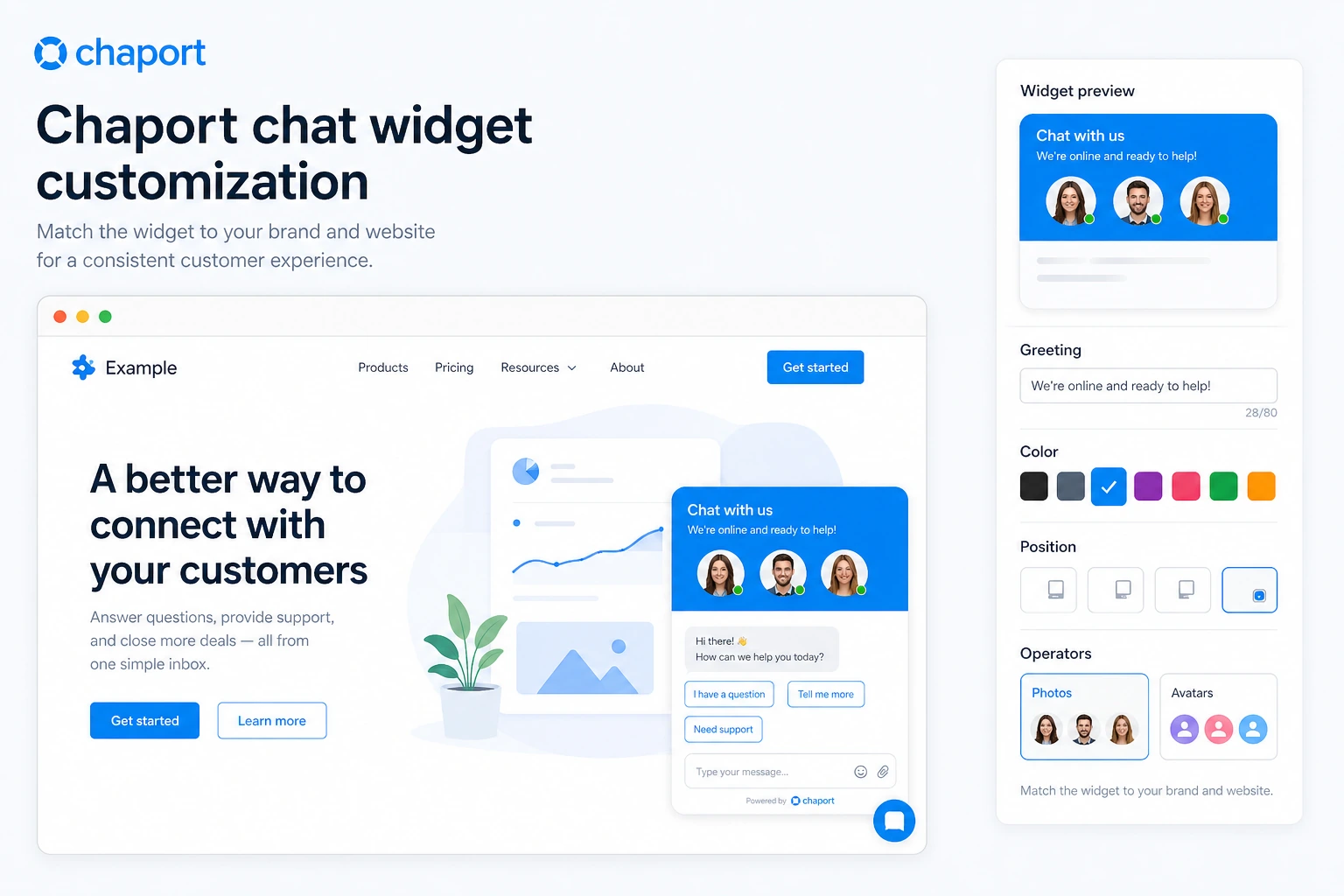
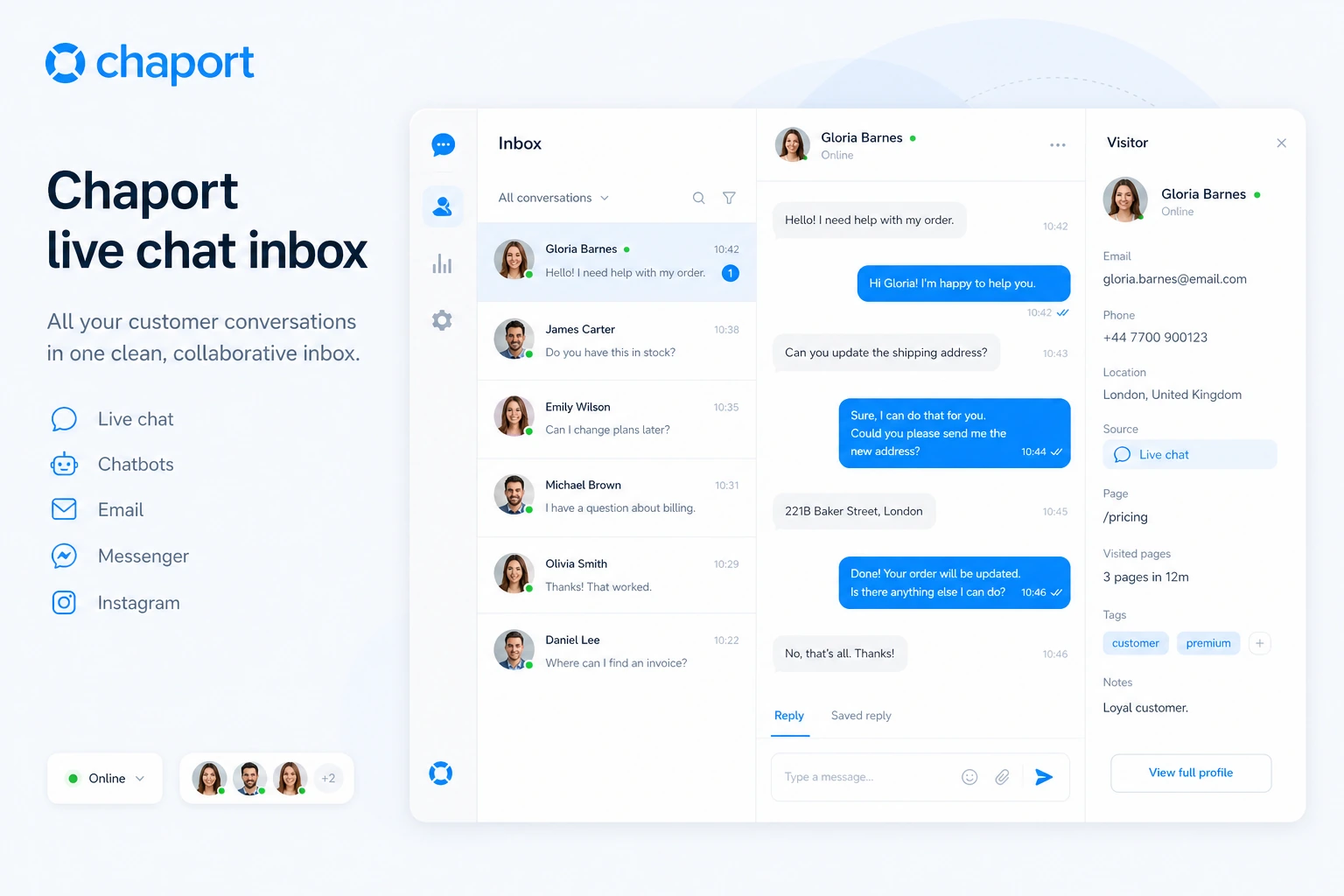
The basic live chat experience is the reason to consider Chaport first. Visitors can start a conversation on the website, and operators can reply from Chaport’s apps. The buyer value is speed: fewer missed questions, clearer customer context, and easier first contact.
Buyer note: judge this feature on a real page, not a demo mindset. Check the visitor experience on mobile, the operator notification path, and the offline message behavior.
Multi-channel messaging
Chaport supports conversations beyond the website chat widget, including email and selected messaging channels. This can be useful for small teams that do not want to chase customer messages across separate tools.
Buyer note: multi-channel support matters only if those channels are active for your business. Do not pay for a channel list that your customers do not use.
Saved replies, visitor context, and reports
Saved replies help operators answer common questions faster. Visitor context helps the team understand where the customer came from and what they are doing. Reports help measure served chats, missed chats, response times, proactive chat performance, and operator activity depending on plan.
Buyer note: these features are practical when the team reviews them. If reports are never checked and saved replies are never maintained, the plan upgrade loses value.
Chatbots, knowledge base, and FAQ bot
This is the deeper upgrade path. Chatbots can answer common questions, qualify leads, and collect feedback. A knowledge base and FAQ bot can move repeated support answers closer to the chat experience.
Buyer note: automation needs good source material. If the business has not documented common questions, the bot may feel less useful than the feature list suggests.
API, JavaScript customization, webhooks, and integrations
Chaport offers REST API, JavaScript API, webhooks, Zapier, and installation routes through common platforms like WordPress and Shopify. This gives technical teams a way to connect chat data or customize behavior.
Buyer note: verify plan-level access and technical need before valuing this too highly. API access is useful when it connects to a real workflow, not when it sits unused.
Pricing and plan value
Chaport’s pricing is easier to understand than many support tools, but the billing toggle matters.
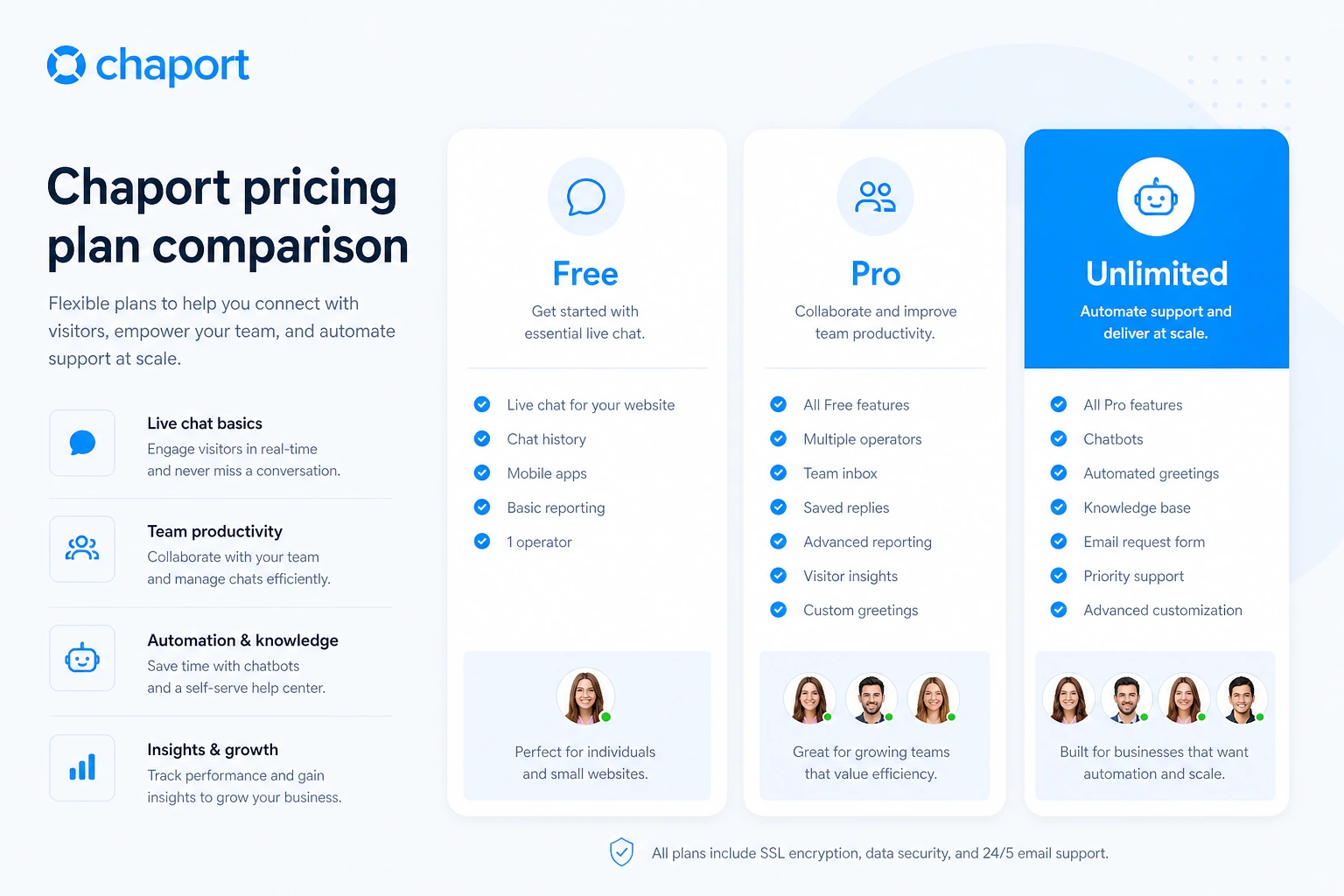
At the time of this review, the public pricing page shows a Free plan at €0, Pro at €29 per month on annual billing or €39 per month on monthly billing, and Unlimited at €99 per month on annual billing or €129 per month on monthly billing. The pricing page also says the 14-day Unlimited trial does not require a credit card and that an account downgrades to the Free plan after the trial if no paid plan is chosen.
The Free plan is not a fake entry point. It includes two operators, unlimited chats and websites, 60-day chat history, a branded default auto-invitation, basic widget customization, and web, desktop, and mobile apps. For a tiny team or early website test, that can be enough.
Pro is the first serious productivity tier. It adds unlimited chat history, auto-invitations, advanced widget customization, email and messenger integration, saved replies, pre-chat form, detailed reports, autoresponder, and REST or JavaScript API access. I would look at Pro if the team already knows live chat is being used and needs better operator workflow.
Unlimited is the automation and control tier. It adds chatbots, knowledge base plus FAQ bot, teams, assignment rules, shared saved replies, custom fields, chat ratings, advanced reports, on-demand reports, Zapier integration, and unlimited operators. This is where Chaport becomes more than a lightweight chat tool, but it is also where the buyer should be most careful about whether the extra features will be used.
I would not move directly to annual billing just to capture the lower displayed monthly equivalent. Annual can make sense after the team proves the tool will stay in the support workflow. It makes less sense if the buyer has not tested operator response, chatbot content, reports, and cancellation expectations.
Pricing check: If Chaport fits your support workflow, verify the current monthly versus annual plan before checkout.
Free plan, trial, coupon, and checkout notes
The safest Chaport buying path is not complicated: start free, use the Unlimited trial, then pay only after the support workflow is clear.
The Free plan gives enough room to test the basic live chat idea. Two operators, unlimited chats and websites, 60-day history, and core apps are useful for a small team. That does not mean it is enough forever, but it does mean buyers can avoid paying before they understand the daily workflow.
The 14-day Unlimited trial is more important for buyers considering automation. Use that window to test chatbots, FAQ bot behavior, knowledge base fit, team routing, assignment rules, reports, and mobile response. Do not spend the trial only looking at settings. Put it on a real page and simulate a real customer conversation.
A reliable public coupon code should not be the center of the decision. If an offer path is visible, treat it as a checkout bonus after fit is clear. The bigger savings decision is usually Free versus Pro versus Unlimited, and monthly versus annual billing.
The refund note is the part I would read twice. Chaport’s terms say there are no refunds or credits for unused service time or plan downgrades if the user closes the account before the end of the subscription period. That does not make Chaport a bad product, but it does change the risk math. Trial first. Annual later.
What I would check before buying Chaport
If I were buying Chaport for a real support workflow, I would check these points before paying:
- Whether two operators are enough to test the first version of the workflow.
- Whether 60-day chat history is acceptable or unlimited chat history is needed.
- Whether the team needs auto-invitations, saved replies, pre-chat forms, and detailed reports.
- Whether chatbots and knowledge base features will be used often enough to justify Unlimited.
- Whether API, JavaScript customization, webhooks, or Zapier are required for the real setup.
- Whether annual billing is worth the commitment after reading current refund terms.
- Whether a full help desk, chatbot-first tool, or Slack/Microsoft Teams live chat route would be a better fit.
The easy mistake is buying the tier that looks safest because it has the most features. The better method is to choose the smallest plan that supports the workflow you can prove.
A simple test before paying
Before paying, I would run a small Chaport test like this:
- Add the widget to one real website page with meaningful visitor intent.
- Send test chats from desktop and mobile as if you were a real customer.
- Confirm how operators receive notifications on web, desktop, and mobile.
- Test offline messages and make sure follow-up works cleanly.
- Create two or three saved replies for common questions.
- If considering Unlimited, build one chatbot flow and one knowledge base or FAQ bot test.
- Review missed chats, response time, and whether the workflow feels lighter or heavier after a week.
This test is intentionally small. You are not trying to prove that Chaport can handle every future support process. You are trying to answer one practical question: does it make the current customer conversation workflow easier?
Pros explained
The free plan is actually useful for early testing
Chaport’s Free plan is useful because it lets a buyer test live chat without forcing an immediate subscription decision. Two operators and unlimited chats give small teams enough room to see whether customers engage.
It stops being enough when the business needs unlimited history, stronger reports, saved replies, pre-chat forms, API access, or automation.
The plan structure is easy to understand
Free is for basic live chat. Pro is for more serious operator workflow. Unlimited is for automation, team control, knowledge base, and advanced reporting. That separation makes the buying decision cleaner than tools that hide everything behind custom quotes.
It stops being enough when a buyer assumes the plan names alone decide value. The real decision is feature use.
Chaport covers common website support paths
Web, desktop, mobile, WordPress, Shopify, API, JavaScript customization, and Zapier coverage make Chaport flexible for many small business setups. This lowers the setup barrier.
It stops being enough if the business needs deep ticket queues, advanced SLA management, or enterprise support governance.
Unlimited trial reduces buying pressure
The 14-day Unlimited trial gives buyers a chance to test the higher-tier features before paying. That is especially useful because chatbots and knowledge base features are hard to judge from a feature list alone.
It stops being enough if the buyer does not run a realistic test during the trial.
Cons explained
The Free plan is not the full product
The Free plan is good for starting, but many high-value features sit in Pro or Unlimited. Buyers who expect chatbots, team routing, assignment rules, advanced reports, and shared saved replies on Free will be disappointed.
The fix is simple: treat Free as a workflow test, not a complete support system.
Refund flexibility is limited
Chaport’s terms do not present unused subscription time as refundable if the user closes the account early. That matters most for annual billing.
The way to reduce this risk is to use the trial, test monthly first when uncertain, and move to annual only after repeated value is clear.
It is not a full help desk
Chaport is strong as live chat and customer messaging software. It is less compelling if the buyer needs a ticketing-first support platform with SLA workflows, case management, and advanced support operations.
The way to avoid mismatch is to compare Chaport with a dedicated help desk before paying if ticketing depth is the main job.
Automation needs content and volume
Chatbots and FAQ suggestions work best when the team already knows its repeated questions. Without that, automation can become another setup task instead of a time saver.
The safer path is to collect real chat patterns first, then automate the questions that actually repeat.
Green flags and red flags
Green flags for Chaport are straightforward. The product has a real free plan, a 14-day Unlimited trial, transparent public pricing, practical live chat features, mobile and desktop apps, and a clear upgrade path into automation.
Another green flag is that Chaport does not force every small buyer into a heavy support suite. A tiny team can start with live chat and decide later whether chatbots or a knowledge base are worth adding.
The red flags are mostly about fit and commitment. Slow down if you need a full ticketing system, if support volume is still unproven, if you are choosing Unlimited for one isolated feature, or if you are tempted by annual billing before reading refund terms.
I would also slow down if the team has no one responsible for answering chats. Live chat creates an expectation. If visitors ask questions and no one answers quickly, the tool can hurt the experience it was supposed to improve.
Chaport vs alternatives
Chaport’s alternatives depend on the buyer’s main job. I would not compare every support tool as if it solves the same problem.
LiveChat vs Chaport
LiveChat is the stronger direct comparison if the buyer wants a more established paid live chat platform with a broader support ecosystem. Chaport may still make more sense for a smaller team that wants a free entry point and a simpler upgrade path.
If live chat is the main job, compare the LiveChat store guide before choosing.
ChatBot vs Chaport
ChatBot is a better comparison when automation is the primary buying reason. Chaport includes chatbots on Unlimited, but its product center is still customer messaging and live chat.
If the buyer wants chatbot automation first and human live chat second, the ChatBot store guide may be the more relevant route.
HelpDesk vs Chaport
HelpDesk is the better route when the team needs ticketing, case tracking, and structured support management. Chaport is better when the buyer wants faster website conversations and lighter customer messaging.
If tickets matter more than chat, compare the HelpDesk store guide before paying for Chaport.
Social Intents vs Chaport
Social Intents is worth comparing if the buyer wants live chat connected closely to team messaging tools like Slack or Microsoft Teams. Chaport is more of a standalone customer messaging workspace with its own apps and automation path.
If the team’s daily support flow already lives inside Slack or Microsoft Teams, the Social Intents store guide may be an adjacent but important comparison.
Trust, refund, and buyer-risk notes
The main trust signal with Chaport is that the public pricing page is clear enough to evaluate before checkout. Free, Pro, and Unlimited are visible, the annual discount is visible, and the 14-day Unlimited trial is clearly described.
The main buyer-risk signal is refund flexibility. The terms say Chaport does not provide refunds or credits for unused service time or plan downgrades when the user closes the account before the subscription period ends. That makes the free and trial paths more important than usual.
There is also a privacy and data angle. Chaport processes customer data and chat history as part of the service, and its privacy policy discusses account registration data, usage data, customer data, chat history, third-party accounts, service providers, analytics, and security measures. That is normal for this category, but teams handling sensitive customer conversations should read the privacy policy and decide what belongs in live chat.
For technical buyers, the API and webhook path looks real, but it should be treated as an integration project, not a magic feature. Confirm plan access, authentication, event needs, and what your system should do with chat or visitor data.
For commercial buyers, the safest order is simple: test the workflow, choose the plan, read refund terms, then check current offers. Do not treat a coupon path as proof that Chaport is the right tool.
Final verdict
I would consider Chaport if your business needs a simple, practical live chat layer and you want the option to grow into chatbots, knowledge base, reports, assignment rules, and integrations later. It is especially sensible when you can start free, test real conversations, and move up only when support volume proves the need.
I would skip Chaport if your real requirement is a deep ticketing system, enterprise case management, or a chatbot-first automation platform. In those cases, compare the category before choosing the cheapest or simplest-looking option.
I would compare Chaport with LiveChat if live chat maturity matters most, ChatBot if automation is the main job, HelpDesk if tickets are the center of support, and Social Intents if your team wants chat tied closely to Slack or Microsoft Teams.
The safest next step is to test Chaport with one real visitor conversation flow before paying. If that test shows faster replies, fewer missed questions, and a cleaner operator routine, Chaport becomes much easier to justify. If the workflow still feels uncertain, stay free, compare alternatives, and do not let annual pricing make the decision for you.
